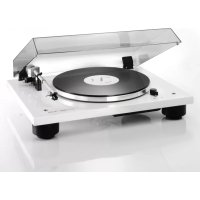
TD 206 - DJ Equipment THORENS - Free user manual and instructions
Find the device manual for free TD 206 THORENS in PDF.



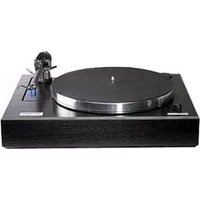
| Product Type | Manual belt-drive turntable |
| Brand | Thorens |
| Model | TD 206 |
| Category | DJ Equipment |
| Dimensions (L x H x D) | 475 x 125 x 370 mm |
| Weight | 5.6 kg |
| Power Supply | 12 V DC/AC power adapter, min. 6 W |
| Rotation Speeds | 33⅓ and 45 rpm, electronic switching with ±5% adjustment range |
| Platter | 12 inches (0.9 kg) aluminum and acrylic |
| Tone arm | Thorens TP 90, effective length 232.8 mm (9.1") |
| Cartridge | Thorens TAS 267 pre-installed, mounting hole spacing 12.5 mm (1/2") |
| Recommended Tracking Force | 18 to 20 mN (1.8 to 2.0 g) |
| Anti-skating | Yes, via integrated magnet, adjustable |
| VTA Adjustment | Yes, via spacers, adjustable arm height |
| Connectivity | Phono RCA cable, ground wire, 12 V power input |
| Package Contents | Chassis, belt, platter, acrylic disc, spacers, counterweight, power adapter, cables, adjustment accessories |
| Maintenance and Cleaning | Clean with a soft, dry cloth; replace the belt every few years; do not open the chassis |
| Safety | Chassis not to be opened, do not expose to rain or moisture, comply with CE regulations |
| Spare Parts and Repairability | Original Thorens belt, compatible cartridges, spacers, counterweight; after-sales service through dealer |
| General Information | Made in Germany, compliant with European directives (CE, RoHS) |
Frequently Asked Questions - TD 206 THORENS
User questions about TD 206 THORENS
0 question about this device. Answer the ones you know or ask your own.
Ask a new question about this device
Download the instructions for your DJ Equipment in PDF format for free! Find your manual TD 206 - THORENS and take your electronic device back in hand. On this page are published all the documents necessary for the use of your device. TD 206 by THORENS.
USER MANUAL TD 206 THORENS
THORENS®
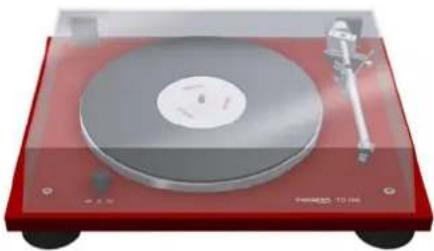
TD 206
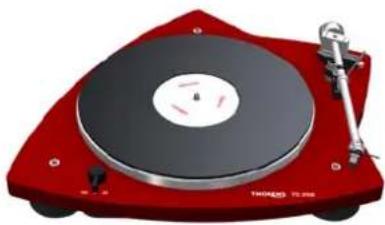
TD 209
Bedienungsanleitung
User Manual
Mode d'Emploi
www.thorens.com
TD 206 TD 209
Bedienungsanleitung
User Manual
Mode d'Emploi
Inhalt
SICHERHEITSHINWEISE
AUSPACKEN 7
SAFETY INSTRUCTIONS 22
UNPACKING 23
SETUP AND ASSEMBLY 24
TURNTABLE ADJUSTMENTS 27
CONNECTIONS 28
TONEARM AND PICK-UP CARTRIDGE 30
TRACKING FORCE 31
ANTI-SKATING FORCE (BIAS) 32
FURTHER TONEARM ADJUSTMENTS 33
OPERATION 35
TECHNICAL SPECIFICATIONS 36
CUSTOMER SERVICE 37
CONSIGNES DE SECURITE 38
DEBALLAGE 39
INSTALLATION ET MONTAGE 40
REGLAGES DE L'ENTRAINEMENT 43
RACCORDEMENT 44
BRAS ET CELLULE DE LECTURE 46
FORCE D'APPUI 47
FORCE ANTISKATING 48
AUTRES REGLAGES DU BRAS 49
UTILISATION DE LA PLATINE 51
CARACTERISTIQUES TECHNIQUES 52
INFORMATIONS SERVICE APRES-VENTE 53
Sicherheitshinweise
BITTE VOR DER ERSTMALIGEN INBETRIEBNAHME AUFMERKSAM LESEN!
VORSICHT
TD 209:
Abb. 3
Anschluss
Auflagekraft
Technische Daten
To reduce risk of electric shock, do not remove the cover (or back). No user-serviceable parts inside.
WARNING
TO PREVENT FIRE OR SHOCK HAZARD, DO NOT EXPOSE THIS APPLIANCE TO RAIN OR MOISTURE.
EXPLANATION OF GRAPHICAL SYMBOLS
The lightning flash with arrowhead symbol, within an equilateral triangle, is intended to alert you to the presence of uninsulated 'dangerous voltage' within the product's enclosure that may be of sufficient magnitude to constitute an electric shock to persons.

The exclamation point within an equilateral triangle is intended to alert you to the presence of important operating and maintenance (servicing) instructions in the literature accompanying the appliance.

This product was tested and complies with all the requirements for the CE Mark.
Compliant to 2002/95/EC (RoHS)
IMPORTANT: DISPOSAL OF WASTE EQUIPMENT BY USERS IN PRIVATE HOUSEHOLDS IN THE EUROPEAN UNION
This symbol on the product or on its packaging indicates that this product must not be disposed off with your other household waste. Instead, it is your responsibility to dispose of your waste equipment by handing it over to a designated collection point for the recycling of waste electrical and electronic equipment. The separate collection and recycling of your waste equipment at the time of disposal will help to conserve natural resources and ensure that it is recycled in a manner that protects human health and the environment. For more information about where you can drop off your waste equipment for recycling, please contact your local city office, your household waste disposal service or the shop where you purchased the product.
Unpacking
Carefully remove the turntable and all accessories from the box. Check that the following items are included:
1 x plinth with sub-platter and tonearm
1 x Thorens drive belt
1 x platter
1 x acrylic disc
12 x spacers
1 x tonearm counterweight
1 x plug-in power supply and power cable
1 x RCA phono cable
1 x earth wire
1 x adapter for 7-inch records
1 x stylus gauge
1 x spirit level
1 x cartridge alignment protractor
1 x 5-mm hex key
Please keep the packaging for future transport. Always replace the transit screws before re-packing and shipping.

TD 206:
1 x dust cover

TD 209:
Setup and Assembly
Place the turntable on a rigid support and use the supplied spirit level to make sure that it is perfectly horizontal. If necessary, readjust the suspension system. → Page 27
Thorens turntables are relatively resistant to vibration. However, vibration can have adverse effects on any turntable, particularly if a high-quality pick-up cartridge is used. You should therefore place the turntable on a sturdy piece of furniture, ideally at some distance from the loudspeakers.
older houses with beam floors, however, this may not be enough to properly isolate the turntable from vibrations. In this case we recommend placing the turntable on a wall shelf that is attached to a supporting wall.
When siting the turntable, make sure that it is at a reasonable distance from any existing electronic equipment (such as amplifiers, receivers or CD players) so as to avoid electromagnetic interference in the pick-up cartridge, which could cause a hum in the signal. The same applies to the cable connecting the turntable to the amplifier.
You can detect and eliminate electromagnetic interference by changing the position of the turntable with respect to other pieces of equipment.
Setup and Assembly
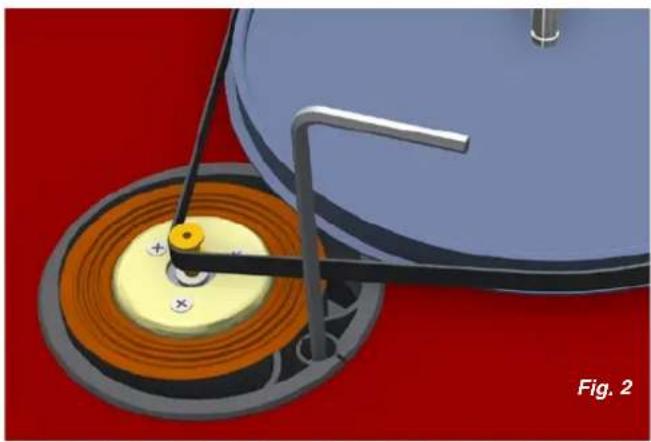
Loop the drive belt around the sub-platter and then around the motor pulley. → Fig. 2
Avoid oil or grease coming into contact with the belt, pulley or sub-platter. If necessary, these parts can be cleaned with glass cleaner or pure alcohol and a lint-free cloth.
The belt tension is factory-adjusted. If it needs to be re-adjusted (e.g. to compensate for gradual belt stretch), loosen the locking screw of the eccentric motor support ring and carefully rotate the ring. → Fig. 2
If the belt tension is changed, the platter speed will need to be reset. → Page 27
The drive belt should be replaced every few years. Thorens replacement belts are available from any Thorens dealer or distributor.
Setup and Assembly
Place the aluminium platter onto the sub-platter, followed by the cardboard cartridge alignment protractor and then the acrylic disc. The cartridge alignment protractor serves to decouple the acrylic disc. → Fig. 3
To improve the replay quality and preserve your records, you may use an additional Thorens platter mat (optionally available) made from felt, cork or a cork/India rubber compound.
This almost completes the assembly of the turntable. The only part missing now is the tonearm counterweight. → Page 30
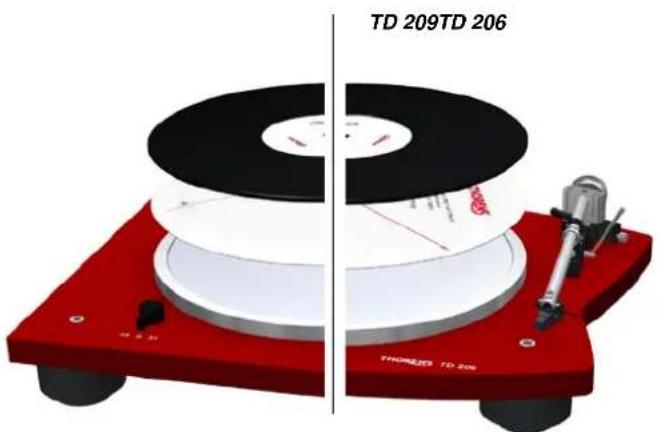
Fig. 3
Turntable adjustments
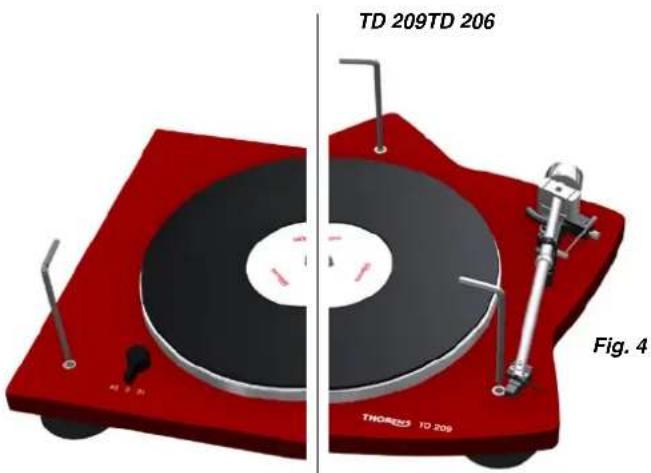
The turntable can be levelled by adjusting the three plinth feet from above with the help of the 5-mm hex key. → Fig. 4
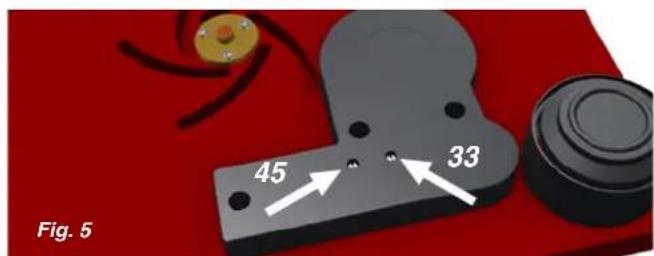
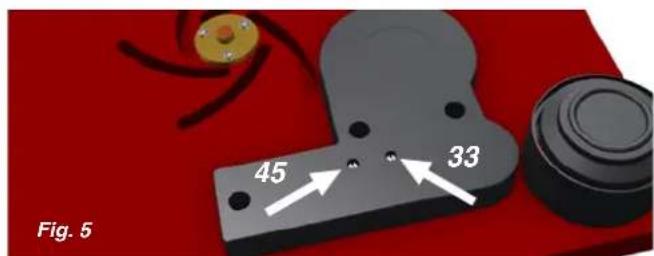
The platter speed can be adjusted by turning the adjustment screws on the bottom of the speed switch unit. → Fig. 5
The platter speeds are factory-adjusted. Any readjustment of the speeds should be checked with the help of a test record or a strobe disc.
Please also refer to "Belt Tension" → Page 25
Connections
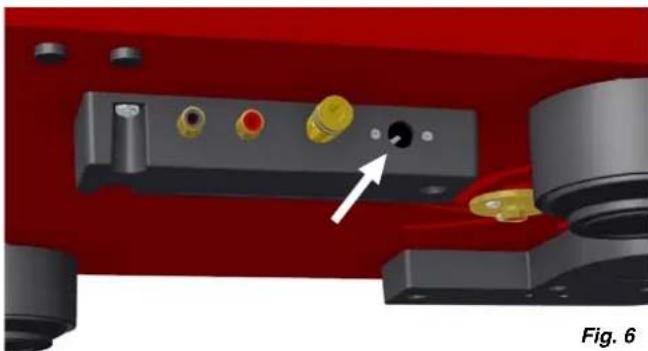
The turntable comes with a universal plug-in power supply that will accommodate all common mains voltages.
Plug the low-voltage connector of the power supply into the appropriate socket on the turntable and then plug the power supply into the mains socket. → Fig. 6
If the turntable is to be powered by mains voltages other than those specified, it may be necessary to use an adapter. Please contact your Thorens dealer or distributor for further advice.
Connections
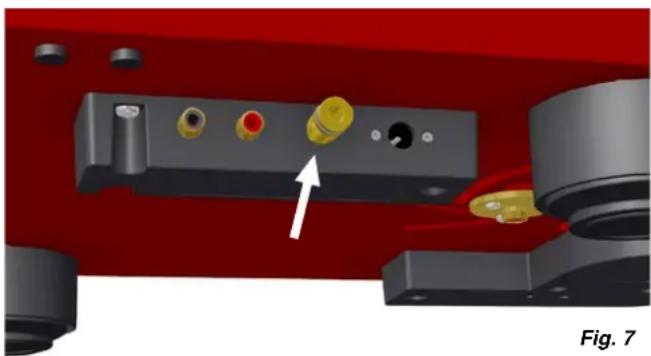
Use the supplied RCA phono cable to connect the turntable output to the phono input of your amplifier. Check that all plugs are connected with the correct polarity. → Fig. 7
In accordance with RIAA standards, vinyl records are cut with pre-emphasis. The operation of a turntable therefore requires the use of a phono stage for equalisation. If your amplifier does not have a phono input, you will need to connect a dedicated phono stage (such as the Thorens MM series phono stages) between the turntable and the amplifier. Please contact your Thorens dealer or distributor for further advice.
The earth wire is used to establish an electrical connection to earth. Connect the wire to the earth screws on the turntable ( → Fig. 7, indicated by an arrow) and the amplifier. If your amplifier does not have an earth screw, you can attach the wire to the side of an unused input socket.
If you can hear a hum in the speakers that increases as you increase the overall volume, then the earth connection may be faulty. Make sure that the earth wire is firmly connected. If the problem persists, try connecting the wire to a different spot.
Tonearm and Pick-Up Cartridge
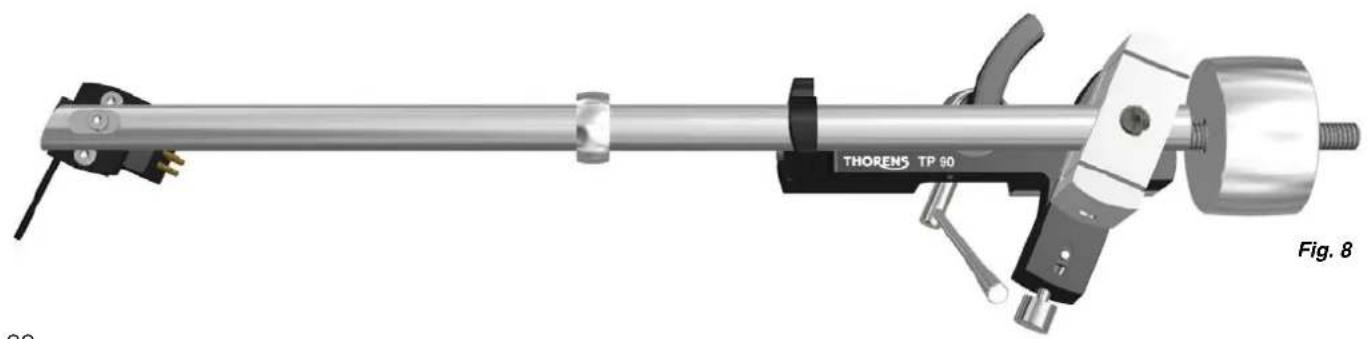
Your Thorens turntable is delivered with a pre-installed TP 90 tonearm and an TAS 267 pick-up cartridge. → Fig. 8
The tonearm is factory-adjusted; however, to avoid damage, the tonearm counterweight is removed for shipping. Screw the counterweight onto the rear end of the tonearm and adjust the tracking force. → Page 31
The TP 90 tonearm can accommodate most pick-up cartridges with a distance of 12.5 mm ( 1/2 ) between the mounting holes.
To connect the pick-up cartridge, push the four colour-coded cartridge tags onto the cartridge pins.
If the cartridge pins are not colour-coded, connect them as follows:
R right channel (signal) → red
G right channel (earth) → green
L left channel (signal) → white
G left channel (earth) → blue
Tracking Force
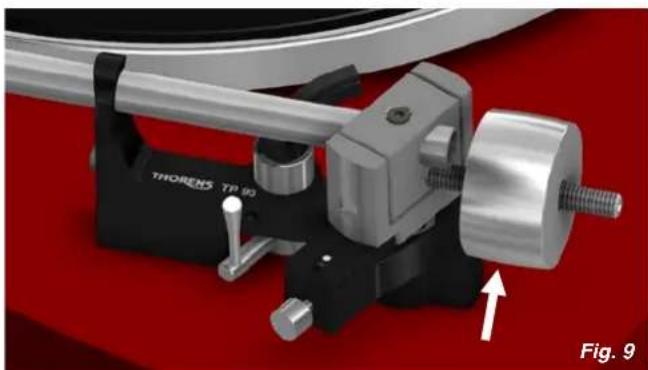
The tracking force can be adjusted by rotating the to-nearm counterweight ( → Fig. 9). The closer the counterweight is to the cartridge, the higher the tracking force.
The correct tracking force can be set with the help of the stylus gauge. Lower the tonearm lift, move the tonearm out over the platter and carefully lower it until the stylus of the pick-up cartridge comes to rest on the stylus gauge. The stylus guard must be removed for this procedure.
Great care should be taken to avoid damaging the stylus.
The recommended tracking force range for the TP 90/TAS 267 combination is 18 to 20 mN (1.8 to 2.0 g).
Do not move the ring that sits around the middle of the tonearm tube ( → Page 30, Fig. 8). It serves as a vibration damper and is effective only at its original position.
Anti-Skating Force (Bias)
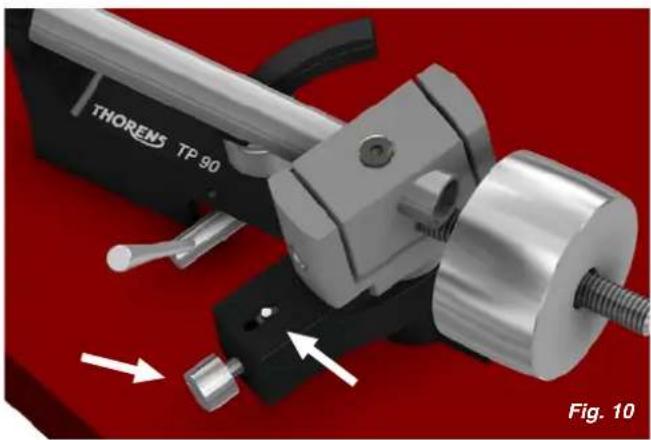
The interaction of stylus friction and cartridge bearing forces produces a force which pulls the tonearm towards the centre of the record (referred to as skating force). This force can be offset with the help of anti-skating force, which, in the case of the TP 90, is produced by a magnet incorporated into the tonearm.
The anti-skating force is factory-adjusted. If necessary, it can be readjusted with the help of an adjustment screw. → Fig. 10
Turn the adjustment screw anti-clockwise to increase, and clockwise to decrease the anti-skating force. The white dot above the adjustment screw indicates the setting.
The amount of anti-skating force required depends on the type of pick-up cartridge used. If you change the cartridge for a different type, use a test record to determine how much anti-skating force is required.
Further Tonearm Adjustments
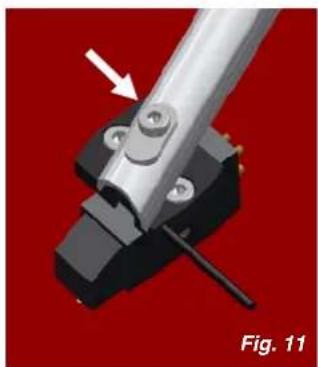
The tonearm headshell allows an overhang adjustment of ± 2,5 mm to be made. To adjust overhang, loosen the screw holding the headshell and move the headshell as required. → Fig. 11
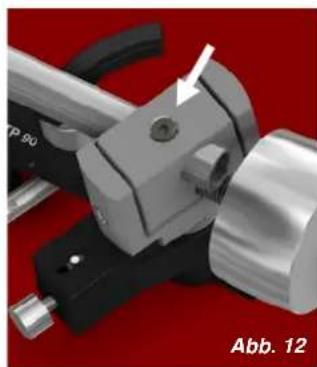
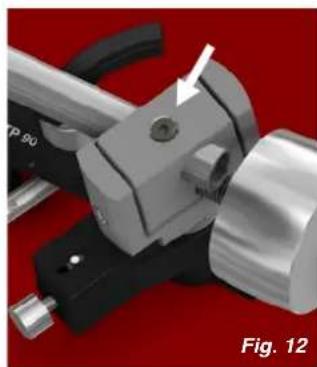
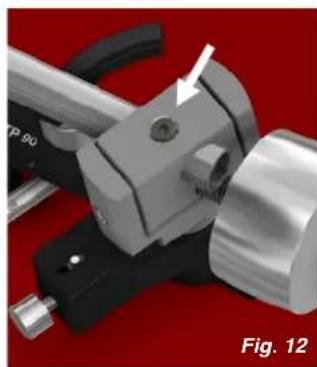
A screw at the rear of the tonearm allows a further overhang adjustment of ±3 mm as well as an azimuth adjustment of ±5° . The screw is recessed into the top of the bearing housing and can be loosened with a 2-mm hex key. → Fig. 12
The vertical tracking angle (VTA) can be adjusted by raising or lowering the tonearm. → Page 34
Take care not to over-tighten the screws after making adjustments.
Further Tonearm Adjustments
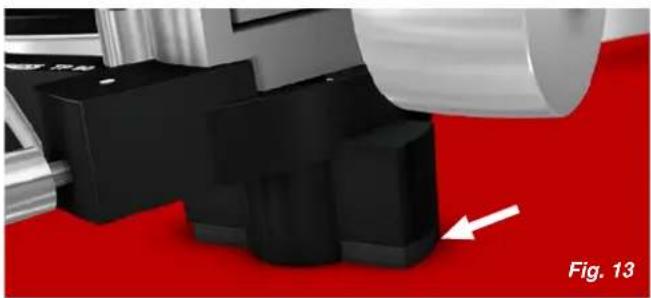
The vertical tracking angle (VTA) can be adjusted by raising the entire tonearm with the help of spacers. Loosen the two locking screws on the underside of the turntable and insert spacers as required ( → Fig. 13). Then retighten the locking screws.
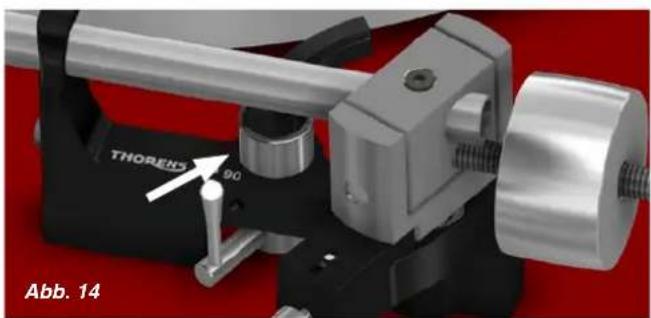
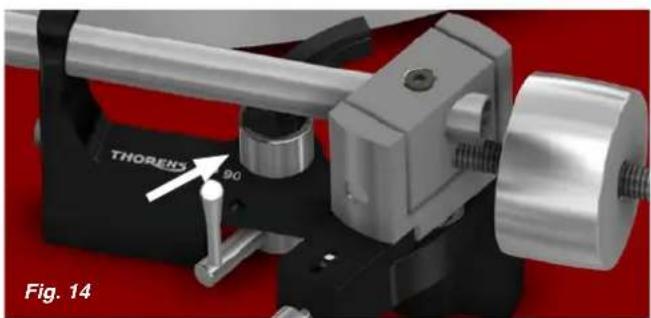
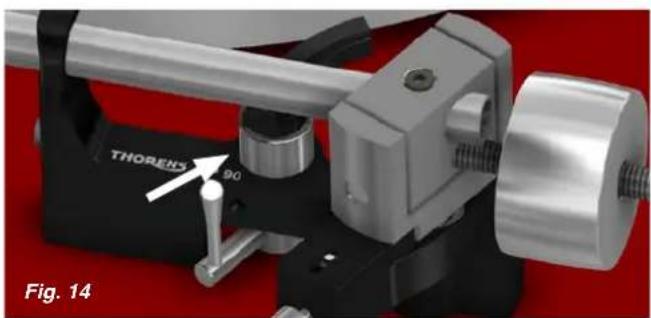
If the VTA is changed, the tonearm lift will need to be to be readjusted. Loosen the locking screw on the tonearm lift with a 1.5-mm hex key and carefully raise or lower the entire lift. → Fig. 14
The tonearm tube should be parallel to the platter surface. Small adjustments of the VTA or the tonearm lift height can have a large effect. After making any changes, you should therefore always check whether there is enough clearance (at least 1 mm) between the cartridge and the record (when the lift is engaged) and between the tonearm lift pad and the tonearm tube (when the lift is disengaged).
Operation
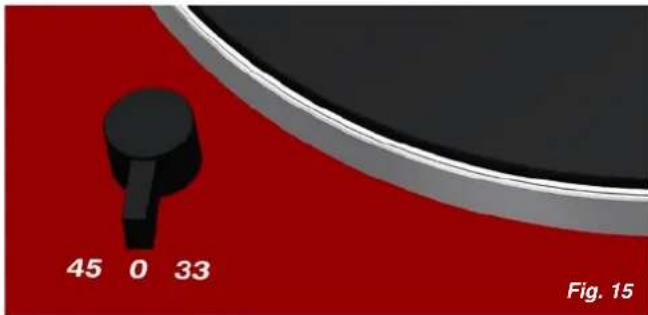
The on/off switch is located at the front left-hand corner of the turntable plinth. This switch is also the speed selector. There are two speeds: 33½ rpm (for LPs) and 45 rpm (for singles). The middle position is the "off" position. → Fig. 15
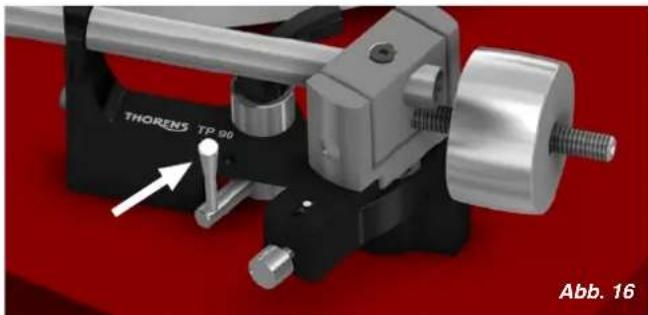
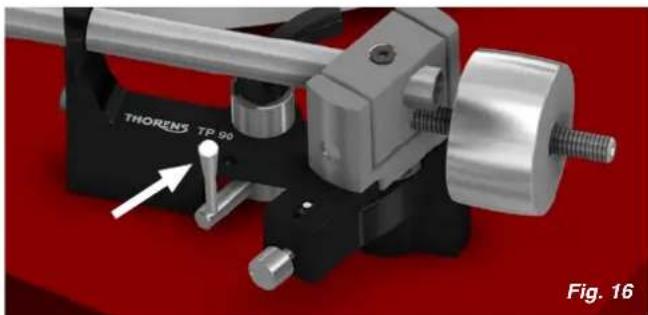
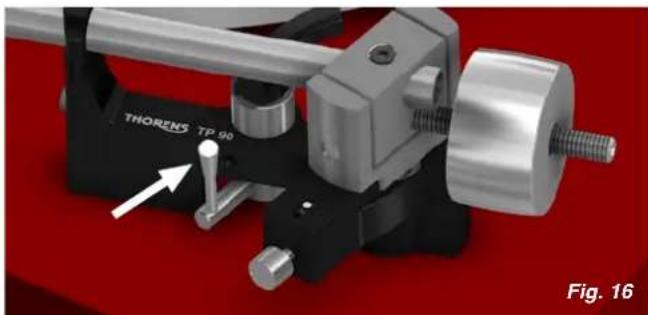
To play a record, first start the turntable by selecting the appropriate speed. Then engage the tonearm lift ( → Fig. 16) by lifting its lever, position the pick-up cartridge over the run-in groove or the desired track and lower the tonearm lift.
The turntable does not feature an automatic shut-off mechanism. Therefore, as soon as the stylus has reached the run-out groove, engage the tonearm lift and switch the turntable off.
Technical Specifications
| TD 206 | TD 209 | |
| Mode of operation | Manual | Manual |
| Drive system | Belt drive (flat belt around sub-platter) | Belt drive (flat belt around sub-platter) |
| Motor | Servo-controlled DC motor | Servo-controlled DC motor |
| Speeds | 33 1⁄2, 45 rpm | 33 1⁄2, 45 rpm |
| Adjustment range | ±5 % | ±5 % |
| Speed change | Electronic | Electronic |
| Platter | 12" / 0.9 kg (aluminium, acrylic) | 12" / 0.9 kg (aluminium, acrylic) |
| Power supply | External plug-in power supply, 12 V DC/AC, 6 W min. | External plug-in power supply, 12 V DC/AC, 6 W min. |
| Dimensions | 475 x 125 x 370 mm (W x H x D) | 470 x 125 x 430 mm (W x H x D) |
| Weight | 5.6 kg | 4.7 kg |
| Tonearm | Thorens TP 90 | Thorens TP 90 |
| Effective length | 232.8 mm (9.1") | 232.8 mm (9.1") |
| Overhang | 17.8 mm (variable) | 17.8 mm (variable) |
| Offset angle | 23.6° (fixed) | 23.6° (fixed) |
| Effective mass | approx. 11 g | approx. 11 g |
Technical specifications subject to change without notice. Made in Germany.
Customer Service
Your Thorens dealer or distributor will be happy to assist you if you have any questions regarding your new turntable or experience any problems. For a list of Thorens distributors, please visit → www.thorens.com or contact us directly:
→ www.thorens.com/contact
Register your product with Thorens to receive up-to-date information and special offers. You can use the registration card included with the product or visit our website:
→ www.thorens.com/register
TD 209:
Raccordement
Raccordement
Force d'appui
→ www.thorens.com/contact
→ www.thorens.com/register
THORENS®
Copyright © 2014
Thorens Export Company AG


- THORENS®
- TD 206 TD 209
- INHALT
- SICHERHEITSHINWEISE
- BITTE VOR DER ERSTMALIGEN INBETRIEBNAHME AUFMERKSAM LESEN
- VORSICHT
- ANSCHLUSS
- AUFLAGEKRAFT
- TECHNISCHE DATEN
- WARNING
- EXPLANATION OF GRAPHICAL SYMBOLS
- COMPLIANT TO 2002/95/EC (ROHS)
- IMPORTANT: DISPOSAL OF WASTE EQUIPMENT BY USERS IN PRIVATE HOUSEHOLDS IN THE EUROPEAN UNION
- UNPACKING
- SETUP AND ASSEMBLY
- TURNTABLE ADJUSTMENTS
- CONNECTIONS
- TONEARM AND PICK-UP CARTRIDGE
- TRACKING FORCE
- ANTI-SKATING FORCE (BIAS)
- FURTHER TONEARM ADJUSTMENTS
- OPERATION
- TECHNICAL SPECIFICATIONS
- CUSTOMER SERVICE
- RACCORDEMENT
- FORCE D'APPUI
Brand : THORENS
Model : TD 206
Category : DJ Equipment