 ManualGo.com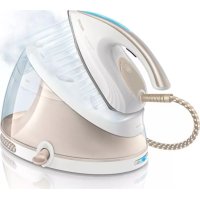
PerfectCare Aqua GC8651 - Iron PHILIPS - Free user manual and instructions
Find the device manual for free PerfectCare Aqua GC8651 PHILIPS in PDF.



Download the instructions for your Iron in PDF format for free! Find your manual PerfectCare Aqua GC8651 - PHILIPS and take your electronic device back in hand. On this page are published all the documents necessary for the use of your device. PerfectCare Aqua GC8651 by PHILIPS.
USER MANUAL PerfectCare Aqua GC8651 PHILIPS
Important Congratulations on your purchase and welcome to Philips! To fully benet from the support that Philips offers, register your product at www.philips.com/welcome. Read this user manual, the important information leaet, and the quick start guide on the packaging carefully before you use the appliance. Save them for future reference. Product overview (Fig. 1) 1 ECO button with light 2 On/off button with power-on light 3 EASY DE-CALC light 4 EASY DE-CALC knob 5 Steam hose storage compartment 6 Carry lock release button (specic types only) 7 Steam trigger/Steam boost (specic types only) 8 Iron ready light/Water tank empty light OptimalTEMP technology No temperature and steam setting needed. The OptimalTEMP technology enables you to iron all types of ironable fabrics, in any order, without adjusting the iron temperature or steam setting. Fabrics with these symbols are ironable, for example linen, cotton, polyester, silk, wool, viscose and rayon (Fig. 2). Fabrics with this symbol are not ironable. These fabrics include synthetic fabrics such as Spandex or elastane, Spandex-mixed fabrics and polyolens (e.g. polypropylene), but also prints on garments (Fig. 3). Type of water to use This appliance has been designed to be used with tap water. If you live in an area with very hard water, fast scale build-up may occur. Therefore, it is recommended to use distilled or de-mineralized water to prolong the lifetime of the appliance. Do not put perfume, vinegar, starch, descaling agents, ironing aids or other chemicals in the water tank of the appliance, as your appliance is not designed to work with these chemicals. Ironing Please read the quick start guide on the packaging carefully to start using your appliance. Note: Keep the steam trigger pressed continuously when you move the iron over the fabric while you iron. Steam boost function (specic types only) Press the steam trigger twice quickly and release it for a high continuous steam output during 13 minutes. Hence you do not have to press the steam trigger continuously, which gives a more comfortable ironing experience. Energy saving - ECO mode By using the ECO mode (reduced amount of steam), you can save energy without compromising on the ironing result.. Note: For the shortest ironing time, we advise you to use the ‘OptimalTEMP’ mode. ENGLISH1 Press the ECO button when the appliance is switched on (Fig. 4). 2 To go back to the ‘OptimalTEMP’ mode, press the ECO button again. For more powerful steam, you can use the turbo steam mode. 1 Press and hold the on/off button for 5 seconds until the light turns white. 2 The appliance returns to normal steam mode automatically after 15 minutes to save energy. 3 Otherwise, to switch back to normal steam mode at any time, press and hold the on/off button for 2 seconds until the light turns blue again. Safety auto-off mode (specic types only) To save energy, the steam generator switches off automatically when it has not been used for 10 minutes. The light in the on/off button ashes. To reactivate the steam generator, press the on/off button. IMPORTANT - cleaning and maintenance Descaling the appliance When DE-CALC light is ashing, perform the descaling procedure.This helps to prolong the lifetime of the appliance and optimise the ironing performance. If your water is very hard, increase the descaling frequency. To avoid the risk of burns, unplug the appliance and let it cool down for at least two hours before you perform the descaling procedure. Tip: When you perform the descaling procedure, place the appliance on the edge of the table top or near the sink. Water may ow out of the appliance when the EASY DE-CALC knob is opened. 1 Hold a cup (with a capacity of at least 350 ml) under the EASY DE-CALC knob and turn the knob anti-clockwise. (Fig. 5) 2 RemovetheEASYDE-CALCknobandletthewaterwithscaleparticlesowintothecup(Fig.6). 3 When no more water comes out of the appliance, reinsert the EASY DE-CALC knob and tighten it. (Fig. 7) Descaling the soleplate If you do not descale your appliance regularly, you may see brown stains coming out of the soleplate due to scale particles. Descale the soleplate by following the procedure below. We advise you to repeat the procedure twice for better results. 1 Make sure the appliance is cool and clean the soleplate with a damp cloth. 2 Emptythewatertankthroughthellingdoor.TilttheapplianceandremovetheEASY DE-CALC knob. Pour 500ml distilled water into the DE-CALC opening and tighten the EASY DE-CALC knob. (Fig. 8) 3 Switch on the appliance and wait for 5 minutes. 4 Keep the steam trigger pressed continuously while you iron a piece of thick cloth in a back-and-forth motion for 3 minutes. (Fig. 9) Hot, dirty water comes out of the soleplate. 5 Stop cleaning when no more water comes out of the soleplate or when steam starts coming out of the soleplate. 6 Unplug the steam generator and let it cool down for at least 2 hours. Remove the EASY DE-CALCknobandlettheremainingwaterowout.TightentheEASYDE-CALCknob. ENGLISH 7Troubleshooting This chapter summarises the most common problems you could encounter with the appliance. If you are unable to solve the problem with the information below, visit www.philips.com/support for a list of frequently asked questions or contact the Consumer Care Centre in your country. Problem Possible cause Solution Dirty water, brown stains or white akes come out of the soleplate. Scale has built up inside the appliance because it has not been descaled regularly. Descale the appliance (see chapter ‘IMPORTANT - cleaning and maintenance’, section ‘Descaling the appliance’). You have put chemicals or additives in the water tank. Never use chemical or additives with the appliance. If you have already done so, follow the procedure in chapter ‘IMPORTANT- cleaning and maintenance’, section ‘Descaling the soleplate’ to remove the chemicals. There is no or little steam. The appliance has not heated up sufciently. Wait until the iron ready light stays on continuously. This takes approx. 2 minutes. There is not enough water in the water tank. Fill the water tank up to the MAX indication. Water leaks from the soleplate. Steam condenses into water in the hose when you use steam for the rst time or have not used it for a long time. This is normal. Hold the iron away from the garment and press the steam trigger. Wait until steam instead of water comes out of the soleplate. The ironing board cover becomes wet, or there are water droplets on the oor/garment. Steam has condensed on the ironing board cover after a long ironing session, or your board cover is not designed to cope with the high steam rate. Replace the ironing board cover if the foam material has worn out. We also advise you to use a layer of felt material in the board cover to prevent water droplets. The EASY DE-CALC knob is not tightened properly. Switch off the appliance and wait 2 hours for it to cool down. Unscrew and reattach the knob to make sure it is tightened. The rubber sealing ring of the EASY DE-CALC knob is worn. Contact an authorised Philips service centre for a new EASY DE-CALC knob. The iron does not heat up and the red DE- CALC light ashes. The appliance reminds you to perform the descaling procedure. The light ashes about after every one month or after every 10 ironing sessions. Perform the descaling procedure, following the instructions in chapter ‘IMPORTANT- cleaning and maintenance’, section ‘Descaling the appliance’. The steam generator produces a pumping sound. Water is pumped into the boiler. This is normal. If the pumping sound continues non-stop, switch off the appliance and unplug it. Contact an authorised Philips service centre.
EASY DE-CALC Philips EASY DE-CALC
EASY DE-CALC EASY DE-CALC
OptimalTEMP ﺔﻴﻨﻘﺗ OptimalTEMP
EASY DE-CALC Philips EASY DE-CALC
9EASY DE-CALCDE-CALC
EASY DE-CALCEASY DE-CALC
7EASY DE-CALC EASY DE-CALC
EASY DE-CALC EASY DE-CALC
OptimalTEMP OptimalTEMP