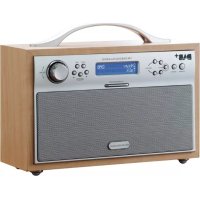
DA88 - Radio SCANSONIC - Free user manual and instructions
Find the device manual for free DA88 SCANSONIC in PDF.


| Product type | DAB/FM Radio |
| Brand | Scansonic |
| Model | DA88 |
| Dimensions (L × W × H) | 260 × 102.5 × 192.5 mm |
| Weight | 1.57 kg |
| Mains power supply | AC 100-240 V, 50/60 Hz |
| Battery supply | 6 V (4 × 1.5 V AA batteries) |
| Output power | 2 × 2 W |
| DAB frequency range | 174-240 MHz |
| FM frequency range | 87.5-108 MHz |
| Antenna | DAB/FM telescopic antenna |
| Display | LCD screen |
| Presets | 8 stations (4 DAB + 4 FM) |
| Alarm function | Yes (radio or buzzer) |
| Snooze function | Yes |
| Auto power off | Yes (15-120 min) |
| Headphone jack | 3.5 mm stereo jack |
| Maintenance | Clean with a dry cloth, avoid any contact with liquids |
| Safety | Do not open, do not expose to moisture |
| Spare parts / repairability | No user-serviceable parts; contact a service center |
Frequently Asked Questions - DA88 SCANSONIC
User questions about DA88 SCANSONIC
0 question about this device. Answer the ones you know or ask your own.
Ask a new question about this device
Download the instructions for your Radio in PDF format for free! Find your manual DA88 - SCANSONIC and take your electronic device back in hand. On this page are published all the documents necessary for the use of your device. DA88 by SCANSONIC.
USER MANUAL DA88 SCANSONIC
UK Please read instructions carefully before use
Ensemble/Multiplex (Group name)
To achieve the utmost in enjoyment and performance, and in order to become familiar with its features, please read this manual carefully before attempting to operate the unit.
Important Notes
This safety and operating instruction should be retained for future reference.
The apparatus shall not be exposed to dripping or splashing and no objects filled with liquids, such as vases, shall be placed on apparatus.
Avoid installing the unit in locations described below:
- Places exposed to direct sunlight or close to heat radiating appliances such as electric heaters,
on top of other stereo equipment that radiate too much heat.
-
Places blocking ventilation or dusty places.
-
Places subject to constant vibration, humid or moist places.
No naked flame sources such as lighted candles should be placed on the unit.
Attention should be drawn to the environmental aspects of battery disposal.
Make sure not to obstruct the ventilation openings, a minimum of 10cm should be kept around the apparatus for ventilation.
The ventilation should not be impeded by covering the ventilation openings with items such as newspaper, table-cloths, curtains, etc.
Use apparatus in moderate climates only.
Operate tuning controls and switches as instructed in the manual.
Before turning on the power for the first time, make sure the power cord is properly installed.
The mains plug is used as the disconnect device and it must remain readily operable. To completely disconnect the power input, the mains plug of the apparatus must be disconnected from the mains.
The normal function of the product may be disturbed by Strong Electro Magnetic Interference. If so, simply reset the product to resume normal operation by following the instruction manual. In case the function could not resume, please use the product in other location.
Do not attempt to remove any screws, or open the casing of the unit; there are no user serviceable parts inside, refer all servicing to qualified service personnel.



CA UT ION TO REDUCE THE RISK OF ELECTRIC SHOCK DO NOT REMOVE COVER (OR BACK), NO USER SERVICEAB LE PARTS INSIDE, RE FER SERVICING TO QUALIFIED SERVIC E PERSONNEL.

DANGEROUS VOLTAGE
Conductor dangerous voltage, that may be of sufficient magnitude to constitute a risk of electric shock to persons is present within this product's enclosure.

ATTENTION
The owner's manual contains important operating and maintenance instructions, for your safety, it is necessary to refer to the manual.
WARNING: TO PREVENT FIRE OR SHOCK HAZARD, DO NOT EXPOSE THIS APPLIANCE TODRIPPING OR SPLASHING.
Note:
This unit will become warm when used for a long period of time. This is normal and does not indicate a problem with the unit.
This unit includes micro-processors which may malfunction as a result of external electrical interference/ noise or electrostatic discharge. If the unit is not working properly, disconnect the power source and then reconnect it.
FEATURES AND CONTROLS

- STANDBY BUTTON
- DAB/FM BUTTON
- MENU BUTTON
- PRESET 1 BUTTON
- PRESET 2 BUTTON
- LCD DISPLAY
-
SCROLL BUTTON
-
SLEEP BUTTON
- SELECT BUTTON
- INFO BUTTON
- SCROLL BUTTON
- VOLUME CONTROL
- PRESET 3 BUTTON
- PRESET 4 BUTTON
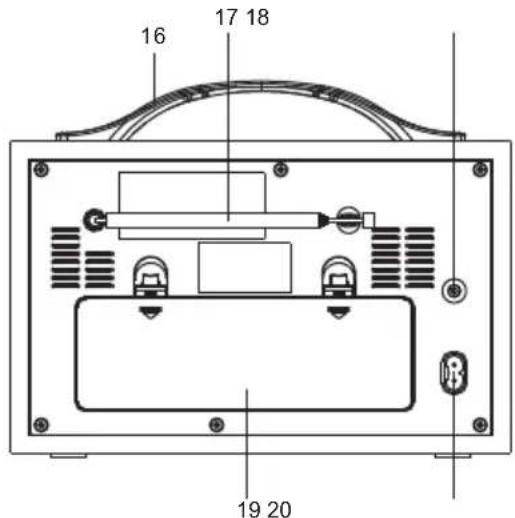
- ALARM/SNOOZE BUTTON
- HANDLE
- ROD ANTENNA
- HEADPHONE JACK
- BATTERY DOOR
- AC CORD SOCKET
LIST TENING TO YOU R RAD IO
Hints for better reception
This radio carries a single DAB/FM telescopic antenna, to obtain the best performance, you should fully extend the antenna and adjust its position as well as the direction until you find the best reception. For ideal DAB reception, always maintain the antenna in an upright vertical position is highly recommended.
Getting started
AC operation
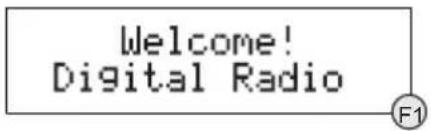
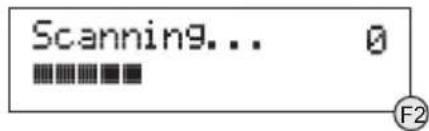
When the radio is connected to the AC power for the first time, it will be in standby mode. The display backlight will be on for a few seconds, the display will first show the greetings and finally the clock. Press the STANDBY button once to turn the radio on, it will then automatically enter into the DAB mode and perform auto scan function. During the scan the display will show "Scanning ..." together with a slide bar that indicates the progress of the scan and the amount of stations that have been found so far. (F. 1) (F. 2)
Once the scan has finished, the radio will select the first alphanumericically found station. You can now press the or button to explore the found stations and then press the SELECT button to select your station.
Note: If there is no stations found after auto scan, the radio will then enter into the Tune Select Menu, you can now press the / buttons followed by pressing the SELECT button to select "Manual tune" or "Autoscan" for stations.
DC (Battery) operation
In DC operation, the STANDBY button will work as a POWER ON/OFF button. The display will be totally off when the radio is powered off. The display backlight will be dimmed after radio power on, and it will be turned on to full brightness for 5 seconds on every key press.
- Ensure the AC power cord is disconnected from the radio.
- Installed the batteries (4X1.5V UM2 battery) into the battery compartment.
- Press the STANDBY button on the front panel to toggle the radio between on and off.
Note: To obtain the best performance in DC operation, the use of alkaline batteries is highly recommended.
Clock setting
The clock will only set and be updated if you can receive DAB signals in your location. In order for the clock to synchronise to the current local time you must leave it one DAB station for a short period. Manual clock setting is not required.
DAB auto scan
The auto scan will search for the entire DAB Band III channels. After the scan has finished, the first alphanumeric found station will be automatically selected.
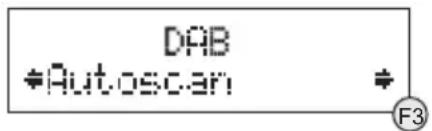
- To activate auto scan, first press the MENU button to enter into the Tune Select Menu and then press the or button to select "Autoscan", finally press the SELECT button to confirm, the display will show "Scanning ..." and a progressing slide bar. (F. 3)
- All the stations that have been found will be stored automatically, to explore the stations that have been found, press the or buttons and when you find a station that you would like to listen to, press the SELECT button.
DAB manual tune
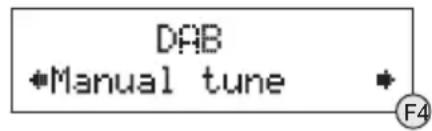
- To select manual tune, first press the MENU button to enter into the Tune Select Menu, then press the SELECT button to select "Manual tune". (F. 4)
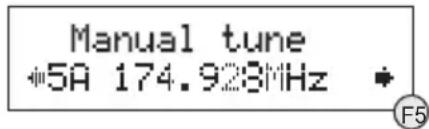
- Press the or button to move through the DAB channels, the display will show "5A to 13F" and their associated frequencies.(F. 5)
- When your desired frequency appears in the display, press the SELECT button to confirm. The name of the station group (ensemble/multiplex) will be displayed.
- To listen to the station selected, press the SELECT button again.
DAB secondary services
On some occasions you will see a “>” symbol directly after the name of the station, this indicates that there are secondary services available to that station. These secondary services contain extra services that relate to the primary station. E.g. a sports station may want to add extra commentaries. The secondary services are inserted directly after the primary station.
DAB display modes
Every time you press the INFO button, the display will cycle through the following display modes:

Time and date
The time and date will be automatically updated by the broadcasted information; it is no need to set the clock manually. In the unlikely event that no clock information is received, the display will show
Frequency
The frequency of the present station will be displayed.
Audio bit rate
The display will show the digital audio bit rate being received.
Signal strength
The display will show a slide bar to indicate the signal strength, the stronger the signal, the longer the bar will be from left to right.
DLS
DLS stands for Dynamic Label Segment which is a scrolling message that the broadcaster may include in their transmissions. The message usually includes information such as programme details ...etc.
Programme type
This describes the style of the programme that is being broadcast. If the information is not available, the display will show "<Programme Type)".
Ensemble/Multiplex (Group name)
The Ensemble/Multiplex is a collection of radio stations that are bundled and transmitted together in a single frequency. There are national and local multiplexes, local ones contain stations that are specific to that area.
Note: Press and hold the INFO button for longer than 2 seconds, the software version number will be displayed.
FM radio
- To select FM, press the DAB/FM button, the display will show FM and the frequency.
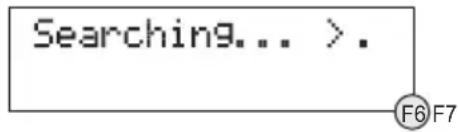
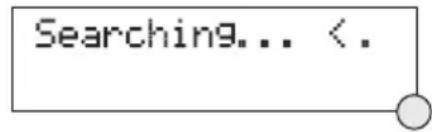
- To activate auto search, press and hold the or button until it starts to scan the frequency band, the display will show "Searching ... >." or "Searching ... < .", and it will stop automatically once a station has been found. (F. 6) (F. 7)
- To activate manual search, repeatedly press the or button.
- To select audio mode, press the SELECT button to toggle between the "Auto" or "Mono" selection.
Note: The radio will automatically switch between stereo and mono mode, but you can override this and switch this function manually which is helpful for poor signal reception.
STORING AND RE CALLING STORED STATI ONS
You can store up to 8 of your favourite stations (4 DAB and 4 FM) to the presets; this will enable you to get direct access to your favourite station at a touch of a single button.
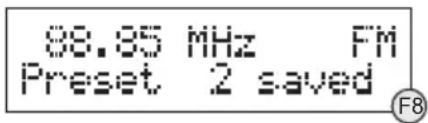
- To store a preset, first tune to your desired station, then press and hold your preferred PRESET button (1 - 4) until the display shows "Preset # saved". (F. 8)
- To recall a preset station, press the PRESET button (1 - 4) that you have stored.
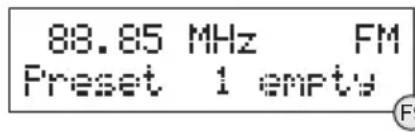
- If you press a preset that hasn't been allocated a station, the display will show "Preset # empty". (F. 9)
FACTORY RESET
When you move the radio to another part of the country, your pre-tuned and stored DAB stations may no longer be available. If this is the case then you will need to reset your radio back to its original factory settings; to perform a factory reset, please do the following:
- Plug the radio to mains and press the STANDBY button to turn the radio on.
- Press and hold the MENU button until the display shows "Press SELECT to confirm reset".
- Release the MENU button and press the SELECT button once, the display will first show "Restarting ..." and after the reset is completed, the radio will go to standby.
- Press the STANDBY button to turn the radio on again, it will then automatically enter into the DAB mode and perform auto scan function. After the scan has finished, the radio will select and display the first alphanumericly found station.
Note: All of your stored DAB & FM presets will be lost once the reset has taken place.
ALARMFUNCTION
This radio can be used as a standard "Radio Alarm Clock" in AC operation. You can use the alarm function to wake you to an electronic buzzer tone or to your favourite radio (DAB/FM). The alarm can be set in either standby or during operation.
Setting the alarm time and wake-up mode
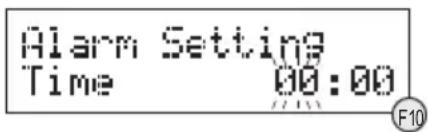
- Depress and hold the ALARM/SNOOZE button until the display shows "Alarm Setting". (F. 10)
- Repeatedly press the or buttons followed by pressing the SELECT button to adjust your desired alarm time - first set the hour and then the minute.
- Finally press the SELECT button to confirm and the alarm time is set and you will enter into the wake-up mode settings.
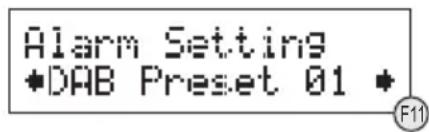
- Repeatedly press the or buttons followed by pressing the SELECT button to adjust the wake-up mode settings - first set the DAB Preset (1-10) and the FM Preset (1-10), then the Buzzer Tone (1 or 2), finally the Alarm Volume Level (1-20). (F.11)
- After the selection of the alarm volume level, the wake-up mode settings are completed and the alarm function is ready for you to activate.
Activating the alarm function
- To activate the alarm function, repeatedly press the ALARM/SNOOZE button, the alarm wake-up mode will be displayed and change in the below sequence on every press:

- When the display shows your desired alarm wake-up mode, release the button, the alarm function is now activated and the alarm icon will be displayed.
- When the alarm time arrives, the selected wake-up mode will be on and the alarm icon in the display will flash to indicate the alarm is triggered. To stop the alarm sooner, press the STANDBY/ON button.
- To check the alarm status, press the ALARM/SNOOZE button once and the alarm status will be displayed.
Note: If you have activated the alarm function and the wake-up mode is DAB or FM, make sure that the alarm volume level is set at a sufficient level for you to hear.
Automatic Alarm Repeat
The alarm will automatically repeat each day at the selected time as long as the alarm icon is displayed. To cancel this function, repeatedly press the ALARM/SNOOZE button until the display shows "Alarm Off".
SNOO ZE F U N C T ION
When the alarm has triggered, press the ALARM/SNOOZE button will temporary switch off the alarm for 5 minutes. A small "z" icon will appear by the side of the alarm icon to indicate snooze on. This is repeatable in the one hour alarm duration.
SLEEP FUNCTION
This function allows you to program the radio to switch off itself after a set period of time.
- To activate the sleep function, repeatedly press the SLEEP button, the display will show "Sleep Timer" and the time will change in the below sequence on every press:

- When your desired sleep time appears in the display, release the button, the sleep function will be confirmed in two seconds. A small "s" icon will appear in the display to indicate sleep timer on. When the sleep time counts to zero, the unit will go off.
- To put the sleep function off, press the SLEEP button again and the "s" icon in the display will disappear.
- To check the sleep timer status, repeatedly press the INFO button until you see the sleep timer information appears in the display.
Note: The sleep function can be activated only in AC operation, there is no sleep function in DC operation.
HEADPHONE JACK
A 3.5mm type stereo headphone jack is located at the back of the unit. Connect a set of stereo headphones (not included) to this jack for private listening without disturbing others. The speakers are automatically disconnected when the headphones are in use.
IMPORTANT: When using headphones always set the volume to a low level before you put the headphones on. Then insert the headphones and gradually increase the volume to a comfortable listening level.
SPECIFI CATION
| POWER SUPPLY: | AC 100-240V~60/50Hz | ||
| DC 6V 1.5V(UM2) x 4 | |||
| OUTPUT POWER: | 2 W x 2 | ||
| FREQUENCY RANGE: | DAB 174 - 240 MHz | ||
| FM 87.5 - 108 MHz | |||
| UNIT DIMENSION: | 260 (L) x 102.5 (W) x 192.5 (H) mm | ||
| WEIGHT: | 1.57kg | ||
SPECIFICATION SUBJECT TO CHANGE WITHOUT FURTHER NOTICE.

Waste electrical and electronic products must not be disposed of with household waste. Please refer to the retailer from whom you purchased this item for disposal instructions. Packaging materials should be recycled using local facilities.
Sicherheitshinweise
Ensemble/Multiplex (Group name)
Ensemble/Multiplex (Group name)
88.85 MHz FM Preset 2 saved
88.85 MHz Fm Preset 1 empy
Ensemble/Multiplex (Group name)



- Ensemble/Multiplex (Group name)
- Important Notes
- DANGEROUS VOLTAGE
- ATTENTION
- Note:
- FEATURES AND CONTROLS
- LIST TENING TO YOU R RAD IO
- Hints for better reception
- Getting started
- AC operation
- DC (Battery) operation
- Clock setting
- DAB auto scan
- DAB manual tune
- DAB secondary services
- DAB display modes
- Time and date
- Frequency
- Audio bit rate
- Signal strength
- DLS
- Programme type
- FM radio
- STORING AND RE CALLING STORED STATI ONS
- FACTORY RESET
- ALARMFUNCTION
- Setting the alarm time and wake-up mode
- Activating the alarm function
- Automatic Alarm Repeat
- SNOO ZE F U N C T ION
- SLEEP FUNCTION
- HEADPHONE JACK
- SPECIFI CATION
- Sicherheitshinweise
Brand : SCANSONIC
Model : DA88
Category : Radio