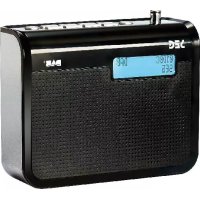
KR 115DAB+ - Radio SEG - Free user manual and instructions
Find the device manual for free KR 115DAB+ SEG in PDF.



| Product type | Digital DAB+ / FM radio |
| Brand | SEG |
| Model | KR 115DAB+ |
| Dimensions (approx.) | 200 x 130 x 80 mm |
| Weight (approx.) | 0.5 kg (without batteries) |
| Power supply | DC 5.9 V mains adapter (included) or 4 LR6 AA batteries (not included) |
| Power consumption | Low, suitable for mains or batteries |
| Frequency bands | DAB+ (Band III) and FM (87.5 – 108 MHz) |
| Number of presets | 10 DAB + 10 FM |
| Display | LCD screen with backlight |
| Main functions | Automatic and manual search, presets, radio info (DLS, signal strength, clock, date), standby, volume control, headphone jack |
| Antenna | Built-in telescopic antenna |
| Connectivity | 3.5 mm headphone jack, antenna input |
| Care and cleaning | Soft, slightly damp cloth; do not use chemical products |
| Safety | Do not open the housing; avoid moisture and heat sources; disconnect during storms |
| Spare parts and repairability | Repairs by authorized service only; unauthorized opening voids warranty |
| Warranty | 2 years (conditions according to manual) |
| General information | CE certified; indoor use only; ambient operating temperature 5°C to 35°C |
Frequently Asked Questions - KR 115DAB+ SEG
User questions about KR 115DAB+ SEG
0 question about this device. Answer the ones you know or ask your own.
Ask a new question about this device
Download the instructions for your Radio in PDF format for free! Find your manual KR 115DAB+ - SEG and take your electronic device back in hand. On this page are published all the documents necessary for the use of your device. KR 115DAB+ by SEG.
USER MANUAL KR 115DAB+ SEG
natural_image
Technical line drawing of a mechanical or fluidic container with a DAB+ label, showing internal structure and no readable text or symbols.natural_image
Symbol of a trash bin with crossed lines indicating no waste or discharge, and a solid black rectangle below (no text or labels)Safety Instructions and Important Information About Intended Use
Please read the following instructions and safety notes thoroughly before starting to use your product!
- Intended Use: this device has been designed for receiving and playing back radio broadcasts. If the product is not used according to the instructions, the user's and other persons' safety is not guaranteed and the warranty will be void.
- User manual: please read this User Manual thoroughly and keep it for any future reference in a safe place. For your own safety and in order to familiarize yourself with the different functions of the product, please follow the instructions in this manual carefully. When passing this product to other persons, please also hand over this User Manual. Please also read the user manuals of all devices that you are going to connect to this device.
- Connecting to the Power Supply: do not use the device if the device or its cables present visible damage.
Connect the device only to the voltage indicated on the corresponding label on the product. Never connect the device to a different voltage. Connect the device to grounded power outlets that comply with the corresponding safety standards only. Do not bend or squeeze the cables.
WARNING: Inside the device there is dangerous voltage. Never open the housing of the device: there is risk of personal injury by electric shock.
In order to completely disconnect the device from the mains, the power plug must be pulled out from the wall outlet. Always pull the power cord from the plug and never from the cable itself. Electric storms may damage any electric equipment; therefore disconnect the power plug from the wall outlet during a thunderstorm. It is also recommended to disconnect the device from the mains and to remove any batteries when you are intending not to use the device for a longer time.
Use this product only with supplied power adapter!
- Objects inside the device: make sure that no foreign objects or liquids enter the device via the ventilation holes or other openings. There is risk of electric shock, damage to the device and short-circuit. In case of any emergency, immediately pull the power plug and contact a qualified service technician.
- Installation: place the device onto a flat and even surface. Never cover the ventilation holes of the device and make sure that the air can easily flow around the device (keep at least 10 cm / 4 inch space on the back and sides).
The device has anti-skid rubber feet. Over the long-term, these feet can dissolve due to chemical substances. It is recommended that you place the device on an anti-skid surface.
WARNING: do not use this device outdoors!
- Condensation: when bringing this device from a cold to a warm environment (e.g. after transportation) moisture can condensate inside the device. In order to protect the device from damage and failure wait at least 2 hours prior to using the device.
- Health injury: extremely high audio volumes can damage your hearing permanently. Therefore carefully adjust the volume.
Connect the headphones or earphones to the device prior to powering it on, as connecting it when already powered on can produce high sound levels causing damage to your hearing.
- Children: Do not allow children to play with electrical devices. Children may not be able to comprehend the presence of potential risks.
- Batteries : Keep batteries away from children.
Always replace all the batteries at the same time (never mix old and new batteries). Do not short-circuit any batteries. There is risk of explosion when misusing the batteries.
Do not place any objects on the device and never apply any pressure onto the housing or
the display. Do not place any recipients containing liquids (beverages, vases, etc.) onto or next to the device. Do not place any fire sources (such as candles) onto the device. This could damage the product.
- Environmental effects: Keep the device away from any heat sources (heating equipment, ovens, cooking places, candlelight, etc.), direct sun radiation, dirt, dust, vibrations, strong magnetic fields, moisture and rain.
- Cleaning: Clean the device with a soft, slightly moistened cloth. Do not use any chemicals, alcohol or solvents for cleaning. The finish of the device can be damaged by using these substances.
Always make sure that no moisture enters the device.
- Servicing: when using the device according to the operating instructions, no special service or maintenance is required. In case of any loss of performance or other malfunction, contact a qualified service technician.
- Repairs: never open the device! Any repairs must be performed by authorized technicians or service personnel. Any unauthorised opening or modification will void the warranty and also the safety of the product may be altered.
WARNING: Inside the device there is dangerous voltage. Never open the housing of the device: there is risk of personal injury by electric shock.
Environment
Old batteries do not belong in with the domestic waste!
Consumers are obliged by law to return any old batteries and rechargeable batteries to the corresponding local and/or public collection centres or to return them to the retail shops. This ensures that batteries will be disposed of respecting the environment.
Make sure to return any batteries and rechargeable batteries discharged.
Disposal of old electric and electronic devices:
The icon of a dashed-out waste bin means that a separate disposal of electric/electronic equipment is necessary.
According to the Legislation of the European Union, any electric and electronic devices may not be disposed of with domestic trash but must be returned to a special collection center enabled for the recycling of these devices. The local waste companies should have set up specific collecting centres for this purpose, allowing private consumers to return any old devices for free. Please contact your local authorities or the local waste company for the available disposal possibilities.
Please support us actively by protecting the environment and recycle this product accordingly by returning it to a specific collection centre. This will protect the environment, other people and yourself. Thank you very much!
Disposal of Packaging and Packaging Materials:
Packaging and any packaging materials do not belong in with the domestic waste! Your system consists of materials which can be recycled and reused if disassembled by a specialized company. Please observe the local regulations regarding the disposal of packaging materials.
Important safety information
Your radio should be treated with care. The information below has been provided in the interest of safety and will help you to enjoy this product and the benefits it brings for many years.
- Keep the product and all its parts out of reach of small children.
- Keep dry; avoid exposure to precipitation, humidity and liquids which could affect the product circuitry.
- Do NOT leave in high temperatures as electronic devices and plastic parts may warp in heat.
- Do NOT leave in low temperatures as moisture may form inside the product and cause damage to the circuit board.
- Do NOT store in dusty or dirty places.
- Do NOT use harsh chemicals, cleaning solvents or detergents to clean the product. Wipe with a soft, damp (not wet) cloth to clean.
- Do NOT attempt to open the product. Unauthorised handling of the device may damage it and will void your warranty.
- Use only the power supply that came with the product. Using an unauthorised power supply will invalidate your guarantee and may damage the product beyond repair.
- Do NOT use your radio near emergency/intensive care medical equipment, if you have a pacemaker fitted or during an electrical storm.
LOCATION OF CONTROLS
Top
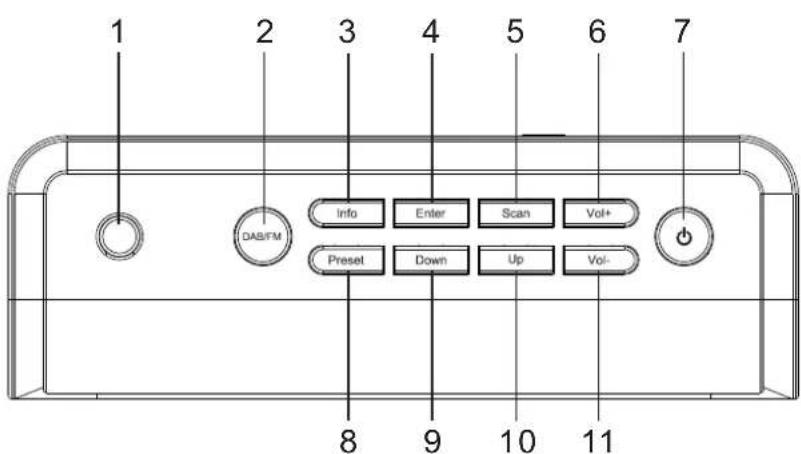
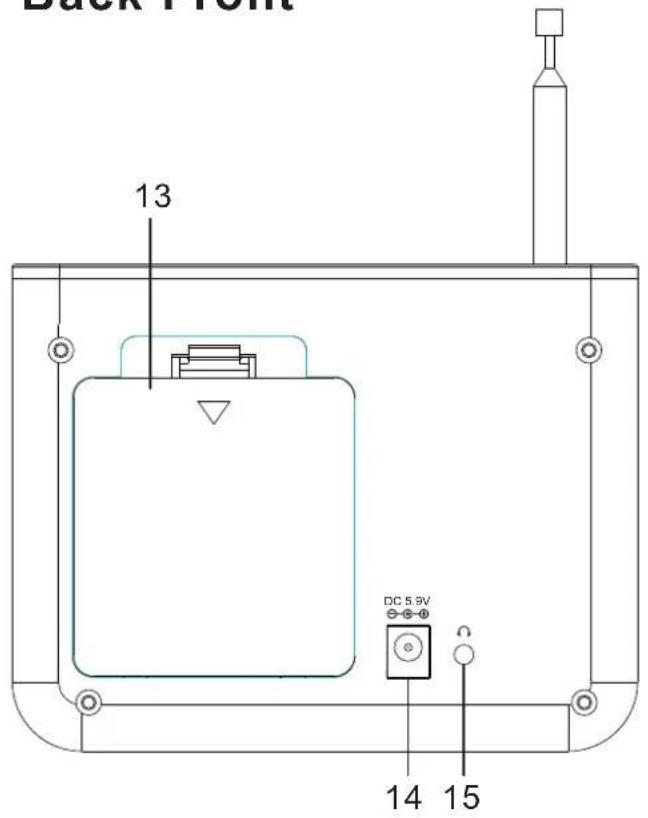
- Aerial input 6. VOL+ 11. VOL-
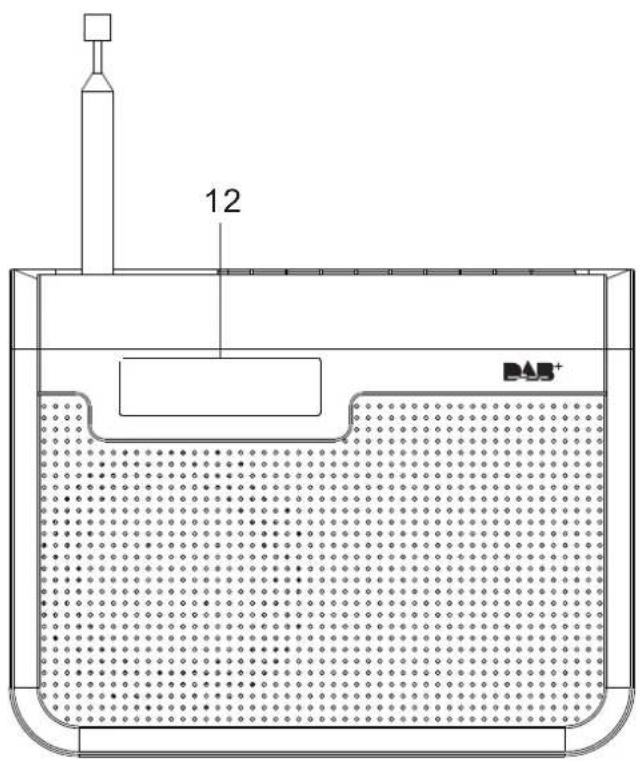
- DAB/FM 7. Power/standby 12. LCD display
- Info 8. Preset 13. Battery door
- Enter 9. Down 14. DC Power socket
- Scan 10. Up 15. Earphone
Back Front
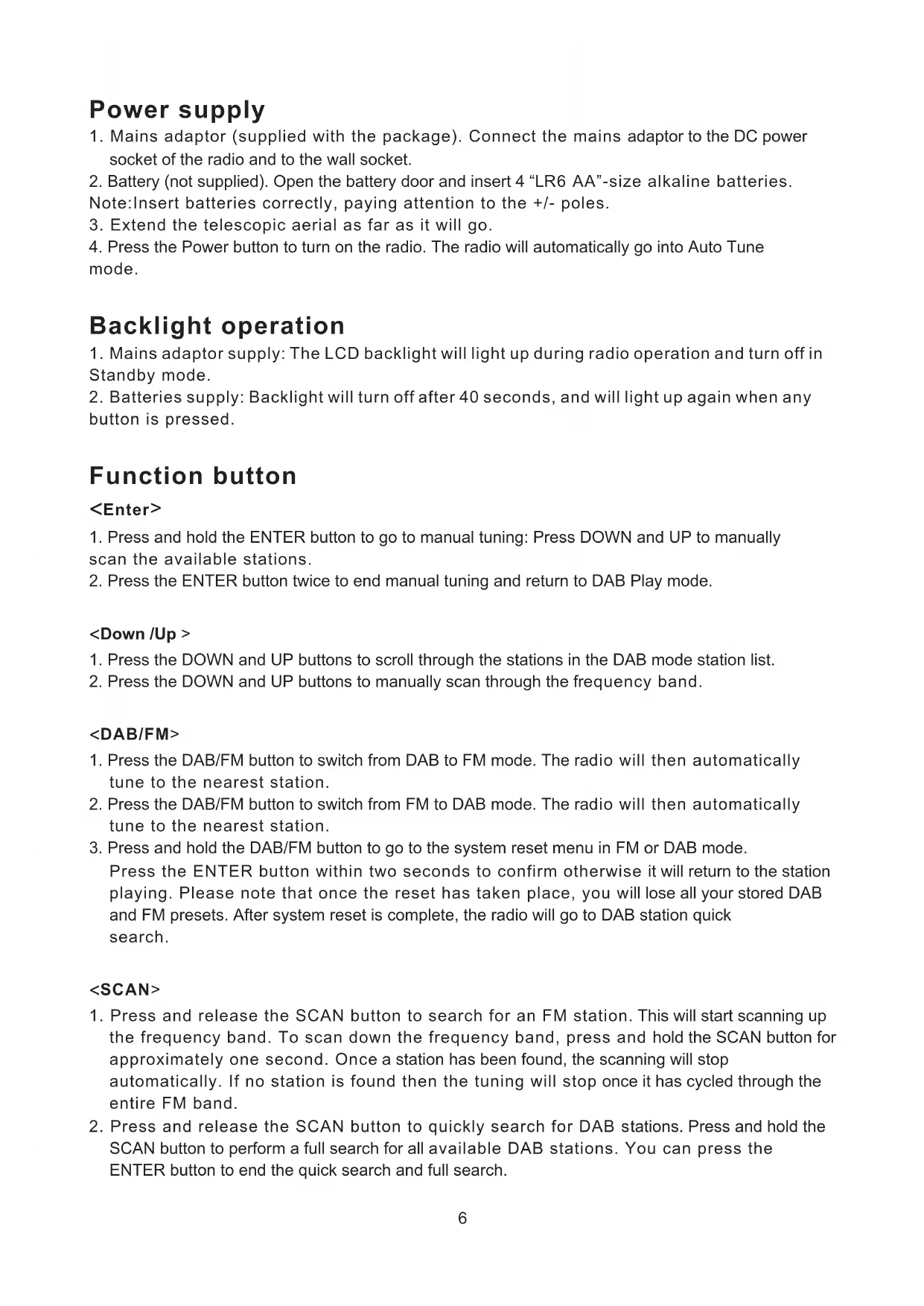
Power supply
- Mains adaptor (supplied with the package). Connect the mains adaptor to the DC power socket of the radio and to the wall socket.
- Battery (not supplied). Open the battery door and insert 4 "LR6 AA"-size alkaline batteries.
Note: Insert batteries correctly, paying attention to the +/- poles. - Extend the telescopic aerial as far as it will go.
- Press the Power button to turn on the radio. The radio will automatically go into Auto Tune mode.
Backlight operation
- Mains adaptor supply: The LCD backlight will light up during radio operation and turn off in Standby mode.
- Batteries supply: Backlight will turn off after 40 seconds, and will light up again when any button is pressed.
Function button
- Press and hold the ENTER button to go to manual tuning: Press DOWN and UP to manually scan the available stations.
- Press the ENTER button twice to end manual tuning and return to DAB Play mode.
- Press the DOWN and UP buttons to scroll through the stations in the DAB mode station list.
- Press the DOWN and UP buttons to manually scan through the frequency band.
- Press the DAB/FM button to switch from DAB to FM mode. The radio will then automatically tune to the nearest station.
- Press the DAB/FM button to switch from FM to DAB mode. The radio will then automatically tune to the nearest station.
- Press and hold the DAB/FM button to go to the system reset menu in FM or DAB mode. Press the ENTER button within two seconds to confirm otherwise it will return to the station playing. Please note that once the reset has taken place, you will lose all your stored DAB and FM presets. After system reset is complete, the radio will go to DAB station quick search.
- Press and release the SCAN button to search for an FM station. This will start scanning up the frequency band. To scan down the frequency band, press and hold the SCAN button for approximately one second. Once a station has been found, the scanning will stop automatically. If no station is found then the tuning will stop once it has cycled through the entire FM band.
- Press and release the SCAN button to quickly search for DAB stations. Press and hold the SCAN button to perform a full search for all available DAB stations. You can press the ENTER button to end the quick search and full search.
- In DAB mode, press the INFO button to view the radio information provided by the broadcaster. This displays in sequential order of: Ensemble name, signal strength, time, date, DLS, program type, channel frequency.
- In FM mode, press the INFO button to view the radio information provided by the broadcaster. This displays in sequential order of: DLS, program type, signal strength, time, date, channel frequency, audio mode (stereo/mono).
- In DAB mode, press and hold the INFO button to display the radio software version. Press again to display radio frequency
- In FM mode, press and hold the INFO button to display the radio software version. Press again to display the PI code.
Press the POWER button to turn on the radio; press again to enter Standby mode in DAB or FM play mode.
Storing a station preset
- The radio can store up to 10 DAB stations and 10 FM stations in its preset memories for instant access to your favourite stations.
- Tune your radio to the station that you wish to preset and press and hold the PRESET button until the LCD shows: < -Preset Empty 1->
- Use the DOWN and UP buttons to select the preset number that you would like to store the station to. Press and hold the PRESET button to store the station.
Tune to a preset station
- Press the PRESET button. Use the DOWN and UP buttons to scroll through the station presets.
- Press the ENTER button when you see the station that you would like to listen to. The radio will instantly tune to that station and begin to play.
Note: If no station has been stored under the preset, the display will change to "preset empty".
Press and hold the "VOL+" or "VOL-" button to progressively increase or decrease the volume.

This appliance complies with European Safety and Electrical directives. It fulfills the following EU regulations:
EN55013: 2001 +A1: 2003 +A2: 2006
EN55020: 2007
EN61000-3-2:2006 +A1: 2009 +A2: 2009
EN61000-3-3: 2008
natural_image
Symbol of a trash bin with crossed lines indicating no waste or discharge (no text or labels)service@schmid-electronics.de
service@schmid-electronics.de



- Safety Instructions and Important Information About Intended Use
- Environment
- Old batteries do not belong in with the domestic waste!
- Disposal of old electric and electronic devices:
- Disposal of Packaging and Packaging Materials:
- Important safety information
- LOCATION OF CONTROLS
- Power supply
- Backlight operation
- Function button
- Storing a station preset
- Tune to a preset station
Brand : SEG
Model : KR 115DAB+
Category : Radio