Brilliance 231C5TJKFU - Monitor PHILIPS - Free user manual and instructions
Find the device manual for free Brilliance 231C5TJKFU PHILIPS in PDF.



User questions about Brilliance 231C5TJKFU PHILIPS
0 question about this device. Answer the ones you know or ask your own.
Ask a new question about this device
Download the instructions for your Monitor in PDF format for free! Find your manual Brilliance 231C5TJKFU - PHILIPS and take your electronic device back in hand. On this page are published all the documents necessary for the use of your device. Brilliance 231C5TJKFU by PHILIPS.
USER MANUAL Brilliance 231C5TJKFU PHILIPS
Important Information Manual
Register your product and get support at www.philips.com/welcome
Table of Contents
-
Important Safety Instruction......3
1.1 Safety precautions and maintenance 3
1.2 Prevent Tipping 73
1.3 HDMI 75 -
TCO Certified.. 78
- Regulatory Information 80
- Warranty Statement 93
- Security and functionality software updates. 114
- Spare Parts Service. 118
- Service Contact Information .... 125
1. Important Safety Instruction
1.1 Safety precautions and maintenance
Safety precautions and maintenance(English)
Warnings
Use of controls, adjustments or procedures other than those specified in this documentation may result in exposure to shock, electrical hazards and/or mechanical hazards.
Read and follow these instructions when connecting and using your computer monitor.
Excessive sound pressure from earphones and headphones can cause hearing loss. Adjustment of the equalizer to maximum increases the earphones and headphones output voltage and therefore the sound pressure level.
For models without AC switches:
The power outlet should be installed near the equipment, if it is pluggable, for easy access.

Note
- To prevent possible hearing damage, do not listen at high volume levels for long periods.
- We recommend you switch off the monitor when it is not in use for a long time.
Operation
- Remove any object that could fall into ventilation holes or prevent proper cooling of the monitor's electronics.
-
Do not block the ventilation holes on the cabinet.
-
Operate under the specified power supply. Be sure to operate the monitor only with the specified power supply. Use of an incorrect voltage will cause malfunction and may cause fire or electric shock.
- The USB Type-C port could only be connected to specify equipment with fire enclosure in compliance with IEC 62368-1 or IEC 60950-1.
Maintenance
-
To avoid the risk of shock or permanent damage to the set, do not expose the monitor to dust, rain, water, or excessive moisture environment.
In order to maintain the best performance of your monitor and use it for a longer lifetime, please use the monitor in a location that falls within the following temperature and humidity ranges. (In case of any conflict between the information and the manual, please refer to the manual.) -
Temperature: 0^ C 40^ C 32^ F 104^ F
- Humidity: 20% RH~80% RH
-
Altitude: 0 ~m 5000 ~m (O ft~16404 ft)
-
Please confirm the distribution system in building installation shall provide the circuit breaker rated 120/240V, 20A (maximum).
- If provided with a 3-pin attachment plug on the power cord, plug the cord into a grounded (earthed) 3-pin outlet. Do not disable the power cord grounding pin, for example, by attaching a 2-pin adapter. The grounding pin is an important safety feature.
Caution(Applicable models with battery)
- Replacement of a battery with an incorrect type that can defeat a safeguard;
- Disposal of a battery into fire or a hot oven, or mechanically crushing or cutting of a battery, that can result in an explosion;
- Leaving a battery in an extremely high temperature surrounding environment that can result in an explosion or the leakage of flammable liquid or gas;
- A battery subjected to extremely low air pressure that may result in an explosion or the leakage of flammable liquid or gas.
- Risk of fire or explosion if the battery is replaced by an incorrect type


Caution(Applicable models with coin/ button cell batteries)
- Do not ingest battery, Chemical Burn Hazard.
- This product contains a coin / button cell battery. If the coin / button cell battery is swallowed, it can cause severe internal burns in just 2 hours and can lead to death.
- Keep new and used batteries away from children.
- If the battery compartment does not close securely, stop using the product and keep it away from children.
If you think batteries might have been swallowed or placed inside any part of the body, seek immediate medical attention.

Stability Hazard.
The product may fall, causing serious personal injury or death. To prevent injury, this product must be securely attached to the floor/wall in accordance with the installation instructions.
A product set may fall, causing serious personal injury or death. Many injuries, particularly to children, can be avoided by taking simple precautions such as:
- ALWAYS use cabinets or stands or installation methods recommended by the manufacturer of the product set.
- ALWAYS use furniture that can safely support the product.
- ALWAYS ensure the product is not overhanging the edge of the supporting furniture.
- ALWAYS educate children about the dangers of climbing on furniture to reach the product or its controls.
- ALWAYS route cords and cables connected to your product so they cannot be tripped over, pulled or grabbed.
- NEVER place a product in an unstable location.
- NEVER place the product on tall furniture (for example, cupboards or bookcases) without anchoring both the furniture and the product to a suitable support.
- NEVER place the product on cloth or other materials that may be located between the product and supporting furniture.
-
NEVER place items that might tempt children to climb, such as toys and remote controls, on the top of the product or furniture on which the product is placed.
-
If the existing product is going to be retained and relocated, the same considerations as above should be applied.
Wall Mount Installation Instructions (Applicable to Models with Wall Mount Installation Function)
This product package does not contain any wall mount spare parts. If wall mount installation is required, please be sure to contact the manufacturer.
| Wall mount hole spacing | 75mm x 75mm, 100mm x 100mm, 200mm x 100mm or 200mm x 200mm (please refer to the corresponding product specifications for details) |
| Quantity of wall mount screws | 2 or 4 pieces (please refer to the corresponding product specifications for details) |
| Wall mount screw specifications | M4 or M6 (please refer to the corresponding product specifications for details)Thread depth 8 mm, 10 mm or 12 mm (please refer to the corresponding product specifications for details) |
EU Battery Regulation
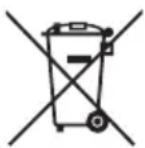
For EU: The crossed-out wheeled bin implies that used batteries should not be put to the general household waste! There is a separate collection system for used batteries, to allow proper treatment and recycling in accordance with legislation.
Please contact your local authority for details on the collection and recycling schemes.
For Switzerland: The used battery is to be returned to the selling point.
For other non-EU countries: Please contact your local authority for correct method of disposal of the used battery.
According to Regulation (EU) 2023/1542, the battery can't be disposed improperly. The battery shall be separated to collect by local
service.
The chemical symbol for lead (Pb) is added under this symbol if the battery(ies) contains more than 0.004% lead.
- Keep the remote control and the battery out of reach of children.
- The remote control supplied with this product contains a coin / button cell battery. If the coin / button cell battery is swallowed, it can cause severe internal burns in just 2 hours and can lead to death.
- If the remote control will not be used for an extended period of time, remove the battery.
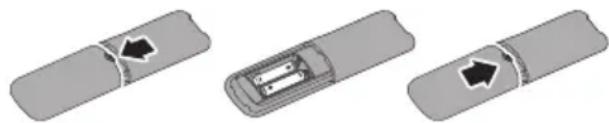
To install or replace batteries:
- Press and then slide the cover to open it.
- Align the batteries according to the (+) and (-) indications inside the battery compartment.
- Replace the cover.
Note
The incorrect use of batteries can result in leaks or bursting. Be sure to follow these instructions:
- Place "AAA" batteries matching the (+) and (-) signs on each battery to the (+) and (-) signs of the battery compartment.
- Do not mix battery types.
-
Do not combine new batteries with used ones. It causes shorter life or leakage of batteries.
-
Remove the dead batteries immediately to prevent them from liquid leaking in the battery compartment. Don't touch exposed battery acid, as it can damage your skin.
If you do not intend to use the remote control for a long period, remove the batteries.
(Arabic)
1
jlll lclaw no jlll lll gall bia i y
12 j 11 j 11 j 11 j 11 j 11 j 11 j 11 j 11 j 11 j 11 j 11 j 11 j 11 j 11 j 11 j 11 j 11 j 11 j 11 j 11 j 11 j 11 j 11 j 11 j 1
J
aaii bia jyj ylll lglssall
S OBC = S COD + S_ BOC
aIbll 120! y! aIbll Jz#p c no s
yIg yIg yIg yIg yIg yIg yIg yIg yIg yIg yIg yIg yIg yIg yIg yIg yIg yIg yIg yIg yIg yIg yIg yIg yIg yIg yIg yIg yIg yIg yIg yIg yIg yIg y Ic60950-1 IIE 62368-1
aill
aalall alal all aaii iiaai
Jia jia jia jia jia jia jia jia jia jia jia jia jia jia jia jia jia jia jia jia jia jia jia jia jia jia jia jia jia jia jia jia jia jia jia jia jia jia jia jia jia jia jia jia jia jia jia jia jia jia
1 1
- a : a A a = x( 1,2)
i 1
y
aLc J 1e aegb ayjy bJe 111 100
uuu uue aayl lslg yIy j. j g y
gcbaa Jnclw Jdx sJbs aJlsd ggr
.
aaii iiaii 10000000000000000000000000000000000000000000000000000000000000000000
.
•
.
.
.
.
•
.
.
.
aill llll 11111111111111
a jall jll (g bii) bilac 15 jill caijil (bila 15 jill a
Mepkn 3a 6e3onacnoct n nodpbxxka(Bulgarian)
A IpeynpeXdHnA
I3noJ3BaHeTo Ha KOMaHn, HAcTpoKn I npOeDpyn, pa3JIuHn OT ONuCaHnTe B Ta3N
DOKyMeHTaUry, MOraT Da npuHnT TOKOB ydap n/nn MexaHnHn UeTeN.
BHHMaHHe (PpNIOXKMM MoJeN c 6aTepey)
- ПомmaHa Ha akymynaTOpHa 6aTePnca He npaBnIeH Tn, KOITo MOKe Da npeKpaTn DeiCTBneTo Ha npeDna3nteJra;
- I3XbBpJHHe Ha akymyJatopHa 6aTePnB OfBn Hn B ropea neu, nnn MexaHnHOTcMauchBaHe nn p3aHe Ha akymyJatopHa 6aTePnA, KoTo MoKe Da DoBeDe Do ekCnIIO3N;
OctabRHe Ha 6aTeepnB n3KlHouHTeJIHO BnCOKa TempepaTpa Ha OKoJHaTa CpeDa, KoEtO MoKe Da DOBeDe Do EKCIIIO3Nn IIN N3TuHaHe Ha 3aNaJIIMMa TeUHOCT NIN rA3;
BaTePnI,IOJIOXeHa Ha N3KJIIOHTeJIHO HNCKOBb3DyUHNO HAJIraHe,KOETO MOKe Da DOBeDeDo EKCIIO3N IIN N3TNUaHe Ha 3aIaNIMATEHQCT INI rA3.
Pnck ot ekcnno3na, ako 6aTepeyra e cmeHeHa c rpeweH TnI.


BBHmamHe (npnloxmmu moJeNc nnockn 6aTeepn)
He norlbuaite 6atepepy - onachoct ot XMMUecko n3rapaHe
To3n npOdyKT cbDbpXa nlocka batepy.. Ako nlockata 6atepy 6bde noBlnHaT, Ta MoKe Da npUHH TeKKn BbTpEshn N3rapHna CaMo 3a 2 yaca n MOKe da DOBeDe Do Cmbpt.
CbXpaHbAaTe HOBnTe n 3nOJ3BaHnTe 6aTeepn DaJeY ot Deca.
Ako otdeleheneto 3a 6aTeepnnte He ce 3aTbOpn do6pe, cnpete da n3no3BaTe npodykta n ro dpbxTe daJeu ot deua.
Ako cMaTaTe, Ye e Bb3MoXHo 6aTeepnnte Da ca NOrbHaTn IIN NOCTaBeHn B HraKoYact Ha TAnOTO, NotbpcTe He3a6abHa MeuHcNcKa NOMOu.
HCTpyKcun 3a HCTaJnpaHe Ha cToiKa 3a CTeHa (PpNJIOXmO 3a MoJeI N C yHKuN 3a HHCTaJIaCnIype3 CTeHEn MOHTax)
To3n naket c npOdykTa He cbDbPjka pe3epBHN
yactn 3a cTOnKa 3a cTeHa.AKO ce n3NCKBa
HHCTaJaCnry Upe3 CteHeH MOHTax, Tp86Ba da
ce CBbPjKeTe C pON3BOIDNTeJI.
muaaunnnaaennnnn (Cambodian)

mtnieign
mnnnnae (controls), mnnn n nn nnnnne nnnnne nnnnne nnnnne nnnnne nnnnne nnnnne nnnnne nnnnne nnnnne nnnnne nnnnne nnnnne nnnnne nnnnne nnnnne nnnnne nnnnne nnnnne nnnnne nnnnne nnnnne nnnnne nnnnne nnnnne nnnnnee
aannn nnnn nnnn nnnn nnnn nnnn nnnn nnnn nnnn nnnn nnnn nnnn nnnn nnnn nnnn nnnn nnnn nnnn nnnn nnnn nnnn nnnn nnnn nnnn nnnn nnnn nnnn nnnn nnnn nnnn nnnn nnnn nnnn nnnn nnn
A:
Igihnnn ginnnsuun nnuuun uannnehennn
1
mugumum
mnnn nnnnnnnnnnnnnnnnnnnnnnnnnnnnnnnnnnnnnnnnnnnnnnnnnnnnnnnnnnnnnnnnnnnnnnnnnnnnnnnnnnnnnnnnnnnnnnnnnnnnnnnnnnnnnnnnnnnnnnnnnnnnnnnnnn nn
H
Punnimnmna, nnnnneannnnnnnnnnnnnnnnnnnnnnnnnnnnnnnnnnnnnnnnnnnnnnnnnnnnnnnnnnnnnnnnnnnnnnnnnnnnnnnnnnnnnnnnnnnnnnnnnnnnnnnnnnnnnnnnnnnnnnnnnnnnn nn
nnae nne ennnnne nnnnne nnnnnnne nnnnnnne nnnnnnne nnnnnnne nnnnnnne nnnnnnne nnnnnnne nnnnnnne nnnnnnne nnnnnnne nnnnnnne nnnnnnne nnnnnnne nnnnnnne nnnnnnne nnnnnnne nnnnnnne nnnnnnne nnnnnnne nnnnnnne nannnne nannnne nannnne nannnne nannnne nannnne nannnne nannnne nannnne nannnne nannnne nannnne nannnne nannnne nannnne nannnne nannnne nannnne nannnne nannnne nannnne nannnne nannnne nannnne nannnne nennnee
mignn
1 1
- 0^ C 40^ C 32^ F 104^ F
- 20% RH~80% RH
- ngjwngnqunm" Om~5000m (O ft~16404 ft).
120/240V, 2OA (m)
3 m 3 (1) 2
unugunng (tucnnnng tannnnnna)
mnnnne nnnnnnnnnnnnnnnnnnnnnnnnnnnnnnnnnnnnnnnnnnnnnnnnnnnnnnnnnnnnnnnnnnnnnnnnnnnnnnnnnnnnnnnnnnnnnnnnnnnnnnnnnnnnnnn
mnnnne genno ngna y naeyn nanaan mnnn no
merrn nnnnnae rnne aannnnnngnnae naanamgumnnnnn mnnnnn ngnnnae
geenee eaeaeaeaeaeaeaeaeaeaeaeaeaeaeaeaeaeaeaeaeaeaeaeaeaeaeaeaeaeaeaeaeaeaeaeaeaeaeaeaeaeaeaeaeaeaeaeaeaeaeaeaeaeaeaeaeaeaeae
unnnnnaa nnnn nn nnnnnnnnnnnnnnnnnnnnnnnnnnnnnnnnnnnnnnnnnnnnnnnnnnnnnnnnnnnnnnnnnnnnnnnnnnnnnnnnnnnnnnnnnnnnnnnnnnn


nngy ng (gtaaang ng nnnnnae mnnn nn nnnnnnnnnnnnnnnnnnnnnnnnnnnnnnnnnnnnnnnnnnnnnnnnnnnnnnnnnnnnnnnnnnnnnnnnnnnnnnnnnnnnnnnnnnnnnnnnnnnnnnnnnnnnnnnnn
Aeannnne nnnnne nnnnne nnnnne
aennnnnne nane nane nannn / nnnn r annn mnnn nane nanae nnnn / nnnnnae nnne nnnnnae nnnnnae nnnnnae nnnnnae nnnnnae nnnnnae nnnnnae nnnnnae nnnnnae nnnnnae nnnnnae
aannngnene n 8u eennne fienr jgacnntra
[paunigangnngnue 1000, nwnuun dnnnnaa twnnne
paanmnnnne nannnnae nnnnnae nnnnnae nnnnnae
mnnnnnngnngn ng n a (nnsnywaaaiaa
mnguaaunn:ssnnnag:umn nnnnnae mnnnnae
| ยงค : ยงรistentead ยง | 75mm x 75mm, 100mm x 100mm, 200mm x 100mm ÷ 200mm x 200mm (ยงค ย诗句 ย诗句 ย诗句 ย诗句 ย诗句 ย诗句 ย诗句 ย诗句 ย诗句 ย诗句 ย诗句 ย诗句 ย诗句 ย诗句 ย诗句 ย诗句 ย诗句 ย诗句 ย诗句 ย诗句 ย诗句 ย诗句 ย诗句 ย诗句 ย诗句 ย诗句 ย诗句 ย诗句 ย诗句 ย诗句 ย诗句 ย诗句 ย诗句 ย诗句 |
| ย诗句 ย诗句 ย诗句 ย诗句 | 臼臼2円 4円 (ย诗句 ย诗句 ย诗句 ย诗句 ย诗句 ย诗句 ย诗句 臼) |
| ย诗句 ย诗句 ย诗句 ย诗句 | M4 ÷ M6 (ย诗句 ย诗句 ย诗句 ย诗句 臼句 臼句 臼句 臼句 臼句 臼句 臼句 臼句 臼句 臼句 臼句 臼句 臼句 臼句 臼句 臼句 臼句 臼句 臼句 臼句 臼句 臼句 臼句 臼句 臼句 臼句 臼句 臼句 臼句 臼句 臼句 臼句 臼句 臼句 |
uugisauumtu
wnnuuunnnnue: quneanennnne ennnnnnnnng: qneel
enpuuynnnae ane nnuuuguaaannn aen m naesm
nannnnae aaninigjnuumnu
aannnnae anananaananaananaananaananaananaananaananaananaananaananaananaananaananaananaananaananaananaananaananaananaananaananaananaananaananaananaananaananaananaananaananaananaananaananaananaananaananaananaananaananaananaananaananaananaananaananaananaananaananaan ana
Jus a t a a a a a a a a a a a a a a a a a a a a a a a a a a a a a a a a a a a a a a a a a a a a a a a a a a 0
AnextensEabyfJyJiBosu(Korea)
A
i. 云,,
KuTnToMoNToTe to EnCtoHg SuOoHh 1eEmy T 的JtchIe Hg TaRzupsiSiO.
IiEhFJfJHJFJFJFJFJFJFJFJFJFJFJFJFJFJFJFJFJFJFJFJFJFJFJFJFJFJFJFJFJFJFJFJFJFJFJFJFJFJFJFJFJFJFJFJFJFJFJFJFJFJFJ
Yka3aHnI NO Mepam 6e3OpaCHOCTN IN TexHnueckomy O6cnyKuBaHnIO (Russian)
A PpeDynpexKdHnna
IcnoJb3OBaHneФyHKu,opraHOB ynpabJeHn Inn Oepaun peYIpOBKn,OTInuHbIX OT yka3aHHbIX B DaHHOM DOKymeHTe,MOKeT npUBeCTN K nopaxHeHIO 3JIeKTpUyeCKIM TOKOM IN OnaChbIM CNTyaCnM,CBra3aHHbIM C 3JIeKTpUyeCKIMn N/Inm MExaHueCKIMKOMNOHeHTaMn.
IpoHTaIe HNeKoCHNTeJIbHO co6IIOaIte npBedeHbIe HIXe HNCTpyKcII npn NOkJIIOUeHIn N 3KcPNaTaUcM MOHTopa:
Upe3MepHOe 3ByKOBoE daBneHne OT HayuHNKOB n roJIOBHOI rAPHTypbI MOXET npNBecTN K noTepe cnyxa. YcTaHOBka 3kBaIaN3epa Ha MaKcIMMaJIbHOe 3HaueHne yBeJIuNBAeT BbIXoDHOe HAnpJxKeHne HayuHNKOB I rOLOBHOI rAPHTypbI N, COOTBeTCTBeHHO, yPOBeHb 3ByKOBOrO daBneHnA.
Длma moDEJIeN 6e3 6Ioka nITaHnIa:
CetBaJ po3eTka DoJIxHa 6bITb paCNoIoxHe npaOM C yCTpOiCTBOM IJIЯ JERKOrO DoCTyna, ecIn Tpe6yETcnoKIIuOHeHne K cTeN.
3Kcnnyatauia
He donyckaite nona daHna kakx-1n6o npedmTOB B BeHTnIaCIOHHbIE OTBepCTnA, a TaKke HapuWeHna HaIneKaUero OxJaXdEHNA 3JIeKTPoHHbIX KOMNoHErTOB MOHITopa N3-3a NOcTOpOHnX npedmTOB.
He 3aKpbBaIte BeHTnJIauNoHHbIe OTBepCTNa Kaopnyce MoHITopa.
- YcTpoIcTBo pa6oTaET ot yka3aHnHO nCTOuHnKa Toka. 3anpeuaeTcnoKJIouaTb MOHTOP K dpyrIM nCTOuHnKAM TOka. IOnkIIOUeHne K nCTOuHnKy nITaHn, HApJxKeHne B KOTOpOM He COOTBeTCTByeT Tpe6oBaHnM, MoXe TpNBecTn K nOLomKe ycTpoIcTBA, Bo3ropaHnIO nII NopaxeHIO 3JIeKTPnuECKm TOKOM.
B COOTBeTCTBnC Tpe6oBaHnIaMn CtaHndapTa IEC 62368-1 nnn IEC 60950-1 K nopTy USB TnC pa3peSeHo NpdknHoueHne TOJIbKO ONpeJeIeHHbIX yCTpoiCTB C npOTINBOIOXKapHbIM KOxYXOM.
TexHnueckoe o6cnykInBaHne
Bo n36exaHne npaxeHn 3JeKtpnueckn m TokOM nI HeyctpaHmOro NOBpeXdEHN MOHTOPa, IpIMTe MepbI NO erO 3aunTe OT BO3DeiCTBnI PbIN, DOxJr, BODbl IIN Ype3MepHOB BLaXHoCTn.
C cIeIbIO IOJIepKahnHaHnyuXHX KCNpyATAUHOHBIX XapaKTepNCTNK MOHTOPa I npOJIeHNr CpOKA 3KcIIyatauIN 3KcIIyATnpYte MOHTOP B NOMEueHN, COOTBeTCTBYIOUeM CNeIyIOUm Tpe6OBaHnAM K TempeType IN BnaXHoCTn.(B cnUyae npOTNbOpEey MekJy INΦopMaUnei n pYkoBOdCTBOM CJIeDyIte yKa3aHnAm pykoBoDCTBa.)
- TemnepaTypa: 0^ 40^ 32^ 104^
- OTHOCHTeJIbHЯ BnaxHoCTb: 20%~80%
- OTHOCHTeJIbHOB BnaxHoCTN
-
BcoTa: o M~5000 m (0 ft~16404 ft)
-
Y6eHntecb, yTO 3HePrcnCTema 3daHna ochaueHa npepbIbaTelem ceni 120/240 B, 20 A (makcmaJIbHo).
- Ecni shHyp nHTAHnO ochaueH 3-KoHTaKTHoB BnIKoN, NOkIIOuHte WHyP K 3a3eMneHHoH 3-KoHTaKTHo 3NeKtpnueCKoR po3eTke. He OTKIIOUaHTe 3a3eMJIHOUsn KOHTaKT ShHypa NITAHn, HAnpIMep, NOkIIOuHb K Hemy 2-KoHTaKTHbI aADnTeP. 3a3eMJIIOUsn KOHTaKT - BaxHaJ FyHKUa 6e3OnacHoCTn.
BHHMaHHe! (PpIMeHMbIe MoJeIN c aKKyMylaTOPHO6aTapee)
3aMeHa 6atapeHn 6atapeHn HEnOAnOJaIeTo TIna, YTO MoKeT HApUHTb 6e3OnaChocTb yCTpOuCTBa;
- YtJIN3aun 6aTapeB ORHe nnrTopyne neu, MexAHueckoe yHNUTOXKeHne nn pa3pe3aHne 6aTapeN, UTO MOKeT npNBecTN K B3pbIBy;
XpaheHne 6aTapeN B cpeDe C oueHb BblcOKoI TemnepaTypoi, yTO MoKeT npNBecTNI K B3pbIBy, yTeUKe rOpUOeRo Ra3a NIIJ XnIDKOCTN;
XpaHHe 6aTapeB CpeDe C oueHb Hn3KIM DaBHeHem BO3Dyxa, YTO MOKeT PpNBecCTN K B3pyBy, yTeUke rOpUoyero Ra3a NJIu JxIDKOCTN;
- Onachoctb BO3ropaHnI INB3pBa B CnyaeyCTaHOBKn HEnoXoJSeTo Tuna 6aTapei


BBHIMaHHe! (PpImeHmblc MoJeN C aKKyMylTOpamn KHONoHOro/ Ta6JIeToUHOro Tnna)
He rnoTaB 6atapen! OnacHocTb xmmueckoro oKora!
-Данhoeизделпс codepкгт akумлгтор kHOnOuHOro/ tabeToCHOro Tuna.Пр nporIaTbIbAHnAkKymyIgTopa KHONoHOro/ tabeToCHOro Tuna Bcero 3a 2 yaca MoryT BO3HnKHyTb CnIbHbIe BHyTpEHnE OXkOrn C BEpoRTHbIM JETaJIbHbIM NCXODOM.
XpaHnTe HOBbie n Otpa6oTaHHbIe 6aTapeKIN BdaJI N OT JeTei.
- Ecnn 6aTapeHbI ONCEK He 3aKpbBaETcra NIOTHO, INpeKpatNTe NCNoJIb3OBaHne yCTpoiCTBa H y6epnte ero nOdaIbwe OT DeTei.
EcN Bbl CHTaTe, YTO npOn3oJIO cnUyauHoe nonaDaHne 6aTapeek B JKeIyDOK nIN dpyrHe oprAhbl, HeMeJeHHO o6paTntecb 3a MeuHcHcKoi NOMOJIbI.
HCTpyKuIN NO BbINOJIHeHIO HAcTeHHOROMOHTaKa (dIy MoJeN c cyHKcneHAcTeHHORo MOHTaKa)
B KOMNJIeKT NocTaBKN DaHHO rYcTPOJCTBa He BXoJrT DeTaN DnA HAcTeHNO MOHTaJa. Ecnn nOtpe6yEtC yCTaHOBt b YcTPOJCTBO Ha CTeHy, ObpaTInTeCb K npOn3BOdnteJIIO.
nnuuuaueunnuunnuunnuwuuwauu wnuu uuuu uuuuuuuuuuuuuuuuuuuuuuuuuuuuuuuuuuuuuuuuuuuuuuuuuuuuuuuuuuuuuuuuuuuuuuuuuuuuuuuuuuuuuuuuuuuuuuuuuuuuuuuuuuuuuuuuuuuuuuuuuuuuuuuuuuuuuuuuuuuuuuuuuuuuuuuuuuuuuuuuuuuuuuuuuuuuuuuuuuuuuuuUUAC:
wauuuaunu uanununuunuunuunuunuunuunuunuunuunuunuunuunuunuunuunuunuunuunuunuunuunuunuunuunuunuunuunuunuunuunuunuunuunuunu
#
- nnnn nn n ananann annnnn nnnn nn nnnnnnnnnnnnnnnnnnnnnnnnnnnnnnnnnnnnnnnnnnnnnnnnnnnnnnnnnnnnnnnnnnnnnnnnnnnnnnnnnnnnnnnnnnnnnnnnnnnnnnnnnnnnnnnnnnnnnnnnnnnnnnnnn
·
Wnwnnnnnaa nnnn nn nnnnnn nn nnnnnnnn nn nnnnnnnn nn nnnnnnnn nn nnnnnnnn nn nnnnnnnn nn nnnnnnnn nn nnnnnnnn nn nnnnnnnn nn nnnnnnnn nn nnnnnnnn nn nnnnnnnn nn nnnnnnnn nn nnnnnnnn nn nnnnnnnn nn nnnnnnnn nn nnnnnnnn nn nnnnnnnn nannn nn nannnnn nn nannnnn nn nannnnn nn nannnnn nn nannnnn nn nannnnn nn nannnnn nn nannnnn nn nannnnn nn nannnnn nn nannnnn nn nannnnn nn nannnnn nn nannnnn nn nannnnn nn nannnnn nn nannnnn nn nannnnn nn nannnnn nn nannnnn nn nann - was USB Type-C wuwrulw aunnna Iwuww wauw u wu n wu wu wu IEC 62368-1 wae IEC 60950-1
75777777
Wwunwnn nnwnnnn Ww wwnn nwnn nnwnnnn nnwnnnn nnwnnnn nnwnnnn nnwnnnn nnwnnnn nnwnnnn nnwnnnn nnwnnnn nnwnnnn nnwnnnn nnwnnnn nnwnnnn nnwnnnn nnwnnnn nnwnnnn nnwnnnn nnwnnnn nnwnnnn nnwnnnn nnwnnnn nnwnnnn nnwnnnn nnwnnnn nnwnnnn nnwn
WwNnwnnnnnnnnnnnn nn nnnnnnnnnnnnnnnnnnnnnnnnnnnnnnnnnnnnnnnnnnnnnnnnnnnnnnnnnnnnnnnnnnnnnnnnnnnnnnnnnnnnnnnnnnnnnnnnnnnnnnnnnnnnnnnnnnnnnnnnnnnnnnnnnnnn nn nn nn nn nn nn nn nn nn nn nn nn nn nn nn nn nn nn nn nn nn nn nn nn nn nn nn nn nn nn nn nn nn nn nn nn nn nn nn nn nn nn nn nn nn nn nn nn nn nn nn nn nn nn nn nn nn nn nn nn nn nn nn nn nn nn nn nn nn nn nn nn nn nn nn nn nn nn nn nn nn nn nn nn nn nn nn nn nn nn nn nn nn nn nn nn nn nn nn nn
- aun: 0^ 40^ 32^ 104^
- 20% RH~80% RH
-
nua:0m~5000 m(0
-
120/240V, 20A (500V)
wunuun 3 wunuunw W uunuunw wunu 3 wunuunuunu (nu) uunuunuunu unu unu unu unu unu unu unu unu unu unu unu unu
2a75y(uunuaan)
- nssuunauanrnnnueuuuunneurnuuunneunnuuun
- nraanrnnnnae rnrnnnnae nnrnnnnae nnrnnnnae nnrnnnnae
- nnnnnae ne nne nne nne nne nne nne nne nne nne nne nne nne nne nne nne nne nne nne nne nne nne nne nne nne nne nne nne nne nne nne nne nne nne nne nne nne nne nne nne nne nne nne nne nne nne nne nne nne nne nne nae
- uuaa a nnnnnae nnne nnnnnae naananae
- aanannnnaaennnnn nn nnnnnnnnnnnnnnnnnnnnnnnnnnnnnnnnnnnnnnnnnnnnnnnnnnnnnnnnnnnnnnnnnnnnnnnnnnnnnnnnnnnnnnnnnnnnnnnnn


aannnnn (nuu/
- aunuuaaennnnnnaaannnnnnae
- nannnnn nn nnnnnae aee nnnnnnne eae /nennn nn nnnnnae ae nnnnnnne nee /nennnnnne 2
- 1nuuuuaa aai nuiu uua uuaia aai iue uau uua
- wnuuauuaaun uun uun u
- wannnnnnaanrnanrnnnne nnnnne nnnnne nnne nnnnne nnnnne nnnnne nnnnne nnnnne nnnnne nnnnne nnnnne nnnnne nnnnne nnnnne nnnnne nnnnne nnnnne nnnnne nnnnne nnnnne nnnnne nnnnne nnnnne nnnnne nnnnne nnnnne nnnnne nnnnne nnnnee
nunununnuuunnuu()
unauuunnuuunnnn uuuuuu uuuu uuuuuuuuuuuuuuuuuuuuuuuuuuuuuuuuuuuuuuuuuuuuuuuuuuuuuuuuuuuuuuuuuuuuuuuuuuuuuuuuuuuuuuuuuuuuuuuuuuuuuuuuuuuuuuuuuuuuuuuuuuuuuuuuuuuuuuuuuuuuuuuuuuuuuuuuuuuuuuuuuuuuuuuuuuuuuuuuuuuuuuuUU
| 政务服务网 政务服务网 政务服务网 | 75 mm. x 75 mm., 100 mm. x 100 mm., 200 mm. x 100 mm. w/la 200 mm. x 200 mm. (lalwongthuayuayuayuayuayuayuayuayuayuayuayuayuayuayuayuayuayuayuayuayuayuayuayuayuayuayuayuayuayuayuayuayuayuayuayuayuayuayuayuayuayuayuayuayuayuayuayuayuayuayu |
| 政务服务网 政务服务网 | 2 wla 4 m (lalwongthuayuayuayuayuayuayuayuayuayuayuayuayuayuayuayuayuayuayuayuayuayuayuayuayuayuayuayuayuayuayuayuayuayuayuayuayuayuayuayuayuayuayuayuayuayuayu |
yuyuanyuwen yuyuyunqin
nnuuunnuuuvnuu:nuuuuuauu uuuuuuuuuuuuuuuuuuuuuuuuuuuuuuuuuuuuuuuuuuuuuuuuuuuuuuuuuuuuuuuuuuuuuuuuuuuuuuuuuuuuuuuuuuuuuuuuuuuuuuuuuuuuuuuuuuuuuuuuuuuuuuuuuuuuuuuuuuuuuuuuuuuuuuuuuuuuuuuuuuuuuuuuuuuuuuuuuuuuuuuuuuuuuuuuuuuuuuuuuUU
155n 155n 155n 155n 155n 155n 155n 155n 155n 155n 155n 155n 155n 155n 155n 155n 155n 155n 155n 155n 155n
nwnuunnuu: uunua nnuu
nnuuueeauue uanuuaanwnwuyu 1u50
nnuuueuueuue uunauuuuauuua
uauuuuuuuuuuuuuuuuuuuuuuuuuuuuuuuuuuuuuuuuuuuuuuuuuuuuuuuuuuuuuuuuuuuuuuuuuuuuuuuuuuuuuuuuuuuuuuuuuuuuuuuuuuuuuuuuuuuuuuuuuuuuuuuuuuuuuuuuuuuuuuuuuuuuuuuuuuuuuuuuuuuuuuuuuuuuuuuuuuuuuuuuuuuuuuuuuUU
- RaKIo npOraRom TpNBaIoro Yacy Bn He 6yJeTe KOpNCTyBaTnCra NylbTOM DnCTaHciHOrO KepyBaHHra, BnIMiTb 3 HbOrO 6aTaapeIO.
When using the display, fasten the LCD to a wall using a cord or chain that can support the weight of the monitor in order to prevent the monitor from falling.
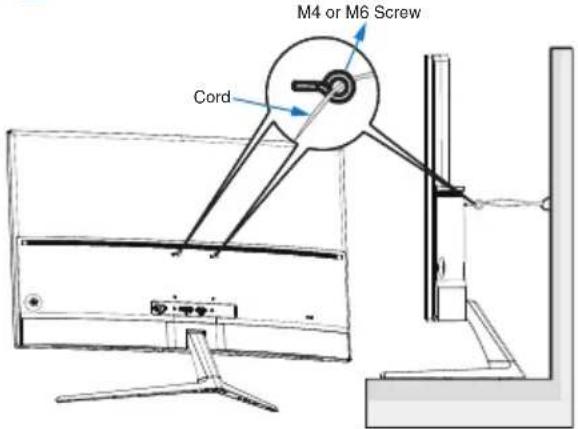
1
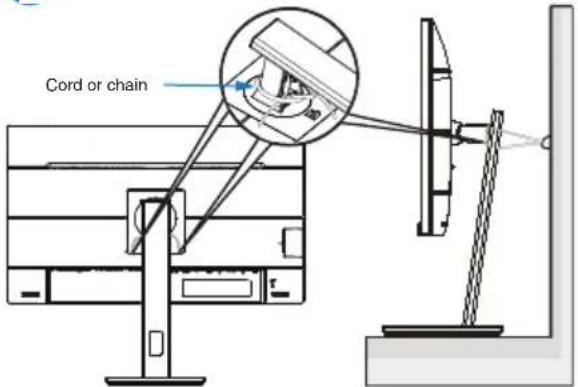
2

Note
- Display design may differ from those illustrated.
- Installing must be done by a qualified technician, and please contact your supplier for more information.
- For the Models with net weight ≥ 7 kg . Please select the suitable way to Prevent Tipping.
- For the models with VESA Mount, please use method ①, install the screws with ring to the VESA Mount hole, then tie the cord or chain to the wall. Otherwise, please use method ② to tie the cord or chain to the stand and then fix it to the wall.
Russian
Pn nCnoB3OBAHnn Dnucnner npnkpenTe KK-ekpan K cTeHe C NOMObUo UHpya NnU cenn, cnocobHOB BbIepXaTb BEc MOHTopa, YTO6bl ppeDOrBpaNTb erOnaJeHne.
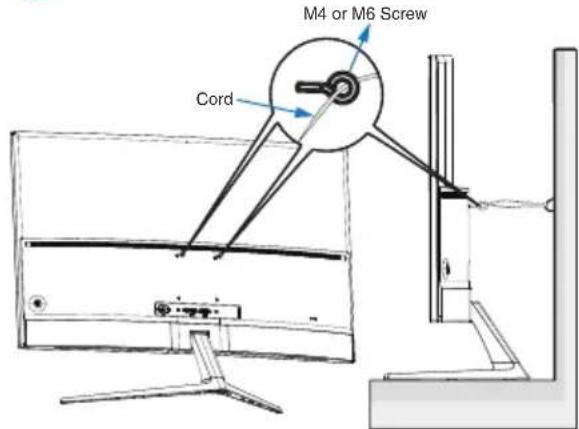
1
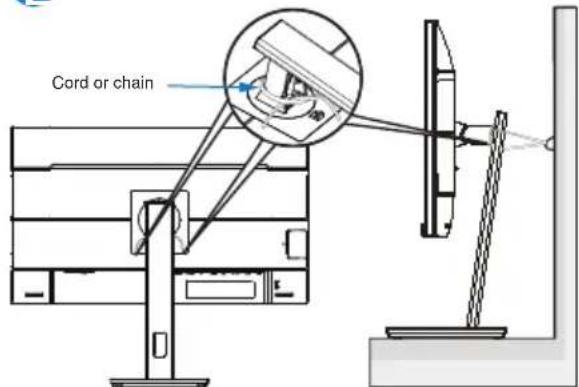
2

PpIMeuaHne
-Ди3aHДИСПЯМоКETOTПИЧаТСАТ 1306paKeHHORHa pucyHke.
YcTaHOBKa DOJXHa IPOUN3BOIDTbcra KBaIINΦuNUPOBaHHbIM CneuaJIInCTOM, IN NOXaIyIcTa, O6paTInTeCb K NoCTaBUnky dIa NOLyueHn DOnOJIHnTEJIbHOINHΦOpMaun.
Длma moJIeJc BECOM HeTTO> =7Kr. IoxaanyIcTa, BblbepnTe nOxOJaUcN cnoc6 dIpypeDToBpaueHnONpOKuDbIBaHn.
ДЯ moJenC kpenJIeHnEM VESA nCnoJIb3yIte MeToD 1, yCTaHOBInTE BnHTbIC KOnbUcOM B OTBepCTne kpenJIeHnEA VESA, 3aTeM npINBExNtE shHyp nnu cENb K CTHe. B npOTUBHom cnUyae, noKaIyIcTa, nCNoJIb3yIte MeToD 2, YTO6bl CBra3aTb shHyr nnu cENb K NOdCTaBKe, a 3aTeM npNKpeNITb erO K CTHe.
Turkish
(Only applicable to the model of application)
English (original)
The terms HDMI, HDMI High-Definition Multimedia Interface, HDMI Trade Dress and the HDMI Logos are trademarks or registered trademarks of HDMI Licensing Administrator, Inc.
Arabic
HDMI. 45
Bulgarian
TepMNHTeHDMI, INTepeic 3a MytImeJnC BncoKa pa3dEnIteHa cnooc6HoCT, TbproBckn obnK HDMI n IorotnITE Ha HDMI ca TbproBckn nn PernctpnpaHn MapKn Ha HDMI Licensing Administrator, Inc.
Brazilian Portuguese
Chinese (Simplified)
Chinese (Traditional)
Spanish (Latin America)
Los TERMINOS HDMI, HDMI High-Definition Multimedia Interface, la Imagen comercial de HDMI (Trade dress) y los logotipos de HDMI son MARCAS commerciales o MARCAS registradas de HDMI Licensing Administrator, Inc.
Spanish (Spain)
A third-party certification according to ISO 14024

Say hello
to a more sustainable product
IT products are associated with a wide range of sustainability risks throughout their life cycle. Human rights violations are common in the factories. Harmful substances are used both in products and their manufacture. Products can often have a short lifespan because of poor ergonomics, low quality and when they are not able to be repaired or upgraded.
This product is a better choice. It meets all the criteria in TCO Certified, the world's most comprehensive sustainability certification for IT products. Thank you for making a responsible product choice, that help drive progress towards a more sustainable future!
Criteria in TCO Certified have a life-cycle perspective and balance environmental and social responsibility. Conformity is verified by independent and approved verifiers that specialize in IT products, social responsibility or other sustainability issues. Verification is done both before and after the certificate is issued, covering the entire validity period. The process also includes ensuring that corrective actions are implemented in all cases of factory non-conformities. And last but not least, to make sure that the certification and independent verification is accurate, both TCO Certified and the verifiers are reviewed regularly.
Want to know more?
Read information about TCO Certified, full criteria documents, news and updates at tcocertified.com. On the website you'll also find our Product Finder, which presents a complete, searchable listing of certified products.
User define mode is used for TCO Certified compliance. (DUT Reset firstly, if information appears, please select "Proceed", otherwise, go ahead.) (Only applicable to the model of application)

Say hello
to a more sustainable product
IT products are associated with a wide range of sustainability risks throughout their life cycle. Human rights violations occur in the supply chain. Harmful substances are used both in products and their manufacture. Products can often have a short lifespan because of poor ergonomics, low quality and when they are not able to be repaired or upgraded.
This product is a better choice. It meets all the criteria in TCO Certified, the world's most comprehensive sustainability certification for IT products. Additionally, it fulfills the requirements of TCO Certified Edge, the supplemental certification that recognizes leading-edge products that exceed typical performance in a particular sustainability attribute. At our Product Finder (tcocertified.com/product-finder) you can find out which TCO Certified Edge criterion or criteria this product meets.
Criteria in TCO Certified have a life-cycle perspective and balance environmental and social responsibility. Compliance is verified by independent verification organizations that specialize in IT products, social responsibility or other sustainability issues. Verification is done both before and after the certificate is issued, covering the entire validity period. The process also includes ensuring that corrective actions are implemented in all cases of factory non-conformities.
Thank you for making a responsible product choice, that help drive progress towards a more sustainable future!
Want to know more?
Read information about TCO Certified, full criteria documents, news and updates at tcocertified.com. On the website you'll also find our Product Finder, which presents a complete, searchable listing of certified products.
User define mode is used for TCO Certified compliance. (DUT Reset firstly, if information appears, please select "Proceed", otherwise, go ahead.)
(Only applicable to the model of application)
3. Regulatory Information
EPEAT (Only applicable to the model of application)
(www.epeat.net)

The EPEAT (Electronic Product Environmental Assessment Tool) program evaluates
computer desktops, laptops, and monitors based on environmental criteria developed through an extensive stakeholder consensus process supported by US EPA.
EPEAT system helps purchasers in the public and private sectors evaluate, compare and select desktop computers, notebooks and monitors based on their environmental attributes. EPEAT also provides a clear and consistent set of performance criteria for the design of products, and provides an opportunity for manufacturers to secure market recognition for efforts to reduce the environmental impact of its products.
Benefits of EPEAT (Only applicable to EPEAT registered model)
Reduce use of primary materials.
Reduce use of toxic materials.
Avoid the disposal of hazardous waste.
EPEAT'S requirement that all registered products meet ENERGY STAR's energy efficiency specifications, means that these products will consume less energy throughout their life.
Note: For EPEAT related information please refer to <MMD
EPEAT Declaration> via URL: https://mmdmonitors.com/ corporate-social-responsibility/ since PHILIPS monitor
EPEAT registration manufacturer is MMD-Monitors &
Energy Star Declaration (Only applicable to EPA certified model)
(www.energystar.gov)

ENERGY STAR is a program run by the U.S. Environmental Protection Agency (EPA) and U.S. Department of Energy (DOE) that promotes energy
efficiency.
This product qualifies for ENERGY STAR in the "default" settings and this is the setting in which power savings will be achieved.
Changing the factory default picture settings or enabling other features will increase power consumption that could exceed the limits necessary to qualify for ENERGY STAR rating.
For more information on the ENERGY STAR program, refer to energystar.gov.
Note
- To prevent possible hearing damage, do not listen at high volume levels for long periods.
Um möglich Hochsäden zuverhindern, ist ein dauerhaftesHoren bei groBer Lautstärke zuvermeiden. - We recommend you switch off the monitor when it is not in use for a long time.
(CE Only applicable to the model of application)
CE Declaration of Conformity (English)
This device complies with the requirements set out in the Council Directive on the Approximation of the Laws of the Member States relating to Electromagnetic Compatibility Directive (2014/30/EU), Low-voltage Directive (2014/35/EU), ErP Directive (2009/125/EC), RoHS directive (2011/65/EU) and Radio Equipment Directive (2014/53/EU)(for Radio Equipment)
This product has been tested and found to comply with the harmonized standards for Information Technology Equipment, these harmonized standards published under Directives of Official Journal of the European Union.
(Arabic) CE a
CEeKaapaun3a cboTBcTbne (Bulgarian)
Toba yctpoiCTBO OTROBAPHa H3NCKBaHnra, nocouehn B AnpeKTbTa Ha Cbbeta 3a c6AnKaBaHe Ha 3aKoHOaTeAChTa BaTa Ha DbpKaBHTe-4eHKn OTHOCHO eAeKTPomarHnTHaTa CbBMecTmOcT (2014/30/ EC), AnpeKTbTa 3a HnCKo HanpeKeHne (2014/35/EC), AnpeKTbTa 3a OnpeDeAaHe Ha N3NcKBaHnraTa 3a EKOAn3aHn KbM npOdykTu, Cbbp3aHn C eHeprOTope6AeHneTo (2009/125/ EO), AnpeKTbTa OTHOCHO OrpaHnueHneTo
3a ynoTpe6aTa Ha onpeDeAeHn onaCHN BeueCTBa B eAeKtpnueCKOTO n eAeKtpoHHOTO 0bOpyDbAHe (2011/65/EC) n AnpKeTnBaTa no OTHouHne Ha paAnoo6OpyDbAHeTo (2014/53/ EC)(3a paAnoo6OpyDbAHe)
To3n npOdyKT e TectBaH n CbOTBeTCTBa Ha
XapMOHN3npaHNTe CTaHApTN 3a CbOpBXKeHNr
3a INHΦOpMaUHOHHTE TexHOLOrN, Te3n
XapMOHN3npaHn CTaHApTN ca Ny6AnKyBaHn
NoA AnpeKTHBn Ha ,OΦuNaeH BeCTHnK Ha
Ebponecknra CbIO3".
Tn mnnnng aennnnae (nnnnnnnne)
mnnnnae nannnnnne nnnnnnne nnnnnnne nnnnnnne nnnnnnne nnnnnnne nnnnnnne nnnnnnne nnnnnnne nnnnnnne nnnnnnne nnnnnnne nnnnnnne nnnnnnne nnnnnnne nnnnnnne nnnnnnne nnnnnnne nnnnnnne nnnnnnne nnnnnnne nennnnnne nnnnnnne nnnnnnne nnnnnnne nnnnnnne nnnnnnne nnnnnnne nnnnnnne nnnnnnne nnnnnnne nnnnnnne nnnnnnne nnnnnnne nnnnnnne nnnnnnne nnnnnnne nnnnnnne nannnee nannnee nannnee nannnee nannnee nannnee nannnee nannnee nannnee nannnee nannnee nannnee nannnee nannnee nannnee nannnee nannnee nannnee nannnee nannnee nannnee nannnee nannnee nannnee nannnee nannnee
nnae nnnnne nnnnne nnnnne nnnnne nnnnne nnnnne nnnnne nnnnne nnnnne nnnnne nnnnne nnnnne nnnnne nnnnne nnnnne nnnnne nnnnne nnnnne nnnnne nnnnne nnnnne nnnnne nnnnne nnnnne nnnnne nnnnnee nnnnne nnnnne nnnnne nnnnne nnnnne nnnnne nnnnne nnnnne nnnnne nnnnne nnnnne nnnnne nnnnne nnnnne nnnnne nnnnne nnnnne nnnnne nnnnne nnnnne nnnnne nnnnne nnnnne nnnnne nnnnae
CE符合性声明 (Chinese Simplified)
CE-samsvarserklaering (Norwegian)
Denne encheten er i samsvar med kravene fastsatt i rådsdirektiv om tilnærming av lover i medlemslandene relatert til direktivene om Elektromagnetisk kompatibilitet (2014/30/EU), Lavspenning (2014/35/EU), Økodesign (2009/125/EF), Farlige stoffer i elektrisk og elektronisk utstyr (2011/65/EU) og Radioutstyr (2014/53/EU).
AekapauncaooTBeTCTBnCA (Russian)
AaHHoe yCTpoiCtBO COOTBeTCTByeT Tpe6OBaHnM, yCTaHOBaeHHbIM B AnpeKTNBc CoBeTa o c6AnJKeHn 3aKoHOaTeMbCTB CTpaH-uaEHOB B OTHouWeHn AnpeKTNBbl
3AnekTpomarHHTHOI COBMecTUMOcTN (2014/30/ EU), AnpeKTNBbl NO Hn3KOBOaTHOMy
3AnekTpoo6OpyOBAHnIO (2014/35/EU),
AnpeKTNBbl ErP (2009/125/EC), AnpeKTNBbl RoHS (2011/65/EU) n AnpeKTNBbl O paAnoo6OpyOBAHnN (2014/53/EU) (Ha paAnoannapaTypy).
IocAe npoBeaHnY nCbTaHnN 6blAo
npi3HaHO, yTO yCTPOINCTBO COOTBeTcTByeT
coIaCOBaHHbIM cTaHApTaM A
obOpyAOBaHnY INΦOpMaUIOHHbIX TexHOAnOHy,
Ony6ANKOBaHHbIM B pa3DeAe «AnpeKTINBbI>
OphiuaNbHO BoCTHnKa Ebponeckoro coIO3a.
CE Deklaracija o usaglasenosti (Serbian)
Ovaj uredaj ispunjava zahteve iz Direktive Saveta o približavanju zakona država Članica u vezi s Direktivom o elektromagnetnoj kompatibilnosti (2014/30/EU), Direktivom o niskonaponskoj opremi (2014/35/EU), Direktivom o zahevima za ekodizajn proizvoda koji koriste energiju (2009/125/EZ), Direktivom o primeni opasnih supstanci u elektricnoj i elektronskoj opremi (2011/65/EU) i Direktivom za radio opremu (2014/53/EU) (za radio opremu).
Ovaj proizvod je testiran i u saglasnosti je sa harmonizovanim standardima za Proizvod informazione technologije, a ovi harmonizovani standardi su objavljeni u okviru Direktiva Sluzbenog lista Evropske unije.
aunnuuauannuuauuauuuuauu uuuuuuuuuuuuuuuuuuuuuuuuuuuuuuuuuuuuuuuuuuuuuuuuuuuuuuuuuuuuuuuuuuuuuuuuuuuuuuuuuuuuuuuuuuuuuuuuuuuuuuuuuuuuuuuuuuuuuuuuuuuuuuuuuuuuuuuuuuuuuuuuuuuuuuuuuuuuuuuuuuuuuuuuuuuuuuuuuuuuuuuuuuuuuuuuuuuuuuuuuUU (2014/30/EU), uanTuTuTuTuTuTuTuTuTuTuTuTuTuTuTuTuTuTuTuTuTuTuTuTuTuTuTuTuTuTuTuTuTuTuTuTuTuTuTuTuTuTuTuTuTuTuTuTuTuTuTuTuTuTuTuTuTuTuTuTuTuTuTuTuTuTuTuTuTuTuTuTuTuTuTuTuTuTuTuTuTuTuTuTuTuTuTuTuTuTuTuTuTuTuTuTuTuTuTuTuTU (2014/35/EU), uanTurouErP (2009/125/EC), uanTurou RoHS (2011/65/EU) uauuuaanTurouauuauu (2014/53/EU)(nTurouauuauu
wunwnnnaaunnnnnaunnnnunnnnnnnnnnnnnnnnnnnnnnnnnnnnnnnnnnnnnnnnnnnnnnnnnnnnnnnnnnnnnnnnnnnnnnnnnnnnnnnnnnnnnnnnnnnnnnnnnnnnnnnnnnnnnnnnnnnnnnnnnnnnnnnnnnnnnnnnnnnnnnnnnnnnnnnnnnnnnnnn nn
Tuyen Bô Tuan Thu CE(Vietnamese)
Thiet bi nay tuan thu cac yeu cau da nei trong Chi thi Hoi dong vè Su Tiem can Luat cua cac Nuoc Thanh vien lien quan den Chi thi tuong thich dien tu (2014/30/EU), Chi thi dien ap thap (2014/35/EU), Chi thi ErP (2009/125/EC), Chi thi RoHS (2011/65/EU) va Chi thi tiét bi vô tuyen (2014/53/EU) (dài vovi Thiét bi vô tuyen).
San pham nay da duoc thu nghiem va chung
nhan la tuan thu cac tiu chu an hai hoa vé Thiét
bi Cong nghe Thong tin, vá cac tiu chu an hai
hoa nay duoc cong bó theo Chi thi cua Tap chi
Chinh thuc cua Lien minh chau Au.
Federal Communications Commission (FCC) Notice (U.S. Only)
This equipment has been tested and found to comply with the limits for a Class B digital device, pursuant to Part 15 of the FCC Rules. These limits are designed to provide reasonable protection against harmful interference in a residential installation. This equipment generates, uses and can radiate radio frequency energy and, if not installed and used in accordance with the instructions, may cause harmful interference to radio communications.
However, there is no guarantee that interference will not occur in a particular installation. If this equipment does cause harmful interference to radio or television reception, which can be determined by turning the equipment off and on, the user is encouraged to try to correct the interference by one or more of the following measures:
- Reorient or relocate the receiving antenna.
- Increase the separation between the equipment and receiver.
- Connect the equipment into an outlet on a circuit different from that to which the receiver is connected.
- Consult the dealer or an experienced radio/TV technician for help.
Changes or modifications not expressly approved by the party responsible for compliance could void the user's authority to operate the equipment.
Use only RF shielded cable that was supplied with the monitor when connecting this monitor to a computer device.
To prevent damage which may result in fire or shock hazard, do not expose this appliance to rain or excessive moisture.
THIS CLASS B DIGITAL APPARATUS MEETS ALL REQUIREMENTS OF THE CANADIAN INTERFERENCE-CAUSING EQUIPMENT REGULATIONS.
FCC Compliance Statement
This device complies with Part 15 of the FCC Rules. Operation is subject to the following two conditions: (1) this device may not cause harmful interference, and (2) this device must accept any interference received, including
interference that may cause undesired operation.
Commission Federale de la Communication (FCC Declaration)
EN55022 or EN55032 Compliance (Czech Republic Only)
This device belongs to category B devices as described in EN55022 or EN55032,unless it is specifically stated that it is a Class A device on the specification label .The following applies to devices in Class A of EN55022 or EN55032(radius of protection up to 30 meters). The user of the device is obliged to take all steps necessary to remove sources of interference to telecommunication or other devices.
Restriction on Hazardous Substances statement (India)
This product complies with the "E-Waste (Management) Rules, 2016" CHAPTER V, rule 16, sub-rule (1). Whereas New Electrical and Electronic Equipment and their components or consumables or parts or spares do not contain Lead, Mercury, Cadmium, Hexavalent Chromium, polybrominated biphenyls and polybrominated diphenyl ethers beyond a maximum concentration value of 0.1% by weight in homogenous materials for lead, mercury, hexavalent chromium, polybrominated biphenyls and polybrominated diphenyl ethers and of 0.01% by weight in homogenous materials for cadmium. except of
exemptions set in Schedule 2 of the Rule.
E-Waste Declaration for India
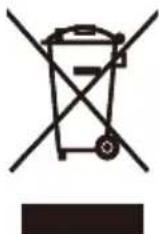
This symbol on the product or on its packaging indicates that this product must not be disposed of with your other household waste. Instead it is your responsibility to dispose of your waste equipment by handing it over to a designated collection point for the recycling of waste electrical and electronic equipment. The separate collection and recycling of your waste equipment at the time of disposal will help to conserve natural resources and ensure that it is recycled in a manner that protects human health and the environment. For more information about E-waste please visit http://www.india.philips.com/about/sustainability/recycling/index.page and to know where you can drop off your waste equipment for recycling in India please contact on below given contact details.
Helpline number: 1800-425-6396 (Monday to Saturday, 9 a.m. to 5:30 pm)
Centralized E-waste collection center Address:
TPV Technology India Private Limited,
59, Maheswari Nagar, 1st Main Road, Mahadevapura Post, Whitefield Road,
Bangalore, Karnataka, PIN: 560048, Tel: 080-3023-1000
E-mail: india.callcentre@tpv-tech.com
Information for U.K. only
WARNING - THIS APPLIANCE MUST BE EARTHED.
Important:
This apparatus is supplied with an approved moulded 13A plug. To change a fuse in this type of plug proceed as follows:
- Remove fuse cover and fuse.
- Fit new fuse which should be a BS 1362 5A,A.S.T.A. or BSI approved type.
- Retit the fuse cover.
If the fitted plug is not suitable for your socket outlets, it should be cut off and an appropriate 3-pin plug fitted in its place.
If the mains plug contains a fuse, this should have a value of 5A. If a plug without a fuse is used, the fuse at the distribution board should not be greater than 5A.
NOTE:The severed plug must be destroyed to avoid a possible shock hazard should it be inserted into a 13A socket elsewhere.
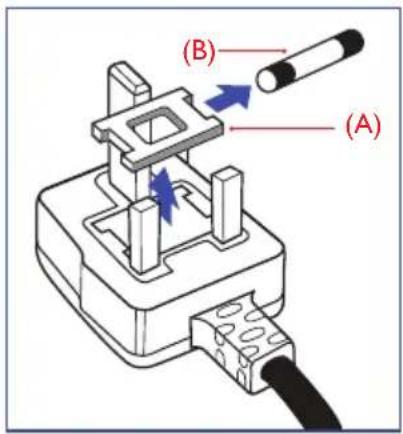
How to connect a plug
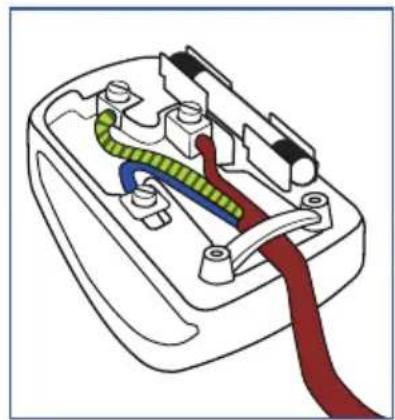
The wires in the mains lead are coloured in accordance with the following code:
BLUE - "NEUTRAL"("N")
BROWN - "LIVE" ("L")
GREEN&YELLOW - "EARTH" ("E")
- The GREEN&YELLOW wire must be connected to the terminal in the plug which is marked with the letter "E" or by the Earth symbol or coloured GREEN or GREEN&YELLOW.
- The BLUE wire must be connected to the terminal which is marked with the letter "N" or coloured BLACK.
- The BROWN wire must be connected to the terminal which is marked with the letter "L" or coloured RED.
Before replacing the plug cover, make certain that the cord grip is clamped over the sheath of the lead - not simply over the three wires.
4. Warranty Statement
Warranty Statement(English)
PHILIPS Monitor's warranty period listed as below, for areas not covered in this table, please follow their warranty statement.
| Region Product Category Warranty Period | ||
| USA, Canada All Monitors 4 years* | ||
| USA, Canada Refurbished monitor 90 days* | ||
| Mexico All Monitors 3 years* | ||
| Chile All Monitors 3 years* | ||
| Peru All Monitors 3 years* | ||
| Brazil EPEAT registered models as in www.epeat.net 3 year * | ||
| China All Monitors 3 years* | ||
| Asia Pacific All Monitors 3 years* | ||
| MEA All Monitors 3 years* | ||
| Europe | Monitors C, E lines | 3 years* |
| Monitors B, M, S, X, P, V lines | 3 years* | |
*: For TCO Certified, Generation 10 models apply below,
5-year available warranty is provided, where at least 1 year is free of charge.
To purchase extended warranty, please refer to "Service Contact Information" section or search www.philips.com/support for further information.
Extended warranty is charged for maximum 15% of MSRP of a product for each year.
J (Arabic)
J 1 J
aagai gai o jiai yjg jol 1. TCO Certified aal jrll
.
www.philips.com/support 1
Lgalljio jjo glgall
10 10
保修声明 (Chinese Simplified)
Izjava o jamstvu(Croatian)
Jamstveni period za PHILIPS monitore za područja koja nisu navedena u ovoj tablici, pogledajte izjavu o jamstvu za njih.
| Regija Kategorija | proizvoda Jamstveni period | |
| SAD, Kanada Svi | monitori 4 godina* | |
| SAD, Kanada Obnovljeni monitor 90 dana* | ||
| Meksiko Svi monitori 3 godina* | ||
| Čile Svi monitori 3 godina* | ||
| Peru Svi monitori 3 godina* | ||
| Brazil EPEAT registered models as in www.epeat.net 3 godina* | ||
| Kina Svi monitori 3 godina* | ||
| Pacifička Azija Svi | monitori 3 godina* | |
| MEA Svi monitori 3 godina* | ||
| Europa | Monitorii linije C, E 3 godina* | |
| Monitorii linije B, M, S, X, P, V | 3 godina* |
*: Za TCO certificirane modele Generacije 10 primijenite navedeno ispod, dostupno je 5-godišnje jamstvo, pri Čemu je najmanje 1 godina besplatno.
Vaharoti keshan(Hindi)
PHILIPS Maonotri ki varee Aayi Nioe Suaovad, i 5 t aolikka me nhi shamil kne
保证の関atory (Japanese)
Garantibevis(Norwegian)
Garanti Beyani(Turkish)
5. Security and functionality software updates
Apply for TCO Certified, Generation 10 models with operating system
English
The security updates, corrective updates and functionality updates to the operating system is available for 5 years after the end of placement on the market.
Arabic
.
Brazilian Portuguese
Spare Parts Service (English)
Extending the lifetime of IT products is the most effective way to reduce their environmental impact.
Spare parts are not upgradeable, but repairable and/or replaceable.
Spare parts are available for use in the repair of EPEAT registered products (refer to www.epeat.net) for minimum 5 years after the point of sale or 2 years after the end of production, whichever is later.
Spare parts are available for use in the repair of non-EPEAT registered products for minimum 3 years after the point of sales or 1 year after the end of production, whichever is later.
Please refer to "Service Contact Information" section or www.philips.com/support for further information.
Key Spare Parts List
| Components or Assemblies | Replaceable | Repairable | How to Replace or Repair |
| Connectivity cables Yes No | By hand without tool, but please contact your dealer or your local service center (via www.philips.com/support) for confirming the cables specification when necessary. | ||
| Power cables Yes No | |||
| External power supply(1) | Yes Yes | For replacing, please follow above action. For repairing, please just contact your local service center (via www. philips.com/support) for help when necessary to avoid any risk. | |
| Display panel or display assembly | Yes Yes | Please just contact your local service center (via www. philips.com/support) for help when necessary to avoid any risk. | |
| Internal power supply(2) | Yes Yes | ||
| System board(3)/motherboard | Yes Yes |

Note
(1): only applicable for the models with external power supply.
(2): Internal power supply includes power circuit board assembly.
(3): System board includes keyboard,USB board etc., only applicable for the models with related function.
Extending the lifetime of IT products is the most effective way to reduce their environmental impact.
Spare parts are not upgradeable, but repairable and/or replaceable.
Spare parts are available for use in the repair of EPEAT registered products (refer to www.epeat.net) for minimum 5 years after the point of sale or 2 years after the end of production, whichever is later.
Spare parts are available for use in the repair of non-EPEAT registered products for minimum 3 years after the point of sales or 1 year after the end of production, whichever is later.
Please refer to "Service Contact Information" section or www.philips.com/support for further information.
Key Spare Parts List
(1): only applicable for the models with external power supply.
(2): Internal power supply includes power circuit board assembly.
(3): System board includes keyboard,USB board etc., only applicable for the models with related function.
Service van reserveonderdelen (Dutch)
Extending the lifetime of IT products is the most effective way to reduce their environmental impact.
Spare parts are not upgradeable, but repairable and/or replaceable.
Spare parts are available for use in the repair of EPEAT registered products (refer to www.epeat.net) for minimum 5 years after the point of sale or 2 years after the end of production, whichever is later.
Spare parts are available for use in the repair of non-EPEAT registered products for minimum 3 years after the point of sales or 1 year after the end of production, whichever is later.
Please refer to "Service Contact Information" section or www.philips.com/support for further information.
Key Spare Parts List
(1): only applicable for the models with external power supply.
(2): Internal power supply includes power circuit board assembly.
(3): System board includes keyboard,USB board etc., only applicable for the models with related function.
Extending the lifetime of IT products is the most effective way to reduce their environmental impact.
Spare parts are not upgradeable, but repairable and/or replaceable.
Spare parts are available for use in the repair of EPEAT registered products (refer to www.epeat.net) for minimum 5 years after the point of sale or 2 years after the end of production, whichever is later.
Spare parts are available for use in the repair of non-EPEAT registered products for minimum 3 years after the point of sales or 1 year after the end of production, whichever is later.
Please refer to "Service Contact Information" section or www.philips.com/support for further information.
Key Spare Parts List
(1): only applicable for the models with external power supply.
(2): Internal power supply includes power circuit board assembly.
(3): System board includes keyboard,USB board etc., only applicable for the models with related function.
Extending the lifetime of IT products is the most effective way to reduce their environmental impact.
Spare parts are not upgradeable, but repairable and/or replaceable.
Spare parts are available for use in the repair of EPEAT registered products (refer to www.epeat.net) for minimum 5 years after the point of sale or 2 years after the end of production, whichever is later.
Spare parts are available for use in the repair of non-EPEAT registered products for minimum 3 years after the point of sales or 1 year after the end of production, whichever is later.
Please refer to "Service Contact Information" section or www.philips.com/support for further information.
Key Spare Parts List
(1): only applicable for the models with external power supply.
(2): Internal power supply includes power circuit board assembly.
(3): System board includes keyboard,USB board etc., only applicable for the models with related function.
Extending the lifetime of IT products is the most effective way to reduce their environmental impact.
Spare parts are not upgradeable, but repairable and/or replaceable.
Spare parts are available for use in the repair of EPEAT registered products (refer to www.epeat.net) for minimum 5 years after the point of sale or 2 years after the end of production, whichever is later.
Spare parts are available for use in the repair of non-EPEAT registered products for minimum 3 years after the point of sales or 1 year after the end of production, whichever is later.
Please refer to "Service Contact Information" section or www.philips.com/support for further information.
Key Spare Parts List
(1): only applicable for the models with external power supply.
(2): Internal power supply includes power circuit board assembly.
(3): System board includes keyboard,USB board etc., only applicable for the models with related function.
7. Service Contact Information
English
Contact Information for Europe region:
Bulgarian (Българский)
Hdopmaun 3a KOHTaKT 3a pernoh EBPONA:
Croatian (Hrvatski)
Contact Information for America region:
| Country | Consumer care number | Country | Consumer care number |
| Argentina | (+54) 0810-444-7782 | Mexico | (+52) 800 087 5888 ext 120 |
| Brazil (Brasil) | (+55) 0800-7254101 | Peru | (+51) 0800-00-688 |
| Canada (+1) 800 479-6696 U.S.A. | (+1) 877 835-1838 | ||
| Chile | (+56) 800 384 300 | ||
Contact Information for China:
| Country | Consumer care number |
| China(中国) | (+86) 4009 555 666 |
Contact Information for AP region:
| Country Consumer care number Country Consumer care number | |||
| Australia (+61) 13 | 00 360 386 Philippines | (Pilipinas) (+63) 9175990 | 545 |
| Hong Kong(香港) Macau(澳門) | Hong Kong: Tel: (+852) 2619 9639 Macau: Tel: (+853) 0800-987 | Singapore (+65) 6286-7 | 333 |
| Indonesia (+62) | 1500155 Taiwan ( | 臺灣)(+886) | 800-231-099 |
| Korea(한국)(+82) | 1661-5003 Thailand ( | 울iston(ngu) | (+66) 086-3787751 hot-Line (+66) 02-0622211 tech. support 076 553 3977 Ho Chi Minh |
| Malaysia | (+60) 80022-0180 (+60) 3-7808-4000 | Vietnam (Viên Nam) | (+84) 28 7300 0911 Ho Chi Minh (+84) 292 3781 978 Can Tho (+84) 24 7300 0911 Ha Noi (+84) 236 356 2666 Da Nang |
| New Zealand (+64) | 0800 657447 Japan ( | 日本) | (+81) 0120-060-530 |
Contact Information for India/MEA region:
| Country Consumer care number Country | Consumer care number |
| Bangladesh(+880) 248113087 | (ص rd) Egypt(+20) 1000305629 / (+20) 1000305630 / (+20) 1000715313 |
| India (बारल) (+91) 1 800 425 6396 | (الbvان) Lebanon(+961) 1 514 003 |
| Saudi Arabia(العربية) (+966) 114614408 | (بساني) Pakistan(+92) 300-8271914 / 32270410 |
| South Africa(Suid-Afrika) (+27) 11 201 8927 | UAE(الإستعمالobiopsية)Lithuania(+971) 4 821 3832 / (+971) 4 8849074 |

2021 TOP Victory Investments Ltd. All rights reserved.
This product has been manufactured by and is sold under the responsibility of Top Victory Investments
and Top Victory Investments Ltd. is the warrantor in relation to this product.
Philips and the Philips Shield Emblem are registered trademarks of Koninklijke Philips N.V. and are used under license.
Specifications are subject to change without notice.