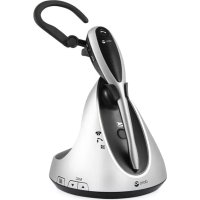
ProSound hs1910dect - Earphones DORO - Free user manual and instructions
Find the device manual for free ProSound hs1910dect DORO in PDF.



| Product Type | Cordless headset telephone handset lifter |
| Brand | Doro |
| Model | ProSound hs1910dect (lifter) |
| Dimensions (approx.) | 100 x 50 x 30 mm |
| Weight (approx.) | 100 g |
| Power supply | Via control cable on the headset base |
| Main functions | Raises and lowers the handset, internal/external ring detection, detector activation/deactivation, sensitivity adjustment, status indicator |
| Ring detection type | Internal (built-in) and external (optional via MIC connector) |
| Status indicator | Blue: detector activated; Red: detector deactivated; Fast flashing: ringing detected |
| Compatibility | Most corded telephones |
| Supplied parts | Large spacer, anti-slip pad, external ring detector (optional) |
| Adjustments | Arm height, motor position, ring detector sensitivity |
| Maintenance | Clean with a soft, dry cloth |
| Safety | Unplug during storms, do not expose to moisture |
| Warranty | 24 months from date of purchase |
| Repairability | Contact the retailer for after-sales service |
| Declaration of conformity | Directives 1999/5/EC (R&TTE) and 2002/95/EC (RoHS) - www.doro.com/dofc |
Frequently Asked Questions - ProSound hs1910dect DORO
User questions about ProSound hs1910dect DORO
0 question about this device. Answer the ones you know or ask your own.
Ask a new question about this device
Download the instructions for your Earphones in PDF format for free! Find your manual ProSound hs1910dect - DORO and take your electronic device back in hand. On this page are published all the documents necessary for the use of your device. ProSound hs1910dect by DORO.
USER MANUAL ProSound hs1910dect DORO
Lifter for hs1910 DECT
English
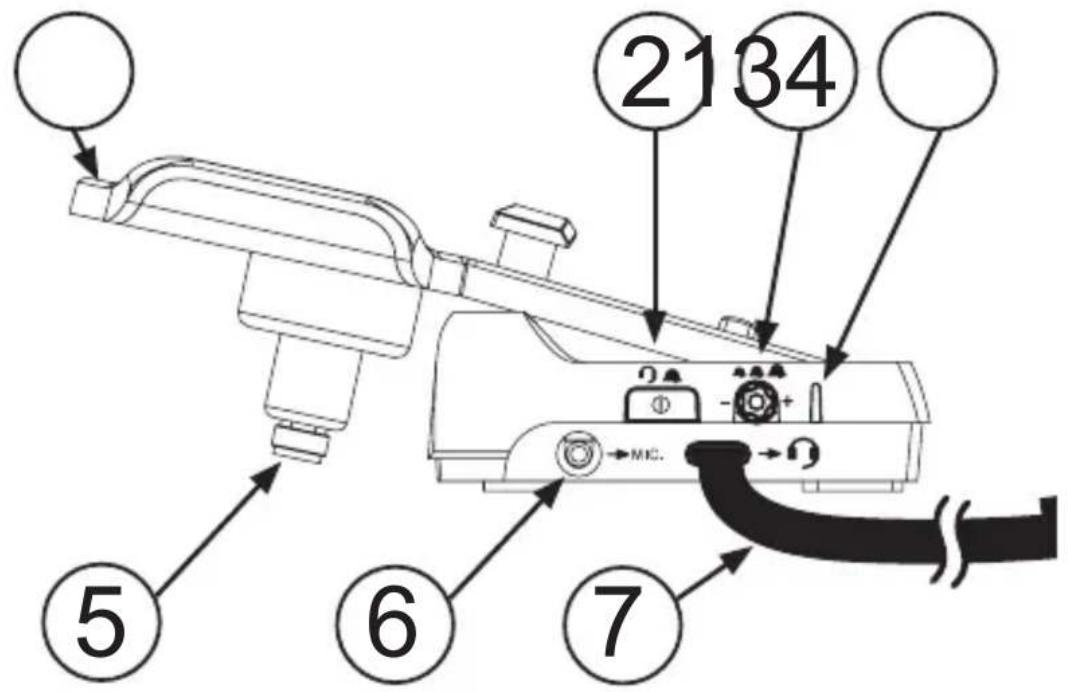
1 Lifter arm
2 Ring detector ON/OFF
3 Ring detector sensitivity
4 Status indicator
5 Hook presser motor
6 External ring detector connector MIC.
7 Lifter control cable
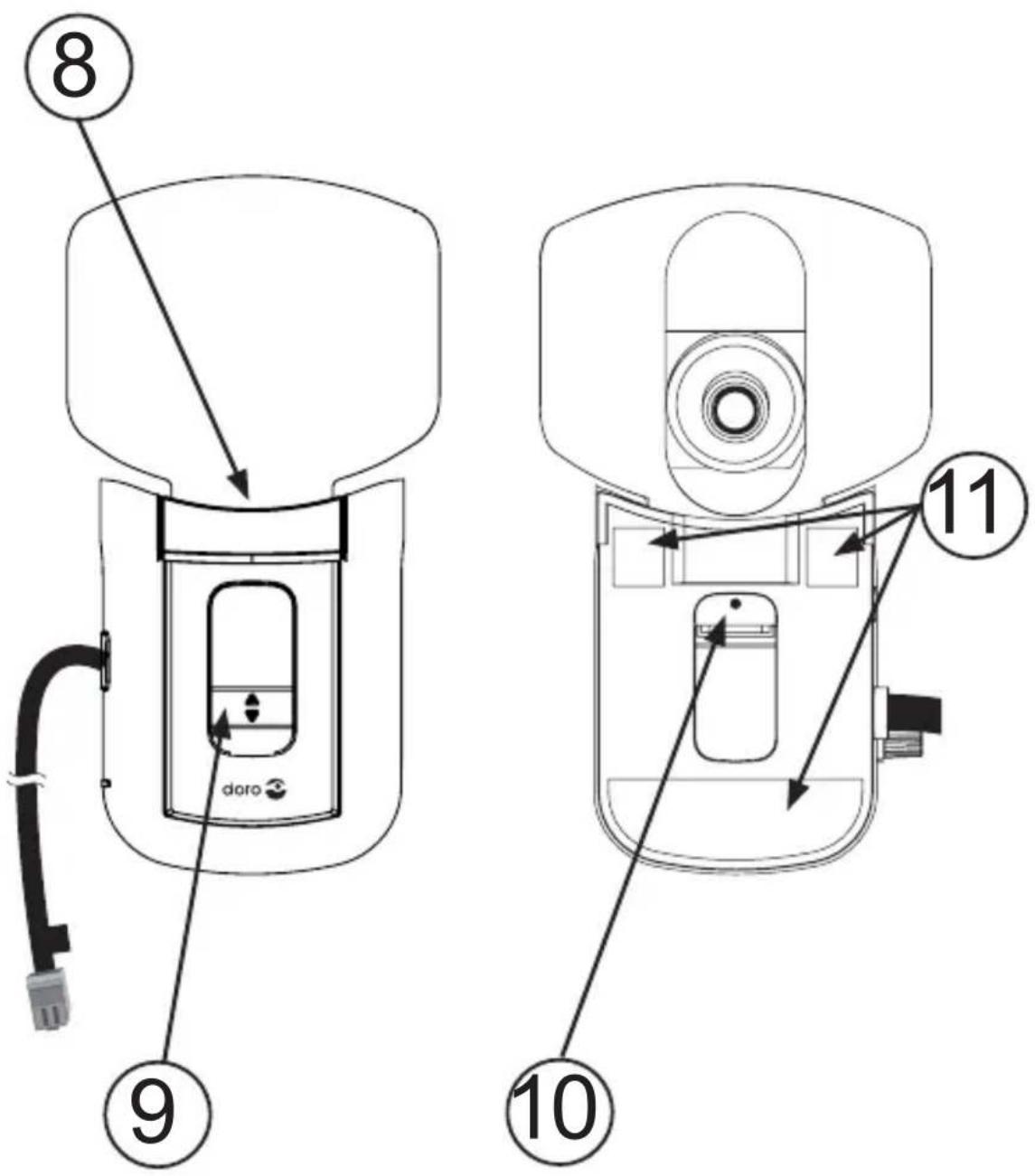
8 Small lifter pad
9 Height control
10 Internal ring detector
11 Adhesive tapes
Svenska
1 Lurlyftararm
2 Ringsignalsdetektor PAV
3 Ringsignalsdetektorns kansklighet
4 Statusindicator
5 Motor for Telefonklyka
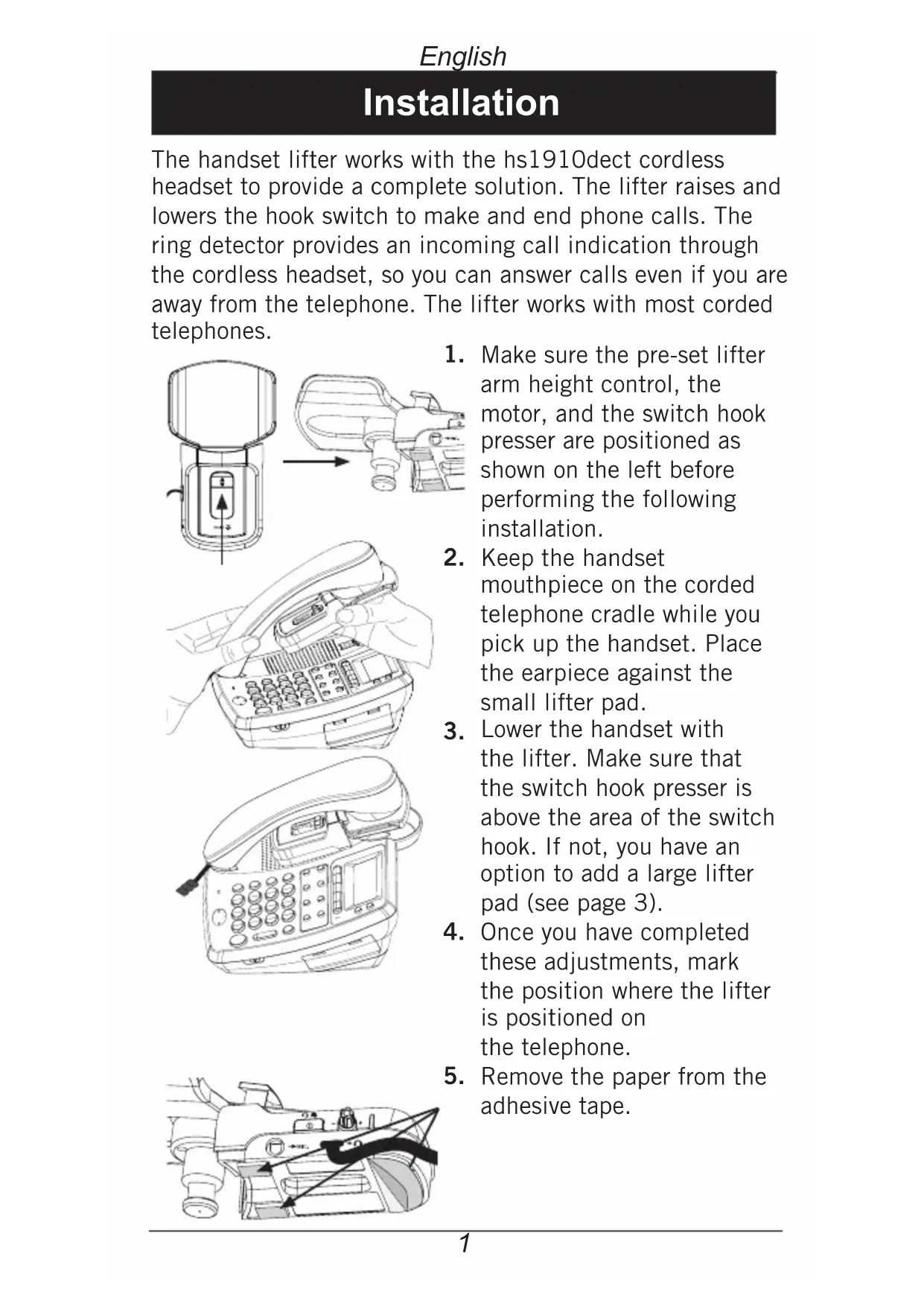
The handset lifter works with the hs1910dect cordless headset to provide a complete solution. The lifter raises and lowers the hook switch to make and end phone calls. The ring detector provides an incoming call indication through the cordless headset, so you can answer calls even if you are away from the telephone. The lifter works with most corded telephones.
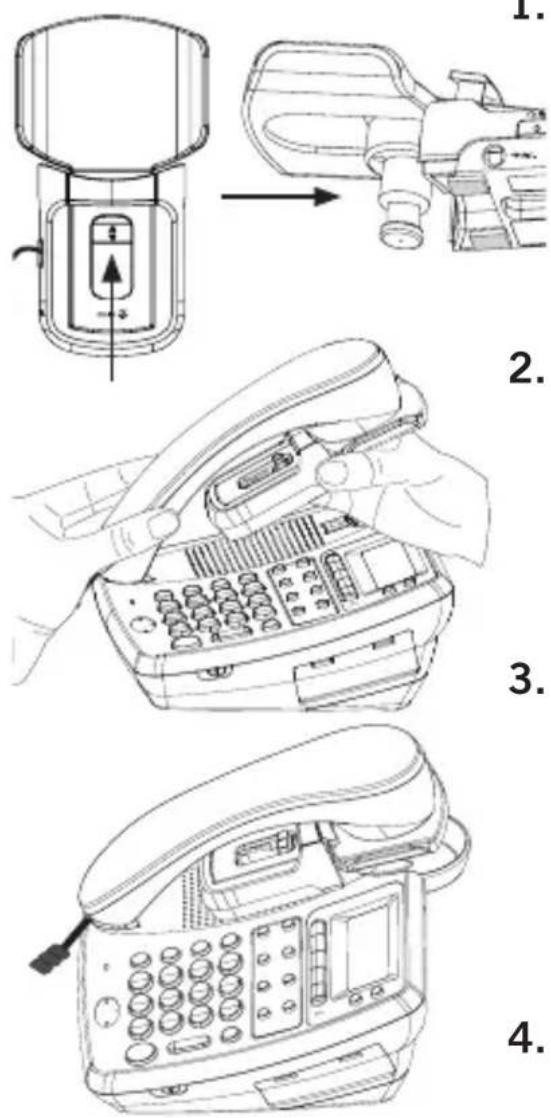
- Make sure the pre-set lifter arm height control, the motor, and the switch hook presser are positioned as shown on the left before performing the following installation.
- Keep the handset mouthpiece on the corded telephone cradle while you pick up the handset. Place the earpiece against the small lifter pad.
- Lower the handset with the lifter. Make sure that the switch hook presser is above the area of the switch hook. If not, you have an option to add a large lifter pad (see page 3).
- Once you have completed these adjustments, mark the position where the lifter is positioned on the telephone.
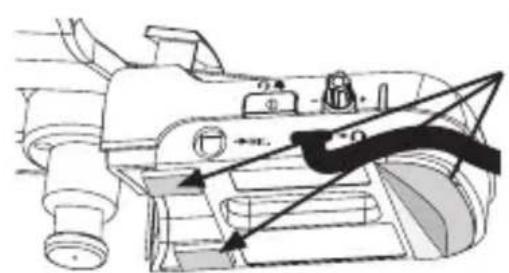
- Remove the paper from the adhesive tape.
- Return the lifter to the same position that you marked before and press down.
- Install hs1910duct as described in the manual, Option 1.
- Connect the Lifter control cable (blue) to the corresponding socket on the headset base.
- Remove the handset from your telephone.
- Press on the headset and listen for the dial tone. Make sure the switch hook presser is in its non-extended position.
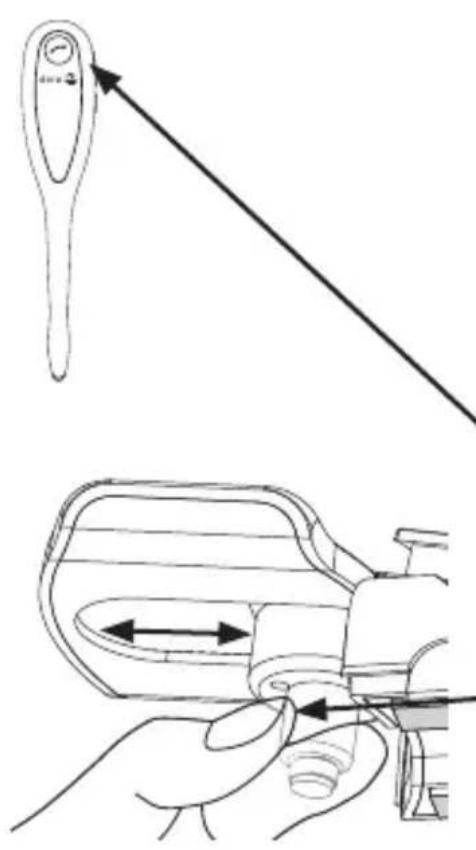
-11. Adjust the motor back and forth to set the switch hook presser just above the switch hook. - Press down on the lifter arm until the switch hook presser firmly touches the switch hook on the telephone. Then slide the lifter arm height control down one notch at a time. Stop adjusting when you hear the dial tone from the headset or handset earpiece.
- Place the telephone handset on the lifter arm.
- Test to make sure the hook is working by pressing the button on the headset.
It may take some adjustments and testing to find the right position for the lifter. For the lifter to work properly, the switch hook must release completely when you press the button on the headset. The switch hook must also be pressed all the way when you press the button on the headset.
Installation of large lifter pad
If the small lifter pad cannot hold the corded handset steady, you can attach a large lifter pad (provided) to enlarge the contact area.
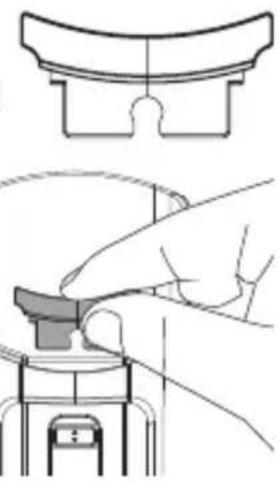
- Hold the large lifter pad in front of the small lifter pad, as shown.
- Insert the large lifter pad into the two front gaps of the small lifter pad.
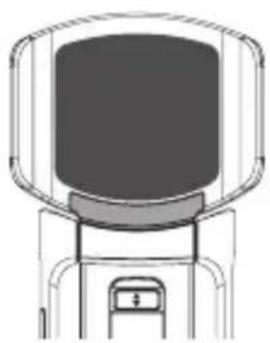
Installation of anti-slip pad
The anti-slip pad (provided) prevents your corded handset from slipping from the lifter.
- Position the anti-slip pad on the lifter arm in the centre front of the lifter pad.
- Peel the paper from the adhesive tape.
- Return the anti-slip pad to its previous position and rest your corded handset on the lifter.
Internal and external ring detectors
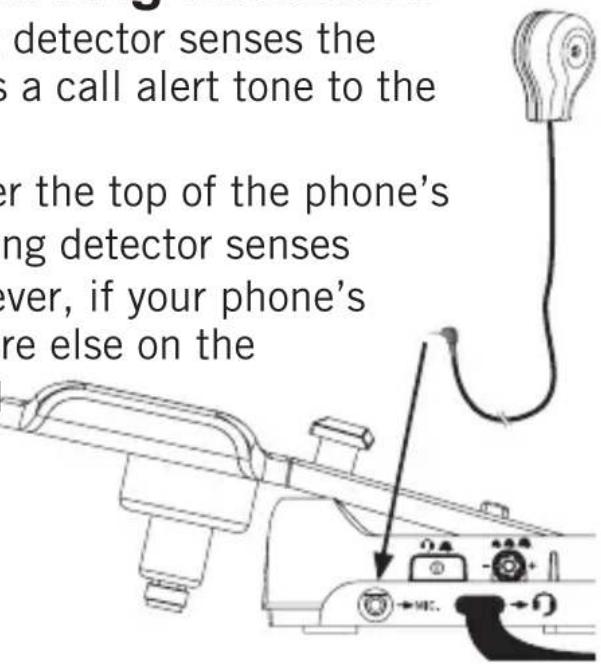
The internal or external ring detector senses the telephone ringing and sends a call alert tone to the headset earpiece.
If you installed the lifter over the top of the phone's speaker, then the internal ring detector senses the telephone ringing. However, if your phone's speaker is located somewhere else on the
phone, connect the optional external ring detector to the speaker as shown below.
Install the external ring detector
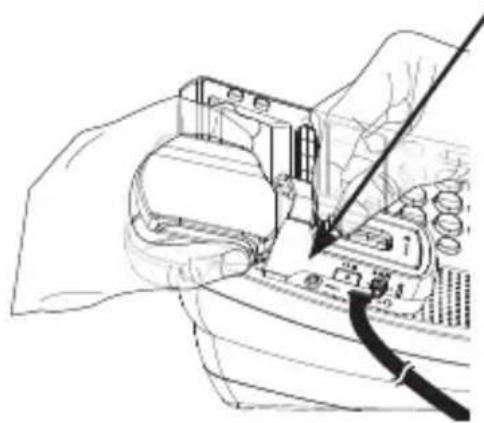
- Connect the external ring detector into the MIC. socket on the lifter.
- Remove the paper from the adhesive tape on the external ring detector.
- Stick the external ring detector near the centre of the corded phone's speaker.
Adjust the sensitivity level
The default setting of the ring detector works with most telephones. However, the ring detector might need some adjustments to recognise less common telephone ring tones.
To adjust the ring detector sensitivity while the telephone is ringing:
- Turn the clockwise to increase the sensitivity.
- Turn the clockwise to decrease the sensitivity.
When the ring detector senses the telephone ringer correctly:
- The STATUS light on the lifter flashes quickly when the phone rings.
- The detector sends the call alert tone to the headset earpiece.
Headset incoming alert tone
Press the button on the lifter to turn the ring detector on or off.
The STATUS light is blue when the ring detector is turned on.
The STATUS light is red when the ring detector is turned off.
English
Troubleshooting
Disconnect any additional equipment, extension cords and other phones. If the problem is resolved, the fault lies with another piece of equipment.
- Check that all cords are undamaged and correctly plugged in.
- Make sure PHONE MODE is selected on the headset base.
- Make sure the lifter control cable is connected to on the headset base.
- Make sure the correct termination is selected on the headset base. Slide on the side of the headset base from A to G until the dial tone is clear.
- Reset the headset base. Unplug the unit's electrical power. Wait for approximately 15 seconds, then plug it back in. Allow up to one minute for the cordless headset and headset base to reset.
- If despite the above measures the device still doesn't work, contact the place where the equipment was purchased for service. Don't forget the receipt/invoice.
Others
Declaration of conformity
We hereby declare that the product 'Lifter for hs1910 DECT' conforms to the essential requirement and other relevant regulations contained in the directives 1999/5/EC(R&TTE), 2002/95/EC(ROHS). A copy of the manufacturer's declaration is available at: www.doro.com/dofc
Guarantee
This product is guaranteed for a period of 12 months from the date of purchase. In the unlikely event of a fault occurring during this period, please contact the place of purchase. Proof of purchase is required for any service or support needed during the guarantee period.
This guarantee will not apply to a fault caused by an accident or a similar incident or damage, liquid ingress, negligence, abnormal usage, non-maintenance or any other circumstances on the user's part. Furthermore, this guarantee will not apply to any fault caused by a thunderstorm or any other voltage fluctuations. As a matter of precaution, we recommend disconnecting the device during a thunderstorm.
NOTE! This guarantee does not affect your legal (statutory) rights under your applicable national laws relating to the sale of consumer products.