
ACM 804/NE - Hob WHIRLPOOL - Free user manual and instructions
Find the device manual for free ACM 804/NE WHIRLPOOL in PDF.




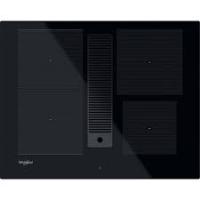
| Product Type | Induction Hob |
| Brand | Whirlpool |
| Model | ACM 804/NE |
| Number of Cooking Zones | 4 |
| Control Type | Touch |
| Electrical Supply | 230 V ~ / 230-240 V ~ / 230 V 3~ / 400 V 3N~ / 400 V 2N~ |
| Maximum Total Power | Approximately 7.2 kW (estimate) |
| Booster Function | Yes, for each cooking zone (displays 'P') |
| Eco Booster Function | Yes, maintains boiling at low power |
| Timer | Yes, up to 99 minutes with automatic shut-off |
| Child Lock | Yes, child safety |
| Residual Heat Indicator | Yes, letter 'H' |
| Pan Detection | Yes, automatic shut-off if no pan detected |
| Automatic Safety Shut-off | Yes, after 10 seconds without selection |
| Demo Mode | Yes |
| Audible Signal | Adjustable (on/off) |
| Surface Type | Ceramic Glass |
| Cleaning | Soft cloth, specific cleaning products; do not use steam cleaner |
| Installation | Built-in, requires a partition wall |
| Spare Parts | Available for 10 years |
| Compliance | Low Voltage Directive (2006/95/EC) and EMC Directive (2004/108/EC) |
| Recycling | Compliant with WEEE Directive (2002/96/EC) |
Frequently Asked Questions - ACM 804/NE WHIRLPOOL
User questions about ACM 804/NE WHIRLPOOL
0 question about this device. Answer the ones you know or ask your own.
Ask a new question about this device
Download the instructions for your Hob in PDF format for free! Find your manual ACM 804/NE - WHIRLPOOL and take your electronic device back in hand. On this page are published all the documents necessary for the use of your device. ACM 804/NE by WHIRLPOOL.
USER MANUAL ACM 804/NE WHIRLPOOL
IMPORTANT SAFETY INSTRUCTIONS
YOUR SAFETY AND THAT OF OTHERS IS VERY IMPORTANT
This manual and the appliance itself provide important safety messages, to be read and always observed.

This is the danger symbol, regarding safety, warning of potential risks to users and others.
All safety messages will be preceded by the danger symbol and the following words:

DANGER
Indicates a hazardous situation which, if not avoided, will result in serious injury.

WARNING
Indicates a hazardous situation which, if not avoided, could cause serious injury.
All messages relevant to safety specify the potential risk to which they refer and indicate how to reduce the risk of injury, damage and electric shocks due to incorrect use of the appliance. Make sure to comply with the following:
- The appliance must be disconnected from the power supply before carrying out any installation operation.
- Installation and maintenance must be carried out by a specialised technician, in compliance with the manufacturer's instructions and the local safety regulations in force. Do not repair or replace any part of the appliance unless specifically stated in the user manual.
- The appliance must be earthed.
- The power cable must be long enough for connecting the appliance, fitted in the cabinet, to the power supply.
- For installation to comply with the current safety regulations, an omnipolar switch with minimum contact gap of 3mm is required.
- Do not use multi-sockets or extension cords.
- Do not pull the appliance's power cable.
- The electrical parts must not be accessible to the user after installation. The appliance is designed solely for domestic use for cooking food. No other use is permitted (e.g. heating rooms). The Manufacturer declines any liability for inappropriate use or incorrect setting of the controls. The appliance and its accessible parts become hot during use. Care should be taken to avoid touching heating elements. Children less than 8 years old shall be kept away unless continuously supervised. The accessible parts can become very hot during use. Children must be kept away from the appliance and watched over to ensure they do not play with it.
- Do not touch the appliance heating elements during and after use. Do not allow the appliance to come into contact with cloths or other flammable materials until all the components have cooled sufficiently.
- Do not place flammable materials on or near the appliance. Overheated oils and fats catch fire easily. Pay attention when cooking food products rich in fat and oil.
- This appliance can be used by children aged from 8 years and above and persons with reduced physical, sensory or mental capabilities or lack of experience and knowledge if they have been given supervision or instruction concerning use of the appliance in a safe way and understand hazards involved. Children shall not play with the appliance. Cleaning and user maintenance shall not be made by children without supervision.
- A separator panel (not supplied) must be installed in the compartment under the appliance.
- If the surface is cracked, switch off the appliance to avoid the possibility of electric shock. The appliance is not intended to be operated by means of an external timer or separate remote control system.
- Unattended cooking on a hob with fat or oil can be dangerous and may result in fire. NEVER try to extinguish a fire with water, but switch off the appliance and then cover flame e.g. with a lid or a fire blanket.
Danger of fire: do not store items on the cooking surfaces.
- Do not use steam cleaners. Metallic objects such as knives, forks, spoons and lids should not be placed on the hob surface since they can get hot.
- After use, switch off the hob element by its control and do not rely on the pan detector.
SAFEGUARDING THE ENVIRONMENT

Disposal of packing
The packing material is 100% recyclable and marked with the recycling symbol. The various parts of the packing must not be dispersed in the environment, but disposed of in compliance with local regulations.
Disposal
This appliance is marked in conformity with European Directive 2002/96/EC on Waste Electrical and Electronic Equipment (WEEE).
By ensuring that this appliance is correctly disposed of, the user can help prevent potentially negative consequences for the environment and the health of people.
The symbol on the appliance or the accompanying documentation indicates that this product should not be treated as domestic waste but must be taken to an appropriate collection point for recycling WEEE.
Energy saving
For optimum results, it is advisable to:
Use pots and pans with bottom width equal to that of the cooking zone. Only use flat-bottomed pots and pans. When possible, keep pot lids on during cooking. Use a pressure cooker to save even more energy and time. Place the pot in the middle of the cooking zone marked on the hob.
DECLARATION OF CONFORMITY (C)
This appliance, intended to come into contact with food products, complies with Regulation (C €) no. 1935/2004, and has been designed, manufactured and marketed in conformity with the safety requirements of "Low Voltage" Directive 2006/95/EC (replacing 73/23/EEC as amended) and protection requirements of "EMC" Directive 2004/108/EC.
BEFORE USE
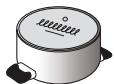
IMPORTANT: The cooking zones will not switch on if pots are not the right size. Only use pots bearing the symbol "INDUCTION SYSTEM" (Figure opposite). Place the pot on the required cooking zone before switching the hob on.
EXISTING POTS AND PANS

Use a magnet to check if the pot is suitable for the induction hob: pots and pans are unsuitable if not magnetically detectable.
- Make sure pots have a smooth bottom, otherwise they could scratch the hob. Check dishes.
- Never place hot pots or pans on the surface of the hob's control panel. This could result in damage.
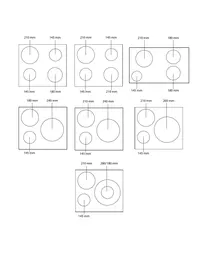
RECOMMENDED POT BOTTOM WIDTHS

INSTALLATION
After unpacking the product, check for any damage during transport. In case of problems, contact the dealer or the After-Sales Service.
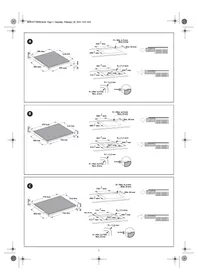
For built-in dimensions and installation instructions, see the pictures on page 2.
PREPARING THE CABINET FOR FITTING

WARNING
Install a separator panel under the hob. - The lower part of the product must not be accessible after installation. - Do not fit the separator panel if an undercut oven is installed.
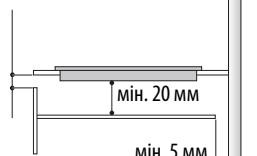
min. 5 mm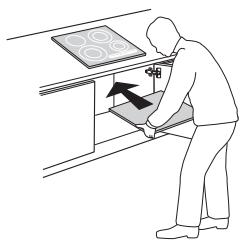
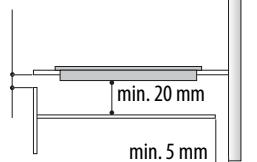
The distance between the underside of the appliance and the separator panel must respect the dimensions given in the figure. To ensure the correct operation of the product, do not obstruct the minimum required clearance between the hob and the top of the unit (min. 5 mm). If an undertop oven is installed, make sure the oven is equipped with a cooling system. Do not install the hob above a dishwasher or washing machine, so that the electronic circuits do not come into contact with steam or moisture which could damage them. In the case of flush-mounted installation, call the After-Sales Service to request assembly of screws kit 4801 211 00112. To remove the hob, use a screwdriver (not provided) to prise off the perimeter clips on the underside of the appliance.
ELECTRICAL CONNECTION

WARNING
- Disconnect the appliance from the power supply.
- Installation must be carried out by qualified personnel who know the current safety and installation regulations.
The manufacturer declines all liability for injury to persons or animals and for damage to property resulting from failure to observe the regulations provided in this chapter. - The power cable must be long enough to allow the hob to be removed from the worktop. - Make sure the voltage specified on the dataplate located on the bottom of the appliance is the same as that of the home.
Connection to the terminal block
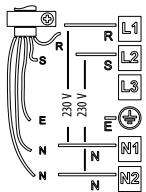
For the electrical connection, use an H05RR-F cable as specified in the table below.
| Wires | Number x size |
| 230 V ~ + ½ | 3 x 4 mm² |
| 230-240 V ~ + ½ | 3 X 4 mm² (Australia only) |
| 230 V 3 ~ + ½ | 4 x 1.5 mm² |
| 400 V 3N ~ + ½ | 5 x 1.5 mm² |
| 400 V 2N ~ + ½ | 4 x 1.5 mm² |
400V3N~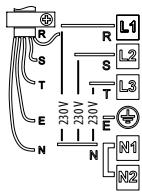
400V2N~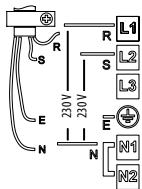
230V~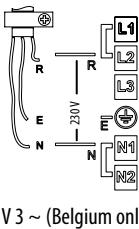
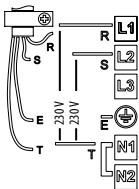
230-240 V ~ (Australia only) 230V~ UK only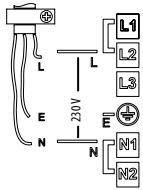
400 V 2N~ (Holland only)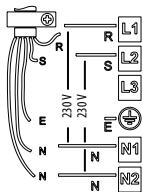
Important:
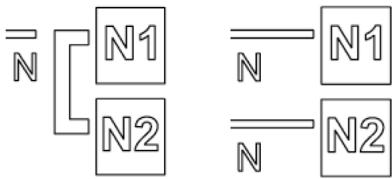
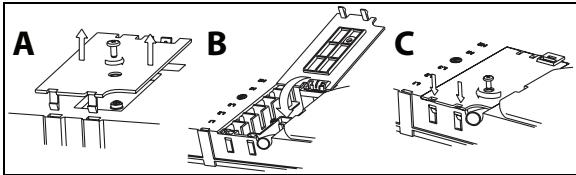
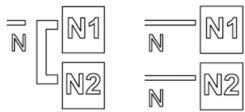
- Based on the wiring diagram (see figure) either keep or remove the metal jumpers between the screws on the terminal block L1-L2 and N1-N2.
- If the cable is provided, see the connection instructions attached to the cable.
- Make sure all six screws on the terminal block are tightened after connecting the cables.
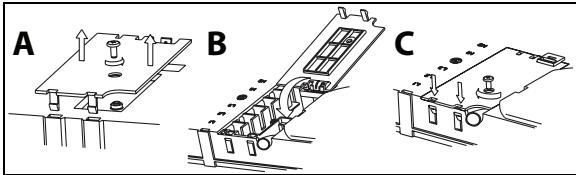
Example of jumper present (left) or removed (right). See the wiring diagram for details (the jumpers can be between L1-L2 and between N1-N2).
INSTRUCTIONS FOR USE

Control Panel Description
Control panel
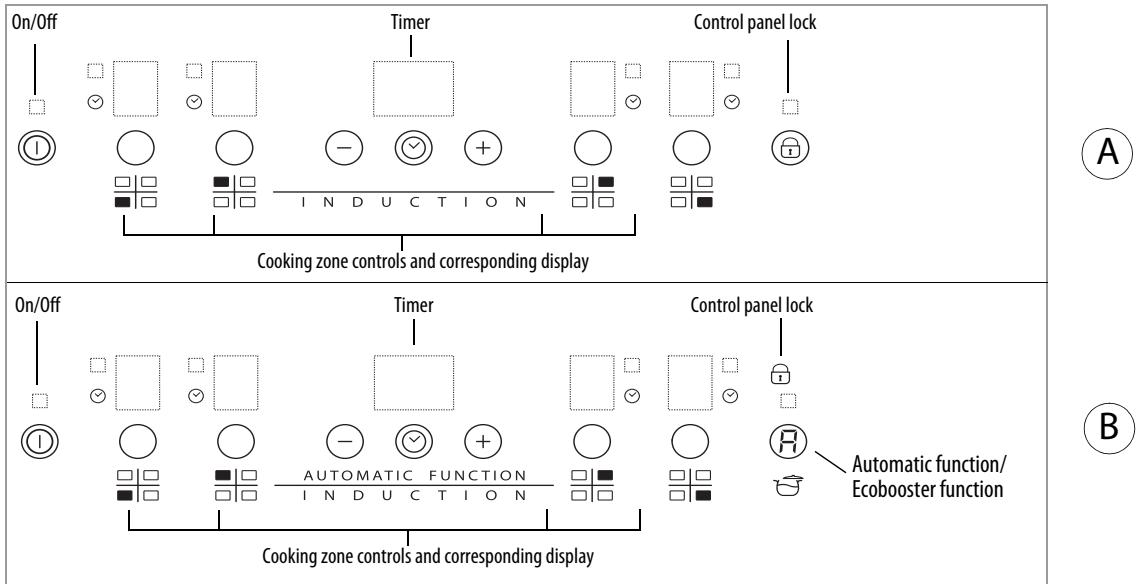
Switching the hob ON/OFF
To switch the hob on, press the ① button for approx. 2 seconds until the cooking zone displays light up. To switch off, press the same button until the displays switch off. All the cooking zones are deactivated.
If the hob has been in use, the residual heat indicator "H" remains lit until the cooking zones have cooled down.
If within 10 seconds of switching on, no function is selected, the hob switches off automatically.
Switching on and adjusting cooking zones
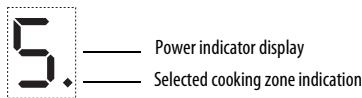
Once the hob is switched on and the pan is positioned on the chosen cooking zone, select the zone using the corresponding button: the display shows level 5.
Each cooking zone has various power levels, adjustable with the + / - buttons, going from "1": min. power, to "9": max. power. Some cooking zones have a fast boil function (Booster), shown on the display with the letter "P".
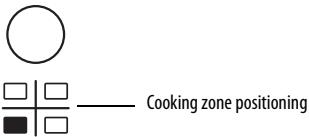
Deactivation of cooking zones
Select the cooking zone you wish to switch off. Press the corresponding button (a dot lights up at the bottom right of the power level indicator).
Press the key " - " to set the level to "0".
To switch off instantly, hold the zone selection button for 3 seconds. The cooking zone switches off and the residual heat indicator "H" lights up.
Control panel lock
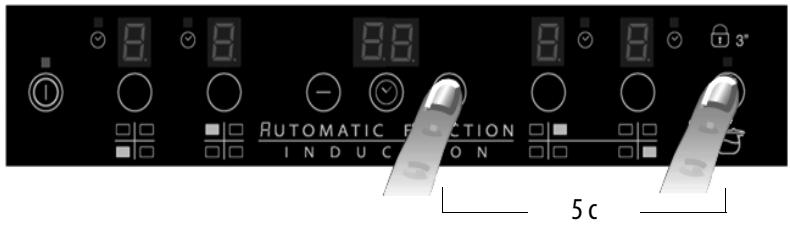
This function locks the controls to prevent accidental switching on of the hob. To activate the control panel lock function, switch on the hob and hold button (or the Automatic function/Eco Booster button, where present) for three seconds; an acoustic signal and a luminous indicator next to the padlock signal activation. The control panel is locked except for the deactivation function. To deactivate the control panel lock, repeat the activation procedure. The luminous dot goes off and the hob is active again.
The presence of water, liquid spilled from pots or any objects resting on the button below the symbol can accidentally activate or deactivate the control panel lock function.
Timer
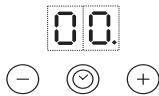
The timer can be used to set cooking time for a maximum of 99 minutes (1 hour and 39 minutes) for all cooking zones.
Select the cooking zone to be used with the timer (an illuminated dot appears to the bottom right hand side of the heat setting indicator on the display), press the button with the clock symbol then set the desired cooking time using the buttons "+" and "-" of the timer function (see figure). After a few seconds, the timer begins the countdown (an illuminated dot is visible next to the zone for which the timer has been activated). Once the set time has elapsed, an acoustic signal sounds and the cooking zone switches off automatically.
To deactivate the timer, press the button until the display shows "0:0" or hold the button with the clock symbol for at least 3 seconds.
To set the timer for another zone, repeat the points above. The timer display always shows the timer for the selected zone or the shortest timer.
To change or switch off the timer, press the zone selection button for the timer in question.
Control panel warnings.
Residual heat indicator.

The hob is fitted with a residual heat indicator for each cooking zone. These indicators alert the user when cooking zones are still hot.
If the display shows the cooking zone is still hot. If the residual heat indicator of a given cooking zone is lit, that zone can be used, for example, to keep a dish warm or to melt butter.
When the cooking zone cools down, the display goes off.
Incorrect or missing pot indicator.
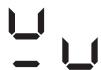
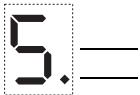
If you are using a pot that is not suitable, not correctly positioned or not of the correct dimensions for your induction hob, the message "no pot" will appear in the display (see figure at side). If no pot is detected within 60 seconds, the hob switches off.
Special functions
Some models have special functions:
Fast boil function (Booster)
This function, only present on some cooking zones, makes it possible to exploit the hob's maximum power (for example to bring water to the boil very quickly). To activate the function, press the "+" button until "P" appears on the display. After 10 minutes' use of the booster function, the appliance automatically sets the zone to level 9.
Automatic function R
The function automatically sets the power level to maintain a light boil. Activate this function after bringing to the boil, pressing first of all the cooking zone button followed by button R.
Eco Booster
With the hob on and the cooking zone selected, press button E to activate the function. The hob automatically activates a cycle that allows you to bring water to the boil and then keep it simmering, with reduced energy consumption compared to the normal booster function. The function is only provided for the two cooking zones identified by the symbol P.
Demo Mode
This hob is equipped with a demo mode which allows you to interact with the control panel without activating the corresponding cooking zones. The activation and deactivation procedure must be carried out within 60 seconds of the appliance being connected to the power supply in the home.
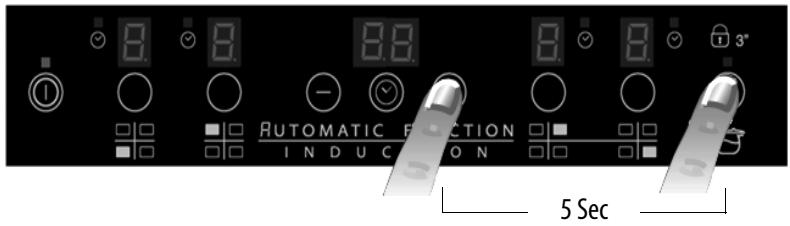
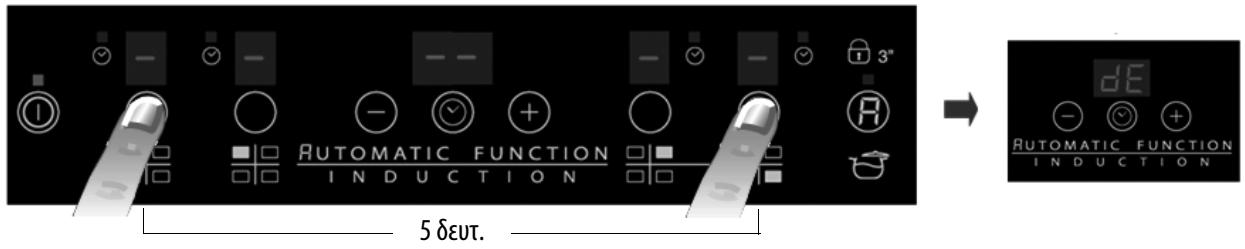
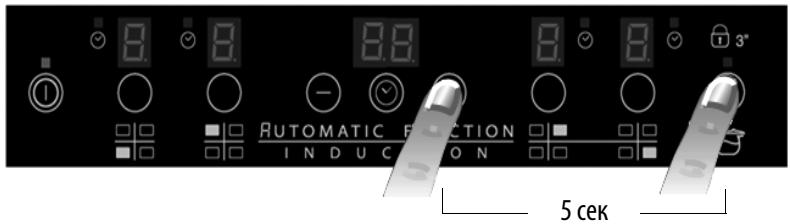
To activate the demo mode, hold the two external cooking zone selection buttons at the same time for at least 5 seconds: "dE" appears on the central display. You can now explore the control panel functions. The Lock and Unlock function is active also in Demo Mode.
To deactivate Demo mode, repeat the procedure, remembering first of all to disconnect the hob from the mains and then reconnect it, carrying out the procedure within 60 seconds of connection.

Activation/deactivation of the acoustic signal
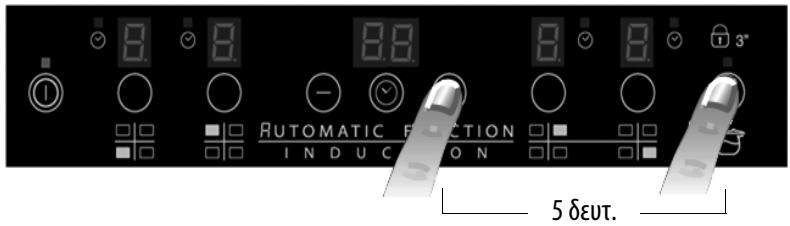
After switching the hob on, press and hold the "+" button and the outermost selector button on the right simultaneously for at least three seconds ("control panel lock").
CLEANING

WARNING
- Do not use steam cleaners. Before cleaning, make sure the cooking zones are switched off and that the residual heat indicator ("H") is not displayed.
IMPORTANT: Do not use abrasive sponges or scouring pads. Their use could eventually ruin the glass.
After each use, clean the hob (when it is cool) to remove any deposits and stains due to food residuals. Sugar or foods with a high sugar content damage the hob and must be immediately removed. Salt, sugar and sand could scratch the glass surface. Use a soft cloth, absorbent kitchen paper or a specific hob cleaner (follow the Manufacturer's instructions).
TROUBLESHOOTING GUIDE
- Read and follow the instructions given in the section "Instructions for use".
- Check that the electricity supply has not been shut off. Dry the hob thoroughly after cleaning it. If, when the hob is switched on, alphanumeric codes appear on the display, consult the following table for instructions. If the hob cannot be switched off after using it, disconnect it from the power supply.
| ERROR CODE | DESCRIPTION | POSSIBLE CAUSES | ERROR ELIMINATION |
| C81, C82 | The control panel switches off because of excessively high temperatures | The internal temperature of electronic parts is too high | Wait for the hob to cool down before using it again. |
| F42 or F43 | The connection voltage is wrong | The sensor detects a discrepancy between the appliance voltage and that of the mains supply | Disconnect the hob from the mains and check the electrical connection |
| F12, F21, F25, F36, F37, F40, F47, F56, F58, F60 | Call the After-Sales Service and specify the error code | ||
NOISES MADE BY THE HOB
Induction hobs can make whistling or crackling sounds during normal operation, these actually come from the pots and pans as a result of the characteristics of the bottoms (for example, bottoms made of several layers of material, or uneven bottoms). These noises vary depending on the pots and pans used and the amount of food they contain, and are not indicative of a defect of any kind.
In addition, the induction hob is equipped with an internal cooling system to control the temperature of electronic parts; as a result, during operation and for several minutes after the hob has been switched off, the noise of the cooling fan will be audible. This is perfectly normal and indeed essential for proper functioning of the appliance.
AFTER-SALES SERVICE
Before contacting the After-sales Service:
- See if you can solve the problem yourself with the help of the "Troubleshooting guide".
- Switch the appliance off and then on again it to see if the problem has been eliminated.
If the problem persists after the above checks, contact the nearest After-Sales Service.
Always specify:
a brief description of the fault; the product type and exact model; the Service number (the number after the word Service on the rating plate), located under the appliance (on the metal plate). your full address; - your telephone number.
SERVICE
0000 000 0000
If any repairs are required, contact an authorised After-Sales Service Centre (to ensure the use of original spare parts and correct repairs). Spare parts are available for 10 years.
POWER LEVEL TABLE NOTE:
| Power level | Type of cooking | Level use (indicating cooking experience and habits) | |
| Max. power | Boost | Fast heating | Ideal for rapidly increasing the temperature of food to fast boiling in the case of water or rapidly heating cooking liquids |
| 8-9 | Frying - boiling | Ideal for browning, starting to cook, frying deep frozen products, fast boiling | |
| High power | 7-8 | Browning - sautéing - boiling - grilling | Ideal for sautéing, maintaining a lively boil, cooking and grilling (for a short period of time, 5-10 minutes) |
| 6-7 | Browning - cooking - stewing - sautéing - grilling | Ideal for sautéing, maintaining a light boil, cooking and grilling (for a medium period of time, 10-20 minutes), preheating accessories | |
| Medium power | 4-5 | Cooking - stewing - sautéing - grilling | Ideal for stewing, maintaining a gentle boil, cooking (for a long period of time). Creaming pasta |
| 3-4 | Cooking - simmering - thickening - creaming | Ideal for long-cooking recipes (rice, sauces, roasts, fish) with liquids (e.g. water, wines, broth, milk), creaming pasta | |
| 2-3 | Ideal for long-cooking recipes (less than a litre in volume: rice, sauces, roasts, fish) with liquids (e.g. water, wines, broth, milk) | ||
| Low power | 1-2 | Melting - defrosting - keeping food warm - creaming | Ideal for softening butter, gently melting chocolate, thawing small products and keeping just-cooked food warm (e.g. sauces, soups, minestrone) |
| 1 | Ideal for keeping just-cooked food warm, for creaming risottos and for keeping serving dishes warm (with induction-suitable accessory) | ||
| OFF | Zero power | Support surface | Hob in stand-by or off mode (possible end-of-cooking residual heat, indicated by an “H”) |
When making quick-cook foods that require perfect heat distribution (e.g. pancakes) on the 28 cm double cooking zone (where present), use pans no greater than 24 cm in diameter. For delicate cooking (for example, melting chocolate or butter) use the smaller diameter single zones.
IMPORTANT SAFETY INSTRUCTIONS
YOUR SAFETY AND THAT OF THOSE AROUND YOU DESERVE YOUR FULL ATTENTION
DECLARATION OF CONFORMITY (€
TROUBLESHOOTING GUIDE
Activation/Deactivation of cooking zones
To activate a cooking zone, press the corresponding knob for about 2 seconds until the indicators light up. To deactivate it, press the same knob or the corresponding indicator. The zone is deactivated.
If the indicators have been set, the indicator will flash and the zone will be deactivated after a few seconds.
If within 10 seconds of activating the cooking zone no further operation is performed, the zone is deactivated automatically.
Activation and adjustment of cooking zones
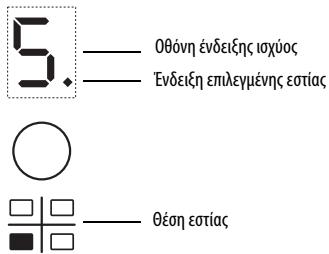
After activating the cooking zone and placing the cookware on the selected zone, adjust the zone with the corresponding knob: the power level is shown on the display.
The zone has different power levels, which can be adjusted with the +/- knobs, starting from level 1, minimum power, to level 9, maximum power. Some zones have a booster function, which is indicated on the display with the letter P.
Deactivation of cooking zones
Select the desired temperature using the temperature selector (the set temperature is displayed on the display).
Press the selector until the desired temperature appears.
To deactivate, press and hold the temperature selector for 3 seconds. The heating is deactivated and the residual heat indicator “H” appears.
Hob controls
With this function, the controls are locked to prevent accidental activation of the heating zones. To activate the control lock, activate the hob and press for 3 seconds the selector (or the function selector / Eco Booster, if available): the symbol lights up and an audible signal sounds near the lock symbol indicating that the control lock is active. To deactivate the control lock, repeat the activation procedure. The lock symbol lights up and the controls are unlocked. The control lock function can be activated or deactivated at any time, even when the hob is off, by pressing the selector below the symbol.
Timer
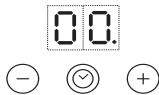
The timer is a control that provides the ability to set the cooking duration for a maximum time of 99 minutes (1 hour and 39 minutes) for all zones.
Select the zone for which you want to set the timer (the set time appears next to the zone indicator). Press the selector with the clock symbol and then set the timer with the + and - keys of the timer function (see figure). A few seconds after the setting, the timer starts
to count down (the set time indicator lights up on the zone for which the timer is activated). When the set time has elapsed, an audible signal sounds and the zone is deactivated automatically.
To deactivate the timer, press the selector with the clock symbol until the indicator shows 0 on the display or press for 3 seconds the selector with the clock symbol. To set the timer for another zone, repeat the above steps. The timer display always shows the remaining time for the last zone set or the same time interval.
To change or deactivate the timer, you must press the selector of the zone for which it was set.
Residual heat indicators
Residual heat indicator.

The hob is equipped with a residual heat indicator for each zone. This indicator lights up when the zones have reached high temperatures.
If the indicator appears on the display, the zone is still hot. For example, if this indicator appears on the zone, you can keep food warm or melt butter.
The device is now in standby mode.
The device is ready for use.

If the device is connected to the main power supply, it does not need to be set to the required settings; the symbol «device set» (type EIOVA) appears on the display. If within 60 seconds no device is detected, the device will automatically shut down.
Special Functions
The following functions are available:
Booster function
This function is available on certain models and provides the ability to increase the temperature of the water (e.g., for rapid water heating). To activate the function, press the button (one + one) until the indicator P appears on the display. After 10 minutes of using the booster function, the device automatically returns to the previous state.
Automatic Function
This function is set automatically for the appropriate content to maintain a low temperature. To activate this function, first press the button of the relevant setting and then the button R.
Eco Booster
After activating the device and setting the temperature, press the button to activate the function. The device automatically performs a water circulation cycle and maintains the temperature by reducing energy consumption compared to the booster function. This function is available only in models with the symbol p.
Demo Function
This function is only for 100k 100k 100k 100k 100k 100k 100k 100k 100k 100k 100k 100k 100k 100k 100k 100k 100k 100k 100k 100k 100
To activate the demo function, press simultaneously for 5 seconds the two buttons of the input settings: on the central display and the indicator D.
Then, you can navigate through the functions of the control panel. The lock and unlock function is available only in the Demo function.
Before activating the device, make sure it is disconnected from the network and, subsequently, connect it again and perform the procedure within 60 seconds of the activation.
Activating the device
After activating the device, keep the button pressed and the indicator light on the right side for at least three seconds (see the control panel).
Do not use abrasive cleaners. Before cleaning, ensure that the device is deactivated and that the residual heat indicator (H) is no longer displayed.

WARNING
Induction cooktops may hum or crackle during operation. These sounds are particularly noticeable with certain cookware (for example, different layers of material, uneven bottoms). The volume of the sound depends on the cookware used and the amount of food being cooked, and these sounds do not indicate a malfunction.
IMPORTANT SAFETY INSTRUCTIONS
YOUR SAFETY AND THE SAFETY OF OTHERS IS VERY IMPORTANT
This manual and the appliance itself contain important safety information that must be read and always followed.

COOKWARE YOU HAVE AT HOME


- Install the appliance under the countertop into a separate countertop. After installation is complete, access to the lower part of the appliance must be impossible. In case of installation under a countertop with an oven, the separating panel does not need to be installed.
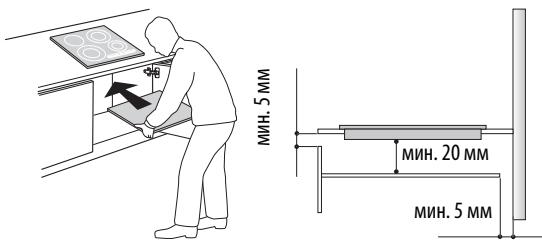
The distance between the lower surface of the appliance and the separating panel must correspond to the dimensions shown in the figure. To ensure proper operation of the appliance, the required minimum gap between the countertop and the panel above and below the appliance (5 mm) must always remain free. If the countertop is equipped with an oven, make sure that it is equipped with a cooling system. Do not install the countertop next to a dishwasher or washing machine to avoid exposing electrical components to moisture or splashes. In case of installation of a hob, contact the service center for the kit of screws 4801 211 00112. - The mounting brackets required for installation are located on the lower side of the appliance.
ELECTRICAL CONNECTION

- Disconnect the appliance from the electrical supply.
Installation of the appliance must be carried out by a qualified specialist in compliance with the current safety regulations for installation of equipment.
The manufacturer assumes no responsibility for material damage or injury to persons or animals that may be caused by failure to comply with the rules set out in this chapter. - The length of the power cable must be sufficient to allow the countertop to be removed from the worktop. Check that the voltage indicated on the rating plate, located on the lower side of the appliance, corresponds to the voltage of the mains in the room where the appliance will be installed.
Connection to the terminal block
To switch off the timer, press the button " - " until "0:0" appears on the display, or press the button with the clock symbol for 3 seconds.
To set the timer for the flexible heating zone, repeat the procedure described above. The display of the timer always shows the time set for the selected heating zone, or the shortest time.
To change the setting or switch off the timer, press the button for selecting the heating zone for which it is set.
Control panel warnings
Residual heat indicator.

The countertop is equipped with a residual heat indicator for each heating zone. This indicator shows which heating zones still have a high temperature. If the display shows a heating zone that has not yet cooled down. When the residual heat indicator is on, the corresponding heating zone can be used, for example, to keep food warm or to melt butter.
When the pan is heated to 30 degrees, the display turns off.
Indicator for incorrect pan size or absence of cookware

If the cookware is unsuitable for induction cooking for some reason, or if it is not installed correctly or has incorrect dimensions, the display will show a message indicating "absence of cookware" (see figure on the side). If within 60 seconds the system does not detect any cookware, the induction hob will switch off automatically.
Special functions
Some models are equipped with special functions:
Booster function
This function is designed for rapid heating zones. It allows maximum use of the hob's power (for example, to quickly boil water). To activate the Booster function, press the "+" button until "P" appears on the display. After 10 minutes of Booster activation (rapid boiling), the corresponding heating zone automatically switches to power level 9.
Automatic power setting function
This function automatically sets the minimum power level required to maintain boiling. This function should be activated after the water has been brought to a boil; to do this, first press the button corresponding to the heating zone, then the button
Eco Booster
To activate this function, press the button (E) after turning on the hob and selecting the heating zone. The hob will automatically start and ensure the water is brought to a boil and maintained at that state; energy consumption is lower than with the rapid boiling function (Booster). This function is only available for heating zones that have the symbol P.
Demo mode
This hob is equipped with a demo mode that allows you to demonstrate the operation of the control panel without activating the corresponding heating zones. The procedure for activating/deactivating it must be performed within 60 seconds of turning on the hob in the electrical supply of your apartment. To activate demo mode, you must simultaneously press the two extreme zone selection buttons for 5 seconds: the central display will show "De". Now you can familiarize yourself with the various functions on the control panel; the control panel lock/unlock function is also available in demo mode.
To deactivate demo mode, repeat the above procedure; note that you must first disconnect the hob from the electrical supply, then reconnect it and within 60 seconds perform the indicated procedure.

Turning on/off the audible signal
Simultaneously press the "+" button and the right rotary knob and hold them pressed for at least three seconds (the control panel lock is activated).
ATTENTION! Do not use sponges with an abrasive layer or metal scrapers. Using such accessories may eventually damage the glass.
After each use, let the pan cool down, then wash it to remove grease and food residues. Wiping the pan with sugar or products with a high sugar content may damage the pan; these residues must be removed immediately. Dirt, sugar, and sand can leave scratches on the glass surface. Use a soft cloth, a sponge, or special products for cleaning pans (follow the manufacturer's instructions).
TROUBLESHOOTING
- Follow the instructions given in the "Operating Instructions" section.
- Make sure the power supply is uninterrupted. After cleaning the pan, dry its surface thoroughly. If after turning on the pan, any alphanumeric code appears on the display, act according to the instructions given in the following table.
- If after using the pan it is impossible to turn it off, immediately unplug the power cord from the outlet.
POWER LEVEL TABLE
| Уровень мошности | Способ приrostовлия | Назначение у探测ая мошности (данные указашия постамулот дочинения К ольчы темпега typу对于我们 bбгтою дочения вды do зашиань сима});приrostовлия, лары вды do зашиань вды do зашиань вды do зашиань вды do зашиань вды do зашиань вды do зашиань вды do зашиань вды do зашиань вды do зашиань вды do зашиань вды do зашиань вды do зашиань вды do зашиань вдыdo Корочи - лары на случам огнec - лары на случам огнec - лары на случам огнec - лары на случам огнec - лары на случам огнec - лары на случам огнec - лары на случам огнec - лары на случам огнec - лары на случам огнec - ларity огнec - ларity огнec - ларity огнec - ларity огнec - ларity огнec - ларity огнec - ларity огнec - ларity огнec - ларity огнec - ларity огнec - ларity огнec - ларity огнec - ларity огнс огнс огнс огнс огнс огнс огнс огнс огнс огнс огнс огнс огнс огнс огнс огнс огнс огнс огнс огнс огнс огнс огнс огнс огнс огнc огнс огнс огнс огнс огнс огнс огнс огнс огнс огнс огнс огнс огнс огнс огнс огнс огнс огнс огнс огнс огнс огнс огнс огнс огнз огнз огнз огнз огнз огнз огнз огнз огнз огнз огнз огнз огнз огнз огнз огнз огнз огнз огнз огнз огнз огнз огнз огнз огнз огнс огнз огнз огнз огнз огнз огнз огнз огнз огнз огнз огнз огнз огнз огнз огнз огнз огнз огнз огнз огнз огнз огнз огнз огнс огнс огнс огнс огнс огнс огнс огнс огнс огнс огнс огнс огнс огнс огнс огнс огнс огнс огнс огнс огнс огнс огнс огнс огн. огн. огн. огн. огн. огн. огн. огн. огн. огн. огн. огн. огн. огн. огн. огн. огн. огн. огн. огн. огн. огн. огн. огн. огн. огн. огн. огн. огн. огн. огн. огн. огн. огн. - - - - - - - - - - - - - - - - - - - - - - - - - - - - - - - - - - - - - - - - - - - - - - - - - - - - - - - - - - - - - - - - - - - - - - - - - - - - - - - - - - - - - - - - - - - - - - - - - - - - -- - - - - - - - - - - - - - - - - - - - - - - - - - - - - - - - - - - - - - - - - - - - - - - - - - - - - - - - - - - - - - - - - - - - - - - - - - - - - - - - - - - - - - - - - - - - - - - - - - - - - - - - - - - - - - - - - - - - - - - - - - - - - - - - - - - - - - - - - - - - - - - - - - - - - - - - - - - - - - - - - - - - - - - - - - - - - - - - - - - - - - - - - - - - - - - - - - - - - - - . - - - - - - - - - - - - - - - - - - - - - - - - - - - - - - - - - - - - - - - - - - - - - - - - - - - - - - - - - - - - - - - - - - - - - - - - - - - - - - - - - - - - - - - - - - - - - - - - - - - - - - - - - - - - - - - - - - - - - - - - - - - - - - - - - - - - - - - - - - - - - - - - - - - - - - - - - - - - - - - - - - - - - - - - - - - - - - - - - - - - - - - - - - - - - - - - - - - - - - - - - - - - - - - - - - - - - - - - - - - - - - - - - - - - - - - - - - - - - - - - - - - - - - - - - - - - - - - - - - - - - - - - - - - - - - - - - - - - - - - - - - - - - - - - - - - - - - - - - - - - - - - - - - - - - - - - - - - - - - - - - - - - - - - - - - - - - - - - - - - - - - - - - - - - - - - - - - - - - - - - - - - - - - - - - - - - - - - - - - - - - - - - - - - - - - - - - - - - - - - - - - - - - - - - - - - - - - - - - - - - - - - - - - - - - - - - - - - - - - - - - - - - - - - - - - - - - - - - - - - - - - - - - - - - - - - - - - - - - - - - - - - - - - - - - - - - - - - - - - - - - - - - - - - - - - - - - - - - - - - - - - - - - - - - - - - - - - - - - - - - - - - - - - - - - - - - - - - - - - - - - - - - - - - - - - - - - - - - - - - - - - - - - - - - - - - - - - - - - - # - - - - - - - - - - - - - - - - - - - - - - - - - - - - - - - - - - - - - - - - - - - - - - - - - - - - - - - - - - - - - - - - - - - - - - - - - - - - - - - - - - - - - - - - - - - - - - - - - - - # - - - - - - - - - - - - - - - - - - - - - - - - - - - - - - - - - - - - - - - - - - - - - - - - - - - - - - - - - - - - - - - - - - - - - - - - - - - - - - - - - - - - - - - - - - - - - - - - - - . - - - - - - - - - - - - - - - - - - - - - - - - - - - - - - - - - - - - - - - - - - - - - - - - - - - - - - - - - - - - - - - - - - - - - - - - - - - - - - - - - - - - - - - - - - - - - - - - - - - + - - - - - - - - - - - - - - - - - - - - - - - - - - - - - - - - - - - - - - - - - - - - - - - - - - - - - - - - - - - - - - - - - - - - - - - - - - - - - - - - - - - - - - - - - - - - - - - - - - - * . - - - - - - - - - - - - - - - - - - - - - - - - - - - - - - - - - - - - - - - - - - - - - - - - - - - - - - - - - - - - - - - - - - - - - - - - - - - - - - - - - - - - - - - - - - - - - - - - - - - . - - - - - - - - - - - - - - - - - - - - - - - - - - - - - - - - - - - - - - - - - - - - - - - - - - - - - - - - - - - - - - - - - - - - - - - - - - - - - - - - - - - - - - - - - - - - - - - - - - . . . . . . . . . . . . . . . . . . . . . . . . . . . . . . . . . . . . . . . . . . . . . . . . . . . . . . . . . . . . . . . . . . . . . . . . . . . . . . . . . . . . . . . . . . . . . . . . . . . . ? . . . . . . . . . . . . . . . . . . . . . . . . . . . . . . . . . . . . . . . . . . . . . . . . . . . . . . . . . . . . . . . . . . . . . . . . . . . . . . . . . . . . . . . . . . . . . . . . . . . - . . . . . . . . . . . . . . . . . . . . . . . . . . . . . . . . . . . . . . . . . . . . . . . . . . . . . . . . . . . . . . . . . . . . . . . . . . . . . . . . . . . . . . . . . . . . . . . . . . . ; . . . . . . . . . . . . . . . . . . . . . . . . . . . . . . . . . . . . . . . . . . . . . . . . . . . . . . . . . . . . . . . . . . . . . . . . . . . . . . . . . . . . . . . . . . . . . . . . . . . > . . . . . . . . . . . . . . . . . . . . . . . . . . . . . . . . . . . . . . . . . . . . . . . . . . . . . . . . . . . . . . . . . . . . . . . . . . . . . . . . . . . . . . . . . . . . . . . . . . . ... . . . . . . . . . . . . . . . . . . . . . . . . . . . . . . . . . . . . . . . . . . . . . . . . . . . . . . . . . . . . . . . . . . . . . . . . . . . . . . . . . . . . . . . . . . . . . . . . . . . 20 30 40 50 60 70 80 90 100 110 120 130 140 150 160 170 180 190 200 210 220 230 240 250 260 270 280 290 300 310 320 330 340 350 360 370 380 390 400 410 420 430 440 450 460 470 480 490 500 510 520 530 540 550 560 570 580 590 600 610 620 630 640 650 660 670 680 690 700 710 720 730 740 750 760 770 780 790 800 810 820 830 840 850 860 870 880 890 900 910 920 930 940 950 960 970 980 990 1000 1010 1020 1030 1040 1050 1060 1070 1080 1090 1100 1110 1120 1130 1140 1150 1160 1170 1180 1190 1200 1210 1220 1230 1240 1250 1260 1270 1280 1290 1300 1310 1320 1330 1340 1350 1360 1370 1380 1390 1400 1410 1420 1430 1440 1450 1460 1470 1480 1490 1500 1510 1520 1530 1540 1550 1560 1570 1580 1590 1600 1610 1620 1630 1640 1650 1660 1670 1680 1690 1700 1710 1720 1730 1740 1750 1760 1770 1780 1790 1800 1810 1820 1830 1840 1850 1860 1870 1880 1890 1900 1910 1920 1930 1940 1950 1960 1970 1980 1990 2000 2010 2020 2030 2040 2050 2060 2070 2080 2090 2100 2110 2120 2130 2140 2150 2160 2170 2180 2190 2200 2210 2220 2230 2240 2250 2260 2270 2280 2290 2300 2310 2320 2330 2340 2350 2360 2370 2380 2390 2400 2410 2420 2430 2440 2450 2460 2470 2480 2490 2500 2510 2520 2530 2540 2550 2560 2570 2580 2590 2600 2610 2620 2630 2640 2650 2660 2670 2680 2690 2700 2710 2720 2730 2740 2750 2760 2770 2780 2790 2800 2810 2820 2830 2840 2850 2860 2870 2880 2890 2900 2910 2920 2930 2940 2950 2960 2970 2980 2990 3000 3010 3020 3030 3040 3050 3060 3070 3080 3090 3100 3110 3120 3130 3140 3150 3160 3170 3180 3190 3200 3210 3220 3230 3240 3250 3260 3270 3280 3290 3300 3310 3320 3330 3340 3350 3360 3370 3380 3390 3400 3410 3420 3430 3440 3450 3460 3470 3480 3490 3500 3510 3520 3530 3540 3550 3560 3570 3580 3590 3600 3610 3620 3630 3640 3650 3660 3670 3680 3690 3700 3710 3720 3730 3740 3750 3760 3770 3780 3790 3800 3810 3820 3830 3840 3850 3860 3870 3880 3890 3900 3910 3920 3930 3940 3950 3960 3970 3980 3990 4000 4010 4020 4030 4040 4050 4060 4070 4080 4090 4100 4110 4120 4130 4140 4150 4160 4170 4180 4190 4200 4210 4220 4230 4240 4250 4260 4270 4280 4290 4300 4310 4320 4330 4340 4350 4360 4370 4380 4390 4400 4410 4420 4430 4440 4450 4460 4470 4480 4490 4500 4510 4520 4530 4540 4550 4560 4570 4580 4590 4600 4610 4620 4630 4640 4650 4660 4670 4680 4690 4700 4710 4720 4730 4740 4750 4760 4770 4780 4790 4800 4810 4820 4830 4840 4850 4860 4870 4880 4890 4900 4910 4920 4930 4940 4950 4960 4970 4980 4990 5000 5010 5020 5030 5040 5050 5060 5070 5080 5090 5100 5110 5120 5130 5140 5150 5160 5170 5180 5190 5200 5210 5220 5230 5240 5250 5260 5270 5280 5290 5300 5310 5320 5330 5340 5350 5360 5370 5380 5390 5400 5410 5420 5430 5440 5450 5460 5470 5480 5490 5500 5510 5520 5530 5540 5550 5560 5570 5580 5590 5600 5610 5620 5630 5640 5650 5660 5670 5680 5690 5700 5710 5720 5730 5740 5750 5760 5770 5780 5790 5800 5810 5820 5830 5840 5850 5860 5870 5880 5890 5900 5910 5920 5930 5940 5950 5960 5970 5980 5990 6000 6010 6020 6030 6040 6050 6060 6070 6080 6090 6100 6110 6120 6130 6140 6150 6160 6170 6180 6190 6200 6210 6220 6230 6240 6250 6260 6270 6280 6290 6300 6310 6320 6330 6340 6350 6360 6370 6380 6390 6400 6410 6420 6430 6440 6450 6460 6470 6480 6490 6500 6510 6520 6530 6540 6550 6560 6570 6580 6590 6600 6610 6620 6630 6640 6650 6660 6670 6680 6690 6700 6710 6720 6730 6740 6750 6760 6770 6780 6790 6800 6810 6820 6830 6840 6850 6860 6870 6880 6890 6900 6910 6920 6930 6940 6950 6960 6970 6980 6990 7000 7010 7020 7030 7040 7050 7060 7070 7080 7090 7100 7110 7120 7130 7140 7150 7160 7170 7180 7190 7200 7210 7220 7230 7240 7250 7260 7270 7280 7290 7300 7310 7320 7330 7340 7350 7360 7370 7380 7390 7400 7410 7420 7430 7440 7450 7460 7470 7480 7490 7500 7510 7520 7530 7540 7550 7560 7570 7580 7590 7600 7610 7620 7630 7640 7650 7660 7670 7680 7690 7700 7710 7720 7730 7740 7750 7760 7770 7780 7790 7800 7810 7820 7830 7840 7850 7860 7870 7880 7890 7900 7910 7920 7930 7940 7950 7960 7970 7980 7990 8000 8100 8200 8300 8400 8500 8600 8700 8800 8900 8910 8920 8930 8940 8950 8960 8970 8980 8990 9000 9100 9200 9300 9400 9500 9600 9700 9800 9900 | |
NOTE:
In case of short-term cooking, which requires even heat distribution (e.g., for a quick meal), on the dual heating zone with a diameter of 28 cm (where available), it is recommended to use a pan with a diameter not exceeding 24 cm. In cases where a specific cooking mode is required (e.g., for melting chocolate or butter), it is recommended to use single heating zones smaller than the diameter.
LLC "Bnerpn"
Zubarev Lane, 15/1
Moscow, Russia, 129164
Hotline phone in the Russian Federation:
8-800-100-57-31
ME10
020

IMPORTANT SAFETY INSTRUCTIONS
YOUR SAFETY AND THE SAFETY OF OTHERS ARE VERY IMPORTANT
This instruction manual contains important safety information that must be read and followed carefully.

This is a safety alert symbol that alerts you to potential hazards for the user and others.
Before any use of the appliance, this safety symbol and the following terms are provided:

DANGER
Indicates a hazardous situation that, if not avoided, will result in death or serious injury.

WARNING
Indicates a hazardous situation that, if not avoided, could result in death or serious injury.
All safety messages will describe the potential hazard, tell you how to reduce the risk of injury, damage, and electric shock resulting from improper use of the appliance. Please pay careful attention to the following instructions:
- The appliance must be disconnected from the electrical supply before any installation or maintenance work. - Installation must be performed by qualified personnel.
- Grounding of the appliance is mandatory.
- The power cord must be provided with a plug to allow connection of the appliance, installed in a cabinet, to the electrical supply.
- To guarantee that the installation complies with the applicable safety standards, a multi-pole switch must be installed with a minimum contact gap of 3 mm.
- Do not use the appliance if it is tilted or damaged.
- Do not immerse the appliance in water.
- After installation, the electrical components must no longer be accessible to the user.
- The appliance is intended solely for use as a kitchen appliance for cooking food. Any other use (e.g., for heating) is not permitted. The manufacturer accepts no liability for damages resulting from improper use or incorrect operating commands.
- The appliance and its accessible parts become hot during use. Care must be taken to avoid touching the heating elements. Children under 8 years of age must be kept away from the appliance unless they are constantly supervised. - The accessible parts may become hot during use. Children must be supervised at a distance to prevent them from playing with the appliance. During and after use, do not touch the hot surfaces. Do not allow flammable materials to come into contact with the appliance, and ensure that all switches and components are sufficiently cooled. Do not place flammable materials on or near the appliance. - The packaging materials can be easily removed. Do not leave the appliance unattended while cooking or using the appliance. This appliance can be used by children aged 8 and above, as well as by persons with reduced physical, sensory, or mental capabilities, or those lacking experience and knowledge, provided they are supervised or have been given instructions on the safe use of the appliance and understand the hazards involved. Children must not play with the appliance. Cleaning and user maintenance must not be performed by children unless they are supervised.
- Do not place the appliance on hot metal surfaces, such as stove tops (hobs, burners, etc.), as you risk getting burned. The appliance must be placed on a heat-resistant surface (not included with the appliance).
- If the surface is cracked, unplug the appliance to avoid the risk of electric shock.
- The appliance is intended for indoor use only or in an external control system.
- Leaving the hob unattended during storage or use of the appliance may be dangerous and could lead to fire. NEVER extinguish a fire with water; unplug the appliance and then cover the flames, for example with a lid or a fire blanket. Fire hazard: Do not place objects on the cooking surface.
- Do not use steam cleaners. Do not place metal objects such as knives, forks, spoons, or lids on the hob surface, as they may become hot.
- After use, switch off the hob using its control and do not rely on the pan detector.
Disposal of packaging materials
The cardboard packaging can be recycled 100%, as confirmed by the recycling symbol (). Different packaging materials must not be disposed of in the environment, but must be handed over in accordance with all local regulations.
Disposal of the appliance
This appliance is marked in accordance with European Directive 2002/96/EC on Waste Electrical and Electronic Equipment (WEEE).
This appliance is designed in accordance with the applicable standards to prevent potential dangerous consequences for the environment and human health.
If the appliance is damaged or its documentation shows that it is not to be treated as household waste, it must be disposed of at an appropriate collection point for recycling of electrical and electronic equipment.
Energy saving
To achieve the best results, it is recommended to:
- Use pans with a flat bottom and a diameter equal to or larger than the diameter of the cooking zone. Use only pans with a flat bottom. If possible, place a lid on the pan during cooking.
- Using the residual heat of the appliance allows you to save energy. Place the pan on the cooking zone before switching it on.
DECLARATION OF CONFORMITY (€
This appliance, intended for contact with food products, complies with Regulation (EC) No 1935/2004 and the directives, designed and manufactured for sale in accordance with the safety requirements of the "Low Voltage" Directive 2006/95/EC (which replaces 73/23/EEC with subsequent amendments and supplements), as well as the requirements of the "EMC" Directive 2004/108/EC.
PRECAUTIONS
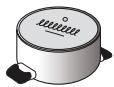
IMPORTANT: If the pans are not of suitable sizes, the cooking zones do not turn on. Use only pans that have the symbol "INDUCTION SYSTEM" (shown in the figure). Before turning on the cooking zone, place the pan on the desired cooking zone.
PANS IN STOCK

To ensure that the pan is suitable for the induction cooking zone, use a magnet: The pans are not suitable if the magnet cannot stick to them.
Ensure that the bottoms of the pans are not damaged, as they may scratch the surface of the cooking zone. Check the bottoms. Never place hot pans or pans with a rough bottom on the hob. They may cause damage.
RECOMMENDED DIAMETER OF THE PANS

INSTALLATION
Before installing the device, check the data plate for damage during transport and in case of problems contact the retailer or service for repair.
Regarding the dimensions for installation and the installation instructions, see the figure on page 2.
PREPARATION OF THE CABINET FOR INSTALLATION

WARNING
- Mount the partition panel under the hob. The bottom of the device must not be accessible after installation. In case the hob is installed above an oven, do not place the partition panel between them.
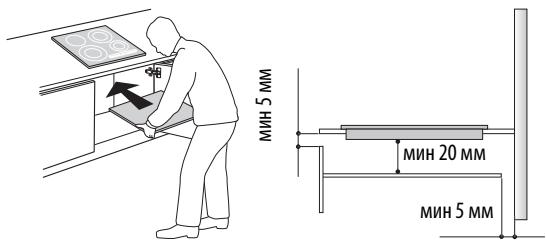
The distance between the bottom surface of the device and the partition panel must be in accordance with the dimensions given in the figure. For proper operation of the device, it must provide the minimum free space between the working surface and the bottom of the cabinet (min. 5 mm). In case of installation of a built-in oven, check that the oven is equipped with a cooling system. Do not install the hob above a washing machine or dishwasher, so that the electrical components do not come into contact with steam or water, which could damage them. In case of installation problems (instability), contact the service for the kit, to get the complete mounting screws 4801 211 00112. For removal of the hob, use a screwdriver (not included in the supply) and loosen the perimeter springs, which are located in the lower part of the product.
CONNECTION TO THE ELECTRICAL MAINS

WARNING
- Disconnect the device from the electrical mains.
- The device must be installed by a qualified technician, who is fully familiar with the safety regulations and installation.
The manufacturer does not accept any responsibility for possible damage to people or animals or for damage to property as a result of non-compliance with the instructions given in this chapter. The supply cable must be long enough to allow the removal of the hob from the working surface. Check that the voltage, shown on the rating plate placed on the bottom of the device, matches the voltage in your home.
Connection to the mains
For connection to the electrical mains use the cable type H05RR-F, as shown in the table below.
| Празоведиц | Бpoьхразмер |
| 230 V ~ + ½ | 3 x 4 mm² |
| 230-240 V ~ + ½ | 3 x 4 mm² (само за Астралия) |
| 230 V 3 ~ + ½ | 4 x 1,5 mm² |
| 400 V 3N ~ + ½ | 5 x 1,5 mm² |
| 400 V 2N ~ + ½ | 4 x 1,5 mm² |
400V3N~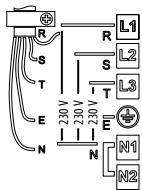
400V2N~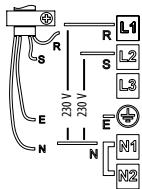
230V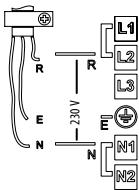
230V3~(cma 3a Bénpn)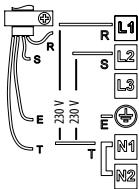
230-240V\~(am03aABCTpAma) 230V\~(am03aBeNikKobpItanHm) 400V2N\~(cAmo3aHndepnaHnn)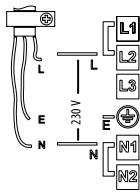
BaxHo:
-3ana3ete nIN CBAJIeTe MToJIHnTe MoTcHTeMa MeJdy BInTOBeTe Ha KJIeMopeLa L1-L2 n N1, N2 B CbOtBeTCTBHe CbC XeMaTa Ha CBbP3BaHe (BX.ФИrpyaTa). -AkoBdoctaKaTAtMaKa6eN,KoHcyntnpaTe IHCTpyKcImTe 3a CbBy3BaHe,piIIOxJeH KbM Ka6eNa. - Ybepete Ce, ue u wectte BnHTa Ha KneMopepa ca 3aTeHnat cIeN CBp3BaHeTo Ha Ka6eJInte.
IpIMep 3a HnHIO MocTye (BnaBO) nIN CBAeHO MocTye (BdACHO). BnKTe cxemata Ha Cbbp3BaHe, 3a IOpnp6HOct (MOCTeTa TA MoRAT da 6bDaT MEkDy L1-L2, KaKTo mexdy N1-N2).
Onicahne Ha KOMaHdHoto Ta6I0
Komahdno Ta6no
BkIIOUBaHe/IMKJIIOUBaHe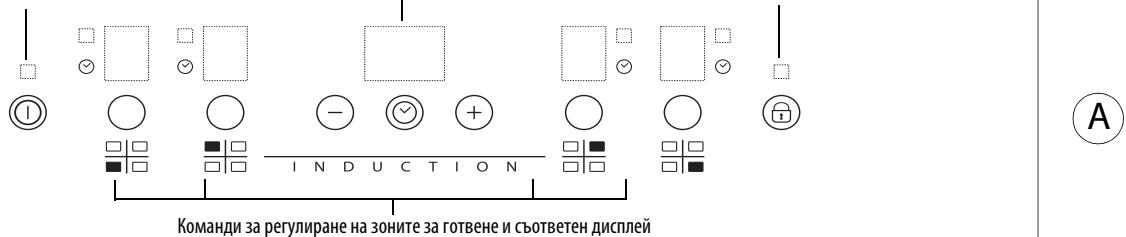
BkIIOUbaHe/IMKJIIOUbaHe A B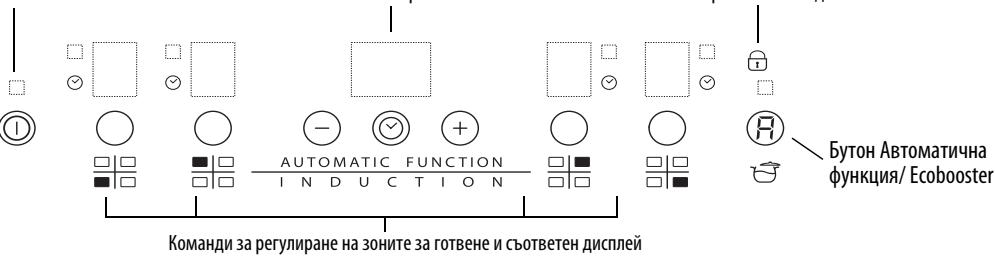
BkIIOUBaHe/V3KJIIOUBaHe Ha IIOOaTa 3a roTBeHe
3a da BkIIOuHTe IIOUaTc 3a rotBEHe, HATNCHEte 3a OKOLO 2 cekyHdi 6byToHa ①, DOKATO CBETHE dncJIpeTn Ha 30HNTe 3a rotBeHe. 3a da n3KJIHOHTe, HATNCHTe CbIurat 6byTO, Do n3rACBaHToHa dncJIpe. BCNUK 30Hn 3a rotBEHe ce n3KJIIOuBAt.
Ako nloyata Beue e 6nna n3non3BaHa, nHdkaTOpbT 3a ocTaTbUHa TOnPiHa "H" ocTaB a BKIOUeH do OxnaJdaHeTo Ha 3OHNte 3a roTBeHe.
AkoB pamknte Ha 10 cekynd cned BknoybaheTo Ha nnoata 3a roTbeHe 6bde n36paHa yHKnua, Tc ce n3KNOyBa ABtOMaTHNo.
AknBupaneH perynipaneHa 30nHe Ha roTbeHe
PAY ATTENTION TO SAFETY FOR YOURSELF AND FOR OTHERS
All instructions and warnings for safe operation are important. Read them carefully.

This is a safety symbol that warns of potential hazards to the user and other persons.
All safety warnings are accompanied by the safety symbol and the following words:

DANGER
Indicates a hazardous situation that will cause serious injury if not avoided.

WARNING
Indicates a hazardous situation that may cause serious injury if not avoided.
All safety warnings indicate the risk and recommend measures to reduce the risk of injury, burns, and electric shock due to incorrect use of the device. Strictly follow the instructions given:
- Before performing installation, disconnect the device from the power supply. Installation or technical maintenance of the device must be performed by qualified personnel in accordance with the manufacturer's instructions and local safety regulations. Do not repair or replace any parts of the device if there are no clear instructions in the manual.
- According to legislation, grounding of this device is mandatory.
- The power cord must be long enough to connect the device installed in furniture to the power supply. To perform installation in accordance with safety standards, it is necessary to install an all-pole switch with a minimum contact gap of 3 mm.
- It is forbidden to use extension cords or adapters.
- It is forbidden to pull the power cord of the device.
- Before starting installation, access to electrical parts of the device must be disconnected. The device is intended exclusively for repeated use in cooking food. It is forbidden to use it for other purposes (e.g., for heating the room). The manufacturer is not liable for any damage resulting from use of the device not in accordance with its intended purpose or from incorrect operation.
- The device and accessible parts heat up during operation. Care must be taken to avoid touching heating elements. Children under 8 years of age must not be allowed near the device unless they are under constant supervision. Accessible parts of the device may become very hot during operation. It is necessary to monitor children to ensure they do not play with the device and generally stay at a safe distance. Do not touch the heating elements of the oven during or after operation. Avoid contact with hot surfaces or other easily flammable materials until all parts of the device have cooled down.
- Do not place flammable materials on the device itself or near it. Hot oil and fat can easily ignite. Do not leave the device unattended while cooking with oil or fat.
- This device can be used by children aged 8 and above and persons with reduced physical, sensory or mental capabilities or lack of experience and knowledge if they have been given supervision or instruction concerning use of the device in a safe way and understand the hazards involved. Children must not play with the device. Cleaning and user maintenance must not be made by children without supervision. Do not place metal objects such as knives, forks, spoons, lids on the hotplate, as they can become hot.
- During installation, a protective panel must be installed under the device, or the device must be installed separately. If the surface is cracked, switch off the device to avoid electric shock.
The device is not intended to be operated by means of an external timer or separate remote-control system. Cooking on hot surfaces without supervision using oil or fat can be dangerous and may cause fire. Never try to extinguish a fire with water. Instead, switch off the device and cover the pan with a lid, a damp cloth, or a fire blanket. Fire hazard: Do not store items on hot surfaces. Do not use steam cleaners. Metal objects such as knives, forks, spoons, and lids must not be placed on the hot surface, as they can become hot. After use, switch off the hotplate using its control element, not relying on the pan detector.
Packaging disposal
Packaging material can be recycled 100%. Therefore, dispose of packaging separately for recycling (C). All parts of the packaging must not be thrown into the environment. They must be disposed of in accordance with local regulations.
Product disposal
This device is marked in accordance with European Directive 2002/96/EC on waste electrical and electronic equipment (WEEE). By ensuring correct disposal of this product, you will help prevent potential negative consequences for the environment and human health.
The symbol on the product or in the accompanying documentation indicates that this product must not be disposed of with household waste. It should be handed over to the appropriate collection point for the recycling of electrical and electronic equipment.
Energy saving
For best results, it is recommended:
Use pans and pots whose diameter is equal to the diameter of the cooking zone. Use cookware with a flat bottom. - Where possible, cover the pot with a lid during cooking. Use a pressure cooker to further reduce energy consumption and cooking time. Place the cookware in the center of the cooking zone marked on the cooking surface.
To check the suitability of the cookware for induction cooking surfaces, use a magnet: If the pot does not react to the magnetic field, it is not suitable.
The bottom of the pot must not be rough, so as not to scratch the cooking surface. Check the cookware carefully. It is forbidden to place pots with a rough surface on the control panel. This may cause damage.
RECOMMENDED DIAMETERS FOR POTS AND PANS

INSTALLATION
After unpacking the product, check for any transport damage and, if any, contact the dealer or customer service. The dimensions of the furniture and installation are given in the figures on page 2.
PREPARATION FOR USE

WARNING
Install the protective panel under the cooking surface. After installation, the lower part of the product must be inaccessible. If the cooking surface is installed above an oven, the protective panel is not needed.
5mm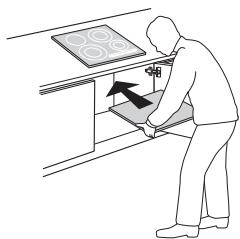
The distance between the lower part of the appliance and the protective panel must correspond to the dimensions shown in the figure. For proper operation of the appliance, do not reduce the distance between the work surface and the upper surface of the furniture (min. 5 mm). - If the cooking surface is installed above an oven, make sure that the oven is equipped with a cooling system. Avoid installing the cooking surface near flammable or hot objects, as contact of electronic components with steam or moisture may cause damage. - For installation of the product, contact the Service Center, which will provide the complete set of screws 4801 211 00112. To remove the surface, use a screwdriver (not supplied) to unscrew the perimeter screws in the lower part of the product.
CONNECTION TO THE ELECTRICAL POWER SUPPLY

Installation of the electric hob must be carried out by qualified personnel familiar with the installation and safety standards.
The manufacturer shall not be liable for damage caused by misuse of the appliance or by failure to follow the instructions given in this manual. The appliance must be installed on a sufficiently strong surface to support its weight. It is recommended to follow the data plate for the appliance and to ensure that the appliance is connected to the electrical supply in accordance with the installation instructions.
Connecting the appliance to the mains
Switching on the appliance and using the audible signal
To switch on the hob, touch the surface with one finger and hold for 3 seconds the "+" and "-" buttons and the selection button (the rightmost one) ("control panel lock").
Do not use steam cleaners. Before cleaning, switch off the appliance and check that the hob is cool and that the indicator light for the residual heat is off ("H").
IMPORTANT: Do not use abrasive sponges or metal scouring pads. Their use over time may damage the glass.
After each use, wait for the surface to cool down and clean it, removing any food residues. Sugar or products with high sugar content can damage the hob surface and must be removed immediately. Salt, sugar, and sand can scratch the glass surface. For cleaning the hob surface, use a damp cloth or a suitable cleaning product (follow the manufacturer's instructions).
TROUBLESHOOTING
- Carefully read the instructions in the "Instructions for Use" section and follow them.
- Check that the power supply is not interrupted. Dry the surface after cleaning. If the hob does not switch on after cleaning, disconnect it from the power supply and refer to the table below. If after use the hob cannot be switched off, it must be disconnected from the electrical supply.
- IMPORTANT SAFETY INSTRUCTIONS
- YOUR SAFETY AND THAT OF OTHERS IS VERY IMPORTANT
- DANGER
- WARNING
- SAFEGUARDING THE ENVIRONMENT
- DISPOSAL OF PACKING
- DISPOSAL
- ENERGY SAVING
- DECLARATION OF CONFORMITY (C)
- BEFORE USE
- EXISTING POTS AND PANS
- RECOMMENDED POT BOTTOM WIDTHS
- INSTALLATION
- PREPARING THE CABINET FOR FITTING
- ELECTRICAL CONNECTION
- CONNECTION TO THE TERMINAL BLOCK
- IMPORTANT
- INSTRUCTIONS FOR USE
- CONTROL PANEL DESCRIPTION
- CONTROL PANEL
- SWITCHING THE HOB ON/OFF
- SWITCHING ON AND ADJUSTING COOKING ZONES
- DEACTIVATION OF COOKING ZONES
- CONTROL PANEL LOCK
- TIMER
- CONTROL PANEL WARNINGS
- RESIDUAL HEAT INDICATOR
- INCORRECT OR MISSING POT INDICATOR
- SPECIAL FUNCTIONS
- FAST BOIL FUNCTION (BOOSTER)
- AUTOMATIC FUNCTION R
- ECO BOOSTER
- DEMO MODE
- ACTIVATION/DEACTIVATION OF THE ACOUSTIC SIGNAL
- CLEANING
- TROUBLESHOOTING GUIDE
- NOISES MADE BY THE HOB
- AFTER-SALES SERVICE
- BEFORE CONTACTING THE AFTER-SALES SERVICE
- IF THE PROBLEM PERSISTS AFTER THE ABOVE CHECKS, CONTACT THE NEAREST AFTER-SALES SERVICE
- YOUR SAFETY AND THAT OF THOSE AROUND YOU DESERVE YOUR FULL ATTENTION
- DECLARATION OF CONFORMITY (€
- ACTIVATION/DEACTIVATION OF COOKING ZONES
- ACTIVATION AND ADJUSTMENT OF COOKING ZONES
- HOB CONTROLS
- RESIDUAL HEAT INDICATORS
- THE DEVICE IS READY FOR USE
- BOOSTER FUNCTION
- AUTOMATIC FUNCTION
- DEMO FUNCTION
- ACTIVATING THE DEVICE
- YOUR SAFETY AND THE SAFETY OF OTHERS IS VERY IMPORTANT
- COOKWARE YOU HAVE AT HOME
- INDICATOR FOR INCORRECT PAN SIZE OR ABSENCE OF COOKWARE
- AUTOMATIC POWER SETTING FUNCTION
- TURNING ON/OFF THE AUDIBLE SIGNAL
- TROUBLESHOOTING
- POWER LEVEL TABLE
- NOTE
- YOUR SAFETY AND THE SAFETY OF OTHERS ARE VERY IMPORTANT
- DISPOSAL OF PACKAGING MATERIALS
- DISPOSAL OF THE APPLIANCE
- PRECAUTIONS
- PANS IN STOCK
- RECOMMENDED DIAMETER OF THE PANS
- PREPARATION OF THE CABINET FOR INSTALLATION
- CONNECTION TO THE ELECTRICAL MAINS
- CONNECTION TO THE MAINS
- BAXHO
- ONICAHNE HA KOMAHDHOTO TA6I
- KOMAHDNO TA6NO
- BKIIOUBAHE/V3KJIIOUBAHE HA IIOOATA 3A ROTBEHE
- AKNBUPANEH PERYNIPANEHA 30NHE HA ROTBEHE
- PAY ATTENTION TO SAFETY FOR YOURSELF AND FOR OTHERS
- PACKAGING DISPOSAL
- PRODUCT DISPOSAL
- RECOMMENDED DIAMETERS FOR POTS AND PANS
- PREPARATION FOR USE
- CONNECTION TO THE ELECTRICAL POWER SUPPLY
- CONNECTING THE APPLIANCE TO THE MAINS
- SWITCHING ON THE APPLIANCE AND USING THE AUDIBLE SIGNAL
Brand : WHIRLPOOL
Model : ACM 804/NE
Category : Hob