
43085 - Audio Dock BOSE - Free user manual and instructions
Find the device manual for free 43085 BOSE in PDF.

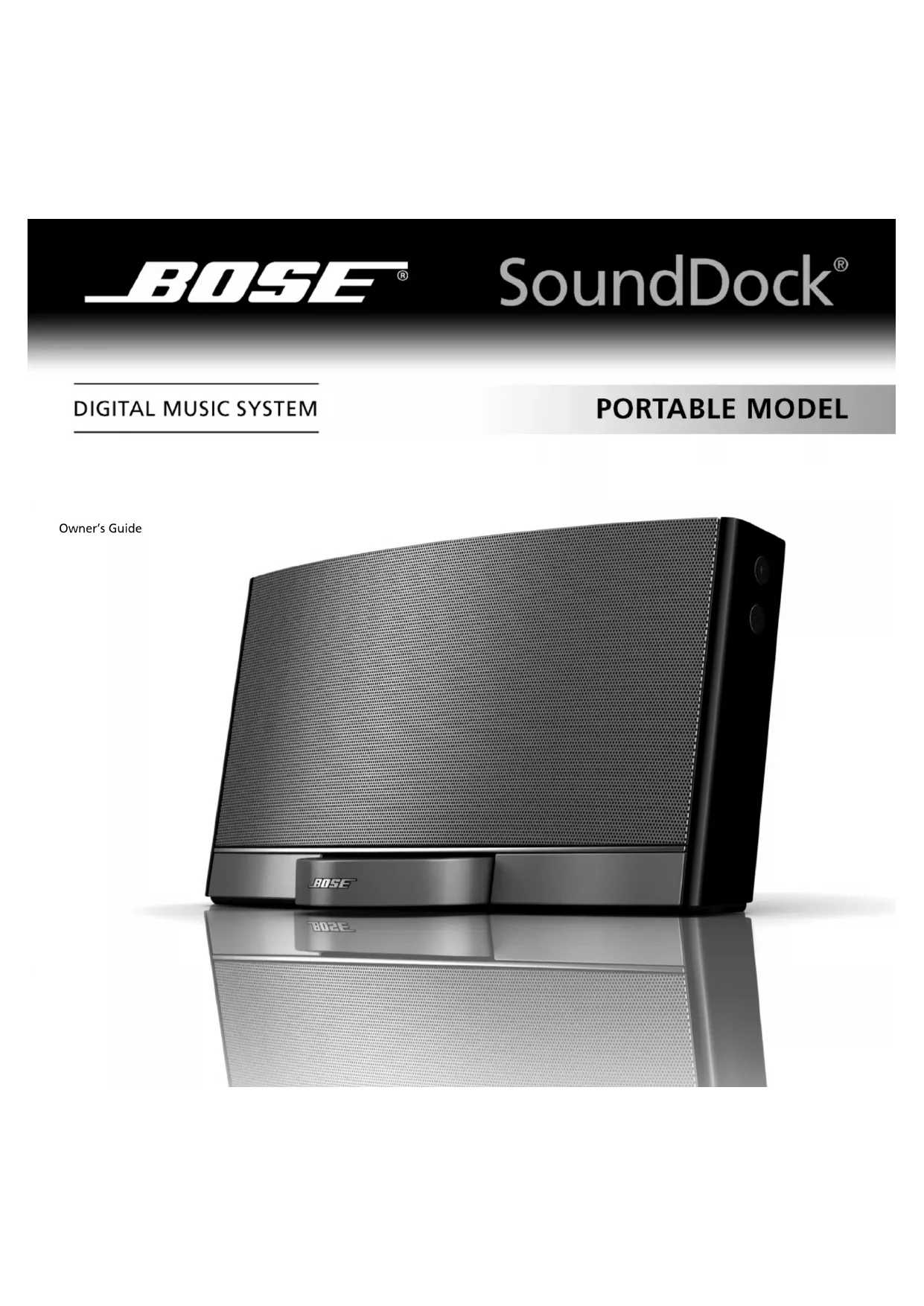

| Brand | Bose |
| Model | 43085 (SoundDock® Portable) |
| Product Type | Portable audio docking station for iPod |
| Dimensions (H x W x D) | 17.0 cm x 30.7 cm x 12.8 cm |
| Weight (with battery) | 2.4 kg |
| Power supply | 100-240 V, 50-60 Hz, 1 A; output 20 V, 2 A |
| AC adapter | Ref. Bose 301141 or 306386 |
| Battery life | Approximately 3 hours at maximum volume, more at reduced volume |
| Battery charging time | Up to 10 hours |
| Battery charge indicator | Solid yellow light (charging), flashing red light (low battery) |
| iPod compatibility | iPod with click wheel (scroll wheel), via docking station |
| Main functions | iPod playback, iPod charging, infrared remote control, auxiliary audio input (3.5 mm mini-jack) |
| Speakers | Magnetic shielding, anti-vibration system |
| Cleaning | Soft dry cloth; low-power vacuum for grilles |
| Remote control battery | Lithium 3 V CR2032 or DL2032 |
| Warranty | Transferable limited warranty (see registration card) |
| After-sales service | Contact local Bose dealer or Bose directly |
| Spare parts | Replacement battery available from Bose; standard remote control battery |
| Repairability | Refer to qualified personnel; do not open yourself |
| Safety instructions | Do not expose to water, do not block ventilation, use only supplied accessories |
Frequently Asked Questions - 43085 BOSE
User questions about 43085 BOSE
0 question about this device. Answer the ones you know or ask your own.
Ask a new question about this device
Download the instructions for your Audio Dock in PDF format for free! Find your manual 43085 - BOSE and take your electronic device back in hand. On this page are published all the documents necessary for the use of your device. 43085 by BOSE.
USER MANUAL 43085 BOSE
This PDF includes both the English and the French versions of this document.
IMPORTANT SAFETY INSTRUCTIONS
Please read this owner's guide.
Please take the time to follow the instructions in this owner's guide carefully. It will help you to properly use your new Bose® product and enjoy its features. Please save this owner's guide for future reference.



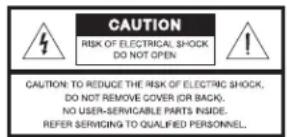

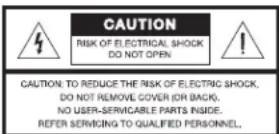
The lightning flash with arrowhead symbol within an equilateral triangle alerts the user to the presence of uninsulated, dangerous voltage within the system enclosure that may be of sufficient magnitude to constitute a risk of electric shock.

The exclamation point within an equilateral triangle alerts the user to the presence of important operating and maintenance instructions in this owner's guide.

WARNINGs and CAUTIONS
- To reduce the risk of fire or electric shock, do not expose this product to rain or moisture. The product shall not be exposed to dripping or splashing, and objects filled with liquids, such as vases, shall not be placed on or near the product. As with any electronic products, use care not to spill liquids into any part of the product. Liquids can cause a failure and/or a fire hazard.
- The power supply must be used indoors only. It is neither designed nor tested for use outdoors, in recreation vehicles, or on boats.
- Before use, charge the battery using only the power supply provided with the system. Refer to charging instructions in the system owner's guide. Do not continue charging the battery if it does not reach full charge within the specified charging time. Overcharging may cause the battery to become hot, rupture, or ignite. If you see any heat deformation or leakage, properly dispose of the battery.
- Do not attempt to recharge the battery in temperatures outside the range of 32^ - 104^ ( 0^ - 40^ ).
- Keep batteries out of the reach of children and pets.
- If the battery begins to leak, do not allow the liquid to come in contact with your skin or eyes. If contact has been made, wash the affected area with plenty of water and seek medical advice immediately.
-
Do not expose the product or battery to excessive heat, including direct sunlight or fire and storage or use inside cars in hot weather, where it can be exposed to temperatures in excess of 140^ (60^) . Doing so may cause the battery and power supply to generate heat, rupture, or ignite. Using the product in this manner also may result in a loss of performance and a shortened life expectancy.
-
If the battery is damaged and ignites, do not use water to extinguish flames. Instead, use a functioning fire extinguisher.
- Do not short-circuit batteries. Avoid storing them around metal objects such as keys, pocket change, paper clips, and jewelry.
- Do not step on, throw, or drop batteries or the power supply or expose them to a strong shock. Do not pierce, crush, dent, or deform the batteries or power supply in any way. If either becomes deformed, properly dispose of it.
- Make no modifications to the product or accessories. Unauthorized alterations may compromise safety, regulatory compliance, and system performance, and will void the warranty.
- Where the mains plug or appliance coupler is used as the disconnect device, such disconnect device shall remain readily operable.
- No naked flame sources, such as lighted candles, should be placed on the product.
- Do not dismantle, open, or shred the battery.
- The battery is intended to be used only with the Bose product and the power supply provided with it.
- After extended periods of storage, it may be necessary to charge and discharge the battery several times to obtain maximum performance.
- The cells in the batteries perform best when operating at normal room temperature, 70^ (20^) .
- We recommend replacing the SoundDock® system battery with a genuine SoundDock battery from Bose or an authorized Bose dealer. Bose cannot warrant the safety and compatibility or assure the operability of batteries from other manufacturers for use in operating the SoundDock Portable system. DO NOT attempt to use the SoundDock battery to power other electronics. Doing so may result in permanent damage to your system and/or personal injury
- Product labels are located on the bottom of the product and on the battery.

Please dispose of a used or damaged battery promptly and properly, following all local regulations. Do not incinerate.
To return a system battery for recycling, contact Bose or your Bose dealer. In the United States only, call 1-800-905-2180 or visit the Bose website at: www.Bose.com. For other regions, see the contact information included in this guide.

This product conforms to the EMC Directive 89/336/EEC and to the Low Voltage Directive 2006/95/EC. The complete Declaration of Conformity can be found at www.Bose.com/ static/compliance/index.html.

WARNING: This product is intended to be used only with the power supply provided: Bose P/N301141 or P/N 306386.
- Read these instructions - for all components before using this product.
- Keep these instructions - for future reference.
- Heed all warnings - on the product and in the owner's guide.
- Follow all instructions.
- Do not use this apparatus near water or moisture - Do not use this product near a bathtub, washbowl, kitchen sink, laundry tub, in a wet basement, near a swimming pool, or anywhere else that water or moisture are present.
- Clean only with a dry cloth – and as directed by Bose Corporation. Unplug this product from the wall outlet and remove the battery before cleaning.
- Do not block any ventilation openings. Install in accordance with the manufacturer's instructions - To ensure reliable operation of the product and to protect it from overheating, put the product in a position and location that will not interfere with its proper ventilation. For example, do not place the product on a bed, sofa, or similar surface that may block the ventilation openings. Do not put it in a built-in system, such as a bookcase or a cabinet, that may keep air from flowing through its ventilation openings.
- Do not install near any heat sources, such as radiators, heat registers, stoves, or other apparatus (including amplifiers) that produce heat.
- Only use attachments/accessories specified by the manufacturer.
- Protect the power cord from being walked on or pinched, particularly at plugs, convenience receptacles, and the point where they exit from the apparatus.
- Unplug this apparatus during lightning storms or when unused for long periods of time - to prevent damage to this product.
- Refer all servicing to qualified service personnel. Servicing is required when the apparatus has been damaged in any way: such as power supply cord or plug is damaged; liquid has been spilled or objects have fallen into the apparatus; the apparatus has been exposed to rain or moisture, does not operate normally, or has been dropped - Do not attempt to service this product yourself. Opening or removing covers may expose you to dangerous voltages or other hazards. Please call Bose to be referred to an authorized service center near you.
- To prevent risk of fire or electric shock, avoid overloading wall outlets, extension cords, or integral convenience receptacles.
- Do not let objects or liquids enter the product - as they may touch dangerous voltage points or short-out parts that could result in a fire or electric shock.
- See product enclosure for safety-related markings.
- Use proper power sources - Plug the product into a proper power source, as described in the operating instructions or as marked on the product.
The SoundDocka system operates with any iPodb with click wheel control. An iPod is not included with this product. SoundDock is a registered trademark of Bose Corporation. iPod is a registered trademark of Apple, Inc. All other marks are registered trademarks and trademarks of Bose Corporation. All rights reserved.
Information about products that generate electrical noise
NOTICE (in U.S.A. only)
This equipment has been tested and found to comply with the limits for a Class B digital device, pursuant to Part 15 of the FCC rules. These limits are designed to provide reasonable protection against harmful interference in a residential installation. This equipment generates, uses, and can radiate radio frequency energy and, if not installed and used in accordance with the instructions, may cause harmful interference to radio communications. However, this is no guarantee that interference will not occur in a particular installation. If this equipment does cause harmful interference to radio or television reception, which can be determined by turning the equipment off and on, you are encouraged to try to correct the interference by one or more of the following measures:
- Reorient or relocate the receiving antenna.
- Increase the separation between the equipment and receiver.
- Connect the equipment to an outlet on a different circuit than the one to which the receiver is connected.
- Consult the dealer or an experienced radio/TV technician for help.
In Canada: This Class B digital apparatus complies with the Canadian ICES-003.
FCC WARNING
Changes or modifications not expressly approved by Bose Corporation could void the user's authority to operate this equipment.
YOUR SOUNDDOCK® PORTABLE DIGITAL MUSIC SYSTEM
Adding to your iPod® possibilities
Congratulations on your choice of the SoundDock® Portable digital music system from Bose. This high-performance system, as a companion to your iPod® or other sound device, invites your music to come out and play.
Wherever you take it, don't be surprised if this SoundDock Portable system draws a wide audience of people who love the sound. You also can enjoy the::
- Battery or AC power as choices for how and where you use your SoundDock Portable system.
- Remote control that adjusts the system volume and controls basic iPod operation.
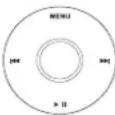
Full compatibility with a variety of iPods that feature a click wheel control, as shown:
Unpacking and setting up
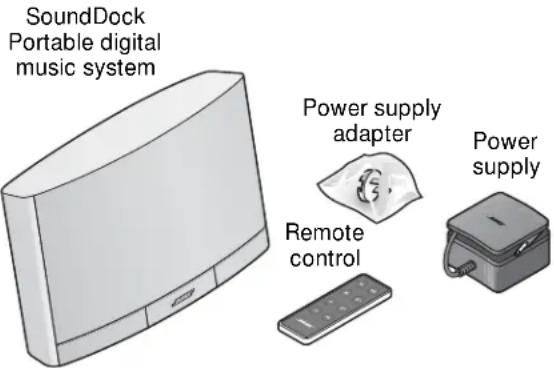
Check the carton for all of the parts shown here. Save the carton for possible future use in transporting the system, as needed.
Place the SoundDock Portable system on a firm and level surface that is free from sand, dirt, and other debris. Exposure to such elements can jam the dock and keep it from opening properly.
The system features shielded speakers that limit the possibility of video interference if you place it near a computer or video screen.
Note: One unusual feature of this system is the Bose proprietary mechanism to isolate vibration. You may notice it as a slight movement when you grasp the speaker. This feature actually adds stability and keeps the system from moving while it plays.
Whenever you move your SoundDock Portable system:
- Make sure your iPod is removed and the dock on the front is closed.
- Place one hand in the grip on the rear of the system and lift.
- Use the other hand to support the bottom until you place the system where you like.
Taking advantage of two power sources
When your new SoundDock® Portable system is plugged into an AC (mains) outlet, it charges both the system battery and your iPod (playing or not). When your system is not plugged in, it draws from battery power.
CAUTION: Use this system only with the attached battery or a replacement battery from Bose.
IAttaching the power supply
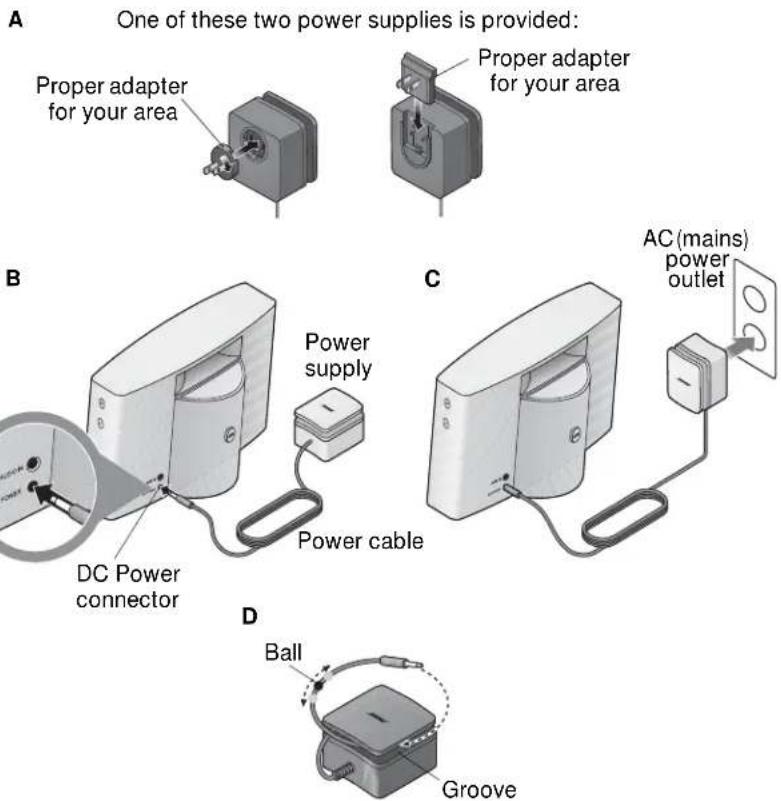
There is no need to remove the SoundDock Portable system battery when you attach the AC power supply. The system automatically draws from this power supply. To connect it:
- If there is more than one power plug adapter in the carton, choose the one that is proper for your area or country. Do not use an adapter that is labeled for use in another country.
IMPORTANT IN CHINA AND KOREA ONLY: A clip for use in your country is labeled on the outside of the small bag that contains it. Be sure to use that adapter only. - Attach the adapter to the power supply (A).
- Insert the free end of the power cable into the connector on the SoundDock system (B).
- Plug the power supply into an AC (mains) power outlet (C).*
CAUTION: Use this system only with the provided power supply or a replacement
A power supply from Bose: P/N 301141 or P/N 306386.
Taking the power supply along
The power supply is designed for packing up to go whenever you do. Before you leave:
- Wind the cable around the groove along the top (D).
- Move the small round ball as needed to fix the cable in place.
*You may notice a brief tone that confirms power attachment when you first plug in the system.
Using the battery
The battery on the SoundDock® Portable system is partially charged before shipping. However, during shipping the system enters a protection mode to preserve battery power. Plugging in the power supply returns the system to active operation and charges the battery as needed.
For information on using a backup battery, refer to "Installing a new SoundDock Portable system battery" on page 9.
Battery operation
Volume level and music type affect the rate of battery discharge. A fully charged battery provides approximately three hours of use when the SoundDock Portable system is set to full volume. You can extend this time significantly by choosing a lower volume.
- A quick way to check the battery power level is to press and hold the remote control Off button. Then notice the color of the light on the front of the SoundDock Portable system. For details, refer to "Noticing the indicator lights" on page 8.
- There is very little depletion of battery power when the SoundDock Portable system is not in use.
- A blinking red light on the front of the system indicates when the battery needs to be recharged. Recharging the battery may take up to 10 hours (whether it is playing or not).
- Plugging in the power supply recharges the battery, as indicated by the yellow light on the front of the system.
- If the light remains yellow after 10 hours of recharging, the battery needs to be replaced.
- If the period of battery operation becomes shorter and shorter, the battery needs to be replaced.
- When it is unplugged and unused for 14 days or more, the system enters battery power protection mode. Plugging in the power supply is the only means to reactivate the system.
CAUTION: Refer to the important safety instructions at the beginning of this guide for WARNINGS and CAUTIONS.
Exploring the other features
Portability is an important element in the design and features of your SoundDock Portable system. The system also contains several unique features.
Using the dock
The SoundDock Portable system provides a versatile dock.
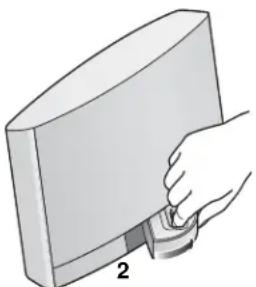
- To open the dock for use:
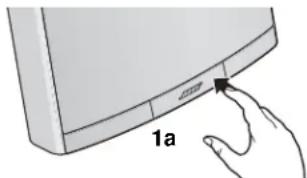
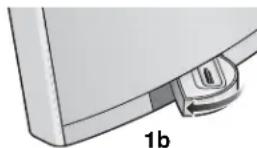
Press and release the right side of the dock frame (1a). The dock automatically swings out to the left (1b).
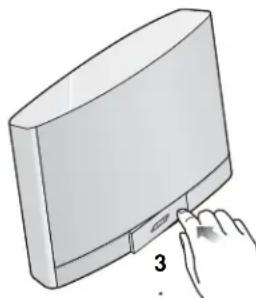
- To close the dock before moving the system:
With one finger inside the dock, pull the dock forward and around to the right (2).
Press in on the right side until the dock latches (3).
Inserting your iPod®
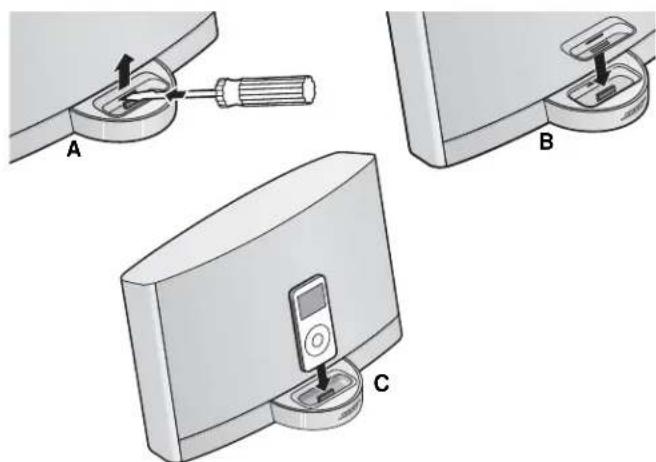
The dock on your SoundDock® Portable system is ready for use with a variety of iPods. If your iPod® includes a dock adapter that is custom-designed for it, we suggest using that adapter instead.
- Carefully insert the edge of a flat-blade screwdriver into the narrow slot inside the dock. Press gently to release the latch and lift out the insert. (A).
- Insert your iPod adapter (B).
- Place your iPod in the dock (C).
Charging begins, as needed, whenever you insert your iPod into the dock. This is true whether the SoundDock Portable system is plugged in or operating actively on battery power.
Using the remote
Each time you press a button on the remote control, a small green light on the front of the system flashes briefly.
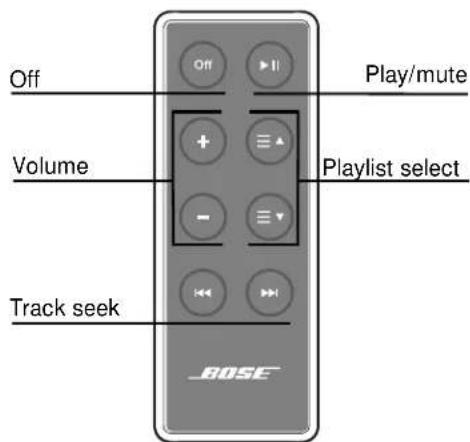
Besides controlling the SoundDock Portable system volume, the remote control turns your iPod on or off and controls basic iPod functions. However, it does not control a second sound device.
-
Turn on both your iPod and the SoundDock Portable system by pressing any button (except Off). The iPod charges, as needed, when the system is active. For more details, see "Playing your iPod" on page 8.
-
Adjust the SoundDock Portable system volume by pressing or . For faster adjustment, press and hold.
-
Pause your iPod play by pressing once. To resume play, press again.
-
Return to the beginning of an iPod track by pressing once. To skip to the beginning of the previous track, press twice. To scan backward quickly through a track, press and hold.
-
Skip to the next iPod track by pressing once.
To scan forward quickly through a track, press and hold. -
Select your next or previous iPod playlist by pressing or .
-
Turn off both your iPod and the SoundDock Portable system by pressing Off. To turn on the system, press any other button.
Some conditions, such as room lighting, furniture that blocks the signal path, or direct sunlight, can affect remote operation. If the remote does not work as it should, move the SoundDock Portable system, dim the lights, or turn the front of the system away from the sun. You also may move closer to the system when you use the remote.
Playing your iPod®
If your iPod® is turned on and playing when you insert it, music playback begins immediately.
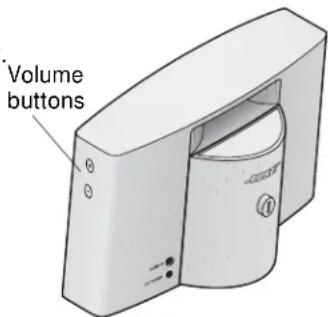
- Buttons on the right side of the SoundDock® Portable system raise (+) or lower (-) the volume. Whenever you press either button, a small green light on the front of the system flashes briefly.
- If earphones are plugged into your iPod when it is playing, sound comes from both the earphones and the system.
- When running on battery power, the SoundDock Portable system becomes inactive when your iPod is off or silent for 10 minutes. This suspends iPod charging.
- Pressing any button (except Off) reactivates the SoundDock Portable system and resumes iPod charging.
- When the iPod is fully charged, leaving it in the dock does no harm to the SoundDock Portable system or to your iPod.
Playing another sound device
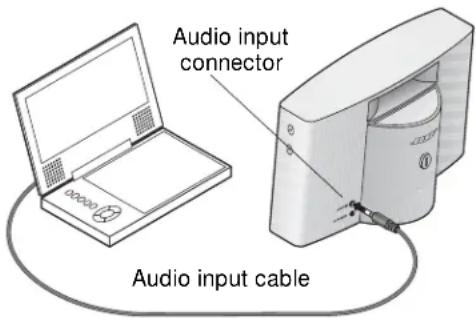
You can use another sound device, such as a portable DVD player shown here, with your SoundDock Portable system. This requires using an audio input cable (not provided with the system) that is appropriate for the device and has a 3.5mm mini plug on one end.
- Connect this other sound device to the system.
- Set the device to full volume, then use the SoundDock Portable system volume buttons to adjust the level.
- Remove your iPod, if it is in the dock. Your added sound device will not play when the iPod is connected.
- With this sound device turned on, touch any button (except OFF) on the SoundDock Portable system or remote control to reactivate the system.
Noticing the indicator lights
On the front of the SoundDock Portable system, a small light lets you know the state of the system.
The light appears:
- Off, when the battery is fully charged and the system is on or off, playing or inactive.
- Green, when you touch a button on the remote or on the SoundDock Portable system. This light flashes several times when the volume reaches maximum or minimum.
- Yellow, solid when the system battery is charging.
- Red, blinking when the system battery needs charging. This requires plugging in the system.
The light also indicates the level of battery power when you press and hold down the Off button on the remote:
Red - 20% or less full power • Yellow - from 20% to 70% full power • Green - above 70% full power
Maintaining your system
You may want to clean your SoundDock® Portable system occasionally. Other than that, charging and changing batteries should be the only maintenance needed.
Cleaning the outside
Wipe the system using a soft, dry cloth. You can also lightly vacuum the grille or the dock to remove any grit or debris.
- Do not use solvents, chemicals, or sprays.
- Do not allow liquids to spill or objects to drop into any openings. Damage from liquids voids the warranty.
Installing a new SoundDock Portable system battery
To purchase a replacement battery or an additional battery as backup, contact your local authorized Bose dealer. Or you can order a battery by visiting the Bose website: www.Bose.com. To contact Bose by phone, refer to the contact list provided in the carton.
To remove the battery:
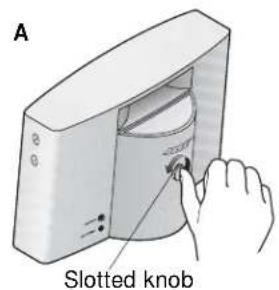
- Press in and turn the slotted knob on the back of the system counterclockwise (A), using a thumb or coin. This releases the battery lock.
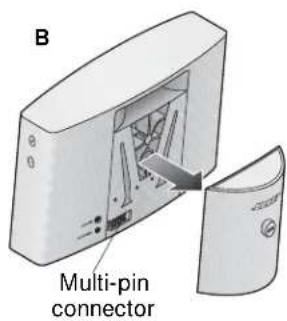
- Using both hands, firmly pull back on the battery. Carefully remove it from the multi-pin connector on the lower left rear of the system (B).
WARNING: We recommend replacing the SoundDock Portable system battery with a genuine SoundDock battery from Bose or an authorized Bose dealer. Bose cannot warrant the safety and compatibility or assure the operability of batteries from other manufacturers for use in operating the SoundDock Portable system.
To attach a new battery:
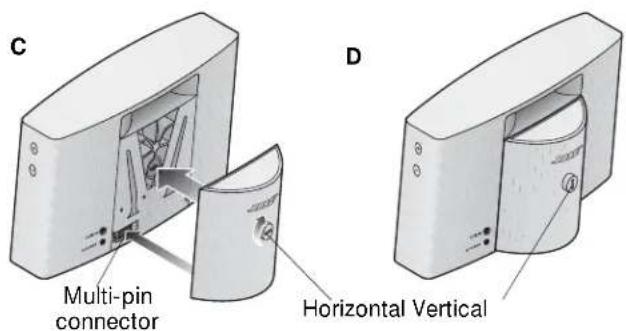
- Make sure the slot in the knob on the back of the battery is in a horizontal position (C).
- Fit the battery plug into the multi-pin connector at the lower left rear of the system.
- With the battery in place, press in and turn the slotted knob clockwise until the slot is vertical. This locks the battery in place (D).
Replacing the remote control battery
When the remote stops operating or its range seems reduced, it is time to change the remote battery.
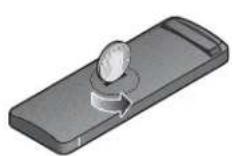
- Using a coin, turn the battery cover slightly counterclockwise. When the cover comes off, turn over the remote and tap it lightly on your hand.
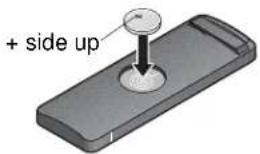
- Remove the used battery and place the new battery in the compartment. Be sure the new battery is broad side up, with the + symbol in view.
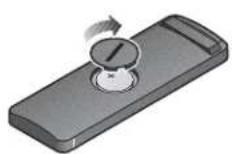
- Reseat the cover, with the slot at a slight angle, and turn it clockwise until the slot is vertical.

WARNING:
- Keep the remote control battery away from children. It may cause a fire or chemical burn if mishandled. Do not recharge, disassemble, heat above 140^ ( 60^ ), or incinerate.
- Dispose of used batteries promptly. Replace only with a battery of the correct type and model number.
- Danger of explosion if battery is incorrectly replaced. Replace only with Duracell, Eveready, Energizer, Maxell, Toshiba, or Shun Wo CR2032 or DL2032 3-volt lithium battery.
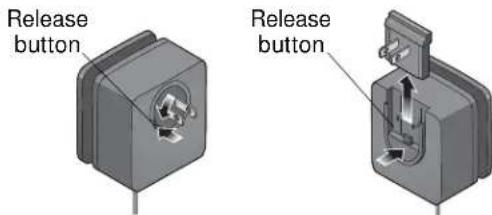
Removing the power supply adapter
You can remove the adapter that came with your power supply, if needed.
Press the release button, as shown, before taking off the adapter.
Customer Service
For questions about the SoundDock® Portable digital music system, contact your local Bose® dealer. To contact Bose directly, see the contact list included in the carton.
Warranty
Your SoundDock Portable digital music system is covered by a transferable limited warranty. See your product registration card for details.
Please be sure to fill out the information section on the card and mail it to Bose. Or, to register online, visit our website: www.Bose.com. However, failure to register, will not affect your limited warranty rights.
Troubleshooting
| Problem What to do | |
| Your iPod ® does not dock properly | Remove your iPod from the dock and check for obstructions on the connectors in the dock and on your iPod. Then reseat it in the dock. Insert the dock adapter provided with your iPod. |
| Problem | What to do |
| The dock does not open or close properly | ·Use a soft, dry cloth to wipe the outside of the dock, whether it is open or closed. ·Blow around the edges of the dock to remove any dirt or debris from the crevices. |
| No sound · Increase the volume setting for the system. ·Make sure the SoundDock®battery is charged or the system is plugged in, your iPod®is turned on, and a music track is selected and playing. ·Remove your iPod from the dock, wait 5 seconds, then reseat it. You may need to do this a few times. ·With another sound device, be sure your iPod is removed from the dock and the second device is properly connected, turned on and set to play. ·If the other sound device is connected and playing, press any button on the remote control to activate the system. Review “Playing another sound device” on page 8. ·Unplug the SoundDock Portable system and remove the battery from the back of the system to completely shut off any power to it. Then reattach the battery and plug the system in again. | |
| No sound and your iPod is not charging | ·Make sure your iPod is firmly seated in the dock and the SoundDock Portable system battery is charged or the power supply is plugged in properly. ·Remove your iPod from the dock, wait 5 seconds, and return it to the dock. ·An iPod that has buttons and no click-wheel control does not recharge while it plays and may need recharging. ·If the power supply is in use, make sure the power outlet is functioning properly. ·Unplug the SoundDock Portable system and remove the battery from the back of the system to completely shut off any power to it. Then reattach the battery and plug the system in again. |
| Your iPod does not respond to the SoundDock remote control | ·Remove your iPod from the dock, wait 5 seconds, then reseat it. You may need to do this a few times. ·Your iPod software may need to be updated. ·Try the remote from a different location. If it works there, strong lighting or other conditions may be causing the problem. Refer to “Using the remote” on page 7 for further details. ·Make sure nothing blocks the infrared (IR) signal path from the remote to your SoundDock Portable system. Wipe off the small lens on the front end of the remote. ·Check the remote control battery to make sure the + side is up, as shown on page 10. ·Replace the remote control battery. ·Unplug the SoundDock Portable system and remove the battery from the back of the system to completely shut off any power to it. Then reattach the battery and plug the system in again. |
Technical Information
Power supply rating
Input: 100-240V 50-60Hz, 1A
Output: 20V, 2A=
System size and weight
6.7"H x 12.0"W x 5.1"D (17.0 cm x 30.7 cm x 12.8 cm)
5.2 lb (2.4kg) including battery

BOSE®
SoundDock®

NSTRUCTIONS A LIRE IF DAMAGED ATTENTIVMENT

IF DAMAGED


- IMPORTANT SAFETY INSTRUCTIONS
- Please read this owner's guide.
- WARNINGs and CAUTIONS
- Information about products that generate electrical noise
- NOTICE (in U.S.A. only)
- FCC WARNING
- YOUR SOUNDDOCK® PORTABLE DIGITAL MUSIC SYSTEM
- Adding to your iPod® possibilities
- Unpacking and setting up
- Taking advantage of two power sources
- IAttaching the power supply
- Taking the power supply along
- Using the battery
- Battery operation
- Exploring the other features
- Using the dock
- Inserting your iPod®
- Using the remote
- Playing your iPod®
- Playing another sound device
- Noticing the indicator lights
- Maintaining your system
- Cleaning the outside
- Installing a new SoundDock Portable system battery
- Replacing the remote control battery
- WARNING:
- Removing the power supply adapter
- Customer Service
- Warranty
- Troubleshooting
- Technical Information
- Power supply rating
- System size and weight
Brand : BOSE
Model : 43085
Category : Audio Dock