Pad - Tablet POCO - Free user manual and instructions
Find the device manual for free Pad POCO in PDF.



User questions about Pad POCO
0 question about this device. Answer the ones you know or ask your own.
Ask a new question about this device
Download the instructions for your Tablet in PDF format for free! Find your manual Pad - POCO and take your electronic device back in hand. On this page are published all the documents necessary for the use of your device. Pad by POCO.
USER MANUAL Pad POCO
To view the user guide, scan the QR code.
POCO Pad Quick Start Guide
Contents
English 01
Francais 07
Italiano 14
Espanol 21
Deutsch 28
Nederlands 35
Portugues (Portugal) 42
Polski 49
Elambdaikα 56
Magyar 63
Cestina 70
Româna 77
UkpaiHcbka 84
Srpski 92
EN
Thank you for choosing POCO Pad
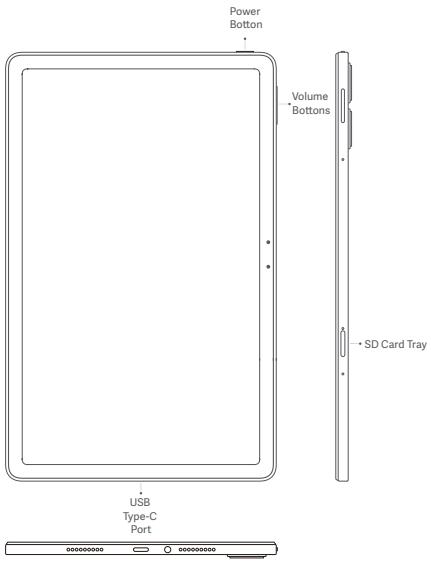
Long press the power button to turn on the device.
Follow the on-screen instructions to configure the device.
For more information, visit our official website:
www.mi.com/global/service/userguide
WEEE

Special precautions must be taken to safely dispose of this product. This marking indicates that this product may not be discarded with other household waste in the EU.
To prevent harm to the environment or human health from inappropriate waste disposal, and to promote sustainable reuse of
material resources, please recycle responsibly.
To safely recycle your device, please use return and collection systems or contact the retailer where the device was originally purchased.
CAUTION
RISK OF EXPLOSION IF BATTERY IS REPLACED BY AN INCORRECT TYPE. DISPOSE OF USED BATTERIES ACCORDING TO INSTRUCTIONS.

To prevent possible hearing damage, do not listen at high volume levels for long periods.
Additional safety information and precautions can be accessed at
the following link: www.mi.com/en/certification
Important Safety Information
Read all safety information below before using your device:
- Use of unauthorized cables, power adaptors, or batteries can cause fire, explosion, or pose other risks.
- Use only authorized accessories which are compatible with your device.
- This device's operating temperature range is 0^ to 40^ . Using this device in an environment outside of this temperature range may damage the device.
- If your device is provided with a built-in battery, to avoid damaging the battery or the device, do not attempt to replace the battery yourself.
- Charge this device only with the included or authorized cable and power adapter. Using other adapters may cause fire, electric shock, and damage the device and the adapter.
- After charging is complete, disconnect the adapter from both the device and the power outlet. Do not charge the device for more than 12 hours.
- The battery must be recycled or disposed of separately from household waste. Mishandling the battery may cause fire or explosion. Disposc of or recycle the device, its battery, and accessories according to your local regulations.
-
Do not disassemble, hit, crush, or burn the battery. If the battery appears deformed or damaged, stop using it immediately.
-
Do not short circuit the battery, as this may cause overheating, burns, or other injury.
- Do not place the battery in a high-temperature environment.
Overheating may cause explosion. - Do not disassemble, hit, or crush the battery, as this may cause the battery to leak, overheat, or explode.
- Do not burn the battery, as this may cause fire or explosion.
-
If the battery appears deformed or damaged, stop using it immediately.
-
User shall not remove or alter the battery. Removal or repair of the battery shall only be done by an authorized repair center of the manufacturer.
- Keep your device dry.
- Do not try to repair the device yourself. If any part of the device does not work properly, contact Mi customer support or bring your device to an authorized repair center.
- Connect other devices according to their instruction manuals. Do not connect incompatible devices to this device.
- For AC/DC adapters, the socket-outlet shall be installed near the equipment and shall be easily accessible.

Safety Precautions
- Observe all applicable laws and rules restricting use of tablet in specific situations and environments.
- Do not use your tablet at petrol stations or in any explosive atmosphere or potentially explosive environment, including fueling areas, below decks on boats, fuel or chemical transfer or storage facilities, or areas where the air may contain chemicals or particles such as grain, dust, or metal powders. Obey all posted signs to turn off wireless devices such as your tablet or other radio equipment. Turn off your tablet or wireless device when in a blasting area or in areas requiring "two-way radios" or "electronic devices" to be turned off to prevent potential hazards.
- Do not use your tablet in hospital operating rooms, emergency rooms, or intensive care units. Always comply with all rules and regulations of hospitals and health centers. If you have a medical device, please consult your doctor and the device manufacturer to determine whether your tablet may interfere with the device's operation. To avoid potential interference with a pacemaker, always maintain a minimum distance of 15cm between your tablet and the pacemaker. To avoid interference with medical equipment, do not use your tablet near hearing aids, cochlear implants, or other similar devices.
- Observe all aircraft safety regulations and turn off your tablet on board aircraft when required.
- When driving a vehicle, use your tablet in accordance with relevant traffic laws and regulations.
- To avoid being struck by lightning, do not use your tablet outdoors during thunderstorms.
- Do not use your tablet in places with high humidity, such as bathrooms. Doing so may result in electric shock, injury, fire, and charger damage.
- Connect the "POCO Pad" to computer using a USB data cable. Use the USB cable included in the gift box with a Mi brand charger and then connect it to a power strip.
You can also use any third-party charger that complies with USB2.0 or higher protocol standards and also meets the requirements of the International Information Technology Equipment Safety Standard (IEC 60950), Audio/video, Information and Communication Technology Equipment Standard (IEC 62368-1) and the related laws and regulations of your country or region.
- Please note that the product allows the use of chargers with the maximum output of 33W. The maximum voltage shall not exceed [11V] and the maximum current shall not exceed [3A].
Using other chargers that do not meet the above requirements to charge this product may damage the product itself and your personal or property safety.
Security Statement
Please update your tablet's operating system using the built-in software update feature, or visit any of our authorized service outlets. Updating software through other means may damage the device or result in data loss, security issues, and other risks.

The power delivered by the charger shall be between min [10] Watts required by the radio equipment, and max [33] Watts in order to achieve the maximum charging speed. USB PD fast Charging.
EU Regulations
RED Declaration of Conformity

Xiaomi Communications Co., Ltd, hereby declares that this Tablet with Bluetooth and Wi-Fi 2405PCFBG is in compliance with the essential requirements and other relevant provisions of the RE Directive 2014/53/EU. The full text of the EU declaration of conformity is available at the following internet address: www.mi.com/en/certification
RF Exposure Information (SAR)
This device is in compliance with Specific Absorption Rate (SAR) limits for general population/uncontrolled exposure (Localized 10-gram SAR for trunk, limit: 2.0W / kg ) specified in Council Recommendation 1999/519/EC, ICNIRP Guidelines, and RED (Directive 2014/53/EU).
During SAR testing, this device was set to transmit at its highest certified power level in all tested frequency bands.
When attaching the device near the body, a belt clip or holster should be used which does not contain metallic components. RF exposure compliance was not tested or certified with any accessory containing metal worn on the body, and use of such an accessory should be avoided.
Certification Information (Highest SAR)
SAR 10 g limit: 2.0 W/Kg
SAR Value: Body: 0.989 W/Kg (0 mm distance).
Legal Information
This device may be operated in all member states of the EU.
Observe national and local regulations where the device is used.
This device is restricted to indoor use only when operating in the 5250 to 5350MHz frequency range in:AT,BE,BG,HR,CY,CZ,DK,EE,FI,FR,DE,EL,HU,IE,IY,LTI,LM,MT,NL,PL,PT,RO,SK,SI,ES,SE,UK(NI),IS,LI,NO,CH,TR
Wi-Fi connectivity (including Wi-Fi frequency bands, Wi-Fi standards and other features as ratified in IEEE Standard 802.11 specifications) may vary based on regional availability and local network support. The function may be added via OTA when and where applicable
Restrictions in the 2.4 GHz band:
Norway: This subsection does not apply for the geographical area within a radius of 20km from the centre of Ny-Ålesund.
Please ensure the used power adapters are compliant with applicable country regulations and international and regional safety standards.
Frequency Bands and Power
This tablet offers the following frequency bands in EU areas only and maximum radio-frequency power:
Bluetooth:20 dBm
Wi-Fi 2.4 GHz band: 20 dBm
Wi-Fi 5 GHz: 5150 to 5250MHz; 23 dBm, 5250 to 5350 MHz; 20 dBm
5470 to 5725 MHz: 20 dBm, 5725 to 5850 MHz: 14 dBm
FCC Regulations
This tablet complies with part 15 of the FCC Rules. Operation is subject to the following two conditions: (1) This device may not cause harmful interference, and (2) this device must accept any interference received, including interference that may cause undesired operation.
This tablet has been tested and found to comply with the limits for a Class B digital device, pursuant to Part 15 of the FCC Rules.
These limits are designed to provide reasonable protection against harmful interference in a residential installation.
This equipment generates, uses and can radiate radio frequency energy and, if not installed and used in accordance with the instructions, may cause harmful interference to radio communications.
However, there is no guarantee that interference will not occur in a particular installation. If this equipment does cause harmful interference to radio or television reception, which can be determined by turning the equipment off and on, the user is encouraged to try to correct the interference by one or more of the following measures:
- Reorient or relocate the receiving antenna.
- Increase the separation between the equipment and receiver.
- Connect the equipment into an outlet on a circuit different from that to which the receiver is connected.
- Consult the dealer or an experienced radio/TV technician for help.
RF Exposure Information (SAR)
This device meets the government's requirements for exposure to radio waves. This device is designed and manufactured not to exceed the emission limits for exposure to radio frequency (RF) energy. The exposure standard for wireless devices employs a unit of measurement known as Specific Absorption Rate, or SAR.
The SAR limit set by the FCC is 1.6 W/Kg. For body-worn operation, this device has been tested and meets the FCC RF exposure guidelines for use with an accessory that contains no metal. RF exposure compliance with any bodyworn accessory that contains metal was not tested and certified, and use of such body-worn accessory should be avoided.
FCC Note
Changes or modifications not expressly approved by the party responsible for compliance could void the user's authority to operate the equipment. Shielded cables must be used with this unit to ensure compliance with the Class B FCC limits.
E-label
This device has an electronic label for certification information. To access it, please go to Settings > About tablet > Certification, or open Settings and type "Certification" into the search bar
Instructions for Factory reset
Path: Settings > About tablet > Factory reset
You can quickly erase the local data on the device via "Factory reset".
Data to be erased includes: Accounts, Contacts, Photos and videos, Apps, Backups, SD card data and Other items on this device.
Model: 2405CPCFBG
2405 indicates that this product will be launched after 202405.
Disclaimer
This quick start guide is published by Xiaomi or its local affiliated company. Improvements and changes to this guide necessitated by typographical errors, inaccuracies of current information, or improvements to programs and/or equipment, may be made by Xiaomi at any time and without notice. Such changes will, however, be incorporated into new online editions of the quick start guide (please see details at www.mi.com/global/service/userguide). All illustrations are for illustration purposes only and may not accurately depict the actual device.
FR
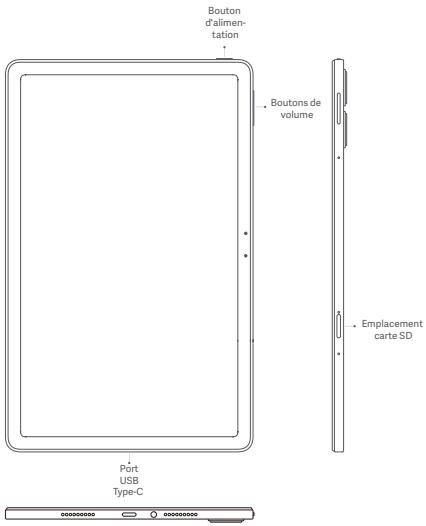
www.mi.com/global/service/userguide
DEEE

019, 9th Floor, Building 6, 33 Xierqi Middle Road, Haidian District, Beijing, China, 100085
IT
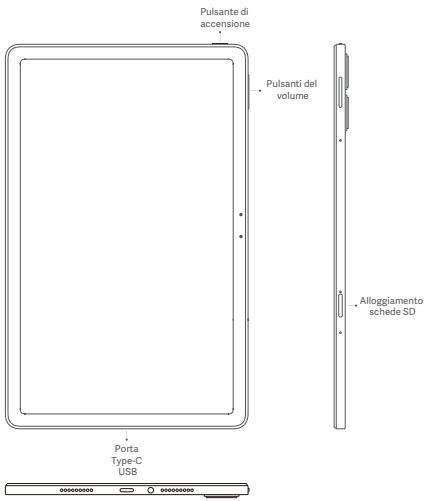
www.mi.com/global/service/userguide
RAEE

Liminete SAR 10 g:2,0 W/kg
AT,BE,BG,HR,CY,CZ,DK,EE,FI,FR,DE,EL,HU,IE,IT,LV,LT
LU,MT,NL,PL,PT,RO,SK,SI,ES,SE,UK(NI),IS,LI,NO,CH,TR
RACCOLTA DIFFERENZIATA
www.mi.com/global/service/userguide
WEEE

www.mi.com/global/service/userguide
WEEE

www.mi.com/global/service/userguide
WEEE

www.mi.com/en/certification
www.mi.com/global/service/userguide
REEE

www.mi.com/global/service/userguide
WEEE

Limit SAR 10 g:2,0 W/kg
Wartosc SAR:Ciaio:0,989 W/kg (odlegtosc 0 mm).
Informacja prawne
www.mi.com/global/service/userguide
OEEZ

www.mi.com/en/certification
Limit SAR 10 g:2,0 W/kg
Hodnoty SAR: tello: 0,989 W/kg (vzdalenost 0 mm).
Právní informace
fi accesse la urmatarul link: www.mi.com/en/certification
Limita SAR 10 g:2,0 W/kg
www.mi.com/global/service/userguide
3a noCnlaHnHaM: www.mi.com/en/certification
BaxnBa iHopmaiz npo 6e3neky
O3hAOMTEc 3 yCima BIDOMOTMnnpo6eNeKpyepnHIXBVKOPNCTOByBnP npnCTpR:
BmokpntahnHa Heo3oBolneHnx Ka6eBn, adaantepB XbIeHNHa a60 aykmjTOpB Moe cnpuHHTn noxKey, Bv6y x a60 ctaHOBtHn HsiH p3HKn.
BukopncTobyntiNbKnyxBaaneHiaKcecyapn,ymich3Baumnpctpoem
- Tempepatya HbakonlhuHoro cepedeobuaIa IeKcnLyaTuI pIcntpOo tchaobOtB iD o0 40°C. IpnctiPoi Moe nookduttinca, KkUO BnKpOHTOByBatni Horo 3a MeKamM 3azHaueHORo TEmnpetypHORo dianao3HO.
- Jäkuo pinnctpr ñochaeho 86bdoaHIMK aykymjTporom, He hamaarJteca 3amHHTnIgO bnaChopuy, Μιδ 3anOfiTrn NouKdxeHHNko kymjTopora a6o pinnctpOK.
3-AprakhXa3teIeIeNpCTRI TILsIK daIZOIMOKAOBeJIIOA dAnjTePA
JiXbENHnA, RJKI NaOCTaOHAI B KOMNkTIe 6o CxBAJIEnI. BHKOpCTAHNI
IHIXX dAnjTePBI MOKE pINB3EHTO Da 3aIMAHUN, ypaKeHHN ENEKTPYNHMM
CTyPMOM I NOKUdKHeNPI RnNPTPO OIOI
1
- Kolm ārādjankhān āaēbupṭṭṭhī, bīd ādāhāre ādāampt Ăbī Ṭnrcptpōo tā pətěkīn. 他 Ārādjankhān ārpctniḥ Ānó Ḥ₁ dōvūn.
-
Akymnytrop ToprpiBHO BIDATNa He nepeboky 6a0 yntni3aybTaOnkEmoB iDn nojboTobXiBXdoJhEn. HenePbnIbe NOBdoKhen 3 akymnytropOMOKe npNBeCTn Do 3aMAnHnA 6o bOByxu. Yntni3yte 3 aZabaiTe Ha nepeboky pnpctri, IoroAkymnytrop i akcescaypri I bNObiDIOho MucdeBxHOPM.
3AzoopnoHretcBpO36ipatni,udaprrn,napmAto 60 cnaIIOBAti AkyMUTrOp.
Jxto AkyMUTrop BnIyIaDeeDfOpMOBAHm AooNtOJKeHMn, HeraiHO npinnHtt HmKOpCTByTMC. -
He donycaikte konpoktoro 3amkHKAHN kYAMNITropa, OCKINKJIe LEO MOKE pni3BcTeD no peperipBHHAn, oniIKI ab oIHxN TpA8m.
3- 3a0peoHEO p03a0uOByBAtn AkyMmIITop y cpeodobuiz 3 BVCOKO temepatypoo. - PerperpibaHnMoKe npu3BecTn do Bn6yxy.
-3a60bHeoHene 0360bHpiAt, ydaatpn 6abn amata kymyIATpO, ocklbkJe Moe MPri3BectOn do Bt bOKy ENePONpyi, perpeipnAIBx ab6B6yx. - 3a60pOHeNO CnAIOBAtN AkyMmIyTOp, OCKiNbK iE MoKe PnIb3EYtn Do nKoJIeXbA6Hxv.
-
JIaOo ayxumyrtop BnVIIaIae deOpMOBamH a60 noNkOKeHHM, HeraHIo pinnHITb Hm KOPrCTByATINc.
-
KOPHYBZAMM 3abOpOHENO BIMATNI AkyMMYIITOP abo BOCHTN I BYO KOHTPKUIO 3MIHN, BImMAHNO aBOPEMT AkyMMYITOPaOBINHHI dJIyBCHOATNI LIIHNE pIeCTADTBNIKHN AIBTOPIS0BAHOR pEMOHTHO NcETPHY BPOVHKNA
CπikkyiTe,πo6 npncptpi 3aBxnd 6bycyn. - He hamaraiTcE pemohyBtavn pnpctrii camoTyKxu. Ikoy6a-Ika-etaIbIpncTPOHne 0kyHuNIOye HALEKNIHmUHNOM, B3epHcySdO cnky6nMiPITMnKMs MI a60 npnnHeCtbpnCTpOdo AotroposBaHOHOre cepicHOHOr eHTpy.
PnKniOJIaOHNI HIN pNtCI rIgHO aNocHsIKAM aIX ekCNyATAJI. 3abOpNHcEeBcNkI NpNIOHNIATHE NcHcMIY cNpNITcO aTO OLO nPNOCTPO.
AaTmep 2nHOrO CTmyI CnIg BmKtN BPO3eTKy, kja PO3a0uBObAH npny I3 nCPTPmoI eIO KMO KHOA NkEr OTOPMAtoDctOy.

3acTepeXeHnI 0oO 6eNKeN
- DTOMYIHTeC, yCIX YMHINX HOPM 3KMOHADCTBCA, TO MO6EYKOHTb BMKOPHTAHN HUHTAUE a NEBHNX CYUJIAX AEO cpeODBOHUAx.
He BinkopcOCTyBEI nnHJWY nOTeHTNO HbVbXOH6E3BnVHIXnCEpeDIOBxUaX, 3KOpENePbMxuYABTOx3AEBONAPBNXtCHauNTH, y2AOKTHINpRIMiueHHXnHA cyDuaN, xCBOwINsANPAIBa xoBIxMHINvpeOBHnVIHnA Tn pACoTIOHNPHXn3Aoc6AbfIINxNEPEB3EHnA, aTAKOW KMIUCN, de NOBIPrMOKe bTyH NAcHYNHM XIMiVNHMn PEoOBHnAMn ABO dIp6HMNHactNkHAMn NICy, NNI, metaLBeMNbNPOpoNtioo. ToDPmYrTeCBMnYcix OToHOJoueNo IPOe6XdHInbI, BVMiHKAHN63EpdOTBXnNPcTIOBx,IKoBt BAOIro NNHAMeTA qI HiWO rPADIooBDAHNHn. BVMiNKaiite NaHMeA 6oB6DpOHTNpIeY BIVbXOeH6E3NEXHNxCMIUXx abTme, BVMiRAactbCYBMMKATNI DnIaDcOToBNHOrOg PADI083KHy6 aEOEKNPOHn PPcTOIa 3AnOgIFHnMAOKnMlBNe6E3Nz
He Kopriyctyireh nlaahmuet O beapnihx 3axn kaphebn, pnpimiehncn for nadnaa hwiubdojnonomirbao a peabimiku. 384n
dortmyriTIECTeCNHnHX pRbAI I perIaMENTI bI KIAPAEI M ENHINHX ueHNTi. RaIO yBaC e MENHIXN pIcNtPcI, pNOKCHyJIteTcE 1kAePMI I BPOHOKOM pIcNtPcO, OIOB IIIaNHTAHY, cM MoKE PIAHET peNeuKOJATIKI HrO POBoTI. OIOb IIYNHNYtO MKNbIXNBEu NKPOsI KaIPODCTMIYNOTRA, 3ABZKn TpIMAAITe PIAHET HaIBDTAI OHMOJAHNEU 15 CM Bd HbOr. IOo He nepeuKOJXATNI POBOIT MOEt MIENHORO 6OaNDAHNHA, HKeONPTCYI PIAHETOM BIL CYNOBXIN anapatIB, KOxJIaePHNX ImIIaTHAI aO NOIDHIIX NpCTPoIB.
- DTOMMYIe8y cixynpBnAIN 3EaJIneKIN bIAInepeBee3bN h I BAIMORY BIMNKAIe4 NIIAHET WHO6pytNtaca.
Пд acкуberаньт tratс�норгима 3ackobokmpocrtseпларшето rfi3do 3bdionobdHmimakohamnряnamabipinamdojopoxrofo pyxu.
念 06yhynkytn ypaekhenb 6bnckabko, NO, he koprctytec nlaanuetom Hnabdoi npi cuaoprton.
He Kopričtičnye TCE nπaúHETUO y miciučx i3 BICKOOKO BOJORICTO, K-OT-y bAHNHX KIMhATax. Lc Mopek πm3BSEtOn do ypačekheny ENeTPKTHNM CTPMOM, TAPMAI, NOKEXI, A takovon noškoDKJEHHA 3apdHOro nPCTPOK.
Пдкюитe+POCO Pad-до ком'tягета зддог�огуКабелТСЕпдддддддддддддддддддддддддддддддддддддддддддддддддддддддддддддддддддддддддддддддддддддддддддддддддддд徳сdД。 - CxopivctaeTaeKabemEM USB, 0g BxOuHbTdo cKnAydou KOMJIeKTHoI
- KOp6Kb3 3aapdNmPnCtpoEb6peHy «Mi”, i norim NidKnHcHbI yoro do
- MepexeKeBOrOphiJfTy.
TAOKO MOKHA KOPCTATN3A4PNNHIM NPHPCTPOEMCSTOPONHHORO BIVNOBHNAKIKI BIDN0BIEAeCTADNPAYTUSB2.0,AO6CTANBPAMBUIHXIPOTKOTOKINAE,TAKOXIKOBIDGAEBAEUMORAMMIKHNAPHOHROTCAHTADPTY 6Be3NEKNUCTATKYBAHNIHIOFPMAQHIINXTEXHONOI(IEC 60950),CTAHNDPTY 8CTATKYBAHNI AUYIO/BIDEO,InFOPMAUINIXKAOMYHKAIINHXTENOHOU (IEC 62368-1)TaBIODINHIMZAKOHAMIHINHMOPMATBHO-NPAOBIM AKNTABWMOKPIAHINa60perIOHY.
Cnld 3a3aHHTNU, 0oBip16 B03J08NEIbKINOPCRTOBYABTN 3apdHI npriCTPO 3 MAXcIMAHNBJIOHXDIOHOOTNYKKTIOHO 3B3M MAXcIMAHNBAHpyRA he Mae nepeBvUyBATN [11 B], a MAXcIMAHNBIH CTpyR HeMae nepeBvUyBATN [3A].
BinkopriCTHNNI HIIHIXI 3APADHNI PHNCTPOI, kAIIE HIIOBIAIOHTB 3AHHENIM BIIIE MBOAM OIOO 3APADKNI BMO6Y, MOKE NOIKKOINITN BIVIO, A TAKOK 3BATADIKI NIOKIOO C06NBIOT IAO MPATENIH 6BneNJI.
3aBa 70do6e3neKn
OohOBIOJIte OpeaJIHcy CSteMly PAnHsTe 3a dONOMoEO 6yDoBaHOI
fOhKUIO OHOBENHEIN pRORpAMHOrO 3aBe3ZeneHHA 6b 6yBuJ- kMyOH 3 hauHX
aBtPO30BAHNx cepBcIHx cTePBr. OHOBENHEIN nprporpAMHOrO 3aBe3ZeneHHA
I HINNI cTcIO6 Moe pRnE3Brv Do noMooKdEHHI pNCTPO 8AO BTPAT
DAHNx, BHINKHeHHNTH pNoBEm 13 Se3NeKO 8HInNX p3MkIB.

TpyOtKhytch, 100NoTaIbTaC8z4aHIMDnPiPCTOeM, NOBHHA nepeBbATNI B MEKAM IX MIMYUM [10] BT. Heo5bIXHNHAPdIOo5bNDaHNNHO, Do MAKcIMyM [33] BT ndoocHeHHNMAkCMmJIbHOI WbIDKcOCTI 3aRdXkAHN. IuBIDKe 3aRdXkAHN USB PD.
Perlaemntn EC
Deknapaia BIDNObiNDocti 3rdno 3 DnpeKtboIO npo padiooblaanHnnra (RED)
CE
KoMamia Xaomi Communications Co., Ltd. zeaBna, zuo CEi nnAunu Hs i nqTmPkoO Blueothoi Wi-Fi 2405CPCFGB iDnOeDAce OOBHbAM BMOMAR T hINHM AKtayIbnHM NOnokEHrMM DInpeKTHNn npro padoOoblaHNH 2014/53/EU. 3 NOBHm KekTcM ONekaplanu npro DIOBnHJbcHs CTanApaRM EC MOKHa zhSAOMHTN HA be6-ctopHui www.mi.com/en/certification
InΦopmaizipnoBnivBpu(SAR)
Ley ncpriptyl b1n0djiae o6mekhenrnn mntoTOMO KOeIFIeHTaNGHNNAHNA (SAR) 4n aHecHenenHa 62o heKOTPPOBHOHAR BvONPMIOHANHn (MAKCHMIAHPONTHyCImHe3 3hNeAHnSA HAR 10 rpaIM TBKAHNH B pasi HCINHHa Ht Ni:2.0 Br/kt), Rki BxIHsHepo KpeMeOHauQoia PaDi EC 1999/5/EC, peKoEHAMDAiM MInkHApDIOK oKiMoIcI 3axcyTeI yID HeoiHi3oyUxh VBNPiMOHBOHaI dUxpTeKIBNO 2014/53/EU (RED).
Пиц дестуваши SAR сени рпсстрий Буно Налаштоано досяпегади на
Biod NobiDhiCTb BmOram UkpaHn
TexuHinpu 耕PernaAMeHT pRiOo6nAdHnnH,3aBeeDjKeHoro
PocTahOBooKaBHyteMHCtPrB YKpaHIn B2d 24 TaPBHO
2017p.N355:
cnpabxhim-Xiaomi Communications Co.,Ltd.>3a#JHae,uoTIN daipoo6bndannha:
Планштейник ПК (Tablet Computer) T.M. +POCO +Moden 2405CPCFBG (POOCap)
BIDNOBiidae TexHCHOMy permaMeHT paiaoo6laHaHHA.
www.mi.com/en/certification
Joi Moblichny Teteohon Mocne npiaobatn B hactynihx dianao3hox tachotB Y Kuphni 3 ta kmachlno hdoiapactoTHO NOYHTKHO

| Дларноч actot робочу рекIMу | Мakсимальна homінальna notужнICTь nepeади |
| Bluetooth | 20 дБм |
| Wi-Fi 2,4 GHz | 20 дБм |
| Wi-Fi 5,1-5,7 GHz | 20 дБм |
| Wi-Fi 5,7-5,8 GHz | 14 дБм |
Iopnunha iHphiopmaia
Lepnptpi moKHa eKnnyaTyBaTu y Bcx kpaiaHax EC.
DtoMpyiTecBepKbHINi McEeBxN npBaBn, kri IIOtB n TaTePOTpIX, DE BkOPKHTOBybTn pIcNPTn.
Néi pππrctb a3bopoHEO bKIOHOPOBYBATR bPnIMUeHNI tIIbHKU BIn pnaepoe bJianaozhi vactor Bi 520 d530 Mlu b: AT, BE,BG,HR,CY,ZD,EE,FI,FR,DE,EL,HU,IE,IT,LV,LT,LU,MT,NL,PL,PT,RO,SK,SI,ES,SE,UK(NI),IS, LI,NO,CH,TR
LJxHnAaTyBaHH> Pp nAaHwet > CknaHnHaanawyBaHb
BmMOKTe WbNko Cteptn lokaJIbHI daHI Ha npncTPOI 3a donomoroIO
YhkyiHtKcKUdAHHaHTyBbHaN, DaJI, kIyIINRAIOCTCpAHnHK:AKAYNTN, KONTAKTI, FOOTa T bIeO, npORpAMI, PeseBEPBI konII, daJI SD-KAPrTI niHiU 6EKTNI h zuOMy npVcrTPO. MoJebL: 2405PCFCB9
www.mi.com/global/service/userguide
WEEE

材料/Paper use of user guide:
封面页:105g无光铜/105g C2S(coated two side) matt art paper
内文页:80g无光铜/80g C2S(coated two side) matt art paper
正背哑油/water-base matt varnish on front/back side
尺寸/Side 单页/olding:65X120mm
基本印刷工艺/Printing requirementPANTONE Cool Gray 11C
装订方式/blinding 装胶/
其他特殊注意事项/Other special precautions:请供应商根据规定印刷料号,并仔细核对/Please print the part number according to the regulations and check carefully