504T - Medical screen DT Research - Free user manual and instructions
Find the device manual for free 504T DT Research in PDF.


| Product Type | Medical Display (Patient Monitor) |
| Brand | DT Research |
| Model | 504T |
| Dimensions (L x H x D) | 370 x 240 x 30 mm (estimated) |
| Weight | 2.5 kg (estimated) |
| Power Supply | 100–240 V AC, 50/60 Hz |
| Power Consumption | ≤ 60 W |
| Screen Type | LED-backlit TFT LCD |
| Screen Diagonal | 15.6 inches (estimated) |
| Resolution | 1920 x 1080 pixels (Full HD) |
| Main Features | Medical display, capacitive touch, wireless connectivity (Wi-Fi, Bluetooth), DICOM compatibility |
| Connectivity | HDMI, USB 2.0/3.0, Ethernet, headphone jack |
| Cleaning and Maintenance | Clean with a soft cloth and a non-abrasive disinfectant. Do not immerse. |
| Safety | Compliant with FCC, IC, low voltage standards. Use at more than 20 cm from the body. |
| Spare Parts | Power supply, cables, wall mount (optional) |
| Repairability | Repairability index not provided. Contact DT Research customer service. |
| Operating Temperature | 0 °C to 40 °C |
| Operating Humidity | 20% to 80% RH (non-condensing) |
| General Information | Indoor use only. Do not use in aircraft or oil platforms. |
Frequently Asked Questions - 504T DT Research
User questions about 504T DT Research
0 question about this device. Answer the ones you know or ask your own.
Ask a new question about this device
Download the instructions for your Medical screen in PDF format for free! Find your manual 504T - DT Research and take your electronic device back in hand. On this page are published all the documents necessary for the use of your device. 504T by DT Research.
USER MANUAL 504T DT Research
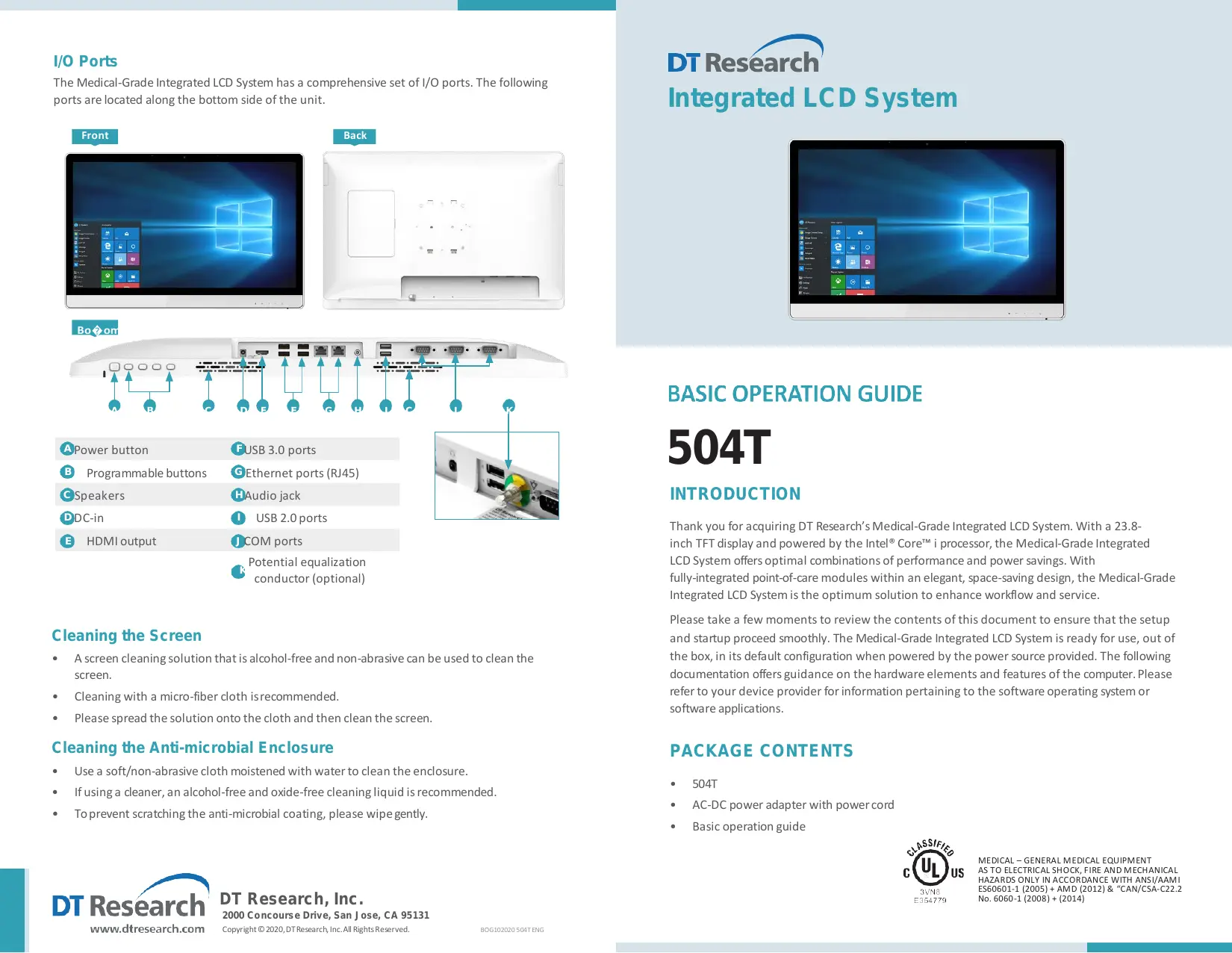
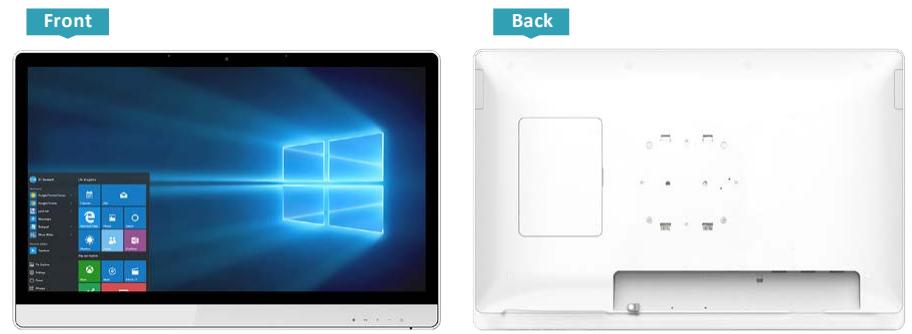
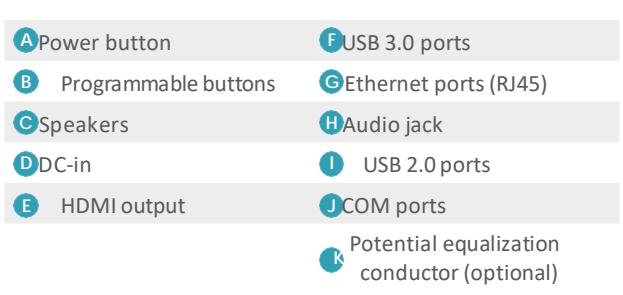
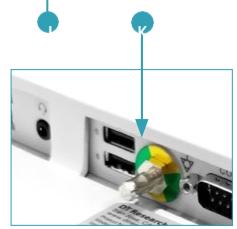
The Medical-Grade Integrated LCD System has a comprehensive set of I/O ports. The following ports are located along the bottom side of the unit.

Cleaning the Screen
- A screen cleaning solution that is alcohol-free and non-abrasive can be used to clean the screen.
- Cleaning with a micro-fiber cloth is recommended.
- Please spread the solution onto the cloth and then clean the screen.
Cleaning the Anti-microbial Enclosure
Use a soft/non-abrasive cloth moistened with water to clean the enclosure.
If using a cleaner, an alcohol-free and oxide-free cleaning liquid is recommended.
- To prevent scratching the anti-microbial coating, please wipe gently.
DT Research Integrated LCD System
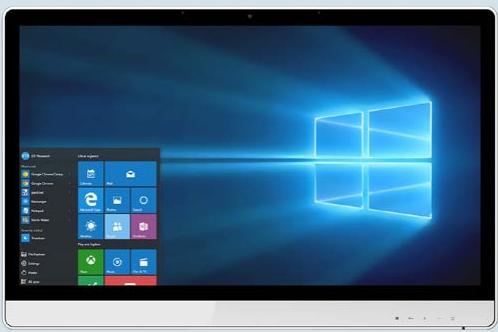
Thank you for acquiring DT Research's Medical-Grade Integrated LCD System. With a 23.8-inch TFT display and powered by the Intel® Core™ i processor, the Medical-Grade Integrated LCD System offers optimal combinations of performance and power savings. With fully-integrated point-of-care modules within an elegant, space-saving design, the Medical-Grade Integrated LCD System is the optimum solution to enhance workflow and service.
Please take a few moments to review the contents of this document to ensure that the setup and startup proceed smoothly. The Medical-Grade Integrated LCD System is ready for use, out of the box, in its default configuration when powered by the power source provided. The following documentation offers guidance on the hardware elements and features of the computer. Please refer to your device provider for information pertaining to the software operating system or software applications.
PACKAGE CONTENTS
504T
- AC-DC power adapter with power cord
Basic operation guide
PRECAUTIONS
- Always exercise care when operating and handling the Medical-Grade Integrated LCD System.
- Never disassemble any portion of the enclosure, as this will void any product warranty on the Medical-Grade Integrated LCD System.
- Do not use any AC/DC adapter other than the one provided with the device or a replacement acquired from the manufacturer.
- In the unlikely event that smoke, abnormal noise or strange odor is present, immediately power down the Medical-Grade Integrated LCD System and disconnect all power sources. Please report the problem to your device provider immediately.
BASIC FEATURES
The Medical-Grade Integrated LCD System integrates a bright 23.8'' display with a high performance system and USB ports for a comprehensive point-of-care solution.
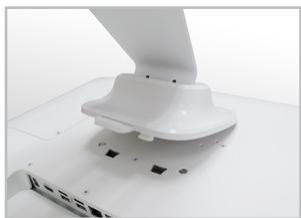
Attach The Tabletop Stand (Optional)
- Insert the top two tabs of the tabletop stand into the top two open slots on the 504T back panel.
- Push the latch to pivot the two lower tabs of the tabletop stand.
- Push the two lower tabs into the two lower slots on the 504T back panel. Make sure the latch locks back into position so the stand is securely attached.
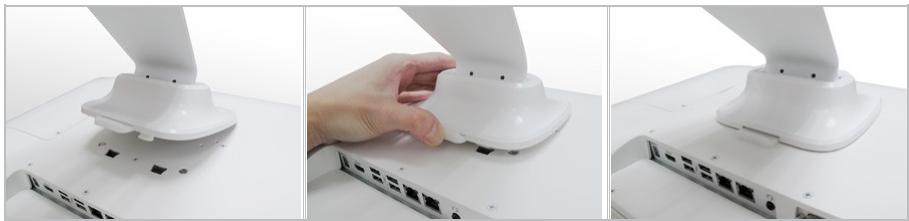
Detach the Tabletop Stand (Optional)
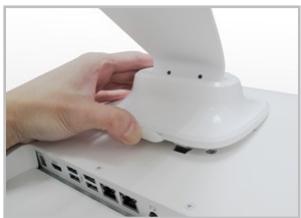
- Push the latch to pivot the twolower tabs.
- Pull out the two lower tabs, then the two upper tabs from the 504T back panel.
Powering ON and OFF
Please use the AC-DC adapter with the Medical-Grade Integrated LCD System for the power supply. To activate the Medical-Grade Integrated LCD System, push and quickly release the Power Button and the display will come on in a few seconds. To put in Standby mode, push and quickly release the Power Button. To turn off for extended storage, power off the device safely using any software function that "shuts down computer" provided in the software operating system.
NOTE:
To conserve power, use (push and quick release) the Power Button to put the device in "Standby" mode while not in use. Pushing briefly on the same button will wake up the system within seconds.
NOTE:
Avoid using the Power Button ("hold 4+ seconds" feature) to turn off the device — this form of hardware shutdown is intended to be a means of recovery from device lockups, and not as normal operation.
Wireless Networking
Wireless LAN
The Medical-Grade Integrated LCD System is often delivered with an embedded (user-inaccessible) 802.11ac WLAN adapter equipped with a hidden custom antenna.
- Through the support of typical WLAN adapters, the Medical-Grade Integrated LCD System should be able to detect all 802.11 access points in the vicinity for you to select the access point of your choice for connection.
- The SSID and WEP/WPA/WPA2 (if enabled) parameters on the Medical-Grade Integrated LCD System and the access points have to match. The SSID is case-sensitive and it is recommended that you enable WEP/WPA/WPA2 encryption (or advanced alternatives) for secure access.
- When WEP/WPA/WPA2 is enabled, you may need to consult your network administrator or your networking equipment literature to properly configure associated settings such as Authentication mode, etc.
Refer to the access point operating manuals for setting up the 802.11 access points.
Bluetooth
The Medical-Grade Integrated LCD System features a built-in Bluetooth adapter that operates on the Microsoft Windows Bluetooth protocol. The Bluetooth configuration application is invoked from the System Tray or from the Control Panel. Follow the instructions and options provided within the application to configure and invoke Bluetooth connectivity with the corresponding peripherals.
NOTE:
Bluetooth devices or accessories that are not compatible with the Microsoft Windows Bluetooth protocol may not work with the Medical-Grade Integrated LCD System.
RF Exposure Information (RED & UKCA)
To be protected against all verified adverse effects, the separation distance of at least 200mm must be maintained between the antenna of the radio having max. 4.7dBi antenna and all persons.
Hereby, [DT Research, Inc.] declares that the radio equipment type [504T] is in compliance with Directive 2014/53/EU and UK Radio Equipment Regulations 2017. The full text of the EU and UK declaration of conformity is available at the following internet address: http://www.dtresearch.com.
The functions of Wireless Access Systems including Radio Local Area Networks(WAS/RLANs) within the band 5150-5350 MHz and 5945-6425MHz for this device are restricted to indoor use only within all European Union countries (BE/BG/CZ/DK/DE/EE/IE/EL/ES/FR/HR/ IT/CY/LV/LT/LU/HU/MT/NT/PL/PT/RO/SI/SK/FI/SE/TR/N O/CH/IS/LI/UK(NI).
Maximum EIRP for EU
| Bluetooth:2402MHz-2480MHz | 11.39dBm |
| Bluetooth LE:2402MHz-2480MHz | 7.45dBm |
| Wifi: 2412MHz-2472MHz/2422MHz-2462MHz | 18.78dBm |
| Wifi: 5150MHz-5725MHz | 19.99dBm |
| Wifi: 5725MHz-5875MHz | 13.91dBm |
| Wifi: 5925MHz-6425MHz | 18.84dBm |

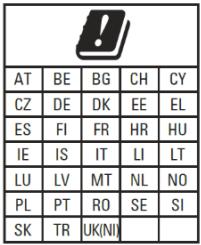
Operating authorizations must exist to operate the product in the following member states of the European Union, refer to the table below.


Importer Name: Concept International GmbH
Importer Address: Zweibrückenstr. 5-7 80331 München Germany
Federal Communication Commission Interference
This equipment has been tested and found to comply with the limits for a Class B digital device, pursuant to Part 15 of the FCC Rules. These limits aredesigned to provide reasonable protection against
h
However, there is no guarantee that interference will not occur in a particular installation. If this equipment does cause harmful interference to radio or television reception, which can be determined by turning the equipment off and on, the user is encouraged to try to correct the interference by one of the following measures:
Reorient or relocate the receiving antenna.
- Increase the separation between the equipment and receiver.
- Connect the equipment into an outlet on a circuit different from that to which the receiver is connected.
- Consult the dealer or an experienced radio/TV technician for help.
FCC Caution: Any changes or modifications not expressly approved by the party responsible for compliance could void the user's authority to operatethis equipment.
Operation is subject to the following two conditions: (1) This device may not cause harmful interference, and (2) this device must accept any interference received, including interference that may cause undesired operation.
This device and its antenna(s) must not be co-located or operating inconjunction with any other antenna or transmitter.
RF Exposure Compliance
To maintain compliance with FCC's RF Exposure guidelines, this equipment should be installed and operated with minimum distance between 200mm the radiator your body: Use only the supplied antenna.
Indoor Client 6XD statement
- FCC regulations restrict the operation of this device to indoor use only.
- The device will only associate and connect with a low-power indoor access point or subordinate device and never directly connect to other client devices.
- The device will always initiate transmission under the control of a low-power indoor AP or subordinate except for brief transmissions before joining a network. These short messages will only occur if the client has detected an indoor AP or subordinate operating on a channel. These brief messages will have a time-out mechanism such that if it does not receive a response from an AP it will not continually repeat the request.
- transmissions will be lower or equal to the power advertised by the indoor low-power access point or subordinate and never above the maximum output power allowed by the FCC grant for equipment class 6XD.
- Prohibited for control of or communications with unmanned aircraft systems, including drones.
Supplier's Declaration of Conformity
47 CFR § 2.1077 Compliance Information
Unique Identifier Trade Name:
Model No.: 504T

Responsible Party - U.S. Contact Information
DT Research, Inc.
2000 Concourse Drive, San Jose, CA 95131
http://www.dtresearch.com
IC Compliance Statement
This device contains licence-exempt transmitter(s)/receiver(s) that comply with Innovation, Science and Economic Development Canada's licence-exempt RSS(s). Operation is subject to the following two conditions:
(1) This device may not cause interference.
(2) This device must accept any interference, including interference that may cause undesired operation of the device.
This equipment complies with IC RSS-102 radiation exposure limits set forth for an uncontrolled environment.
This Class [B] digital apparatus complies with Canadian ICES-003.
RF Exposure Compliance
To maintain compliance with RSS's RF Exposure guidelines, this equipment should be installed and operated with minimum distance between 200mm the radiator your body: Use only the supplied antenna.
The functions of Wireless Access Systems including Radio Local Area Networks(WAS/RLANs) within the band 5150-5250 MHz for this device are restricted to indoor use only.
Devices shall not be used for control of or communications with unmanned aircraft systems.
Low-power indoor access points and indoor subordinate devices shall bear statements acknowledging both of the following restrictions in the user manual and, where feasible, in a conspicuous location on the device:
Operation shall be limited to indoor use only.
Operation on oil platforms, automobiles, trains, maritime vessels and aircraft shall be prohibited except for on large aircraft flying above 3.048 m (10.000 ft).