RZ09-0510 - Laptop RAZER - Free user manual and instructions
Find the device manual for free RZ09-0510 RAZER in PDF.


| Product type | Gaming laptop |
| Brand | Razer |
| Model | RZ09-0510 |
| Dimensions (L × W × H) | Approximately 355 × 235 × 17.8 mm |
| Weight | Approximately 2.1 kg |
| Processor | Intel Core i7 13th Gen |
| RAM Memory | 16 GB DDR5 |
| Storage | 1 TB NVMe SSD |
| Screen | 15.6-inch Full HD 144 Hz |
| Graphics Card | NVIDIA GeForce RTX 4060 |
| Operating System | Windows 11 Home |
| Power Supply | 230 W AC adapter |
| Battery | Lithium-ion 80 Wh, up to 8 hours battery life |
| Connectivity | Wi-Fi 6E, Bluetooth 5.3 |
| Ports | 2 × USB-C Thunderbolt 4, 2 × USB-A 3.2, HDMI 2.1, headphone jack |
| Keyboard | Per-key RGB backlight |
| Audio | Stereo speakers, THX Spatial Audio |
| Webcam | 1080p with privacy shutter |
| Maintenance and cleaning | Clean with a soft, dry cloth; do not use harsh liquids |
| Security | TPM 2.0 security chip, fingerprint reader |
| Spare parts and repairability | User-replaceable battery and SSD; other components by authorized service center |
| General information | 2-year warranty; made in China |
Frequently Asked Questions - RZ09-0510 RAZER
User questions about RZ09-0510 RAZER
0 question about this device. Answer the ones you know or ask your own.
Ask a new question about this device
Download the instructions for your Laptop in PDF format for free! Find your manual RZ09-0510 - RAZER and take your electronic device back in hand. On this page are published all the documents necessary for the use of your device. RZ09-0510 by RAZER.
USER MANUAL RZ09-0510 RAZER
IMPORTANT PRODUCT INFORMATION GUIDE
WHAT'S INSIDE
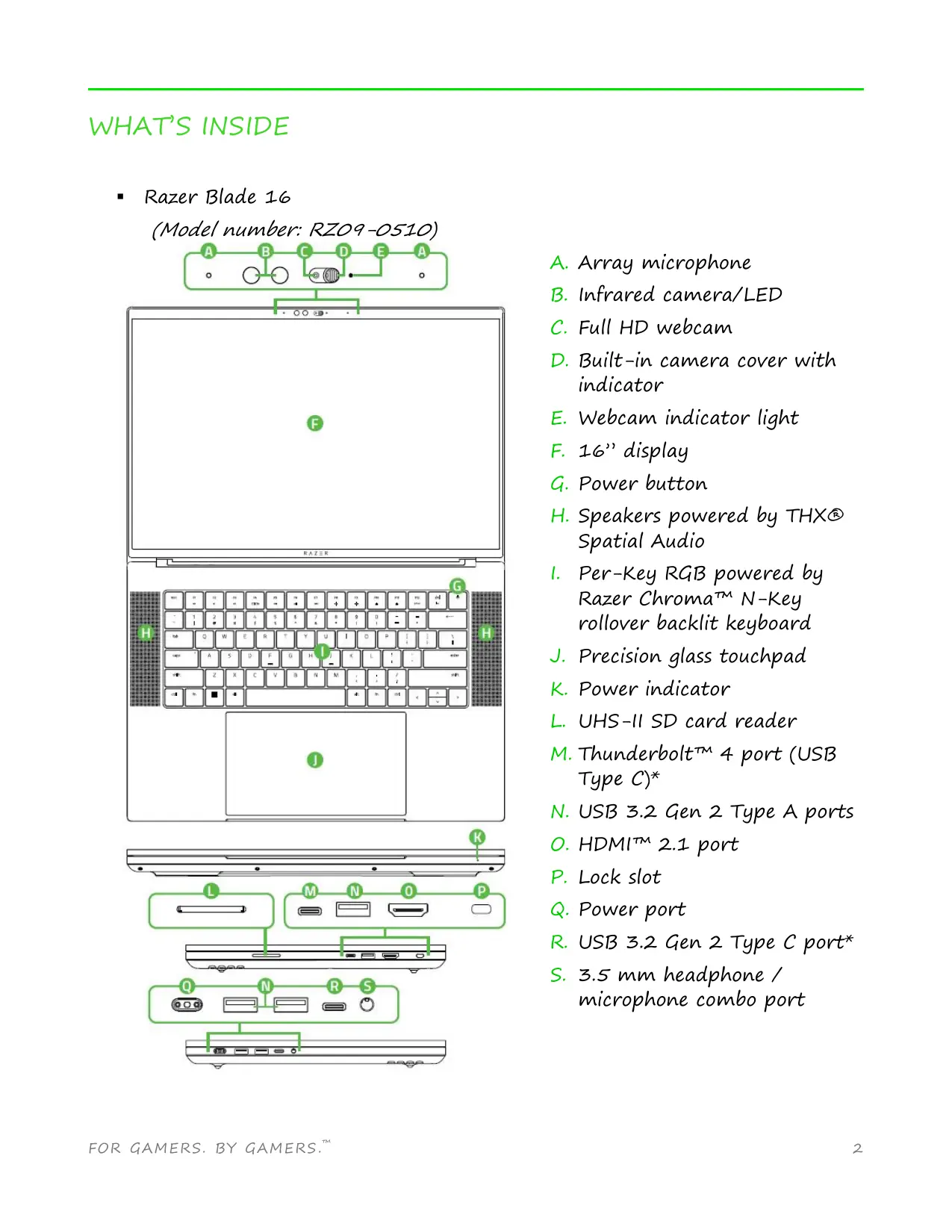
Razer Blade 16
(Model number: RZ09-0510)
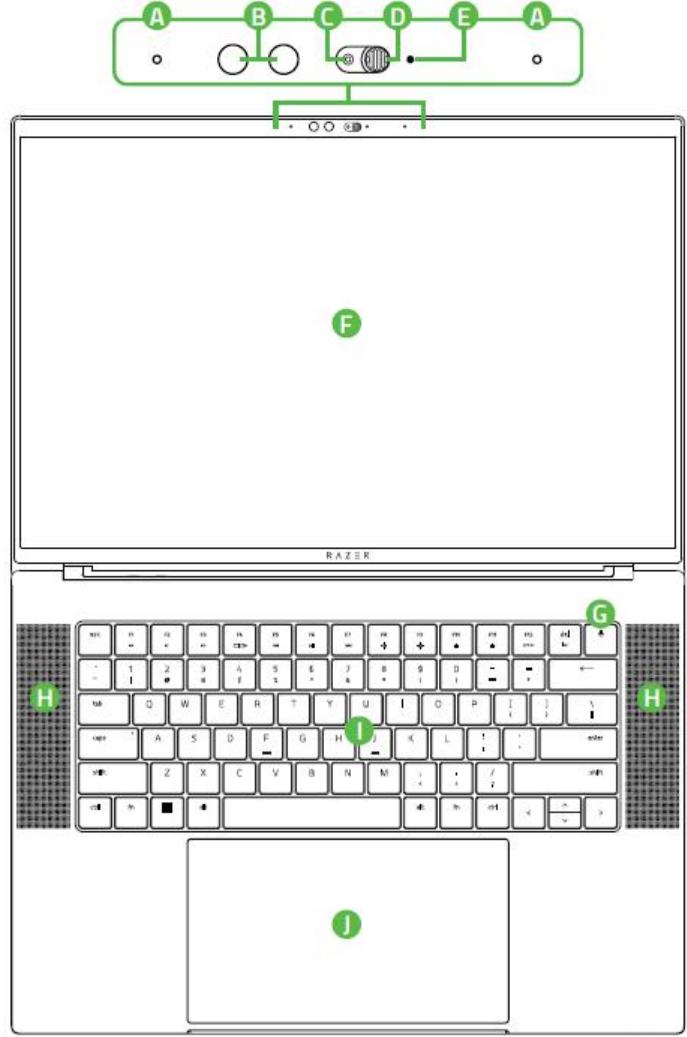
A. Array microphone
B. Infrared camera/LED
C. Full HD webcam
D. Built-in camera cover with indicator
E. Webcam indicator light
F. 16 " display
G. Power button
H. Speakers powered by THX® Spatial Audio
- Per-Key RGB powered by Razer Chroma™ N-Key rollover backlit keyboard
J. Precision glass touchpad
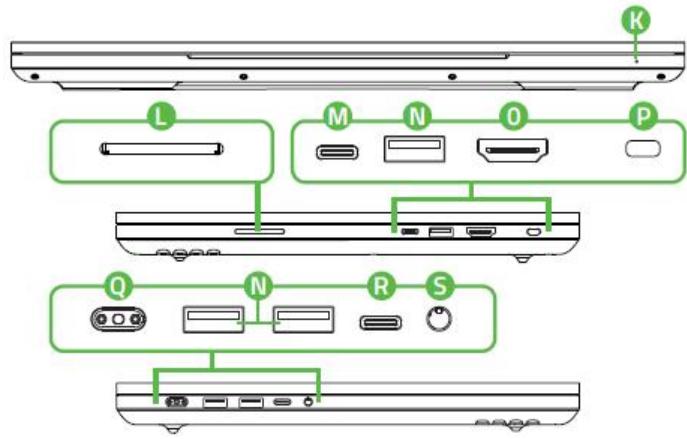
K. Power indicator
L. UHS-II SD card reader
M. Thunderbolt™ 4 port (USB Type C)*
N. USB 3.2 Gen 2 Type A ports - H D M I^T M 2. 1 port
P. Lock slot
Q. Power port
R. USB 3.2 Gen 2 Type C port*
S. 3.5 ~mm headphone / microphone combo port
Power adapter + regional power cord
- Micro-fiber cleaning cloth
- Important Product Information Guide
*Supports 20V USB
- 3个
LET'S GET YOU COVERED
You’ve got a great laptop in your hands, complete with a 1- year limited manufacturer’s warranty* and a 2- year limited battery warranty coverage. Now maximize its potential and score exclusive Razer benefits by registering at razerid.razer.com
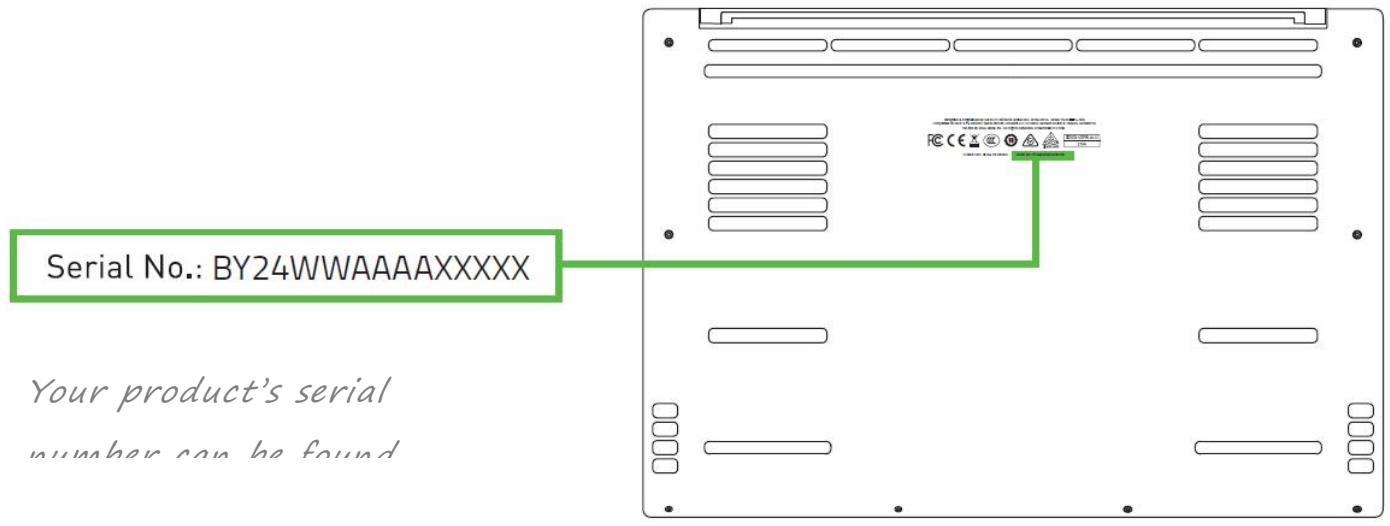
*Warranty may vary by region and is subject to applicable local law.
Got a question? Ask the Razer Support Team at support.razer.com
SETTING UP YOUR LAPTOP
- With the appropriate power cord connected to the power adapter, insert its AC plug into a power outlet, and then connect it to the power port of your Razer Blade 16.
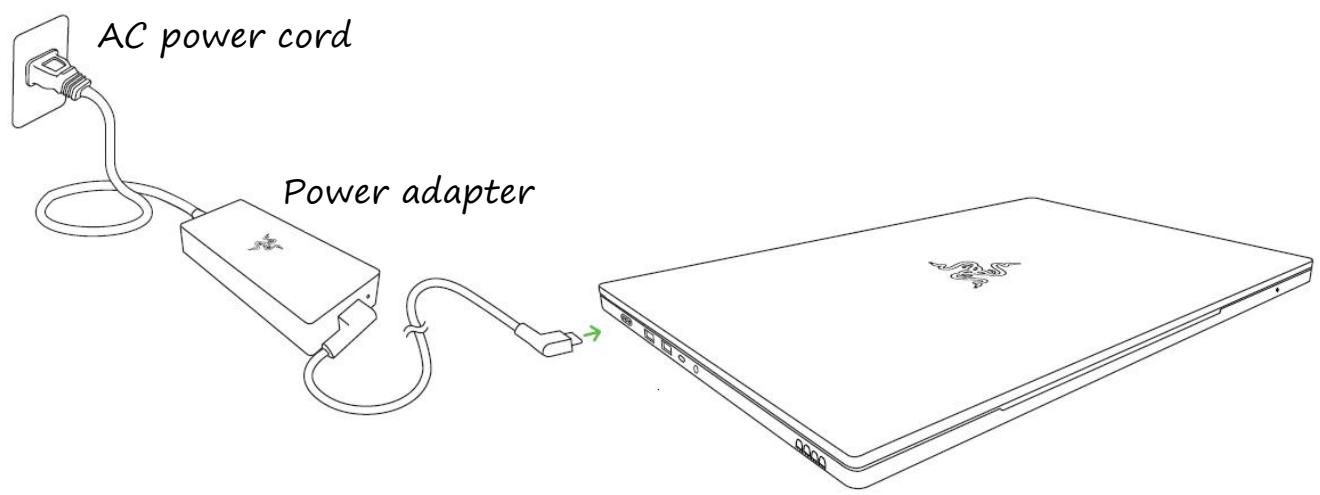
Use the appropriate power cord for your region. For first time use, please fully charge your laptop first or make sure to connect it to a power outlet before turning it on. It takes at least 2 hours to fully charge your Razer Blade 16.
- Power on your Razer Blade 16. The power indicator will show the status of your laptop.
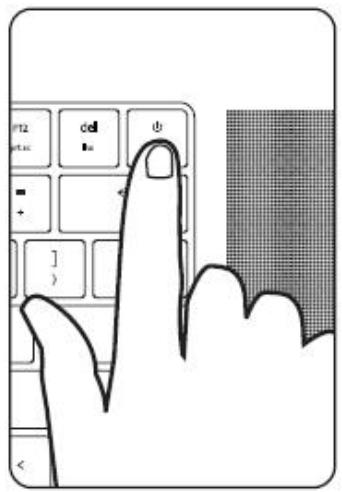
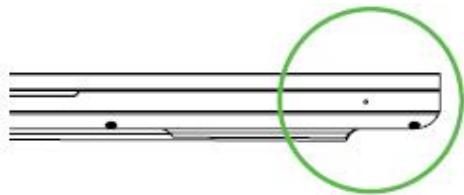
| Sleep | On | Low battery (10% left) | Low battery (3% left) | |
| Power indicator |
- Follow the onscreen
instructions to complete the Windows 11 setup.
When prompted, it is recommended that you connect your laptop to a wireless network with an active internet connection.
PERSONALIZING YOUR LAPTOP
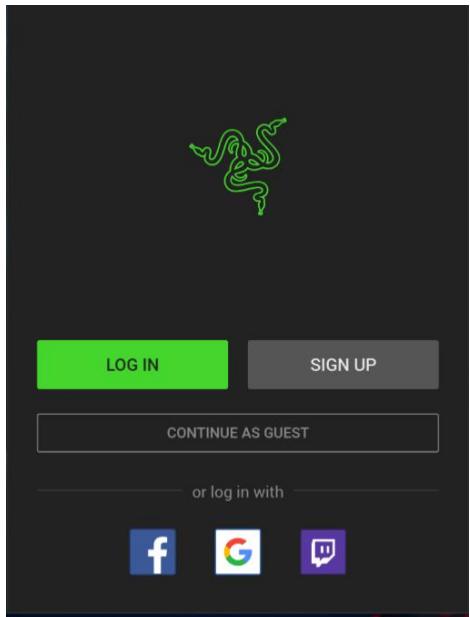
Aside from allowing you to download drivers or firmware updates for your Razer Blade 16 and other supported Razer peripherals, Razer Synapse also enables you
to customize all your Razer devices' advanced settings and lighting effects. When logged in, these custom settings are automatically stored to the cloud so that they can be accessed from any computer.
-
Make sure your laptop has an active internet connection.
-
By default, Razer Synapse will start automatically once you enter Windows 11. Simply sign up for a Razer ID or log in with an existing account.
You may also continue as a guest; however, you won't be able to store any of your settings to the cloud.
- Wait until Razer Synapse automatically downloads and installs the necessary drivers.
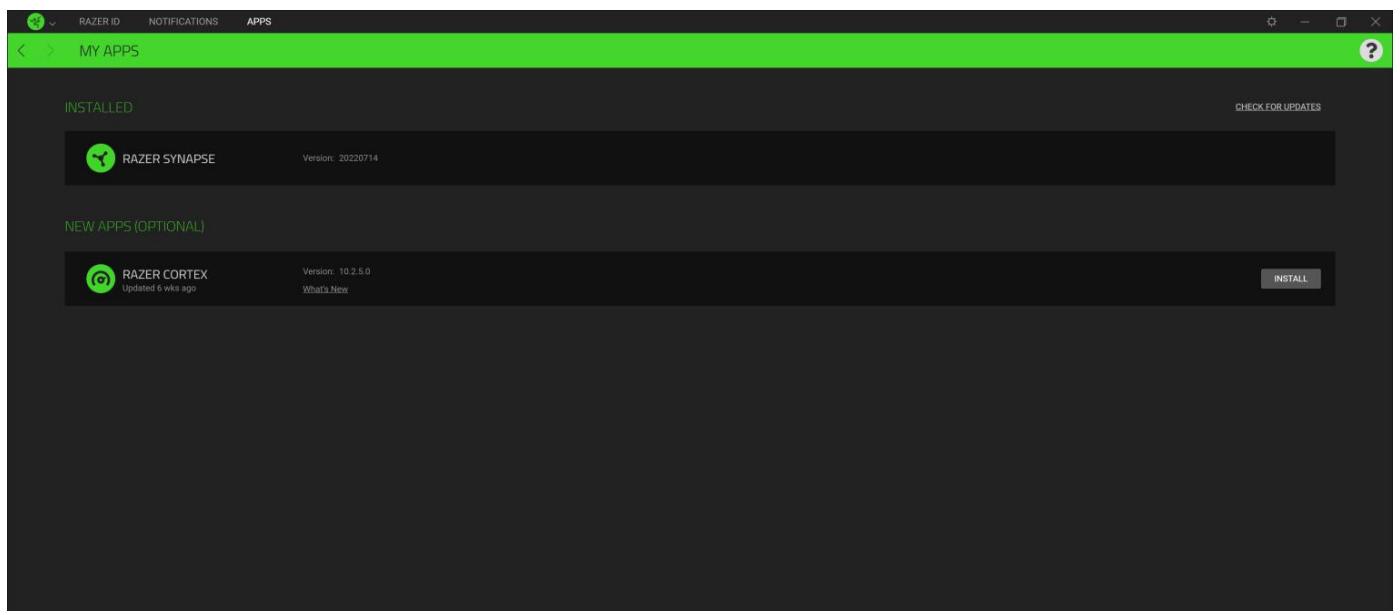
Enhance your play by boosting your system performance and discover the best gaming deals—all on one powerful platform. To install Razer Cortex, right-click Razer Central from your taskbar, launch the Razer Central app, go to the Appst tab, and then press the INSTALL button beside Razer CORTEX.
Find out more at razer.com/cortex.
Pressing the "fn" key in combination with the function keys will activate their secondary functions.
| Function keys | Secondary function description |
| × | The audio volume controls allow you to mute (×), decrease (×) and increase (×) the audio output. |
| ○/○ | Toggles the monitor output. |
| ↔ | The media keys allow you to play/pause (↔) the current track, return to the previous track (↔) or skip to the next track (↔). |
| ← | The screen brightness keys allow you to decrease (←) or increase (→) the brightness of the Razer Blade 16's screen. |
| ○ | The LED control keys allow you to decrease (○) or increase (○) the brightness of your keyboard's LEDs. |
SAFETY AND MAINTENANCE
SAFETY GUIDELINES
In order to achieve maximum safety while using your Razer Blade 16, we suggest that you adopt the following guidelines:
- Should you have trouble operating the device properly and troubleshooting does not work, unplug the device, and go to support.razer.com where you can find FAQs, guides, and contact information to our Razer Advocacy team.
- Do not take apart the device (doing so may void your warranty) and do not attempt to operate it during power fluctuations.
- Magnets and electromagnetic fields may interfere with your electronic devices under certain conditions. To prevent any possible interference, keep your laptop away from other electronic devices at a safe distance of more than 6''.15 ~cm or more than 12''.30 ~cm apart for wireless chargers.
- Keep the device away from liquid, humidity or moisture. Operate the device only within the specific temperature range of 0^ C ( 32^ F ) to 40^ C ( 104^ F ). Should the temperature exceed this range, unplug and/or switch off the device in order to let the temperature stabilize to an optimal level.
COMFORT
Research has shown that long periods of repetitive motion, improper positioning of your computer peripherals, incorrect body position, and poor habits may be associated with physical discomfort and injury to nerves, tendons, and muscles. Below are some guidelines to avoid injury and ensure optimum comfort while using your Razer Blade 16.
- Position your laptop directly in front of you. If you have an external mouse, position it next to the laptop. Place your elbows next to your side, not too far away and your mouse within easy reach.
- Adjust the height of your chair and table so that the laptop is at or below elbow height.
- Keep your feet well supported, posture straight and your shoulders relaxed.
- During gameplay, relax your wrist and keep it straight. If you do the same tasks with your hands repeatedly, try not to bend, extend or twist your hands for long periods.
- Do not rest your wrists on hard surfaces for long periods. When using an external mouse, use a wrist rest to support your wrist while gaming.
-
Do not sit in the same position all day. Get up, step away from your desk and do exercises to stretch your arms, shoulders, neck and legs.
-
If you should experience any physical discomfort while using your laptop, such as pain, numbness, or tingling in your hands, wrists, elbows, shoulders, neck or back, please consult a qualified medical doctor immediately.
BATTERY WARNING
The Razer Blade 16 contains an internal, lithium-ion rechargeable battery. In general, the life expectancy of such battery is dependent upon usage. If you suspect that the lithium-ion rechargeable battery inside the Razer Blade 16 may be drained (has a low charge), try charging it. If the battery does not recharge after several attempts, it may be non-operational.
Do not open, mutilate, or expose to conducting materials (metal), moisture, liquid, fire, or heat. Doing so may cause the battery to leak or explode, resulting in personal injury. Do not use or charge the battery if leaking, discolored, or deformed. Do not leave the rechargeable battery discharged or unused for extended periods. When not using your Razer Blade 16 battery for more than 30 days, be sure to store the battery in a fully charged state. Do not tamper with the battery. Dispose of the used battery according to local regulations.
LEGALESE
COPYRIGHT AND INTELLECTUAL PROPERTY INFORMATION
©2024 Razer Inc. All rights reserved. Razer, the triple-headed snake logo, Razer logo, “For Gamers. By Gamers,”, and “Razer Chroma” are trademarks or registered trademarks of Razer Inc. and/or affiliated companies in the United States or other countries. Actual product may differ from pictures. All other trademarks are the property of their respective owners. Warranty not valid outside of product’s intended region.
Windows and the Windows logo are trademarks of the Microsoft group of companies.
THX® and the THX® Logo are the property of THX® Ltd., registered in the U.S. and other countries.
The terms HDMI, HDMI High-Definition Multimedia Interface, HDMI Trade dress and the HDMI Logos are trademarks or registered trademarks of HDMI Licensing Administrator, Inc.

NVIDIA, the NVIDIA Logo and Optimus are registered trademarks and/or trademarks of NVIDIA Corporation in the United States and/or other countries.
Thunderbolt and the Thunderbolt logo are trademarks of Intel Corporation in the U.S. and/or other countries.
Razer Inc. ("Razer") may have copyright, trademarks, trade secrets, patents, patent applications, or other intellectual property rights (whether registered or unregistered) concerning the product in this Master Guide. Furnishing of this Master Guide does not give you a license to any such copyright, trademark, patent or other intellectual property right. The Razer Blade 16 (the "Product") may differ from pictures whether on packaging or otherwise. Razer assumes no responsibility for such differences or for any errors that may appear. Information contained herein is subject to change without notice.
LIMITED PRODUCT WARRANTY
For the latest and current terms of the Limited Product Warranty, please visit razer.com/warranty.
LIMITATION OF LIABILITY
Razer shall in no event be liable for any lost profits, loss of information or data, special, incidental, indirect, punitive or consequential or incidental damages, arising in any way out of distribution of, sale of, resale of, use of, or inability to use the Product. In no event shall Razer's liability exceed the retail purchase price of the Product.
GENERAL
These terms shall be governed by and construed under the laws of the jurisdiction in which the Product was purchased. If any term herein is held to be invalid or unenforceable, then such term (in so far as it is invalid or unenforceable) shall be given no effect and deemed to be excluded without
invalidating any of the remaining terms. Razer reserves the right to amend any term at any time without notice.
FCC DECLARATION OF CONFORMANCE
This equipment has been tested and found to comply with the limits for a Class B digital device, pursuant to part 15 of the FCC Rules. These limits are designed to provide reasonable protection against harmful interference in a residential installation. This equipment generates, uses and can radiate radio frequency energy and, if not installed and used in accordance with the instructions, may cause harmful interference to radio communications. However, there is no guarantee that interference will not occur in a particular installation. If this equipment does cause harmful interference to radio or television reception, which can be determined by turning the equipment off and on, the user is encouraged to try to correct the interference by one or more of the following measures:
- Reorient or relocate the receiving antenna.
- Increase the separation between the equipment and the receiver.
- Connect the equipment into an outlet on a circuit different from that to which the receiver is connected.
- Consult the dealer or an experienced radio TV technician for help.
For more information, refer to the online help system on razer.com.
FCC CAUTION STATEMENT
Any changes or modifications not expressly approved by the party responsible for compliance could void the user's authority to operate this equipment.
This device complies with Part 15 of the FCC Rules. Operation is subject to the following two conditions:
- This device may not cause harmful interference, and
- This device must accept any interference received, including interference that may cause undesired operation.
IMPORTANT NOTE:
FCC Radiation Exposure Statement:
This equipment complies with FCC radiation exposure limits set forth for an uncontrolled environment. End users must follow the specific operating instructions for satisfying RF exposure compliance. This transmitter must not be co-located or operating in conjunction with any other antenna or transmitter.
USAGE RESTRICTIONS
This Razer device was developed and designed to comply with the various wireless and telecom agency requirements throughout the world. This ensures that the device do not cause any harm to Public Switching Telecommunication Networks (PSTN) and do not violate any power and frequency spectrum allocations on a country by country basis. This device was also designed to be compliant with regulatory agency limits for Electromagnetic Compatibility (EMC).
IMPORTANT NOTICE FOR USE IN HEALTHCARE ENVIRONMENTS
This Razer device is not a medical device and is not listed under UL or IEC 60601 (or equivalent). This device should be kept at a certain distance to avoid harmful effects to patients or medical equipment.
AVIATION USAGE RESTRICTIONS
Certain restrictions apply to this device while on-board an aircraft. Razer encourages you to understand these restrictions to ensure the flight's safety and security.
IC Warning:
This device contains licence-exempt transmitter(s)/receiver(s) that comply with Innovation, Science and Economic Development Canada's licence-exempt RSS(s). Operation is subject to the following two conditions:
"This transmitter must not be co-located or operating in conjunction with any other antenna or transmitter. This equipment should be installed and operated with a minimum distance of 0mm between the radiator and your body.
The SAR limit of USA (FCC) is 1.6 W/kg averaged over one gram of tissue. This device has also been tested against this SAR limit.
DOC
Hereby, Razer Inc. declares that the radio equipment type RZ09-0510 is in compliance with Directive 2014/53/EU. The full text of the EU declaration of conformity is available at the following internet address: http://www.razerzone.com.
Support Wireless Frequency (Max e.r.i.p):
In all EU member states, operation of 5150-5350MHz and 5945-6425 MHz is restricted to indoor use only.
|  | AT | BE | BG | CZ | DK | EE | FR | DE | IS | IE | IT |
| EL | ES | CY | LV | LI | LT | LU | HU | MT | NL | NO | |
| PL | PT | RO | SI | SK | TR | FI | SE | CH | UK (NI) | HR |
RF exposure (SAR): The device can safely be used with a distance of 0mm to the human body.
- WHAT'S INSIDE
- LET'S GET YOU COVERED
- SETTING UP YOUR LAPTOP
- PERSONALIZING YOUR LAPTOP
- SAFETY AND MAINTENANCE
- SAFETY GUIDELINES
- COMFORT
- BATTERY WARNING
- LEGALESE
- COPYRIGHT AND INTELLECTUAL PROPERTY INFORMATION
- LIMITED PRODUCT WARRANTY
- LIMITATION OF LIABILITY
- GENERAL
- FCC DECLARATION OF CONFORMANCE
- FCC CAUTION STATEMENT
- IMPORTANT NOTE:
- USAGE RESTRICTIONS
- IMPORTANT NOTICE FOR USE IN HEALTHCARE ENVIRONMENTS
- AVIATION USAGE RESTRICTIONS
- IC Warning:
Brand : RAZER
Model : RZ09-0510
Category : Laptop