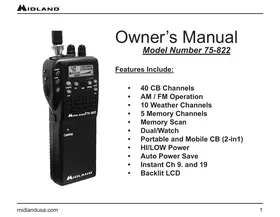
75-822 - Radio MIDLAND - Free user manual and instructions
Find the device manual for free 75-822 MIDLAND in PDF.


User questions about 75-822 MIDLAND
0 question about this device. Answer the ones you know or ask your own.
Ask a new question about this device
Download the instructions for your Radio in PDF format for free! Find your manual 75-822 - MIDLAND and take your electronic device back in hand. On this page are published all the documents necessary for the use of your device. 75-822 by MIDLAND.
USER MANUAL 75-822 MIDLAND
• 40 CB Channels
• AM / FM Operation
• 10 Weather Channels
• 5 Memory Channels
- Memory Scan
- Dual/Watch
• Portable and Mobile CB (2-in1)
• HI/LOW Power
• Auto Power Save
• Instant Ch 9. and 19
- Backlit LCD
Attention:
This radio complies with IEEE and NCRP exposure limits for the general population, uncontrolled RF exposure environment at operating duty factors of up to 75% and is authorized by the FCC for general population/uncontrolled use only. In order to comply with RF exposure requirements, a minimum distance of 2.5 cm must be maintained when held-to-face, and body-worn operations are restricted to the approved original accessories (belt clip). Do not use this device when antenna shows obvious damage.
This product is compliance to FCC RF Exposure requirements. Refer to FCC website:
https://apps.fcc.gov/oetcf/eas/reports/GenericSearch.cfm
and search for FCC ID: MMA75822F to gain further information about SAR Values.
This device complies with part 15 of the FCC Rules. Operation is subject to the following two conditions:
(1) this device may not cause harmful interference, and (2) this device must accept any interference received, including interference that may cause undesired operation.
Changes or modifications to this unit not expressly approved by Midland Radio Corporation could void the user's authority to operate the equipment.
Attention:
This device contains licence-exempt transmitter(s)/receiver(s) that comply with Innovation, Science and Economic Development Canada's licence-exempt RSS(s). Operation is subject to the following two conditions:
(1) This device may not cause interference.
(2) This device must accept any interference, including interference that may cause undesired operation of the device.
This device is in compliance with SAR for general population/uncontrolled exposure limits in IC RSS-102 and had been tested in accordance with the measurement methods and procedures specified in IEEE 1528 and IEC 62209. This equipment should be installed and operated with a minimum distance of 2.5 cm must be maintained when held-to-face, and body-worn operations are restricted to the approved original accessories (belt clip), a minimum distance of 0 cm.
Installing the Batteries 7
Quick Start - Portable Mode 8
Quick Start - Mobile Mode....9
Controls & Indicators 10
Function and Controls 11
LCD 13
CB Specifications 14
Weather Receiver Specifications....15
Limited Warranty (United States And Canada)....16
Service....17
Channels / Frequencies Chart....18
Introduction
75-822 is designed for 40 Channel Citizen Band operation, in a compact package that is big on performance. 75-822 is a quality piece of electronic equipment skillfully constructed with the finest components. The circuitry is all solid-state and mounted on a rugged printed circuit board. Your 75-822 is designed for reliable and trouble-free performance, either as a portable or mobile CB.
The 75-822 package includes the following:
- CB Radio
- Antenna
- Mobile Adapter
- AC Wall Charger
- Lanyard
-
Owner's Manual
-
AA Alkaline Battery Compartment
-
AA Rechargeable Battery Compartment
Package Includes
| AC Wall Adapter - Use to charge the rechargeable battery compartment | 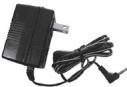 |
| Battery Compartment - Holds 6 AA alkaline Batteries batteries (not included) |  |
| Rechargeable Battery Compartment - Holds 8 AA rechargeable NiMH batteries (not included) |  |
| Mobile Adapter - Used to for vehicular activities |  |
| Antenna - For portable operation |  |
Installing the Batteries
Before you start using the radio, you must first install the batteries into the battery compartment. There are two battery compartments. The smaller compartment is for alkaline (non-rechargeable) AA batteries. The larger compartment with the power jack and charge indicator LED is for NiMH rechargeable AA cells.
- Choose the compartment you want to use.
- Grip both sides of the compartment and place thumbs on the top.
- Pull apart sides of compartment.
- Insert batteries, paying special attention to polarity. If they are placed in the compartment backwards, the unit will not work.
- Snap the two sides of the compartment back together.
- Slide battery compartment onto unit.
- Turn unit on and begin use.
Quick Start - Portable Mode
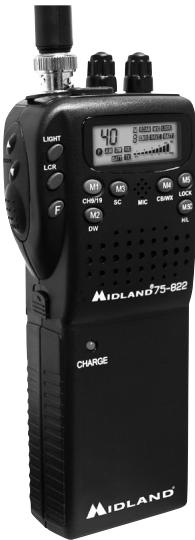
- Attach the antenna to the connector.
- Attach either alkaline or rechargeable battery compartment.
- Rotate the ON/OFF knob clockwise.
- Use the channel selector buttons to select the desired channel.
- Select AM or FM using the CB/WX button.
- Press the push to talk button and start talking.
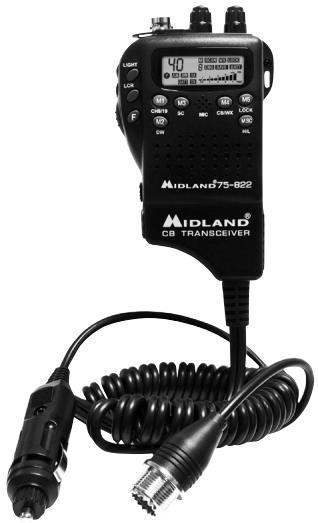
Your CB Radio should look like the image
Note: There is also a mobile adapter that can be used inside your vehicle. See next page.
text_image
LIGHT LCR F 40 DC132.000 DC132.000 DC132.000 DC132.000 DC132.000 DC132.000 DC132.000 DC132.000 DC132.000 DC132.000 DC132.000 DC132.00 DC132.00 DC132.00 DC132.00 DC132.00 DC132.00 DC132.00 DC132.00 DC132.00 DC132.00 DC132.00 DC132.00 DC132.00 DIN CHSTG SC MC DRW MUS LUX MUS MUS MUS MUS MUS MUS MUS MUS MUS MUS MUS MUS MUS MUS MUS MUS MUS MUS MUS MUS MUS MUS MUS MUS MUS MUS MUS MUS MUS MUS MUS MUS MUS MUSQuick Start - Mobile Mode
- Slide the mobile adapter onto the CB Radio.
- Plug your mobile adapter into your vehicle's cigarette lighter plug.
- Connect an external antenna to the UHF connector on the mobile adaptor. (see note below).
- Rotate the ON/OFF knob.
- Use the channel selector buttons to select the desired channel.
- Select AM or FM using the CB/WX button.
- Press the push to talk button and start talking.
- If the PTT is pressed for 180 seconds a beep will sound and the transmission will stop until the PTT is released.
Note: You may use the flexible rubber antenna with the vehicle adapter, however the range may be limited. To order a full size rooftop Antenna, model # 18-2442, go to www.midlandusa.com
text_image
LIGHT 40 8000 10000 20000 30000 40000 50000 60000 70000 80000 90000 100000 LCD MC DC DC DC DC DC DC DC DC DC DC DC DC DC DC DC DC DC DC DC DC DC DC DC DC DC DC DC DC DC DC DC DC DC DC DC DC DC DC DC DC DC DC DC DC DC DC DC DC DC DC DIN NC MC CINN UCA PLC MIDLAND 75-822 MIDLAND® DB TRANSEVERControls & Indicators
text_image
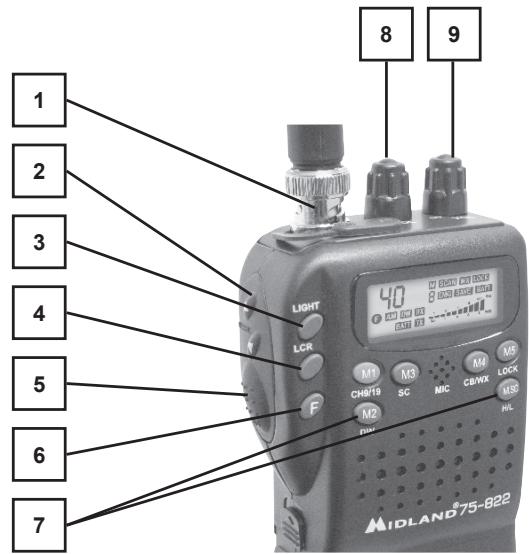
1 2 3 4 5 6 7 LIGHT LCR F M1 M3 M4 M5 CHN/19 SC MIC CB/WX LOCK M2 HL M3 HL M4 HL M5 HL M6 HL M7 HL M8 HL M9 HL M10 HL M11 HL M12 HL M13 HL M14 HL M15 HL M16 HL M17 HL M18 HL M19 HL M20 HL M21 HL M22 HL M23 HL M24 HL M25 HL M26 HL M27 HL M28 HL M29 HL M30 HL M31 HL M32 HL M33 HL M34 HL M35 HL M36 HL M37 HL M38 HL M39 HL M40 HL M41 HL M42 HL M43 HL M44 HL M45 HL M46 HL M47 HL M48 HL M49 HL M50 HL- Antenna Connector
- CH Up/Down buttons
- Backlight Button
- Last Channel Recall
- "Push To Talk"
- Function Button
- Memory Channels
- Squelch Control
- On/Off Volume Knob
Note: See pages 11-12 for details.
Function and Controls
- Antenna Connector - Attach the antenna provided for portable use.
- Squelch Control - Adjust the squelch until background noise disappears to receive the MAX sensitivity.
- ON/OFF Knob - Used to turn your radio ON/OFF and to control volume.
- Channel UP/Down Button - To adjust channels in CB or weather mode.
- Backlight Button - Press to turn LCD backlight "On" or "Off".
- Last Channel - Press this button to recall the last channel used.
- Push To Talk - Push and hold this button and talk into speaker to communicate with other CB users.
- Memory "M" Buttons - There are 5 memory buttons. Each is categorized with the letter M and a number next to it. Each button has a function.
M1- Functions as memory channel 1 and emergency channel 9/19. To switch between functions, just press and release button.
M2- Functions as memory channel 2 and programmable dual watch. Dual Watch is used to quickly switch between two channels that are far apart.
To program the 2 dual watch channels, you must do the following. With the radio on:
- Select the first channel. (i.e. Ch. 7)
- Press and hold the DW button until you hear a beep.
- Using the channel selector, select the second channel.
- Press and hold the DW button until you hear it beep again.
- On the LCD you will see the two channels that you have programmed flashing alternately.
M3-Functions as memory channel 3 and scan. To start scanning other channels, press the M3 button. To stop scanning, push the M3 button again.
M4- Functions as memory channel 4 and the mode button. This button switches the radio between CB and weather radio mode.
M5- Functions as memory channel 5 and the lock button. To lock the radio just press the button until it beeps. To unlock the radio repeat the same procedure
-
Function "F" Button - The "F" button is used to program the memory channel for the M1-M5 buttons. To program a channel follow these steps:
-
Turn your radio on and make sure you are in CB Mode. (AM or FM)
- Select the channel you want to program. (i.e. Channel 4)
- Press the "F" button.
- Press and hold one of the "M" buttons until you hear a beep. You have now programmed a channel into the memory.
- To program other "M" buttons repeat this process.
LCD
other
| Position | Value | |---|---| | 1 | 28.8.85 | | 2 | 28.8.85 | | 3 | 28.8.85 | | 4 | 28.8.85 | | 5 | 28.8.85 | | 6 | 28.8.85 | | 7 | 28.8.85 | | 8 | 28.8.85 | | 9 | 28.8.85 | | 10 | 28.8.85 | | 11 | 28.8.85 | | 12 | 28.8.85 | | 13 | 28.8.85 | | 14 | 28.8.85 | | 15 | 28.8.85 | | 16 | 28.8.85 | | RA | 28.8.85 | | FM | 28.8.85 | | LOW | 28.8.85 | | TX | 28.8.85 | | M | SCAN DW LOCK | | EMG | SAVE BATT | | +30 SIG | RWR | | 1 | 3 | | 2 | 3 | | 3 | 3 | | 4 | 3 | The chart displays a digital display with numeric values and a legend indicating the letter 'F'. The numbers above the display are the corresponding letters (e.g., 'AM', 'WX', 'RX', etc.).Indicators
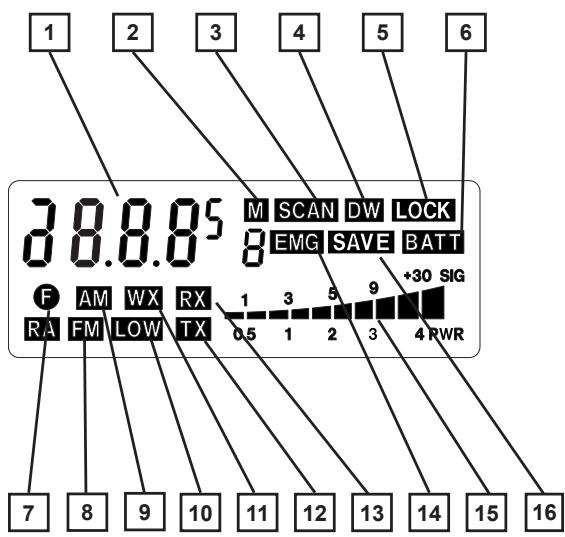
- Channel Display
- Memory CH Selection
- Scan Function
- Dual Watch
- Lock Function
- Battery Indicator
- Function Button "On"
- CB/FM Mode Indicator
- CB/AM Mode Indicator
10.Low Power "On" - Weather Radio Indicator
- Transmitting
- Receiving
- Emergency CH 9 "On"
- Signal Strength Meter
- Auto BATT Save
CB Specifications
| Channels | 1 through 40 |
| Power Output | 4 watts nominal |
| Modulation | 90% +/- 5% |
| TX Dist | <5% |
| Spurious and Harmonics | <-60dbc |
| Receiver Sensitivity | .7 μv for 10db s/n |
| Audio Output | 450 mW |
| Selectivity | 50 db |
Weather Receiver Specifications
| Channel | Frequency MHz |
| 00 | 163.275 |
| 01 | 162.550 |
| 02 | 162.400 |
| 03 | 162.475 |
| 04 | 162.425 |
| 05 | 162.450 |
| 06 | 162.500 |
| 07 | 162.525 |
| 08 | 161.650 |
| 09 | 161.775 |
Sensitivity 0.7μV for 20db
Audio Power 450 mW
Audio Load 8 Ω
LIMITED WARRANTY (UNITED STATES AND CANADA)
Subject to the exclusions set forth below, Midland Radio Corporation will repair or replace, at its option without charge, any Midland 75-822 which fails due to a defect in material or workmanship within One Year following the initial consumer purchase. This warranty does not apply to water damage, battery leak, abuse or misuse of unauthorized accessories, unauthorized service or modification or altered products. Accessories have a 90-day warranty from date of purchase, including any charge cables, headsets, or batteries. This warranty does not include the cost of labor for removal or re-installation of the product in a vehicle or other mounting.
ANY IMPLIED WARRANTIES, INCLUDING, WITHOUT LIMITATION THE IMPLIED WARRANTIES OF MERCHANTABILITY AND FITNESS FOR A PARTICULAR PURPOSE, SHALL BE LIMITED AS SET FORTH HEREIN AND TO THE DURATION OF THE LIMITED WARRANTY, OTHERWISE THE REPAIR OR REPLACEMENT AS PROVIDED UNDER THIS EXPRESS LIMITED WARRANTY IS THE EXCLUSIVE REMEDY OF THE CONSUMER AND IS PROVIDED IN LIEU OF ALL OTHER WARRANTIES, EXPRESS OR IMPLIED. IN NO EVENT SHALL MIDLAND BE LIABLE, WHETHER IN CONTRACT OR TORT (INCLUDING BUT NOT LIMITED TO NEGLIGENCE, GROSS NEGLIGENCE, BODILY INJURY, PROPERTY DAMAGE AND DEATH) FOR DAMAGES IN EXCESS OF THE PURCHASE PRICE OF THE PRODUCT OR ACCESSORY, OR FOR ANY INDIRECT, INCIDENTAL, SPECIAL OR CONSEQUENTIAL DAMAGES OF ANY KIND, OR LOSS OF REVENUE OR PROFITS, LOSS OF BUSINESS, LOSS OF INFORMATION OR DATA OR OTHER FINANCIAL LOSS ARISING OUT OF OR IN CONNECTION WITH THE ABILITY OR INABILITY TO USE THE PRODUCTS OR ACCESSORIES TO THE FULL EXTENT THESE DAMAGES MAY BE DISCLAIMED BY LAW.
This warranty gives you specific legal rights, and you may also have other rights, which vary from state to state.
For Product Purchased in the USA: Performance of any obligation under this warranty may be obtained by returning the warranted product, prepaid freight, along with proof of purchase to:
Midland Radio Corporation
Warranty Service Department
5900 Parretta Drive
Kansas City, MO 64120
For Product Purchased in Canada: Performance of any obligation under this warranty may be obtained by returning the warranted product, along with proof of purchase, to your place of purchase in Canada. This warranty gives you specified legal rights. Additional warranty rights may be provided by law in some areas within Canada.
Note: The above warranty applies only to merchandise purchased in the United States of America or any of the territories or possessions thereof, or from a U.S. Military exchange.
SERVICE
If you have a problem with your unit, please first check the FAQ and support section on our website and review your owner's manual. If additional assistance is needed please contact Midland's support at support@midlandradio.com
CHANNELS / FREQUENCIES CHART
| Channel | Frequency (megahertz - MHz) |
| 1 | 26.965 |
| 2 | 26.975 |
| 3 | 26.985 |
| 4 | 27.005 |
| 5 | 27.015 |
| 6 | 27.025 |
| 7 | 27.035 |
| 8 | 27.055 |
| 9 | 27.065 |
| 10 | 27.075 |
| 11 | 27.085 |
| 12 | 27.105 |
| 13 | 27.115 |
| 14 | 27.125 |
| 15 | 27.135 |
| 16 | 27.155 |
| 17 | 27.165 |
| 18 | 27.175 |
| 19 | 27.185 |
| 20 | 27.205 |
| 21 | 27.215 |
| 22 | 27.225 |
| 23 | 27.255 |
| 24 | 27.235 |
| 25 | 27.245 |
| 26 | 27.265 |
| 27 | 27.275 |
| 28 | 27.285 |
| 29 | 27.295 |
| 30 | 27.305 |
| 31 | 27.315 |
| 32 | 27.325 |
| 33 | 27.335 |
| 34 | 27.345 |
| 35 | 27.355 |
| 36 | 27.365 |
| 37 | 27.375 |
| 38 | 27.385 |
| 39 | 27.395 |
| 40 | 27.405 |
NOTE: This equipment has been tested and found to comply with the limits for a Class B digital device, pursuant to part 15 of the FCC Rules. These limits are designed to provide reasonable protection against harmful interference in a residential installation. This equipment generates, uses and can radiate radio frequency energy and, if not installed and used in accordance with the instructions, may cause harmful interference to radio communications.
However, there is no guarantee that interference will not occur in a particular installation. If this equipment does cause harmful interference to radio or television reception, which can be determined by turning the equipment off and on, the user is encouraged to try to correct the interference by one or more of the following measures:
- Reorient or relocate the receiving antenna.
- Increase the separation between the equipment and receiver.
-Connect the equipment into an outlet on a circuit different from that to which the receiver is connected.
-Consult the dealer or an experienced radio/TV technician for help.
We'd love to hear from you! Let us know what you think of your new Midland product on

natural_image
Four black square icons representing social media platforms: Facebook, Instagram, TikTok, and YouTube (no text or symbols)or by visiting us at
midlandusa.com
MIDLAND RADIO CORPORATION
5900 Parretta Drive
Kansas City, MO 64120
support@midlandradio.com
Note: Features & Specifications are subject to change without notice. MIDLAND is not responsible for unintentional errors or omissions on its packaging.