YU Passive 5.25” - Speaker Kanto - Free user manual and instructions
Find the device manual for free YU Passive 5.25” Kanto in PDF.


| Product type | Passive speaker |
| Brand | Kanto |
| Model | YU Passive 5.25" |
| Dimensions (each speaker) | 3.9" W x 5.6" D x 6.9" H (10 x 14.1 x 17.5 cm) |
| Net weight (each speaker) | 2.2 lb (1 kg) |
| Tweeter type | 3/4" silk dome |
| Woofer type | 3" magnetically shielded paper cone |
| Frequency response | 70 Hz - 22 kHz |
| Nominal impedance | 8 ohms (estimated) |
| Power handling (RMS) | 50 W per speaker (estimated) |
| Connectivity | 4-pin binding posts |
| Cabinet material | Wood (estimated) |
| Finish | Black or white (depending on version) |
| Included accessories | Speaker cable, user manual |
| Warranty | 2 years limited |
| Maintenance and cleaning | Dry cloth only |
| Safety instructions | Do not expose to water or moisture, do not open |
| Country of origin | Canada (design) |
Frequently Asked Questions - YU Passive 5.25” Kanto
User questions about YU Passive 5.25” Kanto
0 question about this device. Answer the ones you know or ask your own.
Ask a new question about this device
Download the instructions for your Speaker in PDF format for free! Find your manual YU Passive 5.25” - Kanto and take your electronic device back in hand. On this page are published all the documents necessary for the use of your device. YU Passive 5.25” by Kanto.
USER MANUAL YU Passive 5.25” Kanto
Important Safety Precautions

ATTENTION
The exclamation point within an equilateral triangle is intended to alert the user of the presence of important operating and maintenance (servicing) instructions in the literature accompanying the apparatus.
CAUTION RISK OF ELECTRIC SHOCK DO NOT OPEN
CAUTION: TO REDUCE THE RISK OF ELECTRIC SHOCK, DO NOT REMOVE BACK PANEL.NO USER SERVICEABLE PARTS INSIDE. REFER SERVICING TO QUALIFIED SERVICE PERSONNEL.

DANGEROUS VOLTAGE
The lightning flash with arrowhead, within an equilateral triangle, is intended to alert the user of the presence of non-insulated "dangerous voltage" within the product's enclosure that may be of sufficient magnitude to constitute a risk of electric shock to persons.
- Read these instructions.
- Keep these instructions.
Heed all warnings. - Follow all instructions.
- Do not use this apparatus near water.
Clean only with a dry cloth. - Do not block any openings. Install in accordance with the manufacturer's instructions.
- Do not install near any heat sources such as radiators, heat registers, stoves, or other apparatus (including amplifiers) that produce heat.
- Protect the power-supply cord from being walked on or pinched, particularly at plugs, convenience receptacles and the point where they exit from the apparatus.
- When a stand is used, use caution when moving the stand/apparatus combination to avoid injury
FCCWarnings
from tip-over.
- Unplug this apparatus during lightning storms or when unused for long periods of time.
Refer all servicing to qualified service personnel. Servicing is required when the apparatus has been damaged in any way, such as power-supply cord or plug is damaged, liquid has been spilled or objects have fallen into the apparatus, the apparatus has been exposed to rain or moisture, the apparatus does not operate normally, or the apparatus has been dropped. - Apparatus shall be connected to a MAINS socket outlet with a protective earthing connection.
- An appliance input coupler is used as the disconnect device - the disconnect device shall remain readily operable.
This device complies with part 15 of the FCC Rules. Operation is subject to the following two conditions: (1) This device may not cause harmful interference, and (2) this device must accept any interference received, including interference that may cause undesired operation.
Any Changes or modifications not expressly approved by the party responsible for compliance could void the user's authority to operate the equipment.
Note: This equipment has been tested and found to comply with the limits for a Class B digital device, pursuant to part 15 of the FCC Rules. These limits are designed to provide reasonable protection against harmful interference in a residential installation. This equipment generates uses and can radiate radio frequency energy and, if not installed and used in accordance with the instructions, may cause harmful interference to radio communications. However, there is no guarantee that interference will not occur in a particular installation. If this equipment does cause harmful interference to radio or television reception, which can be determined by turning the equipment off and on, the user is encouraged to try to correct the interference by one or more of the following measures:
-Reorient or relocate the receiving antenna.
-Increase the separation between the equipment and receiver.
-Connect the equipment into an outlet on a circuit different from that to which the receiver is connected.
-Consult the dealer or an experienced radio/TV technician for help. This equipment complies with FCC radiation exposure limits set forth for an uncontrolled environment. This equipment should be installed and operated with minimum distance 20cm between the radiator & your body.
IC WARNING
This radio transmitter has been approved by Industry Canada.
This Class B digital apparatus complies with Canadian standard ICES-003. This device complies with Industry Canada License exempt RSS standard(s). Operation is subject to the following two conditions.
(1)This device may not cause interference, and (2) this device must accept any interference, including interference that may cause undesired operation of the device.
This equipment complies with ISED radiation exposure limits set forth for an uncontrolled environment. This equipment should be installed and operated with minimum distance 20cm between the radiator & your body.
Limited Warranty
Kanto Living Inc. (Kanto) warrants the equipment it manufactures to be free from defects in material or workmanship for the limited warranty period of 2 years. This warranty is valid in the country of purchase.
If equipment fails and Kanto is notified within 24 months from the date of purchase with proof of original receipt from an authorized reseller, Kanto will, at its option, provide replacement parts, repair the original equipment, or replace the equipment, and be responsible for return shipping to the customer, provided that the equipment has not been subjected to mechanical, electrical, or other abuse or modifications. Any replacement parts, repaired or replaced equipment are covered by the full warranty of the original purchase. The maximum liability of Kanto shall not exceed the actual purchase price paid by the original purchaser for the product.
If you purchased a Kanto product second-hand the limited warranty is fully transferable provided that you can furnish a copy of the original receipt to establish purchase date and the serial number on the product is intact.
Customers will be responsible for obtaining a Return Authorization Number through Customer Support and are responsible for return shipping costs to a Kanto location or authorized depot unless otherwise prohibited. Please keep the original packaging to prevent damage to the product during shipping. Kanto recommends insuring your shipment.
Customer Support: support@kantoliving.com
The information in the manual has been carefully checked and is believed to be accurate. However, Kanto assumes no responsibility for any inaccuracies that may be contained in the manual. In no event will Kanto be liable for direct, indirect, special, incidental, or consequential damages resulting from any defect in the equipment, even if advised of the possibility of such damages. This warranty is in lieu of all other warranties expressed or implied, including without limitation, any implied warranty, including any warranty of merchantability and fitness for any particular purpose, all of which are expressly disclaimed.
Specifications
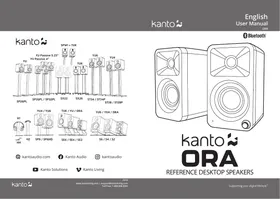
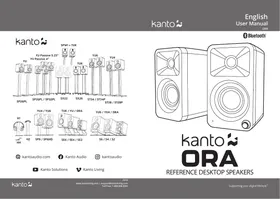
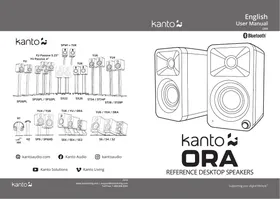
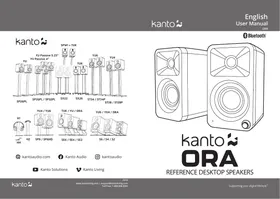
ORA REFERENCE DESKTOP SPEAKERS
| Tweeter | 3/4" silk dome |
| Woofer | 3" paper cone (magnetically shielded) |
| Amplifier Type | Class D bi-amplified |
| Power Output | 100 W peak power (50 W total RMS) |
| Power Output (per tweeter) | 9 W RMS |
| Power Output (per woofer) | 16 W RMS |
| Frequency Response | 70 Hz - 22 kHz |
| High/Low-Pass Filter | 100 Hz (automatic) |
| Inputs | 1 x RCA line-level |
| 1 x USB-C (24 bit/96 kHz) | |
| 1 x Bluetooth 5.0 | |
| Outputs | 1 x sub-out |
| Speaker Terminals | 4-pin connector |
| Rear Mounting Hole | 1/4"-20 |
| Input Voltage / Frequency | AC 100 V - 240 V 50/60 Hz |
| tandby Power Consumption | < 0.5 W |
| Dimensions (each speaker) | 3.9" W x 5.6" D x 6.9" H |
| (10 x 14.1 x 17.5 cm) | |
| Net Weight (active) | 2.2 lb (1 kg) |
| Net Weight (passive) | 2.2 lb (1 kg) |
| Gross Weight (boxed pair) | 8.2 lb (3.7 kg) |
| Shipping Box Dimensions | 8.9" W x 15.1" D x 10" H |
| (22.7 x 38.3 x 25.4 cm) |
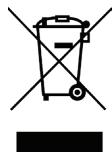
NOTICE: This appliance is labeled in accordance with European Directive 2002/96/ EC concerning waste electrical and electronic equipment (WEEE). This label indicates that this product should not be disposed of with household waste. It should be deposited at an appropriate facility to enable recovery and recycling.
MANUFACTURER AND IMPORTER:
Kanto Living Inc., 9136 196A Street, Langley, BC, Canada V1M 3B4
Introduction
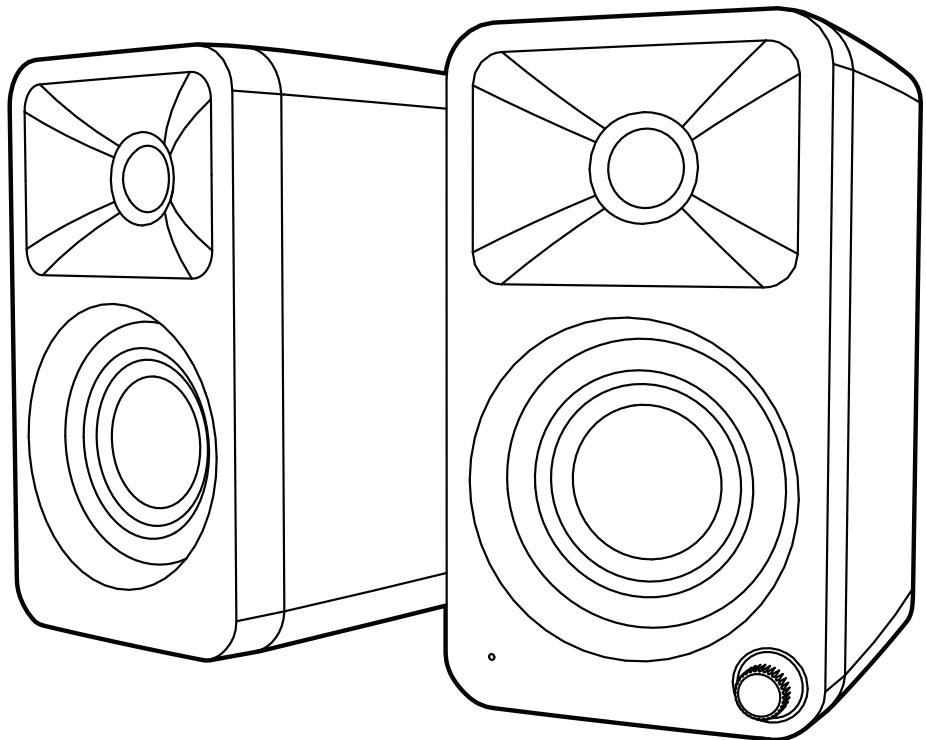
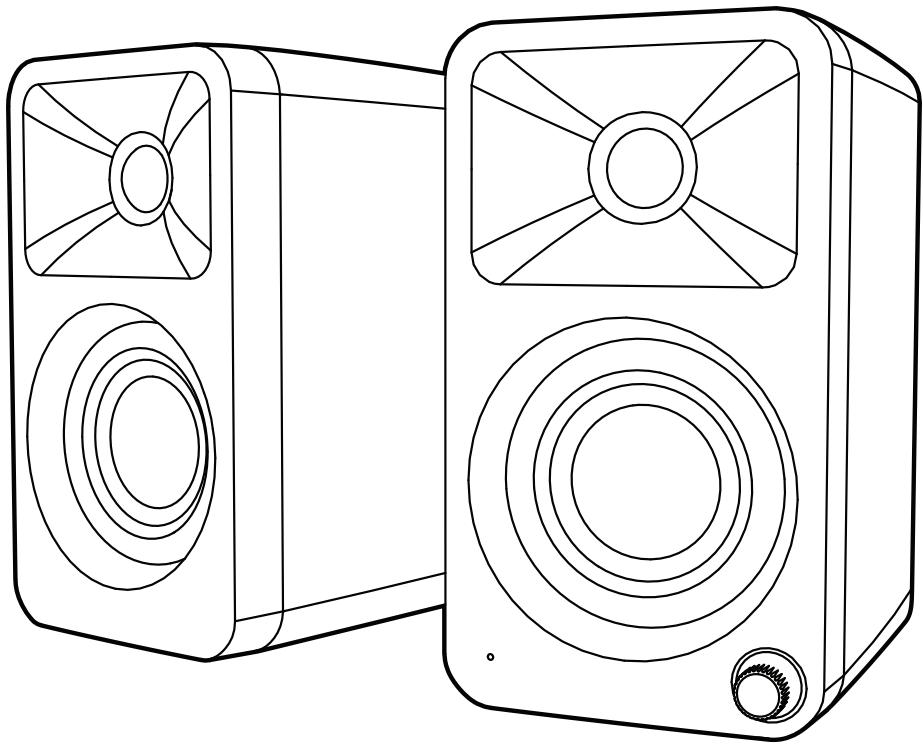
Thank you for choosing ORA, designed by Kanto in Canada. ORA bridges the gap between computer speakers and studio monitors giving you studio-grade, audiophile-approved sound without dominating your space. ORA has modern inputs like USB-C to get the best sound from your PC or Mac, Bluetooth 5.0 to pair with your phone or smart home device, and RCA for your analog gear. Sporting a crossover that automatically sends bass to a connected subwoofer, you get flawless low-end integration freeing up the 3'' woofers and 3/4'' silk dome tweeters to focus on what they do best. ORA is the perfect blend of reference-quality sound and modern features at a size small enough to fit under a monitor.
These powered speakers were carefully tested and inspected during production, and before packaging and shipping. After unpacking, please check for any damage. It is rare that a unit is damaged during shipping, but if this happens contact your retailer immediately.
You can also call Kanto directly at 1-888-848-2643 or email support@kantoliving.com.
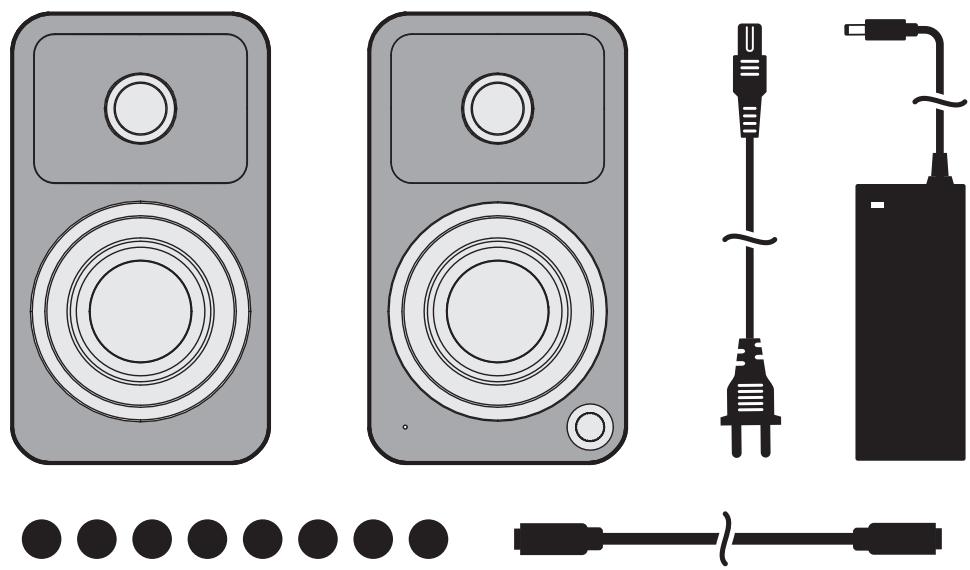
What's In the Box?
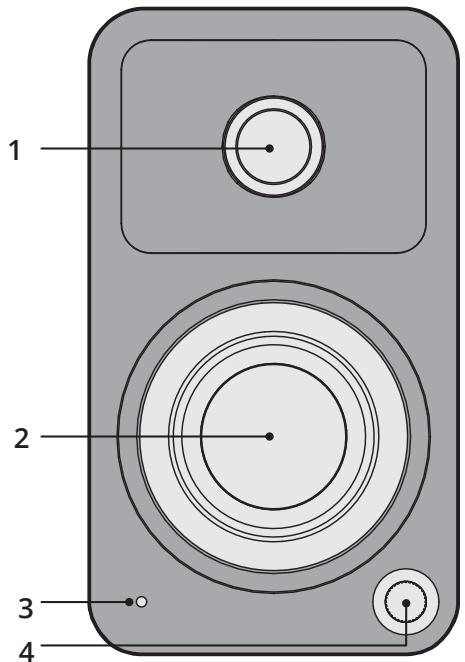
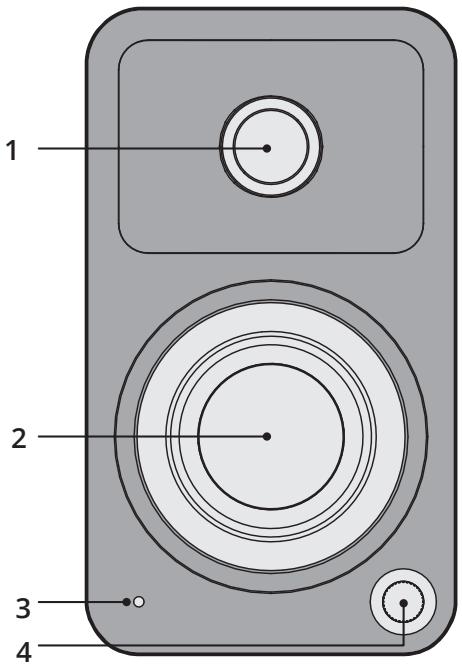
Front & Rear Panels
FRONT PANEL
1 3 / 4'' Silk Dome Tweeter
2 3" Paper Cone Woofer (magnetically shielded)
3 LED
Green
-RCA
Yellow
-USB
Blue
- Pairing (flashing)
- Paired (solid)
4 Volume / Input Select / On / Off
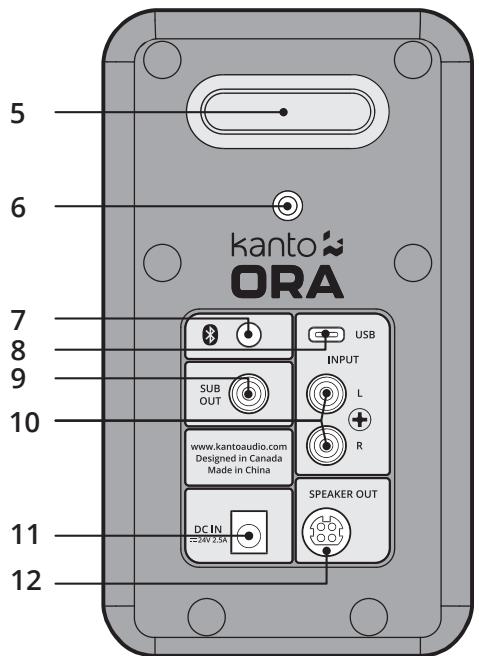
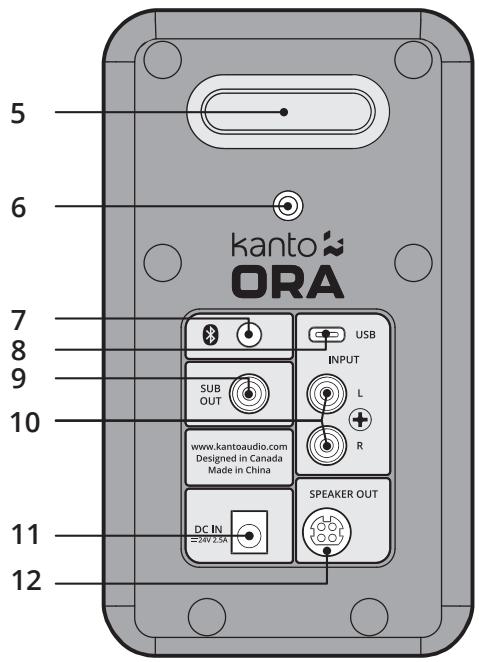
REAR PANEL
5 Bass Reflex Port
6 1 / 4'' -20 Mounting Hole
7 Bluetooth Pairing Button
8 USB Audio Input
9 Subwoofer Output
10 RCA Input
11 DC Input Connection
12 Speaker Out
Audio Troubleshooting Guide
Frequently asked questions about Kanto's ORA speakers.
- None of the lights on the front panel are illuminated.
Make sure the power supply is connected to the speaker and power outlet. -
Ensure that the power outlet is providing power.
-
The light on the front panel is illuminated but there's no audio playing.
-
Set the volume of the source to its highest level. Ensure audio source is playing audio.
- Check that the audio cable connected to and from the source is firmly connected. Test another audio cable if available.
-
Verify that the volume of the speaker is not at its minimum level. Turn the volume up using the knob on the front of the speakers.
Make sure the correct input is selected. Press the knob on the front of the speakers to cycle through the different inputs to select the correct input. -
Audio is only playing through one speaker.
-
Reconnect the 4-pin connector between the active speaker and passive speaker.
- Check that the audio cable connected to and from the source is firmly seated. Try a different cable or source to isolate the issue.
-
Ensure that the balance setting on the source is centered. Some sources may not have an adjustable balance setting.
-
You are experiencing poor audio quality.
-
Set the volume of the source to its highest level. Low source volume can negatively affect dynamic range.
-
Ensure that the rear of the speaker is spaced away from the wall by at least 20 cm, allowing the rear port function to be left unimpeded.
Test a different song or source to isolate the issue. -
The source will not connect to Bluetooth.
-
Ensure the speakers are in Bluetooth mode by cycling through the inputs. Press the knob on the front of the speakers until the blue light on the front panel of the speakers is visible.
- Make sure the blue light on the front panel of the speakers is flashing, indicating speakers are in pairing mode. If the blue light is not flashing press the Bluetooth pairing button on the back of the right speaker. Blue light will flash indicating pairing mode.
-
Turn the device you are trying to pair on and off.
-
You are experiencing buzzing, hissing or distortion.
-
Verify if the noise is coming from the source by removing all sources from the speakers.
Make sure it is not a power issue by trying a power outlet that is on a different circuit. -
Check that the audio cable connected to and from the source is firmly seated. Try a different cable or source to isolate the issue.
If using USB, set the source's sample rate to 96 kHz or lower. -
There's no audio coming from an attached subwoofer.
-
Check that the RCA cable connected to and from the subwoofer is firmly seated. Try a different cable or source to isolate the issue.
Make sure the subwoofer is connected to a power outlet and is set to "On" or "Auto". - Increase the volume of the subwoofer.
- Increase the cutoff frequency of the subwoofer to its highest position.
Connecting a Subwoofer
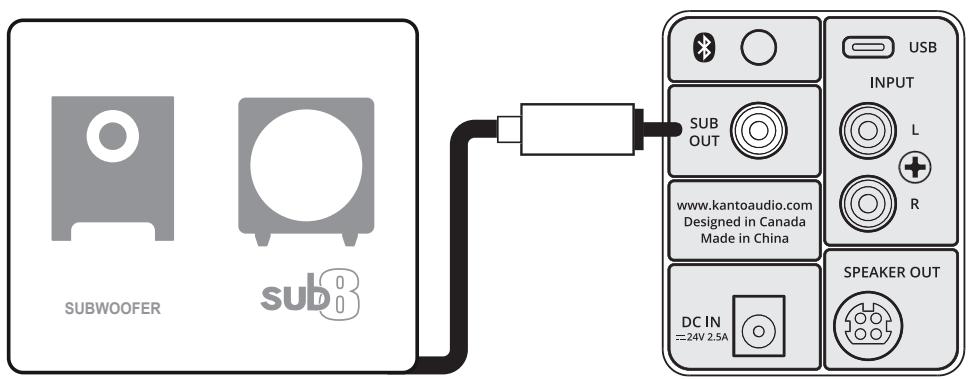
ORA is equipped with an RCA connector to provide output signal to a powered subwoofer. Simply connect a single RCA subwoofer cable from the SUB OUT connection on ORA to the AUDIO INPUT on your subwoofer. If your sub-woofer has a stereo L/R RCA input, either left or right inputs will work.
We recommend the Kanto sub8 powered subwoofer with crossover and volume controls. Most quality subwoofer offer these controls, which allow you to customize the amount of bass you will experience.
Look for details on the Kanto website at: www.kantospeakers.com
Active Crossover
ORA is equipped with an automatic active crossover filter at 100Hz to allow for advanced setup with subwooers. This crossover will reduce the bass extension of the main speakers, allowing them to focus on the mid and high frequencies, while reducing the high-frequency output of the SUB OUT port. If your sub has an adjustable bandwidth or crossover frequency setting, it can be adjusted to the highest or most open setting. The active crossover is enabled automatically when a subwoofer cable is plugged into ORA's SUB OUT port.
Setting Up Your Speakers
ORA is designed for desktop use to enhance your listening in a near-field environment. However, ORA can also be used as a stand-alone stereo speaker system mated with a multitude of audio sources. In either setup, the space between the two speakers and the distance from the rear wall is important. If the speakers are positioned too close or too far apart, stereo imaging will not be fully developed.
ORA is designed to perform optimally positioned at least 20cm to 25cm from the rear wall for best bass response. Regardless of the setup you choose, keep in mind that rooms vary in shape, size, and furnishing; a certain amount of experimentation may be necessary to determine the most suitable position that delivers the most satisfying sound performance.
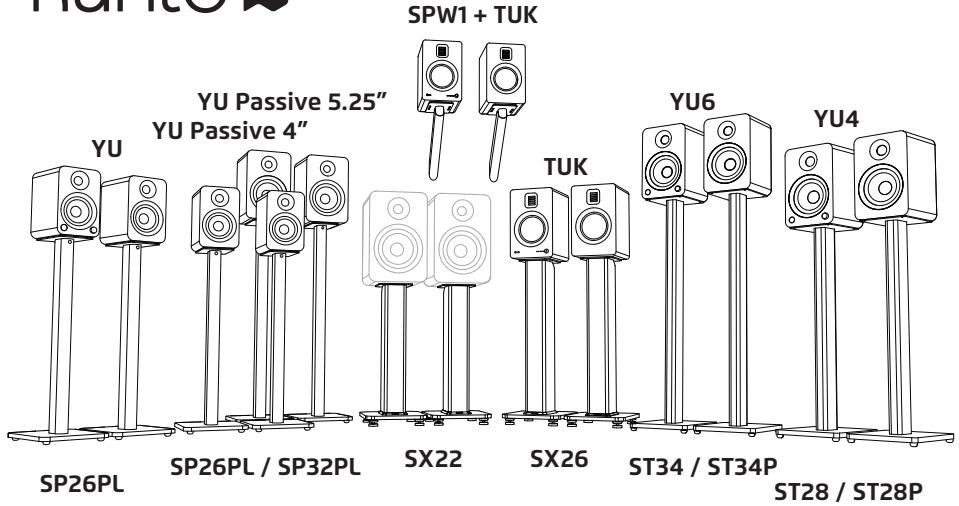
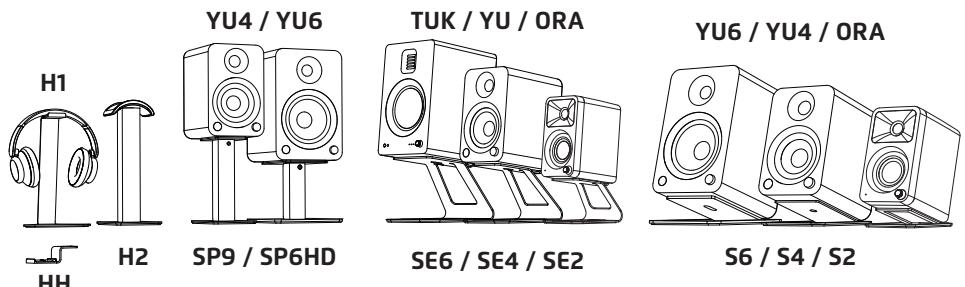
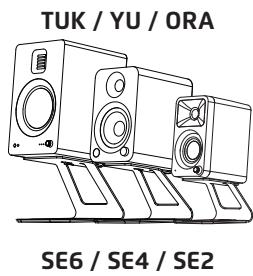
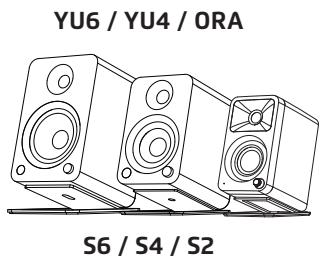
ORA can be placed sideways below a monitor for space saving measures but will sound best when upright. To avoid early reflections from the desktop surface, which can degrade audio performance, it is advised to angle ORA towards your listening position. Kanto has several desktop speaker stand options to suit your needs.
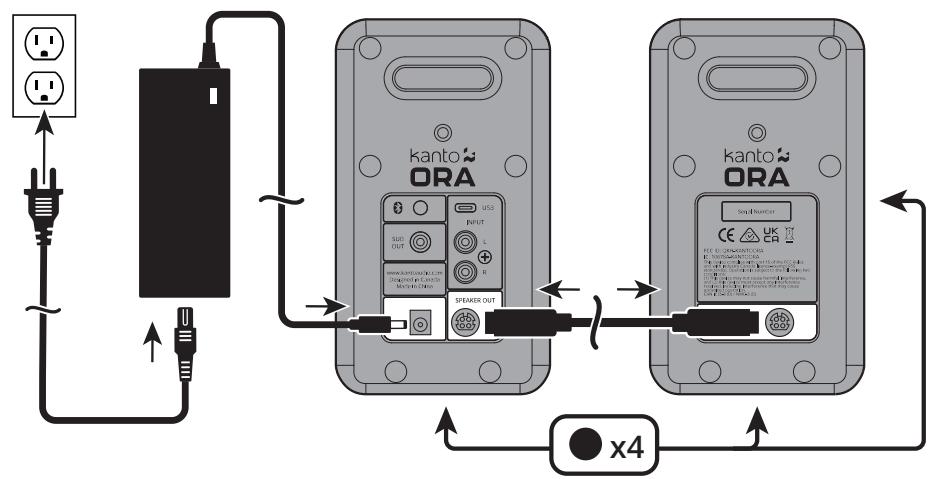
Connect the two speakers together as shown below using the supplied speaker cable. Connect the Speaker Out from the active speaker (right) to the corresponding Speaker In on the passive speaker (left). Connect the AC/DC power supply from ORA's active speaker to your wall outlet. Press the volume control knob to turn it on. Press the knob to select an input source. It cycles through the following inputs depending on what input source was last used.
RCA USB BLUETOOTH REPEAT
Press and hold to turn off. Press to turn on.
Follow the instructions on the ensuing pages to connect your audio sources to ORA. The examples in the following pages are not meant to be exhaustive - just examples.
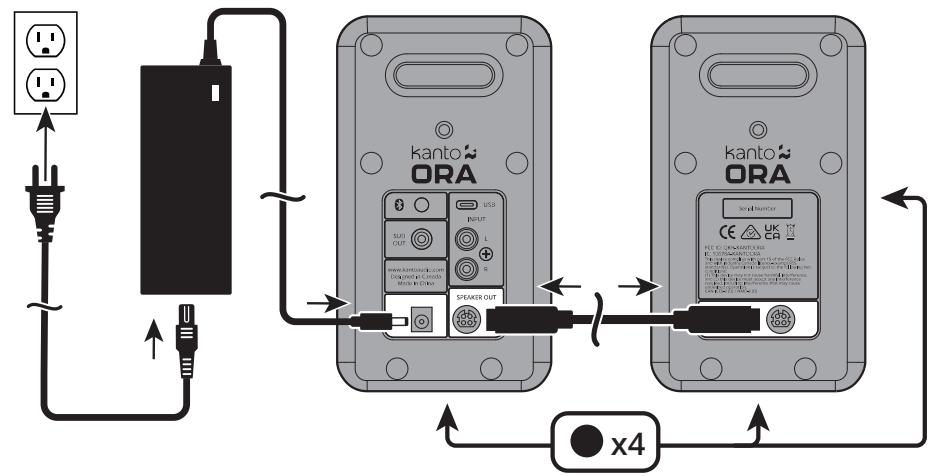

ATTENTION
After connecting all cables, the unit can be turned ON.
When the volume is high, this system can produce noise levels that could permanently damage your
hearing. ORA is a self-powered speaker system. Do not connect the speaker terminals to the speaker
outputs of a stereo amplifier. Damage may occur. Use only the power supply provided with the speakers.
Connecting Audio Sources
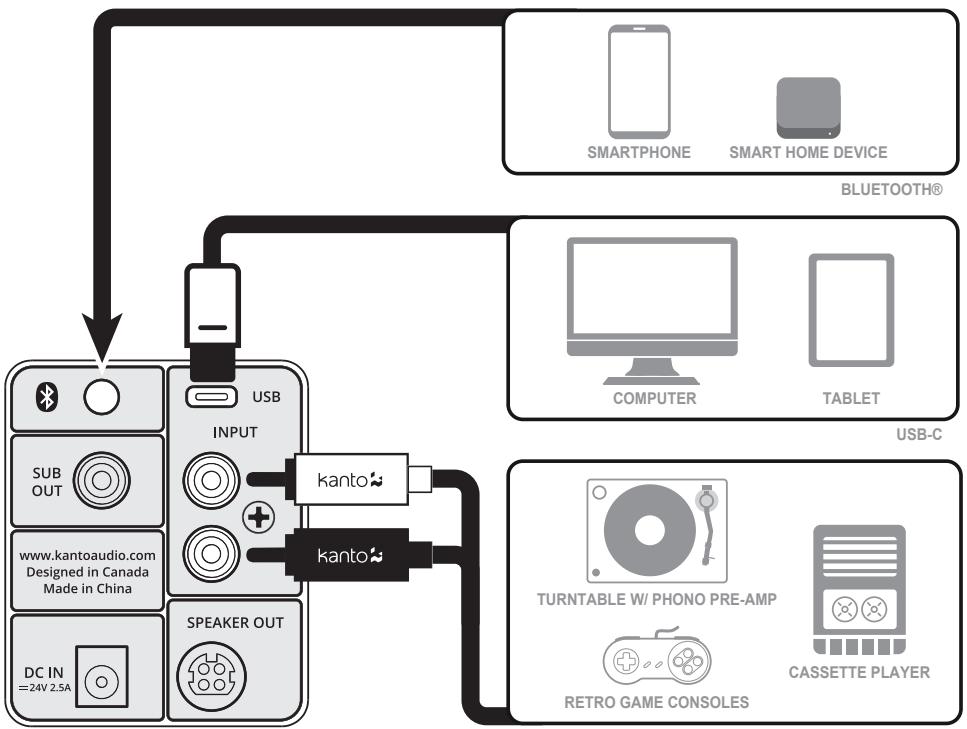
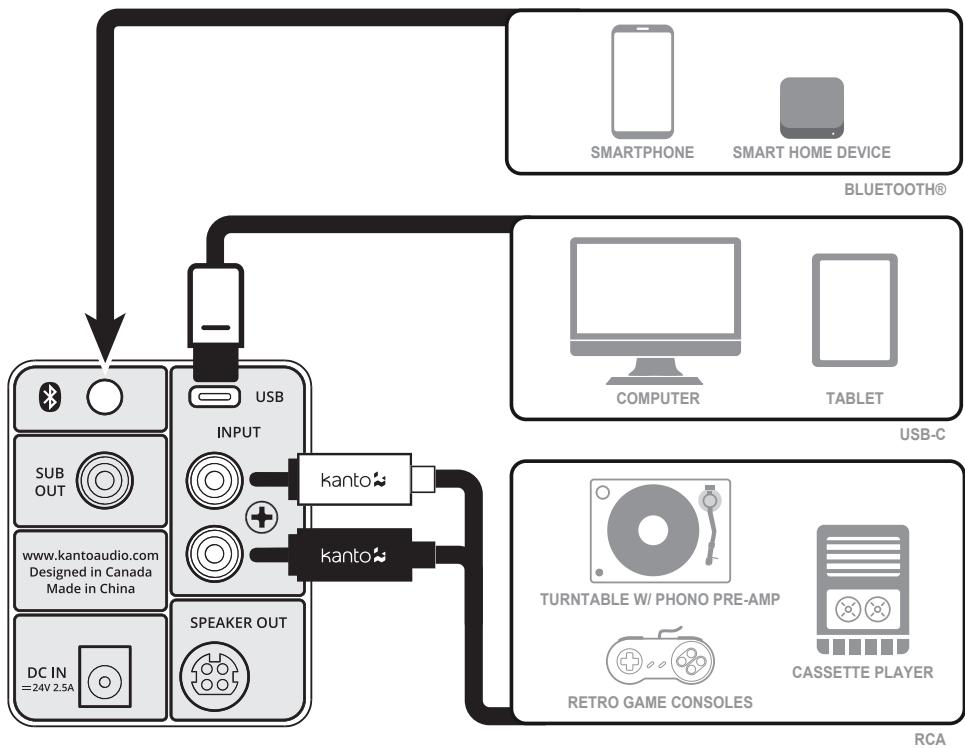
Use the appropriate audio cable to connect your audio source components to your speakers.
- Stereo RCA to Stereo RCA cable
- Stereo RCA to 3.5 mm stereo mini-jack AUX cable
USB-C to USB-C
USB-C to USB-C w/ USB-A adapter
USB-C to USB-A
The ORA features a high-quality USB input that supports data streams up to 24-bit/96 kHz resolution. When connecting your computer via USB connection, you bypass the noisy built-in DAC of the computer, and audio signals are instead decoded by ORA.
To connect using USB, cycle input to USB, and select 'ORA by Kanto' as your audio playback device.
RCA
Connecting Bluetooth
Bluetooth® Pairing
ORA features Bluetooth 5.0 and can be paired with many devices for wireless audio playback from your phone, smart home device or tablet. Pairing is easy.
- Press the volume knob and cycle through the inputs until the status light is blue. The Bluetooth LED (blue) will flash to indicate that ORA is in pairing mode. If the light is solid, then the ORA is already connected to a device. If you wish to connect to another device, press the Bluetooth pairing button (8) on the back of the ORA to put it in pairing mode.
- Enable your Bluetooth device to search for a new device to pair with. Select 'ORA by Kanto' from the list of Bluetooth devices available for pairing.
Bluetooth® Operation
- We recommend keeping a maximum distance of 10 meters between the speaker and your device. The best signal fidelity is within this range.
-
Take note of the following behavior and functionality during Bluetooth operation. When you are successfully connected, the Blue LED will be lit solid, and your device will show as connected to 'ORA by Kanto'.
-
The connection does not remain active while in other inputs.
-
ORA speakers feature a Bluetooth Pairing button on the back of the active speaker (right) to quickly disconnect a paired device and allow a second device to pair with the speaker.
-
Press the Bluetooth Pairing button to disconnect a paired device.
- Follow the pairing instructions to pair another device.
kanto


kantoaudio.com

Kanto Audio

kantoaudio

Kanto Solutions

Kanto Living
kanto\* ORA
HAUT-PARLEURS DE BUREAU DE RÉFERENCE
Kanto Living Inc., 9136 196A Street, Langley, BC, Canada V1M 3B4
Introduction
Important Safety Precautions

ATTENTION
The exclamation point within an equilateral triangle is intended to alert the user of the presence of important operating and maintenance (servicing) instructions in the literature accompanying the apparatus.
CAUTION
RISK OF ELECTRIC SHOCK DO NOT OPEN
CAUTION: TO REDUCE THE RISK OF ELECTRIC SHOCK, DO NOT REMOVE BACK PANEL.NO USER SERVICEABLE PARTS INSIDE. REFER SERVICING TO QUALIFIED SERVICE PERSONNEL.

DANGEROUS VOLTAGE
The lightning flash with arrowhead, within an equilateral triangle, is intended to alert the user of the presence of non-insulated "dangerous voltage" within the product's enclosure that may be of sufficient magnitude to constitute a risk of electric shock to persons.
- Read these instructions.
- Keep these instructions.
Heed all warnings. - Follow all instructions.
- Do not use this apparatus near water.
Clean only with a dry cloth. - Do not block any openings. Install in accordance with the manufacturer's instructions.
- Do not install near any heat sources such as radiators, heat registers, stoves, or other apparatus (including amplifiers) that produce heat.
- Protect the power-supply cord from being walked on or pinched, particularly at plugs, convenience receptacles and the point where they exit from the apparatus.
- When a stand is used, use caution when moving the stand/apparatus combination to avoid injury
from tip-over.
- Unplug this apparatus during lightning storms or when unused for long periods of time.
Refer all servicing to qualified service personnel. Servicing is required when the apparatus has been damaged in any way, such as power-supply cord or plug is damaged, liquid has been spilled or objects have fallen into the apparatus, the apparatus has been exposed to rain or moisture, the apparatus does not operate normally, or the apparatus has been dropped. - Apparatus shall be connected to a MAINS socket outlet with a protective earthing connection.
- An appliance input coupler is used as the disconnect device - the disconnect device shall remain readily operable.
FCCWarnings
This device complies with part 15 of the FCC Rules. Operation is subject to the following two conditions: (1) This device may not cause harmful interference, and (2) this device must accept any interference received, including interference that may cause undesired operation.
Any Changes or modifications not expressly approved by the party responsible for compliance could void the user's authority to operate the equipment.
Note: This equipment has been tested and found to comply with the limits for a Class B digital device, pursuant to part 15 of the FCC Rules. These limits are designed to provide reasonable protection against harmful interference in a residential installation. This equipment generates uses and can radiate radio frequency energy and, if not installed and used in accordance with the instructions, may cause harmful interference to radio communications. However, there is no guarantee that interference will not occur in a particular installation. If this equipment does cause harmful interference to radio or television reception, which can be determined by turning the equipment off and on, the user is encouraged to try to correct the interference by one or more of the following measures:
-Reorient or relocate the receiving antenna.
-Increase the separation between the equipment and receiver.
-Connect the equipment into an outlet on a circuit different from that to which the receiver is connected.
-Consult the dealer or an experienced radio/TV technician for help. This equipment complies with FCC radiation exposure limits set forth for an uncontrolled environment. This equipment should be installed and operated with minimum distance 20cm between the radiator & your body.
IC WARNING
This radio transmitter has been approved by Industry Canada.
This Class B digital apparatus complies with Canadian standard ICES-003. This device complies with Industry Canada License exempt RSS standard(s). Operation is subject to the following two conditions.
(1)This device may not cause interference, and (2) this device must accept any interference, including interference that may cause undesired operation of the device.
This equipment complies with ISED radiation exposure limits set forth for an uncontrolled environment. This equipment should be installed and operated with minimum distance 20cm between the radiator & your body.
Introduction
Thank you for choosing ORA, designed by Kanto in Canada. ORA bridges the gap between computer speakers and studio monitors giving you studio-grade, audiophile-approved sound without dominating your space. ORA has modern inputs like USB-C to get the best sound from your PC or Mac, Bluetooth 5.0 to pair with your phone or smart home device, and RCA for your analog gear. Sporting a crossover that automatically sends bass to a connected subwoofer, you get flawless low-end integration freeing up the 3'' woofers and 3¼'' silk dome tweeters to focus on what they do best. ORA is the perfect blend of reference-quality sound and modern features at a size small enough to fit under a monitor.
These powered speakers were carefully tested and inspected during production, and before packaging and shipping. After unpacking, please check for any damage. It is rare that a unit is damaged during shipping, but if this happens contact your retailer immediately.
You can also call Kanto directly at 1-888-848-2643 or email support@kantoliving.com.
What's In the Box?
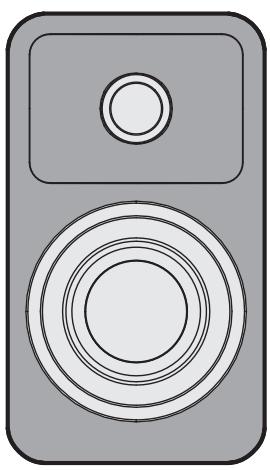

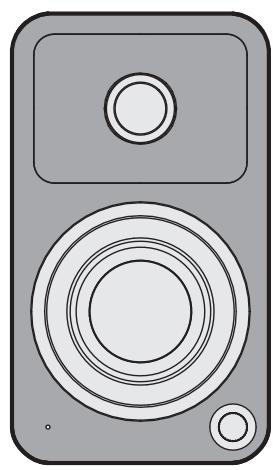

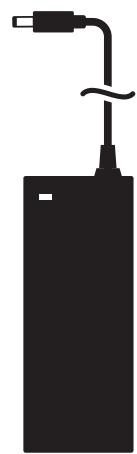

Front & Rear Panels
FRONT PANEL
1 3 / 4'' Silk Dome Tweeter
2 3" Paper Cone Woofer (magnetically shielded)
3 LED
Green - RCA
Yellow -USB
Blue - Pairing (flashing)
- Paired (solid)
4 Volume / Input Select / On / Off
REAR PANEL
5 Bass Reflex Port
6 1/4"20 Mounting Hole
7 Bluetooth Pairing Button
8 USB Audio Input
9 Subwoofer Output
10 RCA Input
11 DC Input Connection
12 Speaker Out
Setting Up Your Speakers
ORA is designed for desktop use to enhance your listening in a near-field environment. However, ORA can also be used as a stand-alone stereo speaker system mated with a multitude of audio sources. In either setup, the space between the two speakers and the distance from the rear wall is important. If the speakers are positioned too close or too far apart, stereo imaging will not be fully developed.
ORA is designed to perform optimally positioned at least 20cm to 25cm from the rear wall for best bass response. Regardless of the setup you choose, keep in mind that rooms vary in shape, size, and furnishing; a certain amount of experimentation may be necessary to determine the most suitable position that delivers the most satisfying sound performance.
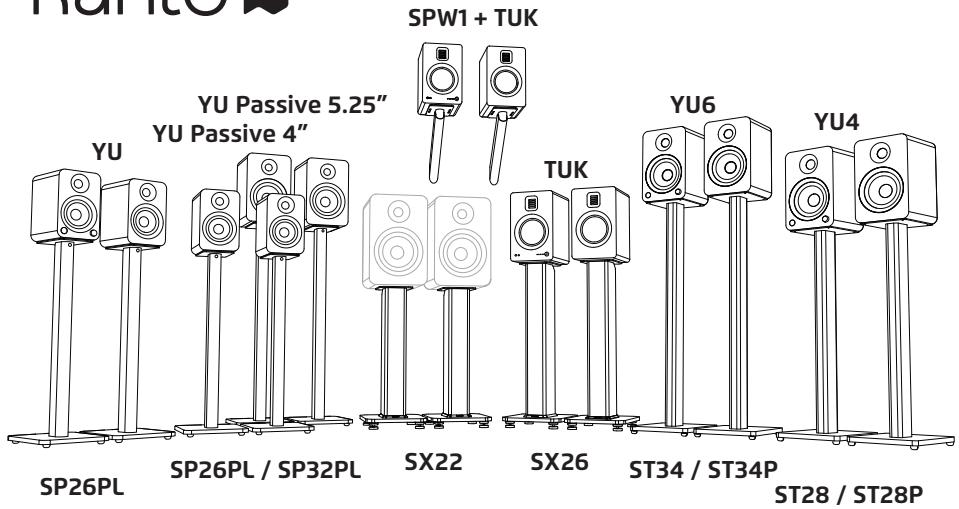
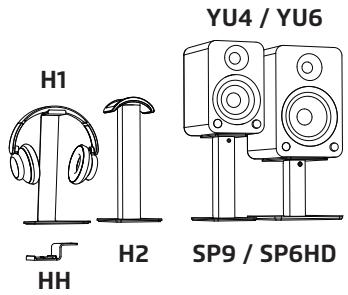
ORA can be placed sideways below a monitor for space saving measures but will sound best when upright. To avoid early reflections from the desktop surface, which can degrade audio performance, it is advised to angle ORA towards your listening position. Kanto has several desktop speaker stand options to suit your needs.
Connect the two speakers together as shown below using the supplied speaker cable. Connect the Speaker Out from the active speaker (right) to the corresponding Speaker In on the passive speaker (left). Connect the AC/DC power supply from ORA's active speaker to your wall outlet. Press the volume control knob to turn it on. Press the knob to select an input source. It cycles through the following inputs depending on what input source was last used.
RCA USB BLUETOOTH REPEAT
Press and hold to turn off. Press to turn on.
Follow the instructions on the ensuing pages to connect your audio sources to ORA. The examples in the following pages are not meant to be exhaustive - just examples.

ATTENTION
After connecting all cables, the unit can be turned ON.
When the volume is high, this system can produce noise levels that could permanently damage your hearing. ORA is a self-powered speaker system. Do not connect the speaker terminals to the speaker outputs of a stereo amplifier. Damage may occur. Use only the power supply provided with the speakers.
Connecting Audio Sources
Use the appropriate audio cable to connect your audio source components to your speakers.
- Stereo RCA to Stereo RCA cable
- Stereo RCA to 3.5 mm stereo mini-jack AUX cable
USB-C to USB-C
USB-C to USB-C w/ USB-A adapter
USB-C to USB-A
The ORA features a high-quality USB input that supports data streams up to 24-bit/96 kHz resolution. When connecting your computer via USB connection, you bypass the noisy built-in DAC of the computer, and audio signals are instead decoded by ORA.
To connect using USB, cycle input to USB, and select 'ORA by Kanto' as your audio playback device.

ATTENTION
Some models of turntables include a built-in Phono Pre-Amp.
Connecting Bluetooth
Bluetooth® Pairing
ORA features Bluetooth 5.0 and can be paired with many devices for wireless audio playback from your phone, smart home device or tablet. Pairing is easy.
- Press the volume knob and cycle through the inputs until the status light is blue. The Bluetooth LED (blue) will flash to indicate that ORA is in pairing mode. If the light is solid, then the ORA is already connected to a device. If you wish to connect to another device, press the Bluetooth pairing button (3) on the back of the ORA to put it in pairing mode.
- Enable your Bluetooth device to search for a new device to pair with. Select 'ORA by Kanto' from the list of Bluetooth devices available for pairing.
Bluetooth® Operation
- We recommend keeping a maximum distance of 10 meters between the speaker and your device. The best signal fidelity is within this range.
-
Take note of the following behavior and functionality during Bluetooth operation. When you are successfully connected, the Blue LED will be lit solid, and your device will show as connected to 'ORA by Kanto'.
-
The connection does not remain active while in other inputs.
-
ORA speakers feature a Bluetooth Pairing button on the back of the active speaker (right) to quickly disconnect a paired device and allow a second device to pair with the speaker.
Press the Bluetooth Pairing button to disconnect a paired device.
- Follow the pairing instructions to pair another device.
Connecting a Subwoofer
ORA is equipped with an RCA connector to provide output signal to a powered subwoofer. Simply connect a single RCA subwoofer cable from the SUB OUT connection on ORA to the AUDIO INPUT on your subwoofer. If your sub-woofer has a stereo L/R RCA input, either left or right inputs will work.
We recommend the Kanto sub8 powered subwoofer with crossover and volume controls. Most quality subwooers offer these controls, which allow you to customize the amount of bass you will experience.
Look for details on the Kanto website at: www.kantospeakers.com
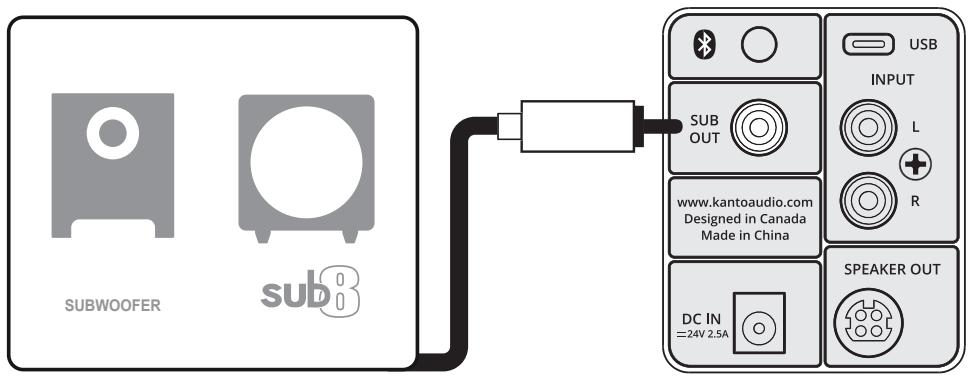
Active Crossover
ORA is equipped with an automatic active crossover filter at 100Hz to allow for advanced setup with subwooers. This crossover will reduce the bass extension of the main speakers, allowing them to focus on the mid and high frequencies, while reducing the high-frequency output of the SUB OUT port. If your sub has an adjustable bandwidth or crossover frequency setting, it can be adjusted to the highest or most open setting. The active crossover is enabled automatically when a subwoofer cable is plugged into ORA's SUB OUT port.
Audio Troubleshooting Guide
Frequently asked questions about Kanto's ORA speakers.
- None of the lights on the front panel are illuminated.
Make sure the power supply is connected to the speaker and power outlet.
- Ensure that the power outlet is providing power.
-
The light on the front panel is illuminated but there's no audio playing.
-
Set the volume of the source to its highest level. Ensure audio source is playing audio.
- Check that the audio cable connected to and from the source is firmly connected. Test another audio cable if available.
-
Verify that the volume of the speaker is not at its minimum level. Turn the volume up using the knob on the front of the speakers.
Make sure the correct input is selected. Press the knob on the front of the speakers to cycle through the different inputs to select the correct input. -
Audio is only playing through one speaker.
-
Reconnect the 4-pin connector between the active speaker and passive speaker.
- Check that the audio cable connected to and from the source is firmly seated. Try a different cable or source to isolate the issue.
-
Ensure that the balance setting on the source is centered. Some sources may not have an adjustable balance setting.
-
You are experiencing poor audio quality.
-
Set the volume of the source to its highest level. Low source volume can negatively affect dynamic range.
- Ensure that the rear of the speaker is spaced away from the wall by at least 20 cm, allowing the rear port function to be left unimpeded.
-
Test a different song or source to isolate the issue.
-
The source will not connect to Bluetooth.
-
Ensure the speakers are in Bluetooth mode by cycling through the inputs. Press the knob on the front of the speakers until the blue light on the front panel of the speakers is visible.
Make sure the blue light on the front panel of the speakers is flashing, indicating speakers are in pairing mode. If the blue light is not flashing press the Bluetooth pairing button on the back of the right speaker. Blue light will flash indicating pairing mode. -
Turn the device you are trying to pair on and off.
-
You are experiencing buzzing, hissing or distortion.
Verify if the noise is coming from the source by removing all sources from the speakers.
Make sure it is not a power issue by trying a power outlet that is on a different circuit.
- Check that the audio cable connected to and from the source is firmly seated. Try a different cable or source to isolate the issue.
If using USB, set the source's sample rate to 96 kHz or lower.
-
There's no audio coming from an attached subwoofer.
-
Check that the RCA cable connected to and from the subwoofer is firmly seated. Try a different cable or source to isolate the issue.
Make sure the subwoofer is connected to a power outlet and is set to "On" or "Auto". - Increase the volume of the subwoofer.
- Increase the cutoff frequency of the subwoofer to its highest position.
Specifications
ORA REFERENCE DESKTOP SPEAKERS
Tweeter 3/4" silk dome
Woofer 3" paper cone (magnetically shielded)
Amplifier Type Class D bi-amplified
Power Output 100 W peak power
(50 W total RMS)
Power Output (per tweeteter) 9 W RMS
Power Output (per woofer) 16 W RMS
Frequency Response 70 Hz - 22 kHz
High/Low-Pass Filter 100 Hz (automatic)
Inputs 1 x RCA line-level
1 x USB-C (24 bit/96 kHz)
1 x Bluetooth 5.0
Outputs 1x sub-out
Speaker Terminals 4-pin connector
Rear Mounting Hole 1/4"-20
Input Voltage / Frequency AC 100 V - 240 V 50/60 Hz
ndby Power Consumption – < 0.5 W
Dimensions (each speaker) 3.9'' W x 5.6" D x 6.9" H
(10× 14.1× 17.5~cm)
Net Weight (active) 2.2 lb (1 kg)
Net Weight (passive) 2.2 lb (1 kg)
Gross Weight (boxed pair) 8.2 lb (3.7kg)
Shipping Box Dimensions 8.9"W x 15.1"D x 10" H
(22.7× 38.3× 25.4cm)
NOTICE: This appliance is labeled in accordance with European Directive 2002/96/ EC concerning waste electrical and electronic equipment (WEEE). This label indicates that this product should not be disposed of with household waste. It should be deposited at an appropriate facility to enable recovery and recycling.
MANUFACTURER AND IMPORTER:
Kanto Living Inc., 9136 196A Street, Langley, BC, Canada V1M 3B4
Limited Warranty
Kanto Living Inc. (Kanto) warrants the equipment it manufactures to be free from defects in material or workmanship for the limited warranty period of 2 years. This warranty is valid in the country of purchase.
If equipment fails and Kanto is notified within 24 months from the date of purchase with proof of original receipt from an authorized reseller, Kanto will, at its option, provide replacement parts, repair the original equipment, or replace the equipment, and be responsible for return shipping to the customer, provided that the equipment has not been subjected to mechanical, electrical, or other abuse or modifications. Any replacement parts, repaired or replaced equipment are covered by the full warranty of the original purchase. The maximum liability of Kanto shall not exceed the actual purchase price paid by the original purchaser for the product.
If you purchased a Kanto product second-hand the limited warranty is fully transferable provided that you can furnish a copy of the original receipt to establish purchase date and the serial number on the product is intact.
Customers will be responsible for obtaining a Return Authorization Number through Customer Support and are responsible for return shipping costs to a Kanto location or authorized depot unless otherwise prohibited. Please keep the original packaging to prevent damage to the product during shipping. Kanto recommends insuring your shipment.
Customer Support: support@kantoliving.com
The information in the manual has been carefully checked and is believed to be accurate. However, Kanto assumes no responsibility for any inaccuracies that may be contained in the manual. In no event will Kanto be liable for direct, indirect, special, incidental, or consequential damages resulting from any defect in the equipment, even if advised of the possibility of such damages. This warranty is in lieu of all other warranties expressed or implied, including without limitation, any implied warranty, including any warranty of merchantability and fitness for any particular purpose, all of which are expressly disclaimed.
kanto
kantoaudio.com
Kanto Audio
kantoaudio
Kanto Solutions
Kanto Living

Bluetooth
kanto® ORA
HAUT-PARLEURS DE BUREAU DE RÉFERENCE
1 x USB-C (24 bit/96 kHz)
1 x Bluetooth 5.0
Sorties 1x sortie subwoofer
Poids net (Passive) 2.2 lb (1 kg)
Poids brut (boxed pair) 8.2lb (3.7kg)
Kanto Living Inc., 9136 196A Street, Langley, BC, Canada V1M 3B4