OBDeleven Gen2 - Car diagnostic tool VOLKSWAGEN - Free user manual and instructions
Find the device manual for free OBDeleven Gen2 VOLKSWAGEN in PDF.


| Product type | Automotive diagnostic tool |
| Brand | Volkswagen |
| Model | OBDeleven Gen2 |
| Dimensions | 5.2 x 2.5 x 1.5 cm |
| Weight | 30 g |
| Power supply | Via vehicle OBD2 port (12V) |
| Connectivity | Bluetooth 5.0 |
| Main functions | Reading and clearing fault codes, real-time data, adaptations, coding, service reset |
| Compatibility | Volkswagen vehicles (OBD2), OBDeleven app (Android/iOS) |
| Maintenance and cleaning | Clean with a dry, non-abrasive cloth. Avoid moisture and chemicals. |
| Safety | Minimum distance of 20 cm between the radiator and body. Compliant with Canadian RSS-102 standards. |
| Spare parts and repairability | Not user repairable. No spare parts available. |
| General information | Compliant with ICES-3 (B)/NMB-3(B). Requires a mobile app to operate. |
Frequently Asked Questions - OBDeleven Gen2 VOLKSWAGEN
User questions about OBDeleven Gen2 VOLKSWAGEN
0 question about this device. Answer the ones you know or ask your own.
Ask a new question about this device
Download the instructions for your Car diagnostic tool in PDF format for free! Find your manual OBDeleven Gen2 - VOLKSWAGEN and take your electronic device back in hand. On this page are published all the documents necessary for the use of your device. OBDeleven Gen2 by VOLKSWAGEN.
USER MANUAL OBDeleven Gen2 VOLKSWAGEN
An innovative smart diagnostic tool for monitoring and customizing your vehicle.
Officially licensed by Volkswagen AG
Worldwide and BMW North America
IMPORTANT SAFETY INSTRUCTIONS

- Do not disassemble the device! Any changes or modifications could void the warranty and user's authority to operate this equipment.
- All wireless data transferring devices produce interference that may affect other devices which are placed nearby.
- Do not use OBDleven if it distracts driver or causes inconvenience due to OBD II placement. Device must not interfere with driving or driver.
- Please consult representatives of your vehicle model regarding OBD II location on your vehicle. In case you are not sure of proper connection, please consult qualified personnel.
IMPORTANT SAFETY INSTRUCTIONS

The device is susceptible to water and humidity.
ATTENTION!
- The device uses SELV limited power source. The nominal voltage is 12 V DC. The allowed range of voltage is 9 - 16v DC.
Download application from App Store, Google Play or Huawei AppGallery.

Available on the
App Store

GET IT ON
Google Play

EXPLORE IT ON
AppGallery
QUICK START
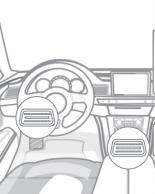
- Plug the device into the OBD II port.
- Turn on the ignition or start the engine.
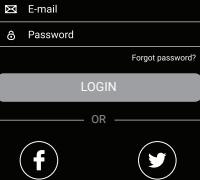
ACCOUNT
- Create an account with Facebook Twitter, Apple or sign up with e-mail.
- if you already have an account enter your details. Your PRO license and credits will be added automatically.
Devices
Alert on disconnect

Select device from list:

OBDeleyen 2
E0:7D:EAE5:42:62
ADD DEVICE AND CONNECT YOUR CAR
- Go to Settings (Android, Huawei) or Other (iOS)
- Select Devices
- Press + icon
- Select the OBDeleven 2 option from the list.
- Press Connect from home screen.
- Create 6 digit device password.
Bonus
Select bonuses you would like to add to this account:
OBDeleven PRO subscription
200 Bonus credits
OK
ADD SUBSCRIPTIONS AND CREDITS TO YOUR ACCOUNT
Select which items you want to use on the connected OBDeleven account
Or if you have purchased PRO or Ultimate subscription, redeem your subscription code (which you received into your email) in the Dashboard (app.odbdeleven.com)
COMPATIBILITY
OBDeleven fully supports diagnostic, programming and coding functions for all supported vehicles.
To check full list of supported vehicles, go to https://obdeleven.com/supported-vehicles or check "Supported vehicles" section in OBDeleven application.
REQUIREMENTS
iOS 11 or newer supported phones/tablets
Android 5.0 or newer phones/tablets
Huawei X.X or newer phones/tablets
OBDeleven SPECIFICATIONS
Size
41×33×24mm
Weight
25g
Idle Power Consumption / Max Power Consumption
0.42W/0.54W
Input Current
45mA
Input Voltage
12V
Bluetooth
5.2
Colour
Black
Frequence support
2402-2480MHz for BLE

TROUBLESHOOTING TIPS
You can access this and other important information via our help platform:
https://obdeleven.com/en/faqs
or please contact support@obdeleven.com
For detailed information about Warranty please visit
https://obdeleven.com/warranty

RETURN POLICY
- We are accepting 14 days return policy, item must be returned in original package and without marks of use.
- Hardware or accessories, purchased online, may be opened for the purpose of inspection (but not used) and may be returned for refund or exchange within 14 days of the dispatch date.
- Virtual items as PRO version activation or Credits can't be returned for refund.
We are unable to refund postage and packaging costs incurred for returning unwanted products for international or Lithuanian orders. - Items bought as part of a bundle (including PRO license or credits, hardware and software packs) if returned digital content used, will result in the full price being charged for other items in the bundle. Your refund will be adjusted accordingly.
- If returning hardware, it must contain all the components.
WARRANTY
Volasit is guarantees its products to be free of any manufacturing defects for a period of 24 months. If a product could fail within this specific warranty time, the product can be:
- Repaired
- Replaced with a new product
This warranty does not apply. Products you purchased from unauthorized restless, or where instructions for use an activation of the product are not complied with or where Product is damaged as a result of abuse, accident, modification or other causes beyond our reasonable control. Any replacement product will be warranted for the remainder of original warranty period or 90 calendar days, whichever is longer.
HOW TO SUBMIT A WARRANTY CLAIM
To obtain warranty service, contact us via our help platform: https://eu.deleven.com/faqs/help
Instructions will follow on how to submit your claim.
- You will be responsible for securely packaging the Hardware and including the requested information, such as account verification information.
- You are also responsible for shipping and handling charges, in addition to any applicable customs duties, VAT or other associate taxes or charges when returning the Hardware.
Hardware for which Voltas IT cannot reproduce the claimed defect or for which your purchase cannot be verified will be rejected.
For more detailed information about Warranty please visit https://obdeleven.com/warranty
FCC Statement
This equipment has been tested and found to comply with the limits for a Class B digital device, pursuant to part 15 of the FCC Rules. These limits are designed to provide reasonable protection against harmful interference in a residential installation. This equipment generates, uses and can radiate radio frequency energy and, if not installed and used in accordance with the instructions, may cause harmful interference to radio communications. However, there is no guarantee that interference will not occur in a particular installation. If this equipment does cause harmful interference to radio or television reception, which can be determined by turning the equipment off and on, the user is encouraged to try to correct the interference by one or more of the following measures:
- Reorient or relocate the receiving antenna.
- Increase the separation between the equipment and receiver.
-
Connect the equipment into an outlet on a circuit different from that to which the receiver is connected.
-
Consult the dealer or an experienced radio/TV technician for help. Caution: Any changes or modifications to this device not explicitly approved by manufacturer could void your authority to operate this equipment.
This device complies with part 15 of the FCC Rules. Operation is subject to the following two conditions: (1) This device may not cause harmful interference, and (2) this device must accept any interference received, including interference that may cause undesired operation.
ISED Statement
English:This device contains licence-exempt transmitter(s)/receiver(s) that comply with Innovation, Science and Economic Development Canada's licence-exempt RSS(s). Operation is subject to the following two conditions:
(1) This device may not cause interference.
(2) This device must accept any interference, including interference that may cause undesired operation of the device.
This device meets the exemption from the routine evaluation limits in
section 2.5 of RSS 102 and compliance with RSS 102 RF exposure, users can obtain Canadian information on RF exposure and compliance.
This equipment complies with Canada radiation exposure limits set forth for an uncontrolled environment.
This equipment should be installed and operated with minimum distance 20cm between the radiator & your body.
Manufacturer: Voltas IT, LLC
Developed by Votas IT, LLC in Lithuania, assembled in Lithuania.
Trademark OBDeleven and Voltas IT, LLC. All rights reserved.

FCC E