TB54 - Smartwatch Desertcat - Free user manual and instructions
Find the device manual for free TB54 Desertcat in PDF.



| Product type | Smart watch |
| Brand | Desertcat |
| Model | TB54 |
| Display | Touch |
| Power supply | Rechargeable lithium-ion battery via included cable |
| Connectivity | Bluetooth 4.0 (BLE) and Bluetooth 3.0 |
| Compatibility | Android 5.0 and above, iOS 9.0 and above |
| Sensors | Accelerometer, heart rate, SpO2 (blood oxygen), blood pressure monitor |
| Main functions | Heart rate, pedometer, blood pressure, blood oxygen, sleep, weather, notifications, Bluetooth calls, Bluetooth music, remote photo control, AI voice assistant, stopwatch, phone finder |
| Water resistance | Waterproof for daily use (do not submerge) |
| Maintenance | Clean with a damp cloth and mild soapy water; avoid chemicals |
| Precautions | Do not wear in the shower or pool; avoid shocks and extreme temperatures |
| Safety | Radiation below FCC/CE standards, safe for the body |
Frequently Asked Questions - TB54 Desertcat
User questions about TB54 Desertcat
0 question about this device. Answer the ones you know or ask your own.
Ask a new question about this device
Download the instructions for your Smartwatch in PDF format for free! Find your manual TB54 - Desertcat and take your electronic device back in hand. On this page are published all the documents necessary for the use of your device. TB54 by Desertcat.
USER MANUAL TB54 Desertcat
Design By Desertcat Team
Use the Touch Screen

Control Center

Swipe Right Change Watch Face


Heart Rate/pedometer / blood pressure/blood/ oxygen/sleep/monitoring/ weather

Swipe Down/UP
Swipe Left/Right
Messages

Downloading the APP
Scan the following QR Code, download and install the APP
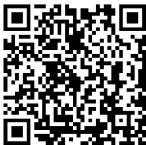
Android/IOS
Scan QR Code and Download
System requirements: Android 5.0 and above; IOS 9.0 and above; support Bluetooth 4.0
Preparation before use
For the first time, please make sure the Smart Watch has enough power. If the Smart Watch cannot be turned on, please charge the Smart Watch first.
PS: Time Synchronization requires connection to Bluetooth.
Binding Use
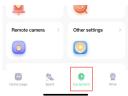
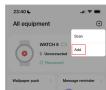
- Connection APP: Open Lefun Health APP, Click "Equipment", "+" , "add", "Start Search" search for the watch Name (Watch 8) and check the Bluetooth address (bluetooth address show on watch "About") same as your watch to connection the Watch.
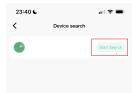
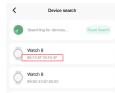
- Connection Bluetooth Call: Open Phone Bluetooth Connection Bluetooth 3.0 (The Bluetooth name is Watch 8_Audio), Note you should check your watch the bluetooth 3.0 turned on, that you can Call and Play Music. Bluetooth 3.0 supports Shared contacts, media audio and communication Audio.

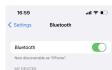
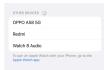
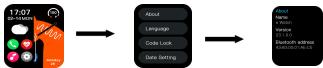
How to Check Bluetooth Addrss on watch?
- Check Bluetooth Address on watch
- Choose SET and choose "About" it show BT address
HOW to turn on Bluetooth 3.0 on watch?
Swipe Down/UP Open Control Center

Click on the "first icon with a bluetooth phone"
What should I do if the Bluetooth cannot be connected?
- Please confirm whether the mobile phone supports it (IOS 9.0 or Android 4.0 system or above).
- Due to the problem of signal interference in the Bluetooth wireless connection, the connection time may vary each time. If you cannot connect for a long time, please make sure to connect in a place without magnetic field or interference from too many Bluetooth devices.
- Turn off the Bluetooth of the mobile phone and turn it on again.
- Clear the background application of the mobile phone or restart the mobile phone
- Do not connect the mobile phone to other products of the same type at the same time.
- Whether the application is still running in the background, if it is not running in the Background, the connection cannot be made.
APP Can't find the Watch?
If the Bluetooth broadcast of the Watch is not searched by the mobile phone, please make sure that the Watch is powered and activated, and is not connected to other mobile phones. Put the bracelet close to the mobile phone to search again. If it still does not work, turn off the Bluetooth of the mobile phone for 20 seconds and try again. Turn on Bluetooth and search again.
Should the Bluetooth connection be turned on all the time? If it is closed, will there still be data?
Before the data is synchronized, the exercise and sleep data will be kept on the watch host. When the mobile phone and the watch are successfully connected via Bluetooth, the watch will automatically upload the data to the mobile phone, but the data stored in the watch is limited and can only be stored for about a week Bluetooth data, when the space is full, it will utomatically overwrite the earliest data to generate the latest data, so please synchronize the watch to the mobile phone in time.
Remarks: If you turn on the call and SMS reminder function, you need to keep the Bluetooth connected, and the alarm clock reminder supports offline. and the Time synchronize need connection be turned on bluetooth.
Will wearing the bracelet for a long time cause harm to the human body?
The radiation of the equipment is far lower than the FCC/CE standard of the United States, which is basically negligible, and long-term wearing will not cause radiation damage to the human body.
How to Increase the volume of Watch?
When connected to the Bluetooth of the mobile phone, you can adjust the volume of the watch, through the volume keys of the mobile phone.
Why the watch cannot receive push notifications and make Call / Answer ?
To make calls and receive messages via Bluetooth, you need to connect the APP with Bluetooth 3.0. Please check whether the APP is connected and Bluetooth 3.0, and whether the watch has turned off Bluetooth 3.0.
Why can't the correct time be displayed
Time synchronization needs to keep the Bluetooth connection, please check whether the Bluetooth connection is normal.
Can use the watch to reply to messages?
The watch only supports message reception, not message reply.
How to set the language of your watch?
Open the watch settings center, select "Language", and select the desired language from the drop-down list.
The Watch is waterproof ?
The smart watch supports life waterproof, please do not soak the watch in water.
Why my iphone can't I receive messages, but I can make or receive calls?
To receive information, you need to connect to the APP, please check whether the APP is connected normally. If the APP is not connected normally, please go to Settings-Bluetooth, find the name "watch 8" and choose to ignore. Re-open the APP to connect to the watch.
What should I do if the bracelet cannot be charged?
- Please confirm whether the direction of the charging stand is correct, and whether the charging is in good contact with the watch.
- When the power of the bracelet is lower than 3.6V , there will be a period of battery precharging time. Remarks: After plugging in the charger, it will enter the charging state immediately. If there is no display, it will take 3-5 minutes to enter the charging state.
Precautions
It should not be worn when taking a bath or swimming.
When synchronizing data, please connect the Hand.
Use the built-in charging cable to charge.
Do not expose the handle ring to a place with highmoisture or extremely high or low temperature for a longtime.
The wristband restarts unexpectedly. Please check thememory information of the phone to clear it and trygain, or exit the APP and reopen it.
Watch maintenance
Do not scratch the sensor, protect it from damage
Wipe the surface of the Hand with a damp cloth and use mild soapy water to remove oil or dust
Do not expose the Hand to the environment with strongchemicals, such as gasoline, cleaning solvents,propanol, alcohol or insect repellent.The chemicals will damage the sealability of the Hand and the surface of the casing
Prevent your Hand from being subjected to strong impact and extreme high temperature exposure
when the lens and casing are intact, it is waterproof. Violent disassembly will affect the waterproofness.
Function Introduction

Step

Search Phone

Heart Rate Monitoring

Blood Oxygen

Stopwatches

QR Code

Sport

BT Camera

BT Music

Dial Style

Settings

Weather

dial

call records

Sleep Monitoring

Blood Pressure

Message
Control Center

Bluetooth call 3.0 on/off

Find Phone

APP QR Code

Dial Style

Dimming

AI Voice
Smart Watch Features

When Bluetooth 3.0 is connected, you can make a call by dialing the number. At this time, the phone will automatically dial, and the phone can set the call device as a Watch.

keep the information pushed by themobile phone: you can view the last 10 pushed message.

Remote camera: need to be connected to the APP, open the remote camera phone will open the camera, shake the Hand phone to take a picture, theHand to exit the remote camera phone will alsoexit the camera.

Bluetooth music: It can be used only when connected to phone Bluetooth 3.0. The guide page jumped outof the APP for the first time is connected to 3.0 Bluetooth. You can control the play / pause of the musicmodel being playeon the mobile phone through Bluetooth music.

Al voice, need mobile phone to connect to Bluetooth 3.0
Reloj Inteligente
Espagnol Manual de instructaciones
TB40/TB62/TB53/TB54
- Please confirm whether the mobile phone supports it (IOS 9.0 or Android 4.0 system or above).
- Due to the problem of signal interference in the Bluetooth wireless connection, the connection time may vary each time. If you cannot connect for a long time, please make sure to connect in a place without magnetic field or interference from too many Bluetooth devices.
- Turn off the Bluetooth of the mobile phone and turn it on again.
- Clear the background application of the mobile phone or restart the mobile phone
- Do not connect the mobile phone to other products of the same type at the same time.
- Whether the application is still running in the background, if it is not running in the background, the connection cannot be made.
APP No能找到 el reloj?
Swipe Down/UP Open Control Center

To receive information, you need to connect to the APP, please check whether the APP is connected normally. If the APP is not connected normally, please go to Settings-Bluetooth, find the name "watch 8" and choose to ignore. Re-open the APP to connect to the watch.
Appel Bluetooth 3.0 active/deactive

This device complies with part 15 of the FCC Rules. Operation is subject to the following two conditions:
(1) This device may not cause harmful interference, and (2) this device must accept any interference received, including interference that may cause undesired operation.
Any changes or modifications not expressly approved by the party responsible for compliance could void the user's authority to operate the equipment.
NOTE: This equipment has been tested and found to comply with the limits for a Class 8 digital device, pursuant to Part 15 of the FCC Rules. These limits are designed to provide reasonable protection against harmful interference in a residential installation. This equipment generates, uses and can radiate radio frequency energy and, if not installed and used in accordance with the instructions, may cause harmful interference to radio communications. However, there is no guarantee that interference will not occur in a particular installation.
If this equipment does cause harmful interference to radio or television reception,
which can be determined by turning the equipment off and on, the user is encouraged to try to correct the interference by one or more of the following measures:
-- Reorient or relocate the receiving antenna.
-- Increase the separation between the equipment and receiver.
-- Connect the equipment into an outlet on a circuit different from that to which the receiver is connected.
-- Consult the dealer or an experienced radio/TV technician for help.
The device has been evaluated to meet general RF exposure requirement. The device can be used in portable exposure condition without restriction.