F1200 - Portable power station Anker - Free user manual and instructions
Find the device manual for free F1200 Anker in PDF.


| Product Type | Portable Power Station (PowerHouse 757) |
| Brand | Anker |
| Model | F1200 |
| Battery Capacity | 1229 Wh (lithium-ion) |
| Net Weight | 19.1 kg (42.1 lb) |
| Dimensions (L×W×H) | 46.3 × 28.8 × 23.7 cm (18.2 × 11.3 × 9.3 in) |
| AC Input | 100-120 V ~ 12 A max, 50/60 Hz (charging 1000 W max, bypass 1440 W max) |
| Solar Input | 11-32 V ⎓ 10 A / 32-60 V ⎓ 12.5 A (600 W max) |
| Car Input | 12 V ⎓ 10 A (120 W max) |
| AC Output (×4) | 120 V ~ 15 A, 60 Hz, 1800 W max |
| USB-A Output (×2) | 5 V ⎓ 2.4 A (2.4 A max per port) |
| USB-C Output (×1, 100 W) | 5 V ⎓ 3 A / 9 V ⎓ 3 A / 15 V ⎓ 3 A / 20 V ⎓ 3 A / 20 V ⎓ 5 A |
| USB-C Output (×1, 60 W) | 5 V ⎓ 3 A / 9 V ⎓ 3 A / 15 V ⎓ 3 A / 20 V ⎓ 3 A |
| Cigarette Lighter Output (×1) | 12 V ⎓ 10 A |
| Inverter (UPS) | Switching < 20 ms |
| Charging Temperature | 0 °C to 40 °C (32 °F to 104 °F) |
| Discharging Temperature | -20 °C to 40 °C (-4 °F to 104 °F) |
| Special Features | Ambient Lighting, SOS mode, Energy Saving Mode, IoT Connectivity (Anker app) |
| Safety | Overload Protection, High/Low Temperature Protection, Auto Shutdown |
| Warranty | 5-Year Limited Warranty |
Frequently Asked Questions - F1200 Anker
User questions about F1200 Anker
0 question about this device. Answer the ones you know or ask your own.
Ask a new question about this device
Download the instructions for your Portable power station in PDF format for free! Find your manual F1200 - Anker and take your electronic device back in hand. On this page are published all the documents necessary for the use of your device. F1200 by Anker.
USER MANUAL F1200 Anker
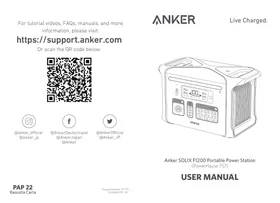
For tutorial videos, FAQs, manuals, and more information, please visit:
https://support.anker.com
Or scan the QR code below:

@anker_official @anker_jp

@AnkerDeutschland @AnkerJapan @Anker

@AnkerOfficial @Anker_JP
Anker SOLIX F1200 Portable Power Station (PowerHouse 757)
USER MANUAL
| English | 01 |
| François | 13 |
| 日本語 | 24 |
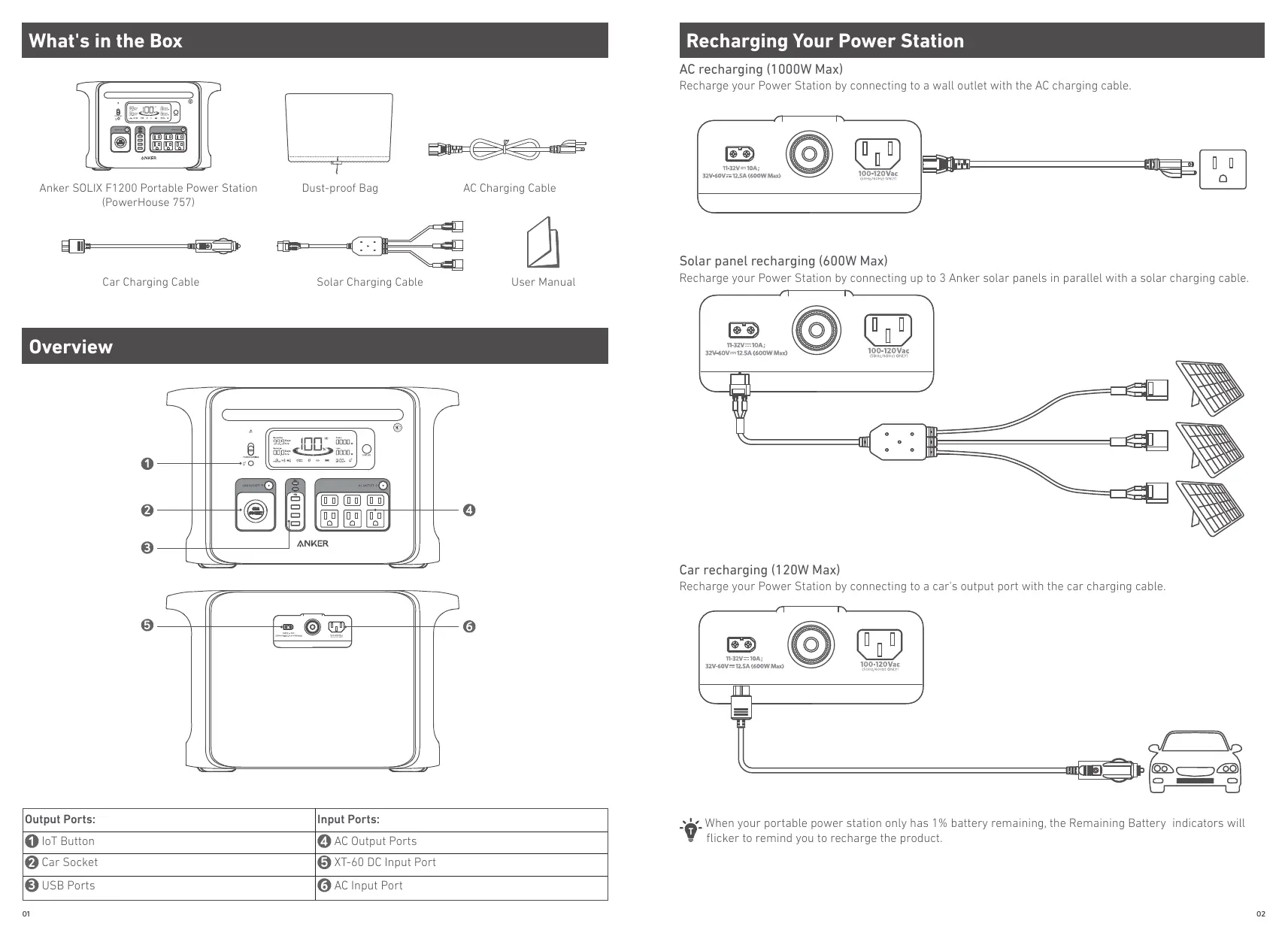
What's in the Box
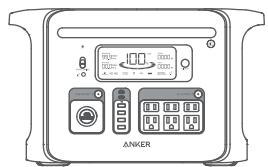
Anker SOLIX F1200 Portable Power Station (PowerHouse 757)
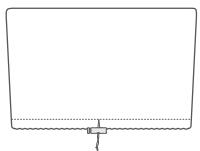
Dust-proof Bag

AC Charging Cable

Car Charging Cable
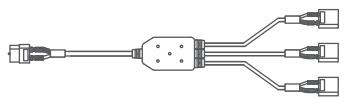
Solar Charging Cable

User Manual
Overview
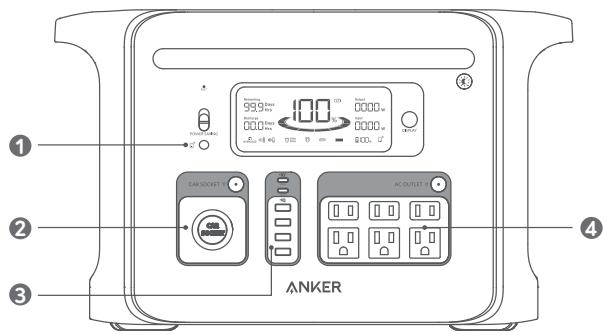
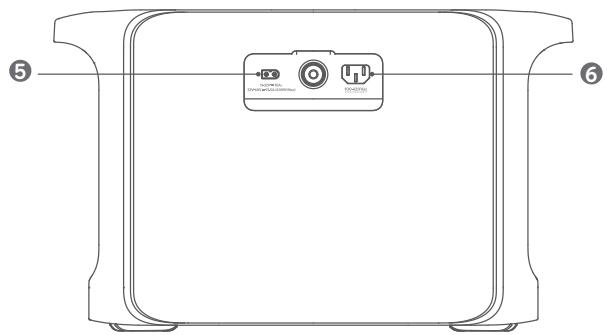
| Output Ports: | Input Ports: |
| 1 IoT Button | 4 AC Output Ports |
| 2 Car Socket | 5 XT-60 DC Input Port |
| 3 USB Ports | 6 AC Input Port |
Recharging Your Power Station
AC recharging (1000W Max)
Recharge your Power Station by connecting to a wall outlet with the AC charging cable.

Solar panel recharging (600W Max)
Recharge your Power Station by connecting up to 3 Anker solar panels in parallel with a solar charging cable.
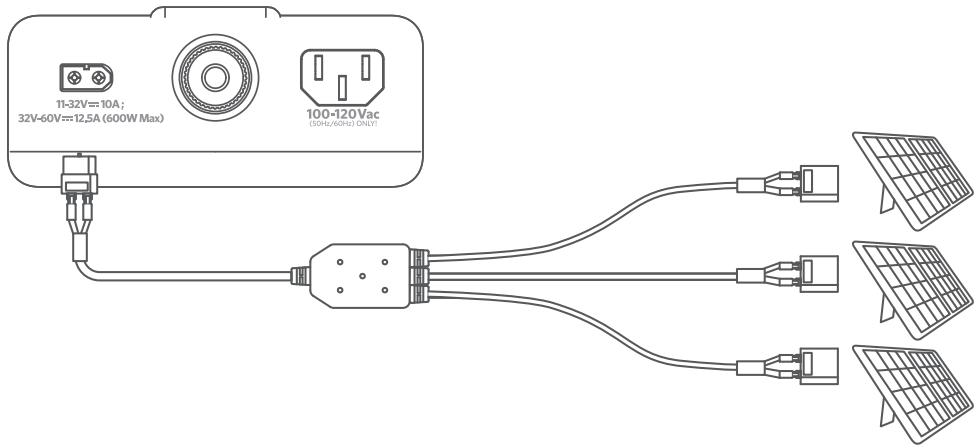
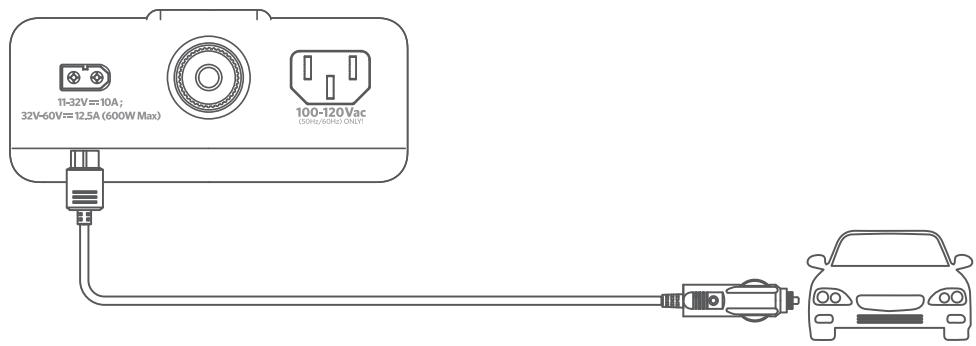
Car recharging (120W Max)
Recharge your Power Station by connecting to a car's output port with the car charging cable.

When your portable power station only has 1% battery remaining, the Remaining Battery indicators will flicker to remind you to recharge the product.
Powering Your Devices
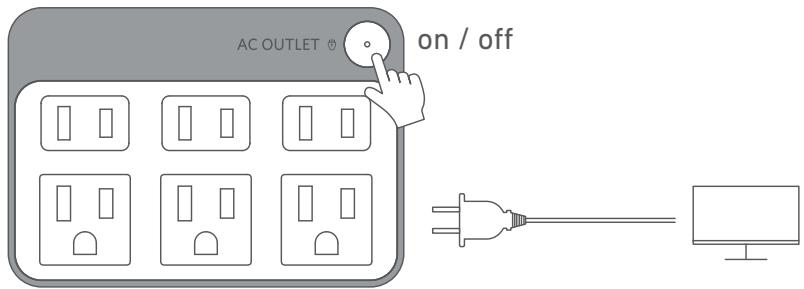
AC charging
Press the AC button and connect your devices to the AC output ports.
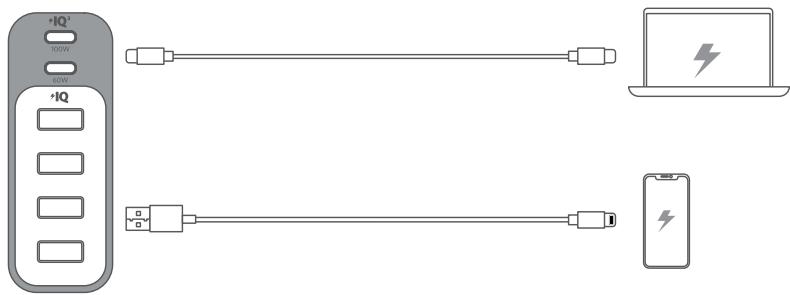
USB charging
Connect your devices to the USB ports.
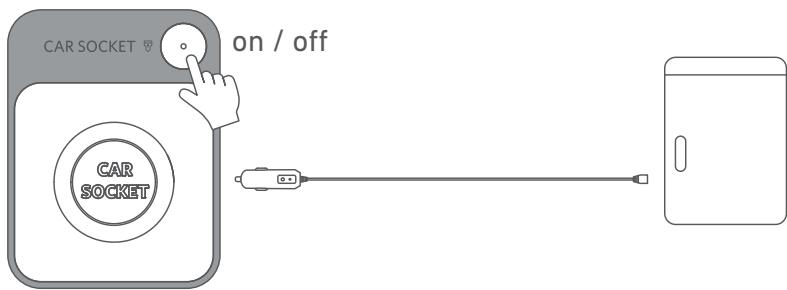
Car socket charging
Turn on the car socket and connect your devices to start charging.
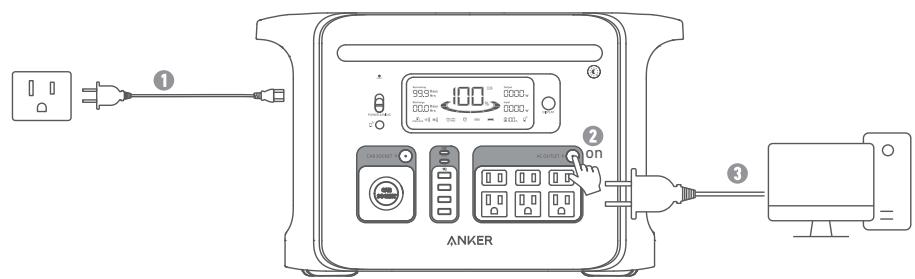
Uninterruptible Power Supply (UPS)
To use the UPS function, connect your Power Station to a wall outlet with the AC charging cable, then press the button and connect your devices via the AC output ports.
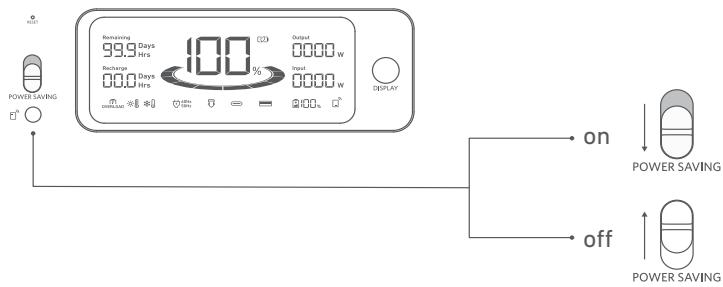
Power Saving Mode
Switching on the power saving mode prevents wasting power by automatically turning off the Power Station once all your devices are fully charged.
Switching off the power saving mode will enable stable charging over an extended period, such as for timelapse photography or for sleeping with a CPAP machine.
The Anker App for Smart Control
You can remotely control your power station using the Anker App. Please download the app and its user manual by scanning this QR code.
Connect the device to a network before using the app for the first time. After connecting successfully, you can connect your devices off-grid.
Light
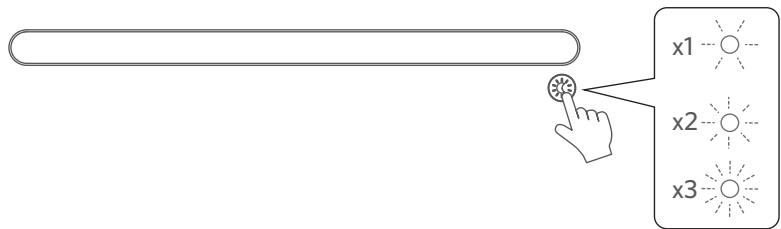
Ambient light
Press the button once to turn on the ambient light, and press again up to 2 times to switch between brightness levels.
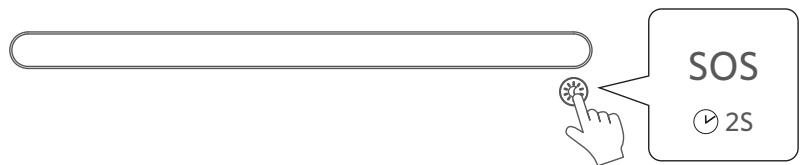
SOS mode
Press and hold the button for 2 seconds to turn on SOS mode.
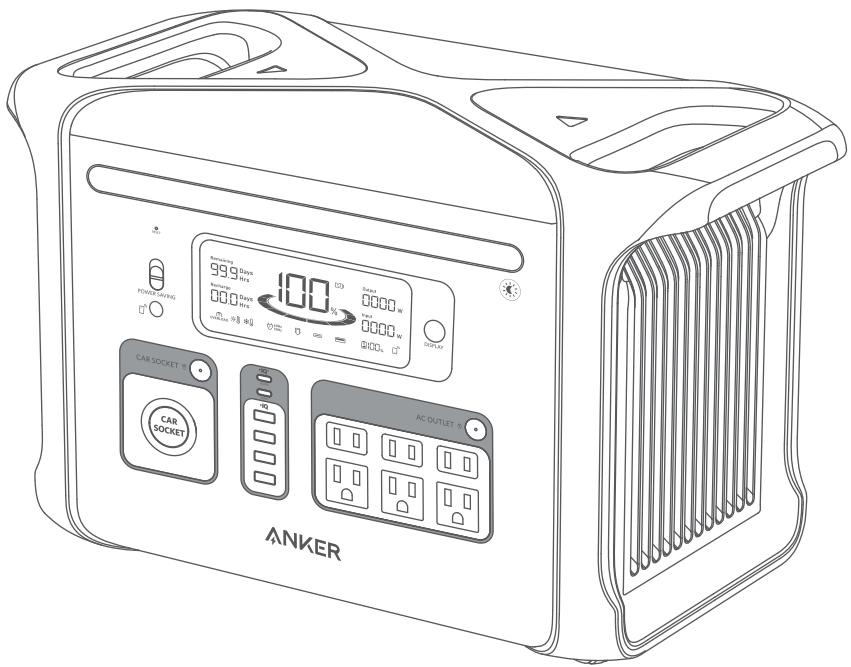
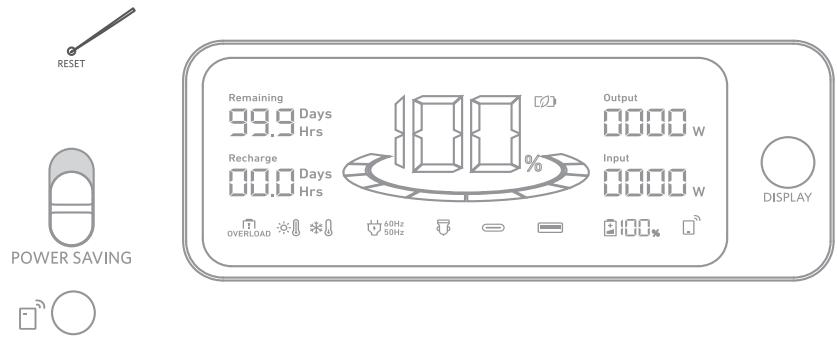
LCD Screen Guide
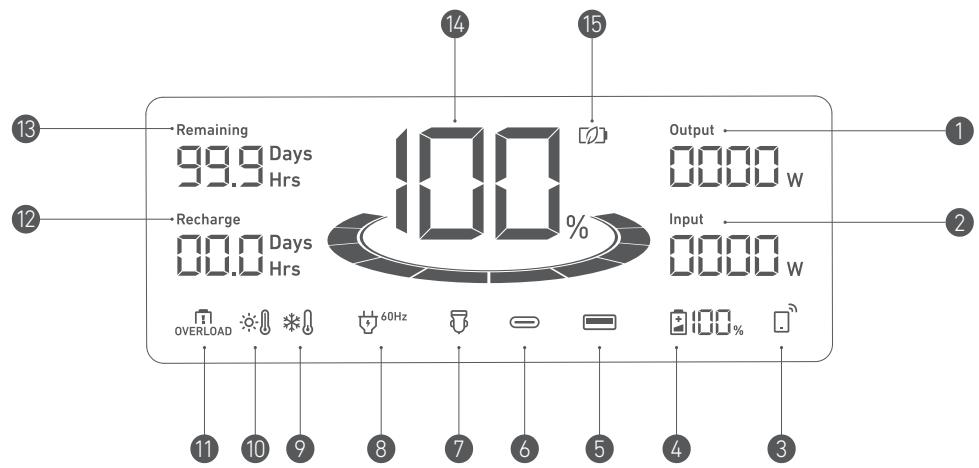
Current Output Power
2 Current Input Power
3 IoT
Press the IoT button for 2 seconds and connect your devices through the app when this icon appears on the screen.
4 Remaining Battery for Expansion Battery
When the expansion battery is connected successfully, this icon appears on the screen.
USB-A Output Port
USB-C Output Port
Car Charging
AC Charge and Voltage Frequency
9 Low-Temperature Alert
When this icon shows, stop using the power station until the icon disappears.
10 High-Temperature Alert
When this icon shows, stop using the power station and let it cool down until the icon disappears.
1 Overload Warning
This icon appears when a port is overloaded. The port will be turned off to avoid any damage.
Please remove the device causing overload.
12 Estimated Time to Fully Recharge
13 Estimated Time for Battery to Deplete
14 Remaining Battery for Power Station
15 Power Saving Mode
Trouble Shooting
AC recharging failure
When AC recharging is unavailable, check to see if the overload protection switch is switched on. If so, press it down to reset, and then recharging can resume.
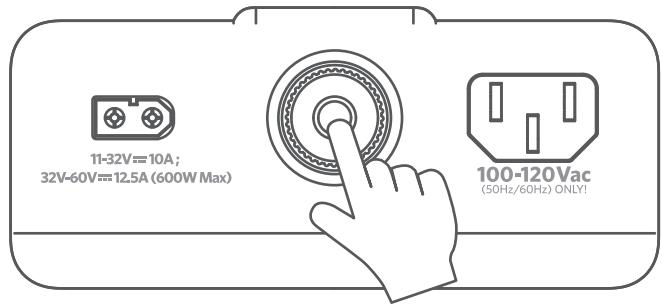
AC charging failure
If AC charging is unavailable, it's possible that the connected devices exceed 1800W. Try unplugging one or more of the connected devices to see if this resolves the issue.
Resetting your Power Station
If your Power Station isn't working correctly, press the reset button (located on the front of the product) for 1 second for a factory reset. If the Power Station still doesn't work, please visit support@anker.com
FAQ
Q1: Why does the Power Station's battery drain even when no devices are connected?
When the AC and Car Socket control button is turned on, even if no devices are being charged, there will still be a certain amount of no-load power consumption. To avoid this, make sure the AC and Car Socket charging button is off or turn on the power saving mode when you're not using the Power Station.
Q2: What's the max power output of the AC output ports?
The AC output ports can deliver a maximum of 1800W to connected devices.
Q3: Can I recharge the product while charging connected devices?
Yes.
Q4: Can this product power a CPAP machine?
Yes, but make sure to turn off the power saving mode first.
Q5: What kind of solar charger can charge this product?
Any 11-60V solar charger with an XT-60 female connector.
Specifications
| Cell Capacity | 1229 Wh |
| AC Input Voltage | 100-120V~ 12A Max, 50Hz/60Hz |
| AC Input Power (Charging) | 1000W Max |
| AC Input Power (Bypass Mode) | 1440W Max |
| Solar Panel Input | 11-32V---10A; 32V-60V---12.5A (600W Max) |
| Car Charger Output | 12V---10A Max |
| AC Output | 120V~ 15A, 60Hz, 1800W Max |
| USB-A Output | 5V---2.4A (2.4A Max Per Port) |
| USB-C Output (100W) | 5V---3A/9V---3A/15V---3A/20V---3A/20V---5A (100W Max) |
| USB-C Output (60W) | 5V---3A/9V---3A/15V---3A/20V---3A (60W Max) |
| UPS | <20ms |
| Discharging Temperature | -4°F-104°F / -20°C-40°C |
| Charging Temperature | 32°F-104°F / 0°C-40°C |
| Size | 46.3*28.8*23.7 cm/ 18.2*11.3*9.3 inches |
| Net Weight | 19.1 kg/ 42.1 lb |
Attention

Not permitted on aircraft.
IMPORTANT SAFETY INSTRUCTIONS
WARNING - When using this product, basic precautions should always be followed, including the following: Read all the instructions before using the product.
- To reduce the risk of injury, close supervision is necessary when the product is used near children.
- Do not put fingers or hands into the product.
- Do not expose the product to rain or snow.
- Use of a power supply or charger not recommended or sold by the product manufacturer may result in a risk of fire or injury to persons.
To reduce risk of damage to the electric plug and cord, pull the plug rather than the cord when disconnecting the product.
- Do not use the product in excess of its output rating. Overload outputs above rating may result in a risk of fire or injury to persons.
- Do not use the product that is damaged or modified. Damaged or modified batteries may exhibit unpredictable behavior resulting in fire, explosion or risk of injury.
Do not operate the product with a damaged cord or plug, or a damaged output cable.
- Do not disassemble the product. Take it to a qualified service person when service or repair is required. Incorrect reassembly may result in a risk of fire or electric shock.
- Do not expose to fire or high temperatures. Exposure to fire or temperatures above 130^ may cause explosion. To reduce the risk of electric shock, unplug the power pack form the outlet before attempting any instructed servicing.
- Have servicing performed by a qualified repair person using only identical replacement parts. This will ensure that the safety of the product is maintained.
- When charging a device, the product may feel warm, this is a normal operating condition and should not be cause for concern.
When charging the internal battery, work in a well ventilated area and do not restrict ventilation in any way.
- Do not clean the product with harmful chemicals or detergents.
- Misuse, dropping or excessive force may cause product damage.
- When disposing of secondary cells or batteries, keep cells or batteries of different electrochemical systems separate from each other.
CAUTION: Risk of explosion if the battery is replaced by an incorrect one.
- Disposal of a battery into fire or a hot oven, or mechanically crushing or cutting of a battery, can result in an explosion;
- Leaving a battery in an extremely high temperature environment can result in an explosion or leakage of flammable liquid or gas;
- A battery subjected to extremely low air pressure may cause an explosion or leakage of flammable liquid or gas;
- Unplug the AC power cable to disconnect from line voltage.
WARNING: GROUNDING INSTRUCTIONS
This product must be grounded. In the event of malfunction or breakdown, grounding provides a path of least resistance for electrical current to reduce the risk of electric shock. This product is equipped with a cord having an equipment grounding conductor and a grounding plug. The plug must be plugged into an outlet that is properly installed and grounded in accordance with all local codes and ordinances.
WARNING - Improper connection of the equipment grounding conductor may result in an electric shock. Check with a qualified electrician if you are in doubt as to whether the product is properly grounded. Do not modify the plug provided with the product – if it does not fit the outlet, have a proper outlet installed by a qualified electrician.
Storage and Maintenance instructions
-
Store the product between 32^ - 104^ (0^ - 40^) . Avoid exposing the product to rain or using the product in a humid environment.
-
To preserve the battery lifespan, charge to 100% after using. If you plan to store your power station, recharge to 100% every 3 months.
- Keep the product on a flat surface when using, charging, and storing.
FCC Statement
This device complies with Part 15 of the FCC Rules. Operation is subject to the following two conditions: (1) This device may not cause harmful interference, and (2) this device must accept any interference received, including interference that may cause undesired operation.
Warning: Changes or modifications not expressly approved by the party responsible for compliance could void the user's authority to operate the equipment.
Note: This equipment has been tested and found to comply with the limits for a Class B digital device, pursuant to Part 15 of the FCC Rules. These limits are designed to provide reasonable protection against harmful interference in a residential installation.
This equipment generates, uses, and can radiate radio frequency energy and, if not installed and used in accordance with the instructions, may cause harmful interference to radio communications. However, there is no guarantee that interference will not occur in a particular installation. If this equipment does cause harmful interference to radio or television reception, which can be determined by turning the equipment off and on, the user is encouraged to try to correct the interference by one or more of the following measures:
(1) Reorient or relocate the receiving antenna.
(2) Increase the separation between the equipment and receiver.
(3) Connect the equipment into an outlet on a circuit different from that to which the receiver is connected.
(4) Consult the dealer or an experienced radio / TV technician for help.
The following importer is the responsible party.
Company Name: Fantasia Trading LLC
Address: 5350 Ontario Mills Pkwy, Suite 100, Ontario, CA 91764
Telephone: +1-800-988-7973

Bluetooth
Bluetooth: The Bluetooth® word mark and logos are registered trademarks owned by Bluetooth SIG, Inc. and any use of such marks by Anker Innovations Limited is under license. Other trademarks and trade names are those of their respective owners.
IC Statement
This device contains licence-exempt transmitter(s)/receiver(s) that comply with Innovation,
Science and Economic Development Canada's licence-exempt RSS(s). Operation is subject to the following two conditions:
(1) This device may not cause interference.
(2) This device must accept any interference, including interference that may cause undesired operation of the device.
This digital apparatus complies with CAN ICES-003 (B)/NMB-003 (B)
RF Exposure Compliance Statement
This equipment complies with the FCC/IC radiation exposure limits set forth for an uncontrolled environment. This equipment should be installed and operated with a minimum distance of 20~cm between the radiator and your body.
Disclaimer
The Uninterruptible Power Supply (UPS) function is designed and manufactured for use in OA equipment such as PCs.
Do not use UPS in situations or with equipment that requires extremely high reliability or safety, such as the following:
Medical equipment that directly affects human life.
- Equipment that may result in personal injury (such as equipment directly related to the operation and control of aircraft, ships, railroads, elevators, etc., or equipment that may be subject to constant vibration, such as automotive and marine equipment).
The product is not for use in high-risk activities. The product is not designed or intended for use in hazardous environments requiring fail-safe performance, or for use in any circumstance in which the failure of the product could lead directly to death, personal injury, severe physical or property damage, or that would affect the operation or safety of any medical or life support device (collectively, "High-Risk Activities"). Anker expressly disclaims any express or implied warranty of fitness for High-Risk Activities. Anker does not authorize use of any product in any High-Risk Activities. Any such use is improper and is a misuse of the product.
Anker Portable Power Station Warranty Policy
All Anker portable power stations purchased on AnkerDirect and Anker authorized resellers come with a limited warranty ("warranty") as set out below. By using an Anker portable power station, you are agreeing to be bound by the terms of the Anker limited warranty.
We provide a 5-year limited warranty for purchases made on AnkerDirect and Anker authorized resellers. The warranty period starts from the date of purchase.
Anker's limited warranty is restricted to the country of purchase. The limited warranty is void on items taken outside the country they were originally bought in or shipped to directly from an authorized online purchase.
Exclusions and Limitations
Not covered under warranty:
- Products that are damaged or modified.
- Products operated with a damaged cord, plug, or output cable.
- Products that are disassembled.
- Products that are cleaned with harmful chemicals or detergents.
Non-quality related issues (after 30 days of purchase).
- Products purchased from unauthorized resellers.
- Products without sufficient proof of purchase.
- Products that have been refunded.
- Products with an expired warranty.
- Lost, stolen, or free products.
- Damage from outside sources.
- Repairs through 3rd parties.
- Damage from misuse of products (including, but not limited to falls, use of the product in excess of its output rating, exposure of the product to rain or snow, extremely low air pressure, extreme temperatures).
Purchases from illegitimate resources.
- Batteries that are damaged when not used for a long time or not properly maintained according to the user manual.
Anker is Not Liable For:
- Loss of data incurred from the use of Anker products.
- Returning personal items sent to Anker.
When returning items with a prepaid shipping label provided by Anker, Anker takes responsibility for any damage or loss incurred in transit. When returning items for non-quality issues, the buyer assumes responsibility for any damage or loss incurred in transit. Anker does not provide refunds for items damaged in transit due to nonquality related warranty claims.
Refund and Warranty Claims
We offer a 30-day money-back guarantee for any reason as well as warranty claims for quality-related issues. For more details please refer to www.anker.com/anker-portable-power-station-warranty-policy
For warranty claims, you can send an email to:
US/CA/UK/DE/JP market: support@anker.com
MEA market: support.mea@anker.com
CN market: CED-CN@anker.com
Or you can call us at:
US/CA: +1 (800)988 7973 UK: +44(0)1604 936 200
DE: +49(0)69 9579 7960 JP: +81 03 4455 7823
UAE: +971 8000 320 817 KSA: +966 8008 500 030
Kuwait: +965 2206 9086 Egypt: +20 8000 000 826
AU: +61 3 8331 4800 TR: +90(850)460 1414
RU: +8(800)511 8623 CN: +86 400 0550 036
KR: +82 0216 7070 98 IN: +91 1800 3138 831
Middle East & Africa: +971 4242 8633
Shipping Costs Must Be Covered by the Buyer in the Following Situations
Please refer to: https://us.anker.com/policies/refund-policy
This page is attached to the Anker warranty page, and Anker reserves the right of final interpretation of the content.
Register Your Anker PowerHouse Today
Why Register?
- Hassle-Free Warranty: Confirm the 5-year warranty for your Anker PowerHouse.
- Fast Customer Service: Enjoy exclusive customer service and get what you need quickly.
- Receive the Latest News: Get exclusive first looks at new products and instant updates on official events.
- Scan the QR code below to enter the smart self-service page for more information about your PowerHouse.
Customer Service

5-Year Limited Warranty
Please note that your rights under applicable law governing the sale of consumer goods remain unaffected by the warranties given in this Limited Warranty.

Lifetime Technical Support

support@anker.com
support.mea@anker.com (For Middle East and Africa Only)

(US / CA) + 1 (800)9887973
(UK) + 44 (0) 1604936200
(DE) + 49(0)6995797960
(Middle East & Africa) +971 42428633
(UAE) +971 8000320817
(KSA) +966 8008500030
(Kuwait) +965 22069086
(Egypt) +20 8000000826
(AU) + 61383314800
(TR) +90 0850 460 14 14
(RU) + 8 (800)511-86-23
(India) +91 18003138831
This device contains licence-exempt transmitter(s)/receiver(s) that comply with Innovation, Science and Economic Development Canada's licence-exempt RSS(s). Operation is subject to the following two conditions:
(1) This device may not cause interference.
(2) This device must accept any interference, including interference that may cause undesired operation of the device.
This digital apparatus complies with CAN ICES-003 (B)/NMB-003 (B)
RF Exposure Compliance Statement
The Uninterruptible Power Supply (UPS) function is designed and manufactured for use in OA equipment such as PCs.
Do not use UPS in situations or with equipment that requires extremely high reliability or safety, such as the following:
Medical equipment that directly affects human life.
- Equipment that may result in personal injury (such as equipment directly related to the operation and control of aircraft, ships, railroads, elevators, etc., or equipment that may be subject to constant vibration, such as automotive and marine equipment).
The product is not for use in high-risk activities. The product is not designed or intended for use in hazardous environments requiring fail-safe performance, or for use in any circumstance in which the failure of the product could lead directly to death, personal injury, severe physical or property damage, or that would affect the operation or safety of any medical or life support device (collectively, "High-Risk Activities"). Anker expressly disclaims any express or implied warranty of fitness for High-Risk Activities. Anker does not authorize use of any product in any High-Risk Activities. Any such use is improper and is a misuse of the product.
Avertissement
US/CA: +1 (800)988 7973 UK: +44(0)1604 936 200
DE: +49(0)69 9579 7960 JP: +81 03 4455 7823
UAE: +971 8000 320 817 KSA: +966 8008 500 030
Kuwait: +965 2206 9086 Egypt: +20 8000 000 826
AU: +61 3 8331 4800 TR: +90(850)460 1414
RU: +8(800)511 8623 CN: +86 400 0550 036
KR:+820216707098 IN:+9118003138831
Middle East & Africa: +971 4242 8633
support.mea@anker.com (For Middle East and Africa Only)

(US / CA) + 1 (800)9887973
(UK) + 44(0)1604936200
(DE) + 49(0)6995797960
(Middle East & Africa) +971 42428633
(UAE) +971 8000320817
(KSA) +966 8008500030
(Kuwait) +965 22069086
(Egypt) +20 8000000826
(AU) + 61383314800
(TR) +90 0850 460 14 14
(RU) + 8 (800)511-86-23
(India) +91 18003138831
(中国)+864000550036
(日本)0344557823
(韩国)+8202-1670-7098
- https://support.anker.com
- USER MANUAL
- What's in the Box
- Overview
- Recharging Your Power Station
- Powering Your Devices
- AC charging
- USB charging
- Car socket charging
- Uninterruptible Power Supply (UPS)
- Power Saving Mode
- The Anker App for Smart Control
- Light
- Ambient light
- SOS mode
- LCD Screen Guide
- Trouble Shooting
- AC recharging failure
- AC charging failure
- Resetting your Power Station
- FAQ
- Attention
- IMPORTANT SAFETY INSTRUCTIONS
- WARNING: GROUNDING INSTRUCTIONS
- Storage and Maintenance instructions
- FCC Statement
- Bluetooth
- IC Statement
- RF Exposure Compliance Statement
- Disclaimer
- Anker Portable Power Station Warranty Policy
- Exclusions and Limitations
- Anker is Not Liable For:
- Refund and Warranty Claims
- For warranty claims, you can send an email to:
- Or you can call us at:
- Shipping Costs Must Be Covered by the Buyer in the Following Situations
- Register Your Anker PowerHouse Today
- Customer Service
- Avertissement
Brand : Anker
Model : F1200
Category : Portable power station