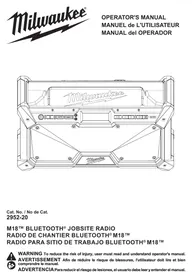
M18™ BLUETOOTH® JOBSITE RADIO - Radio MILWAUKEE - Free user manual and instructions
Find the device manual for free M18™ BLUETOOTH® JOBSITE RADIO MILWAUKEE in PDF.



| Brand | Milwaukee |
| Model | M18 Bluetooth Jobsiter Radio |
| Product type | Bluetooth jobsite radio |
| Power supply | Milwaukee M18 lithium-ion battery pack or included AC adapter |
| Battery compatibility | Milwaukee M18 |
| USB-C port | Yes, up to 3 A for charging external devices |
| Connectivity | Bluetooth, AM/FM, AUX input |
| Preset | 10 preset station slots |
| Equalizer | Manual bass and treble adjustment |
| Clock | Yes, with manual adjustment |
| Backup batteries | 2 AAA batteries required to keep settings when battery pack is removed |
| Low battery indicator | When battery pack charge is below 10% |
| Antenna | Built-in antenna for AM/FM |
| Cleaning | Damp cloth and mild soap; avoid solvents |
| Safety | Do not expose to rain or moisture; unplug before maintenance |
| Repairs | Refer to a Milwaukee authorized service center |
| Warranty (Canada) | 1 year from purchase date (unless exceptions apply) |
| Standards | Complies with FCC Part 15 and ISED Canada |
Frequently Asked Questions - M18™ BLUETOOTH® JOBSITE RADIO MILWAUKEE
User questions about M18™ BLUETOOTH® JOBSITE RADIO MILWAUKEE
0 question about this device. Answer the ones you know or ask your own.
Ask a new question about this device
Download the instructions for your Radio in PDF format for free! Find your manual M18™ BLUETOOTH® JOBSITE RADIO - MILWAUKEE and take your electronic device back in hand. On this page are published all the documents necessary for the use of your device. M18™ BLUETOOTH® JOBSITE RADIO by MILWAUKEE.
USER MANUAL M18™ BLUETOOTH® JOBSITE RADIO MILWAUKEE
IMPORTANT SAFETY INSTRUCTIONS
AWARNING READ, UNDERSTAND AND FOLLOW ALL INSTRUCTIONS. Failure
to heed all warnings listed below, may result in electric shock, fire and/or serious personal injury. KEEP THESE INSTRUCTIONS.
-Read these instructions.
- Keep these instructions.
-Heed all warnings.
Follow all instructions.
- Do not use this apparatus near water.
Clean only with dry cloth.
- Do not install near any heat sources such as radiators, heat registers, stoves, or other apparatus (including amplifiers that produce heat.)
-Only use attachments/accessories specified by the manufacturer.
- Use only with the cart, stand, tripod, bracket, or table specified by the manufacturer, or sold with the apparatus. When a cart is used, use caution when moving the cart/apparatus combination to avoid injury from tip-over.
- Unplug this apparatus during lightning storms or when unused for long periods of time.
Refer all servicing to qualified service personnel. Servicing is required when the apparatus has been damaged in any way, such as power-supply cord or plug is damaged, liquid has been spilled or objects have fallen into the apparatus, the apparatus has been exposed to rain or moisture, does not operate normally, or has been dropped.
- AWARNING To reduce the risk of fire or electric shock, do not expose this apparatus to rain or moisture.
- Only plug power supply into readily accessible outlet to allow the appliance to be unplugged quickly.
- A battery operated radio with integral batteries or a separate battery pack must be recharged only with the specified charger for the battery. A charger that may be suitable for one type of battery may create a risk of fire when used with another battery.
- Use battery operated radio only with specifically designated battery packs. Use of any other batteries may create a risk of fire.
- When battery pack is not in use, keep it away from other metal objects like: paper clips, coins, keys, nails, screws, or other small metal objects that can make a connection from one terminal to another. Shorting the battery terminals together may cause sparks, burns, or a fire.
- Store your battery pack in a cool, dry place. Do not store battery pack where temperatures may exceed 120^ (50^) such as direct sunlight, a vehicle or metal building during the summer.
- Avoid body contact with grounded surfaces such as pipes, radiators, ranges and refrigerators. There is an increased risk of electric shock if your body is grounded.
-Only use the provided adaptor plug.
- Never disassemble the radio or try to do any rewiring on the radio's electrical system.
- Do not expose this apparatus to dripping and splashing, or place objects filled with liquids on this unit.
SPECIFIC SAFETY RULES
- Always use common sense and be cautious when using tools. It is not possible to anticipate every situation that could result in a dangerous outcome. Do not use this tool if you do not understand these operating instructions or you feel the work is beyond your capability; contact Milwaukee Tool or a trained professional for additional information or training.
- Maintain labels and nameplates. These carry important information. If unreadable or missing, contact a MILWAUKEE service facility for a free replacement.
Federal Communications Commission Pursuant to part 15.21 of the FCC Rules, you are cautioned that changes or modifications not expressly approved by the party responsible for compliance could void your authority to operate the product.
This equipment has been tested and found to comply with the limits for a Class B digital device, pursuant to Part 15 of the FCC Rules. These limits are designed to provide reasonable protection against harmful interference in a residential installation. This equipment generates, uses and can radiate radio frequency energy and, if not installed and used in accordance with the instructions, may cause harmful interference to radio communications. However, there is no guarantee that interference will not occur in a particular installation. If this equipment does cause harmful interference to radio or television reception, which can be determined by turning the equipment off and on, the user is encouraged to try to correct the interference by one or more of the following measures:
- Reorient or relocate the receiving antenna.
- Increase the separation between the equipment and receiver.
- Connect the equipment into an outlet on a circuit different from that to which the receiver is connected.
Consult the dealer or an experienced radio/TV technician for help.
This device complies with part 15 of the FCC Rules and ISED-Canada's license exempt RSS standards. Operation is subject to the following two conditions: 1) This device may not cause harmful interference, and 2) This device must accept any interference received, including interference that may cause undesired operation.
To maintain compliance with FCC's RF Exposure guidelines, This equipment should be installed and operated with minimum distance between 20cm the radiator your body: Use only the supplied antenna.
EXTENSION CORDS
Grounded tools require a three wire extension cord. Double insulated tools can use either a two or three wire extension cord. As the distance from the supply outlet increases, you must use a heavier gauge extension cord. Using extension cords with inadequately sized wire causes a serious drop in voltage, resulting in loss of power and possible tool damage. Refer to the table shown to determine the required minimum wire size.
The smaller the gauge number of the wire, the greater the capacity of the cord. For example, a 14 gauge cord can carry a higher current than a 16 gauge cord. When using more than one extension cord to make up the total length, be sure each cord contains at least the minimum wire size required. If you are using one extension cord for more than one tool, add the nameplate amperes and use the sum to determine the required minimum wire size.
Guidelines for Using Extension Cords
- If you are using an extension cord outdoors, be sure it is marked with the suffix "W-A" ("W" in Canada) to indicate that it is acceptable for outdoor use.
- Be sure your extension cord is properly wired and in good electrical condition. Always replace a damaged extension cord or have it repaired by a qualified person before using it.
- Protect your extension cords from sharp objects, excessive heat and damp or wet areas.
| Recommended Minimum Wire Gauge For Extension Cords* | |||||
| Nameplate Amps | Extension Cord Length | ||||
| 25' | 50' | 75' | 100' | 150' | |
| 0 - 2.0 | 18 | 18 | 18 | 18 | 16 |
| 2.1 - 3.4 | 18 | 18 | 18 | 16 | 14 |
| 3.5 - 5.0 | 18 | 18 | 16 | 14 | 12 |
| 5.1 - 7.0 | 18 | 16 | 14 | 12 | 12 |
| 7.1 - 12.0 | 16 | 14 | 12 | 10 | -- |
| 12.1 - 16.0 | 14 | 12 | 10 | -- | -- |
| 16.1 - 20.0 | 12 | 10 | -- | -- | -- |
- Based on limiting the line voltage drop to five volts at 150% of the rated amperes.
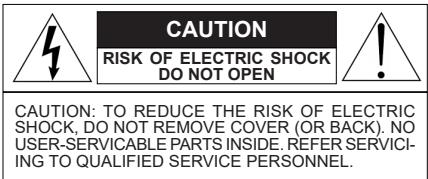

The lightning flash with arrowhead symbol, within an equi- lateral triangle, is intended to alert the user to the presence of uninsulated "dangerous voltage" within the product's enclosure that may be of sufficient magnitude to constitute a risk of electric shock to persons.

The exclamation point within an equilateral triangle is intended to alert the user to the presence of important operating and maintenance (servicing) instructions in the literature accompanying the appliance.
READ AND SAVE ALL INSTRUCTIONS FOR FUTURE USE.
FUNCTIONAL DESCRIPTION
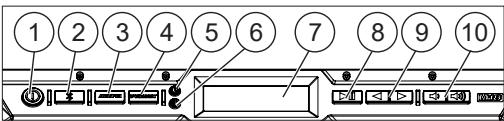
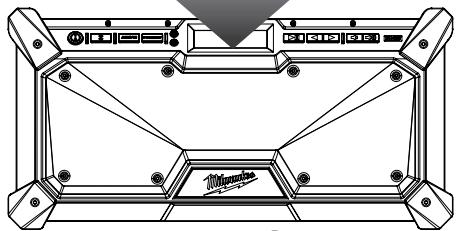
- Power button
- Bluetooth® button
- AM/EM button
- Preset button
- Clock button
- EQ button
- Display
- Play/Pause button
- Seek/adjust buttons
- Volume buttons
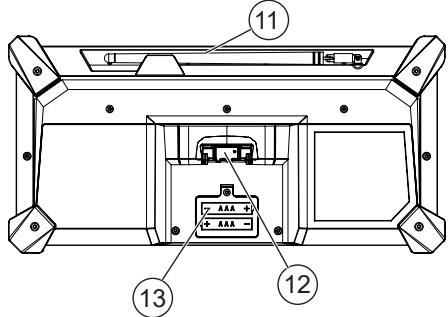
- Antenna
- Battery bay
13.Backup-battery compartment
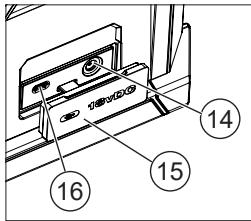
14.Power adapter port
15.Port cover - USB-C power outlet
SPECIFICATIONS
Cat. No. 2952-20
Battery Type. M18TM
Charger Type. M18TM
AC Input Volts 120 V
AC Input Amps. 1.2 A
DC Input Volts 18 V
DC Output Volts 18 V
DC Output Amps. 3A
Output Volts USB-C. 5 V
Output Amps USB-C 3A
FCC ID. 2AB9S-2952-20
Replacement adapter 42-04-0021
Recommended Ambient
Operating Temperature. 14^ to 104^
(-10^ to 40^)

Volts
Direct Current
Amps
Hertz

Read operator's manual
Presence of important operating instructions.


Risk of electric shock.
Federal Communications Commission
Approval Mark for Mexico

UL Listing for Canada and U.S.
ASSEMBLY
AWARNING Recharge only with the charger specified for the battery. For specific charging instructions, read the operator's manual supplied with your charger and battery.
Removing/Inserting the Battery
To remove the battery, push in the release buttons and pull the battery pack away from the tool.
Always remove the battery pack any time the tool is not in use.
To insert the battery, slide the pack into the body of the tool. Make sure it latches securely into place.
WARNING Only use accessories specifically recommended for this tool. Others may be hazardous.
Power
The MILWAUKEE jobsite radio can be powered by MILWAUKEE M18™ Li-Ion battery packs or provided adapter. When plugged into a wall outlet, the battery bay will not charge MILWAUKEE M18™ Li-Ion battery packs.
Low Battery Indicator
When the radio is powered by a battery pack and its charge falls below 10% , the low battery indicator is displayed.
USB-C Power Outlet
This outlet can be used to charge a USB device that uses less than 3A of DC electrical current. The USB-C outlet will supply power when the battery pack is inserted and the radio is ON, or anytime the radio is plugged into the wall adapter.
NOTE: Any device that uses more than 3 A of DC electrical current will trip a self-resetting function and disable the output.
Changing Back-up Batteries
AWARNING Batteries may leak chemicals or may explode if used incorrectly. The following care should be taken to prevent such an incident:
Make sure the positive (+) and negative (-) battery terminals are positioned correctly.
- Do not mix new and old batteries together, or mix different types of batteries.
- Do not try to recharge non-rechargeable batteries.
- If chemicals from the batteries come in contact with your skin, wash them off immediately with water. If chemicals leak onto the radio, clean the radio completely.
To hold station presets and clock time when the battery pack is removed, 2 AAA batteries are required.
- Remove battery pack and unplug radio.
- Remove the screw and battery cover.
- Insert two (2) AAA batteries according to matching positive (+) and negative (-) marks.
- Replace the battery cover and screw.
OPERATION
AWARNING To reduce the risk of fire or electric shock, do not expose this radio to rain or moisture.
① Turning On/Off and Controlling Volume Plug the cord into an appropriate AC outlet or install a battery pack.
Press the power button ① to turn the radio on and off. The radio station (frequency) is displayed. To display the time, press the CLOCK button. Volume is restored to the last setting.
NOTE: When the radio is running on battery power, the display will dim after 5 minutes to reduce power use.
Press the volume buttons to increase or decrease the volume.
Setting the Clock
- Press and hold the CLOCK button until the hour begins to flash.
- Use the buttons to change the hour.
- Press the CLOCK button again. Use the to change the minutes.
- Press the CLOCK button again to save.
EQ Adjustment
To manually adjust the Bass/Treble sound, press the EQ button. Set the bass sound by using the buttons. Press the EQ button again to set the treble sound by using the buttons.
Selecting Band
Push the AM/FM button to select AM or FM.
Tuning (Seeking and Scanning)
Press and hold the buttons to SEEK through the band. When a station is found, the SEEK will stop. Use the SCAN button to continue through the stations, pausing at each.
PRESET Stations
To set the PRESET stations:
- Tune to desired station.
- Press and hold the PRESET button until the PRESET indicator on the display begins to flash.
- Use the buttons to select the PRESET location for the station. Nine locations (1-9) are available.
- Press the PRESET button to save the location.
To tune to a PRESET station:
Press and release the PRESET button to step through the PRESET stations.
Using Bluetooth®
To enter the Bluetooth® mode, press the × button.
Pairing
• If no Bluetooth® device is connected, Bluetooth® pairing will begin automatically and the $ icon will flash on the display.
The radio will continue to search for a signal for 3 minutes.
- To manually pair a device, press and hold the Bluetooth® button until the begins to flash.
While the is flashing, select "M18 Jobsite Radio" on the Bluetooth® capable device.
- Once the device has successfully paired with the radio, a tone will play and the \ 1$ icon will be shown on the radio's display.
Connecting
To enter the Bluetooth® mode, press the 8 button. When the radio locates a paired Bluetooth® device, the \ 8$ will be shown on the radio’s display.
If connection is lost between the radio and the Bluetooth® device, the radio will try to reconnect automatically for up to 3 minutes.
Controlling
When streaming music through to the radio via a Bluetooth® device, use the button to start and pause the music. Use the buttons to move through the tracks.
MAINTENANCE
WARNING To reduce the risk of injury, always unplug the charger and remove the battery pack from the charger or tool before performing any maintenance. Never disassemble the battery pack, charger, or tool, except as provided in these instructions. Contact a MILWAUKEE service facility for all other repairs.
Maintaining Tool
Keep your tool, battery pack and charger in good repair by adopting a regular maintenance program. Inspect your tool for issues such as undue noise, misalignment or binding of moving parts, breakage of parts, or any other condition that may affect the tool operation.
If the tool does not start or operate at full power with a fully charged battery pack, clean the contacts on the battery pack. If the tool still does not work properly, return the tool, charger and battery pack, to a MILWAUKEE service facility for repairs.
AWARNING To reduce the risk of personal injury and damage, never immerse your tool, battery pack or charger in liquid or allow a liquid to flow inside them.
Cleaning
Clean dust and debris from any vents. Keep tool clean, dry and free of oil or grease. Use only mild soap and a damp cloth to clean, since certain cleaning agents and solvents are harmful to plastics and other insulated parts. Some of these include gasoline, turpentine, lacquer thinner, paint thinner, chlorinated cleaning solvents, ammonia and household detergents containing ammonia. Never use flammable or combustible solvents around tools.
Repairs
For repairs, return the tool, battery pack and charger to the nearest authorized service center.
ACCESSIONS
WARNING Use only recommended accessories. Others may be hazardous.
For a complete listing of accessories, go online to www.milwaukeetool.com or contact a distributor.
SERVICE - UNITED STATES
1-800-SAWDUST (1.800.729.3878)
Monday-Friday, 7:00 AM - 6:30 PM CST or visit www.milwaukeeetool.com
Contact Corporate After Sales Service Technical Support with technical, service/repair, or warranty questions.
Email: metproductsupport@milwaukeetool.com
Become a Heavy Duty Club Member at www.milwaukeetool.com to receive important notifications regarding your tool purchases.
This MILWAUKEE power tool* is warranted to the original purchaser from an authorized MILWAUKEE distributor only to be free from defects in material and workmanship. Subject to certain exceptions, MILWAUKEE will repair or replace any part on this power tool which, after examination, is determined by MILWAUKEE to be defective in material or workmanship for a period of one (1) year after the date of purchase unless otherwise noted. Return of the power tool to a MILWAUKEE factory Service Center location or MILWAUKEE Authorized Service Station, freight prepaid and insured, is required. A copy of the proof of purchase should be included with the return product. This warranty does not apply to damage that MILWAUKEE determines to be from repairs made or attempted by anyone other than MILWAUKEE authorized personnel, misuse, alterations, abuse, normal wear and tear, lack of maintenance, or accidents.
Normal Wear: Many power tools need periodic parts replacement and service to achieve best performance. This warranty does not cover repair when normal use has exhausted the life of a part including, but not limited to, chucks, brushes, cords, saw shoes, blade clamps, o-rings, seals, bumpers, driver blades, pistons, strikers, lifters, and bumper cover washers.
*This warranty does not cover battery packs or all power tools. Refer to the separate and distinct warranties available for those products. The warranty period for the LED in the LED Work Light (49-24-0171) and the LED Upgrade Bulb (49-81-0090) is the lifetime of the product subject to the limitations above. If during normal use the LED or LED Upgrade Bulb fails, the part will be replaced free of charge.
Warranty Registration is not necessary to obtain the applicable warranty on a MILWAUKEE power tool product. The manufacturing date of the product will be used to determine the warranty period if no proof of purchase is provided at the time warranty service is requested. ACCEPTANCE OF THE EXCLUSIVE REPAIR AND REPLACEMENT REMEDIES DESCRIBED HEREIN IS A CONDITION OF THE CONTRACT FOR THE PURCHASE OF EVERY MILWAUKEE PRODUCT. IF YOU DO NOT AGREE TO THIS CONDITION, YOU SHOULD NOT PURCHASE THE PRODUCT. IN NO EVENT SHALL MILWAUKEE BE LIABLE FOR ANY INCIDENTAL, SPECIAL, CONSEQUENTIAL, OR PUNITIVE DAMAGES, OR FOR ANY COSTS, ATTORNEY FEES, EXPENSES, LOSSES OR DELAYS ALGRESSED TO BE AS A CONSEQUENCE OF ANY DAMAGE TO, FAILURE OF, OR DEFECT IN ANY PRODUCT INCLUDING, BUT NOT LIMITED TO, ANY CLAIMS FOR LOSS OF PROFITS. SOME STATES DO NOT ALLOW THE EXCLUSION OR LIMITATION OF INCIDENTAL OR CONSEQUENTIAL DAMAGES, SO THE ABOVE LIMITATION OR EXCLUSION MAY NOT APPLY TO YOU. THIS WARRANTY IS EXCLUSIVE AND IN LIUE OF ALL OTHER EXPRESS WARRANTY,TWRITTEN OR ORAL, TO THE EXTENT PERMITTED BY LAW, MILWAUKEE DISCLAIMS ANY IMPLIED WARRANTYES, INCLUDING WITHOUT LIMITATION ANY IMPLIED WARRANTY OF MERCHANTABILITY OR FITNESS FOR A PARTICULAR USE OR PURPOSE; TO THE EXTENT SUCH DISCLAIMER IS NOT PERMITTED BY LAW, SUCH IMPLIED WARRANTY ARE LIMITED TO THE DURATION OF THE APPLICABLE EXPRESS WARRANTY AS DESCRIBED ABOVE. SOME STATES DO NOT ALLOW LIMITATIONS ON HOW LONG AN IMPLIED WARRANTY LASTS, SO THE ABOVE LIMITATION MAY NOT APPLY TO YOU, THIS WARRANTY GIVES YOU SPECIFIC LEGAL RIGHTS, AND YOU MAY ALSO HAVE OTHER RIGHTS WHICH VARY FROM STATE TO STATE.
This warranty applies to product sold in the U.S.A. and Canada only. Please consult the 'Service Center Search' in the Parts & Service section of MILWAUKEE's website www.milwaukeetool.com or call 1.800. SAWDUST (1.800.729.3878) to locate your nearest service facility for warranty and non-warranty service on a MILWAUKEE power tool.
Federal Communications Commission

Milwaukee Tool (Canada) Ltd 1.877.948.2360
Monday-Friday, 7:00 AM - 4:30 PM CST www.milwaukeetool.ca
GARANTIE LIMITÉE - AUX ÉTATS-UNIS ET AU CANADA
Federal Communications Commission

Lunes a Viernes (9am a 6pm)
O contactanos en www.milwaukeetool.com.mx
GARANTÍA LIMITADA - E.U.A. Y CANADA
Note: la然是 the cable's already in a new location.
CENTRO DE SERVICIO Y ATENCIÑON
Llame al 55 4160-3547
IMPORTADO Y COMERCIALIZADO POR
TECHTRONIC INDUSTRIES, MEXICO, S.A. DE C.V.
Miguel de Cervantes Saavedra No.301 Piso 5, Torre Norte
13135 West Lisbon Road
Brookfield, WI 53005 USA
58140274d2
05/23
01605030101Q-02(A)
Printed in China
- IMPORTANT SAFETY INSTRUCTIONS
- AWARNING READ, UNDERSTAND AND FOLLOW ALL INSTRUCTIONS. Failure
- SPECIFIC SAFETY RULES
- EXTENSION CORDS
- Guidelines for Using Extension Cords
- READ AND SAVE ALL INSTRUCTIONS FOR FUTURE USE.
- FUNCTIONAL DESCRIPTION
- SPECIFICATIONS
- ASSEMBLY
- Removing/Inserting the Battery
- Power
- Low Battery Indicator
- USB-C Power Outlet
- Changing Back-up Batteries
- OPERATION
- Setting the Clock
- EQ Adjustment
- Selecting Band
- Tuning (Seeking and Scanning)
- PRESET Stations
- Pairing
- Connecting
- Controlling
- MAINTENANCE
- Maintaining Tool
- Cleaning
- Repairs
- ACCESSIONS
- SERVICE - UNITED STATES
- Milwaukee Tool (Canada) Ltd 1.877.948.2360
- GARANTIE LIMITÉE - AUX ÉTATS-UNIS ET AU CANADA
- GARANTÍA LIMITADA - E.U.A. Y CANADA
Brand : MILWAUKEE
Model : M18™ BLUETOOTH® JOBSITE RADIO
Category : Radio