 ManualGo.com
 S5.5WPK/MM/BZ - Lighting Commercial Electric - Free user manual and instructions
Find the device manual for free S5.5WPK/MM/BZ Commercial Electric in PDF.


Download the instructions for your Lighting in PDF format for free! Find your manual S5.5WPK/MM/BZ - Commercial Electric and take your electronic device back in hand. On this page are published all the documents necessary for the use of your device. S5.5WPK/MM/BZ by Commercial Electric.
USER MANUAL S5.5WPK/MM/BZ Commercial Electric
à à Questions, problems, missing parts? Before returning to the store, call Commercial Electric Customer Service 8 a.m. - 7 p.m., EST, Monday - Friday, 9 a.m. - 6 p.m., EST, Saturday 1-877-527-0313 HOMEDEPOT.CA THANK YOU We appreciate the trust and confidence you have placed in Commercial Electric through the purchase of this product. We strive to continually create quality products designed to enhance your home. Visit us online to see our full line of products available for your home improvement needs. Thank you for choosing Commercial Electric!
- Table of Contents Table of Contents Safety Information . FCC Statement Warranty Pre-Assembly Installation. & B © ND NN D Operation
- Care & Maintenance Troubleshooting , 5 Safety Information | Product Specifications: + 120/277 VAC, 50/60Hz, 40 Watts + Not for use with dimmers + Suitable for wet locations Dusk to Dawn Operation: The light will turn on at dusk and remain on through the night until dawn. The light will remain off throughout the day, until dusk. NOTE: A convenience cover (HH) is provided which can be used to block out light and bypass the sensor. This will keep the light continuous on and fixture can be controlled to turn on/off through the wall switch or a master photocell. p. 5
READ BEFORE INSTALLATION
Follow all safeguards stated in the manual, in addition to normal safety precautions in working with electrical devices. Always follow basic safety precautions to reduce the risk of fire, electric shock and personal injury.
WARNING: RISK OF SHOCK: House electric current can cause painful shock or
serious injury unless handed properly. For your safety, always remember to: A. Turn OFF the power supply at the fuse or circuit breaker box before you install the fixture. B. Ground the fixture to avoid potential electric shocks and to ensure reliable starting. C. Double check all connections to be sure they are tight and correct. D. Wear rubber sole shoes and work on a sturdy ladder. This fixture is designed for use in a circuit protected by a fuse or circuit breaker. Itis also designed to be installed in accordance with local electrical codes. If you are unsure about your wiring, consult a qualified electrician or local electrical inspector, and check your local electrical code.
WARNING: RISK OF CUTS: Some metal parts in the fixture may have sharp edges.
To prevent cuts and scrapes, wear gloves when handling the parts. Account for small parts and destroy packaging material, as these may be hazardous to children.
FCC STATEMENT This device complies with part 15 of the FCC Rules. Operation is subject t the following to conditions:
WARNING: These products may represent a possible shock or
fire hazard if impropery installed or attached in any way. Products should be installed in accordance with the owners manual, current electrical codes and/or the current National Electric Code (NEC). Properly ground electrical enclosure. Use only UL or IEC approved wire for input/output connections. CAUTION: To avoid risk of fire, explosion, or electrical shock, this product should be installed, inspected and maintained by a qualified electrician only, in accordance with all applicable electrical codes. Be certain electrical power is OFF before and during installation and maintenance. CAUTION: This product must be installed in accordance with the applicable installation code by a person familiar with the construction and operation of the product and the hazards involved. {1) This device may not cause harmful interference, and (2) this device must accept any interference received, including interference that may cause undesired operation. Note: This equipment has been tested and found to comply with the limits for a Class B digital device, pursuant to part 15 of the FCC Rules. These limits are designed to provide reasonable protection against harmful interference in a residential installation. This equipment generates, uses and can radiate radio frequency energy and, if not installed and used in accordance with the instructions, may cause harmful interference to radio Supplier’s Declaration of Conformity: 47 CFR $ 2.1077 Compliance Informa- communications. However, here is no guarantee that interference will not occur in a particular installation. l this equipment does cause harmfulinterference tion to radio or television reception, which can be determined by tuming the equipment off and on, the user is encouraged to try to correct the interference by one or more of the following measures: Reorient or relocate the receiving antenna. Increase the separation between the equipment and receiver. Connect the equipment into an outlt on a circuit different from that to which the receiver is connected. Consul the dealer or an experienced radio/TV technician for help. This device complies with FCC radiation exposure limits set forth for an uncontrolled environment. This device should be installed and operated with a minimum distance of 20cm between the radiator and your body.Any changes or modifications not expressly approved by the manufacturer could void the user's authority to operate the equipment. CAN ICES-005 (8). ISED STATEMENT This device complies with Industry Canada's licence-exempt RSSs. Operation is subject t the following to conditions: {1) This device may not cause interference and Responsible Party: Feit Electric Company 4901 Gregg Road, Pico Rivera, CA 90660, USA 562-463-2852 Unique Identifier:
2) This device must accept any interference, including interference that may cause undesired operation of he device.
Limited Warranty This product is warranted to be free from defects in workmanship and materials for up to 5 years from date of purchase. If it fails to do 0, please contact the Customer Service Team at 1-877-527-0313 or visit www.HomeDepot.ca.
HOMEDEPOT.CA Please contact 1-877-527-0313 for further assistance.
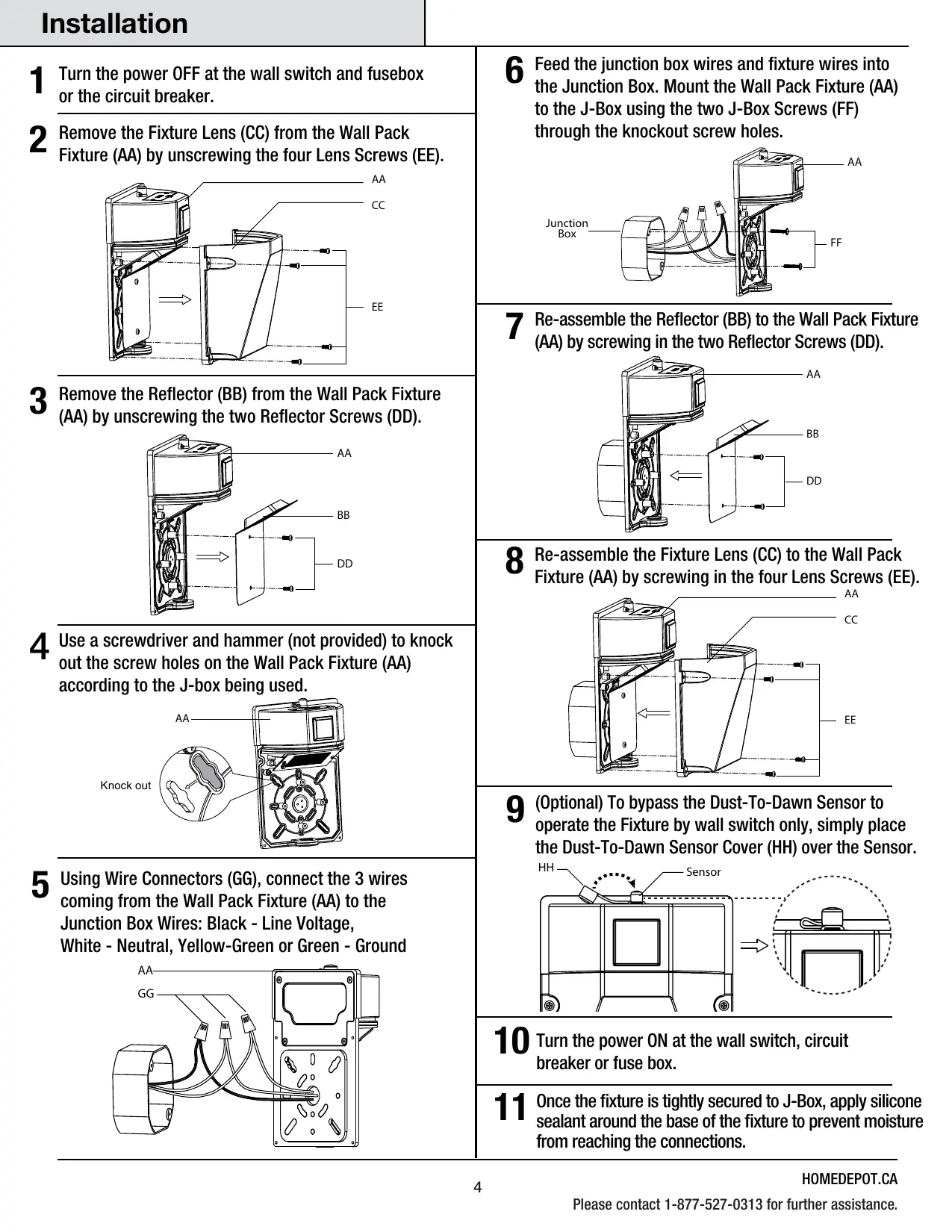
Installation | 1 Turn the power OFF at the wall switch and fusebox or the circuit breaker. 2 Remove the Fixture Lens (CC) from the Wall Pack Fixture (AA) by unscrewing the four Lens Screws (EE).
6 Feed the junction box wires and fixture wires into the Junction Box. Mount the Wall Pack Fixture (AA) to the J-Box using the two J-Box Screws (FF) through the knockout screw holes. Junction Box 3 Remove the Reflector (BB) from the Wall Pack Fixture (AA) by unscrewing the two Reflector Screws (DD).
7 Re-assemble the Reflector (BB) to the Wall Pack Fixture (AA) by screwing in the two Reflector Screws (DD). 4 Use a screwdriver and hammer (not provided) to knock out the screw holes on the Wall Pack Fixture (AA) according to the J-box being used. Knock out | U 8 Re-assemble the Fixture Lens (CC) to the Wall Pack Fixture (AA) by screwing in the four Lens Screws (EE).
b Using Wire Connectors (GG), connect the 3 wires coming from the Wall Pack Fixture (AA) to the Junction Box Wires: Black - Line Voltage, White - Neutral, Yellow-Green or Green - Ground 9 (Optional) To bypass the Dust-To-Dawn Sensor to operate the Fixture by wall switch only, simply place the Dust-To-Dawn Sensor Cover (HH) over the Sensor. TN tr Sensor Ë] @ 1 0 Turn the power ON at the wall switch, circuit breaker or fuse box. 1 1 Once the fixture is tightly secured to J-Box, apply silicone sealant around the base of the fixture to prevent moisture from reaching the connections. HOMEDEPOT.CA Please contact 1-877-527-0313 for further assistance.
Operation Lumen Switch Select the brightness: 1500, 3000 or 4000 lumens CCT Switch Select the color temperature: 3K (3000K) — Soft White 3.5K (3500K) — Neutral White 4K (4000K) — Bright White 5K (5000K) — Daylight 6.5K (6500K) — Daylight Deluxe D2D/MOT Switch D2D — Motion detection is disabled. Light will remain off during the day and automatically turn on at dusk. NOTE: À Dust-To-Dawn Sensor Cover is provided to block out light and bypass the sensor. This will keep the light on continuously and the fixture can be controlled through the wall switch or a master photocell. MOT -— Motion sensor is activated. Light will turn on for 10 minutes when motion is detected. During this time, brightness will be at 100% and will drop to 30% of the selected lumen if no motion is detected. ñ NOTE: There will be a warmup time for about 8 seconds when first powered up. Brightness will be at 100% and will then drop to 30% after the warmup time. Brightness will go to 100% once motion is detected. Care & Maintenance
3K- | le Æ° 2000 - Kk-= - MOT 6.5K - Lumen CCT
ñ NOTE: The 180-degree coverage of the motion sensor is measured side-to-side. The sensor will detect motion across the field of view (see below image). The motion sensor maximum detection range is up to 35 ft. F Motion Sensor
180° Periodically clean the fixture and diffuser using a mild, non-abrasive cleaner and soft cloth. When cleaning the fixture, make sure the power is turned off. Do not spray cleaner directly onto any part of the fixture or LEDs. Troubleshooting
PROBLEM POSSIBLE CAUSE CORRECTIVE ACTION
LED Wall Pack comes on 1. Dusk-to-Dawn sensor is in a shaded area and is 1. Shine a flashlight onto the light sensor. If the during the day. fooled into thinking it is nighttime. security light turns off then the fixture is mounted to i r ï in an area that does not allow enough light to
2. Dusk-to-Dawn sensor is possibly dirty. enter the sensor. Relocate LED Wall Pack.
2. Clean sensor with a damp soft cloth.
LED Wall Pack cycles ON 1. Dusk-to-Dawn sensor is sensing reflected light 1. Ensure no reflective materials are near to the and OFF continuously. from the LED Wall Pack. wall pack.
2. Relocate the LED Wall Pack to a different location
where it no longer causes reflected light. Light will not dim to 30%. 1. Switch is position in the D2D mode.
Commercial Electric” Questions, problems, missing parts? Before returning to the store, call Commercial Electric Customer Service 8 a.m. - 7 p.m., EST, Monday - Friday, 9 a.m. - 6 p.m., EST, Saturday 1-877-527-0313 HOMEDEPOT.CA Retain this manual for future use.