BTH18 - Headphones iclever - Free user manual and instructions
Find the device manual for free BTH18 iclever in PDF.



User questions about BTH18 iclever
0 question about this device. Answer the ones you know or ask your own.
Ask a new question about this device
Download the instructions for your Headphones in PDF format for free! Find your manual BTH18 - iclever and take your electronic device back in hand. On this page are published all the documents necessary for the use of your device. BTH18 by iclever.
USER MANUAL BTH18 iclever
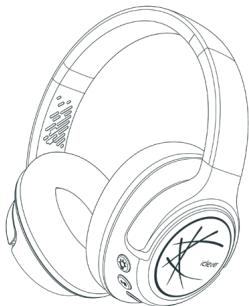
1 x iClever BTH18 Headphones
1 x User Manual
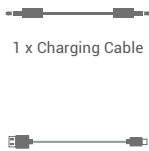
1 x 3.5mm Audio Cable
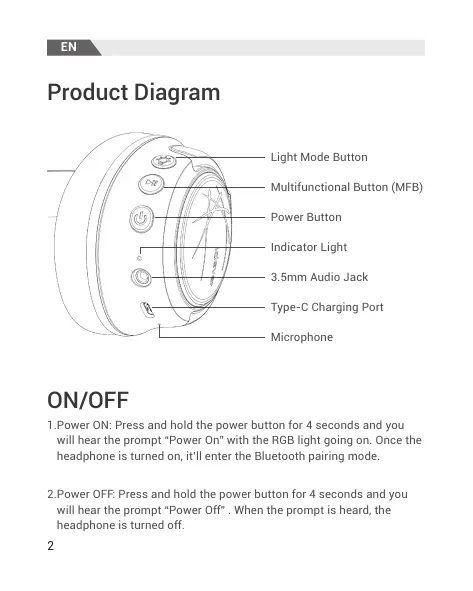
Product Diagram
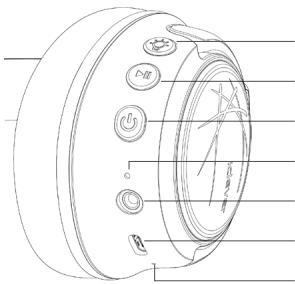
Light Mode Button
Multifunctional Button (MFB)
Power Button
Indicator Light
3.5mm Audio Jack
Type-C Charging Port
Microphone
ON/OFF
- Power ON: Press and hold the power button for 4 seconds and you will hear the prompt "Power On" with the RGB light going on. Once the headphone is turned on, it'll enter the Bluetooth pairing mode.
- Power OFF: Press and hold the power button for 4 seconds and you will hear the prompt "Power Off". When the prompt is heard, the headphone is turned off.
Bluetooth Pairing
- When the headphone is powered on, its RGB light will go on. When the headphone enters the pairing mode, its indicator light will flash in red and blue alternatively.
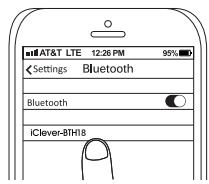
- Activate the Bluetooth function on your Bluetooth-enabled device. Select the "iClever BTH18" from the list of Bluetooth devices found by your device and connect.
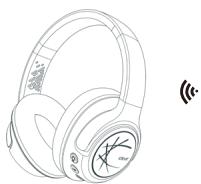
Light Mode Operation
There are 2 light modes available. When the headphone is powered on, the RBG light will go on in breathing pattern. Press the light mode button to switch to a solid single-color light. Press the light mode button again to turn off the light mode.
Volume Limit Gear Switching
- Press the MFB and light mode button simultaneously once and the volume limit switch to 74dB with the voice prompt "74dB".
- Press the MFB and light mode button simultaneously twice and the volume limit switch to 85dB with the voice prompt "85dB".
- Press the MFB and light mode button simultaneously 3 times and the volume limit switch to 94dB with the voice prompt "94dB".
Note:
The default volume limit is 85dB. Once the volume limit is set, it will keep until manually changed.
Audio Sharing
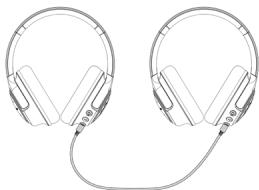
This headphone boasts an audio-sharing function. While the BTH18 is connecting a device through Bluetooth, use the included 3.5mm audio cable to connect another device and share the audio.
Operation of Buttons
| Next Track: | Press the MFB twice. |
| Previous Track: | Press the MFB 3 times. |
| Play/Pause: | Press the MFB. |
| Answer / End Calls: | Press the MFB. |
| Reject Calls: | Press and hold the MFB for 2s. |
| Activate / Deactivate SIRI: | Press and hold the MFB for 2s. |
| Clear the Paring List: | Press and hold the MFB and light mode button simultaneously for 4 seconds in the power-on state to clear the pairing list; then the headphone will clear the pairing list and enter pairing mode automatically with the indicator light flashing in red and blue alternatively. |
Voice Prompt
| Power ON | Power on |
| Power OFF | Power off |
| Entering Paring Mode | Ready to Pair |
| Pairing | Pairing |
| Successful Bluetooth Connection | Connected |
| Bluetooth Disconnection | Disconnected |
| Low Battery Alarm | Battery Low |
Specifications
| Frequency Range | 2.4GHz-2.482GHz |
| Max. Transmission Power | 4dBm |
| Type of Battery | Li-Polymer Battery |
| Battery Capacity | 3.7V 500mAh |
| Battery Voltage | DC 5V 1A |
How to Charge the Headphone
Connect the Type-C cable to the Type-C port on the headphone, and a 5V power outlet (a power adapter is not included). when charging, the headphone will turn off automatically and the RGB light goes off. The indicator light will glow red to indicate charging. When the headphones are fully charged, the indicator light will always glow in blue.
FCC Statement
Changes or modifications not expressly approved by the party responsible for compliance could void the user's authority to operate the equipment.
This equipment has been tested and found to comply with the limits for a Class B digital device, pursuant to Part 15 of the FCC Rules. These limits are designed to provide reasonable protection against harmful interference in a residential installation. This equipment generates uses and can radiate radio frequency energy and, if not installed and used in accordance with the instructions, may cause harmful interference to radio communications. However, there is no guarantee that interference will not occur in a particular installation. If this equipment does cause harmful interference to radio or television reception, which can be determined by turning the equipment off and on, the user is encouraged to try to correct the interference by one or more of the following measures:
-- Reorient or relocate the receiving antenna.
-- Increase the separation between the equipment and receiver.
-- Connect the equipment into an outlet on a circuit different from that to which the receiver is connected.
-- Consult the dealer or an experienced radio/TV technician for help
This device complies with part 15 of the FCC rules. Operation is subject to the following two conditions
(1) This device may not cause harmful interference.
(2) This device must accept any interference received, including interference that may cause undesired operation.
IC Caution
This device complies with Industry Canada licence-exempt RSS standard(s).
Operation is subject to the following two conditions: (1) This device may not cause interference, and (2) This device must accept any interference, including interference that may cause undesired operation of the device.
Canada applicable aux appeareils radio exempts de licence.
Hereby, Thousandshores Deutschland GmbH declares that the radio equipment type Wireless Headphones iClever BTH18 is in compliance with Directive 2014/53/EU.
The full text of the EU declaration conformity is available at the following internet address: http://files.iclever.com/BTH18-DOC-EN.pdf
DE
Learn more about the UK Declaration of Conformity, Please click below link to download. http://files.iclever.com/BTH18-DOC-UK.pdf