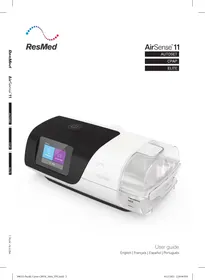
AirSense 11 Elite - CPAP ResMed - Free user manual and instructions
Find the device manual for free AirSense 11 Elite ResMed in PDF.



| Product Type | CPAP device (continuous positive airway pressure) for the treatment of obstructive sleep apnea syndrome (OSAS) |
| Brand and Model | ResMed AirSense 11 Elite |
| Dimensions (with HumidAir11 water chamber) | 94.5 mm x 259.4 mm x 138.5 mm (H x W x D) |
| Weight (with water chamber) | 1130 g (40 oz) |
| Power Supply | 65 W power supply: input 100-240 V, 50-60 Hz, 2.0 A; output 24 V DC, 2.71 A |
| Pressure Range | 4 to 20 cm H2O (4 to 20 hPa) |
| Main Features | Fixed CPAP pressure, Expiratory Pressure Relief (EPR) 3 levels, SmartStart, SmartStop, Ramp (Off, 5-45 min or Auto), Touch screen, Climatic Control (Auto/Manual), Heated humidification (HumidAir11) |
| Connectivity | Bluetooth BLE (10 m), cellular module (4G), compatible with myAir app |
| Sound Level | 27 dBA (with SlimLine and water chamber) with uncertainty of 2 dBA |
| Water Chamber Capacity | 380 ml |
| Humidifier Runtime | > 8 hours ±0.5 hours (at 23°C) |
| Air Filter | Standard (polyester fibers, capture >75%) or hypoallergenic (>80%); replace every 6 months |
| Maintenance | Empty the water chamber daily; clean the circuit, water chamber, and outlet connector weekly; do not use harsh solutions |
| Operating Conditions | +5°C to +35°C, 10-95% RH non-condensing, altitude 0-3010 m |
| Storage and Transport | -25°C to +70°C, 5-95% RH non-condensing |
| Safety Classification | Class II (double insulation), Type BF, IP22 |
| Spare Parts and Accessories | Standard and cleanable water chambers, SlimLine and ClimateLineAir11 tubing, filters (standard/hypoallergenic), power supply unit, SD card, travel bag |
| Expected Lifespan | Device: 5 years; standard water chamber: 6 months; cleanable water chamber: 2.5 years; tubing: 6 months |
| Warranty | Limited warranty (see manual for details) |
Frequently Asked Questions - AirSense 11 Elite ResMed
User questions about AirSense 11 Elite ResMed
0 question about this device. Answer the ones you know or ask your own.
Ask a new question about this device
Download the instructions for your CPAP in PDF format for free! Find your manual AirSense 11 Elite - ResMed and take your electronic device back in hand. On this page are published all the documents necessary for the use of your device. AirSense 11 Elite by ResMed.
USER MANUAL AirSense 11 Elite ResMed
Indications for use 1
Contraindications 1
Adverse effects 1
Software functionality and device data 2
At a glance 3
About your device 4
Setting up your device 5
Navigating the touch screen 7
Additional features 8
Connecting your AirSense 11 device and smart device 9
Starting/Stopping therapy 10
About the heated tubing 11
Therapy data 12
Cleaning and caring for the device. 14
Disassembling 15
Cleaning 15
Checking 16
Replacing the air filter 16
Reassembling 17
Traveling 17
Traveling by plane 17
Troubleshooting 18
General warnings 20
Technical specifications 21
Symbols 25
Servicing 26
Limited warranty 26
Further information 27
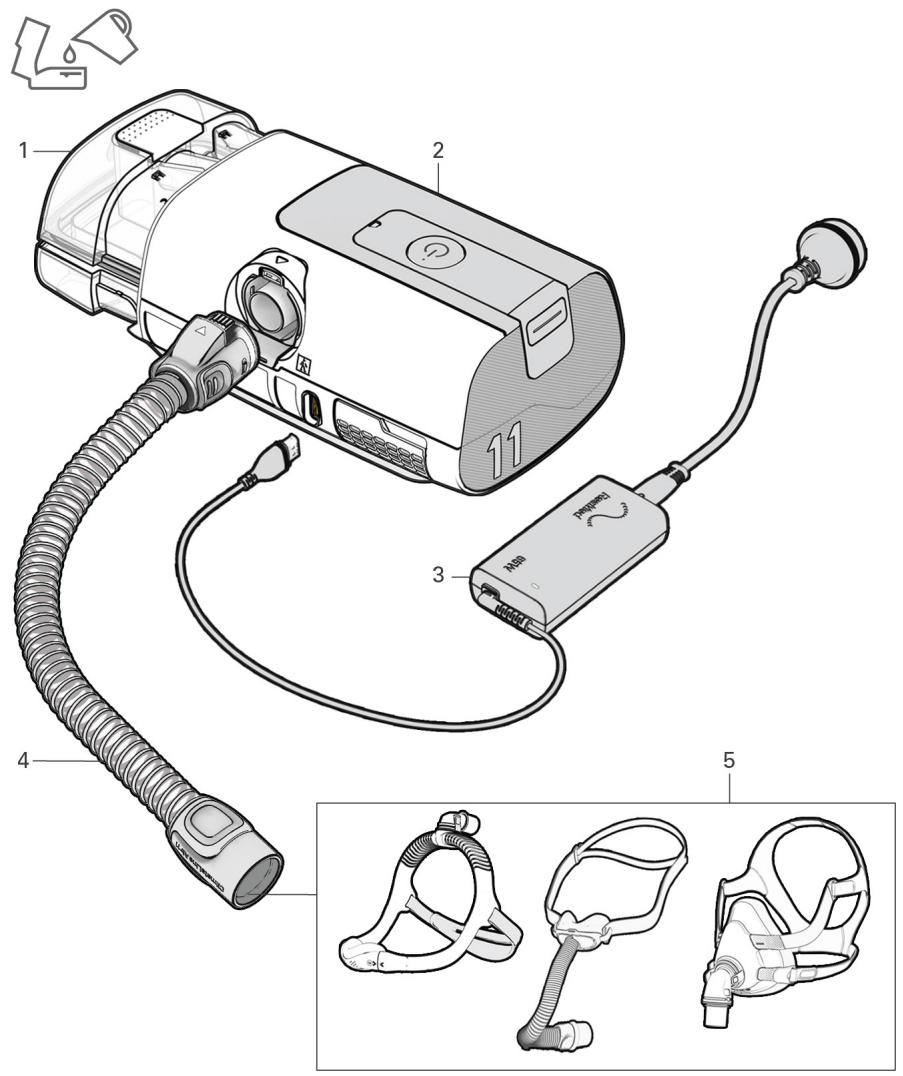
Quick setup view
Components
- HumidAir™ 11 tub
- AirSense™ 11 device
- Power supply unit
- ClimateLineAir™ 11 tubing
- Mask
Welcome
The AirSense 11 AutoSet™ (including AutoSet for Her) device is ResMed's premium auto-adjusting pressure device. The AirSense 11 Elite and the AirSense 11 CPAP are ResMed's Continuous Positive Airway Pressure (CPAP) devices.
WARNING
- Read this entire guide before using the device.
- This device is not suitable for ventilator-dependent patients.
CAUTION
In the US, Federal law restricts this device to sale by or on the order of a physician.
Indications for use
AirSense 11 AutoSet (including AutoSet for Her)
The AirSense 11 self-adjusting system is indicated for the treatment of obstructive sleep apnea (OSA) in patients weighing more than 66lb (30kg) , including female patients with mild to moderate OSA in AutoSet for Her mode. The AirSense 11 self-adjusting system is intended for home and hospital use.
AirSense 11 CPAP (including Elite)
The AirSense 11 CPAP system is indicated for the treatment of obstructive sleep apnea (OSA) in patients weighing more than 66 lb (30kg) . The AirSense 11 CPAP system is intended for home and hospital use.
Contraindications
Positive airway pressure therapy may be contraindicated in some patients with the following pre-existing conditions:
- severe bullous lung disease
- pneumothorax or pneumomediastinum
- pathologically low blood pressure, particularly if associated with intravascular volume depletion
- dehydration
- cerebrospinal fluid leak, recent cranial surgery, or trauma.
Adverse effects
You should report unusual chest pain, severe headache, or increased breathlessness to your prescribing physician. An acute upper respiratory tract infection may require temporary discontinuation of treatment.
The following side effects may arise during the course of therapy with the device:
- drying of the nose, mouth, or throat
- nosebleed
- bloating
- ear or sinus discomfort
- eye irritation
- skin rashes.
Software functionality and device data
This ResMed device is a smart device and includes software functionalities which allow it to be connected to the cloud so that users and their care providers can access data about therapy remotely, receive regular upgrades to the device and much more. Check out https://myair.resmed.com/ to learn about ResMed's patient coaching application, myAir™.
Software License
License Grant. Subject to the terms and conditions below, ResMed grants you, the owner and/or user of this device, a perpetual, non-exclusive, non-sublicensable, personal, limited license to use the ResMed Software solely in connection with the use of this device. All other rights are reserved by ResMed. You will be deemed to have transferred and assigned this license to any person that acquires the owner's or the user's rights in this device.
License Restrictions. Software included on or with this device is owned by or licensed to ResMed (the "ResMed Software"). Neither the ResMed Software nor any intellectual property rights in the ResMed Software are sold or assigned by ResMed. No person or entity is licensed or authorized to (a) reproduce, distribute, create derivative works, modify, display, perform, decompile or attempt to discover the source code for the ResMed Software, (b) remove or attempt to remove the ResMed Software from the ResMed product, or (c) reverse engineer or disassemble the ResMed product or the ResMed Software. For avoidance of doubt, the foregoing restrictions are not intended to limit any licensee's rights to software code incorporated into or distributed with the ResMed Software and licensed under the terms of any open source, free or community software license (collectively, "Open Source Software").
Over-the-Air Download of Software Updates. If the device is connected to the cloud, then the ResMed Software on the device will automatically and periodically download updates and upgrades to the ResMed Software on the device. Such downloads may be done by various means including, but not limited to, using Bluetooth® wireless technology, WiFi and/or cellular networks and combinations of various wireless technologies and services. Such updates to the ResMed Software might include, without limitation, bug fixes, error corrections, security patches, and new versions and releases of the ResMed Software that may include changes to existing features or functions and/or the addition of new features and functions.
Use of Device Data
When you use this device it gathers and records data about your use and, if your device connectivity is enabled, the device sends certain data to ResMed via the cloud to enable ResMed to deliver various benefits to you and your care provider(s). Additionally, some of that data may be used by ResMed (1) to comply with its legal obligations; these legal obligations include collection and analysis of device data for medical device post market surveillance and vigilance, and compliance with these legal obligations includes assessing if ResMed is required to implement actions to improve device safety, usability and performance, and (2) to perform health-related research, study and/or evaluation for specific scientific and medico-economic purposes. ResMed will only use your device data in compliance with applicable laws and regulations in your country or region (for example the GDPR (Regulation (EU) 2016/679 of the European Parliament and of the Council of 27 April 2016 on the protection of natural persons with regard to the processing of personal data and on the free movement of such data), the MDR (Regulation (EU) 2017/745 of the European Parliament and of the Council of 5 April 2017 on Medical Devices)) in the European Union, and, as applicable, HIPAA (the Health Insurance Portability and Accountability Act of 1996) in the USA). Depending on the data protection or privacy laws of your country or region your device data may constitute your personal data. If so, ResMed has the obligation to inform you about your rights and freedoms for our use of your personal data. You can find more details related to our use of your data, your rights to access, rectify, erase, restrict or object at https://www.resmed.com/myprivacy/.
At a glance
WARNING
Use only recommended ResMed masks and accessories or other vented masks as recommended by the prescribing doctor with this device. Using these components allows normal breathing and prevents potential asphyxiation.
The AirSense 11 system includes the following:
Device
- HumidAir 11 Standard tub
- HumidAir 11 Cleanable tub
ClimateLineAir 11 heated tubing or SlimLine™ tubing
Air 11^TM Power supply unit: 65W AC adaptor
- Travel bag
- SD card (not available in all devices).
Contact your care provider for a range of spares and accessories available for use with the device including:
Air tubing (ClimateLineAir 11 and SlimLine)
- HumidAir 11 Standard tub (Single patient re-use - cannot be reprocessed)
- HumidAir 11 Cleanable tub (Multi patient re-use - can be reprocessed)
- Side cover which allows use without the humidifier tub
Air11 Filter - standard
Air11 Filter - hypoallergenic
Air11 DC/DC converter
SD card
SD card cover
Notes:
- The AirSense 11 device is compatible with ResMed masks. For a complete list, see the Mask/Device compatibility list on ResMed.com/downloads/devices.
- The HumidAir 11 Standard tub and the HumidAir 11 Cleanable tub are the only water tubs used with the AirSense 11 device.
- The ClimateLineAir 11 is the only heated tubing that is compatible with the AirSense 11 device.
Humidifier tubs
HumidAir 11 Standard tub
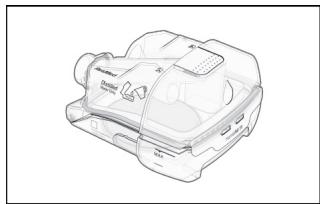
- single-patient use only
- cannot be reprocessed
- has a white thumb grip
fill with distilled water only
HumidAir 11 Cleanable tub
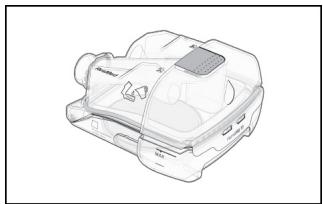
- multi-patient use
can be reprocessed
has a grey thumb grip - fill with drinking quality water (potable)
About your device
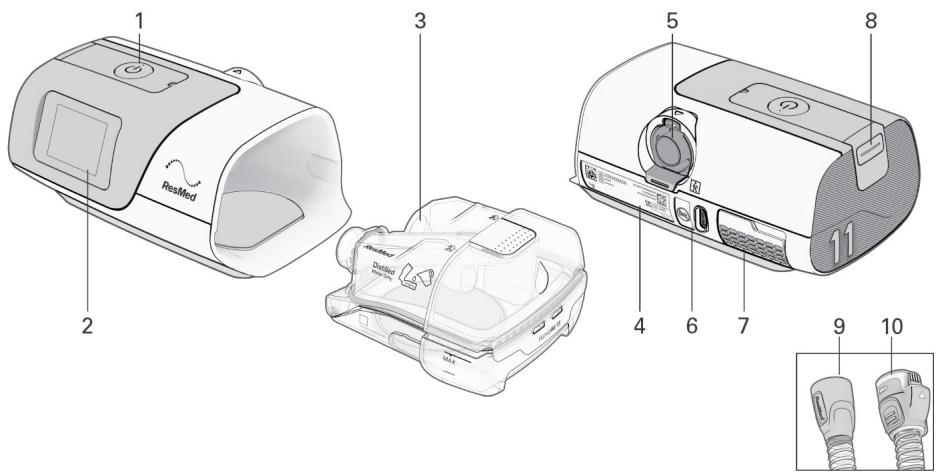
| Description | Purpose | |
| 1 | Start Therapy/ Standby button | Press to start/stop therapy. The LED indicator is green during standby mode, and white during therapy, Test Drive, and Mask Fit functions. |
| 2 | Display touch screen | Navigates between functions and displays information on the operating status of the device. |
| 3 | HumidAir 11 tub | Water tub that provides heated humidification. |
| 4 | Device label | Contains information relevant to the device. |
| 5 | Outlet connector | Connects the air tubing |
| 6 | Power inlet | Connects the power cord |
| 7 | Air inlet filter cover | Contains the air filter |
| 8 | SD card cover | Removable cover that protects the SD card slot. The LED indicator is blue when data is written to the SD card. |
| 9 | SlimLine tubing | Non-heated air tubing |
| 10 | ClimateLineAir 11 tubing | Heated air tubing |
Notes:
- If the Start therapy/ Standby button has a flashing white light, a system error has occurred. Refer to the Troubleshooting section for more information.
- Use this device only as directed by your physician or healthcare provider.
Setting up your device
WARNING
Do not use any additives in the humidifier tub (eg, scented oils or perfumes). These may reduce humidification output and/or cause deterioration of the tub materials.
CAUTION
Use only ResMed parts (eg, air inlet filter, power supplies), masks and accessories with the machine. Non ResMed parts may reduce the effectiveness of the treatment, may result in excess carbon dioxide rebreathing and/or damage the machine. For compatibility information, refer to ResMed.com for more information.
When using the humidifier tub:
- Always place the device on a level surface, lower than your head, to prevent the mask and air tubing from filling with water.
- Do not overfill the humidifier tub as water may enter the device and air tubing.
- Do not fill the humidifier tub with hot water as this could lead to excessive air temperature at the mask. Ensure the water is cooled to room temperature before filling the humidifier tub.
- Do not place the device on its side while the humidifier is attached as water might get into the device and reduce motor life.
When setting up the AirSense 11 system:
- Do not place the power supply where it can be bumped, stepped on, or where someone is likely to trip over the power cord.
- Do not block the air tubing and/or air inlet of the device while in operation as this could lead to overheating of the device.
- Keep the area around the device dry, clean and clear of anything (eg, clothes or bedding) that could block the air inlet or cover the power supply unit.
- Ensure the system is correctly set up. Incorrect system setup may result in incorrect mask pressure reading.
When using a mask:
- Use only vented masks recommended by ResMed or by the prescribing doctor with this device.
- Fitting the mask without the device blowing air can result in rebreathing of exhaled air.
- Make sure that the mask vent holes are kept clear and unblocked to maintain the flow of fresh air into the mask.
To set up the device:
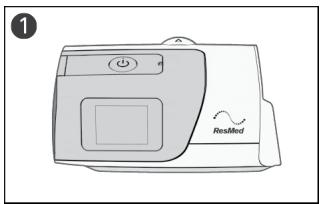
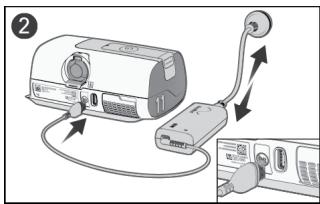
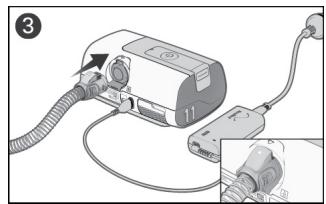
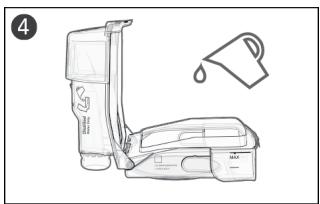
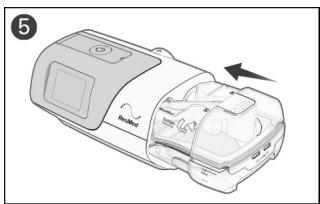
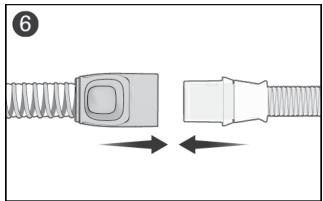
- Place the device on a stable level surface.
- Connect the power cord into the power inlet at the rear of the device. Connect one end of the power cord into the AC adaptor and the other end into the power outlet. Ensure the device is set up and connected to power to enable settings to be applied wirelessly to the device if required.
- Connect the air tubing firmly to the outlet connector at the rear of the device.
- Open the humidifier tub and fill it with water.
Note: The humidifier tub must be removed from the device before adding water.
If using the HumidAir 11 Standard water tub, use distilled water only
- If using the HumidAir 11 Cleanable water tub, use drinking quality water (potable).
Fill the water tub up to the maximum water level mark. The humidifier tub has a maximum capacity of 380~mL .
- Close the humidifier tub and insert it into the side of the device.
- Connect the free end of the air tubing firmly onto the assembled mask.
See the mask user guide for detailed information.
Recommended masks for use with this device are listed on ResMed.com.
Notes:
- Do not insert any USB cable into the AirSense 11 device or attempt to plug the AC adaptor into a USB device. This may cause damage to the AirSense 11 device or USB device.
- The electrical connector end of the heated air tubing is only compatible with the air outlet at the device end and should not be fitted to the mask.
- Do not use electrically conductive or anti-static air tubing.
Navigating the touch screen
The AirSense 11 device operates via a display touch screen, which allows you to access, view and change therapy and device settings. You can also track your sleep health progress.
The status bar at the top of the screen may display icons at different times and may include:
| Icon | Description | Purpose |
| Home Screen | Return to the Home screen at any time. | |
| Humidifier fault | Detects fault in the humidifier. Therapy will run without heating. | |
| Humidifier warming | Water in the humidifier tub is pre-heating. | |
| Humidifier cooling | Water in the humidifier tub is cooling. | |
| Bluetooth connected | Device is successfully connected via Bluetooth wireless technology. | |
| Cellular signal strength | Indicates the strength of cellular connectivity. | |
| No cellular connection | Cellular coverage is not available. | |
| Airplane mode | Device is in airplane mode. | |
Initial Setup
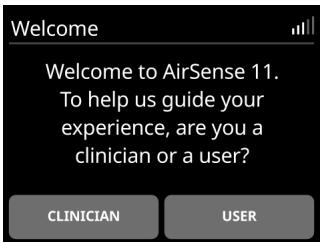
From the Welcome screen, tap USER and follow the prompts.
-
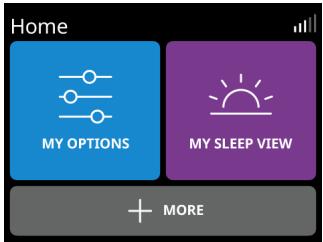
From the Home screen, you can access the following menus:
-
MY OPTIONS: View and adjust therapy settings (eg, Adjust Ramp time)
- MY SLEEP VIEW: Track sleep health (check the number of hours used last night or mask status)
- MORE: Access additional features such as Run Mask Fit or switch to Airplane mode.
Using the touch screen:
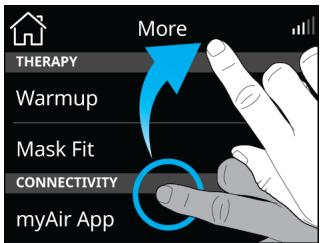
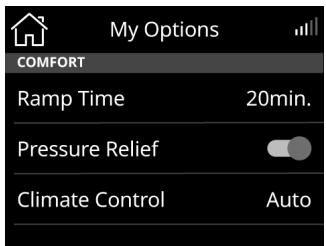
There are two actions to navigate through the touch screen:
Swipe: Swipe up or down the screen to view menu options.
Tap: Select a parameter setting to update. For other parameters (eg Pressure Relief, Airplane mode), tap
the parameter to turn it on or tap to turn it off

Prescription settings
If you have received the device direct to your home, prescription settings may not have been applied to your device. Ensure a wireless connection has been established to enable your care provider to install the prescribed settings.
Personalizing your settings
The device can be set up for your needs by your care provider, but you may want to make adjustments to make your therapy more comfortable.
- Tap MY OPTIONS from the Home screen.
- Tap the parameter you wish to change.
- Tap the preferred setting.
Tap OK to confirm the change or CANCEL to go back to the previous screen.
Additional features
There are some other features on your device which you can personalize.
Note: Not all functions are available in all regions. Functions vary based on therapy mode.
| Menu | Function | Description |
| MY OPTIONS | Ramp Time | Period during which the pressure increases from a low start pressure to the prescribed treatment pressure. Ramp Time can be set to Off, 5 to 45 minutes (in 5-minute increments), or Auto. |
| Pressure Relief* | When EPR (Expiratory Pressure Relief) is enabled, you may find it easier to breathe out. This setting can help you get used to therapy. | |
| SmartStartTM* | When SmartStart is enabled, therapy starts automatically when you breathe into your mask. | |
| SmartStop* | When SmartStop is enabled, therapy stops automatically after a few seconds when you remove your mask. | |
| MORE | Mask Fit | This function helps you assess and identify possible air leaks around your mask. |
*Features enabled by your care provider.
Connecting your AirSense 11 device and smart device
myAir is a smartphone app that guides you through the setup process. This includes device setup videos, mask fitting videos, trying therapy using the Test Drive feature, and tracking your sleep health progress. The app is not required to operate the AirSense 11 device.
Before pairing the AirSense 11 device to a smartphone, ensure the app's latest version is installed on the smartphone. If not, download the app from the App Store® or on Google Play®. Pair the AirSense 11 device to your phone. To set up the app, go to the MORE menu.
- Ensure your AirSense 11 device is set up correctly and plugged into a power source.
- Launch the myAir app. Tap Continue.
- Follow the prompts on the myAir app to complete the Bluetooth connection. AirSense 11 is now connected to the app. The Bluetooth connection symbol appears on the status bar to confirm the connection between the AirSense 11 device and the smartphone.
- Tap Done.
Starting/Stopping therapy
WARNING
The machine is not intended to be operated by persons (including children) with reduced physical, sensory or mental capabilities without adequate supervision by a person responsible for the patient's safety.
To start therapy:
- Fit your mask
- Press the Start therapy/Standby button or breathe normally if SmartStart is enabled
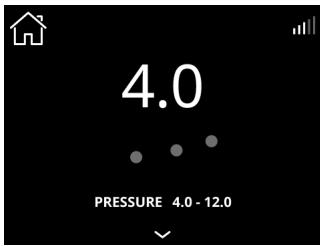
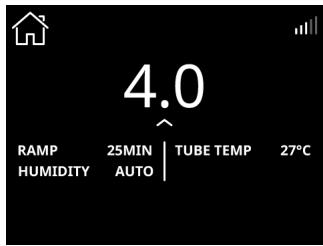
Therapy will begin and the treatment screen is displayed. A dynamic pulse wave will appear during therapy.
To review your sleep progress, click on to view more details
Notes:
- The screen will fade and then go black automatically after a short period of time. Tap the screen to turn it back on.
- If power is interrupted during therapy, the device will automatically restart therapy when power is restored.
- The device has a light sensor that adjusts the screen brightness based on the light in the room.
To stop therapy:
- Remove your mask.
- Press the Start therapy/Standby button or wait until the device stops if SmartStop is enabled.
About the heated tubing
The ClimateLineAir 11 is a heated breathing tube that delivers air to a compatible mask. When used with the device humidifier tub, ClimateLineAir 11 heated air tubing allows you to use the Climate Control feature.
Note: Not all types of air tubing are available in all regions.
Climate Control
Climate Control is designed to make therapy more comfortable by enabling constant temperature and maintaining humidity.
This feature:
- delivers comfortable humidity level and temperature during therapy
- maintains the set temperature and relative humidity during sleep to prevent dryness in the nose and mouth
can be set to either Auto or Manual - is only available when both the ClimateLineAir 11 and HumidAir 11 tub are attached.
Climate Control - Auto setting
Auto is the recommended and default setting. It is designed to make therapy as easy as possible so there is no need to change the temperature or humidity settings.
- Sets the tube temperature to Auto (80^ / 27^) . If the air in the mask is too warm or too cold, you can adjust the tube temperature to anywhere from 60 to 86^ (16 to 30^ ) or turn it off completely
- Adjusts the humidifier output to maintain a constant, comfortable humidity level of 85% relative humidity
- Protects against rainout (water droplets in the heated air tubing and mask).
Climate Control - Manual setting
Manual is designed to offer more flexibility and control over settings and offers the following:
- Temperature and humidity can be adjusted to find the most comfortable setting
- Temperature and humidity level can be set independently
- Rainout protection is not guaranteed. If rainout does occur, first try increasing the tube temperature
- If the air temperature becomes too warm and rainout continues, try decreasing the humidity.
Note: If Climate Control is set to Manual, the Auto Tube Temperature setting is not available.
Humidity Level
The humidifier moistens the air and is designed to make therapy more comfortable.
If you are getting a dry nose or mouth, turn up the humidity
If you are getting any moisture in your mask, turn down the humidity.
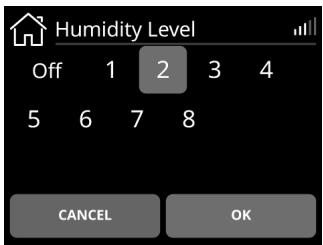
- You can set the Humidity Level to Off or between 1 and 8, where 1 is the lowest humidity setting, and 8 is the highest humidity setting.
To update the setting for Tube Temperature, Climate Control, or Humidity Level, tap MY OPTIONS from the Home screen, go down the list of options, and select the setting.
Note: Tube Temp Auto setting is only relevant when using the Climate Control Auto setting. If Climate Control is set to Manual, Auto set temperature is not a valid selection.
Tube Temperature
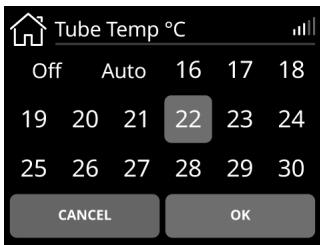
Climate Control
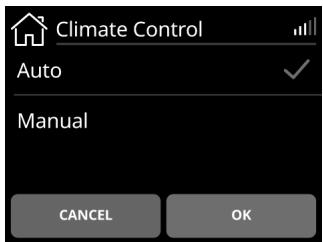
Humidity Level
- Tap Tube Temp.
- Tap the preferred setting.
-
Tap OK to save the change.
-
Tap Climate Control.
- Tap Manual.
-
Tap OK to save the change.
-
Tap Humidity Level.
- Tap the preferred setting.
- Tap OK to save the change.
Note: The temperature and humidity settings are not measured values.
Therapy data
The AirSense 11 device records your therapy data for viewing and adjusting by your care provider if required. The data is transferred to your care provider in the following methods:
Wireless
The device is equipped with cellular communication that allows your sleep therapy data to be wirelessly transmitted to your care provider. It also allows for prescribed settings to be applied or updated.
Transfer of data will occur after therapy has stopped. Leave your device connected to the power outlet at all times and make sure it is not in Airplane Mode. Data will only be transferred if a wireless connection is available.
Within the wireless network, the availability and quality of the network may be affected by terrain, buildings, and the weather. Wireless communication depends on network availability. Coverage is not available everywhere and varies by service.
Notes:
- Cellular feature may not work/ therapy data might not be transmitted if you use it outside of the country or region of purchase.
Devices with cellular communication might not be available in all regions.
SD card
Your sleep therapy data may be transferred to your care provider via SD Card (if provided). Your care provider may ask you to send the SD card by mail or to bring it in. Only remove the SD card when instructed by your care provider.
To use the SD card to record your sleep data, remove the SD card cover.
Do not remove the SD card from the device when the SD light is flashing, because data is being written to the card.
Note: The SD card should not be used for any other purpose as it may corrupt therapy data stored on the card.
To remove the SD card cover and insert SD card:
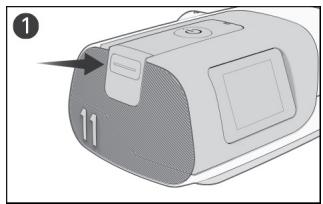
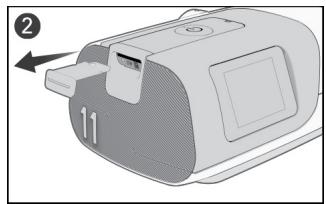
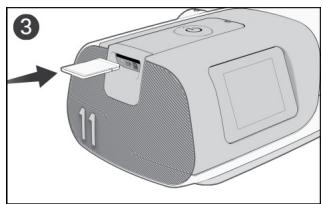
- Push the SD card cover.
- Remove the SD card cover and keep the SD card cover in a safe place.
- Insert the SD card.
- Push in the SD card until it clicks in place.
To remove the SD card:
- Push in the SD card to release it.
- Place the SD card in the protective folder and follow your care provider's instructions.
For more information on the SD card, refer to the SD card protective folder provided with your device.
Cleaning and caring for the device
WARNING
-
Beware of electrocution:
-
Do not immerse the device, AC Adaptor or power cord in water.
-
Do not connect to power while the device is wet. Make sure that all parts are dry before plugging it in.
If liquids are spilled into or onto the device, unplug the device and let the parts dry. -
Always unplug the device before cleaning and ensure that all parts are dry before plugging it back in.
-
Do not perform any maintenance tasks (eg, cleaning, changing the air filter) while the device is in operation.
- Clean the device and its components according to the schedules shown in this guide, to maintain the quality of the device and to prevent the growth of germs that can adversely affect your health.
- Regularly inspect power cords, cables, and power supply for damage or signs of wear. Discontinue use and replace if damaged.
- Do not open or modify the device. There are no user serviceable parts inside. Repairs and servicing should only be performed by an authorized ResMed service agent.
CAUTION
- Do not use bleach, chlorine, or aromatic-based solutions, moisturizing or antibacterial soaps or scented oils to clean the device, the humidifier tub or air tubing. These solutions may cause damage or affect the humidifier performance and reduce the life of the products. Exposure to smoke, including cigarette, cigar or pipe smoke, as well as ozone or other gases, may damage the device. Damage caused by any of the foregoing, will not be covered by ResMed's limited warranty.
- Leave the humidifier tub to cool for at least ten minutes after turning off the humidifier or until the cool down mode is complete before handling the humidifier tub.
- Only clean, maintain and/or reprocess the device and components according to the instructions shown in this guide.
The following sections will help you with:
Disassembling
- Cleaning
- Checking
Reassembling.
Disassembling
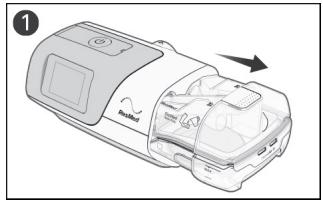
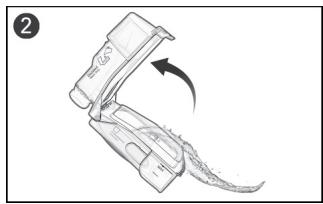
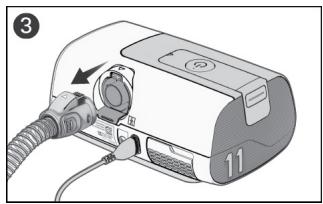
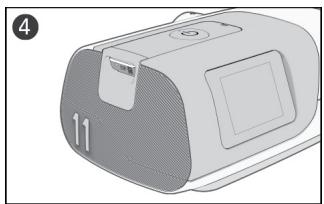
- Hold the humidifier tub at the top and bottom, press it gently and pull it away from the device.
Note: take care when handling the humidifier tub as the humidifier tub may be hot. Allow 10 minutes for the heater plate and any excess water to cool. - Open the humidifier tub and discard any remaining water.
- Pinch the cuff of the air tubing, and gently pull it away from the device.
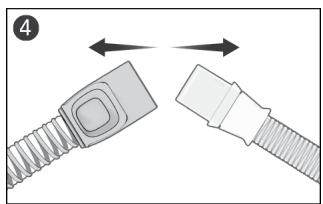
- Hold both the cuff of the air tubing and the swivel of the mask, then gently pull apart.
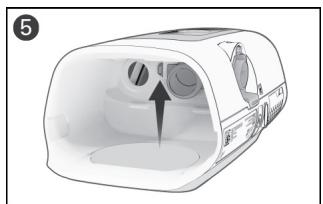
- Locate the outlet connector on the inside of the device and release it by pressing the clip firmly.
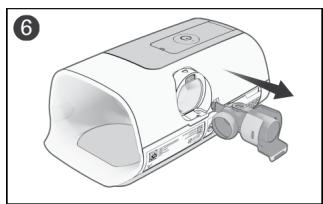
- Remove the outlet connector by pulling it out through the outlet connector socket at the rear of the device.
Cleaning
The following instructions are for home cleaning. Instructions for reprocessing devices intended for multipatient re-use can be found in the clinical guide.
You should clean the device, humidifier tub, air tubing, and outlet connector as described. For cleaning your mask, refer to the mask user guide for detailed instructions.
Daily:
- Empty the humidifier tub and wipe it thoroughly with a clean disposable cloth. Allow it to dry out of direct sunlight.
-
Refill the humidifier tub.
-
If using the HumidAir 11 Standard water tub, use distilled water only
- If using the HumidAir 11 Cleanable water tub, use drinking quality water (potable).
Weekly:
- Wash the components as described:
Air tubing - in warm water using a mild dishwashing liquid.
- Humidifier tub - in warm water using a mild dishwashing liquid OR in a solution with a ratio of 1 part vinegar and 9 parts water at room temperature.
- Outlet connector - in warm water using a mild dishwashing liquid OR in a solution with a ratio of 1 part vinegar and 9 parts water at room temperature.
- Components should not be washed in temperatures higher than 131^ ( 55^ ).
- Rinse each component thoroughly in water.
- Allow to dry out of direct sunlight or heat
- Wipe the exterior of the device with a dry cloth.
Notes:
- The humidifier tub and outlet connector may be washed in a dishwasher.
- Do not wash the air tubing in a dishwasher or washing machine.
- The air filter is not washable or reusable.
Checking
WARNING
- Discontinue use and contact your care provider or ResMed Service Center if any of the following occur:
device does not perform as usual
device is making unusual sounds
device is damaged
- If using a bacterial/viral filter, regularly check it for signs of moisture or other contaminants, particularly during nebulization or humidification. Failure to do so could result in increased breathing resistance or affect the delivery of the therapeutic pressure.
CAUTION
If any visible deterioration of a system component is apparent (cracking, discoloration, tears etc.), the component should be discarded and replaced.
Regularly check the humidifier tub, air tubing, and air filter for any damage.
-
Check the humidifier tub:
-
Replace it if it is leaking or has become cracked, cloudy, or pitted.
- Replace it if the seal is cracked or torn.
-
Remove any white powder deposits using a solution of one-part household vinegar to 9 parts water. Rinse with clean water.
-
Check the air tubing and replace it if there are any holes, tears, or cracks.
- Check the air filter and replace it every six months. Replace it more often if there are any holes or blockages by dirt or dust.
Replacing the air filter
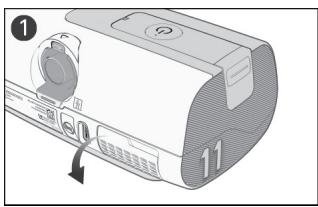
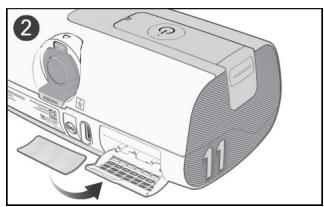
- Open the air filter cover and remove the old air filter.
- Place a new air filter onto the air filter cover and then close the cover. Make sure the air filter and air filter cover are fitted at all times to prevent water and dust from entering the device.
Note: The air filter is not washable or reusable.
Reassembling
When the components are dry, you can reassemble the parts.
To reassemble the AirSense 11 system:
- Hold the outlet connector with the seal pointing to the left and the clip pointing forward.
- Make sure the outlet connector is correctly aligned and insert the outlet connector into the socket.
- Check the outlet connector is inserted correctly.
- Connect the air tubing firmly to the air outlet located on the rear of the device.
-
Open the humidifier tub and fill it with water up to the maximum water level mark.
-
If using the HumidAir 11 Standard water tub, use distilled water only
-
If using the HumidAir 11 Cleanable water tub, use drinking quality water (potable)
-
Close the humidifier tub and insert it into the side of the device.
- Connect the free end of the air tubing firmly onto the assembled mask.
Traveling
You can take your device with you wherever you go. Just keep the following in mind:
- Use the travel bag provided to prevent damage to the device.
- Empty the humidifier tub and pack it separately in the travel bag.
- Make sure you have the appropriate power cord for the region you are traveling to. For information on purchasing, contact your care provider.
Traveling by plane
WARNING
- Do not use the device with water in the humidifier tub while in transit (eg, on a plane or vehicle) due to the risk of:
water spilling into the device
the inhalation of water during turbulence.
- Make sure that the humidifier tub is empty before transporting the device.
Your AirSense 11 device may be taken on board as carry-on luggage. Medical devices do not count toward your carry-on luggage limit.
You can use your AirSense 11 device on a plane as it meets the Federal Aviation Administration (FAA) requirements. Air travel compliance letters can be downloaded and printed from www.resmed.com.
When using the device on a plane:
- Make sure the humidifier tub is empty and inserted into your device. The device will not work without the humidifier tub or side cover inserted.
- Make sure the device is switched to airplane mode when required by airline staff.
To turn on Airplane mode:
- From the Home screen, tap MORE.
- Swipe through the menu to locate Airplane Mode.
- Tap Airplane Mode to switch it on.
Troubleshooting
If you have any problems, have a look at the following troubleshooting topics. If you are not able to fix the problem, contact your care provider or ResMed. Do not try to open the device.
General Issues
| Problem/possible cause | Solution |
| Air is leaking from around my mask | |
| Mask may be fitted incorrectly. | Make sure your mask is fitted correctly. See your mask user guide for fitting instructions, run the mask fit function or refer to the Mask Fit video in the myAir app. |
| I am getting a dry or blocked nose | |
| Humidity level may be set too low. | Increase the Humidity Level. |
| I am getting droplets of water on my nose, in the mask and air tubing | |
| Humidity level may be set too high. | Decrease the Humidity Level. |
| Tube temperature may be too low. | Increase the Tube Temperature. |
| My mouth is very dry and uncomfortable | |
| Air may be escaping through your mouth. | You may need a chin strap to keep your mouth closed or a full face mask. |
| My screen is black | |
| Power may not be connected. | Connect the AC adaptor and make sure the plug is fully inserted. |
| My humidifier tub/side cover is leaking | |
| Humidifier tub may not be assembled correctly. | Check for damage and reassemble the humidifier tub correctly. |
| Side cover may not be inserted correctly. | Check the side cover to ensure it has been inserted correctly. It should click in place. |
| Humidifier tub/side cover may be damaged or cracked. | Contact your care provider for a replacement. |
| My therapy data has not been sent to my care provider/prescription settings have not been applied to my device | |
| Wireless coverage may be poor/The no wireless connection icon is displayed on the top right of the screen. | Make sure that the device is placed where there is coverage (ie, on your bedside table, not in a drawer or on the floor). |
| The wireless signal strength icon indicates good coverage when all bars are displayed, and poor coverage when fewer bars are displayed. | |
| Device may be in Airplane Mode. | Turn off Airplane Mode. |
| Data transfer is not enabled for your device. | Talk to your care provider about your settings. |
| SmartStart is enabled, but the device does not automatically start when I breathe into the mask | |
| Breath is not deep enough to trigger SmartStart | To start therapy, take a deep breath in and out through the mask, before breathing normally. |
| Press the Start therapy/Standby button located on top of the device. | |
| There is excessive leak | Adjust the mask and headgear |
| Air tubing may not be connected properly. Connect firmly at both ends. | |
| SmartStop is enabled, but does not automatically stop when I remove the mask. | |
| Incompatible mask being used | Only use equipment recommended by ResMed.Contact ResMed or see ResMed.com for more information.If you are using a nasal pillows mask with set pressure less than 7 cm H2O (7 hPa), SmartStop may not work and should be disabled.If you are using a conduit mask, SmartStop may not work and should be disabled. |
Device Messages
| Problem/possible cause | Solution |
| System fault, refer to user guide, Error 4 | |
| Device may have been left in a hot environment. | Allow to cool before re-use. Disconnect the AC adaptor and then reconnect it to restart the device. |
| Air filter may be blocked. | Check the air filter and replace it if there are any blockages.Disconnect the AC adaptor and then reconnect it to restart the device. |
| There may be water in the air tubing. | Empty the water from the air tubing. Disconnect the AC adaptor and then reconnect it to start the device. |
| All other error messages, for example, System fault, refer to user guide Error X | |
| An unrecoverable error has occurred on the device. | Contact your care provider. Do not open the device. |
General warnings
WARNING
- Any change or modification to the product is not expressly approved by ResMed and could void the user's authority to operate the device.
- Supplemental oxygen must not be used while smoking or in the presence of an open flame.
-
When using the device with an oxygen supply, check the following:
-
Starting therapy - ensure the device is on and blowing air before the oxygen supply is turned on.
- Stopping therapy - ensure the oxygen supply is turned off first, then the device.
This will ensure oxygen does not accumulate within the device and create a risk of fire.
- The device has not been tested or certified for use in the vicinity of X-ray, CT or MRI equipment. Do not bring the device within 13 ft (4 m) of X-ray or CT equipment. Never bring the device into an MR (Magnetic Resonance) environment.
- The device should not be used adjacent to or stacked with other equipment. If adjacent or stacked use is necessary, the device should be observed to verify normal operation in the configuration in which it will be used.
- The use of accessories other than those specified for the device is not recommended. These may increase radio frequency energy or be influenced by the interference and result in improper operation.
- Portable RF communications equipment (including peripherals such as antenna cables and external antennas) should be used no closer than 3.9'' (10 cm) to any part of the device. Otherwise, degradation of the performance of this equipment could result.
For any serious incidents that occur in relation to this device, these should be reported to ResMed and the competent authority in your country.
Technical specifications
Operating pressure range 4 to 20cmH_2O (4 to 20hPa )
Maximum single fault steady state pressure Device will shut down in the presence of a single fault if the steady state pressure exceeds: 40~cm H_2O (40 hPa) for more than 1 second.
Pressure measurement tolerance ± 0.5cmH_2O (0.5 hPa) ± 4% of measured reading
Flow measurement tolerance ± 6L / min or 10% of reading, whichever is greater, at O to 150 L/min positive flow
Mode pressure ranges
CPAP: 4-20 cm H_2O (4-20 hPa) (measured at the mask)
CPAP with EPR mode: 4-20 cm H_2O (4-20 hPa) CPAP with EPR settings: EPR off, Level 1 = 1.0 cm H_2O (1 hPa), Level 2 = 2.0 cm H_2O (2 hPa), Level 3 = 3.0 cm H_2O (3 hPa).
AutoSet, AutoSet for Her mode: 4-20 cm H_2O (4-20 hPa)
AutoSet, AutoSet for Her mode with EPR: 4-20 cm H_2O (4-20 hPa) APAP with EPR settings: EPR off, Level 1 = 1.0 cm H_2O (1 hPa), Level 2 = 2.0 cm H_2O (2 hPa), Level 3 = 3.0 cm H_2O (3 hPa)..
EPR reduces the pressure during expiration by the amount dependent on the level set above, but the pressure delivered will not drop below 4.0 cm H_2O (4 hPa).
Flow (maximum) at set pressures The following are measured according to ISO 80601-2-70 201.12.1.103:
With HumidAir 11 tub
| Pressure cm H2O (hPa) | AirSense 11 and Standard air tubing L/min | AirSense 11 and SlimLine L/min | AirSense 11 and ClimateLineAir 11 L/min |
| 4 | 150 | 145 | 144 |
| 8 | 147 | 142 | 141 |
| 12 | 143 | 138 | 138 |
| 16 | 140 | 135 | 134 |
| 20 | 136 | 131 | 129 |
| With Side cover: | |||
| Pressure cm H2O (hPa) | AirSense 11 and Standard air tubing L/min | AirSense 11 and SlimLine L/min | AirSense 11 and ClimateLineAir 11 L/min |
| 4 | 156 | 153 | 151 |
| 8 | 152 | 147 | 147 |
| 12 | 149 | 145 | 144 |
| 16 | 144 | 141 | 139 |
| 20 | 140 | 136 | 135 |
| Note: Refer to the relevant measurement uncertainty from the Measurement system uncertainties table. | |||
Sound
Declared dual-number noise emission values in accordance with ISO 4871:1996
Sound pressure level measured according to ISO 80601-2-70:2015 (CPAP mode):
Device with SlimLine and HumidAir 11 tub (HumidAir 11 tub 1/2 filled)
Device with SlimLine and Side cover 25 dBA with uncertainty of 2 dBA
| Sound power level measured according to ISO 80601-2-70:2015 (CPAP mode): | |
| Device with SlimLine and HumidAir 11 tub (HumidAir 11 tub 1/2 filled) | 35 dBA with uncertainty of 2 dBA |
| Device with SlimLine and Side cover | 33 dBA with uncertainty of 2 dBA |
| Physical Dimensions | |
| Dimensions (H x W x D) with HumidAir 11 tub: | 3.72" x 10.21" x 5.45" |
| (94.5 mm x 259.4 mm x 138.5 mm) | |
| Dimensions (H x W x D) with side cover | 3.72" x 9.32" x 5.45" |
| (94.5 mm x 236.8 mm x 138.5 mm) | |
| Air outlet: | The 22 mm conical outlet connector complies with EN ISO 5356-1:2015 |
| Weight - device and HumidAir 11 tub: | 40 oz (1130 g) |
| Weight - device with side cover | 41 oz (1142 g) |
| Housing construction: | Flame retardant engineering thermoplastic |
| Hot plate - Material: | Stainless steel |
| Water capacity: | 380 mL |
| Time between each refill of the humidifier tub: | >8 hours ±0.5 hours (tested at 23 ±2°C / 73.4 ±3.6 °F) |
| Recommended water type to use in the humidifier tub (Standard tub): | Distilled water |
| Recommended water type to use in the humidifier tub (Cleanable tub) | Drinking quality water (potable) |
| Humidifier tub - Material: | Injection molded plastic, stainless steel and silicone seal |
| 65W power supply unit | |
| AC input range | 100-240V, 50-60Hz, 2.0A |
| 115V, 400Hz, 1.5A (for aircraft use) | |
| DC output | 24 V — — — 2.71A |
| Typical power consumption | 56.1W (111.5VA) |
| Peak power consumption | 73.2W (137.6VA) |
| Class of equipment | Class II |
| Environmental conditions | |
| Operating temperature | +41°F to +95°F (+5°C to +35°C) |
| Note: The airflow for breathing produced by this therapy device can be higher than the room temperature. Under extreme ambient temperature conditions (104°F/40°C) the device remains safe. | |
| Operating humidity | 10 to 95% relative humidity, non-condensing |
| Operating altitude | Sea level to 9,870' (3,010 m); air pressure range 1060 hPa to 700 hPa |
| Storage pressure/Storage altitude | 1060 to 700 hPa relative humidity, non-condensing |
| Storage and transport temperature | -13°F to +158°F (-25°C to +70°C) |
| Storage and transport humidity | 5 to 95% relative humidity, non-condensing |
| Air Filter | |
| Standard: | Material: Polyester non woven fiber |
| Average arrester: >75%, when tested to EN779. | |
| Hypoallergenic: | Material: Blended synthetic fibers in a polypropylene carrier |
| Efficiency: >80% (average) when tested to EN13274-7. | |
| Note: The use of a ResMed approved hypoallergenic filter will result in a small reduction in the accuracy of the delivered pressure at high leaks. | |
Electromagnetic compatibility
The AirSense 11 complies with all applicable electromagnetic compatibility requirements (EMC) according to IEC 60601-1-2:2020, for residential, commercial and light industry environments.
Portable and mobile RF communications equipment should be used no closer to any part of the machine, including cables, than the recommended 3.94" (10 cm) separation distance.
The AirSense 11 has been designed to meet EMC standards. However, should you suspect that the device performance (eg. pressure or flow) is affected by other equipment, move the device away from the possible cause of interference.
Information regarding the electromagnetic emissions and immunity of this ResMed device can be found in
ResMed.com/downloads/devices.
IEC 60601-1 (Edition 3.1) classification
Class II (double insulation), Type BF, Ingress protection IP22.
Supplemental oxygen maximum flow
15 L/min
Aircraft use
ResMed confirms that the machine meets the Federal Aviation Administration (FAA) requirements (RTCA/DO-160, section 21, category M; RTCA-DO-160, section 20, category T) for all phases of air travel.
Design life
Device, power supply unit: 5 years
Standard humidifier tub: 6 months
Cleanable humidifier tub 2.5 years
Air tubing: 6 months
General
The patient is an intended operator.
Pneumatic flow path
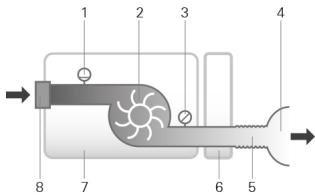
- Flow sensor
- Blower
- Pressure sensor
- Mask
- Air tubing
- Humidifier
- Device
- Inlet filter
Displayed values
Value Range Accuracy Display resolution
Pressure at mask:
Displayed mask pressure1 4-20 cm H2O (4-20 hPa) ±0.5 cm H2O (0.5 hPa) ±4% of 0.1 cm H2O (0.1 hPa)
Flow derived values:
Leak1 0-120 L/min ± 12 L/min or 20% of reading 1 L/min
whichever is greater, 0 to 60
L/min
1 Results may be inaccurate in the presence of leaks or supplemental oxygen
Pressure accuracy
Maximum static pressure variation at 10cmH_2O (10 hPa) according to ISO 80601-2-70:2015
Device with HumidAir 11 tub and air tubing: ±0.5 cm H2O (±0.5 hPa)
Device with Side cover and air tubing ±0.5 cm H2O (±0.5 hPa)
Note: Refer to the relevant measurement uncertainty from the Measurement system uncertainties table.
Maximum dynamic pressure variation according to ISO 80601-2-70:2015
AirSense 11 with HumidAir 11 tub and air tubing
| Breath rate | 10 BPM | 15 BPM | 20 BPM |
| Dynamic pressure variation (cm H2O [hPa]) | 0.5 | 0.5 | 0.8 |
| AirSense 11 with Side cover and air tubing | |||
| Breath rate | 10 BPM | 15 BPM | 20 BPM |
| Dynamic pressure variation (cm H2O [hPa]) | 0.5 | 0.5 | 0.8 |
| Measurement system uncertainties | |||
| In accordance with ISO 80601-2-70:2015 the measurement uncertainty of the manufacturer's test equipment is: | |||
| For measures of flow: | ±3.9 L/min | ||
| For measures of static pressure: | ±0.15 cm H2O (±0.15hPa) | ||
| For measures of dynamic pressure: | ±0.04 cm H2O (±0.04hPa) | ||
Note: ISO 80601-2-70:2015 stated accuracies and test results provided in this manual for these items already include the relevant measurement uncertainty from the table above.
In accordance with ISO 80601-2-74:2017 the measurement uncertainty of the manufacturer's test equipment is
For measures of humidification output ± 0.5mg / L BTPS
Bluetooth
Technology used: Bluetooth Low Energy (BLE)
Connection types: GATT
Frequency: 2400 to 2483.5 MHz
Max RF power output: +4 dBm
Operation range: 10 m (Class 2)
Cellular technology and regulatory compliance
Refer to the Cellular information guide in ResMed.com/downloads/devices
Humidifier
Maximum heater plate temperature: 154^ (68^)
Temperature cut-out (heater): 165^ (74^)
Maximum gas temperature (at mask): ≤ 106^ (41°C)
1 The air flow for breathing produced by this therapy device can be higher than the temperature of the room. Under extreme ambient temperature conditions (104°F/40°C) the device remains safe.
Humidifier performance
SlimLine/Standard tubing
| Mask Pressure cm H2O (hPa) | Nominal RH output % at 72°F (22°C) ambient temperature | Nominal system output mg/L AH1, BTPS2 | ||
| Setting 4 (default setting) | Setting 8 (maximum setting) | Setting 4 (default setting) | Setting 83 (maximum setting) | |
| 4 | 80% | 100% | ≥6 | >12 |
| 10 | 80% | 100% | ≥6 | >12 |
| 20 | 80% | 100% | ≥6 | >12 |
| Climate Control Auto - ClimateLineAir 11 | ||||
| Mask Pressure cm H2O (hPa) | Nominal RH output % at 72°F (22°C) ambient temperature | Nominal system output mg/L AH1, BTPS2 | ||
| 4 | 85% | ≥12 | ||
| 10 | 85% | ≥12 | ||
| 20 | 85% | ≥12 | ||
1 AH - Absolute Humidity in mg/L
2 BTPS - Body Temperature Pressure Saturated
3 Humidifier performance meets ISO 80601-2-74:2017 performance >12mg / L BTPS tested at 59^ to 95^ (15^ to 35^)
Air tubing
| ClimateLineAir 11 | SlimLine/ Standard | |
| ClimateLineAir 11 temperature range | 60 to 86°F (16 to 30°C) | - |
| ClimateLineAir 11 temperature cut out | ≤106°F (≤41°C) | - |
| Maximum recommended pressure | 30 cm H2O (30 hPa) | 30 cm H2O (30 hPa) |
| Maximum working temperature, when used with a humidifier | - | ≤106°F (≤41°C) |
| Material | Flexible plastic and electrical components | Flexible plastic |
| Inner diameter | 0.6" (15 mm) | SlimLine: 0.6" (15 mm)Standard: 0.74" (19 mm) |
| Length | 6'6" (2.0 m) | SlimLine: 6' (1.8 m)Standard: 6'6" (2.0 m) |
Note: The manufacturer reserves the right to change these specifications without notice.
Air tubing resistance to flow and compliance information
Refer to the Air tubing compliance guide in ResMed.com.
Symbols
Follow instructions before use. Indicates a warning or caution. Temperature limitation.
% Humidity limitation. Operating altitude. Atmospheric pressure limitation. Manufacturer.
Direct current. Class II equipment. IP22 Protected against finger sized objects and against
dripping water when tilted up to 15 degrees from specified orientation. ( ) Non-ionising radiation. MR unsafe (do not use in the vicinity of an MRI device). RTCA/DO-160 Section 21, Category M Compliant & FAA Compliant. Type BF applied part. Date of Manufacture Medical device. REF Catalog number. DN Device number. SN Serial number. LOT Batch code. EC REP European Authorized
Representative. Bluetooth. Start therapy/Standby. Rx Only Prescription only (In the US, Federal
Distilled law restricts these devices to sale by or on the order of a physician). Water Only Use distilled water only.
MAX
Maximum water level. Open tub to fill.
Distilled
Water Only Use distilled water only.
See symbols glossary at ResMed.com/symbols.

Environmental information
This device should be disposed of separately, not as unsorted municipal waste. To dispose of your device, you should use appropriate collection, reuse and recycling systems available in your region. The use of these collection, reuse and recycling systems is designed to reduce pressure on natural resources and prevent hazardous substances from damaging the environment.
If you need information on these disposal systems, please contact your local waste administration. The crossed-bin symbol invites you to use these disposal systems. If you require information on collection and disposal of your ResMed device please contact your ResMed office, local distributor or go to ResMed.com/environment.
California Perchlorate Information:
The coin-cell battery within this device may contain Perchlorate Material - special handling may apply. See: www.dtsc.ca.gov/hazardouswaste/perchlorate
Servicing
The AirSense 11 device is intended to provide safe and reliable operation when operated in accordance with the instructions provided by ResMed. ResMed recommends that the AirSense 11 device be inspected and serviced by an authorized ResMed Service Centre if there is any sign of wear or concern with device function. Otherwise, service and inspection of the products generally should not be required during their design life.
Limited warranty
ResMed Pty Ltd (hereafter 'ResMed') warrants that your ResMed product shall be free from defects in material and workmanship from the date of purchase for the period specified below.
Product
Warranty period
- Mask systems (including mask frame, cushion, headgear and tubing)—excluding single- 90 days use devices
- Accessories—excluding single-use devices
- Flex-type finger pulse sensors
-
Humidifier standard water tubs
-
Batteries for use in ResMed internal and external battery systems 6 months
- Clip-type finger pulse sensors 1 year
- CPAP and bilevel device data modules
- Oximeters and CPAP and bilevel device oximeter adapters
- Humidifiers and humidifier cleanable water tubs
- Titration control devices
- CPAP, bilevel and ventilation devices (including external power supply units) 2 years
- Battery accessories
- Portable diagnostic/screening devices
This warranty is only available to the initial consumer. It is not transferable.
During the warranty period, if the product fails under conditions of normal use, ResMed will repair or replace, at its option, the defective product or any of its components.
This limited warranty does not cover: a) any damage caused as a result of improper use, abuse,
modification or alteration of the product; b) repairs carried out by any service organization that has not been expressly authorized by ResMed to perform such repairs; c) any damage or contamination due to cigarette, pipe, cigar or other smoke; and d) any damage caused by exposure to ozone, activated oxygen or other gasses.
Warranty is void on product sold, or resold, outside the region of original purchase.
Warranty claims on defective product must be made by the initial consumer at the point of purchase.
This warranty replaces all other expressed or implied warranties, including any implied warranty of merchantability or fitness for a particular purpose. Some regions or states do not allow limitations on how long an implied warranty lasts, so the above limitation may not apply to you.
ResMed shall not be responsible for any incidental or consequential damages claimed to have resulted from the sale, installation or use of any ResMed product. Some regions or states do not allow the exclusion or limitation of incidental or consequential damages, so the above limitation may not apply to you.
This warranty gives you specific legal rights, and you may also have other rights which vary from region to region. For further information on your warranty rights, contact your local ResMed dealer or ResMed office.
For limited warranty information for the United States, visit ResMed.com or call 1-800-424-0737.
Further information
If you require additional information on how to setup, use or maintain the Air11™ system (including ClimateLineAir 11 heated tubing), or to report unexpected operation or events, please contact the ResMed Service Centre or your care provider.
FRANÇAIS
Contenu
Bienvenue 1
AirSense 11 AutoSet (inclusive AutoSet for Her)
AirSense 11 CPAP (inclusive Elite)
Download on the App Store

GET IT ON Google Play

MANUFACTURER
ResMed Pty Ltd
1 Elizabeth Macarthur Drive
Bella Vista NSW 2153 Australia
See ResMed.com for other ResMed locations worldwide. Air11, AirSense, AutoSet, ClimateLine, ClimateLineAir, EPR, HumidAir, myAir, SlimLine and SmartStart are trademarks and/or registered trademarks of the ResMed family of companies. For patent and other intellectual property information, see ResMed.com/ip.i. SD Logo is a trademark of SD-3C, LLC. Google Play and the Google Play logo are trademarks of Google LLC. The Bluetooth® word mark and logos are registered trademarks owned by Bluetooth SIG, Inc. and any use of such marks by ResMed is under license. Apple and the Apple logo are trademarks of Apple Inc., registered in the U.S and other countries. App Store is a service mark of Apple Inc. registered in the U.S and other countries. © 2021 ResMed. 398133/2 2021-10
ResMed.com



- Components
- Welcome
- WARNING
- CAUTION
- Indications for use
- Contraindications
- Adverse effects
- Software functionality and device data
- Software License
- Use of Device Data
- At a glance
- Notes:
- Humidifier tubs
- HumidAir 11 Standard tub
- HumidAir 11 Cleanable tub
- About your device
- Setting up your device
- To set up the device:
- Navigating the touch screen
- Initial Setup
- Using the touch screen:
- Prescription settings
- Personalizing your settings
- Additional features
- Connecting your AirSense 11 device and smart device
- Starting/Stopping therapy
- To stop therapy:
- About the heated tubing
- Climate Control
- Climate Control - Auto setting
- Climate Control - Manual setting
- Humidity Level
- Tube Temperature
- Therapy data
- Wireless
- SD card
- To remove the SD card:
- Cleaning and caring for the device
- Disassembling
- Cleaning
- Daily:
- Weekly:
- Checking
- Replacing the air filter
- Reassembling
- To reassemble the AirSense 11 system:
- Traveling
- Traveling by plane
- To turn on Airplane mode:
- Troubleshooting
- General warnings
- Technical specifications
- Electromagnetic compatibility
- IEC 60601-1 (Edition 3.1) classification
- Supplemental oxygen maximum flow
- Aircraft use
- Design life
- General
- Pneumatic flow path
- Displayed values
- Pressure accuracy
- Maximum dynamic pressure variation according to ISO 80601-2-70:2015
- Bluetooth
- Cellular technology and regulatory compliance
- Humidifier
- Humidifier performance
- Air tubing resistance to flow and compliance information
- Symbols
- MAX
- Distilled
- Environmental information
- California Perchlorate Information:
- Servicing
- Limited warranty
- Product
- Warranty period
- Further information
- FRANÇAIS
- Contenu
Brand : ResMed
Model : AirSense 11 Elite
Category : CPAP