 ManualGo.com
Platinium One Fi Jetline Premium LED Triline Premium Fi - Pool heat pump POOLSTAR - Free user manual and instructions
Find the device manual for free Platinium One Fi Jetline Premium LED Triline Premium Fi POOLSTAR in PDF.



Download the instructions for your Pool heat pump in PDF format for free! Find your manual Platinium One Fi Jetline Premium LED Triline Premium Fi - POOLSTAR and take your electronic device back in hand. On this page are published all the documents necessary for the use of your device. Platinium One Fi Jetline Premium LED Triline Premium Fi by POOLSTAR.
USER MANUAL Platinium One Fi Jetline Premium LED Triline Premium Fi POOLSTAR
About the Smart Life app: You’ need to create a «Smart Life» account to control your heat pump remotely. The «Smart Life» app lets you control your home appliances from anywhere. You can add and control multiple devices at once. - Also compatible with Amazon Echo and Google Home (depending on the country). - You can share your devices with other Smart Life accounts. - Receive real-time operational alerts. - Create scenarios with several devices, depending on the app's weather data (geolocation required). For more information, go to the «Help» section of the «Smart Life» app The «Smart Life» app and services are provided by Hangzhou Tuya Technology. Poolstar, owner and distributor of the Poolex brand, cannot be held responsible for the operation of the «Smart Life» app. Poolstar has no ty on your «Smart Life» account. ios : Search for «Smart Life» in the App Store to download the app: Smart Life Requires iOS 9.0 or later. Compatible with the iPhone, iPad and iPod touch Android : Search for «Smart Life» on Google Play to download the app :
2. Setting up the app
WARNING : Before you begin, make sure you have downloaded the «Smart
AN Life» app, connected to your local WiFi network, and that your heat pump is electrically powered and running. You’ need to create a «Smart Life» account to control your heat pump remotely. If you already have a Smart Life account, please log in and go directly to step 3. Step 1 : Click on «Create new account» and choose to register by «Email» or «Phone,» where a verification code will be sent to you. Enter your email address or phone number and click «Send verification code». < Email … Téléphone Inscription par email France +39
<< Dane code de venon_> Step 2 : Enter the verification code received by email or phone to validate your account. Congratulations! You are now part of the «Smart Life» community.
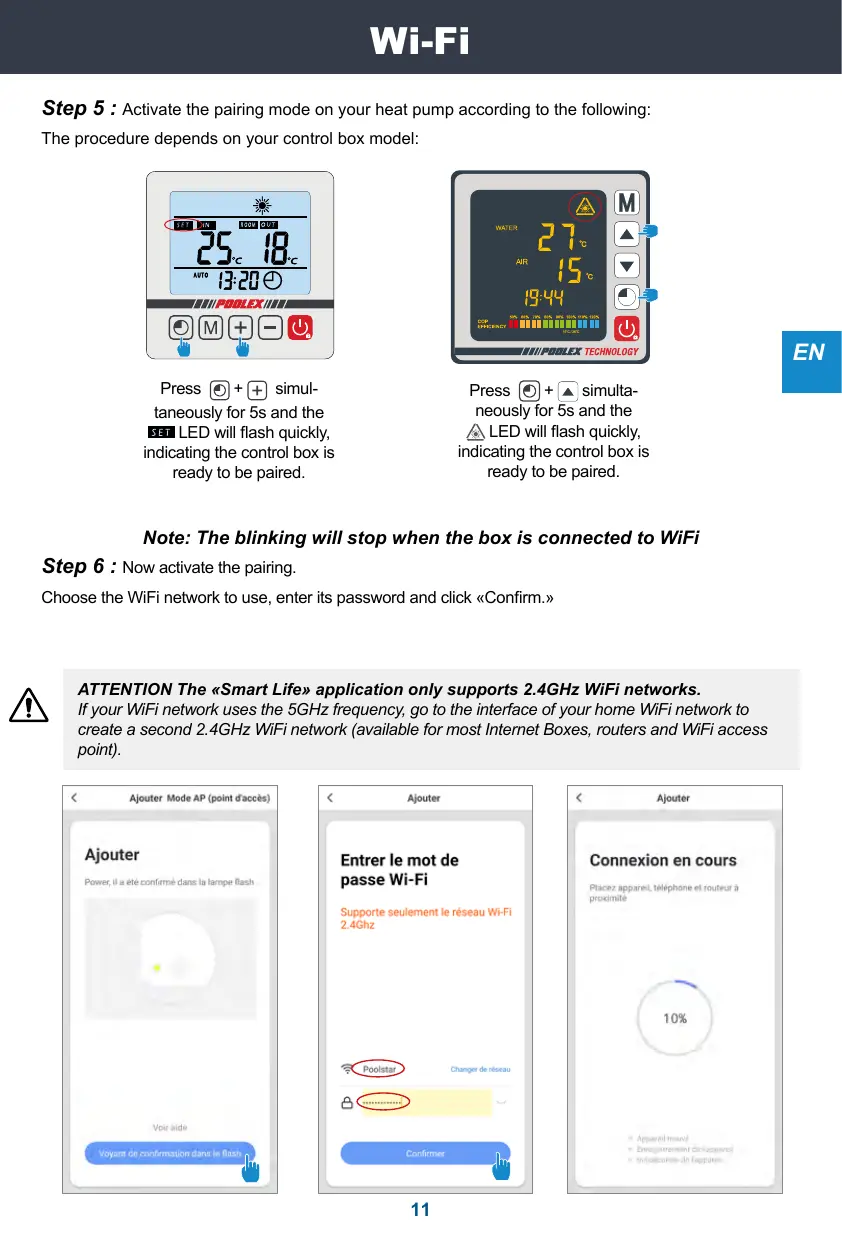
Step 5 : Activate the pairing mode on your heat pump according to the following: The procedure depends on your control box model: “120 jPRDLEX UE GE) Press (©)+ Press (©) + [a simulta- taneously for 5s and the neously for 5s and the LED will flash quickly, A\ LED will flash quickly, indicating the control box is indicating the control box is ready to be paired. ready to be paired. Note: The blinking will stop when the box is connected to WiFi Step 6 : Now activate the pairing. Choose the WiFi network to use, enter its password and click «Confirm.» ATTENTION The «Smart Life» application only supports 2.4GHz WiFi networks. A If your WiFi network uses the 5GHZz frequency, go to the interface of your home WiFi network to create a second 2.4GHz WiFi network (available for most Intemet Boxes, routers and WiFi access point). < Njuter Made AP (oi nets) < Mouer < Hoater Ajouter Entrer le mot de Connexion en cours passe Wi-Fi Supporte seulement le réseau Wi-Fi 2.4Ghz
Step 7 : Ifthe pairing was successful, you can rename your Poolex heat pump and click «Done.» Congratulations! You can now control your heat pump from your smartphone. < Ajouter Ajout de l'appareil réussi
Tous les apporeïs Salon Chambre à ca ++ Interface Q Current pool temperature [2] Temperature setpoint [3] Current operating mode [4] Switch the heat pump on/off 6 Change the temperature 6] Change the operating mode (7) Set the operating range pool temp
Configure the operating ranges for the heat pump Step 1 : Create a schedule, choose the time, day(s) of the week(s), and the action (turn on or off) and save. < Ajout dun minuteur < Ajout dun minuteur Sauvegarder | | < Samedi Répéter Step 2 : To delete a time slot, press on it and hold. Choice of operating modes For OnvOff heat pumps: You can choose between Auto, Heating, or Cooling modes. Available modes Auto Mode Auto Canin ode Cooling Hesting Mode Done For Inverter heat pumps : You can choose between Inverter Heating, Cooling, Eco (Silent) or On/ Off (Manual) modes. Cocing Mode Manual fequenay made Done