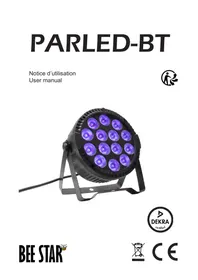
PARLED-BT - Spotlight BEE STAR - Free user manual and instructions
Find the device manual for free PARLED-BT BEE STAR in PDF.


| Product type | LED Spot |
| Brand | BEE STAR |
| Model | PARLED-BT |
| Power supply | 100-240V~, 50Hz |
| Power consumption | 15W |
| Luminous power | 56W (14 x 4W RGBW) |
| Control | Bluetooth mobile app (iOS/Android) and infrared remote control |
| Functions | Automatic effects, static colors, up to 8 separately controllable projectors |
| Positioning | Floor or suspended, double bracket included |
| Protection rating | Indoor use only |
| Operating humidity | 35% to 80% |
| Safety distance | 1 m from walls and inflatable materials |
| Maintenance | Clean with a slightly damp cloth after unplugging |
| Safety | Do not open the casing, unplug before maintenance, do not use in rain |
| Repairability | No user-replaceable parts; repairs by qualified personnel |
| Package contents | 1x PARLED, 1x double bracket with screws, manual |
Frequently Asked Questions - PARLED-BT BEE STAR
User questions about PARLED-BT BEE STAR
0 question about this device. Answer the ones you know or ask your own.
Ask a new question about this device
Download the instructions for your Spotlight in PDF format for free! Find your manual PARLED-BT - BEE STAR and take your electronic device back in hand. On this page are published all the documents necessary for the use of your device. PARLED-BT by BEE STAR.
USER MANUAL PARLED-BT BEE STAR
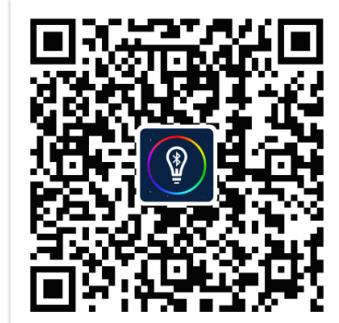
Download on the App Store

Download from Google Play
Thank you for purchasing a BEESTAR product. For your own safety and better use of this product, please read this manual carefully before using this unit.
Packing list:
1xLEDPAR
1 x Bracket with screw
1 x User manual
- Please keep this manual for future consultation.
- For safety reasons, the unit must be firmly installed
- Do not cover the unit.
- This equipment must be installed by professional people and must be fixed away of touch of people
- To prevent or reduce risk of electrical shock or fire, do not expose the fixture to rain or moisture.
- Leave at least 1m distance between the unit and other objects.
- The user should comply with the instructions and warnings of this manual.
Any damage which is caused by incorrect operation or not following the manual, is not covered by the warranty.
-
Do not disassemble or repair the system by yourself unless you are professional. If there is any problem with your fixture, please contact your local dealer.
-
Shields, lenses or ultraviolet screens shall be changed if they have become visibly damaged.
- The luminaire is intended for professional use only.
- If the external flexible cable or cord of this luminaire is damaged, it shall be exclusively replaced by same type cord with same
- specifications.
- The light source contained in this luminaire shall only replaced by the manufacturer or his service agent or similar qualified person.
Specifications
For all your performances, ambient lighting or for the stage
Easy to use
High brightness: 56W (14 x 4W Red/Green/Blue/White)
30^ light beam angle
Infrared remote control
Control by app (IOS or Android compatible)
Choice of automatic functions and static colors
Up to 8 projectors (or groups of projectors) controlled separately
Can be positioned on the ground thanks to its double bracket
Power supply : 100-240V~ 50Hz
Power rating: 15W
- Never cut or tamper with the power cord or plug. If a power cord is supplied with a ground wire, this is mandatory to ensure safe operation! Otherwise, a life-threatening situation exists!
- Unpack and check carefully for transport damage before using the device. Never operate a damaged unit.
- Before starting up, make sure that the voltage and frequency of the power supply correspond to the requirements of the unit's power supply, as specified in this manual.
- This device is intended for indoor use only. Use only in dry areas. Exposing the unit to rain or moisture may cause electric shock or fire.
- DO NOT allow liquids or objects to enter the unit. If any liquid is spilled on the unit, DISCONNECT the power supply immediately and contact customer service.
- The unit should only be installed in a well-ventilated area. Ensure that no ventilation slots are blocked. To ensure adequate ventilation, leave at least 20~cm of free air space around the sides and top of the unit.
- Disconnect the device from the mains before carrying out any maintenance or servicing.
Note on disconnecting the power supply: To disconnect the device from the power supply, the power plug must be pulled out of the socket. For this reason, the device must be placed in a position that allows constant, unobstructed access to the power socket. This means that, in an emergency, you can pull the plug immediately.
- Always hold the power cord by the plug. Do not pull on the cord itself, and never touch the power cord with wet hands, as this may cause a short circuit or electric shock. Do not place the unit, speakers or any other object on top of the power cord, and make sure it is not pinched.
Place the power cord in a position where it cannot be stepped on. A damaged power cord can cause fire or electric shock. Check the power cord from time to time. If damaged, contact our customer service department to have it replaced. - Make sure the power cord never gets wet during operation.
- Before a thunderstorm and/or a lightning storm, disconnect the unit from the mains.
- Under no circumstances should you open the unit's casing. If you do, your safety will not be ensured. There are no operational components inside, only dangerous voltages that could give you a fatal shock!
- NEVER use the device under the following conditions:
In areas subject to vibrations or bumps,
In places where the temperature is above 45^ or below 2^ .
In places exposed to excessive dryness or humidity (ideal conditions: between 35% and 80%). - Never immerse the device in water or any other liquid. Wipe only with a slightly damp cloth.
- Never use the device near flames, flammable or explosive materials or hot surfaces. Doing so may cause a fire.
- Never leave this device running unattended.
- In the event of serious operating problems, discontinue use immediately. Never attempt to disassemble, repair or modify the unit yourself. Otherwise, the warranty becomes null and void. Repairs carried out by unqualified persons may result in damage or malfunction. Please contact your nearest authorized service center.
LED Projector controlled by Bluetooth
Smartphone, tablet and computer compatible
1- Coconnect your LED projector on power supply
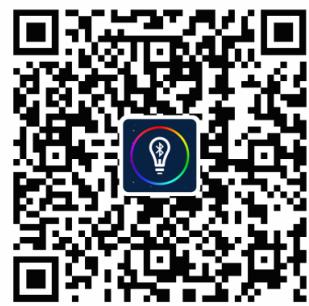
2- Download the Application «Happy Lighting» with the QR code below

Bluetooth

Download on the App Store

Download from Google Play
3- Turn ON the

Bluetooth on your mobile
4- Start the APP
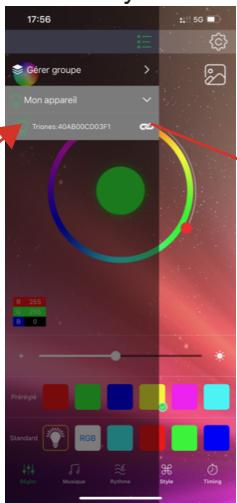
select MENU on top left corner,
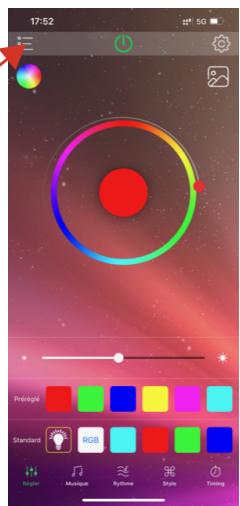
5- The LED projector should be automatically listed.
LED Projector controlled with IR remote control
AUDIO mode1 with FADE effect 7 colors
AUTO mode speed
AUTO mode 21 programs
Static colors 21 colors
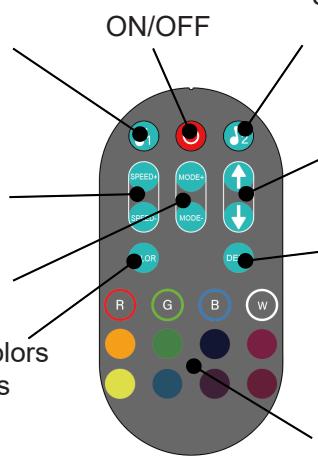
Audio mode 2 with JUMP effect 7 colors
Brightness adjustment 10 steps
AUTO mode
Direst access to static colors
BEE STAR
BEE STAR
CONOR SAS
9 AVENUE DU CANADA
ZA COURTABOEUF
91940 - LES ULIS - FRANCE
C
E
图

FR