USER MANUAL BPI 164 HUX BRANDT
MANUEL D'INSTRUCTION FR
Table de cuisson
Chère Cliente, Cher Client,

Important :


INSTALLATION
FR
Déballage
A
B

Important
Auto-Stop :
INSTRUCTION MANUAL EN
Cooking Hob
Dear Customer,
You have just acquired a BRANDT product and we would like to thank you.
We have designed and made this product with you, your lifestyle and your requirements in mind so that it meets your expectations. We have devoted our know-how, our innovative spirit and the passion that has been guiding us for over 60 years.
In an effort to ensure that our products meet your requirements in the best possible way, our Customer Relations department is at your disposal, to answer all your questions and to listen to all your suggestions.
Visit our website www.brandt.com where you will find our latest innovations, as well as useful and complementary information.
BRANDT is delighted to assist you every day and hopes you get the most out of your purchase.

SAFETY ADVICE ....4

ENVIRONMENT AND ENERGY SAVING 6

IDENTIFICATION ....7

INSTALLATION....9
Unpacking 9
Enclosure 9
Electrical connection 11

USE....12
Choice of cookware....12
Burner selection....12
① Switching on / Stopping 13
+ / - Setting the power 13
Setting the timer....13
Boil Function....12
Recall Function 12
Child safety....14
Safety precautions and recommendations....15

MAINTENANCE....16

SPECIAL MESSAGES, INCIDENTS....17

ENERGY EFFICIENCY....18

AFTER-SALES SERVICE....19
IMPORTANT SAFETY INSTRUCTIONS TO BE READ CAREFULLY AND KEPT FOR FUTURE USE.
This guide can be downloaded from the brand web site.
This appliance may be used by children aged 8 years and over and by persons with reduced physical, sensory or mental capabilities or persons without experience and knowledge, if they have been properly informed or trained in the safe use of the appliance and understand the resulting risks.
Children must not play with the appliance.
Cleaning and maintenance by the user must not be carried out by unsupervised children.
Children under 8 years of age should be kept away unless they are supervised at all times.
The appliance and its accessible parts become hot during use.
Precautions should be taken to avoid touching the heating elements.
Metal objects such as knives, forks, spoons and lids should not be placed on the surface as they can become hot.
Your hob has a child lock which locks the hob when it is switched off or during cooking (see chapter: using the child lock).
Your appliance complies with the European Directives and regulations to which it is subject. These hobs must be connected to the mains supply via an omnipolar disconnecting device that complies with the installation rules in force. A disconnecting device must be incorporated in the fixed wiring.
Your cooktop is designed to operate at 50Hz or 60Hz (50Hz/60Hz) without any special intervention on your part.
After use, switch off the hob by means of the control unit and do not rely on the pot sensor.
In order to prevent interference between your cooktop and a pacemaker, the pacemaker must be designed and adjusted in accordance with the relevant regulations. Ask the manufacturer or your doctor about this.
Unattended cooking with oil or
fat on a hob can be dangerous and may result in a fire. NEVER attempt to extinguish a fire with water, but switch off the appliance before covering the flame with e.g. a lid or fire blanket.
CAUTION: Cooking must be supervised. Short cooking times require continuous supervision.
Risk of fire: Do not store objects on the cooking areas.
If the surface is cracked, disconnect the appliance to avoid the risk of electric shock.
Do not use the hob again until the glass top has been replaced.
Avoid shocks to the cookware: the glass-ceramic surface is very resistant, but not unbreakable.
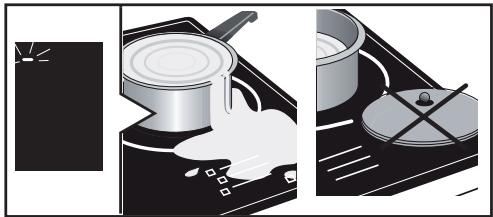
Do not place a hot lid flat on your cooktop. A "suction cup" effect could damage the glass-ceramic top. Avoid rubbing the cookware, as this may cause damage to the glass-ceramic top in the long run.
Never use aluminium foil for cooking. Never place products wrapped in aluminium or in aluminium trays on your hob.
The aluminium will melt and permanently damage the appliance.
Do not store cleaning agents or flammable products in the cabinet under the cooktop.
If the power cord is damaged, it must be replaced by the manufacturer, its service centre or similarly qualified persons to avoid danger.
Make sure that the power cable of an electrical appliance connected in the vicinity of the cooktop does not come into contact with the cooking zones.
Never use a steam cleaner to clean your hob.
The appliance is not intended to be operated by means of an external timer or a separate remote control system.
CAUTION: Only use hob guards designed by the manufacturer of the cooking appliance, referred to in the operating instructions as suitable, or incorporated into the appliance. The use of unsuitable guards may cause accidents.
Protecting the environment
This symbol indicates that this product should not be treated as household waste.
Your appliance also contains a great amount of recyclable material. It is marked with this symbol to indicate that used appliances must be disposed of in certified collection points.
Contact your town hall or your retailer for the used appliance collection points closest to your home. This way, the appliance recycling organised by your manufacturer will be done under the best possible conditions, in compliance with European Directive on Waste Electrical and Electronic Equipment.
This appliance's packing materials are also recyclable. Help recycle it and protect the environment by dropping it off in the municipal receptacles provided for this purpose.
We thank you for your help in protecting the environment.
Advice on how to save energy
Cooking with the correctly sized lid saves energy. If you use a glass lid, you can control your cooking perfectly.
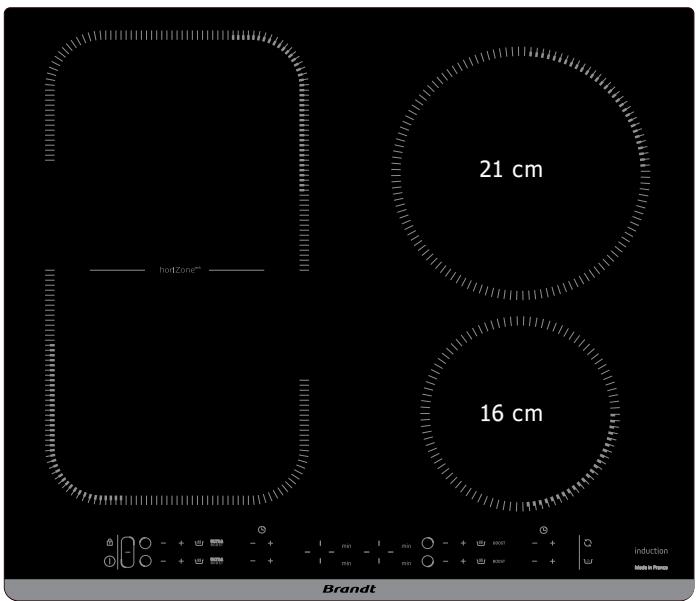

UNPACKING
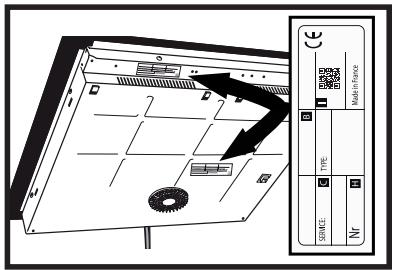
For future use, remove all protective elements. Check and respect the appliance's characteristics that appear on the nameplate.
Note in the boxes below the service and standard references shown on this plate.
Service : ....
Type :
ENCLOSURE
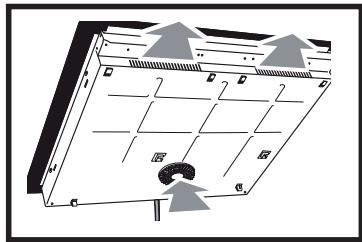
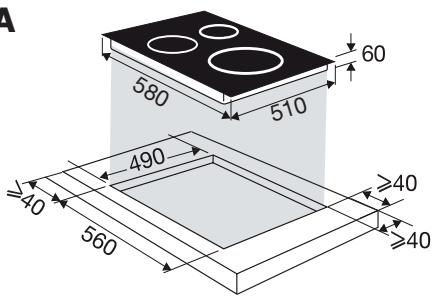
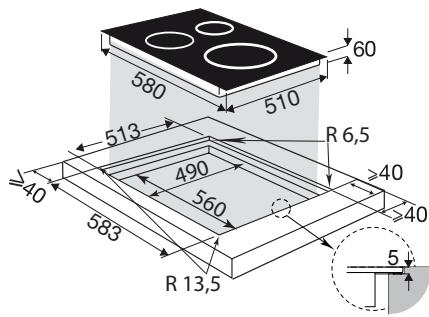
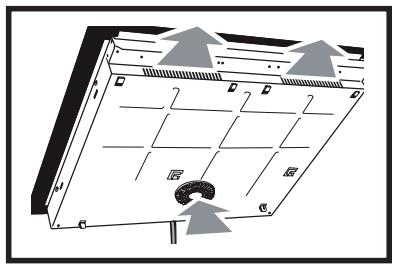
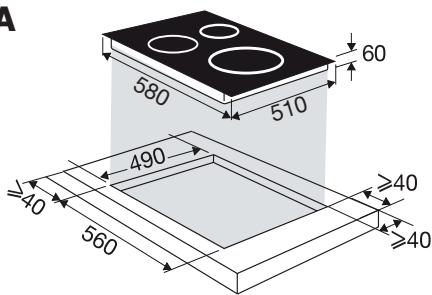
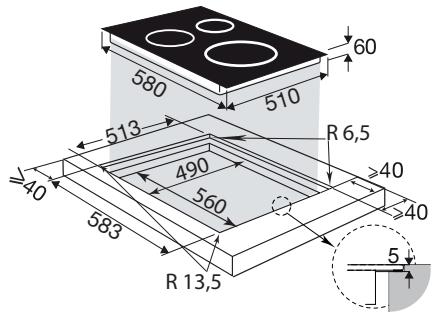
Check that the air intake and outlet are free of obstruction Comply with the information concerning the fitting dimensions (in millimetres) of the work top destined to receive the hob. Check that air circulates correctly between the front and the back of your hob
A
B
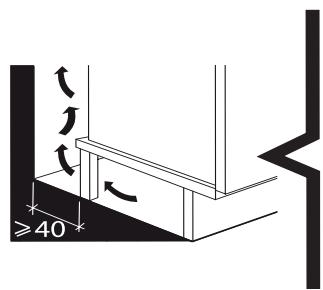
If you are installing the hob above a drawer,
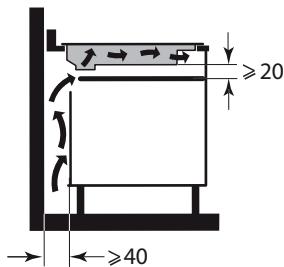
or above a built-in oven, comply with the dimensions provided on the illustrations to ensure a sufficient air outlet at the front.
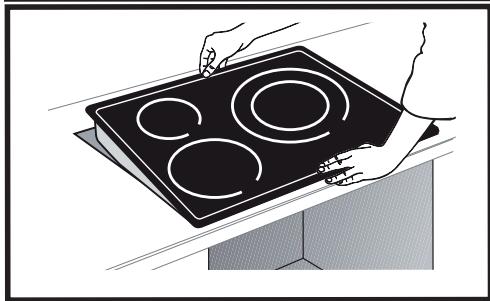
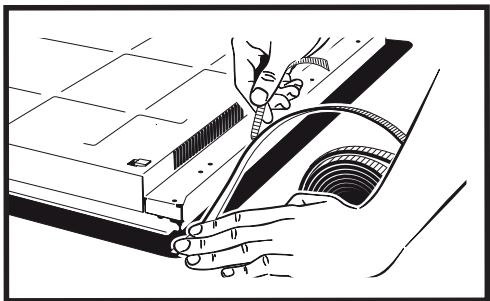
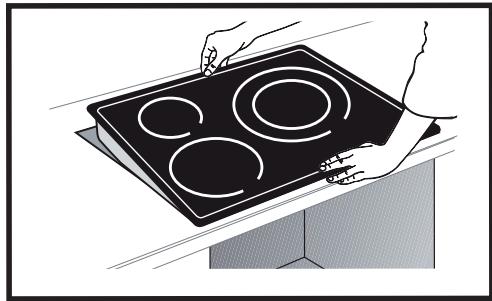
Carefully glue the sealing joint to the entire surround of the glass hob insert the table into the cabinet
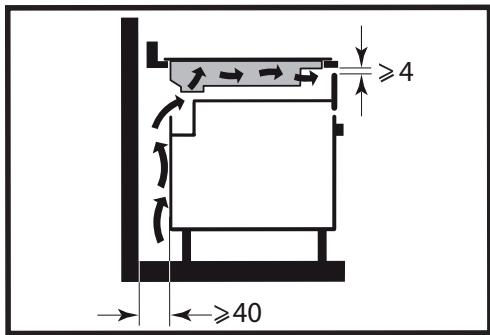

Important
If your hob is located above your oven, the hob's thermal safety devices can impede the simultaneous use of the hob and the oven's pyrolysis programme, display code "F7" in the control zones. In such circumstances we recommend that you increase the hob's ventilation by creating an opening in the side of the cabinet (8 x 5 cm).
Electric connections
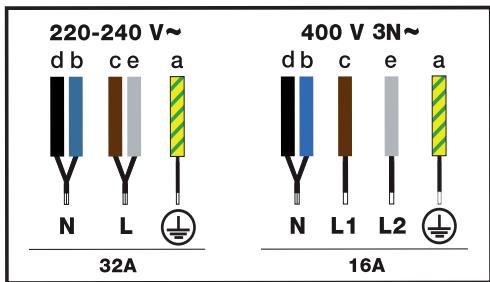
These hobs must be connected to the power grid via an all-pole cut-off device that complies with installation regulations in effect. A disconnection device must be incorporated into the fixed wiring.
Identify the type of cable of your hob according to the number of wires and colours.
When switching your hob on or after a lengthy power cut, a code is shown on the control pad (this display is reserved for your after-sales service, where applicable. The user of the hob does
not need to take notice of it).
This information disappears after around 30 seconds.
CHOICE OF COOKWARE
Most cookware is compatible with induction. Only glass, earthenware, aluminium without a special bottom, copper and some non-magnetic stainless steel do not work with induction cooking.

Tips
We suggest that you choose cookware with a thick and flat bottom. The heat will be distributed better and cooking will be more uniform.
Advice on how to save energy
Cooking with the correctly sized lid saves energy. If you use a glass lid, you can control
BURNER SELECTION
Select the burner which is the right size for the bottom of your cookware (see table). If the base or the cookware is too small, the power indicator will start to flash and the burner will not work, even if the cookware's material is recommended for induction.
Do not use containers with a smaller diameter than that of the fireplace (see table).
| Diameter of burner (cm) | Maximum power of burner (Watts) | Diameter of bottom of cookware |
| 16 | 2500 | 10 - 18 |
| 21 | 3600 | 12 - 24 |
| Horizone | 4000 | 18 - Oval Fishmonger |

Tips
When using the two hobs simultaneously, the hob manages the power distribution so as not to exceed the total power of the hob.
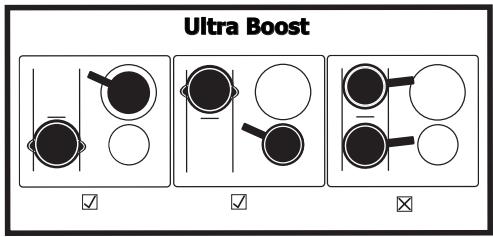
When using the maximum power (Ultra Boost) on several hobs at the same time, make sure that you use the best position for your containers according to the model of your hob as shown in the illustrations.
This will avoid automatic power limitation on one of the hobs if the positioning is not optimal:
☑ = Recommended positioning
☒ = positioning to be avoided
① SWITCHING ON - STOPPING
Switching on:
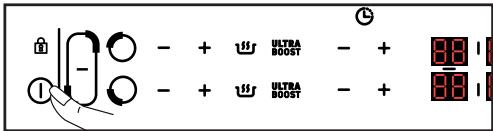
Press the Ⓐ button and then the Ⓐ button corresponding to the desired zone.
A 0 is displayed and a beep indicates that the zone is on. You can set the desired power of the selected cooking zone. If no power is requested, the cooking zone will be switched off automatically.
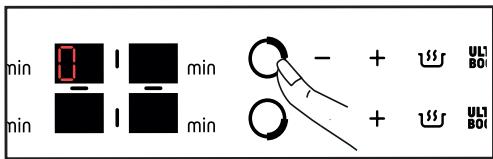
Press and hold the ○ button for the desired heat source.
A long beep sounds and the display goes out or the "H" symbol (residual heat) appears.
General shutdown:
Press and hold the ① on/off button. A long beep sounds and the display goes out or the symbol "H" (residual heat) appears.
+ / - Power setting
When switching on, you can switch directly to power 9 by pressing the - button.
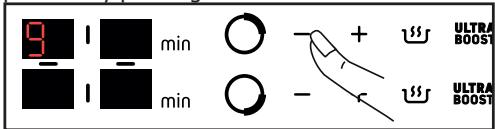
Press the + or - button to set the power level from 1 to 9.
Press the 📊 button to access power 5: Simmering.
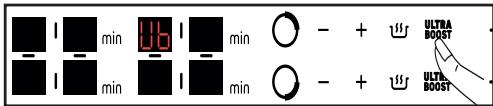
ULTRA
Press BOOST to access the maximum power.
HORIZONE
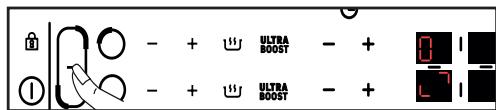
Pressing the ☐ button simultaneously activates the front and rear fireboxes of the "Horizone" function, the □ symbol is displayed. The power and timer settings are made on the rear heater controls, as for a normal heater. The front fireplace setting is inactive.
To deactivate the "Horizone" function, press the ○ or ○ button.
Setting the timer
Each cooking zone has a dedicated timer that can be set for up to 99 minutes. The timer is incremented from 1 to 15 and then from 5 to 99 and can be started as soon as the cooking zone is in operation.
Press the - or + button of the selected cooking zone.
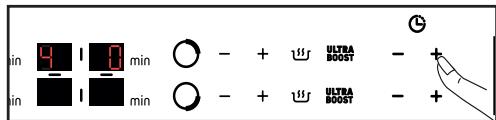
The setting is made by pressing + or - . The 99 minutes can be accessed directly by pressing the - key from the start.
At the end of the cooking time, the display shows 0 and a beep sounds for about 20 seconds. To deactivate the timer, press any of the control keys of the relevant cooking zone.
To stop the timer manually, press and hold the + and - keys simultaneously or return to 0 with the - key.

Boil Function
This function allows you to boil and maintain the boiling of water for cooking pasta for example.
Select your cooker and press the "Boil" button
By default, the quantity of water proposed is 2 litres but you can modify it using the + or - buttons. Set the desired quantity of water (from 0.5 to 6 litres).

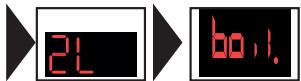
Confirm by pressing the "Boil" symbol 📋 or wait a few seconds and the confirmation will be automatic.
The cooking process starts.
A beep will sound when the water is boiling and "Boil" will appear on the display.
Pour in the pasta and confirm by pressing the "Boil" button 📋.
By default the display suggests power 8 and a cooking time of 8 minutes.
However, you can adjust the proposed power and cooking time.
A beep will sound at the end of the cooking time.
NOTE: It is important that the water is at room temperature when you start cooking. Do not use a cast iron pan for this function.
You can also use this function to cook any food that needs to be cooked in boiling water.

Recall Function
This function displays the last power and timer settings of all burners that have been switched off for less than 3 minutes.
When the hob is in operation, the function recalls the power and timer settings of the hob(s) that have been switched off for less than 30 seconds.
To use this function, the hob must be unlocked, press the On/Off button, then press the button briefly.

CHILD SAFETY
Your hob has a child lock which locks the controls when the appliance is switched off or during cooking. For safety reasons, however, the ① button remains active and allows the heating zones to be switched off even when locked.
Locking :
Press the 🔒 button until the b1ac lock symbol appears and a beep confirms your operation
The display of the operating cooking zones now shows the power and the lock symbol alternately. The display of the operating cooking zones now shows the power and the lock symbol alternately.
Unlocking :
Press the button until the 🔒 symbol b1ac disappears and a beep confirms your operation.

CLEAN LOCK function:
The Clean Lock function allows the table to be temporarily locked during cleaning.
To activate the Clean Lock function, press the button briefly, a beep will sound and the symbol will flash. After about 1 minute, the lock is automatically deactivated. A double beep is heard and the symbol disappears. You can deactivate the Clean Lock function at any time by pressing and holding the button.
SAFETY PRECAUTIONS AND RECOMMENDATIONS
Residual heat:
After intensive use, the cooking zone that you have just used can remain hot for several minutes.
The symbol H is displayed during this period.
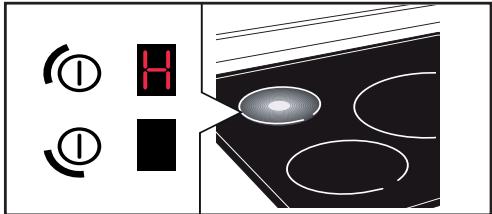
Avoid touching the areas concerned during this time.
Anti-overheat protection:
Each cooking zone has a safety sensor that constantly monitors the temperature of the bottom of the cookware. In the event that empty cookware is left on a cooking zone that is switched on, the hob automatically lowers the power output and thus limits any risk of damage.
Protection against overflows
A special display (symbol —), a sound signal, followed with the hob swit-
ching off, may be triggered in the following cases:
- Overflow that spills onto the buttons
- Damp towel placed over the buttons.
- Metallic object placed on the buttons
Remove the object or clean and dry the touch controls, then restart cooking.
Auto-Stop :
Your hob has an auto-stop device, which automatically stops any cooking zone which remains switched on for an excessive length of time (between 1 and 10 hours depending on the power used).
If this safety system is triggered, the cut-off to the cooking zone is shown with the "A" display on the control panel and a beep sounds for about 2 minutes. Simply press any of the buttons to stop this.

Tips
Sounds which are similar to those of a clock mechanism may be given off.
These noises occur when the hob is working. They disappear or reduce depending on the heating configuration. There may also be whistling sounds depending on the model and quality of your cookware. The noises described are normal. They are related to induction technology and do not indicate a problem.

Tips
We do not recommend a protective device.
For light dirt, use a disinfectant sponge. Thoroughly moisten the zone to be cleaned with hot water, then wipe off.
For a build-up of baked-on dirt or sweet overflows, use a disinfectant sponge and/or a special glass scraper. Thoroughly moisten the zone to be cleaned with hot water. Use a scraper for glass to remove the large bits, finish off with a disinfectant sponge, and then wipe off.
For rings and hard water residue, apply warm white vinegar to the stain, leave on, then wipe with a soft cloth.
For shiny metal streaks or weekly maintenance, use a special vitroceramic glass product.
Important note: do not use any powders or abrasive sponges. Use creams and special delicate glassware sponges.
?
SPECIAL MESSAGES, INCIDENTS
EN
DURING INITIAL USE:
- An indicator light appears. This is normal. It will go away after 30 seconds.
- Your installation blows a fuse or one side only of the hob works. The electrical connection of your hob is incorrect. Check its compliance.
- The hob smells the first few times it is used for cooking. The appliance is new. Heat up each ring for half an hour with a saucepan full of water.
6.2 WHEN POWERING ON:
The hob does not work and the indicator lights on the control panel are not on.
The appliance is not receiving electricity. The electrical supply is defective or the connection is incorrect. Inspect the electrical circuit breaker and fuses.
- The hob does not work and another message is displayed. The electronic board is functioning poorly. Call the After-Sales Service Department.
- The hob does not work, the symbol is displayed. Unlock the child safety device.
- Error code F9: voltage less than 170 V
- Error code F0: voltage less than 5°C
6.3 DURING USE:
- The hob has stopped working. The symbol is displayed and there is a sound signal.
There was an overflow or an object is in contact with the control panel. Clean or remove the object, then begin cooking again.
- Code F7 is displayed.
The electronic circuits have overheated. Check the hob's ventilation.
- During operation of a heating zone, the keypad display continues to flash.
The cookware used is not compatible with induction or its size is not suitable for the burner.
- The cookware makes noise and your hob clicks during cooking (see chapter on Safety precautions and recommendations 4.5).
This is normal with some types of cookware. This is caused by the transfer of energy from the hob
to the cookware.
- The fan continues to function after your hob is turned off.
This is normal. It cools the electronic parts.
- In the event of persistent malfunction.
Switch off your hob for 1 minute. If the problem persists, contact the after-sales service.
Any work on your appliance must be carried out by a qualified professional who is a brand owner. When you call, in order to make it easier to deal with your request, please have the complete references of your appliance (commercial reference, service reference, serial number). This information can be found on the nameplate attached to the bottom of the appliance.
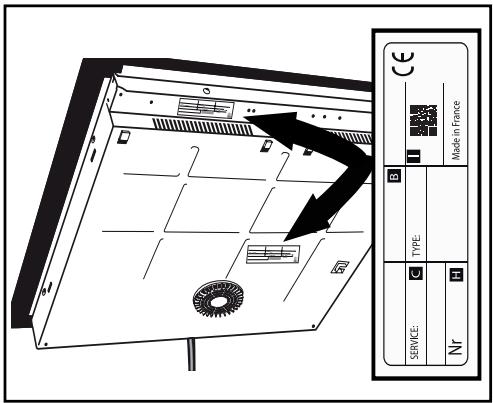
B: Commercial reference
C: Service reference
H: Serial number
I: QR Code