SWA8500S/ZF - Loudspeaker SAMSUNG - Free user manual and instructions
Find the device manual for free SWA8500S/ZF SAMSUNG in PDF.



| Product Type | Wireless surround speaker kit (receiver module + 2 speakers) |
| Brand | Samsung |
| Model | SWA8500S/ZF |
| Receiver module dimensions (W x H x D) | 50.0 x 201.3 x 132.0 mm |
| Surround speaker dimensions (W x H x D) | 76.2 x 126.9 x 76.2 mm |
| Receiver module weight | 0.7 kg |
| Surround speaker weight | 0.5 kg |
| Power supply | 240 V AC (via included power adapter) |
| Standby power consumption | 1.0 W |
| Frequency response | 20 Hz - 20 kHz |
| Connectivity | Wireless with compatible Samsung Soundbar (via ID SET) |
| Operating temperature | +5 °C to +35 °C |
| Operating humidity | 10 % to 75 % |
| Included accessories | Wireless receiver module, 2 surround speakers, power cord, 2 speaker cables |
| Compatible Soundbar models | HW-M360, M369, M450, M460, M4500, M4501, M4510, M4511, M550, M560 |
| Care and cleaning | Disconnect the device, wipe with a soft dry cloth. Do not use chemicals. |
| Safety instructions | Do not obstruct ventilation slots, do not expose to water or heat, disconnect during storms. |
| Repairability | Have any repairs done by a qualified Samsung technician. No user-serviceable parts. |
| Warranty | Contact Samsung customer service for terms |
Frequently Asked Questions - SWA8500S/ZF SAMSUNG
User questions about SWA8500S/ZF SAMSUNG
0 question about this device. Answer the ones you know or ask your own.
Ask a new question about this device
Download the instructions for your Loudspeaker in PDF format for free! Find your manual SWA8500S/ZF - SAMSUNG and take your electronic device back in hand. On this page are published all the documents necessary for the use of your device. SWA8500S/ZF by SAMSUNG.
USER MANUAL SWA8500S/ZF SAMSUNG
Thank you for purchasing this product (SWA-8500S).
 | CAUTIONRISK OF ELECTRIC SHOCK.DO NOT OPEN |  |
| This symbol indicates that high voltage is present inside. It is dangerous to make any kind of contact with any internal part of this product. | CAUTION: TO REDUCE THE RISK OF ELECTRIC SHOCK, DO NOT REMOVE THE COVER (OR BACK). THERE ARE NO USER SERVICEABLE PARTS INSIDE. REFER ALL SERVICING TO QUALIFIED PERSONNEL. | This symbol indicates that important literature concerning operation and maintenance has been included with this product. |
 | Class II product : This symbol indicates that it does not require a safety connection to electrical earth (ground). |
 | AC voltage : This symbol indicates that the rated voltage marked with the symbol is AC voltage. |
 | DC voltage : This symbol indicates that the rated voltage marked with the symbol is DC voltage. |
 | Caution, Consult instructions for use : This symbol instructs the user to consult the user manual for further safety related information. |
- The slots and openings in the cabinet and in the back or bottom are provided for necessary ventilation. To ensure reliable operation of this apparatus, and to protect it from overheating, these slots and openings must never be blocked or covered.
- Do not place this apparatus in a confined space, such as a bookcase, or built-in cabinet, unless proper ventilation is provided.
- Do not place this apparatus near or over a radiator or heat register, or where it is exposed to direct sunlight.
- Do not place vessels (vases etc.) containing water on this apparatus. A water spill can cause a fire or electric shock.
- Do not expose this apparatus to rain or place it near water (near a bathtub, washbowl, kitchen sink, or laundry tub, in a wet basement, or near a swimming pool, etc.). If this apparatus accidentally gets wet, unplug it and contact an authorized dealer immediately.
- Do not overload wall outlets, extension cords or adaptors beyond their capacity, since this can result in fire or electric shock.
- Route power-supply cords so that they are not likely to be walked on or pinched by items placed on or against them. Pay particular attention to cords at the plug end, at wall outlets, and the point where they exit from the apparatus.
- To protect this apparatus from a lightning storm, or when it is left unattended and unused for long periods of time, unplug it from the wall outlet and disconnect the antenna or cable system. This will prevent damage to the set due to lightning and power line surges.
- Before connecting the AC power cord to the DC adaptor outlet, make sure the voltage designation of the DC adaptor corresponds to the local electrical supply.
- Never insert anything metallic into the open parts of this apparatus. Doing so may create a danger of electric shock.
- To avoid electric shock, never touch the inside of this apparatus. Only a qualified technician should open this apparatus.
- Make sure to plug the power cord in until it is firmly seated. When unplugging the power cord from a wall outlet, always pull on the power cord's plug. Never unplug by pulling on the power cord. Do not touch the power cord with wet hands.
- If this apparatus does not operate normally - in particular, if there are any unusual sounds or smells coming from it - unplug it immediately and contact an authorized dealer or service centre.
- Maintenance of Cabinet.
- Before connecting other components to this product, be sure to turn them off.
- Be sure to pull the power plug out of the outlet if the product is to remain unused or if you are leaving the house for an extended period of time (especially when children, elderly, or disabled people will be left alone in the house).
- Accumulated dust can cause an electric shock, an electric leakage, or a fire by causing the power cord to generate sparks and heat or the insulation to deteriorate.
- Contact an authorized service centre for information if you intend to install your product in a location with heavy dust, high or low temperatures, high humidity, chemical substances, or where it will operate 24 hours a day such as in an airport, a train station, etc. Failing to do so may cause serious damage to your product.
- Use only a properly grounded plug and wall outlet.
- An improper ground may cause electric shock or equipment damage. (Class I Equipment only.)
- To turn this apparatus off completely, you must disconnect it from the wall outlet. Consequently, the wall outlet and power plug must be readily accessible at all times.
- Do not allow children to hang on the product.
-
Store the accessories (battery, etc.) in a location safely out of the reach of children.
-
Do not install the product in an unstable location such as a shaky self, a slanted floor, or a location exposed to vibration.
- Do not drop or strike the product. If the product is damaged, disconnect the power cord and contact a service centre.
- To clean this apparatus, unplug the power cord from the wall outlet, and then wipe the product using a soft, dry cloth. Do not use any chemicals such as wax, benzene, alcohol, thinners, insecticide, air fresheners, lubricants, or detergent. These chemicals can damage the appearance of the product or erase the printing on the product.
- Do not expose this apparatus to dripping or splashing. Do not put objects filled with liquids, such as vases, on the apparatus.
- Do not plug multiple electric devices into the same wall socket. Overloading a socket can cause it to overheat, resulting in a fire.
WARNING :
- TO PREVENT THE SPREAD OF FIRE, KEEP CANDLES AND OTHER ITEMS WITH OPEN FLAMES AWAY FROM THIS PRODUCT AT ALL TIMES.
- To reduce the risk of fire or electric shock, do not expose this appliance to rain or moisture.
Precautions
- Ensure that the AC or DC power supply in your house complies with the power requirements listed on the identification sticker located on the back of your product. Install your product horizontally, on a suitable base (furniture), with enough space around it for ventilation (7\~10 cm). Make sure the ventilation slots are not covered. Do not place the unit on amplifiers or other equipment which may become hot. This unit is designed for continuous use. To fully turn off the unit, disconnect the AC plug from the wall outlet.
- Do not expose the unit to direct sunlight or other heat sources. This could lead to overheating and cause the unit to malfunction.
- Unplug the Power cord from the AC wall socket if the unit malfunctions. Your product is not intended for industrial use. It is for personal use only. Condensation may occur if your product has been stored in cold temperatures. If transporting the unit during the winter, wait approximately 2 hours until the unit has reached room temperature before using it.
- If the electricity supplied to your home is rated at 240V AC, use a suitable plug adapter to connect this unit to your electrical outlets.
Important Safety Instructions
Read these operating instructions carefully before using the unit. Follow all the safety instructions listed below. Keep these operating instructions handy for future reference.
- Read these instructions.
- Keep these instructions.
- Heed all warnings.
- Follow all instructions.
- Do not use this apparatus near water.
- Clean only with a dry cloth.
- Do not block any ventilation openings. Install in accordance with the manufacturer's instructions.
-
Do not install near any heat sources such as radiators, heat registers, stoves, or other apparatus (including AV receivers) that produce heat.
-
Do not defeat the safety purpose of the polarized or grounding-type plug. A polarized plug has two blades with one wider than the other. A grounding type plug has two blades and a third grounding prong. The wide blade or the third prong are provided for your safety. If the provided plug does not fit into your outlet, consult an electrician for replacement of the obsolete outlet.
-
Protect the power cord from being walked on or pinched particularly at plugs, convenience receptacles, and the point where it exits the apparatus.
-
Only use attachments/accessories specified by the manufacturer.
-
Use only with the cart, stand, tripod, bracket, or table specified by the manufacturer, or sold with the apparatus. When a cart
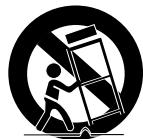
is used, use caution when moving the cart/ apparatus combination to avoid injury from tip-over.
-
Unplug this apparatus during lightning storms or when you intend to leave it unused for long periods of time.
-
Refer all servicing to qualified service personnel. Servicing is required when the apparatus has been damaged in any way, such as when the power-supply cord or plug is damaged, liquid has been spilled or objects have fallen into the apparatus, the apparatus has been exposed to rain or moisture, does not operate normally, or has been dropped.
Accessories
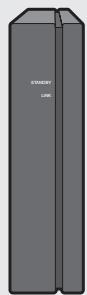
Wireless Receiver Module
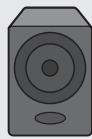
Surround Speaker (2EA)
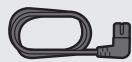
Power Cord
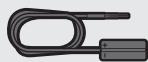
Speaker Cable (2EA)
Specifications
| Weight | Wireless Receiver Module | 0.7 kg |
| Surround Speaker | 0.5 kg | |
| Dimensions (W x H x D) | Wireless Receiver Module | 50.0 X 201.3 X 132.0 mm |
| Surround Speaker | 76.2 X 126.9 X 76.2 mm | |
| Operating Temperature Range | +5°C to +35°C | |
| Operating Humidity Range | 10% ~ 75% | |
| Output | Refer to the Owner's Manual. | |
| Frequency range | 20Hz~20KHz | |
| Overall Standby Power Consumption (W) | 1.0W | |
NOTES
– Samsung Electronics Co., Ltd reserves the right to change the specifications without notice.
– Weight and dimensions are approximate.
- For more information about the power supply and power consumption, refer to the label attached to the product.
- Design and specifications are subject to change without prior notice.
Open Source Licence Notice
- To send inquiries and requests regarding open sources, contact Samsung via Email (oss.request@samsung.com).
Important Note About Service
- An administration fee may be charged if either
(a) an engineer is called out at your request and there is no defect with the product (i.e. where the user manual has not been read).
(b) you bring the unit to a repair centre and there is no defect with the product (i.e. where the user manual has not been read).
- You will be informed of the administration fee amount before a technician visits.
Connecting the SWA-8500S to a Soundbar
1. Connect the Wireless Receiver Module to 2 Surround Speakers
Use the speaker cables to connect the two surround sound speakers to the Wireless Receiver Module.
- The speaker cables are colour coded.
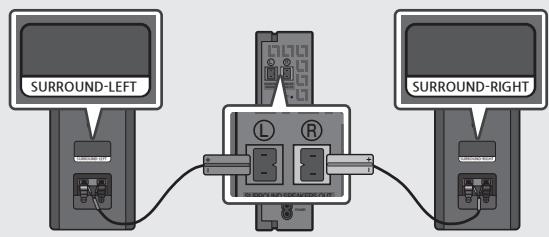
- When connecting the speaker cables to the Wireless Receiver Module, follow these steps:
- Insert the grey plug into the grey jack on the Wireless Receiver.
- Insert the blue plug into the blue jack on the Wireless Receiver.
- When connecting the speaker cables to the surround speakers, follow these steps:
- Match the speaker cable connected to the grey jack to the speaker with the grey label.
- Match the speaker cable connected to the blue jack to the speaker with the blue label.
- Insert the red and black coloured ends of each speaker cable into the red and black jacks of the appropriate speakers.
- The labels are on the backs of the speaker.
2. Check the standby status after plugging into an electrical outlet
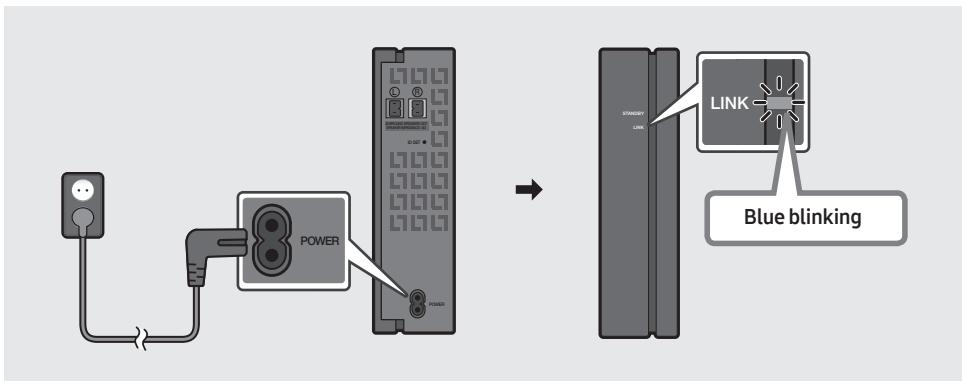
Plug the Wireless Receiver Module power cord into an electrical outlet and into the Wireless Receiver Module to turn on the Wireless Receiver Module. The LINK LED indicator (blue LED) on the Wireless Receiver Module blinks. If the LED does not blink, refer to step 7 on page 10.
flowchart
graph LR
    A["Power"] --> B["Switch"]
    B --> C["Blue blinking"]
    style A fill:#f9f,stroke:#333
    style B fill:#ccf,stroke:#333
    style C fill:#cfc,stroke:#333
3. Turn off the Soundbar
Turn off the Soundbar using the Soundbar's remote control or by pressing the ⏻ (Power) button on the main Soundbar unit.
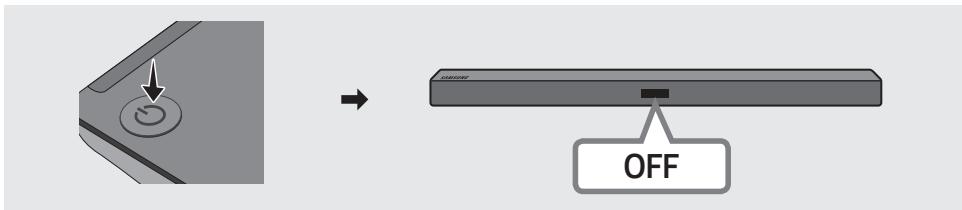
- The image of the Soundbar may differ from your Soundbar, depending on the model.
4. Configure "ID SET" using the Soundbar's remote control
Press the VOL button on your remote control for 5\~6 seconds until the "ID SET" message appears on your Soundbar display.
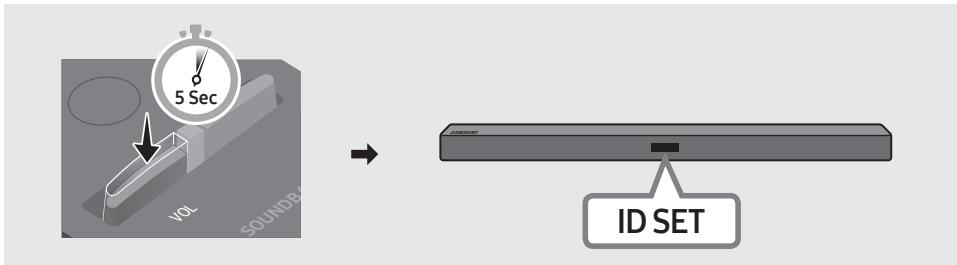
flowchart
graph LR
    A["5 Sec"] --> B["SOUND"]
    B --> C["ID SET"]
- The image of the Soundbar may differ from your Soundbar, depending on the model.
5. Turn on the Soundbar
Turn on the Soundbar using the Soundbar's remote control or by pressing the ⏻ (Power) button on the main Soundbar's unit.
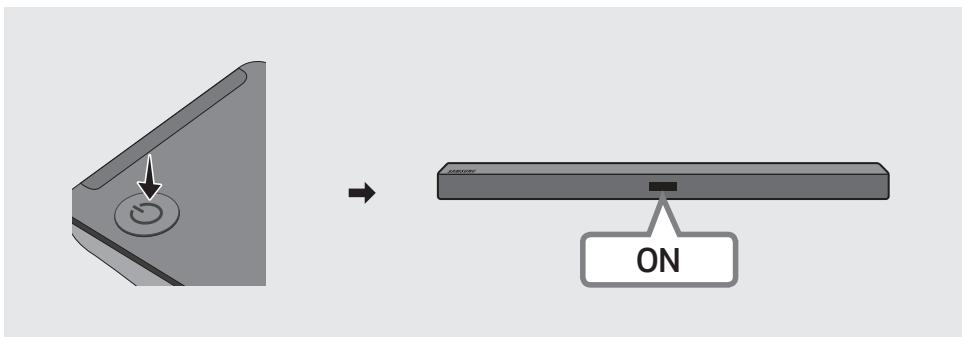
- The image of the Soundbar may differ from your Soundbar, depending on the model.
6. Check if the LINK LED is solid blue (connection complete)
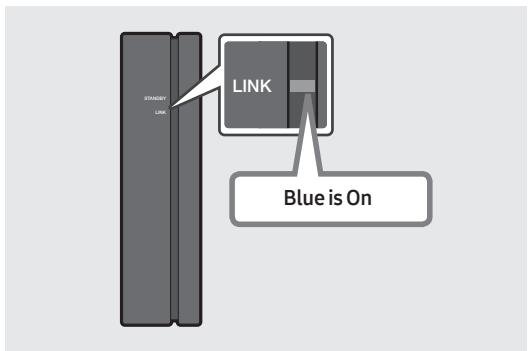
The LINK LED indicator stops blinking and glows a solid blue when a connection is established between the Soundbar and the Wireless Receiver Module.
7. If the SWA-8500S does not connect, take the necessary steps according to the LED Indicator's status
| LED status | Action | ||
| LINK (Blue) | On | Connected with the Soundbar | - |
| Blinking | Connection standby status | Check if the Soundbar is turned on | |
| Repeat steps 3 through 6. | |||
| STANDBY (Red) | On | Connection failure | Check if the Soundbar is turned on |
1. Press the ID SET button on the back of the Wireless Receiver Module with a pen tip for 5~6 seconds until the LINK LED indicator blinks (in Blue).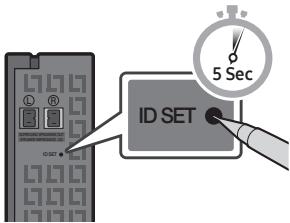 2. Repeat steps 3 through 6. 2. Repeat steps 3 through 6. | |||
| Others | - | Errors | Contact a Samsung Service Centre. |
Compatible Models
| HW-M360 | HW-M369 | HW-M450 | HW-M460 |
| HW-M4500 | HW-M4501 | HW-M4510 | HW-M4511 |
| HW-M550 | HW-M560 |
- The model list is subject to change without further notice.
Wireless Models (including the frequency of 5.15GHz-5.35GHz)
- Hereby, Samsung Electronics, declares that this equipment is in compliance with the essential requirements and other relevant provisions of Directive 1999/5/EC.

The original Declaration of Conformity may be found at http://www.samsung.com, go to Support > Search Product Support and enter the model name.
This equipment may be operated in all EU countries.
This equipment may only be used indoors.
Wireless Models (excluding the frequency of 5.15GHz-5.35GHz)
- Hereby, Samsung Electronics, declares that this equipment is in compliance with the essential requirements and other relevant provisions of Directive 1999/5/EC.
The original Declaration of Conformity may be found at http://www.samsung.com, go to Support > Search Product Support and enter the model name.
This equipment may be operated in all EU countries.


Correct Disposal of This Product
(Waste Electrical & Electronic Equipment)
(Applicable in countries with separate collection systems)
This marking on the product, accessories or literature indicates that the product and its electronic accessories (e.g. charger, headset, USB cable) should not be disposed of with other household waste at the end of their working life. To prevent possible harm to the environment or human health from uncontrolled waste disposal, please separate these items from other types of waste and recycle them responsibly to promote the sustainable reuse of material resources.
Household users should contact either the retailer where they purchased this product, or their local government office, for details of where and how they can take these items for environmentally safe recycling.
Business users should contact their supplier and check the terms and conditions of the purchase contract. This product and its electronic accessories should not be mixed with other commercial wastes for disposal.
For information on Samsung's environmental commitments and product specific regulatory obligations e.g. REACH visit:
samsung.com/uk/aboutsamsung/samsungelectronics/corporate citizenship/data_corner.html
flowchart
graph LR
    A["5 Sec"] --> B["SOUND"]
    B --> C["ID SET"]
samsung.com/uk/aboutsamsung/samsungelectronics/corporate citizenship/data_corner.html
flowchart
graph LR
    A["5 Sec"] --> B["SOUNDER"]
    B --> C["ID SET"]
samsung.com/uk/aboutsamsung/samsungelectronics/corporate citizenship/data_corner.html
© 2017 Samsung Electronics Co., Ltd. All rights reserved.
Contact SAMSUNG WORLD WIDE
If you have any questions or comments relating to Samsung products, please contact the SAMSUNG customer care Centre.
| Country | Contact Centre 📞 | Web Site |
| ■ Europe | ||
| U.K | 0330 SAMSUNG (7267864) | www.samsung.com/uk/support |
| EIRE | 0818 717100 | www.samsung.com/ie/support |
| GERMANY | 0180 6 SAMSUNG bzw. 0180 6 7267864* (*0,20 €/Anruf aus dem dt. Festnetz, aus dem Mobilfunk max. 0,60 €/ Anruf) | www.samsung.com/de/support |
| FRANCE | 01 48 63 00 00 | www.samsung.com/fr/support |
| ITALIA | 800-SAMSUNG (800.7267864) | www.samsung.com/it/support |
| SPAIN | 34902172678 | www.samsung.com/es/support |
| PORTUGAL | 808 20 7267 | www.samsung.com/pt/support |
| LUXEMBURG | 261 03 710 | www.samsung.com/be_fr/support |
| NETHERLANDS | 0900-SAMSUNG (0900-7267864) (€ 0,10/Min) | www.samsung.com/nl/support |
| BELGIUM | 02-201-24-18 | www.samsung.com/be/support (Dutch) www.samsung.com/be_fr/support (French) |
| NORWAY | 815 56480 | www.samsung.com/no/support |
| DENMARK | 70 70 19 70 | www.samsung.com/dk/support |
| FINLAND | 030-6227 515 | www.samsung.com/fi/support |
| SWEDEN | 0771 726 7864 (0771-SAMSUNG) | www.samsung.com/se/support |
| POLAND | 801-172-678* lub +48 22 607-93-33 * * (koszt potączenia według taryfy operatora) | www.samsung.com/pl/support |
| HUNGARY | 0680SAMSUNG (0680-726-786) 0680PREMIUM (0680-773-648) | www.samsung.com/hu/support |
| Country | Contact Centre 📞 | Web Site |
| AUSTRIA | 0800-SAMSUNG (0800-7267864) [Only for Premium HA] 0800-366661 [Only for Dealers] 0810-112233 | www.samsung.com/at/support |
| SWITZERLAND | 0800 726 78 64 (0800-SAMSUNG) | www.samsung.com/ch/support(German)www.samsung.com/ch_fr/support(French) |
| CZECH | 800 - SAMSUNG (800-726786) | www.samsung.com/cz/support |
| SLOVAKIA | 0800 - SAMSUNG (0800-726 786) | www.samsung.com/sk/support |
| CROATIA | 072 726 786 | www.samsung.com/hr/support |
| BOSNIA | 055 233 999 | www.samsung.com/support |
| MONTENEGRO | 020 405 888 | www.samsung.com/support |
| SLOVENIA | 080 697 267 (brezplačna številka) | www.samsung.com/si |
| SERBIA | 011 321 6899 | www.samsung.com/rs/support |
| BULGARIA | *3000 Цена в мрежата 0800 111 31, Безплатна телефонна линия | www.samsung.com/bg/support |
| ROMANIA | *8000 (apel in retea) 08008-726-78-64 (08008-SAMSUNG) Apel GRATUIT | www.samsung.com/ro/support |
| CYPRUS | 8009 4000 only from landline, toll free | www.samsung.com/gr/support |
| GREECE | 80111-SAMSUNG (80111 726 7864) only from land line (+30) 210 6897691 from mobile and land line | |
| LITHUANIA | 8-800-77777 | www.samsung.com/lt/support |
| LATVIA | 8000-7267 | www.samsung.com/lv/support |
| EŠTÔNIA | 800-7267 | www.samsung.com/ee/support |

- WARNING :
- Precautions
- Important Safety Instructions
- Accessories
- Specifications
- NOTES
- Open Source Licence Notice
- Important Note About Service
- Connecting the SWA-8500S to a Soundbar
- Connect the Wireless Receiver Module to 2 Surround Speakers
- Check the standby status after plugging into an electrical outlet
- Turn off the Soundbar
- Configure "ID SET" using the Soundbar's remote control
- Turn on the Soundbar
- Check if the LINK LED is solid blue (connection complete)
- If the SWA-8500S does not connect, take the necessary steps according to the LED Indicator's status
- Compatible Models
- Wireless Models (including the frequency of 5.15GHz-5.35GHz)
- Wireless Models (excluding the frequency of 5.15GHz-5.35GHz)
- Correct Disposal of This Product
- (Waste Electrical & Electronic Equipment)
- (Applicable in countries with separate collection systems)
- Contact SAMSUNG WORLD WIDE
Brand : SAMSUNG
Model : SWA8500S/ZF
Category : Loudspeaker