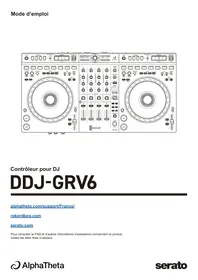
USB DDJ-GRV6 - Audio Controller PIONEER - Free user manual and instructions
Find the device manual for free USB DDJ-GRV6 PIONEER in PDF.


| Product Type | DJ Audio Controller |
| Brand | Pioneer |
| Model | DDJ-GRV6 |
| Dimensions (W × D × H) | 711.4 × 375.9 × 75.7 mm |
| Weight | 4.6 kg |
| Power Supply | 9 V DC, 3 A (USB power adapter) or 5 V DC, 1.5 A (USB bus power) |
| Software Compatibility | rekordbox (Mac/Windows, iOS/Android), Serato DJ Pro |
| Number of Decks | 4 (with Dual Deck mode) |
| Main Features | Jog wheels, performance pads, stems, beat sync, loops, effects, sampling, groove circuit |
| Audio Inputs | MIC (6.35 mm TRS) |
| Audio Outputs | MASTER 1 (6.35 mm TRS), MASTER 2 (RCA), BOOTH (RCA), headphone (6.35 mm and 3.5 mm) |
| USB Ports | USB Type-C × 2 (power and device) |
| Sampling Frequency | 48 kHz |
| Audio Resolution | 24 bits |
| S/N Ratio (USB) | 104 dB |
| Total Harmonic Distortion (USB) | 0.003% |
| Operating Temperature | +5 °C to +35 °C |
| Operating Humidity | 5% - 85% (without condensation) |
| Included Cable | USB Type-C Cable |
| Maintenance and Cleaning | Wipe with a soft, dry cloth. Do not use solvents. |
| Safety | Kensington security slot, power management (auto power off after 20 min) |
| Spare Parts and Repairability | Contact an authorized service center or the retailer. The manual is available in PDF. |
Frequently Asked Questions - USB DDJ-GRV6 PIONEER
User questions about USB DDJ-GRV6 PIONEER
0 question about this device. Answer the ones you know or ask your own.
Ask a new question about this device
Download the instructions for your Audio Controller in PDF format for free! Find your manual USB DDJ-GRV6 - PIONEER and take your electronic device back in hand. On this page are published all the documents necessary for the use of your device. USB DDJ-GRV6 by PIONEER.
USER MANUAL USB DDJ-GRV6 PIONEER
Section Groove Circuit 35
Section Mixer 43
Section Effects 48
Panneau arrête 54
Face avant 56
Raccordements 57
rekordbox Introduction, Instruction Manual
serato.com/dj/pro/downloads
serato.com/dj/pro/downloads
[Shift] + pression :
[Shift] + pression :
[Shift] + pression :
[Shift] + pression :
Avance de 30 secondes la position de lecture du Preview Player.
6 Boutons LOAD
Pression :
[Shift] + pression :
[Shift] + pression :
PassenodeKeyboard.
[Shift] + pression :
[Shift] + pression :
PassenmodeBeatLoop.
[Shift] + pression :
Ouvre le mode Key Shift.
[Shift] + pression :
Active/Désactive le mode Slip.
[Shift] + pression :
Active/Désactive le mode Vinyl.
13 Bouton QUANTIZE
Pression :
Active/Désactive la fonction Quantize.
Pression (en mode Power Management Off):
Annule le mode Power Management Off.
[Shift] + pression :
[Shift] + pression :
[Shift] + pression :
[Shift] + pression :
[Shift] + pression :
[Shift] + pression :
[Shift] + pression :
Ouvre le mode Pitch Play.
[Shift] + pression :
[Shift] + pression :
PassenmodeAutoLoop.
[Shift] + pression :
Ouvre le mode Key Shift.
[Shift] + pression :
Active/Désactive le mode Slip.
[Shift] + pression :
Active/Désactive le mode Vinyl.
13 Bouton QUANTIZE
Pression :
Active/Désactive la fonction Quantize.
Pression (en mode Power Management Off):
Annule le mode Power Management Off.
[Shift] + pression :
[Shift] + pression :
[Shift] + pression :
Annule le mode Sync.
18 Bouton KEY SYNC
serato.com/dj/pro/expansions/pitchntimedi
Pression :
[Shift] + pression :
[Shift] + pression :
[Shift] + pression :
[Shift] + pression :
[Shift] + pression :
PassenodeKeyboard.
[Shift] + pression :
[Shift] + pression :
PassenmodeBeatLoop.
[Shift] + pression :
Ouvre le mode Key Shift.
[Shift] + pression :
Active/Désactive le mode Slip.
[Shift] + pression :
Active/Désactive le mode Vinyl.
13 Bouton QUANTIZE
Pression :
Active/Désactive la fonction Quantize.
Pressure (en mode Power Management Off):
Annule le mode Power Management Off.
[Shift] + pression :
[Shift] + pression :
[Shift] + pression :
[Shift] + pression :
[Shift] + pression :
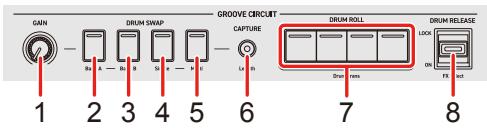
Section Groove Circuit
[Shift] + pression :
[Shift] + pression :
[Shift] + pression :
[Shift] + pression :
[Shift] + pression :
1 Bouton LEVEL/DEPTH (GAIN)
Rotation :
2 Bouton VOCAL (DRUM SWAP 1)
Pression :
[Shift] + pression :
3 Bouton MELODY (DRUM SWAP 2)
Pression :
[Shift] + pression :
4 Bouton BASS (DRUM SWAP 3)
Pression :
[Shift] + pression :
5 Bouton DRUMS (DRUM SWAP 4)
Pression :
[Shift] + pression :
[Shift] + pression :
[Shift] + pression :
[Shift] + pression :
[Shift] + pression :
[Shift] + pression :
[Shift] + pression :
6 Boutons EQ (HI, MID, LOW)
Headphones CUE (canal)
7 Boutons CUE du casque (canal)
Pression :
[Shift] + pression :
6 Boutons EQ (HI, MID, LOW)
7 Boutons Headphones CUE (canal)
Pression :
[Shift] + pression :
6 Boutons EQ (HI, MID, LOW)
7 Boutons Headphones CUE (canal)
Pression :
[Shift] + pression :
[Shift] + pression :
[Shift] + pression :
8 Bouton BEAT FX LEVEL/DEPTH
[Shift] + pression :
Active le Release FX.
[Shift] + pression :
[Shift] + pression :
[Shift] + pression :
8 Bouton BEAT FX LEVEL/DEPTH
[Shift] + pression :
[Shift] + pression :
[Shift] + pression :
8 Bouton BEAT FX LEVEL/DEPTH
[Shift] + pression :
Active le Release FX.
Panneau arrête

8 Bouton MIC ATT. (atténuation)
1: ±0 demi-ton, 2: +1 demi-ton, 3: +2 demi-tons, 4: +3 demi-tons,
5: +4 demi-tons, 6: +5 demi-tons, 7: +6 demi-tons, 8: +7 demi-tons
1: ±0 demi-ton, 2: +1 demi-ton, 3: +2 demi-tons, 4: +3 demi-tons,
5: +4 demi-tons, 6: +5 demi-tons, 7: +6 demi-tons, 8: +7 demi-tons
Slip Hot Cue
Slip Braking
Slip Auto Beat Loop
Slip Manual Loop
To continue installing the software you must agree to the terms of the software license agreement.
Click Agree to continue or click Disagree to cancel the installation and quit the Installer.
Read License
Disagree
Agree
Welcome to the Serato DJ Pro Installer
SERATO - USER LICENSE AGREEMENT ("License Agreement")
Serato Limited ("Serato") and its licensor(s) own the Serato software products and Serato applications, and all intellectual property in Serato software products and applications that are offered by Serato whether purchased through a third party source, downloaded from Serato.com or included in an independent piece of hardware ("The Software"). By installing or using the Software, you agree to the terms of this license.
I agree to the license terms and conditions
Options Install
Welcome to the Serato DJ Pro Installer
Setup Successful
Close
Opérations de base
serato.com/dj/pro/expansions/pitchntimedj
serato.com/dj/pro/expansions/pitchntimedj
5: ±0 demi-ton, 6: +1 demi-ton, 7: +2 demi-tons, 8: +3 demi-tons
serato.com/dj/pro/expansions/pitchntimedj
5: ±0 demi-ton, 6: +1 demi-ton, 7: +2 demi-tons, 8: +3 demi-tons
Slip Hot Cue
Slip Braking
Slip Auto Beat Loop
Slip Manual Loop
Installation (iOS/iPadOS)
https://apps.apple.com/app/id1487048203
2 InstallézrekordboxpouriOS.
Slip Hot Cue
Slip Braking
Slip Auto Beat Loop
Slip Manual Loop
Demo mode
Copyright (c) 2009-2019 ARM Limited. All rights reserved.
SPDX-License-Identifier: Apache-2.0
Licensed under the Apache License, Version 2.0 (the License); you may not use this file except in compliance with the License.
You may obtain a copy of the License at
www.apache.org/licenses/License-2.0
Unless required by applicable law or agreed to in writing, software distributed under the License is distributed on an AS IS BASIS, WITHOUT WARRANTY OR CONDITIONS OF ANY KIND, either express or implied.
See the License for the specific language governing permissions and limitations under the License.
BSD
The BSD-3-Clause License
Copyright (c) 2015, Freescale Semiconductor, Inc.
Copyright 2016-2020 NXP
All rights reserved.
Redistribution and use in source and binary forms, with or without modification, are permitted provided that the following conditions are met:
-
Redistributions of source code must retain the above copyright notice, this list of conditions and the following disclaimer.
-
Redistributions in binary form must reproduce the above copyright notice, this list of conditions and the following disclaimer in the documentation and/or other materials provided with the distribution.
- Neither the name of the copyright holder nor the names of its contributors may be used to endorse or promote products derived from this software without specific prior written permission.
THIS SOFTWARE IS PROVIDED BY THE COPYRIGHT HOLDERS AND Contributors "AS IS" AND ANY EXPRESS OR IMPLIED WARRANTY, INCLUDING, BUT NOT LIMITED TO, THE IMPLIED WARRANTY OF MERCHANTABILITY AND FITNESS FOR A PARTICULAR PURPOSE ARE DISCLAIMED. IN NO EVENT SHALL THE COPYRIGHT HOLDER OR Contributors BE LIABLE FOR ANY DIRECT, INDIRECT, INCIDENTIAL, SPECIAL, EXEMPLARY, OR CONSEQUENTIAL DAMAGES (INCLUDING, BUT NOT LIMITED TO, PROCUREMENT OF SUBSTITUTE GOODS OR SERVICES; LOSS OF USE, DATA, OR PROFITS; OR BUSINESS INTERRUsION) HOWEVER CAUSED AND ON ANY THEORY OF LIABILITY, WHETHER IN CONTRACT, STRICT LIABILITY, OR TORT (INCLUDING NEGLIGENCE OR OTHERWISE) ARISING IN ANY WAY OUT OF THE USE OF THIS SOFTWARE, EVEN IF ADVISED OF THE POSSIBILITY OF SUCH DAMAGE.
© 2024 AlphaTheta Corporation
- Raccordements 57
- rekordbox Introduction, Instruction Manual
- Boutons LOAD
- Bouton QUANTIZE
- Bouton KEY SYNC
- Section Groove Circuit
- Bouton LEVEL/DEPTH (GAIN)
- Bouton VOCAL (DRUM SWAP 1)
- Bouton MELODY (DRUM SWAP 2)
- Bouton BASS (DRUM SWAP 3)
- Bouton DRUMS (DRUM SWAP 4)
- Boutons EQ (HI, MID, LOW)
- Boutons CUE du casque (canal)
- Boutons Headphones CUE (canal)
- Bouton BEAT FX LEVEL/DEPTH
- Panneau arrête
- Bouton MIC ATT. (atténuation)
- Slip Hot Cue
- Slip Braking
- Slip Auto Beat Loop
- Slip Manual Loop
- Opérations de base
- serato.com/dj/pro/expansions/pitchntimedj
- Installation (iOS/iPadOS)
- Demo mode
- BSD
Brand : PIONEER
Model : USB DDJ-GRV6
Category : Audio Controller