
R880 - Hand vacuum cleaner DARTY - Free user manual and instructions
Find the device manual for free R880 DARTY in PDF.



| Product Type | Handheld Vacuum Cleaner |
| Brand | Darty |
| Model | R880 |
| Power Supply | Rechargeable Lithium-Ion Battery |
| Supply Voltage | 230 V (charger) |
| Dust Collector Capacity | 0.5 L |
| Estimated Runtime | 20-30 minutes |
| Charging Time | 4-5 hours |
| Main Functions | Suction, rotating brush, battery indicator, dust collector full indicator |
| Maintenance | Washable filter with clean water, washable brush, washable dust collector |
| Safety | Do not vacuum liquids, hard or hot objects; do not use on people or animals |
| Spare Parts | Battery, filter, brush, charger |
| Repairability | Entrust to an authorized repairer; do not disassemble yourself |
| Estimated Weight | 1.2 kg |
| Estimated Dimensions (L x W x H) | 30 x 10 x 10 cm |
Frequently Asked Questions - R880 DARTY
User questions about R880 DARTY
0 question about this device. Answer the ones you know or ask your own.
Ask a new question about this device
Download the instructions for your Hand vacuum cleaner in PDF format for free! Find your manual R880 - DARTY and take your electronic device back in hand. On this page are published all the documents necessary for the use of your device. R880 by DARTY.
USER MANUAL R880 DARTY
eziclean® make it easy

User manual of your vacuum broom / Gebrauchsanweisung für ihren Besenstaubsauger / Manual de usuario de su escoba aspiradora / Manuale d'uso della vostra scopa aspirante / Gebruksaanwijzing van uw stofzugerbezem
- Only use accessories, consumables or spare parts recommended or supplied by EZclean.
- Do not use your machine outdoors, on a wet surface or for wet pick-up.
- Do not vacuum hard or sharp objects, matches, hot ashes, cigarette butts or other similar objects.
- Do not spray or vacuum flammable liquids, liquid cleaning products, aerosols or their vapours.
- Do not step on the power cord when using your appliance and do not pull the plug out of the socket.
- If your appliance appears to be defective, stop using it immediately.
- To ensure the safe and efficient use of this appliance, we recommend that only an authorised service technician carries out maintenance or repairs.
- Do not step on the power cord or wrap it around your arms or legs when using the appliance.
- This appliance should only be used for domestic cleaning in accordance with this user guide.
- Do not use the appliance on people
or animals.
- This appliance may be used by children of at least 8 years of age and by persons with reduced physical, sensory or mental capabilities, or without experience or knowledge. They must be instructed in the safe use of the appliance and understand the risks involved.
- Children should not play with the appliance.
- Cleaning and maintenance should not be carried out by children without supervision.
- If the power cord is damaged, stop using the appliance immediately.
- Only allow maintenance or repairs to be carried out by an authorised repairer.
- Keep hands, feet, clothing and hair away from the rotating brushes.
- This appliance is supplied with a double-insulated charger for 230V sockets
-
Make sure that the voltage of the power supply is the same as the one indicated on the charger.
-
The appliance must not be connected to the mains when removing the batteries.
- It is normal for the charger to become hot to the touch when charging.
- Do not unplug by pulling on the power cord.
- Never modify the charger.
- A damaged cord can cause fire or electric shock.
- The power cord cannot be replaced, the entire charger must be replaced if it is damaged.
- Unplug the charger if you are going to be away for a long time.
- Do not pick up the charger with wet hands.
- Do not expose the battery to high temperatures. Do not store it near a heat source: fires, radiators, sunlight, etc.
- In case of battery leakage, do not touch the liquids, risk of burns or irritation.
- Used batteries should be taken to a recycling point and not disposed of with household waste.
Please read the following information carefully before using your robot hoover or its accessories. Do not disassemble the appliance or attempt to repair it yourself. In case of malfunction, please contact your dealer for professional advice. Stairs: The device uses sensors to prevent falling down steps, stairs or over an edge. In some situations, the sensors may malfunction. This device cannot detect steps that are less than 8cm high. Steps less than 8cm high may cause the robot to fall. Highly reflective or dark surfaces on some steps or stairs, such as glass or polished ceramic, may cause the device to fall. If available, use the virtual wall or place a mat on the bottom step to prevent your robot from falling. Avoid using your robot hoover on mezzanines, landings or unbounded high surfaces.
1
2
3
4
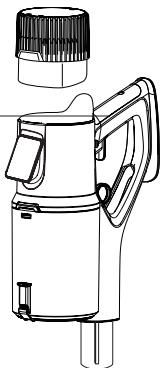
1-Battery
2- Handle
3 - Screen
4 - Dust collector
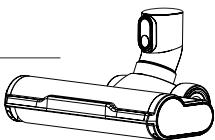
5 - Flexible tube
6 - Brush block
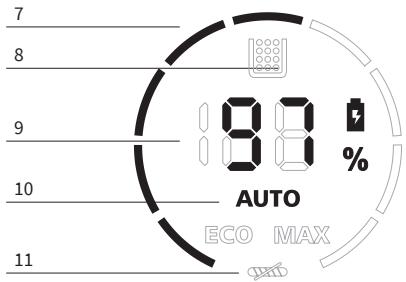
7 - Speed
8 - Collector filling indicator
9 - Battery percentage
10 - Mode used
11 - Brush lock indicator
12 - Touch button to switch modes
5
6
12

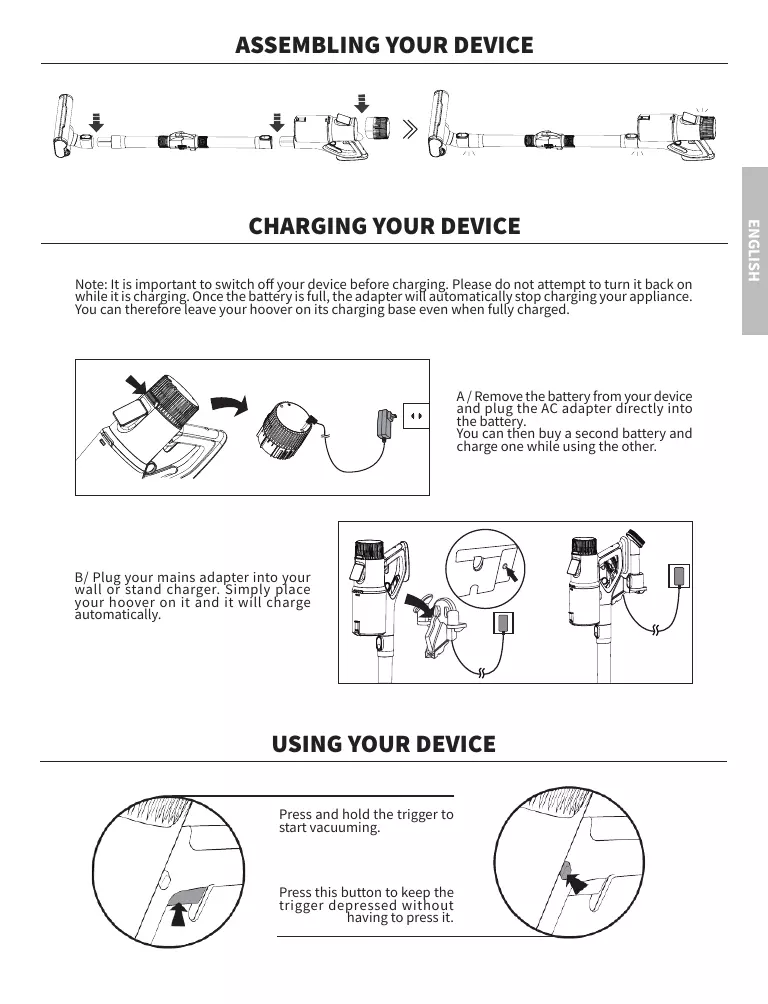
ASSEMBLING YOUR DEVICE

CHARGING YOUR DEVICE
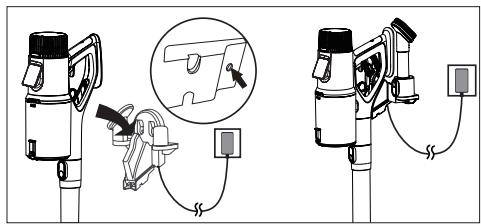
Note: It is important to switch off your device before charging. Please do not attempt to turn it back on while it is charging. Once the battery is full, the adapter will automatically stop charging your appliance. You can therefore leave your Hoover on its charging base even when fully charged.
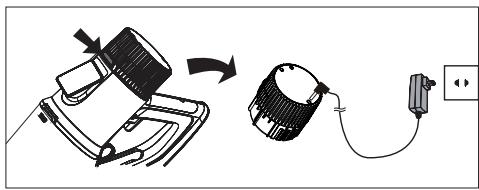
A/Remove the battery from your device and plug the AC adapter directly into the battery. You can then buy a second battery and charge one while using the other.
B/ Plug your mains adapter into your wall or stand charger. Simply place your hoover on it and it will charge automatically.
USING YOUR DEVICE
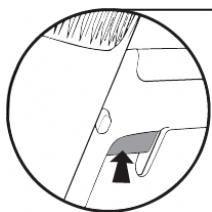
Press and hold the trigger to start vacuming.
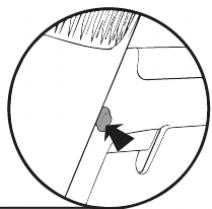
Press this button to keep the trigger depressed without having to press it.
Switch off the appliance before cleaning.
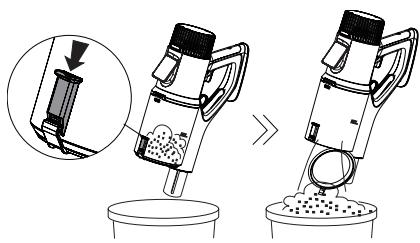
Press the button on the manifold to open and empty it.
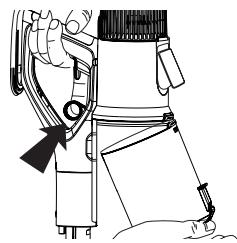
It is also possible to remove the the collector by pulling the ring to completely empty and clean it.
The dust collector can be run under clean water to clean it. Just be sure to let it dry for 24 hours and make sure it is completely that it is completely dry before reinstalling it.
CLEANING THE FILTER
Switch off the unit before cleaning. Remove the dust collector by pulling the ring.
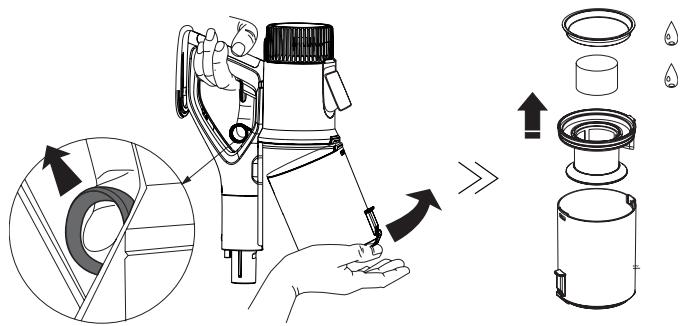
Clean the filter with clean water or a little neutral detergent by rubbing it lightly. Wait at least 24 hours until the filter is completely dry before reinstalling it in the collector.


Please note: the filters of this appliance cannot be machine washed. They cannot be dried with a hair dryer. We strongly advise against scrubbing the filters with a brush to avoid damaging them.
Switch off the appliance before cleaning. To remove the brush, refer to the diagram below:
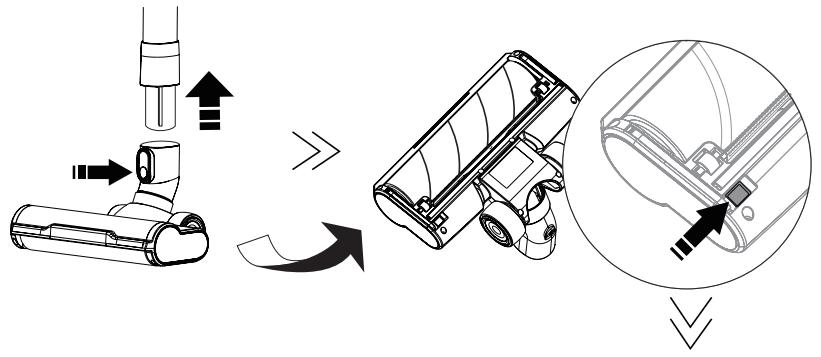
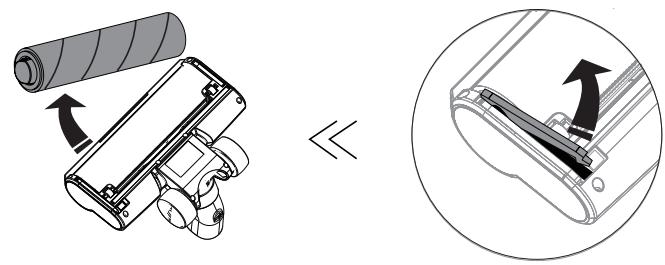
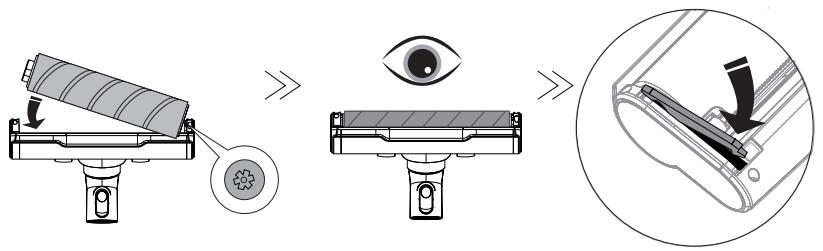
Once the brush has been removed from its block, use a sharp object to remove the bristles and coiled hair. The brush can be rinsed under clean water to clean it. Just be sure to let it dry for 24 hours for 24 hours and ensure that it is completely dry before reinstalling it as follows:
EZclean is a brand of E.ZICOM company
EZclean es unamarca de laEmpresa E.ZICOM
46/48, rue Gay Lussac
94430 Chennveières-sur-Mame
www.eziclean.com


Brand : DARTY
Model : R880
Category : Hand vacuum cleaner