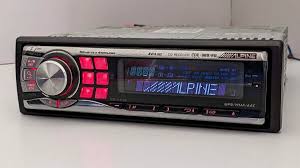
CDE-9881R - Car stereo ALPINE - Free user manual and instructions
Find the device manual for free CDE-9881R ALPINE in PDF.


| Product type | Car stereo |
| Brand | ALPINE |
| Model | CDE-9881R |
| Power supply | 14.4 V DC (11-16 V allowed) |
| Maximum output power | 50 W × 4 |
| Pre-out voltage | 2 V / 10 kΩ |
| Dimensions (W × H × D) | 170 × 50 × 161 mm |
| Weight | 1.6 kg |
| FM tuner | 87.5 - 108.0 MHz |
| MW tuner | 531 - 1 602 kHz |
| LW tuner | 153 - 281 kHz |
| Supported audio formats | CD audio, MP3, WMA, AAC |
| iPod compatibility | Yes (via optional KCE-422i cable) |
| RDS functions | AF, TA, EON, PI Seek |
| Equalizer | Bass, treble, balance, fader, subwoofer |
| Auxiliary input | Yes (AUX+ mode) |
| Detachable front panel | Yes |
| Installation dimensions | 50 mm (height) × 161 mm (depth) |
| Included accessories | Power cable, mounting sleeve, case, screws, instruction manual |
| Fuse | 10 A |
Frequently Asked Questions - CDE-9881R ALPINE
User questions about CDE-9881R ALPINE
0 question about this device. Answer the ones you know or ask your own.
Ask a new question about this device
Download the instructions for your Car stereo in PDF format for free! Find your manual CDE-9881R - ALPINE and take your electronic device back in hand. On this page are published all the documents necessary for the use of your device. CDE-9881R by ALPINE.
USER MANUAL CDE-9881R ALPINE
RDS MP3/WMA/AAC CD Receiver
CDE-9881R/CDE-9881RB
MP3

AAC


Made for iPod
- OWNER'S MANUAL
Please read before using this equipment.
777 Supertest Road, Toronto,
Ontario M3J 2M9, Canada
Phone 1-800-ALPINE-1 (1-800-257-4631)
ALPINE ELECTRONICS OF AUSTRALIA PTY. LTD.
161-165 Princes Highway, Hallam
Victoria 3803, Australia
Phone 03-8787-1200
ALPINE ELECTRONICS GmbH
Frankfurter Ring 117,
80807 München, Germany
Phone 089-32 42 640
ALPINE ELECTRONICS OF U.K. LTD.
Alpine House
Fletchamstead Highway, Coventry CV4 9TW, U.K.
Phone 0870-33 33 763
Installation et raccordements
Avertissement 25
Attention 25
Précautions 25
Installation 26
Raccordements 28
Mode d'emploi
AVENTISSEMENT

AVERTISSEMENT
Impossible de receivevoir les stations.
DIMENSIONS DU CHÂSSIS
Largeur 178 mm (7")
Installation et raccordements
Car Audio and Navigation Systems
GERÄTE-PASS
AUDIO SYSTEME
Filling in this Product Information Card is voluntary. If you fill in this card and send it to Alpine, your data will be tabulated into reference data for future Alpine product development. In addition, in the future you may receive information about new products or Survey Mail requesting additional opinions about Alpine products or services. If you agree to the above term, please sign your name in the indicated space and return the card. Any additional comments or inquiries may be sent to: Person in charge of Customer Service department Alpine Electronics (Europe) GmbH. Frankfurter Ring 117, 80807 München, Germany Phone: +49-(0)89-32 42640
Deutsch
Q1.PRODUCT PURCHASED
-
Cassette Player
-
CD Player
-
MD Player
4.DVD Player
-
CD Changer
-
Amplifier
-
Speaker
-
Subwoofer
-
Monitor Controller
-
Video Monitor
-
Navigation
-
Processor/Equalizer
-
CD/Video CD Changer
-
Other.
Q2. MODEL NUMBER
Q3. DATE OF PURCHASE:
Month: Year:
Q4. If navigation system, which monitor?
Alpine (Model No.)
Other (Brand Name)
Q5. STORE TYPE WHERE PURCHASED:
-
Car Audio Specialist
-
Audio/Video Store
-
Electronics/Appliance Store
-
Car Accessories Shop
-
Other.
Q6. Type of vehicle in which this unit is
installed:
Make: Model:
Purchased Model
Year:
Q7. How was this vehicle purchased?
-
Purchase
-
Lease
Q8. Purpose of buying this unit?
-
Addition
-
Replacement
↓
-
Previous brand replaced?
-
Factory installed
-
Alpine
-
Other (Brand Name).
Q9. Have you purchased Alpine products before?
-
First time
-
Two or More times
Q10. When you purchased this Alpine unit, did you compare it with other brand?
1.Yes (Brand Name)
- No.
Q11.GENDER
-
Male
-
Female
Q12. AGE
Q13. MARITAL STATUS
-
Single
-
Married
Q14.OCCUPATION
-
Company Owner/Self-employed/Freelance
-
Manager
-
Company Employee
-
Civil Servant
-
Educator
-
Student
-
Other
Q15 Comments
Q1. gekauftes Gerät
-
Addition
-
Replacement

Brand : ALPINE
Model : CDE-9881R
Category : Car stereo