USER MANUAL SKW208 ONKYO
Thank you for purchasing an Onkyo powered subwoofer. Please read this manual thoroughly before using the unit
Following the instructions in this manual will enable you to obtain optimum performance and listening enjoyment from your new powered subwoofer.
Please retain this manual for future reference.
Bedienungsanleitung
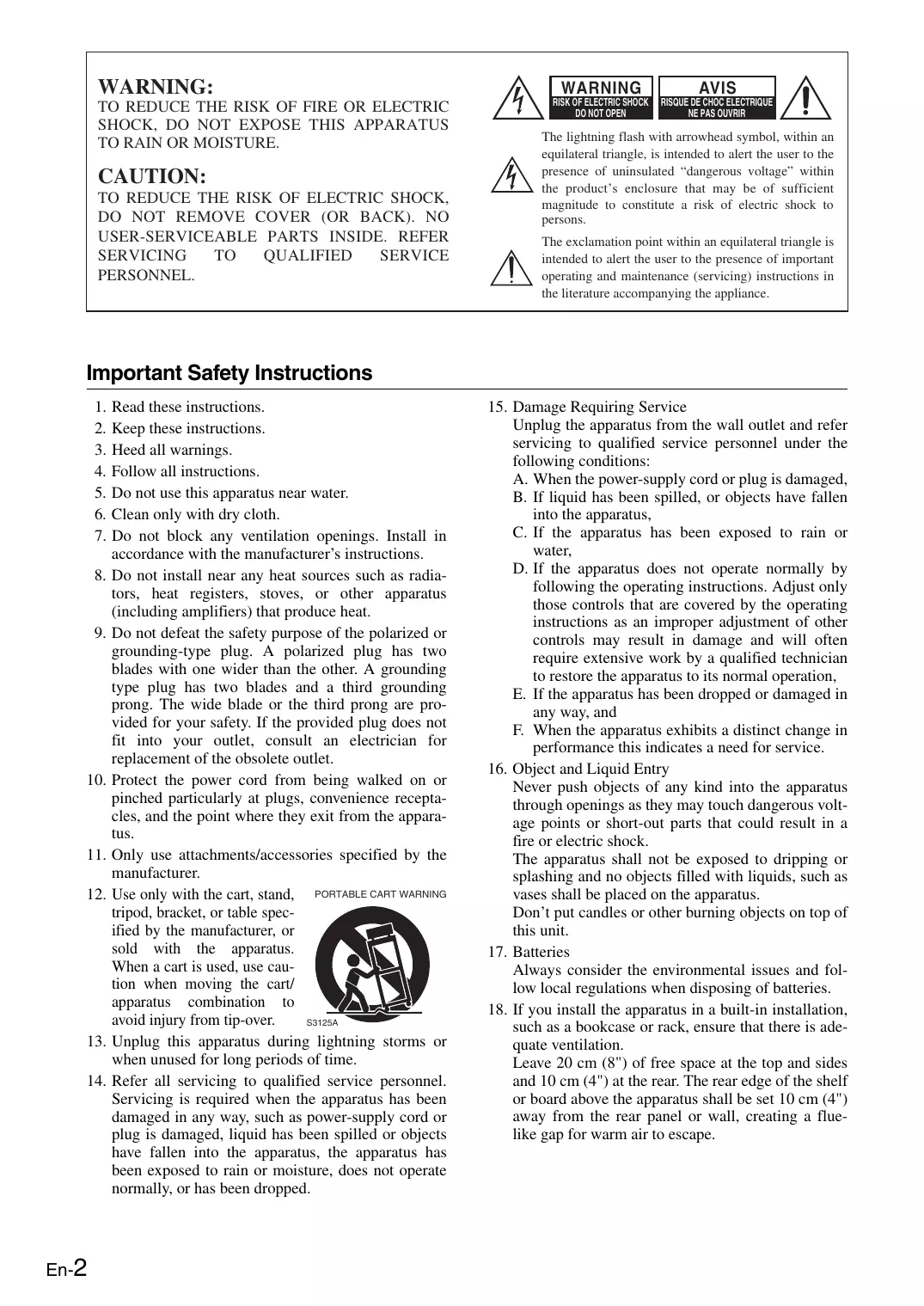
TO REDUCE THE RISK OF FIRE OR ELECTRIC SHOCK, DO NOT EXPOSE THIS APPARATUS TO RAIN OR MOISTURE.
CAUTION:
TO REDUCE THE RISK OF ELECTRIC SHOCK, DO NOT REMOVE COVER (OR BACK). NO USER-SERVICEABLE PARTS INSIDE. REFER SERVICING TO QUALIFIED SERVICE PERSONNEL.

WARNING
RISK OF ELECTRICS
DO NOT OPEN
AVIS
RISQUE DE CHOC ELECTRIQUE
NE PAS OUVRIR


The lightning flash with arrowhead symbol, within an equilateral triangle, is intended to alert the user to the presence of uninsulated "dangerous voltage" within the product's enclosure that may be of sufficient magnitude to constitute a risk of electric shock to persons.

The exclamation point within an equilateral triangle is intended to alert the user to the presence of important operating and maintenance (servicing) instructions in the literature accompanying the appliance.
Important Safety Instructions
-
Read these instructions.
-
Keep these instructions.
-
Heed all warnings.
-
Follow all instructions.
-
Do not use this apparatus near water.
-
Clean only with dry cloth.
-
Do not block any ventilation openings. Install in accordance with the manufacturer's instructions.
-
Do not install near any heat sources such as radiators, heat registers, stoves, or other apparatus (including amplifiers) that produce heat.
-
Do not defeat the safety purpose of the polarized or grounding-type plug. A polarized plug has two blades with one wider than the other. A grounding type plug has two blades and a third grounding prong. The wide blade or the third prong are provided for your safety. If the provided plug does not fit into your outlet, consult an electrician for replacement of the obsolete outlet.
-
Protect the power cord from being walked on or pinched particularly at plugs, convenience receptacles, and the point where they exit from the apparatus.
-
Only use attachments/accessories specified by the manufacturer.
-
Use only with the cart, stand, tripod, bracket, or table specified by the manufacturer, or sold with the apparatus. When a cart is used, use caution when moving the cart/ apparatus combination to avoid injury from tip-over.

PORTABLE CART WARNING
S3125A
- Unplug this apparatus during lightning storms or when unused for long periods of time.
-
Refer all servicing to qualified service personnel. Servicing is required when the apparatus has been damaged in any way, such as power-supply cord or plug is damaged, liquid has been spilled or objects have fallen into the apparatus, the apparatus has been exposed to rain or moisture, does not operate normally, or has been dropped.
-
Damage Requiring Service
Unplug the apparatus from the wall outlet and refer servicing to qualified service personnel under the following conditions:
A. When the power-supply cord or plug is damaged,
B. If liquid has been spilled, or objects have fallen into the apparatus,
C. If the apparatus has been exposed to rain or water,
D. If the apparatus does not operate normally by following the operating instructions. Adjust only those controls that are covered by the operating instructions as an improper adjustment of other controls may result in damage and will often require extensive work by a qualified technician to restore the apparatus to its normal operation,
E. If the apparatus has been dropped or damaged in any way, and
F. When the apparatus exhibits a distinct change in performance this indicates a need for service.
- Object and Liquid Entry
Never push objects of any kind into the apparatus through openings as they may touch dangerous voltage points or short-out parts that could result in a fire or electric shock.
The apparatus shall not be exposed to dripping or splashing and no objects filled with liquids, such as vases shall be placed on the apparatus.
Don't put candles or other burning objects on top of this unit.
- Batteries
Always consider the environmental issues and follow local regulations when disposing of batteries.
- If you install the apparatus in a built-in installation, such as a bookcase or rack, ensure that there is adequate ventilation.
Leave 20cm (8^ ) of free space at the top and sides and 10cm (4^ ) at the rear. The rear edge of the shelf or board above the apparatus shall be set 10cm (4^ ) away from the rear panel or wall, creating a flue-like gap for warm air to escape.
- Recording Copyright—Unless it's for personal use only, recording copyrighted material is illegal without the permission of the copyright holder.
- AC Fuse—The AC fuse inside the unit is not user-serviceable. If you cannot turn on the unit, contact your Onkyo dealer.
-
Care—Occasionally you should dust the unit all over with a soft cloth. For stubborn stains, use a soft cloth dampened with a weak solution of mild detergent and water. Dry the unit immediately afterwards with a clean cloth. Don't use abrasive cloths, thinners, alcohol, or other chemical solvents, because they may damage the finish or remove the panel lettering.
-
Power
WARNING
BEFORE PLUGGING IN THE UNIT FOR THE FIRST TIME, READ THE FOLLOWING SECTION CAREFULLY.
AC outlet voltages vary from country to country. Make sure that the voltage in your area meets the voltage requirements printed on the unit's rear panel (e.g., AC 230 V, 50 Hz or AC 120 V, 60 Hz).
The power cord plug is used to disconnect this unit from the AC power source. Make sure that the plug is readily operable (easily accessible) at all times.
For British models
Replacement and mounting of an AC plug on the power supply cord of this unit should be performed only by qualified service personnel.
IMPORTANT
The wires in the mains lead are coloured in accordance with the following code:
Blue: Neutral
Brown: Live
As the colours of the wires in the mains lead of this apparatus may not correspond with the coloured markings identifying the terminals in your plug, proceed as follows:
The wire which is coloured blue must be connected to the terminal which is marked with the letter N or coloured black.
The wire which is coloured brown must be connected to the terminal which is marked with the letter L or coloured red.
IMPORTANT
The plug is fitted with an appropriate fuse. If the fuse needs to be replaced, the replacement fuse must approved by ASTA or BSI to BS1362 and have the same ampere rating as that indicated on the plug. Check for the ASTA mark or the BSI mark on the body of the fuse.
If the power cord's plug is not suitable for your socket outlets, cut it off and fit a suitable plug. Fit a suitable fuse in the plug.
For European Models
Declaration of Conformity
We, ONKYO EUROPE ELECTRONICS GmbH LIEGNITZERSTRASSE 6, 82194 GROEBENZELL, GERMANY

declare in own responsibility, that the ONKYO product described in this instruction manual is in compliance with the corresponding technical standards such as EN60065, EN55013, EN55020 and EN61000-3-2, -3-3.
GROEBENZELL, GERMANY
ONKYO EUROPE ELECTRONICS GmbH
Placement
- The subwoofer cabinet is made out of wood and is therefore sensitive to extreme temperatures and humidity, do not put it in locations subject to direct sunlight or in humid places, such as near an air conditioner, humidifier, bathroom, or kitchen.
- Do not put water or other liquids close to the subwoofer. If liquid is spilled over the subwoofer, the drive units may be damaged.
- Subwoofer should only be placed on sturdy, flat surfaces that are free from vibration. Putting it on uneven or unstable surfaces, where it may fall and cause damage, will affect the sound quality.
- Subwoofer is designed to be used in the upright vertical position only. Do not use it in the horizontal or tilted position.
- If the subwoofer is used near a turntable, CD player or DVD player, howling or slipping of sound may occur. To prevent this, move it away from the turntable, CD player or DVD player, otherwise lower the unit's output level.
Supplied Accessories
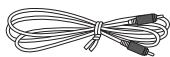
Pin connector cable 10 ft. (3m)
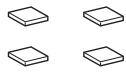
4 floor pads for the subwoofer
- In catalogs and on packaging, the letter added to the end of the product name indicates the color of the SKW-208. Specifications and operation are the same regardless of color.
Using the Floor Pads for Subwoofer
If the subwoofer is placed on a hard floor (wood, vinyl, tile, etc.) and playback is very loud, the subwoofer's feet may damage the flooring.
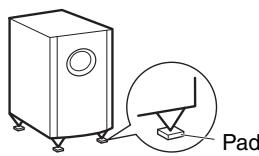
To prevent this, place the supplied pads underneath the subwoofer's feet. The pads also provide a stable base for the subwoofer.
FRONT VIEW
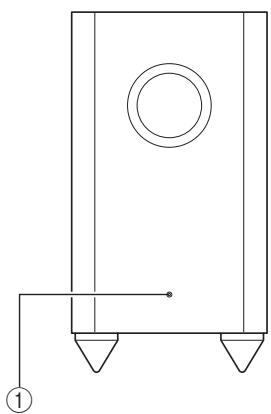
① STANDBY/ON indicator
Red: Subwoofer in standby mode
Blue: Subwoofer on
The Auto Standby function will automatically set the SKW-208 to Standby mode when there is no input signal, or when the input signal is below a certain level.
Note:
If the Auto Standby function sets the SKW-208 to Standby mode even when an input signal is present, the input signal level is too low. In this case, increase the subwoofer output level on the amplifier or AV receiver connected to the SKW-208.
REAR PANEL
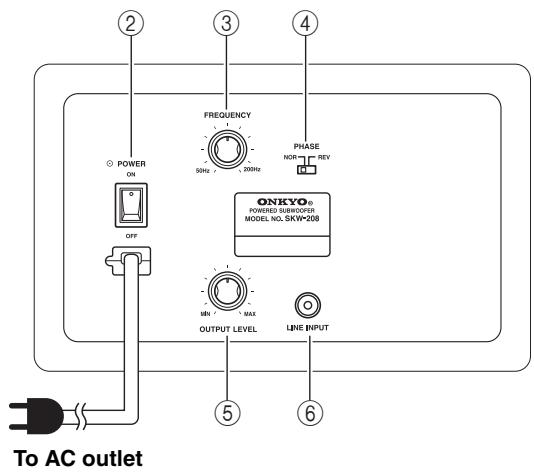
② POWER switch
Press this switch to the ON position to turn on the power. Press it to the OFF position to turn off the power.
③ FREQUENCY knob
Use this knob to select the high-frequency range at which to cut off the signal to the subwoofer. You can select any frequency between 50Hz and 200Hz , depending on the characteristics of the speaker system.
(4) PHASE switch
Use this switch to reverse the phase of the SKW-208. Normally, set the switch to the "NOR" position. Depending on the connected speakers or the installation environment of the SKW-208 however, the "REV" position may result in better sound. Select the switch position that produces a louder bass sound.
⑤ OUTPUT LEVEL knob
Use this knob to adjust the volume of the subwoofer.
Connect this jack to the SUBWOOFER PREOUT jacks on the amplifier etc.
Connections
For safety considerations, turn off all other system components before you connect or disconnect any component and plug the power cable for the last.
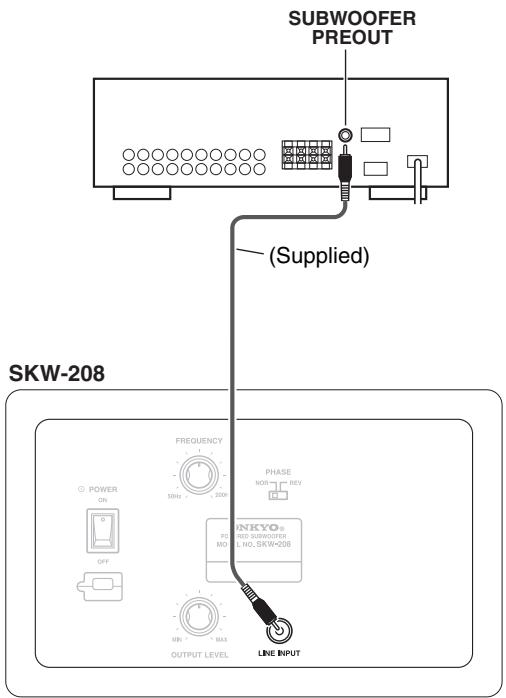
Using the SKW-208 with an AV amplifier
When using the SKW-208 in conjunction with an AV amplifier or receiver that features surround capability, connect the SKW-208 LINE INPUT to SUBWOOFER PREOUT jack using the supplied pin connector cable.
Subwoofer effects
Adding a subwoofer to your speaker system expands the bandwidth of the bass range. However, if the subwoofer's reproduction bandwidth or sound output level is improperly adjusted, the overall performance may decrease, as shown in the graphs below.
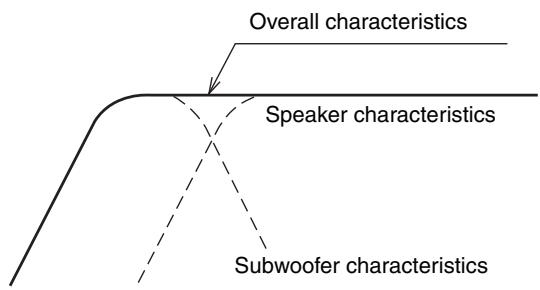
When the subwoofer's reproduction bandwidth is correct
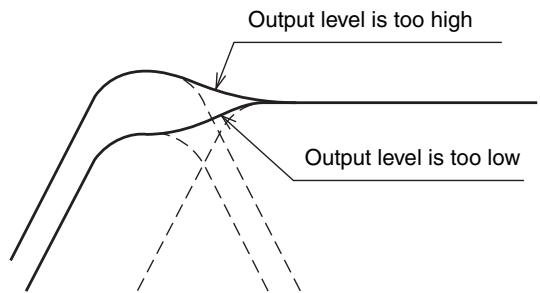
When the subwoofer's output level is incorrect
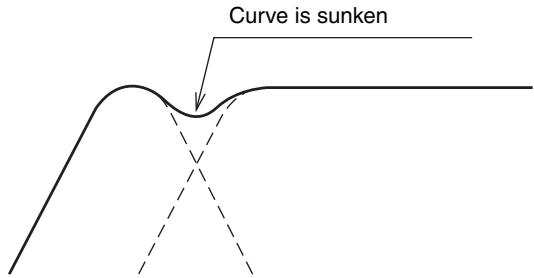
When the subwoofer's reproduction bandwidth is far from the speaker's bandwidth
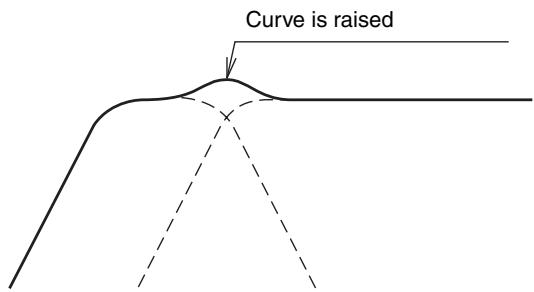
When the subwoofer's reproduction bandwidth is close to the speaker's bandwidth
Crossover frequency and output level
- Adjust the SKW-208 output level and crossover frequency to suit your listening room and connected speakers.
- Be aware that you might set the subwoofer to a high output level because superbass-range sound is less audible than other sound ranges. To obtain well-balanced frequency characteristics, set the output level to a slightly lower level than seems optimal. (This will also prevent the input of signals that are too strong.)
Note:
Be careful not to allow the input of excessive power. Input levels that greatly exceed normal situations can damage the SKW-208. Also note that switching operations at the amplifier may generate excessive noise that may result in damage. When using switches at the amplifier, first lower the volume to prevent accidental damage.
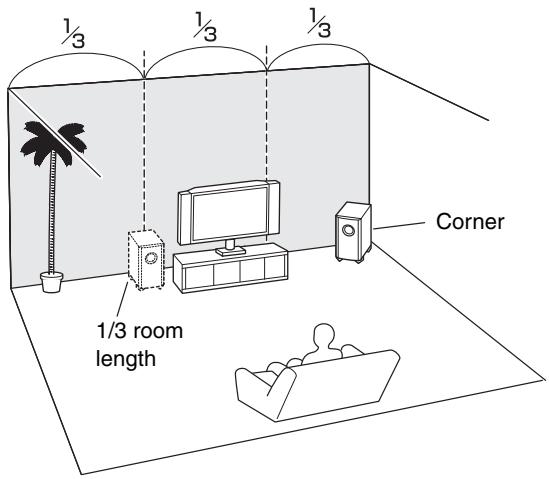
Placement
The placement of the SKW-208 can greatly affect the sound that is produced. In general, a good bass sound can be obtained by installing the subwoofer in a front corner, or at one-third the width of the wall, as shown.
Troubleshooting
The unit does not turn on
- The power plug is not fully inserted.
Insert the power plug fully into the power outlet.
No sound is output
- The OUTPUT LEVEL knob is set to the MIN level.
Set the OUTPUT LEVEL knob properly.
- Pin connector cable is not properly connected to the LINE INPUT jack.
- The speaker setting at the amplifier (or receiver) is incorrect.
Check the settings at the amplifier (or receiver).
- The input signal is so small that the unit entered Standby mode.
Slightly increase the output level at the amplifier (or receiver).
- If the STANDBY/ON indicator lights up (both red and blue LEDs) several seconds or minutes after the sound output stopped, this means that the amp protection circuit has been activated. In this case, set the OUTPUT LEVEL knob to the center position, and disconnect the power cord from the AC outlet. Wait at least 10 seconds, and then reconnect the power cord. If that doesn't solve the issue, contact your Onkyo dealer.
Low sound output
- The sound source might not include a superbass range.
Play a sound source that includes a superbass range.
Hum noise
Pin connector plug is not inserted completely.
Fully insert the pin connector plug.
- External leakage flux (induction noise by TV, etc.) occurs.
Relocate the SKW-208 away from the noise source and re-connect.
Specifications
| Type | Bass-reflex with built-in power amplifier |
| Input sensitivity/impedance | 550 mV / 20 kΩ |
| Frequency response | 25–200 Hz |
| Rated output power | 120 watts minimum continu-
uos power, 4 ohms, driven at
100 Hz with a maximum total
harmonic distortion of 1 % |
| Cabinet capacity | 37 L (1.3 cubic feet) |
| Drivers unit | 25 cm (10 inch) cone woofer |
| Power supply | AC 230 V, 50 Hz |
| Power consumption | 150 W |
| Dimensions (W × H × D) | 275 × 507 × 411 mm
(10-13/16" × 19-15/16" ×
16-3/16") |
| Weight | 11.6 kg (25.6 lbs.) |
| Accessory | Pin connector cable (1 pc.)
Instruction manual (this man-
ual)
Floor pad (4 pcs.) |
| Others | Auto standby |
Specifications and appearance are subject to change without prior notice.