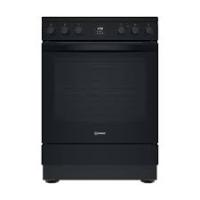
IS67V5CCB - Electric stove INDESIT - Free user manual and instructions
Find the device manual for free IS67V5CCB INDESIT in PDF.


| Brand | INDESIT |
| Model | IS67V5CCB |
| Product type | Electric cooker with induction hob |
| Power supply | 230-240V ~ 50 Hz, 32A |
| Maximum hob power | 7.2 kW (adjustable: 2.5-7.2 kW) |
| Number of cooking zones | 4 induction zones |
| Hob functions | Melt, Keep warm, Slow cooking, Boil, Booster (P) |
| Oven type | Main oven with fan + Top oven (grill) |
| Oven temperature | 80°C - 250°C |
| Oven functions | Fan oven, Grill, Reduced grill, Bottom heat, Natural convection |
| Programmable timer | Yes, with delayed programming |
| Control panel lock | Yes (My menu button 3 seconds) |
| Child safety | Yes (key lock) |
| Pan detection | Yes, with display if absent |
| Residual heat indicator | Yes (display "H") |
| Automatic shut-off | Yes (in case of overheating) |
| Anti-tilt | Retaining chain included |
| Oven light | 40W/230V, type G9 |
| Cleaning | Catalytic panels + manual cleaning |
| Hob | Ceramic glass |
| Included accessories | Metal grid, drip tray, baking sheet, removable handle |
Frequently Asked Questions - IS67V5CCB INDESIT
User questions about IS67V5CCB INDESIT
0 question about this device. Answer the ones you know or ask your own.
Ask a new question about this device
Download the instructions for your Electric stove in PDF format for free! Find your manual IS67V5CCB - INDESIT and take your electronic device back in hand. On this page are published all the documents necessary for the use of your device. IS67V5CCB by INDESIT.
USER MANUAL IS67V5CCB INDESIT
Health and Safety guide
Quick guide
Installation guide
EN SAFETY INSTRUCTIONS
IMPORTANT TO BE READ AND OBSERVED
Before using the appliance, read these safety instructions. Keep them nearby for future reference.
These instructions and the appliance itself provide important safety warnings, to be observed at all times. The manufacturer declines any liability for failure to observe these safety instructions, for inappropriate use of the appliance or incorrect setting of controls.
WARNING: The appliance and its accessible parts become hot during use. Care shoul be taken to avoid touching heating elements. Children less than 8 years of age must be kept away unless continuously supervised.
WARNING: If the hob surface is cracked, do not use the appliance – risk of electric shock.
WARNING: Danger of fire: Do not store items on the cooking surfaces.
CAUTION : The cooking process has to be supervised. A short cooking process has to be supervised continuously.
WARNING: Leaving the hob unattended when cooking with fat or oil can be dangerous – risk of fire. NEVER try to extinguish a fire with water, but switch off the appliance and then cover the flames e.g. with a lid or a fire blanket.
Do not use the hob as a work surface or support. Keep clothes or other flammable materials away from the appliance, unitl all the components have cooled down completely - risk of fire.
Very young children (0-3 years) should be kept away from the appliance. Young children (3-8 years) should be kept away from the appliance unless continuously supervised. Children from 8 years old and above and persons with reduced physical, sensory or mental capabilities or lack of experience and knowledge can use this appliance only if they are supervised or have been given instructions on safe use and understand the hazards involved. Children must not play with the appliance. Cleaning and user maintenance must not be carried out by children without supervision.
WARNING: The appliance and its accessible parts become hot during use. Care should be taken to avoid touching heating elements. Children less than 8 years of age must be kept away unless continuously supervised
Never leave the appliance unattended during food drying. If the appliance is suitable for probe usage, only use a temperature probe recommended for this oven - risk of fire.
Keep clothes or other flammable materials away from the appliance, until all the components have cooled down completely - risk of fire. Always
be vigilant when cooking foods rich in fat, oil or when adding alcoholic beverages - risk of fire. Use oven gloves to remove pans and accessories. At the end of cooking, open the door with caution, allowing hot air or steam to escape gradually before accessing the cavity - risk of burns. Do not obstruct hot air vents at the front of the oven - risk of fire.
Exercise caution when the oven door is in the open or down position, to avoid hitting the door.
PERMITTED USE
CAUTION: The appliance is not intended to be operated by means of an external switching device, such as a timer, or separate remote controlled system.
This appliance is intended to be used in household and similar applications such as: staff kitchen areas in shops, offices and other working environments; farm houses; by clients in hotels, motels, bed & breakfast and other residential environments.
No other use is permitted (e.g. heating rooms).
This appliance is not for professional use. Do not use the appliance outdoors.
Do not store explosive or flammable substances (e.g. gasoline or aerosol cans) inside or near the appliance - risk of fire.
INSTALLATION
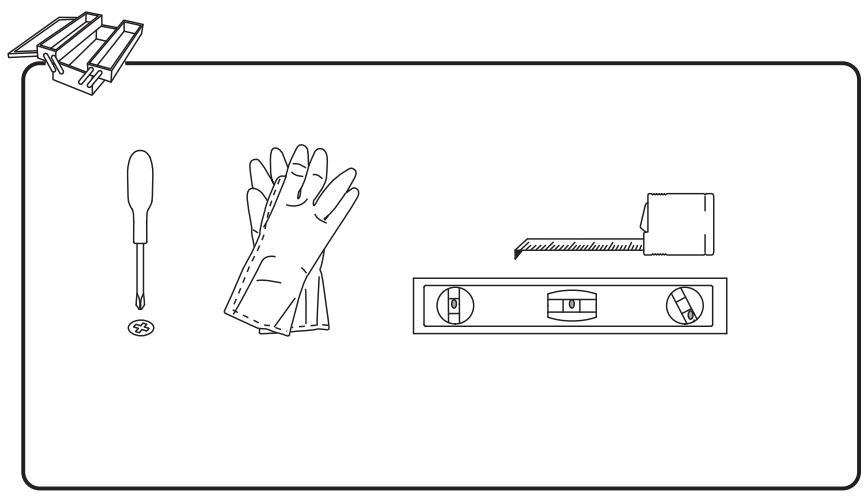
The appliance must be handled and installed by two or more persons - risk of injury. Use protective gloves to unpack and install - risk of cuts.
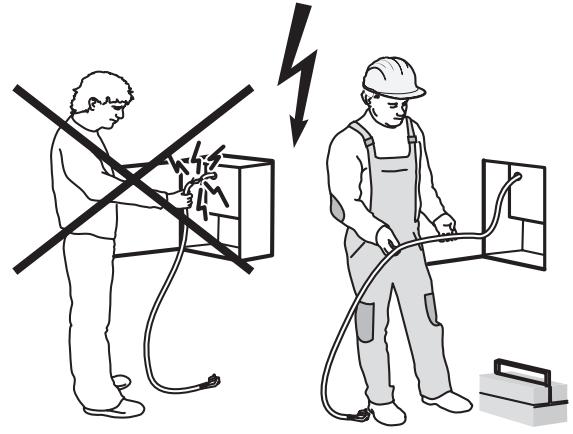
Installation, including water supply (if any), electrical connections and repairs must be carried out by a qualified technician. Do not repair or replace any part of the appliance unless specifically stated in the user manual. Keep children away from the installation site. After unpacking the appliance, make sure that it has not been damaged during transport. In the event of problems, contact the dealer or your nearest Aftersales Service. Once installed, packaging waste (plastic, styrofoam parts etc.) must be stored out of reach of children - risk of suffocation. The appliance must be disconnected from the power supply before any installation operation - risk of electric shock. During installation, make sure the appliance does not damage the power cable - risk of fire or electric shock. Only activate the appliance when the installation has been completed.
Do not remove the appliance from its polystyrene foam base until the time of installation.
Do not install the appliance behind a decorative door - risk of fire.
if the range is placed on a base, it must be leveled and fixed to the wall by the retention chain provided, to prevent the appliance slipping from the base.

WARNING: In order to prevent the appliance from tipping, the retention chain provided must be installed. Refer to the instructions for installation.
ELECTRICALWARNINGS
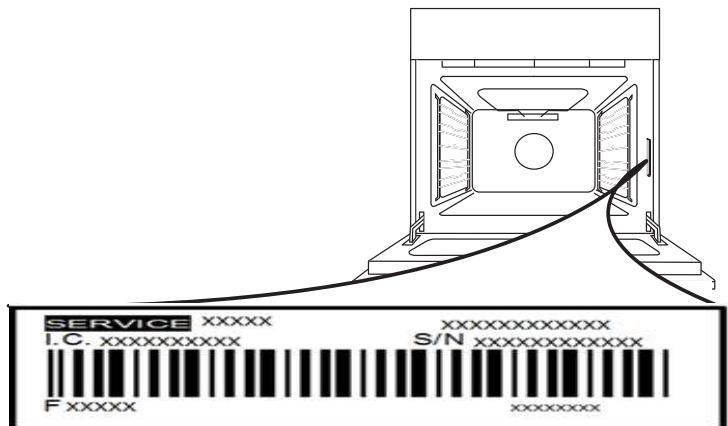
The rating plate is on the front edge of the oven (visible when the door is open).
It must be possible to disconnect the appliance from the power supply by unplugging it if plug is accessible, or by a multi-pole switch installed upstream of the socket in accordance with the wiring rules and the appliance must be earthed in conformity with national electrical safety standards.
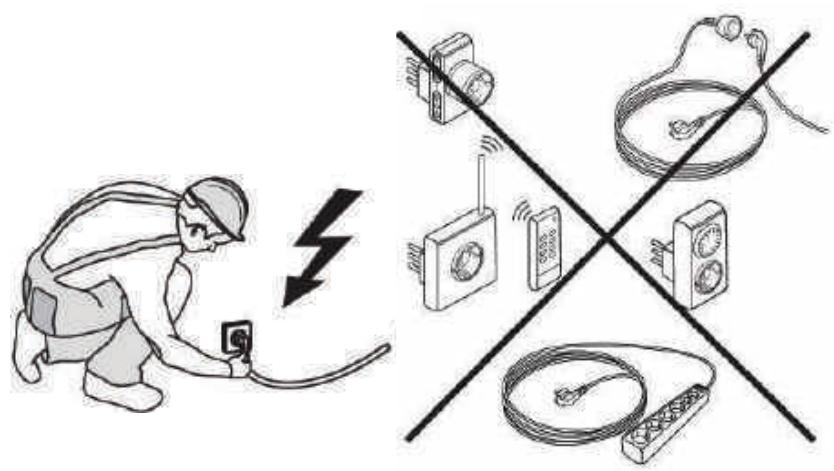
Do not use extension leads, multiple sockets or adapters. The electrical components must not be accessible to the user after installation. Do not use the appliance when you are wet or barefoot. Do not operate this appliance if it has a damaged power cable or plug, if it is not working properly, or if it has been damaged or dropped.
If the supply cord is damaged, it must be replaced with an identical one by the manufacturer, its service agent or similarly qualified persons in order to avoid a hazard - risk of electric shock.
If the power cable needs to be replaced, contact an authorized service center.
WARNING: Ensure that the appliance is switched off before replacing the lamp to avoid the possibility of electric shock.
CLEANING AND MAINTENANCE
WARNING: Ensure that the appliance is switched off and disconnected from the power supply before performing any maintenance operation; never use steam cleaning equipment - risk of electric shock.
Do not use harsh abrasive cleaners or metal scrapers to clean the door glass since they can scratch the surface, which may result in shattering of the glass.
Do not use abrasive or corrosive products, chlorine-based cleaners or pan scourers.
Make sure the appliance has cooled down before cleaning or performing maintenance. - risk of burns.
WARNING: Switch off the appliance before replacing the lamp - risk of electric shock.
DISPOSAL OF PACKAGING MATERIALS
The packaging material is 100% recyclable and is marked with the recycle symbol . The various parts of the packaging must therefore be disposed of responsibly and in full compliance with local authority regulations governing waste disposal.
DISPOSAL OF HOUSEHOLD APPLIANCES
This appliance is manufactured with recyclable or reusable materials. Dispos of it in accordance with local waste disposal regulations.
For further information on the treatment, recovery and recycling of household electrical appliances, contact your local authority, the collection service for household waste or the store where you purchased the appliance. This appliance is marked in compliance with European Directive 2012/19/EU, Waste Electrical and Electronic Equipment (WEEE) and with the Waste Electrical and Electronic Equipment regulations 2013 (as amended).
By ensuring this product is disposed of correctly, you will help prevent negative consequences for the environment and human health. The symbol on the product or on the accompanying documentation indicates that it should not be treated as domestic waste but must be taken to an appropriate collection centre for the recycling of electrical and electronic equipment.
ENERGY SAVING TIPS
Only preheat the oven if specified in the cooking table or your recipe. Use dark lacquered or enamelled baking trays as they absorb heat better.
DECLARATIONS OF CONFORMITY
This appliance meets: Ecodesign requirements of European Regulation 66/2014; Energy Labelling Regulation 65/2014; Ecodesign for Energy-Related Products and Energy Information (Amendment) (EU Exit) Regulations 2019, in compliance with the European standard EN 60350-1. This appliance meets Ecodesign requirements of European Regulation 66/2014 and The Ecodesign for Energy-Related Products and Energy Information (Amendment) (EU Exit) Regulations 2019 in compliance with the European standard EN 60350-2.
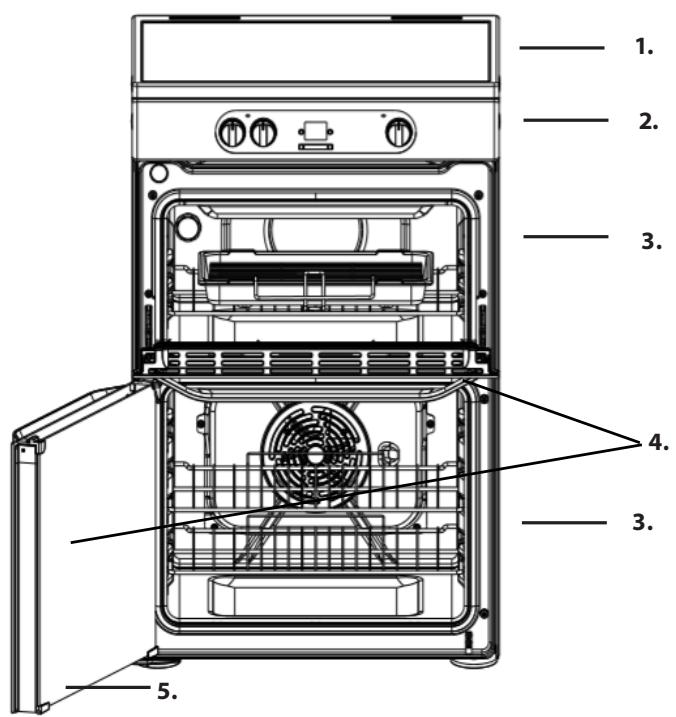
CONTROL PANEL HOB
- Induction hob
- Control panel
- Runners for accessories (the level is indicated on the wall of the cooking compartment)
- Removable Inner Door Glass
- Main oven door
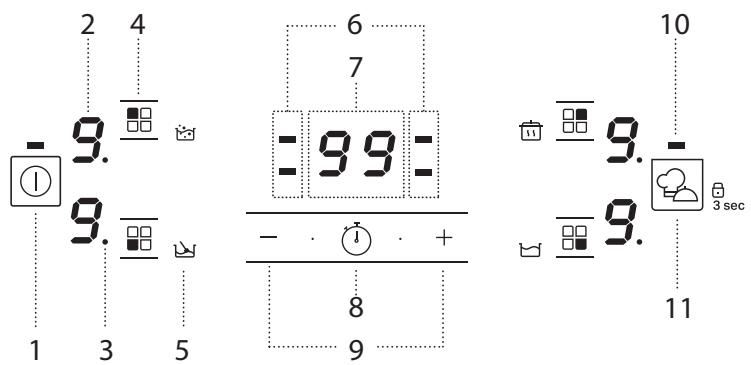
- On/Off button
- Cooking level selected
- Zone selection indicator
-
Cooking zone selection button
-
Special function icon
- Timer indicators active for the selected zone
- Cooking time indicator
-
Activate timer button
-
Power and cooking time adjustment buttons
- Indicator light - function active
- My menu button/Key lock button - 3 seconds
CONTROL PANEL
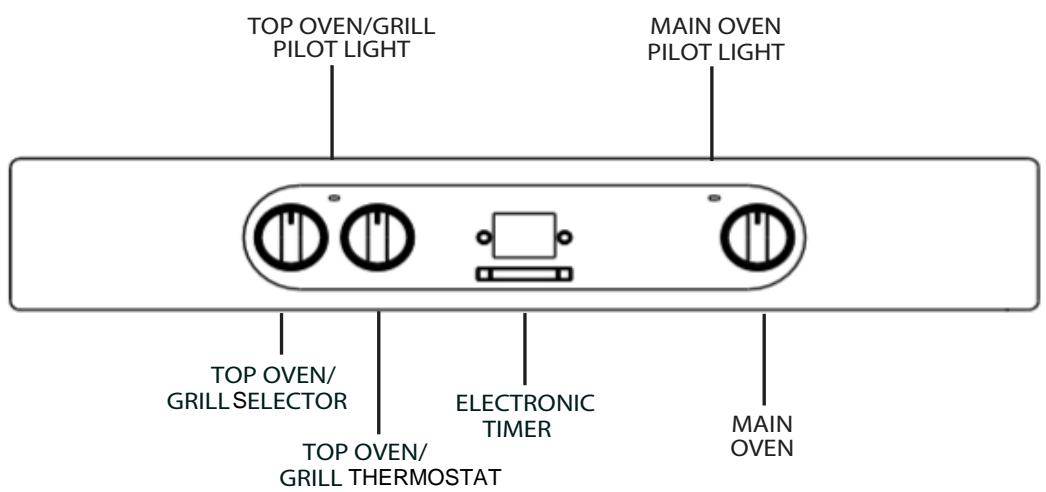
This appliance must be earthed. Mains Connection
Your cooker should have been checked to ensure that the voltage corresponds with your supply voltage, this is stated on the rating plate, which is situated on the outer rear panel.
The model number and serial number are located on the front of the cooker, as shown on the Feature's page.
The cooker must be connected by a competent person such as one who is a, NICEIC registered contractor to a suitable double-pole control unit with a minimum rating of 32A and a minimum contact clearance of 3mm (applicable to newer properties, older properties where a 30A double pole control unit and a minimum contact clearance of 3mm is acceptable).
The double pole control unit should be fitted adjacent to the cooker, in accordance with IEE regulations. The control unit must be within 2 meters of but not directly above the appliance and should be easily accessible in the event of an emergency. The power supply cable should conform to B.S.6004 with a conductor size of 6mm^2 , minimum.
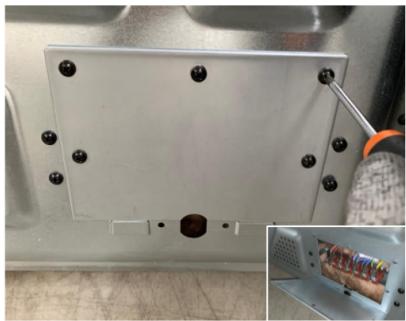
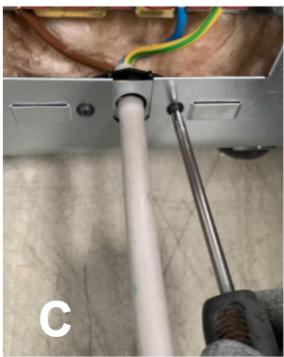
Access to the mains terminals is gained by removing the rear access cover. The mains cable must pass through the cable clamp adjacent to the terminal block.
Sufficient cable should be used to allow the cooker to be pulled out for servicing.
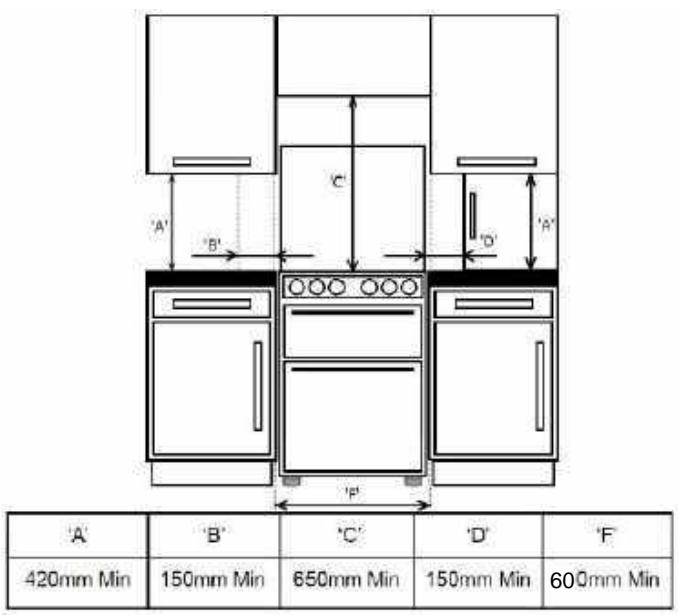
Ensure that the mains cable is routed away from any brackets affixed to the rear panel and is not trapped to the rear wall when pushing the cooker into position between cabinets.
This operation must be performed by a qualified technician.
Before moving your cooker check that it is cool, and switch off at the cooker control unit. Movement of your cooker is most easily achieved by lifting the front as follows:
Open the grill door sufficiently to allow a comfortable grip on the underside front edge of the oven roof, avoiding any grill elements.
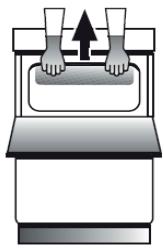
Take care in moving the cooker as it is heavy. Take care to ensure that any floor covering is not damaged.
Splashplate optional, apply to Parts Department (see Back Cover for contact number.)
The following instructions should be read by a qualified technician to ensure that the appliance is installed, regulated and technically serviced correctly in compliance with current regulations.
FIRST TIME USE DAILY USE
MAIN OVEN
To heat the oven turn the knob clockwise, selecting the require temperature between 80^ (176°F) and 250^ (482°F) as recommended in the temperature chart. The pilot light will immediately come on and remain on until the oven reaches the required temperature. This light will then automatically go off and on during cooking as the oven thermostat maintains the correct temperature.
Since a circulaire fan oven heats up more quickly, and generally cooks food at a lower temperature than a conventional oven, pre-heating is often unnecessary. However, foods such as bread, scones, Yorkshire pudding, do benefit from being placed in a pre-heated oven.
The 'oven temperature charts' are a guide only, giving approximate cooking temperatures and times. To suit personal taste and requirements, it may be necessary to increase or decrease temperatures by 10^ .
Unless otherwise indicated in the charts food should be placed in a cold oven, i.e. without pre-heating. If food is placed in an already hot oven, the suggested cooking time should be reduced, depending on the type and quantity of food being cooked.
Oven positions
Since the distribution of heat in the circulaire fan oven is very even, most foods will cook satisfactorily on any shelf position, but the shelves should be evenly spaced.
The top oven rod shelf can be used in the main oven when cooking large quantities of food.
Food or utensils should Never be placed directly an the floor of the oven for cooking.
Never use more than 4 shelves in the oven as air circulation will be seriously restricted. To ensure oven circulation do not use meat pans larger than 390 × 300 ~mm ( 15" × 12") and baking trays no larger than 330 255 ~mm ( 13" × 10") , these should be positioned centrally on the oven shelf.
Food should not be placed directly on the floor of the oven. To avoid unnecessary cleaning, rod shelves which are not in use, should be removed from the oven.
Temperature and time
When all four shelves are used to cook large quantities of food for home freezing or parties, it be necessary to increase the cooking times given in the temperature charts by a few minutes, to allow f loss of heat due to extra time taken to load the oven, and the larger mass of food. Baking trays should ha equal gap at either side of the oven.
TOP OVEN
The top oven should be used to cook small quantities of food. The oven is designed so that the grill element operates at a reduced heat output, this is combined with a heating element situated underneath the floor of the oven.
To ensure even cooking of the food it is important that cooking utensils are positioned correctly on the oven shelf so that the element is directly above.
There are two cooking positions, the shelf placed on runner 1 or 2 (from the base), do not use shelves upside down.
Food/utensils must not be placed directly on the oven floor.
There should always be at least 25mm (1in) between the top of the food and the grill element.
Warning: Items stored in top oven will get hot when main oven is in use.
Operation
While the top oven is heating up, the pilot light will come on and remain on until the oven reaches the required temperature. The pilot light will automatically go on and off during cooking as the thermostat maintains the correct temperature.
Do not use the grill pan as a meat pan in the top oven as air circulation will be seriously restricted.
Top oven as a warming compartment for plates Place the plates/dishes on the shelf, positioned on runner 1, turn top oven control to 100^ C for 10-15 minutes. Never use grill control.
Technical Characteristics Voltage and Frequency: 230-240V 50 Hz
When the cooker is first used an odour may be emitted, this will cease after a period of use. When first using the cooker ensure that the room is well ventilated (e.g. open a window or use an extractor fan) and that persons who may be sensitive to the odour avoid any fumes. It is suggested that any pets be removed from the room until the smell has ceased. This odour is due to temporary finish on oven liners and elements and also any moisture absorbed by the insulation.
POTS AND PANS
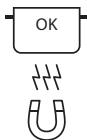
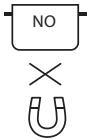
Only use pots and pans made from ferromagnetic material which are suitable for use with induction hobs:
- enamelled steel
cast iron - special pots and pans in stainless steel, suitable for induction cooking
To determine whether a pot is suitable, check for the symbol (usually stamped on the bottom). A magnet may be used to check whether pots are magnetic.
The quality and the structure of the pot base can alter cooking performance. Some indications for the diameter of the base do not correspond to the actual diameter of the ferromagnetic surface.
Some pots and pans have only a part of the bottom in ferromagnetic material, with parts in another material that is not suitable for induction cooking. These areas may heat up at different levels or with lower temperatures. In certain cases, where the bottom is made mainly of non-ferromagnetic materials, the hob might not recognise the pan and therefore not switch on the cooking zone.
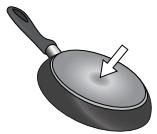
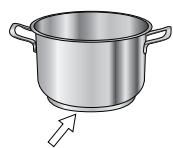
To ensure optimum efficiency, always use pots and pans with a flat bottom that distributes the heat evenly. If the bottom is uneven, this will affect power and heat conduction.
FIRST TIME USE
POWER MANAGEMENT
At the time of purchase, the hob is set to the maximum possible power. Adjust the setting in relation to the limits of the electrical system in your home as described in the following paragraph.
N.B: Depending on the power selected for the hob, some of the cooking zone power levels and functions (e.g. boil or quick reheating) could be automatically limited, in order to prevent the selected limit from being exceeded.
To set the power of the hob:
Once you have connected the device to the mains power supply, you can set the power level within 60 seconds.
Press the "+" button for at least 3 seconds. The display shows P1. Confirm by pressing 口 口 口 口 口 口 口 口 口 口 口 口 口 口 口 口 口 口 口 口 口 0 sec. . The last power level selected appears on the display.
Use the "+" and "-" buttons to select the desired power level. The power levels available are: 2.5 kW - 4.0 kW - 6.0 kW - 7.2 kW .
Confirm by pressing
The power level selected will stay in the memory even if the power supply is interrupted.
To change the power level, disconnect the appliance from the mains for at least 60 seconds, then plug it back in and repeat the steps above.
Empty pots or pots with a thin base
Do not use empty pots or pans when the hob is on. The hob is equipped with an internal safety system that constantly monitors the temperature, activating the "automatic off" function where high temperatures are detected. When used with empty pots or pots with thin bases, the temperature may rise very quickly, and the "automatic off" function may not be triggered immediately, damaging the pan or the hob surface. If this occurs, do not touch anything, and wait for all components to cool down.
If any error messages appear, call the service centre.
Minimum diameter of pot/pan base for the different cooking areas
To ensure that the hob functions properly, the pot must cover one or more of the reference points indicated on the surface of the hob, and must be of a suitable minimum diameter.
Always use the cooking zone that best corresponds to the diameter of the bottom of the pan.

ADAPTER FOR POTS/PANS UNSUITABLE FOR INDUCTION
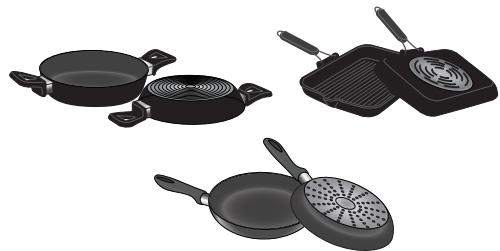
Using this accessory makes it possible to use pots and pans that are not suitable for induction hobs. It is important to bear in mind that using it affects efficiency and consequently the time needed to heat food. Its use should be limited because the temperatures reached on its surface depend significantly on the pot/pan used, its flatness and the type of food being cooked. Using a pot or pan with a smaller diameter than the adapter disc may cause heat to build up that is not transmitted to the pot or pan and this could blacken both the hob and the disc. Adapt the diameter of your pots/pans and the hob to the diameter of the adapter.
If an error occurs during the setting sequence, the EE symbol will appear, and you will hear a beep. If this happens, repeat the operation. If the error persists, contact the After-Sales Service.
To switch the acoustic signal on/off:
- Connect the hob to the power supply;
Wait for the switch-on sequence; - Within 60 seconds, press the buttons "+" and ( 口 口 口 ) simultaneously for at least 5 seconds.
DEMO MODE (reheating deactivated, see section on "Troubleshooting")
To switch the demo mode on and off:
- Connect the hob to the power supply;
Wait for the switch-on sequence.
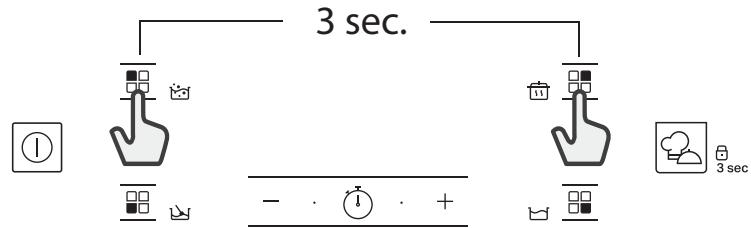
Within 60 seconds, press the cooking zone selection buttons in the top left and top right simultaneously for at least 3 seconds (as shown below);
"DE" will show on the display.

SWITCHING THE HOB ON/OFF
To turn the hob on, press the power button for around 1 second.
To turn the hob off, press the same button again, and all cooking zones will be deactivated.
POSITIONING
Locate the desired cooking zone by referring to the position symbols. Do not cover the control panel symbols with the cooking pot.
Please note: In the cooking zones close to the control panel, it is advisable to keep pots and pans inside the markings (taking both the bottom of the pan and the upper edge into consideration, as this tends to be larger). This prevents excessive overheating of the keypad. When grilling or frying, please use the rear cooking zones wherever possible.
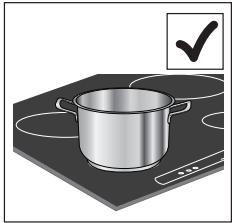
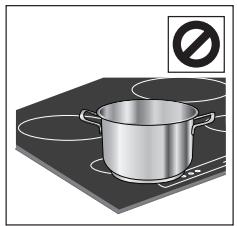

ACTIVATING/DEACTIVATING ADJUSTING POWER LEVELS
COOKING ZONES AND
To activate the cooking zones:
Select the pre-selected cooking zone by pressing the corresponding zone selection button. The display will show level "0".
Each cooking zone has different power levels that can be adjusted using the "+"/"" buttons, from a minimum of 1 to a maximum of 9.
Some cooking zones have a quick reheating function (Booster), shown on the display with the letter "P".
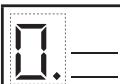
Power indicator display Selected cooking zone indicator
FUNCTIONS

MY MENU
The "My menu" button activates the special functions.
Place the pot in position and select the cooking zone.
Press the "My menu" button. The display of the selected area will show "A". To deactivate the special function, select the cooking zone and press the "My menu" button again.

MELTING
This function allows you to bring food to the ideal temperature for melting and to maintain the condition of the food without risk of burning. This method is ideal, as it does not damage delicate foods such as chocolate, and prevents them from sticking to the pot.

KEEP WARM
This feature allows you to keep your food at an ideal temperature, usually after cooking is complete, or when reducing liquids very slowly. Ideal for serving foods at the perfect temperature.
To deactivate the cooking zones:
Select the cooking zone to be switched off by pressing the corresponding zone selection button (a dot will light up on the display, to the bottom right of the power level indicator). Press the "−" to set the level to "0".
To switch off immediately, press and hold the zone selection button for 3 minutes. The cooking zone is deactivated and the residual heat indicator "H" appears on the display.

CONTROL PANEL LOCK
To lock the settings and prevent it being switched on accidentally, press and hold the My menu/Key lock button for 3 seconds. A beep and a warning light above the symbol indicate that this function has been activated. The control panel is locked except for the switching off function (☑). To unlock the controls, repeat the activation procedure.

TIMER
The timer enables a cooking time to be set for all of the zones.
To activate the timer:
Select the cooking zone for which you wish to set the timer. Press the button with the clock icon and set the desired time, using the "+" and "-" buttons. The timer LED for the zone in use will be illuminated.
A few seconds after the last touch, the timer will start the countdown and the dot on the display that indicates that the seconds are passing will flash. When the set time is up, an acoustic signal will sound and the cooking zone will switch off automatically.
After selecting the zone and the clock icon, the time can be changed at any point, and several timers can be activated simultaneously.
The timer always shows the time set for the selected area, or the shortest remaining time.
When more than one timer is active, the flashing LED indicates the zone for which the cooking time is visible on the display.
To set the timer for another zone, repeat the above steps.
To deactivate the timer:
Select the cooking zone for which you wish to deactivate the timer. Press and hold the - button until 0:0 shows on the display, or press the button with the clock icon ( ) for 3 seconds.

SLOW COOKING
This function is ideal for maintaining a simmering temperature, allowing you to cook food for long periods with no risk of burning. Ideal for long-cooking recipes (rice, sauces, roasts) with liquid sauces.

BOILING
This function allows you to bring water to the boil and keep it boiling, with lower energy consumption.
About 2 litres of water (preferably at room temperature) should be placed in the pan, and left uncovered. In all cases, users are advised to monitor the boiling water closely, and check the amount of water remaining regularly.

POT INCORRECTLY POSITIONED OR MISSING
This symbol appears if the pot is not suitable for induction cooking, is not positioned correctly or is not of an appropriate size for the cooking zone selected. If no pot is detected within 30 seconds of making the selection, the cooking zone switches off.

RESIDUAL HEAT
If the display shows "H", the cooking zone is still hot. When the cooking zone cools down, the display goes off.
COOKING TABLE
| POWER LEVEL | TYPE OF COOKING | LEVEL USE (indicating cooking experience and habits) | |
| Maximum power | P | Fast heating | Ideal for rapidly increasing the temperature of food to fast boiling in the case of water or rapidly heating cooking liquids. |
| 8-9 | Frying – boiling | Ideal for browning, starting to cook, frying deep frozen products, fast boiling. | |
| High power | 7-8 | Browning – sautéing – boiling – grilling | Ideal for sautéing, maintaining a lively boil, cooking and grilling (for a short period of time, 5-10 minutes). |
| 6-7 | Browning – cooking – stewing – sautéing – grilling | Ideal for sautéing, maintaining a light boil, cooking and grilling (for a medium period of time, 10-20 minutes), preheating accessories. | |
| Medium power | 4-5 | Cooking – stewing – sautéing – grilling | Ideal for stewing, maintaining a gentle boil, cooking (for a long period of time). Creaming pasta. |
| 3-4 | Cooking – simmering – thickening – creaming | Ideal for long-cooking recipes (rice, sauces, roasts, fish) with liquids (e.g. water, wines, broth, milk), creaming pasta. | |
| 2-3 | Ideal for long-cooking recipes (less than a litre in volume: rice, sauces, roasts, fish) with liquids (e.g. water, wines, broth, milk). | ||
| Low power | 1-2 | Melting – defrosting – keeping food warm – creaming | Ideal for softening butter, gently melting chocolate, thawing small products and keeping just-cooked food warm (e.g. sauces, soups, minestrone). |
| 1 | Ideal for keeping just-cooked food warm, for creaming risottos and for keeping serving dishes warm (with induction-suitable accessory). | ||
| Zero power | 0 | Support surface | Hob in stand-by or off mode (possible end-of-cooking residual heat, indicated by an "H"). |
FUNCTIONS
1. SELECT A FUNCTION
MAIN OVEN - FAN COOKING
This control switches on the main oven. Fan Cooking - Turn the control clockwise and select any temperature between 80^ C and Max. As the control is turned the fan will start. The main oven light will immediately come on.
The thermostat light indicates that the main oven is heating. When it turns off, the temperature inside the oven has reached the setting made with the main oven knob. At this point, the light will turn on and off as the oven maintains the temperature at a constant level.
The fan and the oven interior light will remain on throughout cooking.
The heat for fan cooking in the main oven is provided by an element situated at the back of the oven, around the fan.
Fan cooking is ideal for large poultry or joints of meat, reducing cooking times and often eliminating the need for pre-heating the oven. It is also ideal for batch cooking where food is cooked on more than one level, because the forced circulation of hot air gives aneven temperature from the top to the bottom of the oven.

FORCED AIR
For cooking different foods on multiple shelves (sum of four) at the same time. This function used to cook different foods without odours being fired from one food to another.
To select a function, turn the Top Oven/Grill Selection Knob to the symbol for the function you require, then select the required temperature by turning the Top Oven/Grill Temperature Knob.
TOPOVEN

CONVENTIONAL
For cooking any kind of dish on one shelf only.

BOTTOM
This function can be used to finish cooking filled pies or to thicken soups. Use this function the last 10/15 minutes of cooking.

HALF GRILL
For grilling small food like bacon or toasting bread. The grill pan is placed on top of the top oven cavity shelf. The shelf position can be adjusted to allow for grilling different types of food.

GRILL
For grilling steaks, kebabs and sausages, cooking vegetables au gratin or toasting bread. When grilling meat, we recommend using a drip tray to collect the cooking juices: Position the pan on of the levels below the wire shelf and add 200 ml o drinking water.
GRID
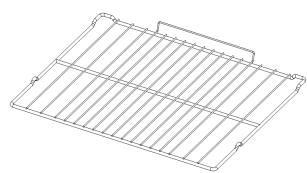
KIT GRILL PAN
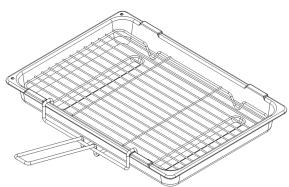

The number and type of accessories may vary depending on which model is purchased. Other accessories that are not supplied can be purchased separately from the After-sales Service.
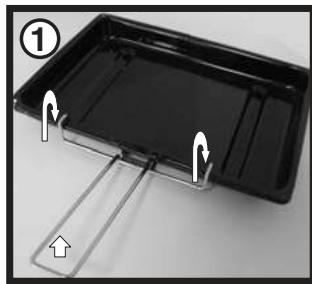
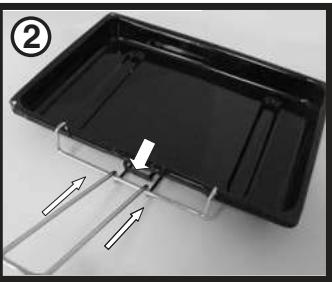
The grill pan handle is detachable from the pan to facilitate cleaning and storage. Fix the pan handle securely before use:
- Fit the handle to the grill pan so that the external 'hooks' embrace the edge of the pan (fig. 1)
- Make sure that the middle part of the handle fits exactly the protruding support of the pan (fig .2) and holds the pan from the bottom.
The food must be placed on the rack in the grill pan. Position the grill pan on top of the oven rack. The best results are achieved following the cooking table. Pouring a little water into the grill pan will make the collection of grease particles more efficient and prevent the formation of smoke.
To Set the Clock
After connecting to the power supply or after a power cut, the display will flash 12:00 AM and start counter up.
- Use the [-] and +1 buttons to set the time. If you press and hold any of the buttons the numbers
will scroll quicker making it ea sier to set the required time. - After 3 seconds the numbers stop flashing and the time is set.
The clock can be set with the oven on or off assuming that a programmed cooking time has not been set.
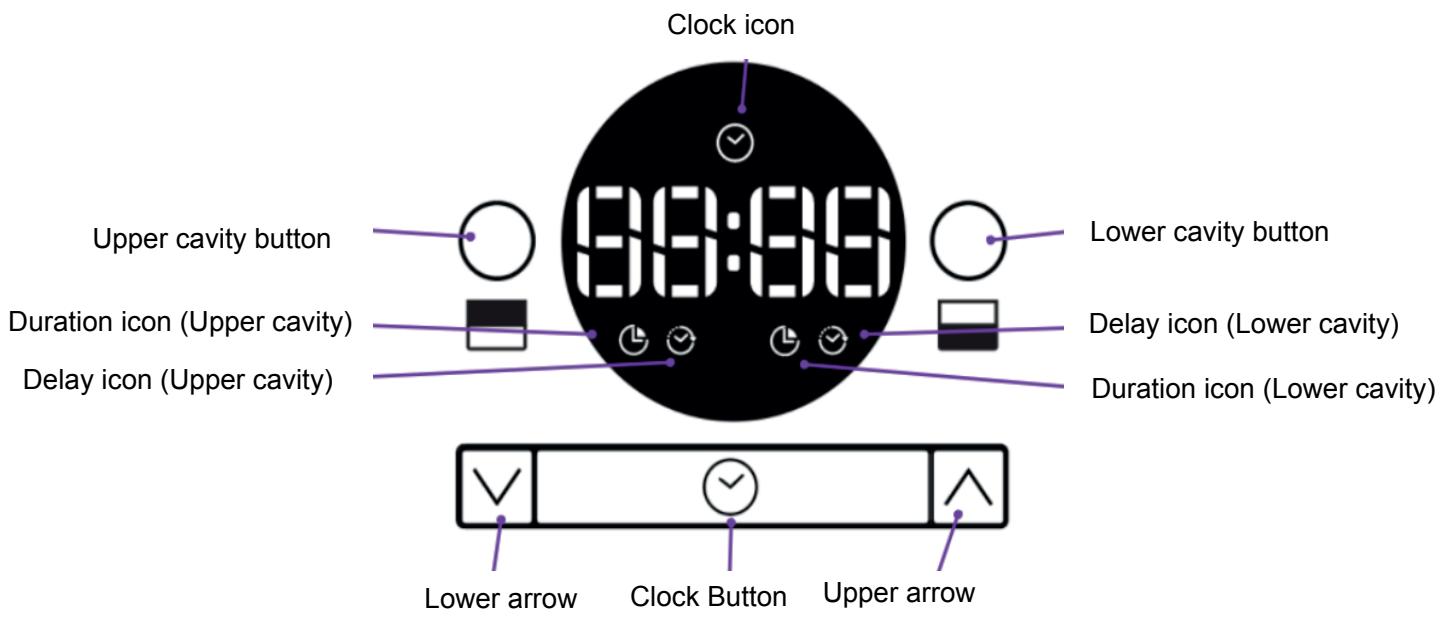
- Press and hold the [clock] button (2 seconds) till the UI bip, the [clock] icon starts flashing.
- Use the '-' and '+' buttons to set the time. If you press and hold any of the buttons the numbers
will scroll quicker making it easier to set the required time.
2. After 3 seconds or by pressing the [clock] button the numbers stops flashing, the time is set and the":" start flashing.
Programming the Cooking Duration Upper/Lower cavity
Cavity button [upper] or [lower]
- Press the [upper] or [lower] cavity button the [cook time] icon strat blinking and 00:00 is displayed, after 3 seconds without interaction, the upper display come back to clock.
- Use the '-' and '+' buttons to set the cooking time. If you press and hold any of the buttons the numbers will scroll quicker making it easier to set the required time. After 3 seconds the [cook time] icon stops flashing and the time is set.
- The":" start flashing and the countdown start.
- When cooking time expires "End" is displayed, the related cavity switch off and the bleep will sound.
- Turn the function knob to OFF position, press the [upper] or [lower] cavity button, the display will show the other cavity state or the clock.
Setting the Delay of Cooking Mode
- Set a cooking time
- Press [upper/lower cavity] buttn, 00:00 is displayed and [delay] icon start blinking, after 3 seconds without interaction the cooking time start counting down.
- Use the '-' and '+-' buttons to set the delay time. If you press and hold any of the buttons the numbers will scroll quicker making it easier to set the required time.
- After 3 seconds without interaction the [delay time] icon stops flashing and the delay time is set.
- The":" start flashing and countdown start.
Cancelling the Programme
During cooking time counting down
- Press and hold - and +^ buttons for 3 seconds, the display show the day time (upper display) or switch off (lower display)
During delay phase
- Press and hold -12 and +1 buttons for 3 seconds, the display show the cook time and countdown start.
Clock button functions
Continued pressing will loop displayed information on the display with appropriated icon:
1.day time
2. upper cavity end time of cooking process, including delay if setted (if not running skip status)
3. lower cavity end time of cooking process, including delay if setted (if not running skip status)
After 3 seconds without interaction the display comes back to the running state.
MAIN OVEN
| RECIPE | FUNCTION | PREHEAT | TEMPERATURE(°C) | DURATION(Min) | LEVEL (L-number) AND ACCESSORIES |
| Leavened cakes / Sponge cakes | FORCED AIR | YES | 160-170 | 30-50 | 2 |
| Leavened cakes / Sponge cakes | FORCED AIR | YES | 160-170 | 30-50 | 2/4 |
| Filled cake(cheese cake, strudel,fruit pie) | FORCED AIR | YES | 160-180 | 50-70 | 2 |
| Filled cake(cheese cake, strudel,fruit pie) | FORCED AIR | YES | 150-170 | 40-70 | 2/4 |
| Cookies / Shortbread | FORCED AIR | YES | 140-150 | 40-50 | 3 |
| Cookies / Shortbread | FORCED AIR | YES | 140-150 | 40-60 | 2/4 |
| Cookies / Shortbread | FORCED AIR | YES | 140-150 | 35-50 | 2/4/5 |
| Small cakes / Muffin | FORCED AIR | YES | 160-170 | 30-50 | 3 |
| Small cakes / Muffin | FORCED AIR | YES | 150-160 | 30-50 | 2/5 |
| Small cakes / Muffin | FORCED AIR | YES | 150-160 | 40-60 | 1/3/5 |
| Choux buns | FORCED AIR | YES | 170-200 | 30-60 | 3 |
| Choux buns | FORCED AIR | YES | 170-200 | 20-50 | 42 |
| Choux buns | FORCED AIR | YES | 170-200 | 20-50 | 1/3/5 |
| Meringues | FORCED AIR | YES | 80-100 | 120-200 | 3 |
| Meringues | FORCED AIR | YES | 80-100 | 120-200 | 42 |
| Meringues | FORCED AIR | YES | 80-100 | 120-200 | 51/3 |
| Pizza / Bread / Focaccia | FORCED AIR | YES | 190-250 | 15-50 | 2 |
| Pizza / Bread / Focaccia | FORCED AIR | YES | 190-230 | 20-50 | 2/4 |
| Pizza / Bread / Focaccia | FORCED AIR | YES | 190-230 | 20-50 | 2/4/5 |
| Savoury pies (vegetable pie, quiche) | FORCED AIR | YES | 180 | 30-60 | 3 |
| Vols-au-vent / Puff pastry crackers | FORCED AIR | YES | 180-210 | 15-40 | 3 |
| Vols-au-vent / Puff pastry crackers | FORCED AIR | YES | 180-210 | 15-40 | 42 |
| Lasagne / Flans / Baked pasta / Cannelloni | FORCED AIR | YES | 180-200 | 40-75 | 3 |
| Lamb / Veal / Beef / Pork 1 kg | FORCED AIR | YES | 190-200 | 80-110 | 3 |
| Chicken / Rabbit / Duck 1 kg | FORCED AIR | YES | 200-230 | 50-100 | 3 |
| Fish fillets / Steaks | FORCED AIR | YES | 180-200 | 20-30 | 3 |
| Roast potatoes | FORCED AIR | YES | 190-220 | 40-80 | 3 |
| Vegetable gratin | FORCED AIR | YES | 180-200 | 20-30 | 3 |
| Stuffed vegetables (tomatoes, courgettes, aubergines) | FORCED AIR | YES | 190-220 | 40-80 | 3 |
| Complete meal: (Cook3) Fruit tart Lasagna Roast | FORCED AIR | - | 180-190 | 40-100 | 1 3/5 |
| Complete meal (Cook4) Fruit tart Lasagna Cuts of meat Roasted vegetables | FORCED AIR | - | 180-190 | 40-80 | 1/2 3/5 |
COOKING TABLE
TOPOVEN
| RECIPE | FUNCTION | PREHEAT | TEMPERA TURE (℃) | DURATION (MIN) | LEVEL (L-number and accessories) |
| Leavened cakes / Sponge cakes | CONVENTIONAL | YES | 170 | 20-50 | 1 |
| Filled cake (cheese cake, strudel, fruit pie) | CONVENTIONAL | YES | 160-180 | 40-60 | 2 |
| Cookies / Shortbread | CONVENTIONAL | YES | 140-150 | 20-50 | 2 |
| Small cakes / Muffin | CONVENTIONAL | YES | 160-170 | 20-50 | 2 |
| Choux buns | CONVENTIONAL | YES | 170-200 | 20-50 | 2 |
| Meringues | CONVENTIONAL | YES | 80-100 | 120-200 | 2 |
| Pizza / Bread / Focaccia | CONVENTIONAL | YES | 190-250 | 15-50 | 2 |
| Vols-au-vent / Puff pastry crackers | CONVENTIONAL | YES | 180-210 | 15-40 | 2 |
| Lasagne / Flans / Baked pasta / Cannelloni | CONVENTIONAL | YES | 180-200 | 30-65 | 2 |
| Lamb / Veal / Beef / Pork 1 kg | CONVENTIONAL | YES | 190-200 | 20-50 | 2 |
| Chicken / Rabbit / Duck 1 kg | CONVENTIONAL | YES | 200-230 | 50-100 | 2 |
| Fish fillets / Steaks | GRILL | - | 230-MAX | 15-35 | 2 |
| Stuffed vegetables (tomatoes, courgettes, aubergines) | CONVENTIONAL | YES | 190-220 | 40-80 | 2 |
| Vegetable gratin | GRILL | - | 230-MAX | 10-30 | 2 |
| Toast | GRILL | 5' | MAX | 0.5-1.5 | 2 |
| Sausages / Kebabs / Spare ribs / Hamburgers | GRILL | - | 230-MAX | 15-30 | 2 |
| Roast potatoes | CONVENTIONAL | YES | 190-220 | 40-80 | 2 |
| Leg of lamb/Shanks | CONVENTIONAL | YES | 200-230 | 50-100 | 2 |
| ACCESSORIES | ...... Wire shelf | Baking dish or cake tin on the wire shelf | Baking tray/Drip tray or Baking dish on the wire shelf | Drip tray / Baking tray | Drip tray / Baking tray with 500 ml of water |
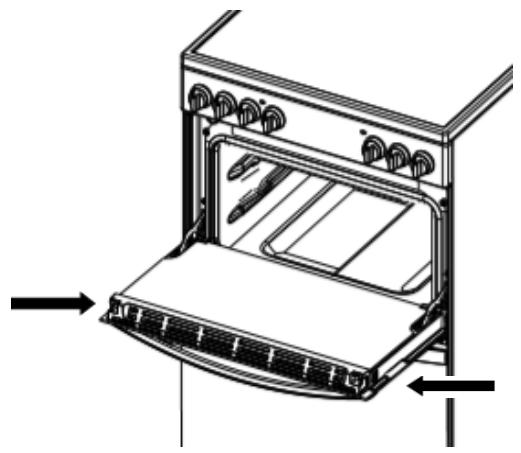
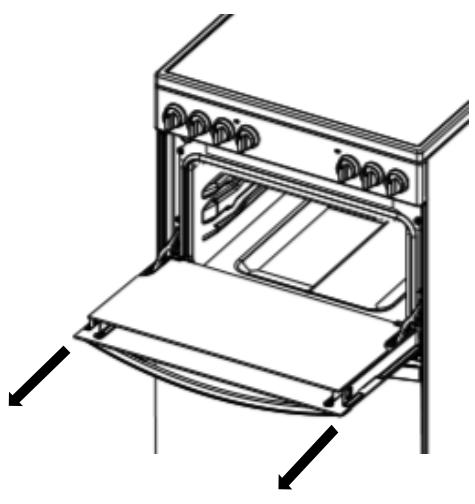
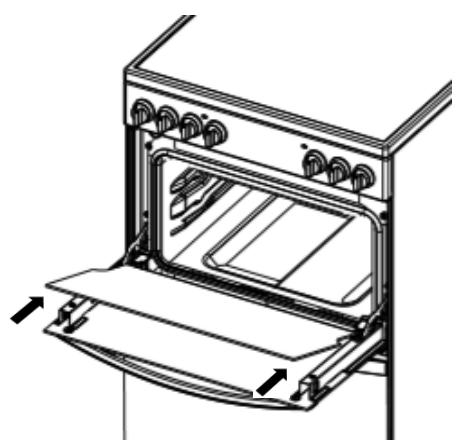
Cleaning the glass door with 2 panels
TOP OVEN DOORS
1.
Open the door to 30^ .
Removing the retaining
bar depress carefully
the clips on
both sides of the bar.
Pull the trim up gently
until the retainer is
released.
2.
Carefully slide the first
inner glass towards you,
taking care not to allow the
glass to fall.
3.
Now the external glass
panel can be washed.
Ensure the glass panel is not subjected to any sharp mechanical blows. Take particular care not to damage the inner surface which is coated with a heat reflective layer. After cleaning, rinse and dry with a soft cloth. For slight soiling the inner glass panel may be cleaned, while still warm, without removing it from the door.
Oven must not be operated with inner door glass removed.
4.
To reassemble the oven doors proceed with inserting the glass panels in the reverse order, pushing gently every panel directly into the liners, so that the warning sign printed on the glass is correctly legible.
TURN OFF THE MAIN SWITCH AND ENSURE THE COOKER IS COLD BEFORE CLEANING. BEFORE SWITCHING ON AGAIN, ENSURE THAT ALL CONTROLS ARE IN THE OFF POSITION.
Do not use steam cleaning equipment.
Use protective gloves during all operations.
- Carry out the required operations when the oven is cold.
- Disconnect the appliance from the power supply.
Do not use wire wool, abrasive scourers or abrasive/corrosive cleaning agents, as these could damage the surfaces of the appliance.
Disconnect the appliance from the power supply.
CLEANING THE CERAMIC HOB
Although ceramic glass is hard wearing and can be kept looking attractive for many years, some marks may not be easily removed from the glass by simply wiping with a damp cloth. For everyday marks, regular use of a ceramic hob cleaner is recommended for care and protection of the hob glass surface. It contains a mild cleaning agent so that subsequent applications may clean and apply a protective film at the same time. Stubborn stains or burnt-on residue from spillage on the glass surface, can be removed using a safety scraper in addition to the ceramic hob cleaner.
While there are many brands available through major retailers, we recommend WPRO cleaning products for our domestic appliance range. To order a WPRO cleaning kit including Cream Cleaner and Safety Scraper, call us on 03448 224224 and choose the option to purchase parts. Please quote part number .484000008418 .to help identify exactly the kit required.
CLEANING THE OVEN SURFACE
EXTERIOR SURFACES
- Clean the surfaces with a damp microfibre cloth. If they are very dirty, add a few drops of pH-neutral detergent. Dry them with a dry cloth.
- Do not use corrosive or abrasive detergents. If any of these products inadvertently comes into contact with the surfaces of the appliance, clean immediately with a damp microfibre cloth.
INTERIOR SURFACES
- After every use, leave the oven to cool and then clean it, preferably while it is still warm, to remove any deposits or stains caused by food residues. To dry any condensation that has formed as a result of cooking foods with a high water content, let the oven to cool completely and then wipe it with a cloth or sponge.
- Clean the glass in the door with a suitable liquid detergent.
ACCESSORIES
Soak the accessories in a washing-up liquid solution after use, handling them with oven gloves if they are still hot. Food residues can be removed using a washing-up brush or a sponge.
REPLACING THE LIGHT
- Disconnect the oven from the power supply.
- Unscrew the cover from the light, replace the bulb and screw the cover back on the light.
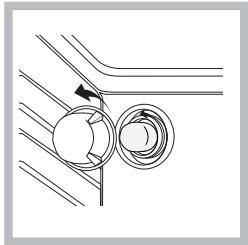
- Reconnect the oven to the power supply. Note: Use 40 W/230 V type G9
The bulb used in the product is specifically designed for domestic appliances and is not suitable for general room lighting within the home (EC Regulation 244/2009). Light bulbs are available from our After-sales Service. - Do not handle bulbs with your bare hands as your fingerprints could damage them. Do not use the oven until the light cover has been refitted.
This product contains a light source of energy efficiency class G
CATALYTIC CLEANING
These are panels coated with a special enamel, which is able to absorb the fat released by food as it cooks. This enamel is quite strong, so that the various accessories (racks, dripping pans, etc.) can slide along them without damaging them. White marks may appear on the surfaces; these are not a cause for concern. Nevertheless, the following should be avoided: -scraping the enamel with sharp objects (a knife,for example) -using detergents or abrasive materials.
LOWER THE TOP HEATING ELEMENT
The top heating element of the grill can be lowered to clean the upper panel of the oven:Extract the heating element from its seating, then lower it. To return the heating element to its position, lift it up, pull it slightly towards you and make sure that the tab support is in its proper seating.
TROUBLESHOOTING
| What to do if... | Possible reasons | Solutions |
| The oven is not working. | Power cut. Disconnection from the mains. | Check for the presence of mains electrical power and whether the oven is connected to the electricity supply. Turn off the oven and restart it to see if the fault persists. |
USEFUL TIPS
HOW TO READ THE COOKING TABLE
The table lists the best function, accessories and level to use to cook various different types of food. Cooking times start from the moment food is placed in the oven, excluding preheating (where required). Cooking temperatures and times are approximate and depend on the amount of food and the type of accessory used. Use the lowest recommended settings to begin with and, if the food is not cooked enough, then switch to higher settings. Use the accessories supplied and preferably dark-coloured metal cake tins and baking trays. You can also use Pyrex or stoneware pans and accessories, but bear in mind that cooking times will be slightly longer.
It should be noted that at the end of the cooking period there may be a momentary puff of steam when the oven door is opened. This will disperse in a few seconds and is a perfectly normal characteristic of an oven with a good door seal.
AFTER-SALES SERVICE
To receive assistance, call the number given on the warranty leaflet enclosed with the product or follow the instructions on our website. Be prepared to provide:
a brief description of the problem;
the exact model type of your product;
- the assistance code (the number following the word SERVICE on the identification plate attached to the product, which can be seen on the inside edge when the oven door is open);
- your full address;
- a contact telephone number.
Please note: If repairs are required, contact an authorised service centre that is guaranteed to use original spare parts and perform repairs correctly.
Please refer to the enclosed warranty leaflet for more information on the warranty.
2
5
6.1
6
Disassemble cover.
6.2
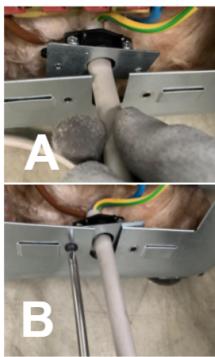
6.4
Fix metal bracket to the rear panel of cooker.
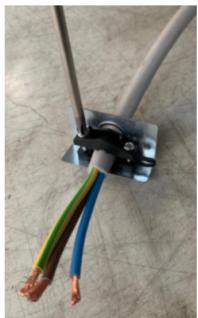
Fix power cord to the plastic holder.
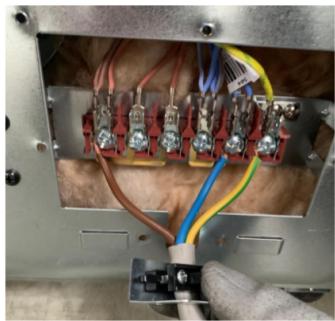
6.3
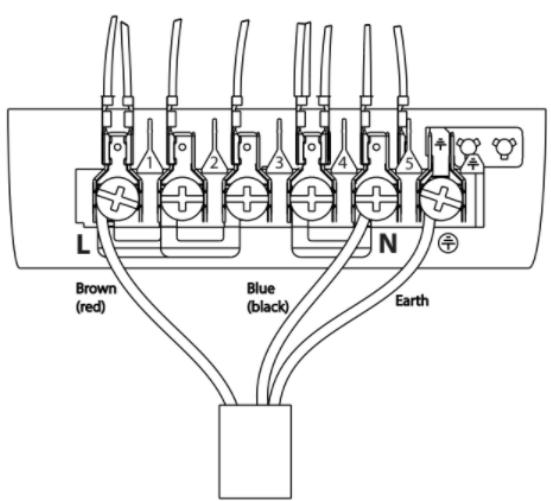
Fix wires to terminal block sockets. To avoid any loose connections, ensure all screws are fully tightened and the 3 copper terminal links are in position as shown.
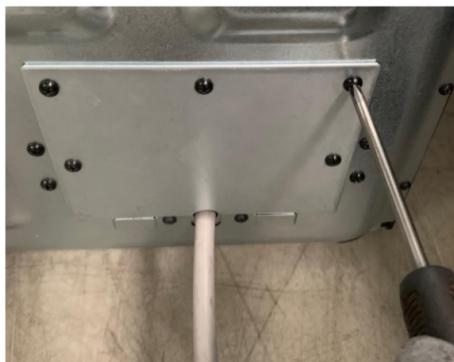
6.5
Assemble cover and tighten screws.
7
- EN SAFETY INSTRUCTIONS
- IMPORTANT TO BE READ AND OBSERVED
- PERMITTED USE
- INSTALLATION
- ELECTRICALWARNINGS
- CLEANING AND MAINTENANCE
- DISPOSAL OF PACKAGING MATERIALS
- DISPOSAL OF HOUSEHOLD APPLIANCES
- ENERGY SAVING TIPS
- DECLARATIONS OF CONFORMITY
- CONTROL PANEL
- This appliance must be earthed. Mains Connection
- This operation must be performed by a qualified technician.
- FIRST TIME USE DAILY USE
- MAIN OVEN
- Oven positions
- Food or utensils should Never be placed directly an the floor of the oven for cooking.
- Temperature and time
- TOP OVEN
- Food/utensils must not be placed directly on the oven floor.
- Operation
- Do not use the grill pan as a meat pan in the top oven as air circulation will be seriously restricted.
- POTS AND PANS
- FIRST TIME USE
- POWER MANAGEMENT
- To set the power of the hob:
- Empty pots or pots with a thin base
- Minimum diameter of pot/pan base for the different cooking areas
- ADAPTER FOR POTS/PANS UNSUITABLE FOR INDUCTION
- DEMO MODE (reheating deactivated, see section on "Troubleshooting")
- SWITCHING THE HOB ON/OFF
- POSITIONING
- ACTIVATING/DEACTIVATING ADJUSTING POWER LEVELS
- To activate the cooking zones:
- FUNCTIONS
- MY MENU
- MELTING
- KEEP WARM
- To deactivate the cooking zones:
- CONTROL PANEL LOCK
- TIMER
- To activate the timer:
- To deactivate the timer:
- SLOW COOKING
- BOILING
- POT INCORRECTLY POSITIONED OR MISSING
- RESIDUAL HEAT
- SELECT A FUNCTION
- MAIN OVEN - FAN COOKING
- FORCED AIR
- TOPOVEN
- CONVENTIONAL
- BOTTOM
- HALF GRILL
- GRILL
- GRID
- KIT GRILL PAN
- To Set the Clock
- Programming the Cooking Duration Upper/Lower cavity
- Cavity button [upper] or [lower]
- Setting the Delay of Cooking Mode
- Cancelling the Programme
- During cooking time counting down
- During delay phase
- Clock button functions
- COOKING TABLE
- 1.
- 2.
- 3.
- 4.
- CLEANING THE CERAMIC HOB
- CLEANING THE OVEN SURFACE
- EXTERIOR SURFACES
- INTERIOR SURFACES
- ACCESSORIES
- REPLACING THE LIGHT
- CATALYTIC CLEANING
- LOWER THE TOP HEATING ELEMENT
- USEFUL TIPS
- HOW TO READ THE COOKING TABLE
- AFTER-SALES SERVICE
Brand : INDESIT
Model : IS67V5CCB
Category : Electric stove