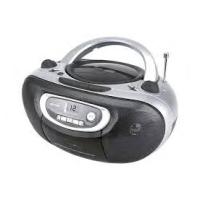
BCD510USB - Radio BRANDT - Free user manual and instructions
Find the device manual for free BCD510USB BRANDT in PDF.


| Product type | Portable radio cassette CD with USB port |
| Brand | Brandt |
| Model | BCD510USB |
| Dimensions (W x H x D) | 300 x 150 x 80 mm |
| Weight | 1.2 kg |
| Power supply | Mains 230V ~ 50Hz or 6 x LR14 batteries (not included) |
| Audio functions | CD player, cassette player, FM/MW radio, USB MP3 player |
| Output power | 2 x 1 W RMS (estimated) |
| Radio bands | FM (88-108 MHz) and MW (530-1600 kHz) |
| Supported formats | Audio CD, CD-R/RW, MP3 on CD/USB |
| USB input | Yes, compatible with USB flash drives up to 32 GB |
| Headphone jack | Yes, 3.5 mm jack |
| Antenna | Telescopic antenna for FM |
| Display | LCD screen with backlight |
| Control | Mechanical buttons and volume knob |
| Maintenance and cleaning | Clean with a soft, dry cloth. Do not use abrasive products or solvents. |
| Safety | Do not expose to moisture or splashes. Unplug before cleaning. |
| General information | Portable radio cassette CD from the brand Brandt. Model BCD510USB. |
Frequently Asked Questions - BCD510USB BRANDT
User questions about BCD510USB BRANDT
0 question about this device. Answer the ones you know or ask your own.
Ask a new question about this device
Download the instructions for your Radio in PDF format for free! Find your manual BCD510USB - BRANDT and take your electronic device back in hand. On this page are published all the documents necessary for the use of your device. BCD510USB by BRANDT.
USER MANUAL BCD510USB BRANDT
Portable radio/cassette/CD player with MP3/USB
This equipment is designed to operate from a 230-240 Volt, 50Hz AC mains supply. Other power sources may damage it. Check that the voltage marked on the rating plate located on the bottom of the unit states 230V, the manufacturer will NOT accept responsibility for damage or injury caused by connecting to the wrong voltage.
Symbols

This equipment is double insulated and an earth connection is not required.

This mark is applied to show the equipment conforms to European safety and electro-magnetic compatibility standards.
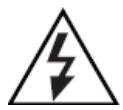
Dangerous voltage constituting a risk of electric shock is present inside this equipment.

There are important operating and maintenance instructions in the literature accompanying this equipment.
Battery handling and usage
BATTERY WARNING: Only adults should handle the batteries. Do not allow a child to use this product unless the Battery Compartment Cover is securely attached to the Battery Compartment in accordance with all product usage instructions.
Follow the battery manufacturer's safety and usage instructions.
Keep the batteries away from children and pets.
Insert the batteries observing the polarity marking inside the battery compartment. Failure to properly align the battery polarity can cause damage. The battery compartments are located on the bottom of the product.
If electrolyte from the batteries gets onto your hands or into your eyes, wash with running tap water and seek medical advice.
To prevent the risk of electrolyte leakage or explosions, never recharge non-rechargeable batteries.
Do not dispose of batteries in a fire as this constitutes an explosion hazard.
To protect the environment, use local recycling facilities for battery disposal.
The battery type used in this product is eight C size batteries. These batteries are located internally and are readily accessible.
Remove the battery cover on the bottom of the product to remove the batteries.
These batteries must be disposed of at your local recycling point.
Risk of damage if batteries are incorrectly replaced. Replace only with the same or equivalent type.
WARNING:
- The mains plug shall be the main disconnect device and shall remain operable at all times.
To save power: switch off mains power or pull out the mains power plug when you are not using the equipment. - Never let anyone push objects into holes and ventilation slots.
- Do not attempt to repair this product yourself, always get a qualified service agent carry out adjustments or repairs.
- Never dispose of batteries in a fire, danger of explosion.
This appliance is intended for domestic household use only and should not be used for any other purpose or in any other application, such as for non domestic use or in a commercial environment.
The ventilation should not be impeded by covering the ventilation openings with items, such as newspapers, table-cloths, curtains, etc.
No naked flame sources, such as lighted candles, should be placed on the apparatus.
The apparatus shall not be exposed to dripping or splashing and that no objects filled with liquids, such as vases, shall be placed on the apparatus.
Ventilation
Allow at least a 10 cm gap all around the product.
This apparatus is not suitable for use in a tropical climate.
Class 1 laser product
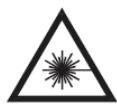
This product contains a low power laser device. Invisible laser radiation when open and interlocks defeated. Avoid exposure to beam.
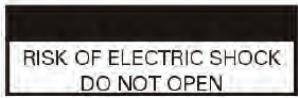
To prevent direct exposure to laser beam, do not open the enclosure. Invisible laser radiation when opening.
Never stare directly into the laser beam.
Notes on Discs
Handling Discs
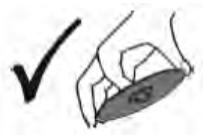
Do not touch the play side of the disc. Hold the disc by the edges so that fingerprints do not get on the surface. Never stick paper or tape on the disc.
Storing Discs
After playing, store the disc in its case. Do not expose the disc to direct sunlight or source of heat and never leave it in a parked car exposed to direct sunlight.
Cleaning Discs
Fingerprints and dust on the disc can cause poor picture quality and sound distortion. Before playing, clean the disc with a clean cloth. Wipe the disc from the centre out.
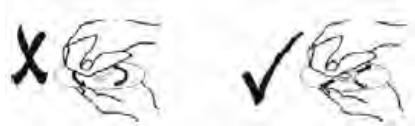
Do not use strong solvents such as alcohol, benzine, thinner, commercially available cleaners, or anti-static spray intended for older vinyl records.
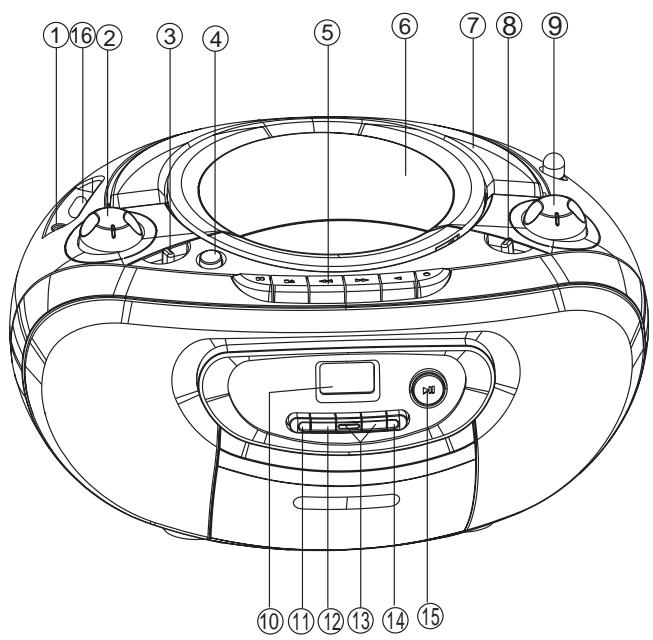
Top and Front View
- AUX IN socket
- To connect an external device
- VOLUME +/-
To adjust the volume level - FUNCTION selector
- To select AUX/USB/CD, TAPE/OFF or RADIO source
- BASS
To turn the bass enhancement on/off - Cassette recorder buttons
: starts recording.
: starts playback.
: fast winds / rewinds the tape
/ : stops the tape; open the cassette compartment
II: interrupts recording or playback. - CD door
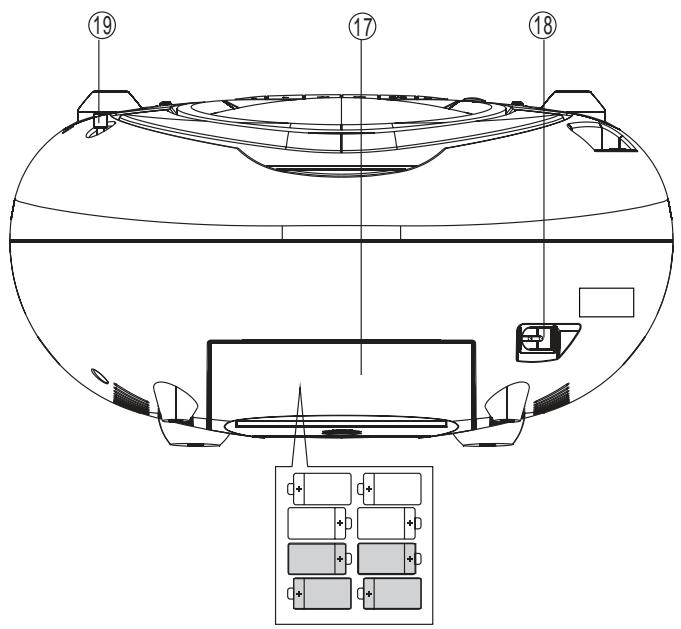
Rear View
- Handle
- BAND selector
To select FM ST. or FM waveband.
-
TUNING control
-
Display
-
+
-
MODE PROG.

- CD/USB
- USB port
- Battery compartment cover
- AC INPUT ~
- Telescopic Aerial
To adjust FM reception
USING BATTERIES (not supplied)
The unit can be powered by the batteries alone.
- Remove the battery compartment cover.
- Insert eight C size batteries with the + and - marks correctly aligned.
- Replace the battery compartment cover.
CONNECTING AC POWER
- Connect the supplied power cord to the AC INPUT socket on the unit and to the wall socket.
- To switch off the unit completely, disconnect the power cord from the wall socket.
If the unit is idle for 15 minutes, it will automatically switch to Power Saving mode. Press the PLAY/PAUSE button to resume.
CD/MP3 PLAYER
PLAYING A DISC
You can play commercially available audio CDs:
CD-Recordable (CD-R)
- CD-Rewritable (CD-RW)
MP3-CD
- Set the power switch to the ON position.
- Set the FUNCTION selector to the AUX/USB/CD mode.
- Press on the top of the unit to open the CD compartment.
- Place a CD with the printed side facing up.
- Press again to close the CD compartment.
The player scans the CD and the total number of tracks shows on the display.
PLAYING MUSIC FILES FROM USB
- Insert a USB memory into the USB port
- Set the FUNCTION selector to the AUX/USB/CD mode.
The player scans the USB device and the total number of tracks shows on the display.
- In CD mode, press and hold /CD/USB to switch from CD to USB mode.
GENERAL OPRATION
- Press /CD/USB. Play starts from the first track.
- Adjust the desired volume by turning VOLUME control.
- To pause, press / CD / USB. To resume, press it again.
- To stop, press ■.
-
For mp3 files with folders,
-
Press + to skip forward by 10 tracks.
- Press and hold + to show the current folder, the current folder name will flash on the display, and then press + repeatedly to select the desired folder.
During play, press / repeatedly until the desired track number appears in the display.
SEARCHING FOR A PASSAGE WITHIN A TRACK
- During play, press and hold
The sound is muted whilst searching is in progress. - When you reach the passage you want, release the button and play continues.
NOTE: When search reaches the end of the last track, the CD stops.
SELECTING PLAY MODES
Repeat play
You can repeat a track, an MP3 album, a disc or a program.
- REPEAT: Repeat a track.
- REPEAT ALBUM: Repeat an album.
- REPEAT ALL: Repeat an entire CD/program.
MODE
During play, press PROG. repeatedly to select the repeat mode you want.
MODE
To stop repeat play, press PROG. repeatedly until the repeat icon is disappeared.
Shuffle play
You can play all tracks in random order.
MODE
During play, press PROG. repeatedly until the display shows "RANDOM".
To stop shuffle play, press the button again, the "RANDOM" icon is disappeared.
PROGRAM PLAY
You can programme up to 32 tracks to play in your desired order.
MODE
MODE
- Press PROG. in stop mode.
"P01" and "PROG" flashes on the display. - Press / to select the desired track.
- Press PROG. to register the selected track.
- Repeat step 2 and 3 to program all the desired tracks.
- Press / CD / USB to play programmed tracks.
- In stop mode, press / repeatedly to browse stored tracks.
- To cancel the program play, press twice. "PROG" disappears on the display.
LISTENING TO RADIO
- Set the FUNCTION selector to the RADIO mode.
- Set the BAND Selector to the desired waveband: FM or FM ST. (STEREO).
-
Turn the TUNING control to tune in a radio station.
-
If the BAND selector is set to FM ST. and you have tuned in to an FM stereo station, the FM ST. indicator light will illuminate.
-
Turn the VOLUME control to set the desired listening level.
- To turn off the radio function, move the FUNCTION selector to any other position.
PLAYING A CASSETTE
- Set the FUNCTION selector to the TAPE mode.
- Press / to open the cassette door.
- Insert a recorded cassette and close the cassette door.
- Press to start playback.
- To interrupt playback, press II. To resume playback, press I again.
- Press or to fast wind or rewind the tape.
-
To stop the tape, press I/△.
-
The buttons are automatically released at the end of the tape except if PAUSE (II) has been activated.
RECORDING
General information
Recording is permissible in so far as copyright or other rights of third parties are not infringed.
- This deck is not suitable for recording on CHROME (IEC II) or METAL (IEC IV) type cassettes. For recording, use NORMAL type cassettes (IEC I) on which the tabs have not been broken.
- The best recording level is set automatically. Altering the VOL and BASS controls will not affect the recording in progress.
- At the very beginning and end of the tape, no recording will take place during the 7 seconds, when the leader tape passes the recorder heads.
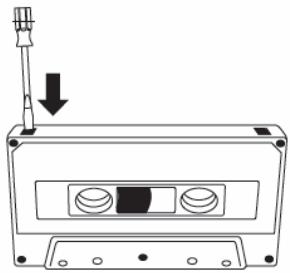
- To protect a tape from accidental erasure, have the tape in front of you and break out the left tab. Recording on this side is no longer possible. To record over this side again, cover the tabs with a piece of adhesive tape.
Recording from the radio
- Tune in to the desired radio station (see 'LISTENING TO RADIO').
- Press / to open the cassette door.
- Insert a suitable cassette into the cassette deck and close the cassette door.
- Press to start recording.
- To interrupt recording, press II. To resume recording, press I again.
- To stop recording, press / .
AUX IN
To play music from personal player,
- Set the FUNCTION selector to the AUX/USB/CD mode.
- Connect your audio player to AUX IN jack with a cable (not included).
- Set the audio player to play. The sound from the player will be heard through the speakers of this unit.
- Turn the VOLUME control of this unit as desired.
CARE OF THE CABINET
If the cabinet becomes dusty, wipe it with a soft dry dust cloth. Do not use any wax, polish sprays, or abrasive cleaners on the cabinet.
CAUTION: Never allow any water or other liquids to get inside the unit while cleaning.
To ensure quality recording and playback of the tape deck, clean parts A, B and C as shown, after approx. 50 hours of operation or on average once a month. Use a cotton bud slightly moistened with alcohol or a special head cleaning fluid to clean the deck.
- Open the cassette door by pressing I/A.
- Press and clean the rubber pressure roller C.
- Press II and clean the magnetic heads A and the capstan B.
- After cleaning, press /
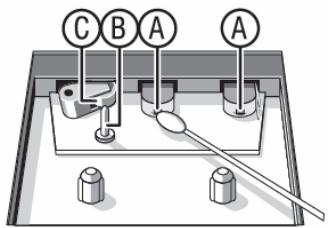
NOTE: Cleaning of the heads can also be done by playing a cleaning cassette through once.
SPECIFICATIONS
Power AC 230-240V~50Hz,15W
Dimensions 230(W) × 231(H) × 161(L) mm
FM frequency 88-108 MHz
Weight 2.3 kg
TROUBLESHOOTING
If you have any of the problems listed below please use this troubleshooting guide to try and solve them. A little time spent in this way may save you to the inconvenience of returning your equipment.
| PROBLEMS | POSSIBLE CAUSE | POSSIBLE SOLUTION |
| No sound/power | Volume not adjusted;Power cord not securely connected;Batteries dead / incorrectly inserted. | • Adjust the VOLUME control.• Connect the AC power cord properly.• Insert (fresh) batteries correctly. |
| Display does not function properly / No reaction to operation of any of the controls | Electrostatic discharge. | Switch off and unplug the unit. Reconnect after a few seconds. |
| Poor cassette sound quality | Dust and dirt on the heads, etc.Use of incompatible cassette types(METAL or CHROME). | • Clean deck parts etc. (see ‘MAINTENANCE’).• Only use NORMAL (IECI) for recording. |
| Recording does not work. | Cassette tab(s) may be broken. | Apply a piece of adhesive tape over the missing tab space. |
| No disc indication. | No CD inserted.CD badly scratched or dirty.Laser lens steamed up.CD-R is blank or the disc is not finalised. | • Insert a CD, CD-R, MP3 or CD-RW.• Replace / clean CD (see ‘MAINTENANCE’).• Wait until lens has cleared.• Use a finalised CD-R. |
| CD/MP3 playback does not work. | CD/MP3 badly scratched / dirty.Laser lens steamed up. | • Replace / clean CD (see ‘MAINTENANCE’).• Wait until lens has adjusted to room temperature. |
| The CD skips tracks. | CD damaged or dirty.Program is active. | • Replace or clean CD.• Quit program mode. |
We apologise for any inconvenience caused by minor inconsistencies in the instructions, which may occur as a result of appliance improvement and development.
Kesa Electricals © UK: EC1N 6TE 17-01-2013