LIVE770NC - Headphones JBL - Free user manual and instructions

Find the device manual for free LIVE770NC JBL in PDF.

JBL LIVE770NC - Headphones
📄 39 pages English EN Download 💬 AI Question 13 questions ⚙️ Specs
Notice JBL LIVE770NC - page 15
View the manual : Français FR English EN မြန်မာ MY
Pick your language and provide your email: we'll send you a specifically translated version.
Product Type Wireless headphones with active noise cancellation
Brand JBL
Model LIVE770NC
Speaker size 40 mm / 1.57 in (dynamic)
Weight 255 g / 0.5622 lb
Power supply 5 V ⎓ 1 A (USB-C)
Battery type Lithium-ion (850 mAh / 3.7 V)
Charging time 3 hours from empty
Music play time (BT on, ANC off) Up to 65 hours
Music play time (BT and ANC on) Up to 50 hours
Talk time with ANC Up to 28 hours
Talk time without ANC Up to 33 hours
Frequency response (Bluetooth) 20 Hz - 20 kHz
Frequency response (wired) 20 Hz - 40 kHz
Impedance 32 Ω
Sensitivity 100 dB SPL at 1 kHz
Maximum sound pressure 95 dB
Microphone sensitivity -40 dBV/Pa at 1 kHz
Bluetooth version 5.3
Supported Bluetooth profiles A2DP, AVRCP, HFP, HSP
Active noise cancellation (ANC) Yes, with Ambient Aware and TalkThru modes
Voice assistants Bixby, Siri, Google Assistant, Alexa
Multipoint connection Yes, up to 2 devices
Dedicated app JBL Headphones (Android/iOS)
Maximum operating temperature 45 °C

Frequently Asked Questions - LIVE770NC JBL

How to turn on and pair the JBL LIVE770NC headphones?
Press and hold the power button for 2 seconds to turn on the headphones. In pairing mode, select 'JBL LIVE770NC' from your device's Bluetooth list.
How to use multipoint connection?
Multipoint connection allows you to connect up to 2 Bluetooth devices simultaneously. Enable it via the JBL Headphones app or by following the procedure in the manual.
How to activate active noise cancellation (ANC)?
Press the dedicated ANC button on the headphones to turn noise cancellation on/off. You can also switch between ANC, Ambient Aware, and TalkThru modes via the app.
What is the battery life of the headphones?
Battery life varies by usage: up to 65 hours with Bluetooth on and ANC off, up to 50 hours with Bluetooth and ANC on, and up to 40 hours in wired mode with ANC.
How to charge the headphones?
Use the provided USB-C cable and connect it to a 5 V 1 A power source. Full charging takes about 3 hours.
Is the headphones compatible with Alexa or Google Assistant?
Yes, the headphones support Alexa and Google Assistant (Android only). Activate the assistant via the JBL Headphones app and use voice commands.
How to reset the headphones to factory settings?
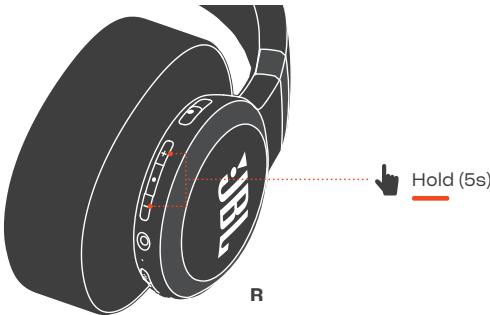
To reset, press and hold the volume + and - buttons for 5 seconds until the indicator flashes red and white.
Can I use the headphones in wired mode?
Yes, connect the provided audio cable to the AUX port on the headphones and to your audio source. The headphones work even without battery in wired mode.
How to clean the headphones?
Use a soft, dry cloth to clean the surfaces. Do not use chemicals. The ear cushions can be wiped with a slightly damp cloth.
Are the headphones recyclable?
Yes, the headphones, accessories, and cables are recyclable. Dispose of them at a store or recycling center in accordance with WEEE regulations.

User questions about LIVE770NC JBL

3 questions about this device. Answer the ones you know or ask your own.

Ask a new question about this device

Your email remains private: it is only used to notify you if someone answers your question.

Where is the power button on the JBL LIVE770NC and how do I use it?
Frequently Asked Questions - 06/11/2026
Response Notice-Facile

The power button on the JBL LIVE770NC is identified by the power symbol (⏻) and is usually located on one of the sides of the headset, often on the right or left earcup.

To turn on the headset: Press and hold the power button for 2 seconds. You will feel a slight haptic vibration or see an LED light up to confirm it is on.

Other functions of the power button:

  • To activate Bluetooth pairing mode: hold the button longer (about 5-7 seconds) until the LED blinks rapidly
  • To turn off: hold the button for 2 seconds until it powers down

If you have trouble locating it, look for the symbol ⏻ on the headset or check the main control area (usually on the touchpad or near the volume buttons).

Respond (be the first)
How to reduce the bass on the JBL LIVE770NC?
Frequently Asked Questions - 05/23/2026
Response Notice-Facile

To reduce the bass on your JBL LIVE770NC, you need to use the JBL Headphones mobile app:

  1. Install the JBL Headphones app on your phone or tablet (available on iOS and Android)
  2. Connect your headphones via Bluetooth
  3. Open the app and go to the Equalizer section
  4. Select a predefined audio preset (light, clear, etc.) that suits your preferences
  5. Or create a custom profile by manually lowering the sliders for the bass frequencies (the first areas)

The JBL LIVE770NC headphones use 40 mm dynamic speaker drivers and support a range of 20 Hz to 20 kHz in Bluetooth mode, allowing you to precisely adjust the bass to your liking.

Respond (be the first)
What should I do if my new JBL LIVE770NC headphones won't charge and the red LED turns off quickly?
Frequently Asked Questions - 03/27/2026
Response Notice-Facile

If your JBL LIVE770NC headphones are brand new and the red LED lights up briefly and then turns off, preventing charging, here are several steps to try to resolve this issue:

1. Check the cable and power source

  • Make sure the provided USB cable is in good condition and properly connected to the headphones and a reliable power source (wall adapter, computer USB port, etc.).
  • Try another compatible USB cable to rule out a cable defect.
  • Test another electrical outlet or USB adapter to check the power source.

2. Let the headphones charge for a sufficient amount of time

It is possible that the battery is completely discharged. Leave the headphones plugged in for at least 30 minutes without interruption before checking if the LED indicates normal charging.

3. Restart the headphones

Turn off the headphones, unplug them, then turn them back on and plug them in again to see if charging starts correctly.

4. Check environmental conditions

Make sure the headphones are not exposed to extreme temperatures (too hot or too cold), which can prevent charging.

5. Last resort: contact customer service

If the problem persists after these checks, it may be a hardware defect. In this case, contact JBL customer service or the retailer for assistance or a warranty exchange.

Respond (be the first)

Download the instructions for your Headphones in PDF format for free! Find your manual LIVE770NC - JBL and take your electronic device back in hand. On this page are published all the documents necessary for the use of your device. LIVE770NC by JBL.

USER MANUAL LIVE770NC JBL

SCAN ME

JBL LIVE770NC - 2

JBL HEADPHONES

JBL LIVE770NC - JBL HEADPHONES - 1

GET IT ON Google Play

JBL LIVE770NC - JBL HEADPHONES - 2

Download on the App Store

Get even more control and personalization of your listening experience with this free app.
QR code with central logo containing 'JBL' text and a circular emblem

POWER ON & CONNECT

graph TD A["Smartphone R"] --> B["Bluetooth"] B --> C["Android 6.0+ Device"] C --> D["Connect"] D --> E["JBL LIVE770NC will appear on devices linked with my account@gmail.com"] E --> F["Choose "JBL LIVE770NC" to connect."] G["Others"] --> H["Bluetooth"] H --> I["Android 6.0+ Device"]

* To enter pairing mode again, hold ✝ for 2 seconds.
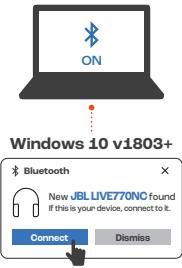
Windows 10 v1803+ Bluetooth New JBL LIVE770NC found If this is your device, connect to it. Connect Dismiss

Microsoft Swift Pair

Fast PairJBL LIVE770NC - POWER ON & CONNECT - 3

MULTI-POINT CONNECTION

JBL LIVE770NC - MULTI-POINT CONNECTION - 1

graph LR A["Smartphone"] -->|Bluetooth Signal| B["L"] B -->|R Signal| C["Tablet"] C -->|Press × 1| D["Smartphone"]

(Maximum 2 devices)

graph TD A["Headphones"] --> B["Connects"] B --> C["Bixby/Siri®/Others"] B --> D["Voice Assistants*"] B --> E["+"] B --> F["-"] B --> G["ANC"] B --> H["Ambient Aware*"] B --> I["TalkThru*"] style A fill:#f9f,stroke:#333 style B fill:#ccf,stroke:#333 style C fill:#cfc,stroke:#333 style D fill:#fcc,st…

* Enable advance controls by connecting your JBL LIVE770NC to JBL Headphones app 📄.

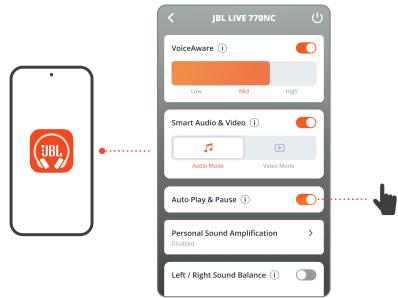
AUTO PLAY/PAUSE
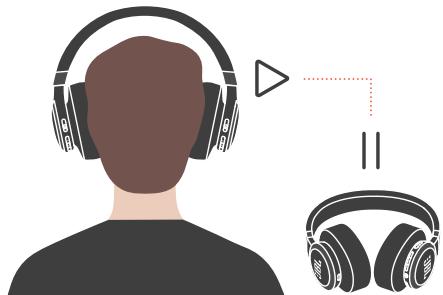
Back view of a person wearing headphones with headband, shown with two headsets and a triangular play button (no text or symbols)

JBL LIVE 770NC VoiceAware Low Mid High Smart Audio & Video Audio Mode Video Mode Auto Play & Pause Personal Sound Amplification Situated Left / Right Sound Balance

WIRED LISTENING MODE

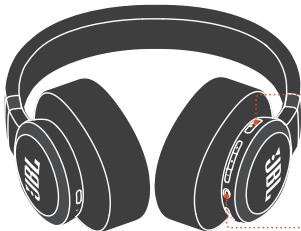
Illustration of a black-framed headphones with ear labels and headband (no text or symbols on the headphones themselves)

L R

JBL LIVE770NC - WIRED LISTENING MODE - 2

JBL LIVE770NC - WIRED LISTENING MODE - 3

ANC

JBL LIVE770NC - WIRED LISTENING MODE - 4

JBL LIVE770NC - WIRED LISTENING MODE - 5

Ambient Aware

JBL LIVE770NC - WIRED LISTENING MODE - 6

JBL LIVE770NC - WIRED LISTENING MODE - 7

TalkThru

JBL LIVE770NC - WIRED LISTENING MODE - 8

JBL LIVE770NC - WIRED LISTENING MODE - 9

JBL LIVE770NC - WIRED LISTENING MODE - 10

JBL LIVE770NC - WIRED LISTENING MODE - 11

JBL LIVE770NC - WIRED LISTENING MODE - 12

ANC

JBL LIVE770NC - WIRED LISTENING MODE - 13

JBL LIVE770NC - WIRED LISTENING MODE - 14

Ambient Aware

JBL LIVE770NC - WIRED LISTENING MODE - 15

JBL LIVE770NC - WIRED LISTENING MODE - 16

TalkThru

JBL LIVE770NC - WIRED LISTENING MODE - 17

JBL LIVE770NC - WIRED LISTENING MODE - 18

JBL LIVE770NC - WIRED LISTENING MODE - 19

Pure diagram of a medical or surgical tool with no text, numbers, or symbols

Simple icon of a laptop with a musical note symbol on screen (no text or labels)

JBL LIVE770NC - WIRED LISTENING MODE - 22

JBL LIVE770NC - WIRED LISTENING MODE - 23

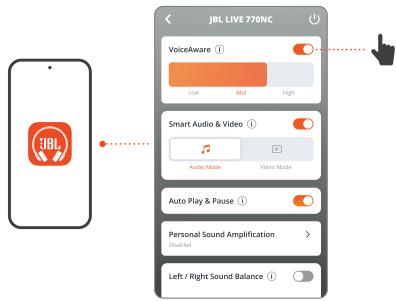
VOICEAWARE

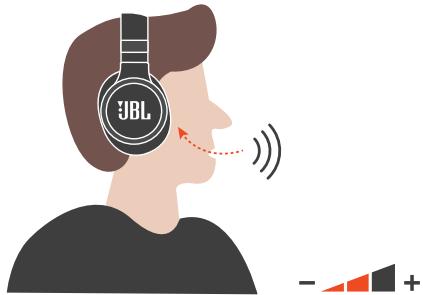
Illustration of a person wearing a JBL headset, with sound waves and a graphic symbol below (no text or symbols on the figures)

JBL LIVE 770NC VoiceAware Low Mid High Smart Audio & Video Audio Mode Video Mode Auto Play & Pause Personal Sound Amplification > Left / Right Sound Balance

DO MORE WITH THE APP

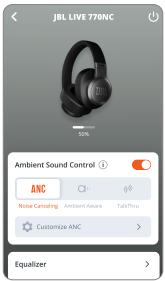
JBL LIVE 770NC Ambient Sound Control ANC Noise Cataloging Ambient Aware TalkThu Customize ANC Equalizer

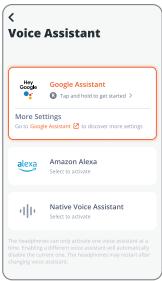
*Voice Assistant Google Assistant Trap and hold to get started > More Settings Go to Google Assistant to discover more settings Alexa Amazon Alexa Select to activate Native Voice Assistant Select to activate The headphones can only activate one voice assistant at a time. Enabling a different voice as…

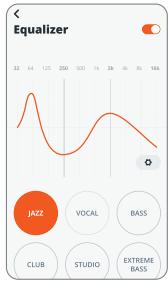
| Category | Value | | ---------- | ----- | | Jazz | 32 | | VOCAL | 64 | | BASS | 125 | | CLUB | 250 | | STUDIO | 500 | | EXTREME BASS | 14 |

JBL HEADPHONES

*Only available on Android™

HANDS-FREE VOICE CONTROL

JBL LIVE770NC - HANDS-FREE VOICE CONTROL - 1

Hey Google

Get more done on the go. Say "Hey Google" to get started.

"Play my Workout playlist" "Turn on noise canceling" "Turn off ambient mode" "What's my schedule today?" "Set an alarm for 7 AM"

Note: Only available on Android™ | Pre-set up is required

HANDS-FREE VOICE CONTROL

JBL LIVE770NC - HANDS-FREE VOICE CONTROL - 1

built-in

Ask Alexa to play music, answer questions, play the news, check the weather, set alarms, control compatible smart home devices, and more.

"Alexa, play today's hits"

"Alexa, volume up."

"Alexa, skip this song."

"Alexa, what's the weather?"

"Alexa, turn off the TV."

"Alexa, start my commute"

Note: Android™ 6.0 or higher is required for full access to Alexa features when using this device. Alexa isn't available in all locations.

CHARGING
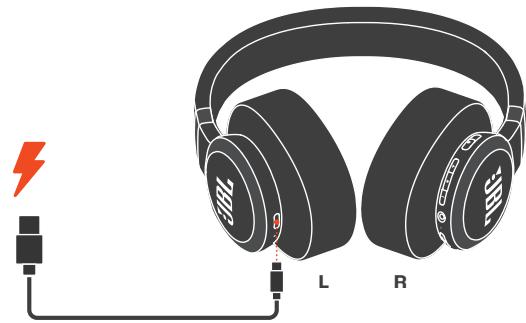
Illustration of a pair of black headphones connected to a power cord with a lightning bolt symbol (no text or labels)

5MIN = 4H♪

lightning → 3H

FACTORY RESET

JBL LIVE770NC - FACTORY RESET - 1

Hold (5s) R

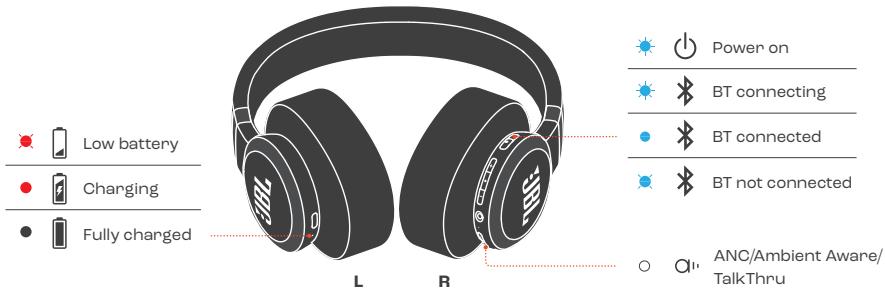
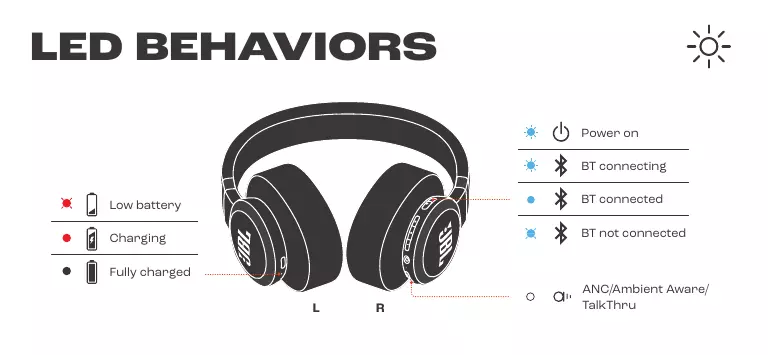
LED BEHAVIORS

Low battery Charging Fully charged L R Power on BT connecting BT connected BT not connected ANC/Ambient Aware/ TalkThru

TECH SPEC

Model:

LIVE770NC

Driver size:

40 mm/ 1.57" Dynamic Driver

Power supply:

5V---1A

Weight:

255 g/ 0.5622 lbs

Battery type:

Lithium-ion Battery (850 mAh/3.7 V)

Charging time:

3 hrs from empty

Music playtime with BT on and ANC off:

up to 65 hrs

Music playtime with BT on and ANC on:

up to 50 hrs

Music playtime with BT off and ANC on:

up to 40 hrs

Talk time with ANC on:

up to 28 hrs

Talk time with ANC off:

up to 33 hrs

Frequency response:

BT mode: 20 Hz ~ 20 kHz

AUX mode: 20 Hz ~ 40 kHz

Impedance:

32 ohm

Sensitivity:

100 dB SPL@1 kHz

Maximum SPL:

95 dB

Microphone sensitivity:

-40 dBV/Pa@1 kHz

Bluetooth version:

5.3

Bluetooth profile version:

A2DP V1.4, HFP V1.8, AVRCP V1.6.2

Bluetooth transmitter

frequency range:

2.4 GHz - 2.4835 GHz

Bluetooth transmitter power: ≤ 10dBm (EIRP)

Bluetooth transmitter

modulation:

GFSK, π/4-DQPSK, 8DPSK

Maximum operation

temperature:

45°C

BOX CONTENTS

APPLICATION

TalkThru (Conversation)*

A2DP V1.4, HFP V1.8, AVRCP V1.6.2

2.4 GHz - 2.4835 GHz

≤ 10 dBm (EIRP)

GFSK, π/4-DQPSK, 8DPSK

45°C

WHAT'S IN THE BOX

THE APP

ANC/Ambient Aware/TalkThru

SPECIFICATIONS

ANC/Ambient Aware/TalkThru

TECHNICAL DATA

Model:

LIVE770NC

Driver size:

A2DP V1.4, HFP V1.8, AVRCP V1.6.2

Bluetooth profile version:

A2DP V1.4, HFP V1.8, AVRCP V1.6.2

2.4 GHz - 2.4835 GHz

≤ 10 dBm (EIRP)

GFSK, π/4-DQPSK, 8DPSK

45°C

ES

BOX CONTENTS

APPLICATION

ANC/Ambient Aware/TalkThru

SPECIFICATIONS

Model:

Driver size:

A2DP V1.4, HFP V1.8, AVRCP V1.6.2

2.4 GHz - 2.4835 GHz

≤10 dBm (EIRP)

GFSK, π/4-DQPSK, 8DPSK

45°C

FI

PACKAGE CONTENTS

APPLICATION

ANC/Ambient Aware/TalkThru

TECHNICAL SPECIFICATIONS

Model:

Element size:

Power supply:

Weight:

Battery type:

Charging time:

A2DP V1.4, HFP V1.8, AVRCP V1.6.2

2.4 GHz - 2.4835 GHz

≤ 10 dBm (EIRP)

GFSK, π/4-DQPSK, 8DPSK

45°C

HU

BOX CONTENTS

APPLICATION

ANC/Ambient Aware/TalkThru

TECHNICAL SPECIFICATIONS

Model:

Speaker size:

Power supply:

Weight:

Battery type:

Charging time:

A2DP V1.4, HFP V1.8, AVRCP V1.6.2

2.4 GHz - 2.4835 GHz

≤ 10 dBm (EIRP)

GFSK, π/4-DQPSK, 8DPSK

45°C

IT

ANC/Ambient Aware/TalkThru

TECHNICAL SPECIFICATIONS

A2DP V1.4, HFP V1.8, AVRCP V1.6.2

2.4 GHz - 2.4835 GHz

≤ 10 dBm (EIRP)

GFSK, π/4-DQPSK, 8DPSK

45°C

NL

PACKAGE CONTENTS

APP

ANC/Ambient Aware/TalkThru

TECHNICAL SPECIFICATIONS

Model:

Driver size:

Power supply:

Weight:

Battery type:

Charging time:

A2DP V1.4, HFP V1.8, AVRCP V1.6.2

2.4 GHz - 2.4835 GHz

≤ 10 dBm (EIRP)

GFSK, π/4-DQPSK, 8DPSK

45°C

NO

THIS IS IN THE BOX

APP

ANC/Ambient Aware/TalkThru

TECHNICAL SPECIFICATIONS

Model:

Driver size:

Power supply:

Weight:

Battery type:

Charging time:

40 mm/1.57" dynamic driver

5V---1A

255 g/0.5622 lb

Lithium-ion battery (850 mAh/3.7 V)

3 hours when empty

up to 65 hours

up to 50 hours

up to 40 hours

up to 28 hours

up to 33 hours

BT mode: 20 Hz - 20 kHz

AUX mode: 20 Hz - 40 kHz

32 ohm

A2DP V1.4, HFP V1.8, AVRCP V1.6.2

2.4 GHz - 2.4835 GHz

≤ 10 dBm (EIRP)

GFSK, π/4-DQPSK, 8DPSK

45°C

PL

PACKAGE CONTENTS

APPLICATION

ANC/Ambient Aware/TalkThru

TECHNICAL SPECIFICATION

DETTA FINNS I LÄDAN APP

MULTIPOINT CONNECTION

(Max 2 devices)

CONTROLLER

ANC/Ambient Aware/TalkThru

TECHNICAL SPECIFICATIONS

Model:

A2DP V1.4, HFP V1.8, AVRCP V1.6.2

2.4 GHz – 2.4835 GHz

≤ 10 dBm (EIRP)

GFSK, π/4-DQPSK, 8DPSK

45°C

TR

BOX CONTENTS

APPLICATION

Ambient Aware*

ANC/Ambient Aware

A2DP V1.4, HFP V1.8, AVRCP V1.6.2

2.4-2.4835 GHz

2.4-2.4835 GHz

≤ 10 dBm (EIRP)

GFSK, π/4-DQPSK, 8DPSK

45°C

ZH-CN

Product List

Applications

Ambient Aware*

TalkThru*

A2DP V1.4, HFP V1.8, AVRCP V1.6.2

2.4 GHz - 2.4835 GHz

≤ 10 dBm (EIRP)

GFSK, π/4-DQPSK, 8DPSK

45°C

ZH-TW

Box Contents

Application

Through this free app,

you can better

control and personalize your listening

experience.

Power on and connect

Other

A2DP V1.4, HFP V1.8, AVRCP V1.6.2

2.4 GHz - 2.4835 GHz

≤ 10 dBm (EIRP)

GFSK, π/4-DQPSK, 8DPSK

45°C

ID

FILL THE BOX

APPLICATION

OTHER USES OF THE APP

*Only available on devices

Android™

CHARGING

RESET TO FACTORY SETTINGS

FACTORY

LED PATTERN

Low battery

Charging

Fully charged

Power on

BT connecting

BT connected

BT not connected

ANC/Ambient Aware/TalkThru

TECHNICAL SPECIFICATIONS

Model:

Driver size:

Power supply:

Weight:

Battery type:

Charging time:

AUX mode: 20 Hz–40 kHz

32 ohm

100 dB SPL@1 kHz

95 dB

-40 dBV/Pa@1 kHz

5.3

A2DP V1.4, HFP V1.8, AVRCP V1.6.2

2.4 GHz - 2.4835 GHz

≤ 10 dBm (EIRP)

GFSK, π/4-DQPSK, 8DPSK

45°C

JP

Included items

App

A2DP V1.4, HFP V1.8, AVRCP V1.6.2

2.4GHz to 2.4835GHz

10dBm or less (EIRP)

GFSK, π/4-DQPSK, 8DPSK

45°C

KO

Included items

App

Listen via the free app

to control and personalize the experience more effectively

control and personalize

can.

Power On & Connection

Other

A2DP V1.4, HFP V1.8, AVRCP V1.6.2

2.4GHz~2.4835GHz

≤10dBm(EIRP)

GFSK, π/4-DQPSK, 8DPSK

45°C

MM

ANC/Ambient Aware/TalkThru

TECH SPEC
###LIVE770NC
###50 ###
###5V---1A
######
###(850mAh/3.7V)
######
BT ###: ANC ## 800### ### ###
######
BT ###: ANC ## ### ### ###
BT ###: ANC ## ### ###
ANC ###: ###50 ###
ANC ###: ###50 ###

A2DP V1.4, HFP V1.8, AVRCP V1.6.2

2.4 GHz - 2.4835 GHz

≤ 10 dBm (EIRP)

GFSK, π/4-DQPSK, 8DPSK

45°C

HANDSFREE VOICE CONTROL

"Activate noise reduction"

The SAR limit of Canada (C) is 1.6 W/kg averaged over one gram of tissue. Device types: (IC:6132A-LIVE770NC) has also been tested against this SAR limit. According to this standard, the highest SAR value reported during product certification for head use is 0.04 W/kg.

The device was tested for typical bodily operations where the product was kept 0 mm from the head. To maintain compliance with IC RF exposure requirements, use accessories that maintain a separation distance of 0 mm between the user's head and the back of the headset. The use of belt clips, holsters and similar accessories shall not contain metal parts in their assembly. Use of accessories that do not meet these requirements may not comply with IC RF exposure requirements and should be avoided.

Head operation

The device was subjected to a typical head manipulation test. In order to comply with RF exposure requirements, a minimum separation distance of 0 cm must be maintained between the user's ear and the product (including the antenna). Head exposure that does not meet these requirements may not meet RF exposure requirements and should be avoided. Use only the supplied or approved antenna.

IC:6132A-LIVE770NC

DO NOT ATTEMPT TO OPEN, SERVICE, OR DISASSEMBLE THE BATTERY | DO NOT SHORT CIRCUIT | MAY EXPLODE IF DISPOSED OF IN FIRE | RISK OF EXPLOSION IF BATTERY IS REPLACED BY AN INCORRECT TYPE | DISPOSE OR RECYCLE USED BATTERIES ACCORDING TO THE INSTRUCTIONS

This wireless equipment may cause radio interference, so services related to human safety cannot be provided.

FCC ID: APILIVE770NC

IC: 6132A-LIVE770NC

CE

UK CA

Abstract icon of a person walking with arrows indicating a cycle (no text or symbols)

FR

The Bluetooth® word mark and logos are registered trademarks owned by Bluetooth SIG, Inc. and any use of such marks by HARMAN International Industries, Incorporated is under license. Other trademarks and trade names are those of their respective owners.

ANATEL

Google, Android and Google Play are trademarks of Google LLC.

JBL LIVE770NC - FR - 2

built-in

Amazon, Alexa, Amazon Music, and all related logos are trademarks of Amazon, Inc. or its affiliates.

Manual assistant
Powered by Anthropic
Waiting for your message
Product information

Brand : JBL

Model : LIVE770NC

Category : Headphones