
UP24LORANGE - Smart bracelet JAWBONE - Free user manual and instructions
Find the device manual for free UP24LORANGE JAWBONE in PDF.



| Brand | JAWBONE |
| Model | UP24 LORANGE |
| Product type | Activity tracker bracelet |
| Power supply | Rechargeable battery via USB cable with 2.5 mm jack |
| Charging time | About 80 minutes |
| Battery life | Up to 7 days depending on usage |
| Bracelet material | Hypoallergenic TPU rubber with spring steel |
| Water resistance | Splash resistant, but not waterproof (do not submerge) |
| Connectivity | Bluetooth 4.0 LE (range 10 m) |
| Compatibility | iOS (iPhone, iPad, iPod touch) |
| Main features | Activity tracking (steps, movement), sleep tracking (light and deep), timer, power nap, food tracking, inactivity alerts, vibrating alarm |
| Display | LED status lights (sun and moon) |
| Mode button | Multifunction button to switch modes (awake, sleep, timer, power nap) |
| Storage capacity | Data is stored on the bracelet and synced with the app |
| Box contents | UP24 bracelet, protective cap, 2.5 mm to USB charging cable, quick start guide |
| Care and cleaning | Wipe with a soft, dry cloth. Do not use chemical products. |
| Safety | Do not wear in the shower or while swimming. Do not expose to extreme temperatures. |
| Spare parts and repairability | The cap and charging cable are replaceable. For any repairs, contact JAWBONE support. |
Frequently Asked Questions - UP24LORANGE JAWBONE
User questions about UP24LORANGE JAWBONE
0 question about this device. Answer the ones you know or ask your own.
Ask a new question about this device
Download the instructions for your Smart bracelet in PDF format for free! Find your manual UP24LORANGE - JAWBONE and take your electronic device back in hand. On this page are published all the documents necessary for the use of your device. UP24LORANGE by JAWBONE.
USER MANUAL UP24LORANGE JAWBONE
Connect your band. Start living better.
Visit up.jawbone.com

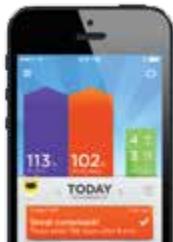
GET THE APP
Go to up.jawbone.com
Already using UP?
Make sure you have the latest version of the app.
If you see a icon in the top right corner of the
home screen you're good to go.
CONNECT YOUR BAND
Follow the instructions to pair your band and create your profile.
Already using UP?
tap the icon in the top right corner of the home screen, "Add new band" and follow the instructions.
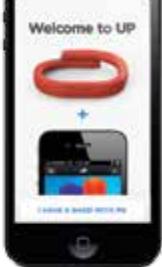
CONGRATULATIONS
Start living better.
Need to charge your band?
Simply plug it into your computer using the included USB cable.
When the light glows solidly, your band is fully charged.

GET TO KNOW YOUR UP BAND
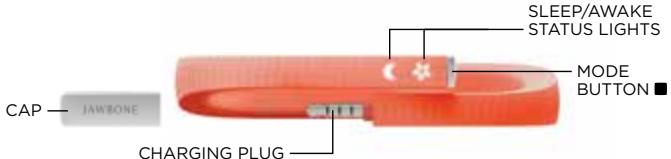
MODE BUTTON
Check status __press _.
Change mode ___press _] and hold until band vibrates
Stopwatch ___press _] then press and hold until band vibrates
Power nap ___press ____] twice, then press and hold until band vibrates
SAFETY INFORMATION WARNING
There are some things you should know about UP24 both for your safety and to avoid damaging your band.
- Do not wear or clean your UP24 band while you are cleaning the band. Use the charger first before cleaning the UP24 band
Do not expose your UP24 band, or any device used to charge it, to liquid, moisture, humidity, or rain while charging. Exposure of the UP24 band to moisture while charging could result in electric shock. - Do not excessively bend or twist your UP24 band. Damage to electrical components, and a risk of shock, may result.
UP CARE
- Your band is rain, splash and sweat resistant, but please do not use the water. Use a swimmer to get the swimming soaking in the bathtub and deep sea diving.
- Use only dry cloth or paper to clean your UP24 band. Do not use any wet cleaners to clean your UP24 band.
- Do not expose your UP24 band to extremely high or low temperatures.
- Do not bring your UP24 band into contact with any sharp objects. This could cause scratches and damage.
-
Do not attempt to repair, modify, or disassemble your equipment. If you are unable to repair the available components and doing so will void the warranty.
-
Use only the supplied USB cable to charge the UP24 band with USB compliant ports.
HEALTH DISCLAIMER
WARNING: UP24 BY JAWBONE IS NOT A MEDICAL DEVICE. The UP24 band and its associated applications should not be used to diagnose, treat, or prevent any disease or medical condition. Always seek the advice of a qualified medical professional before making any changes to your exercise, sleep or nutrition, as doing so may cause severe harm or death.
PRODUCT DISPOSAL
Dispose of the UP24 band, battery, and this packaging are not allowed. Dispose of the battery with regular household waste.
REGULATORY INFORMATION
Please refer to the app for country specific information. This is an optional tool, go to Settings > Help > Regulatory Information.
FCC STATEMENT
This equipment has been tested and found to comply with the limits for a Class B digital device, pursuant to Part 15 of the FCC Rules. These limits are designed to provide reasonable protection against harmful interference in a residential installation. This equipment generates, uses, and can radiate radio frequency energy and, if not installed and used in accordance with the instructions, may cause harmful interference to the user's communication. The safety of this equipment is no guarantee that interference will not occur in a particular installation. If this equipment does cause harmful interference to radio or television reception, which can be determined by
turning the equipment off and on, the user is encouraged to try to correct the interference by one of the following measures:
- Reorient or relocate the receiving antenna.
- Increase the separation between the equipment and receiver.
- Connect the equipment into an outlet on a circuit different from that to which the receiver is connected.
- Consult the dealer or an experienced radio/TV technician for help.
FCC NOTICE
This device complies with Part 15 of the FCC Rules.
Operation is subject to the following two conditions:
- This device may not cause harmful interference, and
- This device must accept any interference received, including interference that may cause undesired operation.
FCC CAUTION
The FCC requires the user to be notified that any of the items listed in the report are not approved by Jawsbone may void
the user's authority to operate the equipment.
- This device and its antenna(s) must not be co-located or operating in conjunction with any other antenna (i.e., the antenna located on the ground).
FOR MORE INFORMATION
Visit jawbone.com/support
FCCID:V3J-L01
