LX3900SA+LX3950W - DVD player PHILIPS - Free user manual and instructions
Find the device manual for free LX3900SA+LX3950W PHILIPS in PDF.


User questions about LX3900SA+LX3950W PHILIPS
0 question about this device. Answer the ones you know or ask your own.
Ask a new question about this device
Download the instructions for your DVD player in PDF format for free! Find your manual LX3900SA+LX3950W - PHILIPS and take your electronic device back in hand. On this page are published all the documents necessary for the use of your device. LX3900SA+LX3950W by PHILIPS.
USER MANUAL LX3900SA+LX3950W PHILIPS
Important notes for users in the U.K.
Mains plug
This apparatus is fitted with an approved 13 Amp plug. To change a fuse in this type of plug proceed as follows:
1 Remove fuse cover and fuse.
Fix new fuse which should be a BS1362 5 Amp, A.S.T.A. or BSI approved type.
3 Refit the fuse cover.
If the fitted plug is not suitable for your socket outlets, it should be cut off and an appropriate plug fitted in its place.
If the mains plug contains a fuse, this should have a value of 5 Amp. If a plug without a fuse is used, the fuse at the distribution board should not be greater than 5 Amp.
Note: The severed plug must be disposed of to avoid a possible shock hazard should it be inserted into a 13 Amp socket elsewhere.
How to connect a plug
The wires in the mains lead are coloured with the following code: blue = neutral (N), brown = live (L).
-
As these colours may not correspond with the colour markings identifying the terminals in your plug, proceed as follows:
-
Connect the blue wire to the terminal marked N or coloured black.
- Connect the brown wire to the terminal marked L or coloured red.
- Do not connect either wire to the earth terminal in the plug, marked E (or 12 ) or coloured green (or green and yellow).
Before replacing the plug cover, make certain that the cord grip is clamped over the sheath of the lead - not simply over the two wires.
Copyright in the U.K.
Recording and playback of material may require consent. See Copyright Act 1956 and The Performer's Protection Acts 1958 to 1972.
Italia
Use of controls or adjustments or performance of procedures other than herein may result in hazardous radiation exposure or other unsafe operation.
VAROITUS
Beam divergence 60 degree
Manufactured under license from Dolby Laboratories. "Dolby", "Pro Logic" and the double-D symbol are trademarks of Dolby Laboratories.
Manufactured under license from Digital Theater Systems, Inc. US Pat. No. 5,451,942, 5,956,674, 5,974,380, 5,978,762 and other world-wide patents issued and pending. "DTS" and "DTS Digital Surround" are registered trademarks of Digital Theater Systems, Inc. Copyright 1996, 2000 Digital Theater Systems, Inc. All Rights Reversed.
This product complies with the radio interference requirements of the European Community.
DivX®, DivX Certified, and associated logos are trademarks of DivXNetworks, Inc and are used under license.


For Customer Use:
Read carefully the information located at the bottom of your DVDVIDEO player and enter below the Serial No. Retain this information for future reference.
Model No. DVDVIDEO LX3900SA/LX3950W Serial No.
CAUTION
VISIBLE AND INVISIBLE LASER
RADIATION WHEN OPEN AVOID
EXPOSURE TO BEAM
ADVARSEL
SYNLIG OG USYNLIG LASERSTRÄLING
VED ÅBNING UNDGÅ UDSÄETTELSE FOR STRÄLING
WARNING
SYNLIG OCH OSYNLIG
LASERSTRÄLNING NÄR DENNA DEL
ÄR ÖPPNAD BETRAKTA EJ STRÄLEN VARO!
AVATTAESSA OLET ALTTIINA
NAKYVALLE JA NAKYMATTOMALLE
LASER SATEILYLLE. ALA KATSO
SATEESEEN
VORSICHT
This DVD player is in conformity with the EMC directive and low-voltage directive.
'CONSUMERS SHOULD NOTE THAT NOT ALL HIGH DEFINITION TELEVISION SETS ARE FULY COMPATIBLE WITH THIS PRODUCT AND MAY CAUSE ARTIFACTS TO BE DISPLAYED IN THE PICTURE. IN CASE OF 525 OR 625 PROGRESSIVE SCAN PICTURE PROBLEMS, IT IS RECOMMENDED THAT THE USER SWITCH THE CONNECTION TO THE 'STANDARD DEFINITION' OUTPUT. IF THERE ARE QUESTIONS REGARDING OUR TV SET COMPATIBILITY WITH THIS MODEL 525p AND 625p DVD PLAYER, PLEASE CONTACT OUR CUSTOMER SERVICE CENTRE'.
English
Hereby, Philips Consumer Electronics, B. U. Peripherals & Accessories, declares that this product is in compliance with the essential requirements and other relevant provisions of Directive 1999/5/EC.
Français
Lecture multi-angle 62
MULTI-CHANNEL (Muticanal)
Mode nocturne - activation/désactivation
$$ " S L E E C P " \rightarrow " S L E E C P " $$
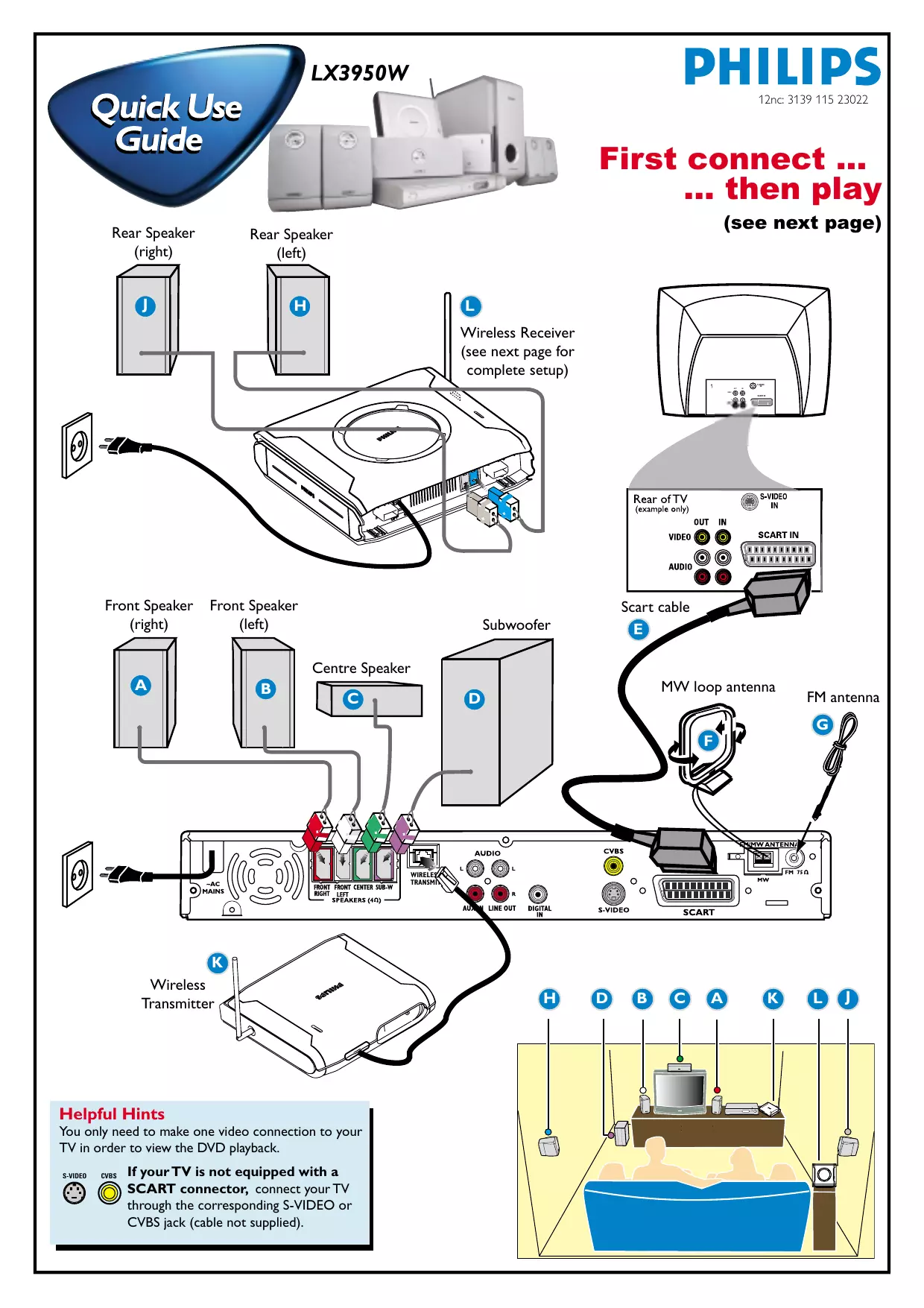
First connect … then play
(see next page)
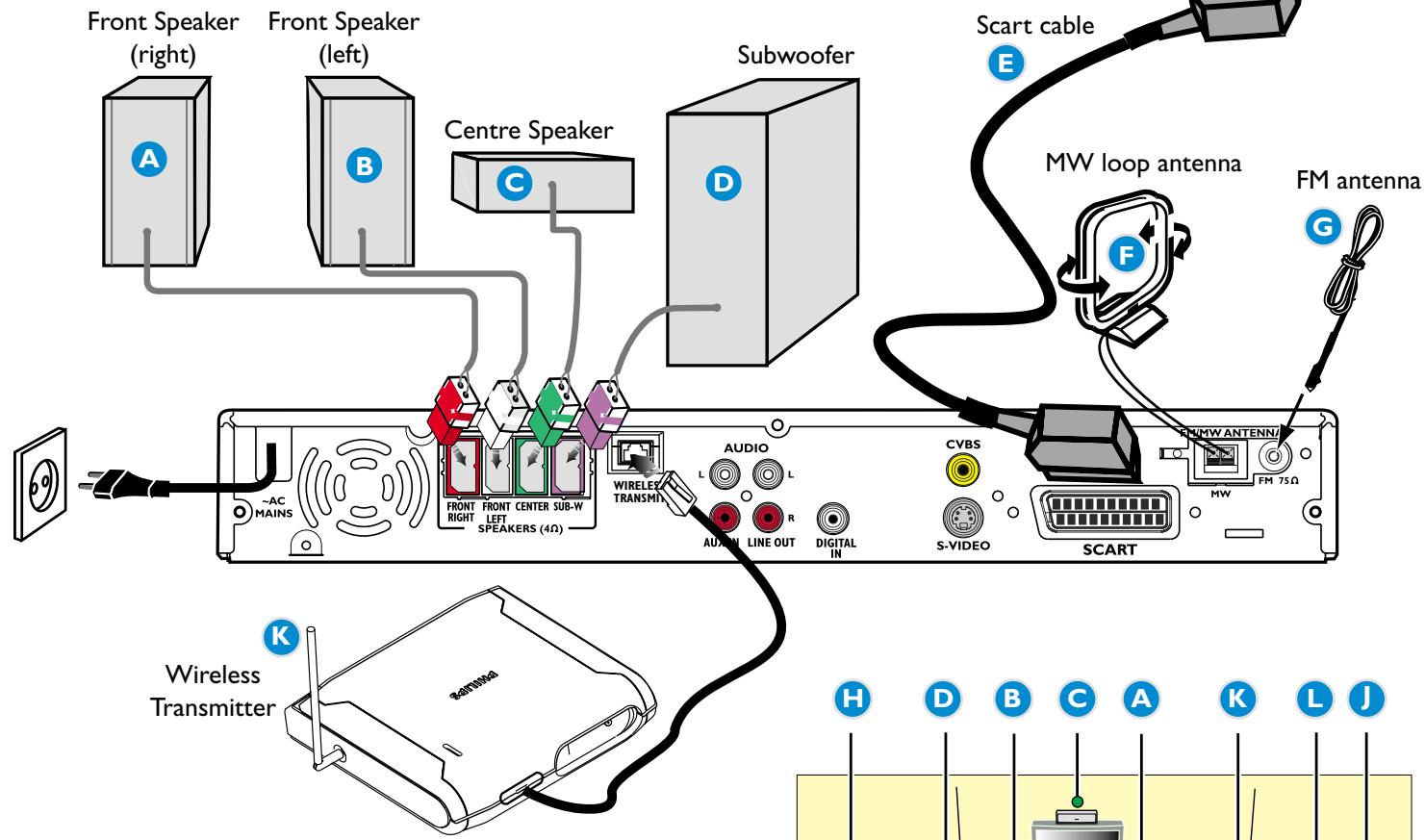
Helpful Hints
You only need to make one video connection to your
TV in order to view the DVD playback.
S-VIDEO

CVBS

If your TV is not equipped with a
SCART connector, connect your TV
through the corresponding S-VIDEO or
CVBS jack (cable not supplied).
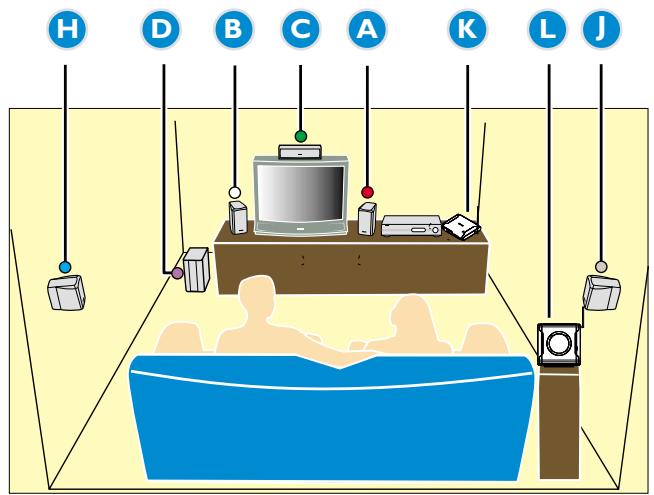
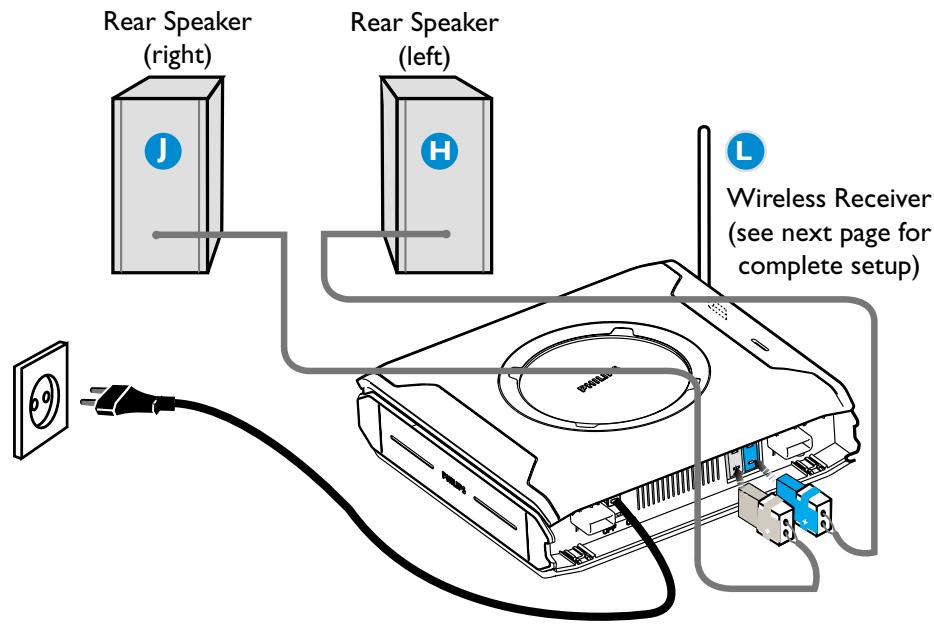
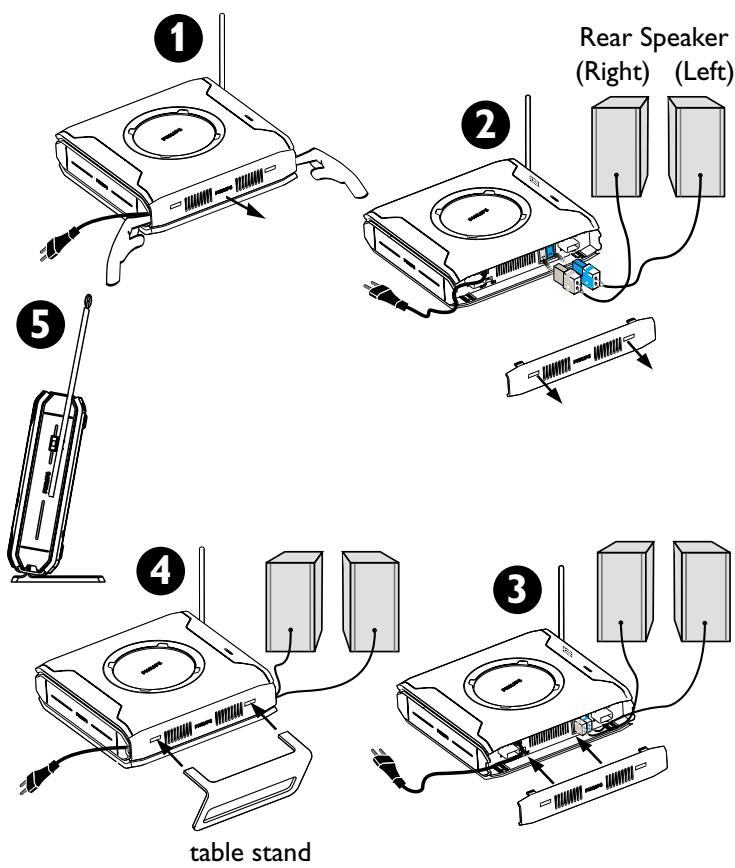
Wireless Receiver Setup
Wireless System - Getting Started
1 Turn on your DVD system and play an audio CD (see 'Playing a disc').
2 Select same transmission frequency channel for both the wireless transmitter and receiver.
The wireless system will automatically turn on when receiving an audio signal and vice versa.
On the wireless transmitter :
The default preset frequency is (1). To select another transmission frequency, press and hold SOUND button on the remote until "FREQ X" ("X" = 1~4) appears on the DVD system display panel. Repeat the step again until you get the best frequency that obtains optimal reception.
On the wireless receiver :
Adjust the Frequency Selector Switch 1~4 (fig ①), so that both units are using the same transmission frequency.
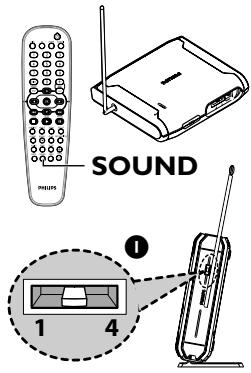
TIPS:
- In case of sound distortion, please select another frequency for both the wireless transmitter and receiver. The distortion could be the result of interference caused by other equipment using same frequency channel in your house or neighborhood.
- Extend the antennas vertically to improve the reception. Check the antennas are safely positioned without obstructions.
To ensure quality sound production and transmission:
Place both the wireless transmitter and receiver at least 3 metres apart and off the ground (recommended minimum height of 30cm ). Do not place them too close to TV, AC power adaptor or any radiation sources.
Also note that audio may be interrupted due to the reflected waves when a person crosses or approaches the space between the transmitter and wireless speaker.
Playing a disc
Make sure your DVD system and TV are connected and turned on!
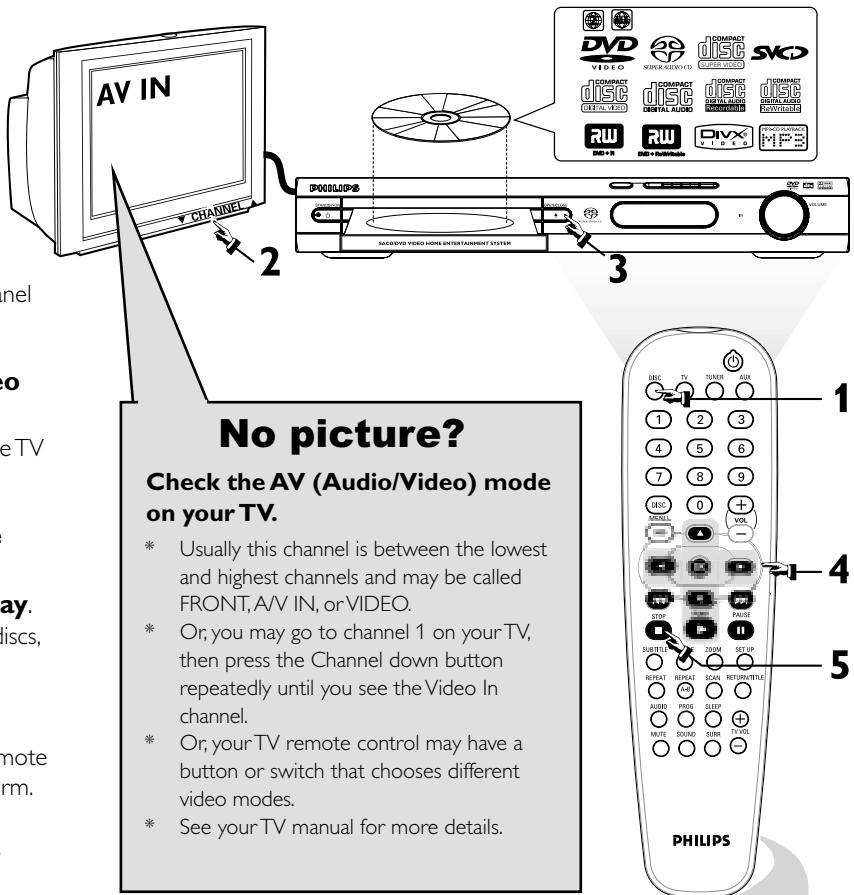
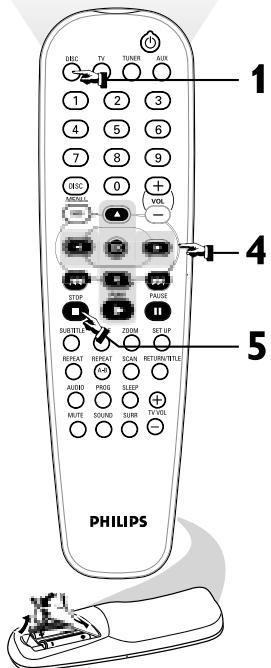
1 Press DISC on the remote control.
You can also press the SOURCE button on the front panel until "DISC" appears on the display panel.
2 Turn on the TV and select the correct Video In mode.
You should see the blue DVD background screen on the TV (if no disc in the DVD system).
3 Press OPEN · CLOSE on the front of the DVD system and load a disc, then press OPEN · CLOSE again to close the disc tray.
Make sure the disc label is facing up. For double-sided discs, load the side you want to play face up.
4Playback will start automatically.
If a disc menu appears, use 0 to make the necessary selection, then press OK to confirm. Or, use the numeric keypad on the remote to select features. Follow the instructions given in the disc menu.
5 To stop playback, press STOP.