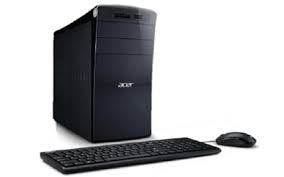
ASPIRE M3985-2TO - Desktop computer ACER - Free user manual and instructions
Find the device manual for free ASPIRE M3985-2TO ACER in PDF.


| Product Type | Desktop Computer |
| Brand | ACER |
| Model | ASPIRE M3985-2TO |
| Supported Processor | Socket-compatible processors (depending on configuration) |
| RAM | Expandable, up to several GB (depending on model) |
| Hard Drive | Variable capacity, replaceable |
| Optical Drives | CD/DVD-ROM, CD/DVD writer (depending on model) |
| Front Ports | USB, microphone jack, headphone jack, multimedia card reader, FireWire (depending on model) |
| Rear Ports | PS/2 keyboard and mouse, VGA, serial, parallel, USB, Ethernet RJ-45, audio input/output, HDMI, eSATA (depending on model) |
| Power Supply | AC mains, voltage selector, detachable power cord UL/CSA/VDE |
| Operating Temperature | 5°C to 35°C |
| Operating Humidity | 20% to 80% (non-condensing) |
| Maintenance and Cleaning | Soft cloth dampened with water, do not use liquids or aerosols |
| Safety | Grounding mandatory, do not open the casing, CMOS battery type CR2032 |
| Spare Parts and Repairability | Call a qualified technician, parts available from Acer dealer |
| Certifications | ENERGY STAR, FCC Class B, CE, TBR21 |
| Supported Operating Systems | Microsoft Windows, Linux |
Frequently Asked Questions - ASPIRE M3985-2TO ACER
User questions about ASPIRE M3985-2TO ACER
0 question about this device. Answer the ones you know or ask your own.
Ask a new question about this device
Download the instructions for your Desktop computer in PDF format for free! Find your manual ASPIRE M3985-2TO - ACER and take your electronic device back in hand. On this page are published all the documents necessary for the use of your device. ASPIRE M3985-2TO by ACER.
USER MANUAL ASPIRE M3985-2TO ACER
Federal Communications Commission 20
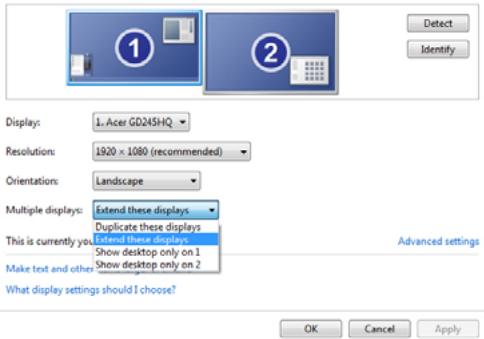
Change the appearance of your displays
This Class B digital apparatus complies with Canadian ICES-003.
8F, 88, Sec. 1, Xintai 5th Rd., Xizhi,
New Taipei City 221, Taiwan
CE
Declaration of Conformity
We,
Acer Incorporated
8F, 88, Sec. 1, Xintai 5th Rd., Xizhi, New Taipei City 221, Taiwan
Contact Person: Mr. RU Jan, e-mail: ru_jan@acer.com.tw
And,
Acer Italy s.r.l
Via Lepetit, 40, 20020 Lainate (MI) Italy
Tel: +39-02-939-921, Fax: +39-02 9399-2913, www.acer.it
Hereby declare that:
Product:
Personal Computer
Trade Name:
Acer
Model Number:
AcerSystem
SKU Number:
XXX-xxx ("x" = 0~9, a ~ z, A ~ Z or Blank)
Is compliant with the essential requirements and other relevant provisions of the following EC directives, and that all the necessary steps have been taken and are in force to assure that production units of the same product will continue comply with the requirements.
EMC Directive 2004/108/EC as attested by conformity with the following harmonized standards:
- EN55022, AS/NZS CISPR22, Class B
- EN55024
- EN55013 (Applicable to product built with TV tuner module)
- EN55020 (Applicable to product built with TV tuner module)
- EN61000-3-2 Class D
- EN61000-3-3
Low Voltage Directive 2006/95/EC as attested by conformity with the following harmonized standard:
- EN60950-1
- EN60065 (Applicable to product built with TV tuner module)
Council Decision 98/482/EC (CTR21):
-. (Applicable to product with pan- European single terminal connection
to the Public Switched Telephone Network (PSTN).)
RoHS Directive 2002/95/EC on the Restriction of the Use of certain Hazardous Substances in Electrical and Electronic Equipment
- . The maximum concentration values of the restricted substances by
weight in homogenous material are:
| Lead | 0.1% | Polybrominated Biphenyls (PBB's) | 0.1% |
| Mercury | 0.1% | Polybrominated Diphenyl Ethers (PBDE's) | 0.1% |
| Hexavalent Chromium | 0.1% | Cadmium | 0.01% |
Directive 2009/125/EC with regard to establishing a framework for the setting of ecodesign requirements for energy-related product.
The standards listed below are applied to the product if built with WLAN module or wireless keyboard and mouse.

R&TTE Directive 1999/5/EC as attested by conformity with the following harmonized standard:
Article 3.1(a) Health and Safety
. EN301 489-1
- EN301 489-3 (Applicable to non-bruethooth wireless keyboard mouse set).
EN301489-17
-
Article 3.2 Spectrum Usages
-
EN300 440-2 (Applicable to non-bruethow wireless keyboard mouse set).
- EN300 328
- EN301 893 (Applicable to 5GHz high performance RLAN).
Year to begin affixing CE marking 2011.
R1I1
RU Jan/Sr. Manager
Regulation Center, Acer Inc.
Mar. 13, 2012
Date
Acer America Corporation
333 West San Carlos St., San Jose
CA 95110, U. S. A.
Tel:254-298-4000
Fax:254-298-4147
www.acer.com

Federal Communications Commission Declaration of Conformity
This device complies with Part 15 of the FCC Rules. Operation is subject to the following two conditions: (1) this device may not cause harmful interference, and (2) this device must accept any interference received, including interference that may cause undesired operation.
The following local Manufacturer /Importer is responsible for this declaration:
| Product: | Personal Computer |
| Trade Name: | Acer |
| Model Number: | AcerSystem |
| SKU Number: | XXX-xxx, ("x" = 0~9, a ~ z, A ~ Z or Blank) |
| Name of Responsible Party: | Acer America Corporation |
| Address of Responsible Party: | 333 West San Carlos St. San Jose, CA 95110 U. S. A. |
| Contact Person: | Acer Representative |
| Phone No.: | 254-298-4000 |
| Fax No.: | 254-298-4147 |