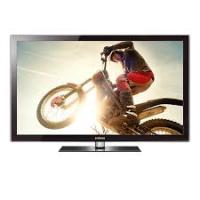
PS50C670G3S - TV SAMSUNG - Free user manual and instructions
Find the device manual for free PS50C670G3S SAMSUNG in PDF.



Pick your language and provide your email: we'll send you a specifically translated version.
| Product type | Plasma TV |
| Brand | Samsung |
| Model | PS50C670G3S |
| Screen size | 50 inches (127 cm) |
| Resolution | 1920 x 1080 pixels (Full HD) |
| Aspect ratio | 16:9 |
| Connectivity | 4 HDMI inputs, 2 USB ports, component input, composite input, VGA input, optical digital audio output, Ethernet port, built-in Wi-Fi, CI+ |
| Audio | 2 speakers of 10 W each, Dolby Digital Plus |
| Power consumption | Operating: approx. 200 W; standby: less than 1 W |
| Weight (with stand) | Approx. 25 kg |
| Dimensions (with stand) | 1185 x 780 x 305 mm |
| Dimensions (without stand) | 1185 x 705 x 56 mm |
| Power supply | 220-240 V, 50/60 Hz |
| Main features | 3D, Internet@TV, DLNA, USB Movie, CI+, Time Shift, EPG |
| Care and cleaning | Clean the screen with a soft, dry cloth. Avoid chemical products and water directly. |
| Safety | Do not expose to moisture, do not block ventilation slots, use a suitable wall mount |
| Spare parts and repairability | Remote control, stand, cables available on Samsung website. Panel and power supply repairable by a professional. |
| General information | Manufactured in 2010. Compatible with Freeview HD and satellite standards. |
Frequently Asked Questions - PS50C670G3S SAMSUNG
How to turn on the TV?
Use the Power button on the remote control. If the remote does not work, press the Power button located on the side or bottom of the screen.
How to connect an HDMI device?
Plug the HDMI cable into one of the HDMI IN ports on the back of the TV, then select the corresponding input using the Source button on the remote.
The TV won't turn on, what to do?
Check that the power cable is properly plugged in and the outlet works. Try another outlet. If the standby light does not come on, contact customer service.
How to adjust picture settings?
Press the Menu button on the remote, then go to Picture. You can adjust the picture mode (Dynamic, Standard, Cinema, etc.), brightness, contrast, color, and sharpness.
How to clean the plasma screen?
Use a soft, dry cloth, preferably microfiber, to gently wipe off dust. Never use chemical products, alcohol, or water directly on the screen.
Can I watch 3D with this TV?
Yes, this model supports active 3D. You must use compatible Samsung 3D glasses and 3D content (Blu-ray, TV channel, etc.). Enable 3D via the 3D menu.
How to update the software?
Go to Menu > Support > Software Update. Choose Online Update if the TV is connected to the internet, or USB after downloading the update from the Samsung website.
Sound is not working, what to do?
Check that the volume is not muted (the Mute button) and is high enough. Test another source (HDMI, TV). If the problem persists, perform an Audio Reset in the Sound menu.
How to use the Internet@TV feature?
Connect the TV to the internet via Ethernet or Wi-Fi. Press the Internet@TV button on the remote. You can access applications like YouTube, Netflix, etc. (subject to availability).
Where to find the serial number?
The serial number (S/N) is on a label on the back of the TV, near the connectors. It is also accessible in the menu Support > Information > Serial Number.
User questions about PS50C670G3S SAMSUNG
0 question about this device. Answer the ones you know or ask your own.
Ask a new question about this device
No questions yet. Be the first to ask one.
Download the instructions for your TV in PDF format for free! Find your manual PS50C670G3S - SAMSUNG and take your electronic device back in hand. On this page are published all the documents necessary for the use of your device. PS50C670G3S by SAMSUNG.
USER MANUAL PS50C670G3S SAMSUNG
Manual assistant
Powered by Anthropic
Waiting for your message
Product information
Brand : SAMSUNG
Model : PS50C670G3S
Category : TV