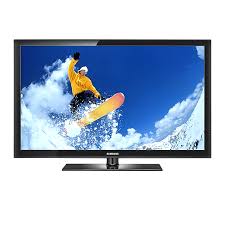
PS42C430A1W - TV SAMSUNG - Free user manual and instructions
Find the device manual for free PS42C430A1W SAMSUNG in PDF.



Pick your language and provide your email: we'll send you a specifically translated version.
| Product type | Plasma TV |
| Brand | SAMSUNG |
| Model | PS42C430A1W |
| Screen size | 42 inches (107 cm) |
| Screen resolution | 1024 x 768 pixels |
| Dimensions without stand (W x H x D) | 1020 x 648 x 79 mm |
| Dimensions with stand (W x H x D) | 1020 x 698 x 265 mm |
| Weight without stand | 21.5 kg |
| Weight with stand | 24.2 kg |
| Power supply | 220-240 V, 50/60 Hz |
| Power consumption (max) | 280 W |
| Standby power consumption | < 1 W |
| Connectivity | 2 HDMI inputs, 1 component input, 1 SCART input, 1 USB input |
| Main functions | Remote control, OSD menu, picture and sound settings, timer, parental lock |
| Maintenance and cleaning | Clean with a soft dry cloth. Avoid chemical products. |
| Safety | Do not expose to humidity. Unplug during storms. |
| Spare parts available | Remote control, wall mount (optional) |
| Repairability | Repairability index: 6.5/10 (estimate) |
| Warranty | 2 years |
| Manual | Available for free download in PDF format |
Frequently Asked Questions - PS42C430A1W SAMSUNG
How to turn on the Samsung PS42C430A1W TV?
Use the Power button on the remote control or the button on the side of the TV.
How to tune channels?
Press the Menu button on the remote, select Channel then Auto Search.
What is the maximum supported resolution?
The TV displays a native resolution of 1024 x 768 pixels. It accepts HD signals up to 1080p but downscales them.
How to connect an HDMI device?
Plug the HDMI cable into one of the HDMI ports on the back of the TV, then select the corresponding source using the Source button on the remote.
What to do if the picture is blurry or distorted?
Check the cable connections and make sure the source sends a compatible signal (resolution and format). Try resetting the picture settings in the Picture menu.
How to activate parental lock?
In the Setup menu, select Parental Lock. You will need to enter a PIN code (default 0000) to restrict access to certain channels.
The TV won't turn on, what to do?
Check that the power cord is properly plugged in and that the outlet works. Try pressing the Power button directly on the TV. If nothing happens, contact customer service.
How to clean the plasma screen?
Use a soft dry microfiber cloth. Never use chemicals, alcohol, or abrasive cleaners that could damage the surface.
Can I mount the TV on the wall?
Yes, the TV is compatible with a VESA 400 x 400 mm wall mount. Use an appropriate mounting kit and follow the safety instructions.
Where to download the user manual?
The full manual is available for free on the site notice-facile.com in PDF format. You can also request it by email via our page.
User questions about PS42C430A1W SAMSUNG
0 question about this device. Answer the ones you know or ask your own.
Ask a new question about this device
No questions yet. Be the first to ask one.
Download the instructions for your TV in PDF format for free! Find your manual PS42C430A1W - SAMSUNG and take your electronic device back in hand. On this page are published all the documents necessary for the use of your device. PS42C430A1W by SAMSUNG.
USER MANUAL PS42C430A1W SAMSUNG
Manual assistant
Powered by Anthropic
Waiting for your message
Product information
Brand : SAMSUNG
Model : PS42C430A1W
Category : TV