
NV70K1340BB - NV70K1340BB/EF - Built-in oven SAMSUNG - Free user manual and instructions
Find the device manual for free NV70K1340BB - NV70K1340BB/EF SAMSUNG in PDF.


| Brand | SAMSUNG |
| Model | NV70K1340BB / NV70K1340BB/EF |
| Product type | Built-in oven |
| Volume | 68 L |
| Energy class | A |
| Energy consumption (conventional mode) | 0.99 kWh/cycle |
| Energy consumption (hot air) | 0.80 kWh/cycle |
| Dimensions (H x W x D) | 595 x 595 x 549 mm |
| Net weight | 32.6 kg |
| Power supply | 220-240 V, 50/60 Hz, 16 A |
| Temperature range | 50 - 250 °C |
| Cooking modes | Convection, Natural convection, Hot air + top, Hot air + bottom, Large grill, Rapid preheat |
| Special functions | Timer, Child lock, Interior light |
| Included accessories | Grid, Grid support, Baking tray, Universal tray, Extra-deep tray (depending on model) |
| Installation type | Built-in |
| Safety | Child lock, Automatic shut-off, Heat-resistant glass surface |
| Cleaning | Manual cleaning, Catalytic surfaces (depending on model) |
| Bulb replacement | Halogen bulb 25-40 W, 300 °C |
| Energy efficiency index | 95.2 |
| Number of cavities | 1 |
| Heat source | Electricity |
Frequently Asked Questions - NV70K1340BB - NV70K1340BB/EF SAMSUNG
User questions about NV70K1340BB - NV70K1340BB/EF SAMSUNG
0 question about this device. Answer the ones you know or ask your own.
Ask a new question about this device
Download the instructions for your Built-in oven in PDF format for free! Find your manual NV70K1340BB - NV70K1340BB/EF - SAMSUNG and take your electronic device back in hand. On this page are published all the documents necessary for the use of your device. NV70K1340BB - NV70K1340BB/EF by SAMSUNG.
USER MANUAL NV70K1340BB - NV70K1340BB/EF SAMSUNG
User & Installation manual
NV70K1340BS/EU / NV70K1340BW/EU /
NV70K1340BB/EU / NV70K1310BS/EU /
NV70K1310BB/EU

Contents
Using this manual 3
The following symbols are used in this User Manual: 3
Safety instructions 3
Important safety precautions 3
Correct Disposal of This Product (Waste Electrical & Electronic Equipment) 6
Auto energy saving function 6
Installation 6
What's included 6
Power connection 7
Cabinet mount 8
Before you start 9
Initial settings 9
New oven smell 9
Accessories 10
Operations 11
Control panel 11
Fast preheat 12
Cooking time 12
Cooking modes 12
To stop cooking 13
Convenience 14
Cooking smart 14
Manual cooking 14
Test Dishes 17
Maintenance 18
Cleaning 18
Replacement 21
Troubleshooting 21
Checkpoints 21
Information codes 23
Appendix 24
Product data sheet 24
2 English
Using this manual
Thank you for choosing SAMSUNG Built-In Oven.
This User Manual contains important information on safety and instructions intended to assist you in the operation and maintenance of your appliance.
Please take the time to read this User Manual before using your oven and keep this book for future reference.
The following symbols are used in this User Manual:
WARNING
Hazards or unsafe practices that may result in severe personal injury, death and/or property damage.
CAUTION
Hazards or unsafe practices that may result in personal injury and/or property damage.
NOTE
Useful tips, recommendations, or information that helps users manipulate the product.
Safety instructions
Installation of this oven must be performed only by a licensed electrician. The installer is responsible for connecting the appliance to the mains power supply in observance of the relevant safety recommendations.
Important safety precautions
WARNING
This appliance is not intended for use by persons (including children) with reduced physical, sensory or mental capabilities, or lack of experience and knowledge, unless they have been given supervision or instruction concerning use of the appliance by a person responsible for their safety.
Children should be supervised to ensure that they do not play with the appliance.
The means for disconnection must be incorporated in the fixed wiring in accordance with the wiring rules.
This Appliance should be allowed to disconnection from the supply after installation. The disconnection may be achieved by having the plug accessible or by incorporating a switch in the fixed wiring in accordance with the wiring rules.
If the supply cord is damaged, it must be replaced by the manufacturer, its service agent or similarly qualified persons in order to avoid a hazard.
Safety instructions
The method of fixing stated is not to depend on the use of adhesives since they are not considered to be a reliable fixing means.
This appliance can be used by children aged from 8 years and above and persons with reduced physical, sensory or mental capabilities or lack of experience and knowledge if they have been given supervision or instruction concerning use of the appliance in a safe way and understand the hazards involved. Children shall not play with the appliance. Cleaning and user maintenance shall not be made by children without supervision. Keep the appliance and its cord out of reach of children less than 8 years.
During use the appliance becomes hot. Care should be taken to avoid touching heating elements inside the oven.
WARNING: Accessible parts may become hot during use. Young children should be kept away.
Do not use harsh abrasive cleaners or sharp metal scrapers to clean the oven door glass since they can scratch the surface, which may result in shattering of the glass.
If this appliance has cleaning function, excess spillage must be removed before cleaning and all utensils should not be left in the oven during steam cleaning or self cleaning. The cleaning function depends on the model.
If this appliance has cleaning function, during cleaning conditions the surfaces may get hotter than usual and children should be kept away. The cleaning function depends on the model.
Only use the temperature probe recommended for this oven. (Meat probe model only)
A steam cleaner is not to be used.
WARNING: Ensure that the appliance is switched off before replacing the lamp to avoid the possibility of electric shock.
The appliance must not be installed behind a decorative door in order to avoid overheating.
WARNING: The appliance and its accessible parts become hot during use. Care should be taken to avoid touching heating elements. Children less than 8 years of age shall be kept away unless continuously supervised.
CAUTION: The cooking process has to be supervised. A short term cooking process has to be supervised continuously.
The door or the outer surface may get hot when the appliance is operating.
The temperature of accessible surfaces may be high when the appliance is operating. The surfaces are liable to get hot during use.

natural_image
Line drawing of a rectangular tray with two circular ends, no text or symbols presentInsert the wire rack into position with the protruding parts (stoppers on both sides) towards the front so that the wire rack supports the rest position for large loads.
CAUTION
If the oven has been damaged in transport, do not connect it.
This appliance must be connected to the mains power supply only by a specially licensed electrician.
In the event of a fault or damage to the appliance, do not attempt to operate it.
Repairs should be performed by a licensed technician only. Improper repair may result in considerable danger to you and others. If your oven needs repair, contact a SAMSUNG Service center or your dealer.
Electrical leads and cables should not be allowed to touch the oven.
The oven should be connected to the mains power supply by means of an approved circuit breaker or fuse. Never use multiple plug adapters or extension leads.
The power supply of the appliance should be turned off when it is being repaired or cleaned.
Take care when connecting electrical appliances to sockets near the oven.
If this appliance has a vapour or steam cooking function, do not operate this appliance when the water supply cartridge is damaged. (Vapour or steam function model only)
When the cartridge is cracked or broken, do not use it and contact your nearest service center. (Vapour or steam function model only)
This oven has been designed only for the cooking of household foods.
During use, the oven interior surfaces become hot enough to cause burns. Do not touch heating elements or interior surfaces of the oven until they have had time to cool.
Never store flammable materials in the oven.
The oven surfaces become hot when the appliance is operated at a high temperature for an extended period of time.
When cooking, take care when opening the oven door as hot air and steam can escape rapidly.
When cooking dishes that contain alcohol, the alcohol may evaporate due to the high temperatures and the Vapour can catch fire if it comes into contact with a hot part of the oven.
For your safety, do not use high-pressure water cleaners or steam jet cleaners.
Children should be kept at a safe distance when the oven is in use.
Frozen foods such as pizzas should be cooked on the big grid. If the baking tray is used, it may become deformed due to the great variation in temperatures.
Do not pour water into the bottom of the oven when it is hot. This could cause damage to the enamel surface.
The oven door must be closed during cooking.
Do not line the bottom of the oven with aluminum foil and do not place any baking trays or tins on it. The aluminum foil blocks the heat, which may result in damage to the enamel surfaces and cause poor cooking results.
Fruit juices will leave stains, which can become permanent on the enamel surfaces of the oven.
When cooking very moist cakes, use the deep pan.
Do not rest bakeware on the open oven door.
Keep children away from the door when opening or closing it as they may bump themselves on the door or catch their fingers in the door.
Do not step, lean, sit or place heavy items on the door.
Do not open the door with unnecessarily strong force.
WARNING: Do not disconnect the appliance from the main power supply even after the cooking process is completed.
WARNING: Do not leave the door open while oven is cooking.
Safety instructions
Correct Disposal of This Product (Waste Electrical & Electronic Equipment)

(Applicable in countries with separate collection systems)
This marking on the product, accessories or literature indicates that the product and its electronic accessories (e.g. charger, headset, USB cable) should not be disposed of with other household waste at the end of their working life. To prevent possible harm to the environment or human health from uncontrolled waste disposal, please separate these items from other types of waste and recycle them responsibly to promote the sustainable reuse of material resources.
Household users should contact either the retailer where they purchased this product, or their local government office, for details of where and how they can take these items for environmentally safe recycling.
Business users should contact their supplier and check the terms and conditions of the purchase contract. This product and its electronic accessories should not be mixed with other commercial wastes for disposal.
For information on Samsung's environmental commitments and product specific regulatory obligations e.g. REACH visit: samsung.com/uk/aboutsamsung/samsungelectronics/corporatecitizenship/data_corner.html
Auto energy saving function
- If no user input is made for a certain time while the appliance is operating, the appliance stops operation and goes to Standby state.
Installation
WARNING
This oven must be installed by a qualified technician. The installer is responsible for connecting the oven to the main power, while observing the relevant safety regulations of your area.
What's included
Make sure all parts and accessories are included in the product package. If you have a problem with the oven or accessories, contact a local Samsung customer centre or the retailer.
Oven at a glance

01 Control panel
02 Door handle
03 Door
Accessories
The oven comes with different accessories that help you prepare different types of food.
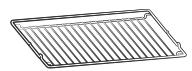
Wire rack
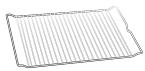
Wire rack insert *

Baking tray *
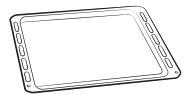
Universal tray *

Extra-deep tray *

Telescopic rail *

NOTE
Availability of accessories with an asterisk (*) depends on the oven model.
Power connection

Plug the oven into an electrical socket. If a plug-type socket is not available due to allowable current limitations, use a multi-pole isolator switch (with at least 3 mm spacing in-between) in order to meet safety regulations. Use a power cord of sufficient length that supports the specification H05 RR-F or H05 VV-F, min. 1.5\~2.5 mm ^4 .
01 BROWN or BLACK
02 BLUE or WHITE
03 YELLOW and GREEN
| Rated current(A) | Minimum cross-sectional area |
| 10 < A ≤ 16 | 1.5 mm^2 |
| 16 < A ≤ 25 | 2.5 mm^2 |
Check the output specifications on the label attached to the oven.
Open the rear cover of the oven using a screwdriver, and remove the screws on the cord clamp. Then, connect the power lines to the relevant connection terminals.
The (⊥)-terminal is designed for earthgrounding. First connect the yellow and green lines (earthgrounding), which must be longer than the others. If you use a plug-type socket, the plug must remain accessible after the oven is installed. Samsung is not responsible for accidents caused by missing or faulty earthgrounding.
WARNING
Do not step on or twist the wires during installation, and keep them away from heat-emitting parts of the oven.
Installation
Cabinet mount
If installing the oven in a built-in cabinet, the cabinet must have its plastic surfaces and adhesive parts resistant up to 90^ . Samsung is not responsible for damage to furniture from the oven's heat emission.
The oven must be properly ventilated. For ventilation, leave a gap of about 50 mm between the lower shelf of the cabinet and the supporting wall. If you install the oven under a cooktop, follow the cooktop's installation instructions.
Required Dimensions for Installation

Oven (mm)
| A | 560 | G | Max. 506 |
| B | 175 | H | Max. 494 |
| C | 370 | I | 21 |
| D | Max. 50 | J | 549 |
| E | 595 | K | 572 |
| F | 595 | L | 550 |


Built-in cabinet (mm)
| A | Min. 550 |
| B | Min. 560 |
| C | Min. 50 |
| D | Min. 590 - Max. 600 |
| E | Min. 460 x Min. 50 |
NOTE
The built-in cabinet must have vents (E) to ventilate heat and circulate the air.
Under-sink cabinet (mm)
| A | Min. 550 |
| B | Min. 560 |
| C | Min. 600 |
| D | Min. 460 x Min. 50 |
NOTE
The built-in cabinet must have vents (D) to ventilate heat and circulate the air.
Before you start
Mounting the oven

natural_image
Diagram showing a circular object with labeled point A and surrounding geometric lines (no text or symbols)Make sure to leave a gap (A) of at least 5 mm between the oven and each side of the cabinet.
natural_image
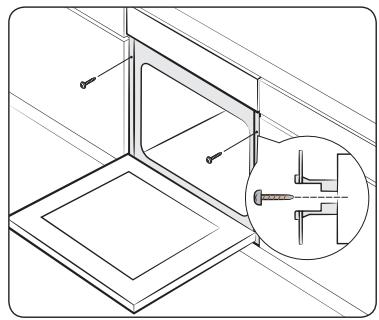
Technical line drawing of a structural bracket with an inset showing a bolt detail (no text or symbols)Fit the oven into the cabinet and fix the oven firmly on both sides using 2 screws.
After installation is complete, remove the protective film, tape, and other packing material, and take out the provided accessories from inside the oven. To remove the oven from the cabinet, first disconnect power to the oven and remove 2 screws on both sides of the oven.
WARNING
The oven requires ventilation for normal operation. Do not block the vents under any circumstance.
NOTE
The actual appearance of the oven may differ with the model.
Initial settings
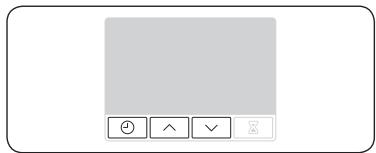
When you power on the oven for the first time, the default time of “12:00” appears on the display where the hour element (“12”) blinks. Follow the steps below to set the current time.
natural_image
Simple icon set with four control buttons (clock, forward arrow, checkmark, close) and a blank background, no text or symbols present.- Use the / buttons to set the hour, and then press . The minute element blinks.
natural_image
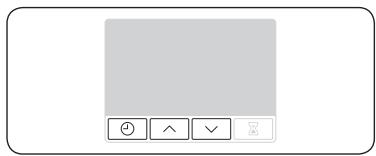
Simple icon grid with control buttons (no text or symbols)- Use the ^ / √ buttons to set the minute, and then press ⏻.
natural_image
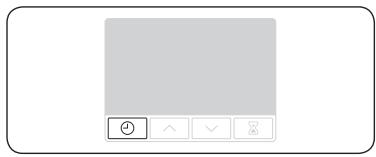
Simple icon grid with a clock, three arrows, and a play button (no text or symbols)To change the current time after this initial setting, hold down ☑ for 3 seconds and follow the above steps.
New oven smell
Before using the oven for the first time, clean inside the oven to remove the new oven smell.
- Remove all accessories from inside the oven.
- Run the oven with Convection 200 °C or Conventional 200 °C for an hour. This will burn any remaining production substances in the oven.
- When complete, turn off the oven.
Before you start
Accessories
For first time use, clean the accessories thoroughly with warm water, detergent and a soft clean cloth.
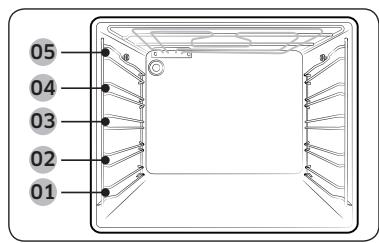
01 Level 1
02 Level 2
03 Level 3
04 Level 4
05 Level 5
- Insert the accessory to the correct position inside of the oven.
- Allow at least a 1 cm space from the accessory and the bottom of the oven, and from any other accessory.
• Take caution in removing cookware and/or accessories out of the oven. Hot meals or accessories can cause burns. - The accessories may be deformed while they are gaining heat. Once they have cooled down, they will recover their original appearance and performance.
Basic use
For better cooking experience, familiarise yourself with how to use each accessory.
| Wire rack | The wire rack is designed for grilling and roasting. Insert the wire rack into position with the protruding parts (stoppers on both sides) towards the front |
| Wire rack insert * | The wire rack insert is used with the tray, and prevents liquid from dropping onto the bottom of the oven. |
| Baking tray * | The baking tray (depth: 20 mm) is used to bake cakes, cookies, and other pastries. Put the slanted side to the front. |
| Universal tray * | The universal tray (depth : 30 mm) is used for cooking and roasting. Use the wire-tray insert to prevent liquid from dropping onto the bottom of the oven. Put the slanted side to the front. |
| Extra-deep tray * | The extra-deep tray (depth: 50 mm) is used for roasting with or without the wire-tray insert. Put the slanted side to the front. |
| Telescopic rails * | Use the telescopic rail plate to insert the tray as follows:1. Stretch the rail plate out from the oven.2. Put the tray on the rail plate and slide the rail plate into the oven.3. Close the oven door. |

NOTE
Availability of accessories with an asterisk (*) depends on the oven model.
Operations
Control panel
The front panel comes in a wide range of materials and colours. For improved quality, the actual appearance of the oven is subject to change without notice.

| 01 Mode selector | Turn to select a cooking mode or function. |
| 02 Display | Shows time information or a brief description of the selected mode. |
| 03 Cooking Time/ Clock | Press to set the cooking time.Press and hold for 3 seconds to set the current time. |
| 04 Up / Down | Use to adjust the setting value for clock or timer settings. |
| 05 Timer | Timer helps you check the time or operating duration while cooking. |
| 06 Value dial | Use the value dial to set the temperature or power level for grilling. |

NOTE
Tapping on the display while wearing plastic or oven gloves may not operate properly.

flowchart
graph TD
    A["01"] --> B["02"]
    B --> C["03"]
    C --> D["04"]
    style A fill:#f9f,stroke:#333
    style B fill:#ccf,stroke:#333
    style C fill:#cfc,stroke:#333
    style D fill:#fcc,stroke:#333

Mode selector
01 Off
02 Fast preheat
03 Cooking modes
04 Oven light
Value dial
01 Power level for grilling
02 Temperature range
Operations
Fast preheat
Optionally, you can fast preheat the oven. This will significantly shorten your waiting time until the preheating is done. To do this, follow the steps below.
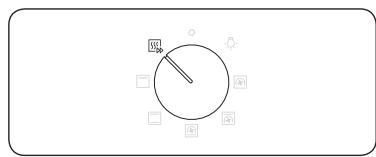
- Turn the mode selector to select 📄.
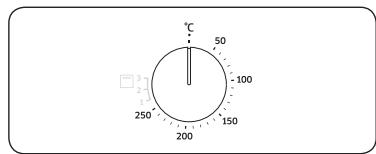
- Turn the value dial to set a desired temperature within the temperature range.

The oven starts preheating until the internal temperature reaches the target temperature.
When complete, make sure to switch back to the selected mode.
NOTE
Preheating is not necessary for Grill mode.
Cooking time
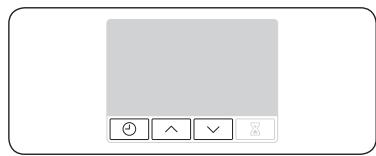
natural_image
Simple icon grid with control buttons (no text or symbols)- Press ⏻.
- Use the / buttons to set the cooking time, and then press . You can set the time to a max of 23 hours and 59 minutes.
NOTE
If you want to clear the cooking time, press
⊕, and then set the time to 0:00.
Cooking modes
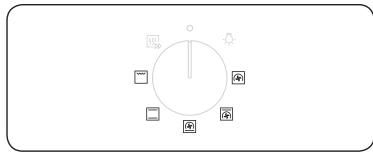
It is recommended to insert food in the oven after preheating is complete. This will help obtain best result.
- Turn the mode selector to choose a cooking mode.
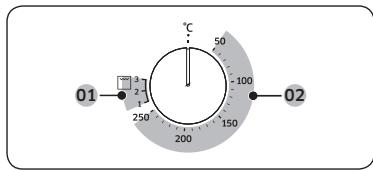
- Turn the value dial to set a desired temperature within the temperature range. For Grill mode, select a power level instead.
01 Grill mode
02 Cooking modes except for Grill

natural_image
Simple diagram with three black dots arranged horizontally inside a rectangular frame (no text or symbols)NOTE
If you select the Grill function and set the temperature between 50 °C and 250 °C, or if you select Normal Cooking mode and set the temperature between Grill 1 and 3, you are asked to reset the temperature with message(as shown on the left) and a beep. The exact temperature inside the oven can be measured with authorized thermometer and method defined by an authorized institution. Using other thermometers may cause a measuring error.
| Mode | Suggested temperature (°C) | Instructions | |
| Convection | 170 | The rear heating element generates heat, which is evenly distributed by the convection fan. Use this mode for baking and roasting on different levels at the same time. | |
| Conventional | 200 | The heat is generated from the top and bottom heating elements. This function should be used for standard baking and roasting for most types of dishes. | |
| Top heat + convection | 190 | The top heating element generates heat, which is evenly distributed by the convection fan. Use this mode for roasting that requires a crispy top (for example, meat or lasagne). | |
| Bottom heat + convection | 190 | The bottom heating element generates heat, which is evenly distributed by the convection fan. Use this mode for pizza, bread, or cake. | |
| Large grill | Level 2 | The large-area grill emits heat. Use this mode for browning the tops of food (for example, meat, lasagne, or gratin). | |
To stop cooking

While cooking is in process, turn the mode selector to select ○.
NOTE
If inside the oven is hot:
Even after turning off the oven, the cooling fan automatically runs and the oven light stays on until the oven cools down.
Operations
Convenience
Oven light
The oven light turns on automatically when the oven starts operation.

To turn on the oven light without activating oven operations, simple turn the mode selector to ⚡️.
NOTE
The cooling fan automatically runs when you select the oven light.
Child lock
To prevent accidents, Child lock disables all controls. Child lock is available only in Off or Oven light mode.
natural_image
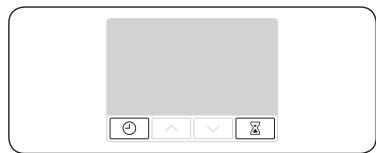
Simple icon grid with control buttons (no text or symbols)Hold down the ⏻ and ⚫ buttons simultaneously for 3 seconds to activate, or hold down for 3 seconds again to deactivate the lock on the control panel.
NOTE
When Child lock is activated, "L" appears on the display.
Timer
Timer helps you check the time or operating duration while cooking.

natural_image
Simple icon set with a gray rectangle, four circular buttons (arrow, down, close, plus) in the bottom row, and a small icon on the top row (no text or symbols)- Press ☒.
- Use the / buttons to set the time, and then press × .
You can set the time to a max of 23 hours and 59 minutes.
NOTE
If you want to cancel the timer operation, press ☒, and then set the time to 0:00.
Cooking smart
Manual cooking
⚠ WARNING on acrylamide
Acrylamide produced while baking starch-contained food such as potato chips, French fries, and bread may cause health problems. It is recommended to cook these foods at low temperatures and avoid overcooking, heavy crisping, or burning.
NOTE
- Pre-heating is recommended for all cooking modes unless otherwise specified in the cooking guide.
- When using Eco Grill, put food in the centre of the accessory tray.
Accessory tips
Your oven comes with a different number or kind of accessories. You may find that some accessories are missing from the table below. However, even if you are not provided with the exact accessories specified in this cooking guide, you can follow along with what you already have, and achieve the same results.
- The Baking tray and the Universal tray are interchangeable.
- When cooking oily foods, it is recommended to put a tray under the Wire rack to collect oil residue. If you are provided with the Wire rack insert, you can use it together with the tray.
- If you are provided with the Universal tray or Extra deep tray, or both, it is better to use whichever is deeper for cooking oily foods.
Baking
We recommend to preheat the oven for best results.
| Food | Accessory | Level | Type of heating | Temp. (°C) | Time (min.) |
| Sponge cake | Wire rack,∅ 25-26 cm tin | 2 |  | 160-170 | 35-40 |
| Marble cake | Wire rack,Gugelhopf tin | 3 |  | 175-185 | 50-60 |
| Tart | Wire rack,∅ 20 cm tart tin | 3 |  | 190-200 | 50-60 |
| Yeast cake on tray with fruits and crumbles | Universal tray | 2 |  | 160-180 | 40-50 |
| Fruit crumble | Wire rack, 22-24 cm oven dish | 3 |  | 170-180 | 25-30 |
| Scones | Universal tray | 3 | [WDOD] | 180-190 | 30-35 |
| Lasagne | Wire rack, 22-24 cm oven dish | 3 |  | 190-200 | 25-30 |
| Meringues | Universal tray | 3 |  | 80-100 | 100-150 |
| Soufflé | Wire rack,soufflé cups | 3 | [ADHS] | 170-180 | 20-25 |
| Apple yeast tray cake | Universal tray | 3 | [SKY5] | 150-170 | 60-70 |
| Homemade pizza, 1-1.2 kg | Universal tray | 2 |  | 190-210 | 10-15 |
| Frozen puff pastry, filled | Universal tray | 2 |  | 180-200 | 20-25 |
| Quiche | Wire rack, 22-24 cm oven dish | 2 | [2003] | 180-190 | 25-35 |
| Food | Accessory | Level | Type of heating | Temp. (°C) | Time (min.) |
| Apple pie | Wire rack,∅ 20 cm tin | 2 |  | 160-170 | 65-75 |
| Chilled pizza | Universal tray | 3 |  | 180-200 | 5-10 |
Roasting
| Food | Accessory | Level | Type of heating | Temp. (°C) | Time (min.) |
| Meat(Beef/Pork/Lamb) | |||||
| Sirloin of beef, 1 kg | Wire rack + Universal tray | 3 | [KZ0A] | 160-180 | 50-70 |
| 1 | |||||
| Boned loin of veal, 1.5 kg | Wire rack + Universal tray | 3 | [5CD?] | 160-180 | 90-120 |
| 1 | |||||
| Pork roast, 1 kg | Wire rack + Universal tray | 3 |  | 200-210 | 50-60 |
| 1 | |||||
| Joint of pork, 1 kg | Wire rack + Universal tray | 3 |  | 160-180 | 100-120 |
| 1 | |||||
| Leg of lamb on the bone, 1 kg | Wire rack + Universal tray | 3 |  | 170-180 | 100-120 |
| 1 | |||||
| Poultry(Chicken/Duck/Turkey) |  | ||||
| Chicken, Whole, 1.2 kg* | Wire rack + Universal tray | 3 |  | 205 | 80-100 |
| 1 | |||||
| Chicken pieces | Wire rack + Universal tray | 3 |  | 200-220 | 25-35 |
| 1 | |||||
| Duck breast | Wire rack + Universal tray | 3 |  | 180-200 | 20-30 |
| 1 | |||||
| Small turkey, Whole, 5 kg | Wire rack + Universal tray | 3 |  | 180-200 | 120-150 |
| 1 | |||||
Cooking smart
| Food | Accessory | Level | Type of heating | Temp. (°C) | Time (min.) |
| Vegetables | |||||
| Vegetables, 0.5 kg | Wire rack + Universal tray | 31 |  | 220-230 | 15-20 |
| Baked potato halves, 0.5 kg | Wire rack + Universal tray | 31 |  | 200 | 45-50 |
| Fish | |||||
| Fish fillet, baked | Wire rack + Universal tray | 31 | 200-230 | 10-15 | |
| Roast fish | Wire rack + Universal tray | 31 | 180-200 | 30-40 | |
* Turnover after half of time.
Grilling
Preheat the empty oven for 5 minutes using large grill function.
| Food | Accessory | Level | Type of heating | Temp. | Time (min.) |
| Bread | |||||
| Toast | Wire rack | 5 |  | 3 | 2-4 |
| Cheese toast | Universal tray | 4 | [BBYK] | 1 | 4-8 |
| Beef | |||||
| Steak* | Wire rack + Universal tray | 41 |  | 3 | 15-20 |
| Burgers* | Wire rack + Universal tray | 41 | [3X/GS] | 3 | 15-20 |
| Pork | |||||
| Pork chops | Wire rack + Universal tray | 41 | [ASY8] | 3 | 20-25 |
| Sausages | Wire rack + Universal tray | 41 | [C44G] | 3 | 10-15 |
| Poultry | |||||
| Chicken, breast | Wire rack + Universal tray | 41 | [0278] | 3 | 30-35 |
| Chicken, drumstick | Wire rack + Universal tray | 41 | [SW46] | 3 | 25-30 |
* Turnover after ^2/3 of the cooking time.
Frozen ready-meal
| Food | Accessory | Level | Type of heating | Temp. (°C) | Time (min.) |
| Frozen pizza | Wire rack | 3 |  | 200-220 | 15-25 |
| Frozen lasagne | Wire rack | 3 | [CT77C] | 180-200 | 45-50 |
| Frozen oven chips | Universal tray | 3 | [CT22] | 220-225 | 20-25 |
| Frozen croquettes | Universal tray | 3 | [CEHZ] | 220-230 | 25-30 |
Test Dishes
According to standard EN 60350-1
1. Baking
The recommendations for baking refer to a preheated oven. Do not use the fast preheat function. Always put trays the slanted side to the door front.
| Type of food | Accessory | Level | Type of heating | Temp. (°C) | Time (min.) |
| Small cakes | Universal tray | 3 |  | 170 | 25-30 |
| 2 | [8XW0] | 160 | 30-35 | ||
| 1+4 | [DDCK] | 155 | 35-40 | ||
| Shortbread | Universal tray | 1+4 | [986W] | 140 | 35-40 |
| Fatless sponge cake | Wire rack + Spring form cake tin (Dark coated, ø 26 cm) | 2 | [CST3] | 160 | 35-40 |
| 2 |  | 160 | 35-40 | ||
| 1+4 |  | 155 | 45-50 | ||
| Apple pie | Wire rack + 2 Spring form cake tins * (Dark coated, ø 20 cm) | 1 placed diagonally | [25KA] | 160 | 70-80 |
| Universal tray + Wire rack + 2 Spring form cake tins ** (Dark coated, ø 20 cm) | 1+3 | 160 | 80-90 |
* Two cakes are arranged on the grid at the back left and at the front right.
** Two cakes are arranged in the centre on top of each other.
Cooking Smart
2. Grilling
Preheat the empty oven for 5 minutes using large grill function.
| Type of food | Accessory | Level | Type of heating | Temp. | Time (min.) |
| White bread toast | Wire rack | 5 | [5x34] | 3 | 1-2 |
| Beef burgers* (12 ea) | Wire rack + Universal tray (to catch drippings) | 41 |  | 3 | 1^st 18-22 2^nd 7-10 |
* Turn over after ^2/_3 of the cooking time.
3. Roasting
| Type of food | Accessory | Level | Type of heating | Temp. (°C) | Time (min.) |
| Whole chicken* | Wire rack + Universal tray (to catch drippings) | 31 | ^[87XH] | 205 | 80-100 |
* Turnover after half of time.
Maintenance
Cleaning
WARNING
- Make sure the oven and accessories are cool before cleaning.
- Do not use abrasive cleaning agents, hard brushes, scouring pads or cloths, steel wool, knives or any other abrasive materials.
Oven interior
- For cleaning the interior of the oven, use a clean cloth and a mild cleaning agent or warm soapy water.
- Do not hand-clean the door seal.
- To avoid damaging the enamelled oven surfaces, only use standard oven cleaners.
- To remove stubborn soils, use a special oven cleaner.
Oven exterior
For cleaning the exterior of the oven such as the oven door, handle, and display, use a clean cloth and a mild cleaning detergent or warm soapy water, and dry with a kitchen roll or dry towel.
Grease and dirt can remain, especially around the handle because of the hot air coming from inside. It is recommended to clean the handle after each use.
Accessories
Wash the accessories after every use, and dry it with a tea towel. To remove stubborn impurities, soak the used accessories in warm soapy water for about 30 minutes before washing.
Catalytic enamel surface (applicable models only)
The removable parts are coated with dark grey catalytic enamel. They can be soiled with oil and fat spattered by the circulating air during convection heating. However, these impurities burn off at oven temperatures of 200 °C or above.
- Remove all accessories from the oven.
- Clean the interior of the oven.
- Select Convection mode with max temperature, and run the cycle for an hour.
Door removal
For normal use, the oven door must not be removed but if removal is necessary, for example, for cleaning purposes, follow these instructions.
CAUTION
The oven door is heavy.

natural_image
Diagram showing a car seatbelt mechanism inside a vehicle cabin, with no text or symbols present.- Open the door and flip open the clips at both hinges completely.

- Close the door by approximately 70°. With both hands, grasp the sides of the oven door at its middle and pull-lift until the hinges can be taken out.

natural_image
Diagram of a mechanical component with a downward arrow indicating motion or force (no text or symbols present)- After cleaning, for attaching the door repeat the 1 and 2 steps in revers order. The clip on the hinge should be closed on both side.
Door Glass Removal
The oven door is equipped with three sheets of glass placed against each other. These sheets can be removed for cleaning.
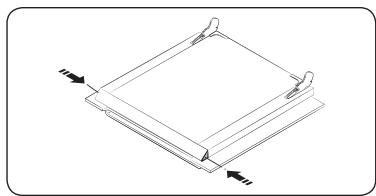
natural_image
Technical line drawing of a square frame with two side supports and directional arrows indicating force or movement (no text or symbols)- Press the both buttons on the left and right sides of the door.

- Detach the covering and remove glass 1 and 2 from the door.
01 Glass 1

- After cleaning the door glasses, for assembly repeat 1, 2 steps in revers order. Check the right locations of glass 1 and 2 with picture.
01 Glass 1
02 Glass 2
NOTE
When assembly the inner glass 1, put printing to direction below.
Maintenance
Water collector

natural_image
Technical line drawing of a door frame with a slanted metal bracket and label '01' (no text or symbols beyond label)01 Water collector
The water collector collects not only excess moisture from cooking but also food residue. Regularly empty and clean the water collector.
WARNING
If you encounter a water leak from the water collector, contact us at a local Samsung service center.
Cleaning the ceiling (depending on model)
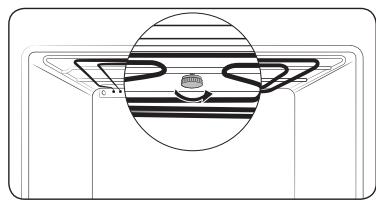
natural_image
Diagram of a device with a circular component and internal striped pattern (no text or symbols)- You can let down the grill heater and it is helpful for cleaning the ceiling of the oven.
Remove the nut circular by turning it anticlockwise while holding the grill heater.

natural_image
Pure technical diagram of a mechanical component with no text, numbers, or symbols- The front of the grill heater inclines downwards and the grill heater can not be removed out of the oven. Do not press the grill heater down, the grill heater can be deformed.
01 Approx. 12°

natural_image
Pure diagram of a mechanical component with internal gear-like structure and no text or symbols- When cleaning has been done, lift the grill heater back to its original level and turn the nut circular clockwise
Detaching the side runners (depending on model)
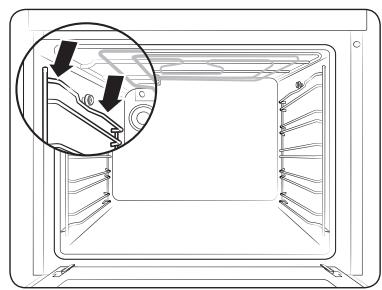
natural_image
Diagram of a microwave oven interior showing internal structure and a magnified view of the lid (no text or symbols)- Press central part of the side runner top portion.

natural_image
Diagram of a refrigerator interior showing airflow direction and structural details (no text or symbols)- Rotate the side runner by approximately 45^ .

natural_image
Diagram of a device interior showing a folded panel inside a housing, with no visible text or symbols.- Pull and remove the side runner from bottom two holes.
Troubleshooting
Replacement
Bulbs
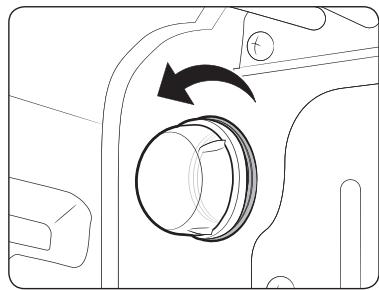
natural_image
Diagram of a camera lens assembly with an arrow indicating rotation (no text or symbols present)- Remove the glass cap by turning anticlockwise.
- Replace the oven light.
- Clean the glass cap.
- When done, follow step 1 above in the reverse order to reinsert the glass cap.
WARNING
- Before replacing a bulb, turn off the oven and unplug the power cord.
- Use only 25-40 W/220-240 V, 300 °C heat-resistant bulbs. You can purchase approved bulbs at a local Samsung service center.
- Always use a dry cloth when handling a halogen bulb. This is to prevent the bulb from being tampered with fingerprints or sweat, resulting in a shortened lifecycle.
Checkpoints
If you encounter a problem with the oven, first check the table below and try the suggestions. If the problem continues, contact a local Samsung service centre.
| Problem | Cause | Action |
| The buttons cannot be pressed properly. | ·If there is foreign matter caught between the buttons | ·Remove the foreign matter and try again. |
| ·Touch model: if there is moisture on the exterior | ·Remove the moisture and try again. | |
| ·If the lock function is set | ·Check whether the lock function is set. | |
| The time is not displayed. | ·If there is no power supplied | ·Check whether there is power supplied. |
| The oven does not work. | ·If there is no power supplied | ·Check whether there is power supplied. |
| The oven stops while in operation. | ·If it is unplugged from the power socket | ·Reconnect the power. |
| The power turns off during operation. | ·If continuous cooking takes a long time | ·After cooking for a long time, let the oven cool. |
| ·If the cooling fan does not work | ·Listen for the sound of the cooling fan. | |
| ·If the oven is installed in a place without good ventilation | ·Keep the gaps specified in the product installation guide. | |
| ·When using several power plugs in the same socket | ·Use a single plug. | |
| There is no power to the oven. | ·If there is no power supplied | ·Check whether there is power supplied. |
Troubleshooting
| Problem | Cause | Action |
| The oven exterior is too hot during operation. | ·If the oven is installed in a place without good ventilation | ·Keep the gaps specified in the product installation guide. |
| The door cannot be opened properly. | ·If there is food residue stuck between the door and product interior | ·Clean the oven well and then open the door again. |
| The interior light is dim or does not turn on. | ·If the lamp turns on and then off | ·The lamp automatically turns off after a certain amount of time to save power. You can turn it on again by pressing the lamp button. |
| ·If the lamp is covered by foreign matter during cooking | ·Clean the inside of the oven and then check. | |
| Electric shock occurs on the oven. | ·If the power supply is not properly grounded·If you are using a socket without grounding | ·Check whether the power supply is properly grounded. |
| There is water dripping. | ·There may be water or steam in some cases depending on the food. This is not a product malfunction. | ·Cool the oven and then wipe with a dry dish towel. |
| There is steam through a crack in the door. | ||
| There is water remaining in the oven. | ||
| The brightness inside the oven varies. | ·The brightness changes depending on power output changes. | ·Power output changes during cooking are not malfunctions, so there is no need to worry. |
| Problem | Cause | Action |
| Cooking is finished, but the cooling fan is still running. | ·The fan automatically runs for a certain amount of time to ventilate inside the oven. | ·This is not a product malfunction, so there is no need to worry. |
| The oven does not heat. | ·If the door is open | ·Close the door and restart. |
| ·If oven controls are not correctly set | ·Refer to the chapter on oven operation and reset the oven. | |
| ·If the household fuse has been blown or the circuit breaker has operated | ·Replace the fuse or reset the circuit. If it happens repeatedly, call an electrician. | |
| Smoke comes out during operation. | ·During initial operation | ·Smoke may come from the heater when you first use the oven. This is not a malfunction, and if you run the oven 2-3 times, it should stop happening. |
| ·If there is food on the heater | ·Let the oven cool sufficiently and remove the food from the heater. | |
| There is a burning or plastic smell when using the oven. | ·If using plastic or other containers that are not heat-resistant | ·Use glass containers suitable for hot temperatures. |
| The oven does not cook properly. | • If the door is often opened during cooking | • Do not frequently open the door unless you are cooking things that need to be turned. If you open the door often, the interior temperature will be lower and this may affect the results of your cooking. |
Information codes
If the oven fails to operate, you may see an information code on the display. Check the table below and try the suggestions.
| Code | Meaning | Action |
| C-20 | Sensor malfunctions | Turn off the oven and then restart. If the problem continues, turn off all power for 30 seconds or more and then reconnect.If the problem is not fixed, please contact a service centre. |
| C-21 | ||
| C-22 | ||
| C-d0 | Button problemOccurs when a button is pressed and held for a period of time. | Clean the buttons and make sure there is no water on/around them. Turn off the oven and try again. If the problem continues, contact a local Samsung service centre. |
| S-01 | Safety shutoffOven has continued operating at a set temperature for an extended time.Under 105 °C - 16 hoursFrom 105 °C to 240 °C - 8 hoursFrom 245 °C to Max - 4 hours | This is not a system failure.Turn off the oven and remove food. Then, try again normally. |
Appendix
Product data sheet
| SAMSUNG | SAMSUNG |
| Model identification | NV70K1340BS/EU / NV70K1340BW/EU / NV70K1340BB/EU / NV70K1310BS/EU / NV70K1310BB/EU |
| Energy Efficiency Index per cavity (EEI cavity) | 95.2 |
| Energy Efficiency Class per cavity | A |
| Energy consumption (electricity) required to heat a standardised load in a cavity of an electric heated oven during a cycle in conventional mode per cavity (electric final energy) (EC electric cavity) | 0.99 kWh/cycle |
| Energy consumption required to heat a standardised load in a cavity of an electric heated oven during a cycle in fan-forced mode per cavity (electric final energy) (EC electric cavity) | 0.80 kWh/cycle |
| Number of cavities | 1 |
| Heat source per cavity (electricity or gas) | electricity |
| Volume per cavity (V) | 68 L |
| Type of oven | Built-in |
| Mass of the appliance (M) | 32.6 kg |
Data determined according to standard EN 60350-1 and Commission Regulations (EU) No 65/2014 and (EU) No 66/2014.
Energy saving tips
- During cooking, the oven door should remain closed except for turning food over. Do not open the door frequently during cooking to maintain the oven temperature and to save energy.
- Plan oven use to avoid turning the oven off between cooking one item and the next to save energy and reduce the time for re-heating the oven.
- If cooking time is more than 30 minutes, the oven may be switched off 5-10 minutes before the end of the cooking time to save energy. The residual heat will complete the cooking process.
- Wherever possible cook more than one item at a time.
Memo
Memo
Memo
QUESTIONS OR COMMENTS?
| COUNTRY | CALL | OR VISIT US ONLINE AT |
| AUSTRIA | 0800-SAMSUNG (0800-7267864)[Only for KNOX customers] 0800 400848[Only for Premium HA] 0800-366661[Only for Dealers] 0810-112233[Only for E-Store] 0800 100 232 | www.samsung.com/at/support |
| BELGIUM | 02-201-24-18 | www.samsung.com/be/support (Dutch)www.samsung.com/be_fr/support (French) |
| DENMARK | 707 019 70 | www.samsung.com/dk/support |
| FINLAND | 030-6227 515 | www.samsung.com/fi/support |
| FRANCE | 01 48 63 00 00 | www.samsung.com/fr/support |
| GERMANY | 06196 77 555 77 | www.samsung.com/de/support |
| ITALIA | 800-SAMSUNG (800.7267864) | www.samsung.com/it/support |
| CYPRUS | 8009 4000 only from landline, toll free | www.samsung.com/gr/support |
| GREECE | 80111-SAMSUNG (80111 726 7864) only from land line(+30) 210 6897691 from mobile and land line | |
| LUXEMBURG | 261 03 710 | www.samsung.com/be_fr/support |
| NETHERLANDS | 088 90 90 100 | www.samsung.com/nl/support |
| NORWAY | 21629099 | www.samsung.com/no/support |
| PORTUGAL | 808 207 267 | www.samsung.com/pt/support |
| SPAIN | 0034902172678 | www.samsung.com/es/support |
| SWEDEN | 0771 726 786 | www.samsung.com/se/support |
| SWITZERLAND | 0800 726 78 64 (0800-SAMSUNG) | www.samsung.com/ch/support (German)www.samsung.com/ch_fr/support (French) |
| UK | 0330 SAMSUNG (7267864) | www.samsung.com/uk/support |
| IRELAND (EIRE) | 0818 717100 | www.samsung.com/ie/support |