
CLASSIC 570 - Blender BLENDTEC - Free user manual and instructions
Find the device manual for free CLASSIC 570 BLENDTEC in PDF.


| Product Type | Blender |
| Brand | Blendtec |
| Model | CLASSIC 570 |
| Dimensions (approx.) | 40 x 20 x 20 cm |
| Weight (approx.) | 3.6 kg |
| Power Supply | 220-240 V, 50/60 Hz |
| Power | 1560 W |
| Container Capacity | 2 L |
| Container Material | BPA-free |
| Blade Material | Stainless steel |
| Main Functions | Smoothie, Hot Soup, Pulse, Incremental speeds (Lo, Medium, Hi), Stop |
| Cleaning Cycle | Yes (automatic) |
| Care and Cleaning | Rinse after use, cleaning cycle, dishwasher safe top rack |
| Safety | Automatic shut-off, overload and overheat protection |
| Warranty | Limited warranty (8 years) |
| Usage | Residential only |
| Included Accessories | Container, lid, recipe booklet |
| Repairability | Contact Blendtec, do not repair yourself |
| Serial Number | Under the motor base |
Frequently Asked Questions - CLASSIC 570 BLENDTEC
User questions about CLASSIC 570 BLENDTEC
0 question about this device. Answer the ones you know or ask your own.
Ask a new question about this device
Download the instructions for your Blender in PDF format for free! Find your manual CLASSIC 570 - BLENDTEC and take your electronic device back in hand. On this page are published all the documents necessary for the use of your device. CLASSIC 570 by BLENDTEC.
USER MANUAL CLASSIC 570 BLENDTEC
SECTION 2 - UNPACKING 3
SECTION 3 - GETTING TO KNOW YOUR BLENDER
SECTION 4 - INSTALLATION
SECTION 5 - OPERATIONAL OVERVIEW
SECTION 6 - CARE AND CLEANING 11
SECTION 7 - TROUBLESHOOTING 12
SECTION 8 - WARRANTY 13
SECTION 1: IMPORTANT SAFEGUARDS
IMPORTANT INFORMATION
Read all instructions carefully before using your Blendtec® blender. Following these instructions will help prevent injuries and damage to the machine and will ensure that you have the best possible experience with your new blender.
1.1 AVOID CONTACT WITH MOVING PARTS
- ALWAYS keep fingers, hands, hair and clothing away from all moving parts.
- ALWAYS keep all utensils away from the drive socket and blender jar blades during operation as utensils may damage blades or the blender jar.
- NEVER put hands into the blender jar or add substances by hand when the blender jar is on the motor base.
- NEVER touch the blade with your fingers whether it is on or off the motor base.
- NEVER place the jar into drive socket if blender motor is operating.
DO NOT rock or remove the blender jar during operation. These precautions will prevent personal injury and/or damage to the blender.
If the blender malfunctions, call your service agent first. If it is dropped or damaged in any way, return the blender to a Blendtec service agent immediately for examination, repair, electrical or mechanical adjustment or possible replacement.
To protect against the risk of electrical shock, do not put the motor base in water or other liquid. Do not use the blender outdoors where it is subject to precipitation. This will void the warranty.
1.4 NEVER PUT NON-FOOD ITEMS INTO JAR
Utensils, rocks and glass are dangerous if placed in the jar. Damage caused by such foreign objects will void the warranty. Keep hands and utensils out of jar while blending to reduce the risk of severe injury to persons or damage to the blender. Utensils may only be used when the blender is not running.
1.5 NEVER OPERATE THE BLENDER WITHOUT THE LID IN PLACE
The use of any unauthorised attachments may cause fire, electric shock and/or injury and will void the warranty.
1.7 BLENDER JAR MUST BE PROPERLY IN PLACE WHILE APPLIANCE IS OPERATING
1.8 WARNING, DO NOT BLEND HOT LIQUIDS OR OTHER HOT INGREDIENTS
Starting blend cycles with boiling or very hot liquids may result in burns or cause the lid to blow off.
1.9 USE CAUTION WHEN BLENDING ON THE HOT SOUP CYCLE
When blending on the Hot Soup cycle, the friction of the blade will heat the contents. The vented lid will allow pressure relief. Be careful not to come in contact with any steam coming from the clear centre lid.
1.10 POWER CORD PRECAUTIONS
- NEVER operate with a damaged cord or plug. If the supply cord is damaged it must be replaced by the manufacturer or an authorised service agent to avoid a hazard.
DO NOT permit the cord to hang over the edge of the work surface. - NEVER use an extension cord with the unit.
- Unplug the blender motor when not in use, before changing blender locations or when cleaning.
1.11 NEVER ATTEMPT TO REPAIR THE POWER UNIT
Never remove the blender motor cover. The blender motor does not contain user-adjustable or serviceable parts. A qualified service agent must make all service adjustments. Removing the cover or attempting to service the blender will void the warranty.
1.12 TURN THE POWER SWITCH OFF WHEN NOT IN USE
The Power Switch (ON/OFF switch) is located on the back of the blender motor cover.
1.13 AVOID TOUCHING THE BLENDER DRIVE SOCKET OR JAR SHAFT AFTER USE!
The blender drive socket and jar shaft may become very hot after blend cycles.
1.14 SAFETY
This appliance is not intended for use by persons (including children) with reduced physical, sensory or mental capabilities or lack of experience and knowledge, unless they have been given supervision or instruction concerning use of the appliance by a person responsible for their safety. Children should be supervised to ensure that they do not play with the appliance.
1.15 THE CLASSIC SERIES BLENDER IS INTENDED FOR HOME USE ONLY! ANY USE OF THIS BLENDER FOR COMMERCIAL PURPOSES VOIDS ALL WARRANTYES
1.16 NEVER OPERATE THE BLENDER WITH MORE THAN THE MARKED CAPACITY OF THE JAR SAVE THESE INSTRUCTIONS
SECTION 2: UNPACKING
SAVE ALL PACKAGING MATERIALS AND INSTRUCTIONS FOR FUTURE USE
2.1 UNPACKING YOUR BLENDER
You should have received the following items:
Classic series motor base
- Blender jar with lid
- Blendtec 101 booklet
Customer Service And Warranty Registration Card
Additional literature may be included depending on package configuration.
- Remove blender motor base, blender jar and lid from packaging.
- Unwind the power cord.
- Check for any packing material that may have blocked ventilation holes on the underside of the blender motor base.
- Inspect all items to ensure no damage occurred during shipment.
- If any damage has occurred, contact your Blendtec service agent immediately.
2.2 RECORDING YOUR SERIAL NUMBER AND DATE OF PURCHASE
Record your blender motor serial number and date of purchase in the space below. You will need these when contacting Blendtec for service or questions.
Motor Serial No. (Found on bottom of motor base):
Date Of Purchase:
Purchased From:
2.3 REGISTRATION OF YOUR BLENDER
Register online at www.blendtec.com/registration
SECTION 3: GETTING TO KNOW YOUR BLENDER
(Refer to Figures 1 and 2)
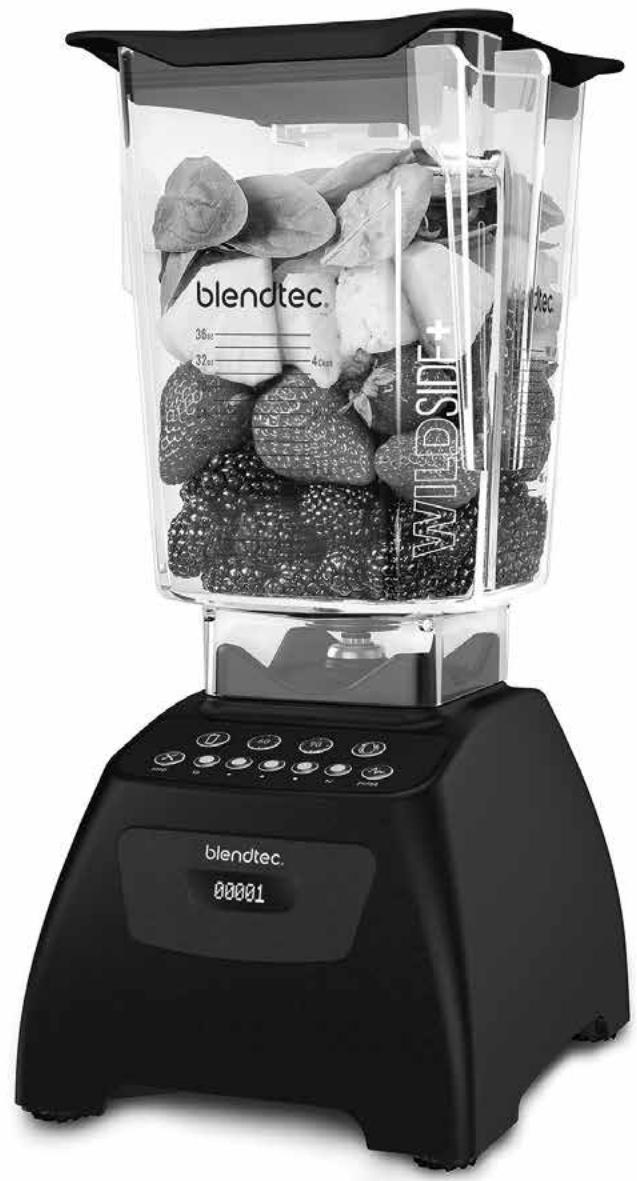
3.1 BLENDER MOTOR BASE
- Touchpad: Consists of one-touch pre-programmed cycles and speeds, as well as Stop and Pulse buttons.
- Hardened Metal Drive Socket: Where the jar couples with the motor to turn the blade assembly; made of hardened metal.
- LCD Information Centre: Displays the number of times a blend cycle button has been pressed.
- Power Unit: This unit is located within the blender motor base and contains the computerised electronics that run the blender.
- Motor Base Cover: Houses the power unit in a durable, plastic material.
- Power Switch: Located on the back lower-right corner of the motor base cover.
- Power Cord: Located at the back of the motor base cover.
3.2 BLENDER JAR ASSEMBLY
The blender jar assembly consists of the blender jar, blade assembly and lid.
- Jar: Durable, BPA-free jar; easy to clean.
- Blade Assembly: Uniquely designed stainless steel blade provides fast, consistent blending.
- Lid: Vented gripper lid seals liquids within the jar during blending.
NOTE: Filling the blender jar beyond the marked capacity is not recommended.
SECTION 4: INSTALLATION
- Place the blender on a flat, clean and dry surface. Blender vents should be unobstructed to allow proper cooling during use.
- Make sure an outlet is available within 61 cm (two feet) of the blender motor.
- Ensure the Power Switch located on the back of the motor base is turned off before plugging it in.
- Turn unit on by toggling the Power Switch to the ON position.
- Place appropriately filled blender jar, with the lid in place, onto the blender base.
- We recommend you use surge protection when plugging your blender into an electrical outlet.
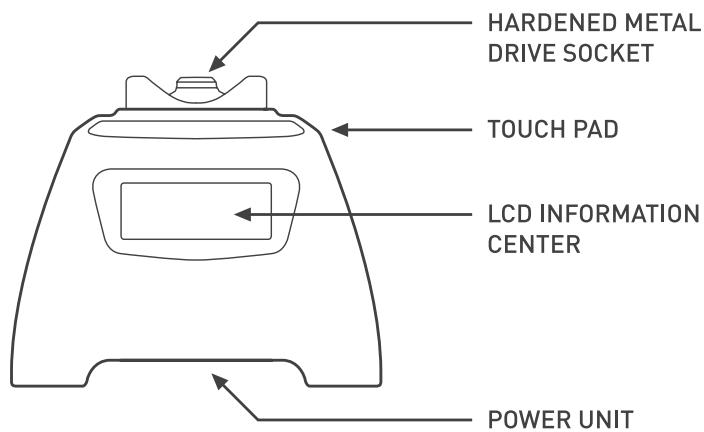
FIGURE 1 FRONT VIEW: MOTOR BASE
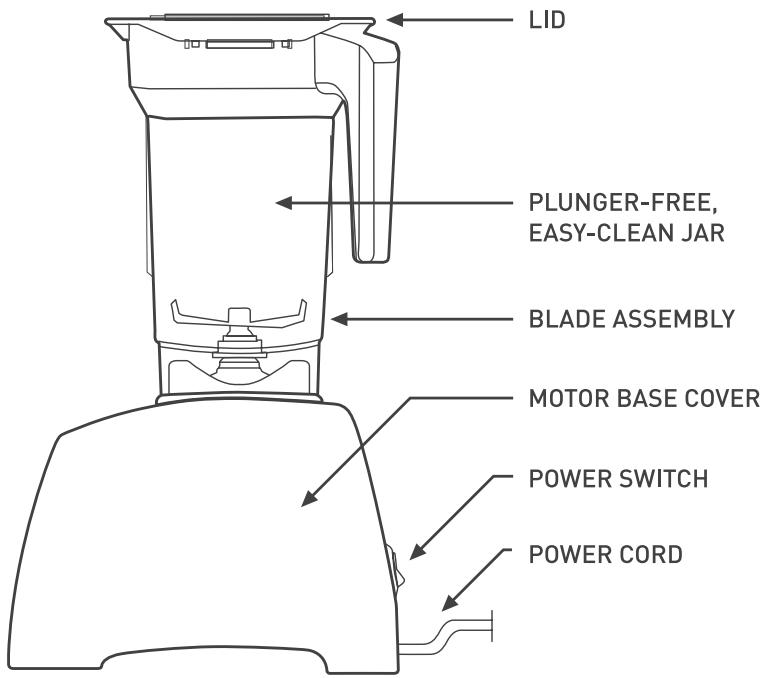
FIGURE 2 SIDE VIEW: MOTOR BASE AND JAR ASSEMBLY
SECTION 5: OPERATIONAL OVERVIEW
5.1 QUICK RECIPE INSTRUCTIONS -
Use these steps to get started right away.
- Choose a recipe from the included Blendtec Blending 101 booklet.
- Gather all of the ingredients.
- Load the blender jar as indicated in the recipe..
- Attach the blender lid to the jar, ensure that it sits on the jar completely.
- Turn on the main power switch located on the back of the blender motor base.
- Place the blender jar onto the base, making sure the jar is secure and fully seated on the motor base.
- Press the indicated touch pad button from the recipe once (or as indicated in the recipe).
- When cycle is complete, remove the blender jar from the blender base.
- Remove the jar lid and serve as indicated in the recipe.
- For best cleaning results, clean immediately after blending. (See CARE AND CLEANING, 6.1)
5.2 ALL ABOUT BLEND CYCLES
Blend cycles are timed cycles designed for specific types of blends. These one-touch cycles speed up, slow down and shut off automatically, so results are perfect every time.
Each blender in the Classic series features a number of pre-programmed cycles and settings that provide a wide range of recipes and functions*:
Smoothe - Fruit smoothies, green smoothies, milkshakes
One-Touch Timed - Used to blend ingredients for a 60-second or 90-second timed cycle
Clean - Automatic cleaning cycle
Incremental Speed — 50-second cycles that blend at Lo, Medium-Lo, Medium, Medium-Hi and Hi speeds
Stop - Stops the blender at any point during blending
Hot Soup - soups, hot chocolate, syrups, fondues
Pulse - used to quickly stir, chop or mince at a high speed
*Interfaces and cycles will vary depending on model number
5.3 CLASSIC 475^TM
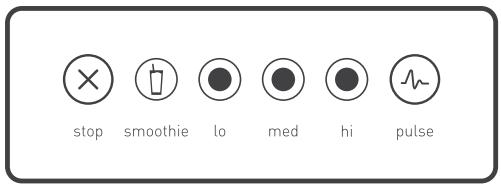
SMOOTHIE
This cycle is designed specifically for various types of smoothies and thick drinks that frequently use dense or frozen ingredients. It slows down and speeds up automatically during the course of the cycle. This allows the blender to draw the ingredients into the blending vortex, creating the desired texture.
INIncrementAL SPEEDS
The Classic 475 comes with three incremental speed cycles that allow you to completely customise the consistency of your blend.
Lo
Medium
Hi
You can switch to a different speed at any point during the cycle. To stop the cycle at any point during blending, press Stop.
PULSE
The Pulse function is used for chopping, mincing, whipping or other momentary tasks that do not require a long blend cycle. You can also Pulse to quickly stir a blend before serving.
The Pulse setting runs at speed 7 and will only run while the Pulse icon remains pressed. When the icon is released, the motor shuts off.
5.4 CLASSIC 560^TM
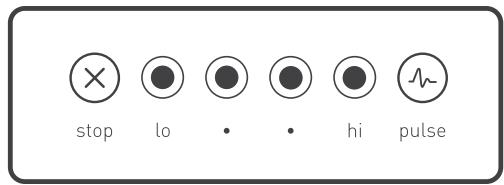

INIncrementAL SPEEDS
The Classic 560 comes with four incremental speed cycles that allow you to completely customise the consistency of your blend.
Lo
Medium
Medium-Hi
Hi
You can switch to a different speed at any point during the cycle. To stop the cycle at any point during blending, press Stop.

PULSE
The Pulse function is used for chopping, mincing, whipping or other momentary tasks that do not require a long blend cycle. You can also Pulse to quickly stir a blend before serving.
The Pulse setting runs at speed 7 and will only run while the Pulse icon remains pressed. When the icon is released, the motor shuts off.
5.5 CLASSIC 570^TM
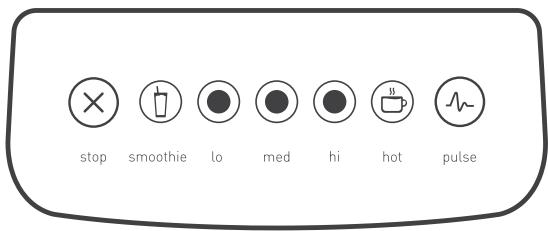

SMOOTHIE
This cycle is designed specifically for various types of smoothies and thick drinks that frequently use dense or frozen ingredients. It slows down and speeds up automatically during the course of the cycle. This allows the blender to draw the ingredients into the blending vortex, creating the desired texture.

INIncrementAL SPEEDS
The Classic 475 comes with three incremental speed cycles that allow you to completely customise the consistency of your blend.
Lo
Medium
Hi
You can switch to a different speed at any point during the cycle. To stop the cycle at any point during blending, press Stop.

HOT SOUP
This cycle is designed for hot recipes. The cycle's length of time, combined with the speed of the motor, heats the ingredients to a hot temperature. This cycle can also be used for hot chocolate, syrups and fondue.
When using fresh ingredients, remember that the speed of the blade generates enough heat to warm the ingredients. Do not add any liquids or ingredients over 46^ C (115°F) to the jar when preparing soups or hot items.

PULSE
The Pulse function is used for chopping, mincing, whipping or other momentary tasks that do not require a long blend cycle. You can also Pulse to quickly stir a blend before serving.
The Pulse setting runs at speed 7 and will only run while the Pulse icon remains pressed. When the icon is released, the motor shuts off.
5.6 CLASSIC 575^TM
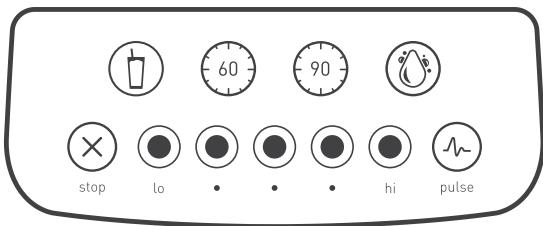
SMOOTHIE
This cycle is designed specifically for various types of smoothies and thick drinks that frequently use dense or frozen ingredients. It slows down and speeds up automatically during the course of the cycle. This allows the blender to draw the ingredients into the blending vortex, creating the desired texture.
60 ONE-TOUCH TIMED CYCLES
The Classic 575 comes equipped with two, one-touch timed cycles: one 60-second and one 90-second. These cycles free your hands for other kitchen tasks and are ideal for recipes that require longer blending times, such as hot soups or bread dough.
CLEAN
This cycle that automatically cleans the inside of your blender jar. To use the Clean cycle:
- Add 240 ml of water and a drop of dish soap to the blender jar.
- Secure the lid and place the jar on the blender base.
- Press the Clean button.
- Once the cycle is complete, remove the jar and rinse. For best results, use the Clean cycle immediately after blending
INIncrementAL SPEEDS
The Classic 575 comes with five incremental speed cycles that allow you to completely customise the consistency of your blend.
Lo
Medium-Lo
Medium
Medium-Hi
Hi
You can switch to a different speed at any point during the cycle. To stop the cycle at any point during blending, press Stop.
PULSE
The Pulse function is used for chopping, mincing, whipping or other momentary tasks that do not require a long blend cycle. You can also Pulse to quickly stir a blend before serving.
The Pulse setting runs at speed 7 and will only run while the Pulse icon remains pressed. When the icon is released, the motor shuts off.
SECTION 6: CARE AND CLEANING
6.1 CLEANING AFTER USE
- Add 240 ml of hot water and a drop of liquid dish soap to the blender jar.
- Place the lid tightly onto the jar.
- Place the jar on the blender base and, with your hand placed on top of the lid, press the Pulse button for 5 seconds or press the Clean cycle button.
- Rinse well.
- Clean the blender base by simply wiping the base and interface with a damp cloth.
6.2 LONG-TERM SANITATION
- For long-term sanitation, fill the blender jar with hot water.
- Add one to two teaspoons (5-10 ml) of liquid chlorine bleach to the jar.
- Stir for 10 seconds to mix water and bleach. Let mixture stand in the blender jar for five minutes.
- Empty water/bleach mixture. Turn the jar upside down on a dish rack until dry.
6.3 CLEANING TIPS AND CAUTIONS
- Do not use stiff bristled brushes or abrasive cloths/pads to clean the blender base or jar, as this will dull or scratch the surface.
- NEVER submerge the blender motor in water. Avoid submerging blender jars for more than 5 minutes. Water penetration through the lower jar seals will reduce the life of the jar. After cleaning, we recommend the blender jar be stored upright.
- BLENDER JAR IS DISHWASHER SAFE-TOP RACK ONLY! Extreme temperatures damage the lower seal of the jar. We recommend hand washing to prolong the life of the blender jar. We do not recommend the jar be used or exposed to temperatures above boiling (100°C, 212°F).
SECTION 7: TROUBLESHOOTING
While we don't expect you to have any problems with your blender, sometimes failures do occur. Use the following guidelines to see if the problem is easily fixed or requires service.
7.1 BLENDER MOTOR WILL NOT TURN ON (NO POWER)
If the blender motor will not turn on, try the following:
- Determine if the Liquid Crystal Display (LCD) is lit. An absence of a lit LCD indicates a lack of power to the unit.
- Make sure the main power switch on the back lower-right corner is turned on. (On is indicated by the vertical slash (l) on the power switch).
- Check your house circuit breaker switch to make sure it is set to the ON position.
- Unplug the power cord from the wall receptacle, wait 5 seconds, then plug the power cord back in.
7.2 ERROR MESSAGES ON DISPLAY
Overload: This message indicates an overload on the motor. Turn off and unplug the unit. Remove the blender jar from the motor base, and turn the shaft by hand to ensure the blade turns freely. If the blade does not move freely, check for any obstruction in the jar. If the blade moves freely, plug in the unit and turn the blender on. If the overload condition reoccurs, please contact your Blendtec service agent for further assistance.
Overtemp: This message indicates that the motor is overheating. The blender has been disabled until the unit cools to operating temperature. Turn off and unplug the unit. Allow it to cool for at least 20 minutes.
E-05 E-05 (Reset Error): This message indicates a permanent failure of the electronics in the unit. Please contact your Blendtec service agent for repair/replacement (see Section 8: Warranty).
E-04 E-04 (No Zero Crossing): This message indicates failure of a component on the electronic board. Please contact your Blendtec service agent for repair/ replacement (see Section 8: Warranty).
7.3 NOISE LEVEL CHANGES
If the blender noise level has increased from original levels, determine whether the sound is coming from the blender motor or jar.
- Blender motor: Remove the jar, and press Pulse. Listen to the motor. If it is excessively noisy, please contact your Blendtec service agent for evaluation.
- Jar: After checking the motor, fill the jar with 480 ml of water and place back on the motor base. Run the blender for a few seconds by pressing the Pulse button.
- If you have more than one jar, test a different jar to determine whether the sound is different. If a jar is excessively noisy, or if the blade assembly seems loose or sounds gravelly when turned by hand, please contact a Blendtec service agent.
7.4 BLENDED TEXTURE UNSATISFACTORY
If the blended texture of product is lumpy or uneven, do the following:
- Ensure the mixture is not cavitating during the cycle. Cavitation is a condition in which an air pocket forms within the mix because it is too cold or too solid. The blender blade then spins freely in this cavity. This problem can be corrected by increasing the mix temperature by reducing ice, increasing liquid and/or ensuring that the frozen ingredients used in the recipe are never colder than -12 degrees Celsius (10 degrees Fahrenheit).
- If the recipe is mixing well but has not had enough time for complete blending, increase the cycle time. Try a longer cycle or touch and hold the Pulse button for the required extra blending time.
- TRIED EVERYTHING? If none of the preceding suggestions work, contact your Blendtec service agent for further assistance.
INSTRUCTIONS THAT APPEAR IN THIS USER GUIDE ARE NOT MEANT TO COVER EVERY POSSIBLE CONDITION OR SITUATION THAT MAY OCCUR. GOOD JUDGMENT MUST BE USED WHEN OPERATING THIS OR ANY OTHER MACHINERY.
SECTION 8: WARRANTY
WARRANTY DESCRIPTION
The motor base and jar assembly, including all moving jar parts, are covered against leaking or breakage for the warranty period. Warranties begin from the date of purchase.
Cosmetic damage, product abuse, unreasonable use, damage resulting from an accident (including fire, flood, earthquake or other natural disasters), product tampering, use of accessories not endorsed by Blendtec, service performed or attempted by unauthorised service agencies or units that have modifications or have been used for commercial purposes are not included under this warranty.
The quality of Blendtec blenders is unsurpassed. You will enjoy years of wonderful and reliable service from your Blendtec Classic series blender.
THIS WARRANTY APPLIES ONLY TO PRODUCTS SOLD BY BLENDTEC OR ITS AUTHORISED DEALERS
LIMITED WARRANTY
Blendtec warrants the blender motor to be free of defect in material and workmanship for the warranty period. During this period, such defects will be repaired or the product replaced at Blendtec's discretion without charge. This warranty does not cover damage caused by misuse, accident or negligence. All implied warranties, including but not limited to implied warranties of fitness and merchantability, are limited in duration to the warranty period on the motor and jar. Any unit submitted for repair must be accompanied by proof of original purchase. For repairs under warranty, Blendtec will provide prepaid shipping. For repairs out of warranty, shipping must be arranged and paid for by the customer. Send all units for repair to:
For International toll-free service please contact:
Australia 1-800-014098
Canada (855) 230-0888
France 0-800-910346
Japan 0066-33-821731
Mexico 001-855-230-0888
South Korea 003-081-32941
Spain 900-948733
Taiwan 008-01147146
United Kingdom 0800-1510183
The above limitations may not apply in states where limited warranties are not allowed. Other warranties may apply outside of the USA and Canada. Using a machine outside the country it was designed for will void the warranty.
UNDER WARRANTY
- Contact Blendtec immediately to diagnose the difficulty. Please have blender serial number ready as well as a description of the problem. Do not attempt to do your own repairs. Repairs made by persons other than Blendtec authorised service representatives will void the warranty. Many issues can be resolved simply and quickly over the phone.
- If the difficulty cannot be resolved over the phone, your unit may require replacement. If blender is under warranty, Blendtec will repair or replace the unit at no cost. Cosmetic damage and abuse are not included.
- Upon receiving instructions from Blendtec, box up your existing unit and enclose the following:
Your Name:
Address:
Phone Number:
Motor Serial No. (Found on bottom of motor base):
Cycle Count (From the LCD Information Centre):
Your Purchase Date:
Place Of Purchase:
An explanation of the problem:
Notice To Australian Customers:
Our goods come with guarantees that cannot be excluded under the Australian Consumer Law. You are entitled to a replacement or refund for a major failure and for compensation for any other reasonably foreseeable loss or damage. You are also entitled to have the goods repaired or replaced if the goods fail to be of acceptable quality and the failure does not amount to a major failure.
OUT OF WARRANTY
- Contact Blendtec to diagnose the difficulty. Please have the blender serial number ready along with a description of the problem. Do not attempt to do your own repairs. Many issues can be resolved simply and quickly over the phone.
- If the blender is not under warranty and you wish to have it repaired, please call customer service with your serial number, place of purchase and date of purchase so we may give you further instructions on how to send your machine in for an out of warranty repair.
- When you ship your unit please enclose the following:
Your Name:
Address:
Phone Number:
Motor Serial No. (Found on bottom of motor base):
Cycle Count (From the LED Information Centre):
Your Purchase Date:
Place Of Purchase:
An explanation of the problem:
∀∃IS∀T0 ∃I ∀R∃S
INDICE
SECCION1-PRECAUCIONESIMPORTANTES 19
SECCION 2 - DESEMBALAJE. 21
1.10 PRECAUTIONS LIÉES AU CORDON D'ALIMENTATION
Never remove the blender motor cover. The blender motor does not contain user-adjustable or serviceable parts. A qualified service agent must make all service adjustments. Removing the cover or attempting to service the blender will void the warranty.
1.13 ÉVITER DE TOUCHER LA DOUILLE D'ENTRAJÉNEMENT DU MÉLANGEUR OU LA BASE DU RÉCIPIENT APRès L'UTILISATION!