 ManualGo.com
 CFBC3150 - Fridge CANDY - Free user manual and instructions
Find the device manual for free CFBC3150 CANDY in PDF.


Download the instructions for your Fridge in PDF format for free! Find your manual CFBC3150 - CANDY and take your electronic device back in hand. On this page are published all the documents necessary for the use of your device. CFBC3150 by CANDY.
USER MANUAL CFBC3150 CANDY
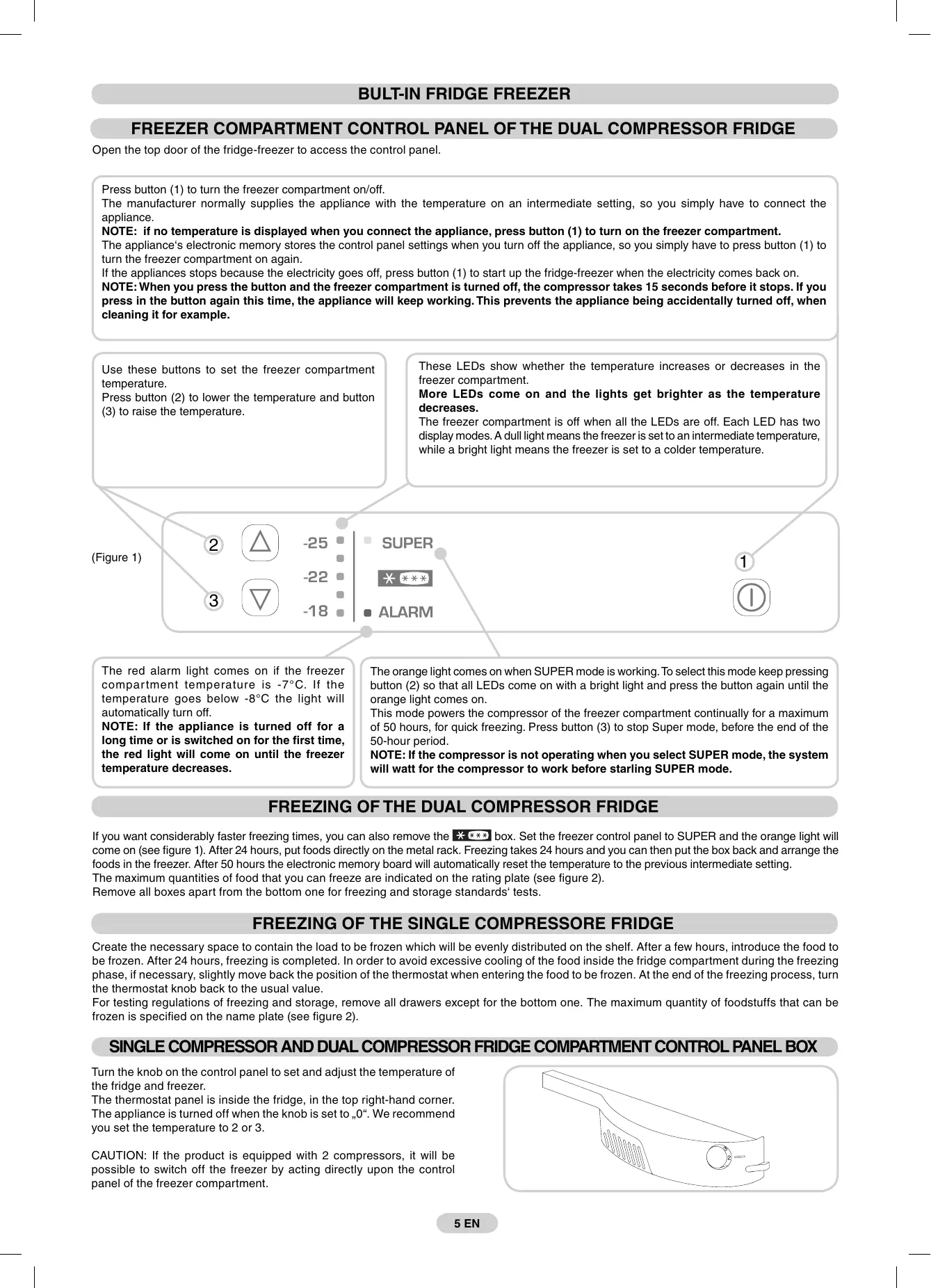
BULT-IN FRIDGE FREEZER FREEZER COMPARTMENT CONTROL PANEL OF THE DUAL COMPRESSOR FRIDGE Open the top door of the fridge-freezer to access the control panel.
Press button (1) to turn the freezer compartment on/off.
The manufacturer normally supplies the appliance with the temperature on an intermediate setting, so you simply have to connect the appliance. NOTE: if no temperature is displayed when you connect the appliance, press button (1) to turn on the freezer compartment. The appliance‘s electronic memory stores the control panel settings when you turn off the appliance, so you simply have to press button (1) to turn the freezer compartment on again. If the appliances stops because the electricity goes off, press button (1) to start up the fridge-freezer when the electricity comes back on. NOTE: When you press the button and the freezer compartment is turned off, the compressor takes 15 seconds before it stops. If you press in the button again this time, the appliance will keep working. This prevents the appliance being accidentally turned off, when cleaning it for example.
Use these buttons to set the freezer compartment temperature.
Press button (2) to lower the temperature and button (3) to raise the temperature.
These LEDs show whether the temperature increases or decreases in the freezer compartment.
More LEDs come on and the lights get brighter as the temperature decreases. The freezer compartment is off when all the LEDs are off. Each LED has two display modes. A dull light means the freezer is set to an intermediate temperature, while a bright light means the freezer is set to a colder temperature.
The red alarm light comes on if the freezer compar tment temperature is -7°C. If the temperature goes below -8°C the light will automatically turn off.
NOTE: If the appliance is turned off for a long time or is switched on for the first time, the red light will come on until the freezer temperature decreases.
The orange light comes on when SUPER mode is working. To select this mode keep pressing button (2) so that all LEDs come on with a bright light and press the button again until the orange light comes on.
This mode powers the compressor of the freezer compartment continually for a maximum of 50 hours, for quick freezing. Press button (3) to stop Super mode, before the end of the 50-hour period. NOTE: If the compressor is not operating when you select SUPER mode, the system will watt for the compressor to work before starling SUPER mode.
FREEZING OF THE DUAL COMPRESSOR FRIDGE If you want considerably faster freezing times, you can also remove the box. Set the freezer control panel to SUPER and the orange light will come on (see figure 1). After 24 hours, put foods directly on the metal rack. Freezing takes 24 hours and you can then put the box back and arrange the foods in the freezer. After 50 hours the electronic memory board will automatically reset the temperature to the previous intermediate setting.
The maximum quantities of food that you can freeze are indicated on the rating plate (see figure 2). Remove all boxes apart from the bottom one for freezing and storage standards‘ tests.
FREEZING OF THE SINGLE COMPRESSORE FRIDGE Create the necessary space to contain the load to be frozen which will be evenly distributed on the shelf. After a few hours, introduce the food to be frozen. After 24 hours, freezing is completed. In order to avoid excessive cooling of the food inside the fridge compartment during the freezing phase, if necessary, slightly move back the position of the thermostat when entering the food to be frozen. At the end of the freezing process, turn the thermostat knob back to the usual value.
For testing regulations of freezing and storage, remove all drawers except for the bottom one. The maximum quantity of foodstuffs that can be frozen is specified on the name plate (see figure 2).
SINGLE COMPRESSOR AND DUAL COMPRESSOR FRIDGE COMPARTMENT CONTROL PANEL BOX Turn the knob on the control panel to set and adjust the temperature of the fridge and freezer.
The thermostat panel is inside the fridge, in the top right-hand corner. The appliance is turned off when the knob is set to „0“. We recommend you set the temperature to 2 or 3. CAUTION: If the product is equipped with 2 compressors, it will be possible to switch off the freezer by acting directly upon the control panel of the freezer compartment.
5 EN DEFROSTING The fridge compartment is automatically defrosted when the compressor is not working.
A small amount of frost or drops of water on the back of the fridge compartment when the fridge is working is normal.
Make sure the water outlet is always clean. Make sure foods do not touch the back or sides of the fridge. We recommend you defrost the freezer compartment when the frost is more than 3 mm thick. N.B. This is the rating plate. If you need to contact our Service Department in the event of faults, remember to give them the information on the plate.
Note: If the room temperature is very warm, the appliance may work continuously and a layer of frost will deposit on the back of the fridge compartment. In this case, turn the knob to lower settings (1-2).
DRAINING WATER The appliance has a system for draining water from defrosting.
This system comprises:
A bar to remove when defrosting so water can flow into a basin.
A drainage basin (not supplied).
REVERSING THE FRIDGE-FREEZER DOORS Remove the pin and bushing from the toppanel.
Remove the top door.
Remove the middle hinge and washers.
Remove the bottom door.
Remove the pin of the bottom right-hand hinge and refit it on the bottom left-hand hinge.
Reverse the bracket cover snap, which is snap-fitted on the bracket.
Fit the hinge and doors, working from top to bottom 1
6 EN SIZE OF THE APPLIANCE AND UNIT INSTALLING THE APPLIANCE IN A UNIT Secure the seal (supplied) to the appliance, on the opposite side from the hinges.
Install the appliance in the unit, Aligning it on the opposite side from the hinges.
Make sure the top bracket of the appliance is against the unit.
Secure the top of the appliance to the unit with the screws provided.
Secure the bottom of the appliance with the screws provided.
Fit the ventilation grid.
Loosen the screws on the middle right-hand hinge.
Position the plate close to the column.
Fit the bracket to the unit with the screws provided.
Tighten the screws in the middle right-hand hinge.
Repeat the same steps for the middle left-hand hinge.
7 EN The appliance is supplied with fittings (slides and slide brackets) to align the fridge-freezer doors with the doors of the unit.
After fitting the appliance, place the rear of the unit against the wall to prevent access to the compressor unit.
To make sure the fridge-freezer works properly, air must circulate to cool the condenser which is situated at the bottom of the appliance. The unit must have a rear outlet with top opening that is not obstructed and a front opening which is covered by the ventilation grid.
Fix the slide on the inside of the unit door, at the height you want.
Make sure it is approximately 20 mm from the outside edge of the door.
Size of the unit cut outs.
Open the doors of the unit and fridge. Position the slide bracket around the slide and secure to the appliance door.
380x50mm Mark the holes for the screws and drill with a 2.5 mm diameter bit. 380x37mm