
CCE3T618ES - Refrigerator CANDY - Free user manual and instructions
Find the device manual for free CCE3T618ES CANDY in PDF.




| Product Type | Refrigerator with Freezer |
| Brand | Candy |
| Model | CCE3T618ES |
| Control Panel | Digital with On/Off and Mode buttons |
| Interior Lighting | LED |
| Shelves | Adjustable |
| Vegetable Drawer | With Humidity Slider |
| Freezer Drawers | Yes |
| Door Bins | Yes |
| Leveling Feet | Yes |
| Refrigerator Temperature | Adjustable from 2°C to 8°C (in 1°C increments) |
| Freezer Temperature | Adjustable (default -18°C, Super Freeze at -25°C) |
| Super Cool Function | Yes (accelerated cooling at 2°C for 30 h) |
| Super Freeze Function | Yes (quick freezing at -25°C for 50 h, activated via app) |
| Eco Mode | Yes (optimizes consumption, settings 5°C / -18°C) |
| Vacation Function | Yes (reduces consumption, freezer active) |
| Fine Adjustment | Yes (3 sub-levels per temperature) |
| Defrost | Automatic (No Frost) |
| Connectivity | Wi-Fi via hOn app |
| Door Reversibility | Yes (tools required: electric screwdriver) |
| Demo Mode | Yes (for display) |
| Error Codes | Blinking LED for fan error |
| Required Space (width) | Min. 920 mm |
| Required Space (depth) | Min. 1137 mm |
Frequently Asked Questions - CCE3T618ES CANDY
User questions about CCE3T618ES CANDY
0 question about this device. Answer the ones you know or ask your own.
Ask a new question about this device
Download the instructions for your Refrigerator in PDF format for free! Find your manual CCE3T618ES - CANDY and take your electronic device back in hand. On this page are published all the documents necessary for the use of your device. CCE3T618ES by CANDY.
USER MANUAL CCE3T618ES CANDY
Discover extra contents and create your inventory list


EN 1 BG 9 CS 18 DA 26 DE 34 EL 42 ES 51 FI 59 FR 67 HR 75 HU 83 IT 91 NL 99 NO 107 PL 115 PT 123 RO 131 RU 139 SK 148 SL 156 SR 164 SV 172 UK 180 AR 188 ET 196 LT 204 LV 212
Summary
PRODUCT DESCRIPTION 2 Space requirements 2 USE 3 Use 3 Customized temperature 3 Fine Tuning 4 Super Cool function 4 Super Freeze function 4 Eco mode 5 Holiday function 5 Defrosting 5 Demo mode 5 Error codes 5 APP CONNECTION (Content only) 6 IN APP PAIRING PROCEDURE 6 Step 1 6 Step 2 6 Step 3 6 DOOR REVERSIBILITY 7 DOOR REVERSIBILITY 8
PRODUCT DESCRIPTION
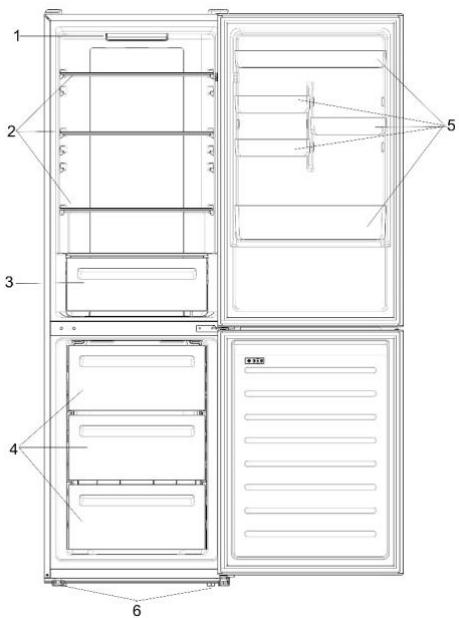
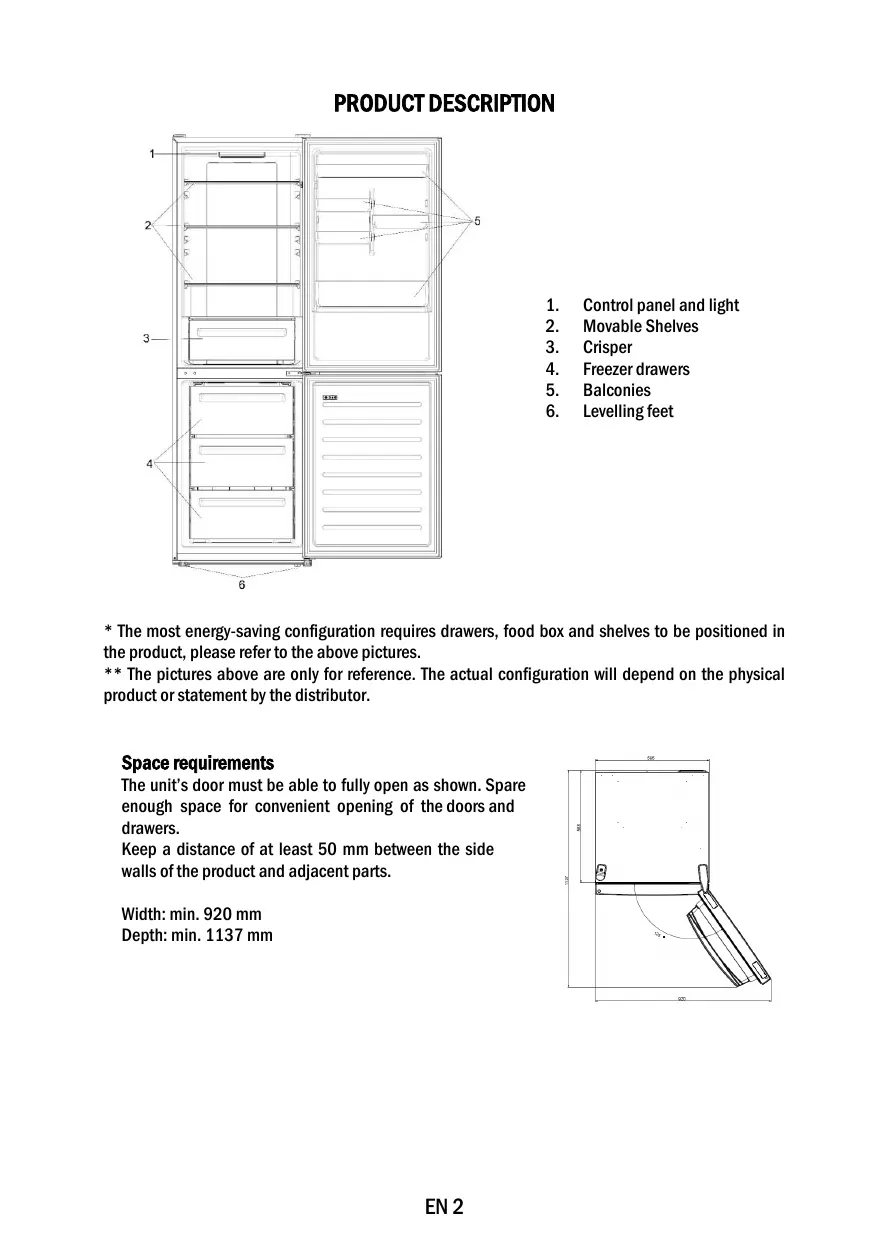
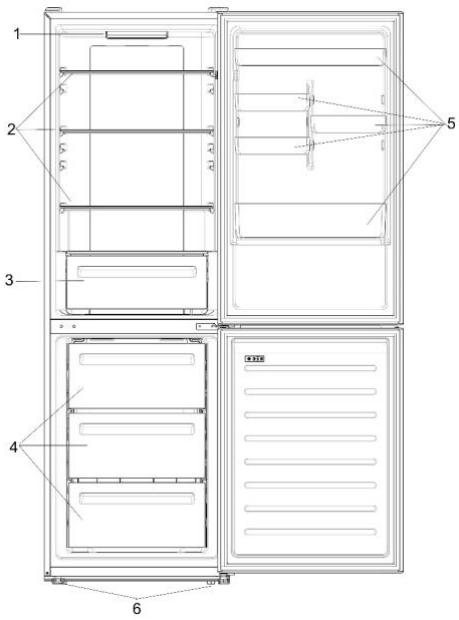
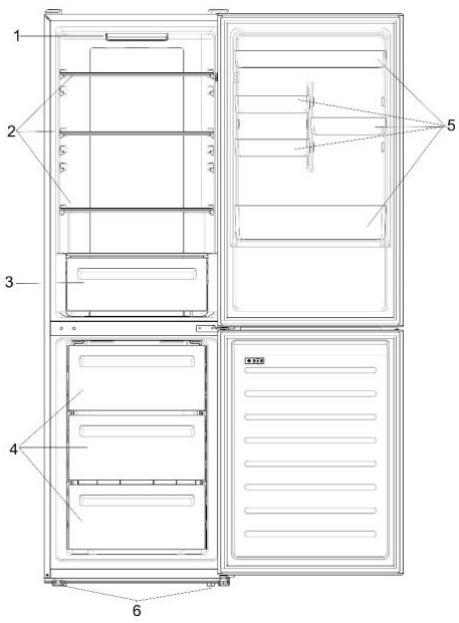
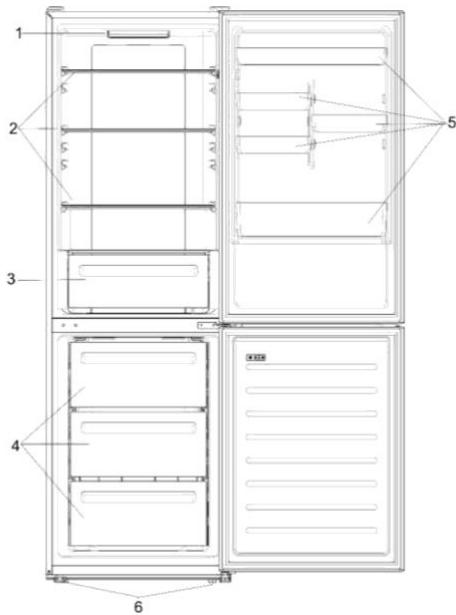
- Control panel and light
- Movable Shelves
- Crisper
- Freezer drawers
- Balconies
- Levelling feet
- The most energy-saving configuration requires drawers, food box and shelves to be positioned in the product, please refer to the above pictures. ** The pictures above are only for reference. The actual configuration will depend on the physical product or statement by the distributor.
Space requirements
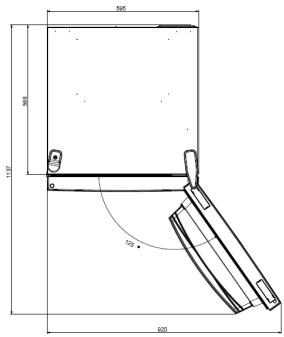
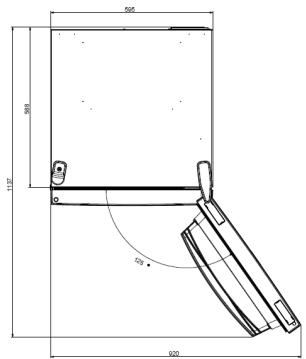
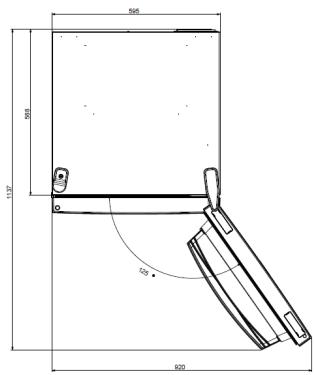
The unit's door must be able to fully open as shown. Spare enough space for convenient opening of the doors and drawers.
Keep a distance of at least 50 mm between the side walls of the product and adjacent parts.
Width: min. 920 mm
Depth: min. 1137 mm
USE
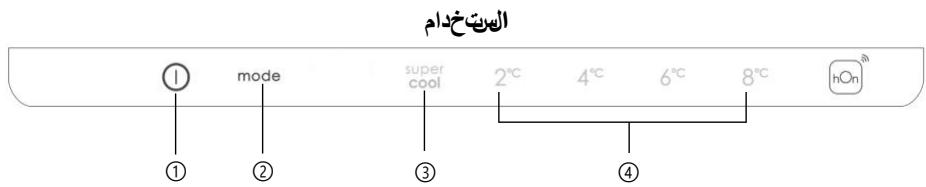
① ON/OFF key, used to switch on/off the appliance. ② Mode key, used to select the fridge temperature or the special functions like. ③ Super Cool Icon, shows if the function is activated. ④ Temperature levels, show which is the selected temperature.
Use
- Plug on the appliance. The appliance will turn on automatically. The temperature will automatically set at 4°C in the fridge and -18°C in the freezer.
- To change the temperature, with the fridge door open, press the mode key. When the setting increases, the corresponding LED light will turn on. An acoustic signal is made every time the mode key is pressed and the temperature is changed. In case of power loss, the last cooling level set will be restored.
- To restore the default setting, at the screen lit, keep pressed the TEMP button, and then press ON/OFF button 5 times in 5 seconds.
- Under the normal operating condition (in spring and autumn), it is recommended to set the temperature at 4°C. In summer when the ambient temperature is high, it is recommended to set temperature at 6~8°C, so as to guarantee the fridge and freezer temperatures and reduce the refrigerator continuous running time; and in winter when the ambient temperature is low, it is recommended to set temperature at 2~4°C to avoid frequent start/stop of the refrigerator.
Customized temperature
From the app, it is possible to customize the temperature of the fridge compartment. The temperature can be set with 1°C sensitivity and it is possible to select a temperature from 2°C to 8°C in the fridge. An acoustic signal is made every time the temperature is changed. When the temperature is selected by the app, there is no indication on the control panel, all the temperature LED lights are turned off, while only the WiFi icon is turned on.
Fine Tuning
The fine tuning selection mode gives to possibility to set the temperatures by sublevels; each temperature level has three sublevels.
How to use the fine tuning function:
- Press the mode key for 8 seconds to enter fine tuning selection mode. When the appliance enters the mode, an acoustic signal is made and the LED of the currently selected cooling level blinks.
- By short pressing the mode key within 5 seconds, the fine tuning setting increases and, at each pressing, an acoustic signal is made. During fine tuning, the LED of the selected cooling level is fixed, while the LED of the selected sublevel blinks.
- If no key is pressed for 5 seconds, the system automatically exits from fine tuning selection mode. The fine tuning setting is saved and the LED of the selected fridge temperature is fixed. If the fine tuning is activated again, the setting will start from the previously stored level.
Super Cool function
It is suggested to switch on the Super Cool function if a large quantity of food should be stored (for example after the purchase). The Super-Cool function accelerates the cooling of fresh food and protects the goods already stored from undesirable warming. When the function is activated, the temperature of the fridge is automatically set at 2°C.
How to use the Super Cool function:
- The function can be activated by pressing many times the mode key until the Super Cool LED is turned ON or by selecting it from the app. If the function is activated, the corresponding icon on the control panel will be turned on. To exit the Super Cool function, press the mode key again. The Super Cool function automatically ends after 30 hours running.
- When the Super Cool ends, the corresponding icon of the control panel turns off and the previously set cooling level is restored.
Super Freeze function
The super freezing function accelerates the freezing of fresh food and protects the goods already stored from undesirable warming. If a large amount of food has to be freeze, it is recommended to set the Super Freeze function on 24h before the usage. When the function is activated, the temperature is automatically set at -25°C.
How to use the Super Freeze function:
The function can be launched only by selecting it from the app. If the function is activated, it will be shown by the app; there is no indication on the control panel. - To exit the Super Freeze function, turn it off from the app. - The Super Freeze function automatically ends when the function has lasted for more than 50 hours.
Eco mode
The Eco mode can be activated to optimize the performance of the appliance, whereas obtaining the best food storage. When the function is activated, the temperature is automatically set at 5°C in the fridge, and at -18°C in the freezer.
How to use the Eco mode:
- The function can be activated only by selecting it from the app. If the function is activated, it will be shown by the app; there is no indication on the control panel. To exit the Eco mode, turn it off from the app; the previously selected temperature will be restored. The Eco mode automatically ends when another function is chosen from the control panel.
Holiday function
The Holiday function can be used to reduce the energy consumption of the appliance, when it is not used regularly. The function will turn off the LED lights (even if the door is open) and the fridge will work on low power consumption mode, whereas the freezer will keep working normally.
How to use the Holiday function:
- The function can be activated only by selecting it from the app. If the function is activated, it will be shown by the app; there is no indication on the control panel.
- To exit the Holiday function, turn it off from the app; the previously selected temperature will be restored. The Holiday function automatically ends when another function is chosen from the control panel.
Defrosting
The defrosting of the refrigerator and freezer compartments is done automatically: no manual operation is needed.
Slider
Near the vegetable basket there is a slider that allows you to adjust the humidity inside it: moving it to the right decreases the humidity, moving it to the left increases the humidity.
Demo mode
Keep the refrigerated door open, press and hold the on/off key, and click the set key five times. The refrigerator will enter the Demo mode. To exit the mode, keep pressed the door switch and press again the SET key for 5s.
Error codes
If the -6°C LED light is flashing, it means there has been a fan error. Please, contact the technical assistance to help solve the problem.
APP CONNECTION (Content only)
IN APP PAIRING PROCEDURE
Step 1
Download the hOn app on the stores


Step 2
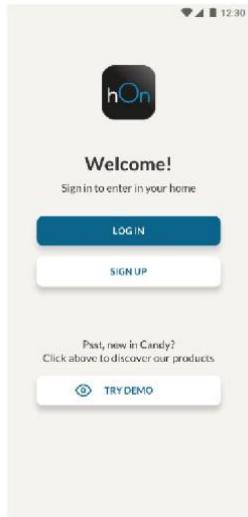
Create your account on the hOn App or log in if you already have an account
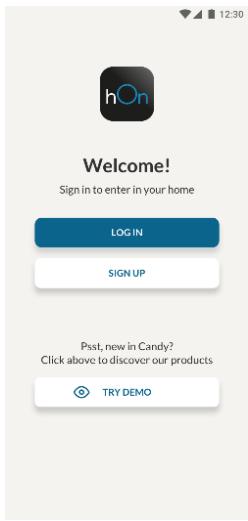
Step 3
- Follow pairing instructions in the hOn App
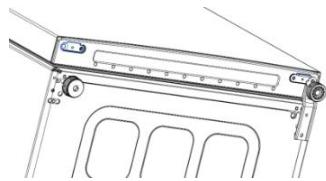
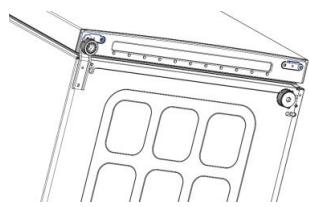
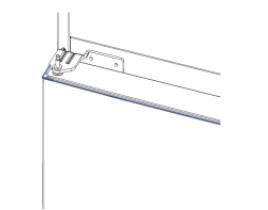
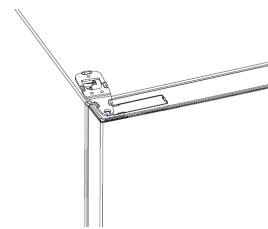
DOOR REVERSIBILITY
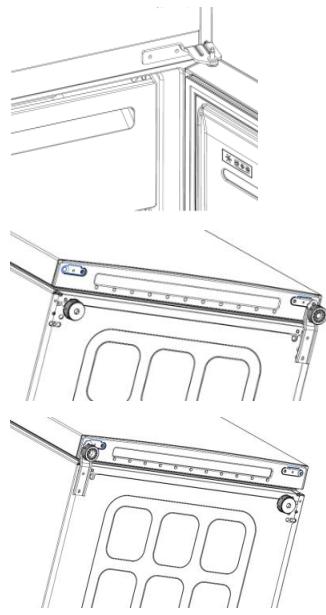
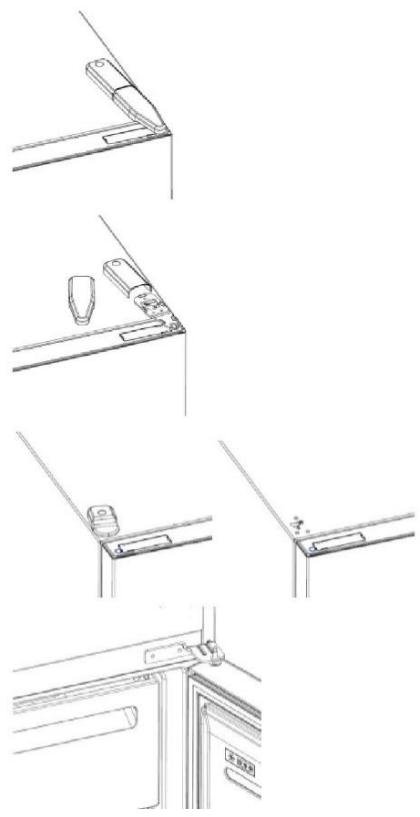
Tools needed: Electric screwdriver
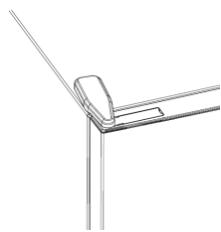
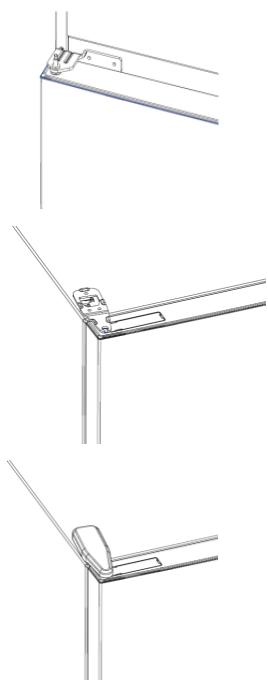
- Remove the top hinge cover
- Unscrew the top hinge
- Remove the top hinge cover (left)
- Remove middle hinge
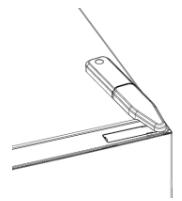
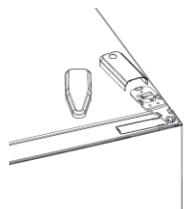
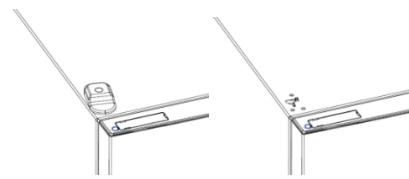
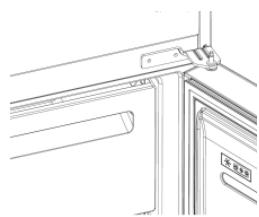
- Remove lower hinge
- Mount hinge foot
- Mount middle hinge
- Mount the upper hinge plate
- Mount the upper hinge cover
CONTENTS DESCRIPTION OF THE PRODUCT 10 Space required 10 Use 11 Personalization Temperature.... 11 Finance 12 "Super Cool" function 12 "Super Freeze" function 12 "Eco" mode 13 "Holiday" function 13 Defrosting 13 Demonstration mode 13 Ice cube trays 14 Connection to the appliance (see for cooling).....15 APPLIANCE FOR FREEZING FOOD.........15 Shelf 1. 15 Shelf 2. 15 Shelf 3. 15 Opening the door 16 Opening the doors. 17
DESCRIPTION OF THE PRODUCT
- Control panel and lighting
- Movable shelves
- Compartment for longer freshness
- Freezer compartment
- Drawers
- Leveling feet
- The most energy-efficient configuration requires the drawers, food containers and shelves to be arranged in the product as shown in the upper illustration. **The illustrations are for reference only. The actual configuration depends on the physical product or the distributor's declaration.
Space requirements
The appliance door must be able to open fully, as shown. Leave enough space for easy opening of the door and drawers. Maintain a distance of at least 50 mm between the side walls of the product and adjacent parts.
Width: min. 920 mm Depth: min. 1137 mm
USE

① The "ON/OFF" button is used to turn the appliance on/off. ② The "Mode" button is used to select the temperature of the refrigerator or the functions. ③ The "Super Cool" icon indicates that the function is activated. ④ The temperature level shows the selected temperature.
Use
Plug the appliance into the socket. The appliance will turn on automatically. The refrigerator temperature will automatically be set to 4°C. To change the temperature while the door is open, press the "Mode" button. When the setting is confirmed, the corresponding LED light turns on. With each press of the "Mode" button, a sound signal is emitted and the temperatures change. In case of a power failure, the last setting of the cooling level will be restored. To restore the factory settings, press and hold the "TEMP" button and then press the "ON/OFF" button 5 times within 5 seconds. - For normal operating conditions (in spring and autumn), it is recommended to set the temperature to 4°C. In summer, when the ambient temperature is high, it is recommended to set the temperature to 6~8°C to guarantee the temperatures of the refrigerator and freezer and to extend the operating time of the refrigerator. In winter, when the ambient temperature is low, it is recommended to set the temperature to 2~4°C to avoid frequent switching on/off of the refrigerator.
- Attach the middle shelf
- Attach the lower shelf
- Mount the drawer handle
- Mount the middle shelf
- Mount the upper shelf of the shelf
- Mount the upper cover of the shelf
Summary
Download on the App Store

EXPLORE IT ON AppGallery
Bnua 2
Akoalouthetais oyniecs ouzueueng tsapmuoyh hOn
ANA2TPEVIMOTHTA IOPTA
Epyaia Tou aataouvtai: Hktpokatαβiδi
- YctaHOBNTe CpeHIOI DBePHyIO neTIO
- YcTaHOBInTe PIIaCTnHy BepXHei DBePHoI neTNI
- YcTaHOBInTe 3aIpyuKy BepxHei DBePHoI neTnI
Zhrnutie
POPIS PRODUKTU 149 Poziadavky na priestor 149 POUZITIE 150 Použitie 150 Prispôsobena teplota 150 Jemné ladenie 151 Funkcia Super Cool 151 Funkcia Super Freeze 151 Rezim Eko 152 Funkcia Holiday 152 Odmrazovanie 152 Rezimukaszky 152 Chybové kódy 152 PRIPOJENIE ALIKÁCIE (len obsah) 153 V REZIME PÁROVANIA APLIKÁCIE 153 Krok 1. 153 Krok 2. 153 Krok 3. 153 REVERZIBILITA DVERI 154 REVERZIBILITA DVERI 155
POPIS PRODUKTU
g jall jn jll jall jall jll jll jll jll jll jll jll jll
yill
aegs aee
a 1
Ae j Cui jua aai ai
Jus Laoie. qalld bai jai jai 8 2d mode gai gai gai
d llll 111111111111111111111111111111111
a 5 10
a
LLED 1
all
baiy. ydiall biall aia jia lalil palll 5 dol cia gla biall p al
a a a a a a a a a a a a a a a a a a
a jssssssssssssssssssssssssssssssssssssssssssssssss
"Super Cool
J. (c) 100000000000000000000000000000000000000000000000000000000000000000000000000000
yj j j j j j j j j j j j j j j j j j j j j j j j j j j j j j j j j j j j j j j j j j j j j j j j j j j j j j j j j j j
2 1
Super Cool
Super Cool LED
30 Super Cool
.155 5 20 SET C
1
J 6 LED
akill Jg axlil alllxally
1 0
hOn 1y
.


2
Jn 1
3
hOn
a
y
aall aal all j1
2
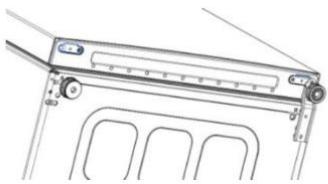
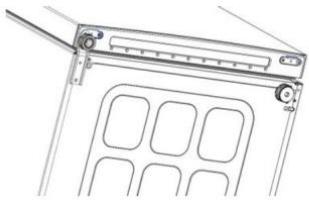
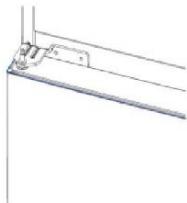
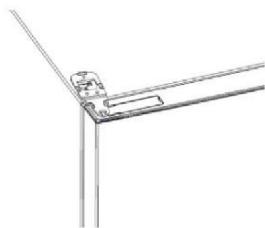
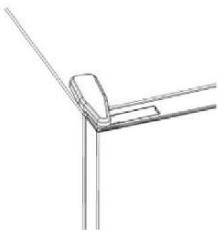
Table of contents
PRODUCT OVERVIEW 197 Space requirements 197 USE 198 Use 198 Temperature adjustment. 198 Fine adjustment 199 Quick cooling function Super Cool 199 Quick freezing function Super Freeze 199 Eco mode Eco 200 Energy saving function Holiday 200 Defrosting 200 Demo mode 200 Error codes 200 CONNECTING WITH THE APP 201 PAIRING THE DEVICE IN THE APP 201 1. step 201 2. step 201 3. step 201 CHANGING THE DOOR HINGE SIDE 202 CHANGING THE DOOR HINGE SIDE 203
PRODUCT OVERVIEW
- SUMMARY
- PRODUCT DESCRIPTION
- SPACE REQUIREMENTS
- USE
- CUSTOMIZED TEMPERATURE
- FINE TUNING
- SUPER COOL FUNCTION
- SUPER FREEZE FUNCTION
- ECO MODE
- HOLIDAY FUNCTION
- DEFROSTING
- SLIDER
- DEMO MODE
- ERROR CODES
- APP CONNECTION (CONTENT ONLY)
- IN APP PAIRING PROCEDURE
- STEP
- DOOR REVERSIBILITY
- DESCRIPTION OF THE PRODUCT
- BNUA
- ANA2TPEVIMOTHTA IOPTA
- ZHRNUTIE
- POPIS PRODUKTU
- SUPER COOL
- TABLE OF CONTENTS
- PRODUCT OVERVIEW
Brand : CANDY
Model : CCE3T618ES
Category : Refrigerator