
WHBSC92FLTX - WHBS C92F LT X - Fridge WHIRLPOOL - Free user manual and instructions
Find the device manual for free WHBSC92FLTX - WHBS C92F LT X WHIRLPOOL in PDF.



User questions about WHBSC92FLTX - WHBS C92F LT X WHIRLPOOL
0 question about this device. Answer the ones you know or ask your own.
Ask a new question about this device
Download the instructions for your Fridge in PDF format for free! Find your manual WHBSC92FLTX - WHBS C92F LT X - WHIRLPOOL and take your electronic device back in hand. On this page are published all the documents necessary for the use of your device. WHBSC92FLTX - WHBS C92F LT X by WHIRLPOOL.
USER MANUAL WHBSC92FLTX - WHBS C92F LT X WHIRLPOOL
EN Instructions for use
text_image
Diagram illustrating building ventilation and door installation methods with labeled components and directional arrows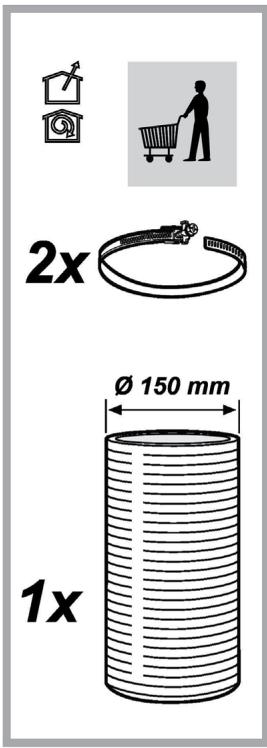
text_image
2x Ø 150 mm 1x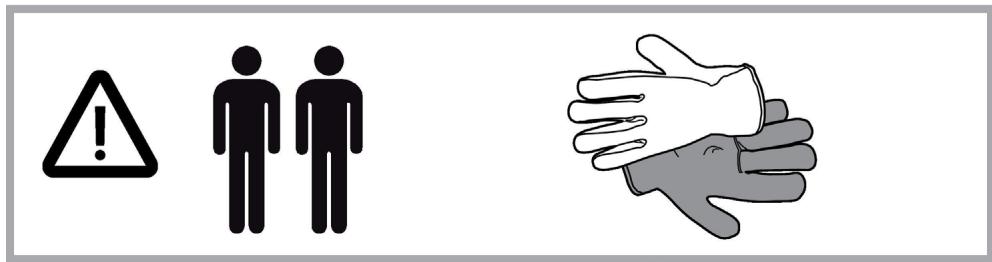
text_image
Warning symbols and hand gesture illustration showing warning, person, and hand interaction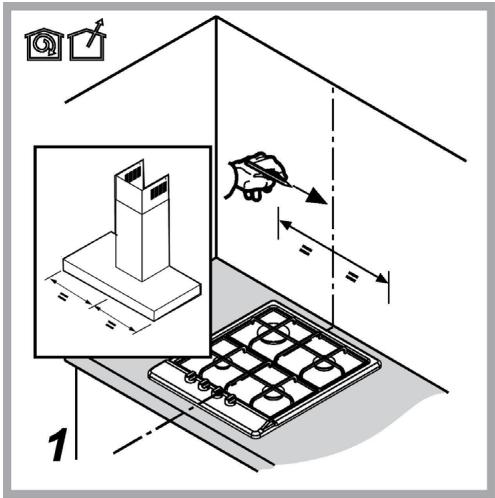
text_image
Technical diagram showing a roof structure with labeled components and dimensions, including a magnified inset of a tower component.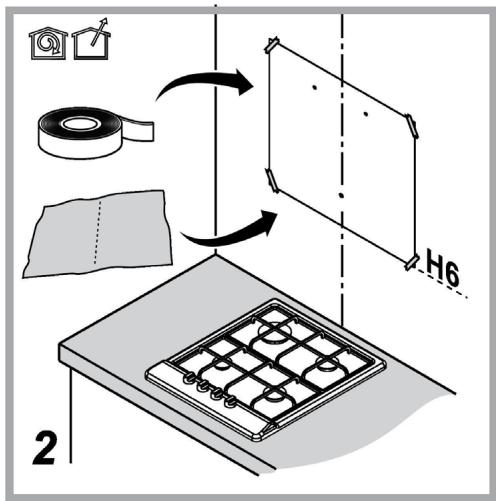
text_image
Diagram illustrating a folding or rolling process with labeled components and directional arrows, including a tape measure and a grid-based object.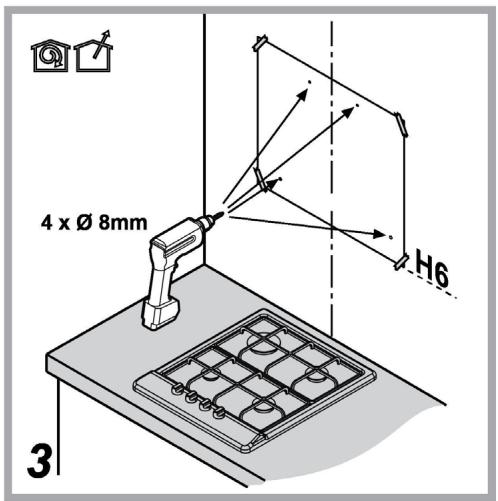
text_image
4 x Ø 8mm H6 3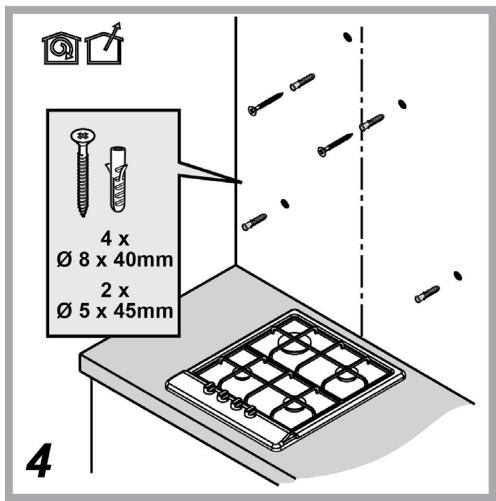
text_image
4 x Ø 8 x 40mm 2 x Ø 5 x 45mm 4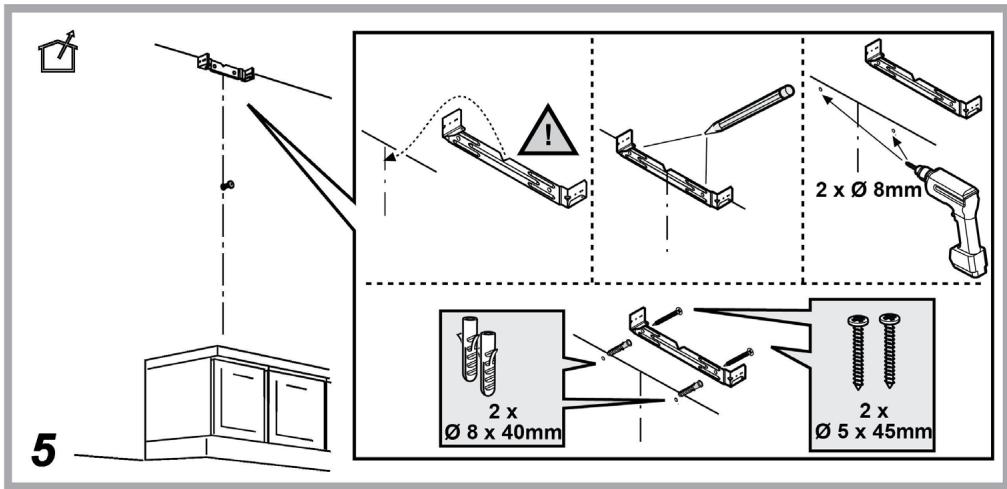
text_image
2 x Ø 8mm 2 x Ø 8 x 40mm 2 x Ø 5 x 45mm 5
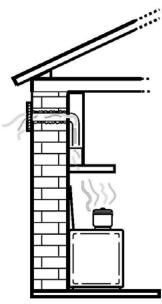
natural_image
Simple line drawing of a heating room with a chimney, stove, and evaporator (no text or symbols)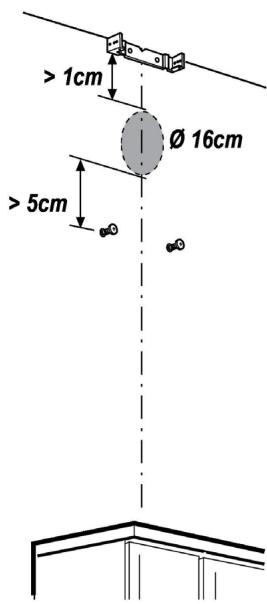
text_image
> 1cm Ø 16cm > 5cm6

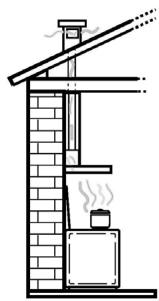
natural_image
Simple line drawing of a chimney with steam rising from the chimney (no text or symbols)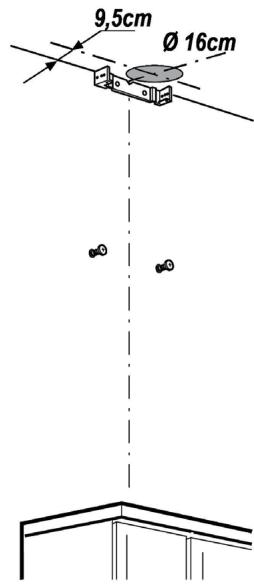
text_image
9,5cm Ø 16cm7

natural_image
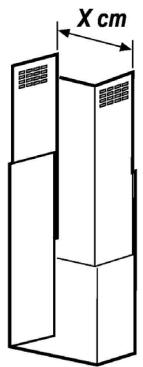
Isometric line drawing of a two-tiered storage unit with X cm dimension label (no text or symbols on the diagram itself)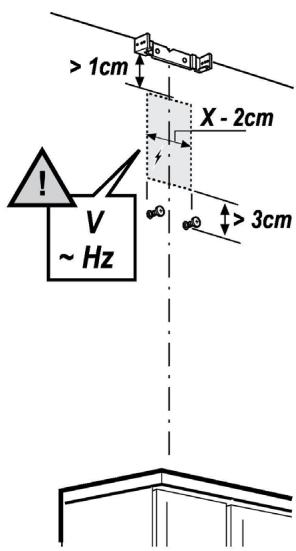
text_image
> 1cm X - 2cm V ~ Hz > 3cm8


text_image
2x Ø 3x99
text_image
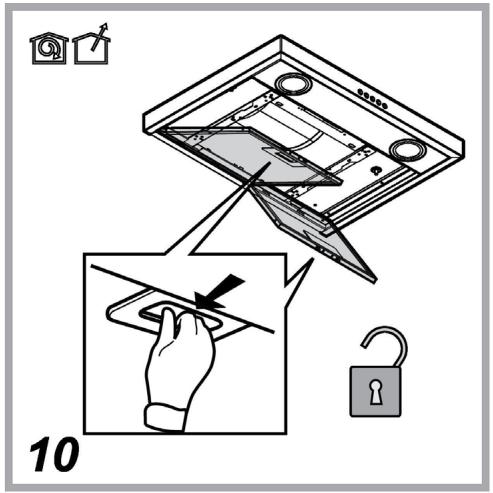
10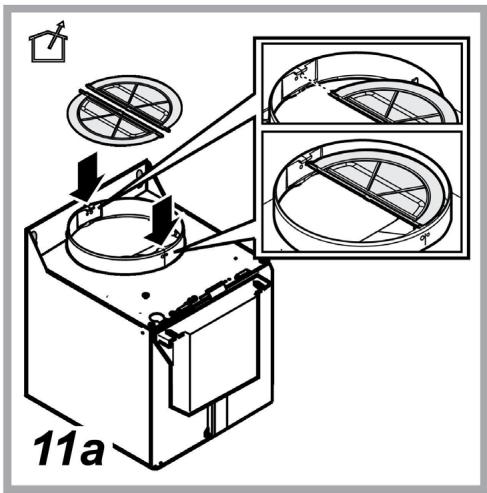
text_image
11a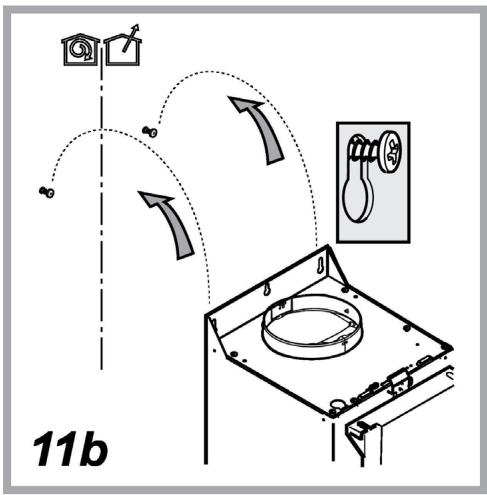
text_image
11b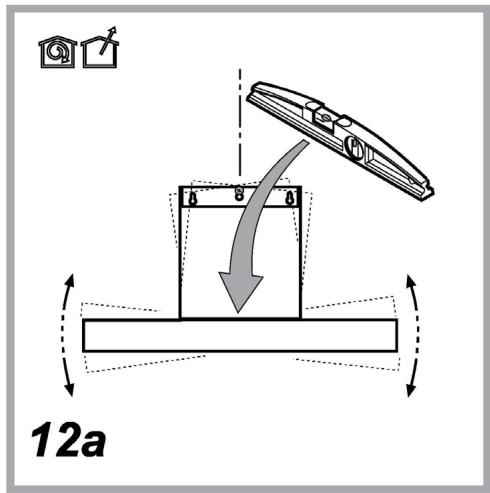
text_image
12a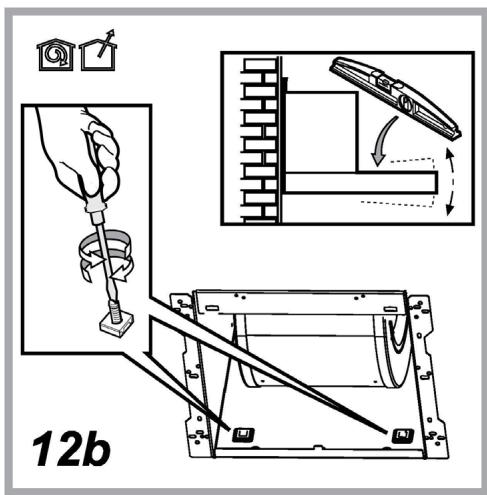
text_image
12b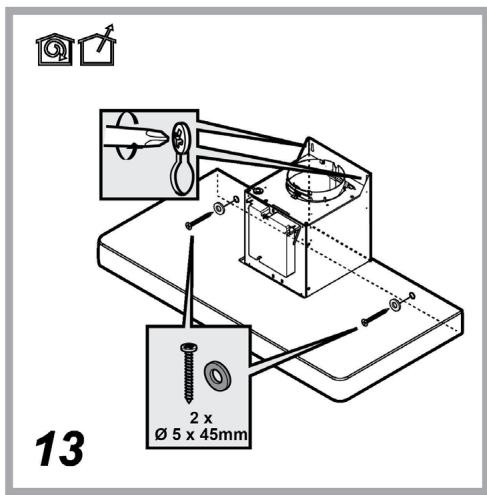
text_image
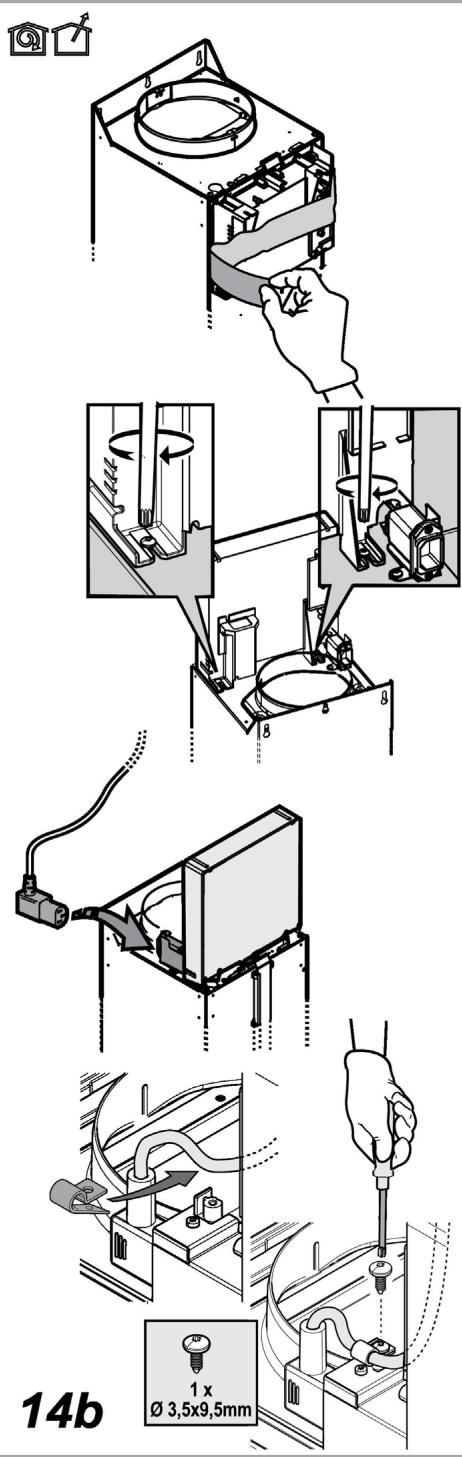
13 2 x Ø 5 x 45mm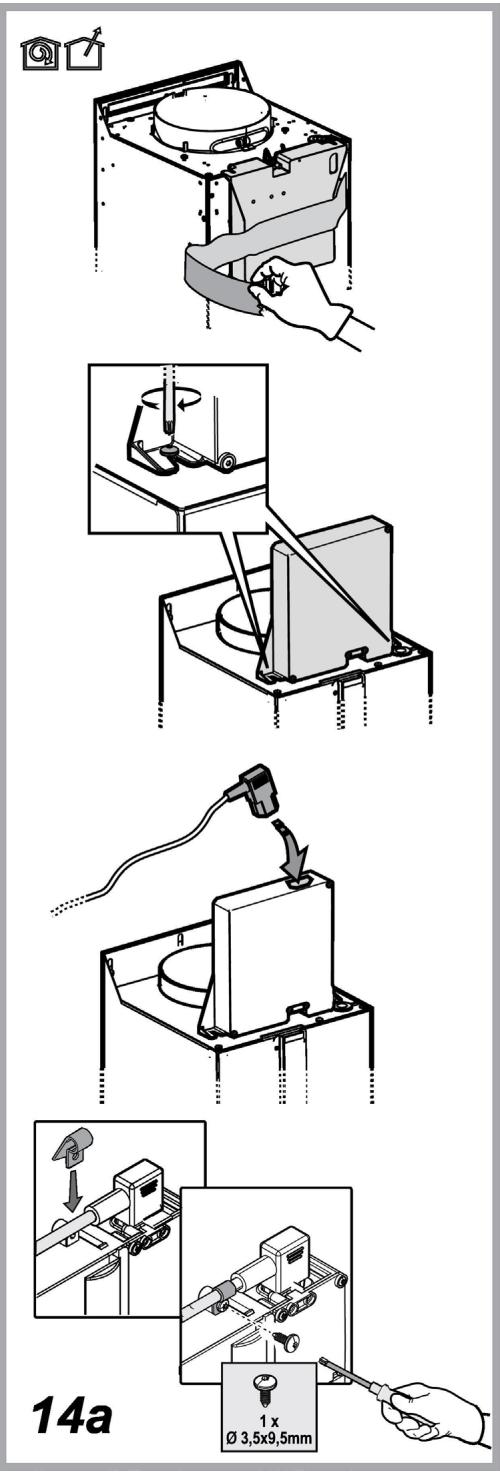
text_image
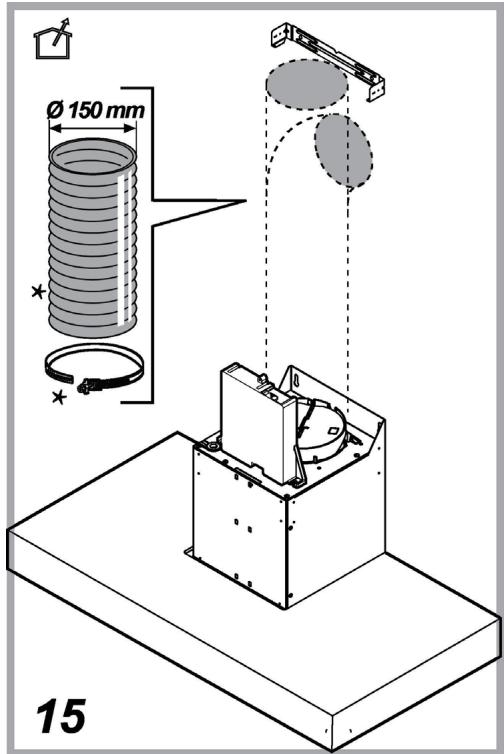
Ø 150 mm 15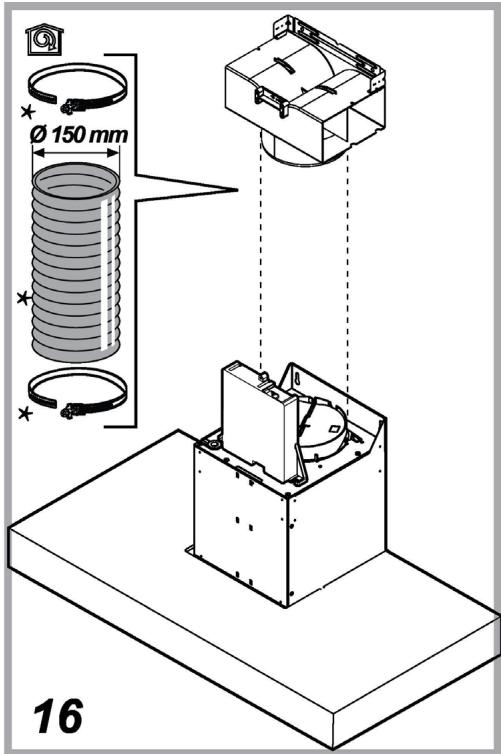
text_image
Ø 150 mm 16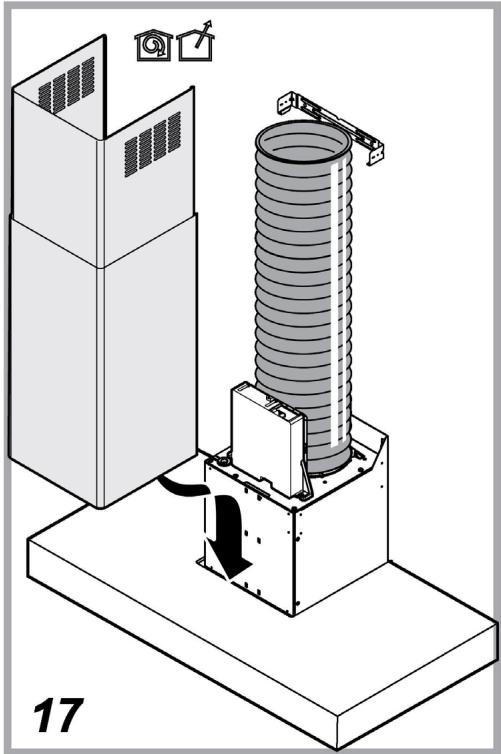
natural_image
Isometric diagram of a mechanical assembly with a cylindrical component mounted on a base, showing motion direction (no text or symbols)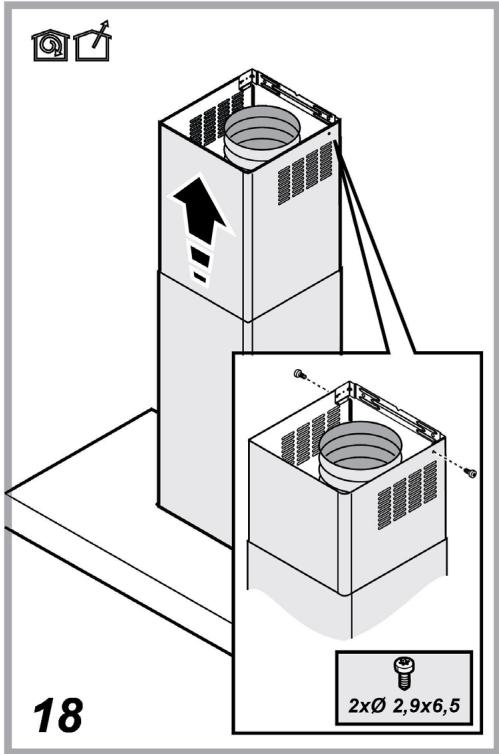
text_image
18 2xØ 2,9x6,5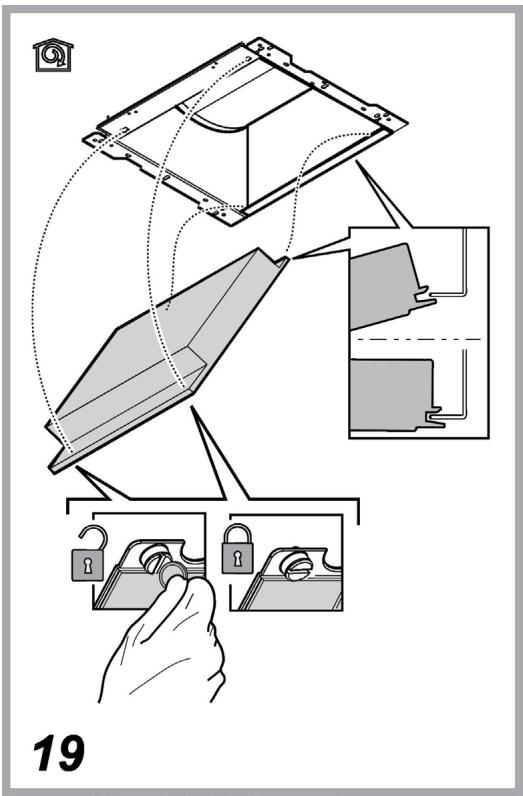
text_image
19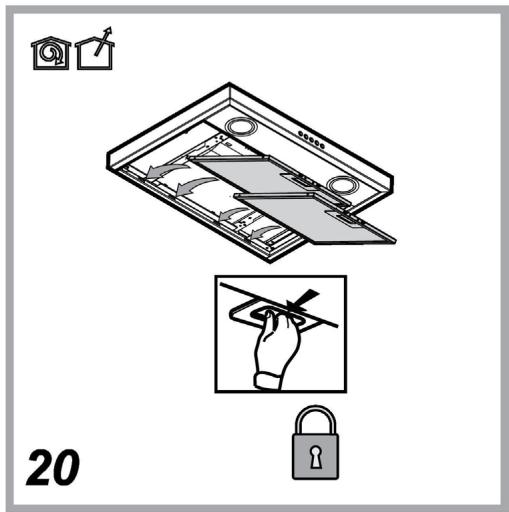
text_image
20SICUREZZA GENERALE
CONTROLLO REMOTO/PROCEDURA DI CONFIGURAZIONE DELL'APPLICAZIONE "Whirlpool 6th Sense Live"
natural_image
Illustration of a hand using a tool to cut or adjust a mechanical component (no text or symbols visible)text_image
Diagram illustrating a mechanical assembly with labeled parts and lock mechanisms, showing hand positioning and assembly steps.natural_image
Silhouette of a person pushing a shopping cart (no text or symbols)text_image
QR code image containing encoded data, no visible human-readable texttext_image
Diagram illustrating a scanning process with labeled components and barcode indicatorsGENERAL SAFETY
- Before any cleaning or maintenance operation, disconnect hood from the mains by removing the plug or disconnecting the mains electrical supply.
• Always wear work gloves for all installation and maintenance operations.
- This appliance can be used by children aged from 8 years and above and persons with reduced physical, sensory or mental capabilities or lack of experience and knowledge if they have been given supervision or instruction concerning use of the appliance in a safe way and understand the hazards involved.
- Children shall not be allowed to tamper with the controls or play with the appliance.
- Cleaning and user maintenance shall not be made by children without supervision.
- The premises where the appliance is installed must be sufficiently ventilated, when the kitchen hood is used together with other gas combustion devices or other fuels.
- The hood must be regularly cleaned on both the inside and outside (AT LEAST ONCE A MONTH).
- This must be completed in accordance with the maintenance instructions provided. Failure to follow the instructions provided regarding the cleaning of the hood and filters will lead to the risk of fires.
- Do not flambé under the range hood.
- Do not remove filters during cooking.
- For lamp replacement use only lamp type indicated in the Maintenance/Replacing lamps section of this manual.
The use of exposed flames is detrimental to the filters and may cause a fire risk, and must therefore be avoided in all circumstances.
Any frying must be done with care in order to make sure that the oil does not overheat and ignite.
CAUTION: Accessible parts of the hood may become hot when used with cooking appliances.
- Do not connect the appliance to the mains until the installation is fully complete.
- With regards to the technical and safety measures to be adopted for fume discharging it is important to closely follow the regulations provided by the local authorities.
- The air must not be discharged into a flue that is used for exhausting fumes from appliance burning gas or other fuels.
⚠ WARNING! Failure to install the screws or fixing device in accordance with these instructions may result in electrical hazards.
- Do not use or leave the hood without the lamp correctly mounted due to the possible risk of electric shocks.
- Never use the hood without effectively mounted grids.
- The hood must NEVER be used as a support surface unless specifically indicated.
- Use only the fixing screws supplied with the product for installation or, if not supplied, purchase the correct screws type.
- Use the correct length for the screws which are identified in the Installation Guide.
- In case of doubt, consult an authorized service assistance center or similar qualified person.
⚠ WARNING! Do not use with a programmer, timer, separate remote control system or any other device that switches on automatically.
Very young children(0-3years) should be kept away from the appliance. Young children (3-8 years) should be kept away from the appliance unless continuously supervised.
CAUTION: The appliance is not intended to be operated by means of an external switching device, such as a timer, or separate remote controlled system.
This appliance is not for professional use. Do not use the appliance outdoors.
The appliance must be handled and installed by two or more persons-risk of injury.
⚠️ Installation, including water supply (if any), electrical connections and repairs must be carried out by a qualified technician.
Once installed, packaging waste (plastic, styrofoam parts etc.) must be stored out of reach of children – risk of suffocation.
Do not use the appliance when you are wet or barefoot.
Never use steam cleaning equipment – risk of electric shock.
The packaging material is 100% recyclable and is marked with the recycle symbol

The hood can look different to that illustrated in the drawings in this booklet. The instructions for use, maintenance and installation, however, remain the same.
Closely follow the instructions set out in this manual. All responsibility, for any eventual inconveniences, damages or fires caused by not complying with the instructions in this manual, is declined. This appliance is intended to be used in household and similar application such as: - staff kitchen areas in shop, offices and other working environments; - farm houses; - by clients in hotels, motels and other residential type environments; - bed and breakfast type environments.
- It is important to conserve this booklet for consultation at any moment. In the case of sale, cession or move, make sure it is together with the product.
- Read the instructions carefully: there is important information about installation, use and safety.
- Do not carry out electrical or mechanical variations on the product or on the discharge conduits.
- Before proceeding with the installation of the appliance verify that there are no damaged all components. Otherwise contact your dealer and do not proceed with the installation.
- The minimum distance between the supporting surface for the cooking equipment on the hob and the lowest part of the range hood must be not less than 50cm from electric cookers and 65cm from gas or mixed cookers.
If the instructions for installation for the gas hob specify a greater distance, this must be adhered to.
ELECTRICAL CONNECTION
The mains power supply must correspond to the rating indicated on the plate situated inside the hood. If provided with a plug connect the hood to a socket in compliance with current regulations and positioned in an accessible area, after installation. If it not fitted with a plug (direct mains connection) or if the plug is not located in an accessible area, after installation, apply a double pole switch in accordance with standards which assures the complete disconnection of the mains under conditions relating to over-current category III, in accordance with installation instructions.
⚠ WARNING! Before re-connecting the hood circuit to the mains supply and checking the efficient function, always check that the mains cable is correctly assembled.
If the cable is not fitted with a plug, connect the wires according to the following table:
Mains voltage and frequency
Refer to the rating indicated on the plate inside of the hood
Wire connection
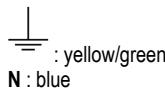
Replacing the power cable
The hood is provided with a special power cable; if the cable is damaged, request a new one from Technical Service.
AIR VENT
(for the suction versions)
Connect the hood and discharge holes on the walls with a diameter equivalent to the air outlet (connection flange).
Using the tubes and discharge holes on walls with smaller dimensions will cause a diminution of the suction performance and a drastic increase in noise.
Any responsibility in the matter is therefore declined.
! Use a duct of the minimum indispensable length.
! Use a duct with as few elbows as possible (maximum elbow angle: 90°).
! Avoid drastic changes in the duct cross-section.
! The company declines any responsibility whenever these regulations are not respected.
FILTERING OR DUCTING ?
! Your cooker hood is ready to be used in suction version.
To use the hood in filtering version the special ACCESSORY KIT must be installed.
Check on the first pages of this manual if the ACCESSORY KIT is furnished or must be bought separately.
Note: If furnished, in certain cases, the additional activated carbon filtering system may be installed on the hood.
Information about the conversion of the hood from suction version to filtering version is present in this manual.
Ducting version
In this case the fumes are conveyed outside of the building by means of a special pipe connected with the connection ring located on top of the hood.

CAUTION!
The exhausting pipe is not supplied and must be purchased apart.
Diameter of the exhausting pipe must be equal to that of the connection ring.

CAUTION!
If the hood is supplied with active charcoal filter, then it must be removed.
Filter version
The aspirated air will be degreased and deodorised before being fed back into the room.
In order to use the hood in this version, you have to install a system of additional filtering based on activated charcoal.
CONTROLS
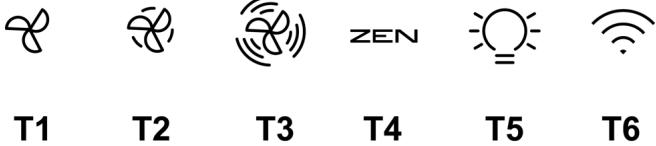
The hood is fitted with a control panel with aspiration speed selection control and a light switch to control cooking area lights.
text_image
T1 T2 T3 ZEN T4 T5 T6T1. ON/OFF speed 1
T2. ON/OFF Speed 2
T3. ON/OFF Intensive speed (boost) timed for 5 min. after which the speed returns to the previous setting.
T4. ON/OFF Funzione "ZEN"
T5. ON/OFF Lighting.
T6. Wi-Fi Connection
Press to activate/deactivate the Wi-Fi functions.
This function allows the product to be connected to the internet and remote monitoring/control of the hood using a smartphone or tablet.
To use the Wi-Fi function, the device must be connected to the home wireless network (internet) according to the configuration procedure described in the “WI-FI MANUAL” instructions.
Note: key T6 turns on with intense lighting and keys T1+T2+T3+T4+T5 turn on with dim lighting when the hood is controlled by remote.
Filter saturation warning (visible for a short period of time with the extraction motor turned off):
T1+T2= Grease filters need maintenance
T3+T4= Carbon filters need maintenance
Note: This warning is normally deactivated, to activate it, proceed as follows:
With the motor off and the warnings off, press keys T3+T4 simultaneously for longer than 3 seconds.
Keys T3+T4 will turn on briefly to indicate successful activation.
To deactivate the function, repeat the operation: keys T3+T4 will flash briefly to indicate successful deactivation
Reset filter saturation signals
The reset of the signals is possible ONLY during their display.
Grease filters: Press keys T1 + T2 simultaneously for more than 3 seconds, the keys go off to indicate that the reset has occurred.
Carbon filters: Press keys T3 + T4 simultaneously for more than 3 seconds, the keys go off to indicate that the reset has occurred.
Press to activate or deactivate the "ZEN" extraction mode.
This function makes it possible to activate an extraction speed with the perfect balance between quietness and extraction efficiency.
WI-FI MANUAL
Whirlpool 6th Sense Live APPLICATION REMOTE CONTROL /SET UP PROCEDURE
The Whirlpool 6th Sense Live feature allows to operate and supervise the appliance remotely by external device. To enable the appliance to be remotely controlled, you first have to complete successfully the connectivity set up process. This process is necessary to register your appliance and connect to your home network. The set up procedure has to be carried out only once. You have to carry it out again if you change your router set up properties (network name or password or data provider).
1.1 BEFORE STARTING THE SET UP PROCESS
- To use this feature You need to own: • a smart phone running Android 4.3 (or higher) with a 1280x720 (or higher) screen or a tablet or a smart phone running iOS 8 (or higher); • a wireless router 2.4Ghz WiFi b/g/n connected to internet (verify with your smart device that the signal strength of your home wireless network close to the appliance is good).
- Download & Install the free application: Whirlpool 6th Sense Live on your Android smart-phone or iPAD/iPhone from the store. The App will guide you, step by step, through the installation process.
If You do not have an account already, create one and subscribe (legal terms) to service to be able to benefit the features provided through the app.
- Register your appliance following the App instructions. For the registration process You will need the Smart Appliance IDentifier (SAID) number, sticker on the appliance. The SAID is composed by numbers and letters (10 chars). You can take a note of your appliance SAID here:
1.2 PROVISIONING
- Before starting the installation process turn on your router and verify that the wireless signal of your home router is reaching the appliance. To verify the Wifi strength signal use a Tablet or Smart-phone connected only to the Wi-Fi router, disable any other data connections, and place the device close to the appliance. Open any internet web page in a browser and check that it is downloaded fast correctly. If the internet connection of your home is working correctly but the page is not downloaded, you may need to install a Wi-Fi extender device (not provided with the appliance).
- If the router supports WPS 2.0 (or subsequent versions), follow the automatic configuration procedure to connect the device to the router. If the router doesn't support WPS, follow the manual configuration procedure.
Follow the instructions on your Whirlpool 6th Sense Live application on your smartphone to connect the appliance to your wifi network.
Otherwise read the next paragraphs for automatic or manual connection.
1.2.1 AUTOMATIC SETUP INSTRUCTION (FIRST TIME USE) – WPS METHOD
This procedure is applicable only if your router supports WPS2.0 (or greater)
- On your appliance activate the provisioning process by pressing and hold for three seconds the connectivity button (an acoustical feedback is played). The appliance is being set to a "search" mode for a local network. The Connectivity icon on the appliance starts blinking fast.
- On wireless router press the WPS button to establish a connection between the two products. An indicator light on your router will begin blinking.
- When the appliance successfully connects to the local router, the wifi icon switches from fast to slow blinking (supported not in all appliances).
- The device will try to connect to the backend system. The connectivity icon remains continuously lit. If the Wi-Fi icon doesn't stop flashing after a few minutes, this means the device was not able to make a connection with the home network through WPS. Try repeating the procedure, and if it is unsuccessful, use the manual configuration procedure.
- You can abort the WiFi connection procedure by pressing the connectivity button.
1.2.2 INSTRUCTIONS FOR MANUAL CONFIGURATION (FIRST USE) - MICRO ACCESS POINT METHOD
This procedure uses Micro Access Point technology and can be used with routers that do not support WPS.
2 Before starting the configuration procedure, note the name (SSID) and password of the home wireless network and the SAID code of the device. This information will be needed during the installation procedure.
3 Turn the router on, check that the internet connection is active and connect your smartphone/tablet to your Wi-Fi network.
4 On the device, activate the recognition process by pressing the connectivity key for 5 seconds (two acoustic signals will be emitted as confirmation, the first after 3 seconds, the second after 5 seconds) • the Wi-Fi network icon should start flashing on the device's interface.
5 Scan the QR code shown on the label attached to the device; at this point, the Whirlpool 6th Sense Live app will provide detailed instructions on how to carry out the procedure. Note: In some cases, the app may ask you to specify the type of device: in this case, select Hood
6 Once the connection has been made, the Wi-Fi icon on the device should stop flashing and remain continuously lit. If not, disconnect and then reconnect the device to the mains power and repeat the procedure.
7 The configuration procedure is complete.
1.3 SWITCH OFF / ON WI-FI FEATURE
To switch off the connection of the appliance to the wifi network, press and hold for 5 seconds the connectivity button on the appliance (one acoustical feedback is played). The wifi icon on the appliance display should turn off.
To turn on again the wifi connection on the appliance, press the wifi button on the remote control.
When appliance is provisioned, user can disengage this function and disconnect it from the wifi network by pressing and hold for 10 seconds the connectivity button on the appliance (two acoustical feedbacks are played, one after 5 seconds, one after 10 seconds).
The wifi icon on the appliance display should turn off.
To connect the appliance again to the home wifi network follow the procedure on paragraph “provisioning”.
1.4 REMOTE CONTROL / DAILY USE
This feature may be implemented depending from the appliance type.
- Make sure the Your router is ON and connected to the Internet.
- Make sure the WiFi Connection State indicator status on the product's display is solid.
- Use the Whirlpool 6th Sense Live App to control the appliance by remote, so You can:
- check your appliance and activate options also when you are out of home.
- access additional functions, for instance the smart energy mode.
- optimize energy consumptions leveraging for example the best energy tariff.
-
access further information on best use of your appliance.
• receive feedback about appliance status in case of alarms. -
Synchronise the hood with the compatible top and pyrolytic oven, allowing the entirely automatic activation of the device.
1.5 QUICK IDENTIFICATION OF APPLIANCE CONNECTION STATE
If WiFi Connection State indicator on appliance display blinks fast, then Appliance is searching connection to router. If it blinks slowly, then Appliance is connected to router but it is not able to connect to internet (for example ADSL not working) some appliance type doesn't support slow blinking but only blinking feature.
If solid ON Appliance is connected to internet and to the Whirlpool's cloud system.
1.6 WIFI FAQs
Which WiFi protocols are supported?
The WiFi adapter installed supports WiFi b/g/n for European countries.
Which settings need to be configured in the router software?
The following router settings are required: 2.4 GHz enabled, WiFi b/g/n, DHCP and NAT activated.
Which Version of WPS is supported?
WPS 2.0 or higher. Check the router documentation.
Are there any differences between using a smartphone (or tablet) with Android or iOS?
You can use whichever operating system you prefer, it makes no difference.
Can I use mobile 3G tethering instead of a router?
Yes, but cloud services are designed for permanently connected devices.
How can I check whether my home Internet connection is working and wireless functionality is enabled?
You can search for your network on your smart device. Disable any other data connections before trying.
How can I check whether the appliance is connected to my home wireless network?
Access your router configuration (see router manual) and check whether the appliance's MAC address is listed on wireless connected devices page.
Where can I find the appliance's MAC address?
Look on your appliance:
There is a label showing the SAID and MAC addresses.
The Mac address consists of a combination of numbers and letters starting with "88:e7".
How can I check whether the appliance's wireless functionality is enabled?
Use your smart device and the Whirlpool 6th Sense Live app to check whether the appliance network is visible and connected to the cloud.
Is there anything that can prevent the signal reaching the appliance?
Check that the devices you have connected are not using up all the available bandwidth.
Make sure that your WiFi-enabled devices do not exceed the maximum number permitted by the router.
How far should the router be from the appliance?
Normally the WiFi signal is strong enough to cover a couple of rooms, but this very much depends on the material the walls are made of. You can check the signal strength by placing your smart device next to the appliance.
What can I do if my wireless connection does not reach the appliance?
You can use specific devices to extend your home WiFi coverage, such as access points, WiFi repeaters and power line bridges (not provided with appliance).
How can I find out the name of and password for my wireless network?
See the router documentation. There is usually a sticker on the router showing the information you need to reach the device setup page using a connected device.
What can I do if my router is using the neighbourhood WiFi channel?
Force the router to use your home WiFi channel.
What can I do if the Connection State indicator continues to blink slowly and never lits solid on or unable to make a stable provision to home router?
The appliance might have successfully connected to the router, but it is not able to access the Internet. To connect the appliance to the Internet, you will need to check the router and/or carrier settings.
Router settings: NAT must be on, firewall and DHCP must be properly configured. Password encryption supported: WEP, WPA,WPA2. To try a different encryption type, please refer to the router manual.
Carrier settings: If your Internet service provider has fixed the number of MAC addresses able to connect to the Internet, you may not be able to connect your appliance to the cloud.
The MAC address of a device is its unique identifier. Please ask your Internet service provider how to connect devices other than computers to the Internet.
How can I check whether data is being transmitted?
After setting up the network, switch the power off, wait 20 seconds and then power the appliance: Check that the app is showing the UI status of the appliance.
Some settings take several seconds to appear in the app.
How can I change my Whirlpool account but keep my appliances connected?
You can create a new account, but remember to remove your appliances from your old account before moving them to your new one.
I changed my router – what do I need to do?
You can either keep the same settings (network name and password) or delete the previous settings from the appliance and configure the settings again.
MAINTENANCE
Cleaning
Clean using ONLY a cloth dampened with neutral liquid detergent. DO NOT CLEAN WITH TOOLS OR INSTRUMENTS. Do not use abrasive products. DO NOT USE ALCOHOL!
Maintenance of the anti-grease filters
Traps cooking grease particles.
This must be cleaned once a month (or when the filter saturation indication system – if envisaged on the model in possession – indicates this necessity) using non aggressive detergents, either by hand or in the dishwasher, which must be set to a low temperature and a short cycle.
When washed in a dishwasher, the grease filter may discolor slightly, but this does not affect its filtering capacity.
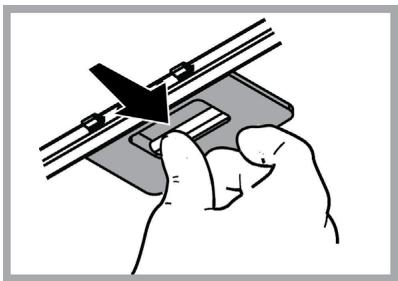
To remove the grease filter, pull the spring release handle.
natural_image
Illustration of a hand using a tool to adjust or install a mechanical component (no text or symbols visible)Maintenance of the charcoal filter It absorbs unpleasant odors caused by cooking.
The saturation of the charcoal filter occurs after more or less prolonged use, depending on the type of cooking and the regularity of cleaning of the grease filter.
In any case it is necessary to replace the cartridge at least every four mounths (or when the filter saturation indication system – if envisaged on the model in possession – indicates this necessity). The charcoal filter may NOT be washed or regenerated.
Assembly
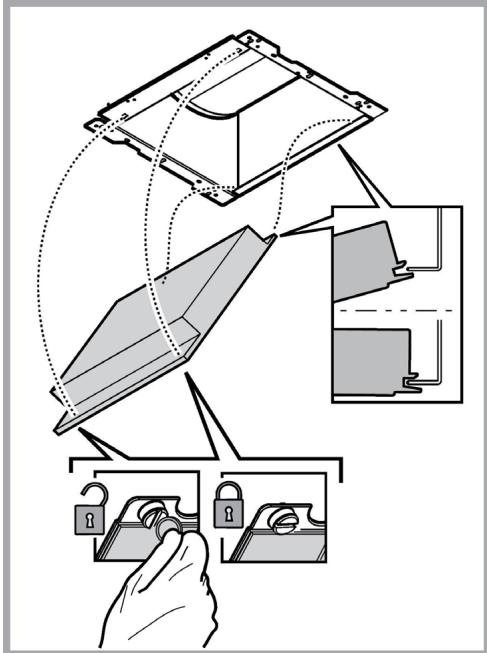
Hook the charcoal filter at the back on the metal tongue of the hood first, then on the front with the two knobs.
Disassembly
Remove the charcoal filter by turning the knobs fixing it to the hood by 90°.
text_image
Diagram illustrating a mechanical assembly with labeled components and hand holding keys, showing structural alignment and assembly steps.Replacing lamps
The hood is equipped with a lighting system based on LED technology.
The LEDs guarantee an optimum lighting, a duration up to 10 times longer than the traditional lamps and allow to save 90% electrical energy.
For replacement, contact the technical service.
DISPOSAL
• This appliance is marked according to the European directive 2012/19/EC on Waste Electrical and Electronic Equipment (WEEE).
- By ensuring this product is disposed of correctly, you will help prevent potential negative consequences for the environment and human health, which could otherwise be caused by inappropriate waste handling of this product.

- The symbol ■ on the product, or on the documents accompanying the product, indicates that this appliance may not be treated as household waste. Instead it should be taken to the appropriate collection point for the recycling of electrical and electronic equipment. Disposal must be carried out in accordance with local environmental regulations for waste disposal.
- For further detailed information regarding the process, collection and recycling of this product, please contact the appropriate department of your local authorities or the local department for household waste or the shop where you purchased this product.
Appliance designed, tested and manufactured according to:
• Safety: EN/IEC 60335-1; EN/IEC 60335-2-31, EN/IEC 62233.
• Performance: EN/IEC 61591; ISO 5167-1; ISO 5167-3; ISO 5168; EN/IEC 60704-1; EN/IEC 60704-2-13; EN/IEC 60704-3; ISO 3741; EN 50564; IEC 62301.
- EMC: EN 55014-1; CISPR 14-1; EN 55014-2; CISPR 14-2; EN/IEC 61000-3-2; EN/IEC 61000-3-3. Suggestions for a correct use in order to reduce the environmental impact: Switch ON the hood at minimum speed when you start cooking and kept it running for few minutes after cooking is finished. Increase the speed only in case of large amount of smoke and vapor and use boost speed(s) only in extreme situations. Replace the charcoal filter(s) when necessary to maintain a good odor reduction efficiency. Clean the grease filter(s) when necessary to maintain a good grease filter efficiency. Use the maximum diameter of the ducting system indicated in this manual to optimize efficiency and minimize noise.
MALFUNCTIONS
If something appears not to be working properly, do the following simple checks before calling Technical Service:
• If the hood is not working:
Check that:
- The power has not been disconnected.
- A speed has been selected.
• If the hood performs inefficiently:
Check that:
- The motor speed selected is sufficient for the amount of smoke and vapours released.
- The kitchen is sufficiently ventilated to allow air intake.
- The charcoal filter is not worn (hood in filtering version).
• If the hood has turned off during normal functioning:
Check that:
- The power has not been disconnected.
- the omnipolar disconnection device has not tripped.
If the hood fails to operate correctly, briefly disconnect it from the mains power supply for almost 5 sec. Then connect it in again and try once more before contacting the Technical Assistance Service.
TECHNICAL DATA
| Height (cm) | Width (cm) | Depth (cm) | ∅ of the exhaust tube (cm) |
 62-114 62-114 71-114 71-114 | 89,8 | 45,5 | 15 |
 62-114 62-114 71-114 71-114 | 59,8 | 45,5 | 15 |
CE

natural_image
Silhouette of a person pushing a shopping cart (no text or symbols)Components not provided with the product

text_image
QR code image containing encoded data, no visible human-readable textYou can download the Safety Instructions, User Manual, Product Fiche and Energy data by:
- Visiting our website docs.whirlpool.eu
- Using QR Code
• Alternatively, contact our After-sales Service (See phone number in the warranty booklet). When contacting our After-sales Service, please state the codes provided on your product's identification plate.
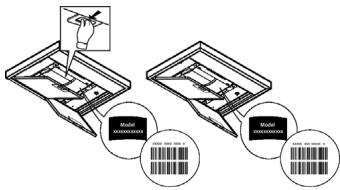
text_image
Diagram illustrating barcode scanning process with labeled components and corresponding barcode iconsnatural_image
Illustration of a hand using a tool to cut or adjust a mechanical component (no text or symbols visible)text_image
Diagram illustrating a mechanical assembly with labeled parts and a hand holding a lock mechanism.Ersetzen der Lampen
natural_image
Silhouette of a person pushing a shopping cart (no text or symbols)text_image
QR code image containing encoded data, no visible human-readable texttext_image
Diagram illustrating scanning process steps with labeled barcode and magnified detail of the first stepFR
SÉCURITÉ GÉNÉRALE
natural_image
Illustration of a hand using a tool to cut or adjust a mechanical component (no text or symbols visible)text_image
Diagram illustrating a door lock mechanism with labeled components and hand holding keysnatural_image
Silhouette of a person pushing a shopping cart (no text or symbols)text_image
QR code image containing encoded data, no visible human-readable texttext_image
Diagram illustrating barcode scanning process with labeled components and corresponding barcode iconsALGEMENE VEILIGHEID
WERKING IN "ZEN-MODUS"
natural_image
Illustration of a hand using a tool to cut or adjust a mechanical component (no text or symbols visible)text_image
Diagram illustrating a mechanical assembly process with labeled components and hand holding keys, showing steps from assembly to locking.Vervanging lampjes
natural_image
Silhouette of a person pushing a shopping cart (no text or symbols)text_image
QR code image containing encoded data, no visible human-readable texttext_image
Diagram illustrating two scanning process steps with barcode and magnified views of the deviceSEGURIDAD GENERAL
natural_image
Illustration of a hand using a tool to cut or adjust a mechanical component (no text or symbols visible)text_image
Diagram illustrating a door lock mechanism with labeled components and hand interactionnatural_image
Silhouette of a person pushing a shopping cart (no text or symbols)text_image
QR code image containing encoded data, no visible human-readable texttext_image
Diagram illustrating a scanning process with labeled components and barcode indicatorsSEGURANÇA GERAL
INSTRUÇÕES PARA CONEXÃO WI-FI
natural_image
Illustration of a hand using a tool to cut or adjust a mechanical component (no text or symbols visible)text_image
Diagram illustrating a mechanical assembly with labeled components and hand holding keys, showing structural alignment and component placement.natural_image
Silhouette of a person pushing a shopping cart (no text or symbols)text_image
QR code image containing encoded data, no visible human-readable texttext_image
Diagram illustrating barcode scanning process with labeled components and corresponding barcode iconsYLEINEN TURVALLISUUS
natural_image
Illustration of a hand using a tool to adjust or install a mechanical component (no text or symbols visible)text_image
Diagram illustrating the installation process of a device with lock and padlock components, showing hand positioning and assembly steps.Lamppujen vaihto
natural_image
Silhouette of a person pushing a shopping cart (no text or symbols)text_image
QR code image containing encoded data, no visible human-readable texttext_image
Diagram illustrating barcode scanning process with labeled components and corresponding barcode iconsADVARSEL
FJERNSTYRING/PROSEDYRE FOR KONFIGURASJON AV APPEN "Whirlpool 6th Sense Live"
natural_image
Illustration of a hand using a tool to adjust or install a mechanical component (no text or symbols visible)text_image
Diagram illustrating the installation process of a device, showing hand holding keys and internal components with dashed lines indicating assembly or repair.natural_image
Silhouette of a person pushing a shopping cart (no text or symbols)text_image
QR code image containing encoded data, no visible human-readable textDu kan laste ned Sikkerhetsinstruksene, Brukerhåndboken, Produktkortet og Energidata ved:
text_image
Diagram illustrating two scanning process steps with barcode and magnified views of the deviceGENEREL SIKKERHED
FJERNSTYRING/PROCEDURE TIL KONFIGURATION AF APPLIKATIONEN "Whirlpool 6th Sense Live"
natural_image
Illustration of a hand using a tool to adjust or install a mechanical component (no text or symbols visible)text_image
Diagram illustrating a mechanical assembly with labeled parts and lock mechanisms, showing hand positioning and assembly steps.natural_image
Silhouette of a person pushing a shopping cart (no text or symbols)text_image
QR code image containing encoded data, no visible human-readable texttext_image
Diagram illustrating a scanning process with labeled components and barcode indicatorsVŠEOBECNÁ BEZPEČNOSTNÍ OPATŘENÍ
DÁLKOVÉ OVLÁDÁNÍ/POSTUP KONFIGURACE APLIKACE "Whirlpool 6th Sense Live"
natural_image
Illustration of a hand using a tool to cut or apply a component, no text or symbols presenttext_image
Diagram illustrating a door lock mechanism with labeled components and hand interactionVýměna svítidel
natural_image
Silhouette of a person pushing a shopping cart (no text or symbols)text_image
QR code image containing encoded data, no visible human-readable texttext_image
Diagram illustrating a scanning process with labeled components and barcode indicatorsPL
OGÓLNE BEZPIECZEŃSTWO
natural_image
Illustration of a hand using a tool to adjust or install a mechanical component (no text or symbols visible)text_image
Diagram illustrating a mechanical assembly with labeled components and lock mechanism, showing hand holding key parts.Wymiana żarówek
natural_image
Silhouette of a person pushing a shopping cart (no text or symbols)text_image
QR code image containing encoded data, no visible human-readable texttext_image
Diagram illustrating barcode scanning process with labeled components and corresponding barcode iconsVŠEOBECNÁ BEZPEČNOST
6 POKYNY K MANUÁLNEJ KONFIGURÁCII (PRVÉ POUŽITIE) – METÓDA MICRO ACCESS POINT
natural_image
Illustration of a hand using a tool to adjust or install a mechanical component (no text or symbols visible)text_image
Diagram illustrating the installation process of a device, showing hand holding keys and lock mechanism with labeled components.Výmena žiaroviek
Odsávač pary je vybavený systémom osvetlenia založenom na technoloógii LED.
natural_image
Silhouette of a person pushing a shopping cart (no text or symbols)text_image
QR code image containing encoded data, no visible human-readable texttext_image
Diagram illustrating a scanning process with labeled components and barcode indicatorsÁLTALÁNOS BIZTONSÁGI ELŐÍRÁSOK
natural_image
Illustration of a hand using a tool to cut or adjust a mechanical component (no text or symbols visible)text_image
Diagram illustrating a mechanical assembly with labeled components and hand holding keys, showing structural alignment and component placement.Izzók cseréje
natural_image
Silhouette of a person pushing a shopping cart (no text or symbols)text_image
QR code image containing encoded data, no visible human-readable texttext_image
Diagram illustrating barcode scanning process with labeled components and corresponding barcode iconsОБЩА БЕЗОПАСНОСТ
natural_image
Illustration of a hand using a tool to cut or adjust a mechanical component (no text or symbols visible)text_image
Diagram illustrating the installation of a device with lock and padlock components, showing hand positioning and assembly steps.Подмяна на лампите
- Waste Electrical and Electronic Equipment (WEEE).