
AM08 - Bluetooth speaker HUAWEI - Free user manual and instructions
Find the device manual for free AM08 HUAWEI in PDF.


| Product Type | Bluetooth Speaker |
| Brand | HUAWEI |
| Model | AM08 |
| Power Supply | USB port (5 V) via power adapter or computer |
| Battery Life | Not specified |
| Charging Time | 2 to 3 hours for initial full charge |
| Charging LED Indicator | On during charging, off when battery is full |
| Bluetooth Pairing LED Indicator | Flashes quickly during pairing, slowly if pairing fails, off when paired |
| Breathing LED Indicator | Flashes slowly when speaker is on, quickly during an incoming call |
| Button LED Indicator | Turns on after power-on or during operation, turns off after inactivity |
| Microphone | Built-in for hands-free calls |
| Connectivity | Bluetooth (A2DP, HFP) |
| Multipoint Pairing | Up to 2 paired devices simultaneously, but use with only one at a time |
| Button Functions | Power on/off, volume +/-, previous/next track, play/pause, answer/end call, switch between hands-free and phone, disconnect pairing |
| Voice Prompt | Ability to switch between voice prompts and alert tones during pairing |
| Low Battery Level | Automatic speaker shutdown |
| Box Contents | AM08 speaker, USB cable (not specified) |
Frequently Asked Questions - AM08 HUAWEI
User questions about AM08 HUAWEI
0 question about this device. Answer the ones you know or ask your own.
Ask a new question about this device
Download the instructions for your Bluetooth speaker in PDF format for free! Find your manual AM08 - HUAWEI and take your electronic device back in hand. On this page are published all the documents necessary for the use of your device. AM08 by HUAWEI.
USER MANUAL AM08 HUAWEI
Getting to know your AM08
The AM08 is a Bluetooth-capable device that lets you play music wirelessly from other Bluetooth devices. It automatically searches for nearby Bluetooth devices after you power it on. The AM08 can be paired with two Bluetooth devices simultaneously, but can work with one device at a time. When paired with your phone, the AM08 functions as a speaker and microphone when you are on a call in handsfree mode.
Before you start using your SWAN, let's take a look at its features and learn how to use them.
I. Power button and keys
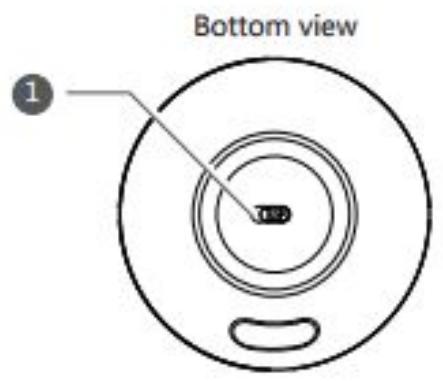
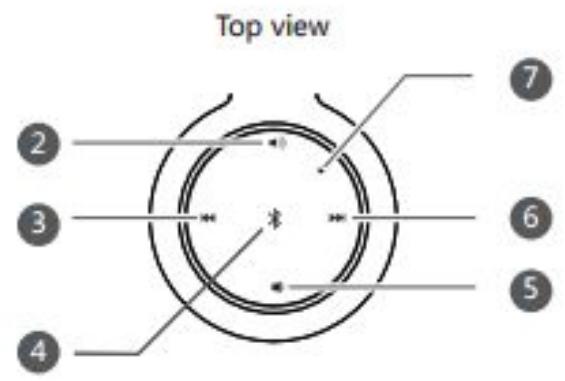
1. Power button
Switch the power button to turn the SWAN on or off.
2. Volume up key 5. Volume down key
- To increase the SWAN volume, touch or touch and hold. To decrease the SWAN volume, touch or touch and hold.
3. Previous 6. Next
- To play the previous or next song in a playlist on a paired Bluetooth device, touch « or «.
- When the SWAN is pairing with a Bluetooth device, touch to switch between voice instructions and alert tones.
4. Bluetooth pair key
-
When music is playing, touch to pause or resume the playback.
-
When a call comes in, touch * to answer the call or touch and hold * to dismiss the call. To end the call, touch * again.
When you are in a call in handsfree mode, touch and hold to switch from the AM08 handsfree mode to the phone mode. To switch back, set the answer mode on your phone to Bluetooth.
- When you are not in handsfree mode, touch and hold * to disconnect the AM08 from its paired Bluetooth device. The SWAN is then ready to pair with another device.
7. Microphone
II. Indicators and port
1. Key indicator
This indicator turns on after the SWAN turns on or when you perform an operation.
It will turn off when the AM08 is inactive for a short while.
2. Bluetooth pairing indicator
When the AM08 is pairing with another device, this indicator blinks quickly. If the
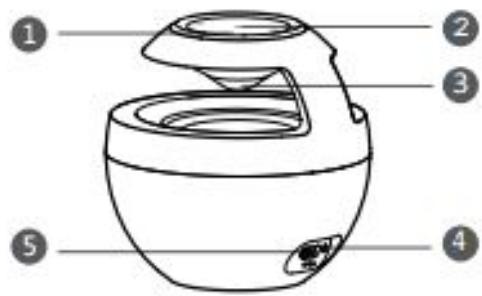
pairing fails, this indicator blinks slowly. If the AM08 successfully pairs with the device, this indicator turns off.
3. Breath indicator
When the AM08 is on, this indicator blinks slowly. When a call comes in, this indicator blinks quickly.
4. Charging indicator
When the AM08 is charging, this indicator turns on. After the battery is fully charged, this indicator turns off.
5. Charging port
This port connects the AM08 to a power adapter (5 V output) through a USB cable. You may also connect the AM08 to a computer's USB port to charge the battery.
Connecting your AM08 to Bluetooth devices
I. Connecting to one Bluetooth device
After you turn the AM08 on, it automatically searches for nearby Bluetooth devices and enters standby mode. On the device you want to pair with the AM08, turn on Bluetooth. After the AM08 is found on the device, touch HUAWEI AM08 to pair it with the AM08.
Note: On some Bluetooth devices, you may need to enter a password to set up a connection. The default password is 0000.
The next time you turn on the AM08, it automatically searches for and pairs with the Bluetooth device that it paired with previously. If no such devices are found, your AM08 will remain in standby mode.
II. Connecting to two Bluetooth devices
The first time you pair the AM08 with two Bluetooth devices, do the following:
-
Pair the AM08 with a Bluetooth device.
-
Touch and hold to disconnect from the device and enable the AM08 to enter the ready-to-pair mode.
- On the second Bluetooth device, search for and pair with the AM08.
- On the first Bluetooth device, search for and pair with the AM08.
Note: The AM08 can work with only one Bluetooth device at a time. If you have two Bluetooth devices paired, pause all operations on one device to have the AM08 run the operations on the other device.
If you do not clear the pairing information from two previously used devices, your AM08 will connect to them automatically when both are available.
Note:
Before using the AM08 for the first time, charge it for 2 or 3 hours.
When the battery level is critically low, the AM08 automatically turns off. If this happens, charge the battery for a while and switch the power button to the off position then the on position to turn on the AM08.
Note:
Some Bluetooth devices do not support the Advanced Audio Distribution Profile (A2DP) and cannot use the AM08 to play media files. For media playback software incompatible with the AM08 will not allow the , ,and keys to work. Before using the AM08, make sure you have compatible Bluetooth devices and media playback software.
- Getting to know your AM08
- Power button and keys
- Power button
- Volume up key 5. Volume down key
- Previous 6. Next
- Bluetooth pair key
- Microphone
- Indicators and port
- Key indicator
- Bluetooth pairing indicator
- Breath indicator
- Charging indicator
- Charging port
- Connecting your AM08 to Bluetooth devices
- Connecting to one Bluetooth device
- Note:
Brand : HUAWEI
Model : AM08
Category : Bluetooth speaker