
FFG816X - Range hood FAURE - Free user manual and instructions
Find the device manual for free FFG816X FAURE in PDF.



| Product Type | Range hood |
| Brand | FAURE |
| Model | FFG816X |
| Dimensions (W x D) | 900 x 500 mm (estimate) |
| Weight | Approximately 15 kg (estimate) |
| Power supply | 220-240 V, 50 Hz (estimate) |
| Functions | Hob2Hood, LED lighting, 4 speeds (1st, 2nd, 3rd, maximum), filter notification, remote control |
| Grease filter | Dishwasher safe (short cycle, low temperature) |
| Charcoal filter | Non-washable, replacement every 4 to 6 months |
| Lighting | LED, replacement by a technician |
| Remote control | Included, connection can be activated from the control panel |
| Hob2Hood | Automatic linking function with compatible hob |
| Maintenance | Clean grease filters every month; use a soft cloth and mild detergent |
| Safety | Do not use without filter; turn off before cleaning; watch out for hot surfaces |
| Repairability | Replacement of lighting by a technician; charcoal filter replaceable by user |
| Environmental information | Recycle in accordance with local regulations |
Frequently Asked Questions - FFG816X FAURE
User questions about FFG816X FAURE
0 question about this device. Answer the ones you know or ask your own.
Ask a new question about this device
Download the instructions for your Range hood in PDF format for free! Find your manual FFG816X - FAURE and take your electronic device back in hand. On this page are published all the documents necessary for the use of your device. FFG816X by FAURE.
USER MANUAL FFG816X FAURE
PÉRSHKRIM I PRODUKTIT
PERMBLEDHJE E PANELIT TÉ KONTROLLIT
6e3oNaCHOCT MoHTaK. PpOyTeTe
BHNMaTeJIHo IJIaBnTe 3a
6e3oNaChOCT npedn BcKa ynoTpe6a
IJIINIOIDpBxKHaHa ypea.
Описане на урEDA
IPERJIeH HA KOHTPOJHnI NAHEI
BESCHRIJVING VAN HET PRODUCT
OVERZICTBEDIERINGSPANEEL
WARNING! Refer to the separate Installation Instructions booklet for Safety Information and Installation. Read carefully the Safety chapters before any use or maintenance of the appliance.
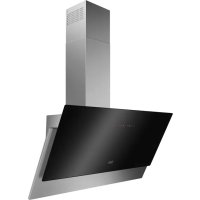
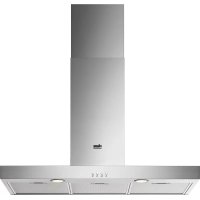
PRODUCT DESCRIPTION
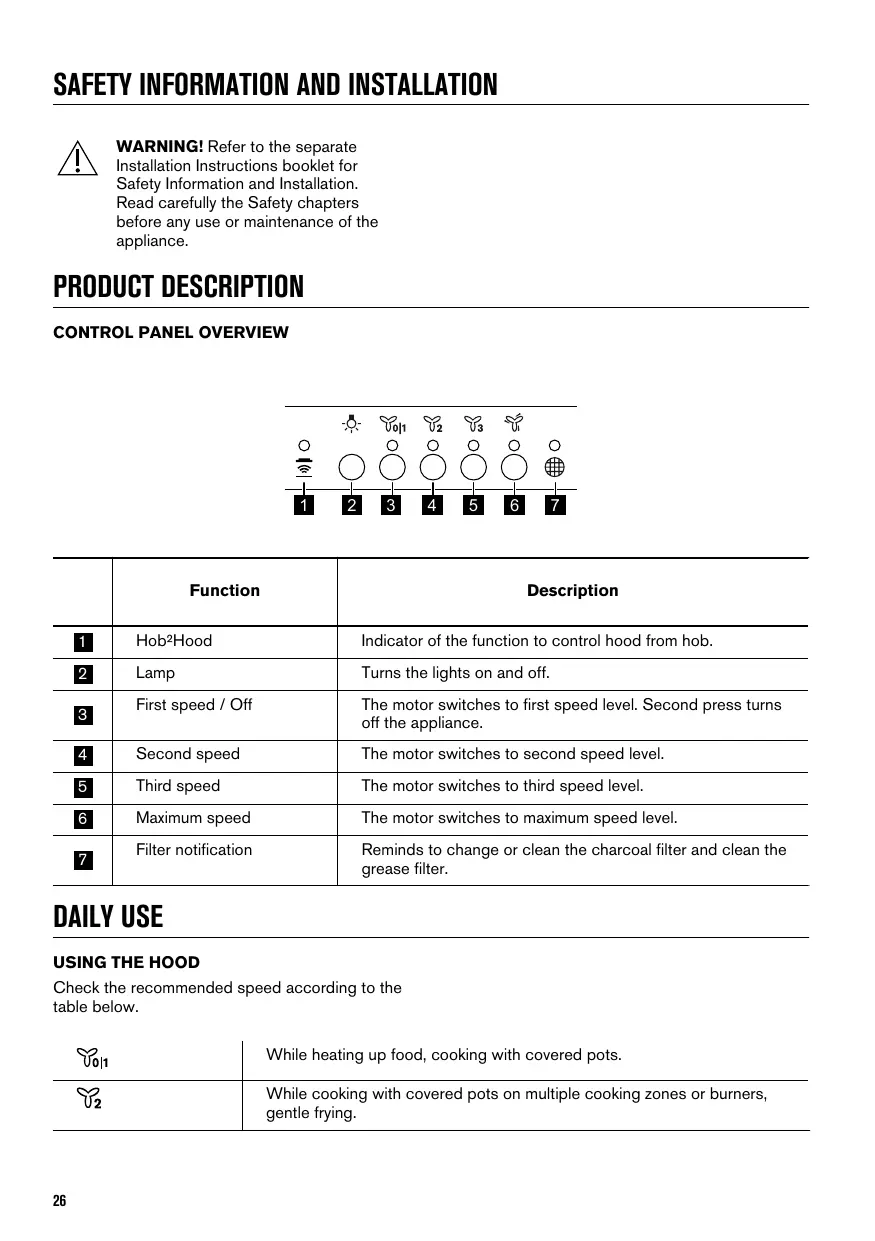
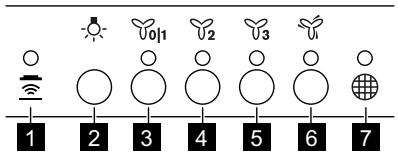
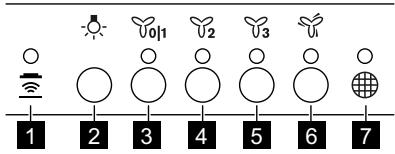
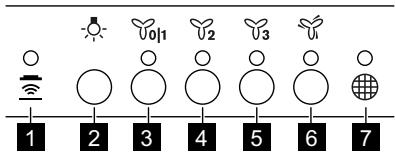
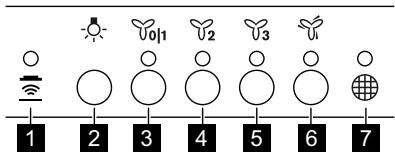
CONTROL PANEL OVERVIEW
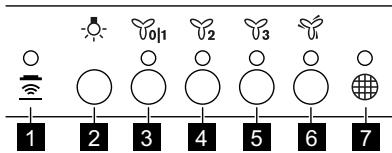
| Function | Description | |
| 1 | Hob2Hood | Indicator of the function to control hood from hob. |
| 2 | Lamp | Turns the lights on and off. |
| 3 | First speed / Off | The motor switches to first speed level. Second press turns off the appliance. |
| 4 | Second speed | The motor switches to second speed level. |
| 5 | Third speed | The motor switches to third speed level. |
| 6 | Maximum speed | The motor switches to maximum speed level. |
| 7 | Filter notification | Reminds to change or clean the charcoal filter and clean the grease filter. |
DAILY USE
USING THE HOOD
Check the recommended speed according to the table below.
y011

While heating up food, cooking with covered pots.
While cooking with covered pots on multiple cooking zones or burners, gentle frying.
| 3 | While boiling, frying big quantities of food without a lid, cooking on multiple cooking zones or burners. |
| While boiling, frying big quantities of food without a lid, big humidity. The hood operates on maximum speed. After 6 minutes the appliance returns to previous setting. |

It is recommended to leave the hood operating for approximately 15 minutes after cooking.
To operate the hood:
- Press the first speed button to switch on the appliance.
- If needed, press the light button to illuminate the cooking surface.
- If needed, change the speed by pressing the desired button.
To turn off the appliance press the first speed button oH again.
HOB2HOOD FUNCTION
It is an automatic function which connects the hob with a hood. Both the hob and the hood have an infrared signal communicator. Speed of the fan is defined automatically on basis of mode setting and temperature of the hottest cookware on the hob. You can also operate the fan using the hob manually. The function can be activated from panel of the hob.

For more information how to use the function refer to the hob user manual.
FILTER NOTIFICATION
Filter alarm reminds to change or clean the charcoal filter and clean the grease filter. The filter indicator is turned on for 30 seconds if the
CARE AND CLEANING
grease filter must be cleaned. The filter indicator flashes for 30 seconds if the charcoal filter must be replaced or cleaned.
Refer to cleaning the grease filter in care and cleaning chapter.
Refer to cleaning the charcoal filter or replacing the charcoal filter in care and cleaning chapter.
To activate or deactivate function:
- To activate function press the button v2 for 3 seconds.
If the function is activated, the filter indicator flashes two times.
2. To deactivate function press the button _2 for 3 seconds.
If the function is deactivated, the filter indicator flashes ones.
To reset the function press the button 3 for 3 seconds.
REMOTE-CONTROL
The appliance is supplied with a remote-control. The connection is originally enabled.
To connect or disconnect remote-control:
- Switch off the appliance.
- Press the for 3 seconds.
The indicator on control panel flashes twice if function is enabled and once if disabled.
NOTES ON CLEANING

Cleaning Agents
Do not use abrasive detergents and brushes.
Clean the surface of the appliance with a soft cloth with warm water and a mild detergent.
After cooking some parts of appliance can get hot. To avoid stains appliance must be cooled down and dried with clean cloth or paper towels.
Clean stains with a mild detergent.
Keep the hood clean
Clean the appliance and grease filters each month. Clean the interior and grease filters carefully from fat. Fat accumulation or other residue may cause fire.
Follow the instructions for cleaning the accessories when filter notification is on. Refer to Filter notification in daily use chapter.
Grease filters can be washed in a dishwasher.
The dishwasher must be set to a low temperature and a short cycle. The grease filter may discolour, it has no influence on the performance of the appliance.

Charcoal filter
The time of saturation of the charcoal filter varies depending on the type of cooking and the regularity of cleaning the grease filter. The activated charcoal filter is not washable, cannot be regenerated and must be replaced approximately every 4/6 months of operation, or more frequently for particularly heavy usage.
CLEANING THE GREASE FILTER
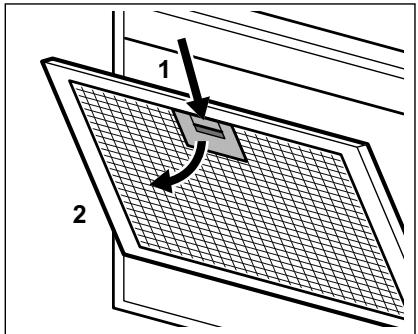
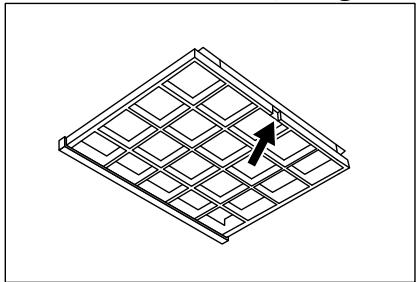
Filters are mounted with the use of clips and pins on the opposite side.
To clean the filter:
- Press the handle of the mounting clip on the filter panel underneath the hood (1).

- Slightly tilt the front of the filter downwards (2), then pull.
Repeat the first two steps for all filters.
3. Clean the filters using a sponge with non abrasive detergents or in a dishwasher.

The dishwasher must be set to a low temperature and a short cycle. The grease filter may discolour, it has no influence on the performance of the appliance.
- To mount the filters back follow the first two steps in reverse order.
Repeat the steps for all filters if applicable.
ENVIRONMENTAL CONCERNS
Recycle materials with the symbol . Put the packaging in relevant containers to recycle it. Help
REPLACING THE CHARCOAL FILTER

WARNING! The charcoal filter is non-washable!
To replace the filter:
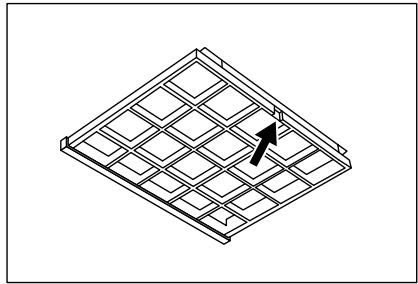
- Remove the grease filters from the appliance. Refer to "Cleaning the grease filter" in this chapter.
- Press the front edge in slot towards the bottom part of the filter. Slightly tilt the front of the filter downwards.
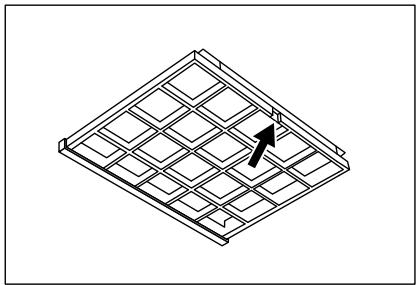
- To install a new filter, perform the same steps in reverse order.
In any case, it is necessary to replace the filters at least every four months.
REPLACING THE LAMP
This appliance is supplied with a LED lamp. This part can be replaced by a technician only. In case of any malfunction refer to "Service" in the "Safety Instructions" chapter.
protect the environment and human health by recycling waste of electrical and electronic
appliances. Do not dispose of appliances marked with the symbol 品 with the household waste.
Return the product to your local recycling facility or contact your municipal office.

XP'HsH TOY ANOPPOΦHTHPA
EeYTe Tn OuviotwuevntaxUTnTa oμpwva e
Tov Tnapakatw Tivaka.

Kata to zéotaa paayntou, me kettaeva okeun.
TnV Evpyoioin n TnV aeepyoioin n tsAeIOUPyia:
- TnV EvpyoToinan TnS LeitoupyiaC, TiéOTo Koupti U2 yia 3 δeutepoAETTTa.
OPhatyFa KaTbIcTb aKnapaTaKa
apHaIFaH KITanwaDaH Kayinci3
OPhaTy TypaJIbI HycKayJIbIKTBI
KapaHbI3. KypblfBhlb naDanaHy
Hemece OFaH KbI3MeT Kepcety
aIbIHdaKayinc3ikTypaIbl
TapayapdI MyKJrT OKbl
UbIFbHb3.
БУным СИПATTAMACbl
BACKAPY NIAHEJIHE IIOJY
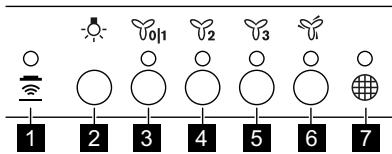
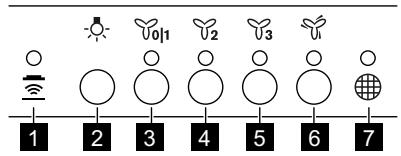
| Функция | СиunaTTamacbl | |
| 1 | Hob?Hood | Aya tarTkbls kypalbIn peu apkbls baskapy Функциясынbls Иndикatopbl. |
| 2 | Шam | Шamдарды кocу көн сөндір. |
| 3 | Бірінші кылдамык / Θшіру | КозfantКыш Бірінші кылдамык Deнг'reиHe ayысады. Екінші рет бackанда кypылflы сөнedi. |
| 4 | Екінші кылдамык | КозfantКыш ekінші кылдамык Deнг'reиHe ayысады. |
| 5 | Ушінші кылдамык | КозfantКыш ушінші кылдамык Deнг'reиHe ayысады. |
| 6 | Ен жогары Кылдамык | КозfantКыш снжогары Кылдамык Deнг'reиHe ayысады. |
| 7 | Сузri тyperы eckepту | Көмір сүэрін ayыICTыр He ta3anay көн He май сүэрін ta3anay кжетеkeniн ecke canadы. |
эРКУндіКОЛДАНУ
AYA TAPTKblI KYPAJIblI PAIDAJAHY
TemeHderi keCTere caikec ycbHbIfaH
XbIJaMaMbIKbI TeKcepiH3.
| Yoh | TamaktsyЖыltKaHda, Кампak КаБылfaн bДыICTы Колданыniciprende. |
| U2 | Бірпше оттыктарда Немес Nicipy aanaДарында Кампafы КаБык bДыICTа Tamak Niciprende,бannen КуврFaHda. |
| U3 | Кайhan Катkan KeЗde, кeн мелшердleri тafamdapны Кампakcsыз bДыICTа КуврFaHda, bірпше Nicipy aanaДарында He OTыктарда niciprende. |
| u | КайнатkanДа, улков Мелшердleri тafamdapны Кампakcsыз КуврFaHda, cýвьтык Keн БOLca. Aya tarTkblsh Курал eH Кофары КувлдамыктayЖуMbIC ICTeɪdi. 6 MнHyTTан Keйн КуврБы alДыИнfy napaMeTpnepre Kaɪta opalədBi. |

TaraMbI niicipreHHHeN KeiH aya TaTbI W KpaJIbI WaMaMeH 15 MHyT KocBn KOFOa KeHec 6epinei.
Aya tapTkbiu kypandbicke kocy yuih:
- KypbIbHbI Kocy yuHbI bipIHsi XblnDaMdbIK 01TynMeciH6acbHb3.
- KaKeT 6oNca, nicipy anaHbH xkapbKtaHdbipy yuHn -wam TYmeciH 6acblHbI3.
- Kepek 6oJca, KaKeTTI TYmHeMi 6aCbIn, XblIaMdbIKTbI e3repTiH3.
KpybIbIbHbI cHdipy yuHi6 biPiXj KblnDaMdbk UITyIMeciH kaIta 6acbHb3.
HOB²HOOD ΦΥΚΙΝΑγκβί
Byn newi aya tapKbIu Kypalfa kjaIaIyTbIH abTomattbФyHKnIe. Nei nei aya tapKbIu Kypal ekeyi de uHpaKa3blc nIhAn KOMMyHnkaTopbImeH Ka6dbkTaNFaH. XeIeTkiuTH JxbldAmdbfblpeXmnapaMeTpim Me neu yctiHderi eH bICTbIK bIDCTbIH TemnepaTpacb 6oBbIHwa abTomATbTVpyde anbKTanadbl.CoHaan-ak newi KojmeH 6bacapbn aya tapKbIuTb Koca anacbl. Byn FyHKnIaHbl newiin nahei apkblib icke Kocyfa 60anaBl.

Функцянblа naДаануfa KaTbICTbl TOnblkaknapaTbI neW yCTiHn naДаанушbl HycKayJbIFbHaH KapaHbI3.
CY3TI TYPAJIbl ECKEPTY
Cy3rhiH ecKeTp CyHraJIbI KEmip cy3riciH aybICTbpy He Ta3anay XaHe MaN cy3riciH
ta3anay kaxket ekenih ecke canaIbI. Cy3riHH INHdkatopbl MaJ cy3ricin Ta3anay kepk60nca
30 cekynd iwiinde jkaanadbl. Cy3riin H INdikatopbl kemip cyricih aybictbpy He ta3anay kaxet 60nca 30 cekynd iwiinde KblnbikTaNdbI.

Kytin yctay xhe Ta3anay TapaybHaH MaI cy3rici Ta3anay TypaIbI aKnapaTbI KapaHbI3.

Kytin yctay xhe Ta3anay TapaybHaH Kemip cy3riciHa Ta3anay Hemece Kemip cy3rici aybictbipy TapaybIH KapaHbI3.
Функцянbl kocyжhe cehdipy yuhi:
1.Функцянbl icke kocу yuin 2 Tymecin 3 cekynd 6acblbl3.
ErepfHKnnaKocbIinaH6oNa,cy3riHH HnDnKaTOpbl eki pet XblnbIbIbIaTaNbl.
2. Φύнкцянь сендіру γιώн 2 Tyμmecin 3 cekyнд басьиьз.
ErepfHKnca cHdipyni 6oJCa, cy3riHINHdkaTOpbl 6ip pet XblbIbIbIkTaIbI.
ФункцянblбactanкьkanltbHaKeItpy ywiH Tynmecin 3cekyndbacbHb3.
KALJBIKTAH BACKAPY KYPAJBI
KypbIJIfbl KaIbIKTah 6ackapy KypaIbIMeH Ka6DbIKTaIHaH.
DeTTe KocbIbIn TypaIbI.
KaawbikTah 6ackapy KypanbH Kocy Hemece axbipaty ywiH:
- KypbIFbHbI eWipiH3.
- 6eJIriuueciH3 cekyHd 6acbIbIbI.
BaCKApy naneJIiHnHdNkAtOpbI yHKnUg Kocyblb6onca eki pet,ewipuyib6onba 6ip pet KblblbIKTaIbI.
TA3AJAYFA KATbICTbl ECKEPIM
| Жуrbш 3aTTAP | Жemipriш жуrbш 3aTTAPы ддддддддддддддддддддддддддддддддддддддддддддддддддддддддддддддддддддддддддддддддддддддддддддддддддддд徴 Курьлбнгддддддддддддддддддддддддддддддддддддддддддддддддддддддддддддддддддддддддддддддддддддддддддддддддддд Баары дддддддддддддддддддддддддддддддддддддддддддддддддддддддддддддддддддддддддддддддддддддддддддддддддд徴 |
| ТаframniciprenhenkeinHкурьлбнгннкeibip6eJIkTepei bICbIgKeTyIМуMKInHДakTыбОлдырмасUHнкурьлбнгнсуltBnT,тазашбepeKпннemeKaFA3cunrIMENKypFATyKepeK. | |
| Дakтарыжумсakжубш 3aTTENH Ta3a7aHaB3. | |
| Aya tarTkblsh Куралы ta3a УстаныЗ | Курьлбнгыжэн Май сузгileiner ai сайын ТazalaHbI.Курьлбнгн iшин Жэне Май сузгileiner Mайдан Tazapынbl.МайшинлfaHda Hemece backa Калдыххинla ca,рг КayinH TdbypybMуMKIn. СузгIHx xabapma cngHaNb KocSybl Ke3de KepeK-jkapaTapdbTa3a7aay HsckaynapbHn opbHdaHb.Су3r typalb xabapmaHb KHydneikTi надалану taraybHnH KapaHbI3. |
| Майы сузгileiner bIDIC JyFbH Maшинada JyyFa 6oJadbl. bIDIC JyFbH Maшинafam Temen TempepaTpya JxHe NkCkA ZIKN OPhaTyr KepeK.Май сузricinH Tyci e3repuyi MymkiH,Бул КурьлбнHbH JyMbic icteyiHe эсер etneidi. | |
| Кемр суз Rici | Кемр сузricinH tony yakblытддддддддддддддддддддддддддддддддддддддддддддддддддддддддддддддддддддддддддддддддддддддддддддддддддд� Каншалыкты ки ТazalaHfahbHa 6aJaLahbIcIb 6oJadbl.БeNsEhdiPirreH Кемрсусricin JxyyFa 6oJMaHbI,КалlbHа KeNTIpyre 6oJMaHbIжэн КолдаылыHa 6aJaLahbIcIb ap 4/6 ai caBbH Hemece kOndaHbIy JxNiririge БaJaNaHbIcIb aYbIcIbpy KepeK. |
MAI CY3IICIH TA3AJAY
Cy3rinerpdi opHaTy yuH Kapama-KapcbI KaKTabbIHda KbICbIbTap MeH KaDaaybIbTap naDanaHbIJFaH.
Cy3riHtra3aJay yuiH:
- Aya tapTkbI W KypaIbI h actbIHaFbI cy3ri naHeJIHderi MOHTaxJday KbICbIbIbIHy yCTaFbIbIH 6acbIbI3 (1).
- Cy3rHiH anIbIhFbI JkaFbIH TeMeH Kapa a3daneHKeYtHiz (2), codaH KeiH TapTbHbI3.
BapnbIc cy3rinep yuiH aIFaUKbI eKi KaIaMdbI KaITanaHbI3.
- Cy3rinepi jxemipriu emec kxyfbl 3aTtapdbkONdaHbIN xekemeH hemece bIDbc KxyfblMaunHameH Ta3aJahbI3.
I bIDbc JxYbIi MaUHHaFa TEmeH TemnepaTpa XaHe KbICKa UIKN opHaty Kepek. Mai Cy3ricHi Tyci e3repyIMykMki.6yI KypblfBtBiH jXymbc icteyiHe ocep etneNi.
- Cy3rHi KaIa opHbHa KOIO yUih aIfauKbI eki KaIaMdbI KepiciHHe opBHaHbI3.
KaKet 6oNca, 6apIbIK cy3rinep yuH Kaamdapbl KaTanaHbI3.
KOMIP CY3ΓICH AYbICTbIPY
ECKEPTY!Kemip cy3ricH Kyyyfa 6oJMaJdbI!
Cy3rhi aybictbyiH:
- MaCy3rinepiH KypbIbIbIaHaJIbIbI3.
OcbI tapaydaIby "MaCy3rIepiH ta3anay" 6eimin kapaHbI3.
- AДынгьжakTaydbу cy3riH IN TemeHr 6eirinderi cahInayfka paai bacbIbI3.
Cy3riHH aIbHfbl KaFbIH TEmeKapai a3an eKeiTihj3.
- KaHa cy3rHi opHaTy yuH ocbl KaaMdapbl kepiHwe opbHdaHbI3.
Ke3-KeIReH JxafDaaCy3rInepDi KEM dereHTeP a anCaiBn aybICTbpy KepeK.
UAMdbI AYbIcTbIPY
Kypblfli LED wambimeh kabdktaflanfaH. Byn 6eJIki TeXnHK fHa aYbIcTbpaIbI. Akayblk opbln anFAH kafdaJa "Kayinci3ik HycKaynapbl" TapayhndaFl "KbImET Kepcety" 6eIMIH KapaHbI3.
KOPSHAFAH OPTAFA KATbICTbl JAFDAIJIAP
Benri canbHfah MaTePnIaIapbl kaTataEhdeyDen ETKi3yRe TaNcbIpbHbI3.OpamMATEPnIaIbpH KaTAteHDeyDen ETKi3yUwIH Tnicti KOnTeHepIepre cAblbHbI.3.AnKeTpnikKHe 3JNEKTPOHnKaIbK KypbINFbInapdbH KaIbIFbH KaTAteHDeyDen ETKi3y apkbl, KopShaFaH optafa KeHe aadAMhBi DeHCaylbFbHa
3nbH KeTIpeTIN JkaFaIaIInapFA Kon 6epMeyre e3 yNeciH3di KocbHb3. BeNri caIbIHfAH KpyblIFbIapDbI TyPbMIcTBIK KaIbIKTapMeH bipre TactaMaHb3. ΘHiMdi XeprinikTi KaIta eHdey opTaIbIFbHa eTKi3iH3 Hemece XeprinikTi MeKemere xa6apnacbHb3.

PekomeHdyetc DaTb BbITJXKe nopa6oTaB OKOIO 15 MmHyT no OKOHuaHHn pNiroTOBneHn.
BkJIIOUeHHe BbITJxKn.:
1.ДьВКИЧЕнЯ ПИБОРаHAЖМITEпервукHONKY BbIbOpa ckopoCTN 0UH1.
2. Пи Heo6xOДMOCn HaXMITE KHONKy NOcBETKn -ДЯ OCbEeHnBaPouHNoI NaHeN.
3. Пин HeobxOДIMOCtN ИЗМeHITe CkopoCtB, Hax Kab Tpe6yemyI KhoIky.
IPERJIED KOMAHHE TABJE
TEMIZLIK HAKKINDA AÇİKLAMALAR
BCTaHOBJIeHHJ. IpePeI
BVKOPNCaHHaM YI
O6cnyroByBaHHm npnlaIy yBaXHO
npouHTaIte po3dinn 0do6e3neKn.
ONHC BNPO6Y
OTJIA NAHENI KEPYBAHHA
JiaIi j"uogdlljilabiu"pwg 2
oljil g aaiiell aiaoiyaiyaiyaiyaiyaiyaiyaiyaiyaiyaiyaiyaiyaiyaiyaiyaiyaiyaiyaiyaiyaiyaiyaiyaiyaiyaiyaiyaiyaiyaiyaiyaiyaiyaiyaiyaiyaiyaiyaiyaiyaiyaiyaiyaiyaiyaiyaiyaiyaiyaiyAI
J 3
0 1111111111111111111111111111111
J
(2) 1J JJJJJJJJJJJJJJJJJJJJJJJJJJJJJJJJJJ
jllg>go aaiuillnssb211 5
aabio oIog aiaewl piaawu jllal abaa .3
glbl alwoc glwoc alwsl
aJrJgJgJgJgJgJgJgJgJgJgJgJgJgJgJgJgJgJgJgJgJgJgJgJgJgJgJgJgJgJgJgJgJgJgJgJgJgJgJgJgJgJgJgJgJgJgJgJgJgJgJ

jIgJgJgJgJgJgJgJgJgJgJgJgJgJgJgJgJgJgJgJgJgJgJgJgJgJgJgJgJgJgJgJgJgJgJgJgJgJgJgJgJgJgJgJgJg
aLl jggljgl 4
JooI JJIJIJIg>0o OJIglaJIJI J
aI I 1
- PÉRSHKRIM I PRODUKTIT
- Описане на урEDA
- BESCHRIJVING VAN HET PRODUCT
- OVERZICTBEDIERINGSPANEEL
- PRODUCT DESCRIPTION
- CONTROL PANEL OVERVIEW
- DAILY USE
- USING THE HOOD
- HOB2HOOD FUNCTION
- FILTER NOTIFICATION
- CARE AND CLEANING
- To activate or deactivate function:
- REMOTE-CONTROL
- To connect or disconnect remote-control:
- NOTES ON CLEANING
- Do not use abrasive detergents and brushes.
- CLEANING THE GREASE FILTER
- To clean the filter:
- ENVIRONMENTAL CONCERNS
- REPLACING THE CHARCOAL FILTER
- REPLACING THE LAMP
- XP'HsH TOY ANOPPOΦHTHPA
- БУным СИПATTAMACbl
- эРКУндіКОЛДАНУ
- HOB²HOOD ΦΥΚΙΝΑγκβί
- CY3TI TYPAJIbl ECKEPTY
- Функцянbl kocyжhe cehdipy yuhi:
- KALJBIKTAH BACKAPY KYPAJBI
- KaawbikTah 6ackapy KypanbH Kocy Hemece axbipaty ywiH:
- TA3AJAYFA KATbICTbl ECKEPIM
- MAI CY3IICIH TA3AJAY
- Cy3riHtra3aJay yuiH:
- KOMIP CY3ΓICH AYbICTbIPY
- UAMdbI AYbIcTbIPY
- KOPSHAFAH OPTAFA KATbICTbl JAFDAIJIAP
- TEMIZLIK HAKKINDA AÇİKLAMALAR
- ONHC BNPO6Y
- J
- aI I 1
Brand : FAURE
Model : FFG816X
Category : Range hood