
DV455EVGSWR - Washer dryer SAMSUNG - Free user manual and instructions
Find the device manual for free DV455EVGSWR SAMSUNG in PDF.



| Product Type | Front-loading dryer |
| Brand | Samsung |
| Model | DV455EVGSWR |
| Dimensions (H x W x D) | 99.0 x 68.6 x 82.0 cm |
| Depth with door open at 90° | 131.2 cm |
| Net weight | 57 kg |
| Capacity | 7.5 cubic feet (approx. 212 L) |
| Heating power (electric) | 5,300 W |
| Power supply | 120/240 V, 60 Hz, 30 A |
| Automatic programs | 13 programs: Normal, Eco Normal, Heavy Duty, Perm Press, Bedding PLUS, Quick Dry, Air Fluff, Delicates, Wool, Sanitize, Refresh, Wrinkle Away, Time Dry |
| Smart features | Smart Control (electric model), Smart Care (diagnostic), Vent Sensor, Fuzzy Logic, Delay Start, Anti-crease, Drum light, Child lock |
| Steam cycles | Refresh (refreshing) and Wrinkle Away (wrinkle removal) |
| Drying rack | Yes, for delicate items (shoes, sweaters, stuffed animals) |
| Reversible door | Yes, reversible |
| Stacking capability | Yes (SK-5A/XAA kit) |
| Optional pedestal | 15-inch pedestal with storage drawer |
| Venting | 4 ways: rear, left, right, bottom (electric model) |
| Lint filter | Clean after each cycle |
| Vent sensor | Detects and alerts if duct is clogged |
| Warranty (United States) | 1 year parts and labor, 2 years control panel |
| Maintenance | Regular cleaning of filter and exhaust duct |
| Customer service | 1-800-SAMSUNG (726-7864) |
Frequently Asked Questions - DV455EVGSWR SAMSUNG
User questions about DV455EVGSWR SAMSUNG
0 question about this device. Answer the ones you know or ask your own.
Ask a new question about this device
Download the instructions for your Washer dryer in PDF format for free! Find your manual DV455EVGSWR - SAMSUNG and take your electronic device back in hand. On this page are published all the documents necessary for the use of your device. DV455EVGSWR by SAMSUNG.
USER MANUAL DV455EVGSWR SAMSUNG
Gas and Electric Dryer user manual

100%
Recycled Paper
This manual is made with 100% recycled paper.
imagine the possibilities
Thank you for purchasing this Samsung product.
To receive more complete service or accessory parts, please register your product at or contact
www.samsung.com/register
• Extra Large Capacity
Ultra drying capabilities are at your fingertips! Now you can dry extra-large loads. Our ultra large 7.5 cu.ft. capacity dryer circulates more air through your clothes, drying them faster, for a wrinkle-free result.
• Smart Control (Elec. Model Only)
Samsung's innovative Smart Control technology enables you to control your dryer through personal technology devices such as smart phones. You don't have to be on standby until the cycle ends. The Smart Control allows you to monitor the drying process and lets you know when the cycle is complete.
• Smart Monitor (Gas Model Only)
Samsung's innovative Smart Monitor technology enables you to monitor your dryer through personal technologies such as smart phones. You don't have to be on standby until the cycle ends. Smart Monitor allows you to monitor the drying process and let you know when the cycle is complete.
- Smart Care
Samsung's Smart Care, an automatic error-monitoring system, detects and diagnoses problems at an early stage and provides a quick and easy solution. With the innovative Smart Remote Control technology, you can also be alerted when the problem occurs via your smart phones.
- Steam Cycle
This cycle sprays a small amount of water into the drum of the dryer after several minutes of tumbling with heat. It reduces bad odors from clothing that are difficult to remove when washing with water, and also reduces wrinkles.
- Sanitize Cycle
This cycle sanitizes garments by infusing high temperature heat deep into the fabric during the drying cycle and eliminating 99.9% of certain bacteria. Use this cycle for clothing, bedding, towels, or other items needing sanitization. The Sanitize cycle is certified by NSF International, an independent third-party testing and certification organization.

NSF Protocol P154 Sanitization Performance of Residential Clothes Dryers
- Various Drying Cycles & Fuzzy Logic Algorithm
Simply turn the Jog Dial to select one of the 13 automatic drying cycles, including normal, heavy duty and Bedding Plus, or let the Fuzzy Logic Control measure the degree of dampness and automatically set the drying time. Precision drying has never been easier than with Samsung.
- Vent Sensor
Your Samsung dryer is equipped with a Vent Sensor which detects and notifies you when it is time to clean the ducts. Keep your dryer safe and efficient!
- Time Saving
Our cycles are designed with you in mind. All our dryers are designed to dry your clothes in less time... just 42 minutes! Giving you time for more important things in life.
2\_Features
- Energy Saving
Samsung dryers are super energy efficient. You can dry up to 3.31 pounds of laundry with 1kWh. Also, both the large capacity and Fuzzy Logic Control save energy by automatically drying your clothes the most efficient way.
- Easy Reversible Door
Our dryers will fit just about anywhere and without a door conflict. The direction of our easy reversible door can be changed easily and quickly.
- Pedestal with Storage Drawers
An optional 15" pedestal is available to raise the dryer for easier loading and unloading. It also offers a built-in storage drawer that can hold a 100 oz. bottle of detergent
- Stacking (MODEL NO: SK-5A/XAA)
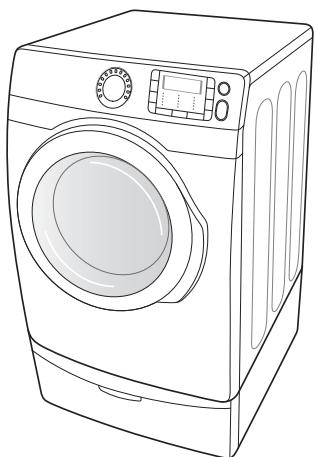
Samsung's Washer and Dryer can be stacked to maximize usable space.

The dryer legs need to be removed to stack the Washer and Dryer. You can purchase an optional stacking kit from you Samsung retailer.
natural_image
Line drawing of a washing machine with control panel and front panel (no text or symbols)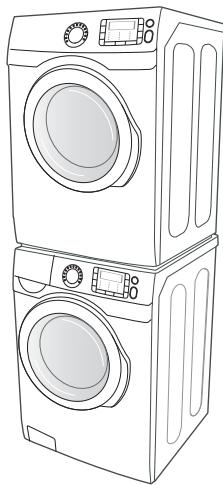
natural_image
Line drawing of a two-tiered washing machine with front and back views (no text or symbols)• 4-way Vent (electric model only : DV455\*)
You can install the exhaust vent in the following four (4) positions: back, either side, bottom.
Safety instructions
Congratulations on your new Samsung Dryer. This manual contains important information on the installation, use, and care of your appliance. Please take the time to read this manual to take full advantage of your dryer's many benefits and features.
WHAT YOU NEED TO KNOW ABOUT SAFETY INSTRUCTIONS
Please read this manual thoroughly to ensure that you know how to operate the extensive features and functions of your new appliance safely and efficiently. Retain the manual in a safe place near the appliance for future reference. Use this appliance only for its intended purpose as described in this instruction manual. The Warnings and Important Safety Instructions in this manual do not cover all possible conditions and situations that may occur. It is your responsibility to use common sense, caution, and care when installing, maintaining, or operating your dryer.
Always contact your manufacturer about problems or conditions you do not understand.
IMPORTANT SAFETY SYMBOLS AND PRECAUTIONS
What the icons and signs in this user manual mean:
 WARNING WARNING | Hazards or unsafe practices that may result insevere personal injury,death and/or property damage. Follow the information in this manual to minimize the risk of fire or explosion or to prevent property damage,personal injury, or death.Do not store or use gasoline or other flammable vapors and liquids near this or any other appliance. |
| [5X46]CAUTION | Hazards or unsafe practices that may result inpersonal injury and/or property damage. |
 | Do NOT attempt. |
 | Do NOT disassemble. |
 | Do NOT touch. |
 | Follow directions explicitly. |
 | Unplug the power plug from the wall socket. |
| [0A72] | Make sure the machine is grounded to prevent electric shock. |
 | Call the service center for help. |
 | Note |
These warning signs are here to prevent injury to you and others.
Please follow them explicitly.
After reading this section, keep it in a safe place for future reference.
SAVE THESE INSTRUCTIONS
4\_Safety instructions

WARNING - Risk of Fire
- Clothes dryer installation must be performed by a qualified installer.
- Install the clothes dryer according to the manufacturer's instructions and local codes.
- Do not install a clothes dryer with flexible plastic venting materials. If flexible metal (foil type) duct is installed, it must be of a specific type identified by the appliance manufacturer as suitable for use with clothes dryers. Flexible venting materials are known to collapse, be easily crushed, and trap lint. These conditions will obstruct clothes dryer airflow and increase the risk of fire.
• To reduce the risk of severe injury or death, follow all installation instructions.

TO REDUCE THE RISK OF FIRE OR EXPLOSION:
- Do not dry items that have been previously cleaned, washed, soaked, or spotted with gasoline, dry cleaning solvents, or other flammable or explosive substances. They emit vapors that could ignite or explode. Any material that has been in contact with a cleaning solvent or flammable liquids or solids should not be placed in the dryer until all traces of these flammable liquids or solids and their fumes have been removed.
There are many highly flammable items used in homes, such as acetone, denatured alcohol, gasoline, kerosene, some liquid household cleaners, some spot removers, turpentine, waxes, and wax removers - Do not dry items containing foam rubber (may be labeled latex foam) or similarly textured rubber-like materials on a heat setting. Heated foam rubber materials can, under certain circumstances, produce fire by spontaneous combustion.

WHAT TO DO IF YOU SMELL GAS:
- Do not try to light any appliance.
- Do not turn on the appliance.
- Do not touch any electrical switch.
- Do not use any phone in your building.
• Clear the room, building or area of all occupants. - Immediately call your gas supplier from a neighbor's phone. Follow the gas supplier's instructions.
• If you cannot reach your gas supplier, call the fire department. - Installation and service must be performed by a qualified installer, service agency, or the gas supplier.
SAVE THESE INSTRUCTIONS
Safety instructions _5
Safety instructions

WARNING
To reduce the risk of fire, electric shock, or injury to persons when using your appliance, follow basic precautions, including the following:
- Read all instructions before using this appliance.
- Do not dry articles that have been previously cleaned in, washed in, soaked in, or spotted with gasoline, dry-cleaning solvents, or other flammable or explosive substances, because they give off vapors that could ignite or explode.
- Do not use the dryer to dry clothes which have traces of any flammable substance, such as vegetable oil, cooking oil, machine oil, flammable chemicals, thinner, etc., or anything containing wax or chemicals, such as mops and cleaning cloths. Flammable substances may cause the fabric to catch fire by itself.
- Do not store or use gasoline or other flammable vapors and liquids near this or any other appliance.
- Do not allow children or pets to play on, in, or in front of the appliance. Close supervision is necessary when the appliance is used near children and pets.
- Before the appliance is removed from service or discarded, remove the door to the drying compartment to prevent children or animals from becoming trapped inside.
- Do not reach into the appliance when the drum is moving.
- Do not install or store this appliance where it will be exposed to the weather.
- Do not tamper with the controls.
- Do not repair or replace any part of the appliance or attempt any servicing unless specifically recommended in the user-maintenance instructions or published in the user-repair instructions that you understand and have the skills to carry out.
- Do not use fabric softeners or products to eliminate static unless recommended by the manufacturer of the fabric softener or product.
- Clean the lint screen before or after each load.
- Do not use heat to dry articles containing foam rubber or similarly textured rubber-like materials.
- Keep the area around the exhaust opening and surrounding areas free from lint, dust, and dirt.
- The interior of the dryer and exhaust duct should be cleaned periodically by qualified service personnel.
- Do not place items exposed to cooking oils in your dryer. Items contaminated with cooking oils may contribute to a chemical reaction that could cause a load to catch fire.
- This appliance must be grounded. See “Electrical requirements” and "Grounding" in the “Installing your dryer” section.
- This appliance must be properly grounded. Never plug the power cord into a receptacle that is not grounded adequately and in accordance with local and national codes. Refer to installation instructions for grounding this appliance.
SAVE THESE INSTRUCTIONS
6\_Safety instructions
- Ensure pockets are free from small irregularly shaped hard objects and foreign material, i.e. coins, knives, pins, etc. These objects could damage your dryer.
- Gas leaks may occur in your system, resulting in a dangerous situation.
- Gas leaks may not be detected by smell alone.
- Gas suppliers recommend you purchase and install a UL-approved gas detector.

STATE OF CALIFORNIA PROPOSITION 65 WARNINGS:
The California Safe Drinking Water and Toxic Enforcement Act requires the Governor of California to publish a list of substances known to the State of California to cause cancer, birth defects, or other reproductive harm, and requires businesses to warn of potential exposure to such substances.
This product contains a chemical known to the State of California to cause cancer, birth defects, or other reproductive harm. This appliance can cause low-level exposure to some of the substances listed, including benzene, formaldehyde, and carbon monoxide.
Gas appliances may cause low-level exposure to some of the substances listed including benzene, formaldehyde, carbon monoxide, and soot; as a result of possible incomplete combustion of natural gas or LP fuels. Exposure to these substances can be minimized further by properly venting the dryer to the outdoors.

CAUTION
- Do not sit on top of the dryer.
- Because of continuing product improvements, Samsung reserves the right to change specifications without notice. For complete details, see the Installation Instructions packed with your product before selecting cabinetry, making cutouts, or beginning installation.
- Do not wash clothing with large buckles, buttons, or other heavy metal or solid things.
- Install and use in accordance with the manufacturer's instructions.
- Do not place items in your dryer that have been spotted or soaked with vegetable oil or cooking oil. Even after being washed, these items may contain significant amounts of these oils.
- Residual oil on clothing can ignite spontaneously. The potential for spontaneous combustion increases when items containing vegetable oil or cooking oil are exposed to heat. Heat sources such as your dryer can warm these items, allowing an oxidation reaction in the oil to occur. Oxidation creates heat. If this heat cannot escape, the items can become hot enough to catch fire. Piling, stacking, or storing these kinds of items may prevent heat from escaping and can create a fire hazard.
- All washed and unwashed fabrics that contain vegetable oil or cooking oil can be dangerous. Washing these items in hot water with extra detergent will reduce, but not eliminate, the hazard. Always use the Cool Down cycle for these items to reduce their temperature. Never remove these items from the dryer hot or interrupt the drying cycle until the items have run through the Cool Down cycle. Never pile or stack these items when they are hot.
- Take care that children's fingers are not caught in the door when closing it. This may result in injury.
SAVE THESE INSTRUCTIONS
Safety instructions _7
Safety instructions
REGULATORY NOTICE
1. FCC Notice

FCC CAUTION:
Any changes or modifications not expressly approved by the party responsible for compliance could void the user's authority to operate the equipment.
This device complies with Part 15 of FCC Rules. Operation is subject to the following two conditions:
- This device may not cause harmful interference, and
- This device must accept any interference received including interference that causes undesired operation.
For product available in the USA/Canada market, only channel 1\~11 can be operated. Selection of other channels is not possible.
FCC STATEMENT:
This equipment has been tested and found to comply within the limits for a Class B digital device, pursuant to part 15 of the FCC Rules. These limits are designed to provide reasonable protection against harmful interference in a residential installation.
This equipment generates, uses, and can radiate radio frequency energy and, if not installed and used in accordance with the instructions, may cause harmful interference to radio communications. However, there is no guarantee that interference will not occur in a particular installation. If this equipment does cause harmful interference to radio or television reception, which can be determined by turning the equipment off and on, the user is encouraged to try to correct the interference by one or more of the following measures:
• Reorient or relocate the receiving antenna
- Increase the separation between the equipment and receiver
- Connect the equipment to an outlet on a different circuit from that of the receiver.
- Consult the dealer or an experienced radio/TV technician for help.
FCC RADIATION EXPOSURE STATEMENT:
This equipment complies with FCC radiation exposure limits set forth for an uncontrolled environment. This equipment should be installed and operated with a minimum distance of 20cm between the radiator and your body. This device and its antenna(s) must not be co-located or operated in conjunction with any other antenna or transmitter.
SAVE THESE INSTRUCTIONS
8\_Safety instructions
2. IC Notice
The term “IC” before the radio certification number only signifies that Industry Canada technical specifications were met. Operation is subject to the following two conditions: (1) this device may not cause interference, and (2) this device must accept any interference, including interference that may cause undesired operation of the device.
This Class B digital apparatus complies with Canadian ICES-003.
For product available in the USA/Canada market, only channels 1\~11 can be operated. Selection of other channels is not possible.
IC RADIATION EXPOSURE STATEMENT:
This equipment complies with IC RSS-102 radiation exposure limits set forth for an uncontrolled environment. This equipment should be installed and operated with minimum distance of 20 cm between the radiator & your body. This device and its antenna(s) must not be co-located or operated in conjunction with any other antenna or transmitter.
SAVE THESE INSTRUCTIONS
Safety instructions _9
contents
INSTALLING YOUR DRYER
12
12 Unpacking your dryer
12 See exhaust requirements
13 Basic requirements
13 Ducting requirements
14 Important to installer
15 Location considerations
15 Alcove or closet installations
17 Mobile home installations
17 Exhausting
18 Gas requirements
18 Commonwealth of massachusetts installation instructions
19 Electrical requirements
19 Grounding
20 Electrical connections
21 Connecting the inlet hose
23 Replacement parts and accessories
23 Installation
26 Final installation checklist
26 Dryer exhaust tips
27 Door Reversal
OPERATING INSTRUCTIONS, TIPS
29
29 Overview of the control panel
34 Rack Dry
35 Clean the lint filter
35 Load the dryer properly
35 Getting started
36 Vent Sensor
37 Setting up Smart control and Smart monitoring
40 Using the mobile app (Android)
52 Using the mobile app (iOS)
62 Registering your dryer
CARE AND CLEANING
64
64 Control Panel
64 Tumbler
64 Stainless Steel Tumbler
64 Dryer Exterior
64 Dryer Exhaust System
10_ contents
SPECIAL LAUNDRY TIPS

65 Special laundry tips
TROUBLESHOOTING

66 Check these points if your dryer...
68 Information codes
69 Network Setup Q&A
APPENDIX

71 Fabric care chart
72 Protecting the environment
72 Declaration of conformity
72 Specifications
73 Cycle chart
74 Open Source Announcement
Installing your dryer
UNPACKING YOUR DRYER
Unpack your Dryer and inspect it for shipping damage. Make sure you have received all the items shown below. If your Dryer was damaged during shipping, or you do not have all the items, contact 1-800-SAMSUNG (726-7864).
To prevent personal injury or strain, wear protective gloves whenever lifting or carrying the unit.

The packing materials can be dangerous children. Keep all packaging material (plastic bags, polystyrene, etc.) well out of the reach of children.
SEE EXHAUST REQUIREMENTS
![[BACK] Water Inlet Duct Exhaust](/content/2020/04/22156/images/63fdbe1ba2a969f2d723c541440cbe6ce9d1a6da2dac43005e21d50aaa285fa3.jpg)
Parts supplied

"Y"-connector

Short inlet hose

Rubber Washer
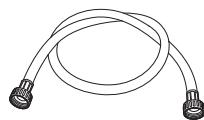
Long inlet hose
12_ Installing your dryer
Tools needed
 | 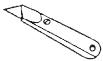 | 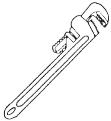 | 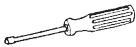 |
| Pliers | Cutting knife | Pipe wrench (gas only) | Nut drivers |
 | 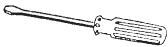 |  | 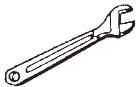 |
| Level | Phillips Screwdriver | Duct tape | Wrench |
BASIC REQUIREMENTS
Make sure you have everything necessary for the proper installation
- A GROUNDED ELECTRICAL OUTLET is required. Refer to the “Electrical requirements” section on page 19.
• A POWER CORD electric dryer (except for Canada).
• GAS LINES (if a gas dryer) must meet national and local codes. - The EXHAUST SYSTEM must be made of rigid metal or flexible stiff-walled metal exhaust ducting.
DUCTING REQUIREMENTS
- Use a 4-inch (10.2 cm) diameter rigid aluminum or rigid galvanized steel duct.
- Do not use a smaller duct.
- Ducts larger than 4 inches (10.2 cm) in diameter can result in increased accumulation of lint.
- Lint should be removed regularly.
- If a flexible metal duct must be used, use the type with a stiff sheet metal wall. Do not use a flexible duct with a thin foil wall. A serious blockage can result if the flexible metal duct is bent too sharply.
- Never install any type of flexible duct in walls, ceilings, or other concealed spaces.
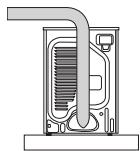
- Keep the exhaust duct as straight and short as possible.
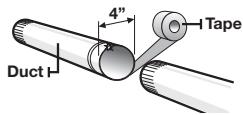
- Secure joints with duct tape. Do not use screws.
- Plastic flexible ducts can kink, sag, be punctured, reduce airflow, extend drying times, and affect the dryer operation.
- Exhaust systems longer than recommended can extend drying times, affect machine operations, and collect lint.
- The exhaust duct should end with an exhaust hood with a swing-out damper to prevent back drafts and entry of wildlife. Never use an exhaust hood with a magnetic damper.
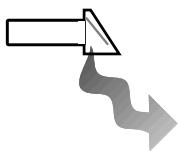
- The hood should have at least 12 inches (30.5 cm) of clearance between the bottom of the hood and the ground or other obstruction. The hood opening should point down.
- Never install a screen over the exhaust outlet.
- To avoid lint buildup, do not exhaust the dryer directly into a window well. Do not exhaust under a house or porch.
- If the exhaust duct must run through an unheated area, the duct should be insulated and slope slightly down towards the exhaust hood to reduce condensation and lint buildup.
Installing your dryer
- Inspect and clean the interior of the exhaust system at least once a year. Unplug the power cord before cleaning.
- Check frequently to make sure the exhaust hood damper opens and closes freely.
- Check once per month, and clean at least once per year. Note: If your clothes are not getting dry, then check the ducting for obstructions.
- Do not exhaust the dryer into a wall, ceiling, crawl space, or concealed space of a building, gas vent, or any other common duct or chimney. This could create a fire hazard from the lint expelled by the dryer.
| ELECTRIC AND GAS DRYER | ||||
| Weather Hood Type | ||||
| Recommended | Use only for short-run installation | |||
  4" (10 .16 cm) 4" (10 .16 cm) | 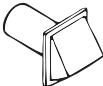 2.5" (6.35 cm) 2.5" (6.35 cm) | |||
| No. of 90° elbows | Rigid | Metallic Flexible* | Rigid | Metallic Flexible* |
| 0 | 24.4 m (80 ft.) | 12.4 m (41 ft.) | 22.6 m (74 ft.) | 10.1 m (33 ft.) |
| 1 | 20.7 m (68 ft.) | 11.2 m (37 ft.) | 18.9 m (62 ft.) | 8.8 m (29 ft.) |
| 2 | 17.4 m (57 ft.) | 10.1 m (33 ft.) | 15.5 m (51 ft.) | 7.6 m (25 ft.) |
| 3 | 14.3 m (47 ft.) | 9.0 m (29 ft.) | 12.5 m (41 ft.) | 6.5 m (21 ft.) |

* Do not use non-metallic flexible ducts.
If the new dryer is installed into an existing exhaust system you must make sure:
- The exhaust system meets all local, state, and national codes.
• That a flexible plastic duct is not used.
• To inspect and clean all lint buildup from inside the existing duct.
• The duct is not dented or crushed.
• The exhaust hood damper opens and closes freely.
The static pressure in any exhaust system must not exceed 0.83 inches of water column, or be less than 0. This can be measured with the dryer running with a manometer at the point where the exhaust duct connects to the dryer. A no-heat setting should be used. The dryer tumbler should be empty and the lint filter clean.
IMPORTANT TO INSTALLER
Please read the following instructions carefully before installing the dryer. These instructions should be kept for future reference.

Remove the door from all discarded appliances to avoid the danger of a child being trapped and suffocating.
LOCATION CONSIDERATIONS
The dryer should be located where there is enough space at the front for loading the dryer, and enough space behind for the exhaust system. This dryer is factory-ready for the rear exhaust option. To exhaust out the bottom, right or the left, use the accessory exhaust kit. Instructions are included with the kit. Make sure the room in which the dryer is located has enough fresh air. The dryer must be located where there are no air-flow obstructions.
For gas dryers, adequate clearance must be maintained as noted on the data plate to ensure adequate air for combustion and the proper dryer operation.
The dryer must not be installed or stored in an area where it will be exposed to water and/or weather. The dryer area must be kept clear of combustible materials, gasoline, and other flammable vapors and liquids. A dryer produces combustible lint. The area around the dryer should be kept lint-free.
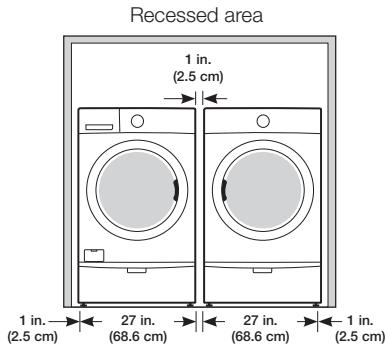
ALCOVE OR CLOSET INSTALLATIONS

The dryer must be exhausted to the outside to reduce the risk of fire when installed in an alcove or closet.
- No other fuel-burning appliance should be installed in the same closet as the dryer.
- WARNING: To reduce the risk of fire, this dryer must be exhausted to the outside. Refer to the "Exhausting" section on page 17.
Minimum clearances between the dryer and adjacent walls or other surfaces
| Sides | 1 in / 25 mm | Rear | 5 in / 127 mm |
| Top | 17 in / 432 mm | Front | 2 in / 51 mm |
- The front of the closet must have two unobstructed air openings for a combined minimum total area of 72 in^2 ( 465 cm^2 ) with a minimum clearance of 3'' (7.6 cm) at the top and bottom. A slatted door with equivalent space clearances is acceptable.
Side view - closet or confined area
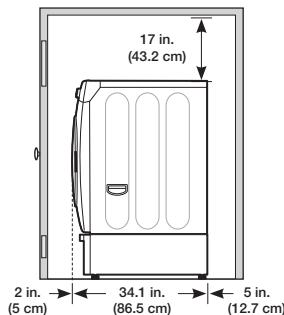
Installing your dryer
With optional pedestal base or stacking kit
Required Dimensions for Installation With Pedestal
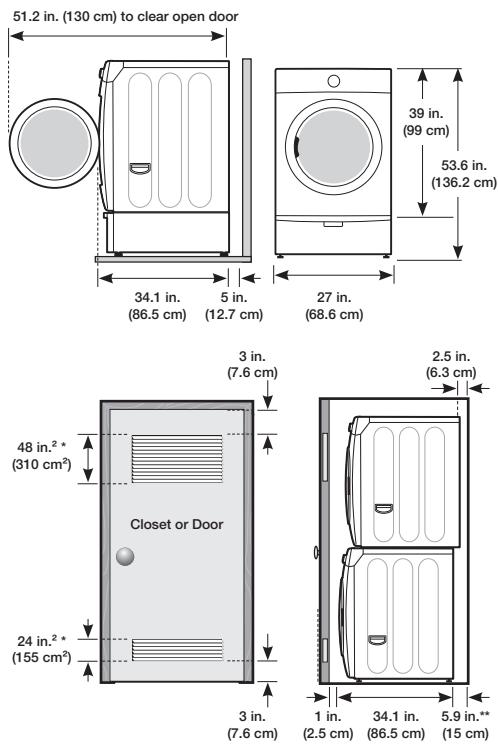
Required Dimensions for Installation With Stacking Kit
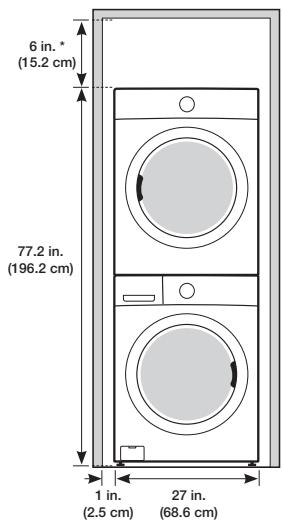
* Required spacing
** An external exhaust elbow requires additional space.
It is not recommended to stack DV457* on your washer.
(it might be hard to control dryer LCD because of the viewing angle.)
MOBILE HOME INSTALLATIONS
The installation of the dryer in a mobile home must conform to the Manufactured Home Construction and Safety Standards Title 24 CFR, Part 3280 {formerly the Federal Standards for Mobile Home Construction and Safety, Title 24, HUD (Part 280), 1975} for the United States) or CSA Standards Z240 (for Canada).
- When installing a dryer in a mobile home, provisions for anchoring the dryer to the floor must be made.
- Locate an area with adequate fresh air.
- A minimum unobstructed space of 72in^2 (465~cm^2) is required.
- Call 1-800-SAMSUNG for information on purchasing the Floor Anchoring Kit as an accessory.
- All mobile home installations must be exhausted to the outside with the exhaust duct termination securely fastened to the mobile home structure, using materials that will not combust.
- The exhaust duct may not terminate underneath the mobile home.
- Refer to the following “Exhausting” section for more information.
EXHAUSTING
The dryer shall not be exhausted into a chimney, a wall, a ceiling, an attic, a crawl space, or a concealed space of a building.
Exhausting the dryer to the outside will prevent large amounts of lint and moisture from being blown into the room.

Refer to the “Ducting requirements” section on page 13 for the maximum duct length and number of bends.
- All dryers must be exhausted to the outside.
- Do not assemble the duct with screws or other fastening means that extend into the duct and catch lint.
- The exhaust duct should be 4 inches (102 mm) in diameter.
- The total length of flexible metal duct shall not exceed 2.4 m (7.8 ft.).
In the United States:
- Use only those foil-type flexible ducts, if any, specifically identified for use with the appliance by the manufacturer and that comply with the Outline for Clothes Dryer Transition Ducts, Subject 2158A, shall be used.
In Canada:
- Use only those foil-type flexible ducts, if any, specifically identified for use with the appliance by the manufacturer.
Outside the U.S. and Canada:
• Refer to the local codes.

The dryer must be exhausted to the outside to reduce the risk of fire when installed in an alcove or closet.

NEVER USE A PLASTIC OR NON-METAL FLEXIBLE DUCT. If your existing ductwork is plastic, non-metal, or combustible, replace it with metal. Use only a metal exhaust duct that is non-flammable to ensure containment of the exhaust air, heat, and lint.
Installing your dryer
GAS REQUIREMENTS
Use only natural or LP (liquid propane) gases.
THE INSTALLATION MUST CONFORM WITH LOCAL CODES, OR IN THE ABSENCE OF LOCAL CODES, WITH THE NATIONAL FUEL GAS CODE ANSI/Z223.1, LATEST REVISION (FOR THE UNITED STATES), OR WITH THE CAN/CGA-B149 INSTALLATION CODES (FOR CANADA).
Gas dryers are equipped with a burner vent for use with natural gas. If you plan to use your dryer with LP (liquid propane) gas, it must be converted for safe and proper performance by a qualified service technician.
A 1/2" (1.27 cm) gas supply line is recommended and must be reduced to connect to the 3/8" (1 cm) gas line on your dryer. The National Fuel Gas Code requires that an accessible, approved manual gas shut-off valve be installed within 6" of your dryer.
Gas dryers installed in residential garages must be raised 18 inches (46 cm) above the floor.
Additionally, a 1/8" (0.3 cm) N.P.T. (National Pipe Thread) plugged tapping, accessible for test gauge connection, must be installed immediately upstream of your dryer's gas supply connection.
Your dryer must be disconnected from the gas supply pipe system during any pressure testing of the system.
DO NOT reuse old flexible metal gas lines. Flexible gas lines must be design certified by the American Gas Association (CGA in Canada).

- Any pipe joint compound used must be resistant to the action of any liquefied petroleum gas.
- As a courtesy, most local gas utilities will inspect a gas appliance installation.
GAS IGNITION - Your dryer uses an automatic ignition system to ignite the burner. There is no constant burning pilot.
COMMONWEALTH OF MASSACHUSETTS INSTALLATION INSTRUCTIONS
Your dryer must be installed by a licensed plumber or gas fitter. A "T" handle manual gas valve must be installed in the gas supply line to your dryer. If a flexible gas connector is used to install your dryer, the connector may not be longer than 3' (36").

• Gas leaks may occur in your system, creating a dangerous situation.
• Gas leaks may not be detected by smell alone.
- Gas suppliers recommend that you purchase and install a UL-approved gas detector.
- Install and use it in accordance with the manufacturer's instructions.
18_ Installing your dryer
ELECTRICAL REQUIREMENTS

The wiring diagram is located on the plate below the control panel.

- The improper connection of the equipment grounding conductor can result in a risk of electric shock. Check with a qualified electrician or serviceman if you are in doubt as to whether your dryer is properly grounded. Do not modify the plug provided with your dryer - if it doesn't fit the outlet, have a proper outlet installed by a qualified electrician.
- To prevent unnecessary risk of fire, electrical shock, or personal injury, all wiring and grounding must be done in accordance with local codes, or in the absence of local codes, with the National Electrical Code, ANSI/NFPA No. 70-Latest Revision (for the U.S.) or the Canadian Electrical Code CSA C22.1 - Latest Revisions and local codes and ordinances. It is your responsibility to provide adequate electrical services for your dryer.
- All gas installations must be done in accordance with the national Fuel Code ANSI/Z2231 - Latest Revision (for the U.S.) or CAN/CGA - B149 Installation Codes - Latest Revision (for Canada) and local codes and ordinances.
GROUNDING
This dryer must be grounded. In the event of a malfunction or breakdown, the grounding the product will reduce the risk of electrical shock by providing a path of least resistance for the electrical current.

Gas models
Your dryer has a cord with an equipment-grounding conductor and a grounding plug.
The plug must be plugged into an appropriate outlet that is properly installed and grounded in accordance with all local codes and ordinances.
Do not modify the plug provided with your dryer – if it doesn't fit the outlet, have a proper outlet installed by a qualified electrician.
Never connect the ground wire to the plastic plumbing lines, gas lines, or hot water pipes.

Electric models
Your dryer has an optional cord with an equipment-grounding conductor and a grounding plug, which is sold separately.
The plug must be plugged into an appropriate outlet that is properly installed and grounded in accordance with all local codes and ordinances.
Do not modify the plug provided with your dryer – if it doesn't fit the outlet, have a proper outlet installed by a qualified electrician.
If a power cord is not used and the electric dryer is to be permanently wired, the dryer must be connected to a permanently grounded metal wiring system, or an equipment grounding conductor must be run with the circuit conductors and connected to the equipment grounding terminal or lead on the dryer.
Installing your dryer
ELECTRICAL CONNECTIONS
Before operating or testing, follow all grounding instructions in the “Grounding” section on page 19. An individual branch (or separate) circuit serving only your dryer is recommended. DO NOT USE AN EXTENSION CORD.
Gas models – U.S. and Canada
A 120 volt, 60 Hz AC approved electrical service, with a 15-ampere fuse or circuit breaker is required.
Electric models – U.S. only
Most U.S. dryers require a 120/240 volt, 60 Hz AC approved electrical service. Some require 120/208 volt, 60 Hz approved electrical service. The electric service requirements can be found on the data label located behind the door. A 30-ampere fuse or circuit breaker on both sides of the line is required.
- If a power cord is used, the cord should be plugged into a 30-ampere receptacle.
- The power cord is NOT provided with U.S. electric model dryers.

WARNING
RISK OF ELECTRIC SHOCK:
When local codes allow, the electrical supply of the dryer may be connected by means of a new power supply cord kit, marked for use with a dryer, that is U.L. listed and rated at a minimum of 120/240 volts, 30-ampere with three No. 10 copper wire conductors terminated with closed loop terminals, open-end spade lugs with turned up ends, or with tinned leads.
- Do not reuse a power supply cord from an old dryer. The power cord electric supply wiring must be retained at the dryer cabinet with a suitable UL-listed strain relief.
- Grounding through the neutral conductor is prohibited for (1) new branch-circuit installations, (2) mobile homes, (3) recreational vehicles, and (4) areas where local codes prohibit grounding through the neutral conductor. (Use a 4-prong plug for 4 wire receptacles, NEMA type 14-30R.)
Electric models – Canada Only
- A 120/240 volt, 60 Hz AC approved electrical service fused through a 30-ampere fuse or circuit breaker on both sides of the line is required.
- All Canadian models are shipped with the power cord attached. The power cord should be plugged into a 30-ampere receptacle.

In Canada, you may not convert a dryer to 208 volts.
Method 1
The dryer must be connected to the cold water faucet using the new inlet hoses. Do not use old hoses.
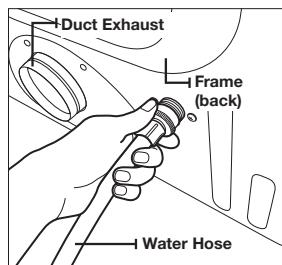
- If space permits, attach the brass female end of the "Y" connector to the cold water faucet.
- Turn the cold water faucet off.
- Attach the straight end of long hose to the "Y" connector.
- Using pliers, tighten the coupling with an additional two-thirds turn.
Do not overtighten, as this may damage the coupling.
- Attach the angled end of long hoses to fill the valve at the bottom of the dryer's rear frame. Screw on the coupling by hand until it is seated on the fill valve connector.
- Using the pliers, tighten the coupling with an additional two-thirds turn.
Do not overtighten, as this may damage the coupling.
- Check that the water faucets are on.
- Check for leaks around the "Y" connector, faucets and hoses.
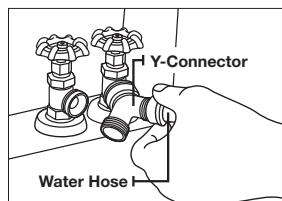
Installing your dryer
Method 2
The dryer must be connected to the cold water faucet using the new inlet hoses. Do not use old hoses.
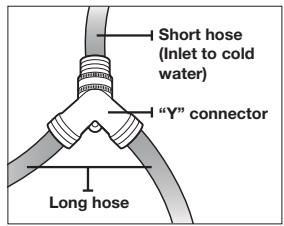
- If the "Y" connector cannot be attached directly to the cold water faucet, the short hose must be used.
- Turn the cold water faucet off.
- Attach the short inlet hose to the cold water faucet. Screw on the coupling by hand until it is seated on the faucet.
- Using the pliers, tighten the coupling with an additional two-thirds turn.
Do not overtighten, as this may damage the coupling.
- Attach the 'Y' connector to the brass male end of the small hose. Screw on the coupling by hand until it is seated on the connector.
- Using the pliers, tighten the coupling with an additional two-thirds turn.
Do not overtighten, as this may damage the coupling.
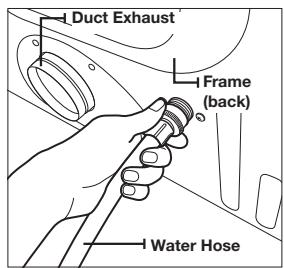
- Attach the angled end of long hoses to the fill valve at the bottom of the dryer rear frame. Screw on the coupling by hand until it is seated on the fill valve connector.
- Using pliers, tighten the coupling with an additional two-thirds turn.
Do not overtighten, as this may damage the coupling.
-
Attach the washer hose to the other side of the "Y" connector. Screw on the hose coupling until it is tight. Using pliers, tighten the coupling with an additional two thirds turn.
Do not overtighten. You can damage the coupling. -
Check that the water faucets are on.
-
Check for leaks around the "Y" connector, faucets and hoses.
REPLACEMENT PARTS AND ACCESSORIES
If your dryer requires replacement parts or accessories, contact the dealer where you purchased your dryer or the SAMSUNG customer care center at 1-800-SAMSUNG (726-7864).
INSTALLATION
For the proper installation, we recommend that you hire a qualified installer.
To install
- Move your dryer to an appropriate location for the installation. Consider installing the dryer and washer side-by-side, to allow access to the gas, electrical, and exhaust connections. Place two of the carton cushion-tops on the floor. Tip your dryer on its side so it lies across both cushion-tops.
- Set your dryer back in an upright position.
- To ensure that the dryer provides the optimal drying performance, it must be level. To minimize vibrations, noise, and unwanted movement, the floor must be a perfectly level, solid surface.

To set the dryer to the same height as the washer, fully retract the leveling feet by turning them counterclockwise, then loosen the legs by turning them clockwise.
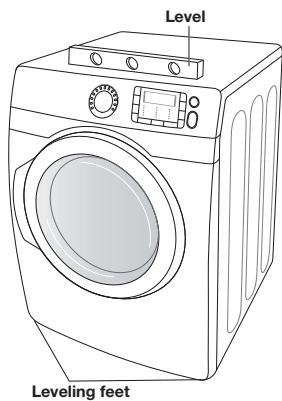
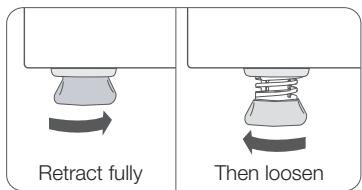

Adjust the leveling feet only as much as necessary to level the dryer. Extending the leveling feet more than necessary can cause the dryer to vibrate.
- Review the "Exhausting" section on page 17 before installing the exhaust system. Install the ductwork from your dryer to the exhaust hood. The crimped end of the duct sections must point away from your dryer.
DO NOT use sheet metal screws when assembling the ducting. These joints should be taped.
Never use plastic flexible exhaust material.
Tip for tight installations: install a section of the exhaust system onto your dryer before putting it in place.
Use duct tape to secure this section to your dryer, but do not cover the ventilation slots at the back of the unit in dryer cabinet.
Installing your dryer
- Review the "Electrical requirements" section on page 19.
BEFORE OPERATING OR TESTING, follow the grounding instructions in the “Grounding” section on page 19.

WARNING
U.S. MODELS:
RISK OF ELECTRIC SHOCK - All U.S. models are produced for a 3-WIRE SYSTEM CONNECTION.
The dryer frame is grounded to the neutral conductor at the terminal block.
A 4-WIRE SYSTEM CONNECTION is required for new or remodeled construction, mobile homes, or if local codes do not permit grounding through neutral. If the 4-wire system is used, the dryer frame cannot be grounded to the neutral conductor at the terminal block. Refer to the following instructions for 3 and 4-WIRE SYSTEM CONNECTIONS.
Remove the terminal block cover plate.
Insert the power cord with a UL-listed strain relief through the hole provided in the cabinet near the terminal block.

A strain relief must be used.
Do not loosen the nuts already installed on the terminal block. Be sure they are tight.
Use a 3/8" (1 cm) deep well socket.
- Review the “Gas requirements” section on page 18. Remove the pipe thread protective cap. Apply a pipe joint compound or about 1 1/2 wraps of Teflon tape over all threaded connections.

The pipe joint compound must be resistant to the actions of any liquefied petroleum gas.
Connect the gas supply to your dryer. An additional fitting is required to connect the 3/4" (1.9 cm) female thread end of a flexible connector to the 3/8" (1 cm) male threaded end on the dryer.
Securely tighten the gas line fitting over the threads.
Turn on the gas supply.
Check all gas connections for leaks using a soap solution.
If bubbles appear, tighten the connections and recheck. DO NOT use an open flame to check for gas leaks.
3-WIRE system connections
- Loosen or remove the center terminal block screw.
- Connect the neutral wire (white or center wire) of the power cord to the center, silver-colored terminal screw of the terminal block. Tighten the screw.
- Connect the other wires to the outer terminal block screws. Tighten the screws.
- Tighten the strain relief screws.
- Insert the tab of the terminal block cover into your dryer's rear panel slot.
- Secure the cover with a hold-down screw.
| 1 | External ground connector |
| 2 | Neutral grounding wire (green/yellow) |
| 3 | Center silver-colored terminal block screw |
| 4 | Neutral wire (white or center wire) |
| 5 | 3/4" (1.9 cm) UL-listed strain relief |
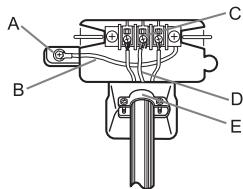

If converting from a 4-wire electrical system to a 3-wire, the ground strap must be reconnected to the terminal block support to ground the dryer frame to the neutral conductor.
4-WIRE system connections
- Remove the center terminal block screw.
- Connect the ground wire (green or unwrapped) of the power cord to the external ground conductor screw.
- Connect the neutral wire (white or center wire) of the power cord and the appliance ground wire (green with yellow stripes) under the central screw of the terminal block.
- Connect the other wires to the outer terminal block screws. Tighten the screws.
- Tighten the strain relief screws.
- Insert the tab of the terminal block cover into your dryer's rear panel slot.
- Secure the cover with a hold-down screw.
| 1 | External ground connector |
| 2 | Green or bare copper wire of the power cord |
| 3 | 3/4 in. (1.9 cm) UL-listed strain relief |
| 4 | Center silver-colored terminal block screw |
| 5 | Grounding wire (green/yellow) |
| 6 | Neutral wire (white or center wire) |
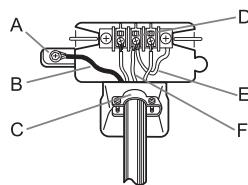
- With a level, check your dryer and make the necessary adjustments to the leveling legs.
-
At this time, make sure all gas connections (on gas models), exhaust and electrical connections are complete. Plug in your dryer, and check its operation by using the checklist below.
-
(GAS MODELS ONLY)
The burner may not ignite initially due to air in the gas line. Allowing your dryer to operate on a heat setting will purge the line. If the gas does not ignite within 5 minutes, turn your dryer off and wait 5 minutes. Be sure the gas supply to your dryer has been turned on. In order to confirm the gas ignition, check the exhaust for heat.
Installing your dryer
FINAL INSTALLATION CHECKLIST
- the dryer is plugged into an electrical outlet and is properly grounded.
- The exhaust ductwork is hooked up and the joints are taped.
• A plastic flexible duct is NOT used. - Use rigid or stiff-walled flexible metal vent material.
- The dryer is level and is sitting firmly on the floor.
- Gas models – the gas is turned on with no gas leaks.
- Start your dryer to confirm that it runs, heats, and shuts off.
DRYER EXHAUST TIPS

A plastic or non-metal flexible duct presents a potential fire hazard.
- Make sure your dryer is installed properly so it exhausts air easily.
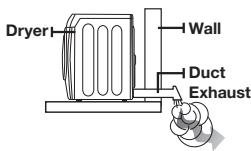
- Use a 4" diameter rigid metal duct. Tape all joints, including at the dryer. Never use lint-trapping screws.
- Keep ducts as straight as possible.
- Clean all old ducts before installing your new dryer. Be sure the vent flap opens and closes freely. Inspect and clean the exhaust system annually.
natural_image
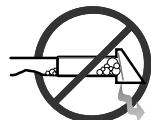
Simple line drawing of a tool with a wavy arrow pointing downward (no text or symbols)Don't let a poor exhaust system slow the drying process by:
- Restricting your dryer with a poor exhaust system.
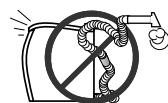
- Using a plastic, thin foil, or non-metal flexible duct.

- Unnecessarily using long ducts that have many elbows.
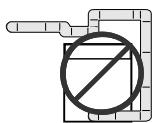
- Allowing dented or clogged ducts and vent.
DOOR REVERSAL
- Unplug the power cord.
- Remove two door hinge screws.
- Lift the door and remove it.
natural_image
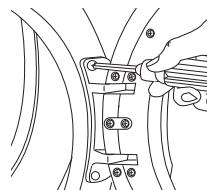
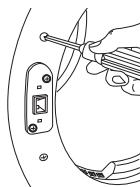
Line drawing of a hand using a tool to adjust or install a mechanical component (no text or symbols present)- Remove two screws from the frame front.
natural_image
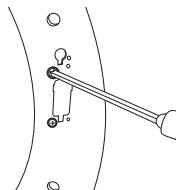
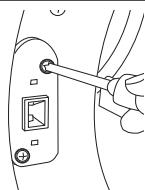
Pure mechanical diagram showing a lever and pivot point without any text or symbols- Remove the two screws from the opposite side of the door hinge.
natural_image
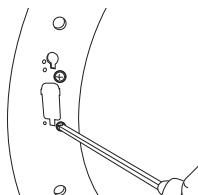
Line drawing of a hand using a tool to cut or install a component on a curved surface (no text or symbols)- Remove the two screws from the holder lever.
natural_image
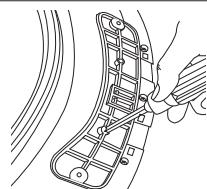
Line drawing of a hand holding a tool interacting with a device (no text or symbols visible)- Reassemble the two screws on the inside holes.
natural_image
Simple line drawing of a mechanical or electrical component with no text, numbers, or symbols- Remove a screw from the door hinge.

The screw is for pre-fixing the door to the frame front.
natural_image
Line drawing of a hand pressing down on a car wheel (no text or symbols)Installing your dryer
- Reassemble the screw in the other hole.
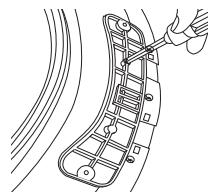
natural_image
Line drawing of a car wheel handle assembly with a hand adjusting the part (no text or symbols)- Place the door on the other side and reattach it to the dryer.
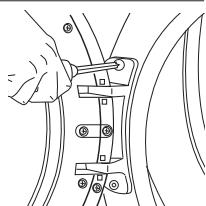
natural_image
Line drawing of a hand adjusting a mechanical component with no visible text or symbols- Reattach the holder lever.
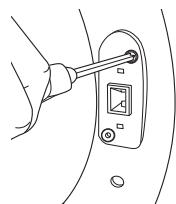
natural_image
Line drawing of a hand using a tool to switch a device on a curved surface (no text or symbols)- Reattach the screws in the remaining holes.
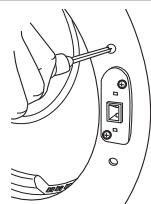
natural_image
Line drawing of a car interior showing a switch and battery (no text or symbols)Operating instructions, tips

To reduce the risk of fire, electric shock, or injury to persons, read the IMPORTANT SAFETY INSTRUCTIONS before operating this appliance.
OVERVIEW OF THE CONTROL PANEL
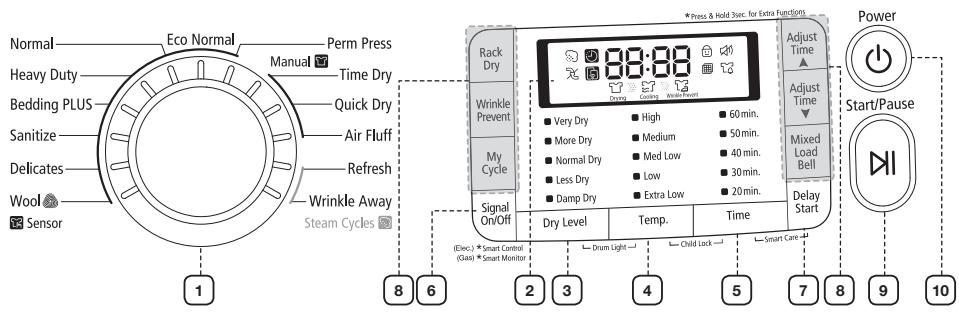

Cycle Selector
To select a cycle, rotate the Cycle Selector dial to the desired cycle.
The indicator light by the cycle name will illuminate. The Wool, Delicates, Sanitize, Bedding PLUS, Heavy Duty, Normal, Eco Normal and Perm Press cycles are Sensor Dry cycles.
Sensor Dry automatically senses the moisture in the load and shuts the dryer off when the selected dryness level (very dry to damp dry) is reached.
Eco Normal - This cycle reduces energy usage by up to 15% compared to the Normal Dry cycle. It adjusts the cycle time and temperature for increased efficiency.
Normal - Use this cycle to dry loads such as cotton, underwear, and linen.
Heavy Duty - Use this cycle to get high heat for heavy fabrics such as jeans, corduroys, or work clothes.
Perm Press - Dry wrinkle-free cottons, synthetic fabrics, knits, and permanent press fabrics automatically.
Bedding PLUS - For bulky items such as blankets, sheets, and comforters.
Delicates - The Delicates cycle is designed to dry heat-sensitive items at a low drying temperature.
Wool - For machine washable and tumble dryable wool only.

Load should be under 3 pounds. The Wool cycle of this machine has been approved by Woolmark company for Total-Easy-Care
WOOLMARK APPAREL CARE
Wool products, M0913(DV455E*) and M1007(DV455G*).
Sanitize - Sanitize garments by infusing high temperature heat deep into the fabric during the drying cycle. Use this course to keep your bedding and curtains clean through sanitization.
Time Dry - Time Dry allows you to select the desired cycle time in minutes.
Turn the Cycle Selector dial to Time Dry, then press the Adjust Time up arrow to set the drying time. Press the arrow repeatedly to scroll through the time settings.
Operating instructions, tips
| Quick Dry - Provides a 30 minutes drying cycle.Air Fluff - The Air Fluff cycle tumbles the load in room temperature air.Refresh - This cycle is best for smoothing out wrinkles and reducing odors from loads consisting of one to four dry items. In this cycle a small amount of water is sprayed into the dryer drum after several minutes of tumbling with heat.Wrinkle Away - The Wrinkle Away cycle removes wrinkles from clothes stored in closets, etc. It provides wrinkle release via optimized steam care. You can change the drying time.(Minimum time : 20 minutes) *For best results, load no more than 3 items.Overloading the dryer may not yield the same results. | ||
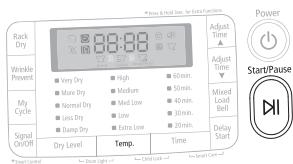
 | LED Display | The display window shows the estimated time remaining in the cycle after the Start/Pause button is pressed. The estimated time remaining may fluctuate as the cycle progresses.The Drying light will illuminate and remain lit until the cycle is complete.When your dryer is in the cool-down phase, the Cooling light will illuminate.When your dryer is in the wrinkle prevent phase, the Wrinkle Prevent light will illuminate.When the cycle is complete, “End” will appear in the display panel until the dryer door is opened or the Power button is pushed.If your dryer is paused during a cycle, the indicator lights will blink until the Start/ Pause button is pressed. |
| [A708] | Dry Level Selection Button | To select the dry level in the Normal, Heavy Duty, or other Sensor Dry cycles, press the Dry Level button. An indicator light will illuminate next to the desired dryness level.Press the button repeatedly to scroll through the settings. Larger or bulkier loads may require the Very Dry or More Dry setting for complete dryness.The Less Dry setting is best suited for lightweight fabrics or for leaving some moisture in the clothing at the end of the cycle. Damp Dry is designed to partially dry items. Use for items that lay flat or hang to dry. |
| [D0WK] | Temp Selection Button | To select the correct temperature for the load, press the Temp button. An indicator light will illuminate next to the desired temperature. Press the button repeatedly to scroll through the settings.High – For sturdy cottons or those labeled Tumble Dry.Medium – For permanent press, synthetics, lightweight cottons, or items labeled Tumble Dry Medium.Med Low – For lower heat than Medium to dry synthetic or washable knit fabrics.Low – For heat sensitive items labeled Tumble Dry Low or Tumble Dry Warm.Extra Low – Provides the lowest heated dry temperature possible. |
| [G28S] | Time Selection Button | When using Manual Dry cycles, you can adjust the drying time by pressing the Time selection button.During the Sensor Dry cycle, the time light indicator is off because exact drying times are determined by fluctuating humidity levels. |
| 6 Signal Selection Button | When the cycle is complete, a chime will sound.If you selected the Wrinkle Prevent option, the chime will sound intermittently.Adjust the volume of the chime or turn it off by pressing the Signal button.Press the button repeatedly to scroll through the choices. |
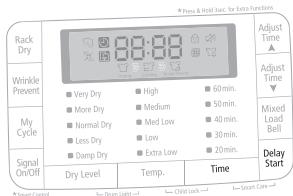
| 7 Delay Start Button | Any cycle can be delayed for up to 24 hours in one-hour increments.Displayed hour indicates the time at which the cycle will be started. (Refer to the “Delay Start” section on page 32.) |
| 8 Select Cycle Option | Adjust Time – Time can be added or subtracted from the automatically set times in the Manual Dry cycles (Time Dry, Quick Dry, or Air Fluff cycles) and Wrinkle Away cycle.To add or subtract time from the cycle, press the Adjust Time arrow pad up or down until the desired time is displayed.Wrinkle Prevent -Wrinkle Prevent provides approximately 180 minutes of intermittent tumbling in unheated air at the end of the cycle to reduce wrinkling. Press the Wrinkle Prevent button to activate this feature.The indicator light above the pad will illuminate when Wrinkle Prevent is selected.The load is dry, and can be removed at any time during the Wrinkle Prevent cycle.My Cycle – Choose your favorite cycle including cycle, temp, dry level option, etc. (Refer to the “My cycle” section on page 33.)Rack Dry – Rack Dry is available in the Time Dry cycle. Temperature will be set to Extra Low only. (Refer to the “Rack Dry” section on page 34.)Mixed Load Bell - This is an alarm that notifies you when the average dry level is damp dry (80% dried). This is useful when the laundry contains various types of clothing you do not want to dry completely. An alarm sounds for 5 seconds. Note that the dryer will continue to run unless you pause or stop it.This function can only be selected in the Sensor Dry course, and the dry level can only be selected from among Normal Dry, More Dry, and Very Dry. |
| 9 Start/Pause selection button | Press to pause and restart programs. |
| 10 Power button | Press once to turn your dryer on. Press again to turn it off. If your dryer is left on for more than 10 minutes without any buttons being touched, the power automatically turns off. |
Operating instructions, tips
Child lock
Prevents children from playing with your dryer.
Setting/Releasing
To turn Child Lock on or off, press both the Temp. and Time buttons simultaneously for 3 seconds.
Child Lock Details
- You can turn Child Lock on while your dryer is running.
- Once you set the Child Lock function, no button, except for the Power button, will respond until you turn off the Child Lock function.
- The "Child Lock 😊" indicator will be lit.

- If the dryer is powered on again, the Child Lock function stays on.
- To turn off Child Lock, follow the instructions above.

When other buttons, except for the Power button, do not respond, check the Child Lock indicator. If Child Lock is on, follow the instructions above to turn Child Lock off.
Delay Start
You can set the dryer to start your course automatically at a later time by choosing a delay time. The hour displayed indicates the time at which the course will be started.
- Set your drying course.
- Press the Delay Start button repeatedly until the delay time is set.
- Press the Start/Pause button. The "Delay Start 🔒" indicator will be lit, and the clock will begin counting down until it reaches the set time.
- To cancel a Delay Start function, press the Power button and then turn the dryer on again.
Drum Light
Lights the dryer drum while the dryer is running.
Turning On and Off
To turn on or turn off the Drum Light, press both the Dry Level and Temp. buttons simultaneously.

You can turn the Drum Light on and off while your dryer is running and when it is stopped. If you do not turn the Drum Light off 5 minutes after turning it on, the Drum Light is automatically turned off.
My cycle
Lets you select, save, and then activate a customized cycle that includes Dry Level, Temp, Time option, etc. at a later time.
To use My Cycle, follow these steps:
- Push the My Cycle button. The My Cycle indicator lights.
- Select the cycle you want to include using the Cycle Selector Dial.
- Select and set the options (Dry Level, Temp, Time, etc.)

Each cycle has certain default options that are automatically set. To see these default options, go to page 37.
- Push the Start/Pause button. The cycle starts.
- As the dryer moves through the cycle, it memorizes the cycle and the options.
- To run this cycle again at a later time, press the My Cycle button. The dryer automatically selects the saved cycle and options.

You can change the My Cycle settings by repeating the process above. The dryer will use these settings the next time you choose My Cycle.
Smart Care
This function enables you to check the status of the dryer using a smartphone.
- Press and hold the Time and Delay Start buttons for 3 seconds when an error occurs or if you haven't pressed any buttons on the dryer after you turned the power on.
- When the Smart Care function is activated, the LED on the window display rotates for 2 or 3 seconds and then the error code will appear in the display panel.
- Run the Smart Care app on your smart phone.

The Smart Care function is optimized with Galaxy S, Galaxy S2, iPhone 4 and iPhone 4S.
- If the smart phone's camera is focused on the display panel of the dryer, the panel and error message is automatically recognized and the error type and countermeasures are displayed on the smart phone.
- If the smartphone fails to recognize the error code more than twice, please enter the error code displayed on the display panel of the dryer manually into the Smart Care app.

Downloading the Smart Care app
Download the Samsung Laundry App into your mobile phone from the Android market or Apple App store. (Search word :Samsung Smart Washer/Dryer)

Precautions when using Smart Care
- If light from a light bulb, fluorescent bulb, or lamp is reflected on the display panel of the washing machine, the smartphone may not be able to recognize the panel or error message easily.
- If you hold the smartphone at too large an angle relative to the front of the display panel, it may not be able to recognize the error code. For best results, hold the smartphone so that the front of the panel and the smartphone are parallel or nearly parallel.
Operating instructions, tips
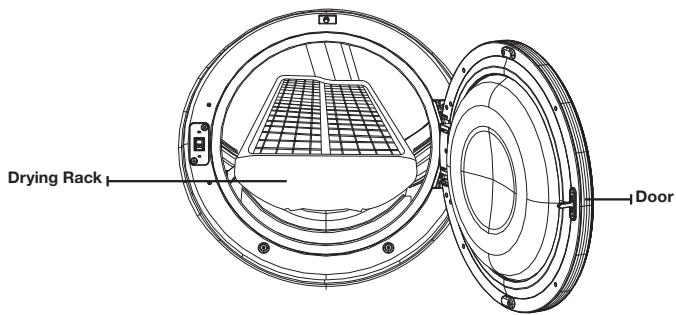
RACK DRY
Installing the drying rack
- Open the dryer door.
- Position the drying rack in the tumbler,, placing the front lip of the drying rack on the top of the lint filter.
- Place the rear legs in the two recessed areas of the dryer's back wall, and then push down the middle of the drying rack to fix in place.
- Place the items to be dried on the rack, leaving space between them so air can circulate.
- Close the dryer door.
- Press the Rack Dry button in the Time Dry cycle and then select the time according to the amount of moisture and the weight of the items. The drying rack can be also used at Air Fluff cycle.
| SUGGESTED ITEMS | SUGGESTED TEMP. SETTINGS |
| Washable sweaters(block to shape and lay flat on rack) | Extra Low ( Time Dry cycle) |
| Stuffed toys(cotton or polyester fiberfilled) | Extra Low ( Time Dry cycle) |
| Stuffed toys(foam or rubber-filled) | Air Fluff |
| Foam rubber pillows | Air Fluff |
| Sneakers | Air Fluff |

Drying foam rubber, plastic, or rubber on a heat setting may cause damage to the items and lead to a fire hazard.
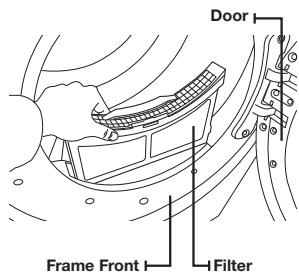
CLEAN THE LINT FILTER
• After each load.
• To shorten drying time.
• To operate more energy efficiently.

Do not operate your dryer without the lint filter in place.
LOAD THE DRYER PROPERLY
- Place only one washload in your dryer at a time.
- Mixed loads of heavy and lightweight fabrics will dry differently, which may result in lightweight fabrics being dry while heavy fabrics remain damp at the end of a drying cycle.
- Add one or more similar items to your dryer when only one or two articles of clothing need drying. This improves the tumbling action and drying efficiency.
- Overloading restricts tumbling action, resulting in uneven drying as well as excessive wrinkling of some fabrics.
GETTING STARTED
- Load your dryer loosely – DO NOT overload.
- Close the door.
- Select the appropriate cycle and options for the load.
- Press the Start/Pause button.
- The dryer indicator light will illuminate.
- The estimated cycle time will appear in the display. The time may fluctuate as humidity levels fluctuate in the dryer.

- When the cycle is complete, "End" will appear in the display.
- Pressing Power cancels the cycle and stops your dryer.
- The Drying, Cooling, and Wrinkle Prevent indicator lights will illuminate during those portions of the cycle.

Do not place anything on top of your dryer while it is running.

Operating instructions, tips
VENT SENSOR
Your Samsung dryer is equipped with a Vent Sensor, which detects and notifies you when it is time to clean the ductwork. Keep your dryer safe and efficient by cleaning the ducts when prompted.
The Vent Sensor detects any duct blockages
You can figure out whether there is a duct blockage from the “Vent Sensor 📋” lamp of the digital display.
| Level | Message | Status | Solution |
| 0 | The “Vent Sensor” lamp is turned off. | The ductwork is free from blockages. | - |
| 1 | The “Vent Sensor” lamp illuminates. | When a part of the duct or the lint filter is blocked by lint or a foreign object. When the resistance is high because the duct is too long or bent. | Check the duct connection and shorten the duct and straighten it if necessary.Check the lint filter or the duct and clean it if necessary. |
| 2 | The “Vent Sensor” lamp blinks. | When the duct is blocked by lint or a foreign object. When the resistance is very high because the duct is too long or bent excessively. | Check the duct connection and shorten the duct and straighten it if necessary.Check the lint filter or the duct and clean it as soon as possible. |
In the LEVEL 2 state, this lamp blinks for 3 hours after the completion of the cycle. (If the wrinkle prevention function is activated, this message is displayed for up to 3 hours.)
If the power button is pressed or the door is opened, the power is immediately turned off.

For more information about the duct installation, please refer to the “Ducting requirements” section on page 13.
- Although the dryer is available even if the blockage message is displayed, the drying time may be extended.
- If the LEVEL 1 message is displayed the first time the dryer is run after the installation, check the connection and clean the duct. If the LEVEL 1 message appears even after you have checked and cleaned the ducts, this may indicate that there are some restrictions of the duct due to the length, condition, etc.
If this occurs, you can use the dryer normally and no countermeasures need to be taken. However, the drying time may be extended or the drying performance may be degraded.
SETTING UP SMART CONTROL AND SMART MONITORING
Connect a wired/wireless router or modem and the dryer through a wireless connection, connect to www.samsungsmartappliance.com and then register the dryer with the Smart Control, the Smart Monitoring service.
The Smart Control function of the electronic model contains the Smart Monitoring function of gas model,
Any actions on your dryer will turn off the Smart Control Function.(Opening Door, Tapping the LCD panel, Pushing Buttons, Etc...)
This product does not contain a wireless router.
Configuring wireless router/modem
- This product supports DHCP (Dynamic Host Configuration Protocol). If you wants to use an existing wireless router/modem, you must turn on the router/modem's DHCP server or function.
- Set the channel for the connection with the wireless router/modem to a channel that is not being used.
- The dryer supports the WEP, TKIP or TKIP AES encryption types only. Other Wi-Fi encryption types are not supported.
- The quality of the wireless network may be affected by the surrounding environment.
- If your Internet service provider has registered and fixed the MAC address (the unique identification number of a device) of your PC or modem, you may not be able to connect the dryer to the Internet. Please ask your Internet service provider about the procedures to connect a device (e.g. dryer) other than a computer to the Internet. If your Internet service provider requires an ID and password to connect to the Internet, you may not be able to connect the dryer to the Internet. In this case, you have to enter the ID and password to connect to the Internet.
You may not be able to connect to the Internet due to a firewall. In this case, ask your Internet service provider for assistance. If you cannot connect the dryer to the Internet even after contacting your Internet service provider, please contact a Samsung Electronics dealer or service center.
Check before installation
- For the procedures to install a normal wired/wireless sharer, refer to the user manual of the corresponding wireless router/modem.
• Samsung dryers only support Wi-Fi 2.4Ghz. - Samsung dryers support IEEE 802.11 b/g/n and Wi-Fi Direct (IEEE802.11n is recommended).
- If the wireless router/modem is not Wi-Fi certified, it cannot be connected to the dryer.
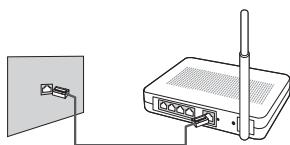
natural_image
Diagram showing a wireless router connected to a separate cable or socket (no text or symbols present)Operating instructions, tips
Connecting to the network using the WPS setting

Your Samsung dryer uses Wi-Fi Protected Setup/Push Button Configuration WPS(PBC) as the primary method of connecting to a wireless router or modem. If your router or modem is WPS compliant and has a WPS button, you can easily connect your washer to your router/modem.
- Press and hold both the Temp. and Start/Pause buttons for 3 seconds.
- Turn the Cycle Selector until "UP" is displayed on the display panel, and then press the Start/Pause button.

If the connection is not established within 5 minutes, "FUP" is displayed on the display panel.
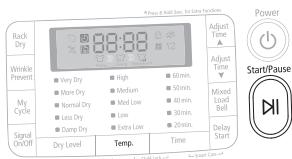
- Press and hold the WPS button on the wireless router/modem within 120 seconds to run the WPS function. If the WPS function runs, the wireless router/modem automatically fetches the necessary information from the dryer and the dryer is automatically connected to the Internet through the wired/wireless router/modem.
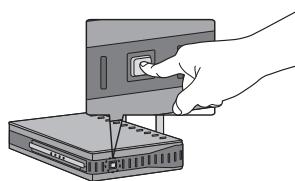
natural_image
Illustration of a hand inserting a device into a rack (no text or symbols visible)
- The way the WPS function runs on your wireless router/modem may differ depending on the manufacturer. Refer to the user manual of your router/modem for details.
- Even after the WPS setup is complete, it may take some time until the actual connection is established and an IP address is allocated through through DHCP (up to 5 minutes).

- Note that if you use a wireless router/modem that is not WPS-certified, the dryer may not be connected through Wi-Fi or another device that was connected to the wireless router/modem may be disconnected.
-
Please note that for some wireless router/modem, if you press and hold the WPS button for some time, the settings of the router/modem may be reset.
-
If the dryer and the wireless router/modem are properly connected, the indicator blinks on the display panel for 30 seconds.
- Press and hold the Signal On/Off button for 3 seconds to finish the Smart Control connection setup. When the setup is completed normally, the indicator blinks on the display panel accompanied by a beeping sound.

If you press and hold the Signal On/Off button for 3 seconds when the dryer and the wired/wireless sharer are not properly connected, the invalid button sound is heard and the Smart Control connection setup is not completed.
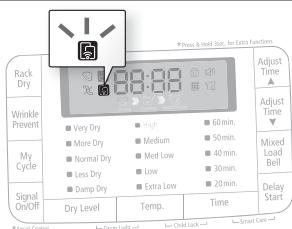
Connecting to the network using the Samsung Laundry App
- Press and hold both the Temp. and Start/Pause buttons for 3 seconds.
- If "AP" is displayed on the display panel, press the Start/Pause button.
If the connection is not established within 5 minutes, "FAP" is displayed on the display panel.
Operating instructions, tips
USING THE MOBILE APP (ANDROID)
Downloading the phone application
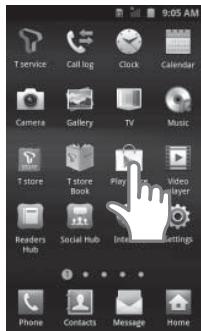
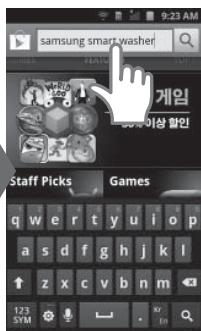
- Touch and bring up the applications menu on your phone. Then find and open the "Play Store" icon.
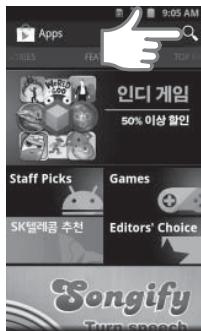
- Once the "Play Store" has been open, do a search.
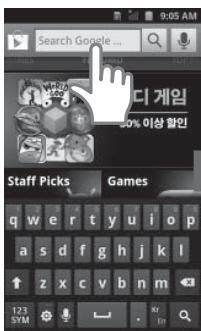
- Once the search box appears type in "Samsung Smart Washer".
40_ Operating instructions, tips
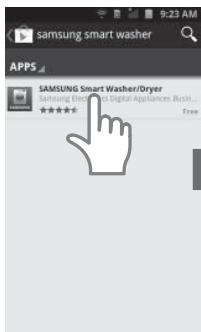
- Once the search is complete the App "SAMSUNG Smart Washer/Dryer" will be displayed. You need to download this App to your phone.

Make sure the app changes from "Free" to "Installed"
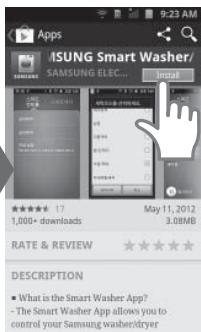
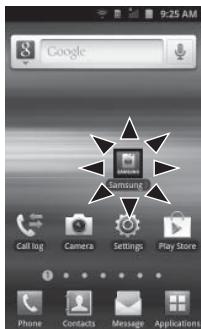
- Once the phone app has been downloaded to your phone, you are now ready to set up the washer Wi-Fi control.
STEP 1
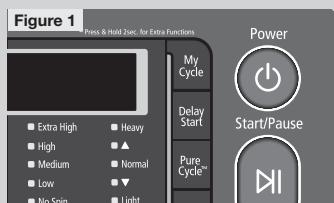
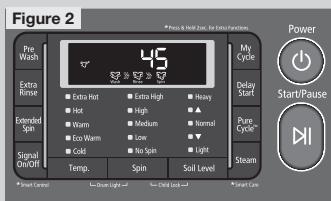
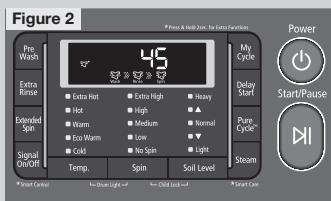
You need to first press the power button to activate the your machine. You can activate the machine to any wash cycle. (See figures 1\~2)
STEP 2
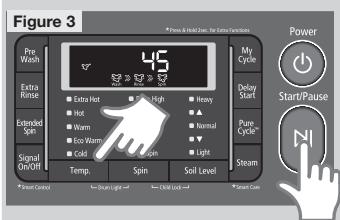
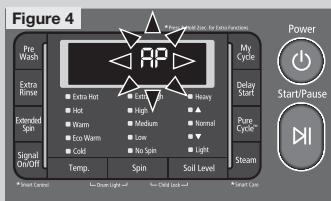
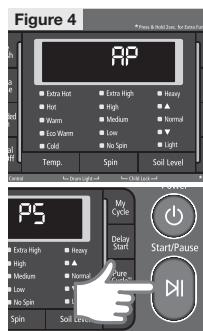
After you activate the machine, press the Temp & Start/Pause buttons simultaneously for 5 seconds. After 5 seconds the "AP" menu appears on the LED screen. (See figures 3\~4)
Operating instructions, tips
STEP 3
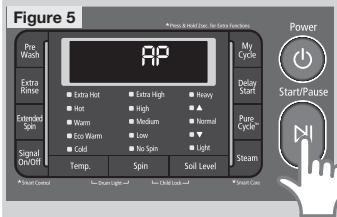
After the AP menu appears on the LED screen, wait approximately 1 minute and press the Start/Pause button. Once the Start/Pause button is pressed the "AP" displayed on the LED screen should start to blink.
It will take a minute or so for the Wi-Fi module to get ready. So if the you press the Start/Pause and the “AP” doesn’t blink try again after a moment. (See figure 5)
STEP 4
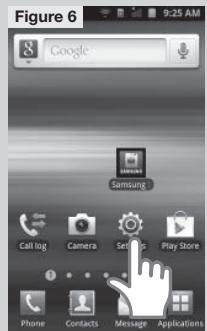
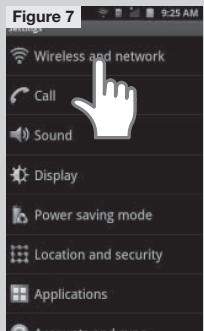
Once the “AP” is blinking go to your mobile phone and press the “Settings” icon. Once the settings menu appears press the wireless and network section. (See figures 5\~7)
STEP 5
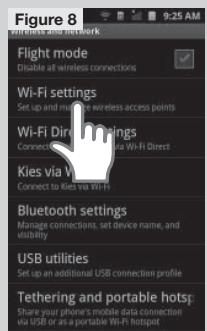
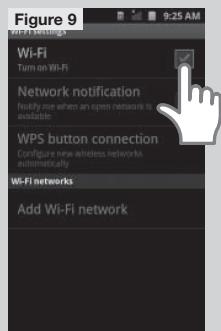
After selecting the wireless and network select Wi-Fi setting. Then turn on the Wi-Fi. (See figures 8\~9)
42_ Operating instructions, tips
STEP 6
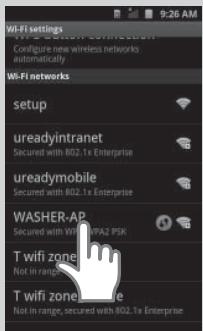
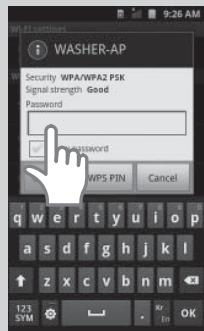
Once the list of available networks appears, select the network to be used and enter the password if necessary.
STEP 7
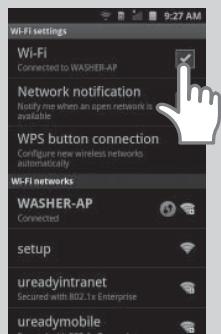
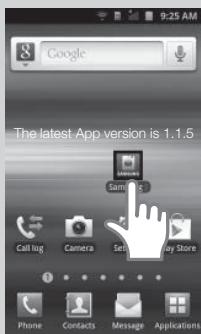
Once you are connected to the selected network go back to the applications screen on your mobile phone. Once you are in the phones application screen touch the Samsung icon "SAMSUNG Smart Washer/Dryer" that was downloaded at the beginning of this process.
STEP 8
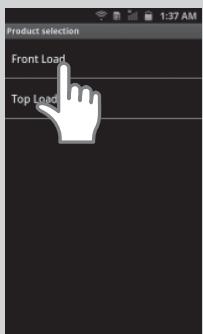
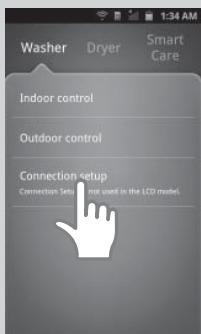
After opening the Samsung app, select "Front Load" and then "Connection Setup".
Operating instructions, tips
STEP 9
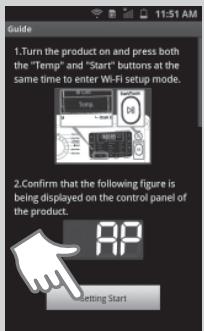
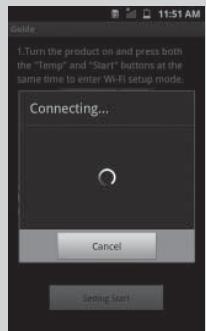
Once the mobile app is open select the “Setting Start” key.

The Wi-Fi indicator will blink on & off on the phone several times.
STEP 10
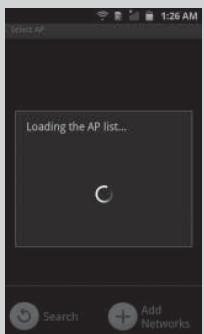
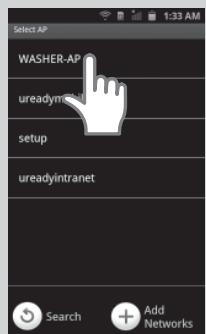
Once the unit starts connecting the phone will load the AP list. When the AP list is loaded you need to select the network.

Please make sure the app and smart phone are connected to the same network/wireless AP.
STEP 11
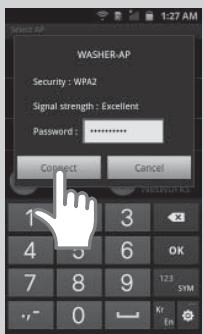
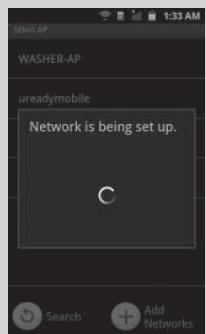
After selecting the network you need to enter your password. Once you enter your password select "Connect". The unit start setting up the network. This process delivers the connection information of the "AP" that is connected to the mobile phone to the product.
STEP 12
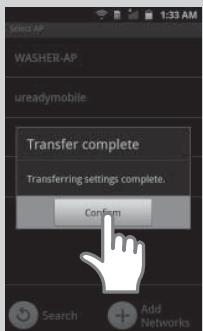
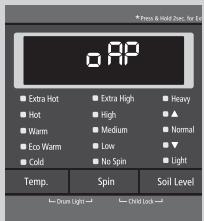
When the network is setup the unit will display "Transfer complete". After the transfer is completed select "Confirm". The unit will then display "oAP". The phone is now connected to the machine through the network.
STEP 13
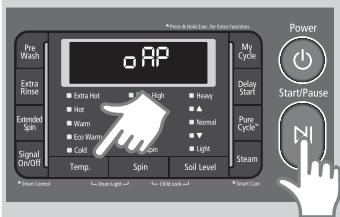
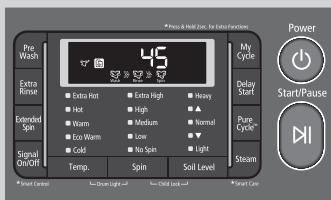
After the phone is connected to the machine, press the Temp & Start/Pause buttons simultaneously for 5 seconds. After 5 seconds the original wash cycle will be displayed on the LED screen.
STEP 14
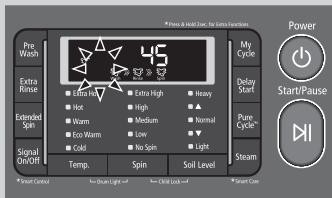
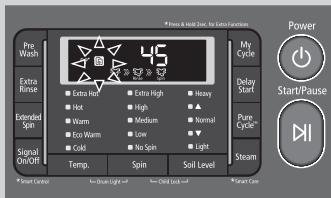
After the wash cycle has been displayed wait approximately 1 minute. You will then see the Wi-Fi icon start to blink.
STEP 15
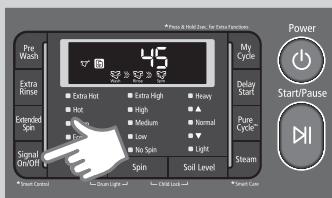
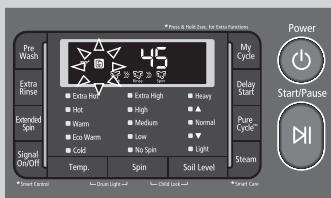
Once the Wi-Fi icon is displayed press and hold the "Signal" for 3 seconds. The Wi-Fi icon will stop blinking. The machine is now ready to run the device certification.
Operating instructions, tips
Device certification
- The “Device Certification” only needs to be run with the initial setup. Touch the “Indoor Control” tab to search for the washer’s name. Once the washer ‘s name is displayed touch tab.
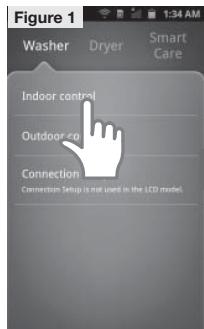
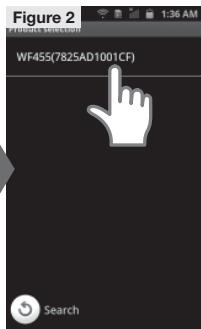
- Verify the that the Wi-Fi icon is not blinking. Press the Temp & Start/Pause buttons simultaneously for 5 seconds. "AP" will now be displayed.
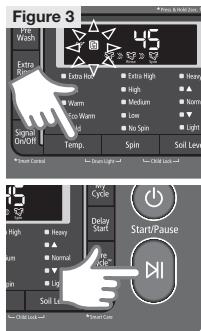
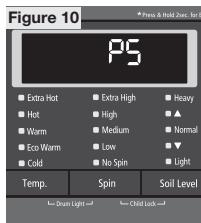
- Once the "AP" is displayed you need to turn the knob counter clockwise until "PS" is displayed. After the "PS" is displayed press the Start/Pause button.
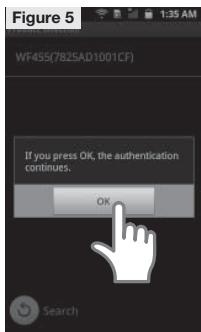
- After you the touch the washer name tab you need to touch the confirm tab to proceed with the certification.
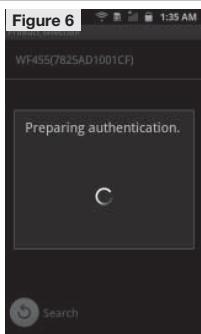
- After you touch the confirm tab you will now start preparing the certification.
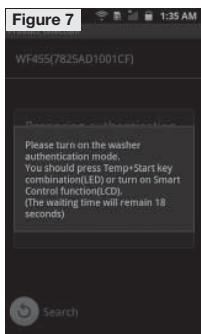
- Follow the instructions displayed on the phone to start the washer setup.
Operating instructions, tips
- Once the Start/Pause button is pressed the "PS" will start to blink. Once it starts blinking the phone will automatically start to connect.
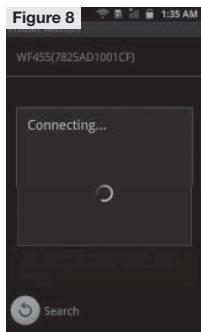
- The washer name will be displayed once again. You need to press this tab to display the "PS".
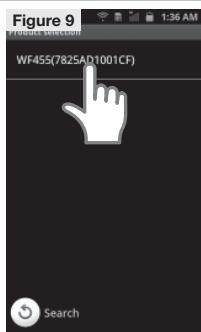
- After you touch the washer name tab, "PS" will be displayed.
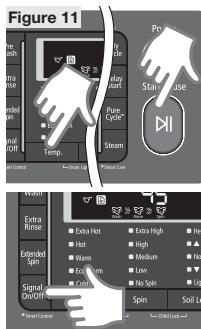
- After the "AP" is displayed, press the Temp & Start/Pause buttons simultaneously for 3 seconds. Now press and hold the Signal button to stop the Wi-Fi icon from blinking.
Once the Wi-Fi connection is established, begin at figure #8 to reconnect to the same network/wireless AP.
48\_ Operating instructions, tips
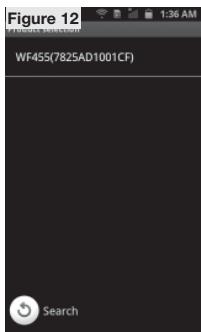
- Press the washer name tab to connect to the washer.
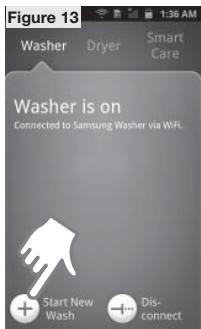
- The washer is now connected. Touch the "Start New Wash" tab and you can now control the washer from your phone.
- The Device Certification is now completed and the washer is connected to your Smartphone.
Operating instructions, tips
Using the mobile app
STEP 1
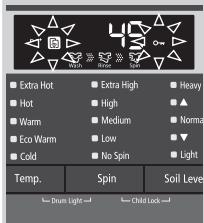
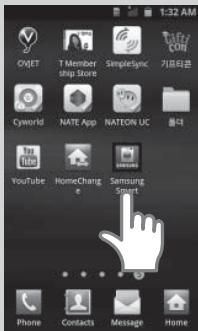
Check to make sure the Wi-Fi icon is not blinking. If the icon is blinking press and hold the Signal button until the icon stops blinking. Once the door lock icon is activated the unit is ready. Now press the "SAMSUNG Smart Washer/Dryer" icon.
STEP 2
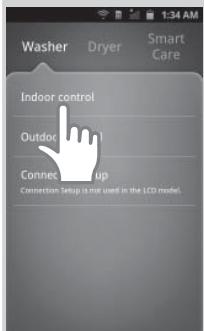
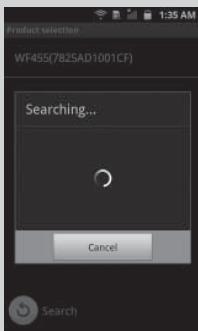
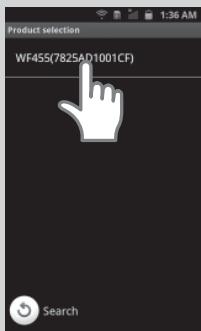
After you touch the “SAMSUNG Smart Washer/Dryer” icon the will search for the washer. Once the phone connects the washer, the washer ‘s name, or “MAC” will appear. Now touch the washer name.
STEP 3
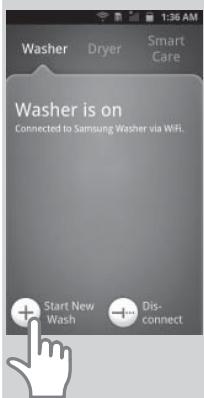
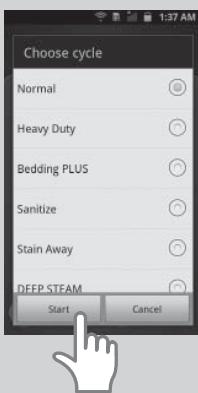
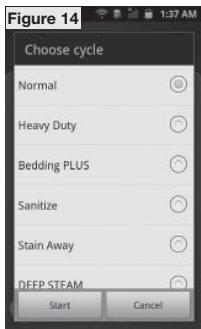
Once the connection is established, touch the "Start New Wash" tab. The unit should display the "Choose Cycle" screen. Once Choose Cycle screen is displayed touch the "Start" tab at the bottom left.
50\_ Operating instructions, tips
STEP 4
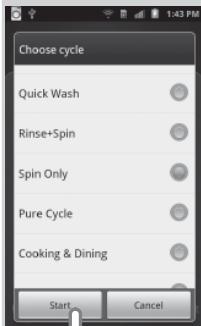
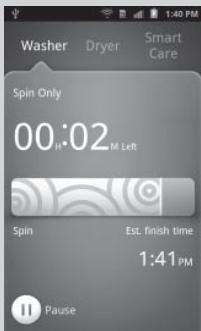
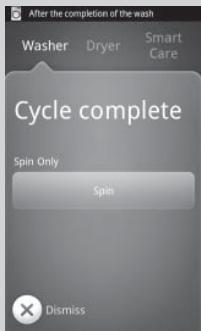
Now touch the “Start” button and activate the wash cycle. You can monitor the wash cycle to check the status of the cycle. Once the cycle is finished the phone will display “Cycle Complete”.

Operating instructions, tips
USING THE MOBILE APP (IOS)
Downloading the phone application
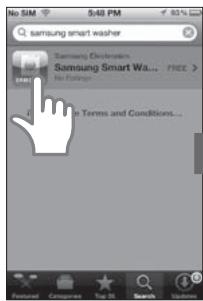
- Find and open the "App Store" icon.
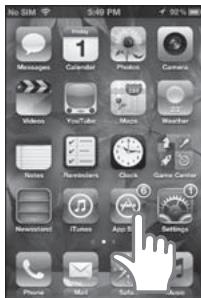
- Once the "App Store" has been open, do a search.
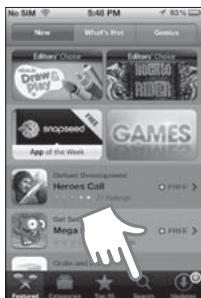
- Once the search box appears type in "Samsung Smart Washer".
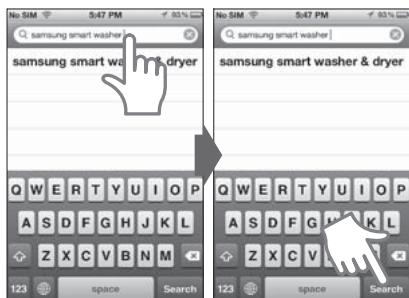
52_ Operating instructions, tips
- Once the search is complete the App "SAMSUNG Smart Washer/Dryer" will be displayed. You need to download this App to your phone.

Make sure the app changes from "Free" to "Installed"
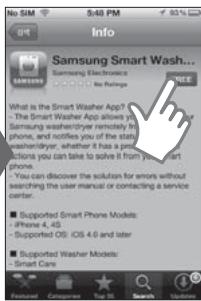
- Once the phone app has been downloaded to your phone, you are now ready to set up the washer Wi-Fi control.
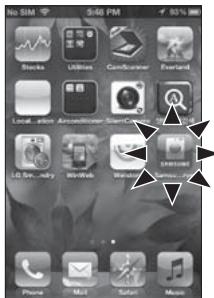
STEP 1
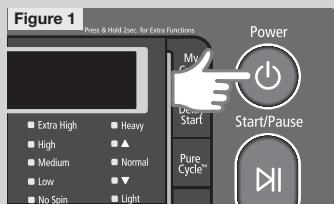
You need to first press the power button to activate the your machine. You can activate the machine to any wash cycle. (See figures 1\~2)
STEP 2
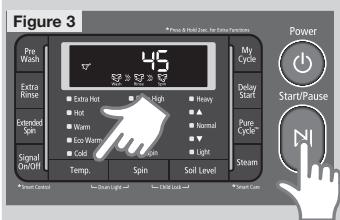
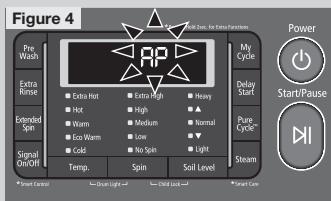
After you activate the machine, press the Temp & Start/Pause buttons simultaneously for 5 seconds. After 5 seconds the "AP" menu appears on the LED screen. (See figures 3\~4)
Operating instructions, tips
STEP 3
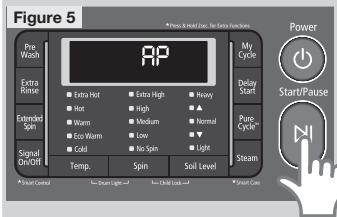
After the AP menu appears on the LED screen, wait approximately 1 minute and press the Start/Pause button. Once the Start/Pause button is pressed the "AP" displayed on the LED screen should start to blink.
It will take a minute or so for the Wi-Fi module to get ready. So if the you press the Start/Pause and the “AP” doesn’t blink try again after a moment. (See figure 5)
STEP 4
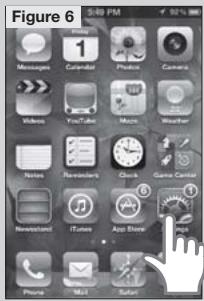
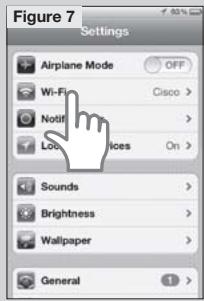
Once the “AP” is blinking go to your mobile phone and press the “Settings” icon. Once the settings menu appears press the Wi-Fi icon. (See figures 5\~7)
STEP 5
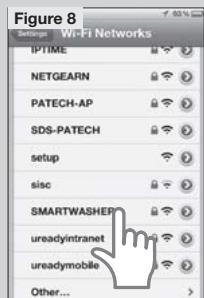
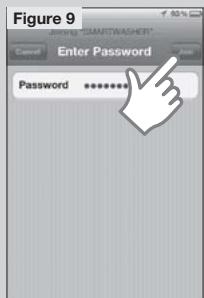
You can see "SMARTWASHER" in the Wi-Fi list. Select the SMARTWASHER and input the password(WASHER2012).
You have to input as Capital.
After typing the password, select the join button. (See figures 8\~9)
STEP 6
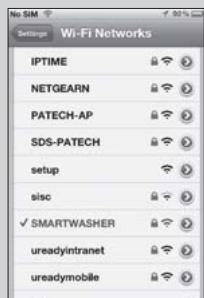
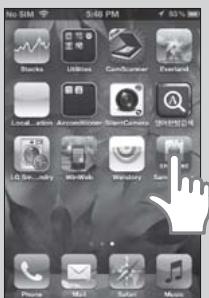
Once you are connected to the selected network go back to the applications screen on your mobile phone. Once you are in the phones application screen touch the Samsung icon “SAMSUNG Smart Washer/Dryer” that was downloaded at the beginning of this process.
54\_ Operating instructions, tips
STEP 7
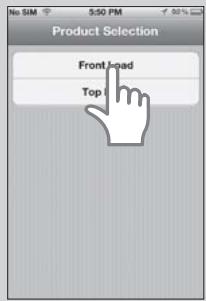
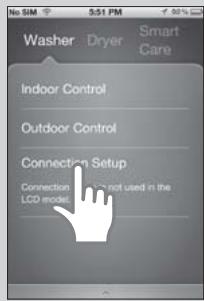
After opening the Samsung app, select "Front Load" and then "Connection Setup".
STEP 8
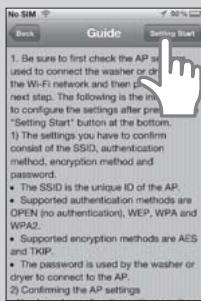
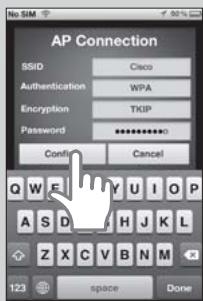
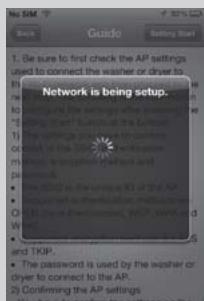
Tap the “Setting Start” and input your SSID, Authentication Type, Encryption Type, password of AP. This process delivers the connection information of the “AP” that is connected to the mobile phone to the product.

Check the security option of the router and then set the wireless network configuration again as below.
- select the Security mode : WPA and Encryption:TKIP
- select the Security mode : WPA2 and Encryption:AES
- refer to wireless router manual for the security option of the wireless router.
STEP 9
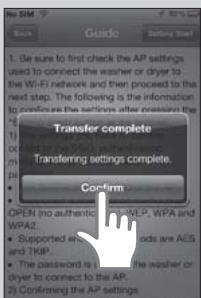
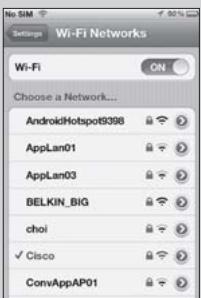
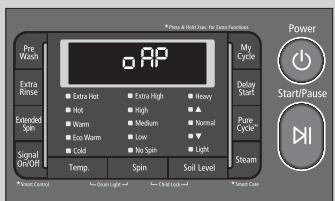
When the network is setup the unit will display “Transfer complete”. After the transfer is completed select “Confirm”. The unit will then display “oAP”. The phone is now connected to the machine through the network.
Operating instructions, tips
STEP 10
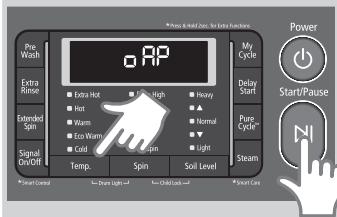
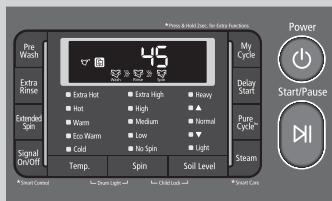
After the phone is connected to the machine, press the Temp & Start/Pause buttons simultaneously for 5 seconds. After 5 seconds the original wash cycle will be displayed on the LED screen.
STEP 11
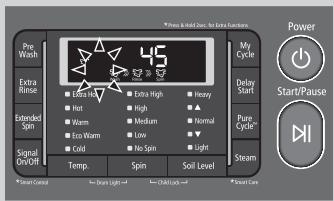
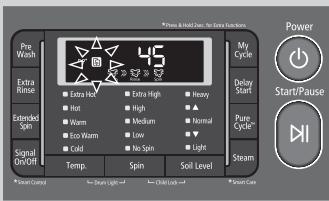
After the wash cycle has been displayed wait approximately 1 minute. You will then see the Wi-Fi icon start to blink.
STEP 12
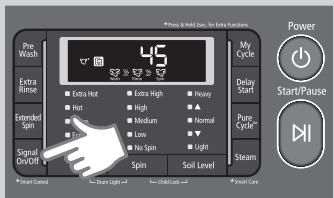
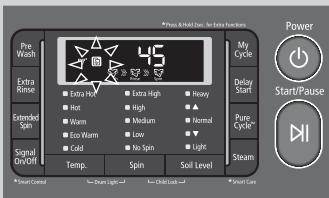
Once the Wi-Fi icon is displayed press and hold the "Signal" for 3 seconds. The Wi-Fi icon will stop blinking. The machine is now ready to run the device certification.
Device certification
- The “Device Certification” only needs to be run with the initial setup. Touch the “Indoor Control” tab to search for the washer’s name. Once the washer ‘s name is displayed touch tab.
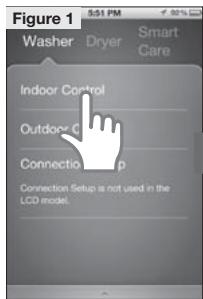
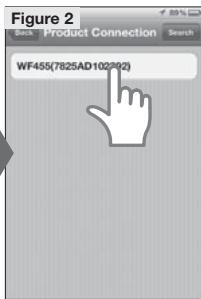
- Verify the that the Wi-Fi icon is not blinking. Press the Temp & Start/Pause buttons simultaneously for 5 seconds. "AP" will now be displayed.
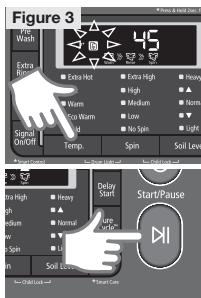
- Once the "AP" is displayed you need to turn the knob counter clockwise until "PS" is displayed. After the "PS" is displayed press the Start/Pause button.
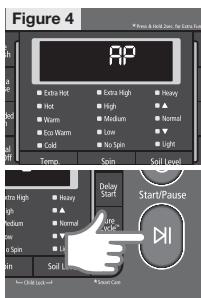
- After you the touch the washer name tab you need to touch the confirm tab to proceed with the certification.
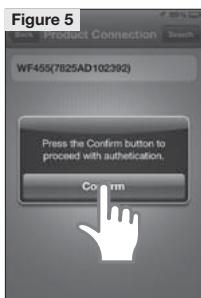
Operating instructions, tips _57
Operating instructions, tips
- After you touch the confirm tab you will now start preparing the certification.
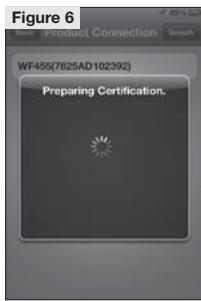
- Follow the instructions displayed on the phone to start the washer setup.
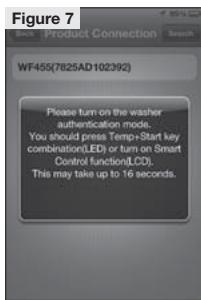
- Once the Start/Pause button is pressed the "PS" will start to blink. Once it starts blinking the phone will automatically start to connect.
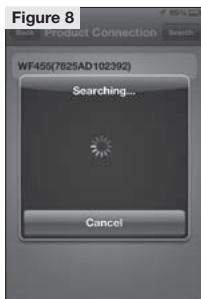
- The washer name will be displayed once again. You need to press this tab to display the "PS".
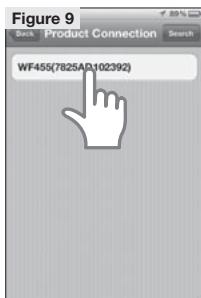
58\_ Operating instructions, tips
- After you touch the washer name tab, "PS" will be displayed.
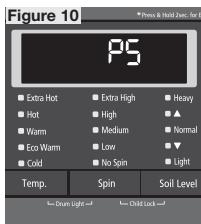
- After the "AP" is displayed, press the Temp & Start/Pause buttons simultaneously for 3 seconds. Now press and hold the Signal button to stop the Wi-Fi icon from blinking.
Once the Wi-Fi connection is established, begin at figure #8 to reconnect to the same network/wireless AP.
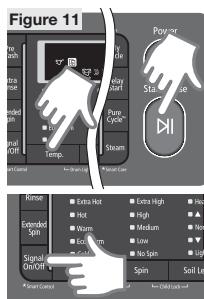
- Press the washer name tab to connect to the washer.
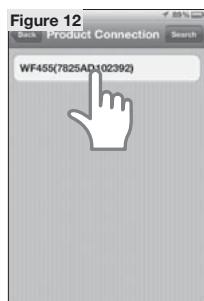
- The washer is now connected. Touch the "Start New Wash" tab and you can now control the washer from your phone.
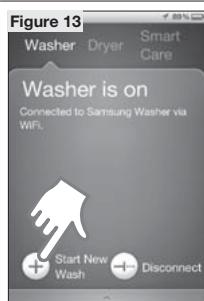
Operating instructions, tips
- The Device Certification is now completed and the washer is connected to your Smartphone.
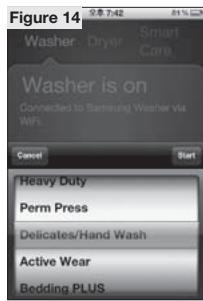
Using the mobile app
STEP 1
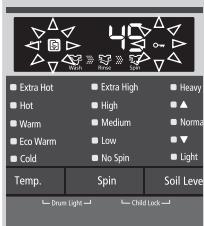
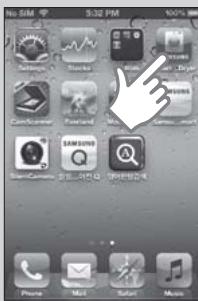
Check to make sure the Wi-Fi icon is not blinking. If the icon is blinking press and hold the Signal button until the icon stops blinking. Once the door lock icon is activated the unit is ready. Now press the “SAMSUNG Smart Washer/Dryer” icon.
STEP 2
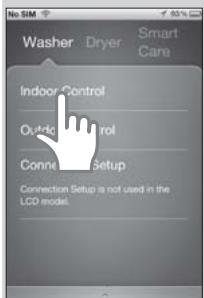
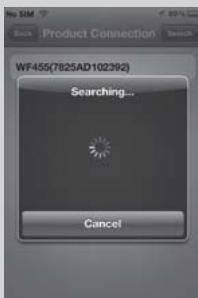
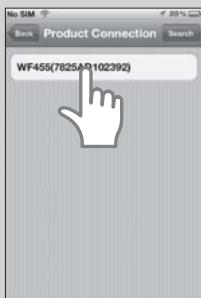
After you touch the “SAMSUNG Smart Washer/Dryer” icon the will search for the washer. Once the phone connects the washer, the washer ‘s name, or “MAC” will appear. Now touch the washer name.
60\_ Operating instructions, tips
STEP 3
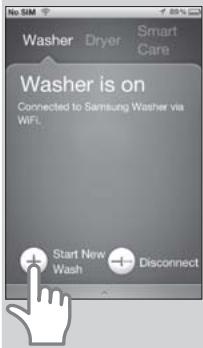
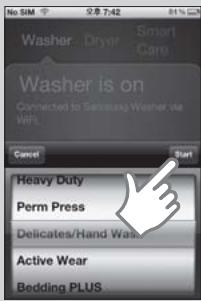
Once the connection is established, touch the "Start New Wash" tab. The unit should display the "Choose Cycle" screen. Once Choose Cycle screen is displayed touch the "Start" tab.
STEP 4
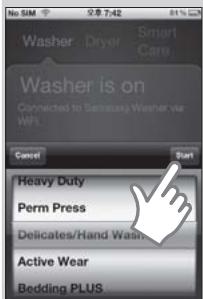
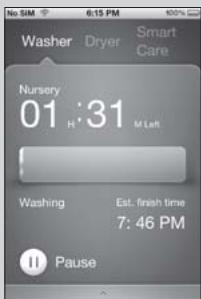
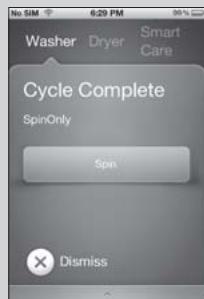
Now touch the “Start” button and activate the wash cycle. You can monitor the wash cycle to check the status of the cycle. Once the cycle is finished the phone will display “Cycle Complete”.
Operating instructions, tips
REGISTERING YOUR DRYER
-
Access Samsung Smart appliance website. (http://www.samsungsmartappliance.com)
-
Enter your User ID and Password to log in.

If you don't have an account, press "Create a Samsung account" and fill in the form to become a member.
- Select "My page" → "My page".
![SMART APPLIANCE Device Settings My Page Customer Support My Device No Device There is no registered devices. You must not register a device based on to use the device. How can do "My Page" to report this device at the last session of a device [My Page is available at a device - [Self-Added device] ] Notice Copyright ©2017 Samsung Electronics Co., Ltd. (All rights reserved)](/content/2020/04/22156/images/1e813113b61f439da2ff4c4ea1acbaf1043f35bde438acbe0cf3c22c97b03b22.jpg)
- Select "Add device".
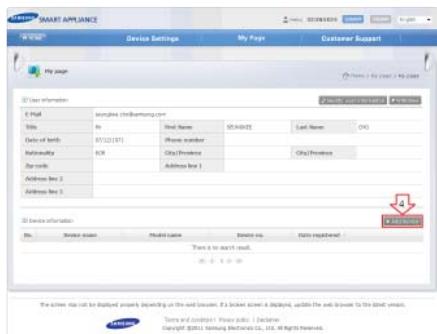
- Find the MAC number on your dryer and enter it into the device page. On your dryer:
1) Press and hold both the Temp., and Start/Pause buttons for 3 seconds.
2) Turn the Cycle Selector until "Ad" is displayed on the display panel and press the Start/Pause button. The MAC address appears.
3) Find out 12 Hexadecimal Address, pressing Start/Pause buttons for 2 digit & text.
- Click "Certify device".
![SMART APPLIANCE Device Settings My Price Customer Support Add My device ID to identify devices No conditions Microsoft Devices How must be authorized before writing the product. 1. Top the HAC address of your purchased product into [Device No.] Web. 2. Dot Device names buttons. 3. Not as smart devices. 4. Turning on the Smart Control according to the product. MAYO, MAYO? Select Smart Control buttons at the right of the main screen. MAYO, MAYO, MAYO? 1. Make and end with the Tamp, and the StartPoint buttons at the same time for 7 seconds. 2. Use all users and help users call out a warning app. 3. Turn the Click Button and DVD a darkened on the Display panel and pass the StartPoint buttons. 4. Do the StartPoint buttons. Device no. Details button Set To: On: 0 The following device has been certified. Press the C# author to create a device registration. Certified device: Sony LCD The answer must not be displayed properly depending on the next neighbor if a broker knows. Copyright ©2011 Samsung Electronics Co., Ltd. All rights reserved.](/content/2020/04/22156/images/d723a594c7c05cb2566c8488f8c851af46b14948d4ec5c61581e508a94e7695a.jpg)
- Press and hold both the Temp., and Start/Pause buttons for 3 seconds.
- Turn the Cycle Selector until PS is displayed on the display panel, and then the Start/Pause button.
- When certify device checking window appears, click "Ok".

If the dryer you are registering is already registered by other users, a window will come on asking whether you want to delete the usage authority of the existing users or not.
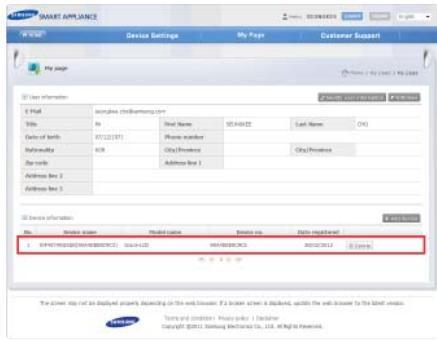
- After the registration of the dryer is completed, you can view the registered dryer on the device information list.
Mac Address : Mapping Table of 7-Segment
| [2TW0] |  | [TBWY] | [8AYH] | [3Z60] | [DCAS] | [OSHC] | [ODOK] | [ITYY] |  |
| 0 | 1 | 2 | 3 | 4 | 5 | 6 | 7 | 8 | 9 |
| [W6ZT] | [X6AS] |  |  |  | [3A32] | ||||
| A | B | C | D | E | F |
| Mac Address Example | Mac Label | 90A4DE89B2D3 |
| 7-Segment | 908486896283 |
Care and Cleaning
CONTROL PANEL
Clean with a soft, damp cloth. Do not use abrasive substances.
Do not spray cleaners directly on the panel.
The control panel finish may be damaged by some laundry pre-treatment soil and stain remover products.
Apply such products away from your dryer and wipe up any spills or overspray immediately.
TUMBLER
Remove any stains caused by crayon, ink, or fabric dye (from new items such as towels or jeans) with an all-purpose cleaner.
Tumble old towels or rags to remove any remaining stain or cleaning substance.
Once these steps are followed, stains may still be visible, but should not transfer to subsequent loads.
STAINLESS STEEL TUMBLER
To clean the stainless steel tumbler, use a damp cloth with a mild, non-abrasive cleaner suitable for stainless steel surfaces.
Remove the cleaner residue and dry with a clean cloth.
DRYER EXTERIOR
Clean with a soft, damp cloth. Do not use abrasive substances.
Protect the surface from sharp objects.
Do not place any heavy or sharp objects or a detergent box on the dryer. Keep them on the purchased pedestal or in a separate storage box. This may scratch or damage the top cover of the dryer.
Since the entire dryer has a high-gloss finish, the surface can be scratched or damaged.
Avoid scratching or damaging the surface when using the dryer.
DRYER EXHAUST SYSTEM
Should be inspected and cleaned yearly to maintain optimum performance.
The outside exhaust hood should be cleaned more frequently to ensure proper operation.
64_Care and Cleaning
Special laundry tips
SPECIAL LAUNDRY TIPS
Please follow the care label or manufacturer's instructions for drying special items. If care label instructions are not available, use the following information as a guide.
| Bedspreads & Comforters | Follow the care label instructions or dry on the Bedding Plus.Make sure the item is thoroughly dry before using or storing.May require repositioning to ensure even drying. |
| Blankets | Use Normal cycle and dry only one blanket at a time for best tumbling action.Make sure the item is thoroughly dry before using or storing. |
| Curtains & Draperies | Use the Perm Press cycle and Low or Extra Low temperature to help minimize wrinkling.Dry these in small loads for best results and remove as soon as possible. |
| Cloth Diapers | Use the Normal cycle and the High temperature settings for soft,fluffy diapers. |
| Down-filled Items (jackets, sleeping bags, comforters, etc.) | Use the Normal cycle and the Low or Extra Low temperature setting.Adding a couple of dry towels shortens drying time and absorbs moisture. |
| Foam Rubber (rug backs, stuffed toys, shoulder pads, etc.) | DO NOT dry on a heat setting. Use the Air Fluff cycle (no heat).WARNING – Drying a rubber item with heat may damage it or be a fire hazard. |
| Pillows | Use the Normal cycle.Add a couple of dry towels and a pair of clean sneakers to help the tumbling action and to fluff the item.DO NOT dry kapok or foam pillows in dryer. Use the Air Fluff cycle. |
| Plastics (shower curtains, outdoor furniture covers, etc.) | Use the Air Fluff cycle or the Time Dry cycle and the Low or Extra Low temperature settings depending on the care label instructions. |
THINGS TO AVOID PUTTING IN THE DRYER:
• Fiberglass items (curtains, draperies, etc.).
- Woolens, unless recommended on the label.
• Vegetable or cooking oil-soaked items.
Troubleshooting
CHECK THESE POINTS IF YOUR DRYER...
| PROBLEM | SOLUTION |
| Doesn't run. | Make sure the door is latched shut.Be sure the power cord is plugged into a live electrical outlet.Check the home's circuit breaker and fuses.Press the Start/Pause button again if the door is opened during the cycle. |
| Doesn't heat. | Check the home's circuit breaker and fuses.Select a heat setting other than Air Fluff.On a gas dryer, check that the gas supply is on.Clean the lint filter and exhaust duct.Dryer may have moved into the cool-down phase of the cycle. |
| Doesn't dry. | Check all of the above, plus...Be sure the exhaust hood outside the home can open and close freely.Check exhaust system for lint buildup. Ducting should be inspected and cleaned annually.Use a 4" rigid metal exhaust duct.Do not overload. 1 wash load = 1 dryer load.Sort heavy items from lightweight items.Large, bulky items like blankets or comforters may require repositioning to ensure even drying.Check that the dryer is draining properly to extract adequate water from the load.Load may be too small to tumble properly. Add a few towels. |
| Is noisy. | Check the load for objects such as coins, loose buttons, nails, etc.Remove promptly.It is normal to hear the dryer gas valve or heating element cycle on and off during the drying cycle.Be sure the dryer is leveled properly as outlined in the installation instruction.It is normal for the dryer to hum due to the high velocity of air moving through the dryer drum and exhaust system. |
| Dries unevenly. | Seams, pockets, and other similarly heavy areas may not be completely dry when the rest of the load has reached the selected dryness level. This is normal. Select the Very Dry setting if desired.If one heavy item is dried with a lightweight load, such as one towel with sheets, it is possible that the heavy item will not be completely dry when the rest of the load has reached the selected dryness level.Sort heavy items from lightweight items for best drying results. |
| Has an odor. | Household odors from painting, varnishing, strong cleaners, etc.may enter the dryer with the surrounding room air. This is normal as the dryer draws the air from the room, heats it, pulls it through the tumbler, and exhausts it outside.When these odors linger in the air, ventilate the room completely before using the dryer. |
| Shuts off before load is dry | Dryer load is too small. Add more items or a few towels and restart the cycle.Dryer load is too large. Remove some items and restart the dryer. |
| Lint on clothes | Make sure the lint filter is cleaned before every load. With some loads that produce high amounts of lint, it may be necessary to clean the filter during the cycle.Some fabrics are lint producers (for example, a fuzzy white cotton towel) and they should be dried separately from clothes that are lint trappers (for example, a pair of lack linen pants)Divide larger loads into smaller loads for dryingCheck pockets thoroughly before washing and drying clothes. |
| Garments still wrinkled after Wrinkle-Care | Small loads of 1 to 4 items work best.Load fewer garments.Load similar-type garments. |
| Odors remain in clothing after Refresh. | Fabrics containing strong odors should be washed in a normal cycle. |
| Water drips from nozzle when Steam-Care starts | This is steam condensation. The dripping water will stop after a short time. |
| Sprayed water is not visible during Steam-Care | Sprayed water is difficult to see when the door is closed |
Troubleshooting
INFORMATION CODES
Information codes may be displayed to help you better understand what is occurring with your Dryer.
| ERROR DISPLAY | MEANING | SOLUTION |
| tE | The thermistor resistance is very low or high. | Clean the screen or vent.If the problem continues, call for service. |
| tE3 | The resistance of the thermistor for the vent blockage detection is very low or very high. | Clean the screen or ventIf the problem continues, call for service. |
| HE | Invalid heating Temp when the dryer is running. | Call for service. |
| dE | Running the dryer with door open | Clean the door and then restart.If the problem continues, call for service. |
| bE2 | Invalid state of key. Circuit short for 30 secs. | Make sure a button is NOT being pressed continuously. Try restarting the cycle.If the problem continue, call for service. |
| FE | Invalid power source frequency | Try restarting the cycle.If the problem continues, call for service. |
| 2E | Electronic Control Problem (Over Voltage Error) | Call for service. |
| AE | Electronic Control Problem (Communication Error) | Call for service. |
| Et | Invalid state of Eeprom communication | Call for service. |
| AE4 | A communication error between the Wi-Fi PBA and the MAIN PBA | Call customer service. |
| AE3 | A A communication error between the DR Modem and the MAIN PBA | Call customer service. |
| AE5 | A A communication error between the LCD PBA and the MAIN PBA | Call customer service. |
| dF | Invalid door state for more than 256 milliseconds. | Call for service. |
For any codes not listed above, call 1-800-SAMSUNG (726-7864)
NETWORK SETUP Q&A
| QUESTION | ANSWER |
| The washer or dryer is not found in the smartphone app. | Check the power status of the access point(AP).Check if the smartphone is connected with Wi-Fi.Check if the Wi-Fi function of the washer or dryer is turned on.To refresh the screen, press “Configure” again.If the AP is installed too far away from the washer or dryer, the strength of the Wi-Fi signal may be weak. In this case, move the AP closer to the washer or dryer. |
| The washer or dryer can’t find the AP (access point). | Check the power status of the AP.Check if the Wi-Fi function of the washer or dryer is turned on.To refresh the screen, press “Configure” again.If the AP is installed too far away from the washer or dryer, the strength of the Wi-Fi signal may be weak. In this case, move the AP closer to the washer or dryer. Ensure that the number of the displayed antenna bars is at least 3.If the strength of the AP is low, the washer or dryer may not find it. Use a high performance AP if available. |
| There are more than one washer or dryer in the house.Do I have to install an AP for each of them? | You can install only one AP.I you want to one AP for each of the washer and dryer, select the corresponding AP for each of the products in the “Smart Washer” app.When both a washer and dryer are installed, they can be controlled through one AP. |
| What kind of AP (access poin) should I use? | Since the washer or dryer is controlled through the AP from the inside or outside of the house, we recommend a high performance AP.Use an AP with Wi-Fi certification mark.Since an AP with 2 or more antennas provides better performance, we recommend purchasing a wireless AP with 2 or more antennas. |
| How can I check if the AP is out of order? | Connect to the AP on a smartphone and check if you can connect to the Internet. If you can connect to the Internet, the AP is normal.Check if the LEDs on the AP are blinking. If all the LEDs are turned off, it indicates that the power is turned off.If the AP doesn’t seem to be working properly, request after-sales service. |
| I do not have a PC. Can I use the indoor and outdoor control features? | If the Internet can be accessed inside of the house, the feature is available. However, you have to sign up on the Samsung web site and register the product. |
| How many users can control a washer or dryer? | Multiple users can control the washer or dryer only if the “Smart Washer” app is authenticated, |
Troubleshooting
| QUESTION | ANSWER |
| What should I do to get the strongest Wi-Fi signal? | Install the AP near the washer or dryer is recommended. You can check the signal strength through the setup screen of the washer or dryer or a smartphone.Since network performance is seriously affected by a door or steel wall, install the washer or dryer in an open place. If there is door in front of the installed product, open the door when using the product.Do not place an object made with steel or glass in front of the front LCD of the washer since it blocks the radio signal.Note that the radio signal may be weakened or interfered with and the communication with the smartphone may fail when a microwave oven is used in the house.Install the washer or dryer so that the front of the product faces the AP if available. |
| How can I connect the washer or dryer with a smartphone stably? | When the signal strength that is displayed on the LCD of the washer or dryer is weak, the control may fail. For stable operation, the measures of signal strength should be as follows:At least 3 antenna bars should be displayed on the LCD of the washer or dryer.At least 3 antenna bars for the Wi-Fi connection should be displayed on the smartphone.When the signal strength is measured with a smartphone app that shows the Wi-Fi signal strength, the signal strength should be stronger than -65 dBm. (E.g. -60 dBm and -50 dBm are stronger than -65 dBm.) |
| What should I have to do when the number of the antenna bars that are displayed on the LCD of the washer or dryer is 1? | When the signal strength that is displayed on the LCD of the washer or dryer is weak, the control may fail. In this case, take the following measures for normal operation.Move the AP closer to the washer or dryer.(At least 3 antenna bars should be displayed in the network setup of the washer for proper operation.)Because an old AP may provide lower performance, use a new AP if available.Position the antenna of the AP so that the radio signal is more easily propagated. |
70_ Troubleshooting
FABRIC CARE CHART
The following symbols provide garment care direction. The Clothing care labels include symbols for washing, bleaching, drying, and ironing, or dry cleaning when necessary. The use of symbols ensures consistency among garment manufacturers of domestic and imported items. Follow care label directions to maximize garment life and reduce laundering problems.
| Wash Cycle | Special Instructions | Warning Symbols for Laundering | |||
 | Normal | (DAD) | Line Dry/ Hang to Dry | (DAD) | Do Not Wash |
| [KDCS] | Permanent Press / Wrinkle Resistant / Wrinkle Control | (DWR) | Drip Dry | (MDT) | Do Not Wring |
 | Gentle/Delicates | (DWD) | Dry Flat | (MWD) | Do Not Bleach |
| [4T2K] | Hand Wash | Heat Setting | Do Not Tumble Dry | ||
| Water Temperature** |  | High | (OHED) | No Steam (added to iron) | |
| (BHD) | Hot | [AKCB] | Medium | (EFTK) | Do Not Iron |
| (DDH) | Warm |  | Low | Dryclean | |
| (DDH) | Cold | (DHT) | Any Heat | (TS2) | Dry Clean |
| Bleach | (TWD) | No Heat/Air | (DWT) | Do Not Dry Clean | |
 | Any Bleach (when needed) | Iron-Dry or Steam Temperatures | Line Dry/ Hang to Dry | ||
 | Only Non-Chlorine (color-safe) Bleach (when needed) | [CHKH] | High | (HCAW) | Drip Dry |
| [30Z8] | Tumble Dry Cycle |  | Medium |  | Dry Flat |
| Normal | (TW4H) | Low | |||
| [DAATT] | Permanent Press/ Wrinkle Resistant/ Wrinkle Control | ||||
| [CDTC] | Gentle/Delicates | ||||
Water Temperature**
** The dot symbols represent appropriate wash water temperatures for various items. The temperature range for Hot is 105 – 125 °F (41 – 52 °C), for Warm 85 – 105 °F (29 – 41 °C) and for Cold 60 – 85 °F (16 – 29 °C). (Wash water temperature must be a minimum of 60 °F (16 °C) for detergent activation and effective cleaning.)
Appendix
PROTECTING THE ENVIRONMENT
This appliance is manufactured from recyclable materials. If you decide to dispose of this appliance, please observe local waste disposal regulations. Cut off the power cord so that the appliance cannot be connected to a power source. Remove the door so that animals and small children cannot get trapped inside the appliance.
DECLARATION OF CONFORMITY
This appliance complies with UL2158.
SPECIFICATIONS
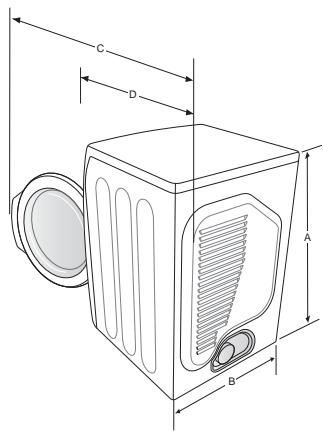
| TYPE | FRONT LOADING DRYER | |
| DIMENSIONS | A. Height | 39" (99.0 cm) |
| B. Width | 27" (68.6 cm) | |
| C. Depth with door open 90° | 51.65" (131.2 cm) | |
| D. Depth | 32.28" (82.0 cm) | |
| WEIGHT | 127.8 lb (57 Kg) | |
| HEATER RATING | 5300 W (Elec.)22000 BTU/hr (Gas) | |
72\_ Appendix
CYCLE CHART
(●: factory setting, ○: selectable)
| CYCLE | RECOMMENDED ITEMS | MAXIMUM AMOUNT | |
| Sensor Dry | Normal | Cottons, Work clothes, Linen, Mixed loads | |
| Heavy Duty | Heavy fabrics such as jean, Corduroys, Heavy work clothes | ||
| Perm Press | Shirts, Synthetic fabrics, Knits, Wrinkle-free cottons, Permanent | ||
| Bedding PLUS | Bulky items such as blankets, Sheets, Comforters, Pillows | ||
| Delicates | Underwear, Blouses, Lingerie | ||
| Sanitize | Bedding, Curtains, Children` clothing | ||
| Eco Normal | Cottons, Work clothes, Linen | ||
| Wool | For machine washable and tumble dryable wool only (Maximum amount : 3lb) | ||
| Manual Dry | Air Fluff | Form, Rubber, Plastic | |
| Quick Dry | Small loads | ||
| Time Dry | Any load | ||
| Steam Cycles | Wrinkle Away | Shirts, Trouser, Blouses | |
| Refresh | Shirts, Trouser, Comforter, Pillows | ||
| CYCLE | FUNCTIONS | OPTIONS | ||||||||
| Sensor Dry Level | Temp. Control | Time | Wrinkle Prevent | Delay Start | ||||||
| High | Medium | Medium Low | Low | Extra Low | ||||||
| Sensor Dry | Normal | Normal dry | ● | ○ | ○ | ○ | ○ | ○ | ○ | |
| Heavy Duty | Normal dry | ● | ○ | ○ | ○ | ○ | ○ | ○ | ||
| Perm Press | Normal dry | ● | ○ | ○ | ○ | ○ | ||||
| Bedding PLUS | Normal dry | ● | ○ | ○ | ||||||
| Delicates | Normal dry | ● | ○ | ○ | ||||||
| Sanitize | Very dry (No change) | ● | ○ | ○ | ||||||
| Eco Normal | Normal dry (No change)* | ●(DV455G)* | ● | ○ | ○ | |||||
| Wool | Normal dry (No change) | ● | ○ | ○ | ||||||
| Manual Dry | Air Fluff | - | ○ | ○ | ○ | |||||
| Quick Dry | - | ● | ○ | ○ | ○ | |||||
| Time Dry | - | ● | ○ | ○ | ○ | ○ | ○ | ○ | ○ | |
| Steam Cycles | Wrinkle Away | - | ● | ○ | ○ | ○ | ||||
| Refresh | - | ● | ○ | ○ | ||||||

* is only Gas model
Load Size Recommendations
| Large load | Fill the drum to about 34 full. Do not add items over this level as they need to tumble freely. |
| Medium load | Fill the drum to about 12 full. |
| Small load | Fill the drum with 3~5 items, not more than 14 full. |

For best results, follow the load size recommendations for each drying cycle.
Appendix
OPEN SOURCE ANNOUNCEMENT
The software included in this product contains copyrighted software that is licensed under the GPL/LGPL. You may obtain the complete Corresponding Source code from us for a period of three years after our last shipment of this product by sending email to:
oss.request@samsung.com
If you want to obtain the complete Corresponding Source code in the physical medium such as CD-ROM, the cost of physically performing source distribution may be charged.
This offer is valid to anyone in receipt of this information.
GPL Software:
Bridge-Utils, BusyBox, DNRD, dosfstools, iproute2, IPTables, Linux Kernel, ntpclient, Open1x, RSDK toolchain, rtl819x - Bootloader, samba, squashfs, udhcp Server-Client Package, USB-ModeSwitch, wireless-tools
LGPL Software:
libnl-Netlink Library, Mini-XML
GNU GENERAL PUBLIC LICENSE
Version 2, June 1991
Copyright (C) 1989, 1991 Free Software Foundation, Inc.
51 Franklin Street, Fifth Floor, Boston, MA 02110-1301, USA
Everyone is permitted to copy and distribute verbatim copies of this license document, but changing it is not allowed.
Preamble
The licenses for most software are designed to take away your freedom to share and change it. By contrast, the GNU General Public License is intended to guarantee your freedom to share and change free software--to make sure the software is free for all its users. This General Public License applies to most of the Free Software Foundation's software and to any other program whose authors commit to using it. (Some other Free Software Foundation software is covered by the GNU Lesser General Public License instead.)
You can apply it to your programs, too.
When we speak of free software, we are referring to freedom, not price. Our General Public Licenses are designed to make sure that you have the freedom to distribute copies of free software (and charge for this service if you wish), that you receive source code or can get it if you want it, that you can change the software or use pieces of it in new free programs; and that you know you can do these things.
To protect your rights, we need to make restrictions that forbid anyone to deny you these rights or to ask you to surrender the rights. These restrictions translate to certain responsibilities for you if you distribute copies of the software, or if you modify it.
For example, if you distribute copies of such a program, whether gratis or for a fee, you must give the recipients all the rights that you have. You must make sure that they, too, receive or can get the source code. And you must show them these terms so they know their rights.
We protect your rights with two steps: (1) copyright the software, and (2) offer you this license which gives you legal permission to copy, distribute and/or modify the software.
Also, for each author's protection and ours, we want to make certain that everyone understands that there is no warranty for this free software. If the software is modified by someone else and passed on, we want its recipients to know that what they have is not the original, so that any
74\_ Appendix
problems introduced by others will not reflect on the original authors' reputations.
Finally, any free program is threatened constantly by software patents. We wish to avoid the danger that redistributors of a free program will individually obtain patent licenses, in effect making the program proprietary. To prevent this, we have made it clear that any patent must be licensed for everyone's free use or not licensed at all.
The precise terms and conditions for copying, distribution and modification follow.
TERMS AND CONDITIONS FOR COPYING, DISTRIBUTION AND MODIFICATION
- This License applies to any program or other work which contains a notice placed by the copyright holder saying it may be distributed under the terms of this General Public License. The “Program”, below, refers to any such program or work, and a “work based on the Program” means either the Program or any derivative work under copyright law: that is to say, a work containing the Program or a portion of it, either verbatim or with modifications and/or translated into another language. (Hereinafter, translation is included without limitation in the term “modification”). Each licensee is addressed as “you”.
Activities other than copying, distribution and modification are not covered by this License; they are outside its scope. The act of running the Program is not restricted, and the output from the Program is covered only if its contents constitute a work based on the Program (independent of having been made by running the Program). Whether that is true depends on what the Program does.
- You may copy and distribute verbatim copies of the Program's source code as you receive it, in any medium, provided that you conspicuously and appropriately publish on each copy an appropriate copyright notice and disclaimer of warranty; keep intact all the notices that refer to this License and to the absence of any warranty; and give any other recipients of the Program a copy of this License along with the Program.
You may charge a fee for the physical act of transferring a copy, and you may at your option offer warranty protection in exchange for a fee.
- You may modify your copy or copies of the Program or any portion of it, thus forming a work based on the Program, and copy and distribute such modifications or work under the terms of Section 1 above, provided that you also meet all of these conditions:
1) You must cause the modified files to carry prominent notices stating that you changed the files and the date of any change.
2) You must cause any work that you distribute or publish, that in whole or in part contains or is derived from the Program or any part thereof, to be licensed as a whole at no charge to all third parties under the terms of this License.
3) If the modified program normally reads commands interactively when run, you must cause it, when started running for such interactive use in the most ordinary way, to print or display an announcement including an appropriate copyright notice and a notice that there is no warranty (or else, saying that you provide a warranty) and that users may redistribute the program under these conditions, and telling the user how to view a copy of this License. (Exception: if the Program itself is interactive but does not normally print such an announcement, your work based on the Program is not required to print an announcement.)
These requirements apply to the modified work as a whole. If identifiable sections of that work are not derived from the Program, and can be reasonably considered independent and separate works in themselves, then this License, and its terms, do not apply to those sections when you distribute them as separate works. But when you distribute the same sections as part of a whole which is a work based on the Program, the distribution of the whole must be on the terms of this License, whose permissions for other licensees extend to the entire whole, and thus to each and every part regardless of who wrote it.
Thus, it is not the intent of this section to claim rights or contest your rights to work written
Appendix
entirely by you; rather, the intent is to exercise the right to control the distribution of derivative or collective works based on the Program.
In addition, mere aggregation of another work not based on the Program with the Program (or with a work based on the Program) on a volume of a storage or distribution medium does not bring the other work under the scope of this License.
-
- You may copy and distribute the Program (or a work based on it, under Section 2) in object code or executable form under the terms of Sections 1 and 2 above provided that you also do one of the following:
1) Accompany it with the complete corresponding machinereadable source code, which must be distributed under the terms of Sections 1 and 2 above on a medium customarily used for software interchange; or,
2) Accompany it with a written offer, valid for at least three years, to give any third party, for a charge no more than your cost of physically performing source distribution, a complete machine-readable copy of the corresponding source code, to be distributed under the terms of Sections 1 and 2 above on a medium customarily used for software interchange; or, c) Accompany it with the information you received as to the offer to distribute corresponding source code. (This alternative is allowed only for noncommercial distribution and only if you received the program in object code or executable form with such an offer, in accord with Subsection b above.)
The source code for a work means the preferred form of the work for making modifications to it. For an executable work, complete source code means all the source code for all modules it contains, plus any associated interface definition files, plus the scripts used to control compilation and installation of the executable. However, as a special exception, the source code distributed need not include anything that is normally distributed (in either source or binary form) with the major components (compiler, kernel, and so on) of the operating system on which the executable runs, unless that component itself accompanies the executable.
If distribution of executable or object code is made by offering access to copy from a designated place, then offering equivalent access to copy the source code from the same place counts as distribution of the source code, even though third parties are not compelled to copy the source along with the object code.
- You may not copy, modify, sublicense, or distribute the Program except as expressly provided under this License. Any attempt otherwise to copy, modify, sublicense or distribute the Program is void, and will automatically terminate your rights under this License. However, parties who have received copies, or rights, from you under this License will not have their licenses terminated so long as such parties remain in full compliance.
- You are not required to accept this License, since you have not signed it. However, nothing else grants you permission to modify or distribute the Program or its derivative works. These actions are prohibited by law if you do not accept this License. Therefore, by modifying or distributing the Program (or any work based on the Program), you indicate your acceptance of this License to do so, and all its terms and conditions for copying, distributing or modifying the Program or works based on it.
-
Each time you redistribute the Program (or any work based on the Program), the recipient automatically receives a license from the original licensor to copy, distribute or modify the Program subject to these terms and conditions. You may not impose any further restrictions on the recipients' exercise of the rights granted herein. You are not responsible for enforcing compliance by third parties to this License.
-
If, as a consequence of a court judgment or allegation of patent infringement or for any other reason (not limited to patent issues), conditions are imposed on you (whether by court order, agreement or otherwise) that contradict the conditions of this License, they do not excuse you from the conditions of this License. If you cannot distribute so as to satisfy simultaneously your obligations under this License and any other pertinent obligations, then as a consequence you may not distribute the Program at all. For example, if a patent license would not permit royalty-free redistribution of the Program by all those who receive copies directly or indirectly through you, then the only way you could satisfy both it and this License would be to refrain entirely from distribution of the Program.
If any portion of this section is held invalid or unenforceable under any particular circumstance, the balance of the section is intended to apply and the section as a whole is intended to apply in other circumstances.
It is not the purpose of this section to induce you to infringe any patents or other property right claims or to contest validity of any such claims; this section has the sole purpose of protecting the integrity of the free software distribution system, which is implemented by public license practices. Many people have made generous contributions to the wide range of software distributed through that system in reliance on consistent application of that system; it is up to the author/donor to decide if he or she is willing to distribute software through any other system and a licensee cannot impose that choice.
This section is intended to make thoroughly clear what is believed to be a consequence of the rest of this License.
-
If the distribution and/or use of the Program is restricted in certain countries either by patents or by copyrighted interfaces, the original copyright holder who places the Program under this License may add an explicit geographical distribution limitation excluding those countries, so that distribution is permitted only in or among countries not thus excluded. In such case, this License incorporates the limitation as if written in the body of this License.
-
The Free Software Foundation may publish revised and/or new versions of the General Public License from time to time. Such new versions will be similar in spirit to the present version, but may differ in detail to address new problems or concerns.
Each version is given a distinguishing version number. If the Program specifies a version number of this License which applies to it and “any later version”, you have the option of following the terms and conditions either of that version or of any later version published by the Free Software Foundation. If the Program does not specify a version number of this License, you may choose any version ever published by the Free Software Foundation.
- If you wish to incorporate parts of the Program into other free programs whose distribution conditions are different, write to the author to ask for permission. For software which is copyrighted by the Free Software Foundation, write to the Free Software Foundation; we sometimes make exceptions for this. Our decision will be guided by the two goals of preserving the free status of all derivatives of our free software and of promoting the sharing and reuse of software generally.
NO WARRANTY
- BECAUSE THE PROGRAM IS LICENSED FREE OF CHARGE, THERE IS NO WARRANTY FOR THE PROGRAM, TO THE EXTENT PERMITTED BY APPLICABLE LAW. EXCEPT WHEN OTHERWISE STATED IN WRITING THE COPYRIGHT HOLDERS AND/OR OTHER PARTIES PROVIDE THE PROGRAM "AS IS" WITHOUT WARRANTY OF ANY KIND, EITHER EXPRESSED OR IMPLIED, INCLUDING, BUT NOT LIMITED TO, THE IMPLIED WARRANTIES OF MERCHANTABILITY AND FITNESS FOR A PARTICULAR PURPOSE. THE ENTIRE RISK AS TO THE QUALITY AND PERFORMANCE OF THE PROGRAM IS WITH YOU. SHOULD THE PROGRAM PROVE DEFECTIVE, YOU ASSUME THE COST OF ALL NECESSARY SERVICING, REPAIR OR CORRECTION.
Appendix
- IN NO EVENT UNLESS REQUIRED BY APPLICABLE LAW OR AGREED TO IN WRITING WILL ANY COPYRIGHT HOLDER, OR ANY OTHER PARTY WHO MAY MODIFY AND/OR REDISTRIBUTE THE PROGRAM AS PERMITTED ABOVE E, BE L I ABL E TO YOU FOR DAMAGES, INCLUDING ANY GENERAL, SPECIAL, INCIDENTAL OR CONSEQUENTIAL DAMAGES ARISING OUT OF THE USE OR INABILITY TO USE THE PROGRAM (INCLUDING BUT NOT LIMITED TO LOSS OF DATA OR DATA BEING RENDERED INACCURATE OR LOSSES SUSTAINED BY YOU OR THIRD PARTIES OR A FAILURE OF THE PROGRAM TO OPERATE WITH ANY OTHER PROGRAMS), EVEN IF SUCH HOLDER OR OTHER PARTY HAS BEEN ADVISED OF THE POSSIBILITY OF SUCH DAMAGES.
END OF TERMS AND CONDITIONS
How to Apply These Terms to Your New Programs
If you develop a new program, and you want it to be of the greatest possible use to the public, the best way to achieve this is to make it free software which everyone can redistribute and change under these terms.
To do so, attach the following notices to the program. It is safest to attach them to the start of each source file to most effectively convey the exclusion of warranty; and each file should have at least the “copyright” line and a pointer to where the full notice is found.
one line to give the program's name and an idea of what it does.
Copyright (C) yyyy name of author
This program is free software; you can redistribute it and/or modify it under the terms of the GNU General Public License as published by the Free Software Foundation; either version 2 of the License, or (at your option) any later version.
This program is distributed in the hope that it will be useful, but WITHOUT ANY WARRANTY; without even the implied warranty of MERCHANTABILITY or FITNESS FOR A PARTICULAR PURPOSE. See the GNU General Public License for more details.
You should have received a copy of the GNU General Public License along with this program; if not, write to the Free Software Foundation, Inc., 51 Franklin Street, Fifth Floor, Boston, MA 02110-1301, USA.
Also add information on how to contact you by electronic and paper mail.
If the program is interactive, make it output a short notice like this when it starts in an interactive mode:
Gnomovision version 69, Copyright (C) year name of author Gnomovision comes with ABSOLUTELY NO WARRANTY; for details type `show w'. This is free software, and you are welcome to redistribute it under certain conditions; type `show c' for details.
The hypothetical commands `show w' and `show c' should show the appropriate parts of the General Public License. Of course, the commands you use may be called something other than `show w' and `show c'; they could even be mouse-clicks or menu items--whatever suits your program. You should also get your employer (if you work as a programmer) or your school, if any, to sign a "copyright disclaimer" for the program, if necessary. Here is a sample; alter the names:
Yoyodyne, Inc., hereby disclaims all copyright interest in the program `Gnomovision' (which makes passes at compilers) written by James Hacker.
signature of Ty Coon, 1 April 1989
Ty Coon, President of Vice
This General Public License does not permit incorporating your program into proprietary programs. If your program is a subroutine library, you may consider it more useful to permit linking proprietary applications with the library. If this is what you want to do, use the GNU Lesser General Public License instead of this License.
78\_ Appendix
GNU LESSER GENERAL PUBLIC LICENSE
Version 2.1, February 1999
Copyright (C) 1991, 1999 Free Software Foundation, Inc.
51 Franklin Street, Fifth Floor, Boston, MA 02110-1301 USA
Everyone is permitted to copy and distribute verbatim copies of this license document, but changing it is not allowed.
[This is the first released version of the Lesser GPL. It also counts as the successor of the GNU Library Public License, version 2, hence the version number 2.1.]
Preamble
The licenses for most software are designed to take away your freedom to share and change it. By contrast, the GNU General Public Licenses are intended to guarantee your freedom to share and change free software--to make sure the software is free for all its users.
This license, the Lesser General Public License, applies to some specially designated software packages--typically libraries--of the Free Software Foundation and other authors who decide to use it. You can use it too, but we suggest you first think carefully about whether this license or the ordinary General Public License is the better strategy to use in any particular case, based on the explanations below.
When we speak of free software, we are referring to freedom of use, not price. Our General Public Licenses are designed to make sure that you have the freedom to distribute copies of free software (and charge for this service if you wish); that you receive source code or can get it if you want it; that you can change the software and use pieces of it in new free programs; and that you are informed that you can do these things.
To protect your rights, we need to make restrictions that forbid distributors to deny you these rights or to ask you to surrender these rights. These restrictions translate to certain responsibilities for you if you distribute copies of the library or if you modify it.
For example, if you distribute copies of the library, whether gratis or for a fee, you must give the recipients all the rights that we gave you. You must make sure that they, too, receive or can get the source code. If you link other code with the library, you must provide complete object files to the recipients, so that they can relink them with the library after making changes to the library and recompiling it. And you must show them these terms so they know their rights.
We protect your rights with a two-step method: (1) we copyright the library, and (2) we offer you this license, which gives you legal permission to copy, distribute and/or modify the library.
To protect each distributor, we want to make it very clear that there is no warranty for the free library. Also, if the library is modified by someone else and passed on, the recipients should know that what they have is not the original version, so that the original author's reputation will not be affected by problems that might be introduced by others.
Finally, software patents pose a constant threat to the existence of any free program. We wish to make sure that a company cannot effectively restrict the users of a free program by obtaining a restrictive license from a patent holder. Therefore, we insist that any patent license obtained for a version of the library must be consistent with the full freedom of use specified in this license.
Most GNU software, including some libraries, is covered by the ordinary GNU General Public License. This license, the GNU Lesser General Public License, applies to certain designated libraries, and is quite different from the ordinary General Public License. We use this license for certain libraries in order to permit linking those libraries into nonfree programs.
When a program is linked with a library, whether statically or using a shared library, the combination of the two is legally speaking a combined work, a derivative of the original library. The ordinary General Public License therefore permits such linking only if the entire combination fits its criteria of freedom. The Lesser General Public License permits more lax criteria for linking other code with the library.
We call this license the “Lesser” General Public License because it does Less to protect the
Appendix
user's freedom than the ordinary General Public License. It also provides other free software developers Less of an advantage over competing non-free programs. These disadvantages are the reason we use the ordinary General Public License for many libraries.
However, the Lesser license provides advantages in certain special circumstances.
For example, on rare occasions, there may be a special need to encourage the widest possible use of a certain library, so that it becomes a de-facto standard. To achieve this, non-free programs must be allowed to use the library.
A more frequent case is that a free library does the same job as widely used non-free libraries. In this case, there is little to gain by limiting the free library to free software only, so we use the Lesser General Public License.
In other cases, permission to use a particular library in nonfree programs enables a greater number of people to use a large body of free software. For example, permission to use the GNU C Library in non-free programs enables many more people to use the whole GNU operating system, as well as its variant, the GNU/Linux operating system.
Although the Lesser General Public License is Less protective of the users' freedom, it does ensure that the user of a program that is linked with the Library has the freedom and the wherewithal to run that program using a modified version of the Library.
The precise terms and conditions for copying, distribution and modification follow. Pay close attention to the difference between a “work based on the library” and a “work that uses the library”. The former contains code derived from the library, whereas the latter must be combined with the library in order to run.
TERMS AND CONDITIONS FOR COPYING, DISTRIBUTION AND MODIFICATION
- This License Agreement applies to any software library or other program which contains a notice placed by the copyright holder or other authorized party saying it may be distributed under the terms of this Lesser General Public License (also called “this License”). Each licensee is addressed as “you”.
A “library” means a collection of software functions and/or data prepared so as to be conveniently linked with application programs (which use some of those functions and data) to form executables.
The “Library”, below, refers to any such software library or work which has been distributed under these terms. A “work based on the Library” means either the Library or any derivative work under copyright law: that is to say, a work containing the Library or a portion of it, either verbatim or with modifications and/or translated straightforwardly into another language. (Hereinafter, translation is included without limitation in the term “modification”.)
“Source code” for a work means the preferred form of the work for making modifications to it. For a library, complete source code means all the source code for all modules it contains, plus any associated interface definition files, plus the scripts used to control compilation and installation of the library.
Activities other than copying, distribution and modification are not covered by this License; they are outside its scope. The act of running a program using the Library is not restricted, and output from such a program is covered only if its contents constitute a work based on the Library (independent of the use of the Library in a tool for writing it).
Whether that is true depends on what the Library does and what the program that uses the Library does.
- You may copy and distribute verbatim copies of the Library's complete source code as you receive it, in any medium, provided that you conspicuously and appropriately publish on each copy an appropriate copyright notice and disclaimer of warranty; keep intact all the notices that refer to this License and to the absence of any warranty; and distribute a copy of this License along with the Library.
You may charge a fee for the physical act of transferring a copy, and you may at your option
offer warranty protection in exchange for a fee.
- You may modify your copy or copies of the Library or any portion of it, thus forming a work based on the Library, and copy and distribute such modifications or work under the terms of Section 1 above, provided that you also meet all of these conditions:
1) The modified work must itself be a software library.
2) You must cause the files modified to carry prominent notices stating that you changed the files and the date of any change.
3) You must cause the whole of the work to be licensed at no charge to all third parties under the terms of this License.
4) If a facility in the modified Library refers to a function or a table of data to be supplied by an application program that uses the facility, other than as an argument passed when the facility is invoked, then you must make a good faith effort to ensure that, in the event an application does not supply such function or table, the facility still operates, and performs whatever part of its purpose remains meaningful.
(For example, a function in a library to compute square roots has a purpose that is entirely well-defined independent of the application. Therefore, Subsection 2d requires that any application-supplied function or table used by this function must be optional: if the application does not supply it, the square root function must still compute square roots.)
These requirements apply to the modified work as a whole. If identifiable sections of that work are not derived from the Library, and can be reasonably considered independent and separate works in themselves, then this License, and its terms, do not apply to those sections when you distribute them as separate works. But when you distribute the same sections as part of a whole which is a work based on the Library, the distribution of the whole must be on the terms of this License, whose permissions for other licensees extend to the entire whole, and thus to each and every part regardless of who wrote it. Thus, it is not the intent of this section to claim rights or contest your rights to work written entirely by you; rather, the intent is to exercise the right to control the distribution of derivative or collective works based on the Library. In addition, mere aggregation of another work not based on the Library with the Library (or with a work based on the Library) on a volume of a storage or distribution medium does not bring the other work under the scope of this License.
- You may opt to apply the terms of the ordinary GNU General Public License instead of this License to a given copy of the Library. To do this, you must alter all the notices that refer to this License, so that they refer to the ordinary GNU General Public License, version 2, instead of to this License. (If a newer version than version 2 of the ordinary GNU General Public License has appeared, then you can specify that version instead if you wish.) Do not make any other change in these notices.
Once this change is made in a given copy, it is irreversible for that copy, so the ordinary GNU General Public License applies to all subsequent copies and derivative works made from that copy.
This option is useful when you wish to copy part of the code of the Library into a program that is not a library.
- You may copy and distribute the Library (or a portion or derivative of it, under Section 2) in object code or executable form under the terms of Sections 1 and 2 above provided that you accompany it with the complete corresponding machine-readable source code, which must be distributed under the terms of Sections 1 and 2 above on a medium customarily used for software interchange.
If distribution of object code is made by offering access to copy from a designated place, then offering equivalent access to copy the source code from the same place satisfies the requirement to distribute the source code, even though third parties are not compelled to copy the source along with the object code.
Appendix
- A program that contains no derivative of any portion of the Library, but is designed to work with the Library by being compiled or linked with it, is called a “work that uses the Library”. Such a work, in isolation, is not a derivative work of the Library, and therefore falls outside the scope of this License.
However, linking a “work that uses the Library” with the Library creates an executable that is a derivative of the Library (because it contains portions of the Library), rather than a “work that uses the library”. The executable is therefore covered by this License. Section 6 states terms for distribution of such executables.
When a “work that uses the Library” uses material from a header file that is part of the Library, the object code for the work may be a derivative work of the Library even though the source code is not. Whether this is true is especially significant if the work can be linked without the Library, or if the work is itself a library. The threshold for this to be true is not precisely defined by law.
If such an object file uses only numerical parameters, data structure layouts and accessors, and small macros and small inline functions (ten lines or less in length), then the use of the object file is unrestricted, regardless of whether it is legally a derivative work. (Executables containing this object code plus portions of the Library will still fall under Section 6.)
Otherwise, if the work is a derivative of the Library, you may distribute the object code for the work under the terms of Section 6. Any executables containing that work also fall under Section 6, whether or not they are linked directly with the Library itself.
- As an exception to the Sections above, you may also combine or link a “work that uses the Library” with the Library to produce a work containing portions of the Library, and distribute that work under terms of your choice, provided that the terms permit modification of the work for the customer’s own use and reverse engineering for debugging such modifications.
You must give prominent notice with each copy of the work that the Library is used in it and that the Library and its use are covered by this License. You must supply a copy of this License. If the work during execution displays copyright notices, you must include the copyright notice for the Library among them, as well as a reference directing the user to the copy of this License. Also, you must do one of these things:
1) Accompany the work with the complete corresponding machine-readable source code for the Library including whatever changes were used in the work (which must be distributed under Sections 1 and 2 above); and, if the work is an executable linked with the Library, with the complete machine-readable “work that uses the Library”, as object code and/or source code, so that the user can modify the Library and then relink to produce a modified executable containing the modified Library. (It is understood that the user who changes the contents of definitions files in the Library will not necessarily be able to recompile the application to use the modified definitions.)
2) Use a suitable shared library mechanism for linking with the Library. A suitable mechanism is one that (1) uses at run time a copy of the library already present on the user's computer system, rather than copying library functions into the executable, and (2) will operate properly with a modified version of the library, if the user installs one, as long as the modified version is interfacecompatible with the version that the work was made with.
3) Accompany the work with a written offer, valid for at least three years, to give the same user the materials specified in Subsection 6a, above, for a charge no more than the cost of performing this distribution.
4) If distribution of the work is made by offering access to copy from a designated place, offer equivalent access to copy the above specified materials from the same place.
5) Verify that the user has already received a copy of these materials or that you have already sent this user a copy.
For an executable, the required form of the “work that uses the Library” must include any data and utility programs needed for reproducing the executable from it. However, as a special exception, the materials to be distributed need not include anything that is normally
distributed (in either source or binary form) with the major components (compiler, kernel, and so on) of the operating system on which the executable runs, unless that component itself accompanies the executable.
It may happen that this requirement contradicts the license restrictions of other proprietary libraries that do not normally accompany the operating system. Such a contradiction means you cannot use both them and the Library together in an executable that you distribute.
- You may place library facilities that are a work based on the Library side-by-side in a single library together with other library facilities not covered by this License, and distribute such a combined library, provided that the separate distribution of the work based on the Library and of the other library facilities is otherwise permitted, and provided that you do these two things:
1) Accompany the combined library with a copy of the same work based on the Library, uncombined with any other library facilities. This must be distributed under the terms of the Sections above.
2) Give prominent notice with the combined library of the fact that part of it is a work based on the Library, and explaining where to find the accompanying uncombined form of the same work.
-
You may not copy, modify, sublicense, link with, or distribute the Library except as expressly provided under this License. Any attempt otherwise to copy, modify, sublicense, link with, or distribute the Library is void, and will automatically terminate your rights under this License. However, parties who have received copies, or rights, from you under this License will not have their licenses terminated so long as such parties remain in full compliance.
-
You are not required to accept this License, since you have not signed it. However, nothing else grants you permission to modify or distribute the Library or its derivative works. These actions are prohibited by law if you do not accept this License. Therefore, by modifying or distributing the Library (or any work based on the Library), you indicate your acceptance of this License to do so, and all its terms and conditions for copying, distributing or modifying the Library or works based on it.
-
Each time you redistribute the Library (or any work based on the Library), the recipient automatically receives a license from the original licensor to copy, distribute, link with or modify the Library subject to these terms and conditions. You may not impose any further restrictions on the recipients' exercise of the rights granted herein. You are not responsible for enforcing compliance by third parties with this License.
-
If, as a consequence of a court judgment or allegation of patent infringement or for any other reason (not limited to patent issues), conditions are imposed on you (whether by court order, agreement or otherwise) that contradict the conditions of this License, they do not excuse you from the conditions of this License. If you cannot distribute so as to satisfy simultaneously your obligations under this License and any other pertinent obligations, then as a consequence you may not distribute the Library at all. For example, if a patent license would not permit royalty-free redistribution of the Library by all those who receive copies directly or indirectly through you, then the only way you could satisfy both it and this License would be to refrain entirely from distribution of the Library.
If any portion of this section is held invalid or unenforceable under any particular circumstance, the balance of the section is intended to apply, and the section as a whole is intended to apply in other circumstances.
It is not the purpose of this section to induce you to infringe any patents or other property right claims or to contest validity of any such claims; this section has the sole purpose of protecting the integrity of the free software distribution system which is implemented by public license practices.
Many people have made generous contributions to the wide range of software distributed through that system in reliance on consistent application of that system; it is up to the author/donor to decide if he or she is willing to distribute software through any other system and a licensee cannot impose that choice.
Appendix
This section is intended to make thoroughly clear what is believed to be a consequence of the rest of this License.
-
If the distribution and/or use of the Library is restricted in certain countries either by patents or by copyrighted interfaces, the original copyright holder who places the Library under this License may add an explicit geographical distribution limitation excluding those countries, so that distribution is permitted only in or among countries not thus excluded. In such case, this License incorporates the limitation as if written in the body of this License.
-
The Free Software Foundation may publish revised and/or new versions of the Lesser General Public License from time to time. Such new versions will be similar in spirit to the present version, but may differ in detail to address new problems or concerns.
Each version is given a distinguishing version number.
If the Library specifies a version number of this License which applies to it and “any later version”, you have the option of following the terms and conditions either of that version or of any later version published by the Free Software Foundation. If the Library does not specify a license version number, you may choose any version ever published by the Free Software Foundation.
- If you wish to incorporate parts of the Library into other free programs whose distribution conditions are incompatible with these, write to the author to ask for permission. For software which is copyrighted by the Free Software Foundation, write to the Free Software Foundation; we sometimes make exceptions for this. Our decision will be guided by the two goals of preserving the free status of all derivatives of our free software and of promoting the sharing and reuse of software generally.
NO WARRANTY
-
BECAUSE THE LIBRARY IS LICENSED FREE OF CHARGE, THERE IS NO WARRANTY FOR THE LIBRARY, TO THE EXTENT PERMITTED BY APPLICABLE LAW. EXCEPT WHEN OTHERWISE STATED IN WRITING THE COPYRIGHT HOLDERS AND/OR OTHER PARTIES PROVIDE THE LIBRARY "AS IS" WITHOUT WARRANTY OF ANY KIND, EITHER EXPRESSED OR IMPLIED, INCLUDING, BUT NOT LIMITED TO, THE IMPLIED WARRANTIES OF MERCHANTABILITY AND FITNESS FOR A PARTICULAR PURPOSE. THE ENTIRE RISK AS TO THE QUALITY AND PERFORMANCE OF THE LIBRARY IS WITH YOU. SHOULD THE LIBRARY PROVE DEFECTIVE, YOU ASSUME THE COST OF ALL NECESSARY SERVICING, REPAIR OR CORRECTION.
-
IN NO EVENT UNLESS REQUIRED BY APPLICABLE LAW OR AGREED TO IN WRI T ING WI L L ANY COPYRIGHT HOLDER, OR ANY OTHER PARTY WHO MAY MODIFY AND/ OR REDISTRIBUTE THE LIBRARY AS PERMITTED ABOVE, BE LIABLE TO YOU FOR DAMAGES, INCLUDING ANY GENERAL, SPECIAL, INCIDENTAL OR CONSEQUENTIAL DAMAGES ARISING OUT OF THE USE OR INABILITY TO USE THE LIBRARY (INCLUDING BUT NOT LIMITED TO LOSS OF DATA OR DATA BEING RENDERED INACCURATE OR LOSSES SUSTAINED BY YOU OR THIRD PARTIES OR A FAILURE OF THE LIBRARY TO OPERATE WITH ANY OTHER SOFTWARE), EVEN IF SUCH HOLDER OR OTHER PARTY HAS BEEN ADVISED OF THE POSSIBILITY OF SUCH DAMAGES.
END OF TERMS AND CONDITIONS
How to Apply These Terms to Your New Libraries If you develop a new library, and you want it to be of the greatest possible use to the public, we recommend making it free software that everyone can redistribute and change. You can do so by permitting redistribution under these terms (or, alternatively, under the terms of the ordinary General Public License).
To apply these terms, attach the following notices to the library. It is safest to attach them to the start of each source file to most effectively convey the exclusion of warranty; and each file should have at least the “copyright” line and a pointer to where the full notice is found.
one line to give the library's name and an idea of what it does.
84\_ Appendix
Copyright (C) year name of author
This library is free software; you can redistribute it and/or modify it under the terms of the GNU Lesser General Public License as published by the Free Software Foundation; either version 2.1 of the License, or (at your option) any later version.
This library is distributed in the hope that it will be useful, but WITHOUT ANY WARRANTY; without even the implied warranty of MERCHANTABILITY or FITNESS FOR A PARTICULAR PURPOSE. See the GNU
Lesser General Public License for more details.
You should have received a copy of the GNU Lesser General Public License along with this library; if not, write to the Free Software Foundation, Inc., 51 Franklin Street, Fifth Floor, Boston, MA 02110-1301 USA Also add information on how to contact you by electronic and paper mail. You should also get your employer (if you work as a programmer) or your school, if any, to sign a “copyright disclaimer” for the library, if necessary. Here is a sample; alter the names: Yoyodyne, Inc., hereby disclaims all copyright interest in the library ‘Frob’ (a library for tweaking knobs) written by James Random Hacker.
signature of Ty Coon, 1 April 1990
Ty Coon, President of Vice
That's all there is to it!
BSD LICENSE
flex: the fast lexical analyser
Copyright (c) 2001, 2002, 2003, 2004, 2005, 2006, 2007
The Flex Project.
Copyright (c) 1990, 1997 The Regents of the University of California. All rights reserved.
LibNet License
Copyright (c) 1998 - 2001 Mike D. Schiffman mike@infonexus.com
PPP/ Debian
Copyright (c) 1989 Regents of the University of California. All rights reserved.
Redistribution and use in source and binary forms, with or without modification, are permitted provided that the following conditions are met:
- Redistributions of source code must retain the above copyright notice, this list of conditions and the following disclaimer.
- Redistributions in binary form must reproduce the above copyright notice, this list of conditions and the following disclaimer in the documentation and/or other materials provided with the distribution.
- Neither the name of the
nor the names of its contributors may be used to endorse or promote products derived from this software without specific prior written permission.
THIS SOFTWARE IS PROVIDED BY THE COPYRIGHT HOLDERS AND CONTRIBUTORS “AS IS” AND ANY EXPRESS OR IMPLIED WARRANTIES, INCLUDING, BUT NOT LIMITED TO, THE IMPLIED WARRANTIES OF MERCHANTABILITY AND FITNESS FOR A PARTICULAR PURPOSE ARE DISCLAIMED. IN NO EVENT SHALL
OPENSSL
This product includes software developed by the OpenSSL Project for use in the OpenSSL Toolkit. (http://www.openssl.org/)
This product includes cryptographic software written by Eric Young (eay@cryptsoft.com)
LICENSE ISSUES
The OpenSSL toolkit stays under a dual license, i.e. both the conditions of the OpenSSL License and the original SSLeay license apply to the toolkit. See below for the actual license texts.
Actually both licenses are BSD-style Open Source licenses. In case of any license issues related to OpenSSL please contact openssl-core@openssl.org.
OpenSSL License
Copyright (c) 1998-2008 The OpenSSL Project. All rights reserved.
Redistribution and use in source and binary forms, with or without modification, are permitted provided that the following conditions are met:
- Redistributions of source code must retain the above copyright notice, this list of conditions and the following disclaimer.
- Redistributions in binary form must reproduce the above copyright notice, this list of conditions and the following disclaimer in the documentation and/or other materials provided with the distribution.
- All advertising materials mentioning features or use of this software must display the following acknowledgment: "This product includes software developed by the OpenSSL Project for use in the OpenSSL Toolkit. (http://www.openssl.org/)
- The names “OpenSSL Toolkit” and “OpenSSL Project” must not be used to endorse or promote products derived from this software without prior written permission. For written permission, please contact openssl-core@openssl.org.
- Products derived from this software may not be called "OpenSSL" nor may "OpenSSL" appear in their names without prior written permission of the OpenSSL Project.
- Redistributions of any form whatsoever must retain the following acknowledgment: "This product includes software developed by the OpenSSL Project for use in the OpenSSL Toolkit (http://www.openssl.org/)
THIS SOFTWARE IS PROVIDED BY THE OpenSSL PROJECT "AS IS" AND ANY EXPRESSED OR IMPLIED WARRANTIES, INCLUDING, BUT NOT LIMITED TO, THE IMPLIED WARRANTIES OF MERCHANTABILITY AND FITNESS FOR A PARTICULAR PURPOSE ARE DISCLAIMED. IN NO EVENT SHALL THE OpenSSL PROJECT OR ITS CONTRIBUTORS BE LIABLE FOR ANY DIRECT, INDIRECT, INCIDENTAL, SPECIAL, EXEMPLARY, OR CONSEQUENTIAL DAMAGES (INCLUDING, BUT NOT LIMITED TO, PROCUREMENT OF SUBSTITUTE GOODS OR SERVICES; LOSS OF USE, DATA, OR PROFITS; OR BUSINESS INTERRUPTION) HOWEVER CAUSED AND ON ANY THEORY OF LIABILITY, WHETHER IN CONTRACT, STRICT LIABILITY, OR TORT (INCLUDING NEGLIGENCE OR OTHERWISE) ARISING IN ANY WAY OUT OF THE USE OF THIS SOFTWARE, EVEN IF ADVISED OF THE POSSIBILITY OF SUCH DAMAGE.
This product includes cryptographic software written by Eric Young (eay@cryptsoft.com). This product includes software written by Tim Hudson (tjh@cryptsoft.com).
Warranty (U.S.A)
SAMSUNG DRYER
LIMITED WARRANTY TO ORIGINAL PURCHASER
This SAMSUNG brand product, as supplied and distributed by SAMSUNG ELECTRONICS AMERICA, INC. (SAMSUNG) and delivered new, in the original carton to the original consumer purchaser, is warranted by SAMSUNG against manufacturing defects in materials and workmanship for a limited warranty period of:
One (1) Year All Parts and Labor
Two (2) Years Control Board Parts
This limited warranty begins on the original date of purchase, and is valid only on products purchased and used in the United States.
To receive warranty service, the purchaser must contact SAMSUNG for problem determination and service procedures.
Warranty service can only be performed by a SAMSUNG authorized service center.
The original dated bill of sale must be presented upon request as proof of purchase to SAMSUNG or SAMSUNG's authorized service center.
SAMSUNG will provide in-home service during the warranty period at no charge, subject to availability within the contiguous United States.
In-home service is not available in all areas.
To receive in-home service, product must be unobstructed and accessible to the service agent.
If service is not available, SAMSUNG may elect to provide transportation of the product to and from an authorized service center.
SAMSUNG will repair, replace, or refund this product at our option and at no charge as stipulated herein, with new or reconditioned parts or products if found to be defective during the limited warranty period specified above.
All replaced parts and products become the property of SAMSUNG and must be returned to SAMSUNG. Replacement parts and products assume the remaining original warranty, or ninety (90) days, whichever is longer.
This limited warranty covers manufacturing defects in materials and workmanship encountered in normal, noncommercial use of this product and shall not apply to the following: damage that occurs in shipment; delivery and installation; applications and uses for which this product was not intended; altered product or serial numbers; cosmetic damage or exterior finish; accidents, abuse, neglect, fire, water, lightning, or other acts of nature or God; use of products, equipment, systems, utilities, services, parts, supplies, accessories, applications, installations, repairs, external wiring or connectors not supplied or authorized by SAMSUNG that damage this product or result in service problems; incorrect electrical line voltage, fluctuations and surges; customer adjustments and failure to follow operating instructions, maintenance and environmental instructions that are covered and prescribed in the instruction book; product removal and reinstallation; problems caused by pest infestations.
This limited warranty does not cover problems resulting from incorrect electric current, voltage or supply, light bulbs, house fuses, house wiring, cost of a service call for instructions, or fixing installation errors.
SAMSUNG does not warrant uninterrupted or error-free operation of the product.
Warranty
Except as set forth herein, there are no warranties on this product either express or implied, and samsung disclaims all warranties including, but not limited to, any implied warranties of merchantability, infringement or fitness for a particular purpose.
No warranty or guarantee given by any person, firm, or corporation with respect to this product shall be binding on samsung.
Samsung shall not be liable for loss of revenue or profits, failure to realize savings or thter benefits, or any other special, incidental or consequential damages caused by the use, misuse, or inability to use this product, regardless of the legal theory on which the claim is based, and even if samsung has been advised of the possibility of such damages.
Nor shall recovery of any kind against samsung be greater in amount than the purchase price of the product sold by samsung and causing the alleged damage.
Without limiting the foregoing, purchaser assumes all risk and liability for loss, damage, or injury to purchaser and purchaser's property and to others and their property arising out of the use, misuse, or inability to use this product. This limited warranty shall not extend to anyone other than the original purchaser of this product, is nontransferable and states your exclusive remedy.
Some states do not allow limitations on how long an implied warranty lasts, or the exclusion or limitation of incidental or consequential damages, so the above limitations or exclusions may not apply to you. This warranty gives you specific rights, and you may also have other rights, which vary from state to state.
To obtain warranty service, please contact SAMSUNG at:
Samsung Electronics America, Inc.
85 Challenger Road Ridgefield Park, NJ 07660
Visits by a Service Engineer to explain functions, maintenance or installation is not covered by warranty. Please contact your Samsung call agent for help with any of these issues.
Warranty (CANADA)
SAMSUNG DRYER
LIMITED WARRANTY TO ORIGINAL PURCHASER
This SAMSUNG brand product, as supplied and distributed by SAMSUNG ELECTRONICS CANADA, INC. (SAMSUNG) and delivered new, in the original carton to the original consumer purchaser, is warranted by SAMSUNG against manufacturing defects in materials and workmanship for a limited warranty period of:
One (1) year part and labor
This limited warranty begins on the original date of purchase, and is valid only on products purchased and used in the Canada.
To receive warranty service, the purchaser must contact SAMSUNG for problem determination and service procedures.
Warranty service can only be performed by a SAMSUNG authorized service center.
The original dated bill of sale must be presented upon request as proof of purchase to SAMSUNG or SAMSUNG's authorized service center.
SAMSUNG will provide in-home service during the warranty period at no charge, subject to availability within the Canada.
In-home service is not available in all areas.
To receive in-home service, product must be unobstructed and accessible to the service agent.
If service is not available, SAMSUNG may elect to provide transportation of the product to and from an authorized service center.
SAMSUNG will repair, replace, or refund this product at our option and at no charge as stipulated herein, with new or reconditioned parts or products if found to be defective during the limited warranty period specified above.
All replaced parts and products become the property of SAMSUNG and must be returned to SAMSUNG. Replacement parts and products assume the remaining original warranty, or ninety (90) days, whichever is longer.
This limited warranty covers manufacturing defects in materials and workmanship encountered in normal, noncommercial use of this product and shall not apply to the following: damage that occurs in shipment; delivery and installation; applications and uses for which this product was not intended; altered product or serial numbers; cosmetic damage or exterior finish; accidents, abuse, neglect, fire, water, lightning, or other acts of nature or God; use of products, equipment, systems, utilities, services, parts, supplies, accessories, applications, installations, repairs, external wiring or connectors not supplied or authorized by SAMSUNG that damage this product or result in service problems; incorrect electrical line voltage, fluctuations and surges; customer adjustments and failure to follow operating instructions, maintenance and environmental instructions that are covered and prescribed in the instruction book; product removal and reinstallation; problems caused by pest infestations.
This limited warranty does not cover problems resulting from incorrect electric current, voltage or supply, light bulbs, house fuses, house wiring, cost of a service call for instructions, or fixing installation errors.
SAMSUNG does not warrant uninterrupted or error-free operation of the product.
Warranty
EXCEPT AS SET FORTH HEREIN, THERE ARE NO WARRANTIES ON THIS PRODUCT EITHER EXPRESS OR IMPLIED, AND SAMSUNG DISCLAIMS ALL WARRANTIES INCLUDING, BUT NOT LIMITED TO, ANY IMPLIED WARRANTIES OF MERCHANTABILITY, INFRINGEMENT OR FITNESS FOR A PARTICULAR PURPOSE.
NO WARRANTY OR GUARANTEE GIVEN BY ANY PERSON, FIRM, OR CORPORATION WITH RESPECT TO THIS PRODUCT SHALL BE BINDING ON SAMSUNG.
SAMSUNG SHALL NOT BE LIABLE FOR LOSS OF REVENUE OR PROFITS, FAILURE TO REALIZE SAVINGS OR OTHER BENEFITS, OR ANY OTHER SPECIAL, INCIDENTAL OR CONSEQUENTIAL DAMAGES CAUSED BY THE USE, MISUSE, OR INABILITY TO USE THIS PRODUCT, REGARDLESS OF THE LEGAL THEORY ON WHICH THE CLAIM IS BASED, AND EVEN IF SAMSUNG HAS BEEN ADVISED OF THE POSSIBILITY OF SUCH DAMAGES.
NOR SHALL RECOVERY OF ANY KIND AGAINST SAMSUNG BE GREATER IN AMOUNT THAN THE PURCHASE PRICE OF THE PRODUCT SOLD BY SAMSUNG AND CAUSING THE ALLEGED DAMAGE.
WITHOUT LIMITING THE FOREGOING, PURCHASER ASSUMES ALL RISK AND LIABILITY FOR LOSS, DAMAGE, OR INJURY TO PURCHASER AND PURCHASER'S PROPERTY AND TO OTHERS AND THEIR PROPERTY ARISING OUT OF THE USE, MISUSE, OR INABILITY TO USE THIS PRODUCT.
THIS LIMITED WARRANTY SHALL NOT EXTEND TO ANYONE OTHER THAN THE ORIGINAL PURCHASER OF THIS PRODUCT, IS NONTRANSFERABLE AND STATES YOUR EXCLUSIVE REMEDY.
Some provinces do not allow limitations on how long an implied warranty lasts, or the exclusion or limitation of incidental or consequential damages, so the above limitations or exclusions may not apply to you. This warranty gives you specific rights, and you may also have other rights, which vary from province to province.
To obtain warranty service, please contact SAMSUNG at:
Samsung Electronics Canada Inc.,
Customer Service 55 Standish Court Mississauga, Ontario L5R 4B2 Canada
Visits by a Service Engineer to explain functions, maintenance or installation is not covered by warranty. Please contact your Samsung call agent for help with any of these issues.
Memo

Scan the QR code* or visit www.samsung.com/spsn to view our helpful How-to Videos and Live Shows
*Requires reader to be installed on your smartphone
bit.ly/samsungwashers
QUESTIONS OR COMMENTS?
| COUNTRY | CALL | OR VISIT US ONLINE AT |
| U.S.A | 1-800-SAMSUNG (726-7864) | www.samsung.com |
| MEXICO | 01-800-SAMSUNG (726-7864) | www.samsung.com |
| CANADA | 1-800-SAMSUNG (726-7864) | www.samsung.com/ca www.samsung.com/ca_fr (French) |
Visits by a Service Engineer to explain functions, maintenance or installation is not covered by warranty. Please contact your Samsung call agent for help with any of these issues.
Code No. DC68-02836F-02_EN
natural_image
Line drawing of a washing machine with front panel and control panel (no text or symbols)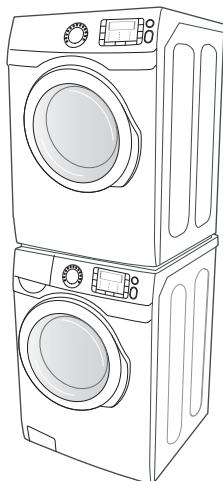
natural_image
Line drawing of a two-tiered washing machine with front and back views (no text or symbols)natural_image
Simple line drawing of a tool with a wavy arrow pointing downward (no text or symbols)natural_image
Line drawing of a hand using a tool to clamp or adjust cable components (no text or symbols)natural_image
Pure electrical circuit lines without any symbolsnatural_image
Line drawing of a hand using a tool to cut or install a component on a curved surface (no text or symbols)natural_image
Line drawing of a hand inserting a plug into a device with a switch (no text or symbols)natural_image
Simple line drawing of a mechanical or electrical component with no text, numbers, or symbolsnatural_image
Line drawing of a hand pressing down on a car wheel (no text or symbols)natural_image
Line drawing of a car wheel assembly with a hand adjusting the component (no text or symbols)natural_image
Line drawing of a hand using a tool to adjust or install a mechanical component (no text or symbols present)natural_image
Line drawing of a hand using a tool to switch a device on a curved surface (no text or symbols)natural_image
Line drawing of a car interior showing a switch, battery, and electrical outlet (no text or symbols)natural_image
Diagram showing a wireless router connected to a separate cable (no text or symbols present)natural_image
Illustration of a hand inserting a device into a device slot (no text or symbols)
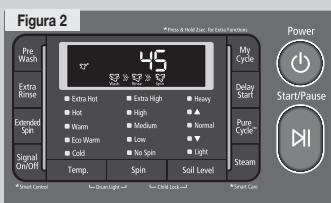
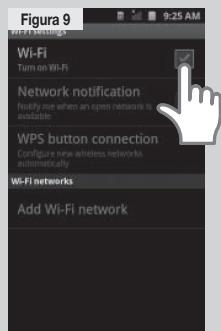
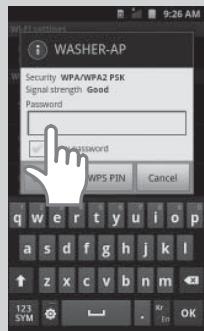
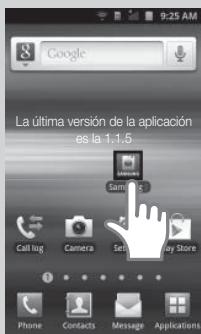
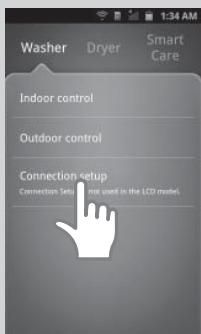
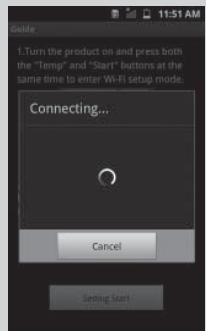
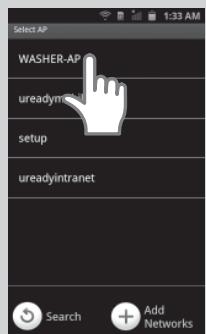
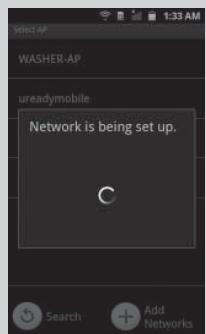
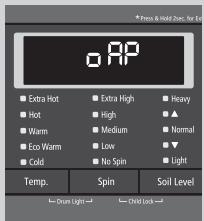
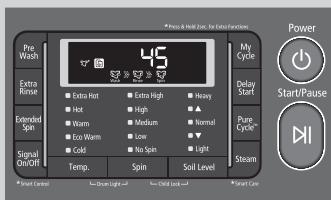
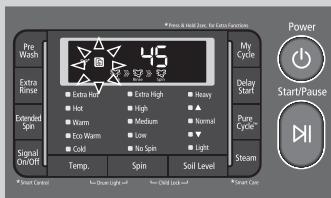
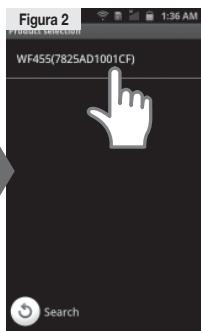
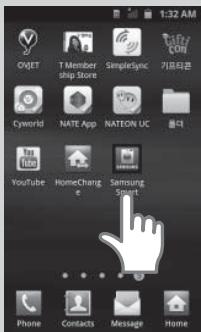
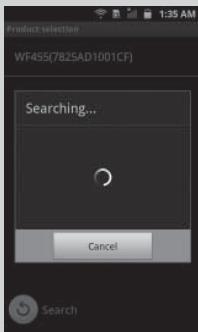
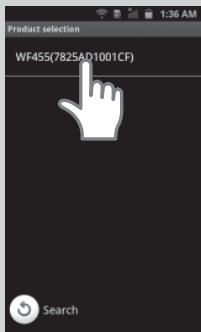
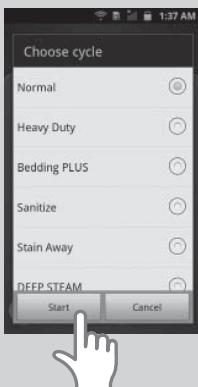
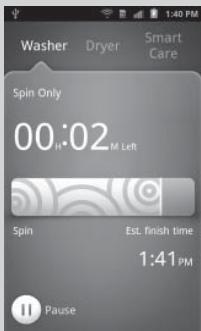
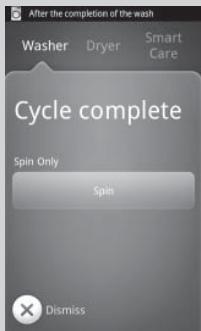
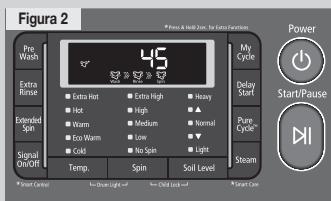
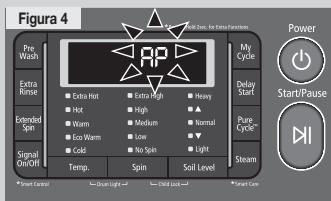
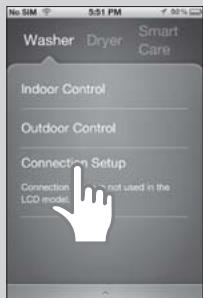
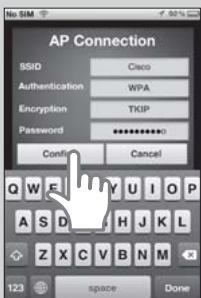
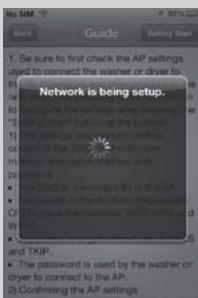
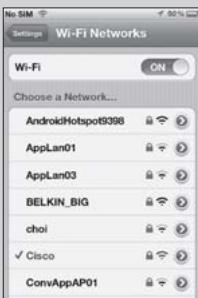
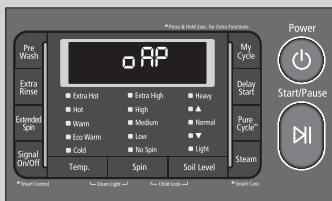
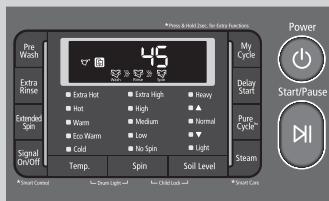
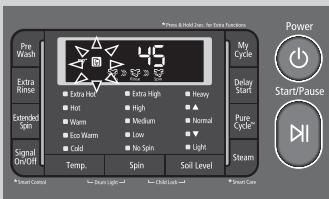
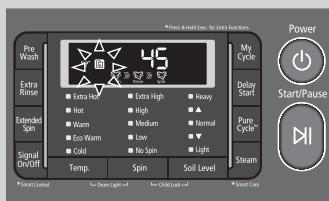
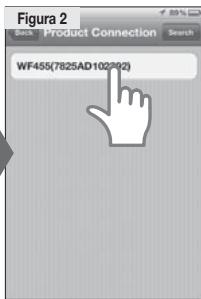
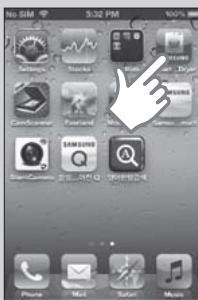
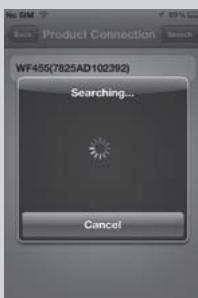
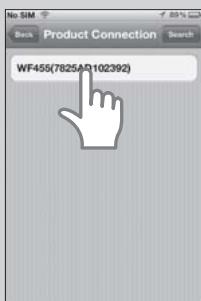
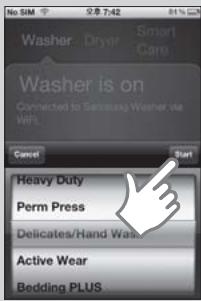
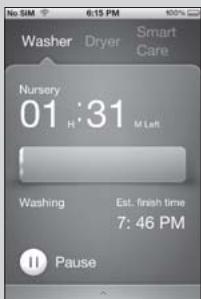
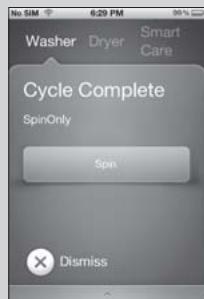
- Seleccione "Add device (Agregar dispositivo)".
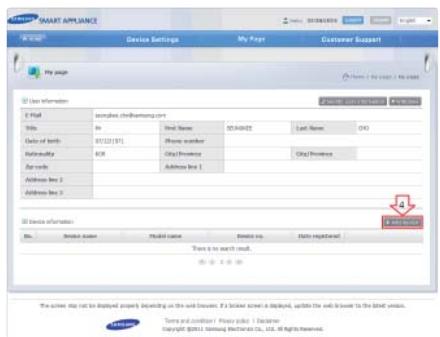
OPEN SOURCE ANNOUNCEMENT
The software included in this product contains copyrighted software that is licensed under the GPL/LGPL. You may obtain the complete Corresponding Source code from us for a period of three years after our last shipment of this product by sending email to:
oss.request@samsung.com
If you want to obtain the complete Corresponding Source code in the physical medium such as CD-ROM, the cost of physically performing source distribution may be charged.
This offer is valid to anyone in receipt of this information.
GPL Software:
Bridge-Utils, BusyBox, DNRD, dosfstools, iproute2, IPTables, Linux Kernel, ntpclient, Open1x, RSDK toolchain, rtl819x - Bootloader, samba, squashfs, udhcp Server-Client Package, USB-ModeSwitch, wireless-tools
LGPL Software:
libnl-Netlink Library, Mini-XML
GNU GENERAL PUBLIC LICENSE
Version 2, June 1991
Copyright (C) 1989, 1991 Free Software Foundation, Inc.
51 Franklin Street, Fifth Floor, Boston, MA 02110-1301, USA
Everyone is permitted to copy and distribute verbatim copies of this license document, but changing it is not allowed.
Preamble
The licenses for most software are designed to take away your freedom to share and change it. By contrast, the GNU General Public License is intended to guarantee your freedom to share and change free software--to make sure the software is free for all its users. This General Public License applies to most of the Free Software Foundation's software and to any other program whose authors commit to using it. (Some other Free Software Foundation software is covered by the GNU Lesser General Public License instead.)
You can apply it to your programs, too.
When we speak of free software, we are referring to freedom, not price. Our General Public Licenses are designed to make sure that you have the freedom to distribute copies of free software (and charge for this service if you wish), that you receive source code or can get it if you want it, that you can change the software or use pieces of it in new free programs; and that you know you can do these things.
To protect your rights, we need to make restrictions that forbid anyone to deny you these rights or to ask you to surrender the rights. These restrictions translate to certain responsibilities for you if you distribute copies of the software, or if you modify it.
For example, if you distribute copies of such a program, whether gratis or for a fee, you must give the recipients all the rights that you have. You must make sure that they, too, receive or can get the source code. And you must show them these terms so they know their rights.
We protect your rights with two steps: (1) copyright the software, and (2) offer you this license which gives you legal permission to copy, distribute and/or modify the software.
Also, for each author's protection and ours, we want to make certain that everyone understands that there is no warranty for this free software. If the software is modified by someone else and passed on, we want its recipients to know that what they have is not the original, so that any
74\_Apéndice
problems introduced by others will not reflect on the original authors' reputations.
Finally, any free program is threatened constantly by software patents. We wish to avoid the danger that redistributors of a free program will individually obtain patent licenses, in effect making the program proprietary. To prevent this, we have made it clear that any patent must be licensed for everyone's free use or not licensed at all.
The precise terms and conditions for copying, distribution and modification follow.
TERMS AND CONDITIONS FOR COPYING, DISTRIBUTION AND MODIFICATION
- This License applies to any program or other work which contains a notice placed by the copyright holder saying it may be distributed under the terms of this General Public License. The “Program”, below, refers to any such program or work, and a “work based on the Program” means either the Program or any derivative work under copyright law: that is to say, a work containing the Program or a portion of it, either verbatim or with modifications and/or translated into another language. (Hereinafter, translation is included without limitation in the term “modification”). Each licensee is addressed as “you”.
Activities other than copying, distribution and modification are not covered by this License; they are outside its scope. The act of running the Program is not restricted, and the output from the Program is covered only if its contents constitute a work based on the Program (independent of having been made by running the Program). Whether that is true depends on what the Program does.
- You may copy and distribute verbatim copies of the Program's source code as you receive it, in any medium, provided that you conspicuously and appropriately publish on each copy an appropriate copyright notice and disclaimer of warranty; keep intact all the notices that refer to this License and to the absence of any warranty; and give any other recipients of the Program a copy of this License along with the Program.
You may charge a fee for the physical act of transferring a copy, and you may at your option offer warranty protection in exchange for a fee.
- You may modify your copy or copies of the Program or any portion of it, thus forming a work based on the Program, and copy and distribute such modifications or work under the terms of Section 1 above, provided that you also meet all of these conditions:
1) You must cause the modified files to carry prominent notices stating that you changed the files and the date of any change.
2) You must cause any work that you distribute or publish, that in whole or in part contains or is derived from the Program or any part thereof, to be licensed as a whole at no charge to all third parties under the terms of this License.
3) If the modified program normally reads commands interactively when run, you must cause it, when started running for such interactive use in the most ordinary way, to print or display an announcement including an appropriate copyright notice and a notice that there is no warranty (or else, saying that you provide a warranty) and that users may redistribute the program under these conditions, and telling the user how to view a copy of this License. (Exception: if the Program itself is interactive but does not normally print such an announcement, your work based on the Program is not required to print an announcement.)
These requirements apply to the modified work as a whole. If identifiable sections of that work are not derived from the Program, and can be reasonably considered independent and separate works in themselves, then this License, and its terms, do not apply to those sections when you distribute them as separate works. But when you distribute the same sections as part of a whole which is a work based on the Program, the distribution of the whole must be on the terms of this License, whose permissions for other licensees extend to the entire whole, and thus to each and every part regardless of who wrote it.
Thus, it is not the intent of this section to claim rights or contest your rights to work written
entirely by you; rather, the intent is to exercise the right to control the distribution of derivative or collective works based on the Program.
In addition, mere aggregation of another work not based on the Program with the Program (or with a work based on the Program) on a volume of a storage or distribution medium does not bring the other work under the scope of this License.
-
- You may copy and distribute the Program (or a work based on it, under Section 2) in object code or executable form under the terms of Sections 1 and 2 above provided that you also do one of the following:
1) Accompany it with the complete corresponding machinereadable source code, which must be distributed under the terms of Sections 1 and 2 above on a medium customarily used for software interchange; or,
2) Accompany it with a written offer, valid for at least three years, to give any third party, for a charge no more than your cost of physically performing source distribution, a complete machine-readable copy of the corresponding source code, to be distributed under the terms of Sections 1 and 2 above on a medium customarily used for software interchange; or, c) Accompany it with the information you received as to the offer to distribute corresponding source code. (This alternative is allowed only for noncommercial distribution and only if you received the program in object code or executable form with such an offer, in accord with Subsection b above.)
The source code for a work means the preferred form of the work for making modifications to it. For an executable work, complete source code means all the source code for all modules it contains, plus any associated interface definition files, plus the scripts used to control compilation and installation of the executable. However, as a special exception, the source code distributed need not include anything that is normally distributed (in either source or binary form) with the major components (compiler, kernel, and so on) of the operating system on which the executable runs, unless that component itself accompanies the executable.
If distribution of executable or object code is made by offering access to copy from a designated place, then offering equivalent access to copy the source code from the same place counts as distribution of the source code, even though third parties are not compelled to copy the source along with the object code.
- You may not copy, modify, sublicense, or distribute the Program except as expressly provided under this License. Any attempt otherwise to copy, modify, sublicense or distribute the Program is void, and will automatically terminate your rights under this License. However, parties who have received copies, or rights, from you under this License will not have their licenses terminated so long as such parties remain in full compliance.
- You are not required to accept this License, since you have not signed it. However, nothing else grants you permission to modify or distribute the Program or its derivative works. These actions are prohibited by law if you do not accept this License. Therefore, by modifying or distributing the Program (or any work based on the Program), you indicate your acceptance of this License to do so, and all its terms and conditions for copying, distributing or modifying the Program or works based on it.
-
Each time you redistribute the Program (or any work based on the Program), the recipient automatically receives a license from the original licensor to copy, distribute or modify the Program subject to these terms and conditions. You may not impose any further restrictions on the recipients' exercise of the rights granted herein. You are not responsible for enforcing compliance by third parties to this License.
-
If, as a consequence of a court judgment or allegation of patent infringement or for any other reason (not limited to patent issues), conditions are imposed on you (whether by court order, agreement or otherwise) that contradict the conditions of this License, they do not excuse you from the conditions of this License. If you cannot distribute so as to satisfy simultaneously your obligations under this License and any other pertinent obligations, then as a consequence you may not distribute the Program at all. For example, if a patent license would not permit royalty-free redistribution of the Program by all those who receive copies directly or indirectly through you, then the only way you could satisfy both it and this License would be to refrain entirely from distribution of the Program.
If any portion of this section is held invalid or unenforceable under any particular circumstance, the balance of the section is intended to apply and the section as a whole is intended to apply in other circumstances.
It is not the purpose of this section to induce you to infringe any patents or other property right claims or to contest validity of any such claims; this section has the sole purpose of protecting the integrity of the free software distribution system, which is implemented by public license practices. Many people have made generous contributions to the wide range of software distributed through that system in reliance on consistent application of that system; it is up to the author/donor to decide if he or she is willing to distribute software through any other system and a licensee cannot impose that choice.
This section is intended to make thoroughly clear what is believed to be a consequence of the rest of this License.
-
If the distribution and/or use of the Program is restricted in certain countries either by patents or by copyrighted interfaces, the original copyright holder who places the Program under this License may add an explicit geographical distribution limitation excluding those countries, so that distribution is permitted only in or among countries not thus excluded. In such case, this License incorporates the limitation as if written in the body of this License.
-
The Free Software Foundation may publish revised and/or new versions of the General Public License from time to time. Such new versions will be similar in spirit to the present version, but may differ in detail to address new problems or concerns.
Each version is given a distinguishing version number. If the Program specifies a version number of this License which applies to it and “any later version”, you have the option of following the terms and conditions either of that version or of any later version published by the Free Software Foundation. If the Program does not specify a version number of this License, you may choose any version ever published by the Free Software Foundation.
- If you wish to incorporate parts of the Program into other free programs whose distribution conditions are different, write to the author to ask for permission. For software which is copyrighted by the Free Software Foundation, write to the Free Software Foundation; we sometimes make exceptions for this. Our decision will be guided by the two goals of preserving the free status of all derivatives of our free software and of promoting the sharing and reuse of software generally.
NO WARRANTY
-
BECAUSE THE PROGRAM IS LICENSED FREE OF CHARGE, THERE IS NO WARRANTY FOR THE PROGRAM, TO THE EXTENT PERMITTED BY APPLICABLE LAW. EXCEPT WHEN OTHERWISE STATED IN WRITING THE COPYRIGHT HOLDERS AND/OR OTHER PARTIES PROVIDE THE PROGRAM "AS IS" WITHOUT WARRANTY OF ANY KIND, EITHER EXPRESSED OR IMPLIED, INCLUDING, BUT NOT LIMITED TO, THE IMPLIED WARRANTIES OF MERCHANTABILITY AND FITNESS FOR A PARTICULAR PURPOSE. THE ENTIRE RISK AS TO THE QUALITY AND PERFORMANCE OF THE PROGRAM IS WITH YOU. SHOULD THE PROGRAM PROVE DEFECTIVE, YOU ASSUME THE COST OF ALL NECESSARY SERVICING, REPAIR OR CORRECTION.
-
IN NO EVENT UNLESS REQUIRED BY APPLICABLE LAW OR AGREED TO IN WRITING WILL ANY COPYRIGHT HOLDER, OR ANY OTHER PARTY WHO MAY MODIFY AND/OR REDISTRIBUTE THE PROGRAM AS PERMITTED ABOVE E, BE L I ABL E TO YOU FOR DAMAGES, INCLUDING ANY GENERAL, SPECIAL, INCIDENTAL OR CONSEQUENTIAL DAMAGES ARISING OUT OF THE USE OR INABILITY TO USE THE PROGRAM (INCLUDING BUT NOT LIMITED TO LOSS OF DATA OR DATA BEING RENDERED INACCURATE OR LOSSES SUSTAINED BY YOU OR THIRD PARTIES OR A FAILURE OF THE PROGRAM TO OPERATE WITH ANY OTHER PROGRAMS), EVEN IF SUCH HOLDER OR OTHER PARTY HAS BEEN ADVISED OF THE POSSIBILITY OF SUCH DAMAGES.
END OF TERMS AND CONDITIONS
How to Apply These Terms to Your New Programs
If you develop a new program, and you want it to be of the greatest possible use to the public, the best way to achieve this is to make it free software which everyone can redistribute and change under these terms.
To do so, attach the following notices to the program. It is safest to attach them to the start of each source file to most effectively convey the exclusion of warranty; and each file should have at least the “copyright” line and a pointer to where the full notice is found.
one line to give the program's name and an idea of what it does.
Copyright (C) yyyy name of author
This program is free software; you can redistribute it and/or modify it under the terms of the GNU General Public License as published by the Free Software Foundation; either version 2 of the License, or (at your option) any later version.
This program is distributed in the hope that it will be useful, but WITHOUT ANY WARRANTY; without even the implied warranty of MERCHANTABILITY or FITNESS FOR A PARTICULAR PURPOSE. See the GNU General Public License for more details.
You should have received a copy of the GNU General Public License along with this program; if not, write to the Free Software Foundation, Inc., 51 Franklin Street, Fifth Floor, Boston, MA 02110-1301, USA.
Also add information on how to contact you by electronic and paper mail.
If the program is interactive, make it output a short notice like this when it starts in an interactive mode:
Gnomovision version 69, Copyright (C) year name of author Gnomovision comes with ABSOLUTELY NO WARRANTY; for details type `show w'. This is free software, and you are welcome to redistribute it under certain conditions; type `show c' for details.
The hypothetical commands `show w' and `show c' should show the appropriate parts of the General Public License. Of course, the commands you use may be called something other than `show w' and `show c'; they could even be mouse-clicks or menu items--whatever suits your program. You should also get your employer (if you work as a programmer) or your school, if any, to sign a "copyright disclaimer" for the program, if necessary. Here is a sample; alter the names:
Yoyodyne, Inc., hereby disclaims all copyright interest in the program `Gnomovision' (which makes passes at compilers) written by James Hacker.
signature of Ty Coon, 1 April 1989
Ty Coon, President of Vice
This General Public License does not permit incorporating your program into proprietary programs. If your program is a subroutine library, you may consider it more useful to permit linking proprietary applications with the library. If this is what you want to do, use the GNU Lesser General Public License instead of this License.
78\_Apéndice
GNU LESSER GENERAL PUBLIC LICENSE
Version 2.1, February 1999
Copyright (C) 1991, 1999 Free Software Foundation, Inc.
51 Franklin Street, Fifth Floor, Boston, MA 02110-1301 USA
Everyone is permitted to copy and distribute verbatim copies of this license document, but changing it is not allowed.
[This is the first released version of the Lesser GPL. It also counts as the successor of the GNU Library Public License, version 2, hence the version number 2.1.]
Preamble
The licenses for most software are designed to take away your freedom to share and change it. By contrast, the GNU General Public Licenses are intended to guarantee your freedom to share and change free software--to make sure the software is free for all its users.
This license, the Lesser General Public License, applies to some specially designated software packages--typically libraries--of the Free Software Foundation and other authors who decide to use it. You can use it too, but we suggest you first think carefully about whether this license or the ordinary General Public License is the better strategy to use in any particular case, based on the explanations below.
When we speak of free software, we are referring to freedom of use, not price. Our General Public Licenses are designed to make sure that you have the freedom to distribute copies of free software (and charge for this service if you wish); that you receive source code or can get it if you want it; that you can change the software and use pieces of it in new free programs; and that you are informed that you can do these things.
To protect your rights, we need to make restrictions that forbid distributors to deny you these rights or to ask you to surrender these rights. These restrictions translate to certain responsibilities for you if you distribute copies of the library or if you modify it.
For example, if you distribute copies of the library, whether gratis or for a fee, you must give the recipients all the rights that we gave you. You must make sure that they, too, receive or can get the source code. If you link other code with the library, you must provide complete object files to the recipients, so that they can relink them with the library after making changes to the library and recompiling it. And you must show them these terms so they know their rights.
We protect your rights with a two-step method: (1) we copyright the library, and (2) we offer you this license, which gives you legal permission to copy, distribute and/or modify the library.
To protect each distributor, we want to make it very clear that there is no warranty for the free library. Also, if the library is modified by someone else and passed on, the recipients should know that what they have is not the original version, so that the original author's reputation will not be affected by problems that might be introduced by others.
Finally, software patents pose a constant threat to the existence of any free program. We wish to make sure that a company cannot effectively restrict the users of a free program by obtaining a restrictive license from a patent holder. Therefore, we insist that any patent license obtained for a version of the library must be consistent with the full freedom of use specified in this license.
Most GNU software, including some libraries, is covered by the ordinary GNU General Public License. This license, the GNU Lesser General Public License, applies to certain designated libraries, and is quite different from the ordinary General Public License. We use this license for certain libraries in order to permit linking those libraries into nonfree programs.
When a program is linked with a library, whether statically or using a shared library, the combination of the two is legally speaking a combined work, a derivative of the original library. The ordinary General Public License therefore permits such linking only if the entire combination fits its criteria of freedom. The Lesser General Public License permits more lax criteria for linking other code with the library.
We call this license the “Lesser” General Public License because it does Less to protect the
user's freedom than the ordinary General Public License. It also provides other free software developers Less of an advantage over competing non-free programs. These disadvantages are the reason we use the ordinary General Public License for many libraries.
However, the Lesser license provides advantages in certain special circumstances.
For example, on rare occasions, there may be a special need to encourage the widest possible use of a certain library, so that it becomes a de-facto standard. To achieve this, non-free programs must be allowed to use the library.
A more frequent case is that a free library does the same job as widely used non-free libraries. In this case, there is little to gain by limiting the free library to free software only, so we use the Lesser General Public License.
In other cases, permission to use a particular library in nonfree programs enables a greater number of people to use a large body of free software. For example, permission to use the GNU C Library in non-free programs enables many more people to use the whole GNU operating system, as well as its variant, the GNU/Linux operating system.
Although the Lesser General Public License is Less protective of the users' freedom, it does ensure that the user of a program that is linked with the Library has the freedom and the wherewithal to run that program using a modified version of the Library.
The precise terms and conditions for copying, distribution and modification follow. Pay close attention to the difference between a “work based on the library” and a “work that uses the library”. The former contains code derived from the library, whereas the latter must be combined with the library in order to run.
TERMS AND CONDITIONS FOR COPYING, DISTRIBUTION AND MODIFICATION
- This License Agreement applies to any software library or other program which contains a notice placed by the copyright holder or other authorized party saying it may be distributed under the terms of this Lesser General Public License (also called “this License”). Each licensee is addressed as “you”.
A “library” means a collection of software functions and/or data prepared so as to be conveniently linked with application programs (which use some of those functions and data) to form executables.
The “Library”, below, refers to any such software library or work which has been distributed under these terms. A “work based on the Library” means either the Library or any derivative work under copyright law: that is to say, a work containing the Library or a portion of it, either verbatim or with modifications and/or translated straightforwardly into another language. (Hereinafter, translation is included without limitation in the term “modification”.)
“Source code” for a work means the preferred form of the work for making modifications to it. For a library, complete source code means all the source code for all modules it contains, plus any associated interface definition files, plus the scripts used to control compilation and installation of the library.
Activities other than copying, distribution and modification are not covered by this License; they are outside its scope. The act of running a program using the Library is not restricted, and output from such a program is covered only if its contents constitute a work based on the Library (independent of the use of the Library in a tool for writing it).
Whether that is true depends on what the Library does and what the program that uses the Library does.
- You may copy and distribute verbatim copies of the Library's complete source code as you receive it, in any medium, provided that you conspicuously and appropriately publish on each copy an appropriate copyright notice and disclaimer of warranty; keep intact all the notices that refer to this License and to the absence of any warranty; and distribute a copy of this License along with the Library.
You may charge a fee for the physical act of transferring a copy, and you may at your option
offer warranty protection in exchange for a fee.
- You may modify your copy or copies of the Library or any portion of it, thus forming a work based on the Library, and copy and distribute such modifications or work under the terms of Section 1 above, provided that you also meet all of these conditions:
1) The modified work must itself be a software library.
2) You must cause the files modified to carry prominent notices stating that you changed the files and the date of any change.
3) You must cause the whole of the work to be licensed at no charge to all third parties under the terms of this License.
4) If a facility in the modified Library refers to a function or a table of data to be supplied by an application program that uses the facility, other than as an argument passed when the facility is invoked, then you must make a good faith effort to ensure that, in the event an application does not supply such function or table, the facility still operates, and performs whatever part of its purpose remains meaningful.
(For example, a function in a library to compute square roots has a purpose that is entirely well-defined independent of the application. Therefore, Subsection 2d requires that any application-supplied function or table used by this function must be optional: if the application does not supply it, the square root function must still compute square roots.)
These requirements apply to the modified work as a whole. If identifiable sections of that work are not derived from the Library, and can be reasonably considered independent and separate works in themselves, then this License, and its terms, do not apply to those sections when you distribute them as separate works. But when you distribute the same sections as part of a whole which is a work based on the Library, the distribution of the whole must be on the terms of this License, whose permissions for other licensees extend to the entire whole, and thus to each and every part regardless of who wrote it. Thus, it is not the intent of this section to claim rights or contest your rights to work written entirely by you; rather, the intent is to exercise the right to control the distribution of derivative or collective works based on the Library. In addition, mere aggregation of another work not based on the Library with the Library (or with a work based on the Library) on a volume of a storage or distribution medium does not bring the other work under the scope of this License.
- You may opt to apply the terms of the ordinary GNU General Public License instead of this License to a given copy of the Library. To do this, you must alter all the notices that refer to this License, so that they refer to the ordinary GNU General Public License, version 2, instead of to this License. (If a newer version than version 2 of the ordinary GNU General Public License has appeared, then you can specify that version instead if you wish.) Do not make any other change in these notices.
Once this change is made in a given copy, it is irreversible for that copy, so the ordinary GNU General Public License applies to all subsequent copies and derivative works made from that copy.
This option is useful when you wish to copy part of the code of the Library into a program that is not a library.
- You may copy and distribute the Library (or a portion or derivative of it, under Section 2) in object code or executable form under the terms of Sections 1 and 2 above provided that you accompany it with the complete corresponding machine-readable source code, which must be distributed under the terms of Sections 1 and 2 above on a medium customarily used for software interchange.
If distribution of object code is made by offering access to copy from a designated place, then offering equivalent access to copy the source code from the same place satisfies the requirement to distribute the source code, even though third parties are not compelled to copy the source along with the object code.
- A program that contains no derivative of any portion of the Library, but is designed to work with the Library by being compiled or linked with it, is called a “work that uses the Library”. Such a work, in isolation, is not a derivative work of the Library, and therefore falls outside the scope of this License.
However, linking a “work that uses the Library” with the Library creates an executable that is a derivative of the Library (because it contains portions of the Library), rather than a “work that uses the library”. The executable is therefore covered by this License. Section 6 states terms for distribution of such executables.
When a “work that uses the Library” uses material from a header file that is part of the Library, the object code for the work may be a derivative work of the Library even though the source code is not. Whether this is true is especially significant if the work can be linked without the Library, or if the work is itself a library. The threshold for this to be true is not precisely defined by law.
If such an object file uses only numerical parameters, data structure layouts and accessors, and small macros and small inline functions (ten lines or less in length), then the use of the object file is unrestricted, regardless of whether it is legally a derivative work. (Executables containing this object code plus portions of the Library will still fall under Section 6.)
Otherwise, if the work is a derivative of the Library, you may distribute the object code for the work under the terms of Section 6. Any executables containing that work also fall under Section 6, whether or not they are linked directly with the Library itself.
- As an exception to the Sections above, you may also combine or link a “work that uses the Library” with the Library to produce a work containing portions of the Library, and distribute that work under terms of your choice, provided that the terms permit modification of the work for the customer’s own use and reverse engineering for debugging such modifications.
You must give prominent notice with each copy of the work that the Library is used in it and that the Library and its use are covered by this License. You must supply a copy of this License. If the work during execution displays copyright notices, you must include the copyright notice for the Library among them, as well as a reference directing the user to the copy of this License. Also, you must do one of these things:
1) Accompany the work with the complete corresponding machine-readable source code for the Library including whatever changes were used in the work (which must be distributed under Sections 1 and 2 above); and, if the work is an executable linked with the Library, with the complete machine-readable “work that uses the Library”, as object code and/or source code, so that the user can modify the Library and then relink to produce a modified executable containing the modified Library. (It is understood that the user who changes the contents of definitions files in the Library will not necessarily be able to recompile the application to use the modified definitions.)
2) Use a suitable shared library mechanism for linking with the Library. A suitable mechanism is one that (1) uses at run time a copy of the library already present on the user's computer system, rather than copying library functions into the executable, and (2) will operate properly with a modified version of the library, if the user installs one, as long as the modified version is interfacecompatible with the version that the work was made with.
3) Accompany the work with a written offer, valid for at least three years, to give the same user the materials specified in Subsection 6a, above, for a charge no more than the cost of performing this distribution.
4) If distribution of the work is made by offering access to copy from a designated place, offer equivalent access to copy the above specified materials from the same place.
5) Verify that the user has already received a copy of these materials or that you have already sent this user a copy.
For an executable, the required form of the “work that uses the Library” must include any data and utility programs needed for reproducing the executable from it. However, as a special exception, the materials to be distributed need not include anything that is normally
distributed (in either source or binary form) with the major components (compiler, kernel, and so on) of the operating system on which the executable runs, unless that component itself accompanies the executable.
It may happen that this requirement contradicts the license restrictions of other proprietary libraries that do not normally accompany the operating system. Such a contradiction means you cannot use both them and the Library together in an executable that you distribute.
- You may place library facilities that are a work based on the Library side-by-side in a single library together with other library facilities not covered by this License, and distribute such a combined library, provided that the separate distribution of the work based on the Library and of the other library facilities is otherwise permitted, and provided that you do these two things:
1) Accompany the combined library with a copy of the same work based on the Library, uncombined with any other library facilities. This must be distributed under the terms of the Sections above.
2) Give prominent notice with the combined library of the fact that part of it is a work based on the Library, and explaining where to find the accompanying uncombined form of the same work.
-
You may not copy, modify, sublicense, link with, or distribute the Library except as expressly provided under this License. Any attempt otherwise to copy, modify, sublicense, link with, or distribute the Library is void, and will automatically terminate your rights under this License. However, parties who have received copies, or rights, from you under this License will not have their licenses terminated so long as such parties remain in full compliance.
-
You are not required to accept this License, since you have not signed it. However, nothing else grants you permission to modify or distribute the Library or its derivative works. These actions are prohibited by law if you do not accept this License. Therefore, by modifying or distributing the Library (or any work based on the Library), you indicate your acceptance of this License to do so, and all its terms and conditions for copying, distributing or modifying the Library or works based on it.
-
Each time you redistribute the Library (or any work based on the Library), the recipient automatically receives a license from the original licensor to copy, distribute, link with or modify the Library subject to these terms and conditions. You may not impose any further restrictions on the recipients' exercise of the rights granted herein. You are not responsible for enforcing compliance by third parties with this License.
-
If, as a consequence of a court judgment or allegation of patent infringement or for any other reason (not limited to patent issues), conditions are imposed on you (whether by court order, agreement or otherwise) that contradict the conditions of this License, they do not excuse you from the conditions of this License. If you cannot distribute so as to satisfy simultaneously your obligations under this License and any other pertinent obligations, then as a consequence you may not distribute the Library at all. For example, if a patent license would not permit royalty-free redistribution of the Library by all those who receive copies directly or indirectly through you, then the only way you could satisfy both it and this License would be to refrain entirely from distribution of the Library.
If any portion of this section is held invalid or unenforceable under any particular circumstance, the balance of the section is intended to apply, and the section as a whole is intended to apply in other circumstances.
It is not the purpose of this section to induce you to infringe any patents or other property right claims or to contest validity of any such claims; this section has the sole purpose of protecting the integrity of the free software distribution system which is implemented by public license practices.
Many people have made generous contributions to the wide range of software distributed through that system in reliance on consistent application of that system; it is up to the author/donor to decide if he or she is willing to distribute software through any other system and a licensee cannot impose that choice.
Apéndice
This section is intended to make thoroughly clear what is believed to be a consequence of the rest of this License.
-
If the distribution and/or use of the Library is restricted in certain countries either by patents or by copyrighted interfaces, the original copyright holder who places the Library under this License may add an explicit geographical distribution limitation excluding those countries, so that distribution is permitted only in or among countries not thus excluded. In such case, this License incorporates the limitation as if written in the body of this License.
-
The Free Software Foundation may publish revised and/or new versions of the Lesser General Public License from time to time. Such new versions will be similar in spirit to the present version, but may differ in detail to address new problems or concerns.
Each version is given a distinguishing version number.
If the Library specifies a version number of this License which applies to it and “any later version”, you have the option of following the terms and conditions either of that version or of any later version published by the Free Software Foundation. If the Library does not specify a license version number, you may choose any version ever published by the Free Software Foundation.
- If you wish to incorporate parts of the Library into other free programs whose distribution conditions are incompatible with these, write to the author to ask for permission. For software which is copyrighted by the Free Software Foundation, write to the Free Software Foundation; we sometimes make exceptions for this. Our decision will be guided by the two goals of preserving the free status of all derivatives of our free software and of promoting the sharing and reuse of software generally.
NO WARRANTY
-
BECAUSE THE LIBRARY IS LICENSED FREE OF CHARGE, THERE IS NO WARRANTY FOR THE LIBRARY, TO THE EXTENT PERMITTED BY APPLICABLE LAW. EXCEPT WHEN OTHERWISE STATED IN WRITING THE COPYRIGHT HOLDERS AND/OR OTHER PARTIES PROVIDE THE LIBRARY "AS IS" WITHOUT WARRANTY OF ANY KIND, EITHER EXPRESSED OR IMPLIED, INCLUDING, BUT NOT LIMITED TO, THE IMPLIED WARRANTIES OF MERCHANTABILITY AND FITNESS FOR A PARTICULAR PURPOSE. THE ENTIRE RISK AS TO THE QUALITY AND PERFORMANCE OF THE LIBRARY IS WITH YOU. SHOULD THE LIBRARY PROVE DEFECTIVE, YOU ASSUME THE COST OF ALL NECESSARY SERVICING, REPAIR OR CORRECTION.
-
IN NO EVENT UNLESS REQUIRED BY APPLICABLE LAW OR AGREED TO IN WRI T ING WI L L ANY COPYRIGHT HOLDER, OR ANY OTHER PARTY WHO MAY MODIFY AND/ OR REDISTRIBUTE THE LIBRARY AS PERMITTED ABOVE, BE LIABLE TO YOU FOR DAMAGES, INCLUDING ANY GENERAL, SPECIAL, INCIDENTAL OR CONSEQUENTIAL DAMAGES ARISING OUT OF THE USE OR INABILITY TO USE THE LIBRARY (INCLUDING BUT NOT LIMITED TO LOSS OF DATA OR DATA BEING RENDERED INACCURATE OR LOSSES SUSTAINED BY YOU OR THIRD PARTIES OR A FAILURE OF THE LIBRARY TO OPERATE WITH ANY OTHER SOFTWARE), EVEN IF SUCH HOLDER OR OTHER PARTY HAS BEEN ADVISED OF THE POSSIBILITY OF SUCH DAMAGES.
END OF TERMS AND CONDITIONS
How to Apply These Terms to Your New Libraries If you develop a new library, and you want it to be of the greatest possible use to the public, we recommend making it free software that everyone can redistribute and change. You can do so by permitting redistribution under these terms (or, alternatively, under the terms of the ordinary General Public License).
To apply these terms, attach the following notices to the library. It is safest to attach them to the start of each source file to most effectively convey the exclusion of warranty; and each file should have at least the “copyright” line and a pointer to where the full notice is found.
one line to give the library's name and an idea of what it does.
84\_Apéndice
Copyright (C) year name of author
This library is free software; you can redistribute it and/or modify it under the terms of the GNU Lesser General Public License as published by the Free Software Foundation; either version 2.1 of the License, or (at your option) any later version.
This library is distributed in the hope that it will be useful, but WITHOUT ANY WARRANTY; without even the implied warranty of MERCHANTABILITY or FITNESS FOR A PARTICULAR PURPOSE. See the GNU
Lesser General Public License for more details.
You should have received a copy of the GNU Lesser General Public License along with this library; if not, write to the Free Software Foundation, Inc., 51 Franklin Street, Fifth Floor, Boston, MA 02110-1301 USA Also add information on how to contact you by electronic and paper mail. You should also get your employer (if you work as a programmer) or your school, if any, to sign a “copyright disclaimer” for the library, if necessary. Here is a sample; alter the names: Yoyodyne, Inc., hereby disclaims all copyright interest in the library ‘Frob’ (a library for tweaking knobs) written by James Random Hacker.
signature of Ty Coon, 1 April 1990
Ty Coon, President of Vice
That's all there is to it!
BSD LICENSE
flex: the fast lexical analyser
Copyright (c) 2001, 2002, 2003, 2004, 2005, 2006, 2007
The Flex Project.
Copyright (c) 1990, 1997 The Regents of the University of California. All rights reserved.
LibNet License
Copyright (c) 1998 - 2001 Mike D. Schiffman mike@infonexus.com
PPP/ Debian
Copyright (c) 1989 Regents of the University of California. All rights reserved.
Redistribution and use in source and binary forms, with or without modification, are permitted provided that the following conditions are met:
- Redistributions of source code must retain the above copyright notice, this list of conditions and the following disclaimer.
- Redistributions in binary form must reproduce the above copyright notice, this list of conditions and the following disclaimer in the documentation and/or other materials provided with the distribution.
- Neither the name of the
nor the names of its contributors may be used to endorse or promote products derived from this software without specific prior written permission.
THIS SOFTWARE IS PROVIDED BY THE COPYRIGHT HOLDERS AND CONTRIBUTORS "AS IS" AND ANY EXPRESS OR IMPLIED WARRANTIES, INCLUDING, BUT NOT LIMITED TO, THE IMPLIED WARRANTIES OF MERCHANTABILITY AND FITNESS FOR A PARTICULAR PURPOSE ARE DISCLAIMED. IN NO EVENT SHALL
OPENSSL
This product includes software developed by the OpenSSL Project for use in the OpenSSL Toolkit. (http://www.openssl.org/)
This product includes cryptographic software written by Eric Young (eay@cryptsoft.com)
LICENSE ISSUES
The OpenSSL toolkit stays under a dual license, i.e. both the conditions of the OpenSSL License and the original SSLeay license apply to the toolkit. See below for the actual license texts.
Actually both licenses are BSD-style Open Source licenses. In case of any license issues related to OpenSSL please contact openssl-core@openssl.org.
OpenSSL License
Copyright (c) 1998-2008 The OpenSSL Project. All rights reserved.
Redistribution and use in source and binary forms, with or without modification, are permitted provided that the following conditions are met:
- Redistributions of source code must retain the above copyright notice, this list of conditions and the following disclaimer.
- Redistributions in binary form must reproduce the above copyright notice, this list of conditions and the following disclaimer in the documentation and/or other materials provided with the distribution.
- All advertising materials mentioning features or use of this software must display the following acknowledgment: "This product includes software developed by the OpenSSL Project for use in the OpenSSL Toolkit. (http://www.openssl.org/)
- The names “OpenSSL Toolkit” and “OpenSSL Project” must not be used to endorse or promote products derived from this software without prior written permission. For written permission, please contact openssl-core@openssl.org.
- Products derived from this software may not be called "OpenSSL" nor may "OpenSSL" appear in their names without prior written permission of the OpenSSL Project.
- Redistributions of any form whatsoever must retain the following acknowledgment: "This product includes software developed by the OpenSSL Project for use in the OpenSSL Toolkit (http://www.openssl.org/)
THIS SOFTWARE IS PROVIDED BY THE OpenSSL PROJECT "AS IS" AND ANY EXPRESSED OR IMPLIED WARRANTIES, INCLUDING, BUT NOT LIMITED TO, THE IMPLIED WARRANTIES OF MERCHANTABILITY AND FITNESS FOR A PARTICULAR PURPOSE ARE DISCLAIMED. IN NO EVENT SHALL THE OpenSSL PROJECT OR ITS CONTRIBUTORS BE LIABLE FOR ANY DIRECT, INDIRECT, INCIDENTAL, SPECIAL, EXEMPLARY, OR CONSEQUENTIAL DAMAGES (INCLUDING, BUT NOT LIMITED TO, PROCUREMENT OF SUBSTITUTE GOODS OR SERVICES; LOSS OF USE, DATA, OR PROFITS; OR BUSINESS INTERRUPTION) HOWEVER CAUSED AND ON ANY THEORY OF LIABILITY, WHETHER IN CONTRACT, STRICT LIABILITY, OR TORT (INCLUDING NEGLIGENCE OR OTHERWISE) ARISING IN ANY WAY OUT OF THE USE OF THIS SOFTWARE, EVEN IF ADVISED OF THE POSSIBILITY OF SUCH DAMAGE.
This product includes cryptographic software written by Eric Young (eay@cryptsoft.com). This product includes software written by Tim Hudson (tjh@cryptsoft.com).
Garantía (U.S.A)
SECADORA SAMSUNG
GARANTÍA LIMITADA PARA EL COMPRADOR ORIGINAL
85 Challenger Road Ridgefield Park, NJ 07660
Samsung Electronics Canada Inc.,
Customer Service 55 Standish Court Mississauga, Ontario L5R 4B2 Canada
natural_image
Line drawing of a washing machine with control panel and front panel (no text or symbols)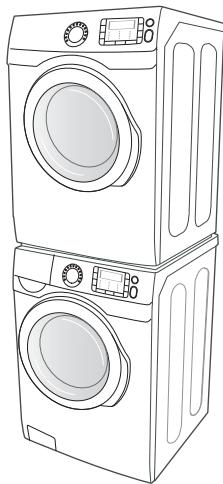
natural_image
Line drawing of a two-tiered washing machine with front and back views (no text or symbols)74 Open Source Announcement
natural_image
Simple line drawing of a tool with a wavy arrow pointing downward (no text or symbols)natural_image
Line drawing of a hand using a tool to adjust or install a mechanical component (no text or symbols present)natural_image
Pure mechanical diagram showing a lever and pivot point without any text or symbolsnatural_image
Line drawing of a hand using a tool to cut or install a component on a curved surface (no text or symbols)natural_image
Line drawing of a hand holding a tool interacting with a device (no text or symbols visible)natural_image
Simple line drawing of a lever mechanism with a light bulb and handle (no text or symbols)natural_image
Line drawing of a hand pressing down on a car wheel (no text or symbols)natural_image
Line drawing of a car wheel rim with a hand adjusting the seat (no text or symbols)natural_image
Line drawing of a hand adjusting a mechanical component with no visible text or symbolsnatural_image
Line drawing of a hand using a tool to switch a device on a curved surface (no text or symbols)natural_image
Diagram of a car interior showing a handle, switch, and electrical outlet (no text or symbols)Activation/Désactivation
Activation/Désactivation
natural_image
Diagram showing a wireless router connected to a separate cable (no text or symbols present)natural_image
Illustration of a hand inserting a device into a rack (no text or symbols visible)
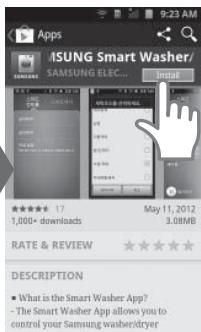
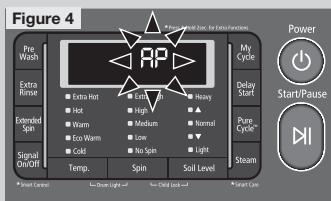
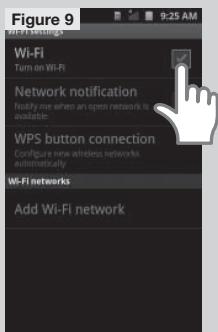
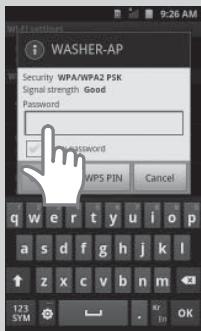
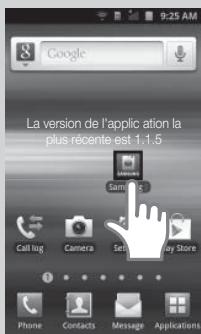
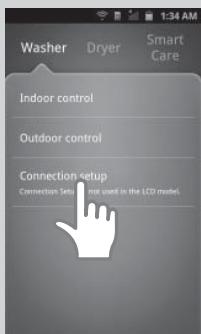
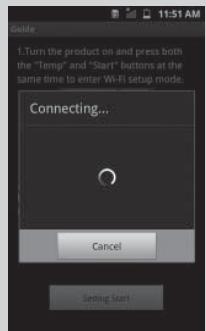
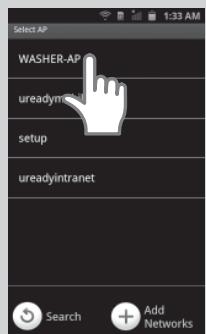
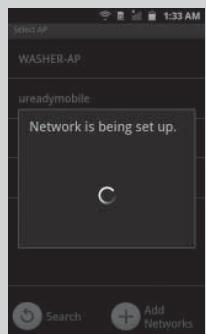
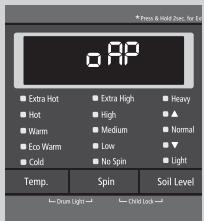
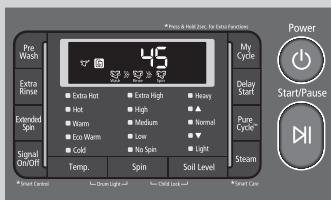
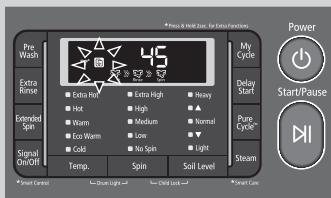
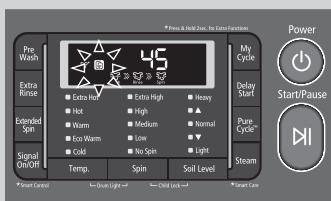
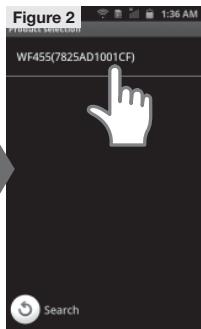
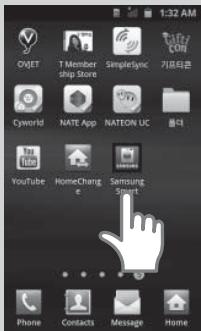
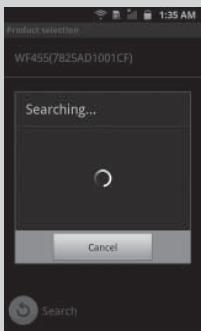
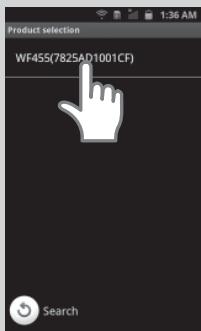
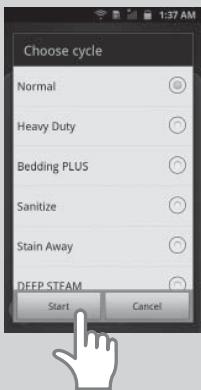
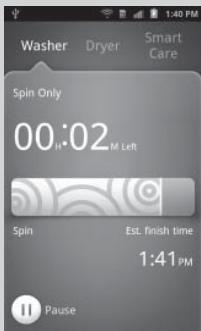
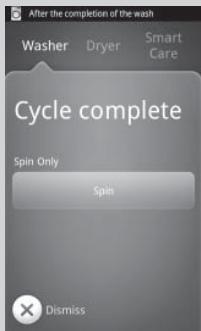
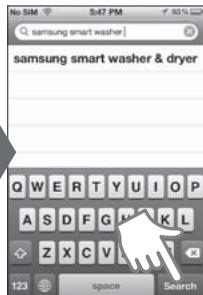
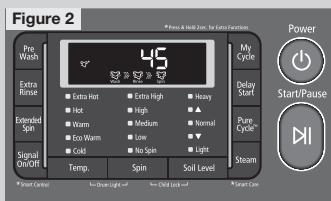
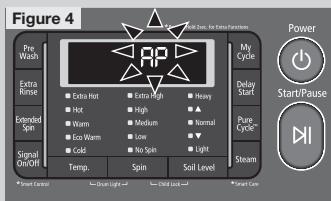
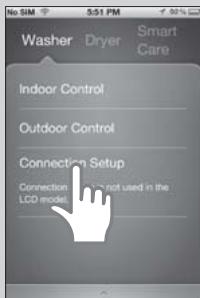
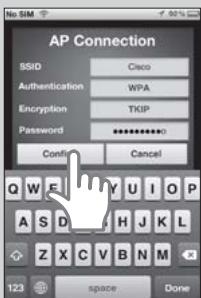
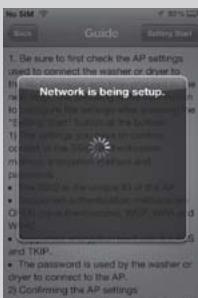
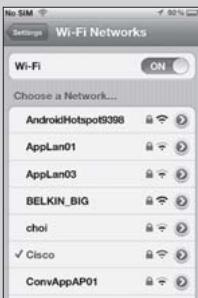
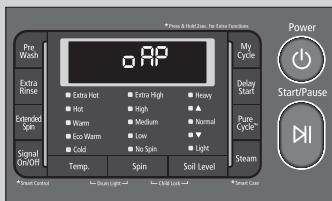
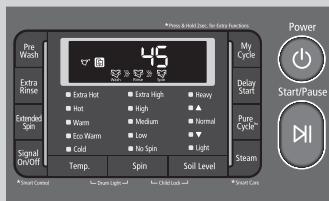
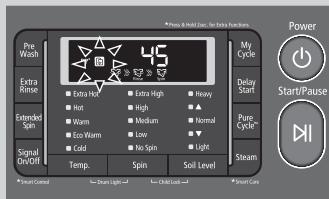
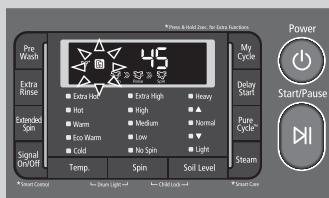
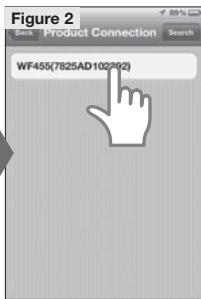
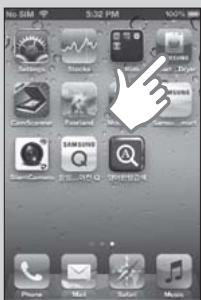
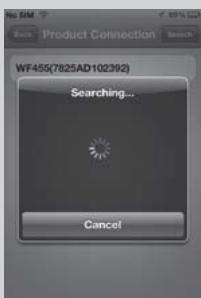
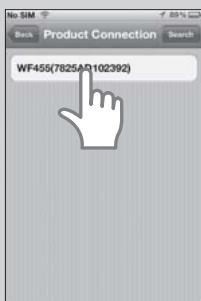
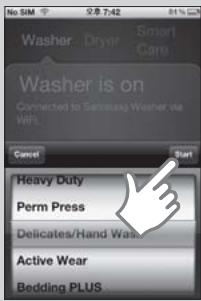
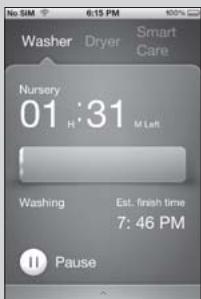
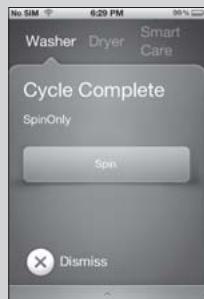
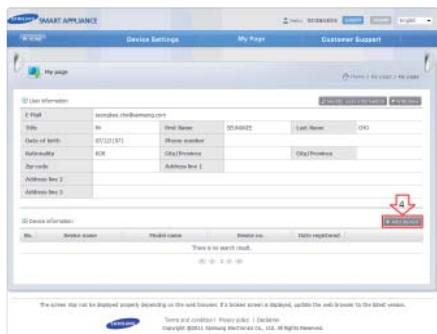
DÉCLARATION DE CONFORMITÉ
OPEN SOURCE ANNOUNCEMENT
The software included in this product contains copyrighted software that is licensed under the GPL/LGPL. You may obtain the complete Corresponding Source code from us for a period of three years after our last shipment of this product by sending email to:
oss.request@samsung.com
If you want to obtain the complete Corresponding Source code in the physical medium such as CD-ROM, the cost of physically performing source distribution may be charged.
This offer is valid to anyone in receipt of this information.
GPL Software:
Bridge-Utils, BusyBox, DNRD, dosfstools, iproute2, IPTables, Linux Kernel, ntpclient, Open1x, RSDK toolchain, rtl819x - Bootloader, samba, squashfs, udhcp Server-Client Package, USB-ModeSwitch, wireless-tools
LGPL Software:
libnl-Netlink Library, Mini-XML
GNU GENERAL PUBLIC LICENSE
Version 2, June 1991
Copyright (C) 1989, 1991 Free Software Foundation, Inc.
51 Franklin Street, Fifth Floor, Boston, MA 02110-1301, USA
Everyone is permitted to copy and distribute verbatim copies of this license document, but changing it is not allowed.
Preamble
The licenses for most software are designed to take away your freedom to share and change it. By contrast, the GNU General Public License is intended to guarantee your freedom to share and change free software--to make sure the software is free for all its users. This General Public License applies to most of the Free Software Foundation's software and to any other program whose authors commit to using it. (Some other Free Software Foundation software is covered by the GNU Lesser General Public License instead.)
You can apply it to your programs, too.
When we speak of free software, we are referring to freedom, not price. Our General Public Licenses are designed to make sure that you have the freedom to distribute copies of free software (and charge for this service if you wish), that you receive source code or can get it if you want it, that you can change the software or use pieces of it in new free programs; and that you know you can do these things.
To protect your rights, we need to make restrictions that forbid anyone to deny you these rights or to ask you to surrender the rights. These restrictions translate to certain responsibilities for you if you distribute copies of the software, or if you modify it.
For example, if you distribute copies of such a program, whether gratis or for a fee, you must give the recipients all the rights that you have. You must make sure that they, too, receive or can get the source code. And you must show them these terms so they know their rights.
We protect your rights with two steps: (1) copyright the software, and (2) offer you this license which gives you legal permission to copy, distribute and/or modify the software.
Also, for each author's protection and ours, we want to make certain that everyone understands that there is no warranty for this free software. If the software is modified by someone else and passed on, we want its recipients to know that what they have is not the original, so that any
74\_ Annexe
problems introduced by others will not reflect on the original authors' reputations.
Finally, any free program is threatened constantly by software patents. We wish to avoid the danger that redistributors of a free program will individually obtain patent licenses, in effect making the program proprietary. To prevent this, we have made it clear that any patent must be licensed for everyone's free use or not licensed at all.
The precise terms and conditions for copying, distribution and modification follow.
TERMS AND CONDITIONS FOR COPYING, DISTRIBUTION AND MODIFICATION
- This License applies to any program or other work which contains a notice placed by the copyright holder saying it may be distributed under the terms of this General Public License. The “Program”, below, refers to any such program or work, and a “work based on the Program” means either the Program or any derivative work under copyright law: that is to say, a work containing the Program or a portion of it, either verbatim or with modifications and/or translated into another language. (Hereinafter, translation is included without limitation in the term “modification”). Each licensee is addressed as “you”.
Activities other than copying, distribution and modification are not covered by this License; they are outside its scope. The act of running the Program is not restricted, and the output from the Program is covered only if its contents constitute a work based on the Program (independent of having been made by running the Program). Whether that is true depends on what the Program does.
- You may copy and distribute verbatim copies of the Program's source code as you receive it, in any medium, provided that you conspicuously and appropriately publish on each copy an appropriate copyright notice and disclaimer of warranty; keep intact all the notices that refer to this License and to the absence of any warranty; and give any other recipients of the Program a copy of this License along with the Program.
You may charge a fee for the physical act of transferring a copy, and you may at your option offer warranty protection in exchange for a fee.
- You may modify your copy or copies of the Program or any portion of it, thus forming a work based on the Program, and copy and distribute such modifications or work under the terms of Section 1 above, provided that you also meet all of these conditions:
1) You must cause the modified files to carry prominent notices stating that you changed the files and the date of any change.
2) You must cause any work that you distribute or publish, that in whole or in part contains or is derived from the Program or any part thereof, to be licensed as a whole at no charge to all third parties under the terms of this License.
3) If the modified program normally reads commands interactively when run, you must cause it, when started running for such interactive use in the most ordinary way, to print or display an announcement including an appropriate copyright notice and a notice that there is no warranty (or else, saying that you provide a warranty) and that users may redistribute the program under these conditions, and telling the user how to view a copy of this License. (Exception: if the Program itself is interactive but does not normally print such an announcement, your work based on the Program is not required to print an announcement.)
These requirements apply to the modified work as a whole. If identifiable sections of that work are not derived from the Program, and can be reasonably considered independent and separate works in themselves, then this License, and its terms, do not apply to those sections when you distribute them as separate works. But when you distribute the same sections as part of a whole which is a work based on the Program, the distribution of the whole must be on the terms of this License, whose permissions for other licensees extend to the entire whole, and thus to each and every part regardless of who wrote it.
Thus, it is not the intent of this section to claim rights or contest your rights to work written
Annexe
entirely by you; rather, the intent is to exercise the right to control the distribution of derivative or collective works based on the Program.
In addition, mere aggregation of another work not based on the Program with the Program (or with a work based on the Program) on a volume of a storage or distribution medium does not bring the other work under the scope of this License.
-
- You may copy and distribute the Program (or a work based on it, under Section 2) in object code or executable form under the terms of Sections 1 and 2 above provided that you also do one of the following:
1) Accompany it with the complete corresponding machinereadable source code, which must be distributed under the terms of Sections 1 and 2 above on a medium customarily used for software interchange; or,
2) Accompany it with a written offer, valid for at least three years, to give any third party, for a charge no more than your cost of physically performing source distribution, a complete machine-readable copy of the corresponding source code, to be distributed under the terms of Sections 1 and 2 above on a medium customarily used for software interchange; or, c) Accompany it with the information you received as to the offer to distribute corresponding source code. (This alternative is allowed only for noncommercial distribution and only if you received the program in object code or executable form with such an offer, in accord with Subsection b above.)
The source code for a work means the preferred form of the work for making modifications to it. For an executable work, complete source code means all the source code for all modules it contains, plus any associated interface definition files, plus the scripts used to control compilation and installation of the executable. However, as a special exception, the source code distributed need not include anything that is normally distributed (in either source or binary form) with the major components (compiler, kernel, and so on) of the operating system on which the executable runs, unless that component itself accompanies the executable.
If distribution of executable or object code is made by offering access to copy from a designated place, then offering equivalent access to copy the source code from the same place counts as distribution of the source code, even though third parties are not compelled to copy the source along with the object code.
- You may not copy, modify, sublicense, or distribute the Program except as expressly provided under this License. Any attempt otherwise to copy, modify, sublicense or distribute the Program is void, and will automatically terminate your rights under this License. However, parties who have received copies, or rights, from you under this License will not have their licenses terminated so long as such parties remain in full compliance.
- You are not required to accept this License, since you have not signed it. However, nothing else grants you permission to modify or distribute the Program or its derivative works. These actions are prohibited by law if you do not accept this License. Therefore, by modifying or distributing the Program (or any work based on the Program), you indicate your acceptance of this License to do so, and all its terms and conditions for copying, distributing or modifying the Program or works based on it.
-
Each time you redistribute the Program (or any work based on the Program), the recipient automatically receives a license from the original licensor to copy, distribute or modify the Program subject to these terms and conditions. You may not impose any further restrictions on the recipients' exercise of the rights granted herein. You are not responsible for enforcing compliance by third parties to this License.
-
If, as a consequence of a court judgment or allegation of patent infringement or for any other reason (not limited to patent issues), conditions are imposed on you (whether by court order, agreement or otherwise) that contradict the conditions of this License, they do not excuse you from the conditions of this License. If you cannot distribute so as to satisfy simultaneously your obligations under this License and any other pertinent obligations, then as a consequence you may not distribute the Program at all. For example, if a patent license would not permit royalty-free redistribution of the Program by all those who receive copies directly or indirectly through you, then the only way you could satisfy both it and this License would be to refrain entirely from distribution of the Program.
If any portion of this section is held invalid or unenforceable under any particular circumstance, the balance of the section is intended to apply and the section as a whole is intended to apply in other circumstances.
It is not the purpose of this section to induce you to infringe any patents or other property right claims or to contest validity of any such claims; this section has the sole purpose of protecting the integrity of the free software distribution system, which is implemented by public license practices. Many people have made generous contributions to the wide range of software distributed through that system in reliance on consistent application of that system; it is up to the author/donor to decide if he or she is willing to distribute software through any other system and a licensee cannot impose that choice.
This section is intended to make thoroughly clear what is believed to be a consequence of the rest of this License.
-
If the distribution and/or use of the Program is restricted in certain countries either by patents or by copyrighted interfaces, the original copyright holder who places the Program under this License may add an explicit geographical distribution limitation excluding those countries, so that distribution is permitted only in or among countries not thus excluded. In such case, this License incorporates the limitation as if written in the body of this License.
-
The Free Software Foundation may publish revised and/or new versions of the General Public License from time to time. Such new versions will be similar in spirit to the present version, but may differ in detail to address new problems or concerns.
Each version is given a distinguishing version number. If the Program specifies a version number of this License which applies to it and “any later version”, you have the option of following the terms and conditions either of that version or of any later version published by the Free Software Foundation. If the Program does not specify a version number of this License, you may choose any version ever published by the Free Software Foundation.
- If you wish to incorporate parts of the Program into other free programs whose distribution conditions are different, write to the author to ask for permission. For software which is copyrighted by the Free Software Foundation, write to the Free Software Foundation; we sometimes make exceptions for this. Our decision will be guided by the two goals of preserving the free status of all derivatives of our free software and of promoting the sharing and reuse of software generally.
NO WARRANTY
-
BECAUSE THE PROGRAM IS LICENSED FREE OF CHARGE, THERE IS NO WARRANTY FOR THE PROGRAM, TO THE EXTENT PERMITTED BY APPLICABLE LAW. EXCEPT WHEN OTHERWISE STATED IN WRITING THE COPYRIGHT HOLDERS AND/OR OTHER PARTIES PROVIDE THE PROGRAM "AS IS" WITHOUT WARRANTY OF ANY KIND, EITHER EXPRESSED OR IMPLIED, INCLUDING, BUT NOT LIMITED TO, THE IMPLIED WARRANTIES OF MERCHANTABILITY AND FITNESS FOR A PARTICULAR PURPOSE. THE ENTIRE RISK AS TO THE QUALITY AND PERFORMANCE OF THE PROGRAM IS WITH YOU. SHOULD THE PROGRAM PROVE DEFECTIVE, YOU ASSUME THE COST OF ALL NECESSARY SERVICING, REPAIR OR CORRECTION.
-
IN NO EVENT UNLESS REQUIRED BY APPLICABLE LAW OR AGREED TO IN WRITING WILL ANY COPYRIGHT HOLDER, OR ANY OTHER PARTY WHO MAY MODIFY AND/OR REDISTRIBUTE THE PROGRAM AS PERMITTED ABOVE E, BE L I ABL E TO YOU FOR DAMAGES, INCLUDING ANY GENERAL, SPECIAL, INCIDENTAL OR CONSEQUENTIAL DAMAGES ARISING OUT OF THE USE OR INABILITY TO USE THE PROGRAM (INCLUDING BUT NOT LIMITED TO LOSS OF DATA OR DATA BEING RENDERED INACCURATE OR LOSSES SUSTAINED BY YOU OR THIRD PARTIES OR A FAILURE OF THE PROGRAM TO OPERATE WITH ANY OTHER PROGRAMS), EVEN IF SUCH HOLDER OR OTHER PARTY HAS BEEN ADVISED OF THE POSSIBILITY OF SUCH DAMAGES.
END OF TERMS AND CONDITIONS
How to Apply These Terms to Your New Programs
If you develop a new program, and you want it to be of the greatest possible use to the public, the best way to achieve this is to make it free software which everyone can redistribute and change under these terms.
To do so, attach the following notices to the program. It is safest to attach them to the start of each source file to most effectively convey the exclusion of warranty; and each file should have at least the “copyright” line and a pointer to where the full notice is found.
one line to give the program's name and an idea of what it does.
Copyright (C) yyyy name of author
This program is free software; you can redistribute it and/or modify it under the terms of the GNU General Public License as published by the Free Software Foundation; either version 2 of the License, or (at your option) any later version.
This program is distributed in the hope that it will be useful, but WITHOUT ANY WARRANTY; without even the implied warranty of MERCHANTABILITY or FITNESS FOR A PARTICULAR PURPOSE. See the GNU General Public License for more details.
You should have received a copy of the GNU General Public License along with this program; if not, write to the Free Software Foundation, Inc., 51 Franklin Street, Fifth Floor, Boston, MA 02110-1301, USA.
Also add information on how to contact you by electronic and paper mail.
If the program is interactive, make it output a short notice like this when it starts in an interactive mode:
Gnomovision version 69, Copyright (C) year name of author Gnomovision comes with ABSOLUTELY NO WARRANTY; for details type `show w'. This is free software, and you are welcome to redistribute it under certain conditions; type `show c' for details.
The hypothetical commands `show w' and `show c' should show the appropriate parts of the General Public License. Of course, the commands you use may be called something other than `show w' and `show c'; they could even be mouse-clicks or menu items--whatever suits your program. You should also get your employer (if you work as a programmer) or your school, if any, to sign a "copyright disclaimer" for the program, if necessary. Here is a sample; alter the names:
Yoyodyne, Inc., hereby disclaims all copyright interest in the program `Gnomovision' (which makes passes at compilers) written by James Hacker.
signature of Ty Coon, 1 April 1989
Ty Coon, President of Vice
This General Public License does not permit incorporating your program into proprietary programs. If your program is a subroutine library, you may consider it more useful to permit linking proprietary applications with the library. If this is what you want to do, use the GNU Lesser General Public License instead of this License.
GNU LESSER GENERAL PUBLIC LICENSE
Version 2.1, February 1999
Copyright (C) 1991, 1999 Free Software Foundation, Inc.
51 Franklin Street, Fifth Floor, Boston, MA 02110-1301 USA
Everyone is permitted to copy and distribute verbatim copies of this license document, but changing it is not allowed.
[This is the first released version of the Lesser GPL. It also counts as the successor of the GNU Library Public License, version 2, hence the version number 2.1.]
Preamble
The licenses for most software are designed to take away your freedom to share and change it. By contrast, the GNU General Public Licenses are intended to guarantee your freedom to share and change free software--to make sure the software is free for all its users.
This license, the Lesser General Public License, applies to some specially designated software packages--typically libraries--of the Free Software Foundation and other authors who decide to use it. You can use it too, but we suggest you first think carefully about whether this license or the ordinary General Public License is the better strategy to use in any particular case, based on the explanations below.
When we speak of free software, we are referring to freedom of use, not price. Our General Public Licenses are designed to make sure that you have the freedom to distribute copies of free software (and charge for this service if you wish); that you receive source code or can get it if you want it; that you can change the software and use pieces of it in new free programs; and that you are informed that you can do these things.
To protect your rights, we need to make restrictions that forbid distributors to deny you these rights or to ask you to surrender these rights. These restrictions translate to certain responsibilities for you if you distribute copies of the library or if you modify it.
For example, if you distribute copies of the library, whether gratis or for a fee, you must give the recipients all the rights that we gave you. You must make sure that they, too, receive or can get the source code. If you link other code with the library, you must provide complete object files to the recipients, so that they can relink them with the library after making changes to the library and recompiling it. And you must show them these terms so they know their rights.
We protect your rights with a two-step method: (1) we copyright the library, and (2) we offer you this license, which gives you legal permission to copy, distribute and/or modify the library.
To protect each distributor, we want to make it very clear that there is no warranty for the free library. Also, if the library is modified by someone else and passed on, the recipients should know that what they have is not the original version, so that the original author's reputation will not be affected by problems that might be introduced by others.
Finally, software patents pose a constant threat to the existence of any free program. We wish to make sure that a company cannot effectively restrict the users of a free program by obtaining a restrictive license from a patent holder. Therefore, we insist that any patent license obtained for a version of the library must be consistent with the full freedom of use specified in this license.
Most GNU software, including some libraries, is covered by the ordinary GNU General Public License. This license, the GNU Lesser General Public License, applies to certain designated libraries, and is quite different from the ordinary General Public License. We use this license for certain libraries in order to permit linking those libraries into nonfree programs.
When a program is linked with a library, whether statically or using a shared library, the combination of the two is legally speaking a combined work, a derivative of the original library. The ordinary General Public License therefore permits such linking only if the entire combination fits its criteria of freedom. The Lesser General Public License permits more lax criteria for linking other code with the library.
We call this license the “Lesser” General Public License because it does Less to protect the
Annexe
user's freedom than the ordinary General Public License. It also provides other free software developers Less of an advantage over competing non-free programs. These disadvantages are the reason we use the ordinary General Public License for many libraries.
However, the Lesser license provides advantages in certain special circumstances.
For example, on rare occasions, there may be a special need to encourage the widest possible use of a certain library, so that it becomes a de-facto standard. To achieve this, non-free programs must be allowed to use the library.
A more frequent case is that a free library does the same job as widely used non-free libraries. In this case, there is little to gain by limiting the free library to free software only, so we use the Lesser General Public License.
In other cases, permission to use a particular library in nonfree programs enables a greater number of people to use a large body of free software. For example, permission to use the GNU C Library in non-free programs enables many more people to use the whole GNU operating system, as well as its variant, the GNU/Linux operating system.
Although the Lesser General Public License is Less protective of the users' freedom, it does ensure that the user of a program that is linked with the Library has the freedom and the wherewithal to run that program using a modified version of the Library.
The precise terms and conditions for copying, distribution and modification follow. Pay close attention to the difference between a “work based on the library” and a “work that uses the library”. The former contains code derived from the library, whereas the latter must be combined with the library in order to run.
TERMS AND CONDITIONS FOR COPYING, DISTRIBUTION AND MODIFICATION
- This License Agreement applies to any software library or other program which contains a notice placed by the copyright holder or other authorized party saying it may be distributed under the terms of this Lesser General Public License (also called “this License”). Each licensee is addressed as “you”.
A “library” means a collection of software functions and/or data prepared so as to be conveniently linked with application programs (which use some of those functions and data) to form executables.
The “Library”, below, refers to any such software library or work which has been distributed under these terms. A “work based on the Library” means either the Library or any derivative work under copyright law: that is to say, a work containing the Library or a portion of it, either verbatim or with modifications and/or translated straightforwardly into another language. (Hereinafter, translation is included without limitation in the term “modification”.)
“Source code” for a work means the preferred form of the work for making modifications to it. For a library, complete source code means all the source code for all modules it contains, plus any associated interface definition files, plus the scripts used to control compilation and installation of the library.
Activities other than copying, distribution and modification are not covered by this License; they are outside its scope. The act of running a program using the Library is not restricted, and output from such a program is covered only if its contents constitute a work based on the Library (independent of the use of the Library in a tool for writing it).
Whether that is true depends on what the Library does and what the program that uses the Library does.
- You may copy and distribute verbatim copies of the Library's complete source code as you receive it, in any medium, provided that you conspicuously and appropriately publish on each copy an appropriate copyright notice and disclaimer of warranty; keep intact all the notices that refer to this License and to the absence of any warranty; and distribute a copy of this License along with the Library.
You may charge a fee for the physical act of transferring a copy, and you may at your option
offer warranty protection in exchange for a fee.
- You may modify your copy or copies of the Library or any portion of it, thus forming a work based on the Library, and copy and distribute such modifications or work under the terms of Section 1 above, provided that you also meet all of these conditions:
1) The modified work must itself be a software library.
2) You must cause the files modified to carry prominent notices stating that you changed the files and the date of any change.
3) You must cause the whole of the work to be licensed at no charge to all third parties under the terms of this License.
4) If a facility in the modified Library refers to a function or a table of data to be supplied by an application program that uses the facility, other than as an argument passed when the facility is invoked, then you must make a good faith effort to ensure that, in the event an application does not supply such function or table, the facility still operates, and performs whatever part of its purpose remains meaningful.
(For example, a function in a library to compute square roots has a purpose that is entirely well-defined independent of the application. Therefore, Subsection 2d requires that any application-supplied function or table used by this function must be optional: if the application does not supply it, the square root function must still compute square roots.)
These requirements apply to the modified work as a whole. If identifiable sections of that work are not derived from the Library, and can be reasonably considered independent and separate works in themselves, then this License, and its terms, do not apply to those sections when you distribute them as separate works. But when you distribute the same sections as part of a whole which is a work based on the Library, the distribution of the whole must be on the terms of this License, whose permissions for other licensees extend to the entire whole, and thus to each and every part regardless of who wrote it. Thus, it is not the intent of this section to claim rights or contest your rights to work written entirely by you; rather, the intent is to exercise the right to control the distribution of derivative or collective works based on the Library. In addition, mere aggregation of another work not based on the Library with the Library (or with a work based on the Library) on a volume of a storage or distribution medium does not bring the other work under the scope of this License.
- You may opt to apply the terms of the ordinary GNU General Public License instead of this License to a given copy of the Library. To do this, you must alter all the notices that refer to this License, so that they refer to the ordinary GNU General Public License, version 2, instead of to this License. (If a newer version than version 2 of the ordinary GNU General Public License has appeared, then you can specify that version instead if you wish.) Do not make any other change in these notices.
Once this change is made in a given copy, it is irreversible for that copy, so the ordinary GNU General Public License applies to all subsequent copies and derivative works made from that copy.
This option is useful when you wish to copy part of the code of the Library into a program that is not a library.
- You may copy and distribute the Library (or a portion or derivative of it, under Section 2) in object code or executable form under the terms of Sections 1 and 2 above provided that you accompany it with the complete corresponding machine-readable source code, which must be distributed under the terms of Sections 1 and 2 above on a medium customarily used for software interchange.
If distribution of object code is made by offering access to copy from a designated place, then offering equivalent access to copy the source code from the same place satisfies the requirement to distribute the source code, even though third parties are not compelled to copy the source along with the object code.
Annexe
- A program that contains no derivative of any portion of the Library, but is designed to work with the Library by being compiled or linked with it, is called a “work that uses the Library”. Such a work, in isolation, is not a derivative work of the Library, and therefore falls outside the scope of this License.
However, linking a “work that uses the Library” with the Library creates an executable that is a derivative of the Library (because it contains portions of the Library), rather than a “work that uses the library”. The executable is therefore covered by this License. Section 6 states terms for distribution of such executables.
When a “work that uses the Library” uses material from a header file that is part of the Library, the object code for the work may be a derivative work of the Library even though the source code is not. Whether this is true is especially significant if the work can be linked without the Library, or if the work is itself a library. The threshold for this to be true is not precisely defined by law.
If such an object file uses only numerical parameters, data structure layouts and accessors, and small macros and small inline functions (ten lines or less in length), then the use of the object file is unrestricted, regardless of whether it is legally a derivative work. (Executables containing this object code plus portions of the Library will still fall under Section 6.)
Otherwise, if the work is a derivative of the Library, you may distribute the object code for the work under the terms of Section 6. Any executables containing that work also fall under Section 6, whether or not they are linked directly with the Library itself.
- As an exception to the Sections above, you may also combine or link a “work that uses the Library” with the Library to produce a work containing portions of the Library, and distribute that work under terms of your choice, provided that the terms permit modification of the work for the customer’s own use and reverse engineering for debugging such modifications.
You must give prominent notice with each copy of the work that the Library is used in it and that the Library and its use are covered by this License. You must supply a copy of this License. If the work during execution displays copyright notices, you must include the copyright notice for the Library among them, as well as a reference directing the user to the copy of this License. Also, you must do one of these things:
1) Accompany the work with the complete corresponding machine-readable source code for the Library including whatever changes were used in the work (which must be distributed under Sections 1 and 2 above); and, if the work is an executable linked with the Library, with the complete machine-readable “work that uses the Library”, as object code and/or source code, so that the user can modify the Library and then relink to produce a modified executable containing the modified Library. (It is understood that the user who changes the contents of definitions files in the Library will not necessarily be able to recompile the application to use the modified definitions.)
2) Use a suitable shared library mechanism for linking with the Library. A suitable mechanism is one that (1) uses at run time a copy of the library already present on the user's computer system, rather than copying library functions into the executable, and (2) will operate properly with a modified version of the library, if the user installs one, as long as the modified version is interfacecompatible with the version that the work was made with.
3) Accompany the work with a written offer, valid for at least three years, to give the same user the materials specified in Subsection 6a, above, for a charge no more than the cost of performing this distribution.
4) If distribution of the work is made by offering access to copy from a designated place, offer equivalent access to copy the above specified materials from the same place.
5) Verify that the user has already received a copy of these materials or that you have already sent this user a copy.
For an executable, the required form of the “work that uses the Library” must include any data and utility programs needed for reproducing the executable from it. However, as a special exception, the materials to be distributed need not include anything that is normally
distributed (in either source or binary form) with the major components (compiler, kernel, and so on) of the operating system on which the executable runs, unless that component itself accompanies the executable.
It may happen that this requirement contradicts the license restrictions of other proprietary libraries that do not normally accompany the operating system. Such a contradiction means you cannot use both them and the Library together in an executable that you distribute.
- You may place library facilities that are a work based on the Library side-by-side in a single library together with other library facilities not covered by this License, and distribute such a combined library, provided that the separate distribution of the work based on the Library and of the other library facilities is otherwise permitted, and provided that you do these two things:
1) Accompany the combined library with a copy of the same work based on the Library, uncombined with any other library facilities. This must be distributed under the terms of the Sections above.
2) Give prominent notice with the combined library of the fact that part of it is a work based on the Library, and explaining where to find the accompanying uncombined form of the same work.
-
You may not copy, modify, sublicense, link with, or distribute the Library except as expressly provided under this License. Any attempt otherwise to copy, modify, sublicense, link with, or distribute the Library is void, and will automatically terminate your rights under this License. However, parties who have received copies, or rights, from you under this License will not have their licenses terminated so long as such parties remain in full compliance.
-
You are not required to accept this License, since you have not signed it. However, nothing else grants you permission to modify or distribute the Library or its derivative works. These actions are prohibited by law if you do not accept this License. Therefore, by modifying or distributing the Library (or any work based on the Library), you indicate your acceptance of this License to do so, and all its terms and conditions for copying, distributing or modifying the Library or works based on it.
-
Each time you redistribute the Library (or any work based on the Library), the recipient automatically receives a license from the original licensor to copy, distribute, link with or modify the Library subject to these terms and conditions. You may not impose any further restrictions on the recipients' exercise of the rights granted herein. You are not responsible for enforcing compliance by third parties with this License.
-
If, as a consequence of a court judgment or allegation of patent infringement or for any other reason (not limited to patent issues), conditions are imposed on you (whether by court order, agreement or otherwise) that contradict the conditions of this License, they do not excuse you from the conditions of this License. If you cannot distribute so as to satisfy simultaneously your obligations under this License and any other pertinent obligations, then as a consequence you may not distribute the Library at all. For example, if a patent license would not permit royalty-free redistribution of the Library by all those who receive copies directly or indirectly through you, then the only way you could satisfy both it and this License would be to refrain entirely from distribution of the Library.
If any portion of this section is held invalid or unenforceable under any particular circumstance, the balance of the section is intended to apply, and the section as a whole is intended to apply in other circumstances.
It is not the purpose of this section to induce you to infringe any patents or other property right claims or to contest validity of any such claims; this section has the sole purpose of protecting the integrity of the free software distribution system which is implemented by public license practices.
Many people have made generous contributions to the wide range of software distributed through that system in reliance on consistent application of that system; it is up to the author/donor to decide if he or she is willing to distribute software through any other system and a licensee cannot impose that choice.
Annexe
This section is intended to make thoroughly clear what is believed to be a consequence of the rest of this License.
-
If the distribution and/or use of the Library is restricted in certain countries either by patents or by copyrighted interfaces, the original copyright holder who places the Library under this License may add an explicit geographical distribution limitation excluding those countries, so that distribution is permitted only in or among countries not thus excluded. In such case, this License incorporates the limitation as if written in the body of this License.
-
The Free Software Foundation may publish revised and/or new versions of the Lesser General Public License from time to time. Such new versions will be similar in spirit to the present version, but may differ in detail to address new problems or concerns.
Each version is given a distinguishing version number.
If the Library specifies a version number of this License which applies to it and “any later version”, you have the option of following the terms and conditions either of that version or of any later version published by the Free Software Foundation. If the Library does not specify a license version number, you may choose any version ever published by the Free Software Foundation.
- If you wish to incorporate parts of the Library into other free programs whose distribution conditions are incompatible with these, write to the author to ask for permission. For software which is copyrighted by the Free Software Foundation, write to the Free Software Foundation; we sometimes make exceptions for this. Our decision will be guided by the two goals of preserving the free status of all derivatives of our free software and of promoting the sharing and reuse of software generally.
NO WARRANTY
-
BECAUSE THE LIBRARY IS LICENSED FREE OF CHARGE, THERE IS NO WARRANTY FOR THE LIBRARY, TO THE EXTENT PERMITTED BY APPLICABLE LAW. EXCEPT WHEN OTHERWISE STATED IN WRITING THE COPYRIGHT HOLDERS AND/OR OTHER PARTIES PROVIDE THE LIBRARY "AS IS" WITHOUT WARRANTY OF ANY KIND, EITHER EXPRESSED OR IMPLIED, INCLUDING, BUT NOT LIMITED TO, THE IMPLIED WARRANTIES OF MERCHANTABILITY AND FITNESS FOR A PARTICULAR PURPOSE. THE ENTIRE RISK AS TO THE QUALITY AND PERFORMANCE OF THE LIBRARY IS WITH YOU. SHOULD THE LIBRARY PROVE DEFECTIVE, YOU ASSUME THE COST OF ALL NECESSARY SERVICING, REPAIR OR CORRECTION.
-
IN NO EVENT UNLESS REQUIRED BY APPLICABLE LAW OR AGREED TO IN WRI T ING WI L L ANY COPYRIGHT HOLDER, OR ANY OTHER PARTY WHO MAY MODIFY AND/ OR REDISTRIBUTE THE LIBRARY AS PERMITTED ABOVE, BE LIABLE TO YOU FOR DAMAGES, INCLUDING ANY GENERAL, SPECIAL, INCIDENTAL OR CONSEQUENTIAL DAMAGES ARISING OUT OF THE USE OR INABILITY TO USE THE LIBRARY (INCLUDING BUT NOT LIMITED TO LOSS OF DATA OR DATA BEING RENDERED INACCURATE OR LOSSES SUSTAINED BY YOU OR THIRD PARTIES OR A FAILURE OF THE LIBRARY TO OPERATE WITH ANY OTHER SOFTWARE), EVEN IF SUCH HOLDER OR OTHER PARTY HAS BEEN ADVISED OF THE POSSIBILITY OF SUCH DAMAGES.
END OF TERMS AND CONDITIONS
How to Apply These Terms to Your New Libraries If you develop a new library, and you want it to be of the greatest possible use to the public, we recommend making it free software that everyone can redistribute and change. You can do so by permitting redistribution under these terms (or, alternatively, under the terms of the ordinary General Public License).
To apply these terms, attach the following notices to the library. It is safest to attach them to the start of each source file to most effectively convey the exclusion of warranty; and each file should have at least the “copyright” line and a pointer to where the full notice is found.
one line to give the library's name and an idea of what it does.
84\_ Annexe
Copyright (C) year name of author
This library is free software; you can redistribute it and/or modify it under the terms of the GNU Lesser General Public License as published by the Free Software Foundation; either version 2.1 of the License, or (at your option) any later version.
This library is distributed in the hope that it will be useful, but WITHOUT ANY WARRANTY; without even the implied warranty of MERCHANTABILITY or FITNESS FOR A PARTICULAR PURPOSE. See the GNU
Lesser General Public License for more details.
You should have received a copy of the GNU Lesser General Public License along with this library; if not, write to the Free Software Foundation, Inc., 51 Franklin Street, Fifth Floor, Boston, MA 02110-1301 USA Also add information on how to contact you by electronic and paper mail. You should also get your employer (if you work as a programmer) or your school, if any, to sign a “copyright disclaimer” for the library, if necessary. Here is a sample; alter the names: Yoyodyne, Inc., hereby disclaims all copyright interest in the library ‘Frob’ (a library for tweaking knobs) written by James Random Hacker.
signature of Ty Coon, 1 April 1990
Ty Coon, President of Vice
That's all there is to it!
BSD LICENSE
flex: the fast lexical analyser
Copyright (c) 2001, 2002, 2003, 2004, 2005, 2006, 2007
The Flex Project.
Copyright (c) 1990, 1997 The Regents of the University of California. All rights reserved.
LibNet License
Copyright (c) 1998 - 2001 Mike D. Schiffman mike@infonexus.com
PPP/ Debian
Copyright (c) 1989 Regents of the University of California. All rights reserved.
Redistribution and use in source and binary forms, with or without modification, are permitted provided that the following conditions are met:
- Redistributions of source code must retain the above copyright notice, this list of conditions and the following disclaimer.
- Redistributions in binary form must reproduce the above copyright notice, this list of conditions and the following disclaimer in the documentation and/or other materials provided with the distribution.
- Neither the name of the
nor the names of its contributors may be used to endorse or promote products derived from this software without specific prior written permission.
THIS SOFTWARE IS PROVIDED BY THE COPYRIGHT HOLDERS AND CONTRIBUTORS "AS IS" AND ANY EXPRESS OR IMPLIED WARRANTIES, INCLUDING, BUT NOT LIMITED TO, THE IMPLIED WARRANTIES OF MERCHANTABILITY AND FITNESS FOR A PARTICULAR PURPOSE ARE DISCLAIMED. IN NO EVENT SHALL
OPENSSL
This product includes software developed by the OpenSSL Project for use in the OpenSSL Toolkit. (http://www.openssl.org/)
This product includes cryptographic software written by Eric Young (eay@cryptsoft.com)
LICENSE ISSUES
The OpenSSL toolkit stays under a dual license, i.e. both the conditions of the OpenSSL License and the original SSLeay license apply to the toolkit. See below for the actual license texts.
Actually both licenses are BSD-style Open Source licenses. In case of any license issues related to OpenSSL please contact openssl-core@openssl.org.
OpenSSL License
Copyright (c) 1998-2008 The OpenSSL Project. All rights reserved.
Redistribution and use in source and binary forms, with or without modification, are permitted provided that the following conditions are met:
- Redistributions of source code must retain the above copyright notice, this list of conditions and the following disclaimer.
- Redistributions in binary form must reproduce the above copyright notice, this list of conditions and the following disclaimer in the documentation and/or other materials provided with the distribution.
- All advertising materials mentioning features or use of this software must display the following acknowledgment: "This product includes software developed by the OpenSSL Project for use in the OpenSSL Toolkit. (http://www.openssl.org/)
- The names “OpenSSL Toolkit” and “OpenSSL Project” must not be used to endorse or promote products derived from this software without prior written permission. For written permission, please contact openssl-core@openssl.org.
- Products derived from this software may not be called "OpenSSL" nor may "OpenSSL" appear in their names without prior written permission of the OpenSSL Project.
- Redistributions of any form whatsoever must retain the following acknowledgment: "This product includes software developed by the OpenSSL Project for use in the OpenSSL Toolkit (http://www.openssl.org/)
THIS SOFTWARE IS PROVIDED BY THE OpenSSL PROJECT "AS IS" AND ANY EXPRESSED OR IMPLIED WARRANTIES, INCLUDING, BUT NOT LIMITED TO, THE IMPLIED WARRANTIES OF MERCHANTABILITY AND FITNESS FOR A PARTICULAR PURPOSE ARE DISCLAIMED. IN NO EVENT SHALL THE OpenSSL PROJECT OR ITS CONTRIBUTORS BE LIABLE FOR ANY DIRECT, INDIRECT, INCIDENTAL, SPECIAL, EXEMPLARY, OR CONSEQUENTIAL DAMAGES (INCLUDING, BUT NOT LIMITED TO, PROCUREMENT OF SUBSTITUTE GOODS OR SERVICES; LOSS OF USE, DATA, OR PROFITS; OR BUSINESS INTERRUPTION) HOWEVER CAUSED AND ON ANY THEORY OF LIABILITY, WHETHER IN CONTRACT, STRICT LIABILITY, OR TORT (INCLUDING NEGLIGENCE OR OTHERWISE) ARISING IN ANY WAY OUT OF THE USE OF THIS SOFTWARE, EVEN IF ADVISED OF THE POSSIBILITY OF SUCH DAMAGE.
This product includes cryptographic software written by Eric Young (eay@cryptsoft.com). This product includes software written by Tim Hudson (tjh@cryptsoft.com).
Garantie (U.S.A)
SÈCHE-LINGE SAMSUNG
85 Challenger Road Ridgefield Park, NJ 07660
Samsung Electronics Canada Inc.,
Customer Service 55 Standish Court Mississauga, Ontario L5R 4B2 Canada