USER MANUAL DV 656 A PIONEER
The lightning flash with arrowhead symbol, within an equilateral triangle, is intended to alert the user to the presence of uninsulated "dangerous voltage" within the product's enclosure that may be of sufficient magnitude to constitute a risk of electric shock to persons.
CAUTION
RISK OF ELECTRIC SHOCK DO NOT OPEN
CAUTION:
TO PREVENT THE RISK OF ELECTRIC SHOCK,DO NOT REMOVE COVER (OR BACK).NO USER- SERVICEABLE PARTS INSIDE.REFER SERVICING TO QUALIFIED SERVICE PERSONNEL.

The exclamation point within an equilateral triangle is intended to alert the user to the presence of important operating and maintenance (servicing) instructions in the literature accompanying the appliance.
H002_En
IMPORTANT SAFETY INSTRUCTIONS
READ INSTRUCTIONS - All the safety and operating instructions should be read before the product is operated.
REtain Instructions - The safety and operating instructions should be retained for future reference.
HEED WARNINGS — All warnings on the product and in the operating instructions should be adhered to.
FOLLOW INSTRUCTIONS - All operating and use instructions should be followed.
CLEANING — Unplug this product from the wall outlet before cleaning. The product should be cleaned only with a polishing cloth or a soft dry cloth. Never clean with furniture wax, benzine, insecticides or other volatile liquids since they may corrode the cabinet.
ATTACHMENTS - Do not use attachments not recommended by the product manufacturer as they may cause hazards.
WATER AND MOISTURE — Do not use this product near water — for example, near a bathtub, wash bowl, kitchen sink, or laundry tub; in a wet basement; or near a swimming pool; and the like.
ACCESSORIES — Do not place this product on an unstable cart, stand, tripod, bracket, or table. The product may fall, causing serious injury to a child or adult, and serious damage to the product. Use only with a cart, stand, tripod, bracket, or table recommended by the manufacturer, or sold with the product. Any mounting of the product should follow the manufacturer's instructions, and should use a mounting accessory recommended by the manufacturer.
CART — A product and cart combination should be moved with care. Quick stops, excessive force, and uneven surfaces may cause the product and cart combination to overturn.

VENTILATION — Slots and openings in the cabinet are provided for ventilation and to ensure reliable operation of the product and to protect it from overheating, and these openings must not be blocked or covered. The openings should never be blocked by placing the product on a bed, sofa, rug, or other similar surface. This product should not be placed in a built-in installation such as a bookcase or rack unless proper ventilation is provided or the manufacturer's instructions have been adhered to.
POWER SOURCES - This product should be operated only from the type of power source indicated on the marking label. If you are not sure of the type of power supply to your home, consult your product dealer or local power company.
LOCATION - The appliance should be installed in a stable location.
NONUSE PERIODS - The power cord of the appliance should be unplugged from the outlet when left unused for a long period of time.
GROUNDING OR POLARIZATION
-
If this product is equipped with a polarized alternating current line plug (a plug having one blade wider than the other), it will fit into the outlet only one way. This is a safety feature. If you are unable to insert the plug fully into the outlet, try reversing the plug. If the plug should still fail to fit, contact your electrician to replace your obsolete outlet. Do not defeat the safety purpose of the polarized plug.
-
If this product is equipped with a three-wire grounding type plug, a plug having a third (grounding) pin, it will only fit into a grounding type power outlet. This is a safety feature. If you are unable to insert the plug into the outlet, contact your electrician to replace your obsolete outlet. Do not defeat the safety purpose of the grounding type plug.
POWER-CORD PROTECTION — Power-supply cords should be routed so that they are not likely to be walked on or pinched by items placed upon or against them, paying particular attention to cords at plugs, convenience receptacles, and the point where they exit from the product.
OUTDOOR ANTENNA GROUNDING — If an outside antenna or cable system is connected to the product, be sure the antenna or cable system is grounded so as to provide some protection against voltage surges and built-up static charges. Article 810 of the National Electrical Code, ANSI/NFPA 70, provides information with regard to proper grounding of the mast and supporting structure, grounding of the lead-in wire to an antenna discharge unit, size of grounding conductors, location of antenna-discharge unit, connection to grounding electrodes, and requirements for the grounding electrode. See Figure A.
LIGHTNING — For added protection for this product during a lightning storm, or when it is left unattended and unused for long periods of time, unplug it from the wall outlet and disconnect the antenna or cable system. This will prevent damage to the product due to lightning and power-line surges.
POWER LINES — An outside antenna system should not be located in the vicinity of overhead power lines or other electric light or power circuits, or where it can fall into such power lines or circuits. When installing an outside antenna system, extreme care should be taken to keep from touching such power lines or circuits as contact with them might be fatal.
OVERLOADING — Do not overload wall outlets, extension cords, or integral convenience receptacles as this can result in a risk of fire or electric shock.
OBJECT AND LIQUID ENTRY — Never push objects of any kind into this product through openings as they may touch dangerous voltage points or short-out parts that could result in a fire or electric shock. Never spill liquid of any kind on the product.
SERVICING — Do not attempt to service this product yourself as opening or removing covers may expose you to dangerous voltage or other hazards. Refer all servicing to qualified service personnel.
DAMAGE REQUIRING SERVICE — Unplug this product from the wall outlet and refer servicing to qualified service personnel under the following conditions:
- When the power-supply cord or plug is damaged.
- If liquid has been spilled, or objects have fallen into the product.
- If the product has been exposed to rain or water.
- If the product does not operate normally by following the operating instructions. Adjust only those controls that are covered by the operating instructions as an improper adjustment of other controls may result in damage and will often require extensive work by a qualified technician to restore the product to its normal operation.
- If the product has been dropped or damaged in any way.
- When the product exhibits a distinct change in performance — this indicates a need for service.
REPLACEMENT PARTS — When replacement parts are required, be sure the service technician has used replacement parts specified by the manufacturer or have the same characteristics as the original part. Unauthorized substitutions may result in fire, electric shock, or other hazards.
SAFETY CHECK - Upon completion of any service or repairs to this product, ask the service technician to perform safety checks to determine that the product is in proper operating condition.
WALL OR CEILING MOUNTING — The product should not be mounted to a wall or ceiling.
HEAT - The product should be situated away from heat sources such as radiators, heat registers, stoves, or other products (including amplifiers) that produce heat.
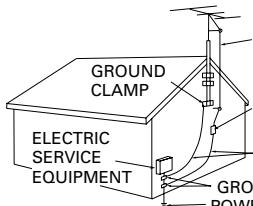
Fig. A
ANTENNA LEAD IN WIRE
ANTENNA DISCHARGE UNIT (NEC SECTION 810
GROUNDING CONDUCTORS (NEC SECTION 810-21)
UND CLAMPS
ER SERVICE GROUNDING
TRODE SYSTEM
(Art 250, PART H)
NEC — NATIONAL ELECTRICAL CODE
WARNING: THE APPARATUS IS NOT WATERPROOFS, TO PREVENT FIRE OR SHOCK HAZARD,DO NOT EXPOSE THIS APPARUTUS TO RAIN OR MOISTURE AND DO NOT PUT ANY WATER SOURCE NEAR THIS APPARATUS, SUCH AS VASE,FLower POT,COSMETICS CONTAINER AND MEDICINE BOTTLE ETC. H001A_En
[For U.S. model] IMPORTANT NOTICE
The serial number for this equipment is located on the rear panel. Please write this serial number on your enclosed warranty card and keep it in a secure area. This is for your security. H006A_EN
NOTE: This equipment has been tested and found to comply with the limits for a Class B digital device, pursuant to Part 15 of the FCC Rules. These limits are designed to provide reasonable protection against harmful interference in a residential installation. This equipment generates, uses, and can radiate radio frequency energy and, if not installed and used in accordance with the instructions, may cause harmful interference to radio communications. However, there is no guarantee that interference will not occur in a particular installation. If this equipment does cause harmful interference to radio or television reception, which can be determined by turning the equipment off and on, the user is encouraged to try to correct the interference by one or more of the following measures:
- Reorient or relocate the receiving antenna.
- Increase the separation between the equipment and receiver.
- Connect the equipment into an outlet on a circuit different from that to which the receiver is connected.
- Consult the dealer or an experienced radio/ TV technician for help. H010_En
Alteration or modifications carried out without appropriate authorization may invalidate the user's right to operate the equipment. H011_En
CAUTION:
This product satisfies FCC regulations when shielded cables and connectors are used to connect the unit to other equipment. To prevent electromagnetic interference with electric appliances such as radios and televisions, use shielded cables and connectors for connections. H012_En
CAUTION
- Use of controls or adjustments or performance of procedures other than those specified herein may result in hazardous radiation exposure.
- The use of optical instruments with this product will increase eye hazard. H013_En
[For Canadian model]
CAUTION: TO PREVENT ELECTRIC SHOCK, DO NOT USE THIS (POLARIZED) PLUG WITH AN EXTENSION CORD, RECEPTACLE OR OTHER OUTLET UNLESS THE BLADES CAN BE FULLY INSERTED TO PREVENT BLADE EXPOSURE.
ATTENTION: POUR PREVENIR LES CHOCSELECTRIQUES NE PAS UTILISER CETTE FICHEPOLARISEE AVEC UN PROLONGATEUR UNEPRISE DE COURANT OU UNE AUTRE SORTIEDE COURANT, SAUF SI LES LAMES PEUVENTETRE INSEREES A FOND SANS EN LAISSEAUCUNE PARTIE A DECOUVERT. H007A2
[For Canadian model]
This Class B digital apparatus complies with Canadian ICES-003.
CAUTION: THE STANDBY/ON BUTTON IS SECONDARY CONNECTED AND THEREFORE DOES NOT SEPARATE THE UNIT FROM MAINS POWER IN STANDBY POSITION. therefore install the unit suitable places easy to disconnect the MAINS plug in case of the accident. The MAINS plug of unit should be unplugged from the wall socket when left unused for a long period of time.
H017B_En
CAUTION
This product contains a laser diode of higher class than 1. To ensure continued safety, do not remove any covers or attempt to gain access to the inside of the product.
Refer all servicing to qualified personnel.
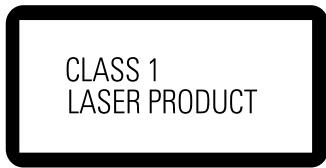
The following caution label appears on your unit.
Location: rear of the unit
H018A_En
WARNING: Slot and openings in the cabinet are provided for ventilation and to ensure reliable operation of the product and to protect it from overheating, to prevent fire hazard, the openings should never be blocked and covered with items, such as newspapers, table-cloths, curtains, etc. Also do not put the apparatus on the thick carpet, bed, sofa, or fabric having a thick pile.
H040_En
WARNING: BEFORE PLugging IN THE UNIT FOR THE FIRST TIME, READ THE FOLLOWING SECTION CAREFULLY. THE VOLTAGE OF THE AVAILABLE POWER SUPPLY DIFFERS ACCORDING TO COUNTRY OR REGION. BE SURE THAT THE POWER SUPPLY VOLTAGE OF THE AREA WHERE THIS UNIT WILL BE USED MEETS THE REQUIRED VOLTAGE (E.G., 230V OR 120V) WRITTEN ON THE REAR PANEL.
H041A_En
WARNING: NO NAKED FLAME SOURCES, SUCH AS LIGHTED CANDLE, SHOULD BEPLACED ON THE APPARATUS. IF NAKED FLAMESOURCES ACCIDENTALLY FALL DOWN, FIRESPREAD OVER THE APPARATUS THEN MAYCAUSE FIRE.
H044 En
Operating Environment H045_En
Operating environment temperature and humidity:
+5°C +35°C (+41°F - +95°F); less than 85%RH (cooling vents not blocked)
Do not install in the following locations
- Location exposed to direct sunlight or strong artificial light
- Location exposed to high humidity, or poorly ventilated location
On the bonnet of the unit
CAUTION : VISIBLE AND INVISIBLE LASER RADIATION WHEN OPEN. AVOID EXPOSURE TO BEAM
VORSICHT : SICHAIRE UNI/UNSICHAIRE LASERSTRAHUNG, WENNADECKUNG GOEFPNET NOTCH DEM STRAHL AUSSETZEN!
ADVARSEL: SYNLIG OG USYNLIG LASERSTRALING VED ABDING UNDGA UDSETTALSE FOR STRALING.
WARNING SYNLIG OCH OSYNLIG LASERSTRALNING NAR DENNA DEL AR OPPNAD BETRAKTA E.J.STRALEN.
VARO! AVATTAASSA ALISTUT NAKYVA JAKNAYMTOMALLE LASERSATEIE YLLE.ALA KATO SATEESEN.
CUIDADO: RADIACION LASER VISIBLE E INVISIBLE AL ESTAR ABIERTO. EVITAR EXPOSICIONAL RAYO.
VRW1872
[For U.S. model]
![PIONEER DV 656 A - [For U.S. model] - 1](/content/2024/11/220976/images/e7b124fa8703dc0493e4dc0721f8efe4d796a704e0b747f402cd38c4560d3bbd.jpg)
ENERGY STAR® and ENERGY STAR
certification mark are registered US marks.
K001B_En
This product is for general household purposes. Any failure due to use for other than household purposes (such as long-term use for business purposes in a restaurant or use in a car or ship) and which requires repair will be charged for even during the warranty period. K041 En
This product incorporates copyright protection technology that is protected by method claims of certain U.S. patents and other intellectual property rights owned by Macrovision Corporation and other rights owners. Use of this copyright protection technology must be authorized by Macrovision Corporation, and is intended for home and other limited viewing uses only unless otherwise authorized by Macrovision Corporation. Reverse engineering or disassembly is prohibited.
This product includes FontAvenue® fonts licenced by NEC corporation. FontAvenue is a registered trademark of NEC Corporation.
Thank you for buying this Pioneer product.
Please read through these operating instructions so you will know how to operate your model properly. After you have finished reading the instructions, put them away in a safe place for future reference.
01 Before You Start
Features 8
What's in the box 9
Putting the batteries in the remote control ....9
Using the remote control 9
Disc/Content Format playback
Compatibility 10
General Disc Compatibility 10
CD-R/RW Compatibility 10
DVD-R/RW Compatibility 10
Compressed Audio Compatibility 10
PC Created Disc Compatibility 11
Titles, chapters and tracks 11
DVD-Video regions 11
02 Connecting Up
Rear panel 12
Easy connections 13
Using other types of video output 14
Connecting using an S-Video output ....14
Connecting using the
component video output 14
DV-655A Taiwan model only: Connecting
using the D1/D2 video output 14
Connecting for multichannel surround
sound 15
Connecting using the multichannel analog
outputs 15
Connecting using a digital output 16
Controlling this player from another Pioneer
component 17
03 Controls and Displays
Front panel 18
About progressive scan video 19
Display 20
Remote control 21
04 Getting Started
Switching on 23
Let's Get Started 23
Using the on-screen displays 25
Setting up with the Setup Navigator 25
Playing discs 28
Basic playback controls 28
Front panel controls 29
DVD disc menus 29
Video CD/Super VCD PBC menus 30
05 Playing Discs
Introduction 33
Using the Disc Navigator to browse
the contents of a disc 33
Scanning discs 34
Playing in slow motion 35
Frame advance/frame reverse 35
Looping a section of a disc 36
Using repeat play 36
Using random play 37
Creating a program list 38
Editing a program list. 40
Other functions available from the program menu 41
Searching a disc 41
Switching subtitles 42
Switching DVD-Video audio language 43
Switching DVD-RW audio channel 43
Switching DVD-Audio audio channel 43
Switching CD/MP3/Video CD/Super VCD audio
channel 44
Zooming the screen 44
Switching camera angles 45
Displaying disc information 45
Audio DRC 46
Virtual Surround 47
Channel Level 48
Video Adjust 49
Creating your own interlace output presets 49
Creating your own progressive output presets 50
Using the Initial Settings menu 51
Digital Audio Out settings 51
Digital Out 51
Dolby Digital Out 51
DTS Out 52
Linear PCM Out 52
MPEG Out 52
Video Output settings 53
TV Screen 53
Auto Progressive (DV-656A only) 53
S-Video Out 53
Still Picture 54
Language settings 54
Audio Language 54
Subtitle Language 55
Auto Language 55
DVD Menu Language 56
Subtitle Display 56
Display settings 56
OSD Language 56
On Screen Display 56
Angle Indicator 57
Background 57
Screen Saver 57
Options 57
Parental Lock 57
Registering a new password 58
Changing your password 58
Setting/changing the
Parental Lock level 59
Setting/changing the CountryCode ....59
Bonus Group 60
Auto Disc Menu 60
GroupPlayback 61
DVDPlaybackMode 61
SACDPlayback(DV-655Aonly) 61
CDPlayback 62
Speakers 62
Audio Output Mode 62
Speaker Installation 62
Channel Level. 63
Taking care of your player and discs 65
Handling discs 65
Storing discs 65
Discs to avoid 65
Cleaning the pickup lens 66
Problems with condensation 66
Hints on installation 66
Moving the player 66
Power cord caution 66
Screen sizes and disc formats 67
Widescreen TV users 67
Standard TV users 67
Resetting the player 67
About the audio output settings 68
Language code list 69
Country code list 69
Selecting languages using the
language code list 70
Glossary 70
Changing the on-screen display language to English 72
Setting the TV System(Except DV-656A and DV
655A Taiwan model) 73
Watching NTSC on a PAL TV 73
Troubleshooting 74
Specifications 78
Features
DVD-Audio and SACD\*1 compatible
Experience the super high-quality audio performance of DVD-Audio and Super Audio CD (SACD).
The on-board 24-bit/192kHz DAC means that this player is fully compatible with high sampling-rate discs, capable of delivering exceptional sound quality in terms of dynamic range, low-level resolution and high-frequency detail.
Super VCD compatible*1
This player supports the IEC's Super VCD standard. Compared to the Video CD standard, Super VCD offers superior picture quality, and allows two stereo soundtracks to be recorded. Super VCD also supports the widescreen size.
Built-in Dolby\*2 Digital and DTS\*3 decoding with multichannel outputs


This player features multichannel analog outputs for connection to an AV amplifier to give you stunning surround sound from Dolby Digital, DTS and multichannel DVD-Audio discs.
TruSurround*4 and Virtual Dolby Digital
TruSurround by SRS (●)
TruSurround/Virtual Dolby Digital creates a realistic surround-sound effect from any Dolby Digital source using just two speakers (see page 47).
PureCinema progressive scan
When connected to a progressive scan-compatible TV or monitor using the component video outputs, you can enjoy extremely stable, flicker free images, with the same frame refresh rate as the original movie (see page 50).
Super Fine Focus digital filter
This improves the quality of the video output by reducing video noise and increasing the horizontal resolution to 540 lines (see page 49).
Picture zoom (interlace output only)
While a DVD-Video or Video CD/Super VCD is paused, you can zoom in on any part of the picture at up to 4x magnification for a closer look (see page 44).
MP3 compatibility
This player is compatible with CD-R, CD-RW and CD-ROM discs that contain MP3 audio tracks (see pages 10-11).
Graphical on-screen displays
Setting up and using your DVD player is made very easy using the graphical on-screen displays.
Energy saving design
This unit is designed to use 0.3 W of power when in standby mode.
1 Model DV-655A only
2 Manufactured under license from Dolby Laboratories. "Dolby" and the double-D symbol are trademarks of Dolby Laboratories.
3 "DTS" and "DTS Digital Surround" are registered trademarks of Digital Theater Systems, Inc.
4 TruSurround and the (●)® symbol are trademarks of SRS Labs, Inc. TruSurround technology is incorporated under license from SRS Labs, Inc.
What's in the box
Please confirm that the following accessories are in the box when you open it.
Remote control
AA/R6P dry cell batteries x2
- Stereo audio cable (red/white plugs)
Video cable (yellow plugs)
Power cable
These operating instructions
- Warranty card (DV-656A and DV-655 px model only)
Putting the batteries in the remote control
1 Open the battery compartment cover on the back of the remote control.
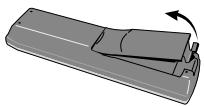
2 Insert two AA/R6P batteries into the battery compartment following the indications ( ,) inside the compartment.
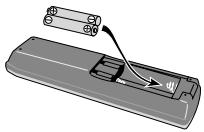
3 Close the cover.
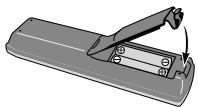

Note
Incorrect use of batteries can result in hazards such as leakage and bursting. Please observe the following:
- Don't mix new and old batteries together.
- Don't use different kinds of battery together—although they may look similar, different batteries may have different voltages.
- Make sure that the plus and minus ends of each battery match the indications in the battery compartment.
- Remove batteries from equipment that isn't going to be used for a month or more.
- When disposing of used batteries, please comply with governmental regulations or environmental public instruction's rules that apply in your country or area.
Using the remote control
Keep in mind the following when using the remote control:
- Make sure that there are no obstacles between the remote and the remote sensor on the unit.
- The remote has a range of about 23 ft. (7 meters)
- Remote operation may become unreliable if strong sunlight or fluorescent light is shining on the unit's remote sensor.
- Remote controllers for different devices can interfere with each other. Avoid using remotes for other equipment located close to this unit.
- Replace the batteries when you notice a fall off in the operating range of the remote.
Disc / Content Format Playback Compatibility
General Disc Compatibility
- This player was designed and engineered to be compatible with software containing one or more of the following logos.

DVD-Audio

DVD-Video

DVD-R

DVD-RW

Audio CD

Video CD

CD-R

CD-RW

Super VCD


Super Audio CD
*1 DV-655A only
- Other formats, including but not limited to the following, are not playable in this player:
Photo CD / DVD-RAM / DVD-ROM / CD-ROM
(except those that contain MP3 files formatted as specified in the "Compressed Audio Compatibility" section)
DVD-R/RW and CD-R/RW discs (Audio CDs and Video CDs) recorded using a DVD Recorder, CD Recorder or Personal Computer may not be playable on this machine. This may be caused by a number of possibilities, including but not limited to: the type of disc used; the type of recording; or damage, dirt or condensation on either the disc or the player's pick-up lens.
Special note about particular formats or software follows below:
CD-R/RW Compatibility
- This unit will play CD-R and CD-RW discs recorded in CD Audio, Video CD, or MP3 audio formatting. However, any other content may cause the disc not to play, or create noise/distortion in the output.
- This unit cannot record CD-R or CD-RW discs
- Un-finalized CD-R/RW discs recorded in CD Audio can be played, but not all Table of Contents (playing time, etc...) will be displayed
DVD-R/RW Compatibility
- This unit will play DVD-R/RW discs that were recorded using the DVD Video format.
- This unit will play DVD-RW discs that were recorded using the Video Recording format.
This unit cannot record DVD-R/RW discs
- Un-finalized DVD-R/RW discs cannot be played in this player.
Compressed Audio Compatibility
- This unit will play compressed audio files formatted in the MPEG-1 Audio Layer 3 format (MP3) with a 44.1 or 48kHz fixed bit rate. Incompatible files will not play and "UNPLAYABLE" will be displayed on the unit.
- Variable Bit-Rate (VBR) files are playable, but playing time may not be shown correctly.
- The CD-ROM used to compile your MP3 files must be ISO 9660 Level 2 compliant.
- CD physical format: Mode1, Mode2 XA Form1.
-
This player only plays tracks that are named with the file extension“.mp3” or“.MP3”
-
This player is compatible with multi-session discs, but only plays sessions that are closed.
- Use CD-R or CD-RW media for recording your MP3 files.
- This player can recognize a maximum of 250 folders or 250 tracks. Discs containing more than 250 folders or 250 tracks will play, but only the first 250 folders / tracks.
- Folder and track names (excluding the ".mp3" extension) are displayed.
- There are many different recording bitrates available to encode your MP3 files. This unit was designed to be compatible with all of them. Audio encoded at 128Kbps should sound close to regular CD Audio quality. This player will play lower bit-rate MP3 tracks, but please note that the sound quality becomes noticeably worse at lower bit-rates.
PC Created Disc Compatibility
- If you record a disc using a Personal Computer, even if it is recorded in a "compatible format" as listed above, there will be cases in which the disc may not be playable in this machine due to the setting of the application software used to create the disc. In these particular incidences, check with the software publisher for more detailed information.
DVD-R/RW and CD-R/RW software disc boxes also have additional compatibility information.
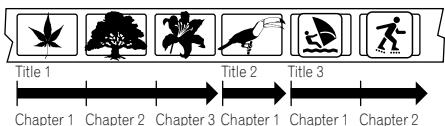
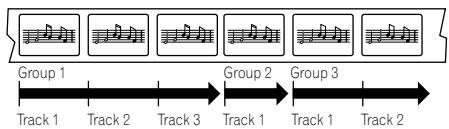
Titles, chapters, Groups and tracks
DVD-Video discs are generally divided into one or more titles. Titles may be further subdivided into chapters.
DVD-Audio discs are divided into one or more groups that can each contain a number of tracks.
CDs, SACDs and Video CD/Super VCDs are divided into tracks.
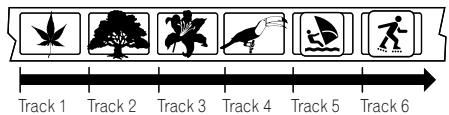
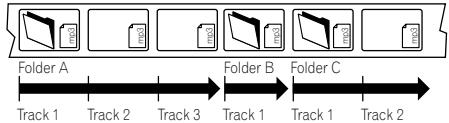
CD-ROMs containing MP3 files are divided into folders and tracks.Folders may also contain further sub folders.
DVD-Video regions
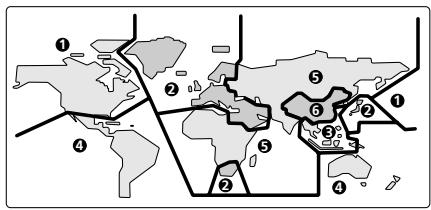
All DVD-Video discs carry a region mark on the case somewhere that indicates which region(s) of the world the disc is compatible with. Your DVD player also has a region mark, which you can find on the rear panel. Discs from incompatible regions will not play in this player. Discs marked ALL will play in any player.
The diagram below shows the various DVD regions of the world.
Rear panel
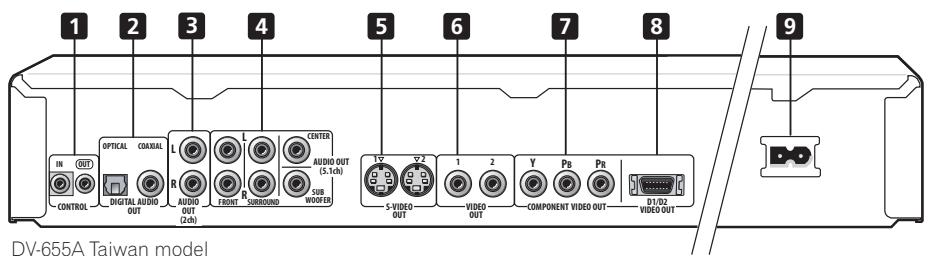
When connecting this player up to your TV, AV receiver or other components, make sure that all components are switched off and unplugged.
1 CONTROL IN / OUT
For passing remote control signals to other Pioneer components (page 17).
2 DIGITAL AUDIO OUT - OPTICAL / COAXIAL
Digital audio outputs for connection to a PCM, Dolby Digital, DTS and/or MPEG-compatible AV receiver (page 16).
3 AUDIO OUT (2ch)
Two channel analog audio outputs for connection to your TV, AV receiver or stereo system (pages 13, 15, 16).
4 AUDIO OUT (5.1ch)
Multichannel analog audio outputs for connection to an AV receiver with multichannel inputs (page 15).
5 S (S-Video output)
S-Video output(s) that you can use instead of the video output described in 6 below (page 14).
DV-655A has two S-Video outputs
6VIDEO OUT
Standard video output(s) that you can connect to your TV or AV receiver using the supplied audio/video cable (pages 13, 15, 16). (DV-655A has two Video outputs)
7 COMPONENTVIDEO OUT
High quality video output for connection to a TV, monitor or AV receiver that has component video inputs.
Connect using a commercially available three-way component video cable. Be careful to match the colors of the jacks and cables for correct connection (page 14).
8 D1/D2VIDEO OUT (DV-655A Taiwan model only)
Use to connect this player to a TV with a D video input (page 14).
9 AC IN
Connect the supplied power cord here, then plug into a power outlet.

Tip
- You may find it useful to have the manuals supplied with your other components handy when connecting this player.
- If you come across any unfamiliar terms in this section of the manual, take a look at the Glossary starting on page 70.
Easy connections
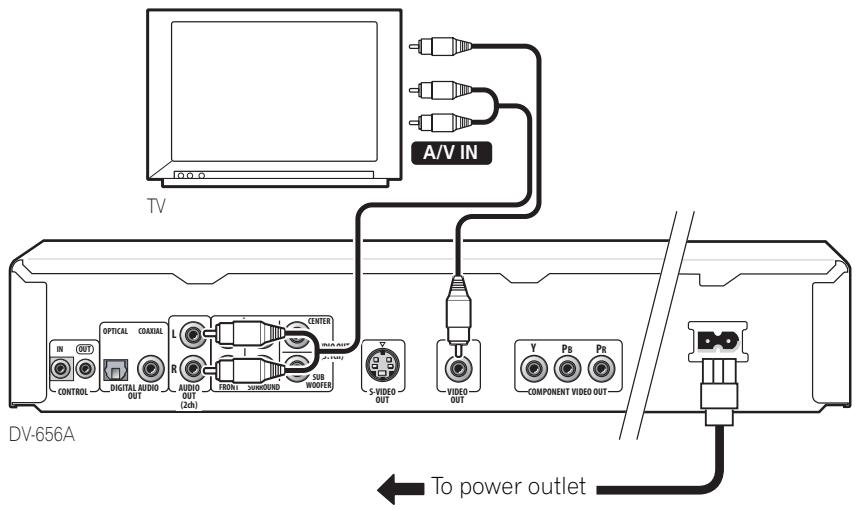
The setup described here is a basic setup that allows you to play discs using just the cables supplied with the player. In this setup, stereo audio is played through your TV.

Important
- This player is equipped with copy protection technology. Do not connect this player to your TV via a VCR using AV cables, as the picture from this player will not appear properly on your TV. (This player may also not be compatible with some combination TV/VCRs for the same reason; refer to the manufacturer for more information.)
Use the supplied red/white stereo audio and yellow video cable. Make sure you match up the left and right audio outputs with their corresponding inputs for correct stereo sound.
See the next page if you want to use an S-Video, component or a D video connection.
- If you need another pair of stereo outputs (and don't need to use the multichannel analog outputs), you can use the AUDIO OUT (5.1ch) FRONT L/R jacks (page 15).
2 Connect the supplied AC power cord to the AC IN inlet, then plug into a power outlet.

Important
-
Before unplugging the player from the power outlet, make sure you first switch it into standby using either the front panel STANDBY/ON button, or the remote control, and wait of the -OFF-message to disappear from the player's display.
-
For the above reasons, do not plug this player into a switched power supply found on some amplifiers and AV receivers.
Using other types of video output
This player has standard (composite), S-Video and component video outputs (the DV-655A (Taiwan model) has a D video connector for component video). The main difference between them is the quality of the picture.
S-Video delivers a better picture than standard composite video, while component video gives better picture quality still. The variety of outputs also gives you the flexibility of connecting your particular equipment using the best connection type available.
Connecting using an S-Video output
You can use the S-Video output instead of theVIDEO OUT jack to connect this player to your TV (or other equipment).
Line up the small triangle above the jack with the same mark on the plug before plugging in.
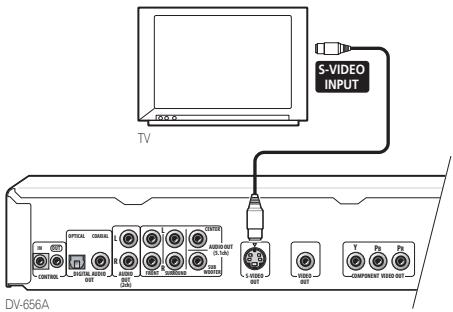
- DV-655A only: If you connect both S-video jacks, but one of the connected components is not S1/S2 compatible, the automatic aspect ratio switching will not work with either connected component.
Connecting using the component video output
You can use the component video output instead of the standard video out jack to connect this player to your TV (or other equipment).
1 Use a component video cable (not supplied) to connect the COMPONENT VIDEO OUT jacks to a component video input on your TV, monitor or AV receiver.
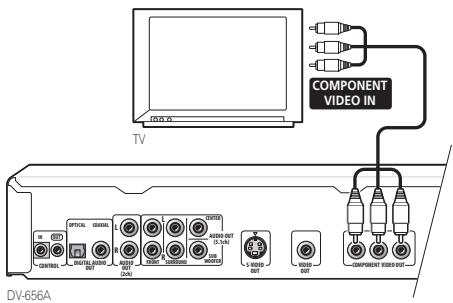

Note
- DV-655A: Only NTSC video is output when set to progressive scan.
DV-655A Taiwan model only: Connecting using the D1/D2 video output
If your TV is equipped with a D type video input, you can use a D video cord to connect this player to your TV.
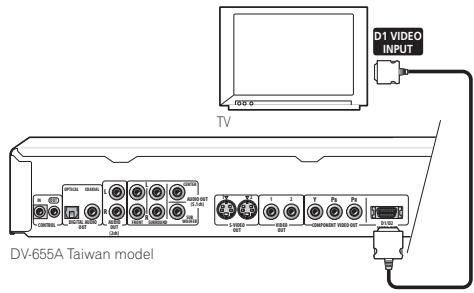

Note
- Only NTSC video is output when set to progressive scan.
- This player is compatible with D1, D2, D3 and D4 input jacks, however, when connected to a D1 jack, only interlace video is output.
- If you connect both one or both of the S-video jacks, and the D video connector, and one of the connected components is not S1/S2 compatible, the automatic aspect ratio switching will not work with any of the connected components.
Connecting for multichannel surround sound
You can connect this player to your AV receiver using the multichannel analog outputs or one of the digital outputs.
In addition to these connections, you should also connect the 2 channel analog outputs for compatibility with all discs.
You'll probably also want to connect a video output to your AV receiver. You can use any of the video outputs available on this player (the illustration shows a standard (composite) connection).
Connecting using the multichannel analog outputs
If your AV receiver has 5.1 channel analog inputs, we recommend connecting this player to it using the multichannel analog outputs. Doing this will ensure that you can enjoy all kinds of disc, including Dolby Digital and DTS DVD-Video discs, as well as high sampling rate and multichannel DVD-Audio and (for DV-655A) SACD discs.
1 Connect the MULTICHANNEL AUDIO outputs on this player to the multi-channel audio inputs on your AV receiver. It's convenient to use three stereo audio cables; one for the FRONT, one for the SURROUND and one for the CENTER and SUBWOOFER channels.
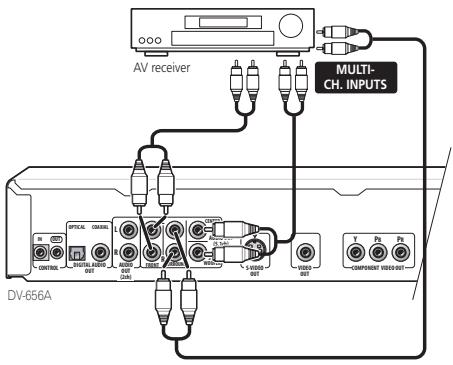
2 Connect the analog AUDIO OUT L/R and VIDEO OUTPUT jacks on this player to a set of analog audio and video inputs on your AV receiver.
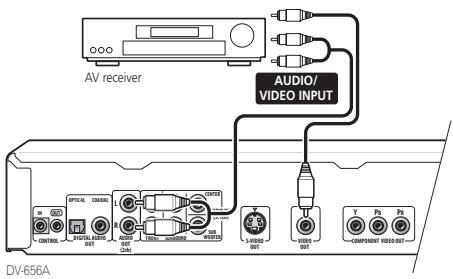
The diagram shows standard video connections, but you can alternatively use the S-Video or component video connections if they're available.

Tip
- You usually have to connect the same kind of video cable between your DVD player and AV receiver, and between your AV receiver and TV.
Connecting using a digital output
You can also connect this player to your AV receiver using one of the digital outputs. There are both coaxial and optical digital jacks; use whichever is convenient.
We recommend also connecting this player to your AV receiver using a stereo analog connection.
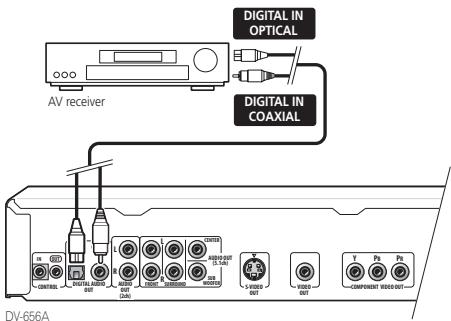
This enables you to listen to multichannel surround sound.
For an optical connection, use an optical cable (not supplied) to connect the OPTICAL DIGITAL OUT jack to an optical input on your AV receiver.
- When inserting the plug, the protective shutter will open and you should hear the plug click into position when fully inserted. Take care not to force the plug as this may damage the shutter, the cable and/or the player.
For a coaxial connection, use a coaxial cable (similar to the supplied video cable) to connect the COAXIAL DIGITAL OUT jack to a coaxial input on your AV receiver.
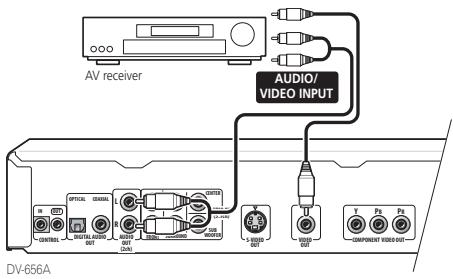
The diagram shows standard video connections, but you can alternatively use the S-Video or component video connections if they're available.

Tip
- You usually have to connect the same kind of video cable between your DVD player and AV receiver, and between your AV receiver and TV.
Controlling this player from another Pioneer component
This player has SR jacks which allow you to use the remote sensor on one Pioneer component to control another.
Use a mini-jack plug to connect the
CONTROL OUT of one component to the CONTROL IN of another. In this way you can daisy-chain several components together.
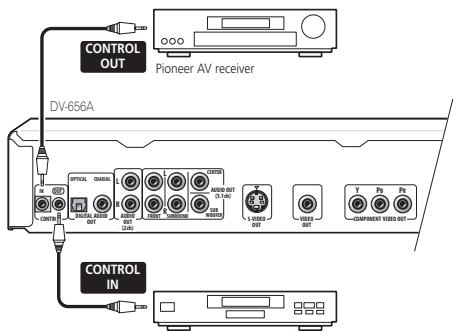
Pioneer CD player, etc.

FAQ
- My TV doesn't have any inputs to connect the DVD player. How can I watch DVDs?
Unfortunately, if your TV has no inputs you can't use this player with it.
- My VCR is already connected to my TV, so there aren't any spare inputs. What should I do?
If all your TV's inputs are already in use, you can buy a video input selector from an electronics store, which effectively gives you more inputs.
- My TV only has one input for the sound. What should I plug it into?
If you don't mind mono sound, you can buy a stereo RCA-to-mono RCA cable from an electronics store. Connect the stereo end to this player and the mono end to your TV.
If you want stereo sound, connect this player to your amplifier or stereo system using a stereo audio cable.
I connected the DVD player to my AV receiver, and although the sound is fine, there's no picture. What did I do wrong?
Make sure that the type of video connection from the DVD player to your AV receiver is the same as that from the receiver to your TV. Most AV receivers won't convert from one kind of connection to another.
Front panel
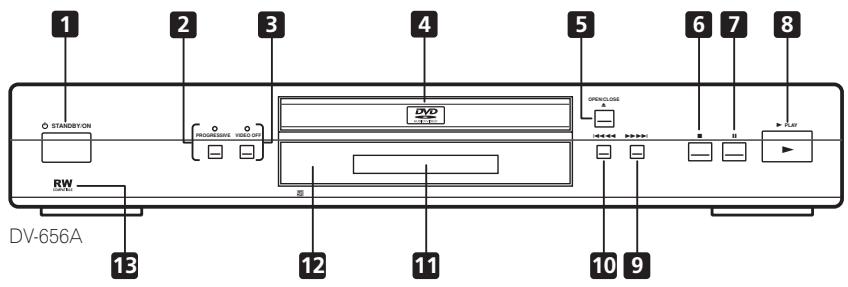
1 STANDBY/ON
Press to switch the player on or into standby
Press to switch the progressive video output mode between progressive and interlace. The indicator lights in progressive scan mode. See page 19 for more information.
Press to switch the video output on/off. The indicator lights when the video output is switched off (when listening to a DVD-Audio disc, for example)
4 Disc tray
5 ▲ OPEN/CLOSE
Press to open or close the disc tray
6
Press to stop the disc (you can resume playback by pressing (play))
7 11
Press to pause playback. Press again to restart
8
Press to start or resume playback
9
- Press and hold for fast forward scanning
- Press to jump to the next chapter or track
10
- Press and hold for fast reverse scanning
- Press to jump back to the beginning of the current chapter or track, then to previous chapters/tracks
11 Display
See page 20 for a description of the display
12 Remote control sensor
The remote control has a range of up to about 7m (23ft.)
13 RW COMPATIBLE
This mark indicates compatibility with DVD-RW discs rerecorded on a DVD recorder in Video Recording mode.
About progressive scan video
Compared to interlace video, progressive scan video effectively doubles the scanning rate of the picture, resulting in a very stable, flicker-free image.
Progressive scan video is available only from the component video output. Use the
PROGRESSIVE button on the front panel to switch the component video output between interlace and progressive. With a DVD-Video disc you can do this during playback, or when the disc is stopped. For other types of disc, the player must be stopped.

Important
- If you connect a TV that is not compatible with a progressive scan signal and switch the player to progressive, you will not be able to see any picture at all. In this case, press the PROGRESSIVE button on the front panel to switch back to interlace (the PROGRESSIVE indicator should be unlit).

Note
- When set to progressive, there is no video output from theVIDEO and S-VIDEO jacks. If you want to display video on more than one monitor simultaneously, make sure that the video output is set to interlace.
- Some TVs display 4:3 material incorrectly in progressive scan mode. This player has an Auto Progressive setting to correct this problem. See page 53 for more information (DV-656A only).
- You can't switch the video output when an OSD is on-screen.
- The picture on some TVs may momentarily break up when you switch the video output of this player.
Compatibility of this unit with progressive-scan TVs.
This player is compatible with progressive video Macro Vision System Copy Guard.
CONSUMERS SHOULD NOTE THAT NOT ALL HIGH DEFINITION TELEVISION SETS ARE FULY COMPATIBLE WITH THIS PRODUCT AND MAY CAUSE ARTIFACTS TO BE DISPLAYED IN THE PICTURE. IN CASE OF 525 PROGRESSIVE SCAN PICTURE PROBLEMS, IT IS RECOMMENDED THAT THE USER SWITCH THE CONNECTION TO THE "STANDARD DEFINITION" OUTPUT. IF THERE ARE QUESTIONS REGARDING OUR TV SET COMPATIBILITY WITH THIS MODEL 525p DVD PLAYER, PLEASE CONTACT OUR CUSTOMER SERVICE CENTER.
- DV-656A: This player is compatible with the following Pioneer displays and monitors: PDP-5030HD, PRO-1000HD, PRO-800HD, PDP-4330HD, PRO-720HD, PRO-620HD, PRO-520HD, SD-643HDS, SD-533HDS.
- DV-655A: This player is compatible with the following Pioneer displays and monitors: PDP-503HDG, PDP-433HDG progressive scan-compatible TVs.
Display
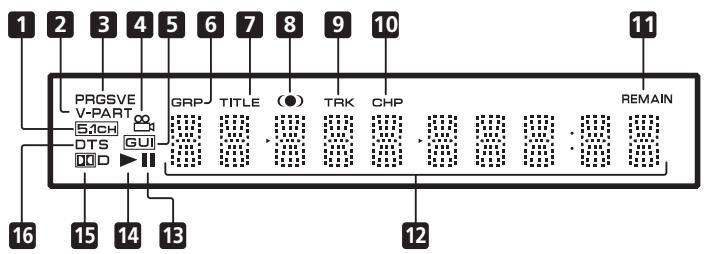
1 5.1CH
Lights when analog 5.1 channel output is selected (page 62)
2 V-PART
Lights when playing a video part of a DVD disc
3 PRGSVE
Lights when the video output is progressive scan (pages 18, 19)
4
Lights during multi-angle scenes on a DVD disc (page 44)
5 GUI (Graphical User Interface)
Lights when a menu is displayed on-screen
6 GRP
Indicates that the character display is showing a DVD-Audio group number
7 TITLE
Indicates that the character display is showing a DVD-Video title number
8 (0)
Lights when Dv/TruSurround is active (page 47)
9 TRK
Indicates that the character display is showing a track number
10 CHP
Indicates that the character display is showing a DVD chapter number
11 REMAIN
Lights when the character display is showing the time or number of tracks/titles/chapters remaining
12 Character display
13 II
Lights when a disc is paused
14
Lights when a disc is playing
15 D D
Lights when a Dolby Digital soundtrack is playing
16 DTS
Lights when a DTS soundtrack is playing
Remote control
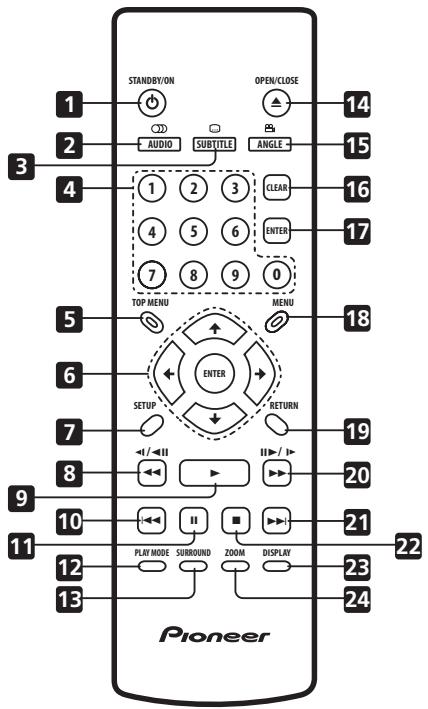
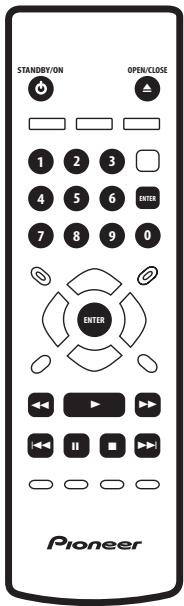
1 STANDBY/ON
Press to switch the player on or into standby
2 AUDIO
Press to select the audio channel or language (pages 42-44)
3 SUBTITLE
Press to select a subtitle display (page 42)
Press to display the top menu of a DVD disc
Use to navigate on-screen displays and menus. Press ENTER to select an option or execute a command
7 SETUP
Press to display (or exit) the on-screen display
8 and /ll
Use for reverse slow motion playback, frame reverse and reverse scanning. See page 35
9
Press to start or resume playback
10
Press to jump to the beginning of the current chapter or track, then to previous chapters/ tracks
11 II
Press to pause playback; press again to restart
12 PLAY MODE
Press to display the Play Mode menu (pages 36-42) (You can also get to the Play Mode menu by pressing SETUP and selecting Play Mode)
13 SURROUND
Press to activate/switch off V/TruSurround
14 ▲ OPEN/CLOSE
Press to open or close the disc tray
15 ANGLE
Press to change the camera angle during DVD multi-angle scene playback (page 45)
16 CLEAR
Press to clear a numeric entry
17 ENTER
Use to select menu options, etc. (works exactly the same as the ENTER button in 6 above)
Press to display a DVD disc menu, or the Disc Navigator if a DVD-RW, CD, Video CD or MP3 disc is loaded
19 RETURN
Press to return to a previous menu screen
20 ▶ and ||/||
Use for forward slow motion playback, frame advance and forward scanning. See page 35
21
Press to jump to the next chapter or track
22
Press to stop the disc (you can resume playback by pressing (play))
23 DISPLAY
Press to display information about the disc playing (page 45)
24 ZOOM
Press to change the zoom level (page 44)
Switching on
After making sure that everything is connected properly and that the player is plugged in, press STANDBY/ON on the front panel, or on the remote control to switch the player on.
Also, switch on your TV and make sure that it is set to the input you connected the DVD player to.
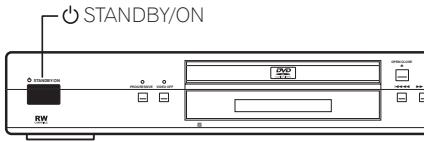

FAQ
- My DVD player switches on but there is nothing displayed on my TV.
Make sure that the TV is set to the correct video input (not a TV channel). For example, if you connected this player to the VIDEO 1 inputs on your TV, switch your TV to VIDEO 1.
- If you connected this player to an AV receiver, make sure that the receiver is switched on and set to the correct input.

Note
- You can also use the OPEN/CLOSE button to switch on the player and open the disc tray at the same time.
- This player features a screen saver. If the player is stopped or paused and no button is pressed for five minutes, the screen saver starts.
Let's Get Started
When you switch on the player for the first time, you should see a welcome screen displayed on your TV. From here you can set up the player to work with the kind of TV you have, then either use the Setup Navigator to make more settings, or jump right in and start playing some discs.
Before continuing, make sure that you've loaded the batteries in the remote control.

Important
- For customers in Taiwan: The default on-screen menu language is Traditional Chinese. Use the instructions below to complete the Let's Get Started setup, then see page 72 for instructions on changing the on-screen display language to English.
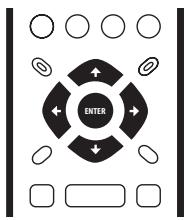
1 Press ENTER to move on to the next screen.
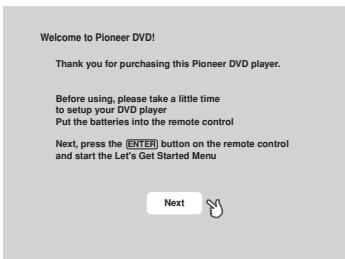
DV-655A Taiwan model only
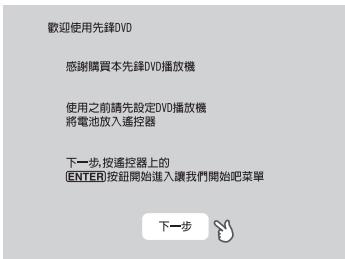
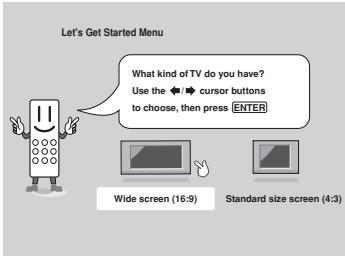
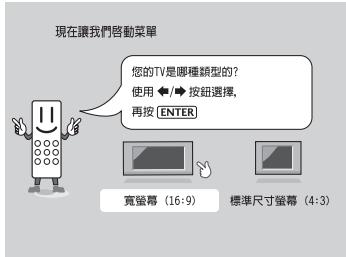
DV-655A Taiwan model only
3 Press ENTER again to finish setting up.
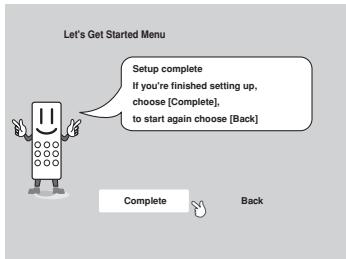
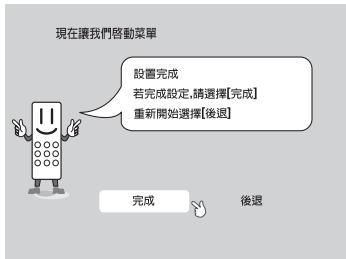
DV-655A Taiwan model only
- Select Back then press ENTER if you want to go back and change the setting you just made.
Using the on-screen displays
For ease of use, this player makes extensive use of graphical on-screen displays (OSDs). You should get used to the way these work as you'll need to use them when setting up the player, using some of the playback features, such as program play, and when making more advanced settings for audio and video.
All the screens are navigated in basically the same way, using the cursor buttons to change the highlighted item and pressing ENTER to select it.

Important
- Throughout this manual, 'Select' means use the cursor buttons to highlight an item on-screen, then press ENTER.
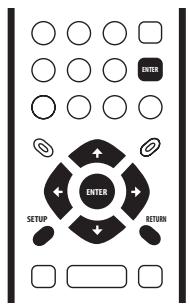
| Button | What it does |
| SETUP | Display/exit the on-screen display |
| ↔ ↑ ↔ | Changes the highlighted menu item |
| ENTER | Selects the highlighted menu item (both ENTER buttons work in exactly the same way) |
| RETURN | Returns to the previous menu without saving changes |

Tip
- Information at the bottom of every OSD screen explains the currently selected menu item and shows which buttons can be used for that screen.
Setting up with the Setup Navigator
Using the Setup Navigator you can make a number of other initial settings for this player. We recommend using the Setup Navigator, especially if you connected this player to an AV receiver for playing surround sound. To answer some of the questions about digital audio formats you may need to look at the instructions that came with your AV receiver.
1 If a disc is playing, press (stop).
Also turn on your TV and make sure that it is set to the correct video input.
2 Press SETUP.
The on-screen display (OSD) appears.
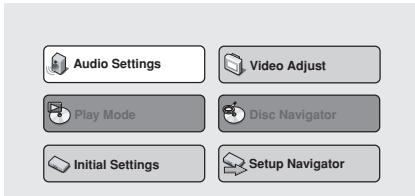
3 Select 'Setup Navigator'.
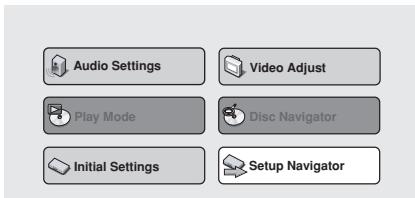
4 Select a DVD language.
Some DVD discs feature on-screen menus, soundtracks and subtitles in several languages. Set your preferred language here.
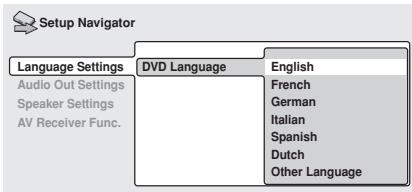
(DV-656A screen)
Note that the language you choose here may not be available on all discs.
- If you want to select a language other than those listed, select Other Language. See Selecting languages using the language code list on page 70 for detailed information.
5 Did you connect this player to an AV receiver?
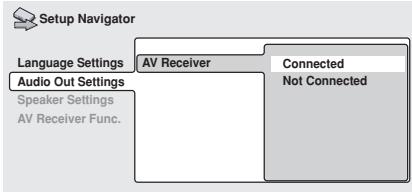
- If you selected Not Connected here, that completes the setup. Press ENTER to leave the Setup Navigator.
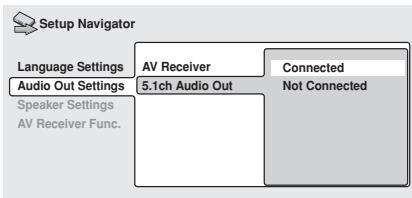
6 Did you connect the 5.1 channel analog audio outputs to your AV receiver?
Select Connected or Not Connected.
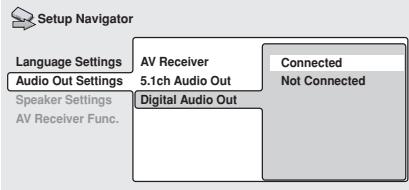
7 Did you connect a digital output to your AV receiver?
Select Connected or Not Connected.
- If you selected Not Connected in both steps 6 and 7, that completes the setup. Press ENTER to leave the Setup Navigator.
If you selected Connected in step 6, then answer the following questions about the speakers in your system, otherwise jump to step 11.
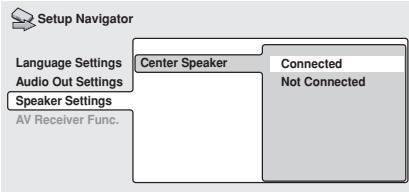
8 Do you have a center speaker connected to your AV receiver?
Select Connected or Not Connected.
9 Do you have surround speakers connected to your AV receiver?
Select Connected or Not Connected.
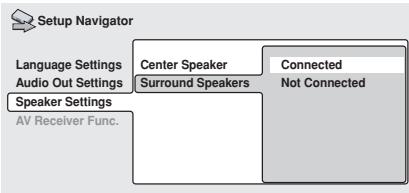
10 Do you have a sub-woofer connected to your AV receiver?
Select Connected or Not Connected.
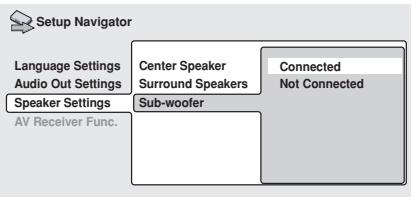
- If you selected Not Connected in step 7, that completes the setup. Press ENTER to leave the Setup Navigator.
Questions 11 through 14 are concerned with the digital decoding capabilities of your AV receiver.
11 Is your AV receiver Dolby Digital compatible?
Select Compatible, Not Compatible or Don't Know.
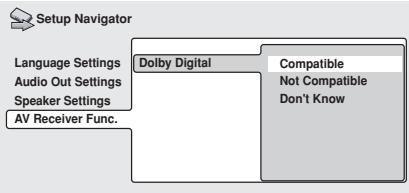
12 Is your AV receiver DTS compatible?
Select Compatible, Not Compatible or Don't Know.
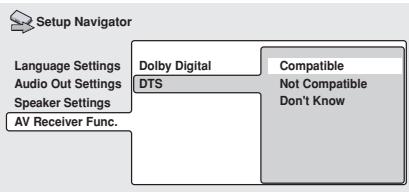
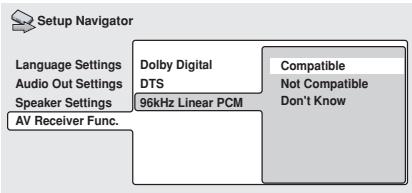
13 Is your AV receiver compatible with 96kHz Linear PCM audio?
Select Compatible, Not Compatible or Don't Know.
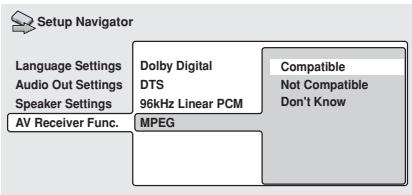
14 Is your AV receiver MPEG compatible?
Select Compatible, Not Compatible or Don't Know.
15 Press ENTER to complete the setup, or press SETUP to quit the Setup Navigator without making any changes.
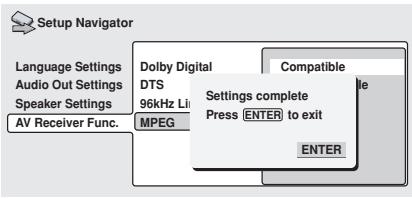
Congratulations, setup is complete!
Playing discs
The basic playback controls for playing DVD, CD, SACD, Video CD/Super VCD and MP3 discs are covered here. Further functions are detailed in the next chapter.

Important
Throughout this manual, the term 'DVD' means DVD-Video, DVD-Audio and DVD-R/RW. If a function is specific to a particular kind of DVD disc, it is specified.
1 If the player isn't already on, press 口 STANDBY/ON to switch it on.
If you're playing a DVD or Video CD/Super VCD, also turn on your TV and make sure that it is set to the correct video input.
2 Press OPEN/CLOSE to open the disc tray.
- Load a disc with the label side facing up, using the disc tray guide to align the disc.
- Never load more than one disc at a time.
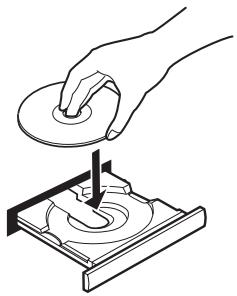
3 Press (play) to start playback.
If you're playing a DVD or Video CD/Super VCD, a menu may appear. See pages 29-30 for how to navigate these.
If you're playing an MP3 disc, it may take a few seconds before playback starts, depending on the complexity of the file structure on the disc.
Basic playback controls
The table below shows the basic controls on the remote for playing discs. The following chapter covers more playback features in more detail.
| Button | What it does |
| ► | Starts playback.
DVD and Video CD: if the display shows RESUME, playback starts from the resume point. |
| ■ | Pauses a disc that's playing, or restarts a paused disc. |
| ■ | Stops playback.
DVD and Video CD: Display shows RESUME. Press (stop) again to cancel the resume function. (The resume function is also cancelled when you eject the disc tray.) |
| ▲► | Press to start fast reverse scanning. Press (play) to resume normal playback. |
| ▲► | Press to start fast forward scanning. Press (play) to resume normal playback. |
| ▲► | Skipping to the start of the current track or chapter, then to previous tracks/chapters. |
| ▲► | Skipping to the next track or chapter. |
| Numbers | Use to enter a title/group/track number. Press ENTER to select (or wait a few seconds).
· If the disc is stopped, play-back starts from the selected title/group (for DVD) or track number (for CD/SACD/Video CD/Super VCD/MP3).
· If the disc is playing, playback jumps to the start of the selected chapter or track (within the current group for DVD-Audio). |
Front panel controls
The (play), (stop), and (pause) buttons on the front panel work in exactly the same way as their remote control equivalents. The combined scan/skip buttons on the front panel (I and I) work slightly differently from the remote buttons.
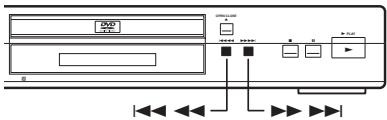
Press and hold for fast scan; press for track/ chapter skip.

Important
- You may find with some DVD discs that some playback controls don't work in certain parts of the disc. This is not a malfunction.
Many DVD-Video and DVD-Audio discs contain menus from which you can select what you want to watch or listen to. They may give access to additional features, such as subtitle and audio language selection, or special features such as slideshows. See the disc packaging for details.
Sometimes menus are displayed automatically when you start playback; others only appear when you press MENU or TOP MENU.

Important
- Some DVD-Audio discs feature a 'bonus group'. To access this group you have to input a password, which you can find on the disc's packaging. See page 60 for more information.
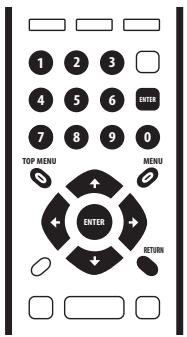
| Button | What it does |
| TOP MENU | Displays the 'top menu' of a disc—this varies with the disc. |
| MENU | Displays a disc menu—this varies with the disc and may be the same as the 'top menu'. |
| ← ↑ ↓ ↑ | Moves the cursor around the screen. |
| ENTER | Selects the current menu option. |
| RETURN | Returns to the previously displayed menu screen. On some DVD-Audio discs featuring browsable pictures, press to display the browser screen. |
| Numbers | Highlights a numbered menu option (some discs only). Press ENTER to select (or wait a few seconds). |
Some Video CDs/Super VCD have menus from which you can choose what you want to watch. These are called PBC (Playback control) menus.
You can play a PBC Video CD/Super VCD without having to navigate the PBC menu by starting playback using a number button or track skip button ( 1) to select a track, rather than the (play) button.
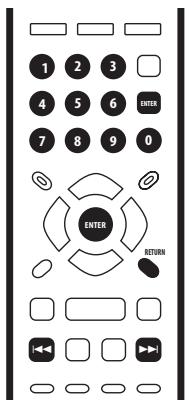
| Button | What it does |
| RETURN | Displays the PBC menu. |
| Numbers | Use to enter a numbered menu option. Press ENTER to select (or wait a few seconds). |
| ← | Displays the previous menu page (if there is one). |
| ► | Displays the next menu page (if there is one). |

FAQ
After I load a DVD disc, it ejects automatically after a few seconds!
Most likely, the disc is the wrong region for your player. The region number should be printed on the disc; check it against the region number of the player (which you can find on the rear panel). See also page 11.
If the region number is OK, it may be that the disc is damaged or dirty. Clean the disc and look for signs of damage.
See also page 65. Check also that the disc is aligned properly in the disc tray and that it's loaded label-side up.
- Why won't the disc I loaded play?
First check that you loaded the disc the right way up (label side up), and that it's clean and not damaged. See page 65 for information on cleaning discs.
If a disc loaded correctly won't play, it's probably an incompatible format or disc type, such as DVD-ROM. See page 10 for more on disc compatibility.
Check the front panel and make sure that the VIDEO OFF indicator isn't lit. If it is, press the VIDEO OFF button to switch the video output back on. See also page 18.
Also make sure that if your TV isn't compatible with progressive scan video, that the PROGRESSIVE indicator isn't lit. If it is, press the PROGRESSIVE button to switch the video output back to interlace. See also page 18.
- I have a widenscreen TV so why are there black bars at the top and bottom of the screen when I play some discs?
Some movie formats are such that even when played on a widescreen TV, black bars are necessary at the top and bottom of the screen. This is not a malfunction.
- I have a standard (4:3) TV and set the player to show widescreen DVDs in pan & scan format, so why do I still get black bars top and bottom with some discs?
Some discs override the display preferences of the player, so even if you have 4:3 (Pan & Scan) selected, those discs will still be shown in letterbox format. This is not a malfunction.
- My AV receiver is definitely compatible with 96/88.2kHz Linear PCM audio, but it doesn't seem to work with this player. What's wrong?
For digital copy-protection purposes, some 96/88.2kHz DVD discs only output digital audio downsampled to 48/44.1kHz. This is not a malfunction. To fully take advantage of the high sampling rate audio, connect the analog audio outputs to your amplifier/receiver.
- Why can't I hear SACD audio through the digital outputs?
SACD audio is only available through the analog outputs. This is not a malfunction. Some DVD-Audio discs too only output audio through the analog outputs.
- Is it better to listen to DVD-Audio discs through the analog outputs?
Some DVD-Audio discs do not output anything through the digital outputs, and multichannel discs are downmixed to stereo for the digital output. In addition, high sampling rate DVD-Audio discs (higher than 96kHz ) automatically downsample audio output from the digital outputs.
Using the multichannel analog audio outputs for DVD-Audio have none of these limitations.
- My DVD-Audio disc starts playing, but then suddenly stops!
The disc may have been illegally copied.
- My CD with MP3 tracks won't play!
Also make sure that the tracks are encoded in MPEG1 audio layer 3 format. See also page 10.
- Some MP3 tracks don't show up. Where are they?
File names that don't end with the extension ".mp3" won't be recognized by this player. Also, if there are more than 250 folders or tracks on the disc, only the first 250 are recognized. See also page 11.
Introduction
Most of the features described in this chapter make use of on-screen displays. For an explanation of how to navigate these, see Using the on-screen displays on page 25.
Many of the functions covered in this chapter apply to DVD and SACD discs, Video CDs/ Super VCDs, CDs and MP3 discs, although the exact operation of some varies slightly with the kind of disc loaded.
Some DVD discs restrict the use of some functions (random or repeat, for example). This is not a malfunction.
When playing Video CDs/Super VCD, some of the functions are not available during PBC playback. If you want to use them, start the disc playing using a number button to select a track.
Using the Disc Navigator to browse the contents of a disc
Use the Disc Navigator to browse through the contents of a disc to find the part you want to play. You can use the Disc Navigator when a disc is playing or stopped.

Important
- It's not possible to use the Disc Navigator when playing a Video CD/Super VCD in PBC mode, or when a DVD disc menu is displayed.
1 Press SETUP and select 'Disc Navigator' from the on-screen display.
Alternatively, if a DVD-RW, CD, Video CD/ Super VCD or MP3 disc is loaded, you can press MENU, which takes you straight to the Disc Navigator screen.
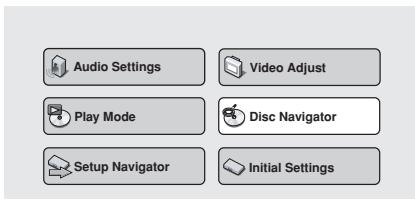
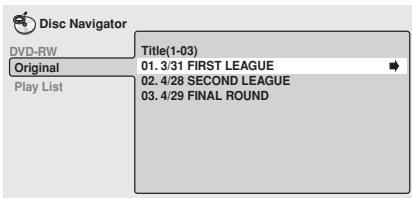
2 Select what you want to play.
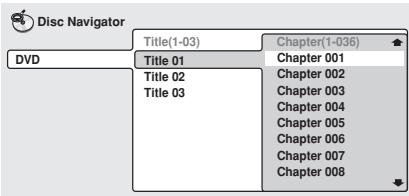
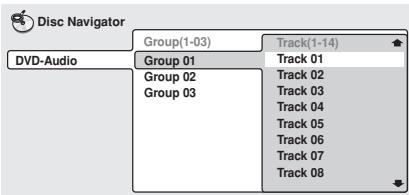
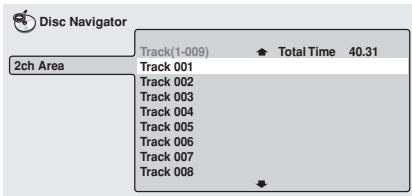
Depending on the type of disc you have loaded, the Disc Navigator looks slightly different.
For DVD-Video discs select a title, or a chapter within a title.
For DVD-Audio discs select a group, or a track within a group.
For SACD discs select a track within the current playback area.
For a VR mode DVD-RW disc select between the Playlist and Original areas of the disc, or a title. Press (cursor right) to preview the title.
- It's not possible to switch between Original and Playlist during playback.
- Not all DVD-RW discs have a Playlist.
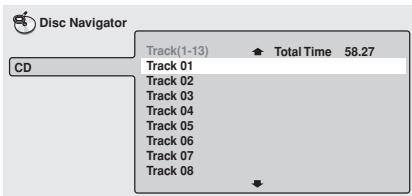
For SACDs, CDs and Video CDs/Super VCD select a track.
(The screen below shows a CD loaded.)
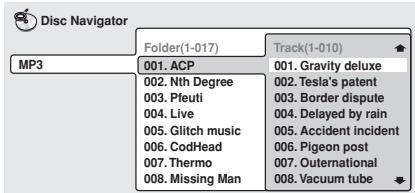
For MP3 discs select a folder, or a track within a folder. (Note that if a folder or track name contains accented or non-roman characters, they may show up with generic names - F_033, T_035, etc.).
Playback starts after you press ENTER.

Tip
- The Disc Navigator is not available unless there is a disc loaded.
- Another way to find a particular place on a disc is to use one of the search modes. See Searching a disc on page 41.
Scanning discs
You can fast-scan discs forward or backward at various different speeds using the remote.
1 During playback, press or to start scanning.
2 Press repeatedly to increase the scanning speed.
- MP3s can only be scanned at one speed.
- The scanning speed is shown on-screen.
3 To resume normal playback, press (play).

Note
Sound can be heard while scanning audio CDs, and MP3 discs.
- There is no sound while scanning DVD-Video and Video CDs/Super VCDs, and no subtitles while scanning DVD-Video.
Depending on the disc, normal playback may automatically resume when a new chapter is reached on a DVD-Video disc.
Playing in slow motion
You can play DVD-Videos, DVD-R/RW and Video CDs/Super VCD at four different forward slow motion speeds, and DVD-Videos, DVD-R/RW also at two reverse speeds.
1 During playback, press II (pause).
2 Press and hold / or / until slow motion playback starts.
- The slow motion speed is shown on-screen.
- There is no sound during slow motion playback.
3 Press repeatedly to change the slow motion speed.
- The slow motion speed is displayed on-screen.
4 To resume normal playback, press (play).

Note
Video CD/Super VCD only supports forward slow motion playback.
- The picture quality during slow motion playback is not as good as during normal playback.
Depending on the disc, normal playback may automatically resume when a new chapter is reached.
- For DVD-Audio discs featuring browsable pictures (page 70), press / / / to view the previous/next picture.
Frame advance/frame reverse
You can advance or back up DVD-Video or DVD-RW discs frame-by-frame. With Video CDs/Super VCDs, you can only use frame advance.
1 During playback, press II (pause).
2 Press / or / to reverse or advance a frame at a time.
3 To resume normal playback, press (play).

Note
- The picture quality when using frame reverse is not as good as frame advance.
Depending on the disc, normal playback may automatically resume when a new chapter is reached.
- When changing direction of a DVD-Video disc, the picture may 'move' in an unexpected way. This is not a malfunction.
- For DVD-Audio discs featuring browsable pictures (page 70), press / / / to view the previous/next picture.
Looping a section of a disc
The A-B Repeat function allows you to specify two points (A and B) within a track (DVD-Audio, CD and Video CD) or title (DVD-Video and DVD-RW) that form a loop which is played over and over.

Important
- A-B Repeat is not available with SACDs, MP3s, Super VCDs, Video CD in PBC mode, or while a DVD disc menu is being displayed.
1 During playback, press PLAY MODE and select 'A-B Repeat' from the list of functions on the left.
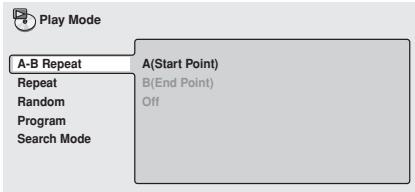
2 Press ENTER on 'A(Start Point)' to set the loop start point.
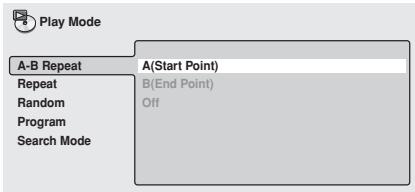
3 Press ENTER on 'B(End Point)' to set the loop end point.
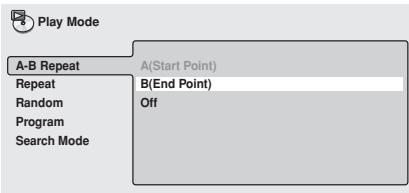
After pressing ENTER, playback jumps back to the start point and plays the loop.
Using repeat play
There are various repeat play options, depending on the kind of disc loaded. It's also possible to use repeat play together with program play to repeat the tracks/chapters in the program list (see Creating a program list on page 38).

Important
- Repeat play is not available with Video CDs/Super VCD in PBC mode, or while a DVD disc menu is being displayed.
1 During playback, press PLAY MODE and select 'Repeat' from the list of functions on the left.
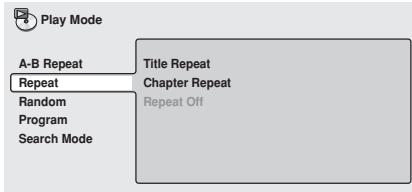
2 Select a repeat play option.
The repeat play options available depend on the type of disc loaded. The screen below appears when a DVD-Video disc is loaded.
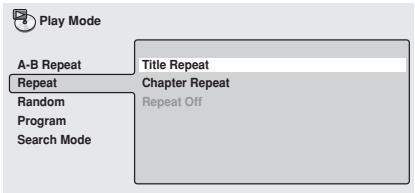
DVD-Video and DVD-RW discs
- Title Repeat
Chapter Repeat
- Repeat Off
DVD-Audio discs
- Group Repeat
Track Repeat
Repeat Off
SACD, CD and Video CD/Super VCD discs
Disc Repeat
- Track Repeat
- Repeat Off
MP3 discs
Disc Repeat
- Folder Repeat
Track Repeat
- Repeat Off

Tip
- If you've made a program list, the Program Repeat option also appears as a repeat option.
- To stop the disc and cancel repeat play, press ■ (stop).
- You can also cancel repeat play without stopping playback by pressing CLEAR. The disc will play to the end, then stop.

Note
- You can't use repeat and random play at the same time.
- If you switch camera angle during repeat play, repeat play is canceled.
Using random play
Use the random play function to play titles or chapters (DVD-Video), groups or tracks (DVD-Audio), or tracks (CD, Video CD/Super VCD and MP3 discs) in a random order.
You can set the random play option when a disc is playing or stopped.

Important
- You can't use random play with SACDs, DVD-RWs, Video CDs/Super VCDs playing in PBC mode, or while a DVD disc menu is being displayed.
1 Press PLAY MODE and select 'Random' from the list of functions on the left.
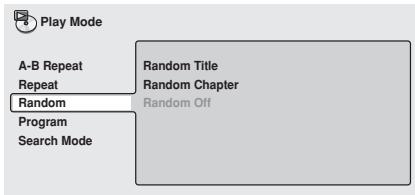
2 Select a random play option.
The random play options available depend on the type of disc loaded. The screen below appears when a DVD-Video disc is loaded.
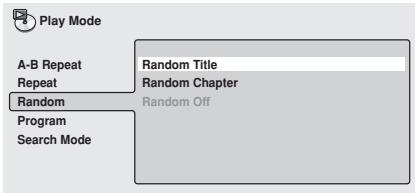
DVD-Video discs
- Random Title
- Random Chapter
- Random Off
DVD-Audio discs
- Random Group
- Random Track
- Random Off
MP3, CD and Video CD/Super VCD discs
On
- Off

Tip
- To stop the disc and cancel random playback, press (stop).
-
You can also cancel random playback without stopping the disc by presssing CLEAR. The disc will play to the end, then stop.
-
During random play, the 山 and buttons function a little differently to normal: 山 returns to the beginning of the current track/chapter. You can't go back further than this. selects another track/chapter at random from those remaining.
- You can't use random play together with program or repeat play.
Creating a program list
This feature lets you program the play order of titles/group/chapters/folders/tracks on a disc.

Important
- Program play is not available with DVD-RWs, Video CDs/Super VCDs playing in PBC mode, or while a DVD disc menu is being displayed.
1 Press PLAY MODE and select 'Program' from the list of functions on the left.

Play Mode
A-B Repeat
Repeat
Program
Search Mode
Create/Edit
Playback Start
Playback Stop
Program Delete
Program Memory
Off
2 Select 'Create/Edit' from the list of program options.
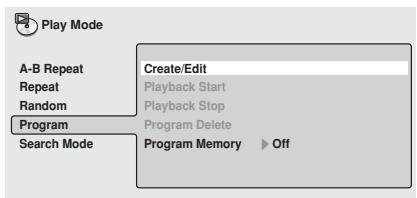
The Program edit screen that appears depends on the kind of disc loaded.
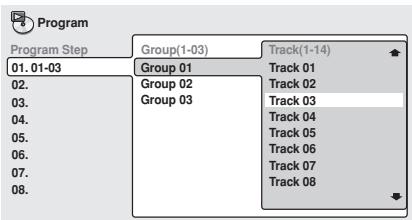
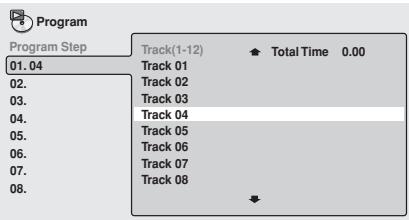
On the left side is the program list, then to the right is a list of titles (if a DVD-Video disc is loaded), groups (for DVD-Audio), tracks (for SACDs, CDs and Video CDs/Super VCD), or folder names (for MP3 discs). On the far right is a list of chapters (for DVD-Video) or tracks (for DVD-Audio and MP3).
3 Select a title, chapter, group, folder or track for the current step in the program list.
For a DVD-Video disc, you can add a whole title, or a chapter within a title to the program list.
To add a title, select the title.
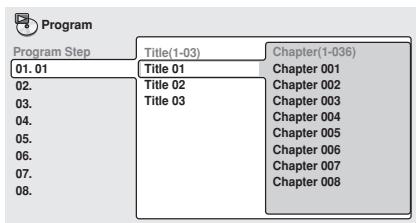
- To add a chapter, first highlight the title, then press (cursor right) and select a chapter from the list.
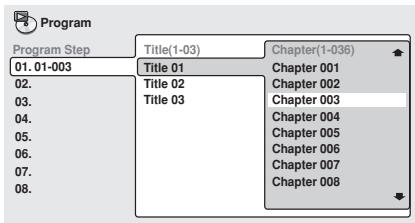
For a DVD-Audio disc, you can add a whole group, or a track within a group to the program list.
- To add a group, select the group.
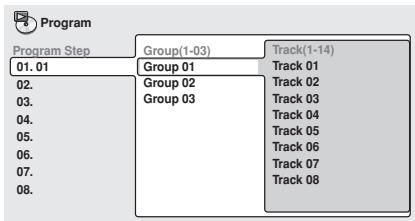
- To add a track, first highlight the group, then press (cursor right) and select a track from the list.
For SACD, CD or Video CD/Super VCD, select a track to add to the program list.
(The screen below shows a CD loaded.)
For an MP3 disc, you can add a whole folder, or a track within a folder to the program list.
- To add a folder, select the folder.
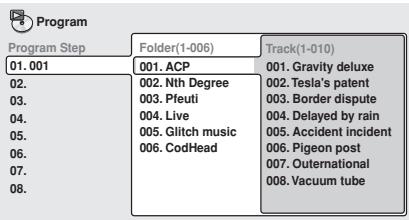
- To add a track, first find the folder, then press (cursor right) and select a track name from the list.
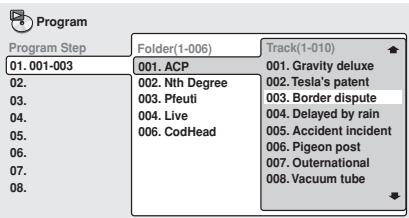
After pressing ENTER to select the title/ group/chapter/folder/track, the step number automatically moves down one.
4 Repeat step 3 to build up a program list.
A program list can contain up to 24 titles/chapters/groups/folders/tracks.
5 To play the program list, press (play).
Program play remains active until you turn off program play (see below), erase the program list (see below), eject the disc or switch off the player.

Tip
- To exit the program edit screen without starting playback, press PLAY MODE or SETUP. (Don't press RETURN—your program list will be lost.)
- During program play, press▶▶I to skip to the next program step.
- Press CLEAR during playback (though not if the program list OSD is displayed) to switch off program play. Press while stopped to erase the program list.
Editing a program list
After creating a program list, you can add, delete and change steps.
1 Press PLAY MODE and select 'Program' from the list of functions on the left.
2 Select 'Create/Edit' from the list of program options.
3 To clear a step, highlight the step number and press CLEAR.
4 To insert a step in the middle of the program list, highlight the step where you want the new step to appear, then select a title/group/chapter/folder/track to add.
After pressing ENTER, the new step is inserted into the list.
5 To add a step to the end of the program list, highlight the next free step then select a title/group/chapter/folder/ track to add.

Tip
- To exit the program edit screen without starting playback, press PLAY MODE or SETUP.
- If you want to exit the program edit screen without saving the changes you made, press RETURN.
As well as creating and editing a program list, you can start and stop program play, erase the program list, and memorize a DVD program list from the Program menu.
1 Press PLAY MODE and select 'Program' from the list of functions on the left.
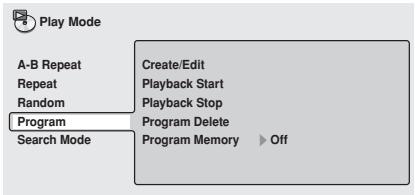
2 Select a program play function.
- Create/Edit - See Creating a program list on page 39.
- Playback Start - Starts playback of the program list
- Playback Stop - Turns off program play, but does not erase the program list
- Program Delete - Erases the program list and turns off program play
- Program Memory (DVD-Video only) – Select On to save the program list for the disc loaded. (Select Off to cancel the program memory for the disc loaded)

Tip
- After saving a program list using the Program Memory feature, whenever you load that disc, the program list is automatically recalled and program play switched on.
- You can save program lists for up to 24 discs. After that, the oldest one is replaced with the new one saved.
Searching a disc
Using the search mode function from the Play Mode menu you can quickly jump to a particular part of the disc that you're watching or listening to.
1 Press PLAY MODE and select 'Search Mode' from the list of functions on the left.
The search options that appear depend on the kind of disc loaded. The screen below shows the DVD-Video search options.
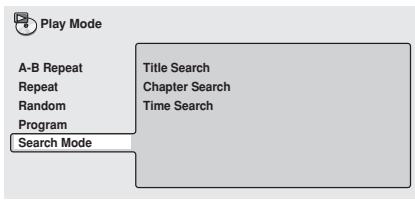
2 Select a search mode.
3 Use the number buttons to enter a title, group, chapter, page, folder or track number, or a time.
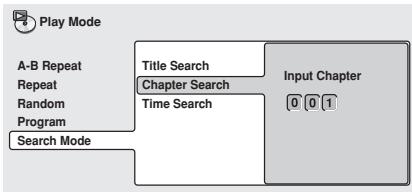
- For a time search, enter the number of minutes and seconds into the currently playing title (DVD-Video/DVD-RW) or track (Video CD) you want playback to resume from. For example, press 4, 5, 0, 0 to have playback start from 45 minutes into the disc. For 1 hour, 20 minutes and 30 seconds, press 8, 0, 3, 0.
- Some DVD-Audio discs feature pages of browsable pictures. Enter the page number you want.
4 Press ENTER to start playback.

Note
- You can only use time search with DVD-Video and Video CD discs.
- The disc must be playing in order to use time search.
- Search functions are not available with Video CDs/Super VCD in PBC mode (start non-PBC playback by stopping playback, then pressing▶I, then▶(play)).
- You can often select what you want to watch from a DVD disc menu. See also pages 29-30.
Switching subtitles
Some DVD-Video discs have subtitles in one or more languages; the disc box will usually tell you which subtitle languages are available. You can switch subtitle language during playback.
1 Press SUBTITLE repeatedly to select a subtitle option.

- While the above display is showing, you can also use the / (cursor up/down) buttons and ENTER to select a subtitle language from a drop-down menu.
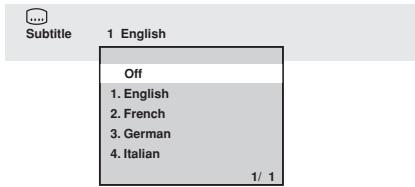

Note
- Some discs only allow you to change subtitle language from the disc menu. Press TOP MENU to access.
- To set subtitle preferences, see Subtitle Language on page 55.
Switching DVD-Video audio language
When playing a DVD-Video disc recorded with dialog in two or more languages, you can switch audio language during playback.
1 Press AUDIO repeatedly to select an audio language option.
O
Audio
2 French
Dolby Digital 3/2.1CH
- With some discs, while the above display is showing, you can also use the
/ (cursor up/down) buttons and ENTER to select an audio language from a drop-down menu.
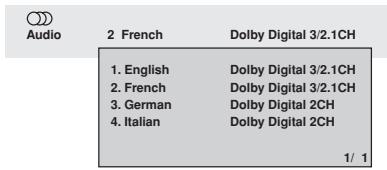

Note
- Some discs only allow you to change audio language from the disc menu. Press TOP MENU to access.
- To set audio language preferences, see Audio Language on page 54.
Switching DVD-RW audio channel
When playing a DVD-RW disc recorded with dual-mono audio, you can switch between the main, sub, and mixed channels during playback.
1 Press AUDIO repeatedly to select an audio channel option.
O
Audio
1L
Dolby Digital 1+1CH
Switching DVD-Audio audio channel
Depending on the disc, you may be able to switch channels when playing DVD-Audio discs—see the disc box for details.
1 Press AUDIO repeatedly to select an audio channel option.
O
Audio
1
Digital Out Converted
Linear PCM 192kHz24bit
2CH
When you change the audio channel, playback restarts from the beginning of the current track.

Note
- Some discs only allow you to change audio channel from the disc menu. Press TOP MENU to access.
- To set audio language preferences, see Audio Language on page 54.
Switching CD/MP3/Video CD/ Super VCD audio channel
You can switch between stereo, just the left channel or just the right channel of a CD/ MP3/Video CD/Super VCD. (To change the audio channel of a CD it must be playing.) Some Super VCDs have two soundtracks. With these discs you can switch between the two soundtracks as well as individual channels in each.
1 Press AUDIO repeatedly to select an audio channel option.
O
Audio
Stereo
Zooming the screen
Using the zoom feature you can magnify a part of the screen by a factor of 2 or 4, while a DVD-Video, DVD-Audio or Video CD/Super VCD disc is paused.

Important
- The zoom function only works when the player is outputting interlace video. Use the front panel PROGRESSIVE button to switch the player to interlace video (the PROGRESSIVE indicator should be unlit) before using the zoom feature.
- Playback pauses when the screen is zoomed.
Press ZOOM repeatedly to select a zoom factor
Normal
- 2x
4x
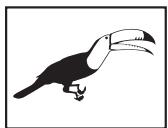
Normal
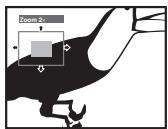
Zoom 2×
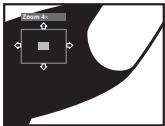
Zoom 4×
- Since DVD-Video, DVD-Audio and Video CD/Super VCD have a fixed resolution, picture quality will deteriorate, especially at 4x zoom. This is not a malfunction.
You can change the zoom factor and the zoomed area freely.
- If the navigation square at the top of the screen disappears, press ZOOM again to display it.
- You can use the / or / buttons for frame reverse/advance while the picture is zoomed (slow motion playback is not possible).
3 Press (play) to return the screen to normal and resume playback.
Switching camera angles
Some DVD-Video discs feature scenes shot from two or more angles—check the disc box for details.
When a multi-angle scene is playing, a icon appears on screen to let you know that other angles are available (this can be switched off if you prefer—see page 57).
- During playback press ANGLE to switch angle.
Various track, chapter and title information, as well as the video transmission rate for DVD discs, can be displayed on-screen.
Keep pressing DISPLAY to change the displayed information.
DVD-Video displays
| Play | DVD |
| Title | Current / Total | Elapsed | Remain | Total |
| 1/3 | 2.23 | 138.36 | 138.59 |
| (1) | 1 English | ... | 1 English | 1 |
| Audio | Dolby Digital | 3/2.1CH | Subtile | Angle |
| Play | DVD |
| Current / Total | Elapsed | Remain | Total |
| Chapter | 2/36 | 0.06 | 1.40 | 1.46 |
| # | Tr. Rate : | | | 6.0Mbps |
The # mark displayed with some DVD-Video discs means that the video is playing at 24 frames/second, progressive.
| Pause | III | DVD |
| Current/Total | Elapsed | Remain | Total |
| Chapter | 2:36 | 0.06 | 15 | 1.40 | 1.46 |
| Tr. Rate : | 6.0Mbps |
When the disc is paused, the display also shows the frame number.
DVD-Audio displays
| Play | DVD-Audio |
| Current / Total | Elapsed | Remain | Total |
| Track | 1/14 | 3.20 | 2.41 | 6.01 |
| Audio | 1 Linear PCM | -- | -- | 1 |
| 192kHz 24bit 20CH | Subtitle | Angle |
| Play | DVD-Audio |
| Current / Total | Elapsed | Remain | Total |
| Group | 1/3 | 3.21 | 53.20 | 56.41 |
| Tr. Rate : | | | 9.5Mbps |
DVD-RW displays
| Play | DVD-RW | Original | | |
| Title | Current / Total | Elapsed | Remain | Total |
| 1/32 | 0.08 | 30.22 | 30.30 |
| Audio Dolby Digital | 2/0CH | -- | | |
| Play | DVD-RW | Original |
| Current / Total |
| Chapter | 1/1 | |
| Tr. Rate | ### | 4.3Mbps |
| Play | SACD |
| Current / Total | Elapsed | Remain | Total |
| Track | 1/9 | 0.22 | 3.38 | 4.00 |
(During multichannel playback only)
| Play | SACD |
| Current / Total | Elapsed | Remain | Total |
| Track | 1/9 | 0.22 | 3.38 | 4.00 |
| Audio | 3/2.1CH |
| Play | SACD |
| Elapsed | Remain | Total |
| Disc | 0.24 | 40.07 | 40.31 |
| Play | VCD |
| | Elapsed | Remain | Total |
| Disc | | 0.23 | 58.51 | 57.14 |
| Play | VCD |
| Current / Total | Eliapsed | Remain | Total |
| Track | 2/16 | 0.23 | 4.20 | 4.43 |
(During PBC playback only)
Super VCD displays
| Play | VCD |
| Current / Total | Elapsed |
| Track | 2/16 | 1.07 |
| Play | MP3 |
| Current / Total | Elapsed | Remain | Total |
| Track | 1/17 | 0.18 | 12.42 | 13.00 |
| Track Name | Outernational |
| Play | MP3 |
| Current / Total |
| Folder | 2/7 |
| Folder Name | ACP |

Tip
- You can see disc information (number of titles/chapters, groups, tracks, folders and so on) from the Disc Navigator screen. See Using the Disc Navigator to browse the contents of a disc on page 33.
Audio DRC
- Default setting: Off
When watching Dolby Digital DVDs at low volume, it's easy to lose the quieter sounds completely—including some of the dialog. Switching Audio DRC (Dynamic Range Control) to On can help by bringing up the quieter sounds, while controlling loud peaks. How much of a difference you hear depends on the material you're listening to. If the material doesn't have wide variations in volume, you may not notice much change.
1 Press SETUP and select 'Audio Settings' from the on-screen display.
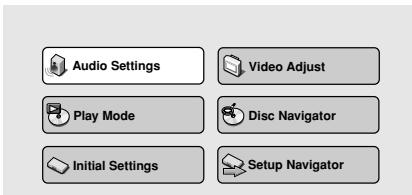
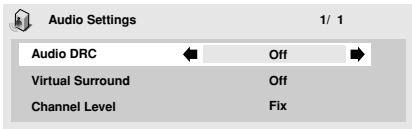
3 Press ENTER to make the setting and exit the Audio Settings screen.

Note
Audio DRC is only effective with Dolby Digital audio sources.
Audio DRC is only effective through the digital output when Digital Out is set to On, and Dolby Digital Out is set to Dolby Digital > PCM. See page 51.
- The effect of Audio DRC depends on your speakers and AV receiver settings.
Virtual Surround
- Default setting: Off
Switch on Virtual surround to enjoy surround sound effects from just two speakers.
When you play a Dolby Digital soundtrack, Virtual Dolby Digital, which uses TruSurround technology from SRS, produces a deep, realistic 3D soundspace from a pair of stereo speakers.
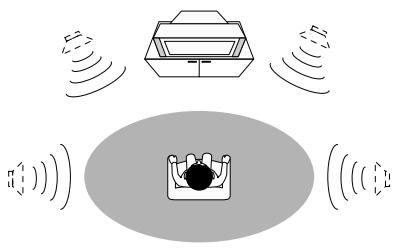
TruSurround by SRS(●)
1 Press SETUP and select 'Audio Settings' from the on-screen display.

Audio Settings

Video Adjust

Play Mode

Disc Navigator

Initial Settings

Setup Navigator
2 Highlight TruSurround, then use the / buttons (cursor left/right) to change to 'V/TruSurround' or 'Off', as required.
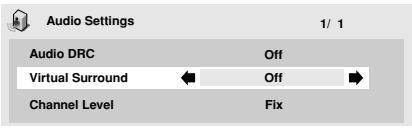
3 Press ENTER to make the setting and exit the Audio Settings screen.

Tip
- You can also use the SURROUND button on the remote control to switch Virtual Surround on (DOV/TruSurround)/Off.

Note
- Virtual Surround does not work with CD, MP3, DVD-Audio or SACD discs, or 96kHz Linear PCM soundtracks.
- The Virtual Surround effect is output only through the analog AUDIO OUT (2ch) jacks.
- Make sure that Audio Output Mode is set to 2 Channel (page 62).
- How good the surround effect is varies with the disc.
Channel Level
This setting allows you to set the level of each channel sent to the 5.1 channel analog outputs.
1 Press SETUP and select 'Audio Settings' from the on-screen display.
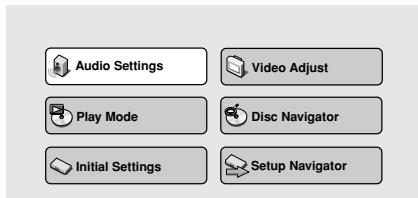
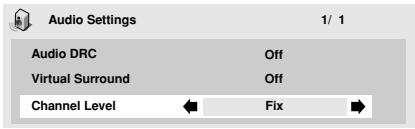
Fix - Channel levels are fixed
- Variable - You can specify variable channel levels
3 If you chose Variable, press (cursor down) to proceed to the next screen.
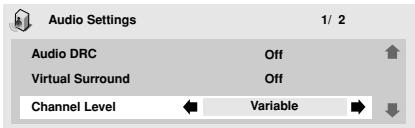
4 Variable setting only: Set the channel levels for each speaker.
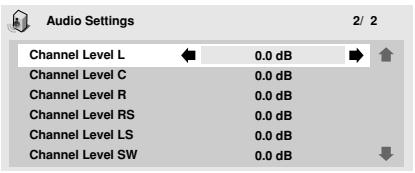
- Use the / buttons (cursor up/down) to select a speaker.
- Use the / buttons (cursor left/right) to adjust the channel level for that speaker.
Channel levels can be set from -6 dB to +6 dB. in 0.5 dB increments.
5 Press ENTER to make the settings and exit the audio settings screen.

Note
- You can't adjust the channel level for any speakers that are set to Off in the Speaker Installation menu screen (page 62).
- The Fix setting is equivalent to setting all the channel levels to +6 dB. Therefore, the Variable setting will usually sound quieter than the Fix setting.
Video Adjust
- Default setting: Standard
From the Video Adjust screen you can select the standard video presentation or define presets of your own.
1 Press SETUP and select 'Video Adjust' from the on-screen display.
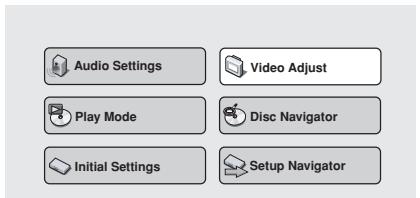
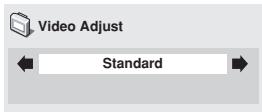
Standard - Normal
- I. Memory1-2 / P. Memory1-2 - Use for making your own interlaced / progressive presets (see below)
3 Press ENTER to make the setting and exit the Video Adjust screen.

Note
Depending on the disc and the TV/ monitor, you may not see the effect clearly.
Creating your own interlace output presets
These presets are available when the video output is set to interlace. (Use the front panel PROGRESSIVE button to switch between interlace and progressive video output. See also page 18)
1 Select one of the Memory presets (see above).
2 Press (cursor down) to select 'Detailed Settings' then press ENTER.
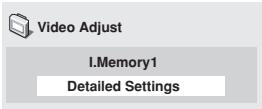
3 Adjust the picture quality settings.
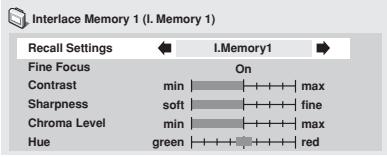
- Use the / buttons (cursor up/down) to select a setting.
- Use the / buttons (cursor left/right) to adjust the current setting.
- Press DISPLAY to switch between full and single view.
- You can change the preset number from the Recall Settings menu item.
You can adjust any or all of the following picture quality settings:
- Fine Focus - Switch On to reveal greater detail (high resolution) in the picture.
- Contrast - Adjusts the contrast between light and dark elements in the picture.
- Sharpness - Adjusts the sharpness of the mid-frequency (less detailed) elements in the picture. (This setting is only effective when Fine Focus is On.)
- Chroma Level - Adjusts how saturated colours appear.
- Hue - Adjusts the overall colour balance between red and green. (This is only effective when the player is connected using the VIDEO OUT or S-VIDEO OUT jacks.)
4 Press ENTER to save the preset and exit the Video Adjust screen.
Creating your own progressive output presets
These presets are available when the video output is set to progressive. (Use the front panel PROGRESSIVE button to switch between interlace and progressive video output. See also page 18)
1 Select one of the Memory presets (see above).
2 Press (cursor down) to select 'Detailed Settings' then press ENTER.
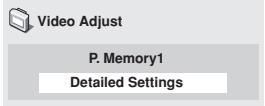
3 Ajust the picture quality settings.
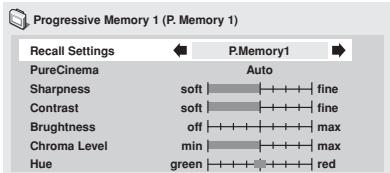
- Use the / buttons (cursor up/down) to select a setting.
- Use the buttons (cursor left/right) to adjust the current setting.
- Press DISPLAY to switch between full and single view.
- You can change the preset number from the Recall Settings menu item.
You can adjust any or all of the following picture quality settings:
- PureCinema - When watching DVD movies, PureCinema optimizes the picture quality. The default setting is Auto, but if the picture appears unnatural, then set to On or Off, as appropriate.
- Sharpness - Adjusts the sharpness of the mid-frequency (less detailed) elements in the picture.
- Contrast - Adjusts the contrast between light and dark elements in the picture.
- Brightness - Adjusts the overall brightness of the picture.
- Chroma Level - Adjusts how saturated colours appear.
- Hue - Adjusts the overall colour balance between red and green.
3 Press ENTER to save the preset and exit the Video Adjust screen.

Note
- Video on a DVD discs may be either video material (originally shot on video) or film material (originally shot on film). Video material has a frame rate of 30 frames/sec.(NTSC), compared with 24 frames/sec. for film. This player converts film material to 60 frames/sec. (in progressive scan mode). PureCinema adjusts the picture so that it matches more closely the picture quality of a cinema screen.
You can see whether video on a DVD disc is film or video material by displaying the video transmission rate (see page 45). If a hash mark (#) appears next to the transmission rate display, it is film material.
The Initial Settings menu is where you can set preferences for language, audio and video output, and so on.
If a menu option is grayed out it means that it cannot be changed at the current time. This is usually because a disc is playing. Stop the disc, then change the setting.
1 Press SETUP and select 'Initial Settings' from the on-screen display.
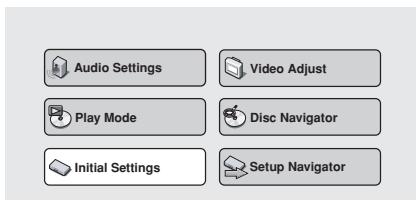
3 Make the setting you want.

Note
- The language options shown in the on-screen display illustrations on the following pages may not correspond to those available in your country or region.
Digital Audio Out settings
Digital Out
You only need to make this setting if you connected this system to an AV receiver (or other component) using one of the digital outputs.
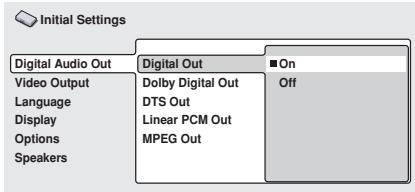
If at any time you need to switch off the digital audio output, set this to Off, otherwise leave it On.

Note
- You can't switch on/off the optical and coaxial outputs individually.
- There is no digital output when playing SACDs and some DVD-Audio discs regardless of this setting.
Dolby Digital Out
- Default setting: Dolby Digital
You only need to make this setting if you connected this system to an AV receiver (or other component) using one of the digital outputs.
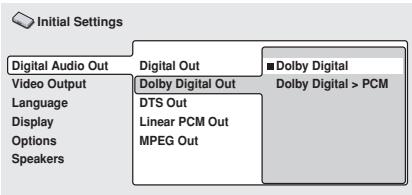
If your AV receiver (or other connected component) is Dolby Digital compatible, set to Dolby Digital, otherwise set to Dolby Digital > PCM.
DTS Out
- Default setting: DTS > PCM
You only need to make this setting if you connected this system to an AV receiver (or other component) using one of the digital outputs.
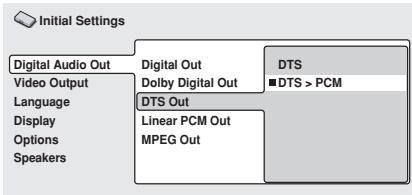
If your AV receiver (or other connected component) has a built-in DTS decoder, set this to DTS, otherwise set to DTS > PCM (DTS audio is converted to more compatible PCM audio). Check the manual that came with the other component if you're unsure whether it is DTS compatible.

Note
- If you set to DTS with a non-DTS compatible amplifier, noise will be output when you play a DTS disc.
- This setting applies only to DTS audio on DVDs. DTS-CD always output DTS digital audio as-is regardless of this setting.
Linear PCM Out
- Default setting: Down Sample On
You only need to make this setting if you connected this system to an AV receiver (or other component) using one of the digital outputs.
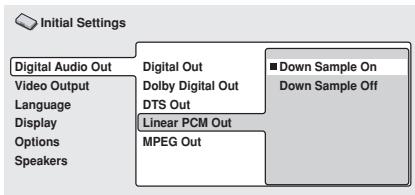
If your AV receiver (or other connected component) is compatible with high sampling rates (96 kHz), set this to Down Sample Off, otherwise set it to Down Sample On (96 kHz audio is converted to a more compatible 48 kHz). Check the manual that came with the other component if you're unsure whether it is 96 kHz compatible.

Note
- Even when set to Down Sample Off, some discs will still output down-sampled audio through the digital outputs (you only get full sampling rate audio through the analog outputs).
- High sampling rate DVD-Audio discs (192kHz or 176.2kHz) automatically output down-sampled audio through the digital outputs.
MPEG Out
- Default setting: MPEG > PCM
You only need to make this setting if you connected this system to an AV receiver (or other component) using one of the digital outputs.
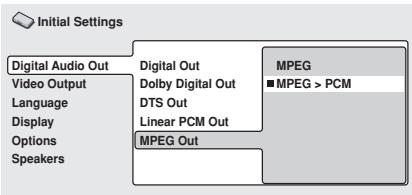
If your AV receiver (or other connected component) is compatible with MPEG audio, set this to MPEG, otherwise set it to MPEG > PCM (MPEG audio is converted to more compatible PCM audio). Check the manual that came with the other component if you're unsure whether it is MPEG audio compatible.
Video Output settings
TV Screen
- Default setting: 16:9 (Wide)

Initial Settings
Digital Audio Out
Video Output
Language Display Options Speakers
TV Screen
Auto Progressive
S-Video Out
Still Picture
4:3 (Letter Box)
4:3 (Pan&Scan)
16:9 (Wide)
DV-656A screen)
If you have a widescreen TV, select the 16:9 (Wide) setting—widenscreen DVD software is then shown using the full screen area. When playing software recorded in conventional (4:3) format, the settings on your TV will determine how the material is presented—see the manual that came with your TV for details on what options are available.
If you have a conventional TV, select either 4:3 (Letter Box) or 4:3 (Pan & Scan). In Letter Box mode, widescreen software is shown with black bars at the top and bottom of the screen. Pan & Scan chops the sides off widescreen material to make it fit the 4:3 screen (so even though the image looks larger on the screen, you're actually seeing less of the picture). See also page 67.
Auto Progressive (DV-656A only)
You only need to make this setting if you connected this player to your TV using the component video outputs.
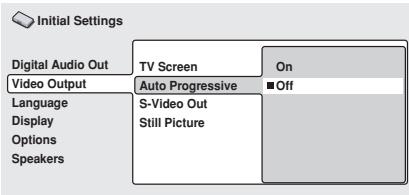
When set to On, discs in 16:9 format are output as progressive video, while 4:3 format discs are output as interlaced video. This corrects a problem with some TVs that display 4:3 material stretched when fed a progressive scan signal. If you do not experience this problem you can leave this setting as Off.
S-Video Out
You only need to make this setting if you connected this player to your TV using an S-Video cord.
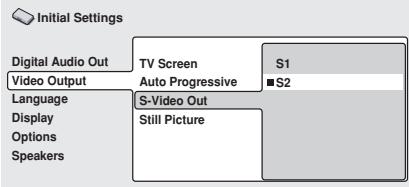
DV-656A screen)
If you find that the picture is stretched or distorted on the default S2 setting, try changing it to S1. (See also S1 and S2 in the Glossary on page 71.)
Still Picture
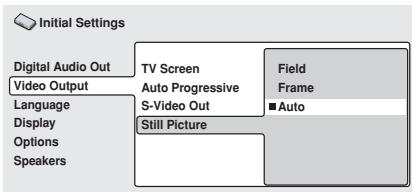
(DV-656A screen)
This player uses one of two processes when displaying a still frame from a DVD disc. The default Auto setting automatically chooses the best setting each time.
- Field - produces a stable, generally shake-free image
- Frame - produces a sharper image, but more prone to shake than field stills
Language settings

Note
- The language options shown in the on-screen display illustrations on the following pages may not correspond to those available in your country or region.
Audio Language
- Default setting: English (excpet Taiwan model: Traditional Chinese)
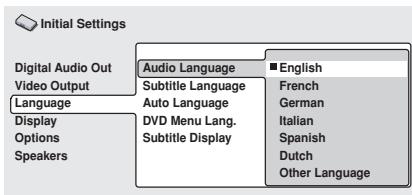
(DV-656A screen)
This setting is your preferred audio language for DVD-Video discs. If the language you specify here is recorded on a disc, the system automatically plays the disc in that language.
The DVD-Video format recognizes 136 different languages. Select Other Language if you want to specify a language other than those listed. See also Selecting languages using the language code list on page 70.

Tip
- You can switch between the languages recorded on a DVD disc during playback using the AUDIO button. (This does not affect this setting.) See page 43.
- Some DVD discs set the audio language automatically when loaded, overriding the audio language you set in the Initial Settings menu.
- Discs with two or more audio languages usually allow you to select the audio language from the disc menu. Press TOP MENU to access the disc menu.
Subtitle Language
- Default setting: English (excerpt Taiwan model: Traditional Chinese)
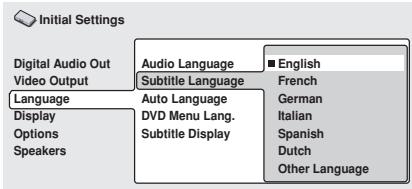
(DV-656A screen)
This setting is your preferred subtitle language for DVD-Video discs. If the language you specify here is recorded on a disc, the system automatically plays the disc with those subtitles.
The DVD-Video format recognizes 136 different languages. Select Other Language if you want to specify a language other than those listed. See also Selecting languages using the language code list on page 70.

Tip
- You can change or switch off the subtitles on a DVD disc during playback using the SUBTITLE button. (This does not affect this setting.) See page 42.
- Some DVD discs set the subtitle language automatically when loaded, overriding the subtitle language you set in the Initial Settings menu.
- Discs with two or more subtitle languages usually allow you to select the subtitle language from the disc menu. Press TOP MENU to access the disc menu.
Auto Language
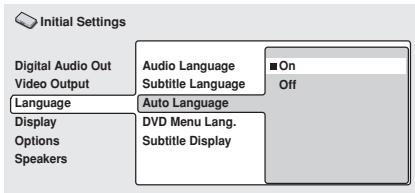
When set to On, the player always selects the default audio language on a DVD-Video disc (French dialog for a French movie, for example), and displays subtitles in your preferred subtitle language only if that is set to something different. In other words, movies in your native language won't have any subtitles, while foreign language movies will be shown with subtitles.
Set to Off to have the player play discs strictly according to your Audio Language and Subtitle Language settings.
For Auto Language to work, the Audio Language and Subtitle Language settings must be the same (see also pages 54-55).

Tip
- You can still switch audio and subtitle language on playback using the AUDIO and SUBTITLE buttons.
- Default setting: w/Subtitle Lang.
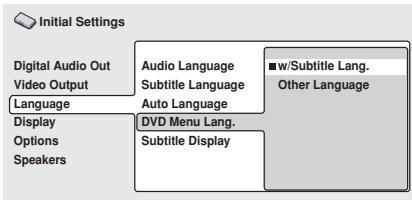
(DV-656A screen)
Some multilingual discs have disc menus in several languages. This setting specifies in which language the disc menus should appear. Leave on the default setting for menus to appear in the same language as your Subtitle Language—see page 55.
The DVD-Video format recognizes 136 different languages. Select Other Language if you want to specify a language other than those listed. See also Selecting languages using the language code list on page 70.
Subtitle Display
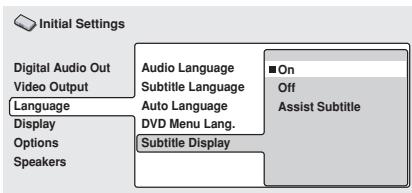
When set to On, the player displays subtitles according to the Subtitle Language and Auto Language settings. Set to Assist Subtitle to have the player display the extra assistive subtitles recorded on to some DVD discs. Set to Off to switch subtitles off altogether.
Display settings
OSD Language
- Default setting: English (excpet Taiwan model: Traditional Chinese)
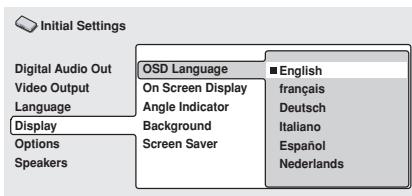
(DV-656A screen)
This sets the language of this player's on-screen displays.
On Screen Display
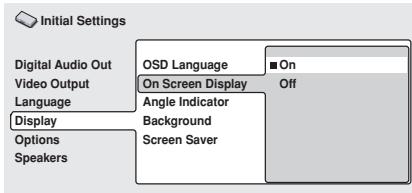
This sets whether operation displays are shown on-screen (Play, Resume, Scan and so on.)
Angle Indicator
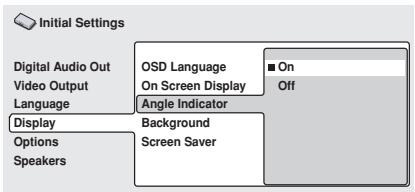
If you prefer not to see the camera icon on-screen during multi-angle scenes on DVD discs, change this setting to Off.
Background
- Default setting: Pioneer Logo
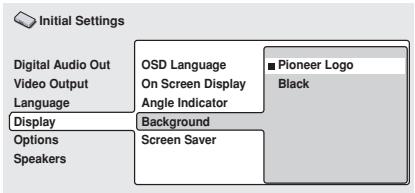
This specifies what is displayed on-screen when the player is stopped.
Screen Saver
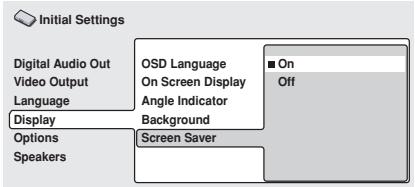
If a constant image is displayed on a conventional CRT-type TV, it can 'burn in' leaving a ghost image on the screen. Switch to On to make sure that a constant image is not displayed for a dangerously long time.
Options
Parental Lock
- Default level: Off
- Default password: none
- Default country code: us (2119)
Some DVD Video discs feature a Parental Lock level. If your player is set to a lower level than the disc, the disc won't play. This gives you some control about what your children watch on your DVD player.
Some discs also support the Country Code feature. The player does not play certain scenes on these discs, depending on the country code you set.
Before you can set the Parental Lock level or the Country Code you must register a password. As the password owner, you can change the Parental Lock level or Country Code whenever you like. You can also change the password.

Note
- Not all discs that you may consider inappropriate for your children use the Parental Lock feature. These discs will always play without requiring the password first.
- If you forget your password, you'll need to reset the player to it's factory settings (page 67), then register a new password.
Registering a new password
You must register a password before you can change the Parental Lock level or enter a Country Code.
1 Select 'Password'.
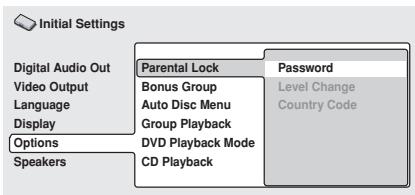
(DV-656A screen)
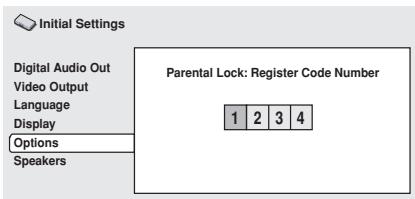
The numbers you enter show up as asterisks (^*) on-screen.
3 Press ENTER to register the password and return to the Options menu screen.
If you forget your password, you can reset the system then register a new one. See page 67 for how to reset the player.
Changing your password
To change your password, confirm your existing password then enter a new one.
1 Select 'Password Change'.
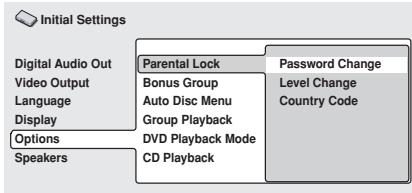
(DV-656A screen)
- The numbers appear as asterisks as you enter them.
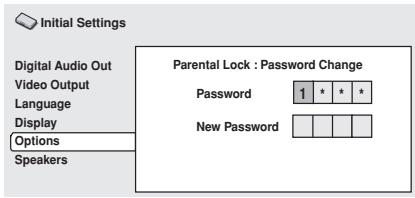
3 Enter a new password.
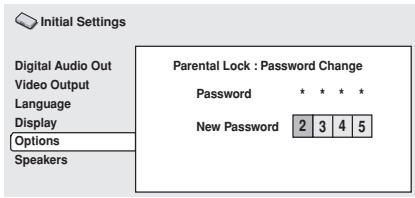
4 Press ENTER to register the new password and return to the Options menu screen.
Setting/changing the Parental Lock level
1 Select 'Level Change'.
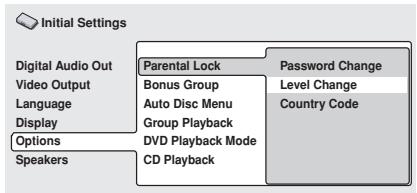
DV-656A screen)
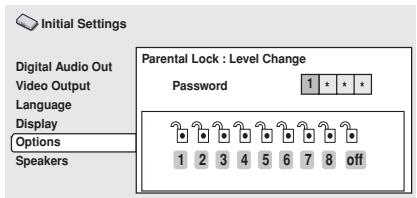
3 Select a new level.
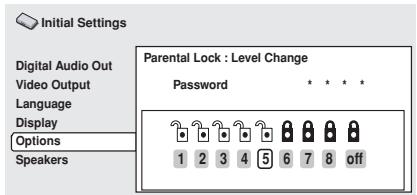
Press (cursor left) repeatedly to lock more levels (more discs will require the password); press (cursor right) to unlock levels. You can't lock level 1.
4 Press ENTER to set the new level and return to the Options menu screen.
Setting/changing the Country Code
You may also want to refer to the Country code list on page 69.
1 Select 'Country Code'.
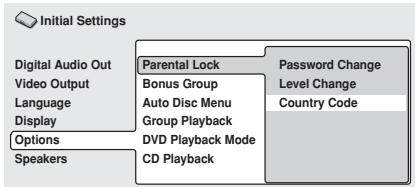
(DV-656A screen)
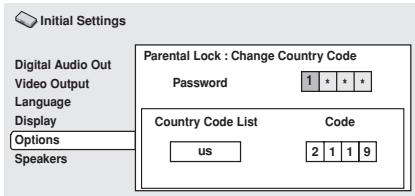
3 Select a country code.
There are two ways you can do this.
- Select by code letter: Use / (cursor up/down) to change the country code.
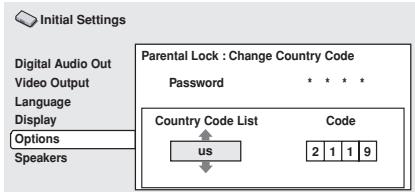
- Select by code number: Press (cursor right) then use the number buttons to enter the 4-digit country code (you can find the country code list on page 69).
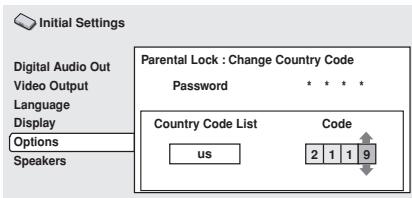
4 Press ENTER to set the new Country Code and return to the Options menu screen.

Note
- Changing the country code does not take effect until the next disc is loaded (or the current disc is reloaded).
Bonus Group
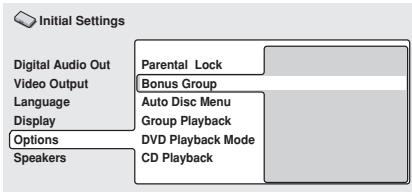
Some DVD-Audio discs have an extra 'bonus' group that requires a 4-digit key number to access. See the disc packaging for details and the key number.
When you play a DVD-Audio disc that has a bonus group, the key number input screen appears automatically. Select Bonus Group to access the same screen.
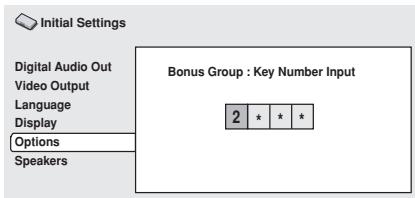

Note
- If you eject the disc, switch the power off, or unplug the player, you will need to re-enter the key number.
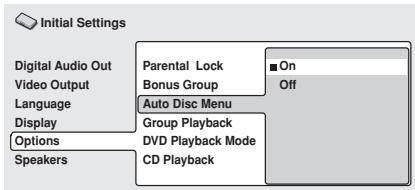
(DV-656A screen)
This specifies whether the menu (Top menu) is automatically displayed after loading a disc. Set to On if you want the menu displayed automatically, or Off if you don't want it displayed.

Note
- Some DVD discs display a menu automatically regardless of this setting. If you press while a disc is loading, this setting is ignored.
GroupPlayback
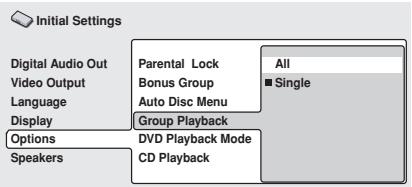
(DV-656A screen)
DVD-Audio discs can have up to 9 groups of tracks. When set to Single, the selected group plays and then the disc stops, or returns to the menu screen. Use Group Search (page 41) to select the group to play. (You cannot use the track skip / or scan buttons / in this mode.)
Set to All if you want to play all the groups on a disc consecutively.

Note
- Even if the players is set to All but you select a group to play from the disc menu, only that group will play. If you stop playback, all groups will play again when you restart playback.
DVDPlaybackMode
- Default setting: DVD-Audio
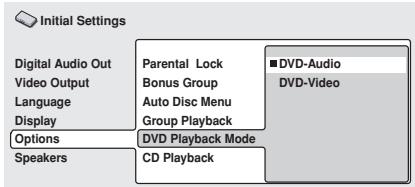
DV-656A screen)
Some DVD-Audio discs contain DVD-Video content in addition to the DVD-Audio. Set to DVD-Video to play a DVD-Audio disc as if it were a DVD-Video disc. Note that in this case only the DVD-Video part of the disc will play.
SACDPlayback(DV-655Aonly)
- Default setting: 2ch Area
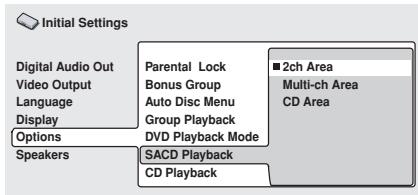
SACD discs can be divided up into several different areas — stereo audio (2ch Area), multi-channel audio (Multi-ch Area) and, for hybrid SACDs, standard CD audio (CD Area). Select which you want to listen to.

Note
- If you select an area that isn't on the disc loaded, a different area will play. For example, if you choose standard CD audio but the disc loaded is not a hybrid SACD, the stereo SACD area will play.
CDPlayback
- Default setting: PCM Playback
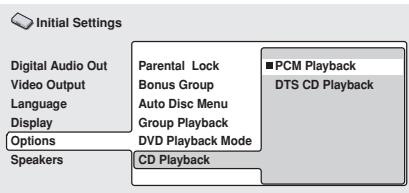
(DV-656A screen)
When set to PCM Playback, playback is optimized for standard audio CDs. You can also play DTS CDs, however you may notice some noise when a DTS CD starts playing. This is not a malfunction.
When set to DTS CD Playback, playback is optimized for DTS CDs. In this mode you cannot play standard audio CDs through the analog outputs. Change the setting back to PCM Playback to play standard CDs.
Speakers
Audio Output Mode
- Set in Setup Navigator (Default: 2 Channel)
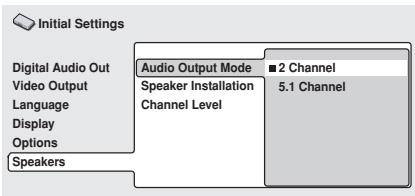
If you connected this player to your amplifier using the 5.1 channel analog outputs (front, surround, center and subwoofer outs), set this to 5.1 Channel; if you connected only the stereo outs, set to 2 Channel.

Note
- Even if you set Audio Output Mode to 5.1 Channel, you'll only get sound from all speakers when playing a multi-channel DVD-Audio disc, or Dolby Digital or DTS encoded DVD disc.
- When set to 5.1 Channel, only the front left/right channels are output from the AUDIO OUT (2ch) jacks. Change to 2 Channel if you want to listen to downmixed stereo audio (for example, because you are listening through the TV's built-in speakers).
- When set to 5.1 Channel there is no digital output when playing DVD-Audio.
- If you set to 2 Channel, Dolby Digital, DTS and MPEG audio is mixed down to two channels so you still hear all the audio recorded on the disc.
- Some DVD-Audio discs don't allow down-mixing of audio. These discs always output multi-channel audio regardless of the setting made here.
Speaker Installation
- Set in Setup Navigator (default: L/R: Large | C: Large | LS/RS: Large | SW: On)
You only need to make this setting if you connected this player to your amplifier using the 5.1 channel analog outputs.
This setting does not affect digital audio output.
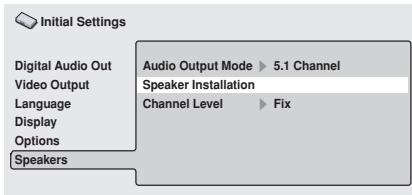
Use the Speaker Installation screen to tell the player what kinds of speakers you have connected.
- The L and R, and RS and LS speakers are paired; you can't set them differently.
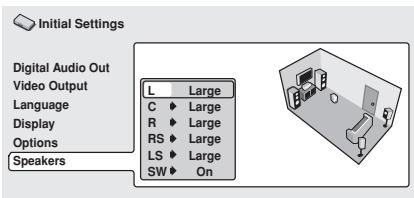
2 Press (cursor right) to modify the selected speaker.
- You can see the effect of your changes in the room graphic on the right of the screen.
Except for the subwoofer, you can set speaker size to Large or Small. If the main speaker cone in the speaker is 12cm or more, set to Large, otherwise set to Small (or Off if you don't have that speaker).
- If you set the front L and R speakers to Small, the center and surround speakers are automatically set to Small and the subwoofer to On.
- The subwoofer can only be set to On or Off.
4 Press (cursor left) to go back to the speaker list if you want to modify another speaker, or press ENTER to exit the Speaker Installation screen.

Note
- When listening to a DVD-Audio source, the C, LS, and RS speakers will automatically be set to the Large size setting. However, the sound will not be affected by the change. Listening to another source will return the speakers to their original settings.
- For DVD-Audio only, if the C, LS, or RS speakers is set to Off, the audio is automatically downmixed to stereo.
Channel Level
You only need to make this setting if you connected this player to your amplifier using the 5.1 channel analog outputs.
This setting does not affect digital audio output.
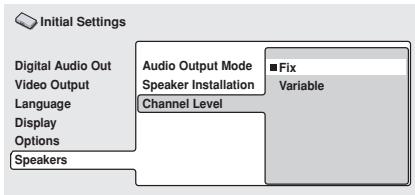
When set to Fix, the level of each of the 5.1 channel analog outputs is fixed. Choose Variable if you want to adjust the relative levels to balance the surround sound better for your listening room.
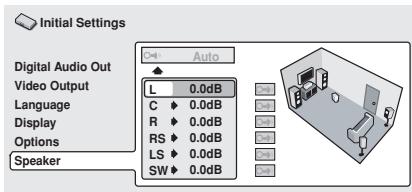
You can set the individual channel levels between -6dB and +6dB using the test tone output as a guide to set the correct levels. Adjust the levels until the output level from all channels sounds the same from your usual listening position.
Automatic: Select Auto to start the test tone output.
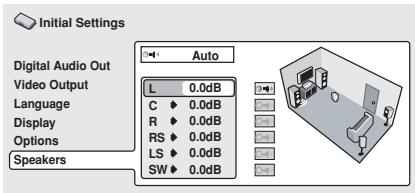
As the test tone plays through each speaker in turn, it is highlighted on-screen. Use the
/ (cursor up/down) buttons to adjust the channel output level of the current speaker. Press (cursor left) to exit the test tone sequence, or ENTER to save the settings and exit the channel level setting screen.
Manual: Use the / (cursor up/down) buttons to select a speaker.
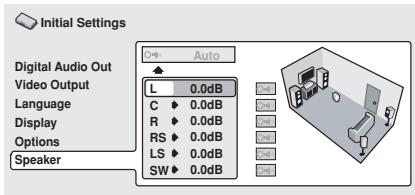
Press (cursor right) then use the / (cursor up/down) buttons to set the channel output level.
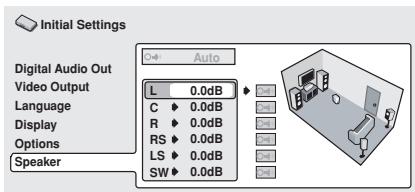
To turn the test tone on/off for an individual speaker, press (cursor right). The test tone continues playing even when you select a different speaker.
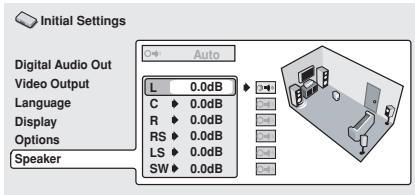
Press ENTER to save the settings and exit the channel level setting screen.
Taking care of your player and discs
Handling discs
When holding discs of any type, take care not to leave fingerprints, dirt or scratches on the disc surface. Hold the disc by its edge or by the center hole and edge.
Damaged or dirty discs can affect playback performance. Take care also not to scratch the label side of the disc. Although not as fragile as the recorded side, scratches can still result in a disc becoming unusable.
Should a disc become marked with fingerprints, dust, etc., clean using a soft, dry cloth, wiping the disc lightly from the center to the outside edge as shown in the diagram below.
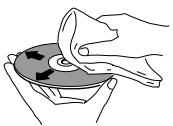
Wipe lightly from the center of the disc using straight strokes.
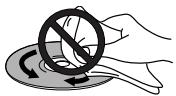
Don't wipe the disc surface using circular strokes.
If necessary, use a cloth soaked in alcohol, or a commercially available CD/DVD cleaning kit to clean a disc more thoroughly. Never use benzine, thinner or other cleaning agents, including products designed for cleaning vinyl records.
Storing discs
Although CDs and DVD discs are more durable than vinyl records, you should still take care to handle and store discs correctly. When you're not using a disc, return it to its case and store upright. Avoid leaving discs in excessively cold, humid, or hot environments (including under direct sunlight).
Don't glue paper or put stickers onto the disc, or use a pencil, ball-point pen or other sharp-tipped writing instrument. These could all damage the disc.

For more detailed care information see the instructions that come with discs.
Do not load more than one disc into the player at a time.
Discs to avoid
Discs spin at high speed inside the player. If you can see that a disc is cracked, chipped, warped, or otherwise damaged, don't risk using it in your player--you could end up damaging the unit.
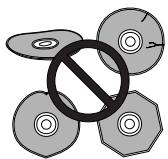
This unit is designed for use with conventional, fully circular discs only. Use of shaped discs is not recommended for this product. Pioneer disclaims all liability arising in connection with the use of shaped discs.
Cleaning the pickup lens
The DVD player's lens should not become dirty in normal use, but if for some reason it should malfunction due to dust or dirt, consult your nearest Pioneer-authorized service center. Although lens cleaners for CD players are commercially available, we do not recommend using them since some may damage the lens.
Problems with condensation
Condensation may form inside the player if it is brought into a warm room from outside, or if the temperature of the room rises quickly. Although the condensation won't damage the player, it may temporarily impair its performance. For this reason you should leave it to adjust to the warmer temperature for about an hour before switching on and using.
Hints on installation
We want you to enjoy using this unit for years to come, so please bear in mind the following points when choosing a suitable location for it:
Do...
Use in a well-ventilated room.
Place on a solid, flat, level surface, such as a table, shelf or stereo rack.
Don't...
× Use in a place exposed to high temperatures or humidity, including near radiators and other heat-generating appliances.
× Place on a window sill or other place where the player will be exposed to direct sunlight.
× Use in an excessively dusty or damp environment.
× Place directly on top of an amplifier, or other component in your stereo system that becomes hot in use.
X Use near a television or monitor as you may experience interference—especially if the television uses an indoor antenna.
X Use in a kitchen or other room where the player may be exposed to smoke or steam.
X Use on a thick rug or carpet, or cover with cloth—this may prevent proper cooling of the unit.
× Place on an unstable surface, or one that is not large enough to support all four of the unit's feet.
Moving the player
If you need to move the player, first press STANDBY/ON on the front panel to turn the player off. Wait for --OFF-- to disappear from the display, then unplug the power cord. Never lift or move the unit during playback—discs rotate at a high speed and may be damaged.
Power cord caution
Handle the power cord by the plug part. Do not pull out the plug by tugging the cord, and never touch the power cord when your hands are wet, as this could cause a short circuit or electric shock. Do not place the unit, a piece of furniture, or other object on the power cord or pinch the cord in any other way. Never make a knot in the cord or tie it with other cords. The power cords should be routed so that they are not likely to be stepped on. A damaged power cord can cause a fire or give you an electric shock. Check the power cord once in a while. If you find it damaged, ask your nearest Pioneer authorized service center or your dealer for a replacement.
DVD-Video discs come in several different screen aspect ratios, ranging from TV programs, which are generally 4:3, to CinemaScope widenscreen movies, with an aspect ratio of up to about 7:3.
Televisions, too, come in different aspect ratios; 'standard' 4:3 and widenscreen 16:9.
Widescreen TV users
If you have a widescreen TV, the TV Screen setting (page 53) of this player should be set to 16:9(Wide).
When you watch discs recorded in 4:3 format, you can use the TV controls to select how the picture is presented. Your TV may offer various zoom and stretch options; see the instructions that came with your TV for details.
Please note that some movie aspect ratios are wider than 16:9, so even though you have a widescreen TV, these discs will still play in a 'letterbox' style with black bars at the top and bottom of the screen.
Standard TV users
If you have a standard TV, the TV Screen setting (page 53) of this player should be set to 4:3 (Letter Box) or 4:3 (Pan&Scan), depending on which you prefer.
Set to 4:3 (Letter Box), widescen discs are shown with black bars top and bottom.
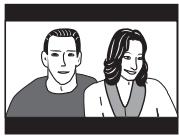
Set to 4:3(Pan&Scan), widenscreen discs are shown with the left and right sides cropped. Although the picture looks larger, you don't actually see the whole picture.
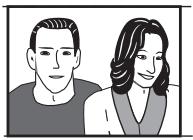
Please note that many widenscreen discs override the player's settings so that the disc is shown in letterbox format regardless of the setting.

Tip
- Using the 16:9 (Wide) setting with a standard 4:3 TV, or either of the 4:3 settings with a widescreen TV, will result in a distorted picture.
Resetting the player
Use this procedure to reset all the player's settings to the factory default.
1 Switch the player into standby.
2 Using the front panel buttons, hold down the (stop) button and press STANDBY/ON to switch the player back on.
All the player's settings are now reset, and you should see the 'Let's Get Started' screen.
About the audio output settings
The table below shows how the audio settings you make in the Initial Settings menu (pages 51-52, 62) affect the output from the 2 channel and the 5.1 channel analog outputs, and from the digital outputs with various types of disc.
| Disc audio format | Player setting | Front L/R analog outputs*1 | Surround L/R Center, LFE, outputs*1 | Digital outputs PCM convert*2 | Bitsream*3 |
| DVD | Dolby Digital | 2 Ch | 2ch downmix | - | 2ch downmix | Dolby Digital |
| 5.1 Ch | Front L / R | Surround L/R, Center, LFE |
| Dolby Digital karaoke | 2 Ch / 5.1 Ch | Left / Right | - | Left / Right | Dolby Digital |
| Linear PCM | 2 Ch / 5.1 Ch | Left / Right | - | Left / Right | Left / Right |
| DTS | 2 Ch | Front L / R | - | 2ch downmix | DTS |
| 5.1 Ch | 2ch downmix | Surround L/R, Center, LFE |
| MPEG | 2 Ch / 5.1 Ch | Left / Right | - | Left / Right | MPEG |
| DVD-Audio | 2 Ch | 2ch downmix*4 | - | 2ch downmix | 2ch downmix*5 |
| 5.1 Ch | Front L / R | Surround L/R, Center, LFE | - | - |
| DVD-RW | 2 Ch / 5.1 Ch | Left / Right*6 | - | Left / Right | Dolby Digital MPEG or PCM |
| Super Audio CD | 2 Ch | 2ch downmix | - | - | - |
| 5.1 Ch | Front L / R | Surround L/R, Center, LFE |
| CD | 2 Ch / 5.1 Ch | Left / Right | - | Left / Right | Left / Right |
| DTS CD | 2 Ch | 2ch downmix | - | DTS | DTS |
| 5.1 Ch | Front L / R | Surround L/R, Center, LFE |
| Video CD / Super VCD | 2 Ch / 5.1 Ch | Left / Right | - | Left / Right | Left / Right |
1 When Audio Output Mode is set to 2 Channel, the AUDIO OUT (5.1ch) FRONT L / R jacks act as a second pair of stereo audio outputs.
^2 Dolby Digital > PCM, MPEG > PCM or DTS > PCM setting (pages 51-52)
3 Dolby Digital, MPEG or DTS setting (pages 51-52)
4 Discs that prohibit downmixing will be output as 5.1 channel even if 2 Channel is selected as the Audio Output Mode setting (see page 62)
5 Discs that prohibit downmixing also mute the digital output
6 If the sound is mono, the Left and Right channels will be the same
Language code list
Language (Language code letter), Language code
Japanese (ja), 1001
English (en), 0514
French (fr), 0618
German (de), 0405
Italian (it), 0920
Spanish (es), 0519
Chinese (zh), 2608
Dutch (nl), 1412
Portuguese (pt), 1620
Swedish (sv), 1922
Russian (ru), 1821
Korean (ko), 1115
Greek (el), 0512
Afar (aa), 0101
Abkhazian (ab), 0102
Hungarian (hu), 0821
Armenian (hy), 0825
Interlingua (ia), 0901
Interlingue (ie), 0905
Inupiak (ik), 0911
Indonesian (in), 0914
Icelandic (is), 0919
Hebrew (iw), 0923
Yiddish (ji), 1009
Javanese (jw), 1023
Georgian (ka), 1101
Kazakh (kk), 1111
Greenlandic (kl), 1112
Cambodian (km), 1113
Kannada (kn), 1114
Kashmiri (ks), 1119
Kurdish (ku), 1121
Kirghiz (ky), 1125
Latin (la), 1201
Lingala (In), 1214
Laothian (Io), 1215
Lithuanian (It), 1220
Latvian (lv), 1222
Malagasy (mg), 1307
Maori (mi), 1309
Macedonian (mk), 1311
Malayalam (ml), 1312
Mongolian (mn), 1314
Moldavian (mo), 1315
Marathi (mr), 1318
Malay (ms), 1319
Maltese (mt), 1320
Burmese (my), 1325
Nauru (na), 1401
Nepali (ne), 1405
Norwegian (no), 1415
Occitan (oc), 1503
Oromo (om), 1513
Oriya (or), 1518
Panjabi (pa), 1601
Polish (pl), 1612
Pashto,Pushto (ps),1619
Quechua (qu), 1721
Rhaeto-Romance (rm), 1813
Kirundi (rn), 1814
Romanian (ro), 1815
Kinyarwanda (rw), 1823
Sanskrit (sa), 1901
Sindhi (sd), 1904
Sangho (sg), 1907
Serbo-Croatian (sh), 1908
Sinhalese (si), 1909
Slovak (sk), 1911
Slovenian (sl), 1912
Samoan (sm), 1913
Shona (sn), 1914
Somali (so), 1915
Albanian (sq), 1917
Serbian (sr), 1918
Siswati (ss), 1919
Sesotho (st), 1920
Vietnamese (vi), 2209
Volapuk (vo), 2215
Wolof (wo), 2315
Xhosa (xh), 2408
Yoruba (yo), 2515
Zulu (zu), 2621
Country code list
Country, Country code, Country code letter
Argentina, 0118, ar
Australia, 0121, au
Austria, 0120, at
Belgium, 0205, be
Brazil, 0218, br
Canada, 0301.ca
Chile, 0312.d
China, 0314, cn
Denmark, 0411, dk
Finland, 0609, fi
France, 0618.fr
Germany, 0405.de
Hong Kong, 0811, hk
India, 0914, in
Indonesia, 0904, id
Italy, 0920, it
Japan, 1016.jp
Korea, Republic of, 1118, kr
Malaysia, 1325, my
Mexico, 1324, mx
Netherlands, 1412, nl
New Zealand, 1426, nz
Norway, 1415, no
Pakistan, 1611, pk
Philippines, 1608, ph
Portugal, 1620, pt
Russian Federation, 1821, ru
Singapore, 1907, sg
Spain, 0519, es
Sweden, 1905, se
Switzerland, 0308, ch
Taiwan, 2023, tw
Thailand, 2008, th
United Kingdom, 0702, gb
United States of America, 2119, us
Selecting languages using the language code list
Some of the language options (such as 'DVD Language' in the Setup Navigator) allow you to set your preferred language from any of the 136 languages listed in the language code list on the previous page.
1 Select 'Other Language'.
See the language code list on the previous page for a complete list of languages and codes.
Glossary
Analog audio
An electrical signal that directly represents sound. Compare this to digital audio which can be an electrical signal, but is an indirect representation of sound. See also Digital audio.
Aspect ratio
The width of a TV screen relative to its height. Conventional TVs are 4:3 (in other words, the screen is almost square); widenscreen models are 16:9 (the screen is almost twice as wide as it is high). See also page 53.
Bonus Group (DVD-Audio only)
An 'extra' group on some DVD-Audio discs that requires a key number to access. See also Group. See also page 60.
Browsing pictures (DVD-Audio only)
A feature of some DVD-Audio discs in which the user can browse still pictures recorded on the disc as the audio is played. See also Slideshow.
Dolby Digital

Using a maximum of 5.1 channels of audio, this high quality surround system is used in many of the finer movie theaters around the world.
The on-screen display shows which channels are active, for example showing 3/2.1. The 3 being the two front channels and the center channel; the 2 being the surround channels, and the .1 being the LFE channel.
DTS

DTS stands for Digital Theater System. DTS is a surround system different from Dolby Digital that has become a popular surround sound format for movies.
Dynamic range
The difference between the quietest and loudest sounds possible in an audio signal (without distorting or getting lost in noise). Dolby Digital and DTS soundtracks are capable of a very wide dynamic range, delivering dramatic cinema-like effects.
File extension
A tag added to the end of a filename to indicate the type of file. For example, ".mp3" indicates an MP3 file. See also page 10.
Interlaced video
A method of displaying a picture in which odd-numbered lines are updated in one pass, then even-numbered lines updated in the next. See also Progressive scan video.
MP3
MP3 (MPEG1 audio layer 3) is a compressed audio file format. Files are recognized by their file extension ".mp3" or ".MP3". See also pages 10-11.
MPEG audio MPEG)Multichannel
An audio format used on Video CDs/Super VCDs and some DVD discs. This unit can convert MPEG audio to PCM format for wider compatibility with digital recorders and AV amplifiers. See also PCM.
MPEG video
The video format used for Video CDs/Super VCDs and DVDs. Video CD/Super VCD uses the older MPEG-1 standard, while DVD uses the newer and much better quality MPEG-2 standard.
Packed PCM (DVD-Audio only)
A lossless compression system that enables more PCM audio to be stored on a DVD-Audio disc than would otherwise be possible.
PCM (Pulse Code Modulation)
The most common system of encoding digital audio, found on CDs and DAT. Excellent quality, but requires a lot of data compared to formats such as Dolby Digital and MPEG audio. For compatibility with digital audio recorders (CD, MD and DAT) and AV amplifiers with digital inputs, this unit can convert Dolby Digital, DTS and MPEG audio to PCM. See also Digital audio.
PBC (PlayBack Control) (Video CD/Super VCD only)
A system of navigating a Video CD/Super VCD through on-screen menus recorded onto the disc. Especially good for discs that you would normally not watch from beginning to end all at once—karaoke discs, for example.
Progressive scan video
Also called non-interlaced video, this method of displaying a picture updates all the lines in one pass, resulting in a more stable, flicker-free image than interlaced video (for a given scanning rate). See also Interlaced video. See also page 19.
Regions (DVD-Video only)
These associate discs and players with particular areas of the world. This unit will only play discs that have compatible region codes. You can find the region code of your unit by looking on the rear panel. Some discs are compatible with more than one region (or all regions). See also page 11.
S1 S-video output
This S-video signal format includes aspect ratio information (4:3 or 16:9) within the video signal. TVs which are compatible with S1 S-video automatically switch aspect ratio according to the signal. See also page 53.
S2 S-video output
S2 is an enhanced version of S-video which, in addition to aspect ratio information, contains letterbox / pan & scan information. Widescreen TVs which are compatible with S2 S-video automatically switch aspect ratio according to the signal. See also page 53.
Sampling frequency
The rate at which sound is measured to be turned into digital audio data. The higher the rate, the better the sound quality, but the more digital information is generated. Standard CD audio has a sampling frequency of 44.1kHz , which means 44,100 samples (measurements) per second. See also Digital audio.
Slideshow (DVD, Video CD/Super VCD)
A feature of some DVD discs in which still pictures recorded on the disc cycle automatically as the audio is played. See also Browsable Picture.
Super Audio CD (SACD)
Super Audio CD is a high quality audio disc format that can accommodate high sampling rate stereo and multi-channel audio, as well as conventional CD audio all on the same disc.
Taiwan model only: Changing the on-screen display language to English
1 Press SETUP.
The on-screen display (OSD) appears.
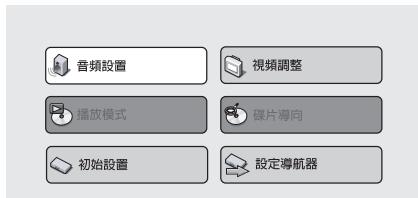
2 Use the / / (cursor up/down/left/right) buttons to select'初始设置 from the on-screen display, then press ENTER.
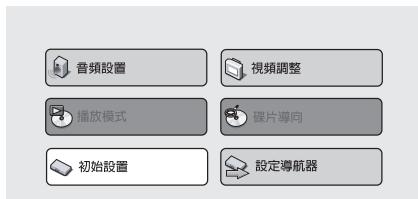
3 Use the / (cursor up/down)
buttons to select '顯示屏' from the list on the left, then press ENTER.
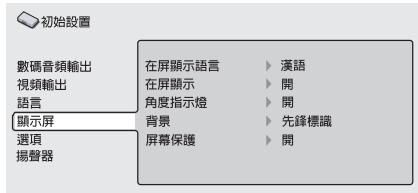
4 Press ENTER.
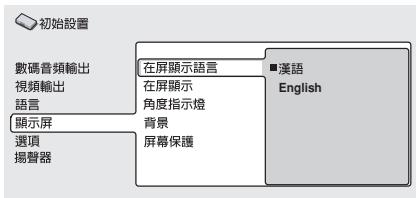
5 Use the / (cursor up/down) buttons to select 'English' from the list on the right, then press ENTER.
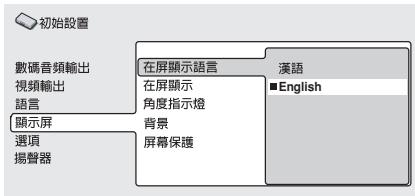
6 Press SETUP.
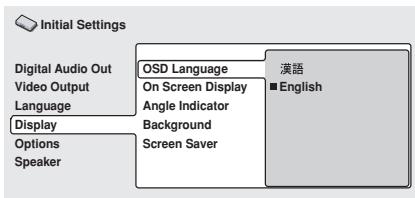
Setting the TV System
(Except DV-656A and DV-655A Taiwan model)
The default setting of this player is AUTO, and unless you notice that the picture is distorted when playing some discs, you should leave it set to AUTO. If you experience picture distortion with some discs, set the TV system to match your country or region's system. Doing this, however, may restrict the kinds of disc you can watch. The table below shows what kinds of disc are compatible with each setting (AUTO, PAL and NTSC).
1 If the player is on, press STANDBY/ ON to switch it to standby.
2 Using the front panel controls, hold down then press STANDBY/ON to switch the TV system.
The TV system changes as follows:
$$
\mathrm {A U T O} \rightarrow \mathrm {N T S C}
$$
$$
\mathrm {N T S C} \rightarrow \mathrm {P A L}
$$
$$
\mathrm {P A L} \rightarrow \mathrm {A U T O}
$$
The player's display shows the new setting.

Note
- You have to switch the player into standby (press STANDBY/ON) before each change.
| Disc | Player setting |
| Type | Format | NTSC | PAL | AUTO |
| DVD/Super VCD | NTSC | NTSC | MOD.PAL | NTSC |
| PAL | — | PAL | PAL |
| Video CD | NTSC | NTSC | MOD.PAL | NTSC |
| PAL | NTSC | PAL | PAL |
| CD / no disc | — | NTSC | PAL | NTSC or PAL |
Watching NTSC on a PAL TV
Most models of the newly developed countdown PAL TV system detect 50Hz (PAL)/60 Hz (NTSC) and automatically switch vertical amplitude, resulting in a display without vertical shrinkage.
If your PAL TV does not have a V-Hold control, you may not be able to watch NTSC discs because of picture roll. If the TV has a V-Hold control, adjust it until the picture stops rolling.
On some TVs, the picture may shrink vertically, leaving black bands at the top and bottom of the screen. This is not a malfunction; it is caused by the NTSC to PAL conversion.
Troubleshooting
Incorrect operation is often mistaken for trouble or malfunction. If you think that there is something wrong with this component, check the points below. Sometimes the trouble may lie in another component. Inspect the other components and electrical appliances being used. If the trouble cannot be rectified after checking the items below, ask your nearest Pioneer authorized service center or your dealer to carry out repair work.
| Problem | Cause / Remedy |
| The disc won't play or is automatically ejected after loading. | ·Make sure the disc is free from dirt and dust and is not damaged (page 65).
·Make sure the disc is loaded with the label side face-up and aligned properly in the disc tray guide.
·Incompatible region number: If the region number on a DVD-Video disc does not match the number on the player, the disc cannot be used (page 11).
·Condensation inside the player: Allow time for condensation to evaporate. Avoid using the player near an air-conditioning unit.
·Disc is loaded upside down: Reload the disc with the label side face up.
·A Super VCD that does not conform with the IEC standards might not play normally. |
| DVD-Audio playback stops. | ·The disc may have been illegally copied. |
| Picture playback stops and the operation buttons cannot be used. | ·Press , then start playback again (►).
·Switch the power off once, unplug from the wall socket, then plug back in and switch on again using the front panel STANDBY/ON button. |
| New settings made in the Setup screen menus while a disc is playing are ineffective. | ·Some settings can be changed while a disc is playing, but are not effective until the disc is stopped then restarted: Press , then start playback again (►). |
| Settings are canceled. | ·When the power is cut due to power failure or by unplugging the power cord, settings will be canceled: Press STANDBY/ON on the front panel to turn the player off. Wait for --OFF-- to disappear from the display, then unplug the power cord. |
| The remote control doesn't seem to work. | ·The CONTROL IN jack on the rear panel is connected: Point the remote control at the connected component to control this player.
·The remote control is too far from the player, or the angle with the remote sensor is too wide: Use the remote within its operating range (page 9).
·The batteries are exhausted: Put in new ones (page 9). |
| No picture/No color. | ·Check that the VIDEO OFF indicator is not lit. If it is, press theVIDEO OFF button (page 18).·Incorrect video connections: Check that connections are correct and that plugs are inserted fully. Also check the video cable for damage.TV/monitor or AV amplifier settings are incorrect: Check the instruction manual of the connected equipment.The video output is set to progressive but your TV/monitor is not compatible with progressive scan: Press the PROGRESSIVE button on the front panel to set to interlace (the indicator above the button should not be lit) (page 18).·When set to progressive video output, there is no video output from the composite or S-video outputs. |
| Screen is stretched or aspect does not change. | ·The TV Screen setting in the Initial Settings menu is incorrect.See page 67 for how to set it correctly for your TV/monitor.If your TV/monitor is connected using an S-video cable, try changing the S-Video Out setting (page 53). |
| Picture disturbance during playback or the picture is dark. | ·This player is compatible with Macro-Vision System copy guard. Some discs include a copy prevention signal, and when this type of disc is played back, stripes etc., may appear on some sections of the picture depending on the TV. This is not a malfunction.Due to the player's copy protection circuits, connection of this device through a VCR or an AV selector may prevent recording or cause picture problems. This is not a malfunction.The TV system may be set inappropriately. See Setting the TV System on page 73. |
| No audio, or audio is distorted. | ·No audio is output during slow motion playback or when scanning discs other than audio CDs·Some DVD discs do not output digital audio: Switch your amplifier to the player's analog outputs.Check that the disc is free from dust and dirt, and that it is not damaged (page 65).·Check that all interconnects are firmly inserted.Check that the plugs and terminals are free of dirt, oxide, etc. and clean if necessary. Also check the cable for damage.Make sure the player's output is not connected to the amplifier's phono (turntable) inputs.Check your amplifier/receiver's settings (volume, input function, speaker settings, etc.). |
| The analog audio is OK, but there appears to be no digital audio signal. | ·Make sure that the Digital Out setting is set to On (page 51).·Check that the Dolby Digital, DTS and MPEG out settings (pages 51-52) are suitable for your amplifier/receiver-check the instruction manual that came with your amplifier/receiver.SACDs and some DVD-Audio discs do not output digital audio.Listen through the player's analog audio outputs. |
| Noticeable difference in DVD and CD volume. | ·This is due to differences in the audio format and is not a malfunction. |
| Cannot play multi-channel audio | ·Make sure that Audio Output Mode is set to 5.1 Channel (page 62).·Check that the Dolby Digital, DTS and MPEG Out settings (Pages 51-52) are suitable for your amplifier/receiver-check the instruction manual that came with your amplifier/receiver.DVD-Audio and SACDs do not output multichannel digital audio.Listen through the player's analog outputs.Check that the settings in the Speaker Installation screen are correct (page 62).·Check the audio options available from the disc menu. |
| Cannot listen to high-sampling rate audio through the digital output. | ·Make sure that Linear PCM Out is set to Down Sample Off (page 52).·As a copy-protection measure, some DVDs do not output 96kHz audio. In this case, even if set to Down Sample Off, the player automatically outputs the audio at 48 kHz. This is not a malfunction. |
| Cannot output 192kHz or 176.4kHz digital audio. | ·The player does not output digital audio at these sampling rates. The digital output is automatically downsampled. |
| Cannot output 96kHz or 88.2kHz digital audio. | ·Check that Linear PCM Out is set to Down Sample Off (page 52).·Some discs are digital copy protected and do not output high sampling rate digital audio. In this case the output is automatically downsampled. |
| No DTS audio output. | ·If this unit is connected to a non-DTS compatible amplifier or decoder using a digital audio cable, set DTS Out to DTS ▷ PCM. If you do not do this, noise will be output when you play a DTS disc.If this unit is connected to a DTS-compatible amplifier or decoder using a digital audio cable, check the amplifier settings, and that the cable is properly connected. |
| Audio mix does not sound right or sounds incomplete (for example, inaudible dialog). | ·Make sure that Audio Output Mode is set to 2 Channel if you've connected to the stereo inputs on your amplifier or TV (page 62). |
| Disc containing the MP3 tracks won't play. | This player is compatible with multi-session discs, but only plays sessions that are closed.
If the message UNPLAYABLE MP3 FORMAT is displayed when you try to play a disc/track, check the audio file formats. For more information see pages 10-11. |
| The audio recorded on a Super VCD disc is not output properly. | If the audio is switched to [2] when playing a Super VCD that contains only one stereo soundtrack, there may be no sound at all. Press AUDIO to change the soundtrack. |
| Can't hear effect of TruSurround | TruSurround does not work with CD, MP3, DVD-Audio, SACD or 96kHz linear PCM DVD.
The TruSurround effect is only output through the AUDIO OUT (2ch) analog audio outputs.
Make sure that Audio Output Mode is set to 2 Channel (page 62).
The effectiveness of TruSurround varies with the disc. |

Note
- Static electricity or other external influences may cause malfunctioning of this unit. In this case, unplug the power cord and then plug back in. This will usually reset the unit for proper operation. If this does not correct the problem, please consult your nearest Pioneer service center.
Specifications
General
System DVD Player
Power requirements
DV-656A. AC 120 V, 60 Hz
DV-655A Taiwan model 110 V, 60 Hz
Other models..... 110-127/220-240 V, 50/60 Hz
Power consumption
DV-656A 12 W
DV-655A 13 W
Power consumption (standby) 0.3 W
Weight 2.6 kg (5lb 12oz)
Dimensions ...... 420 (W) x 69 (H) x 278 (D) mm
(16^9 / 16(W)× 2^3 / 4(H)× 11(D) in.)
Operating temperature +5^ to +35^
(+36^ to +96^)
Operating humidity 5% to 85%
(no condensation)
Component Video output (Y, P_R, P_R)
Output level .. 1.0 Vp-p (75
P_B PR .. 0.7Vp - p 75Ω
Jacks .RCA jacks
D1/D2 Video output (DV-655A Taiwan model only)
Output level Y: 1.0 Vp-p (75 Ω)
Output level ........ During audio output
200 mVrms (1 kHz, -20 dB)
Number of channels 2
Jacks RCA jack
Audio output (multi-channel / L, R, C, SW, LS, RS)
Output level ........ During audio output
200 mVrms (1 kHz, -20 dB)
Number of channels 6
Jacks .RCA jack
Digital audio characteristics
Frequency response
4 Hz to 44 kHz(DVD fs: 96 kHz)
4 Hz to 88 kHz (DVD-Audio fs: 192 kHz)
S/N ratio 118 dB
Dynamic range 108 dB
Total harmonic distortion .001%
Wow and flutter ......... Limit of measurement
(0.001% W. PEAK) or lower
Digital output
Optical digital output........... Optical digital jack
Coaxial digital output. RCA jack
Other terminals
Control in Minijack (3.5)
Control out Minijack (3.5)
Accessories
Stereo audio cable 1
Video cable 1
Power cable 1
Remote control 1
AA/R6P dry cell batteries 2
Operating Instructions 1 (DV-656A)*
2 (DV-655A)**
Warranty card (DV-656A only)* 1
** Except DV-655A px model

Note
- The specifications and design of this product are subject to change without notice, due to improvement.

Dear Customer:
Selecting fine audio equipment such as the unit you've just purchased is only the start of your musical enjoyment. Now it's time to consider how you can maximize the fun and excitement your equipment offers. This manufacturer and the Electronic Industries Association's Consumer Electronics Group want you to get the most out of your equipment by playing it at a safe level. One that lets the sound come through loud and clear without annoying blaring or distortion, most importantly, without affecting your sensitive hearing.
Sound can be deceiving. Over time your hearing "comfort level" adapts to higher volumes of sound. So what sounds "normal" can actually be loud and harmful to your hearing. Guard against this by setting your equipment at a safe level BEFORE your hearing adapts.
To establish a safe level:
- Start your volume control at a low setting.
- Slowly increase the sound until you can hear it comfortably and clearly, and without distortion.
Once you have established a comfortable sound level:
- Set the dial and leave it there.
Taking a minute to do this now will help to prevent hearing damage or loss in the future. After all, we want you listening for a lifetime.
We Want You Listening For A Lifetime
Used wisely, your new sound equipment will provide a lifetime of fun and enjoyment. Since hearing damage from loud noise is often undetectable until it is too late, this manufacturer and the Electronic Industries Association's Consumer Electronics Group recommend you avoid prolonged exposure to excessive noise. This list of sound levels is included for your protection.
Decibel
Level Example
30 Quiet library,soft whispers
40 Living room, refrigerator, bedroom away from traffic
50 Light traffic, normal conversation, quiet office
60 Air conditioner at 20 feet, sewing machine
70 Vacuum cleaner, hair dryer, noisy restaurant
80 Average city traffic, garbage disposals, alarm clock at two feet.
THE FOLLOWING NOISES CAN BE DANGEROUS UNDER CONSTANT EXPOSURE
90 Subway, motorcycle, truck traffic, lawn mower
100 Garbage truck, chain saw, pneumatic drill
120 Rock band concert in front of speakers, thunderclap
140 Gunshot blast, jet plane
180 Rocket launching pad
Information courtesy of the Deafness Research Foundation.


WaitToo LISTENING For A Lifetime
S001A_en
Should this product require service in the U.S.A. and you wish to locate the nearest Pioneer Authorized Independent Service Company, or if you wish to purchase replacement parts, operating instructions, service manuals, or accessories, please call the number shown below.
800-421-1404
Please do not ship your product to Pioneer without first calling the Customer Support Division at the above listed number for assistance.
Pioneer Electronics (USA) Inc.
Customer Support Division
P.O. BOX 1760, Long Beach,
For warranty information please see the Limited Warranty sheet included with your product.
Should this product require service in Canada, please contact a Pioneer Canadian Authorized Dealer to locate the nearest Pioneer Authorized Service Company in Canada.
Alternatively, please contact the Customer Satisfaction Department at the following address:
Pioneer Electronics of Canada, Inc.
Customer Satisfaction Department
300 Allstate Parkway, Markham, Ontario L3R OP2
(905)479-4411
1(877)283-5901
For warranty information please see the Limited Warranty sheet included with your product.
300, Allstate Parkway, Markham, Ontario L3R OP2
(905)479-4411
1(877)283-5901
Published by Pioneer Corporation.
Copyright © 2002 Pioneer Corporation.
All rights reserved.
PIONEER CORPORATION
4-1, Meguro 1-Chome, Meguro-ku, Tokyo 153-8654, Japan
PIONEER ELECTRONICS (USA) INC.
P.O. BOX 1540, Long Beach, California 90801-1540, U.S.A.
PIONEER ELECTRONICS OF CANADA, INC.
300 Allstate Parkway, Markham, Ontario L3R OP2, Canada
PIONEER EUROPE NV
Haven 1087, Keetberglaan 1, B-9120 Melsele, Belgium TEL: 03/570.05.11
PIONEER ELECTRONICS AUSTRALIA PTY. LTD.
178-184 Boundary Road, Braeside, Victoria 3195, Australia, TEL: [03] 9586-6300
PIONEER ELECTRONICS DE MEXICO S.A. DE C.V.
San Lorenzo 1009 3er Piso Desp. 302 Col. Del Valle Mexico D.F. C.P. 03100 TEL: 55-5688-52-90