
PC-KA 1138 - Electric coffee maker PROFICOOK - Free user manual and instructions
Find the device manual for free PC-KA 1138 PROFICOOK in PDF.



| Product type | Electric coffee maker with built-in coffee grinder |
| Brand | PROFICOOK |
| Model | PC-KA 1138 |
| Net weight | Approximately 3.85 kg |
| Power supply | 220-240 V~, 50/60 Hz |
| Maximum power | 900 W |
| Water tank capacity | 1.3 liters |
| Bean container capacity | 150 g maximum |
| Coffee types usable | Roasted coffee beans or ground coffee |
| Grinding levels | More than 14 levels (from finest to coarsest) |
| Programming | 2 programmable timers (start time) |
| Keep warm | Adjustable from 5 to 40 minutes, automatic shut-off after 40 min |
| Safety | Anti-drip device, automatic shut-off in standby mode, child safety, hot surface indicator |
| Carafe material | Glass with lid |
| Paper filter | Size 1x4 (standard format) |
| Descaling | Recommended with citric acid-based product |
| Grinder maintenance | Annual: disassembly and cleaning of conical burrs |
| Cord storage | Compartment under the appliance |
Frequently Asked Questions - PC-KA 1138 PROFICOOK
User questions about PC-KA 1138 PROFICOOK
0 question about this device. Answer the ones you know or ask your own.
Ask a new question about this device
Download the instructions for your Electric coffee maker in PDF format for free! Find your manual PC-KA 1138 - PROFICOOK and take your electronic device back in hand. On this page are published all the documents necessary for the use of your device. PC-KA 1138 by PROFICOOK.
USER MANUAL PC-KA 1138 PROFICOOK
ATTENTION:Anti-goutte
Thank you for choosing our product. We hope you will enjoy using the appliance.
Symbols in these Instructions for Use
Important information for your safety is specially marked. It is essential to comply with these instructions in order to avoid accidents and prevent damage to the appliance:

WARNING:
This warns you of dangers to your health and indicates possible injury risks.

CAUTION:
This refers to possible hazards to the appliance or other objects.

NOTE: This highlights tips and information.
Contents
Overview of the Components 3
Illustrations A and B 4
Illustrations C-H 5
General Notes 34
Special Safety Instructions for this Appliance 34
Designated Use 35
Unpacking the Appliance 35
Information Sign on the Appliance 35
Overview of the Components/Delivery Scope 35
Notes on Use 35
Placement 35
European Regulations on Energy Saving 35
Electric Connection 36
Control panel. 36
Coffee Beans 36
Adjustment of the Coarseness Setting 36
Remaining Coffee Beans 36
Initial Operation 36
Time Setting 36
Switch the Appliance On and Off 36
Before Using the Appliance for the First Time. 36
Operation 36
Set the Warm-Keeping Time 36
Preparing the Coffee Machine 36
Preparation with Coffee Beans. 36
Preparation with Coffee Powder. 37
Interruption of the Brewing Process 37
The Coffee is Ready 37
Coffee Preparation with Programmed Timer Operation 37
Stop Operation 38
De-scaling. 38
Cleaning 38
Filter Holder Insert 38
Maintenance of the Grinding 38
Storage 38
Troubleshooting 38
Technical Data 39
Disposal 39
Meaning of the "Dustbin" Symbol 39
General Notes
Read the operating instructions carefully before putting the appliance into operation and keep the instructions including the warranty, the receipt and, if possible, the box with the internal packing. If you give this appliance to other people, please also pass on the operating instructions.
- The appliance is designed exclusively for private use and for the envisaged purpose. This appliance is not fit for commercial use.
- Do not use it outdoors. Keep it away from sources of heat, direct sunlight, humidity (never dip it into any liquid) and sharp edges. Do not use the appliance with wet hands. If the appliance is humid or wet, unplug it immediately.
- When cleaning or putting it away, switch off the appliance and always pull out the plug from the socket (pull the plug itself, not the lead) if the appliance is not being used and remove the attached accessories.
- Do not operate the appliance without supervision. If you leave the room you should always turn the appliance off. Remove the plug from the socket.
- The appliance and the mains lead have to be checked regularly for signs of damage. If damage is found the appliance must not be used.
- Use only original spare parts.
- In order to ensure your children's safety, please keep all packaging (plastic bags, boxes, polystyrene etc.) out of their reach.

WARNING:
Do not allow small children to play with the foil. There is a danger of suffocation!
Special Safety Instructions for this Appliance

WARNING: Risk of burns!
- The hotplate and the pot get very hot. Only grab the glass pot by the handle. The surface of the warming plate may still be hot after having used the appliance.
- Never open the lid of the water reservoir during the cooking process.

CAUTION:
The appliance must not be immersed in water for cleaning. Refer to the instructions provided in the chapter "Cleaning".
- Use the appliance only on a level work surface.
- Only use the appliance when water is filled into the water container.
- Do not move the appliance when it is in operation.
- This appliance can be used by children aged from 8 years and above if they have been given supervision or instruction concerning the safe use of the appliance understand the hazards involved.
- Cleaning and maintenance by the user shall not be made by children unless they are older 8 years and supervised.
-
Keep the appliance and its cord out of reach of children less than 8 years.
-
Children shall not play with the appliance.
- Appliances can be used by persons with reduced physical, sensory or mental capabilities or lack of experience and knowledge if they have been given supervision or instruction concerning use of the appliance in a safe way and if they understand the hazards involved.
- Do not try to repair the appliance on your own. Always contact an authorized technician. If the supply cord is damaged, it must be replaced by the manufacturer, its service agent or similarly qualified persons in order to avoid a hazard.
Designated Use
-
This appliance is intended to be used for
-
Grinding of roasted coffee beans and
-
Cooking of pure bean coffee.
-
Only use the appliance in a dry, indoor area.
-
It is intended for domestic use and similar areas of use such as e.g.
-
In staff kitchens in shops, offices and other commercial areas;
- By guests in hotels, motels and other accommodation facilities.
It is not intended for use in farm accommodation or Bed & Breakfast establishments.
Unpacking the Appliance
- Remove the appliance from its packaging.
- Remove all packaging materials such as films, filler material, cable clips and carton.
- Check the contents for completeness.
- In the event that the packaging content should be incomplete or if damages are noticeable, do not operate the appliance. Return it to the dealer immediately.
- Remove the protection foil from the appliance.
NOTE:
Production residue or dust may have collected on the appliance. We recommend cleaning the appliance according to chapter "Cleaning".
Information Sign on the Appliance
Please note the label on the cap of the grinder:



CAUTION:
Do not fill any liquids or coffee powder into the coffee bean container!
Overview of the Components/Delivery Scope
Page 3:
1 Upper grinding cone
2 Cap of the grinder
3 Cover for the coffee bean container
4 Lower grinding cone
5 Coffee bean container
6 Control panel
7 Overflow hole and steam outlet
8 Filter holder
9 Glass jug with lid
10 Cleaning brush
11 Hotplate
12 Cable storage
13 Water level indicator
14 Regulator of coarseness setting
15 Indicator of coarseness setting
16 Water tank
17 Water tank cover
Page 4: Control Panel (Figure A)
18 Indicator light Program 1
19 Program 1 button
20 Indicator light Program 2
21 Program 2 button
22 Display
23 Hours/minutes button
24 Indicator light Number of cups
25 Number of cups button
26 Indicator light Coffee strength
27 Coffee strength button
28 Indicator light Function selection
29 Function selection button
30 Indicator light Operating mode
31 Start button
32 Indicator light Operation
33 On/Off button
Notes on Use
Placement
- Place the automatic coffee maker on a stable and level surface. Place the appliance in such way that it cannot tip over.
- Do not place the appliance in close proximity to a gas or electric stove or any other heat source.
European Regulations on Energy Saving
NOTE:
The European Directive 2009/125/EC (Ecodesign Directive) incorporates measurements for energy saving. The following applies to coffee makers: The keep-warm period is limited to max. 40 minutes after which the appliance turns off automatically.
You benefit from better safety and lower energy consumption.
Electric Connection
- Ensure that your mains power corresponds with the specifications of the appliance. The specifications are printed on the type label.
- There is a cable storage at the bottom of the appliance. Unwind the required power cord. Pass the power cord through one of the openings to ensure the firm stand of the unit.
- Connect the mains cable to a properly installed and earthed wall outlet. The indicator light for operation lights up.
Control panel
The buttons on the appliance are multi-functional touch buttons. To select the different functions, the corresponding button must either be briefly tapped, or pressed longer.
Coffee Beans

CAUTION:
Use only roasted coffee beans for grinding.
Raw, frozen or liquid coffee beans may damage the grinder.
Adjustment of the Coarseness Setting
The coffee grinder has got 14 different coarseness setting.
Stage 1 = finely ground (strong coffee)
Stage 14 = coarsely ground (mild coffee)
How fine or coarse you grind the coffee depends on your taste. The sort and roasting of the coffee beans also influence the taste. With a little practice, you easily will find out which coarseness setting is the right one for you.
RECOMMENDATION:
To reach the best flavour, use the amount of coffee beans you need for one brewing process only.
Remaining Coffee Beans
Remove the coffee beans from the appliance if they are older than one week. They maybe have lost their aroma and will reduce the flavour of your coffee.
NOTE:
Store coffee beans in a sealed, air-tight container in the refrigerator to ensure that the coffee will keep its typical flavour.
Initial Operation
Time Setting
After connecting the appliance the power supply, the time will flash in the display.
- Tap the button. The hours will flash.
- Tap the % button again, to set the current hour.
- Confirm your setting with the _1 . button. The minutes will flash.
- Repeat step 2 and 3 to set the current minute. Your coffee machine is now ready for operation.
NOTE:
If you keep the % button pressed, a fast mode starts.
Switch the Appliance On and Off
- If you do not press any button for 3 minutes, the appliance switches into standby- mode automatically. The display and all indicator lights will turn off.
- You also can switch off the appliance manually by pressing and holding the ① button for 2 seconds.
- To switch on the appliance again, press and hold the ① button for 2 seconds again. The time and the last program settings will be displayed again.
Before Using the Appliance for the First Time
Before making coffee for the first time operate the appliance twice with clean water only and without paper filter. This removes dust, which may have collected during transport. Follow the instructions given under the chapter "Preparation with Coffee Powder". Do not fill in coffee powder!
Operation
Set the Warm-Keeping Time
Set the time period you want your coffee to be kept warm after the brewing process.

NOTE:
- The warm-keeping time can only be set whilst standby- mode.
-
You can set any time between 5 and 40 minutes.
-
Press and hold the _2 button, until the display shows the time 00:5.
- Use the % button to set the required warm-keeping time.
- Confirm your setting with the _2 button. The current time is displayed again.
Preparing the Coffee Machine
- Close the coffee bean container.
- Open the lid of the water tank.
- Fill cold water according to the desired amount of cups of coffee into the rear water tank. The water level is displayed on the indicator.

NOTE:
- You can use the pot to fill the water tank.
- Pour in only as much water as you want to brew cups. The content of the water tank will be emptied completely during each brewing process, regardless of the settings.

CAUTION:
Do not overfill the tank! Do not fill it above the 10 mark.
- Now close the lid of the water tank.
- Refer to figure B on page 4! Turn over the lower fold of the paper filter (size 1 × 4 ) and place it in the filter funnel. The paper filter may not protrude over the edge of the filter holder!
- Slide the filter holder into the appliance until it will lock in audible.

NOTE:
A safety switch prevents the start of the brewing process if the filter holder is not inserted correctly.
- Place the jug onto the warming plate.

CAUTION: Drip stop
Your appliance comes with a drip stop. It closes when removing the coffee pot. This prevents the coffee from dripping onto the warming plate if there is still water in the filter.
- Ensure that the lid is attached to the coffee pot. It opens the drip stop.
If there is still water in the tank, place the pot underneath as soon as possible. Otherwise the filter might overflow. -
Please also refer to the chapter "Interruption of the Brewing Process".
-
If you want to make your coffee with coffee powder, read the chapter
"Preparation with Coffee Powder".
Preparation with Coffee Beans
Please follow the instructions under points "Preparing the Coffee Machine".
- Open the coffee bean container.
- Use the regulator (14) to adjust the coarseness setting.
- Fill the desired amount of coffee beans into the grinder. The maximum filling capacity of 150g may not be exceeded.
-
Close the coffee bean container.
-
Press the ① button to turn on the appliance.
- Tap the % button repeatedly, until the indicator light beside icon lights up.

NOTE:
If you do not want your coffee to be kept warm after the brewing process, tap the % button until the indicator light beside the symbol as well as the indicator light beside "non-keep warm" lights up.
15. Use the button 3-10 to select the number of cups of coffee you want to brew.

NOTE:
Each touch of the button changes to a different number of cups. The red control light indicates the odd numbers, the green control light indicates the even numbers of cups.
- You also have influence on the strength of the coffee. Use the button to determine, whether more or less coffee will be ground. Tap the button repeatedly, until the indicator light next to the desired setting switches on.
0 = Standard setting +1/+2 = approx. +6% stronger coffee (more coffee powder) -1/-2 = approx. -6% more mild coffee (less coffee powder) - Press and hold the button for 2 seconds to start the coffee preparation. The display shows a rotation of the segment lighting [---]. The indicator light next to "grind" flashes. The coffee grinder will be unlocked and the coffee will be ground.

NOTE:
If the filter holder is not inserted correctly, the following symbol appears in the display: L.
-
Pull out the filter holder and insert it correctly. Press the ① button again.
-
After the grinding process, the appliance automatically locks the coffee grinder. Now the brewing process starts. The control lamp next to "brew" flashes.
Preparation with Coffee Powder
Please follow the instructions under points "Preparing the Coffee Machine". Add coffee powder before you insert the filter holder into the coffee machine.

NOTE:
Do not put too much coffee powder into the filter to avoid spillage.
- Press the ① button to turn on the appliance.
- Tap the % button repeatedly, until the indicator light beside icon lights up.

NOTE:
If you do not want your coffee to be kept warm after the brewing process, tap the % , button until the indicator light beside the symbol as well as the indicator light beside “non-keep warm” lights up
- Press and hold the button for 2 seconds to start the coffee preparation. The display shows a rotation of the segment lighting [---]. The indicator light next to "brew" flashes.
Interruption of the Brewing Process

CAUTION:
If you remove the glass jug during the brewing process, the process is not stopped. If you do not place back the glass jug onto the hotplate within 20 seconds, the coffee may run over the edge of the filter holder.
If you want to remove the jug for a short time during the brewing process, proceed as follows:
- Briefly tap the button. The rotation of the segments in the display stops. The control lamp next to "brew" lights up. The brewing process stops.
- If you want to continue the brewing process, place back the glass jug onto on the hotplate and briefly tap the button again.
The Coffee is Ready
- Once the brewing process is finished, the control lamp next to "brew" turns off. If you have previously set a keep- warm time, the indicator light next to "warm" flashes. The display shows . The warm-keeping process starts. The appliance counts up to the set time.
- After the keep-warm period has elapsed, the light next to "warm" switches off. The indicator light next to "clean" lights up on to remind you to dispose of the paper filter. It will not switch off until you remove the filter holder.
- If you have not set a keep-warm time, or the "non-keep warm" function is activated, the control light next to "clean" lights up immediately after the brewing process.
- When no more coffee is flowing through the filter you can remove the pot.
- Turn the appliance off.
- Would you like to keep the remaining coffee warm? Leave the appliance turned on until the end of the keep-warm period. If you wish to keep the coffee warm even after the keep-warm period has finished, pour the remaining coffee into a thermal flask.

NOTE:
We recommend to pull out the filter holder out of the coffee machine immediately, to ensure that the filter holder insert dries out.

WARNING:
If you want to make another pot of coffee immediately, switch off the appliance first. Let it cool down with the water tank open in order to avoid hot water splashing when refilling with water.
Coffee Preparation with Programmed Timer Operation
You have the option to set 2 different starting times for your coffee machine to start with the coffee automatically.

CAUTION:
Everything must be ready for the preparation of the coffee. See chapter "Preparing the Coffee Machine".

IOTE:
For automatic start of preparation at the set time, the appliance need to be in standby-mode.
Set the Program Timer
- Press the button to switch on the appliance.
- Press and hold the _1 (program 1) or _2 (program 2) button for 4 seconds. The corresponding indicator light flashes. The display shows the time.
- Use the % button to set the hour of the start time.
- Confirm your desired setting with the relevant program button.
- Use the % button to set the minutes of the start time.
- Confirm your desired setting with the relevant program button. The current time appears in the display again.
Switch the Program Timer On/Off

IOTE:
You are only able to activate one of the two program timers.
- Press the button to switch on the appliance.
- Tap the program button of the timer you want to activate or disable. If the timer is activated, the corresponding control lamp lights up above the buttons.
Stop Operation
- Press the ① button to switch off the appliance. (Standby mode)
- Unplug the power cord from the wall outlet.
- Clean the appliance after each use.
De-scaling
De-scaling is necessary when the brewing time increases substantially.
- Use only commercially available citrus acidbased de-scaler.
- Follow the recommended instructions for use.
- Use the % button to select the function and "non-keep warm".

WARNING:
- Afterwards you should boil fresh water in the pot three or four times in order to rinse out residues of the descending agent.
- Do not use any coffee powder!
- Do not use this water for consumption.
Cleaning

WARNING:
- Before cleaning, always remove the mains plug and wait until the appliance has cooled down.
- Do not immerse the appliance in water. Otherwise this might result in an electric shock or fire.

CAUTION:
- Do not use a wire brush or any abrasive items.
-
Do not use any acidic or abrasive detergents.
-
The exterior of the appliance should be cleaned as necessary with a slightly damp cloth – without any additives.
- The coffee pot and the filter pad should be cleaned by rinsing in warm water. Use a soft brush if necessary.
Filter Holder Insert
Please refer to figure C on page 5.
- Wipe the filter holder insert with a paper towel after each use.
- Remove the coffee powder residue with a cleaning brush.
Maintenance of the Grinding
Maintain the grinder on a weekly basis. Refer to figures D to H on page 5.

Empty the coffee bean container best by using all beans for the coffee preparation.
- Insert the filter holder with a new filter bag into the coffee machine to catch the remaining coffee powder. Alternatively, you can place a dry container onto the hot plate.
- Press the ① button to switch off the appliance.
- Press and hold the button until the control light next to "clean" flashes. After a few seconds, the grinder will turn briefly and unlock. The remaining coffee powder falls out. The display shows OPEN.
- Unplug the power cord.
- Open the coffee bean container.
- Rotate the lock part of the grinder clockwise to open. Take it off. (Fig. D)
- Turn the regulator of the coarseness level clockwise to the coarsest level (Fig. E a)
- Press down on the coarseness level indicator and turn the regulator clockwise, until the indicator points to the red dot. (Fig. E b)

CAUTION:
Do not try to turn the regulator by force! Reinsert the grinder cap and repeat steps 1 - 8 until the regulator turns. If the regulator is completely blocked, hand in your coffee machine for repair.
- Pull out the upper grinding cone. (Fig. E c)

WARNING: Risk of injury!
The blades of the cone are sharp.
- Carefully clean the upper grinding cone with a cleaning brush and a dry cloth.
- Carefully clean the grinder tunnel with a cleaning brush. (Fig. F a)
- Take a vacuum for help. Place the suction hose over the open grinder and vacuum out the residues. (Fig. F b)
- Vacuum the grinder tunnel from below. (Fig. F c)
- Re-insert the cleaned upper grinding cone. Please make sure that the bar of the grinding cone is in line with the symbol (Fig. G)
- Turn the knob of the grinder counter-clockwise over coarseness setting 1, until it audibly unlocks.
- Insert the grinder cap and turn it clockwise. It must audibly lock in. (Fig. H)
Storage
- Clean the appliance as described and let it dry completely.
- For longer periods of non-use we recommend storing the appliance in its original packaging.
- Always store the appliance in a well-ventilated and dry place out of reach of children.
Troubleshooting
Malfunctions are often just caused due to minor problems. Before contacting our customer service, please check the table below:
| Problem | Possible cause | Notes / Solution |
| The appliance does not work. | The appliance is not connected to mains power. | Check the wall outlet with a different appliance. |
| Insert the plug properly in the wall outlet. | ||
| Check the fuse. | ||
| The appliance is defective. | Contact our service or a repair center. | |
| Filter blockage: coffee grounds spill over the edge of the filter. | The drip stop is closed: The coffee pot is not on the warming plate or the lid is not on the coffee pot. | 1. Switch the appliance off. Disconnect from mains power supply. 2. Put the coffee pot with lid on the warming plate so that the filter is emptied. 3. Dispose of the paper filter. 4. Clean the appliance as described. |
| Too much coffee powder in the filter. | ||
| Coffee grounds in the coffee. | The paper filter is too small. | Use a paper filter size “1 x 4”. |
| Too much coffee powder in the filter. | Use less coffee powder. | |
| The brewing process takes too long. | Limescale deposits in the appliance. | Decalcify the appliance as described. |
| The appliance turns off automat-ically. | This is not a malfunction of the appliance. In order to comply with the Ecodesign Directive (2009/125/EC), the appliance turns off automatically after max. 40 minutes after the brewing process has finished. | |
| L3 | The filter holder is inserted incorrectly. | Pull it out and insert it again. It need to close up with the upper side completely. It must audiably lock into place. |
| E1 | The filter holder is dirty. | 1. Clean the filter holder insert of the appliance as described in the chapter ➔ “Filter Holder Insert”. 2. Disconnect the unit from the power supply. Wait a few seconds and reconnect again. |
| E2 | ||
| E3 | The grinder is tilted. | 1. Unplug the power cord. 2. Carry out maintenance as described under chapter ➔ “Maintenance of Grinding”. |
| The coarseness level regulator is overheated by frequent use. | 1. Allow the engine to cool down. 2. Disconnect the unit from the power supply. Wait a few seconds and reconnect again. | |
| E4 | The grinder lid was inserted incorrectly. | Insert the grinder lid correctly. To clear the error message, you have to pull out the mains plug. |
| The coarseness level regulator cannot be adjusted. | A bean has jammed. | Start a new grinding process and then try again. Do not force the blocked regulator to turn. |
| The grinder becomes slower and louder. | Heavy contamination and foreign objects in the grist. | Carry out maintenance. |
Technical Data
Model: PC-KA 1138
Power supply: 220-240V\~,50/60Hz
Power consumption: 900W max.*
Net weight: approx. 3,85 kg
(*Total output of all components)
The right to make technical and design modifications in the course of continuous product development remains reserved.
This appliance has been tested according to all relevant current CE guidelines, such as electromagnetic compatibility and low voltage directives, and has been constructed in accordance with the latest safety regulations.
Disposal
Meaning of the "Dustbin" Symbol
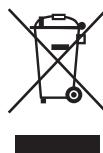
Protect our environment: do not dispose of electrical equipment in the domestic waste.
Please return any electrical equipment that you will no longer use to the collection points provided for their disposal.
This helps avoid the potential effects of incorrect disposal on the environment and human health.
This will contribute to the recycling and other forms of re-utilisation of electrical and electronic equipment.
Information concerning where the equipment can be disposed of can be obtained from your local authority.
Instrukcja obslugi
CTC Clatronic Sp. z o.o
Ul. Brzeska 1
45-960 Opole