
SG K3100DN - Inkjet Printer RICOH - Free user manual and instructions
Find the device manual for free SG K3100DN RICOH in PDF.



| Product type | Black and white inkjet printer |
| Brand | RICOH |
| Model | SG K3100DN |
| Print speed (black and white) | 29.0 ppm |
| Nozzles | Black: 384 nozzles |
| Power source | 220-240 V, 50/60 Hz, 0.7 A |
| Power consumption (printing) | 26.7 W (without options) |
| Power consumption (Energy Saver mode) | Less than 0.88 W |
| Weight (body with consumables) | Approximately 10.5 kg |
| Noise emission (acoustic power printing) | 62.8 dB(A) |
| Noise emission (acoustic power standby) | 46 dB(A) or less |
| Sound pressure level (printing) | 56.8 dB(A) |
| Sound pressure level (standby) | 40 dB(A) or less |
| Ink cartridge | Black only |
| Cartridge replacement indicator | Yes, six-level display |
| Unsupported functions | Mac OS, glossy paper, RPCS color driver, nozzle/head cleaning, gray reproduction, Economy Color color counter |
| Consumables | Ink cartridges, ink waste tray |
| User guide | User manual, User guide and Safety instructions provided |
| Supported operating systems | Not specified (Mac OS not supported) |
Frequently Asked Questions - SG K3100DN RICOH
User questions about SG K3100DN RICOH
0 question about this device. Answer the ones you know or ask your own.
Ask a new question about this device
Download the instructions for your Inkjet Printer in PDF format for free! Find your manual SG K3100DN - RICOH and take your electronic device back in hand. On this page are published all the documents necessary for the use of your device. SG K3100DN by RICOH.
USER MANUAL SG K3100DN RICOH
This booklet describes the features and functions of the SG K3100DN.
The User Guide and Safety Information for the SG2100N/SG3110DN/ SG3110DNw/SG7100DN are supplied with this product. Some descriptions in the User Guide and Safety Information do not apply to this product. Replace them according to the instructions in this booklet.

Important
This booklet describes the features and functions of the SG K3100DN only.
- For information not included in this booklet, refer to the parts about the SG 3110DN in the User Guide ⑤ , which also apply to the SG K3100DN.
About This Product
This product is a black-and-white printer.
Guide to Components and Control Panel
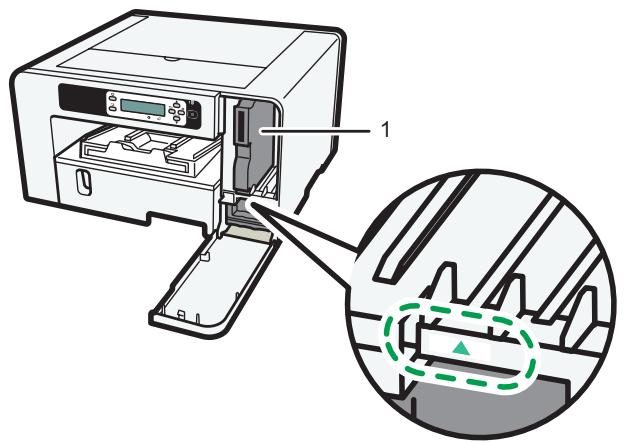
CXK001
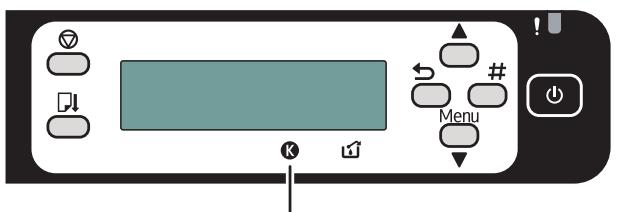
2
CXK002
1. Print Cartridge (black)
Insert the cartridge at the point indicated by the mark, as shown in the illustration. Only black print cartridges can be used with this product.
2. Cartridge replacement indicator
K indicates black.
The amount of ink remaining in print cartridge is indicated on the six-level display.
Limitation
This machine does not support the following functions.
Operating Systems
Mac OS
Paper
Glossy paper
Printer driver
RPCS Raster printer driver
Color Mode
- Gray Reproduction
Maintenance
- Nozzle check, Head-cleaning, Head-flushing
[All Heads]
- [Head 2]
Counter
Full Color
Economy Color
Specifications
Specifications of the machine is listed.
Print speed
Measurements according to the manufacturer's measurement system Black and white: 29.0 ppm
Nozzles
Black: 384 nozzles
Power source
220-240 50/60 Hz 0.7 A (when fully equipped)
Power consumption
Average power consumption while printing: 26.7 W (not including options) Energy Saver mode: less than 0.88 W
Weight
Approximately 10.5kg (23.2 lb) (machine body with consumables)
Noise emission*1
Sound Power Level
| Main unit only | |
| During Printing | Speed priority: 62.8 dB(A) |
| Standby | 46 dB(A) or less |
Sound Pressure Level
| Main unit only | |
| During Printing | Speed priority: 56.8 dB(A) |
| Standby | 40 dB(A) or less |
1 The preceding measurements made in accordance with ISO7779 are actual values.
2 Measured at the position of a bystander.
Printer language
PCL
Recommended Consumables
Consumables recommended for this machine are listed.
Purchase necessary consumables before your supply runs out.
For information about consumables, contact your sales or service representative.
- Print cartridges
- Ink Collector Unit
Einleitung
[Alle Druckkopfe]
- [Druckkopf 2]
Zähler
Vollfarbe
Economy Color
Spezifikationen
Brand : RICOH
Model : SG K3100DN
Category : Inkjet Printer