ManualGo.com
 CDIMN 4D622SB - CDIMN4D622PB - Dishwasher CANDY - Free user manual and instructions
Find the device manual for free CDIMN 4D622SB - CDIMN4D622PB CANDY in PDF.


Download the instructions for your Dishwasher in PDF format for free! Find your manual CDIMN 4D622SB - CDIMN4D622PB - CANDY and take your electronic device back in hand. On this page are published all the documents necessary for the use of your device. CDIMN 4D622SB - CDIMN4D622PB by CANDY.
USER MANUAL CDIMN 4D622SB - CDIMN4D622PB CANDY
L Spia "TABS" M Spia "Wi-Fi"
DIMENSIONI H Spia "SMART DOOR"
Thank you for choosing this product. We are proud to offer the ideal product for you and the best complete range of home appliances for your daily routine. Carefully read this manual for correct and safe appliance use and for helpful tips on efficient maintenance.
Contents 1. GENERAL SAFETY RULES 2. WATER CONNECTION
3. LOADING THE SALT Only use the dish washer after carefully reading these instructions. We recommend you always keep this manual to hand and in good condition for any future owner.
5. LOADING DISHES Please check that the appliance is delivered with this instruction manual, the warranty certificate, the service centre address and the energy efficiency label. Each product is identified by a unique 16digit code, also called the “serial number”, printed on the warranty certificate or on the serial plate found inside the door, on the upper right hand side. This code is a sort of product-specific ID card that you will need to use to register the product or if you need to contact the Technical Assistance Centre.
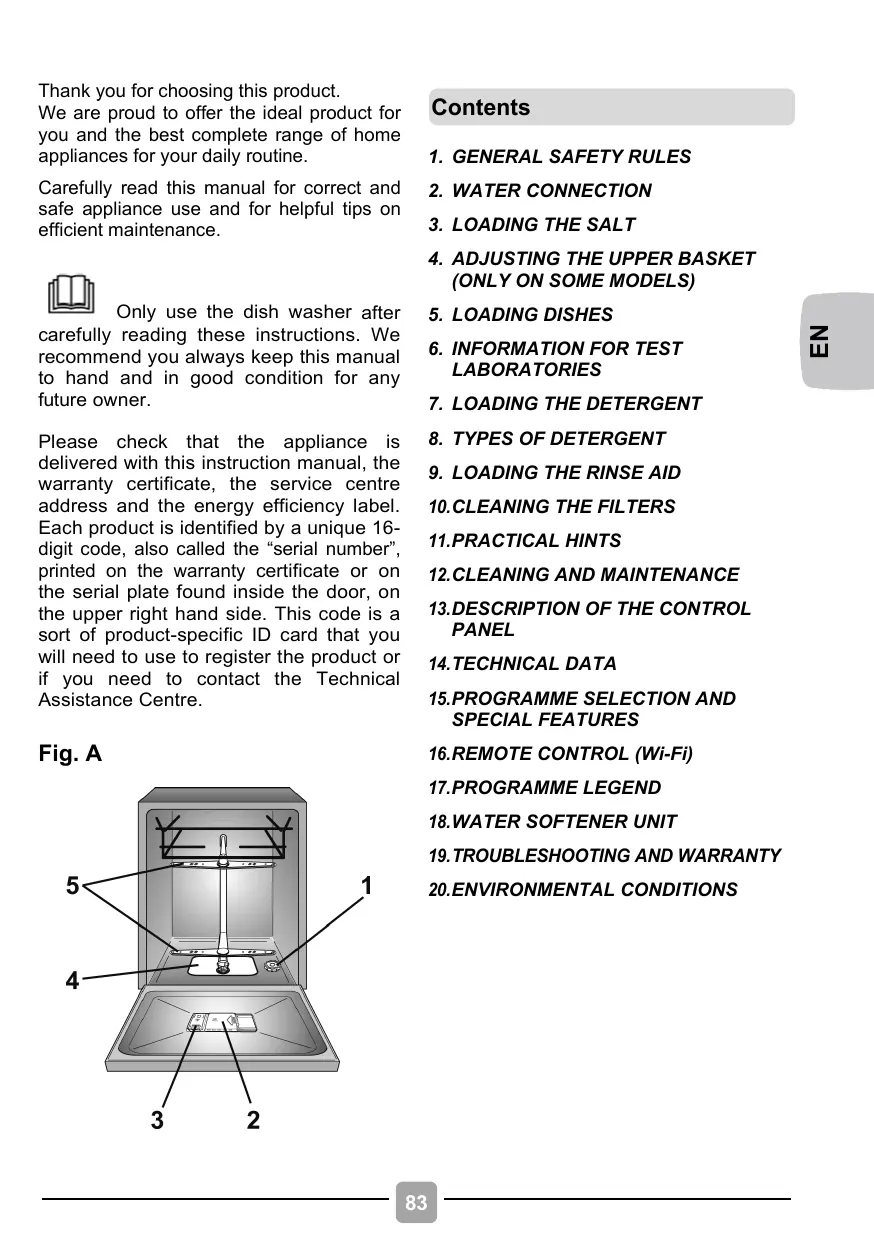
8. TYPES OF DETERGENT Fig. A
sensorial or mental capacities, without experience or knowledge of the product, only if supervised or provided with instruction as to the operation of the appliance, in a safe way with awareness of the possible risks.
appliances is intended to be used in household and similar applications such as: − Staff kitchen areas in shops, offices and other for Extra EU markets working environments; This appliance is not intended − Farm houses; for use by persons (including − By clients in hotels, motels children) with reduced physical, and other residential type sensory or mental capabilities, environments; or lack of experience and − Bed and breakfast type knowledge, unless they have environments. been given supervision or instruction concerning use of A different use of this appliance the appliance by a person from household environment responsible for their safety. or from typical housekeeping functions, as commercial use by Children should be supervised expert or trained users, is excluded to ensure that they do not play even in the above applications. If with the appliance. the appliance is used in a manner inconsistent with this it may reduce Children of aged 3 and under should be kept away unless the life of the appliance and may continuously supervised. void the manufacturer’s warranty. Any damage to the appliance or If the supply cord is damaged, it must be replaced by a other damage or loss arising through use that is not consistent Special cord or assembly available from the manufactured with domestic or household use (even if located in a domestic or or its service agent. household environment) shall not Only use the hose-sets be accepted by the manufacturer to supplied with the appliance for the fullest extent permitted by law. the water supply connection (do not reuse old hose-sets). EU market The appliance can be used by Water pressure must be those aged 8 or over and by between 0.08 MPa and 0.8 those with limited physical, MPa.
sure carpets or rugs do Ensure that the dishwasher not obstruct the base or any of does not crush power cables. the ventilation openings. In general it is not advisable to After installation, the appliance use adaptors, multiple plugs must be positioned so that the and/or extension cables. plug is accessible. Do
not leave the door open in a horizontal position, in order to avoid potential dangers (e.g. tripping). further information on the product or to consult the technical data sheet, please refer to the manufacturer's website.
The appliance must not be supplied through an external switching device, such as a timer, or connected to a circuit that is regularly switched on and off by a utility.
the maximum number of place settings, see the relevant data plate attached to the product.
Electrical connections safety instructions
cleaning or maintaining the dishwasher, unplug the appliance and turn off the water supply.
not pull on the power cord or appliance to unplug the machine.
The technical details (supply voltage
and power input) are indicated on the product rating plate.
Water may reach very high during the sure that the electrical temperatures system is earthed and complies wash cycle. with all applicable laws, and that the socket is compatible Do not leave the appliance with the plug of the appliance. exposed to the elements (rain, sun, etc.). The manufacturer declines all responsibility for any damage Leaning or sitting on the open to people or property due to door of the dishwasher could non-earthing of the machine. cause it to tip over. Make
moving, do not lift the dishwasher by the door; during the transport, never lean the door on the trolley. We recommend two people lift the machine.
By marking this product, we confirm, under our own responsibility, full compliance of this product with all relevant safety, health and environmental requirements under European legislation.
dishwasher is designed for normal kitchen utensils. Objects that have been contamined by Installation petrol, paint, traces of steel or Remove all elements of the iron, corrosive chemicals, acids packaging. or alkalis must not be washed in the dishwasher.
there is a water softening Keep packaging materials device installed in the home away from children. there is no need to add salt to the water softener fitted in the Do not install or use the dishwasher. dishwasher if it is damaged. If the appliance breaks down or stops working properly, switch it Follow the instructions supplied with the product. off, turn off the water supply and do not tamper with it. Repair work should only be carried out by an WARNING: approved service agent and only genuine spare parts should be Knives and other utensils fitted. Any failure to follow the with sharp points must be above advice may have serious loaded in the basket with consequences for the safety of their points down or placed in a horizontal position. the appliance. If
you need to move the machine after removing the packaging, do not try to lift it by the bottom of the door. Open the door slightly and lift the machine by holding it on the top. 86
2. WATER CONNECTION If the dishwasher is connected to new
The appliance must be connected to the water mains using new hose-sets. The old hose-sets should not be reused.
pipes or to pipes which have not been inuse for a long time run water through for a few minutes before connecting the inlet hose. In this way no deposits of sand or rust will clog up the water inflow filter.
The inlet and drain hoses can be directed to left or right.
EN The dishwasher can be connected to either cold or hot water, as long as it is no hotter than 60°C.
Water pressure must be between 0,08 MPa and 0,8 MPa.
The inlet hose must be connected to a tap
so that the water supply can be cut off when the machine is not in use (fig. 1 B).
The dishwasher is fitted with 3/4" threaded connector (fig. 2).
Connect inlet hose "A" to water tap "B"
with a 3/4" attachment making sure that it has been properly tightened.
If it is necessary, the inlet pipe can be
lengthened up to 2,5 m. The extension pipe is available from the After Sales Service Centre.
AQUASTOP (fig. 4):
Hydraulic safety devices
A device located on the supply tube that stops water flow if the tube deteriorates; in this case, a red mark will appear in the window "A" and the tube must be replaced. To unscrew the nut, press the one-way lock device "B".
All the dishwashers are equipped with an overflow safety device which, if water exceeds normal levels due to malfunctions, automatically blocks water flow and/or drains excess quantities. SOME MODELS may include one or more of the following features:
WATERBLOCK (fig. 3)
The waterblock system has been designed to improve the safety of your appliance. The system prevents flooding which might be caused by a machine malfunction or as a result of a fracture on the rubber pipes and in particular on the water supply pipe.
How it works A sump located on the base of the appliance collects any possible water leakage and operates a sensor which activates a valve placed under the water tap and blocks any water, even with the tap fully opened. If box "A" containing the electrical parts is damaged, remove the plug from the socket immediately. To ensure perfect operation of the safety system, the hose with box "A" should be connected to the tap as shown in the figure. The water supply hose should not be cut, as it contains live parts. If the hose is not long enough for correct connection, it must be replaced with a longer one. The hose can be obtained from the Technical Assistance Centre.
AQUAPROTECT - SUPPLY TUBE WITH GUARD (fig. 5): Should water leak from the primary internal tube "A", the transparent containment sheath "B" will contain water to permit the washing cycle to complete. At the end of the cycle, contact the Customer Service Centre to replace the supply tube.
Connecting the outlet hose standpipe, making sure that there are no kinks (fig. 6).
The hose can be hooked over the side of the sink, but it must not be immersed in water, in order to prevent water from being syphoned back to the machine when this is in operation (fig. 6Y).
The standpipe must be at least 40 cm
above floor level and it must have an internal diameter of at least 4 cm.
the appliance under a worktop the hose pipe clamp must be attached to the wall in the highest possible position under the worktop (fig. 6Z).
It is advisable to fit an anti-odour air trap
(fig. 6X). If necessary the outlet hose can be extended up to 2,5 m, provided that it is kept at a maximum height of 85 cm above floor level. The extension pipe is available from the After Sales Service Centre.
Check that there are no kinks in the inlet
The outlet hose should disharge into a
3. LOADING THE SALT (Fig. A "1") The appearance of white stains on dishes
is generally a warning sign that the salt container needs filling.
On the bottom of the machine there is a container for the salt for regenerating the softener.
It is important to use only a salt that is
specifically designed for dishwasher. Other types of salt contain small quantities of insoluble particles which over a long period of time may affect and deteriorate the softener performance.
To add salt, unscrew the cap of the container on the bottom and then refill the container.
During this operation a little water will overflow; but keep adding salt until the container is full. When the container is full, clean the thread of salt residue and retighten the tap.
After loading the salt, it is recommended
running a complete washing cycle, or COLD RINSE programme.
After loading the salt, YOU MUST run a complete washing cycle, or the PRE-WASH/COLD RINSE/REFRESH programme.
The salt dispenser has a capacity of
between 1.5 and 1.8 kg and, for efficient use of the appliance, it should be refilled from time to time .
(Only for first start up) When the appliance is used for the first time, after completely filling the salt container, it is necessary to add water until the container overflows.
If 29 cm to 32.5 cm plates are regularly
Dishes that are greater than 20 cm* in diameter can no longer be loaded onto the upper basket, and the mobile supports cannot be used when the basket is in the upper position.
* In models fitted with a third basket, dishes measuring more than 14 cm in diameter can no longer be loaded onto the upper basket.
used, load them onto the lower basket after the upper basket has been placed in its upper position, as detailed below (according to the model):
1. Turn front blocks "A" outwards; 2. Remove the basket and remount it in the upper position; 3. Replace blocks "A" in the original position.
Dishes that are greater than 20 cm in diameter can no longer be loaded onto the upper basket, and the mobile supports cannot be used when the basket is in the upper position.
ADJUSTING THE BASKET LOWER POSITION:
1. Hold the basket on both sides and lift it gently upwards (fig. 1); 2. Then slowly release into the correct position (fig. 2). N.B.: NEVER LIFT OR LOWER THE BASKET FROM ONE SIDE ONLY (fig. 3).
We recommend adjusting the basket before loading the dishes.
5. LOADING DISHES Using the lower basket
Using the upper basket
Saucepans, oven dishes, tureens, salad
The upper basket is provided with mobile
racks hooked to the sides of the basket, which can be regulated into 4 positions.
In the lowered position (A-A1) the racks
may be used for such items as: tea and coffee cups, kitchen knives and ladles. Also glasses with stems may be safely hung on the ends of the racks.
It is advisable to load large plates
(approx. 26 or more cm) slightly tilted towards the rear to facilitate introduction of the basket into the machine.
bowls, lids, serving dishes, dinner plates and soup plates can be loaded into the lower basket.
Place the cutlery in the plastic cutlery
holder with the handles pointing upwards and place the cutlery holder on the lower basket (fig.6) making sure that the cutlery does not get in the way of the rotating arms.
FOLDABLE RACKS Foldable racks (fig.2 and fig.3) may be provided in the lower basket to optimize dish stability. Racks may be raised or lowered to accommodate non-standard sizes and/or shapes for maximum flexibility.
Salad bowls and plastic bowls may also be loaded on the upper basket. It is advisable to block these in place so that the jets of water do not make them overturn.
The upper basket has been designed to
offer maximum flexibility in use and can be loaded with up to 24 plates on two rows, up to 30 glasses on five rows or a mixed load.
A standard daily load is represented in fig.1 Lower basket (Figure 2)
Upper basket (Figure 1)
Lower basket (Figure 3)
An example of the positioning of the Cutlery rack is shown in figure 4.
EN An example of the standard daily load is shown in fig.4.
Please load the dishwasher sensibly to ensure the best wash results. The lower basket has a safety-stop device, for its safe extraction, also especially useful with a full load. For loading salt, cleaning filter and for ordinary maintenance, the complete extraction of the basket is necessary.
To position the cutlery basket correctly, lower the front foldable racks as shown in fig.6 to ensure maximum stability.
Cutlery basket (Provided in certain models only)
The top of cutlery basket can be removed, for enable various loading options (fig.5).
knives and other utensils with sharp points must be loaded in the basket with their points down or placed in a horizontal position.
Using the third basket (Provided in certain models only) Use the third basket to load the cutlery, as shown in the image (fig.7). Load knives with the blade down.
6. INFORMATION FOR TEST LABORATORIES Please ask information required for comparison testing and measuring noise levels, according to EN normative, to the following address: testinfo-dishwasher@candy.it
If necessary, the side shelves of the third basket can be slid or removed (fig.8) in order to create additional space in the upper basket for bulky items such as wine glasses.
In the request, please specify model name and number of the dishwasher (see rating plate).
7. LOADING THE DETERGENT (Fig. A "2")
It is essential to use a detergent that is specifically designed for dishwashers either in powder, liquid,gel or tablet form. Unsuitable detergents (like those for washing up by hand) do not contain the proper ingredients for use in a dishwasher, and stop the dishwasher from working correctly.
After pouring the detergent into the container, close the lid, firstly pushing (1) and then pressing on it (2) until you hear the click.
Filling the detergent container The detergent container is inside the door (fig. A "2"). If the lid of the container is closed, press the button (A) to open. At the end of every wash cycle the lid is always open and ready for the next time the dishwasher is used.
Since not all detergents are the same the instructions on the boxes of detergent can vary. We should just like to remind users that too little detergent does not clean the dishes properly whilst too much detergent will not produce better results and is also a waste. Do not use an excessive amount of detergent and help limit damage to the environment at the same time.
WARNING When loading the lower basket, please ensure that the plates or others do not obstruct the detergent dispenser. The amount of detergent to be used varies according to how dirty the dishes are and on the type of dishes to be washed. We advise using 20:30 g of detergent in the wash section of detergent compartment (B).
read carefully and follow the manufacturer’s
the effectiveness of detergents containing
Detergent tablets of different manufacturers dissolve at different speeds, for this reason, during short programmes, some detergent tablets may be not fully effective, because they are not completely dissolved. If these products are used, is recommended to choose longer programmes to guarantee the complete use of the detergent.
If when using this type of product, you don't get satisfactory washing results, please contact the detergent manufacturer.
instructions given on the packaging;
the built in water softener/salt depends on the hardness of your water supply. Check that the hardness of your water supply is within the effective range given on the detergent packaging.
In certain circumstances use of combined detergents can cause:
To get satisfactory washing results, the tablets MUST be placed in the wash section of the detergent container and NOT directly in the tub.
limescale deposits on dishes or in the dishwasher;
a reduction in washing and drying
Concentrated detergents
The concentrated detergents, with reduced alkalinity and with natural enzymes, in conjunction with 50°C wash programmes, have a smaller impact on the environment and they protect the dishes and the dishwasher. The 50°C wash programmes purposely exploit the dirt-dissolving properties of the enzymes, allowing therefore, with the use of the concentrated detergents, to achieve the same results of the 65°C programmes but at a lower temperature.
Combined detergents The detergents that also contain the rinse aid must be placed in the wash section of the detergent container. The rinse aid container must be empty (if it is not empty, set the rinse aid regulator to lowest position before using combined detergents).
Any problems which arise as a direct result of the use of these products are not covered by our warranty. Please note that using the "TABS" combined detergents, the rinse aid and salt indicator lights (only used on selected models) are superfluous, so you must ignore the lights. If washing and/or drying problems occur, we recommend you return to use traditional separate products (salt, detergent and rinse agent). This will ensure that the water softener in the dishwasher operates correctly. In this case, we recommends that you:
refill both the salt and rinse aid container; run one normal washing cycle without a
"TABS" combined detergents
If you are planning to use "TABS" (“3 in 1 “/ “4 in 1”/ “5 in 1”, etc.) combined detergents i.e. those with built in salt and/or rinse agent, we would advise the following:
Please note that on return to the use of conventional salt, a number of cycles will be required before the system becomes fully efficient again.
9. LOADING THE RINSE AID (Fig. A "3") The rinse aid
EN The rinse aid, which is automatically released during the last rinsing cycle, helps the dishes to dry quickly and prevents spots and stains forming.
Filling the rinse aid container. The rinse aid container can be found to the left of the detergent container (fig. A "3"). To open the lid, push the reference mark and, in the same time, pull the tab of opening. It is always advisable to use rinse aid that is specifically designed for dishwasher. Check the rinse aid level through the indicator eye (C) which is located on the dispenser.
Regulating the rinse aid from 1 to 6 The regulator (D) is placed under the lid and can be turned using a coin. The recommended position is 4. The limestone content of the water considerably affects the formation of limescale and the drying performance. It is therefore important to regulate the quantity of rinse aid to achieve good washing results. If, after the wash, streaks occur on the dishes, decrease the amount by one position. If whitish spots occur, increase the amount by one position.
10. CLEANING THE FILTERS (Fig. A "4") The filter system consists of: A. A central container that traps the larger particles; B. A micro filter, located beneath the gauze, that traps the tiniest particles ensuring a perfect rinse; C. A flat gauze that continuously filters the wash water.
To achieve excellent results every time, the filters should be checked and cleaned after each wash.
To remove the filter unit, simply turn the handle anticlockwise (fig. 1).
ease of cleaning, the container is removable (fig. 2).
Remove the gauze filter (fig.3) and wash
the whole unit under a jet of water. If necessary a small brush can be used.
With the Self-cleaning Micro filter,
maintenance is reduced and the filter unit need only be checked every two weeks. Nevertheless, after each wash it is advisable to check that the central container and the gauze filter are not clogged.
WARNING After cleaning the filters, make sure that they are correctly reassembled and that the gauze filter is properly positioned at the bottom of the dishwasher. Make sure that the filter is screwed back, clockwise, into the gauze, as poor seating of the filter unit could have an adverse effect on the efficiency of the appliance. Never use the dishwasher without the filters.
If you want the dishwasher to give a
complete wash, place the dishes in the dishwasher at the end of each meal and if necessary turn on the COLD RINSE cycle to soften the food remains and remove bigger particles of food from the new load of dishes. When the dishwasher is full start the complete wash cycle programme.
How to get really good wash results. Before
placing the dishes in the dishwasher, remove any remaining food (bones, shells, pieces of meat or vegetables, coffee grounds, skin of fruit, cigarette ash, thooth picks etc. to avoid blocking the filters, water outlet and washing arm nozzles.
Try not to rinse the dishes before loading
If the dishes are not very dirty or if the
baskets are not very full select an ECONOMY programme, following the instructions in the program list.
The most efficient programmes in terms
of combined use of water and energy are usually the longer-lasting ones with lower temperature.
them into the dishwasher.
If saucepans and oven dishes are
encrusted with the remains of burnt or roast food, it is advisable to leave them to soak before washing.
Place the dishes face downwards.
What not to wash. It should be remembered that not all
dishes are suitable for washing in a dishwasher. We advise against using the dishwasher to wash items in thermoplastic, cutlery with wooden or plastic handles, saucepans with wooden handles, items in aluminum, crystal leaded glass unless otherwise stated.
Try to place the dishes in such a way that
they are not touching one another. If they are loaded properly you will get better results.
After loading the dishes check that the washing arms can rotate freely.
and other dishes that have particularly stubborn food particles or remnants of burnt food should be left to soak in water with dishwasher detergent.
To wash silver properly: a) rinse the silver immediately after use, especially if it has been used for mayonnaise, eggs, fish etc.;
Certain decorations may fade. It is
therefore a good idea before loading the whole batch to wash just one of the items first so as to be sure that others like it will not fade.
It is a good idea not to put silver cutlery
with non-stainless steel handles into the dishwasher as there could be a chemical reaction between them.
b) do not sprinkle detergent onto it;
When buying new crockery or cutlery always make sure that they are suitable for washing in a dishwasher.
c) keep it separate from other metals.
How to make savings. Tips on how to save money and not damage the environment when using your appliance.
Achieve the best use of energy, water, detergent and time by using the recommended maximum load size. Save up to 50% energy by washing a full load instead of 2 half loads.
Useful hints In order to avoid any dripping from the top rack, remove the lower rack first.
If the dishes are to be left in the machine
for some time, leave the door ajar, to let some air circulate and to improve the drying performance.
12. CLEANING AND MAINTENANCE
2) wash the rotor arms under a jet of water to clear any blockage in the spray heads.
Looking after your appliance correctly can extend its lifespan.
Do not use tools that can deform the spray heads.
Cleaning the appliance’s exterior
3) when you have finished, refit the rotor arms in the same position, remembering to re-align the arrow and screw into position.
Disconnect the machine from the power supply.
To clean the dishwasher outside, do not
use solvents (degreasing action) neither abrasives, but only a cloth soaked with water.
Both the door lining and the tank lining are in stainless steel; however, should spots caused by oxidation occur, this is probably due to a high level of iron salts presents in the water.
Cleaning the appliance’s interior The dishwasher does not require special
The spots can be removed with a mild abrasive agent; never use chlorine based materials, steel wool, etc.
maintenance, because the tank is selfcleaning.
Regularly wipe the door gasket with a
damp cloth to remove any food remains or rinse aid.
Dishwasher cleaning is recommended, in
order to remove limestone deposits or dirt. We suggest you run a washing cycle periodically with specialist dishwasher cleaning products. For all cleaning operations the dishwasher must be empty.
If, in spite of the routine cleaning of the filters, you notice that the dishes or pans are not properly washed or rinsed, check that all the spray heads on the rotor arms (fig. A “5”) are clear.
If they are blocked, clean them in the following way: 1) to remove the upper rotor arm, turn it until it lines up with the stop marked by the arrow (fig. 1b). Push it upwards (fig. 1) and, keeping it pushed in, unscrew it in a clockwise direction (to reassemble it repeat the same operation, but turn it anticlockwise). The lower rotor arm can be removed simply by pulling it upwards (fig. 2);
WHEN CYCLE IS FINISHED. After every wash it is essential to turn off water supply and to switch off the machine by pressing the On/Off button to the off position.
If the machine is not going to be used for some time, it is advisable to follow these rules: 1. do an empty wash with detergent in order to clean the machine of any deposits; 2. pull out the electric plug;
5. Ieave the door ajar; 6. keep the inside of the machine clean; 7. If the machine is left in places where the temperature is below 0°C any water left inside the pipes may freeze. Wait until the temperature rises above zero and then wait for about 24 hours before.
3. turn off the water tap;
L "TABS" light M "Wi-Fi" light
D DISPLAY E "TABS" option button
Fuse / Power input / Supply voltage
Capacity with pans and dishes Water supply pressure (MPa)
Place settings (EN 50242)
Depth with door open (cm)
FULL-INTEGRATED BUILT-IN
DATA FREE-STANDING HALF-INTEGRATED I "HALF LOAD" light
C "DELAY START" button
SIZE H "SMART DOOR" light
15. PROGRAMME SELECTION AND SPECIAL FEATURES
Close the door (after an audible signal
has sounded, the programme will start automatically).
To turn the appliance on and off, press
the ON/OFF button (for at least 3 seconds).
At the end of the cycle, remember to switch off the appliance using the ON/OFF button, then remove the plug and close the water supply.
Next time you switch on the appliance
First time you switch on the appliance
Open the door. Hold down the ON/OFF button for about 3
secs to turn the machine on and the "ECO" programme or the programme you have decided to use will appear on the display, saving it when the dishwasher is switched on. (To save the programme, see the specific paragraph "Memorising the last programme used").
Connect the machine to the power supply.
Open the door, put the dishes to be washed inside, and close the door again.
Press the "ON/OFF" button and hold for
In this phase only the "OPTIONS"
"TABS" and "START/RESET" buttons will remain active. The message "BRAVA" will appear on the display and all the indicator lights will turn on for 3 secs.
The dishwasher is regulated with certain factory settings. Nevertheless, from the Settings menu, you can adjust various parameters to suit your washing requirements. Entering the Settings menu
The message "ENGLISH" will appear on
The dishwasher must ALWAYS be off before you start this procedure.
Pressing the "OPTIONS" and "TABS"
buttons you can select the preferred language.
To accept the language selection press
the "START/RESET" button Immediately afterwards the "WELCOME" message will scroll on the display once and the indicator lights will all be off.
Open the door. Turn on the dishwasher by holding the "ON/OFF" button down for about 3 secs.
Hold down the "PROGRAMME SELECTION" and "ON/OFF" buttons for about 5 secs.
The message "SETTINGS" will appear
on the display and the indicator lights of the "OPTIONS" and "TABS" buttons will be on.
"ECO" will appear on the display. Press "START/RESET" and a signal will sound, the indicator light corresponding to the selected programme will stay on and the wash indicator light will come on.
Pressing the "PROGRAMME SELECTION"
button you can select the parameters to be adjusted in succession (SOFTENER → BUZZER → MEMO FUNCTION).
EN In the event that the machine remains switched on without selecting or starting any program, after 5 mins. the dishwasher will switch off automatically.
Parameter adjustment is performed by
"IMPULSE" programmes (only on some models)
pressing the "OPTIONS" and "TABS" buttons.
To adjust the SOFTENER see the specific Chapter of the manual.
To adjust the BUZZER see the specific paragraph.
The "IMPULSE" programmes use an impulse washing technology, which reduces consumption and noise, and improves performance. The “intermittent” working of the washing pump is NOT to be considered a malfunction; it is a characteristic of impulse washing, and therefore should be considered a normal feature of the programme.
To adjust the MEMO FUNCTION see the specific paragraph.
Changing language Press the "DELAY START" and "TABS" buttons together for 3 seconds.
ADDISH (possibility of adding dishes after the programme has started)
"ENGLISH" appears on the display. Pressing the "TABS" and "OPTIONS"
buttons you can select the preferred language.
To accept the language selection press the "START/RESET" button.
The cycle is automatically paused and the message "DOOR OPEN" appears on the display when a door is opened while the program is running. Every 7 seconds or when any button is pressed the message: • "ADD-DISH ON" appears if dishes can be added and correct washing is guaranteed.
"AUTOMATIC" programmes Models with Smart Loading Sensor The "AUTO WASH" programme, thanks to an algorithm that analyses the degree of dirtiness of the dishes in real time, automatically sets the ideal temperature and washing time , optimising water and electricity consumption
• "ADD-DISH OFF" appears if dishes should not be added because correct washing cannot be guaranteed. The cycle restarts from where it left off when the door is closed.
Models with dirt sensor (Only on some models). The dishwasher is equipped with a dirt sensor, capable of analysing water murkiness during all "AUTOMATIC" programme phases (see programme legend). Thanks to this device, the wash cycle parameters are automatically adapted to the real quantity of dirt on dishes. This is because water murkiness is linked to the quantity of dirt on dishes. Thus, excellent washing results are guaranteed while optimising water and energy consumption.
Open the door slowly and carefully, to avoid getting wet with splashes of washing water.
WARNING If you open the door during the drying cycle, an intermittent audio signal advises you that the drying cycle has not yet finished. The buzzer stops after 2 minutes and the machine turns off.
Programme interruption
If you open the door during the drying cycle, an intermittent audio signal advises you that the drying cycle has not yet finished.
"PERFECT RAPID ZONE" (only on some models) The "PERFECT RAPID ZONE" is identified by the left side of the tub, in which two extra washing arms will be activated during Rapid programs (ZOOM 39’ and Rapid 24') and programs (UNIVERSAL, SANITISING, UNIVERSAL PLUS and ECO PLUS) to provide an extra washing force, more water, in that zone.
Changing a running programme. Proceed as follows to change or cancel a running program:
Open the door. Keep the START/RESET button pressed
for at least 3 seconds. "RESET" will appear on the display and acoustic signals will be emitted.
Close the door of the appliance. The running programme will be cancelled. At this point a new programme can be set using the "PROGRAMME SELECTION" button.
Before starting a new programme, you should check that there is still detergent in the dispenser. If necessary, top up the detergent.
Option buttons The option buttons provide you with further wash options, allowing you to customise the wash programmes (see the table in chapter 17 for a list of programmes on which each option can be enabled). Options are enabled (or disabled) before starting the programme, using the appropriate buttons. The relevant indicator lights will appear (or disappear) on the display. The option button should be enabled after you have chosen the wash programme.
Programme end A 5 second buzzer will sound (if not muted) 3 times at 30 second intervals to signal that the programme has ended.
Press the button once to enable option "HALF LOAD", or press twice to enable option "SMART DOOR". The two functions cannot be run simultaneously.
EN Opening the door when a programme is running is not recommended especially during the main wash and final hot rinse phases. However, if the door is opened while a programme is running (for example, to add dishes) the machine stops automatically. Close the door, without pressing any buttons. The cycle will start from where it left off.
Only for models with the "SMART DOOR" option, during the drying phase the door will open automatically and you will have to wait until for the end-ofcycle signal before removing the dishes.
If an option is selected that is not compatible with the selected programme then the option indicator light first flashes and then goes off. "EXPRESS" button (only on some models). This button enables average energy and time savings of 25% (according to the cycle selected), reducing the wash water temperature and the drying time during the final rinse. This option is recommended for evening washing when perfectly dry dishes are not needed immediately. For better drying, leave the dishwasher door slightly ajar to promote natural air circulation in the dishwasher. "HALF LOAD" button (only on some models). If you need to wash just a few dishes (e.g. glasses, cups, plates), you can enabled the "HALF LOAD" option. In this way, you can save water, energy and time. With the "HALF LOAD" option, use less detergent than for a full load. "SMART DOOR" button (AUTOMATIC DOOR OPENING) (only on some models). This option enables a special device that opens the door by a few centimetres during or at the end of the drying cycle (depending on the programme). This ensures the natural and efficient drying of dishes. The duration of the selected cycle will automatically change to obtain the optimal temperature for the rinse cycle; this significantly reduces energy consumption. The automatic door opening during the last drying phase enables the air to circulate, removing the risk of bad odours. When the door opens, the message "SMART DOOR" will appear on the display. This option is automatically enabled in the "ECO" programme. In any case, it is possible to disable it. The "SMART DOOR" feature is not available in the "ZOOM 39’", "RAPID 24’" and "PREWASH" programmes.
WARNING With this option selected, you must not in any way prevent the door from opening or force it shut, as this would damage the mechanism. Ensure that there is free space in front of the door and, before closing, wait for the opening device to complete its activity. "TABS" button This option optimises the use of "TABS" ("3 in 1"/"4 in 1"/"5 in 1", ecc.) combined detergents. By pressing this button, the selected washing programme is modified to get best performance from combined detergents (furthermore, the salt and rinse aid shortage lights are de-activated).
WARNING Once selected, this option keeps being on (light on) also for next washing cycles and it can be deactivate (light off) only by pressing the button once again. This option is recommended when using the RAPID 24' program, the duration of which will be extended for about 15 minutes, allowing the detergent tablets to achieve a better performance.
"NO SALT" warning light If your dishwasher requires salt, "SALT" will be displayed when selecting the programme. The appearance of whitish stains on dishes is generally a warning sign that the salt container needs filling. In order to guarantee the correct functioning of the salt indicator light, YOU MUST ALWAYS FULLY REPLENISH THE SALT CONTAINER.
"DELAY START" button
(Only for free-standing models) The length of the selected cycle will be shown on the display. At the end of the countdown, the programme will automatically start and the length of the selected cycle will be shown on the display.
Dishwasher start time can be set with this button, delaying start from 1 to 23 hours. Proceed as follows to set a delayed start:
Open the door. "ON/OFF" button for about 3 sec.
Select the washing programme.
Proceed as follows to cancel a delayed start:
Hold the "START/RESET" button down
for at least 3 seconds. "00" will appear on the display "RESET" and audible signals will sound.
Press the "DELAY START" button ("0:30” will appear on the display).
Press the button again to increase the delay (on each press the delay is increased by 30 mins., up to a maximum of 23:30.
The delayed start and the selected programme will be cancelled. dashes will appear on the display.
At this point, to set off the dishwasher, a new programme and any option buttons must be selected, as indicated in the "PROGRAMME SETTINGS" paragraph.
When the delay is set on a programme: - after pressing "START/RESET", the countdown time “00:00” appears on the display with flashing “ : ” - if you press any button (except for the "ON/OFF", "PROGRAMME SELECTION" buttons), the programme name is displayed for a single scroll on the display and then the delay time is displayed again. - When the time has elapsed, the programme name is displayed for a single scroll on the display and the remaining time will be displayed as "0:00h".
To start the countdown, press the
"START/RESET" button. The display will show the time remaining to the end of the programme. At the end of the countdown, the programme will start automatically.
If the delayed start is not confirmed by pressing the "START/RESET" button, after approx. 10 sec. the delayed start will be cancelled.
Activation/Muted END-OFPROGRAMME signal. You can deactivate turning on and off of the audio signal as follows (the default setting is active): The dishwasher must ALWAYS be off before you start this procedure.
Open the door. Turn on the dishwasher by holding the "ON/OFF" button down for about 3 secs.
Hold down the "PROGRAMME SELECTION" and "ON/OFF" buttons for about 5 secs.
The message "SETTINGS" will appear
on the display and the indicator lights of the "OPTIONS" and "TABS" buttons will be on.
Turn on the dishwasher by pressing the
Parameter adjustment is performed by
pressing the "OPTIONS" and "TABS" buttons to change the value from YES to NO and vice versa.
2. Turn on the appliance ON/OFF button.
Switch off the dishwasher by pressing the To turn the alarm on again, follow the same procedure.
4. "DEMO MODE ON" will appear on the display.
MEMO FUNCTION (Memorising the last programme used)
5. If no button is pressed for 30 seconds, the programme will start, simulating the start of a wash programme.
The dishwasher must ALWAYS be off before you start this procedure.
The PROGRAMME SELECTION/ OPTIONS/ DELAY START options are enabled, and by pressing these buttons you can simulate the product's functioning without starting a wash.
Open the door. Turn on the dishwasher by holding the "ON/OFF" button down for about 3 secs.
Hold down the "PROGRAMME SELECTION" and "ON/OFF" buttons for about 5 secs.
3. Press the "PROGRAMME SELECTION" and "DELAY START" buttons together for 5 seconds.
"ON/OFF" button for 3 secs to confirm the new setting.
The message "SETTINGS" will appear
on the display and the indicator lights of the "OPTIONS" and "TABS" buttons will be on.
Pressing the "PROGRAMME SELECTION" button until the "MEMO FUNCTION" parameter is selected.
Parameter adjustment is performed by
pressing the "OPTIONS" and "TABS" buttons to change the value from "MEMO MODE ON" to "MEMO MODE OFF" and vice versa.
Switch off the dishwasher by pressing the "ON/OFF" button for 3 secs to confirm the new setting.
To turn the alarm on again, follow the same procedure.
Enabling or disabling DEMO MODE (be used exclusively in stores) Enabling The dishwasher must ALWAYS be off before you start this procedure.
WARNING Once installed, if the appliance works correctly but the wash cycle does not start upon pressing the Start button, "Demo mode" may not have been disabled. The dishwasher must ALWAYS be off before you start this procedure. 1. Open the door. 2. Turn on the appliance ON/OFF button.
3. Press the "PROGRAMME SELECTION" and "DELAY START" buttons together for 5 seconds. 4. "DEMO MODE OFF" will appear on the display. 5. Switch off the appliance.
16. REMOTE CONTROL (WI-FI) This appliance is equipped with Wi-Fi technology that allows the machine to be remote controlled via an app.
on the display once, after which the message "REMOTE CONTROL" will appear and the "Wi-Fi" indicator light will be steady on. App.
Unsuccessful enrollment If enrolment fails (or does not succeed within 5 mins.):
The Candy simply-Fi app is available both for Android and for iOS tablets and smartphones.
"TRY AGAIN" will appear on the display. The machine will not be connected.
To discover all the details of the Wi-Fi features, explore the app menus in DEMO mode.
Make sure the router is turned on and your smartphone/tablet is connected to your home Wi Fi network.
Repeat the enrolment procedure from the App.
For more information, refer to the “Enrollment App - Quick Guide" that comes with your machine, also accessible at the link: go.candy-group.com/bm-dw
Open the app, create a user profile and
enroll the appliance, following the instructions appearing on the device’s display.
Reset WiFi Repeat the enrolment procedure, removing the product from the APP, in the event of problems or a change in your home router password.
Turn on the dishwasher by pressing the ON/OFF button for 3 seconds when instructed to do so in the app.
Press "PROGRAMME SELECTION" for 3 secs the message "ENROLMENT" will scroll on the display and the "Wi-Fi" indicator light will be off.
Within 60 secs. keep the "DELAY START" button pressed for 3 secs., and the message "EASY" will appear on the display for 5 mins, the Wi-Fi indicator light will start to flash slowly 3 times and then turn off for 2 seconds.
Enter the password of your home WiFi
network in the App and complete the procedure.
ENABLING REMOTE CONTROL Whenever you want to use the machine with remote control:
Fill the dishwasher, add detergent, and close the door.
Turn on the dishwasher. Press "PROGRAMME SELECTION" for
3 secs. The message "REMOTE CONTROL" will appear on the display.
Close the door. You can now check the machine from the
Download the Candy simply-Fi app onto
on BLUETOOTH on smartphone/tablet (if available).
The message "CONNECTED" will appear
You can now check the machine from the
Pairing the machine with the app
Successful enrollment
DISABLING REMOTE CONTROL
"Wi-Fi" indicator light
To exit remote control, press "PROGRAMME
Indicates the connection status of the
SELECTION" again for 3 secs.
When no cycle is under way: - The Wi-Fi indicator light will start to flash slowly and the message "REMOTE CONTROL OFF" will appear on the display.
When a cycle is under way: - The Wi-Fi indicator light will start to flash slowly and the message "REMOTE CONTROL OFF" will appear on the display. - The message “DOOR OPEN” will appear on the display. - The cycle will be completed without control from the App. Alternative way to exit remote control.
Press the "START/RESET" button for 3
secs If there is a cycle under way, it will be cancelled, and the machine will exit REMOTE CONTROL mode. The "Wi-Fi" indicator light will flash slowly. It is now possible to set a new wash cycle from the control panel.
Press the "ON/OFF" button for 3 secs
(or power off) If there is a cycle under way, it will be paused and the machine will exit REMOTE CONTROL mode. On switching on again, the "Wi-Fi" indicator light will flash slowly and any cycle under way will continue from the point of interruption.
Opening the door, any REMOTE CONTROL will be disabled. To resume control from the App, close the door.
product to the home Wi-Fi network. It can be:
- SLOW FLASHING: disabled.
- QUICK FLASHING FOR 3 SECONDS, THEN OFF: the machine cannot connect to the home Wi-Fi network or has not yet been enrolled on the App. - SLOWLY FLASHING 3 TIMES, THEN OFF FOR 2 SECONDS: enrolment procedure on the App in progress.
17. PROGRAMME LEGEND Description Programme for normally soiled tableware (the most efficient in terms of its combined energy and water consumption for that type of tableware). Programme standardised to EN 50242. Once a day - for heavily soiled pans and any other items that have been left all day for washing.
INTENSIVE RAPID Intended for rapid washing of very dirty dishes.
UNIVERSAL PLUS Intended for everyday dishwashing. Two final rinses ensure a high level of hygiene and cleanliness.
DELICATE Once a day - for normal soiled pans and any other items that have been left all day for washing. Programme suitable for washing in a single cycle the most delicate dishes such as glassware and porcelain in Washing Class A. Quick wash for dishes which are to be washed immediately after the meal. Wash load of 6 persons. Short cold pre-wash for items that are stored in the dishwasher until you are ready to wash a full load. An antibacterial cycle, intended for washing and sterilising dishes (even heavily stained ones) babies’ bottles etc.
Fast cycle, for “normally” dirty dishes – intended for frequent washes and normal loads. This programme is optimised thanks to a smart sensor that adapts washing parameters to actual dish load. Quietest washing cycle. Ideal for functioning by night and for taking advantage of reduced energy fares. Suitable for delicate crockery and glassware. Also for less soiled items excluding pans.
Programmes with prewash For wash programmes with prewash, it is advisable to add a second dose of detergent (max. 10 g) directly in the machine.
Average washing time¹ (min.)
"IMPULSE" programmes
Detergent for soaking (Prewash)
● = Detergent for soaking (Prewash) ■ = "IMPULSE" programmes = PERFECT RAPID ZONE (only on some models)
1) With cold water (15°C) – Tollerance ±10% With hot water the time remaining until the end of the programme is automatically displayed while the programme is running. *Values are measured in a laboratory according to European Standard EN 50242 (consumption may vary according to conditions of usage).
EN N/A= OPTION NOT AVAILABLE
18. WATER SOFTENER UNIT Depending on the source of the supply, water contains varying amounts of limestone and minerals which are deposited on the dishes leaving whitish stains and marks. The higher the level of these minerals present in the water, the harder the water is. The dishwasher is fitted with a water softener unit which, through the use of special regenerating salt, supplies softened water for washing the dishes. The degree of hardness of your water can be obtained from your water supply company.
Regulate the setting of your water softener unit according to the degree of hardness of your water, as follows: The dishwasher must ALWAYS be off before start of this procedure. 1. Turn on the dishwasher by pressing the "ON/OFF" button for about 3 secs. 2. Hold the "PROGRAMME SELECTION" and "ON/OFF" buttons down for about 5 secs.
Regulating the water softener
3. The message "SETUP" will appear on the display and the indicator lights of the "OPTIONS" and "TABS" buttons will be on. 4. Press the "PROGRAMME SELECTION" button until you select “SOFTENER S4" (S4 factory level). 5. Parameter adjustment is performed by pressing the "OPTIONS" (S7 → S0) and "TABS" (S0 → S7) buttons to increase or decrease the previously set level.
Water softener setting
Use of Regenerating salt
The water softener can treat water with a hardness level of up to 90 °fH (French grading) or 50 °dH (German grading) through 8 settings. The settings are listed in the table below, with the relative mains water to be treated.
6. Switch off the dishwasher by pressing the "ON/OFF" for 3 secs. button to confirm the new setting. To change the water softener setting again, follow the same procedure.
WARNING If you cannot complete the procedure, turn the dishwasher off by pressing the "ON/OFF" button and start the procedure again from the beginning (STEP 1).
* The softener unit is set in the factory at level 4 (S4) as this satisfies the requirements of the majority of users.
19. TROUBLESHOOTING AND WARRANTY If you believe the dishwasher is not working correctly, consult the quick guide provided below with some practical tips on how to fix the most common problems. If the malfunction continues or recurs, contact the Technical Assistance Centre.
BUG REPORTS Models with a display: errors are reported by a number preceded by the letter "E" The error code is shown by the number of flashes followed by a pause of 5 seconds (example: two flashes – pause 5 seconds – two flashes – repeating = Error 2).
Only models with a display Error displayed
Meaning and solutions The dishwasher does not fill with water
"CHECK WATER" with a short audio signal (only on some models).
E2 (with display) with a short audio signal
Make sure the water supply is open. Make sure the water supply hose is not bent or crushed. Make sure the drain pipe is at the proper height (see installation section). Close the water supply, unscrew the drain pipe from the back of the dishwasher and check that the "sand" filter is not clogged. The dishwasher does not drain water
E3 (with display) with a short audio signal
Make sure the drain pipe isn’t bent, trapped or blocked, and the filter is not clogged. Make sure the siphon is not clogged. Water leak
E4 (with display) with a short audio signal
Make sure the drain pipe isn’t bent, trapped or blocked, and the filter is not clogged. Make sure the siphon is not clogged.
(with display) with a short audio signal Any other code (with display)
The water heating element is not working correctly or the filter plate is clogged Clean the filter plate. Turn off and unplug the dishwasher, wait a minute. Turn on the machine and restart a program. If the error occurs again contact an Authorised Customer Service Centre directly.
(e.g. Error 2 = E2) and a short audio signal.
Models without a display: an error is shown by a sequence of flashes of every LED.
Only models without a display If malfunctions or faults occur when a programme is running, the indicator light that corresponds to the selected cycle will blink rapidly, and an intermittent audio signal will sound. In this case, turn the dishwasher off by pressing the "ON/OFF" button. After checking to make sure the water supply is open, that the drain pipe is not bent and that the siphon or filters are not clogged, set the selected program again. If the fault persists, contact the Technical Assistance Centre. This dishwasher is equipped with an overflow safety device that, in the event of a problem, automatically discharges any excess water.
WARNING To ensure the correct operation of the overflow safety device, we recommend not moving or tilting the dishwasher during operation. Should it be necessary to tilt or move the dishwasher, please ensure that the washing cycle is complete and that no water remains inside the appliance. Other faults FAULTS
1. No programme works
2. Dishwasher does not fill with water
3. Dishwasher does not discharge water 4. Dishwasher discharges water continuously
CAUSE SOLUTION Plug not connected to wall socket O/I button not pressed
Connect electric plug
See point 1 The water tap is closed The water supply hose is bent
The filter of the water supply hose is clogged
Clean the filter at the end of the hose
Drain pipe is bent The drain pipe extension is not correctly connected The outlet connection on the wall is pointing downwards not upwards
Eliminate the bends in the pipe Follow the instructions for connecting the drain pipe carefully
Position of the drain pipe is too low
Lift drain pipe to at least 40 cm above floor level
Open the water tap Eliminate the bends in the hose
Call a qualified technician
5. Spray arms are not heard to rotate 6. On electronic appliances without a display: one or more indicator lights flashing quickly
CAUSE Excessive amount of detergent Item prevents arms from rotating Filtering plate and filter very dirty
Water supply tap turned off
Switch off the appliance. Turn on the tap. Re-set the cycle.
Bottom of saucepans have not been washed well
Burnt on food remains must be soaked before putting pans in dishwasher
Edge of saucepans have not been washed well Spray arms are partially blocked
7. Dishes only partially washed
SOLUTION Reduce amount of detergent Use suitable detergent Check Clean filtering plate and filter
The dishes have not been loaded properly The end of the drain pipe is immersed in water An incorrect amount of detergent has been measured out, or the detergent is old and hard
Reposition saucepans Remove spray arms by unscrewing ring nuts clockwise and wash under running water Do not place the dishes too close together The end of the drain pipe must not come into contact with the outflow water Increase the measure according to how dirty the dishes are, or change detergent
The cap of the salt container is not closed properly
Choose a more vigorous programme
The wash programme is not thorough enough
8. Detergent not dispensed or partially dispensed
Cutlery, dishes, pans, etc., stop the detergent dispenser from opening
Position dishes so as not to obstruct the dispenser
9. Presence of white spots on dishes
Mains water is too hard
Check salt and rinse aid level and regulate. Should the fault persist, contact the Technical Assistance Centre
The dishes knock against one another
Re-check loading of dishes in the basket
The revolving arms knock against the dishes
Re-check loading of dishes in the basket
Leave the dishwasher door ajar at the end of the wash program to allow the dishes to dry naturally
Fill the rinse aid dispenser
10. Noise during wash 11. The dishes are not completely dry
EN FAULTS N.B.: Should any of the above situations result in a bad wash performance or insufficient rinsing, remove dirt deposits from the dishes by hand since the final drying cycle hardens the dirt, making it difficult to remove with a subsequent wash. If the malfunction continues, contact the Technical Assistance Centre, quoting the model of the dishwasher. This is found on the plate on the upper section of the inside of the dishwasher door, or on the warranty. This information will make it possible to take quicker, more effective action. It is always recommended to use original spare parts, that are available at our Authorised Customer Service Centres. Assistance and Warranty The product is guaranteed under the law, and under the terms and conditions stated on the warranty certificate included with the product. The certificate should be stored and shown to an authorized Technical Assistance Centre in case of need, together with the proof of purchase. You can also check the warranty conditions on our website. For assistance, please fill in the online form or contact us at the number indicated on the support page of our website. The manufacturer declines all responsibility for any printing errors in this booklet. Moreover, the manufacturer reserves the right to make any changes deemed useful to its products without changing their essential characteristics.
20. ENVIRONMENTAL CONDITIONS Individuals can play an important role in ensuring that WEEE does not become an environmental issue; it is
should not household waste;
WEEE should be handed over to the relevant collection points managed by the municipality or by registered companies. In many countries, for large WEEE, home collection could be present.
In many countries, when you buy a new appliance, the old one may be returned to the retailer who has to collect it free of charge on a one-to-one basis, as long as the equipment is of equivalent type and has the same functions as the supplied equipment.
EN This appliance is marked a cording to the European directive 2012/19/EUon Waste Electrical and Electronic Equipment (WEEE). WEEE contains both polluting substances (which can cause negative consequences for the environment) and basic components (which can be re-used). It is important to have WEEE subjected to specific treatments, in order to remove and dispose properly all pollutants, and recover and recycle all materials.
N/A = OPTION NON DISPONIBLE FR