
WB70I952X - Refrigerator-freezer WHIRLPOOL - Free user manual and instructions
Find the device manual for free WB70I952X WHIRLPOOL in PDF.



| Product type | Refrigerator-freezer |
| Brand | Whirlpool |
| Model | WB70I952X |
| Control panel | Electronic with buttons and LED indicators |
| Refrigerator temperature range | +2°C to +8°C |
| Freezer temperature range | -18°C to -26°C |
| Super freeze | Yes, manual or automatic activation (max 48h) |
| Rapid cooling | Yes, manual or automatic activation (max 6h) |
| Smart display | Yes, to save energy |
| Water dispenser | Yes, with carbon filter |
| Water tank | Yes, removable |
| 0°C freshness zone | Yes, compartment for meat, fish and defrosting |
| Temperature indicator | Yes, displays "OK" if temperature adequate |
| Fruit and vegetable drawer | Yes, with humidity control |
| Shelves | Removable and adjustable in height |
| Bottle rack | Yes |
| Ice cube tray | Yes |
| Interior lighting | LED |
| Alarms | Door open alarm, temperature alarm, malfunction alarm |
| 6th Sense technology | Yes, automatic optimization of storage conditions |
| Maintenance and cleaning | Wash the tank and water filter before first use and after long inactivity |
| Spare parts | Replaceable water filter, LED bulb (after-sales service) |
| Reparability | Contact after-sales service for repairs |
| General information | Manual available at docs.whirlpool.eu |
Frequently Asked Questions - WB70I952X WHIRLPOOL
User questions about WB70I952X WHIRLPOOL
0 question about this device. Answer the ones you know or ask your own.
Ask a new question about this device
Download the instructions for your Refrigerator-freezer in PDF format for free! Find your manual WB70I952X - WHIRLPOOL and take your electronic device back in hand. On this page are published all the documents necessary for the use of your device. WB70I952X by WHIRLPOOL.
USER MANUAL WB70I952X WHIRLPOOL
THANK YOU FOR PURCHASING A WHIRLPOOL PRODUCT
To receive more comprehensive help and support, please register your product at www.whirlpool.eu/register

WWW
You can download the Safety Instructions and the Use and Care Guide by visiting our website docs.whirlpool.eu and following the instructions on the back of this booklet.

Before using the appliance carefully read the Health and Safety guide.
PRODUCT DESCRIPTION
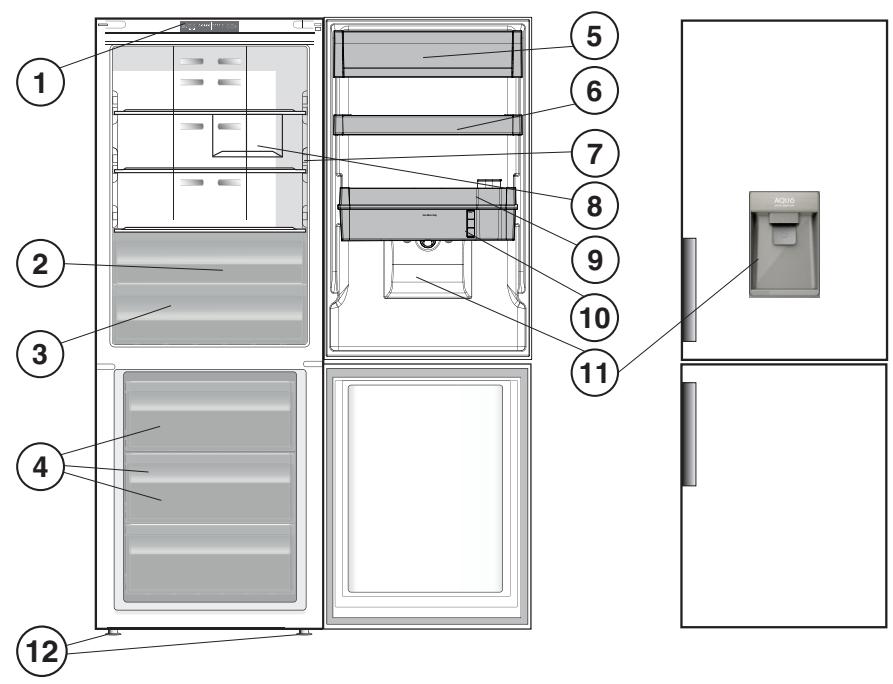
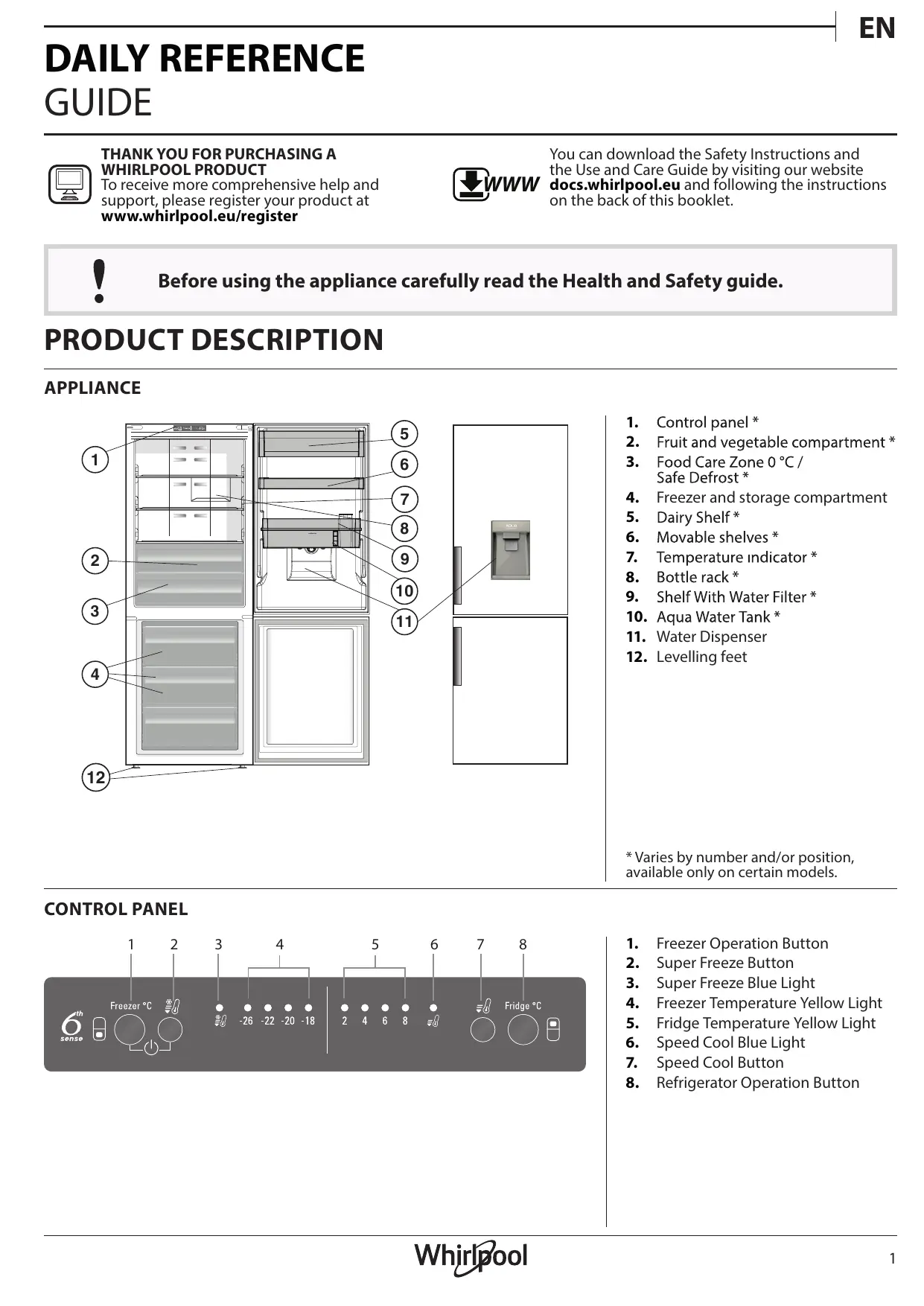
APPLIANCE
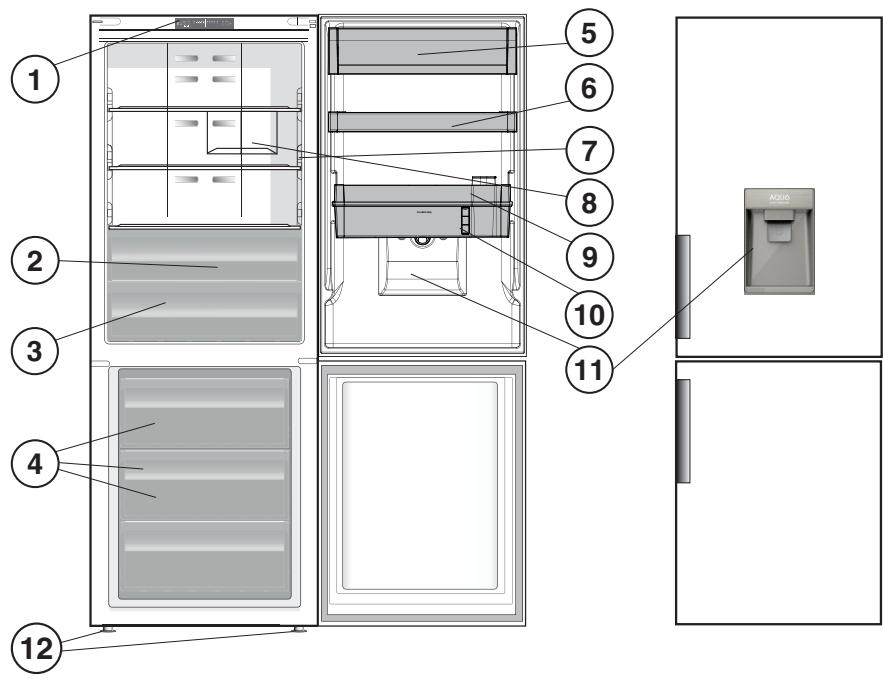
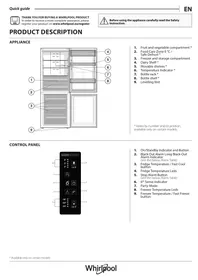
- Control panel *
- Fruit and vegetable compartment *
- Food Care Zone 0^ / Safe Defrost *
- Freezer and storage compartment
- Dairy Shelf *
- Movable shelves *
- Temperature indicator *
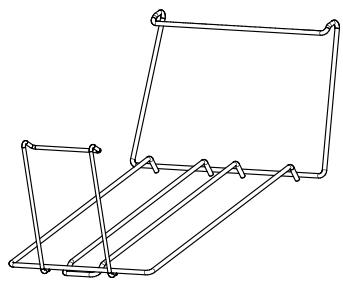
- Bottle rack *
- Shelf With Water Filter *
- Aqua Water Tank *
- Water Dispenser
-
Levelling feet
-
Varies by number and/or position, available only on certain models.
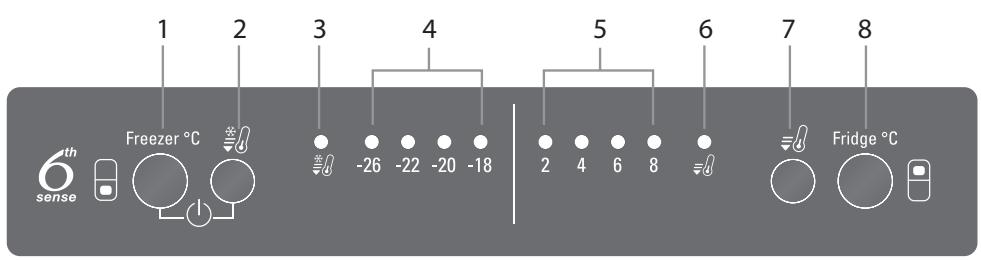
CONTROL PANEL
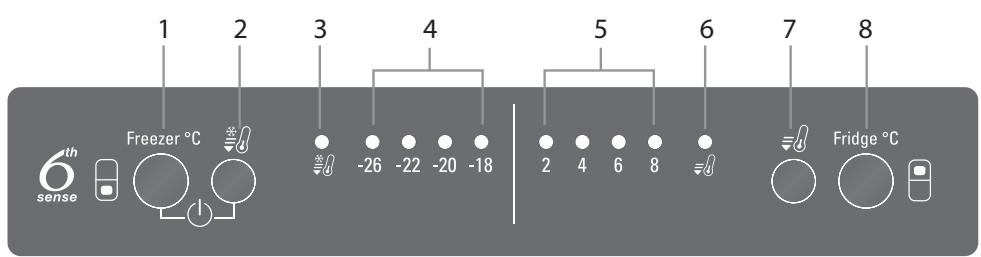
- Freezer Operation Button
- Super Freeze Button
- Super Freeze Blue Light
- Freezer Temperature Yellow Light
- Fridge Temperature Yellow Light
- Speed Cool Blue Light
- Speed Cool Button
- Refrigerator Operation Button
ACCESSIONS
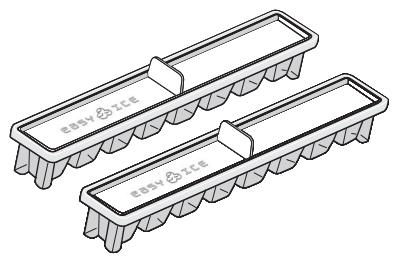
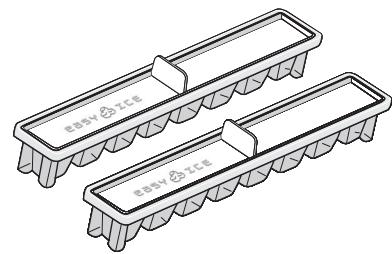
EASY ICE
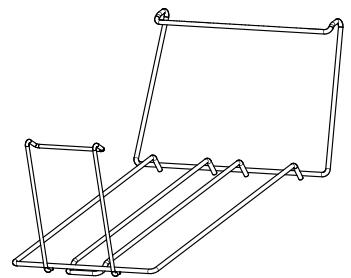
BOTTLE RACK
FIRST TIME USE
HOW TO START THE APPLIANCE
After plugging the appliance to the mains, it starts the operation automatically. After starting the appliance, wait at least 4-6 hours before placing food into the fridge and into the freezer compartment.
When the appliance is connected to the power supply, the display lights up and all the icons appear on the display for approximately 1 second. The default (factory) values of the fridge - freezer compartment settings light-up.
DAILY USE
See Use and Care Guide for more details on functions / see last page for information on how to obtain the Use and Care Guide
FUNCTIONS
To regulate the temperature the freezer compartment. Button is used with SUPER FREEZE Button to switch on/ switch off the product by pressing both 3 seconds.
FREEZER TEMPERATURE
To adjust the Freezer Temperature, press the Freezer Operation ^ C button. The Freezer Temperature can be adjusted between -18^ C and -26^ C , as shown by the Freezer Temperature LEDs.
SUPER FREEZE
The use of this function is recommended when placing a very high quantity of food to be frozen in the freezer compartment. Press the SUPER FREEZE button to enable or disable the function. When the Super Freeze function activated, blue light illuminates on the freezer display. After 24 hours place the food to be frozen in the upper basket of freezer compartment. The function is automatically disabled after 48 hours, or can be manually disabled by pressing Super Freeze ^ C button.

FRIDGE TEMPERATURE
To adjust the Fridge Temperature, press the Fridge Operation ^ C button. The Fridge Temperature can be adjusted between +2^ C and +8^ C , as shown by the Fridge Temperature LEDs.
SPEED COOL
Using Speed Cool function it is possible to increase the cooling in the refrigerator compartment. The use of this function is recommended when placing a very high quantity of food in the refrigerator compartment. Press the Speed cool button to activate Speed Cool function. When speed cooling function is activated, blue light illuminates on the refrigerator display. The function is automatically disabled after 6 hours, or can be manually disabled by pressing Speed cool button.

REFRIGERATOR LIGHT
The light system inside the refrigerator compartment uses LEDs light, allowing a better lightning as well as a very low energy consumption. If the LED light system does not work, please contact the Service to replace it.
6th SENSE INDICATOR
6^th Sense technology automatically works to ensure the optimal conditions to preserve the stored food.
SMART DISPLAY
This optional function can be used to save energy. To activate the Smart Display, press Fridge ^ C and Freezer ^ C buttons at the same time for 3 seconds until an audible signal sounds. To deactivate this function repeat the same procedure. Remember 3 that this function does not disconnect the appliance from the power supply, but only reduce the power consumed by external display.
DISPENSER AND AQUA WATER TANK
Thanks to use of carbon filter, the aqua dispenser provides fresh, filtered water, without the need of opening the refrigerator door. This will reduce the number of times the door is opened, thus also reducing energy consumption of the product.
Important: The first time you use the aqua or after a long period left not used wash the tank and the filter with water.
FITTING AND REPLACING THE AQUA FILTER
The aqua filter should be removed from the foil bag found in the crisper drawer. Detailed instructions are available in the Use&Care Guide from WEB site.
Important: If the filter is left dry for an extended period of time, its performance may be reduced. Immerse the filter in water for a few seconds to reinstate optimum performance.
FOOD CARE ZONE 0°C / SAFE DEFROST *
A compartment designed to keep delicate food such as meat and fish fresh. The low temperature in the compartment makes it possible to store the food for up to one week - tests performed on meat products - without changing its nutrients, appearance and flavour. The compartment is also very suitable for healthy food defrosting, as lowtemperature defrosting prevents any proliferation of microorganisms, while protecting
its taste and organoleptic properties. It is not suitable for fruit, vegetables and green salad. But it can be used for stuffed fresh pasta and even cooked food or leftovers.
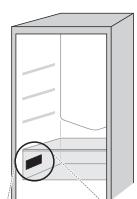
TEMPERATURE INDICATOR*
Temperature indicator informs you if the temperature in this cavity is cold enough for storage with the word "OK".
- Check that OK appears clearly on the indicator light (see the picture below).

- If the word "OK" does not appear it means that the temperature is too high: set a lower temperature and wait approximately 10 hours until the temperature has been stabilised.
- Check the indicator light again: if necessary, readjust it following the initial process. If large quantities of food have been added or if the refrigerator door has been opened frequently, it is normal for the indicator not to show OK. Wait at least 10 hours before adjusting the REFRIGERATOR OPERATION knob to a higher setting.
FRUIT AND VEGETABLE BIN *
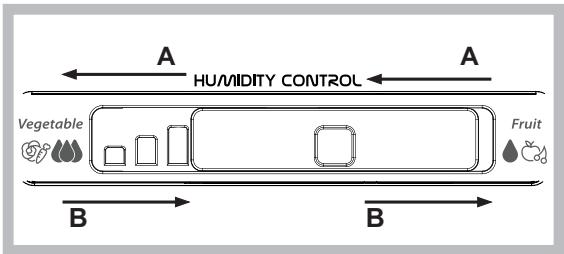
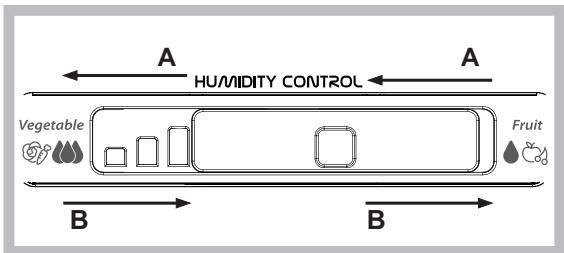
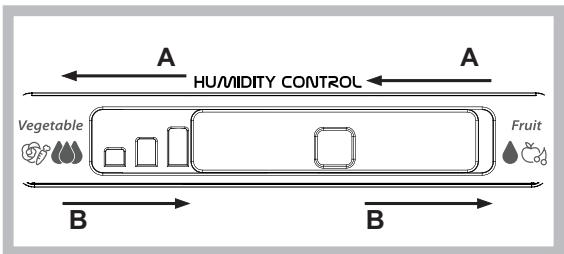
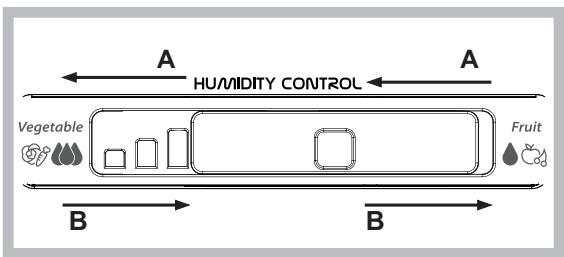
The salad crispers fitted inside the fridge have been specially designed for the purpose of keeping fruit and vegetables fresh and crisp. Open the humidity regulator (position B) if you want to store food in a less humid environment like fruit, or close it (position A) to store food in a more humid environment like vegetable.
SHELVES*
Due to the special guides the shelves are removable and the height is adjustable, allowing easy storage of large containers and food.
ALARM TABLE
| ALARM TYPE | SIGNAL | CAUSE | SOLUTION |
| Door open alarm. | Refrigerator Light blinks. Alarm Indicator blinks. | The door has remained open for more than 2 minutes. | Close the door or press the Stop Alarm to mute the acoustical alarm. |
| Temperature Alarm. | Refrigerator Light OFF. | The door has remained open for more than 4 minutes. | Close the door. |
| Malfunction. | Any temperature indicators blinks. | Product malfunction. | Contact the After-sales Service. |
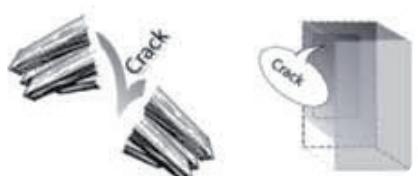
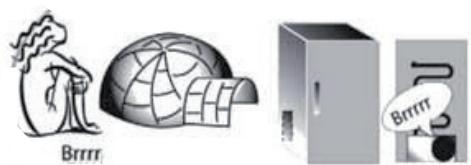
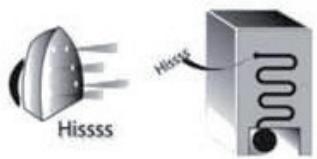
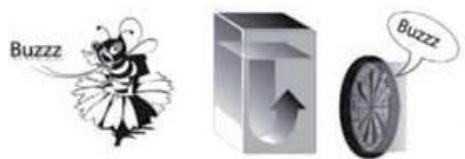
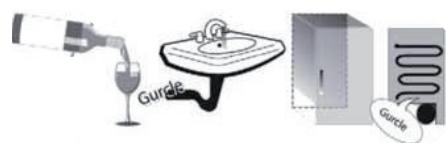
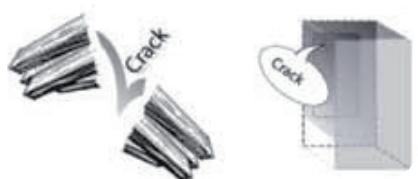
SOME OF THE FUNCTIONAL SOUNDS YOU MIGHT HEAR
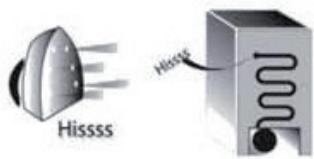
A hissing sound when switching on the appliance for the first time or after a long pause.
Buzzing sound when water valve or fan start working.
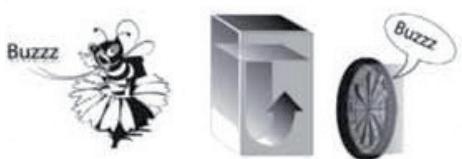
A gurgling sound when refrigerant fluid enters into the pipes.
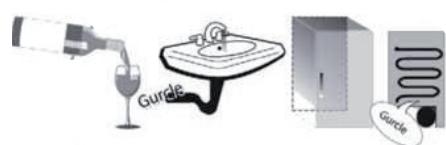
A cracking sound when compressor starts.
BRRR sound is from the compressor running.
The Click is from the thermostat which adjusts how often the compressor is running.


HOW TO STORE FOOD
AND BEVERAGE
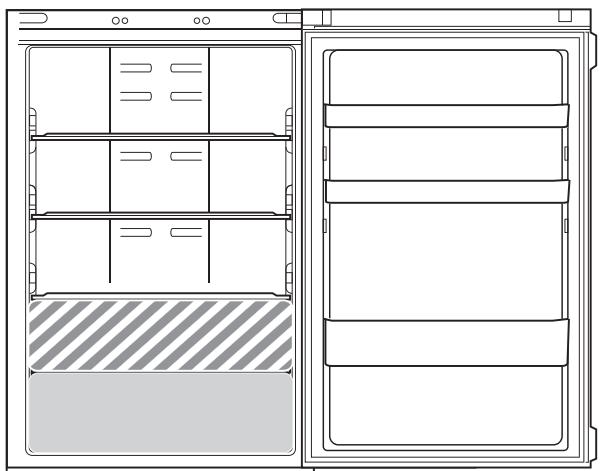
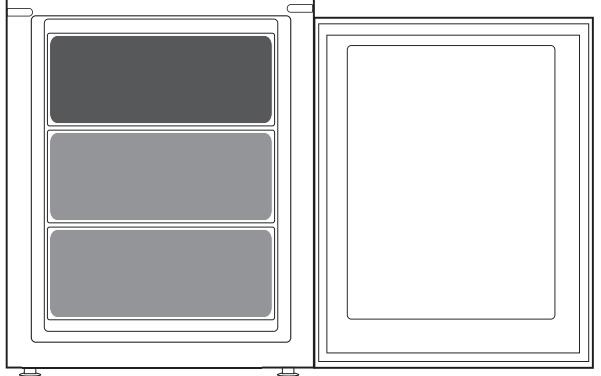
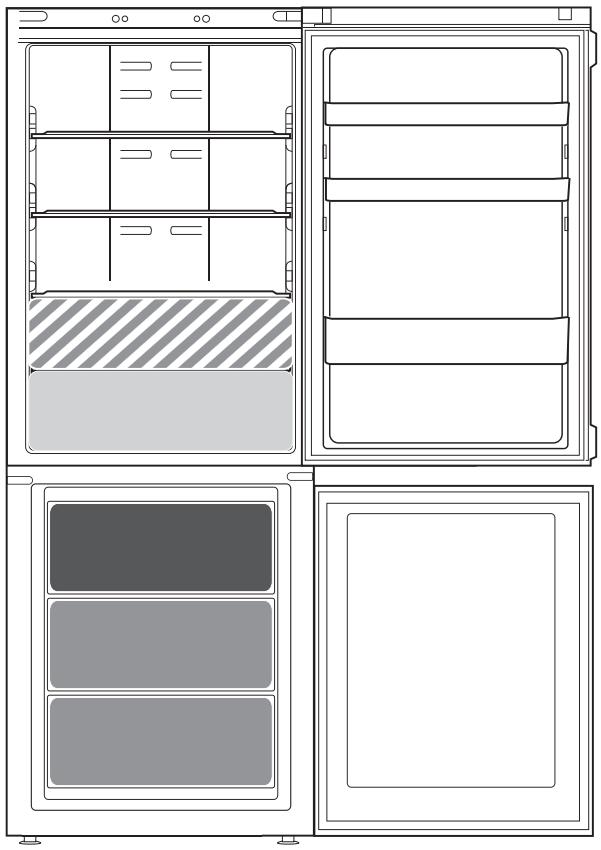
Legend

COOL ZONE
Suggested for the storage of beverage, milk and food as dairy food, delicatessen, yogurt, eggs, butter, sauces, pickles, desserts

FRUIT & VEGETABLE DRAWER

COOLER ZONE:
FOOD CARE ZONE 0 °C / SAFE DEFROST *
Suggested for the storage of meat, fish, cold cuts, stuffed fresh pasta, cooked food, leftovers.
This zone is also suggested for food defrosting.

FAST FREEZING ZONE DRAWER
Max cool zone suggested to freeze fresh food and cooked food.

NORMAL FREEZER DRAWERS
Suggested for the storage of frozen food and ice cream.
Note: The Grey tone of the legend doesn't match with the color of drawers
FRIDGE COMPARTMENT
Use recyclable plastic, metal, aluminum and glass containers and cling film to wrap foods.
Always use closed containers for liquids and for food that may give off or be tainted by odor or flavor transfer or cover them.
If you have a little quantity of food to store in the refrigerator, we recommend to use the shelves above the crisper for fruits and vegetables since this is the coolest area of the compartment.
Foods which give off a large amount ethylene gas and those that are sensitive to this gas, such as fruit, vegetables and salad, should always be separated or wrapped so as not to reduce the storage life; for example do not store tomatoes together with kiwi fruits or cabbage.
To avoid bottles falling over, you can use the bottle holder (available on selected models).
Do not store food too close together to enable sufficient air circulation.
FREEZER COMPARTMENT
The freezer is the ideal storage location for store frozen food, make ice cubes and freeze fresh food in the freezer compartment.
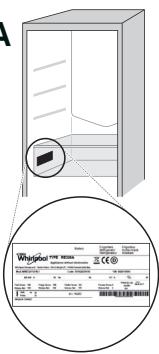
The maximum number of kilograms of fresh food that can be frozen within a 24-hour period is indicated on the rating plate (.kq/24h).
If you have a little quantity of food to store in the freezer, we recommend to use the coldest areas of your freezer compartment, corresponding to the middle area.
PRODUCT FICHE
www The product fiche with energy data of this product can be downloaded from Whirlpool Website docs.whirlpool.eu
HOW TO OBTAIN THE USE AND CARE GUIDE
www Download the Use and Care Guide from the website docs.whirlpool.eu (you can use this QR code), specifying the product's commercial code.
As an alternative, contact the After-Sales Service

CONTACTING AFTER-SALES SERVICE
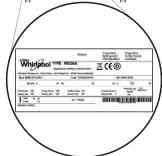
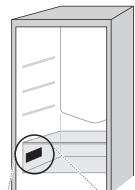
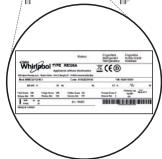
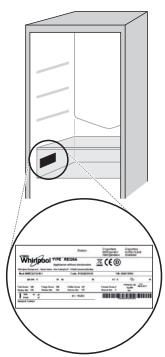
You can find our contact details in the warranty manual. When contacting our Client After-Sales Service, please state the codes provided on your product's identification plate.

19514224802
Printed in Italy
Jis jia lii, jia xin Jldgao xu liai Li jii di
Ecldocs.whirlpool.eu 15
1

WWW
WHIRLPOOL
J 1
www.whirlpool.eu/register

a

C
joc
*
* 1
1 0s i6e o 0* aebly ayieill aebio
*aaiy
S BCD = S COD + S BDO - S BOC
*J
* 1
* 1
*JU
*
*1g
1011
S OBC = S COD + S_ BOC
jbsy ggyggyg yg yg yg yg yg
.
250 100
(20
1
aill o j 0j j j j j gall
a
1
E
i 1
J
C. Cl_1( x + 3) = 3 - x + 3
J 1
jgi jgi jgi jgi jgi jgi jgi jgi jgi jgi jgi jgi jgi jgi jgi jgi jgi jgi jgi jgi jgi jgi jgi jgi jgi jgi jgi jgi jgi jgi jgi jgi jgi jgi jgi jgi jgi jgi jgi jgi jgi jgi jgi jgi jgi jgi jgi jgi jgi jgi jgi
jiee jieee
Jl 6 4 J 12
aannnnn nnnnnn nnne nnnnnn nnnnnn nnnnnn nnnnnn nnnnnn nnnnnn nnnnnn nnnnnn nnnnnn nnnnnn nnnnnn nnnnnn nnnnnn nnnnnn nnnnnn nnnnnn nnnnnn nnnnnn nnnnnn nnnnnn nnnnnn nnnnnn nnnnnn nnnnnn nnnnnn nnnnn
y
4
eclaiy lao LEDs 1000000000000000000000000000000000000000000000000000000000000000000
y 1
1 3 3
6th SENSE
aie 11 6th Sense abg Jai jai all
Jz
26-8 18- 10 11 12 13 14 15 16 17 18
sill sall jll blll llll 111111111111111111111111111111111111111111111111111111
a aiee eae ee eae eae eae eae eae eae eae eae eae eae eae eae eae eae eae eae eae eae eae eae eae eae eae eae eae eae eae eae eae eae eae eae eae eae eae eae eae eae eae eae eae eae eae eae eae eae eae eae eae eae eee
155 plal 1j8 g Ejgo
jilallll lally 20y1e 1 jg o g y 1 jilai i 1 jaii jaii jaii jaii jaii jaii jaii jaii jaii jaii jaii jaii jaii jaii jaii jaii jaii jaii jaii jaii jaii jaii jaii jaii jaii jaii jaii jaii jaii jaii jaii jaii jaii jaii
. Cullj ydlledj
ii jiiY 2g 00
olll jilall jay p aieoL Jai yIy b oal Ia Jilll jilll
*aia 1 aia / aiaia 0 aiaiaiaiaiaiaia
jaii j! iI aIyI yI yI yI yI yI yI yI yI yI yI yI yI yI yI yI yI yI yI yI yI yI yI yI yI yI yI yI yI yI yI yI yI yI yI yI yI yI yI yI yI yI yI yI yI yI yI yI yI yI yI

a
y 8+ y 2+ y 24
y
Fasl lal jn Fast Cool 1111111111111111111111111111111111111111111111111111111 200000000000000000000000000000000000000000000000000000000000000000000000000000000000

*glggl451gll
a 1 a 1 a 1 a 1 a 1 a 1 a 1 a 1 a 1 a 1 a 1 a 1 a 1 a 1 a 1 a 1 a 1 a 1 a 1 a 1 a 1 a 1 a 1 a 1 a 1 a 1 a 1 a 1 a 1 a 1 a 1 a 1 a 1 a 1 a
*oJz
0000 1000000000000000000000000000000000000000000000000000000000

aill lll o j 10d "OK" aok gob p 2.2
jlll 10 d 10 10 10 10 10 10 10 10 10 10 10 10 10 10 10 10 10 10 10 10 10 10 10 10 10 10 10 10 10 10 10 10 10 10
J
ETUKET C DAHHN 3A YPEDA
www JnctOBkTa Ha ypeJa, cBdIbpKaja DaHHN 3a KOHCymaunraHa eHeprna Ha TOni ypeJ MoKeTe da n3Terlnte ot ye6caeta Ha Whirlpool docs.whirlpool.eu
KAK DA CE CIOBNETEC PbKOBOIDCTBOTO 3A yIOTPEBA I IOIaPbXKA
www I3TerIneTe PbKOBOCTBOTO 3a yNtpe6a n IOndPbXka OT ye6caNTa docs.whirlpool.eu (Илл ИЗПОЛЗВайт EQRк),КATO nOcoUHTE Тьр罗вски КОД Haураза.
MojTe CbIoo TaKa Da Ce CbByKeTe C OTJeJa 3a CneInpoJax6eHo O6cnyKbaHe

CBbP3BAHE COTDEJIA 3A CJIeI\POДAJXБEOBcJIyJXBAHE
HOpMaunTa 3a KOHTKe nocOyeHa B pBKOBOIDCTBOTO 3a rapaHcNIOHNO6CnyXbaHe. Pn KOHTAcT COTdela 3a CneInpoJaXbeHO 06CnyXbaHe Ha KIneHTn, MoJra, CbO6uBaYte KoIOBeTe, NOCOeHN Ha NDeHTNuKauNHOHa Ta6eJIka Ha BaWn ypeI.

19514224802
OtneuaTaoBItaTina
PRÍRUČKA
PRO KAŽDODENNIPOUŽITI

DEKUJEME VÁM ZA NÁKUP VYROBKU ZNACKY WHIRLPOOL
MERCI D'AVOIR CHOISI UN PRODUIT WHIRLPOOL
TOHA3bitkbil TEMINEPATYPACbi
ToHa3bITKbIi TMnepaTypacbIH pettey yIiH ToHa3bITKbIi
XMyMbICbI ^ C TyIMeCIn 6aCbIH3. ToHa3bITKbIi
TEMnepaTypacbIHbIH XapbIK DIOiTapbl apkblbl
KepeTiIReHdei, ToHa3bITKbIi TMnepaTypacbIH +2^ XeHe +8^ apalibfbiHda petteyre 6oJabl.
KbIДAMCyblTy
KbIJaM cyIty fynKUraCbIHbH KEMeRImeH ToHa3bITkbIb
6bnimweciHcAknBHaDAty MymKIndirihapTbpyf6oNaIbI.
Byn fynHKUraHbI naIaIaNHy TaFamdApdbH yNKeH KeJIemH
ToHa3bITkbIb 6bnimiHe cany Ke3iHde YcBbHbIaNbI. XblIaM
cyIty fynKUraCbH 6enCeHdipy uHiN XblIaM cyIty TymeciH
6acbIbI. XblIaM cyIty fynKUraCbI icKe KocBbIFAH Ke3de,
TOHa3bITkbI WINCNNeHHDe Kek WAm KaHaDbI. FynKUra 6
cafattah Kein ABTomatbb Type eWeedi Hemece OHbXblIaM
Cyby TyImeCih bacy apkblbl KoJMeH eWipyre 6oNaDbI.

TOHA3bITKblIuIAMbl
ToHa3bIKbIi 6eJIIMUeCiHih iHderi JapbIK jyueciHde JapbIKTbIH JAKCbl JkaHybHa MYMKIHdiK bepetIH, COfAH 6aIIaHbICTbl KyaATbIH a3 IbIFbIHdAlybIH KaMTaMaCbI3 eTeTI H JapbIK DIOdbIHbIH WAmbl NaJaIaNbHJaIaBl.
6th SENSE ИнданКаторы
6th Sense TexHONORNAcbl ABTOMATTbI TpyDe JxMbIC ICTeN, TOHa3bITKbIUtAFbI TaFAmbl CaKTay YwIH OHTaJIbI WaPTTAPDbI KaMTaMaCbI3 eTeDi.
CMAPTДИСПЛЕI
Бул кocbIMwa Фуннкцянbl Каattbl caKay yшin naДануfa ьonaы.Смар дисплел Фуннкцясьн bелсендipy yшin dIb6bICTbIK běnlī ectiInreHne ToHa3bITKbIw °C xəHe KaTbIPfblw °C Tymemepeihbip Me3rInde 3 cekHydбоыk l KaTAP bacbl TpybIHbI3.Бул Фуннкцянbl eWipy yshin,ДэЛ COl npOceDypaHbI kaTaNahbI3.Бул Фуннкця KypblfblHbI Kyat Ke3iHeh aXbIpaTNaJ, TeK cbIpTKbl DnCpJIe N TyTBHaTbIH KyaATbI a3aIbTaTbIHbIH ecte caKTaHbI3.
CY BEPETIH KYPbJIfBi MEH AQUA CY CAYbitBi
Kemiptek cy3ricihapkacbIHc cy 6peTeIH Kypblfbl TOHa3bITkbIHTbIH eciriH aunactaH Ta3a, cy3iJeH eTKi3iJreH cymen KaMTamacbI3 etedi. Mydai kafdaJa ecik ciperipeK aIbIaNlaDa, coJ apkblbIKypblfbl TytbHaTbIH Kyat Ta a3aJbl.
MaHbI3Obl: Cybl anfaw pet naJaHaHaHaKe3de HEmece cy cayblTl y3aK yaKaBt naJaHaH MaJ KaJIFaH Ke3de Caybl peH Cy3rHi CyMeH JyBbIbI3.
CY CY3ΓICIH OPHATY KΘHE AγbICTbIPY
Cy cy3ricin KekcHtacnabHdaftj KkaTbip KaIWBkTaH aBbI WbIFy KepeK. www ToJIbIK HcCKayJap Be6-caTTaFb I PaIaHaHy MeH KyTIN YCTay HcCKayNbIHbDA 6epiJREh. MaHb30bl: Erep cy3ri y3ak yaKaBt 6oBi Kypfak KyiHde KaIca, OHbIH XyMbIC eHIMdiJiri TEmeHdeyi MymKiH. KaKcbI XyMbIC eHIMdiJiriH KaIbIHa KeNTipy YUH IN Cy3rHi Cyfa 6ipHeWe ckyHd MaTbIPbIHb3.
TAFAM CAKTAY AINMAFBI 0 °C / KAYINC13 XIIBITY *
Et neh 6aIbIK CnIaKtbl Jaxc TaFAMdbI CaKtayfa apHaJIFaH
6eIIMwe. BcIIMueHin iHJderi TEmeH TemepaTypa
TaFAMhbIH HepNIJIirIH, CbIPTKbl TYPI MeH dAmIH
e3reptnecTeH bip anTafA deHIN cKaTayfMyMmKiHdIK
6epei - cbHAK ET TaFAMdpbImen KypriiznDi. Byl
6eIIMwe COHdaN-ak TaFAMdbI DeHCayJIbIKKa 3NIAHCB13
Tpyde XbiTyRe KOJaIbI, Ce6eI TeMeH TemnpaTypaDa
XbiTy MInkpoopraHn3MdepDIn Ecin-EnHyiHe K0JI BePMeH,
TaFAMhbIH dMI MeH opraHOJIeNTnKAIBIK CnPaTTapBH
KopraDbI. ByI 6eIIMwe JeMIC-KnDEKKE, KeKHeIC NeH Kek
CaIaNtka JapamaiDbI. AJaIa OHb IToNTbIPMaCbI bap JkaHa
nicKeH MaKapOH XHe TiINTi NicKeH TaMaK HeMece KaIFaH
TamaK YsiH naIdaNaHyf BaJaDbI.
TEMNEPATYAPHNDIKATOPbI\*
TemnepaTpya INHnKaTOPbI OHbIH iWInDeIe TemnepaTpyaHbIH TaRaMdbCaKaTaNbIHdAcyBk eKeHIn OK"ce3i apKbJIbI xa6apnaDbI.
- INДИКaTOp шambyнда OK ce3iHи aHbIK KepiHetiH IN TeKcepiHiz (TeMeHderi cypetTi KapaHbI3).

- Erep "OK" cezi kepihbece, 6yI TemnepaTpa TbIM XOFapbl DeReHdi 6iJDipei: TMeHipeK TemnepaTpaHbI OPhaTbIHb3 Da, oJ 66dE h TypaKaTHfAHaHa waamAmen 10 CaFATTa Kytih3.
3.Индикаторшамын КайтаданTekcepihi3:erep kaxket
60nc, 6actankbI epekeTTi opbIHan, OHk KaTadaH peTteHi3. Erep TaFAM KEN MEJIWepe De caJIbHc Hemece TOHa3blKbIbTHbH eciri Jxni aMbllca, INDnKaTOp 7amda OK ce3iHIN KepiHbeyi - KaIbITbI XaFdai. TOHA3blKbIbXJYMbIcBl Teteirih Kofapbipak npaMetpre aybICTbIPmac 6ypin KEM dereHne 10 carat KytiiH3.
JEMIC-JKIDEK INH KOKOHIC KOLI
ToHa3bITbIITbIH iWIIHderi caJIaT KOHTeHepNepi KKeHicTepeMEN JEMICTEPdi JAc XHe COImFaH KyINHde CaKTayfa apHaIHaF. Erep JEMIC CnKrTbI TaFAMdbI bINFaIDbIbIFbl TEmHJeY optada caKTarBihB3 KeJce, bINFaIDbIbIKTbI peTTerIiTI aMbIHb3 (B 6aftbI) HeMeCe TaFAMdbI bINFaIday optada caKTarBihB3 KeJce OHbI Xa6bIHb3 (A 6aftbIbI).
COPEJIEP*
Apha b6aftbTTaybIITapbHbH KEmerIme H cpeJepi aIbIn 7bIfyfa 60naDbI JxHe 6nIKtiri peTten, KelemyNKeH bIbIC neh TaFamDbI OHa CaKtaYfMaMkiHdiK bepeDi.
ДАБылдAP KECTECI
| ДАБыП TYPI | СИГHAЛ | CEБЕБI | ШЕШIMI |
| Ашьк ecikдабылbl. | Тоназытkbblшшамы кынblынblктайдbl.ДАБыл ИndикаторыЖынblынblкайдbl. | Есik 2 минутанapТык aшык Тур. | Есikti жабынbl3 Неме сыбICTыкдаБылдын Dayысын bacy ушinДаБылды TOKТату ТуМeшirin Басынbl3. |
| Temnéратудабылbl. | Тоназытkbblшшамы ΘшIPУЛ. | Есik 4 минутанapТык aшык Tур. | Есikti жабынbl3. |
| Акayлblk. | Кeз keлген Temnéратупндикаторлары Кынblынblкайдbl. | ΘимнIHakayлblfbl. | Кенидik boйынша Кызmet керсетубелIMine xabapnaacblb3. |
JYMbICbHA BAnJIaHbICTbl ECTIyIMYMKIH KEINIP DbIBbICTAP
KypbIfBihb6ipHsi pet HeMece y3ak ipkiciTeH KeiH Kocy Ke3iHderi bICbIJaFaH Dbl6bc.
Cy kpahtbI Hemece XeJNeTkiu XyMbICTbl 6baTaHaH Ke3deri 6bIXbINdaFaH Dbl0bcIc.
XnaaareH cybIKtbIby TYtikTepekipreh Ke3deri 6yknldereh DblObic.
Komnpcecop icke kocbIraH ke3deri caTbIpnaFaH dbl6bc.
Kymbcic ICTen TpyraH KOMnpeccopdaH 1bifaTbIH "6ppp" Dbl6bIcbl.
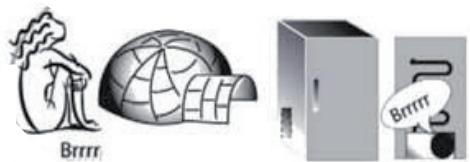
Cbiptbldafah Dbl6bIC KOMnpeccopdbH KaHwaJIbIKTbI JNIXyMbIC ICTeTIHH peTTeTIH TepMOCTaTTAH WbIFabI.


TAFAMДAP MEH CYCbIHДAPды CAKTAY
Uapmmb6eJainep

CAJKNbIHNDATY AIMAFbl
CycbHndapdbI, cytTt JxHe cyTTeH JxacnfaH, XeHcIK TaFamdAp, KaTbIK, KymbIpTka, capbl MaN, Ty3DbIKTap, Ty3DbIKTaJFaH KeKHeic, TETTinep CnKaKTbI TaFamdapdbI caTay yWih YCbHbJaDbI

Mv3daTbIJfAH TaFAM MeH 6aJIIMy3JaKtBlcakTayFa apHaJIfAH.
Ecken: 7apTb6enriHcyppeNkI TaPTnapanapdbH TyciHe cae emec
TOHA3bITKblIeJIIMI
KaTataHdJe aJatbIH nlaCTNK, MetaJIJI, aIIOMHn JxHe eHKe KOHTeHepJIepdi, COHa-aK, TaFamblOpay ywiH ac PHeHKacbIH NaJaHaHbIHb3.
CyibkTbikTap XHe NiCTi WbIFapbyI He ciHipyIMyMKIH TaFamDap YUIN ČpKawaH Jka6bIK KOHTeHepJIepDi NaJaJahbIHbI3 Hemece 6etIH Jka6bIHbI3.
ErepToHa3bITKbIiTa CaKTaJaTbIH TaMaKTbIH MJIWepi a3 BoJcA, XeMIC XeHe KeKeHicTePdi CaTay BeJIIMiHiY cTInDi erepenH naJdaJahybiH
ycbHaMb3,ce6e6i 6yJ-6JIIMderi eH cybIK aImaK.3TnIeH ra3bIHbIH yIKeH MeIeepin 6epeTIn XHe OcbI ra3Fa ce3IMtAn XeMIC, KKeHICTeP XHe caIaI CNkTbTaFamdap CaTay Mep3imKbICkapTnay MaKcTaIHda 6eNEK opabIN caKTanBykepeK; MbCaJIb, Kb3HaKaTAPdbI KMBI XeMICimeH XeHE opAMXaNbipakneH 6ipre caKTamaHB3.
Betelekepein ayapbbln ketyih
boIbipmay yuH oTeIke yCTaBlbIH
naJaNaHyra bolaDb (Keibip
yrrinepe konKetimdi).
KetikniKTi aya cnpkynuaCbIH
KaMTamacb3 eTu yuH TaFmDb iip-
bipiHe KaKbH CaTamaHb3.
KATbIPfbluB0JIIMI
KaTbIPfblW KaTbIPbJnFaH TaFam, My3 KeceKTEpei Hxacay XeHe BaJfbiH TaFamDbI My3DaTkbIi OeNiIMiHde CaKTayfa apHaJIraH TamaIa opBiH. 24 caFaTTbIK Ke3eHne Cakayfa BoNaTbIK BaJfbiH TaFamHbIH KINORpAMMbIK MEnIupei TexHNkaJIbIK DepeKTEp TaKTbacIHda KepCeTIinreH (...Kr/24 car).
ErepKaTbipfblwTa caKtaNaTbH TaFAM MEniwepi a3 fHa 60nca, KaTbipfbll 6enirih en cankbH 6eJIirH (eTe optAhfb 6enik) naDalaHdybl yCbIHAmbl3.
KYPbIJIfBiIHbIH TEXHINKAJIbIK NAPAKUACbl
www Ocbi KypbIJIfBiHbIH KyaT 6oBbIHwa DepeKTepi Jx3blJFaH TexHNkaJIbIK npaKaUacbIH docs.whirlpool.eu Whirlpool Be6-caIbIHan XyKTe n anyfa 60naDbI
ПАДАЛAHY MEH KYTIN YCTAY HYCKAYIbIFbIH AJIY KOJIbl
www KypbIJIbIbIHbIN KOMMepuJbIK KOblIH KepceTe OTbIbIn, PnaiDanaHy MeH KyTIIN YCTay HcCKayIbIFbIH docs.whirlpool.eu Be6-caTbIHaN JyKTeN aJIbIHb3 (ocbl QR KoobIN naJaIaNHyf aOJaIb).
Hemece KeniIiKi bI3MeT KepCeTy opTaIbIfbHa xa6apIaCbIHbI3
KENIJI Kbl3MET KOPCETY OPTAJbIFbIHAXABAPLACY
Bi3diH 6aINaHbIC aKnapaTbIMbI3bl KeniNdk HcayIbIbIHAn Taoyfa 6oIaIbI. KeiNiDi Kbl3MeT KepCETy opTaIbIFbHa xaBapJaCKan Ke3de, eHIMHi TExHnKaJIbIK KecTeciHne KepCetIJIReH KOtApbl aiTbIHbI3.

19514224802
ItaJnJa 6acBnIfaH
PRZEWODNIK
UZYTKOWNIKA

DZIEKUJEMY ZA ZAKUP PRODUKTU WHIRLPOOL
VÄ MULTUMIM CÄ ATI ACHIZITIONAT UN PRODUS WHIRLPOOL
Pentru a putea beneficia de asistenta,
va rugam sa va inregistrati produsul la
www.whirlpool.eu/register

WWW
CKOPOCTHOE OXJIAXDEHME
Функля "СkopocstHoe oxIaxJdeHne" ПОЗВОЛЯТВ ВрЕмEHо yBeINuHTb ПОН3BOДИТьНOCвoxIaxJdeHnB XOJOДИЛБHOM OTДeJIeHnN. ИСПОЛБЗОВАне 3TOI Функли peKOMeHДОВaHOB T BOM CNYaE,ecN B XOJOДИЛБHoe OTДeJIeHnE 6blIO NOMEUSEHO OUYeH 6OJIbSоE KOJIuYeCTBO ПЮДУКТО.ДЯВКЛIOчЕHЯ Функли "СkopocstHoe oxIaxJdeHne" надKMITE KHOПКу "СkopocstHoe oxIaxJdeHne".ПпдЕйСТВуJOUSeI Функли CkopocstHoro oxIaxJdeHnHa ДИСПЛee xOJOДИЛБИнka rOpNT CINHI INHДИКaTOp.Функля aBTOMaTNUeCKN OTKJIIOUaETcY uepe3 6
caob. Ee moxho otKIOuHTb BpyHyIO, HaxkAB KONky "CkopocTHoe OxJaXdHHe".

OCBEUHEHNEXOLOINbHnKA
ДлЯ OСБЕSUHNY XOLOДИNBHOrO OTДELeHNY NCSNOLb3yETcR CBTeODINODHЯ CNTeMa,ОБсЕЧИВАЮша 60LEE KauceTBeHHOE OCBEUHHe IprOчeHb Hn3KOM 3HeproIOTpe6JIeHIM. B clyuAe BbIXoJa CBTeODINODHON CNTeMbl IN3 CTpOraOBpaITTeCB B CepBncДлге 3aMeHbl.
ИндIKATOP 6th SENSE
TexHONOrn6th Sense — 3To aBTOMaTmUeCKa fYHKUIn, oBecneuBaIOUaJ ONTIMaJIbHbIe ycNOBn XpaHeHn IpoDyKTOB.
YMHbIДИСПЛЕI
3Ta DOnOJIHInTeIbHaNФYHKUINMOKET NcPONb3OBaTbCЯДЯ3KOHOMMn 3Heprn.ДЯВКЛIOUeHnRA"YMHbI DcNpIeN"HakMNTe OJHOBpeMeHNO KHOPIK "XoJIIOuJIbHnIK ^ C "и 空空 "MopOzIIbHnIK ^ C "иуapedЖИBaHTe INx 3cekyHbIdo IOpoaun 3BykoBOrO cHHaJa.ДЯ OTKJIIOUeHnRA"ФyHKUIN NOBTopiTe 3Tu Jne pIoceIpy. CJeNyET ImTe B BVdu, YTO daHnaFФyHKUIN He OTKJIIOUaET npIbOp OT ceTn, a IIMb CHNkaet Notpe6JIeHnE 3JIeKTPO3Heprn BHeSHm DIncPJIeEM.
DINCEHCEP IEMKOCTb DJIY BObl
OchaueHHbI yroJIbHOM fIJIbTpOM dINcTeHceP "AkBa" I03BOJIaReT OJIyauTb OxJaXeHHUO OUnIeHHUO Bovy 6e3 Heo6xOJIMOCtN OTKpbITnA DBepZb XOnOINbHnKa. Yactota OTKpbITnA DBepZb UMeHbSaeTcR, YTO IIOJOKeTIbHO Cka3bIBaETcHa 3HepeO3ΦeKTHBHOCTn Pnp6opa.
BaxHo: IpeepnepBbIM nCpONb3OBAHneM dncpeHcep a AkBa", a taKxe Pocle ero dInTeIbHoro 6e3dEiCTBnI pPOMoTte EMKoCTb N fNtBtp BOIoJ.
YCTAHOBKA I3AMEHA ΦιJIbTPA “AKBA”
N3BLeKnteΦnIbTp"AkBa"u3PONIaTInJeHOBOrO naKeTa, HaxoJaIeROCA B KOHTeIHepe Ira OBOUeI N pkyTOB. www POnp6HbIe INCTpyKcIIIO yCTaHOBKe CoedePKaTcB pyKOBoDCTBe "VcnOpbl3OBaHne uYxOJ,IOCTyHHom Ha Be6-caTe.
BaxHo: EcInnΦnIbTp OCTaBaNcra CyXIM B TeueHne IINTeIbHO BpeMeHN, eRr 3oΦeKtNBHOCTb MOKeT 6bITb ChNKeHa. IOrpy3nte ΦnIbTp BBOy Ha HeCKoJIbKO CeKHyD, UTO6bl NOnHOCTbIO BOCCTaHOBNTb eRr 3oΦeKtNBHOCTb.
3OHA CBEXECTN 0^ /BE3ONACHA PA3MOPO3KA*
3To OTdJIeHnI pIeHa3HaueHo IJIЯ nIOJepKahnI CBexIMNCKOPONOPTAAxCpIPOyKTOB, TaKINK KAK MRCO IN pbl6a. Hn3KaYTEMNEpaTpya B OTdJIeHnI PO3BOJAEr XpaHInbI pOdyKTbI DO OJHOHNHeJIb 6e3 N3MeHEnH INX PNTaTeJIbHbIX CBOICTB, BHEUHero BVJaN 3aJaxa (TEcTIPOBaHnE IPOBOINIOcB DJIr MJCbIX pOdyKTOB).OTdJIeHnE MOKeT TaKKe IcNOJb3OBaTbCra IJIr ZDOPOBOrOpa3MOPaXIBAHN: Hn3KOTempeATypHOe pa3MOpaxNBaHneNCKLIQUaET pa3MHOJKeHnEMIKPooPrAHN3MOB, IpeOxoPaHReT BKUC INOPraHOnIeTTuCeckNe KaueCTBa pOdyKTOB. OTdJIeHnE HeIPINOHOIIxApaEHnI OBOSei, fpykTOB IN 3eJIeHn. OJNaKO erO MoKHOICNoJIb3OBaTb DJIr fApIuPoBaHHbIX IN3dJIeNl IN3 CBexEro TcTa,ROTOBbIX INI NeEOeENHbIX 6JIou.
MHDMKATOP TEMIPEPATpbl*
ИнданаТор Temператы Информірет повьзовател O TOM,чTO Temперatypeв Камеpe Достатуно НИЗКая ДЯхаЕня ПюдуктOB:В 3ТOMСЛУЧАЕ на НEM ВсICBEЧИВаETССЮBO"OK".
- Y6eIHTecb, yTO Ha nHnIkaTope yeTko BnIhbl 6yKbbl "OK" (cM. pncyHOK HIXKe).

-
Ecni cnloBO "OK" oTcYtCTbYeT, tempepaTypa CImiKOM BbICKa: yCTaHOBInTe 6OJIee Hn3Koe 3HaueHne I NOJoxdIte npIMepHO 10 YacOB, YTO6bl TempepaTypa BblJa Ha HObI paBHObecbIy ypOBeHb.
-
Choba npOBepbTe INHdNkATOp n npn Heo6xOJIMOCtN NOBTOPte npoceDpy perynpOBKn. Ecnn B npi6op 6bIIO NOMeueHO 60JIbwoe KOJIueCTBO pOdyKTOB INI dBepca xOJOINJBnka OTKpbBaETC rIiXKom qactO,OTcyTCTBne "OK" ABJRAeTc HOPMaJIbHbIM RAJIeHnEM. IdoXdnte He meHee 1O cacOB,pepeTem KaK yCTaHaBnBaTb pyky MOLHOCTN OXIAJDEHnHa 6Oone BBICOKoe 3NaueHne.
AUSIK DJIAR OBOUEN IN OPYKTOB*
CaNaTbIe KOHTeHepbI, yCTaHaBnIBaEMbIe B XOLOINbHOM OTdJeHIMN, P03BOJIAOT NOIDepKINBaTb pyKTbI N OBOUIN CBEXKIMN IN XpCYTAUMN B TeueHne dInTeNbHOro BVpeMeHI. OTkpoITe peYJrAToP BLnXHOCTN (NoLoXeHne B), ecNI pOdyKTam (HaNPImEp, pyKTam) Heo6XoIMo xpaHeHne B YcIOBnIX POHNIXeHHoB BlaXHoCTN, IINI 3aKpoITe erO (NoLoXeHne A), ecNI pOdyKTam (HaNPImep, OBOUam) Tpe6yETcN IOBblSeHHaBlaXHOCTb.
PONKIN
BnaOpaIcneuaIbHbIM HnPaBIAIOUM NOLKMOKHOJIeKO CHMaTb I UCTaHaBINBaTb Ha HyXHoB BbICOTe, YTO N03BOJAEt pa3MeuTaHb HNX KpyNblte EMKOTU INI pOdyKTbl.
TAbJIuIa CnIHJIOB
3oHa Han60bIbIeO xOJOna, peKOMeHIOBaHHaJ
IJIa 3aMOpO3Kn CBExnX/npuROTOBJIeHHbIX
IPOdYKTOB.

ObIyHbIEЯUKNMOPO3nJIbHNKA
PeKOMeHDoBaHbI dIaXpaHeHn3aMOpOKeHHbIX npOdyKTOB mOPOKeHOrO.
MOPO3nJIbHOEOTdJIeHHe
Mop03nIbHoe OTJeHe HeBJIeTcR
NdeAIBHbIM MecToM IJRA XpaHeHnRA
3aMOpOKeHHbIX PPOyKTOB, PpIroTOBLeHnRA
K6nKOB IbJa, a TaKxE IJRA 3aMOpaxNBnra CBexnx PPOyKTOB. MakcImaJIbHOe KOnIueCTBO CBexNX PPOyKTOB B
KNOrpAMMax, KOtOpoe MOxHO 3aMOp03ntb 3a 24 Yaca, yKa3aHo Ha NaCnOpTHoIN TablUcKe (...Kr/24.Y). EcIn KOnIueCTBO PPOyKTOB, Tpe6yUoXx XpaHeHnRA MOp03nIbHNke, HeBeJIko, INcNoIb3yIte CpeDHIIO 3OHy KaK CaMyIO XOJIoNDHy IO 3OHy B MOp03nIbHOM OTJeHnIN.
TEXHNUECKN JIUCT N3DEJNA
www TexHnueckn JIcT pIn60pa c yKa3aHneM daHHbIX 3Hepronotpe6JIeHnMa MoXHo 3aRpy3ntb C caYta Whirlpool docs.whirlpool.eu
CnOCObblIPOJUyEHHaPYKOBoCTBA IcNoJIb3OBAHHe N yXoI
www 3a rpy3nTe pykoBODCTBO "IcnoJb3OBaHne n yxoJ" c canTa docs.whirlpool.eu (ncnoJb3yJte npedctablenHHb QR-koJ), yka3ab KOMMepueckn KoN n3dJIIny.
PykoBOJCTBO MOxHToKaKHe IOnyUHTb, 6paTnBUnCb B CepBnc

OBPAUHEHNE BCEPBNC
Bb mojkeTe haTn Haan KOHTaKTHbIe daHbIe B rapaHTnHOM 6yKJte. Ppi o6paueHmN B Cnyx6y npdepkKn kIneHTOB coo6uNTe KoDbI, yka3aHHbIe Ha nacnopTHoN 3TuKeTke npnbopa.

19514224802
HaneetaHO BITaJIN
PRÍRUČKA NA KAZDODENNE
POUŽÍVANIE

DAKUJEME, ZE STE SI KUPILI VYROBOK WHIRLPOOL
Ak chcete ziskat komplexnejsiu pomoc a podporu, zaregistrujte, prosim, svoj vyrobok na www.whirlpool.eu/register

Bezpečnostné pokyny a Návod na používanie a udržbu si možete stiahnut na nasej webovej stránke docs.whirlpool.eu a postupovat podlá pokynov na zadnej strane tejto brožúrky.

SUOIDEHHE BUKOPUCTAHNRA
BinboudoKnaohy iHopmauio npo fyHKuii dubimbcry YIocibuky 3 bukopucmanha ma dozlaody)/iHopmauio npo me, kOmpumamu «Piocihuk 3 bukopucmanha ma dozlaody), dubimbcra Ha ocmaHHi cmopiu
ФУHKUII
KHONIKA KEPYBAHHRA MOPO3UNbHUKOM
3AMOPOXKYBAHHY> DnB BBIMKHeHHBMMKHeHHH npCTpoI
IJIaXOM OJHouaCHOrO HATnCKaHHN O6OX KHOIOK IpOTaROM 3 cEkyH.
TEMIEPATyPA MOPO3NJIbHOrO BIDIUEHH
Lio6 halaitybAtn Tempeatpy MOp03InbHOro BiDineHHaHTNCiTb KHOIky «KepyBaHHa MOp03InbHIM BiDineHHaM (^) .Tempeatpy MOp03InbHnka MoJHa peryIIOBAtu y Mejax BiD-18°Cdo -26°C, ii BIO6paKaIoTB CBITIOIOHi iHNkaTopu Tempeatpyu MOp03InbHOMy BiDilneHHi.
CINlbHE 3AMOPOKYBAHH
LIOyHKcIIO peKOMeHNOBaHO BnKOpNCTOByBaTn,AKIIO BMOPO3NJIbHe BIIJIeHNN3aBaHTaKeHO 3a6aTATO NPOdyKTIB JIA3AMOPOxyBaHH. LIO6 yBIMKHyTN a60 BmMKNyTHU cIO fYHKcIIO, HATNCITb KONKy «CINbHE 3AMOPOxyBAHH». Y pa3i akTbByBaHHy FyHKcII «CInbHe 3AMOPOxyBaHH» Ha dICPJIeI MOpO3NlBnKa CBiTbC8c CNIH iDnKaTOp. Upez 24 roHNIOKJaITb NPOdyKTINJIA3AMOPOxyBaHH Y BepxHi BnCyBnI RnIK MOpO3NlBHO BIDJIeHNN. Upez 48 roHN cIO fYHKcIIO byeA BtOMaTHU HO BmMKHeHO, a60 II MoXHa BmMKHyTN BpyHy, HATNCHYBNI KONKy «CINbHe 3AMOPOxyBaHH (°C)

TEMNEPATyPA XOJIODNJIbHOrO BII DIIIEHHA
UoB ViDpyuHOBaTu TEMpepaTyxOIOJNbHO BIDiJeHHA, HATNCHTb KONKy «KepyBaHHxOIOJNbHIM BIDiJIeHHAM (^) 》. YXOIOJNbHOMy BIDiJIeHHI MOKHa BCTaHOBHTu TEMpepaTyB iJana30Hi BID +2^ Do +8 ,Ha IO BkAzIyTOB CBITIOJIOHi IHNikatOpN TEMpepaTyu XOIOJNbHO BIDiJIeHHA.
WBnDKOxOJIOJXEHNA
3a donomoroio fynkuii «UWBnDke oxoJOnKeHHra MoXHa npuWBnDnHTn pnoec OxonoJKeHH npoDyKTtB y XoNoDnHbOMy BiiDilneHHI. LIO fynKciio pekomehnObaHO BVNKOpNCTOByBaTn, kAIO B XoNoDnJIbHe BiDilneHHa 3aBaHTaKeHO 3a6aTaTO npOdyKTtB. LIO6 aKtNByBaTn fynKciio «UWBnKe oxoJOnKeHHra, HATNCITb KONIKY «UWBnKe oxoJOnKeHHra. Y pa3i aKtNByBaHHa fynKciu IWBnDKORO OXoNoJKeHH Ha DnCnJIe i XoNoDnBnHnKa CBiTbCnHI iHNkATOp.
Yepe36roHnФyHKJIAABTOMaTHNOBIMKHeTbC.Ⅱo6BIMKHyTIN BpyHy,HaTNCiTb KONKy《UWBnKe OXOJIOnKeHHN

OCBITJEHHXOJIOJNbHBOBIDJIUEHH
CnCTemyOCBtIeHNNXoJOniNbHOrO BiDJIeHNNO OChaIeHO CBITIOIOHNMI INIINKaTOPaMNI,AKI BNIPOMIHIOITb DyKe JCKpabe CBIITIO, CTOXINBAIOU npu cboMy He3NaHy KInbKICb eJeKTpoEhePrtII. YKsO CBIITIOIOHa CNCTema OCBtIeHNNHe IpaIQe, 3BePHTbcrdo UcHTpy OcbNyROByBaHHN KJIeHTIB DnI II 3AmHn.
IHДИKATOP 6th SENSE (6-EЧТЯ)
TexHonoria «6th Sense» akTbByeTbCra ABTomaTnHTo Ta 3a6e3neUe ONTImaJIbHi yMOBn IЯЗ 36epirahnЯ pOdoyktIb.
PO3YMHN DUCJIEN
LIOIooaTkoByfHKUIOMOXHaBnKOpNCToBYBaTNДla3oUaJKeHHeNEKTPoeHeprII.106akTbYBaTNfHKUIO《PoZymnIINcJIpeN》,ODHOACHO HATNCiTBiYTPmUyTe pOToRGM3ceUYHKnKONKn= 《XoIoNJIbHe BIDInEnHn(℃)》iMopOzNIbHe BIDInEnHn(℃),DOKN He npolyHae3ByKOBnCnIHaN.LIO6BVMKHyTNfHKUIO,NOBTOHO BnKOHaIte IIO npOeDpy.CnIqNam'raTaN,IIO3aYMOBn BnKOpNCaHHNciE fHKUII eNEKTPoXnBnEHn npInaNy He BmNkAeTbc.HaTOMICTb IpOCTO3MeHsyeTbcp IBeHb CNoXnBAHHeNEKTPoHeprI3OBHIshIM DInCPIJeEM.
IO3ATOPIBOJHNI BAYOK AQUA
3aBn BkopntaHb ByrIbHoro fIbTa dOaTOp Aqa nOda cBixy, fIbTPOBaHy bOy 6e3 Heo6xIHocTi BiKpNBaHH NBepuT XOIOINbHnka. Lc I03BOJNTb CkOPOTnK KJIbKiCTb pa3IB, KOJI N BiKpNBaHcNc DBePcTa, 3aBJaN cOMy TaKoX 6Uye 3MeHsEHO CNOXHBHn Bnpo6om eNEKTpoEheprii.
Baxlueo: Pn nepwomy BnKopncTaHHi Aqua a6o nicra Tpmbaioro nepioy noro HeBnKopncTahna cnipomntb 6ak ta fijbtp BOIOU.
YCTAHOBJIEHHRA 3AMIHAФЛьТРА AQUA
Фльтр АQua Heo6xIDHOBITrHHTn i3 nakety 3ФOLBnI,якni 3нaxOДИТСЯ KONTeHepi dnyФpykTIB i OBOyIB. wwwДOKlaDiHi ICHpyKcII MoxHa HabeJeHO y «ДОВiDnHy i3 BVKOpNCTaHHЯ Ta DOrJIy» Ha Be6-caNTi.
Baxlueo: RaIoo foJIbTp 3aJIINuAeTbc CyaXIM npOTrOM TpINBaIoro nepioody acy, Ioro npOdyKTHBnICTb MoKe 3HnKyBaTnC. Lio6
BIDHOBNITN ONTINMaJIbHy PNOyKTINBHiCTb, CJIiD 3aHypNTIN φiInbTp y BODY Na DeKiNbKa CeKuHd.
3OHAДБАЛИВОТЗБЕПIGАHHЯ0℃/БE3ПЕЧЕPO3MOPOЖУBAHHЯ*
BidiHnHnnPn3NaHeNoIy 36epirAHnCBiXoCTI IeKoiix,taKoi
kM'c0i np6a.Hn3bKa TempepaTy a BiDjIneHHIOZ3BOJAE
36epirATn PPOyKTNI POTrO rOM OJHO TmKHN - IPO CE CBiUaTb
TeCTN,PiOBeHni 3M'ChHMn PPOyKTAMN - 6e3 BTpAtn IX NOxHBHX
peOBoHn,3OBHIshbOro BnrrAyni Cmaky. Lc BiDjIneHHaTOKX
ideAlbHO NiXoINtB Iy PO3MOPoxyBaHHN 3IOPOBOIIX, TOMU 10
po3MOPOxgyBaHHN 3a Hn3bKOITempepatpy 3anobiraI IOuIPenHHIO
MIkPoopraHn3MiB, y Toi Jue c36epiraouhi CmAk i opraHOneTTNUH
BlaCTNbOCti. BOHO He NiXoINtB Iy 36epirAHn FpyktIB, OBOvIB
i ZeJeHoro caIaNty. ALe BOHO MoKe 6ytN BVKnOpnstane He Iy CBiKO
fapUnPOBaHOI MaKApONHOI CTpaBN Ta HabIT nI pNiROTOBAHOI
ctpaBN abO 3aJIuShkIB ix.
IHДИKATOP TEMПЕРATYPN\*
IhikkaTOp TemnepaTpyi iHΦopMye npo Te, lio TemnepaTpa y Lii KaMepi dOcTaTHbO HN3bKa DJI 36epirAHnR, BiO6paXauChi cNoB OK
1.ПepekoHaItecA,ио сIoBO«OK»чITКоВiДоБраЖаETbСЯHa iHДИKaTOpI(ДИВ.MaI.NHЖYe).

2.Якшо сюво «OK» He 3'явиорс,цие 03нача€,цо Temперatypea 3андTo BИСОКa:ВCTaHOBiTB bIbS Hn3bKу Temперatypey i 3auekaite npi6IIN3HO 10 roDInH, pOKn Temперatypeca6iNizyEtbcR.
- 3HOBy nepeBipTe iHdkaTOp: 3a Heo6xHocTi BiDpyrIIOIte Ioro nicra noatKOBORO npouccy. JaKIO doJaHO haITo BeNkU KIIbkICTb npOyKTiB a60 JaKIO DBepzTa XOJOINbHnka YaCTO BIKPnBaI, BiCytHicTB ha iHdkaTOpi Hanncy OK E HopMaJIbHOIO. 3aueKaIte 10rOHN, nepH HIX BCTAHOBITn pyKoIO «YPABJIHHXOJOnlNBHNKOM» 6JIbSe 3HaueHnn.
PeKOMeHnyETbcraI36epirAHnHaHOIB,MOJOKa Ta MOnOuHnX npOdyKTiB,JeNlKaTeCtCB,NOrpyTy, RaLb,MacNa,CoycB,CoJIiNb,DecepTiB

KOHTEHEPДЯФPyKTIBIOBOOYIB

3OHA OXOJIOJXEHH: 3OHA I6AJIINBOI0 3BEPIGAHH 0°C / BE3NEUHE PO3MOPOXYBAHH*
PekomeHnyeTbcJ36epirahnM'ra, pio6n, M'achoi Hapi3kn,Cbixoij fapwnpoBaHOi MakapOHHOi ctpaBn, npiroTObaHOi ctpaBn, 3aIIuikB iXi. TaKoxIIO 3OHy peKomeHnyeTbcJ3actOCOByBaTu Ipnp03MopOxyBaHHxapUOBx npOdykTIB.

KOHTEHEP 3OHN WBNIKOTO 3AMOPOXYBAHH
3OHy MaKcMmaIbHOrO OXoIoJxKeHHr peKOMeHnyETbcR BIKOPINCTOByBaTn IJIa 3aMOpOxyBaHHr CBIXnx Ta PIPNTOBAAHx PPOdyKTIB.

3BNUAHHI KOHTENHEPN MOPO3NJbHOrO BIDJIIEHHJ
PeKOMeHdyETbc8 BnKOpNCTOBByBaTnДЯ 36epirahHHaMOPOKeHnx pOdyKtIB i MOp03NuBa.
- THANK YOU FOR PURCHASING A WHIRLPOOL PRODUCT
- PRODUCT DESCRIPTION
- ACCESSIONS
- FIRST TIME USE
- HOW TO START THE APPLIANCE
- DAILY USE
- FUNCTIONS
- FREEZER TEMPERATURE
- SUPER FREEZE
- FRIDGE TEMPERATURE
- SPEED COOL
- REFRIGERATOR LIGHT
- 6th SENSE INDICATOR
- SMART DISPLAY
- DISPENSER AND AQUA WATER TANK
- FITTING AND REPLACING THE AQUA FILTER
- FOOD CARE ZONE 0°C / SAFE DEFROST *
- TEMPERATURE INDICATOR*
- FRUIT AND VEGETABLE BIN *
- SHELVES*
- SOME OF THE FUNCTIONAL SOUNDS YOU MIGHT HEAR
- HOW TO STORE FOOD
- AND BEVERAGE
- Legend
- COOL ZONE
- FRUIT & VEGETABLE DRAWER
- COOLER ZONE:
- FAST FREEZING ZONE DRAWER
- NORMAL FREEZER DRAWERS
- FRIDGE COMPARTMENT
- FREEZER COMPARTMENT
- PRODUCT FICHE
- HOW TO OBTAIN THE USE AND CARE GUIDE
- CONTACTING AFTER-SALES SERVICE
- J 1
- y
- ETUKET C DAHHN 3A YPEDA
- KAK DA CE CIOBNETEC PbKOBOIDCTBOTO 3A yIOTPEBA I IOIaPbXKA
- CBbP3BAHE COTDEJIA 3A CJIeI\POДAJXБEOBcJIyJXBAHE
- PRÍRUČKA
- PRO KAŽDODENNIPOUŽITI
- DEKUJEME VÁM ZA NÁKUP VYROBKU ZNACKY WHIRLPOOL
- MERCI D'AVOIR CHOISI UN PRODUIT WHIRLPOOL
- TOHA3bitkbil TEMINEPATYPACbi
- KbIДAMCyblTy
- TOHA3bITKblIuIAMbl
- 6th SENSE ИнданКаторы
- CMAPTДИСПЛЕI
- CY BEPETIH KYPbJIfBi MEH AQUA CY CAYbitBi
- CY CY3ΓICIH OPHATY KΘHE AγbICTbIPY
- TAFAM CAKTAY AINMAFBI 0 °C / KAYINC13 XIIBITY *
- TEMNEPATYAPHNDIKATOPbI\*
- JEMIC-JKIDEK INH KOKOHIC KOLI
- COPEJIEP*
- JYMbICbHA BAnJIaHbICTbl ECTIyIMYMKIH KEINIP DbIBbICTAP
- TAFAMДAP MEH CYCbIHДAPды CAKTAY
- Uapmmb6eJainep
- CAJKNbIHNDATY AIMAFbl
- TOHA3bITKblIeJIIMI
- KATbIPfbluB0JIIMI
- KYPbIJIfBiIHbIH TEXHINKAJIbIK NAPAKUACbl
- ПАДАЛAHY MEH KYTIN YCTAY HYCKAYIbIFbIH AJIY KOJIbl
- KENIJI Kbl3MET KOPCETY OPTAJbIFbIHAXABAPLACY
- PRZEWODNIK
- UZYTKOWNIKA
- DZIEKUJEMY ZA ZAKUP PRODUKTU WHIRLPOOL
- VÄ MULTUMIM CÄ ATI ACHIZITIONAT UN PRODUS WHIRLPOOL
- CKOPOCTHOE OXJIAXDEHME
- OCBEUHEHNEXOLOINbHnKA
- ИндIKATOP 6th SENSE
- YMHbIДИСПЛЕI
- DINCEHCEP IEMKOCTb DJIY BObl
- YCTAHOBKA I3AMEHA ΦιJIbTPA “AKBA”
- 3OHA CBEXECTN 0°C /BE3ONACHA PA3MOPO3KA*
- MHDMKATOP TEMIPEPATpbl*
- AUSIK DJIAR OBOUEN IN OPYKTOB*
- PONKIN
- ObIyHbIEЯUKNMOPO3nJIbHNKA
- MOPO3nJIbHOEOTdJIeHHe
- TEXHNUECKN JIUCT N3DEJNA
- CnOCObblIPOJUyEHHaPYKOBoCTBA IcNoJIb3OBAHHe N yXoI
- OBPAUHEHNE BCEPBNC
- PRÍRUČKA NA KAZDODENNE
- POUŽÍVANIE
- SUOIDEHHE BUKOPUCTAHNRA
- ФУHKUII
- KHONIKA KEPYBAHHRA MOPO3UNbHUKOM
- TEMIEPATyPA MOPO3NJIbHOrO BIDIUEHH
- CINlbHE 3AMOPOKYBAHH
- TEMNEPATyPA XOJIODNJIbHOrO BII DIIIEHHA
- WBnDKOxOJIOJXEHNA
- OCBITJEHHXOJIOJNbHBOBIDJIUEHH
- IHДИKATOP 6th SENSE (6-EЧТЯ)
- PO3YMHN DUCJIEN
- IO3ATOPIBOJHNI BAYOK AQUA
- 3OHAДБАЛИВОТЗБЕПIGАHHЯ0℃/БE3ПЕЧЕPO3MOPOЖУBAHHЯ*
- IHДИKATOP TEMПЕРATYPN\*
- KOHTEHEPДЯФPyKTIBIOBOOYIB
- 3OHA OXOJIOJXEHH: 3OHA I6AJIINBOI0 3BEPIGAHH 0°C / BE3NEUHE PO3MOPOXYBAHH*
- KOHTEHEP 3OHN WBNIKOTO 3AMOPOXYBAHH
- 3BNUAHHI KOHTENHEPN MOPO3NJbHOrO BIDJIIEHHJ
Brand : WHIRLPOOL
Model : WB70I952X
Category : Refrigerator-freezer