
NEFFOS Y5 - Smartphone TP-LINK - Free user manual and instructions
Find the device manual for free NEFFOS Y5 TP-LINK in PDF.




| Product Type | Smartphone |
| Brand | TP-LINK |
| Model | NEFFOS Y5 |
| SIM | Dual Nano-SIM (or one Nano-SIM + one microSD) |
| Expandable Storage | Yes, via microSD card (up to 128 GB) |
| Fingerprint Sensor | Yes, rear-mounted |
| Rear Camera | 1 sensor + LED flash |
| Front Camera | 1 sensor |
| Connectors | 3.5mm headphone jack, micro USB port, SIM/SD tray |
| Physical Buttons | Volume (up/down), Power (on/off/restart) |
| Sensors | Proximity, accelerometer, fingerprint |
| Operating System | Android (version unspecified) |
| Battery | Removable lithium-ion (typical capacity 3000 mAh) |
| Dimensions (approx.) | 145 x 72 x 9 mm |
| Weight (approx.) | 160 g |
| Display | 5.5 inches, HD resolution (1440 x 720) |
| Processor | Quad-core 1.3 GHz |
| RAM | 2 GB |
| Internal Storage | 16 GB |
| Power | 5V/1A power adapter (included) |
| Maintenance and Cleaning | Clean with a soft, dry cloth. Do not use chemicals. |
| Safety | Do not expose to moisture. Keep the provided ejection tool out of reach of children. |
| Spare Parts / Repairability | Removable battery, screen and other components by a professional. |
Frequently Asked Questions - NEFFOS Y5 TP-LINK
User questions about NEFFOS Y5 TP-LINK
0 question about this device. Answer the ones you know or ask your own.
Ask a new question about this device
Download the instructions for your Smartphone in PDF format for free! Find your manual NEFFOS Y5 - TP-LINK and take your electronic device back in hand. On this page are published all the documents necessary for the use of your device. NEFFOS Y5 by TP-LINK.
USER MANUAL NEFFOS Y5 TP-LINK
Press and hold the power button to turn your phone on or off.
To manually restart your phone, press and hold the power button until your phone vibrates.
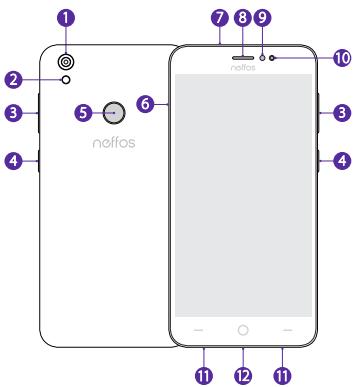
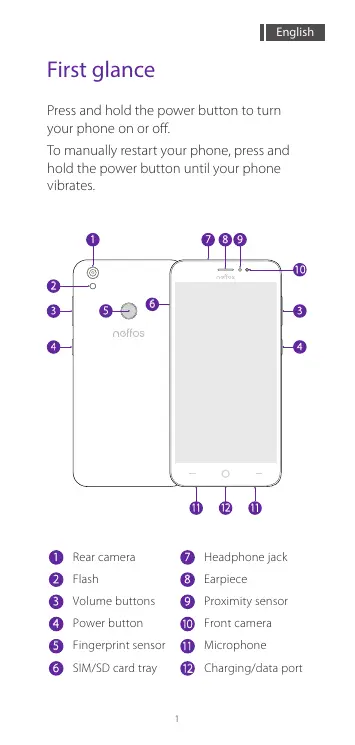
1 Rear camera 2 Flash 3 Volume buttons 4 Power button 5 Fingerprint sensor 6 SIM/SD card tray
7 Headphone jack 8 Earpiece 9 Proximity sensor 10 Front camera 11 Microphone 12 Charging/data port
Put in the cards
Eject the SIM card tray by inserting the SIM ejector pin provided into the hole on the tray. Place the card(s) into the tray with the gold contacts face down and then insert the tray back into the phone.
The card tray can support two Nano-SIM cards or a Nano-SIM card and a microSD card.
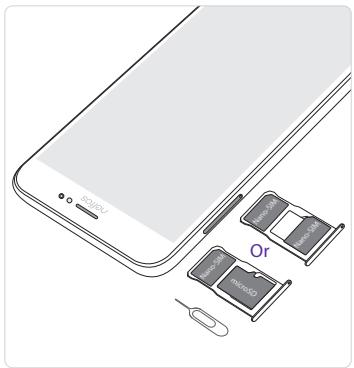
Take care not to scratch your device or harm yourself when using the SIM ejector pin. Store the SIM ejector pin out of the reach of children to prevent accidental swallowing or injury.
Dual SIM settings
If there's only one SIM card in the phone, it's ready to use.
With two SIM cards inserted, you can choose to use one or both of them:
Go to Settings > Dual-SIM & network, choose a SIM card and then tap the on/off button to enable or disable SIM1 or SIM2.

- Your phone supports only dual card dual standby single pass, which means you cannot use both SIM cards for calls or data services simultaneously.
Fingerprint identification
Go to Settings > Screen lock, fingerprint & security > Fingerprint management and follow the onscreen instructions to register your fingerprint.
When recording your fingerprint, make sure the fingerprint sensor and your fingers are dry and clean.
Lock apps
Unlock phone
Take pictures
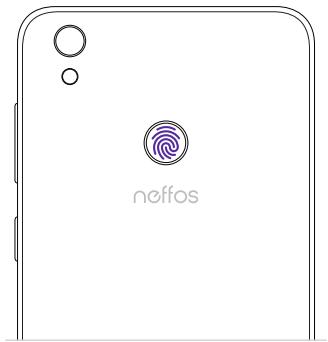
- You will be asked to enter your backup pattern or password when you restart your device or if fingerprint recognition fails.
At a glance
SIM/SD card slot



Brand : TP-LINK
Model : NEFFOS Y5
Category : Smartphone